Auto repair shopsDemo with sample data
Auto Repair Work Order and Tracking: screen-by-screen guide
The full version of the short description on the product page: every feature, how each screen is used step by step, all limits and the delivery details.
All features
The flows below were run in the app’s demo mode with sample data, and the screens were taken from that installation. The shop, cars, people, phone numbers, plates and amounts are made up; the car pictures are sample drawings, not real photos. The sample-data demo is live (version 1.3.0; 1.3.0 added the sign-in-free customer page: appointment request, status page and “Add to calendar”, tried on the live demo on 28 October 2026 and not on a real phone; the setup guide, add-to-phone and free phone notification arrived in 1.2.0; since 1.1.0 the demo-only photo header and the sign-in page, customer and vehicle import from Excel/CSV for the manager (1.1.3) and a “contact the manager” note instead of the Cancel form for staff on a work order that has a payment (1.1.4) were added; the two role buttons were tried on the live demo on 21 October 2026); its address is the button below.
- Customer and vehicle records: name, phone, plate, brand, model, year, mileage, VIN and engine number, inspection and insurance expiry dates, notes; quick search by plate, VIN, customer name (Turkish letters are matched loosely) or phone
- Vehicle intake: mileage, fuel level, customer complaint, existing damage note, list of items left in the car, estimated delivery date, mechanic and intake photos; photos are linked to the vehicle and the work order, and location and device data are stripped from the file
- Damage map: at intake you tap the damaged spot on a car drawing, pick the type (scratch, dent / ding, crack, paint damage, replaced part or other) and a numbered point is added (up to 30; tapping a point again removes it); the same map is edited on the work order page, is read-only on a delivered work order, changes are written to the history and the intake form printout carries the map and a numbered damage list
- Work board: open cars by status in four columns (intake / inspection, awaiting approval, in progress, ready for delivery); counters for in the shop, ready, late and promised for today, and a mechanic filter; late jobs come first in their column and tapping a card opens the work order
- Work order: part and labour items, quantity, unit price, discount and VAT rate; parts, labour, subtotal and grand total are worked out automatically; frequent jobs are added with one click as ready jobs
- Statuses: received, inspecting, awaiting approval, in progress, completed, delivered, cancelled; only valid transitions are offered, customer approval is recorded with its method (phone, in person, WhatsApp, signed form) and time, a delivered work order is locked, and cancelling never deletes the record
- Part catalogue and stock: a catalogue part added to a work order is first counted on the quote and shown separately in the parts list, and is deducted from stock when the customer approves and the job goes in progress; it returns if removed, taken back to the quote stage or cancelled; low-stock warnings, stock entry and a movement log
- Payment records: cash, bank transfer or card is picked by hand; partial payments, refunds and open balances are recorded; a payment above the remaining balance is rejected; the app takes no payment and connects to no payment provider
- A printable vehicle intake form (no prices, with signature lines) and work order (with or without prices); print them or save as PDF
- An appointment book (converted to an intake when the car arrives) and a reminder list of cars whose inspection, insurance or service is coming up; the ready WhatsApp text opens in the shop’s own WhatsApp, the shop sends the message, the app does not
- Vehicle and work order history: all work orders of a vehicle with photos, mileage and next service; an automatic event log and notes on each work order
- A daily summary, daily and monthly reports (received, completed, delivered, cancelled, the parts-labour-VAT split of completed jobs, payments by method) and CSV export
- Manager and employee roles: the manager sets whether employees see prices, amounts, payments, reports and part purchase prices; sample data loads and clears in one action and never mixes with real data; the panel works on a phone with a bottom menu
- Setup guide and onboarding: it opens step by step on first sign-in, a progress bar shows on every page and every screen has a “What is this screen for?” box; the demo has “Start with an empty site” and “Restore sample data” buttons
- Add to phone and notifications: a sign-in-free setup page, send by WhatsApp, copy the link and an A4 setup card with a QR code; free push notification for new work orders and appointments and an optional e-mail (no SMS)
- Customer page (no sign-in): the customer picks a day and time and sends an appointment request with a name, phone, plate and the work needed; a request does not block the slot until the business approves it, and is approved or rejected under “Incoming appointment requests” on the Appointments page; the customer’s own status page with the appointment and job-order status (“car received”, “in progress”, “ready”), plate half-masked, no internal notes, costs or phone, the amount only if the setting is on; a ready WhatsApp status message from the job order in one tap; “Add to calendar” on a confirmed future appointment (a Google Calendar link and an .ics, a reminder one hour before; no name, phone, plate or amount is added); taking requests can be switched off in settings
Screen by screen: how it is used
The app’s interface in these screens is Turkish; only the captions and explanations on this page are in English. The screens come from the app’s own demo mode with sample data; the shop (“Örnek Oto Servis”, a made-up name), the cars, the people, the phone numbers, the plates, the parts and the amounts are sample data, and the car pictures are sample drawings, not real photos. The panel sign-in page comes from the live demo (version 1.1.2), the other screens from the app’s own demo mode. The phone views were taken with a browser set to a phone’s size and show the first screen; the bottom menu bar sits at the bottom of the phone screen.
- Who uses it?
- The shop owner or manager, who runs intake and work orders; shop employees, who do the intake, items and status work.
- Where do they start?
- Sign in to the panel as manager or employee; when a car arrives the plate is typed, the intake form is filled in and a work order is opened.
What do they do on screen? Step by step
-
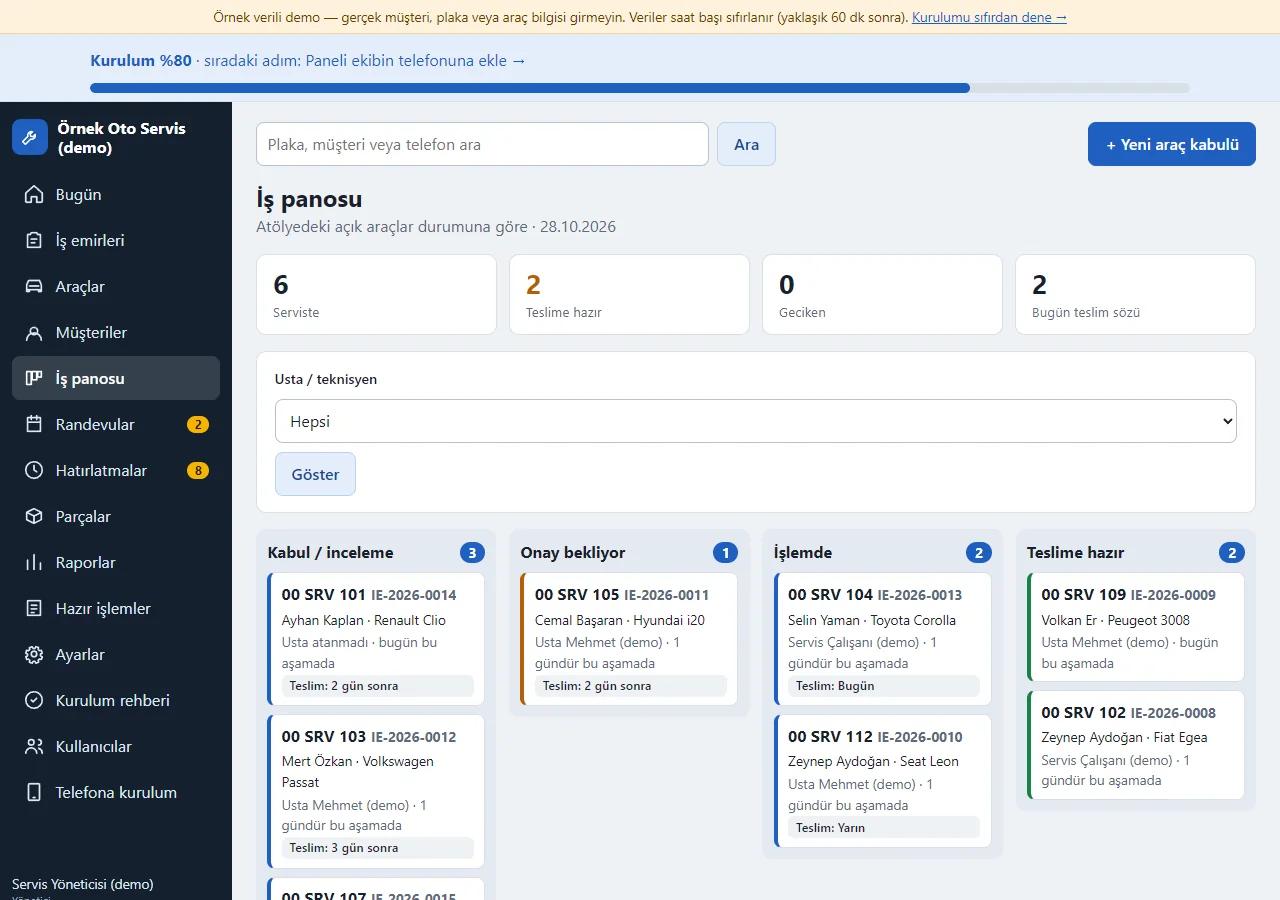
Work board
The open cars in the shop stand in four columns by status: intake / inspection, awaiting approval, in progress and ready for delivery. The counters at the top show how many cars are in the shop, how many are ready, how many jobs are past their promised date (late) and how many were promised for today; late jobs come first in their column with a red edge. It can be filtered by mechanic, and tapping a card opens the work order.
-
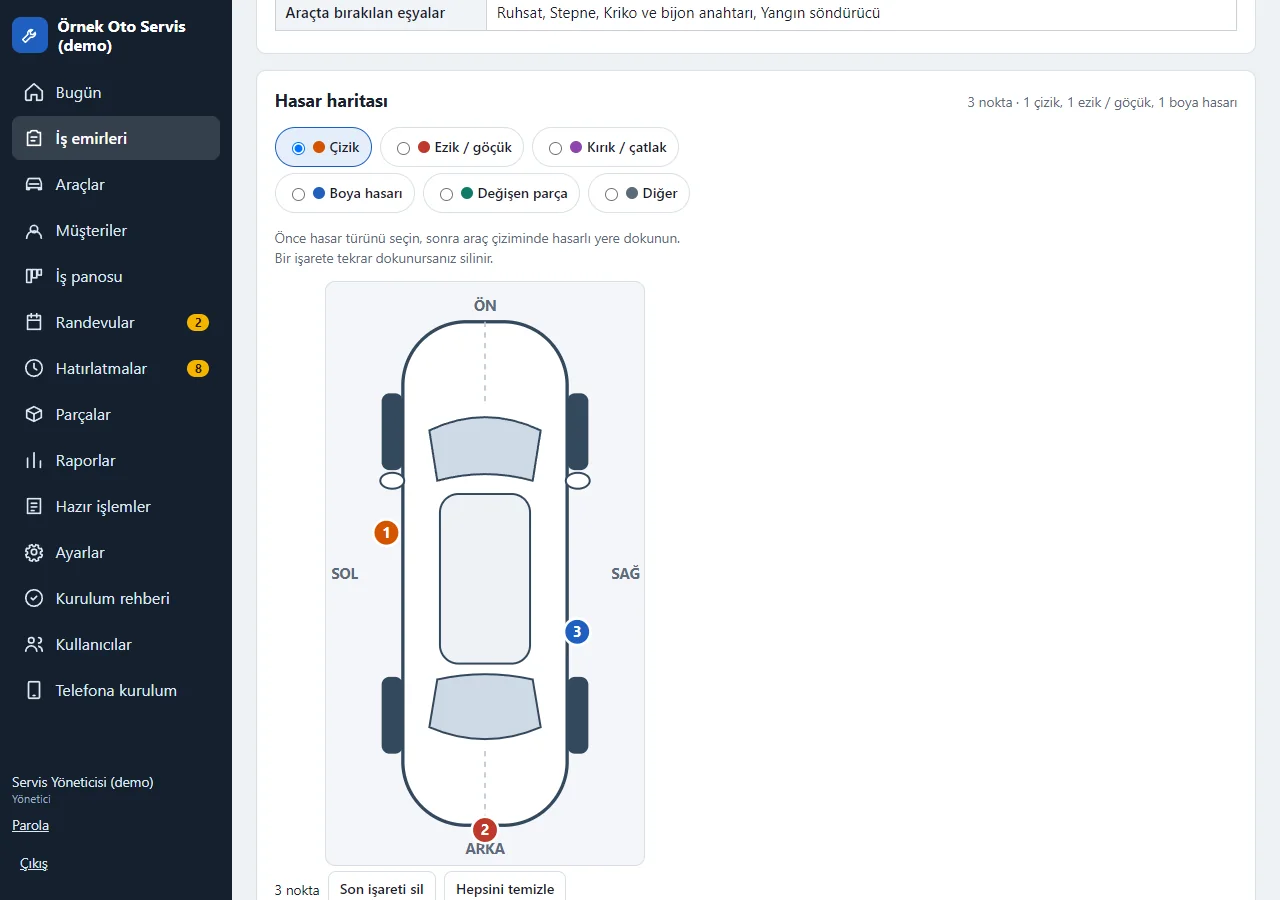
Damage map
At intake you tap the damaged spot on a car drawing, pick the type (scratch, dent, crack, paint damage, replaced part or other) and a numbered point is added (up to 30). Tapping a point again removes it. The same map is edited on the work order page; the intake form printout carries the map and a numbered damage list. On a delivered work order it is read-only.
-
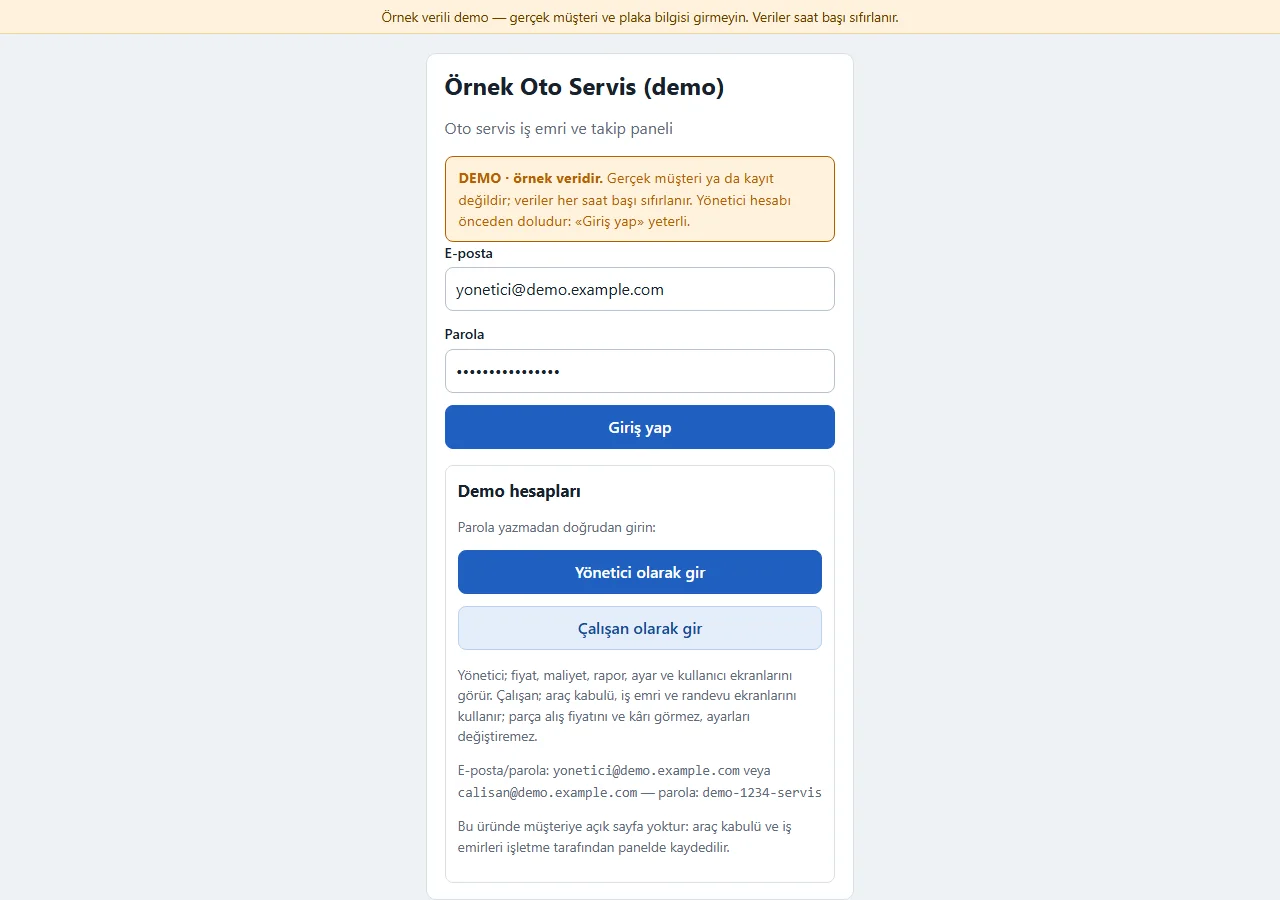
1.1.2 · 21 October 2026 Panel sign-in
On the demo’s sign-in page (version 1.1.2) a “DEMO · örnek veridir” (sample data) notice sits at the top, the e-mail and password fields come prefilled with the manager account, and a “Demo hesapları” (demo accounts) box holds password-free “… olarak gir” (sign in as …) buttons for manager and employee. Both show only in the demo; a normal installation has empty fields. The manager decides whether employees see prices and costs.
- On screen (Turkish interface)
- “DEMO · örnek veridir” — DEMO · sample data
- “Demo hesapları” — demo accounts
- “Yönetici olarak gir” — enter as manager
- “Çalışan olarak gir” — enter as employee
- “Giriş yap” — sign in
-
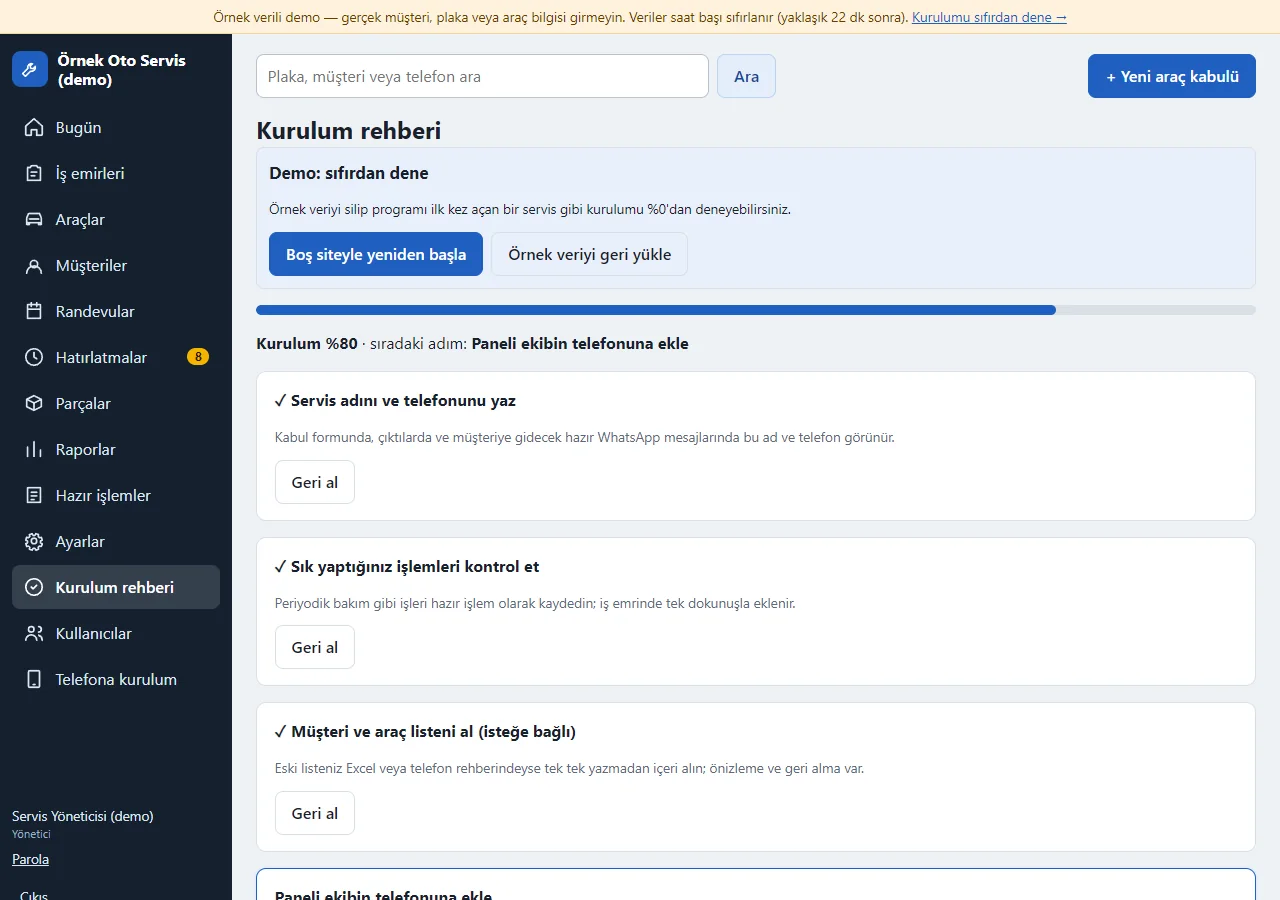
Setup guide
Opens on first sign-in: shop name and phone, frequent jobs, customer and vehicle list and adding the team’s phones are ticked off one by one; every step can be skipped. Two demo-only buttons at the top, “Start with an empty site” and “Restore sample data”, let you try the guide from scratch.
-
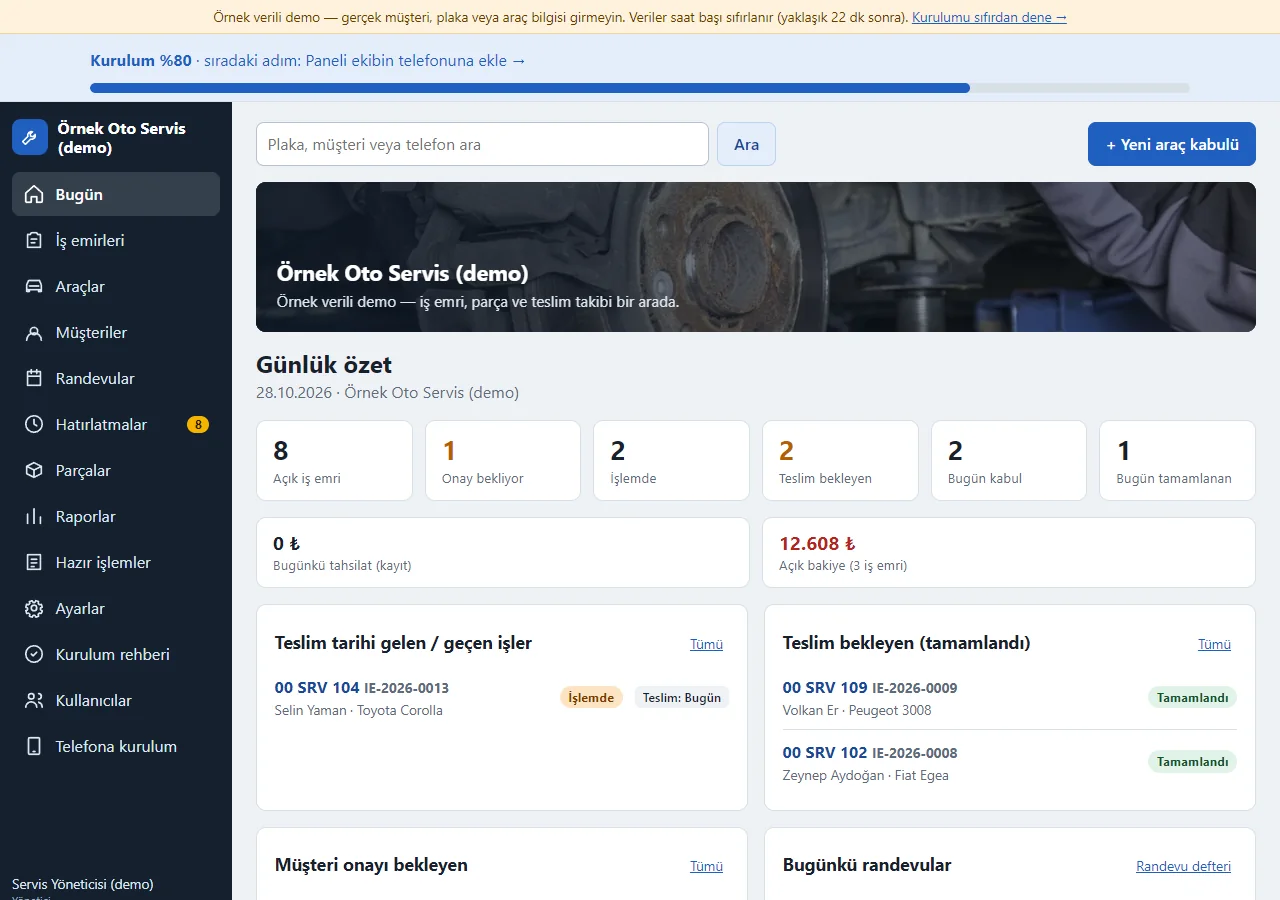
Progress bar on the Today screen
Until the steps are done, a “Setup 80% · next step…” bar sits at the top of every page; the next step is one tap away. Every main screen has a closed “What is this screen for?” box.
-
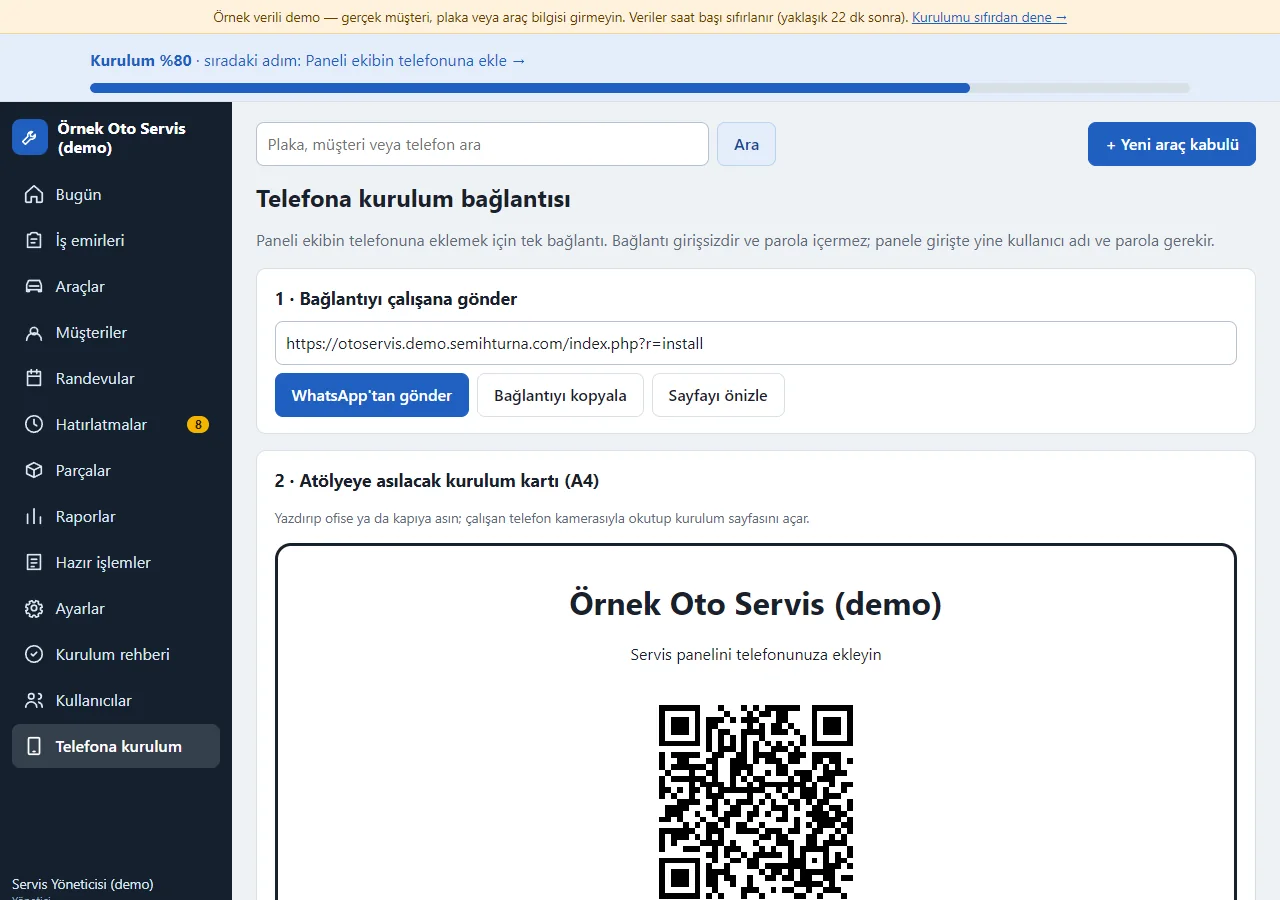
Send the link to the team
The panel’s phone-setup link goes out as a ready WhatsApp message or is copied in one tap; an A4 setup card with a QR code for the workshop wall is here too. The link needs no sign-in and contains no password.
-
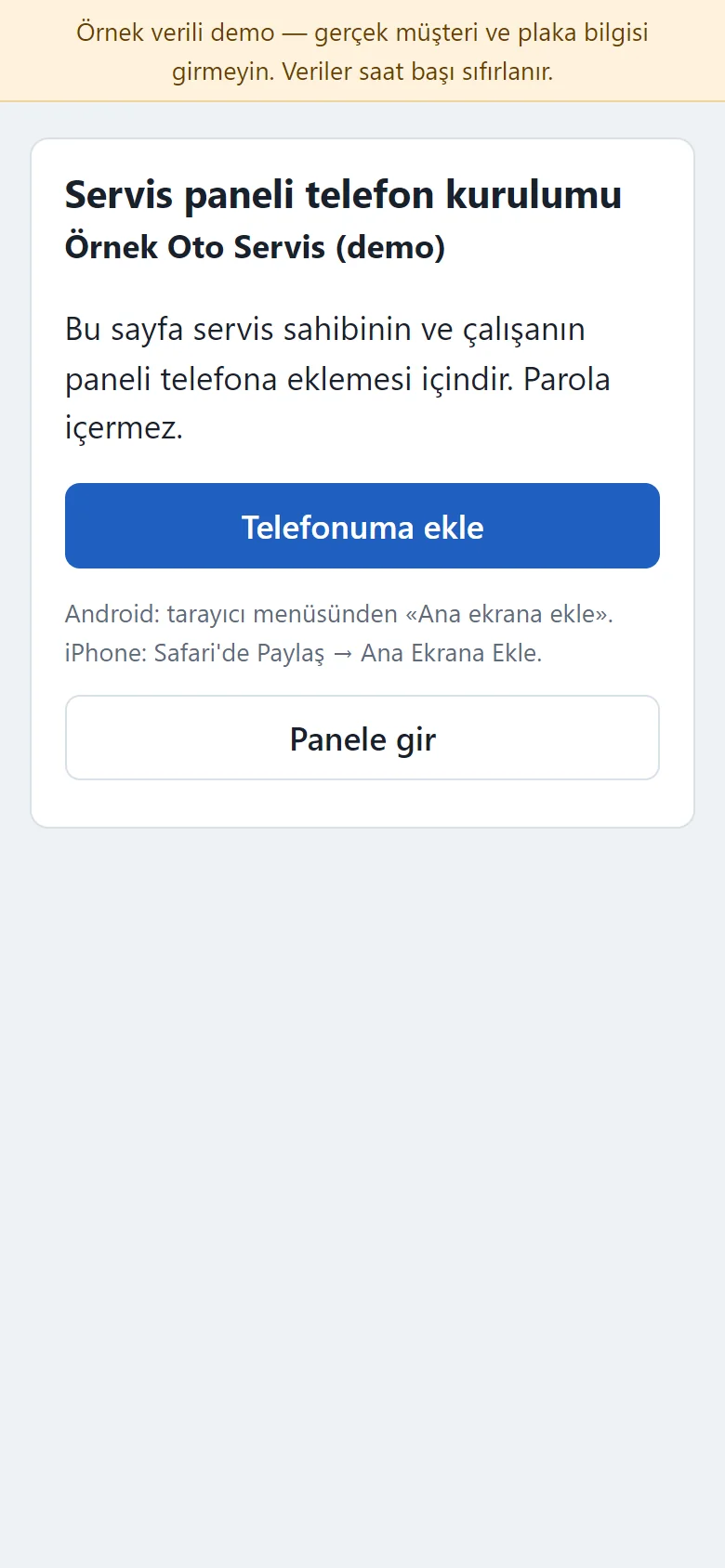
Add-to-phone page
A page without sign-in that opens on an employee’s phone: a large “Add to my phone” button, short steps for Android and iPhone, and “Open the panel”. The icon opens the panel sign-in directly; new work orders and appointments can send a free push notification.
-
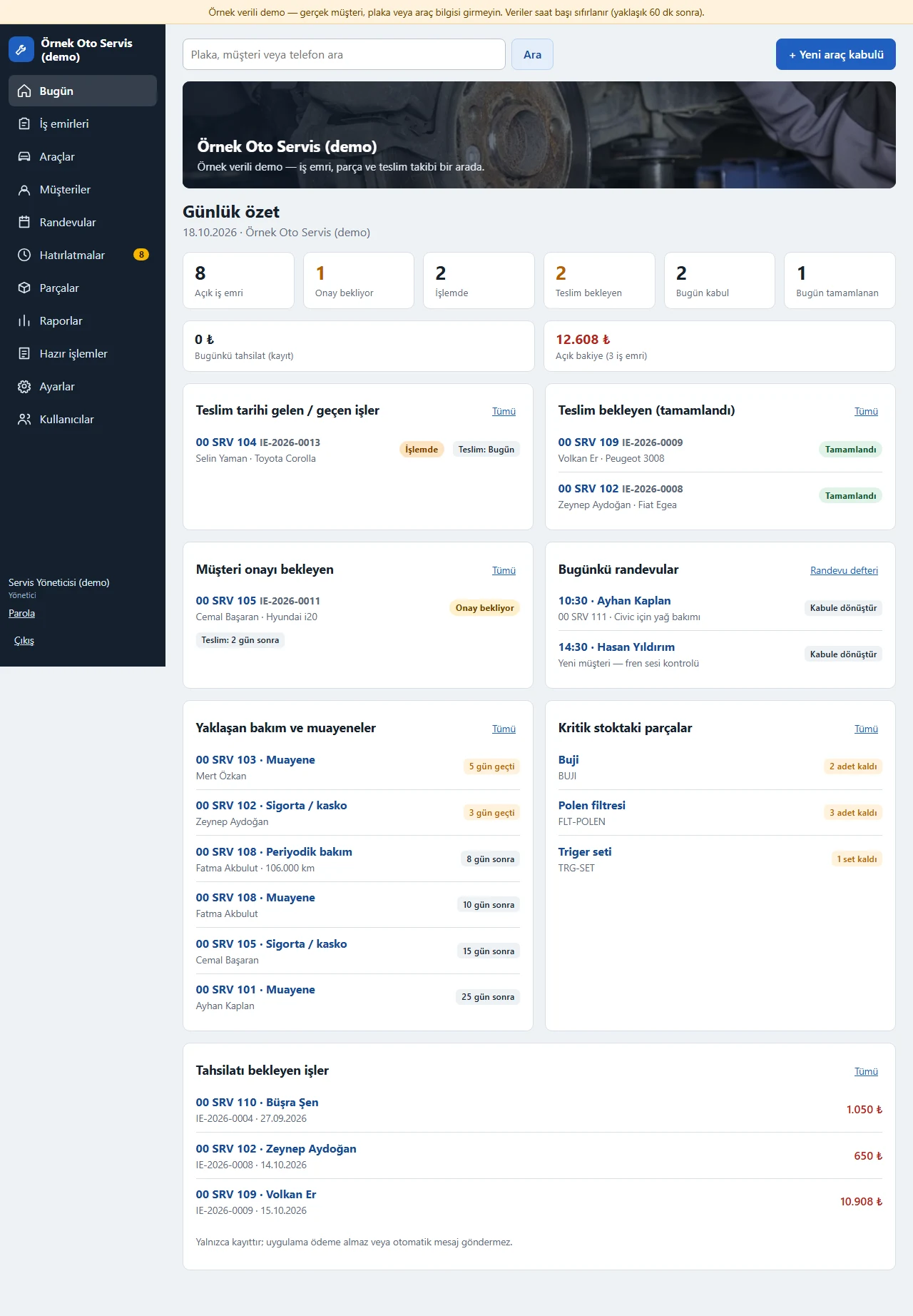
Daily summary
Open work orders, those awaiting approval, in progress and waiting for pickup; jobs due, today’s appointments, upcoming service and inspections, low stock and the open balance at a glance.
- On screen (Turkish interface)
- “Günlük özet” — daily summary
- “Açık iş emri / Onay bekliyor / İşlemde / Teslim bekleyen” — open work orders / awaiting approval / in progress / waiting for pickup
- “Bugünkü randevular” — today’s appointments
- “Yaklaşan bakım ve muayeneler” — upcoming service and inspections
- “Kritik stoktaki parçalar” — low-stock parts
- “Açık bakiye” — open balance
-
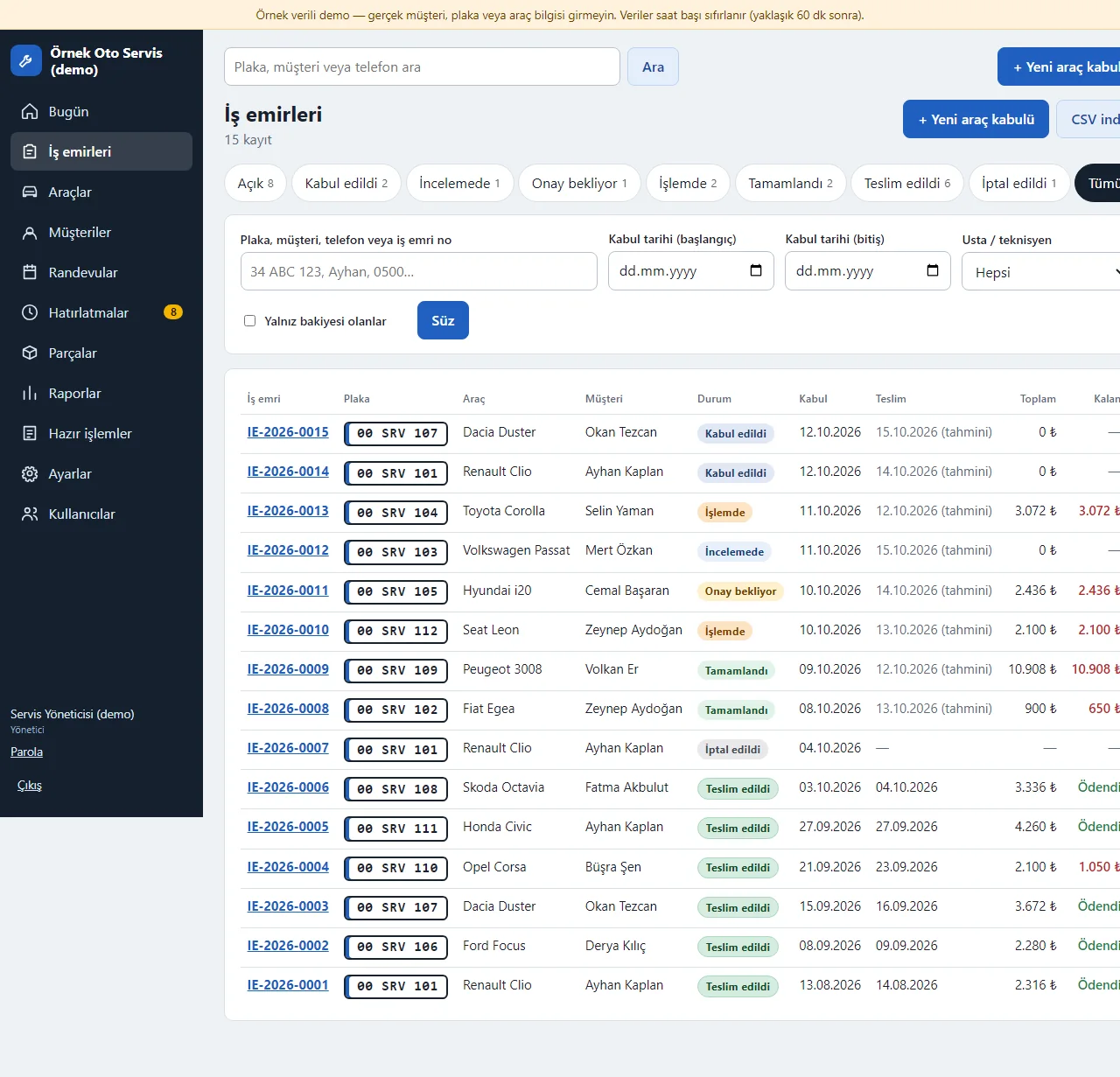
Work order list
Plate, vehicle, customer, status, received and estimated delivery date, total and remaining balance. Filter by status tab, plate, customer, phone or order number, date and mechanic; the list downloads as CSV.
- On screen (Turkish interface)
- “İş emirleri” — work orders
- “Açık / Kabul edildi / İncelemede / Onay bekliyor / İşlemde / Tamamlandı / Teslim edildi / İptal edildi / Tümü” — open / received / inspecting / awaiting approval / in progress / completed / delivered / cancelled / all
- “Usta / teknisyen” — mechanic / technician
- “Yalnız bakiyesi olanlar” — only those with a balance
- “CSV indir” — download CSV
-
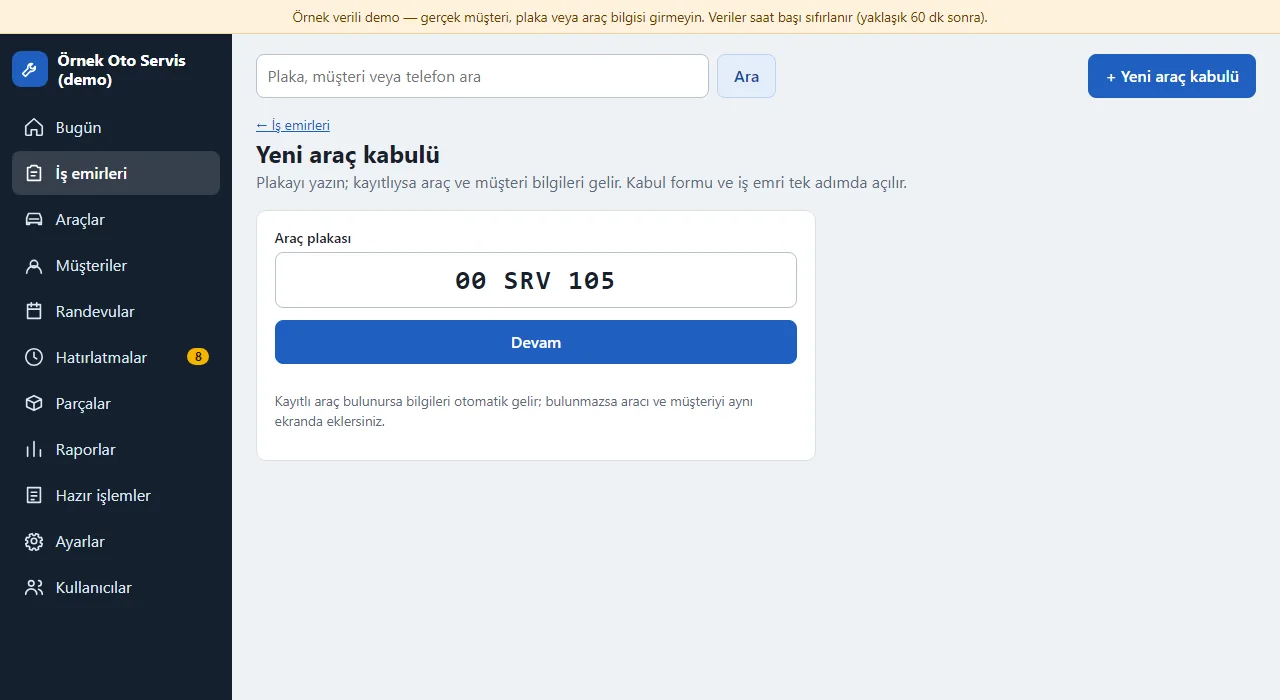
Vehicle intake: plate
Intake starts with the plate. A registered plate brings up the vehicle and customer automatically; an unregistered one lets you add the vehicle and customer on the same screen.
- On screen (Turkish interface)
- “Yeni araç kabulü” — new vehicle intake
- “Araç plakası” — vehicle plate
- “Devam” — continue
-
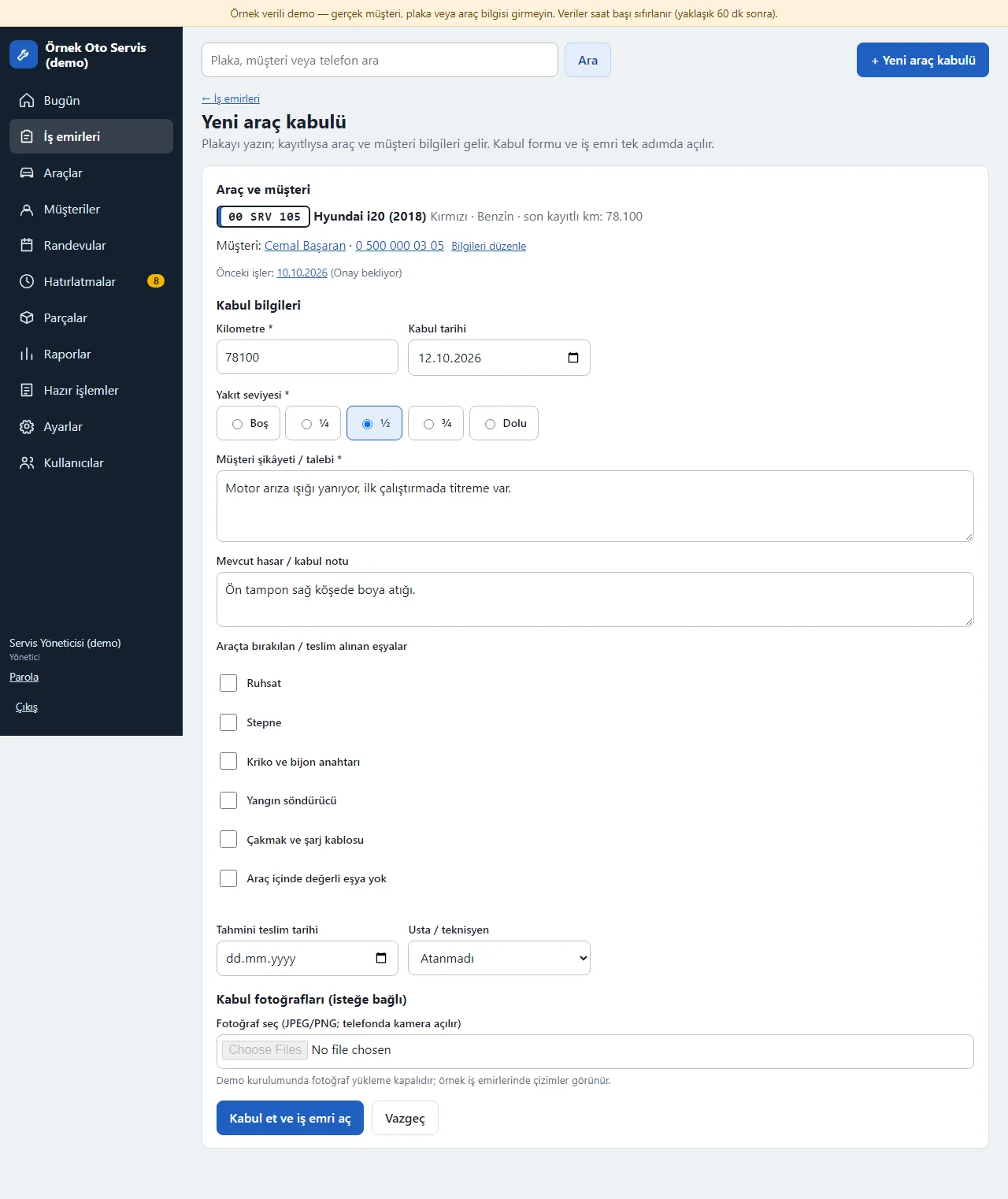
Intake form
Mileage, fuel level, customer complaint, existing damage note, items left in the car, estimated delivery, mechanic and intake photos are entered. Required fields are starred; a clear warning appears if something is missing.
- On screen (Turkish interface)
- “Kilometre / Yakıt seviyesi” — mileage / fuel level
- “Müşteri şikâyeti / talebi” — customer complaint / request
- “Mevcut hasar / kabul notu” — existing damage / intake note
- “Araçta bırakılan / teslim alınan eşyalar” — items left in / taken from the car
- “Tahmini teslim tarihi” — estimated delivery date
- “Usta / teknisyen” — mechanic / technician
- “Kabul et ve iş emri aç” — accept and open a work order
-
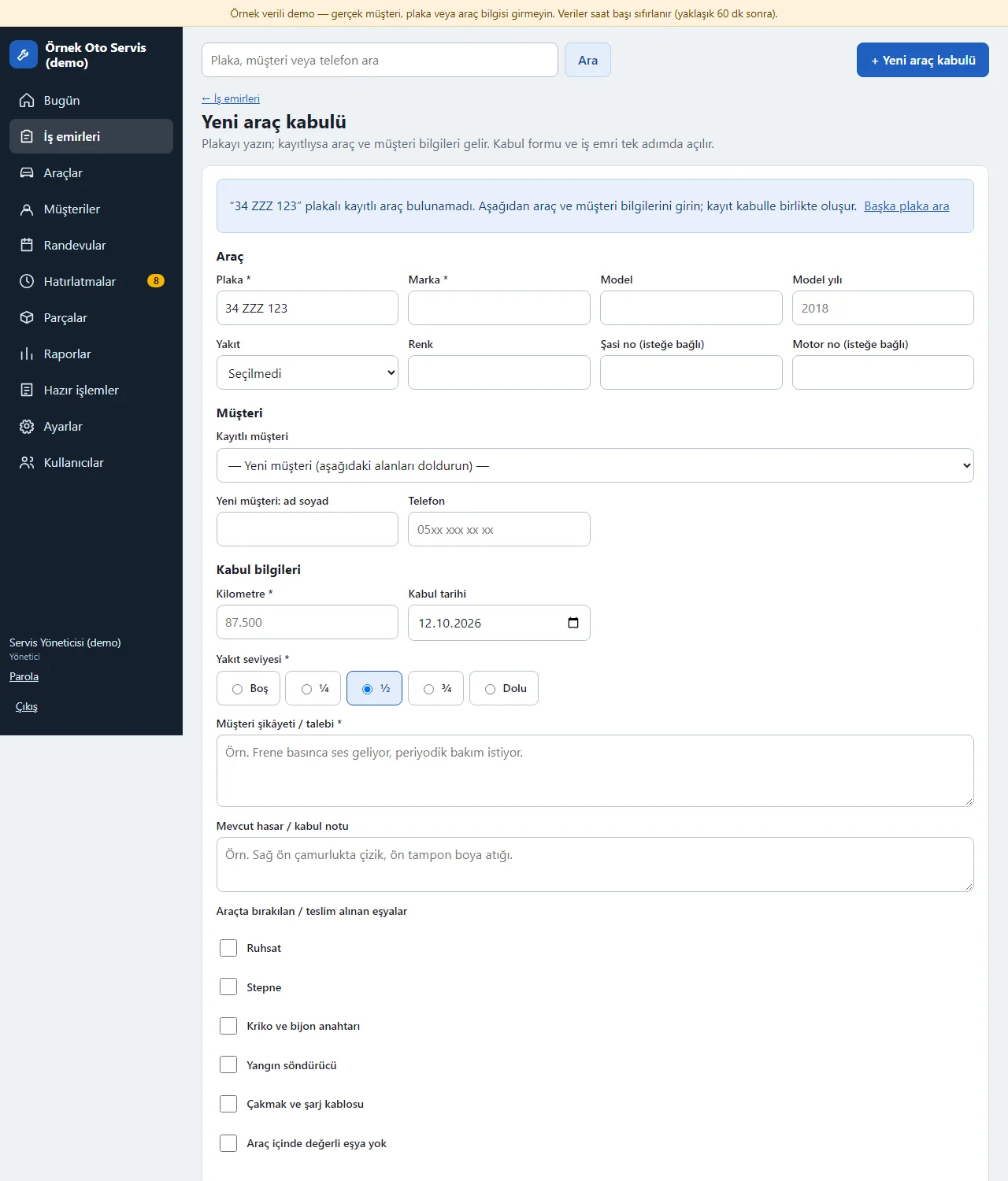
Unregistered plate: adding vehicle and customer
For an unregistered plate the vehicle (brand, model, year, VIN…) and the customer (name, phone) are entered on the same screen; a duplicate customer is not created if the same name and phone exist.
- On screen (Turkish interface)
- “Araç” — vehicle
- “Marka / Model / Model yılı / Yakıt / Renk” — brand / model / year / fuel / colour
- “Şasi no / Motor no” — VIN / engine number
- “Müşteri” — customer
- “Kayıtlı müşteri” — registered customer
- “Yeni müşteri: ad soyad / Telefon” — new customer: full name / phone
-
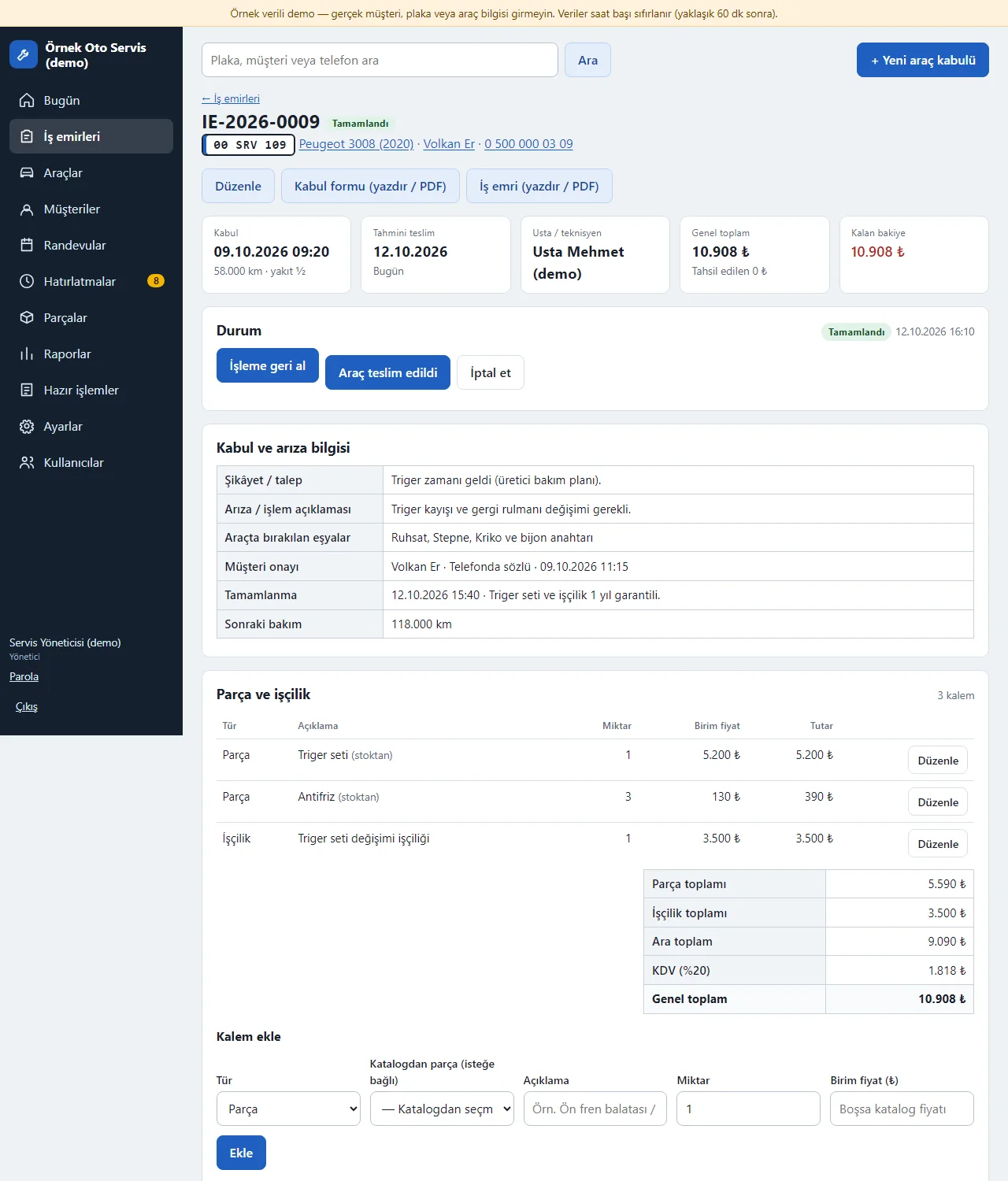
Work order page
Status, intake and delivery info, complaint and diagnosis, customer approval, items, payments, photos, messages and history on one page. Status buttons show only valid transitions.
- On screen (Turkish interface)
- “Durum” — status
- “Tamamlandı / Teslim edildi / İptal edildi” — completed / delivered / cancelled
- “İşleme geri al / Araç teslim edildi / İptal et” — return to in progress / vehicle delivered / cancel
- “Kabul formu (yazdır / PDF) / İş emri (yazdır / PDF)” — intake form (print / PDF) / work order (print / PDF)
- “Tahmini teslim / Usta / teknisyen” — estimated delivery / mechanic
- “Genel toplam / Kalan bakiye” — grand total / remaining balance
-
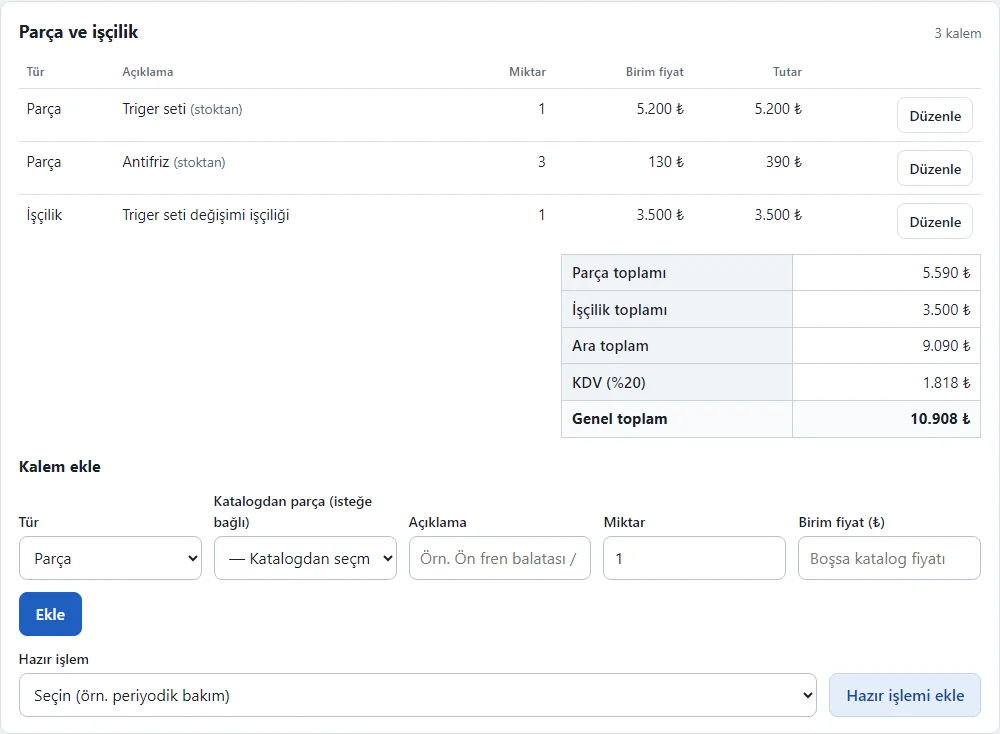
Part and labour items
Quantity, unit price and amount; parts, labour, subtotal, discount, VAT and grand total are worked out automatically. A part picked from the catalogue stays on the quote until the customer approves and is deducted from stock when the job goes in progress; a ready job adds many items in one click.
- On screen (Turkish interface)
- “Parça ve işçilik” — parts and labour
- “Tür / Açıklama / Miktar / Birim fiyat / Tutar” — type / description / quantity / unit price / amount
- “Parça toplamı / İşçilik toplamı / Ara toplam” — parts total / labour total / subtotal
- “KDV (%20) / Genel toplam” — VAT (20%) / grand total
- “Kalem ekle” — add an item
- “Katalogdan parça” — part from the catalogue
- “Hazır işlemi ekle” — add the ready job
-
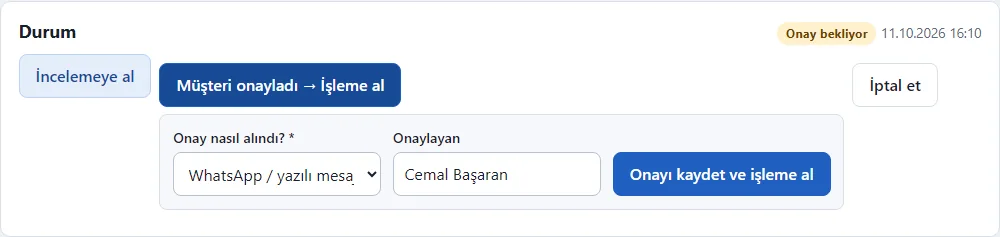
Customer approval
For a job awaiting approval, when the customer approves, how approval was obtained (phone, in person, WhatsApp, signed form), who approved and when are recorded; then the work order moves to in progress.
- On screen (Turkish interface)
- “Müşteri onayladı → İşleme al” — customer approved → start work
- “Onay nasıl alındı?” — how was approval obtained?
- “WhatsApp / yazılı mesaj” — WhatsApp / written message
- “Onaylayan” — approved by
- “Onayı kaydet ve işleme al” — record approval and start work
-
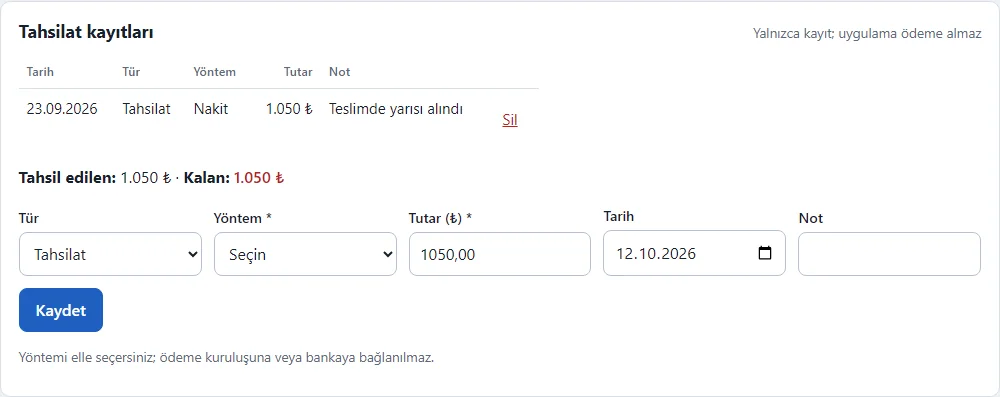
Payment record
You pick cash, bank transfer or card; partial payments and refunds are recorded and the remaining balance is shown. A payment above the remaining balance is rejected. The app takes no payment.
- On screen (Turkish interface)
- “Tahsilat kayıtları” — payment records
- “Yalnızca kayıt; uygulama ödeme almaz” — a record only; the app takes no payment
- “Nakit / Havale / EFT / Kart” — cash / bank transfer / card
- “Tutar / Tarih / Not” — amount / date / note
- “Tahsil edilen / Kalan” — collected / remaining
-
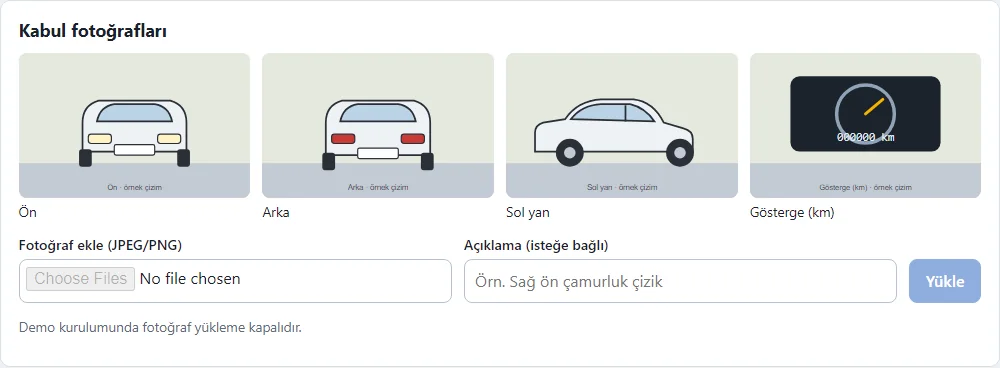
Intake photos
Photos are linked to the work order and the vehicle; location and device data are stripped from files on upload. The pictures in the demo are sample drawings and upload is off.
- On screen (Turkish interface)
- “Kabul fotoğrafları” — intake photos
- “Öne al” — bring to the front
- “Fotoğraf ekle” — add a photo
- “(örnek çizim)” — (sample drawing)
-
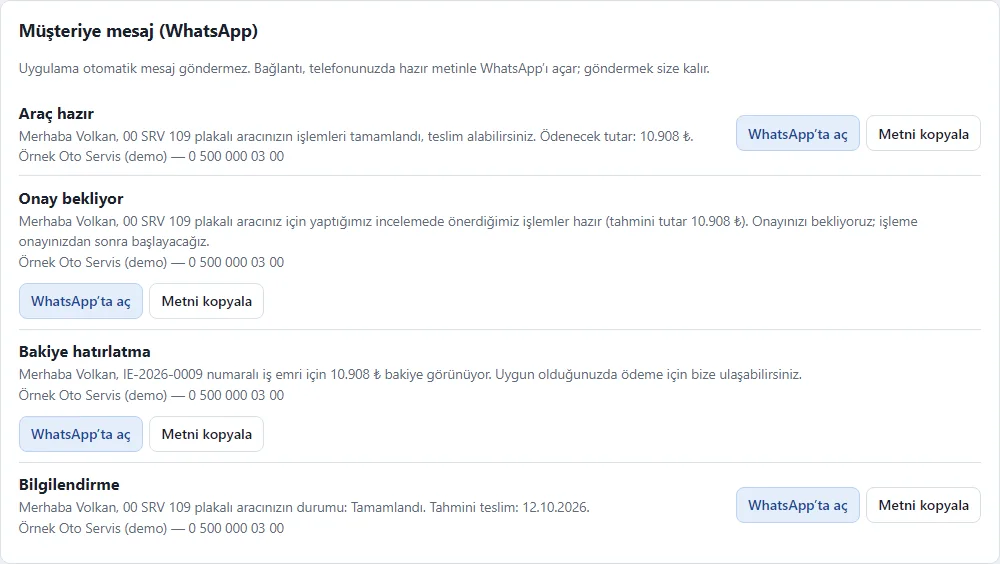
Ready WhatsApp texts
Texts for vehicle ready, awaiting approval, balance and information come ready; copy them or open them in the shop’s own WhatsApp. The shop sends the message, the app does not.
- On screen (Turkish interface)
- “Müşteriye mesaj (WhatsApp)” — message to the customer (WhatsApp)
- “Araç hazır / Onay bekliyor / Bakiye hatırlatma / Bilgilendirme” — vehicle ready / awaiting approval / balance reminder / information
- “WhatsApp’ta aç” — open in WhatsApp
- “Metni kopyala” — copy the text
-
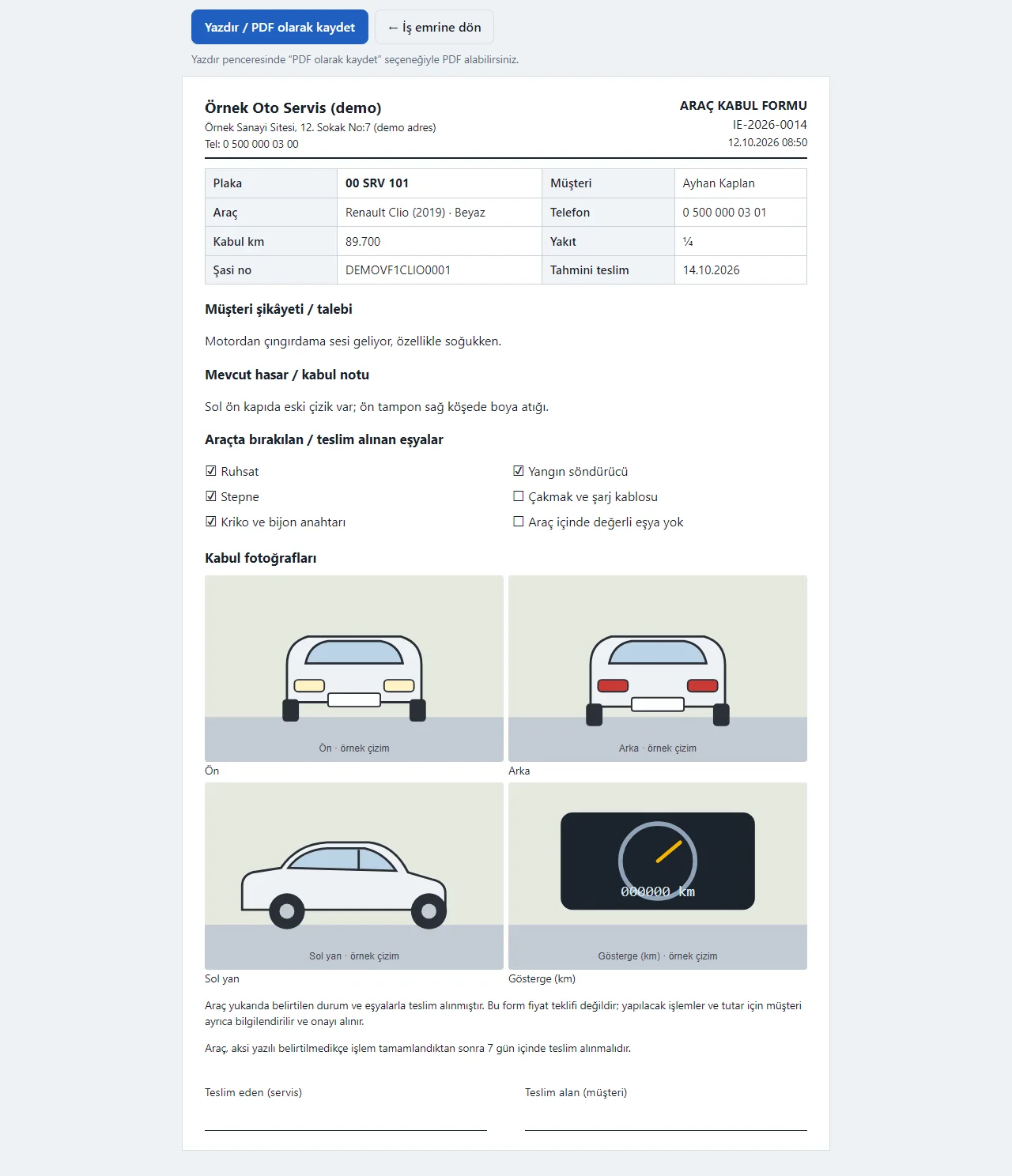
Vehicle intake form printout
Shop details, plate, customer, complaint, mileage, fuel, existing damage note, items left and signature lines. It carries no prices; print it or save as PDF.
- On screen (Turkish interface)
- “ARAÇ KABUL FORMU” — vehicle intake form
- “Araçta bırakılan / teslim alınan eşyalar” — items left in / taken from the car
- “Teslim eden (servis) / Teslim alan (müşteri)” — handed over by (shop) / received by (customer)
- “Yazdır / PDF olarak kaydet” — print / save as PDF
-
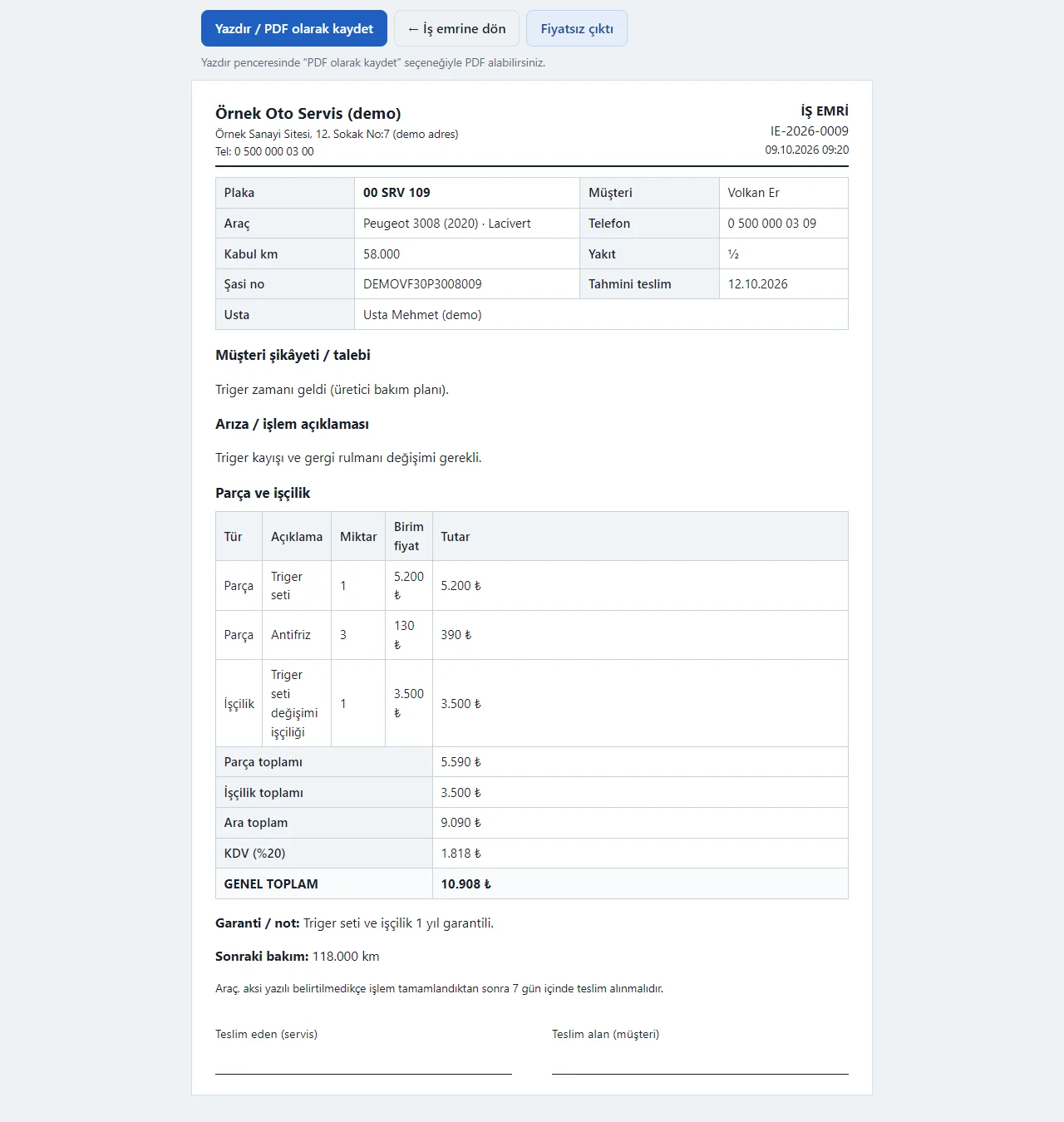
Work order printout
Diagnosis, part and labour items, subtotal, VAT, grand total, warranty note and next service. Print with or without prices; save as PDF.
- On screen (Turkish interface)
- “İŞ EMRİ” — work order
- “Parça ve işçilik” — parts and labour
- “GENEL TOPLAM” — grand total
- “Fiyatsız çıktı” — printout without prices
-
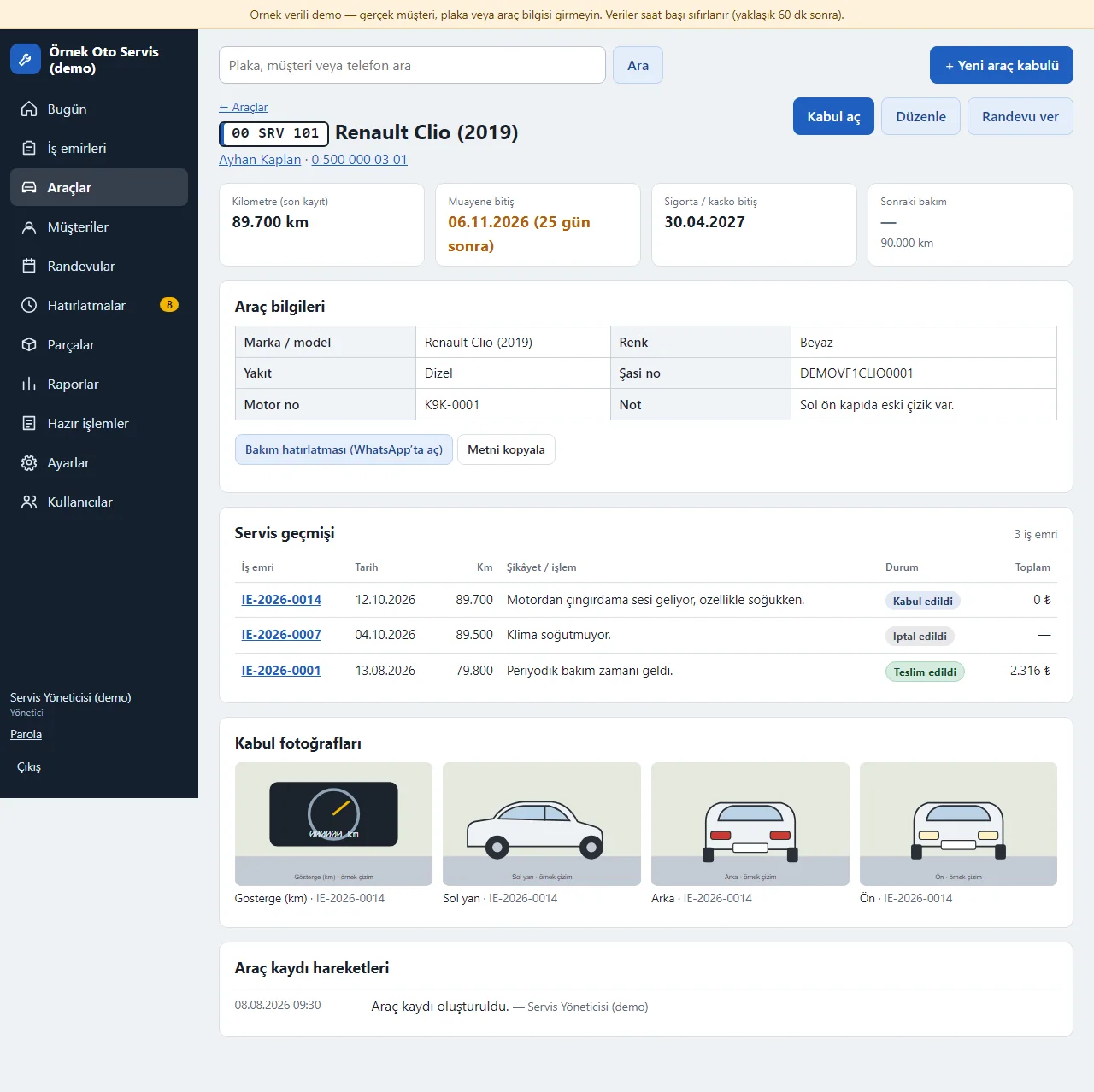
Vehicle page and service history
Mileage, inspection and insurance expiry, next service, all work orders of the vehicle, intake photos and a service reminder text.
- On screen (Turkish interface)
- “Muayene bitiş / Sigorta / kasko bitiş” — inspection expiry / insurance expiry
- “Sonraki bakım” — next service
- “Servis geçmişi” — service history
- “Kabul aç / Randevu ver” — open an intake / book an appointment
-
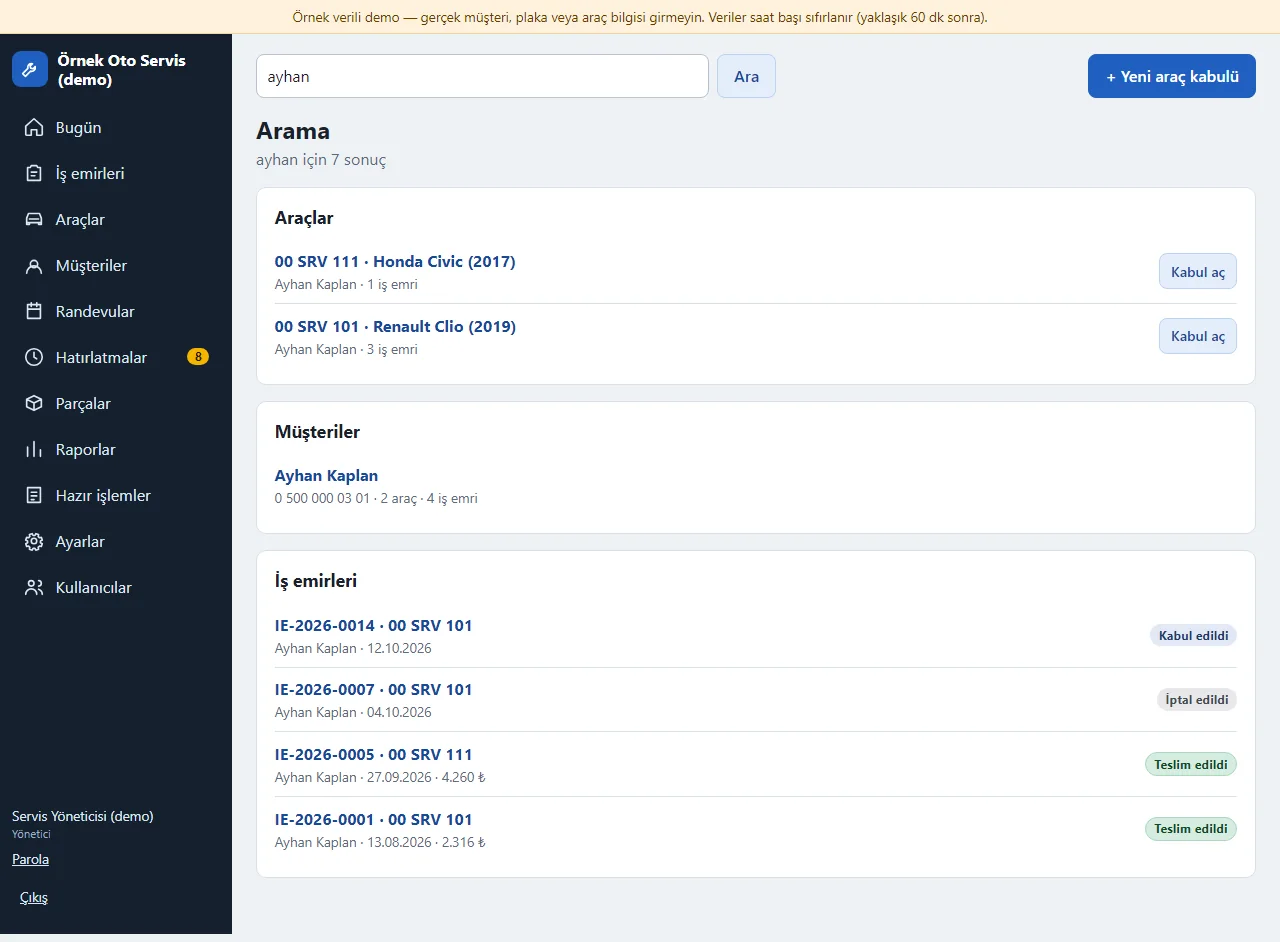
Search
The search box at the top finds vehicles, customers and work orders together by plate, customer name, phone or VIN; Turkish letters are matched loosely.
- On screen (Turkish interface)
- “Plaka, müşteri veya telefon ara” — search plate, customer or phone
- “Araçlar / Müşteriler / İş emirleri” — vehicles / customers / work orders
- “Kabul aç” — open an intake
-
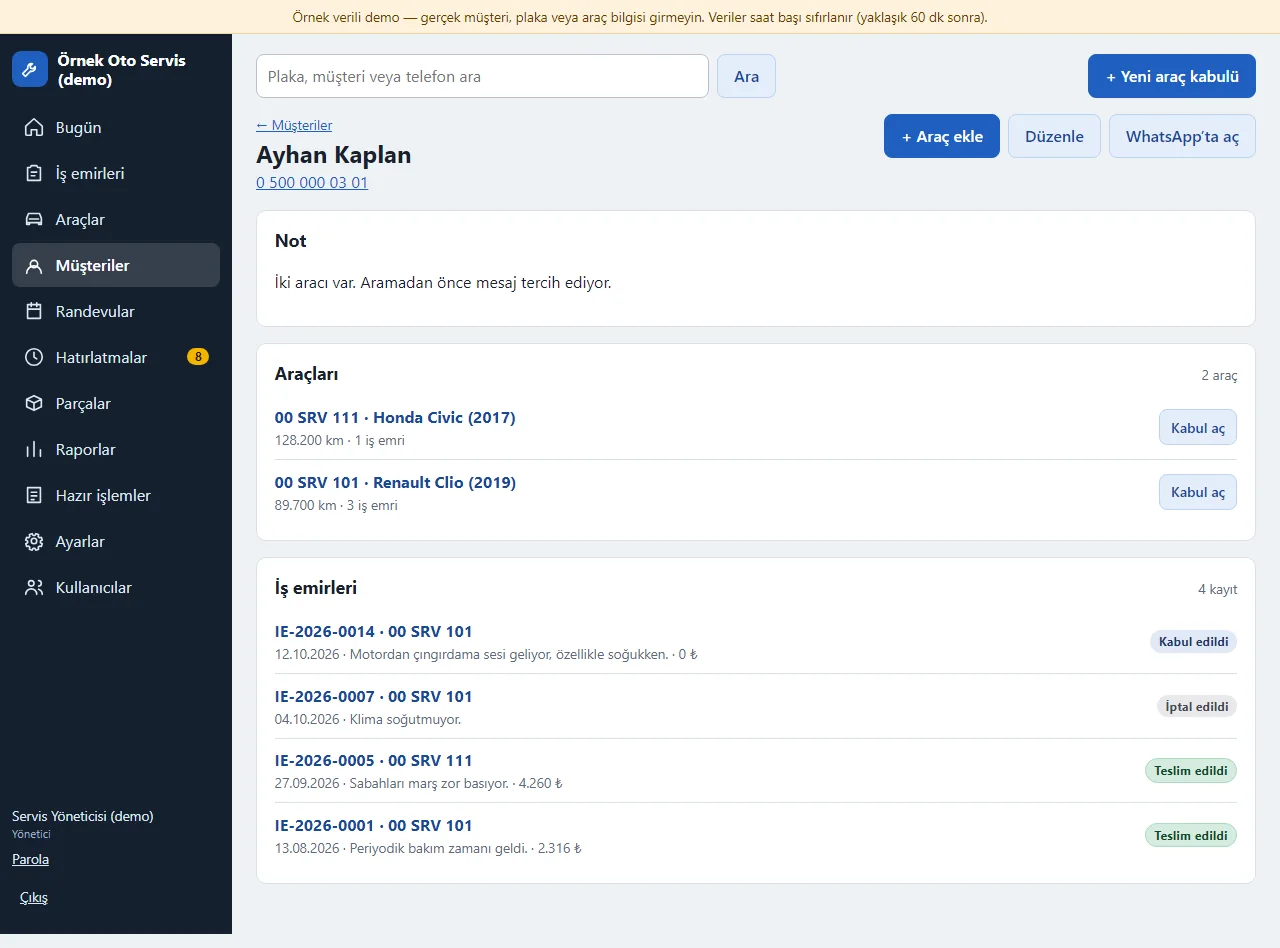
Customer card
Phone, notes, the customer’s vehicles and all work orders; an open balance from completed jobs shows at the top. Add a vehicle or open a WhatsApp link from here.
- On screen (Turkish interface)
- “Araçları” — vehicles
- “İş emirleri” — work orders
- “+ Araç ekle” — add a vehicle
- “WhatsApp’ta aç” — open in WhatsApp
-
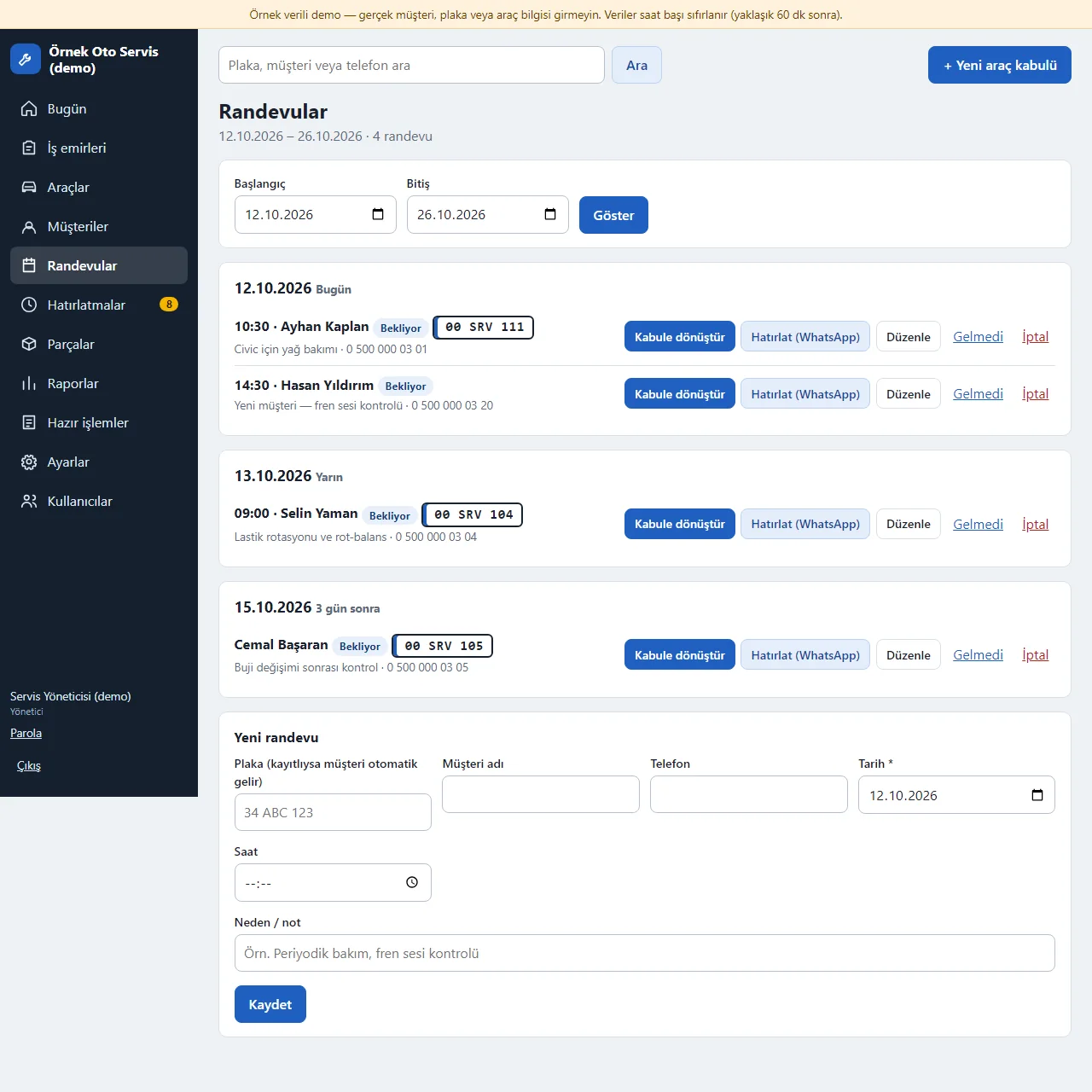
Appointment book
Appointments by date and time; when the car arrives, “Kabule dönüştür” opens a work order and the appointment becomes “Geldi”. The reminder text opens ready in WhatsApp.
- On screen (Turkish interface)
- “Randevular” — appointments
- “Kabule dönüştür” — convert to intake
- “Hatırlat (WhatsApp)” — remind (WhatsApp)
- “Gelmedi / İptal” — did not come / cancel
- “Yeni randevu” — new appointment
-
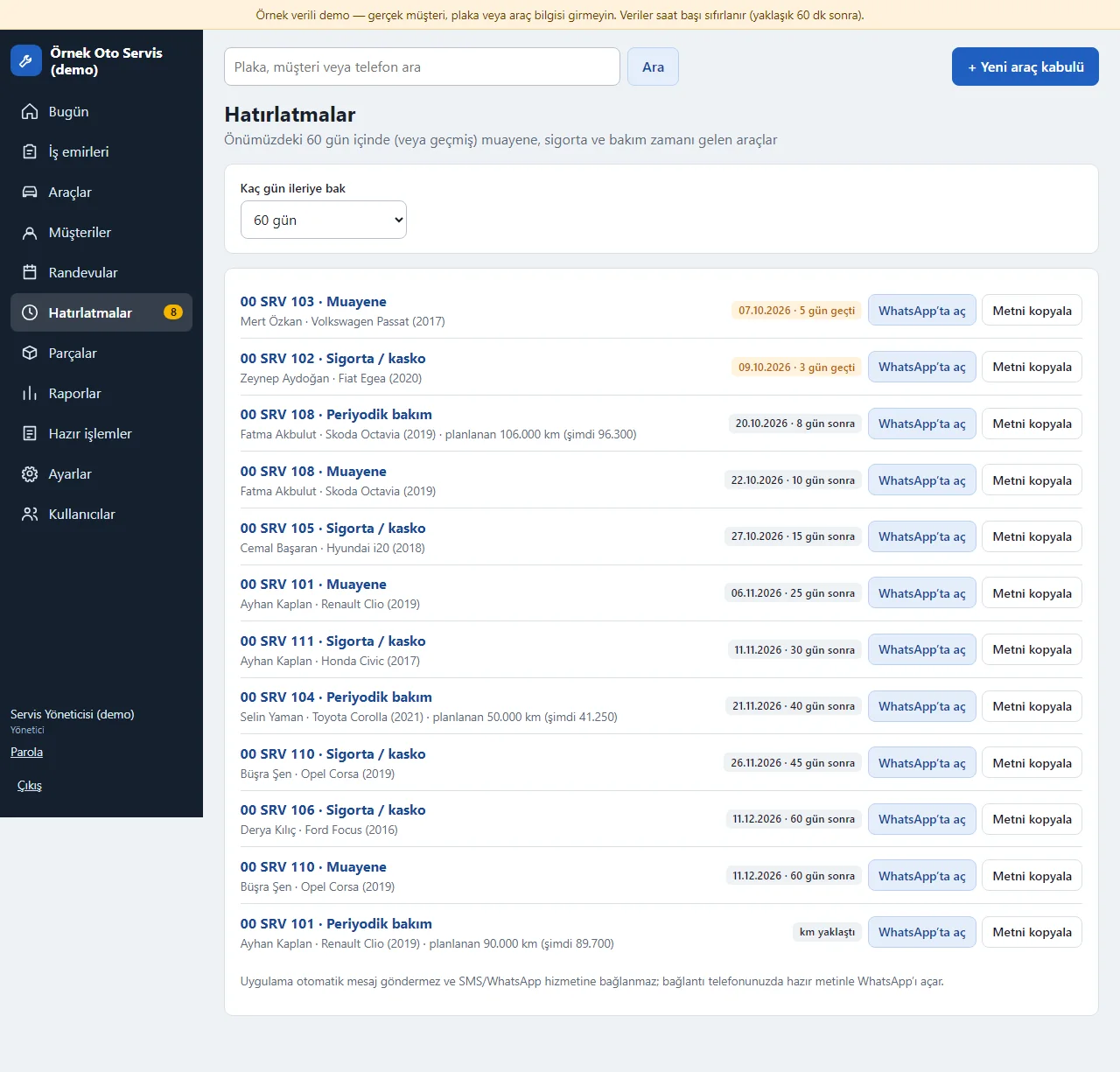
Reminders
Cars whose inspection or insurance expiry, or periodic service (by date or mileage), is coming up; overdue ones are flagged. The shop sends the message with the ready text.
- On screen (Turkish interface)
- “Hatırlatmalar” — reminders
- “Muayene / Sigorta / kasko / Periyodik bakım” — inspection / insurance / periodic service
- “gün geçti” — days overdue
- “WhatsApp’ta aç” — open in WhatsApp
-
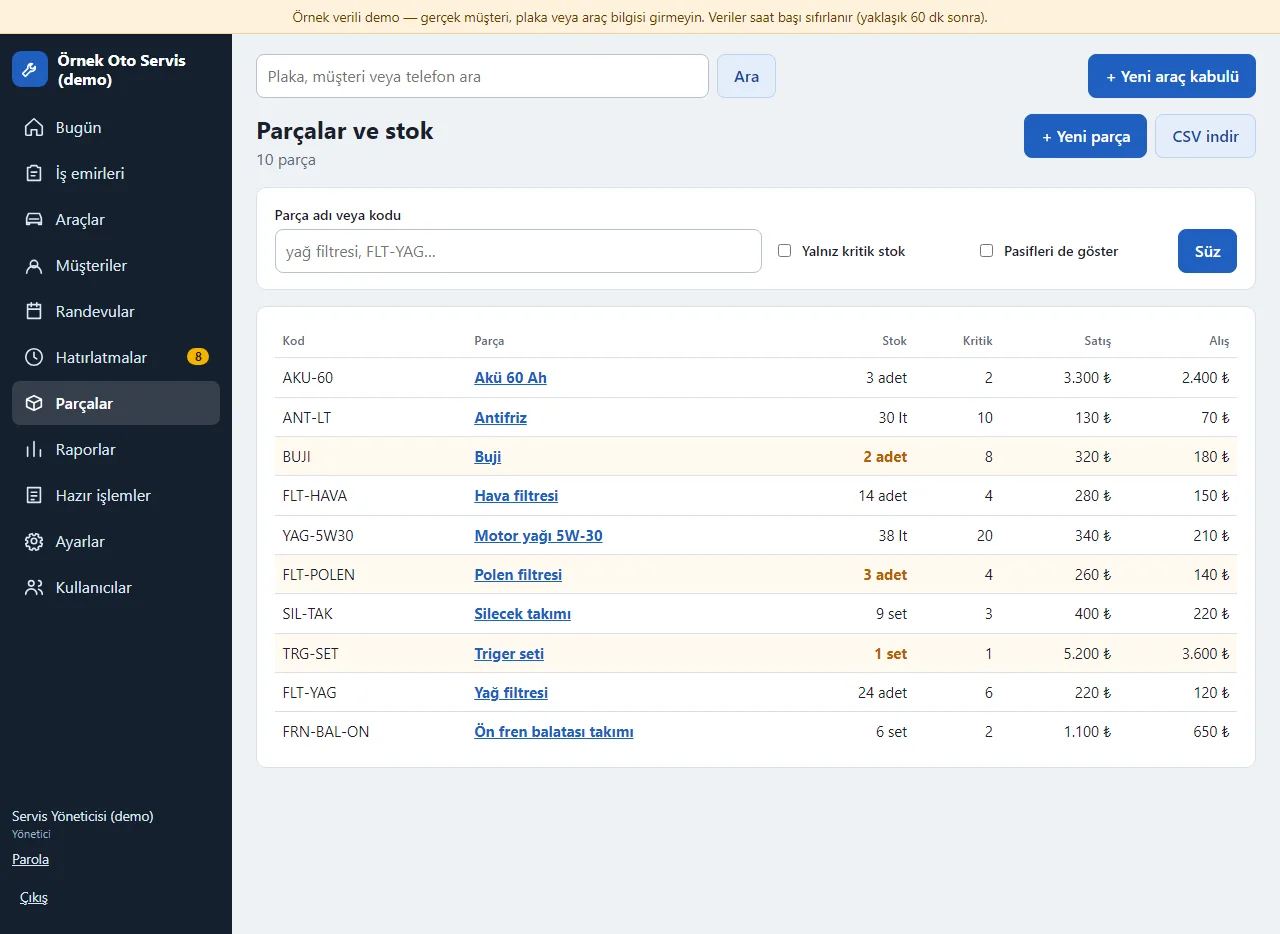
Parts and stock
Code, name, current stock, low-stock level, sale price and, for the manager, purchase price. Low-stock parts are flagged; the list downloads as CSV.
- On screen (Turkish interface)
- “Parçalar ve stok” — parts and stock
- “Yalnız kritik stok” — only low stock
- “Stok / Kritik / Satış / Alış” — stock / low-stock level / sale / purchase
- “+ Yeni parça” — new part
-
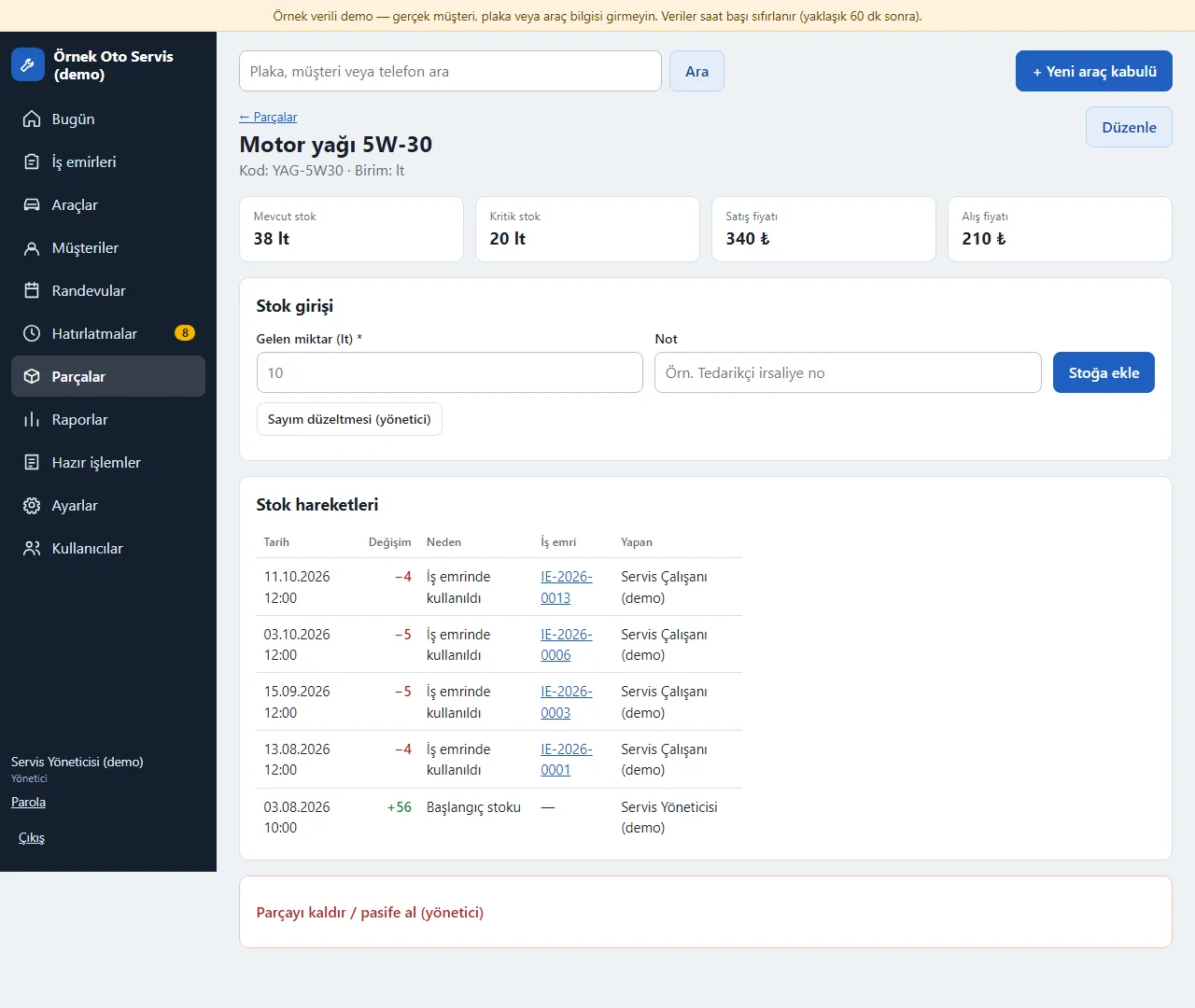
Stock entry and movements
Stock entries are made here and movements are listed; every movement records the work order and who did it. A catalogue part added to a work order is first counted on the quote and is deducted from stock when the job goes in progress after the customer’s approval; it returns if removed, taken back to the quote stage or cancelled. The screenshot is the interface from before the “Teklifte” (on-quote) distinction.
- On screen (Turkish interface)
- “Stok girişi” — stock entry
- “Stok hareketleri” — stock movements
- “İş emrinde kullanıldı” — used on a work order
- “Sayım düzeltmesi (yönetici)” — stock count correction (manager)
-
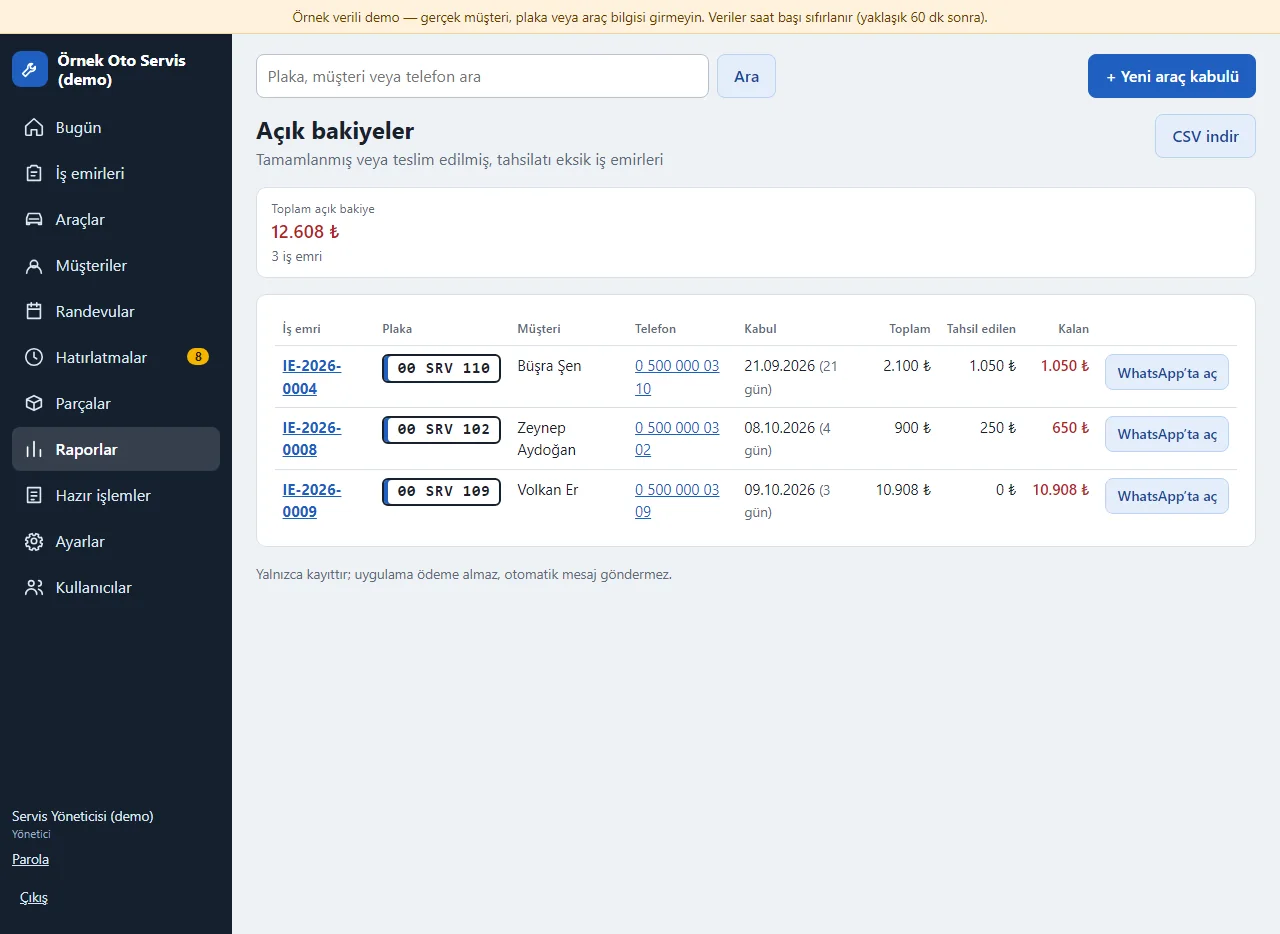
Open balances
Completed or delivered work orders with payment still due: how long they have waited, the remaining amount and a ready balance reminder text. Download as CSV.
- On screen (Turkish interface)
- “Açık bakiyeler” — open balances
- “Toplam açık bakiye” — total open balance
- “Tahsil edilen / Kalan” — collected / remaining
-
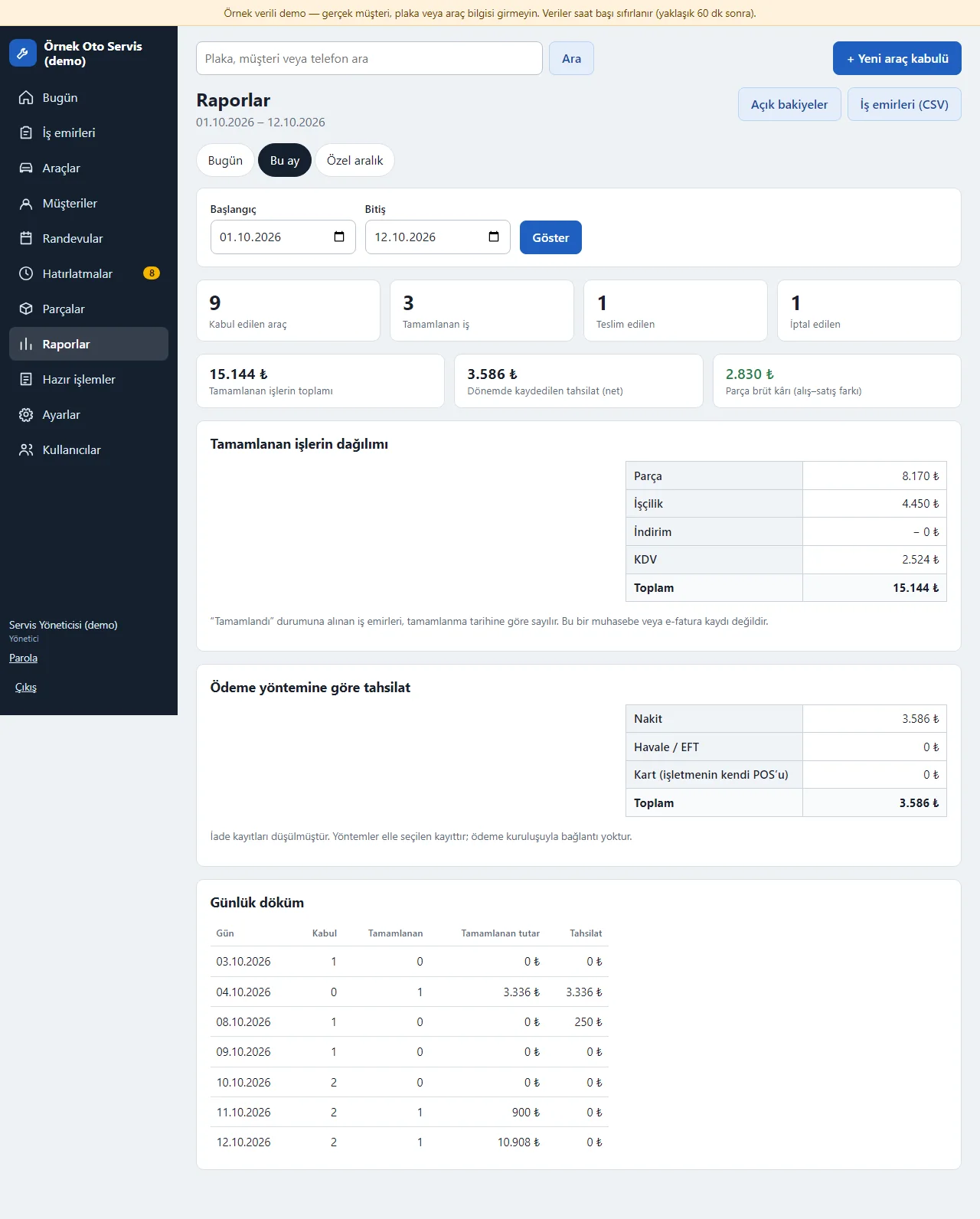
Daily and monthly report
Work orders received, completed and delivered, the parts-labour-VAT split of completed jobs, payments by method and a daily breakdown.
- On screen (Turkish interface)
- “Raporlar” — reports
- “Bugün / Bu ay / Özel aralık” — today / this month / custom range
- “Kabul edilen araç / Tamamlanan iş / Teslim edilen / İptal edilen” — vehicles received / jobs completed / delivered / cancelled
- “Ödeme yöntemine göre tahsilat” — payments by method
- “Günlük döküm” — daily breakdown
-
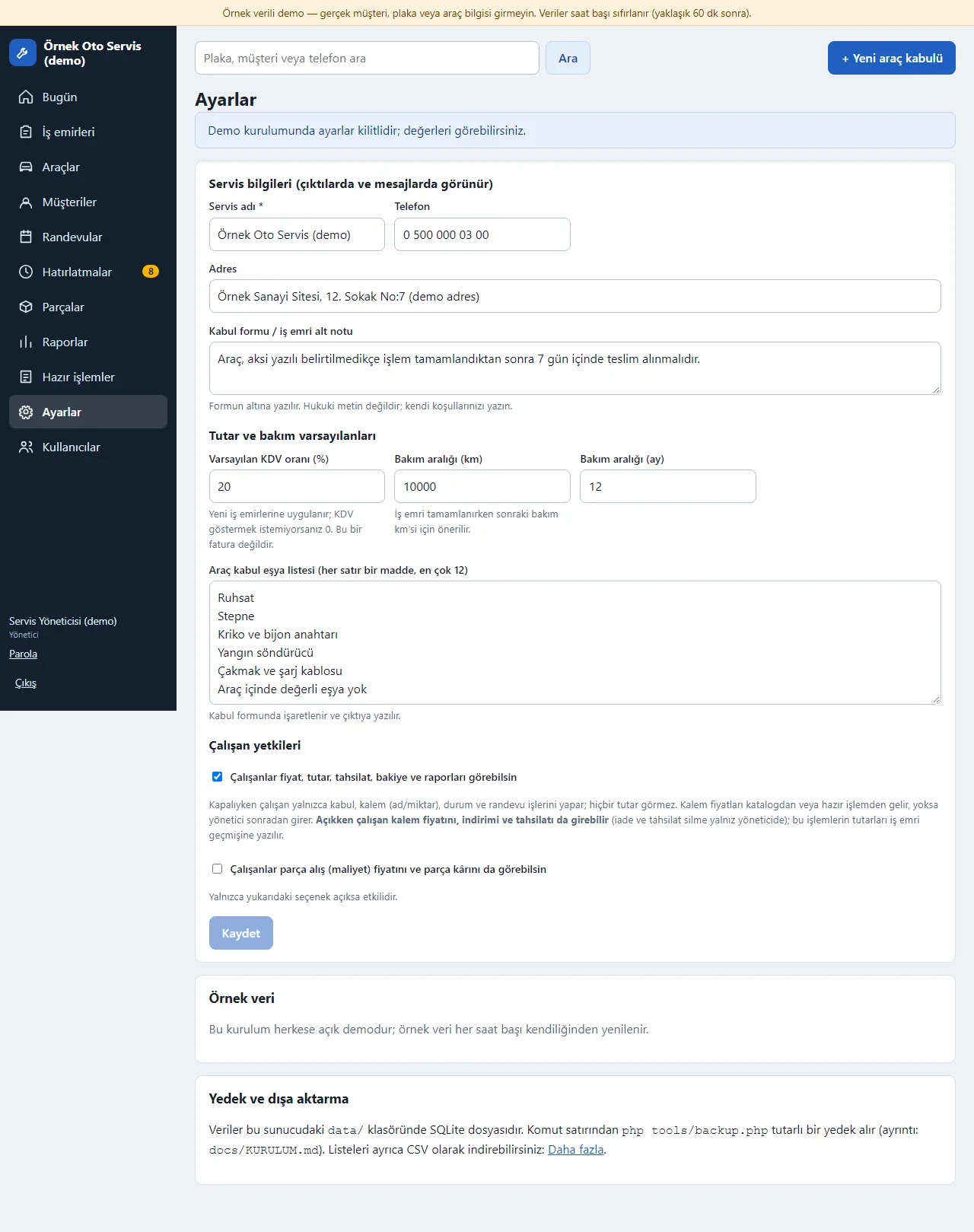
Settings and employee permissions
Shop details, VAT and service defaults, the intake item list and employee permissions. The manager chooses whether employees see prices and part costs; sample data loads and clears in one action.
- On screen (Turkish interface)
- “Çalışan yetkileri” — employee permissions
- “Çalışanlar fiyat, tutar, tahsilat, bakiye ve raporları görebilsin” — employees can see prices, amounts, payments, balances and reports
- “Örnek veri” — sample data
- “Varsayılan KDV oranı” — default VAT rate
-
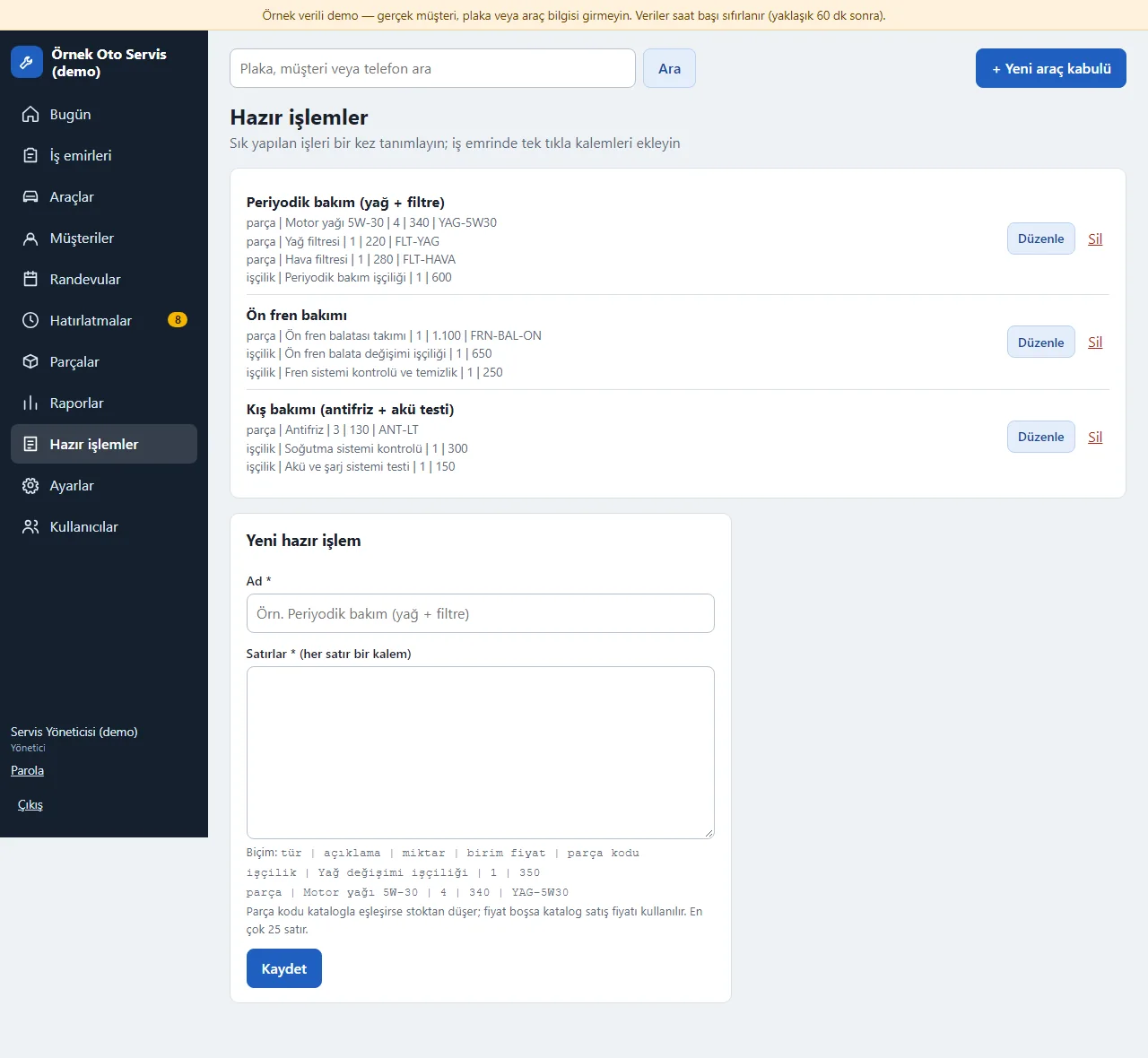
Ready jobs
Frequent jobs such as periodic service are defined once; one click adds the part and labour items to a work order. A part code that matches the catalogue uses the catalogue part; stock is deducted when the job goes in progress.
- On screen (Turkish interface)
- “Hazır işlemler” — ready jobs
- “Satırlar” — lines
- “işçilik | ad | miktar | birim fiyat” — labour | name | quantity | unit price
- “parça | ad | miktar | birim fiyat | parça kodu” — part | name | quantity | unit price | part code
-
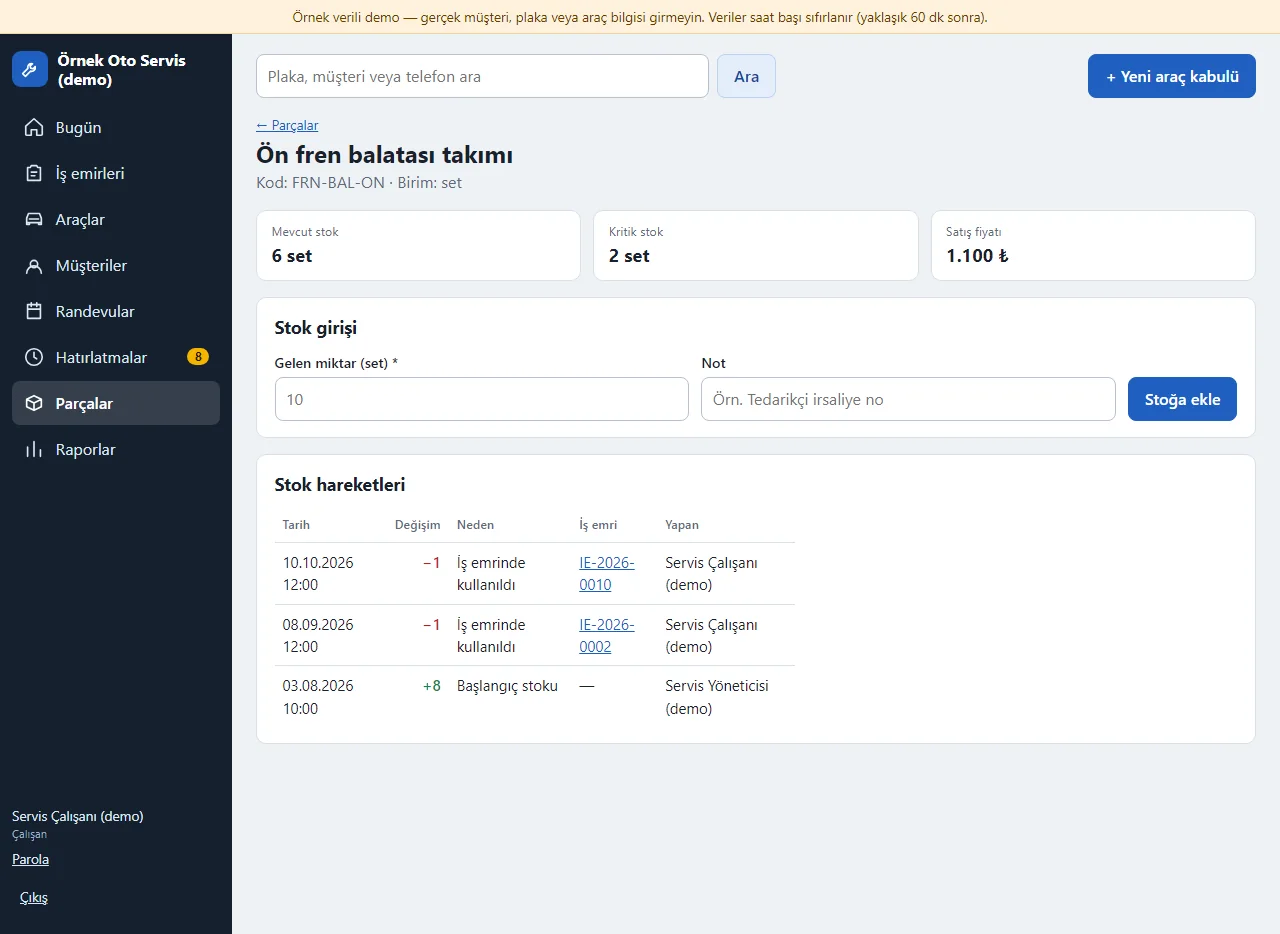
Employee view
The employee does intake, work orders, items, status and appointments; part purchase prices, settings and users are not shown. Price visibility is a manager setting.
- On screen (Turkish interface)
- “Parçalar ve stok” — parts and stock
- “Çalışan” — employee
- “Stok girişi” — stock entry
-
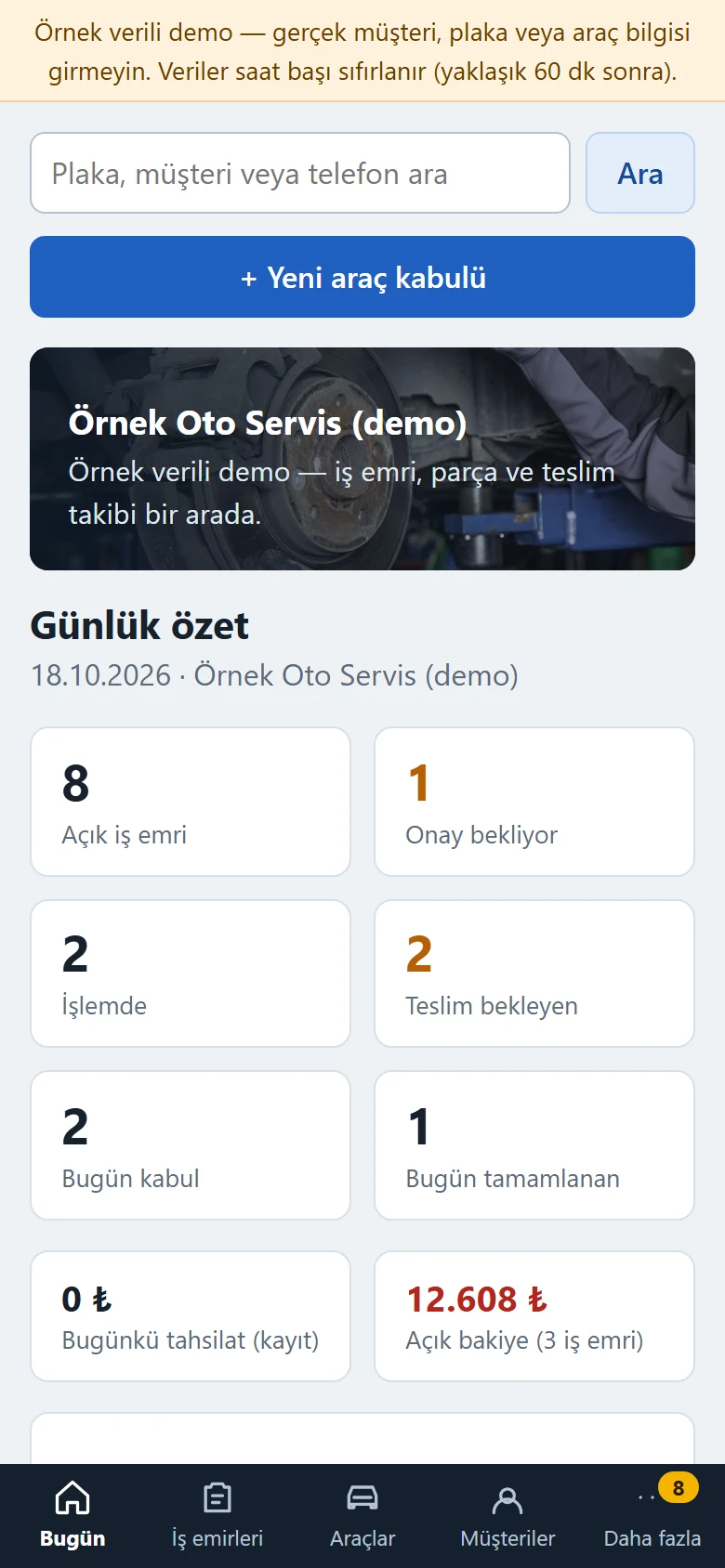
Daily summary on a phone
The panel on a phone: the bottom menu opens Today, Work orders, Vehicles and Customers, and “More” opens appointments, reminders, parts and reports. The summary tiles are on the first screen.
- On screen (Turkish interface)
- “Bugün / İş emirleri / Araçlar / Müşteriler / Daha fazla” — today / work orders / vehicles / customers / more
- “Günlük özet” — daily summary
-
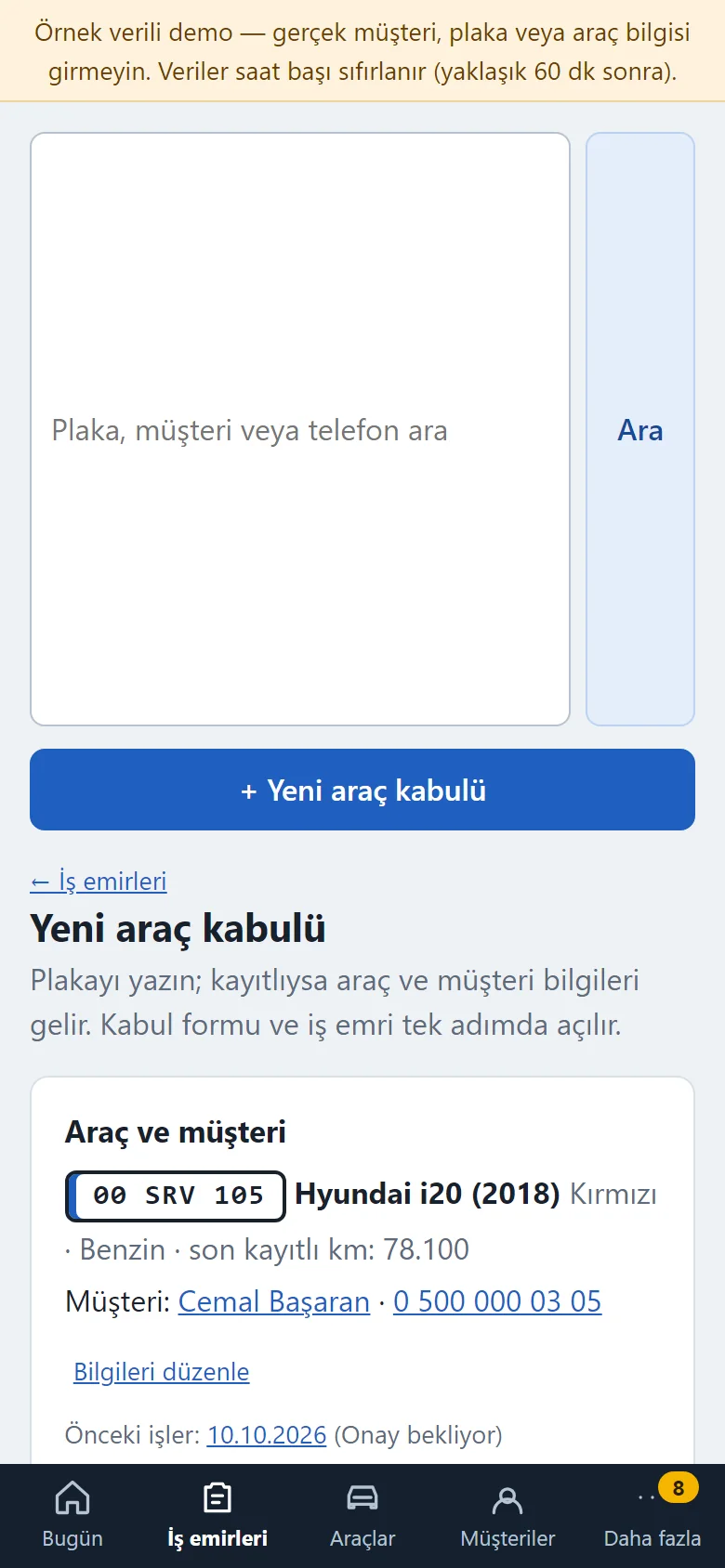
Vehicle intake on a phone
Filled in next to the car in the workshop; the photo field opens the phone camera.
- On screen (Turkish interface)
- “Kilometre” — mileage
- “Müşteri şikâyeti / talebi” — customer complaint / request
- “Kabul fotoğrafları” — intake photos
-
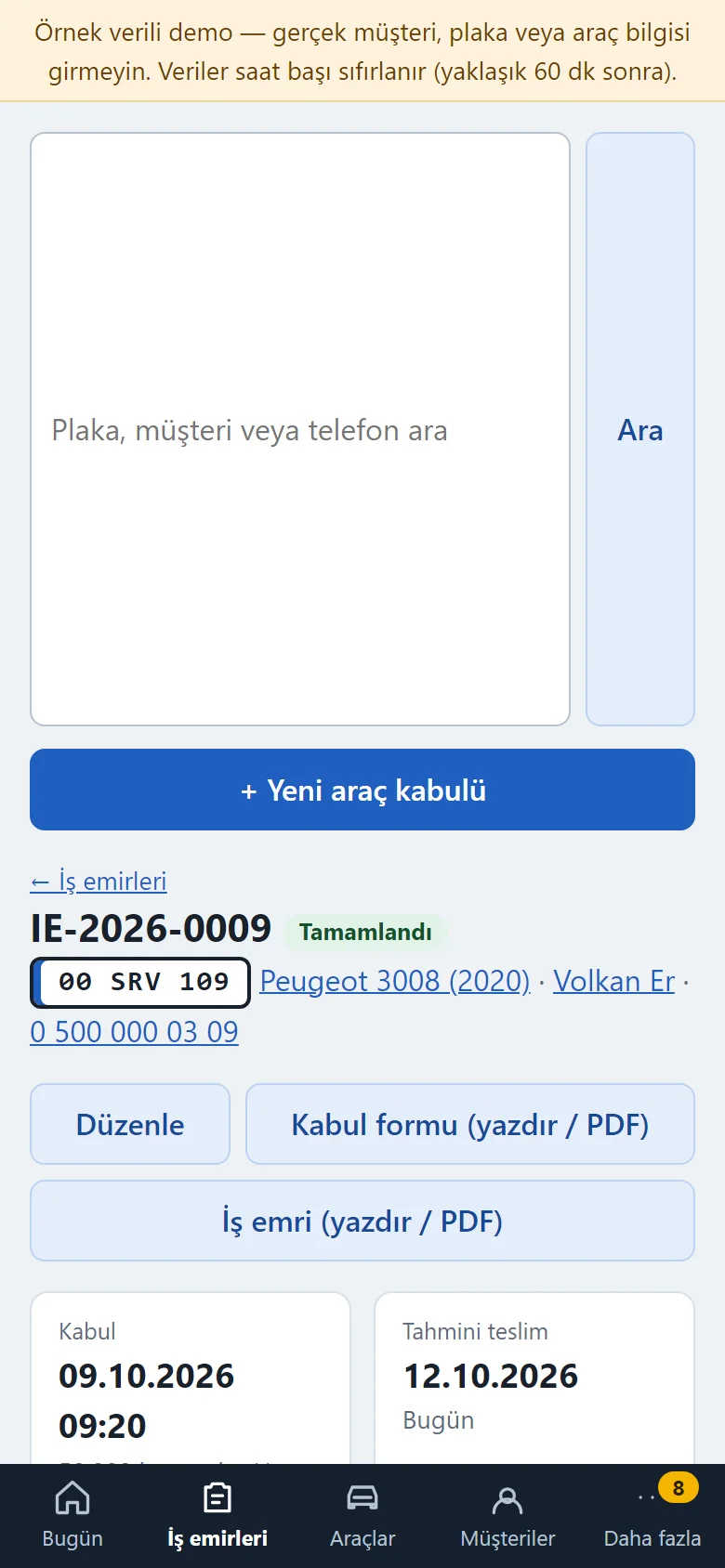
Work order on a phone
The work order on a phone: status buttons, items and payments on one page.
- On screen (Turkish interface)
- “Durum” — status
- “Parça ve işçilik” — parts and labour
- “Tahsilat kayıtları” — payment records
- What do they see at the end?
- Every work order shows the vehicle, customer, complaint, items, total, customer approval, payments and history together; jobs due, those awaiting approval, low stock, upcoming service and open balances are gathered in the daily summary.
- What is it good for?
- Intake, damage notes, approval, parts and payments do not scatter across a ledger, paper slips and WhatsApp; which stage a car is at and which job is unpaid can be followed in one place.
Everything that is not included, and all limits
- Not delivered to a client and not used by a real repair shop. The shop on the screens (“Örnek Oto Servis”), the cars, people, phone numbers, plates, parts and amounts are made up; no real customer or plate details should be entered in the demo.
- The car pictures in the demo are sample drawings, not real photos, and photo upload is switched off in the demo.
- There is no online payment, virtual POS or bank connection: payments and refunds are records only, and the app takes no payment.
- There is no automatic SMS or WhatsApp sending: the message text comes ready and the shop sends it from its own phone. The appointment, reminder and balance lists only show on screen; no notification is sent.
- There is no e-invoice, e-archive or accounting; VAT is only an amount display, not an invoice. There is no customer ledger, cash and bank, multi-branch view or barcode reader.
- There is no official lookup of a plate, VIN or inspection and no GPS vehicle tracking; the shop enters the inspection, insurance and service dates.
- There is no document storage (registration papers, PDFs) and no store app; the panel opens in a phone browser.
- Tried locally with PHP 8.3 and SQLite, and on a DirectAdmin/LiteSpeed demo account with PHP 8.3; it has not been tried on any other hosting or PHP version. There is no MariaDB or MySQL support; only SQLite is used.
- In the demo the data is reset every hour; the sign-in page has the manager account prefilled and a “Demo hesapları” (demo accounts) box with “Yönetici olarak gir” (enter as manager) and “Çalışan olarak gir” (enter as employee) buttons that need no password (the notice and the box show only in the demo). A normal installation asks for an e-mail and password.
- The interface in the screens is Turkish; there is no English interface in the panel.
Delivery and sales status
How does it work?
You try the demo and tell us about your shop, and we send you a quote. We install it and we host it. The yearly price includes installation, hosting, data transfer and support.
Price
The yearly list price is 2,500 TL. Installation, one year of hosting, data transfer, bug fixes and written usage support are included. You send the status and appointment messages to customers yourself from WhatsApp; automatic SMS, e-Archive / e-invoice, AI analysis, multiple branches, card collection and a store app are not included. New feature requests and work beyond the scope are priced separately and you are told before anything is done. The renewal price is notified in writing at least 30 days before the term ends. The payment method and the paperwork are settled in the quote.
Possible delivery options
Other delivery options
Requirements and version history
Installation requirements
- It uses plain PHP 8.1 or newer and SQLite; no separate database server is needed, and MariaDB or MySQL are not supported. The product was tried locally and on the demo account with PHP 8.3; it has not been tried on other PHP versions.
Release notes
- No version has been delivered to a client. A live sample-data demo exists; the live demo runs version 1.4.1.
- 1.4.1 (28 October 2026): the mechanic filter on the work board now lists the mechanics assigned to open work orders, with their job counts, and not only the user accounts.
- 1.4.0 (28 October 2026): a damage map: at intake you tap a car drawing to mark a scratch, dent / ding, crack, paint damage, replaced part or other (up to 30 points); the same map is edited on the work order page, is read-only on a delivered or cancelled work order, changes are written to the history, and the intake form printout carries the map and a numbered damage list. A work board: open jobs in four columns (intake / inspection, awaiting approval, in progress, ready for delivery), counters for in the shop, ready, late and promised for today, and a mechanic filter. The database schema moves to 3 by itself (only one new table is added).
- 1.3.0 (28 October 2026): a sign-in-free customer page: the customer picks a day and time and sends an appointment request with a name, phone, plate and the work needed; a request does not block the slot until the business approves it, and is approved or rejected under “Incoming appointment requests” on the Appointments page (clash and closed-day warning); the customer’s own status page: appointment status and job-order status (“car received”, “in progress”, “ready”), plate half-masked, internal notes, costs and phone are not shown, the amount only if the setting is on; a ready WhatsApp status message in one tap from the job order; “Add to calendar” on a confirmed future appointment (a Google Calendar link and an .ics, a reminder one hour before; no name, phone, plate or amount is added); taking requests can be switched off in settings; two new tables are added and existing data is kept. 1.2.1: one-tap manager and employee screens from the product page (demo only).
- 1.1.4 (26 October 2026): on a work order that has a payment, staff see a “contact the manager” note instead of the Cancel form.
- 1.1.3 (21 October 2026): customer and vehicle import from Excel/CSV for the manager only: file upload or paste, columns recognised from the header, a preview before saving, the same phone number counts as one customer and the same plate as one vehicle and nothing is added twice, the last import can be undone.
- 1.1.2 (18 October 2026): demo sign-in page: a demo notice, fields prefilled with the manager account and password-free “… olarak gir” (sign in as …) buttons for manager and employee (demo mode only; on a real installation there is no notice, box or prefilled field).
- 1.1.1 (18 October 2026): a demo-only header with a copyright-free (CC0) photo on the main screen of the sample-data demo; the vehicle intake angle drawings did not change.
- 1.1.0 (14 October 2026): a part on a quote is kept separate from a part actually used — it stays on the quote while the work order is at intake, inspection or awaiting approval and is deducted from stock when the customer approves and the job goes in progress; it returns if the job is taken back to the quote stage or cancelled; the parts list shows the quoted quantity.
- 1.0.1 (12 October 2026): the top search box no longer stretches at a phone width.
- 1.0.2 (13 October 2026): vehicle details and the tables in the print forms fit a phone width without sideways overflow.
- 1.0.0 (12 October 2026): first version; customer and vehicle records, plate search, vehicle intake and photos, work order items and totals, statuses and customer approval, parts stock, payment records, printable intake form and work order, appointments and reminders, a ready WhatsApp text, a daily summary and reports, CSV, manager and employee roles, loading and clearing sample data.
Decisions not made yet
- Rights to use, modify, transfer and receive the source code: to be set in a written agreement; not decided yet.
- Whose name the hosting and domain are opened in, and where the software is installed, have not been decided yet.
There is no cart, customer account or online payment on this site for now. Reach out by phone, WhatsApp or the form; in a first conversation your need and the software’s fit are reviewed. The form does not create an order, a contract or a payment.