Associations and communitiesDemo with sample data
Dost Yuva: screen-by-screen guide
The full version of the short description on the product page: every feature, how each screen is used step by step, all limits and the delivery details.
All features
Every feature listed here can be seen in the screenshots.
- Listings filtered by species, city, age, health and temperament, plus search
- Adoption application form; applications are tracked by status in the panel
- A listing posted by a visitor goes live once the admin approves it
- Site name and main colour are changed from the panel and apply site-wide
Screen by screen: how it is used
The demo’s interface is in Turkish and there is no English version; only the captions and explanations on this page are in English.
- Who uses it?
- A visitor who wants to adopt a pet, and the association or volunteer group that publishes the listings and reviews the applications.
- Where do they start?
- The visitor goes from the home page to the listings. The association side starts from the panel that opens with the “Yönetici” (admin) login; in the demo the login details are shown on the screen.
What do they do on screen? Step by step
-
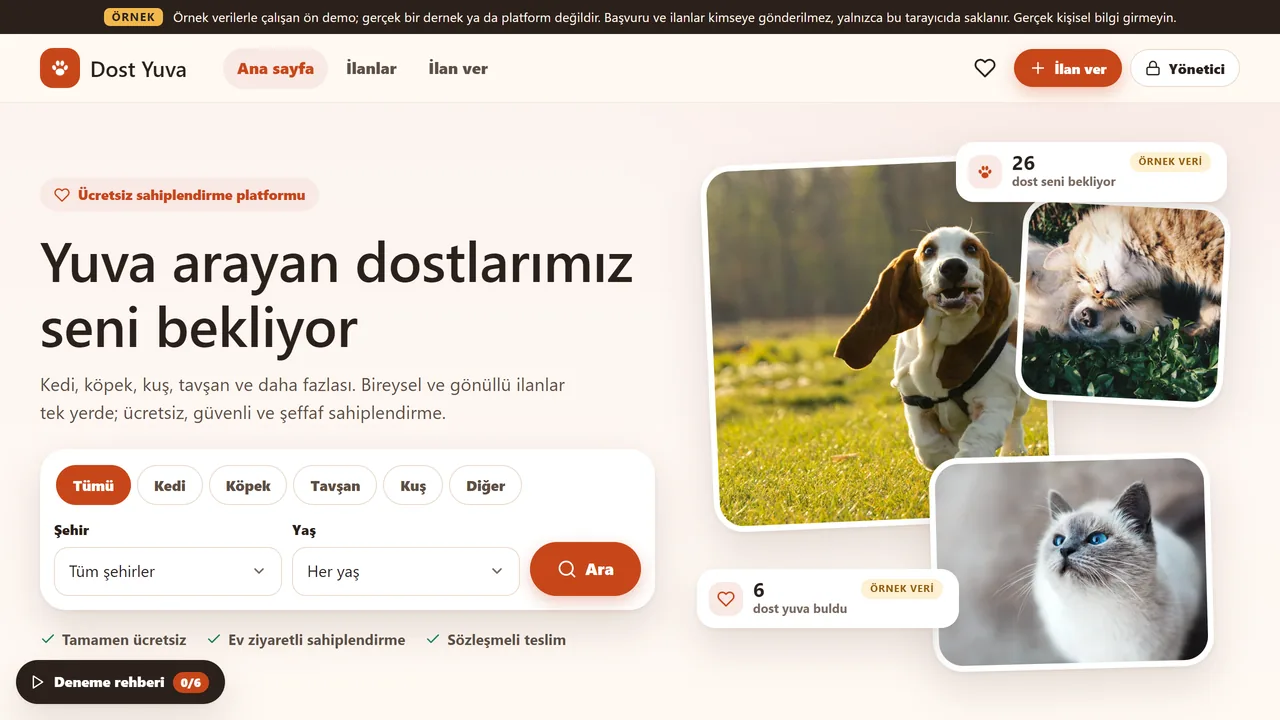
Home page
Shortcuts by kind of animal and the latest listings. The numbers are sample data.
- On screen (Turkish interface)
- “Ana sayfa / İlanlar / İlan ver / Yönetici” — top nav: Home / Listings / Post a listing / Admin
- “Ücretsiz sahiplendirme platformu” — small badge above the heading
- “Tamamen ücretsiz · Ev ziyaretli sahiplendirme · Sözleşmeli teslim” — trust badges: completely free · home-visit adoption · contract-based handover
- “Deneme rehberi” — guided-tour button, with a step counter
-
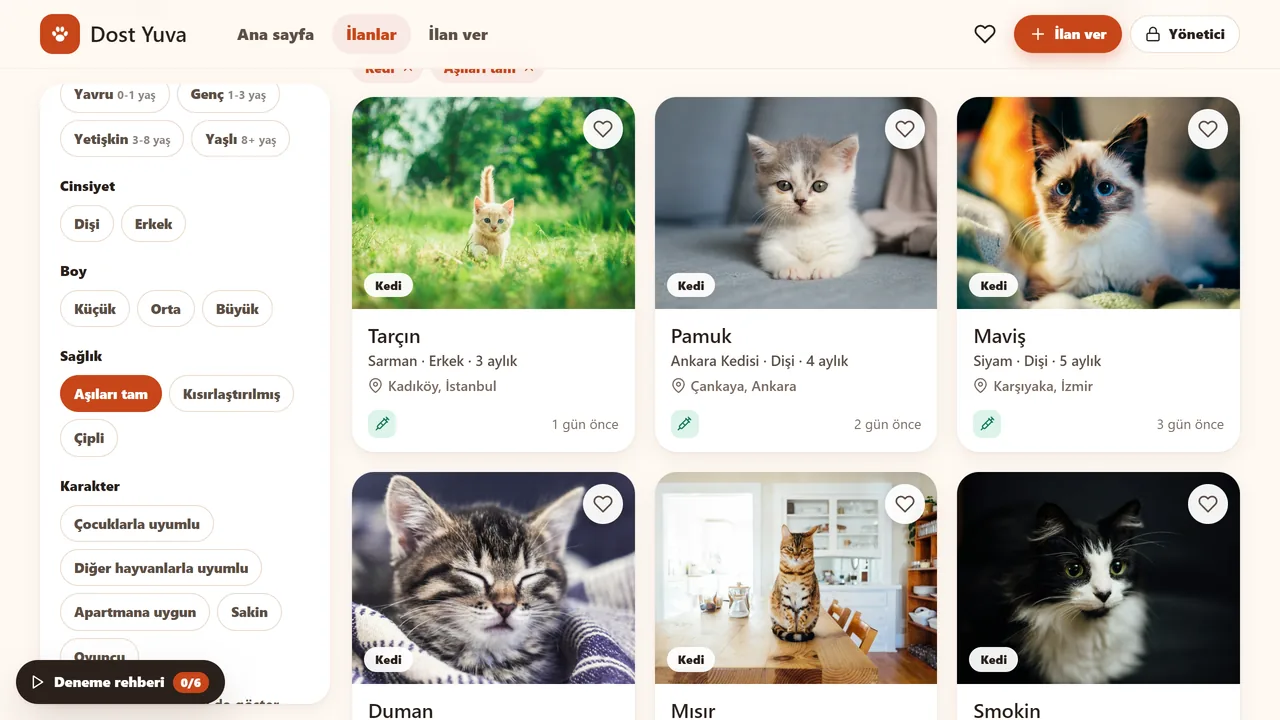
Filter the listings
Filter by species, city, age, health and temperament (here: cats with complete vaccinations).
- On screen (Turkish interface)
- “Yavru 0-1 yaş / Genç 1-3 yaş / Yetişkin 3-8 yaş / Yaşlı 8+ yaş” — age filter options
- “Cinsiyet: Dişi / Erkek” — gender: female / male
- “Boy: Küçük / Orta / Büyük” — size: small / medium / large
- “Sağlık: Kısırlaştırılmış / Çipli” — health: neutered-spayed / microchipped
- “Karakter: Çocuklarla uyumlu / Diğer hayvanlarla uyumlu / Apartmana uygun / Sakin” — temperament tags
-
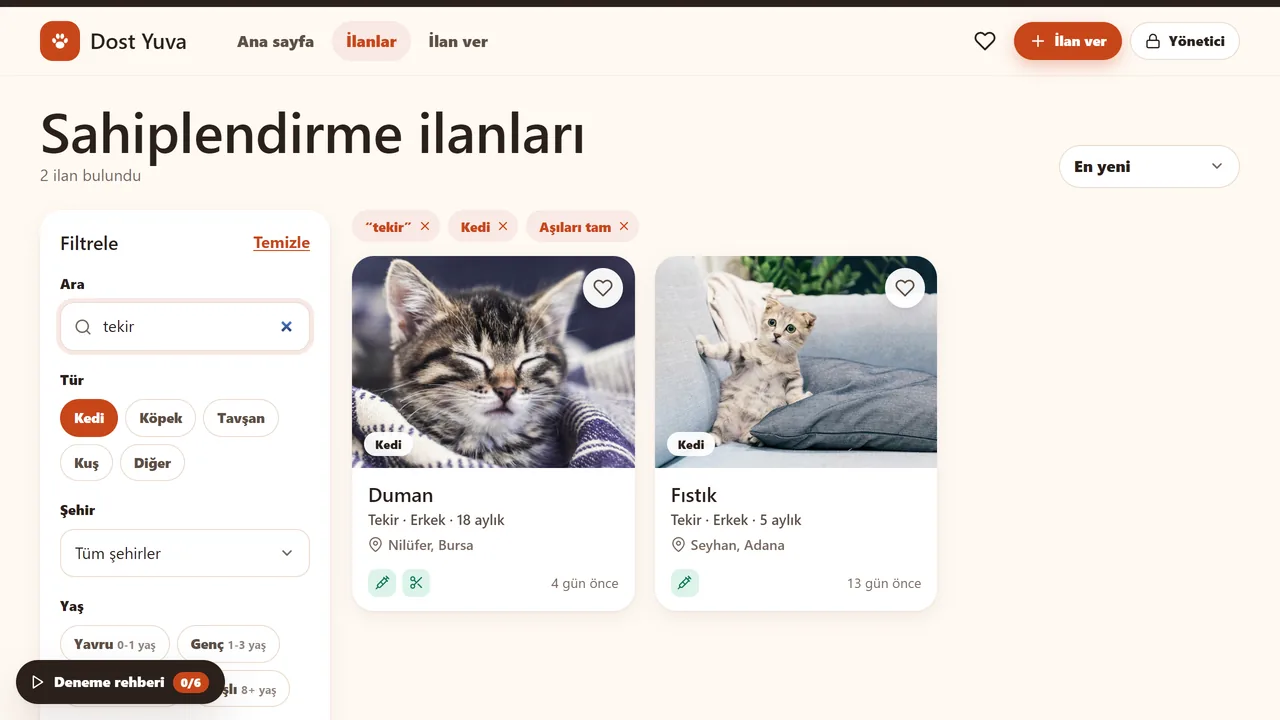
Search
Type a name, breed or city and the list narrows (here: “tekir”, tabby).
- On screen (Turkish interface)
- “Sahiplendirme ilanları” — page title
- “2 ilan bulundu” — result count
- “En yeni” — sort-by: newest first
- “18 aylık / 5 aylık” — age shown on listing cards
-
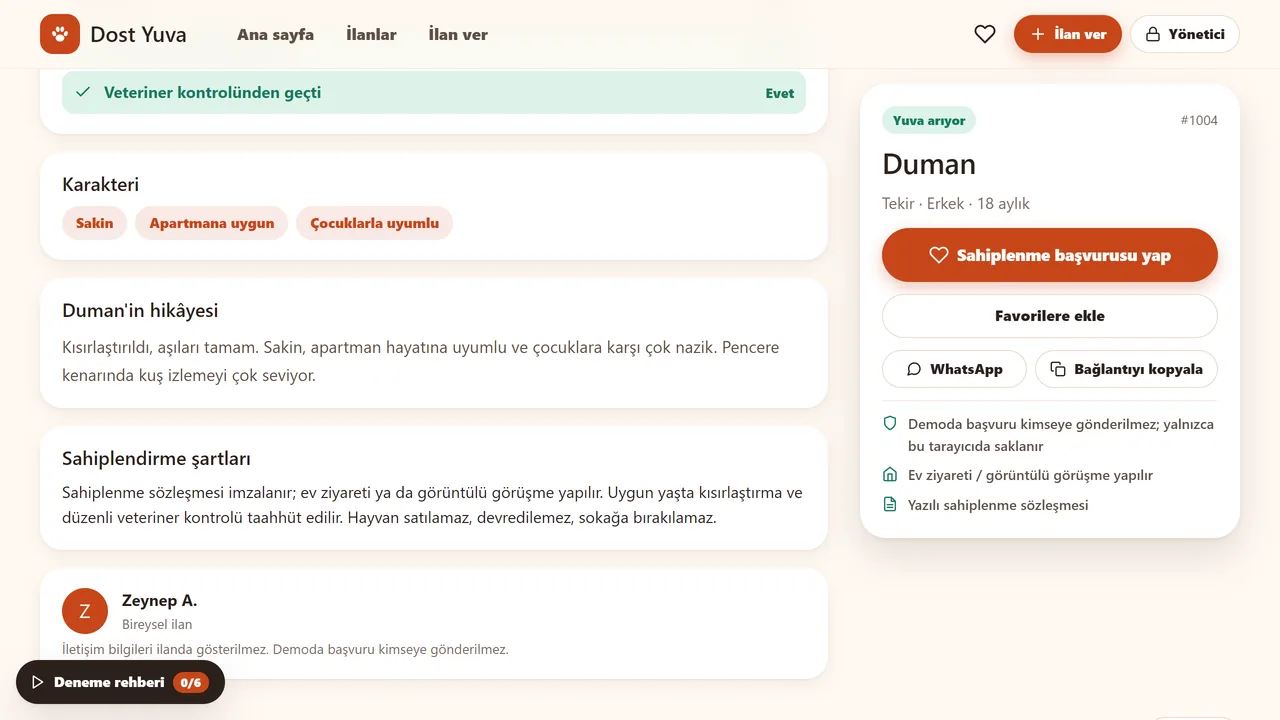
Listing page
The animal’s health, temperament and story together. The adoption application starts here.
- On screen (Turkish interface)
- “Sahiplenme başvurusu yap” — primary button: apply to adopt
- “Favorilere ekle” — add-to-favourites button
- “Yuva arıyor” — status badge: looking for a home
- “Veteriner kontrolünden geçti: Evet” — passed veterinary check: yes
- “Demoda başvuru kimseye gönderilmez; yalnızca bu tarayıcıda saklanır” — note: applications aren’t sent anywhere, stored only in this browser
-
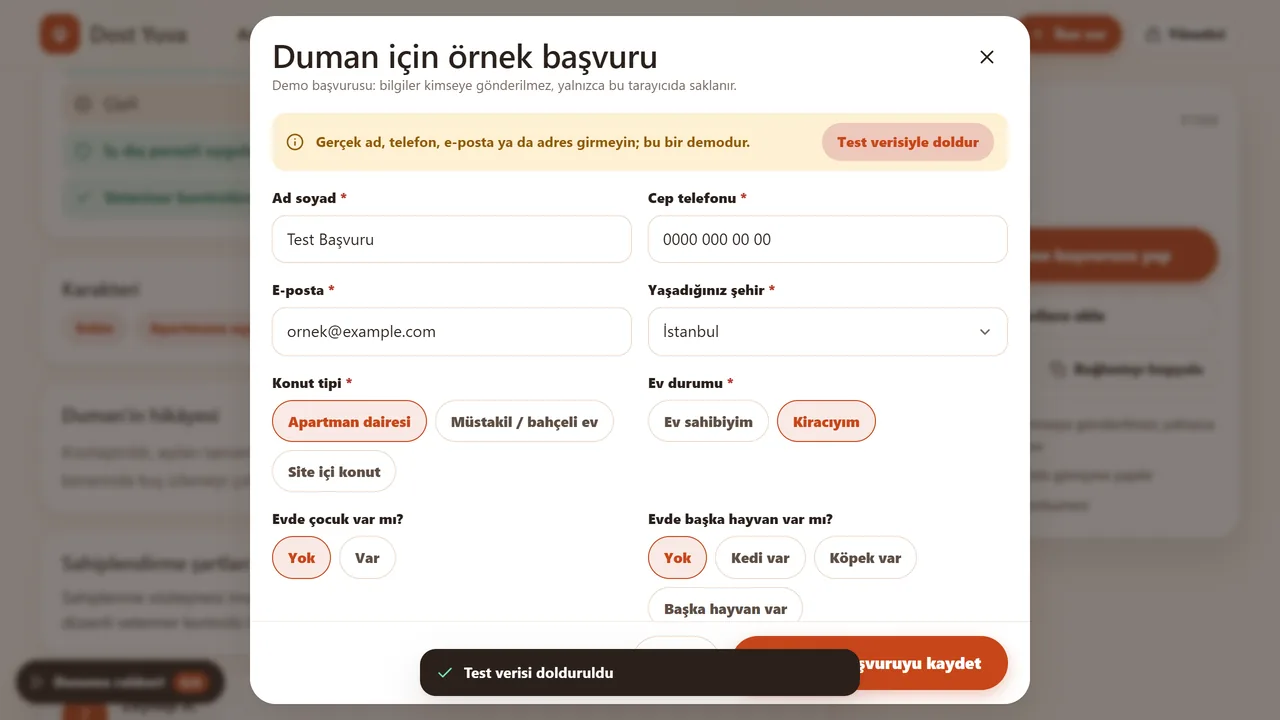
Application form
Someone who wants to adopt fills in the form. The demo asks for no real details; a “Test verisiyle doldur” (fill with test data) button writes sample values.
- On screen (Turkish interface)
- “Gerçek ad, telefon, e-posta ya da adres girmeyin; bu bir demodur.” — warning: don’t enter real details, this is a demo
- “Ad soyad / Cep telefonu / E-posta / Yaşadığınız şehir” — form field labels
- “Konut tipi: Apartman dairesi / Müstakil-bahçeli ev / Site içi konut” — housing type options
- “Ev durumu: Ev sahibiyim / Kiracıyım” — home status: own / rent
-
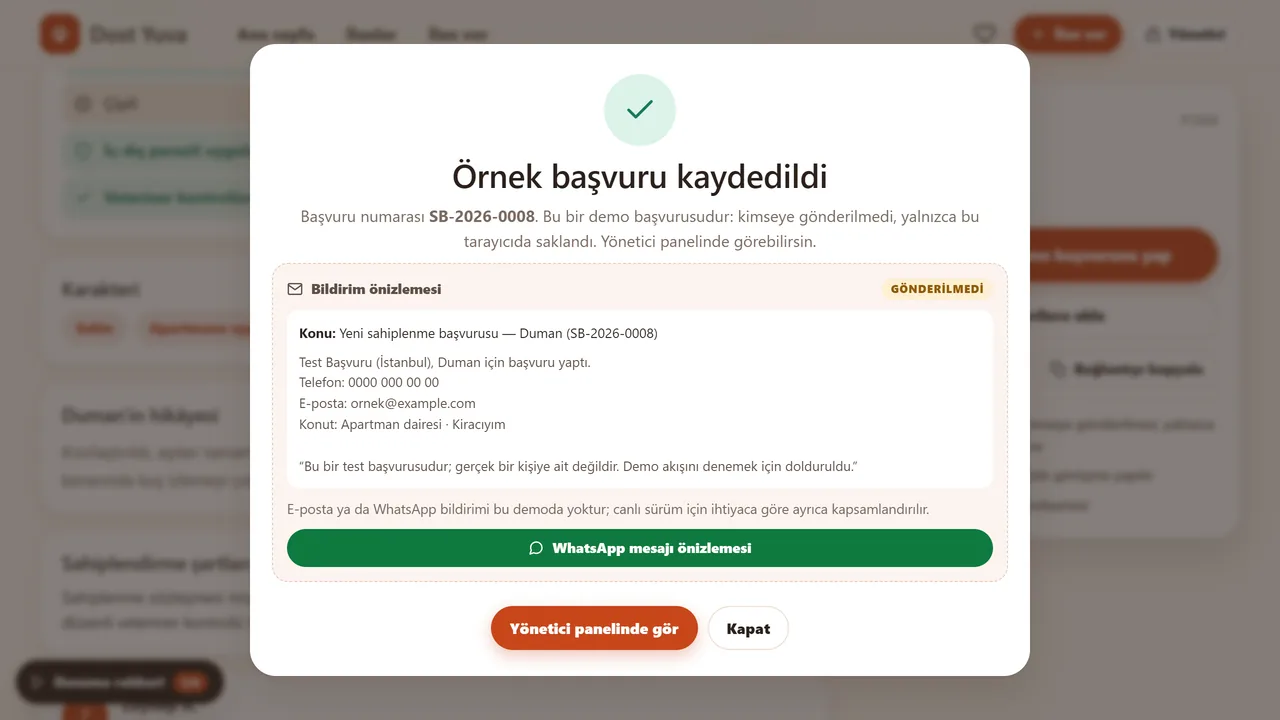
Result
The application is not sent to anyone; it is stored only in this browser.
- On screen (Turkish interface)
- “Örnek başvuru kaydedildi” — confirmation title
- “GÖNDERİLMEDİ” — “NOT SENT” badge
- “Bildirim önizlemesi” — notification-preview heading
- “E-posta ya da WhatsApp bildirimi bu demoda yoktur” — note: no email/WhatsApp notification in this demo
-
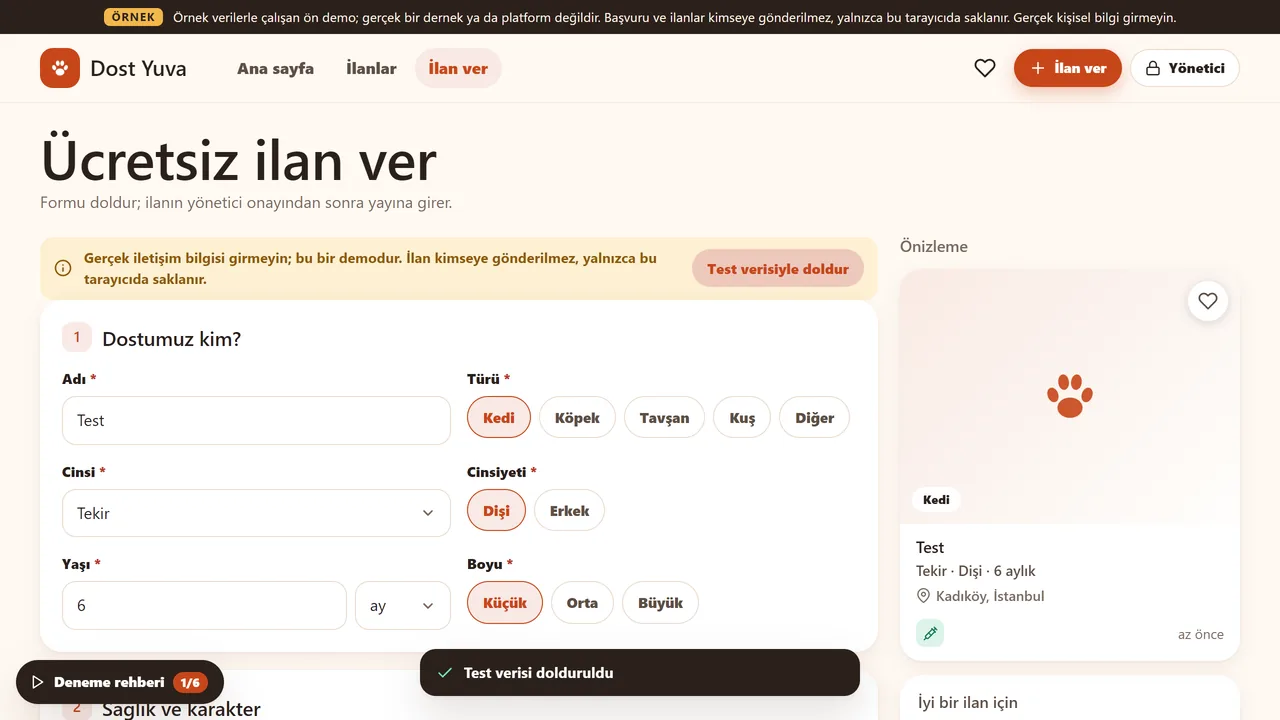
Visitors can post a listing too
The listing form can also be filled with test data.
- On screen (Turkish interface)
- “Ücretsiz ilan ver” — page title: post a free listing
- “Formu doldur; ilanın yönetici onayından sonra yayına girer.” — note: listing goes live after admin approval
- “1 Dostumuz kim?” — step 1 heading: who’s our friend?
- “Cinsi / Yaşı / Boyu” — form fields: breed / age / size
- “Sağlık ve karakter” — step 2 heading
-
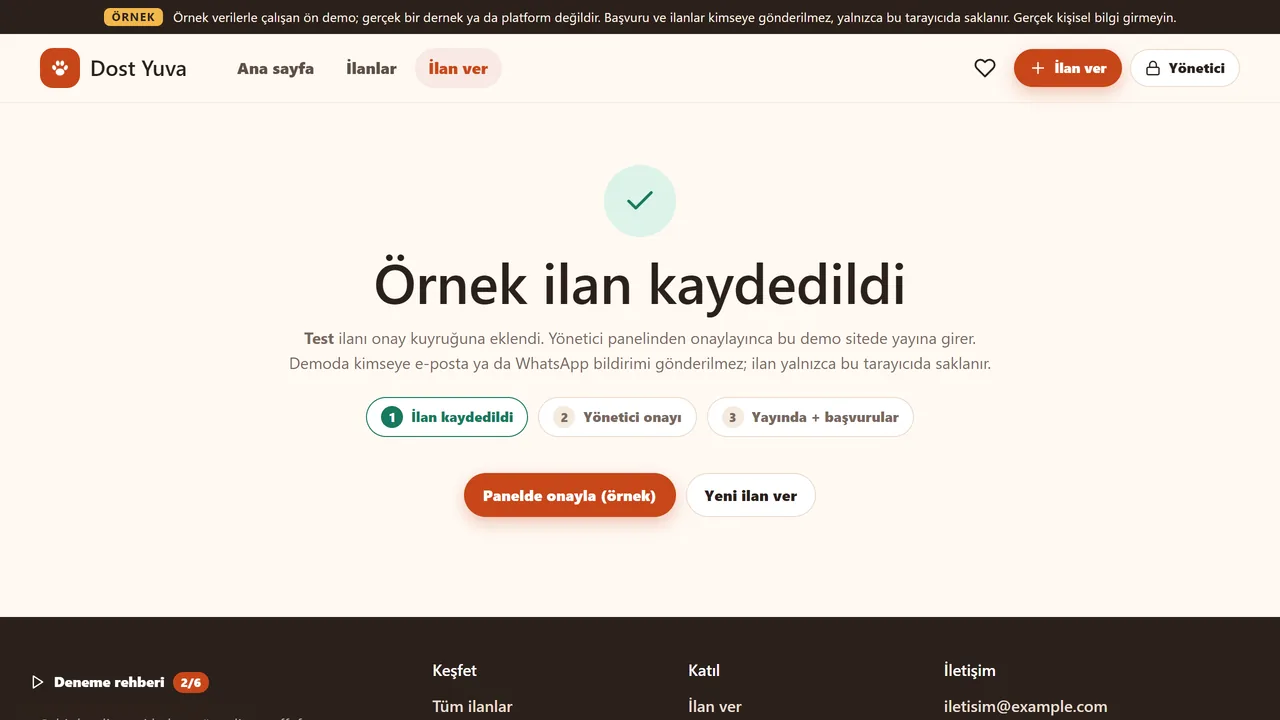
The listing awaits approval
A posted listing is not published straight away; it goes to the admin for approval.
- On screen (Turkish interface)
- “Örnek ilan kaydedildi” — confirmation title
- “İlan kaydedildi / Yönetici onayı / Yayında + başvurular” — 3-step progress tracker
- “Yönetici panelinden onaylayınca bu demo sitede yayına girer.” — note explaining the approval step
-
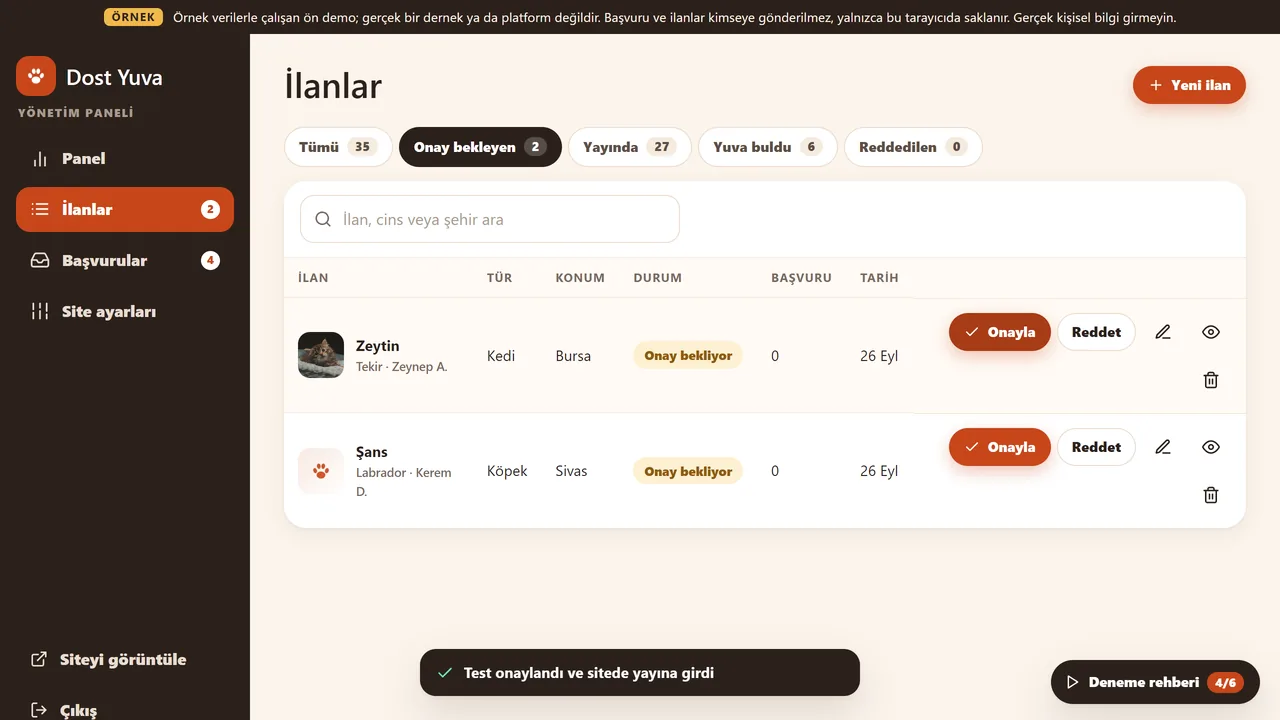
The admin approves it
In the panel, the pending listing is put live with “Onayla” (approve).
- On screen (Turkish interface)
- “Panel / İlanlar / Başvurular / Site ayarları” — admin sidebar nav
- “Tümü 35 / Onay bekleyen 2 / Yayında 27 / Yuva buldu 6” — status-tab counts
- “İLAN / TÜR / KONUM / DURUM / BAŞVURU / TARİH” — table column headers
- “Reddet” — reject button next to Approve
-
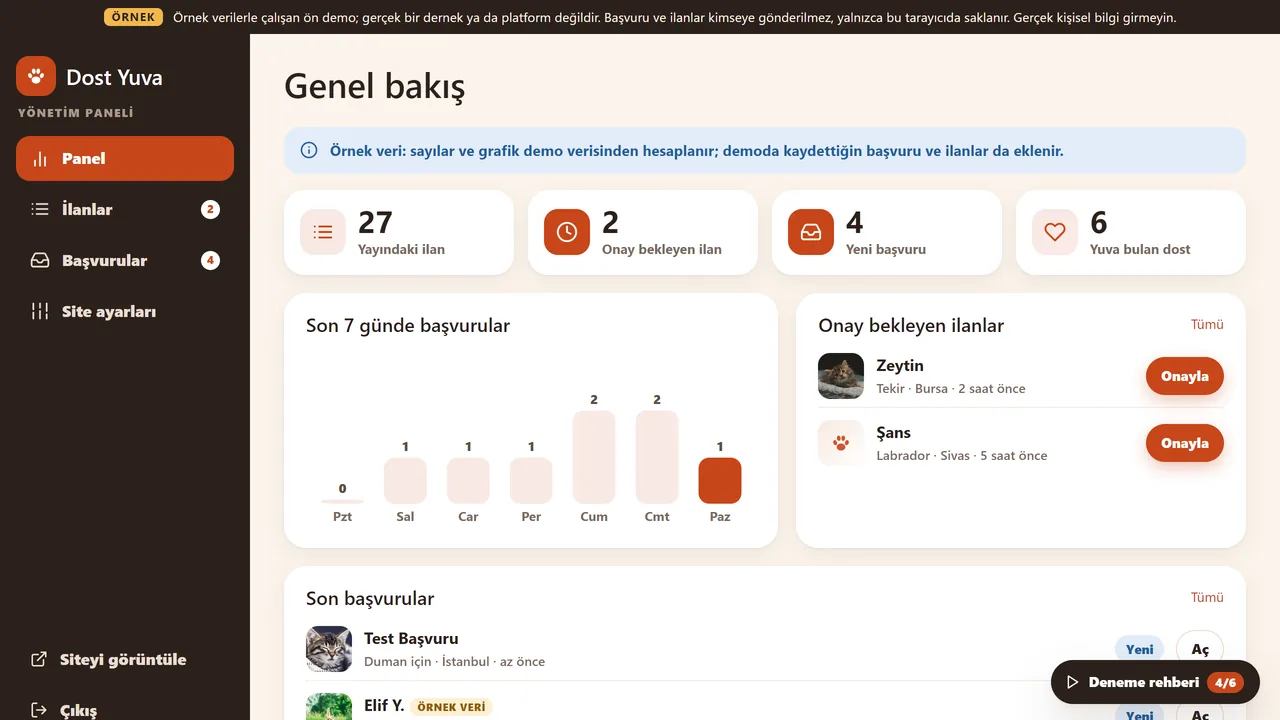
Panel overview
Live listings, listings awaiting approval, new applications, pets that found a home, and the latest applications. The figures are sample data.
- On screen (Turkish interface)
- “Genel bakış” — page title
- “Son 7 günde başvurular” — chart heading: applications in the last 7 days
- “Onay bekleyen ilanlar” — card: listings awaiting approval
- “Son başvurular” — card: recent applications
-
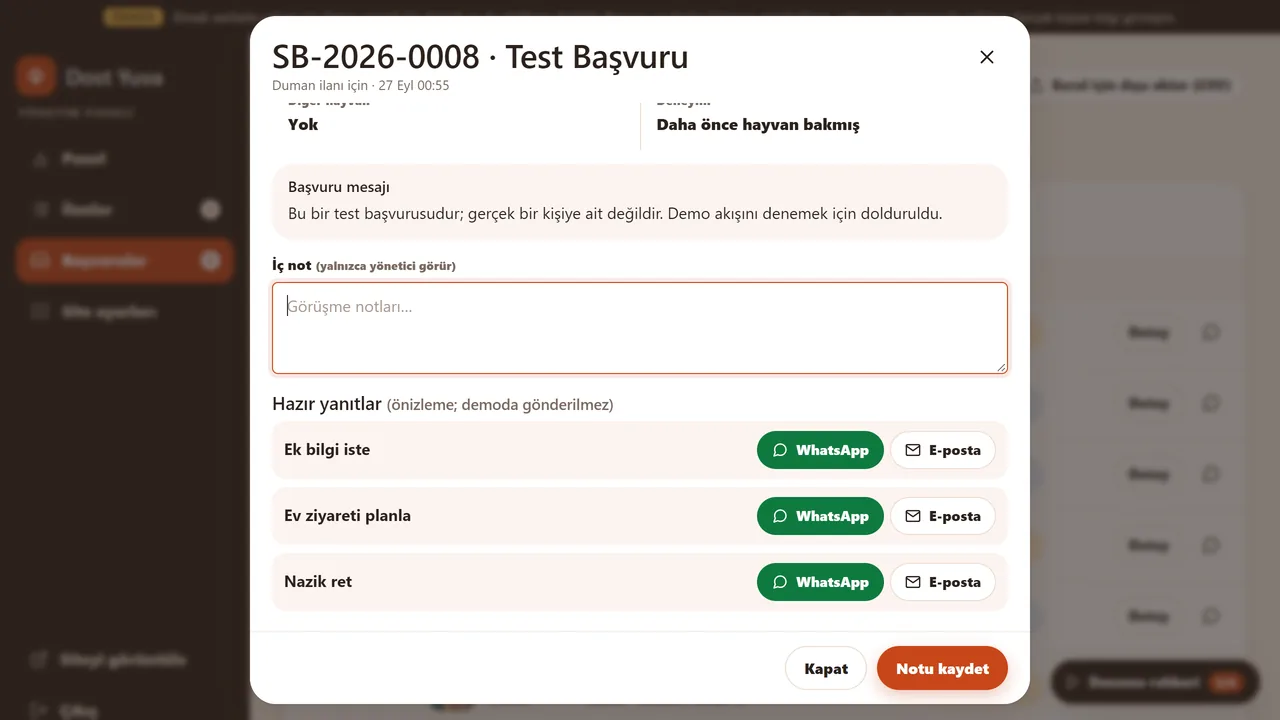
Application details
The application’s status is changed, a note only the admin sees is written, and ready-made replies are previewed. Nothing is sent in the demo.
- On screen (Turkish interface)
- “İç not (yalnızca yönetici görür)” — internal, admin-only note field
- “Hazır yanıtlar (önizleme; demoda gönderilmez)” — canned replies, preview only
- “Ek bilgi iste / Ev ziyareti planla / Nazik ret” — reply templates
-
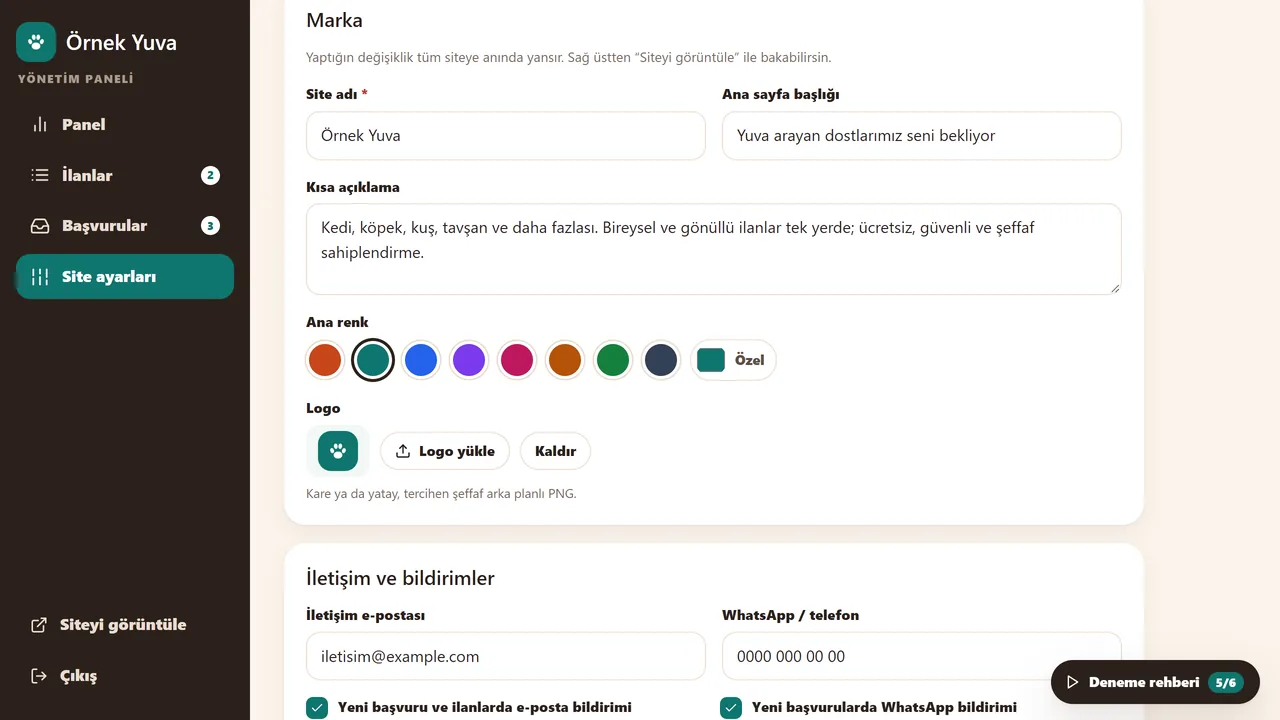
Site settings
The site name, short description and main colour are changed in the panel.
- On screen (Turkish interface)
- “Marka” — section title: brand
- “Site adı / Ana sayfa başlığı / Kısa açıklama” — site name / homepage heading / short description
- “Ana renk” — main-colour swatch picker
- “Yeni başvuru ve ilanlarda e-posta bildirimi” — email-notification checkbox
-
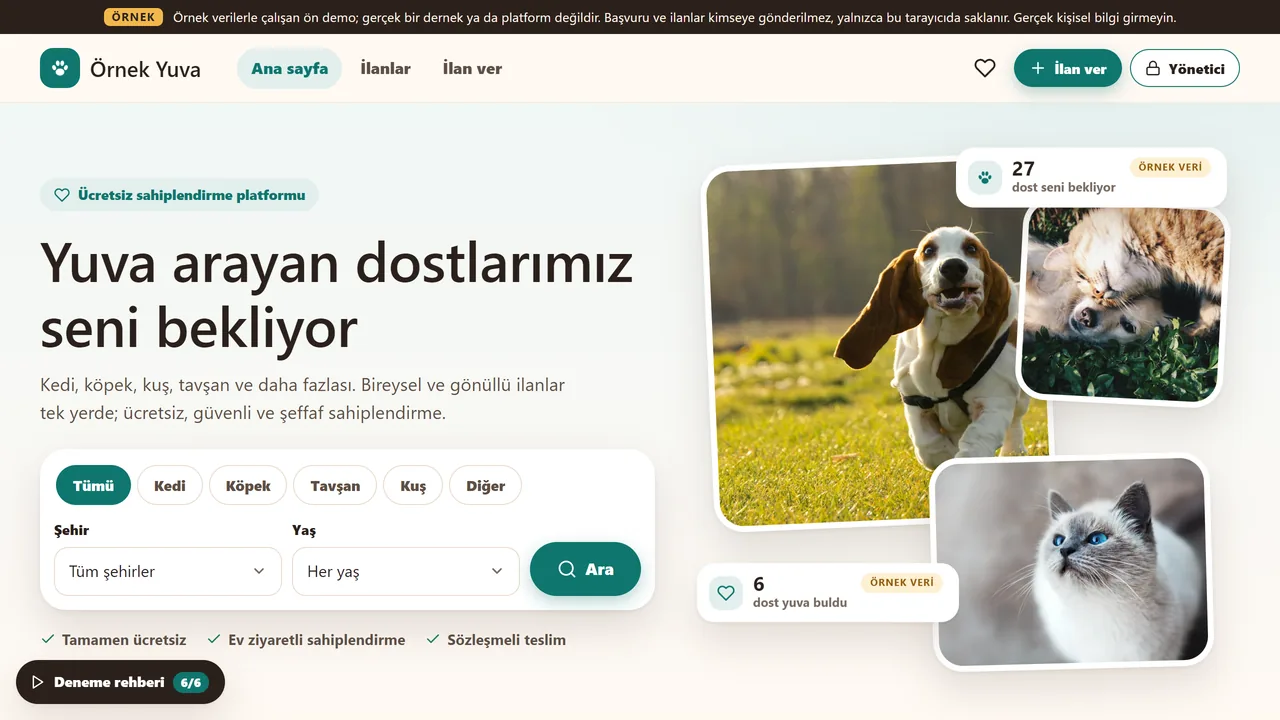
The new look
Once saved, the site name and colour change on the home page straight away (here: “Örnek Yuva”, green).
- On screen (Turkish interface)
- “Deneme rehberi (6/6)” — guided tour, now complete
- What do they see at the end?
- The visitor sees that the application was saved. The association follows it, with its status, in the panel; a listing posted by a visitor goes live once the admin approves it.
- What is it good for?
- The association follows applications in one panel instead of hunting through e-mail and messages, and the listings stay tidy and searchable.
Everything that is not included, and all limits
- Not delivered to a client and not used by a real association or platform; the sales package and price have not been set yet (details: the “Delivery and sales status” section).
- The demo has no server, database, e-mail or WhatsApp notifications, or real user login; applications are not sent to anyone.
- These can only be scoped and built separately, based on your needs.
- Listings, people and numbers are sample data, and photos are from Unsplash. The demo has no English version; its interface is in Turkish.
Delivery and sales status
There is no cart, customer account or online payment on this site for now. Reach out by phone, WhatsApp or the form; in a first conversation your need and the software’s fit are reviewed. The form does not create an order, a contract or a payment.
Possible delivery options
What the package contains
- A sample-data storefront page: listings and a listing page
- The adoption application form and an application number
- A notification preview (nothing is actually sent) and admin panel sections
- Not included: a server, a database, real e-mail or WhatsApp notifications, real user login
Price
There is no list price yet; the price, package and payment method have not been set yet.
Requirements and version history
What you do
- You upload the files to your own web hosting.
- You prepare the listings and images yourself.
Installation requirements
- No server or database is needed; the page files (index.html, style.css, app.js, data.js and the images) are uploaded to your own hosting.
- Applications and changes are kept in the visitor’s own browser and reach nobody. There is no installation guide yet.
- The WhatsApp link goes to wa.me; no other outside server address was found in the page files.
Release notes
- This work has no version number or version history; it is a sample storefront. The source copy is dated 27 September 2026; the published demo differs only in small interface wordings (“Deneme/Örnek” instead of “Demo”). It has not been delivered to a client.
Decisions not made yet
- What the product is exactly: only a sample storefront, or whether a server side will be built separately so that applications really arrive.
- Rights to use, modify, transfer and receive the source code: to be set in a written agreement; not decided yet.
- How the terms of use of the example photos (Unsplash) will be stated in the sales package.
- The price and payment method have not been decided yet.