Sports facilitiesDemo with sample data
Football Pitch and Court Booking Management: screen-by-screen guide
The full version of the short description on the product page: every feature, how each screen is used step by step, all limits and the delivery details.
All features
The flows below were run on a local installation (PHP 8.3, SQLite) with sample data; 801 of the product’s automated checks passed (unit 176, 1.1.0 features 281, version upgrade 36, demo 16, concurrency 20, end-to-end HTTP 244, setup wizard 28). Of 12 simultaneous booking attempts for the same pitch and hour, of 10 simultaneous sales of the last 3 items and of 6 bookings for a pass’s last match, only the allowed number were accepted; a 1.0.1 database was upgraded in place and tried with the new features. The sample-data demo is live (version 1.2.0; added after 1.1.0: the demo sign-in page, customer import from Excel/CSV, hiding the “İptal” (cancel) button staff may not use, the setup guide, the customer link and QR poster, add to phone and free notifications; 79 extra HTTP checks passed for 1.2.0 and on 28 October 2026 it was tried on the live demo with the owner, staff and customer roles in about 80 operations); its address is the button below. Phone-notification delivery on a real phone and the “add to home screen” button were not tried.
- A daily and weekly calendar per pitch: booked, free, pending and closed hours look different, and a clashing booking for the same pitch and hour is refused (also when requests arrive at the same moment)
- A customer booking page made for the facility: customers see the free days and hours, send a request with their name and phone, follow it on a status page and can withdraw a pending request; the business approves it or rejects it with a reason
- Price, deposit received and remaining amount recorded; a ready message text for confirmation, reminder, rejection and cancellation (the business opens it in WhatsApp and sends it itself; the app sends nothing)
- On the status page of a request waiting for approval, a “İşletmeye WhatsApp ile haber ver” (tell the business on WhatsApp) button (1.0.1): the pitch, day, time and name open as a ready message in the business’s WhatsApp; the customer taps “send”, the site sends nothing on its own
- Pitch and court set-up: opening hours for each (including hours that run past midnight), a session length of 30 to 120 minutes, a base price and price rules by day and hour (a weekday daytime discount or an evening tariff, for example)
- A pending request shows the hour as taken; if the business does not answer, the hour is freed again when the approval time runs out
- Adding a booking taken by phone or in person by hand: the price comes from the tariff, the deposit and payment type go in the same form, and a known customer is found by phone
- Recurring weekly bookings (regular teams): the same day and hour for up to 26 weeks; each week is its own record on the calendar, marked with ↻; the series can be extended or cancelled from a date; weeks that are taken or closed are skipped and reported
- A customer book: name, phone, note, booking history, cancelled and no-show counts and the open balance
- The payment type (cash, bank transfer, card) is only a record label; the app takes no payment. Bookings with an amount left to collect show in the booking list with one filter
- Closed hours: close the hours of one pitch or all pitches for maintenance, a tournament or a holiday; they show grey on the calendar and cannot be chosen on the customer page
- A Today screen: the day’s list, occupancy, expected, remaining and received payments and tomorrow’s reminder list
- An occupancy and payment report per pitch for a chosen date range, with a CSV download; owner and staff roles (staff can cancel an extra item only for today; on past days’ items the “İptal” button is shown to the owner only); a panel that works on a phone with a bottom menu
- Importing the customer list from Excel/CSV (owner only): a file upload or pasting from Excel, column recognition from the header, a preview, duplicate phone numbers set apart, undo of the last import; no booking, payment, pass or message is created (.xlsx only when the server has the zip extension)
- Setup guide (1.2.0, owner only): five steps (facility name and phone, pitches, the customer list, the customer link and the first booking request); each step is saved on its own, can be skipped and the next one opens when one is done. On a real installation it opens at the owner’s first sign-in and a “Setup 60% · next step” bar shows on every page until it is finished; each main screen has a closed “Bu ekran ne işe yarar?” (what is this screen for) box. In the demo, the “Boş siteyle yeniden başla” (start again with an empty site) and “Örnek veriyi geri yükle” (restore the sample data) buttons let you try the setup from zero
- Customer link and poster (1.2.0): send the link as a ready WhatsApp message with one tap, copy it, and print an A4 poster with a QR code for the pitch; a password-free “business phone setup” page to send to staff
- Add to phone and free phone notifications (1.2.0): the panel and the customer’s own booking page can be added to the phone’s home screen (the panel icon opens the sign-in page, the customer’s icon opens their own booking); when a new booking request arrives the business’s phone is notified, and a customer who wants it sees a notification on their own phone when their booking is confirmed or changes; an optional notification e-mail in the settings. Notifications are free and no SMS is sent
- Head count and per-person share: for groups the share is worked out automatically; each payment is recorded with who paid and “6 / 8 shares in” is shown
- Snack-bar and extra-item sales (water, tea, cola and the like): written onto the booking’s tab or straight into the till; the total, the amount left, the customer’s balance, the report and the messages follow
- Shoe, vest and ball hire: shown as “out” until returned; partial returns are possible; counted on the Today and Till screens
- Stock tracking: a count per product; sales reduce it, a cancelled sale gives it back, a sale with no stock is refused (also when sales arrive at the same moment); deliveries, wastage and stock counts are logged; a warning shows when stock runs low
- Deposits (held items): money and/or an item such as an ID; closed with a full refund or a deduction with a reason; not counted as revenue, only the deduction becomes income
- An end-of-day till summary (printable): by cash, card and bank transfer — booking payments, over-the-counter sales, passes and deposit movement; the snack-bar breakdown; rentals still out
- Passes / subscriptions: a prepaid match pass (number of matches, last valid day, one pitch only if wanted); bookings and recurring series link to it; a cancellation gives the match back and a no-show uses it
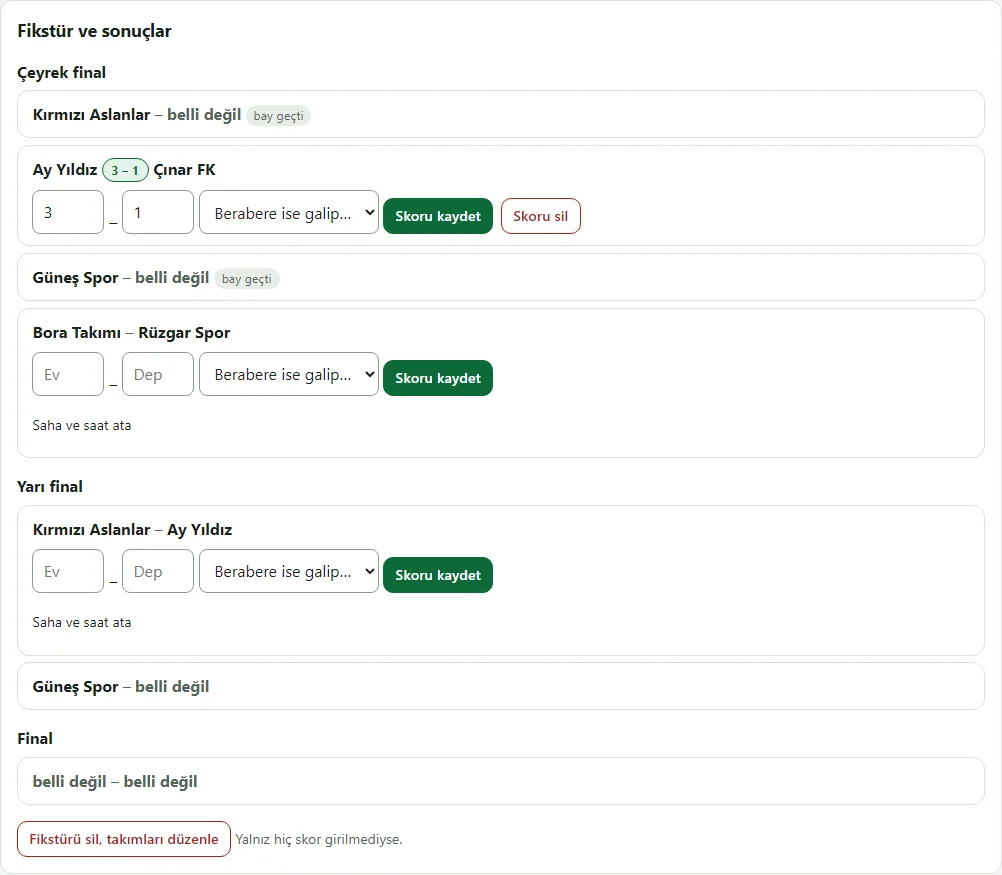
- Tournaments: a league (with a return-leg option) or single-match knockout; teams, entry-fee records, scores and standings, winners moving on in a knockout; a match given a court and time closes that session to bookings
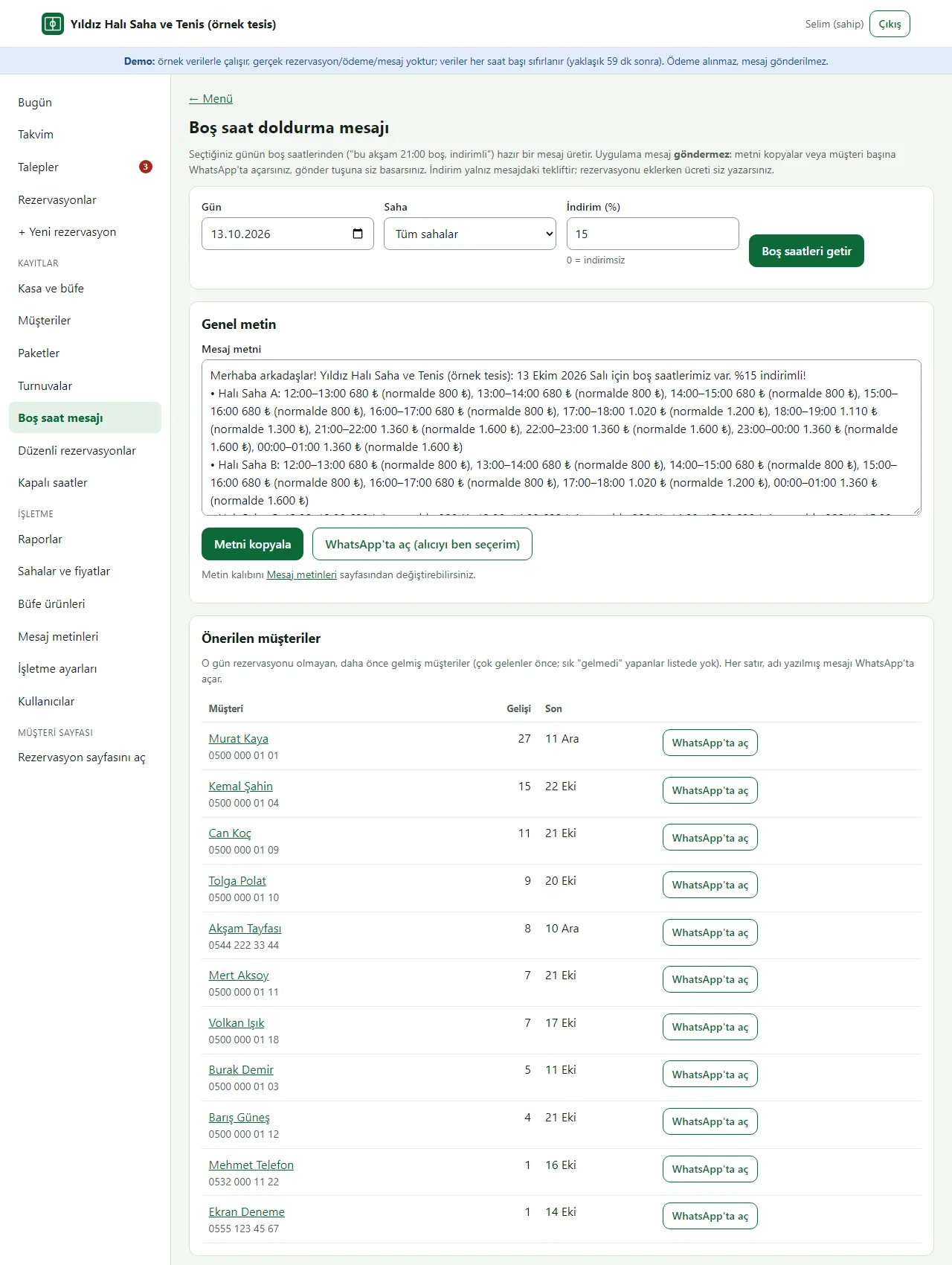
- A free-hour message: a ready, discounted announcement text built from the day’s open hours, with a WhatsApp link per customer who has no booking that day (the business does the sending)
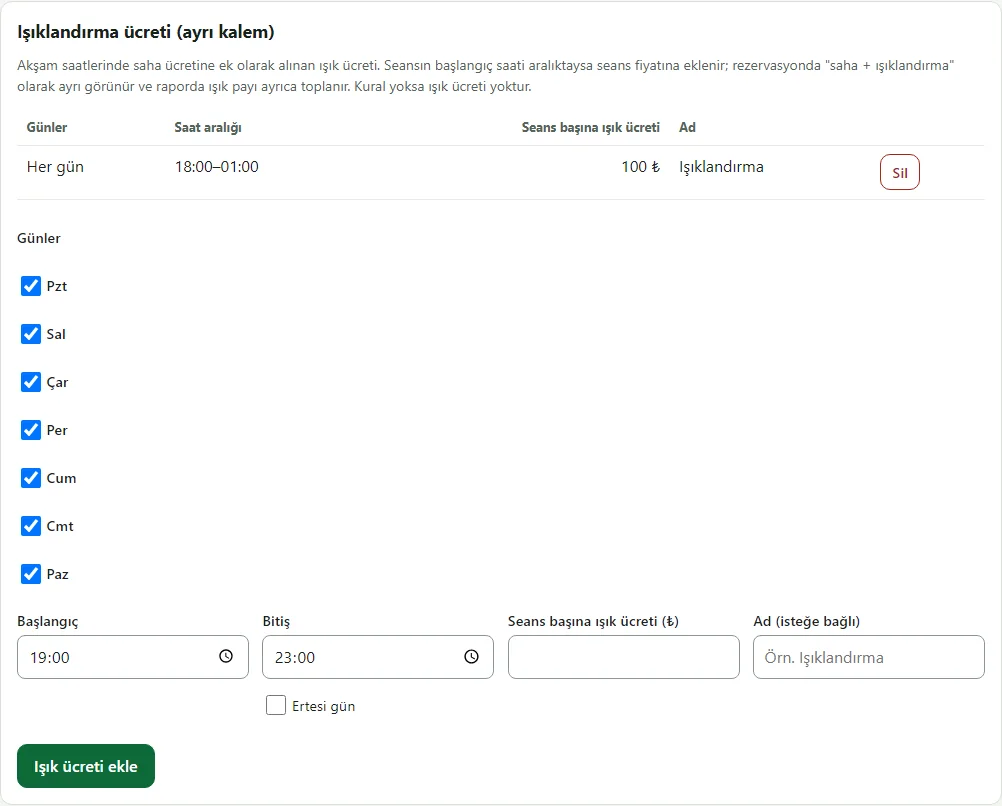
- A floodlight fee: added to the pitch price as a separate line in the evening; a booking shows “pitch + floodlight” and the report totals the floodlight share separately
Screen by screen: how it is used
The app’s interface in these screens is Turkish; only the captions and explanations on this page are in English. The screens come from the app’s own demo mode with sample data; the facility (“Yıldız Halı Saha ve Tenis”, a made-up name), the people, the phone numbers and the amounts are sample data. The panel sign-in page comes from the live demo (version 1.1.1), the other screens from the app’s own demo mode. The phone views were taken with a browser set to a phone’s size. On very long pages only the first part is shown.
- Who uses it?
- The customer who picks an hour and sends a request; the facility owner, who runs the calendar, requests, payments and reports; staff who handle bookings.
- Where do they start?
- The customer taps a free hour on the facility’s own page. The business signs in to the panel and starts at the Today screen.
What do they do on screen? Step by step
-
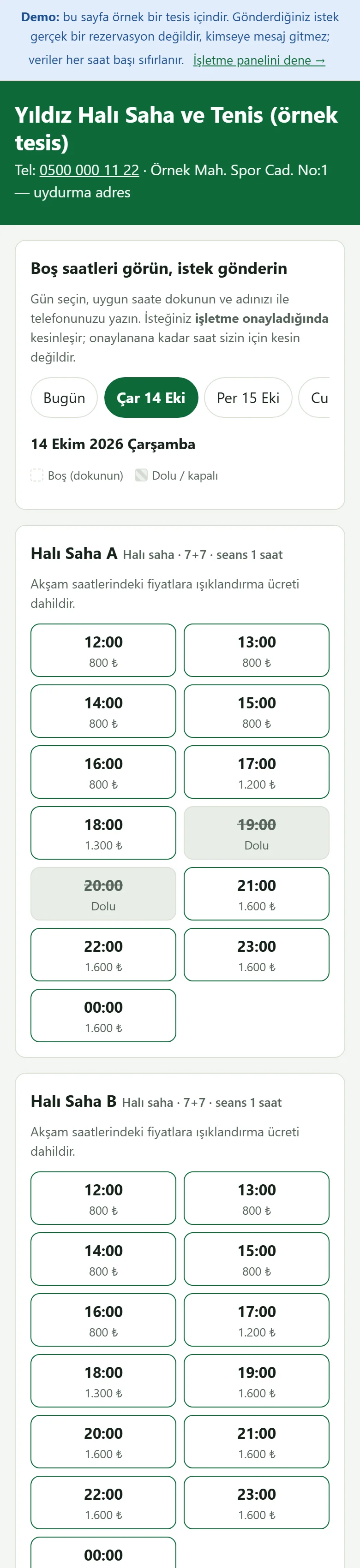
Customer page: free hours
The facility’s own page as a customer sees it on a phone: day buttons and the hours for each pitch. Taken and closed hours are struck through, and who booked them is not shown. The page is long; the picture shows the first part.
- On screen (Turkish interface)
- “Boş saatleri görün, istek gönderin” — see free hours, send a request
- “Dolu / kapalı” — taken / closed
- “Bugün” — today
-
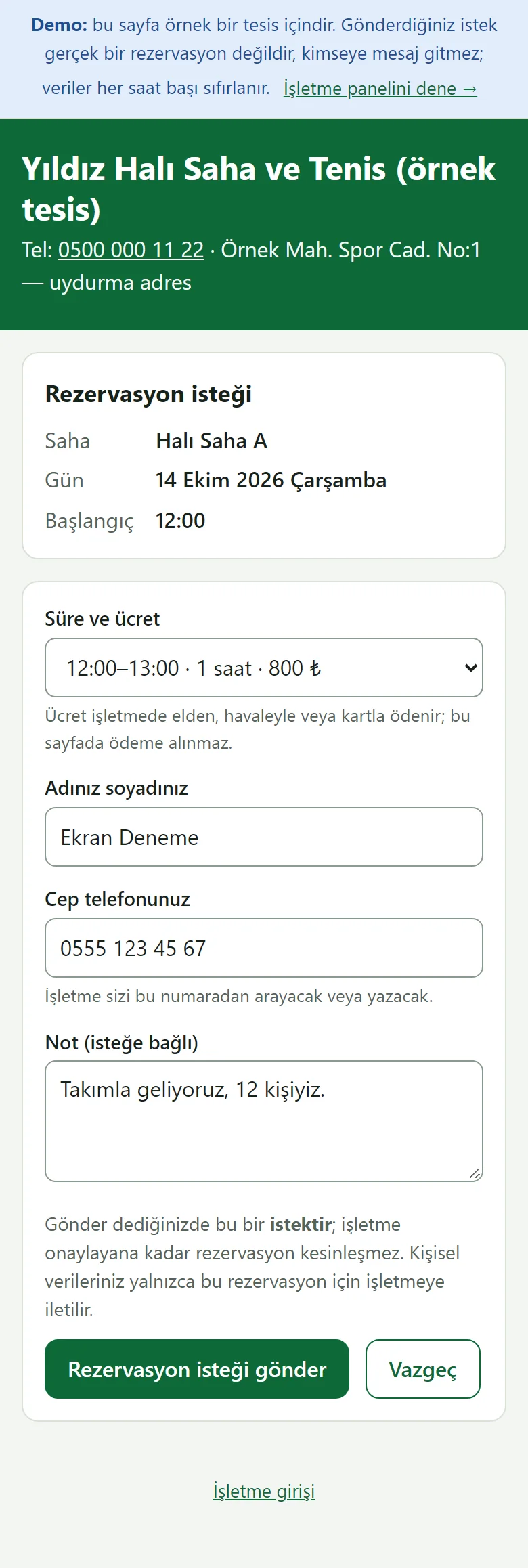
Booking request form
The customer picks the length, writes a name and a phone number. This is a request: it is not final until the business approves it, and no payment is taken on this page. In the picture the form is filled in but not sent.
- On screen (Turkish interface)
- “Rezervasyon isteği gönder” — send the booking request
- “Süre ve ücret” — length and price
- “Adınız soyadınız / Cep telefonunuz” — your name / your mobile phone
- “Vazgeç” — cancel
-
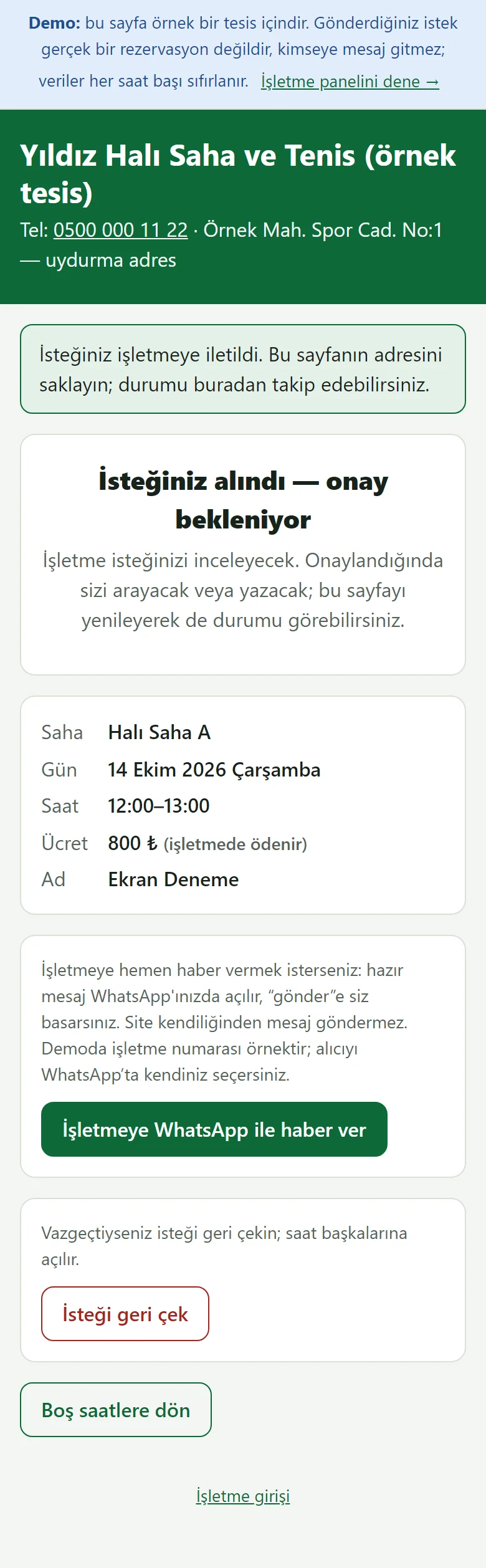
Request sent: status page
The request reaches the business. The customer follows it from this page’s address and can withdraw it until the business approves it.
- On screen (Turkish interface)
- “İsteğiniz alındı — onay bekleniyor” — your request is received — waiting for approval
- “İsteği geri çek” — withdraw the request
- “Boş saatlere dön” — back to the free hours
-
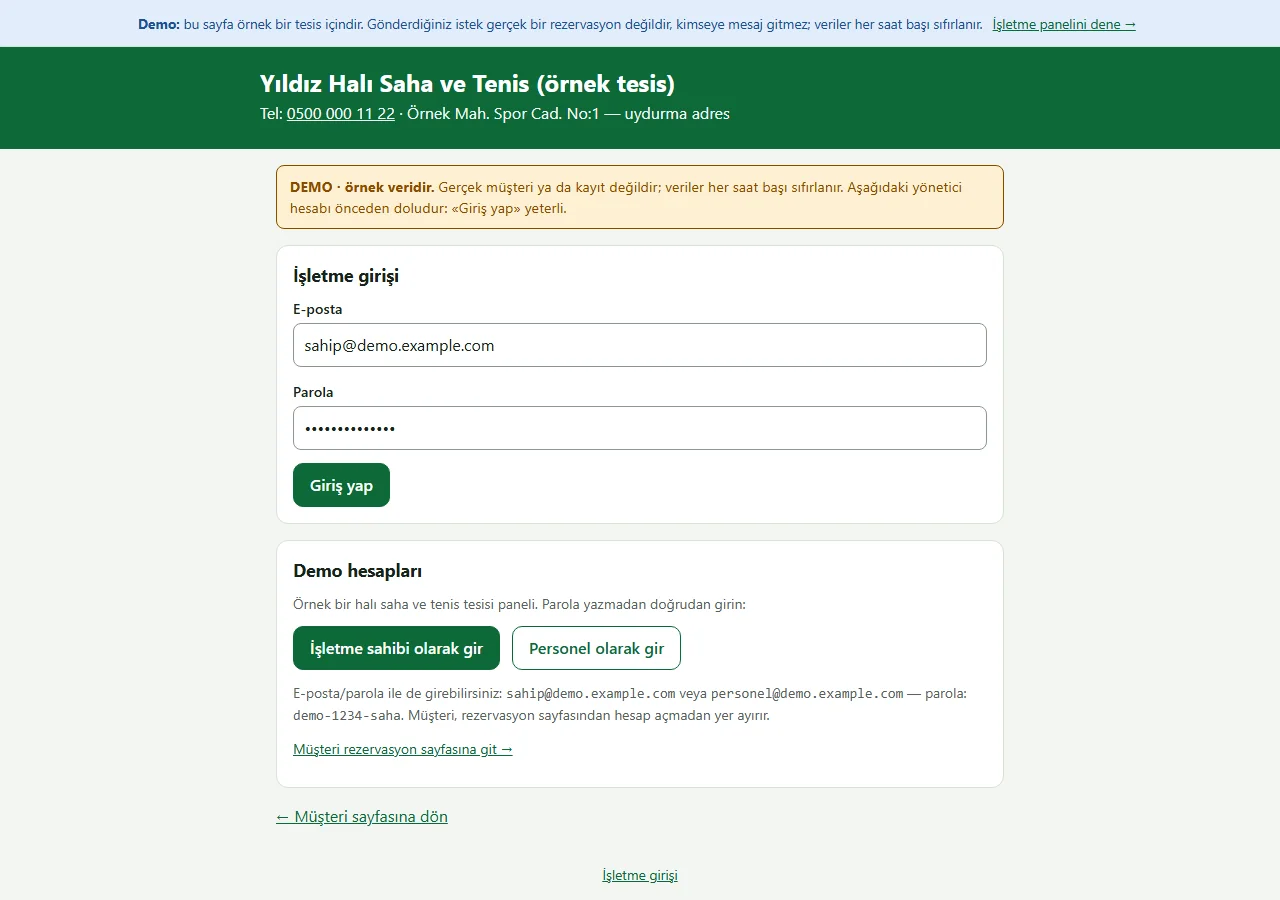
1.1.1 · 21 October 2026 Panel sign-in
The business panel sign-in. On the demo’s sign-in page (version 1.1.1) a “DEMO · örnek veridir” (sample data) notice sits at the top, the e-mail and password fields come prefilled with the manager account, and a “Demo hesapları” (demo accounts) box holds password-free “… olarak gir” (sign in as …) buttons for owner and staff and a link to the customer page. Both show only in the demo; a normal installation has empty fields.
- On screen (Turkish interface)
- “DEMO · örnek veridir” — DEMO · sample data
- “Demo hesapları” — demo accounts
- “İşletme sahibi olarak gir” — enter as business owner
- “Personel olarak gir” — enter as staff
- “Giriş yap” — sign in
-
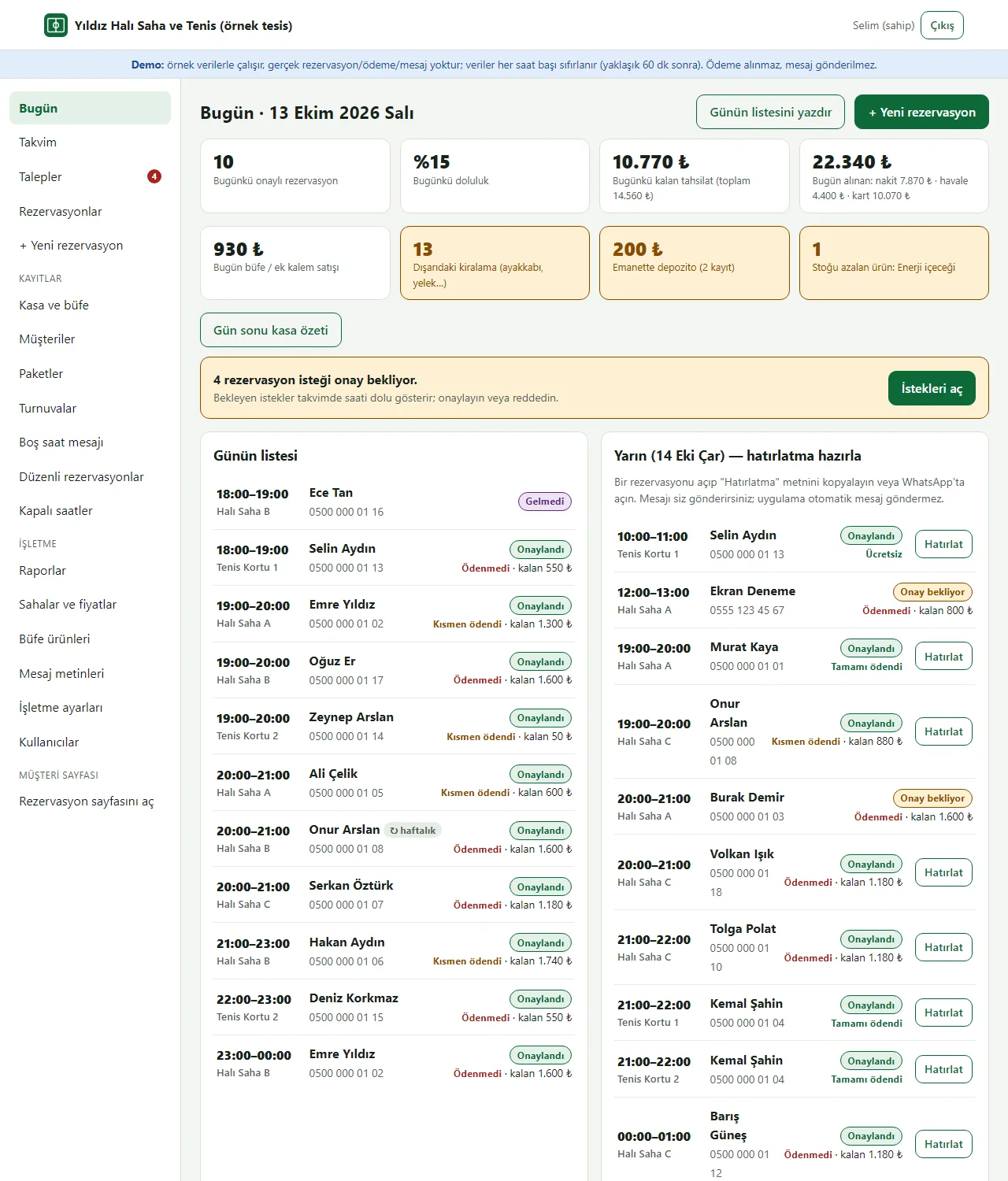
Today screen
The day’s bookings by time, occupancy, expected, remaining and received payments, and tomorrow’s reminder list at a glance. A warning shows when requests are waiting for approval. The picture shows the first part.
- On screen (Turkish interface)
- “Bugünkü doluluk” — today’s occupancy
- “Bugünkü kalan tahsilat” — remaining payments today
- “İstekleri aç” — open the requests
- “Günün listesi” — the day’s list
- “Hatırlat” — remind
-
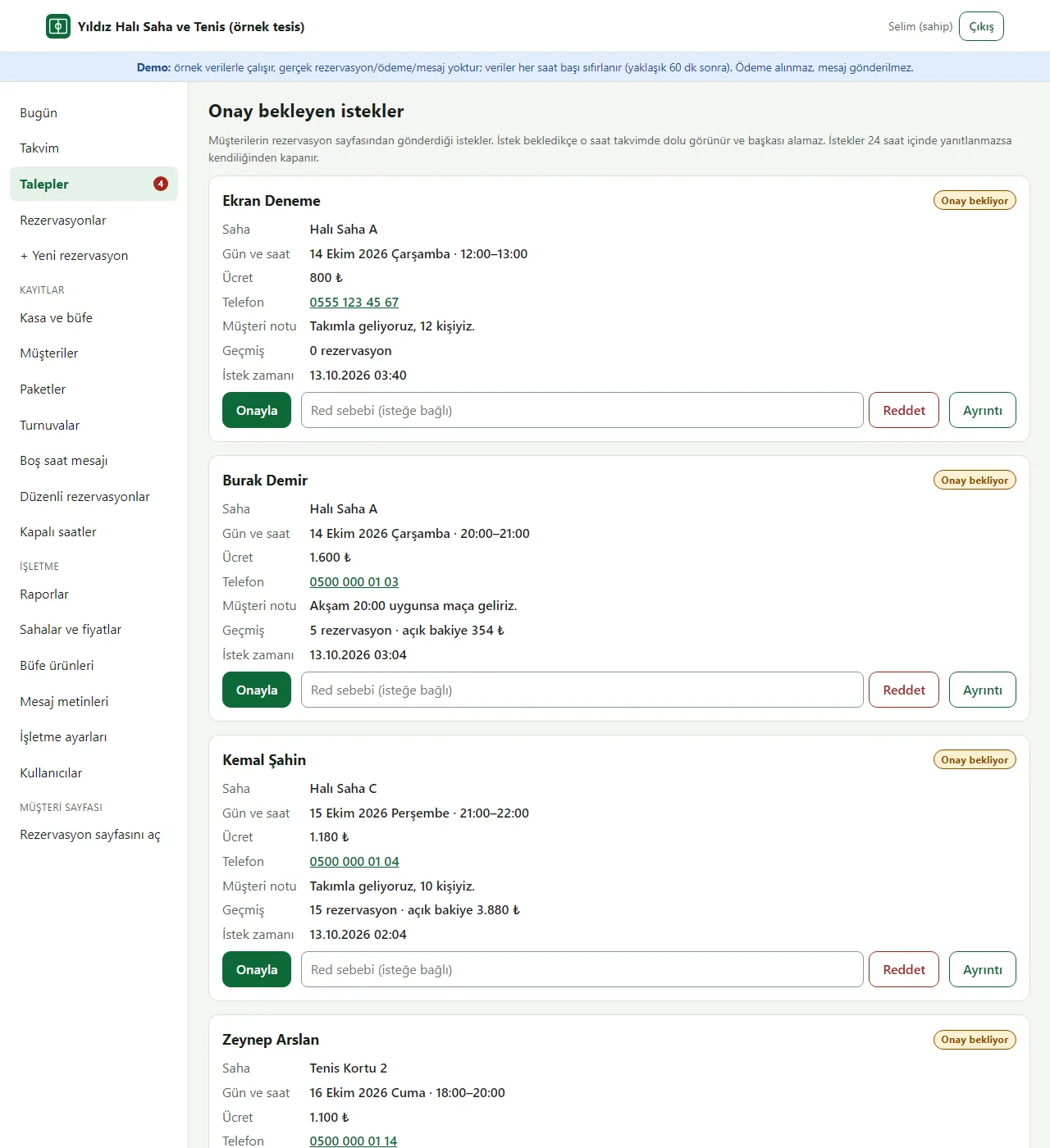
Pending requests
Requests sent by customers: name, phone, note and history are shown. The business approves, or rejects with a reason; a pending request holds the hour so nobody else can take it.
- On screen (Turkish interface)
- “Onay bekleyen istekler” — requests waiting for approval
- “Onayla / Reddet / Ayrıntı” — approve / reject / details
- “Red sebebi (isteğe bağlı)” — reason for rejection (optional)
-
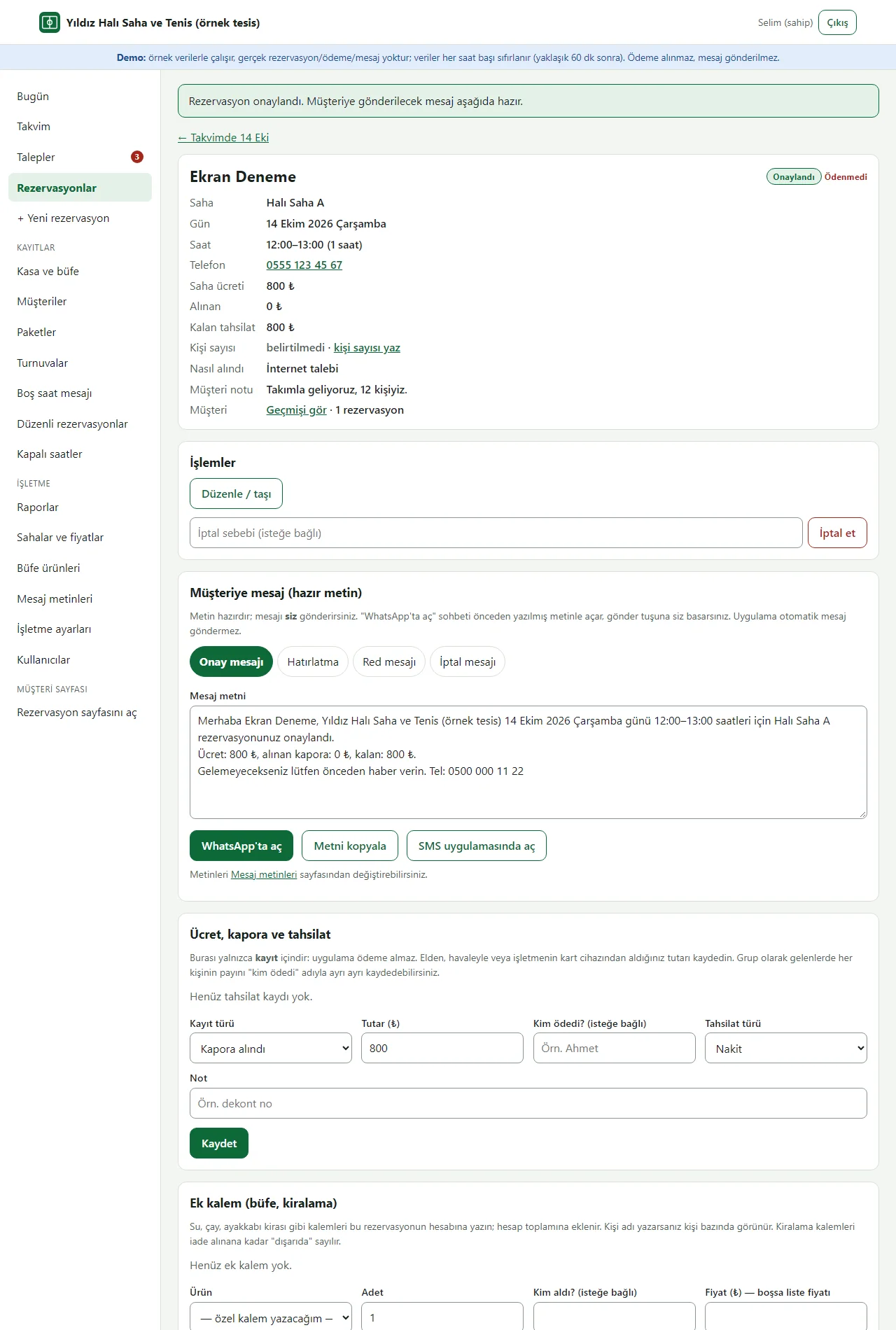
Approval and ready message
After approval the message for the customer comes ready. “WhatsApp’ta aç” opens the chat with the text filled in; the business sends it from its own phone and the app sends nothing. There are separate texts for confirmation, reminder, rejection and cancellation.
- On screen (Turkish interface)
- “Müşteriye mesaj (hazır metin)” — message to the customer (ready text)
- “Onay mesajı / Hatırlatma / Red mesajı / İptal mesajı” — confirmation / reminder / rejection / cancellation message
- “WhatsApp’ta aç” — open in WhatsApp
- “Metni kopyala” — copy the text
-
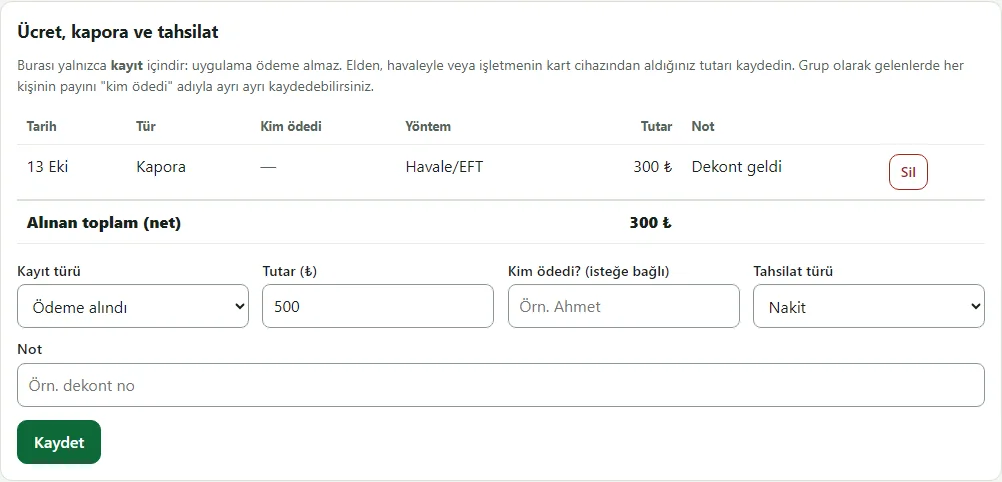
Deposit and remaining payment
Tracking of the price, the deposit received and the amount still to collect. The payment type (cash, bank transfer, card) is only a record; no payment is taken through the app.
- On screen (Turkish interface)
- “Ücret, kapora ve tahsilat” — price, deposit and payment
- “Havale/EFT” — bank transfer
- “Alınan toplam (net)” — total received (net)
- “Kapora / Ödeme alındı” — deposit / payment received
-
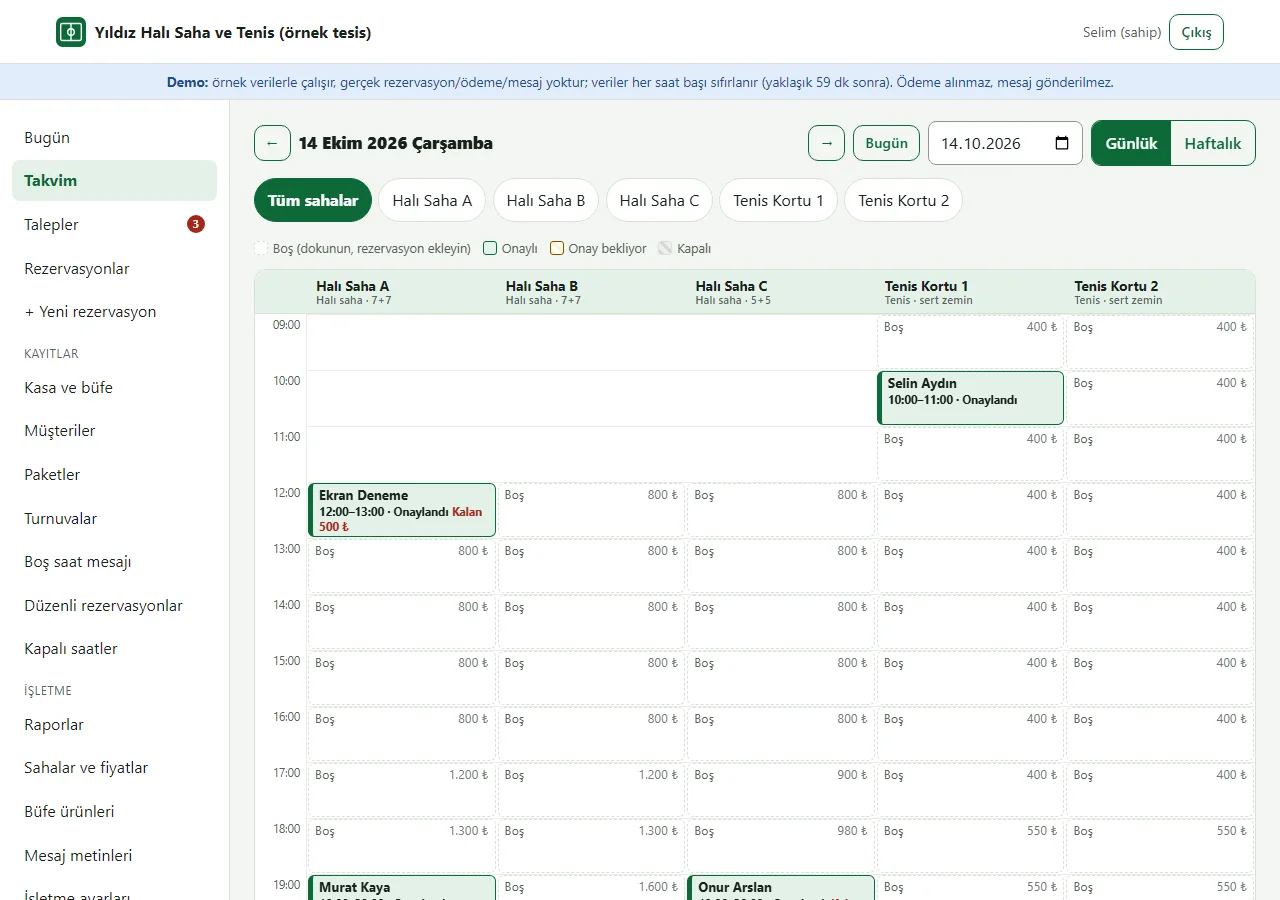
Daily calendar
The pitches side by side. Green is booked, striped yellow is waiting for approval, striped grey is closed and dashed is free. Tap a free hour to add a booking.
- On screen (Turkish interface)
- “Tüm sahalar” — all pitches
- “Boş (dokunun, rezervasyon ekleyin)” — free (tap to add a booking)
- “Onaylı / Onay bekliyor / Kapalı” — approved / waiting for approval / closed
-
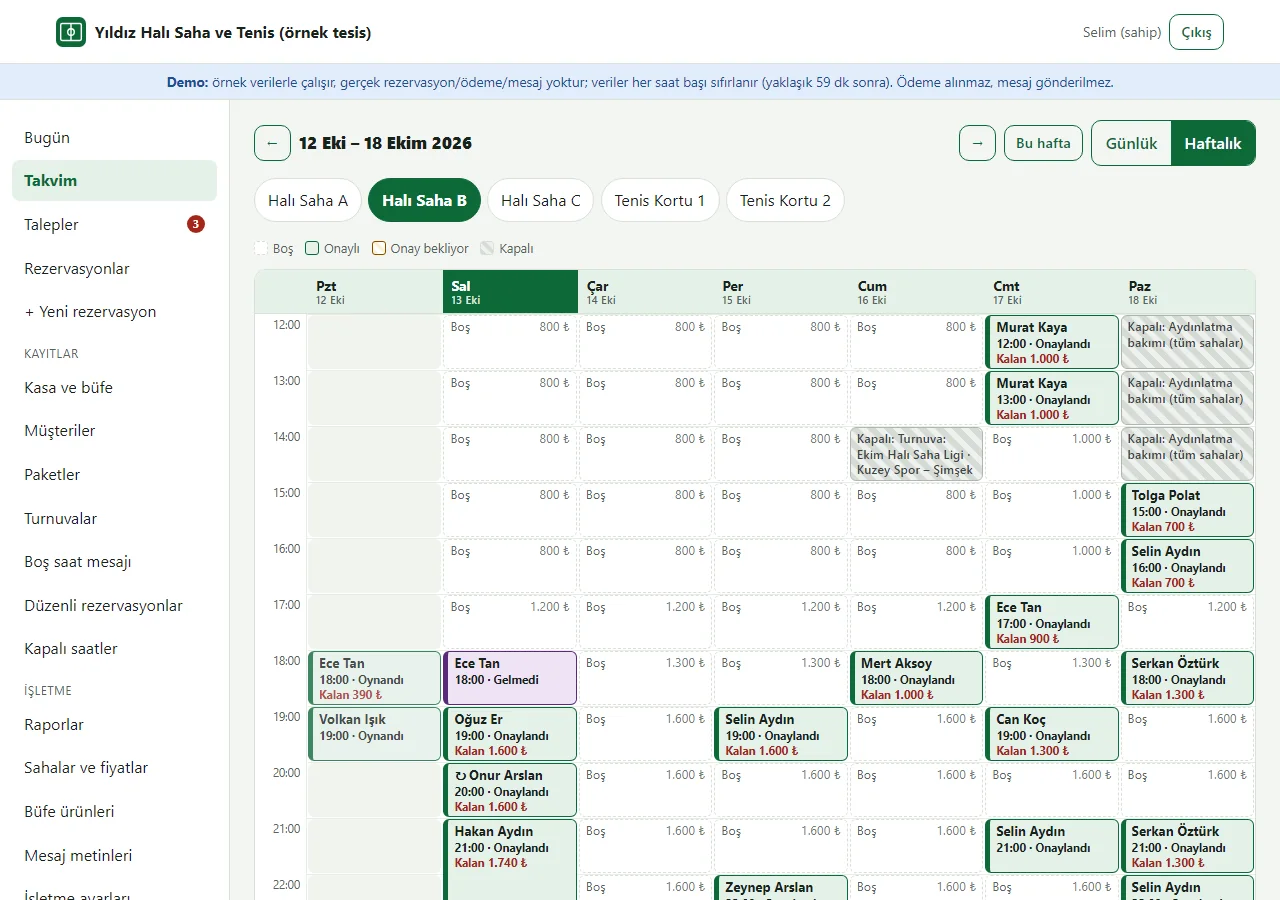
Weekly calendar
Seven days of one pitch. The ↻ mark is a recurring weekly booking (a regular team); closed hours show grey.
- On screen (Turkish interface)
- “Günlük / Haftalık” — daily / weekly
- “Bu hafta” — this week
- “Kapalı: Aydınlatma bakımı (tüm sahalar)” — closed: floodlight maintenance (all pitches)
-
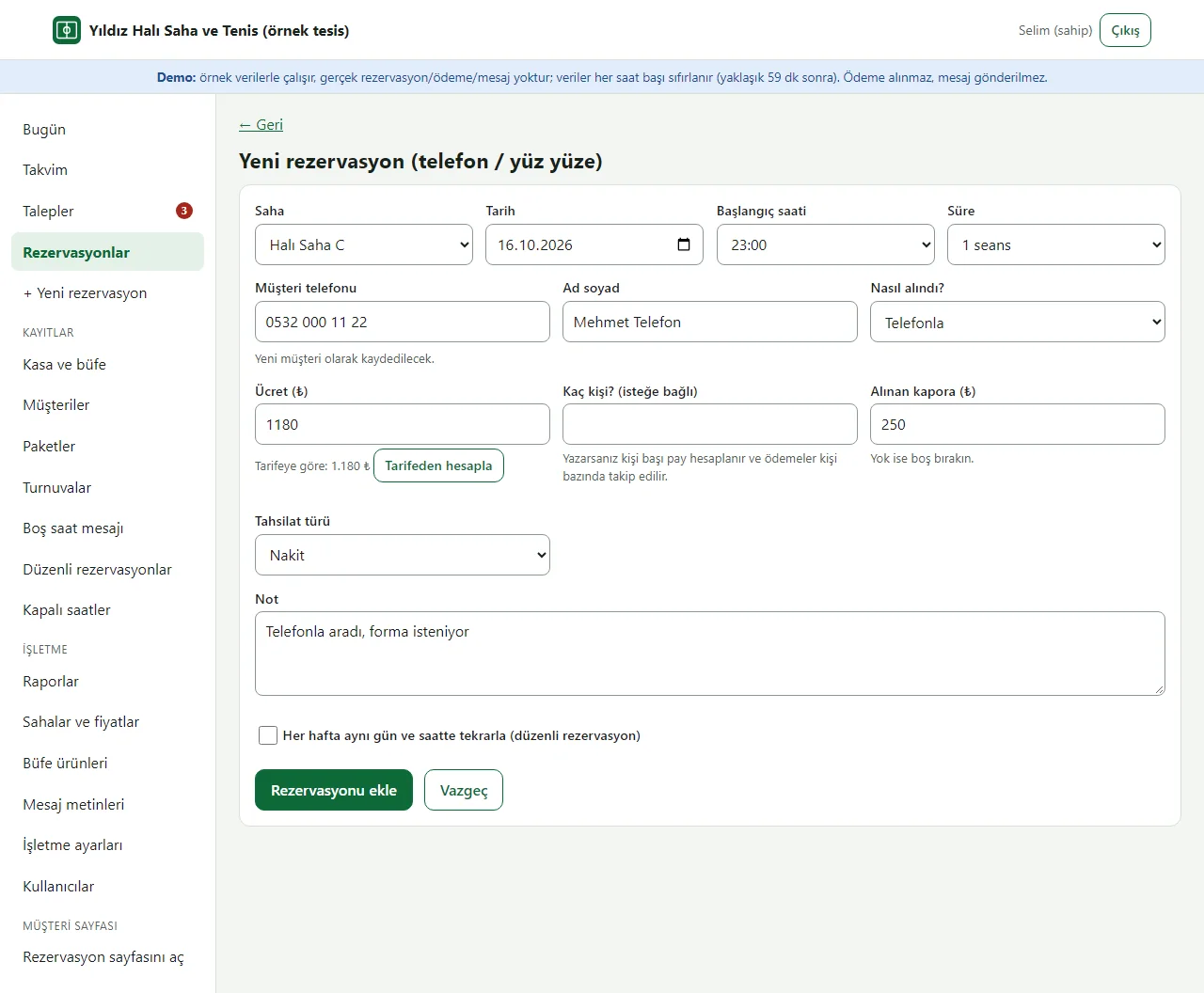
Booking by hand
A booking taken by phone or in person is added by hand. The price comes from the tariff, the deposit and payment type go in the same form, and a known customer is found by phone.
- On screen (Turkish interface)
- “Yeni rezervasyon (telefon / yüz yüze)” — new booking (phone / in person)
- “Tarifeden hesapla” — work out from the tariff
- “Alınan kapora / Tahsilat türü” — deposit received / payment type
- “Rezervasyonu ekle” — add the booking
-
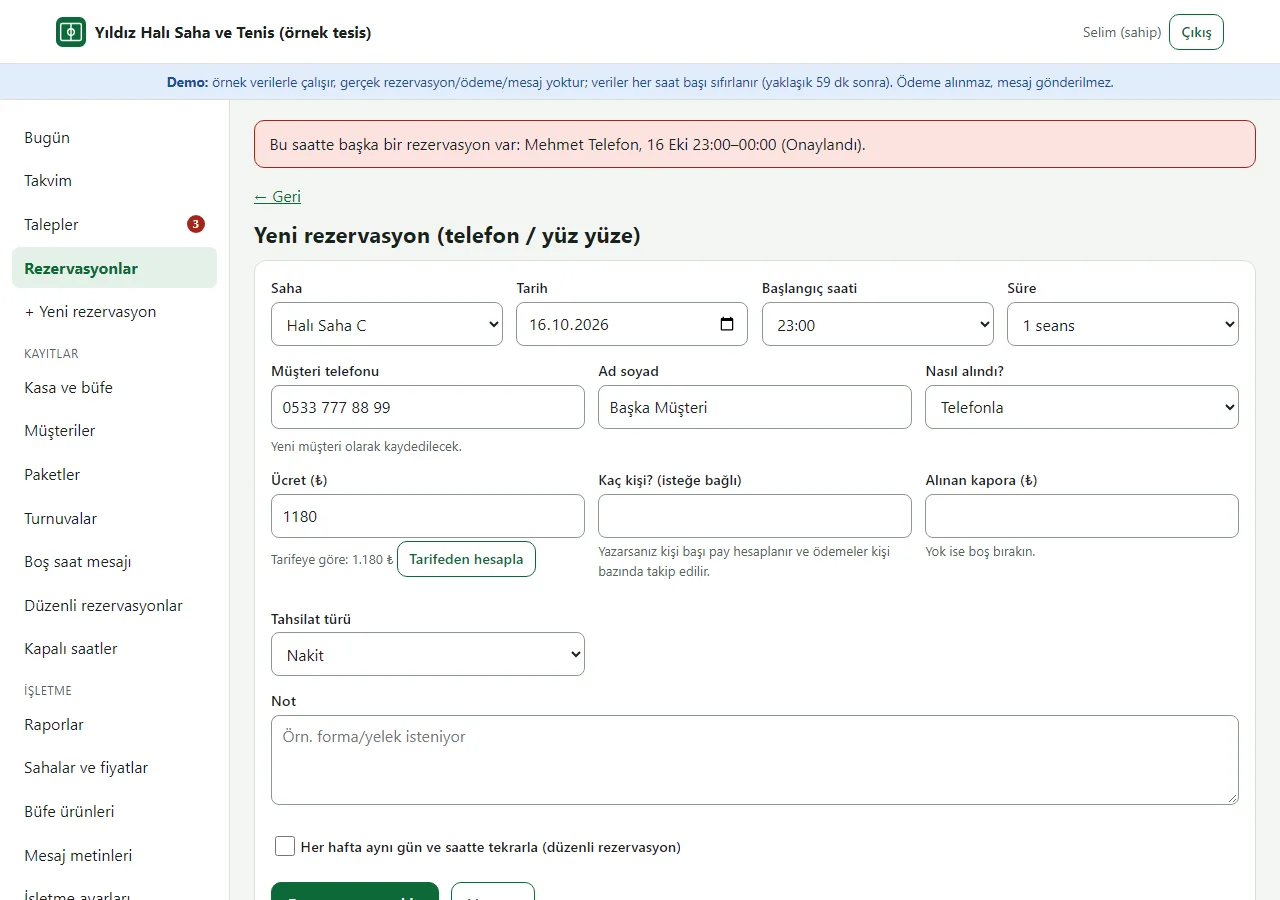
Clash prevention
A second booking for the same pitch and hour is refused; the panel says which booking clashes. The hour is also shown as taken on the customer page.
- On screen (Turkish interface)
- “Bu saatte başka bir rezervasyon var” — there is another booking at this hour
-
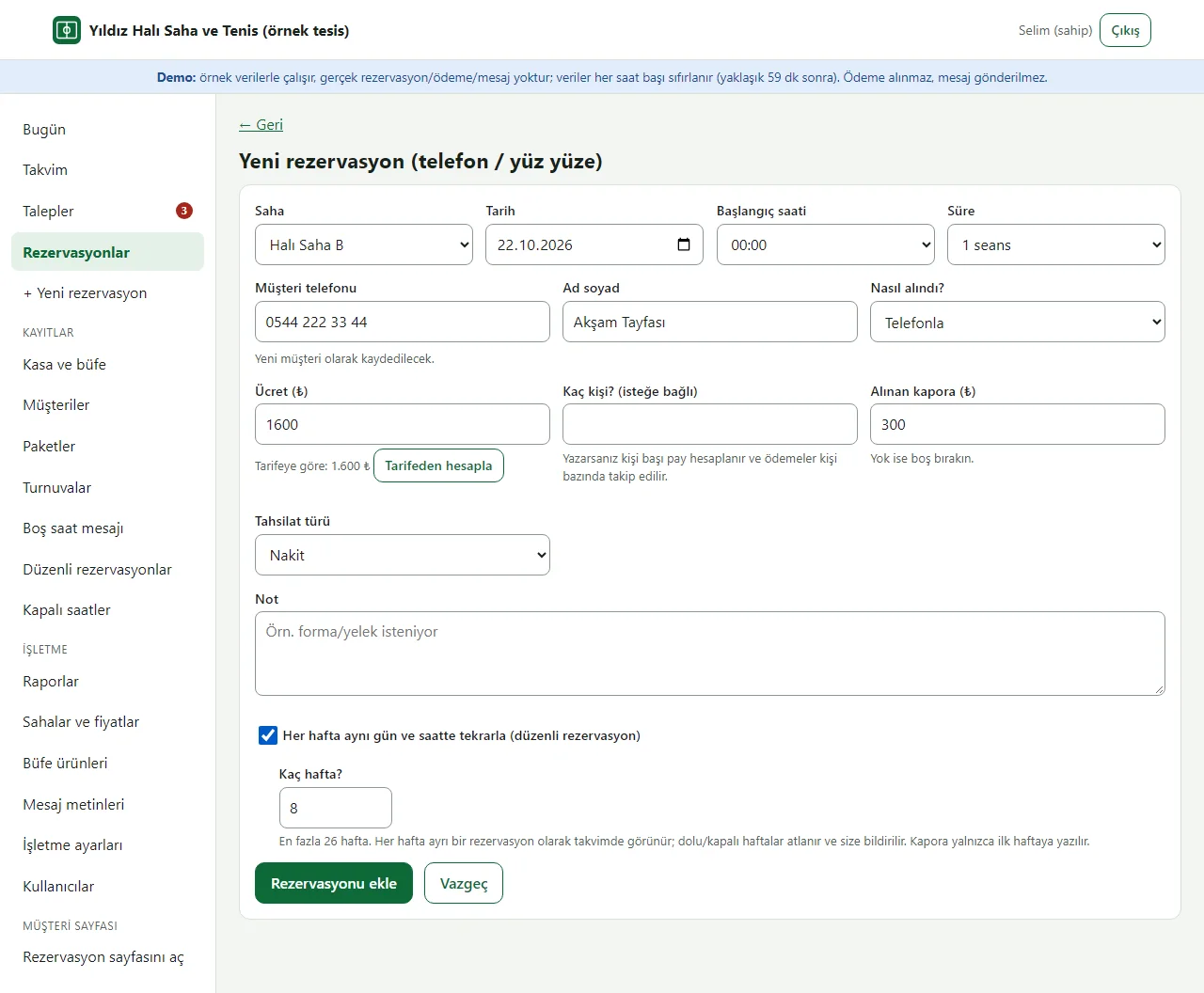
Recurring weekly booking
The same day and hour every week, up to 26 weeks. Weeks that are taken or closed are skipped and reported; the deposit is written to the first week only.
- On screen (Turkish interface)
- “Her hafta aynı gün ve saatte tekrarla (düzenli rezervasyon)” — repeat every week on the same day and hour (recurring booking)
- “Kaç hafta?” — how many weeks?
-
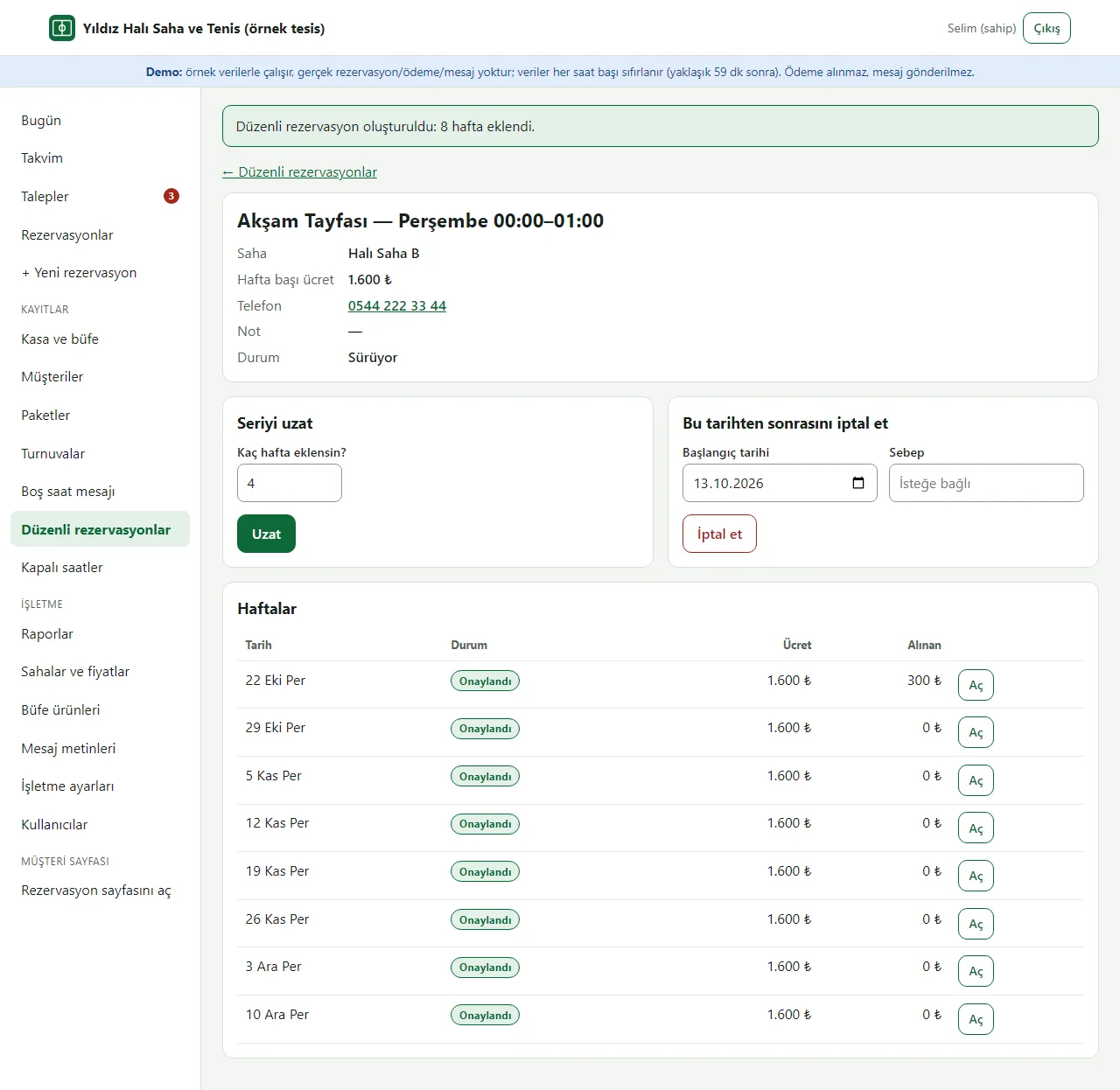
Recurring booking series
Every week is a separate booking; each is collected separately and cancelled one by one. The series can be extended, or cancelled from a date.
- On screen (Turkish interface)
- “Düzenli rezervasyon oluşturuldu: 8 hafta eklendi” — recurring booking created: 8 weeks added
- “Seriyi uzat” — extend the series
- “Bu tarihten sonrasını iptal et” — cancel from this date
- “Haftalar” — weeks
-
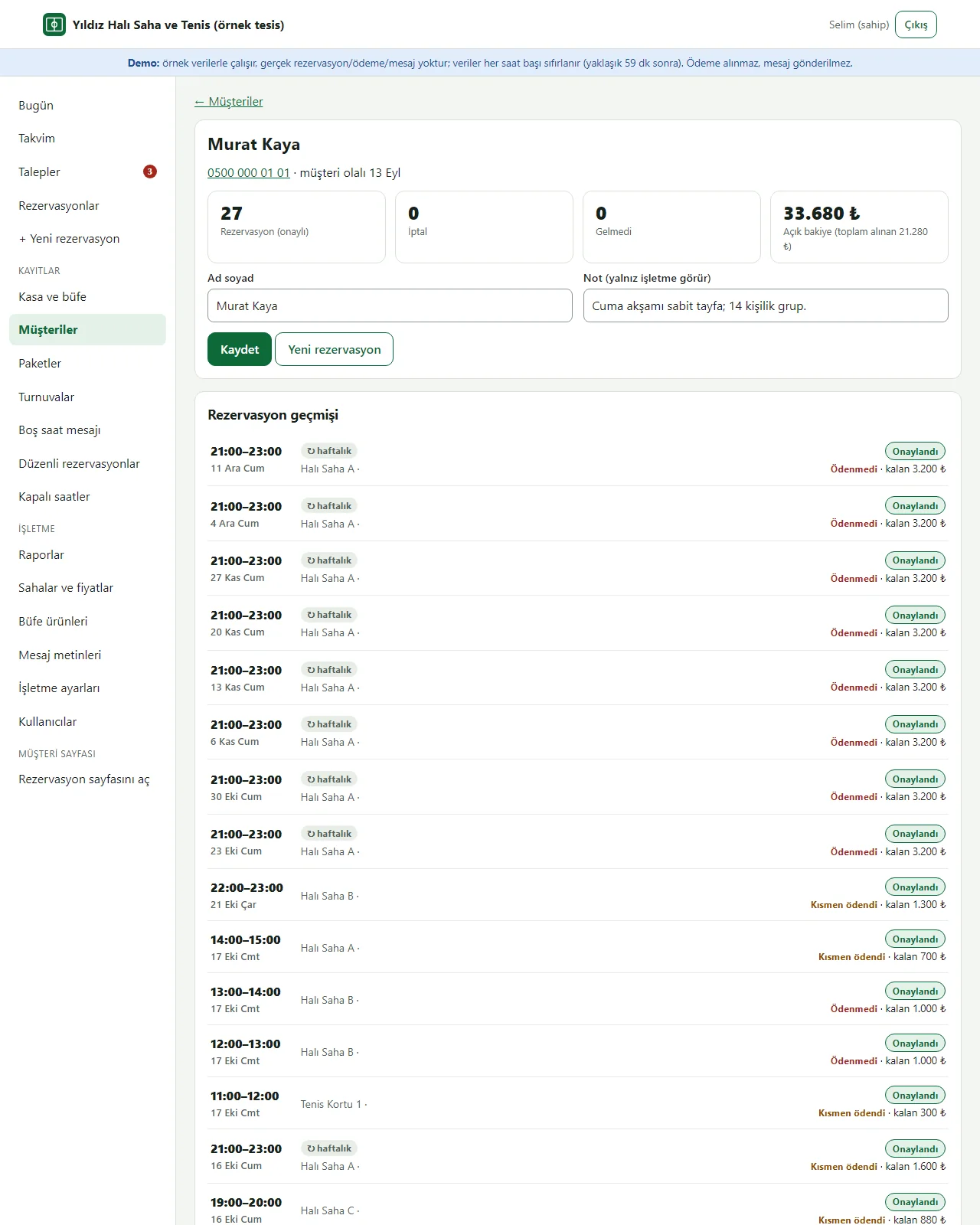
Customer book
The customer card: name, phone, a note only the business sees, booking history, cancelled and no-show counts and the open balance. The sample customers are made up.
- On screen (Turkish interface)
- “Rezervasyon geçmişi” — booking history
- “İptal / Gelmedi” — cancelled / no-show
- “Açık bakiye” — open balance
- “Not (yalnız işletme görür)” — note (only the business sees it)
-
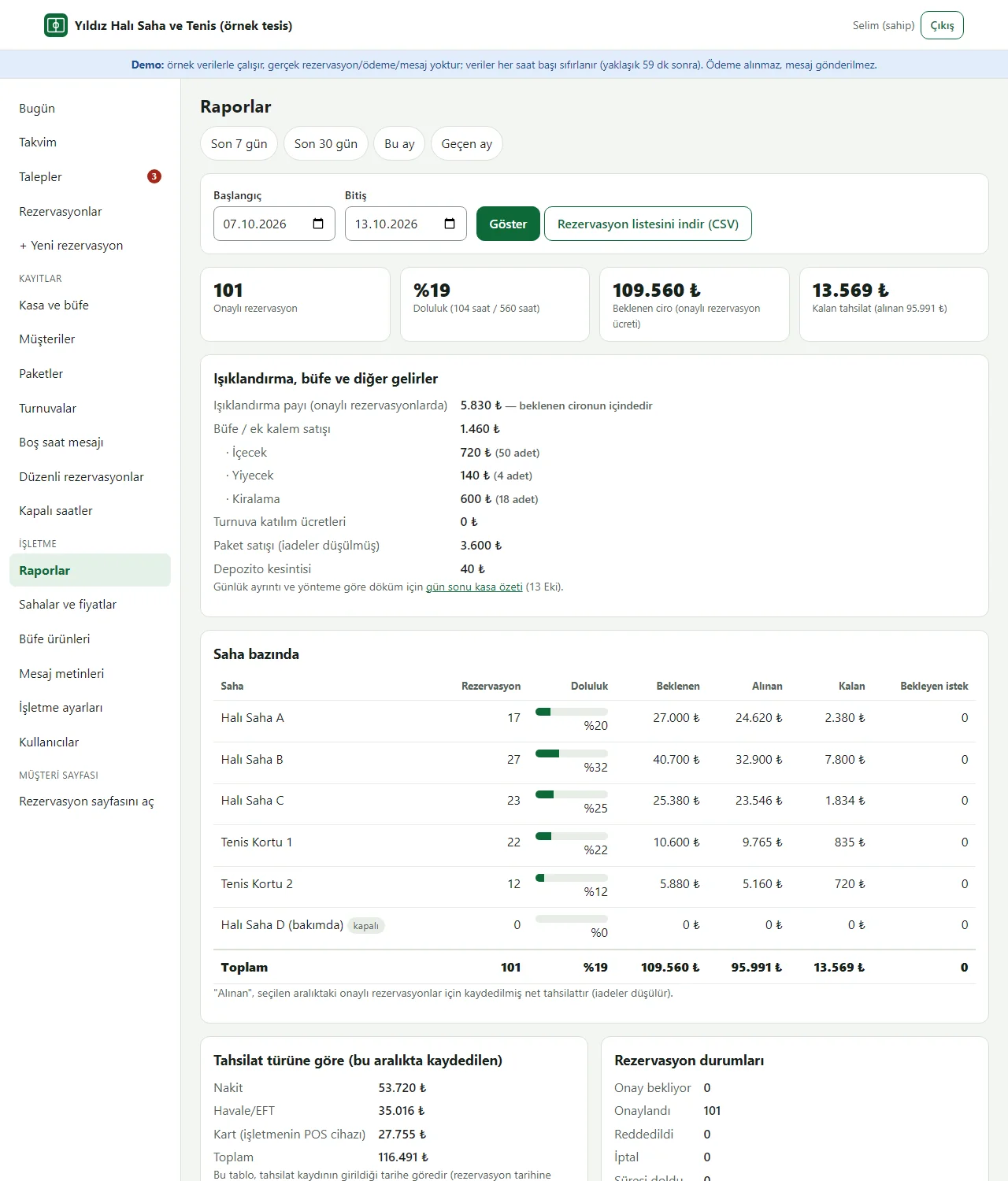
Occupancy and payment report
Seen by the owner only. Quick range buttons (last 7 days, last 30 days, this month, last month) or the chosen dates give bookings, occupancy, expected, received and remaining payments per pitch, a split by payment type, and a CSV download of the booking list.
- On screen (Turkish interface)
- “Raporlar” — reports
- “Son 7 gün / Son 30 gün / Bu ay / Geçen ay” — last 7 days / last 30 days / this month / last month
- “Saha bazında” — per pitch
- “Doluluk” — occupancy
- “Beklenen / Alınan / Kalan” — expected / received / remaining
- “Rezervasyon listesini indir (CSV)” — download the booking list (CSV)
-
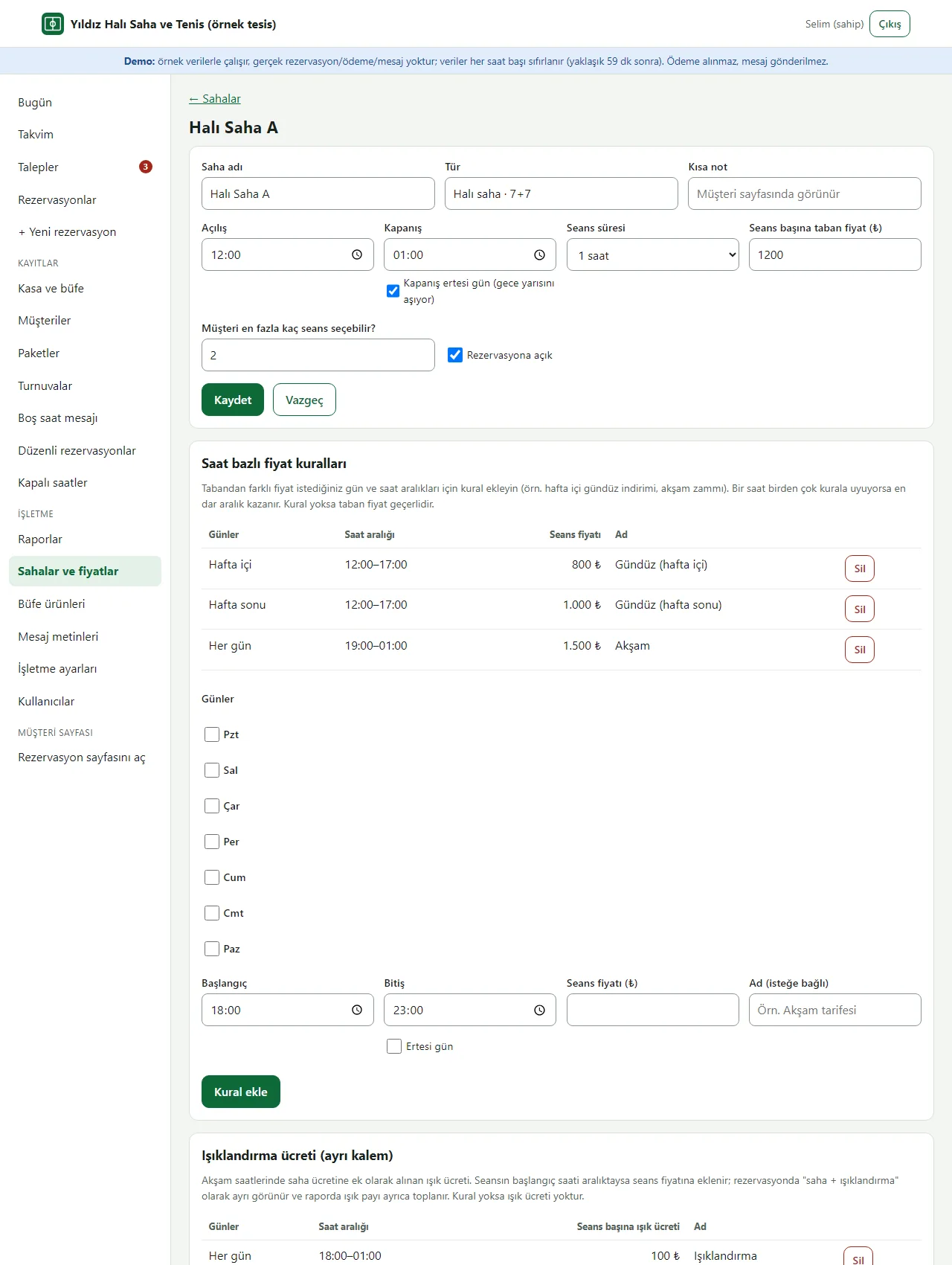
Pitch and price rules
Setting up a pitch: opening hours (which may run past midnight), session length, base price and price rules by day and hour (weekday daytime, weekend daytime, evening).
- On screen (Turkish interface)
- “Seans süresi” — session length
- “Kapanış ertesi gün (gece yarısını aşıyor)” — closes the next day (runs past midnight)
- “Saat bazlı fiyat kuralları” — price rules by hour
- “Hafta içi / Hafta sonu / Her gün” — weekdays / weekend / every day
-
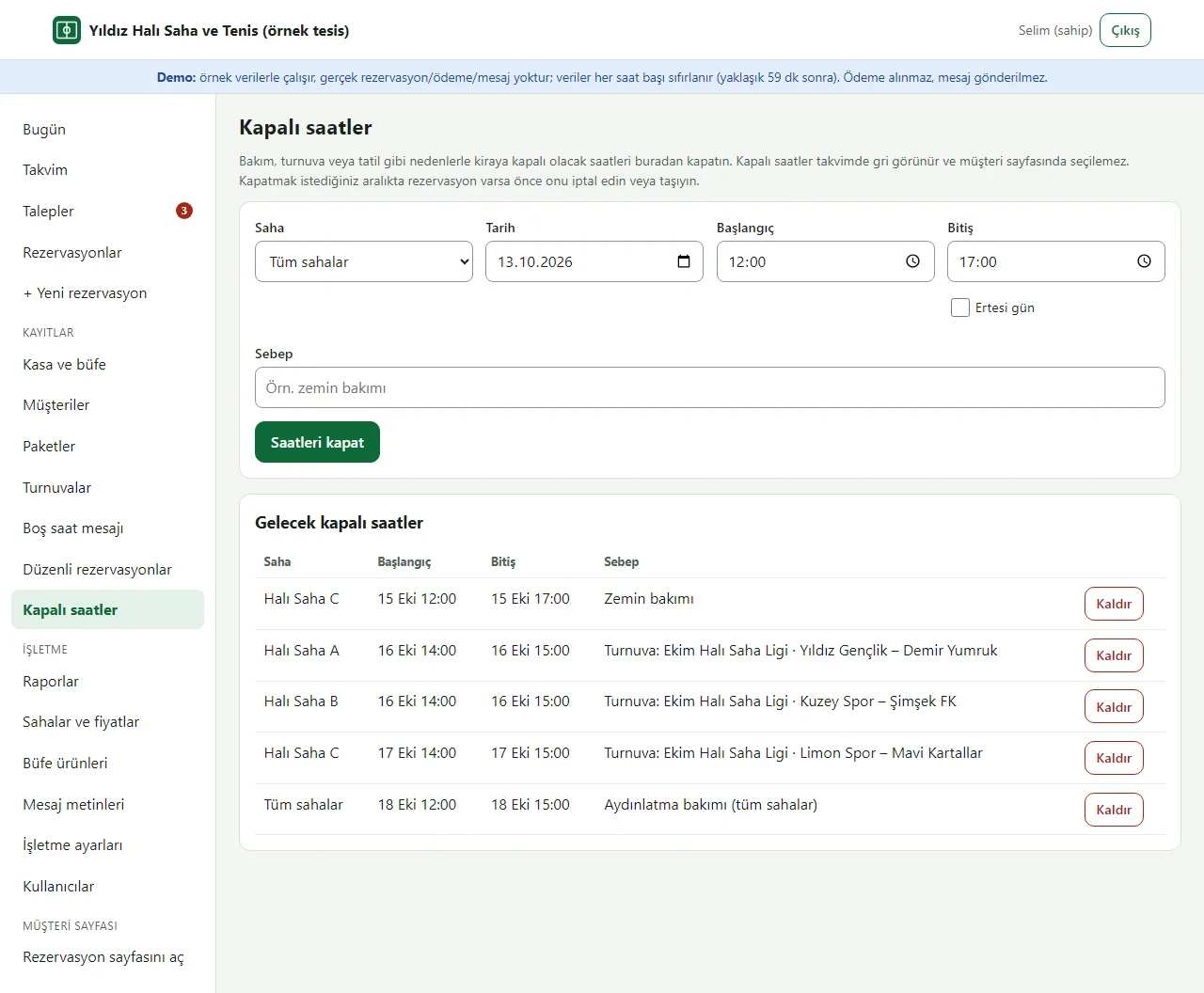
Closed hours
Close the hours of one pitch or all pitches for maintenance, a tournament or a holiday. Closed hours show grey on the calendar and cannot be chosen on the customer page.
- On screen (Turkish interface)
- “Kapalı saatler” — closed hours
- “Tüm sahalar” — all pitches
- “Saatleri kapat” — close the hours
- “Gelecek kapalı saatler” — upcoming closed hours
-
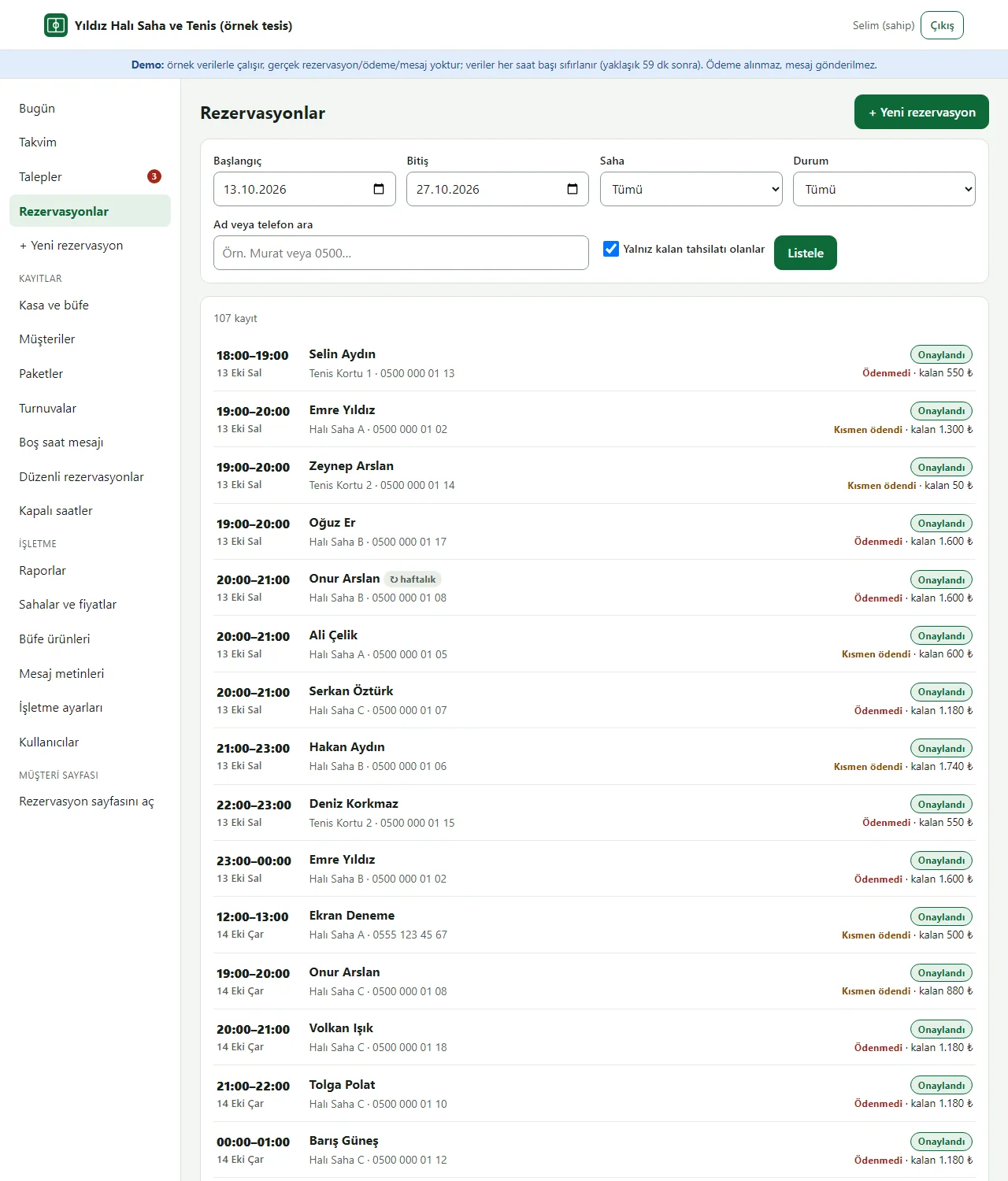
Bookings with an amount left to collect
The booking list can be filtered by date, pitch, status or name and phone. With “only those with an amount left to collect” on, you see who still owes what in one list.
- On screen (Turkish interface)
- “Rezervasyonlar” — bookings
- “Yalnız kalan tahsilatı olanlar” — only those with an amount left to collect
- “Listele” — show the list
-
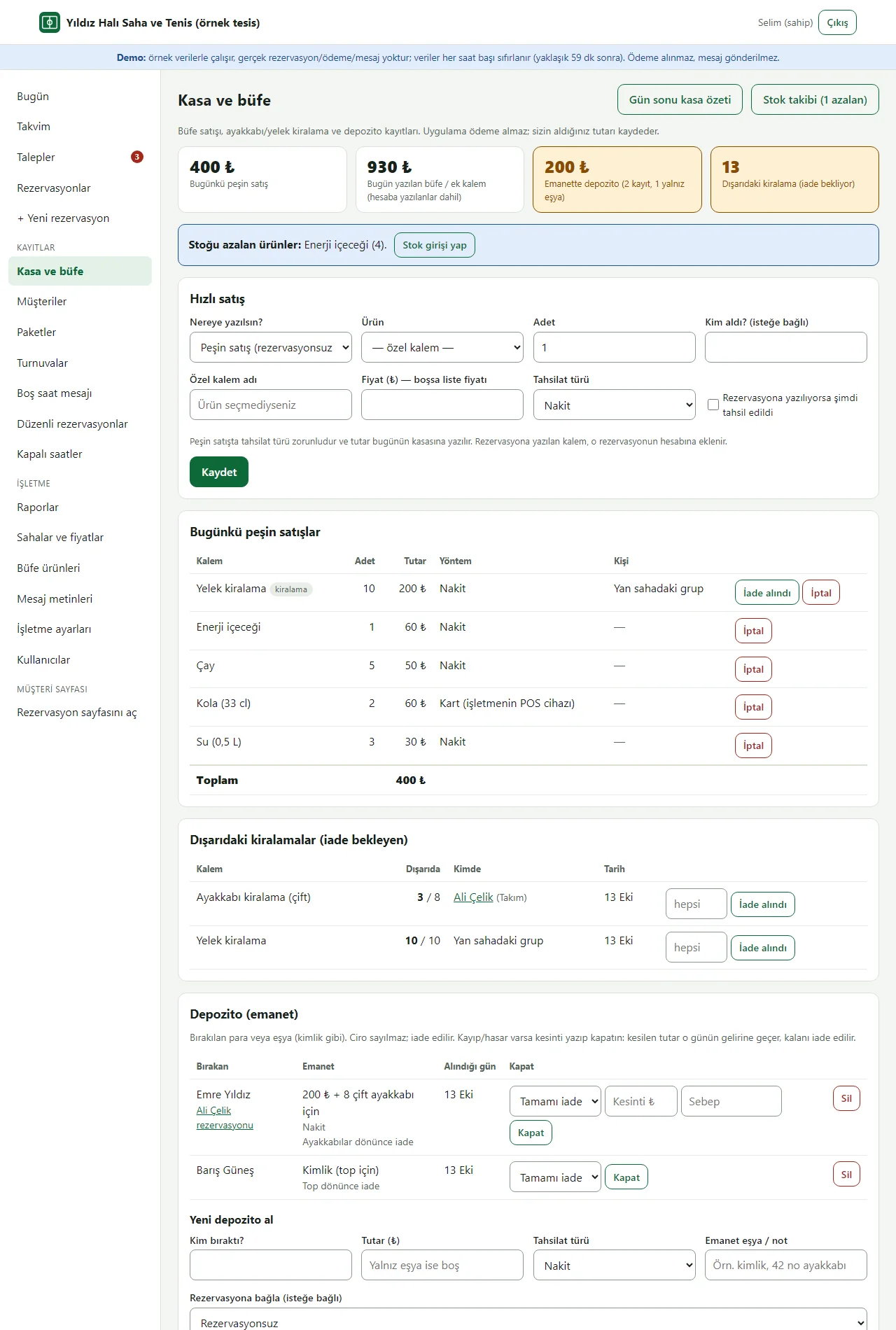
Till and snack bar
Till and snack bar: quick sale (cash sale or onto one of today’s bookings), shoe/vest rentals still out, and deposits. The app takes no payment; it records what you took.
- On screen (Turkish interface)
- “Hızlı satış” — quick sale
- “Dışarıdaki kiralamalar” — rentals still out
- “Depozito (emanet)” — deposit (held item)
- “Gün sonu kasa özeti” — end-of-day till summary
-
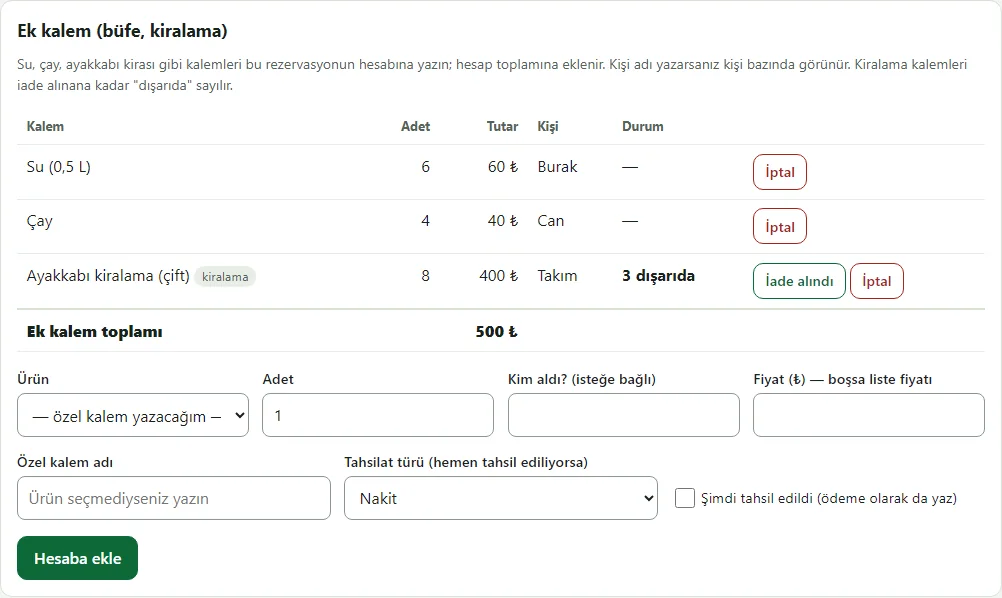
Extra items and hire
Water, tea, shoe hire and similar items are added to the booking’s tab; the total and the amount left change accordingly. Shoes show as "out" until they are returned.
- On screen (Turkish interface)
- “Ek kalem (büfe, kiralama)” — extra items (snack bar, hire)
- “dışarıda” — out
- “İade alındı” — returned
- “Hesaba ekle” — add to the tab
-
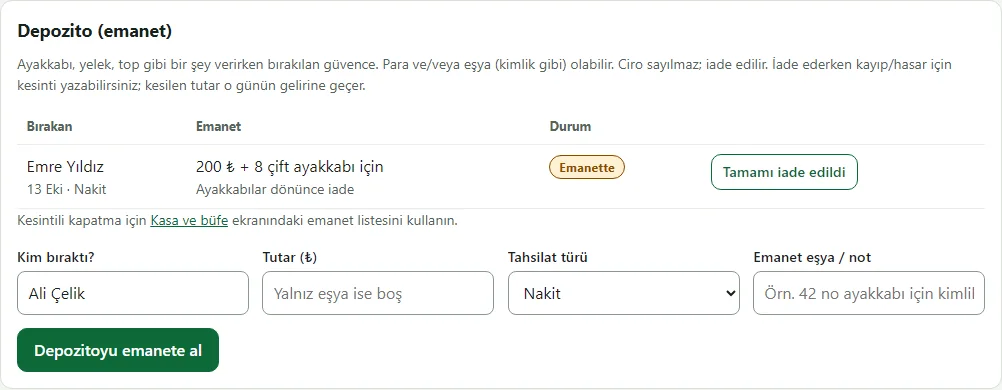
Deposits (held items)
Deposit (security): money and/or an item left when hiring something such as shoes. It is not revenue and is handed back; if something is lost or damaged it is closed with a deduction.
- On screen (Turkish interface)
- “Depozito (emanet)” — deposit (held item)
- “Emanette” — held
- “Tamamı iade edildi” — fully refunded
- “Depozitoyu emanete al” — take the deposit
-
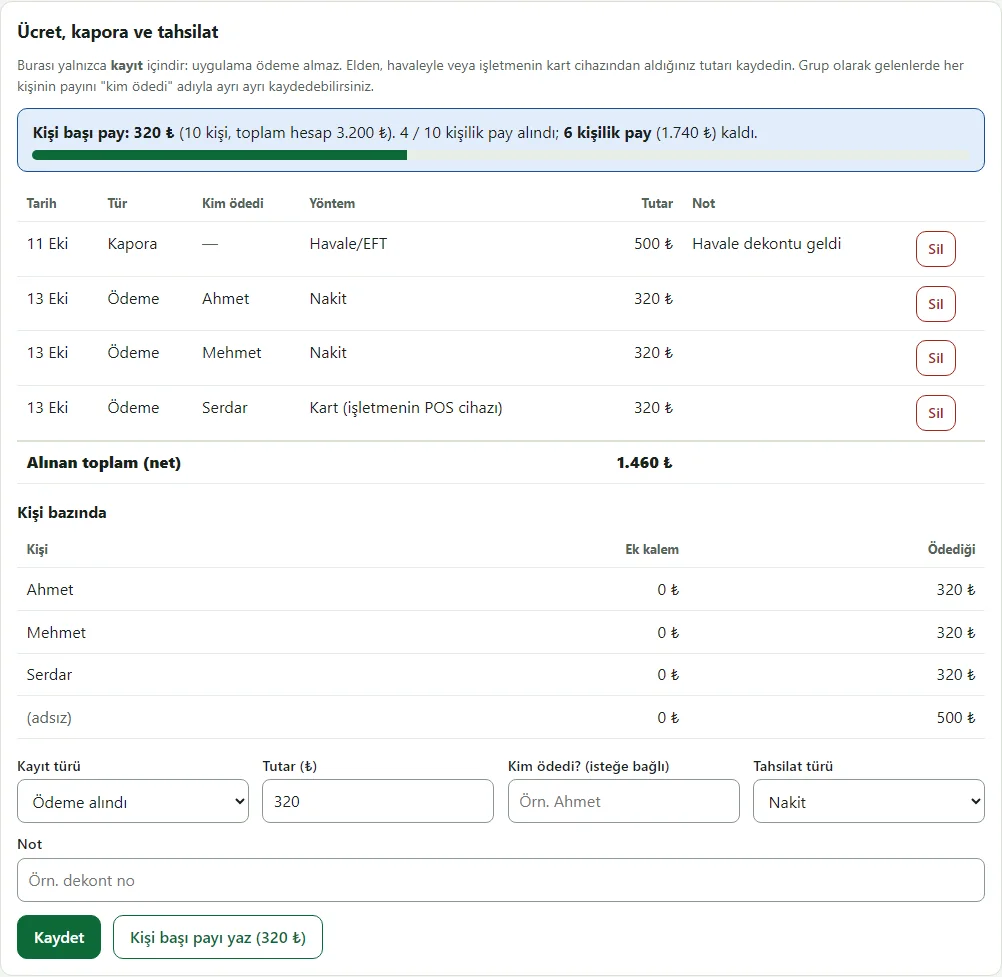
Per-person share and payments
When a group splits the bill: with the head count entered the per-person share is worked out, each payment is recorded with who paid, and you can see how many shares are in.
- On screen (Turkish interface)
- “Kişi başı pay” — per-person share
- “Kim ödedi?” — who paid?
- “Kişi bazında” — by person
- “Kişi başı payı yaz” — fill in the per-person share
-
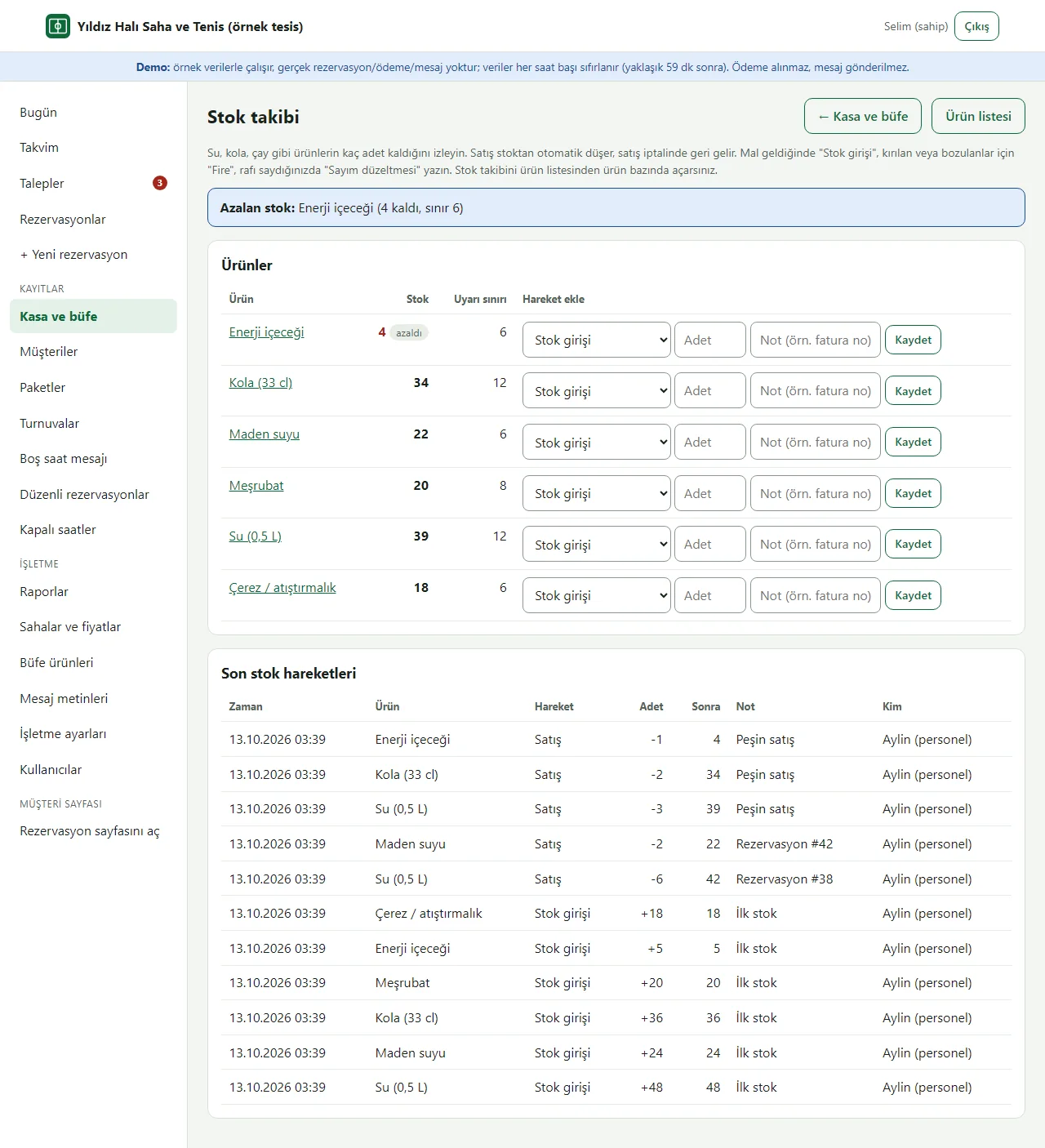
Stock tracking
Stock tracking: how many of water, cola, tea and so on are left; deliveries, wastage and stock counts are logged. Sales reduce stock and low items are flagged.
- On screen (Turkish interface)
- “Stok takibi” — stock tracking
- “Stok girişi / Fire / Sayım” — delivery / wastage / count
- “Azalan stok” — low stock
- “Son stok hareketleri” — recent stock movements
-
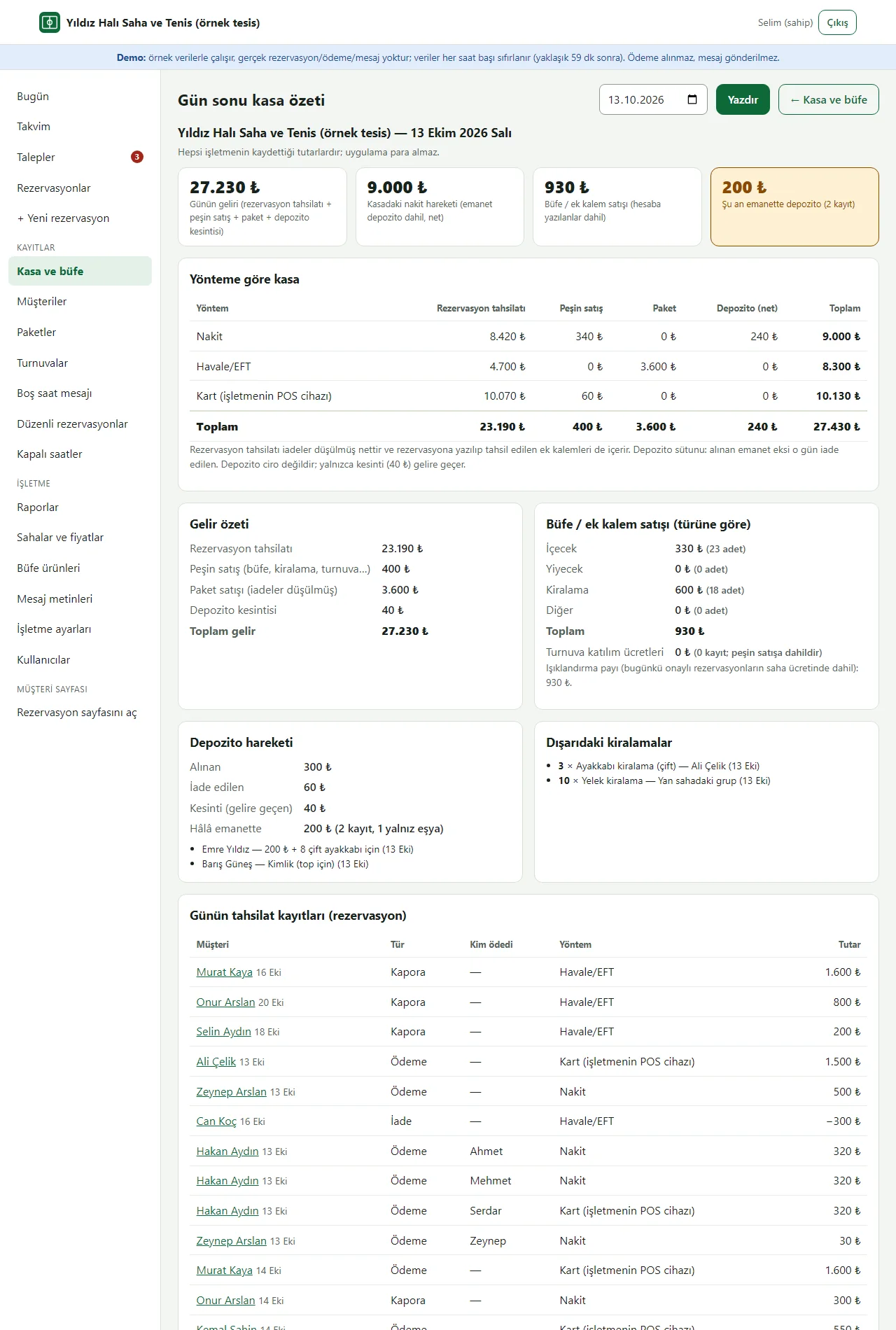
End-of-day till summary
End-of-day till summary (printable): by cash, card and transfer — booking payments, over-the-counter sales, passes and deposit movement; the day’s income and rentals still out.
- On screen (Turkish interface)
- “Gün sonu kasa özeti” — end-of-day till summary
- “Yönteme göre kasa” — till by method
- “Nakit / Havale/EFT / Kart” — cash / bank transfer / card
- “Yazdır” — print
-
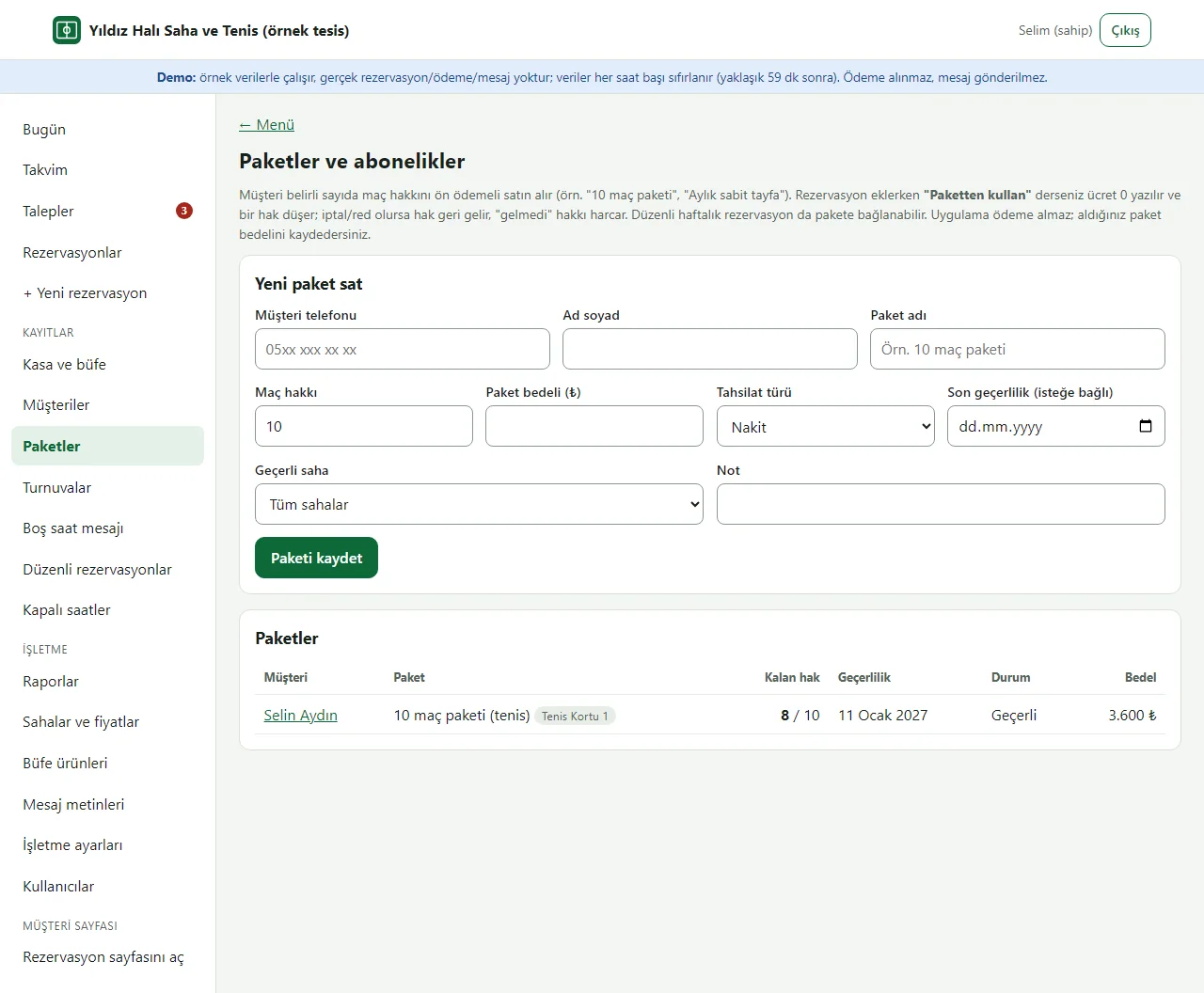
Passes and subscriptions
Pass / subscription: a customer buys a prepaid bundle ("10-match pass"); a booking linked to it uses one match, and a cancellation gives it back. It can also be linked to a weekly recurring booking.
- On screen (Turkish interface)
- “Paketler ve abonelikler” — passes and subscriptions
- “Yeni paket sat” — sell a new pass
- “Kalan hak” — matches left
- “Maç hakkı” — number of matches
-
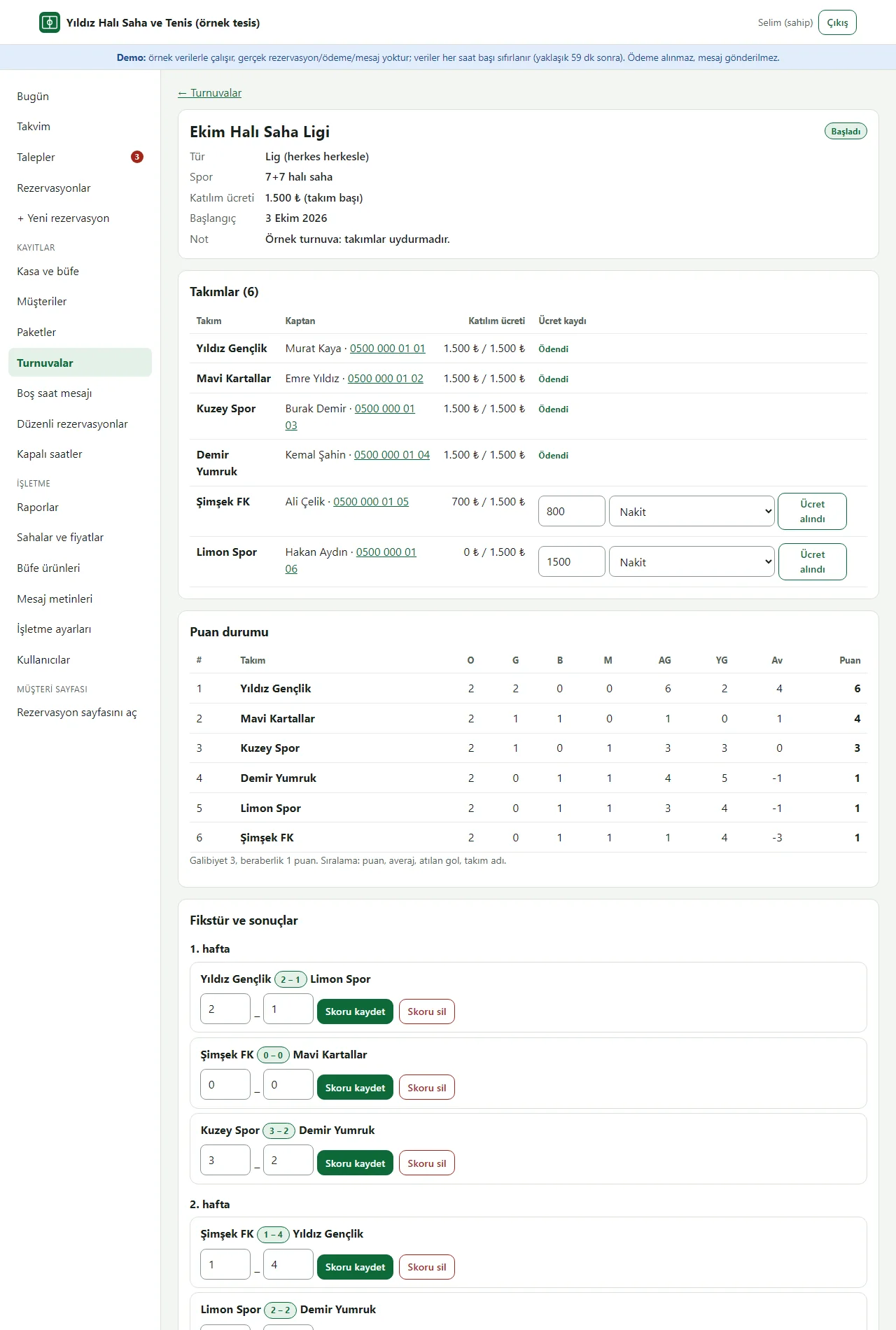
Tournament: teams and standings
Tournament (league): teams, entry-fee records, fixture and scores; the table updates as scores go in. Matches can be given a court and time, and that hour closes to bookings.
- On screen (Turkish interface)
- “Takımlar” — teams
- “Ücret alındı” — fee received
- “Puan durumu” — standings
- “Fikstür ve sonuçlar” — fixture and results
-
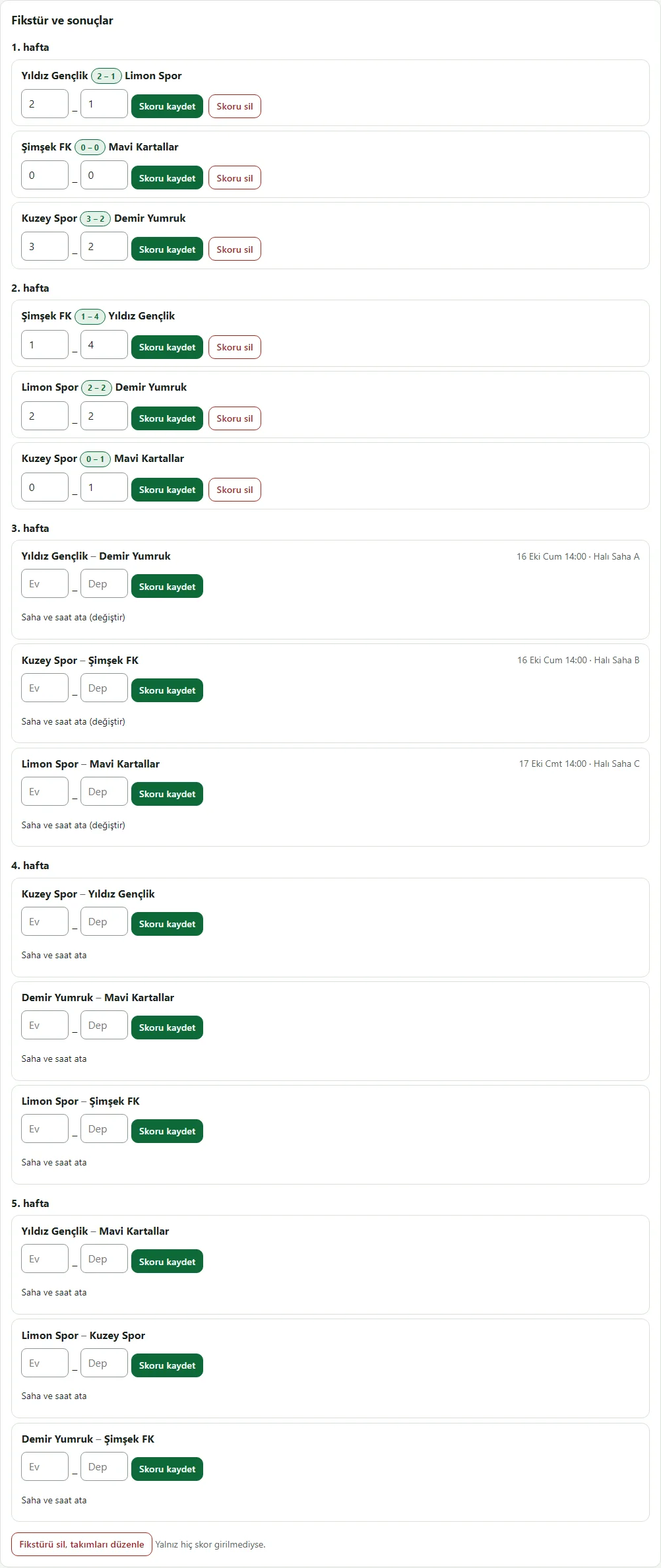
Tournament fixture
Fixture: matches by round, scores for those played and assigned court and time; results are entered in the score boxes.
- On screen (Turkish interface)
- “Skoru kaydet” — save the score
- “Saha ve saat ata” — assign court and time
- “1. hafta” — week 1
-
Knockout tournament
Knockout tournament: with an uneven number of teams some get byes; winners move on by themselves, and a drawn match needs a penalty winner.
- On screen (Turkish interface)
- “Çeyrek final / Yarı final / Final” — quarter-final / semi-final / final
- “bay geçti” — bye
- “Berabere ise galip…” — winner if drawn…
-
Free-hour message
Free-hour message: a ready announcement such as "21:00 is free tonight, discounted" built from the day’s open hours, plus a WhatsApp link per customer who has no booking that day. The business does the sending.
- On screen (Turkish interface)
- “Boş saat doldurma mesajı” — free-hour message
- “İndirim (%)” — discount (%)
- “Metni kopyala” — copy the text
- “WhatsApp’ta aç” — open in WhatsApp
-
Floodlight fee
Floodlight fee: added to the pitch price as a separate line in the evening. A booking shows "pitch + floodlight" and the report totals the floodlight share separately.
- On screen (Turkish interface)
- “Işıklandırma ücreti (ayrı kalem)” — floodlight fee (separate line)
- “Işık ücreti ekle” — add a floodlight fee
- “Ertesi gün” — next day
-
Snack bar product list
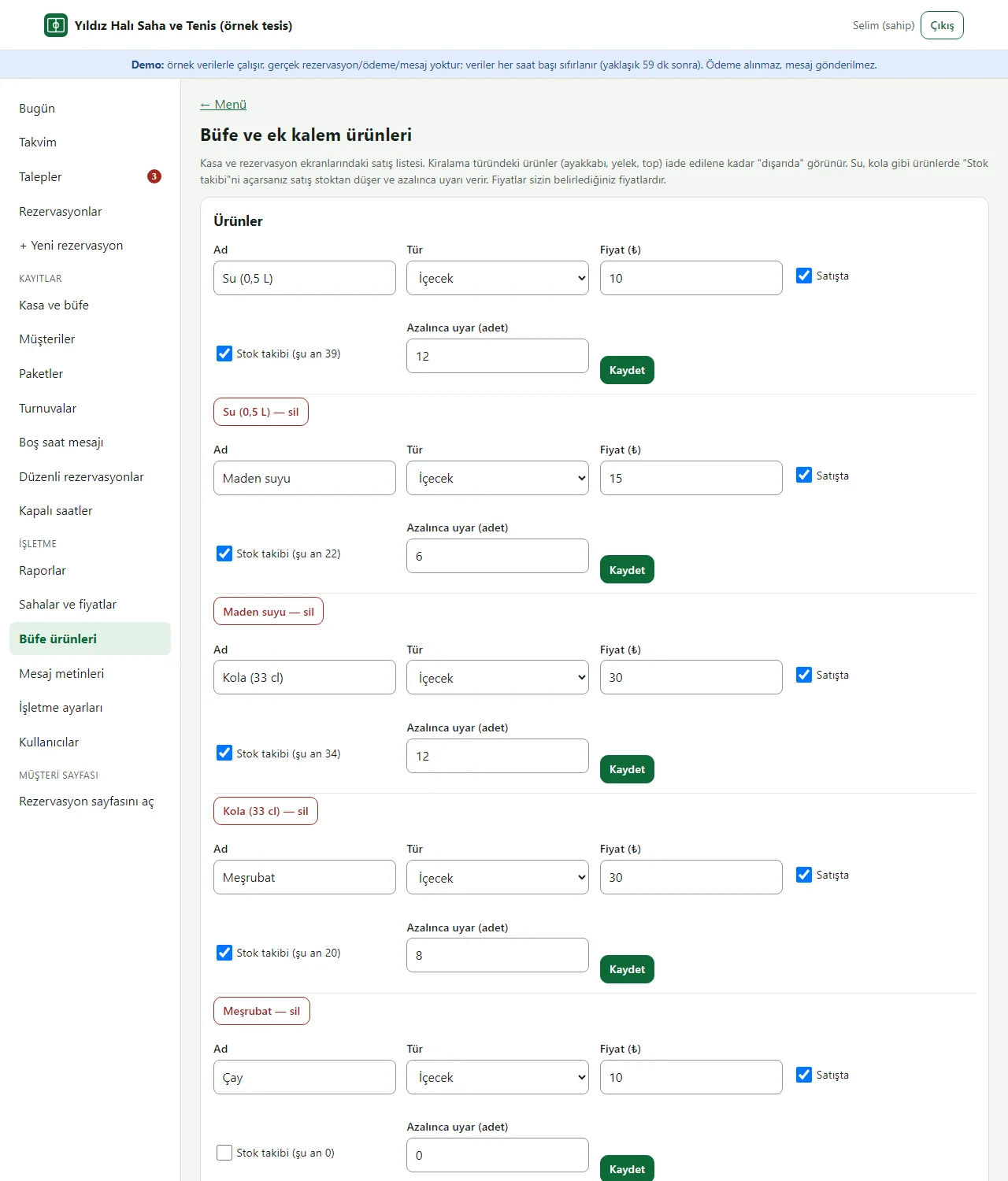
Snack bar and extras product list (owner only): product, type, price, on sale, stock tracking and low-stock limit. The business sets the prices.
- On screen (Turkish interface)
- “Büfe ve ek kalem ürünleri” — snack bar and extra items
- “Stok takibi” — stock tracking
- “Azalınca uyar” — warn when low
- “Satışta” — on sale
-
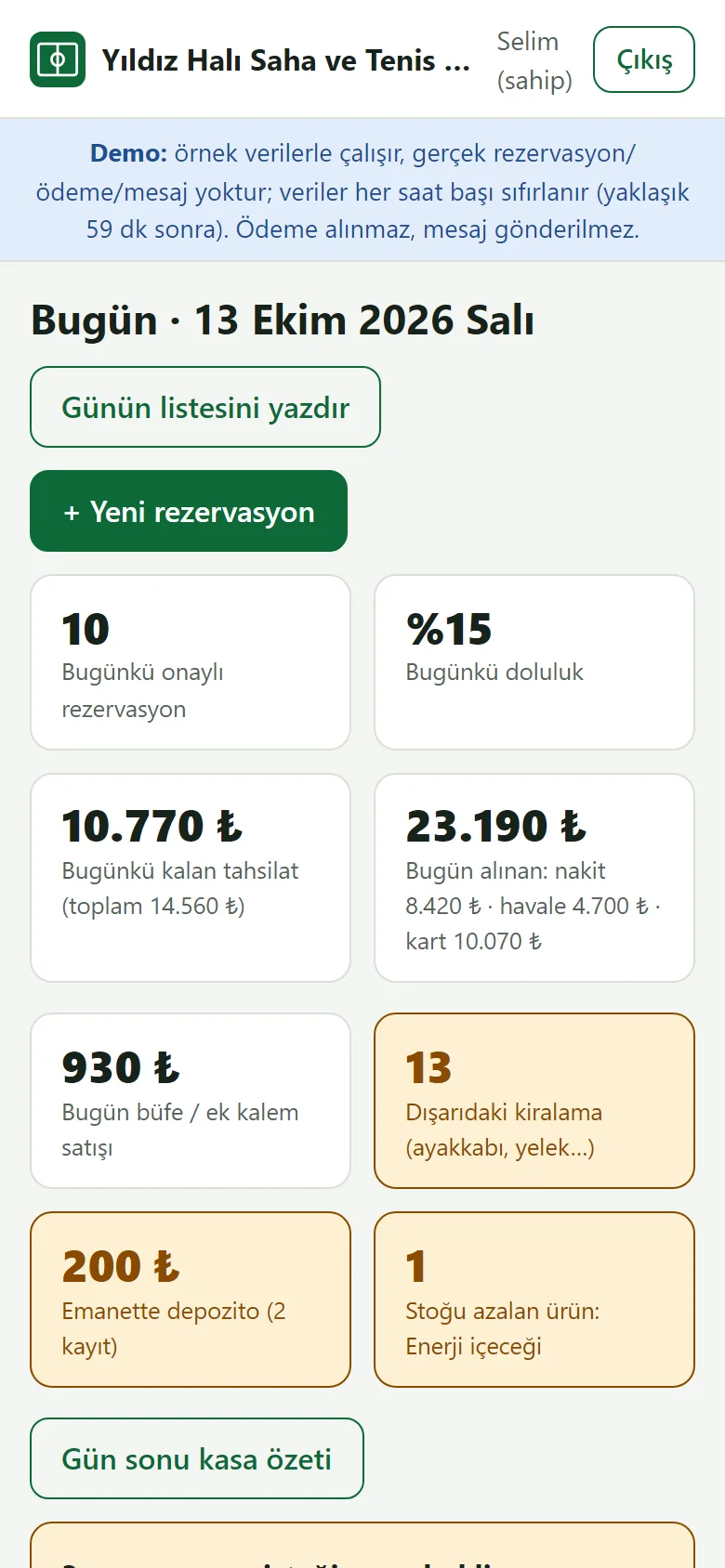
Today on a phone
The panel on a phone: Today, Calendar, Requests, List and Menu open from the bottom bar. The summary tiles and the pending-requests alert are on the first screen.
- On screen (Turkish interface)
- “Bugün / Takvim / Talepler / Liste / Menü” — today / calendar / requests / list / menu
- “Günün listesini yazdır” — print the day’s list
-
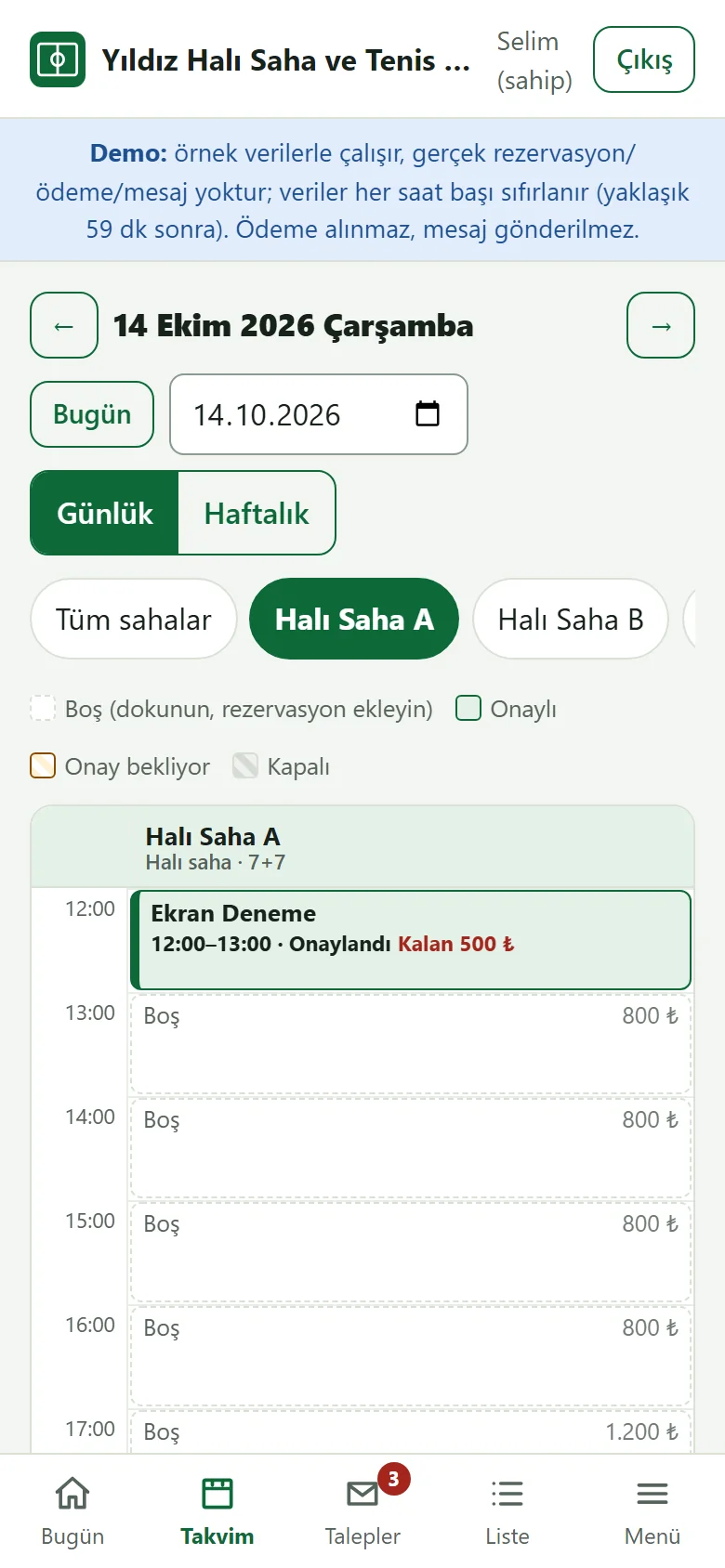
Calendar on a phone
Tap a pitch button to see one pitch; tap a free hour to add a booking.
- On screen (Turkish interface)
- “Tüm sahalar” — all pitches
- “Günlük / Haftalık” — daily / weekly
-
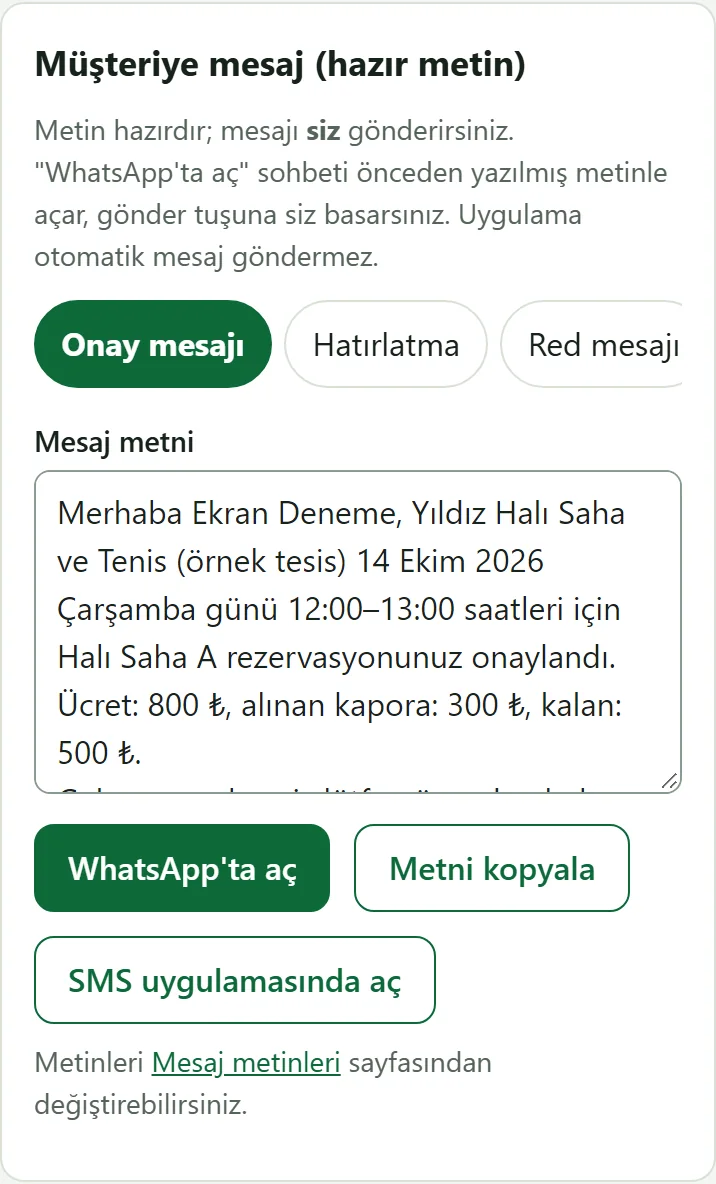
Ready message on a phone
The confirmation, reminder, rejection or cancellation text; open it in WhatsApp or copy it. Sending is in the business’s own hands.
- On screen (Turkish interface)
- “WhatsApp’ta aç” — open in WhatsApp
- “Metni kopyala” — copy the text
- “SMS uygulamasında aç” — open in the SMS app
-
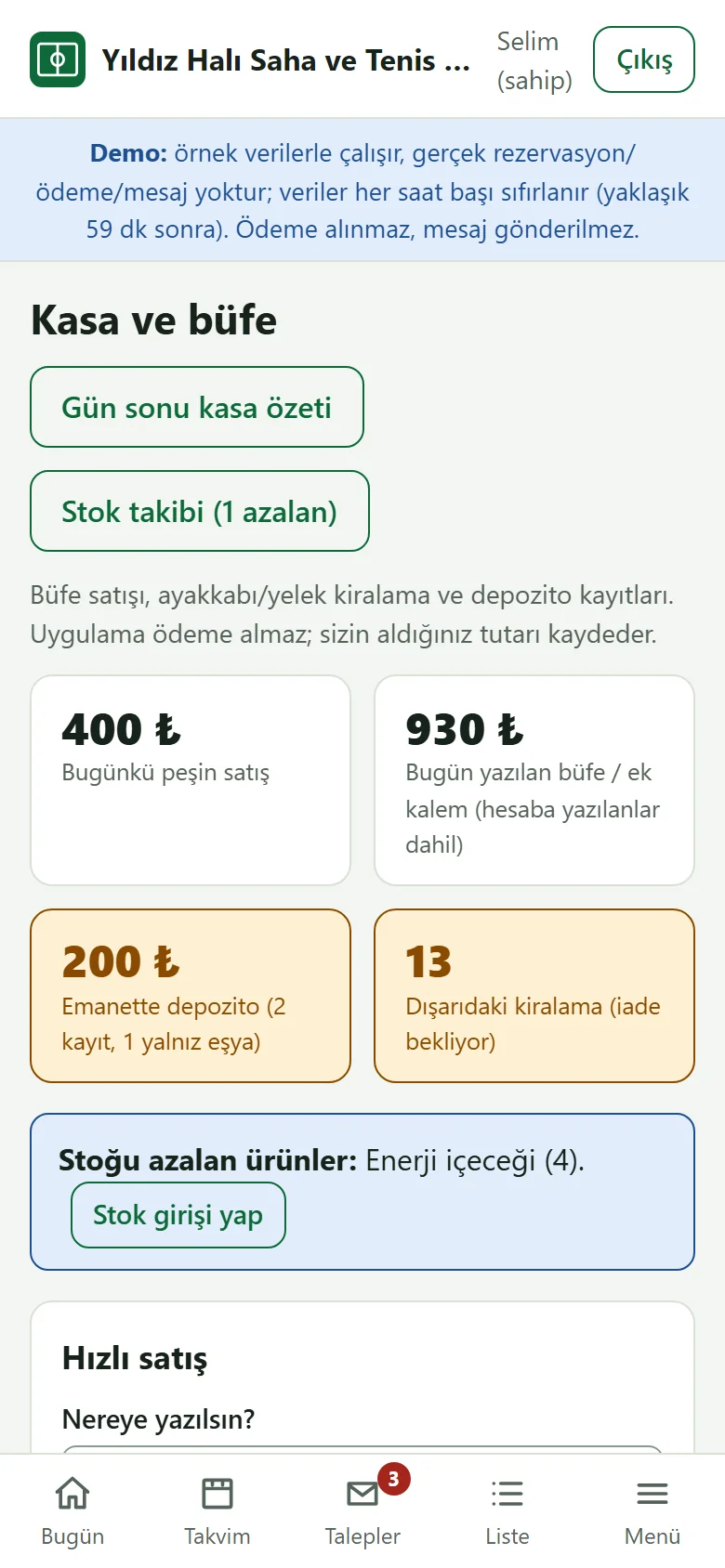
Till and snack bar on a phone
Till and snack bar on a phone: log a sale one-handed at the pitch and take rentals back.
- On screen (Turkish interface)
- “Kasa ve büfe” — till and snack bar
- “Hızlı satış” — quick sale
-
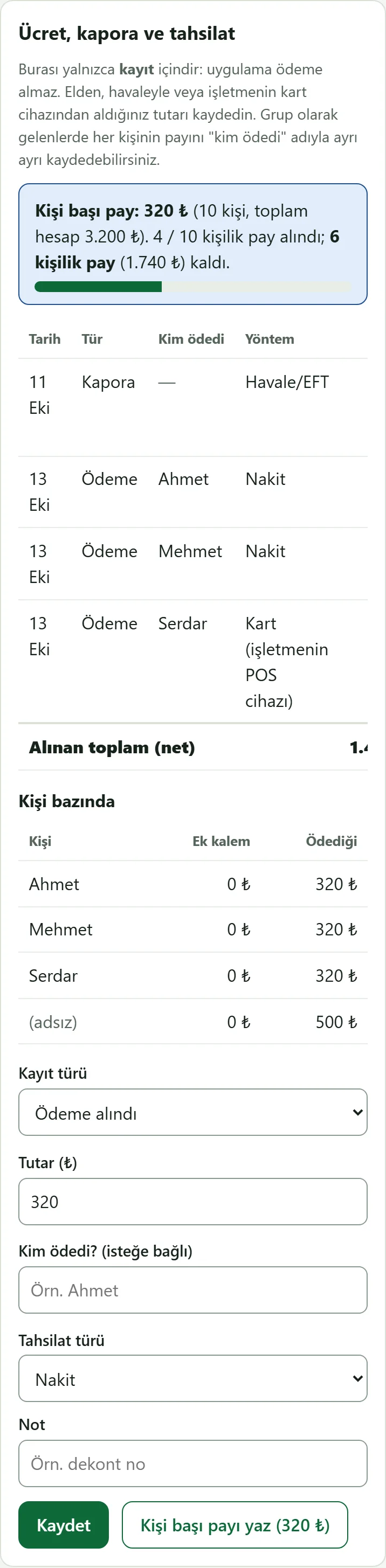
Per-person share on a phone
Per-person share on a phone: how many shares are in and who paid are listed; the "fill the per-person share" button fills in the amount.
- On screen (Turkish interface)
- “Kişi başı payı yaz” — fill in the per-person share
- “Kim ödedi?” — who paid?
- What do they see at the end?
- The customer’s request waits for approval and holds that hour so nobody else can take it. The business approves or rejects it; an approved request becomes a booking on the calendar, the deposit and remaining payment are recorded and the message for the customer comes ready.
- What is it good for?
- Bookings, deposits and balances do not scatter across a notebook, the phone and WhatsApp; the same hour is not given to two people; a team that comes every week is set up in one go.
Everything that is not included, and all limits
- Not delivered to a client and not used by a real facility. The facility on the screens (“Yıldız Halı Saha ve Tenis”, a made-up name), the people, the phone numbers and the amounts are sample data; no real personal details should be entered in the demo.
- There is no online payment, virtual POS or online deposit: choosing cash, bank transfer or card only sets a record label, and the app takes no payment.
- There is no automatic SMS or WhatsApp sending: the message text comes ready and the business sends it from its own phone. There is no e-invoice connection.
- There is no QR entry, coach or group lesson, player matching or social match network. It is for a single facility; there is no multi-branch view. Stock tracking is a simple count (no purchase price, cost, supplier or VAT records); pass and deposit records are the business’s own records and do not produce a contract or receipt. Knockout matches are single matches; there is no group stage or third-place match. There is no store app; the panel opens in a phone browser.
- Tried locally with PHP 8.3 and SQLite; the sample-data demo is live on a DirectAdmin/LiteSpeed account with PHP 8.3. It has not been tried on any other hosting or PHP version. The phone-size screens come from a browser set to phone width (390 pixels); not tried on a real phone.
- In the demo the data is reset every hour, no payment is taken, no message is sent and the pages are closed to search engines; the sign-in page has the manager account prefilled and a “Demo hesapları” (demo accounts) box with “enter as business owner” and “enter as staff” buttons that need no password (the notice and the box show only in the demo). A normal installation asks for an e-mail and password.
- The interface in the screens is Turkish; there is no English interface in the panel.
Delivery and sales status
There is no cart, customer account or online payment on this site for now. Reach out by phone, WhatsApp or the form; in a first conversation your need and the software’s fit are reviewed. The form does not create an order, a contract or a payment.
Possible delivery options
Price
There is no package on offer right now, so there is no list price. If a package is defined, the price and payment method are settled then.
Requirements and version history
Installation requirements
- It uses plain PHP 8.1 or newer and SQLite; no separate database server is needed. The product was tried locally with PHP 8.3; it has not been tried on other PHP versions.
Release notes
- No version has been delivered to a client. A live sample-data demo exists.
- 1.0.0 (11 October 2026): first version; pitch and price rules, a daily and weekly calendar, clash prevention, a customer booking page with request approval, bookings added by hand, recurring weekly bookings, a customer book, deposit and remaining-payment records, ready message texts, closed hours, a Today screen and an occupancy and payment report.
- 1.0.1 (12 October 2026): a “İşletmeye WhatsApp ile haber ver” (tell the business on WhatsApp) button on the status page of a request waiting for approval (a ready message; the customer taps “send”, the site sends nothing on its own).
- 1.1.0 (13 October 2026): per-person share and per-person payments, snack-bar and extra-item sales, shoe and vest hire, stock tracking, deposits, an end-of-day till summary, passes / subscriptions, tournaments, a free-hour announcement message and a floodlight fee; a 1.0.x database is upgraded in place.
- 1.1.1 (18 October 2026): demo sign-in page: a demo notice, fields prefilled with the manager account and password-free “… olarak gir” (sign in as …) buttons for owner and staff (demo mode only; on a real installation there is no notice, box or prefilled field).
- 1.1.2 (21 October 2026): customer import from Excel/CSV (owner only): upload a file or paste from Excel; columns are recognised by their header, the preview shows new, already registered and wrong rows, an unwanted row is left out with “Alma” (do not take), the last import can be taken back; phone-number spelling differences count as the same person. No booking, payment, pass or message is created; .xlsx is read only when the server has the zip extension.
- 1.1.3 (26 October 2026): staff no longer see the “İptal” (cancel) button on extra-item rows of past days (the owner sees all of them, and staff can cancel today’s item); the server rule is unchanged.
- 1.2.0 (28 October 2026): a setup guide (five steps, a progress bar, “Bu ekran ne işe yarar?” boxes on the main screens, “Boş siteyle yeniden başla” in the demo), a customer link page (a ready WhatsApp message, copy, an A4 poster with a QR code), adding the panel and the customer’s own booking page to the phone, a free phone notification on a new booking request and an optional e-mail; the schema did not change.
- 1.2.1 (28 October 2026): a one-press role screen from the product page (demo only): opens as the owner or as staff without a password; closed on a real installation. No new permission, data or schema change.
- 1.2.2 (28 October 2026): “Takvime ekle” (add to calendar) on the customer’s status page: an “Add to Google Calendar” link and “Dosya olarak indir (.ics)” (download the file; a reminder one hour before; no customer name, phone number, note or payment detail is carried and nothing is sent to the business). Shown only for a confirmed booking that has not started; not for a request waiting for approval, a rejected, cancelled or past one. No new permission, data or schema change.