Gyms and fitness studiosDemo with sample data
Gym and Fitness Membership Tracking: screen-by-screen guide
The full version of the short description on the product page: every feature, how each screen is used step by step, all limits and the delivery details.
All features
The flows below were run in the app’s demo mode with sample data. The screens were taken on 20 October 2026 from a local demo installation; the live demo is on version 1.1.0 today; the versions up to 1.0.6 only fixed the trainer sign-in, the times of the sample entries, one text on the member page, the sample expenses, the version number in notifications, English texts left in the Turkish panel and a repeated package name in the WhatsApp membership message; the screens look the same in these versions (the income-report screen was taken from the 1.0.3 live demo); in 1.0.7 the member import also reads an Excel (.xlsx) file, and in 1.0.8 some links and forms a role may not use are no longer shown; in 1.0.9 the “Today’s revenue” on a trainer’s calendar counts only the trainer’s own appointments, not the gym’s ticket sales; in 1.0.10 the class schedule and request pages that members and guests see say “salon” instead of “stüdyo” (studio) and a page opened without the right to it says “Bu işlem için yetkiniz yok.” in Turkish; 1.1.0 adds time off over several days and the “Yaklaşan izin ve kapalı saatler” (upcoming time off) list to the private-training calendar (the manager, reception, trainer, member and guest sides were all tried on the live demo). The gym (“Örnek Spor Salonu”), members, phone numbers and amounts are made up; no real name, phone number or e-mail should be entered in the demo.
- Front desk: find by name, phone or member code, or scan the QR code; a green (can enter), amber (can enter but say something) or red (cannot enter) result, always with the reason; today’s entries are listed below
- Record and undo an entry: a visit-count card loses one visit, an unlimited package does not, a second tap on the same day does not deduct a second visit; an entry recorded by mistake is undone with “Yanlış girdim” and the visit is returned
- Manager exception: on a red result the manager writes a reason and presses “Yine de içeri al” (let in anyway), which is kept as a separate record; reception cannot do this. What happens at the desk when an instalment is late is a setting: warn, do not let in, or say nothing
- Member code and readers: a signed member code, a USB barcode reader and camera QR scanning (camera scanning depends on the browser’s support)
- Package definitions and sales: monthly, 3-6-12 month, day pass, visit-count card, student and personal-training packages; the end date is counted from the sale day, the package ending first is used first, and a membership is frozen for a date range with the end date moving along
- Instalment plan and collection: a plan of 1 to 24 parts, payment per part, partial payments and late instalments; the parts always add up to the exact amount to the kuruş
- Member card: balance, total paid, packages, instalments, recent entries, an emergency contact and the link to the member’s own page (send on WhatsApp, copy the link) on one page
- The member’s own page: remaining days or visits, the payment due, the QR code to show at entry, recent visits and a button to call the gym; the page can be added to the phone
- Follow-up lists: memberships ending and cards running low, late instalments, members who stopped coming, those who left in the last 30 days, and busy hours; the day and visit thresholds are changed in Settings, and every row has a ready WhatsApp message
- Importing members from a list: CSV (semicolon, comma, tab; Windows Turkish encoding), an Excel (.xlsx) file (only when the server has the zip extension; otherwise the page says to save as CSV), pasting from Excel or Google Sheets, column recognition from the header, a preview before saving, duplicate and incomplete rows set apart, phone formats matched, and undo; a running membership that is imported has no price, so no income or balance is created
- Member list, reports and public page: a membership column with running, not running and owing filters; collection, expense, packages sold, daily entries and birthday reports; the gym’s public page shows packages, opening hours and the class schedule
- Private-training calendar and time off over several days: a trainer’s leave, training or a break at the same hour every day is closed with one form by choosing a first and a last day; the days are closed in the background and no private-training appointment can be booked in those hours; a day that already holds an appointment is left open and named in the message, and no appointment is cancelled; under the calendar the “Yaklaşan izin ve kapalı saatler” (upcoming time off) list shows consecutive days as one line and “Yanlış girdim, sil” (I made a mistake, delete) removes them all together; a trainer sees and removes only their own. There is no leave-days counter or leave entitlement calculation
- Roles and set-up: manager, reception (no settings or reports) and trainer (no front desk; the logo leads to their own start page instead of a “no permission” screen, and the discount form is not shown on an appointment card); a six-step setup wizard, a “Bu ekran ne işe yarar?” (what is this screen for) box on every screen, and “Boş siteyle yeniden başla” (start with an empty site) and “Örnek veriyi geri yükle” (restore the sample data) in the demo; optional group classes and personal-training appointments, cash, expenses, stock and campaigns come from the core
- Free phone notifications (Web Push): a daily summary for the owner and expiry, remaining-visit and instalment reminders for members exist in the code and pass unit tests; notifications were tried in desktop Chrome and on one Android phone, and have not been tried on an iPhone or in Safari
Screen by screen: how it is used
The interface in these screens is Turkish; only the captions and explanations on this page are in English. The screens come from the app’s own demo mode with sample data, taken on 20 October 2026 from a local installation; the live demo is on version 1.1.0 today (the screens look the same up to 1.0.6; in 1.0.7 the member import also reads an Excel (.xlsx) file, in 1.0.8 some links and forms a role may not use are no longer shown, in 1.0.9 a trainer’s calendar no longer shows the gym’s ticket sales as revenue, in 1.0.10 the member and guest pages say “salon” instead of “stüdyo”, and in 1.1.0 the private-training calendar gets time off over several days); only the income-report screen was taken from the 1.0.3 live demo. The gym (“Örnek Spor Salonu”, a made-up name), members, phone numbers and amounts are made up. The member page and the phone view of the front desk are 390 px wide. The English text on the file chooser belongs to the browser.
- Who uses it?
- The gym owner or manager, the front-desk staff, a trainer and the member.
- Where do they start?
- On the demo sign-in page a role button is pressed; at the front desk the member’s name, phone or code is typed into the check-in desk.
What do they do on screen? Step by step
-
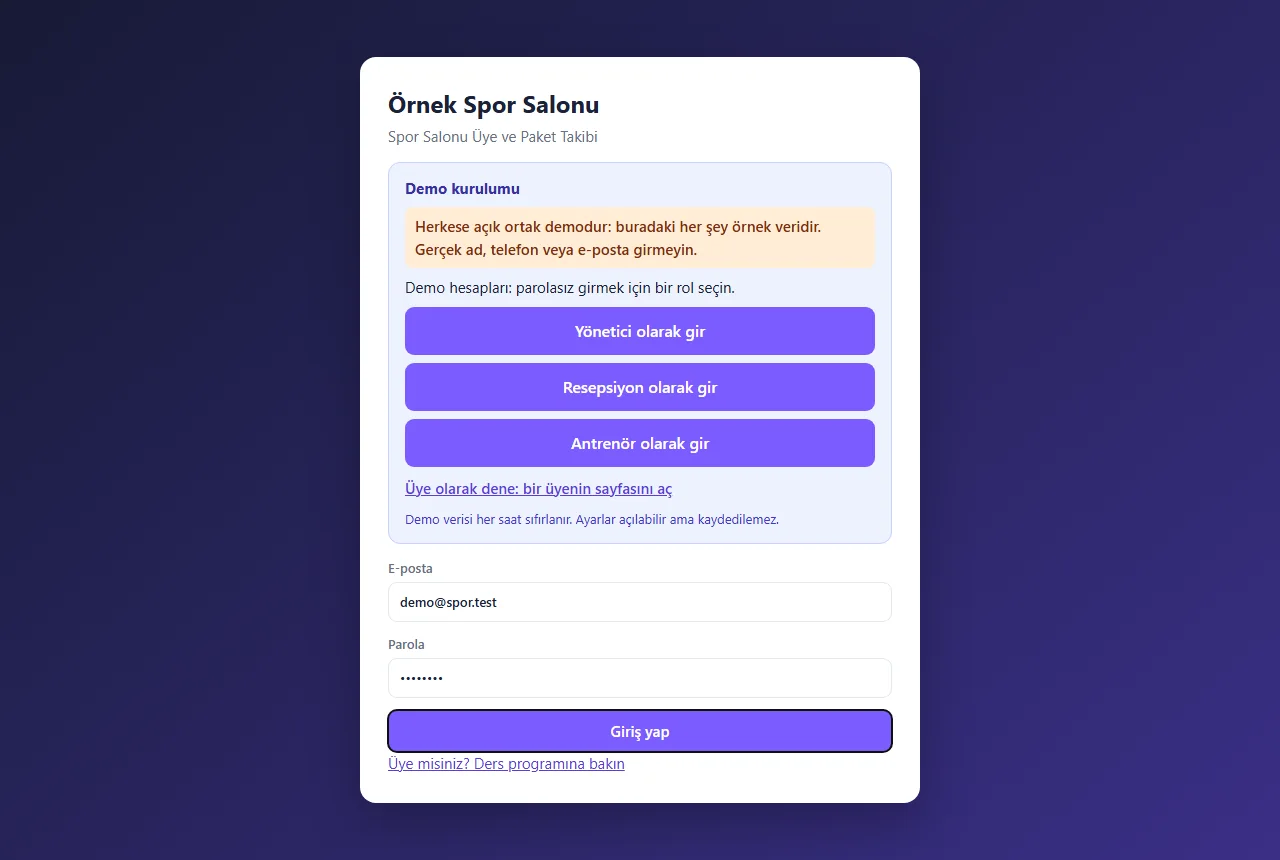
Demo sign-in page
The demo needs no password: enter as manager, reception or trainer with one click; a member’s own page also opens from here. A normal installation asks for an e-mail and password.
- On screen (Turkish interface)
- “Yönetici olarak gir” — enter as manager
- “Resepsiyon olarak gir” — enter as reception
- “Antrenör olarak gir” — enter as trainer
- “Üye olarak dene: bir üyenin sayfasını aç” — try as a member: open a member’s page
-
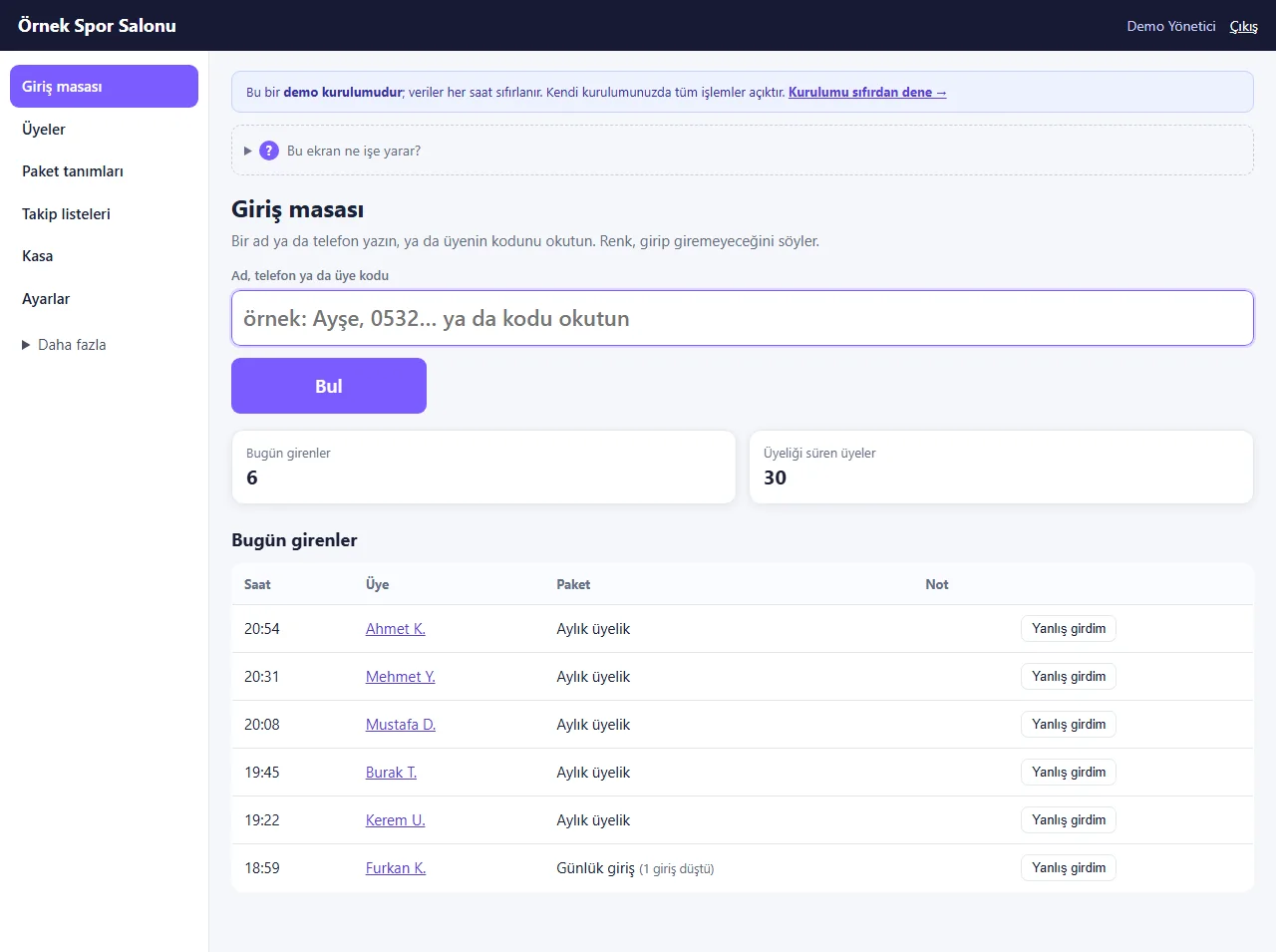
Check-in desk
The member’s name, phone or code is typed, or the QR code is scanned. Today’s entries are listed below; an entry recorded by mistake is undone with “Yanlış girdim”.
- On screen (Turkish interface)
- “Giriş masası” — check-in desk
- “Ad, telefon ya da üye kodu” — name, phone or member code
- “Bugün girenler” — entered today
- “Yanlış girdim” — entered by mistake
-
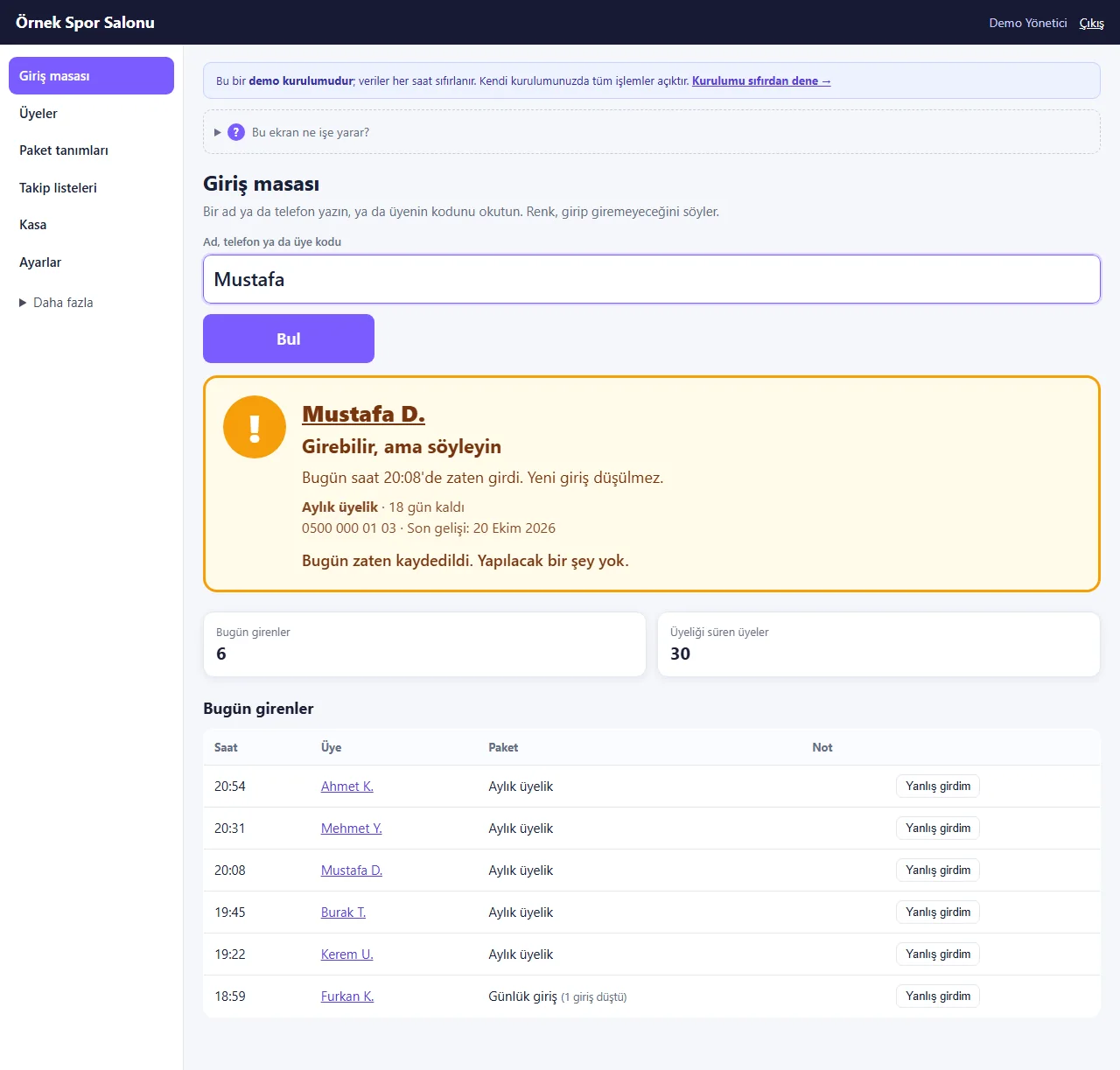
Member who already entered today
If the same member is scanned a second time on the same day the screen turns amber, says the time and no new visit is deducted.
- On screen (Turkish interface)
- “Girebilir, ama söyleyin” — can enter, but tell them
- “Bugün zaten kaydedildi” — already recorded today
- “Aylık üyelik · 18 gün kaldı” — monthly membership · 18 days left
-
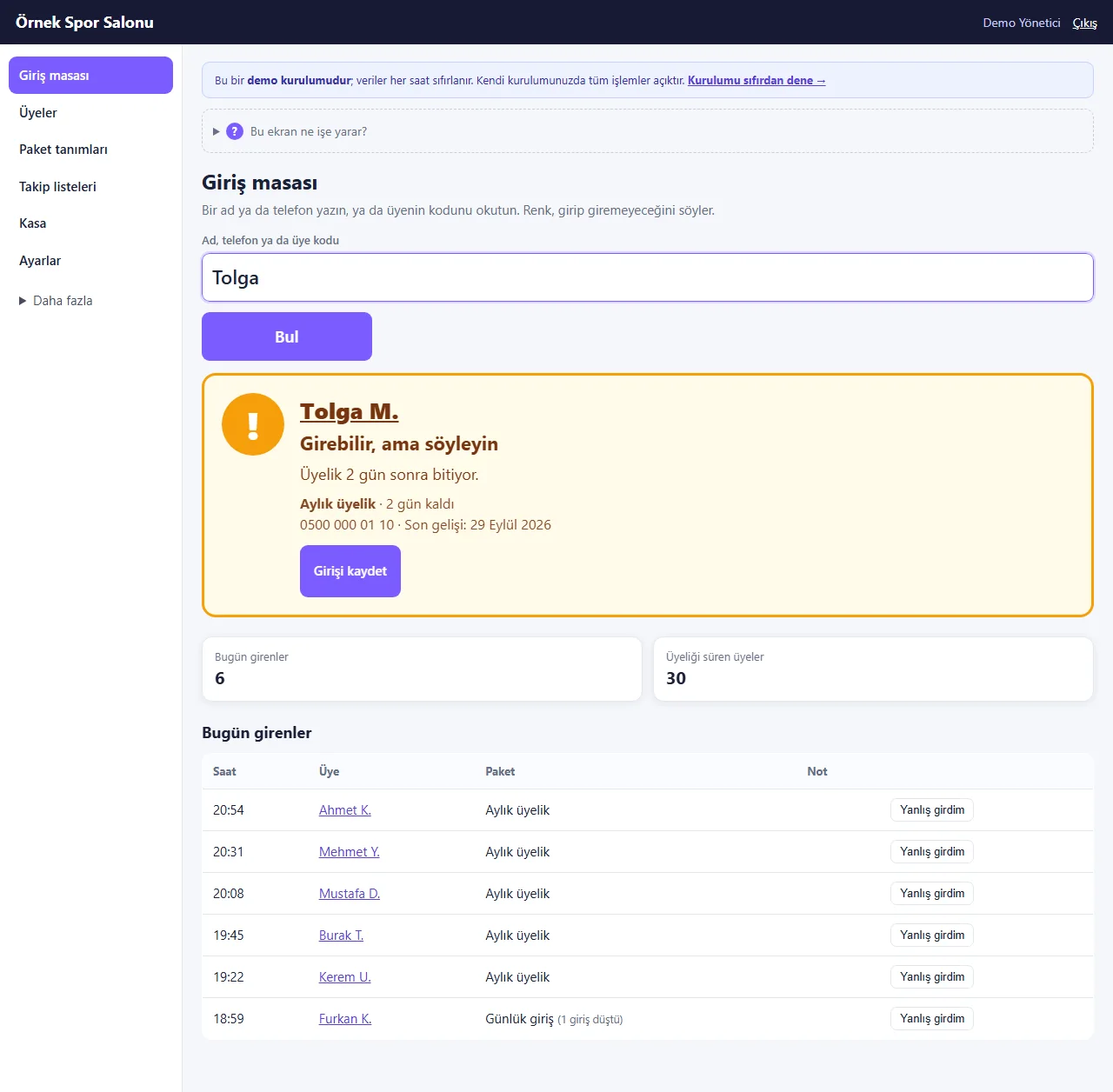
Membership about to end
If the membership ends in 2 days the amber result says “can enter but say something”; the record-entry button sits right below. A member who owes a balance also gets amber.
- On screen (Turkish interface)
- “Üyelik 2 gün sonra bitiyor.” — the membership ends in 2 days
- “Girişi kaydet” — record the entry
-
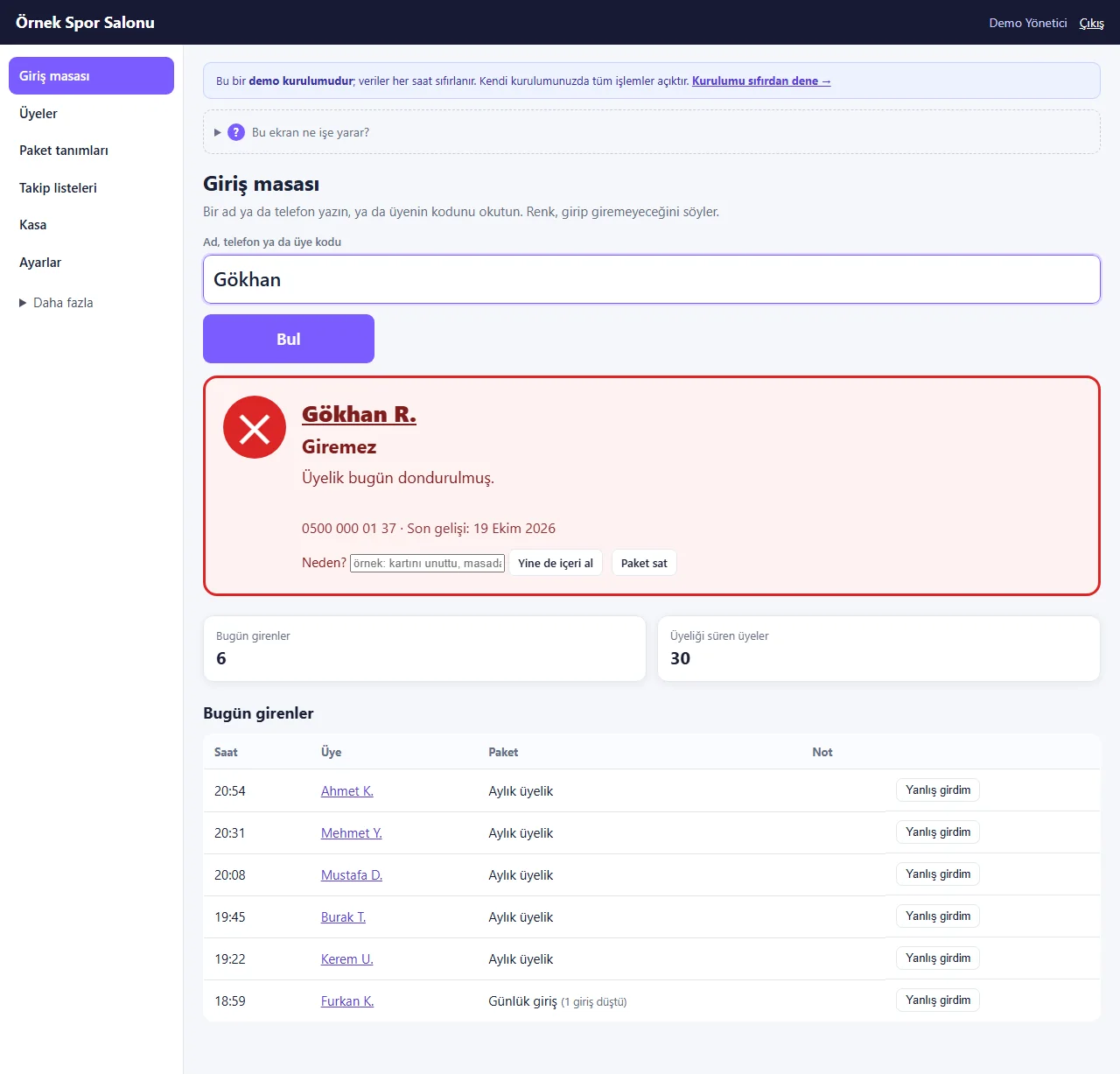
Frozen membership
A frozen membership gives a red result and states the reason. A manager can write a reason and press “Yine de içeri al”, or sell a new package with “Paket sat”.
- On screen (Turkish interface)
- “Giremez” — cannot enter
- “Üyelik bugün dondurulmuş.” — the membership is frozen today
- “Yine de içeri al” — let in anyway
- “Paket sat” — sell a package
-
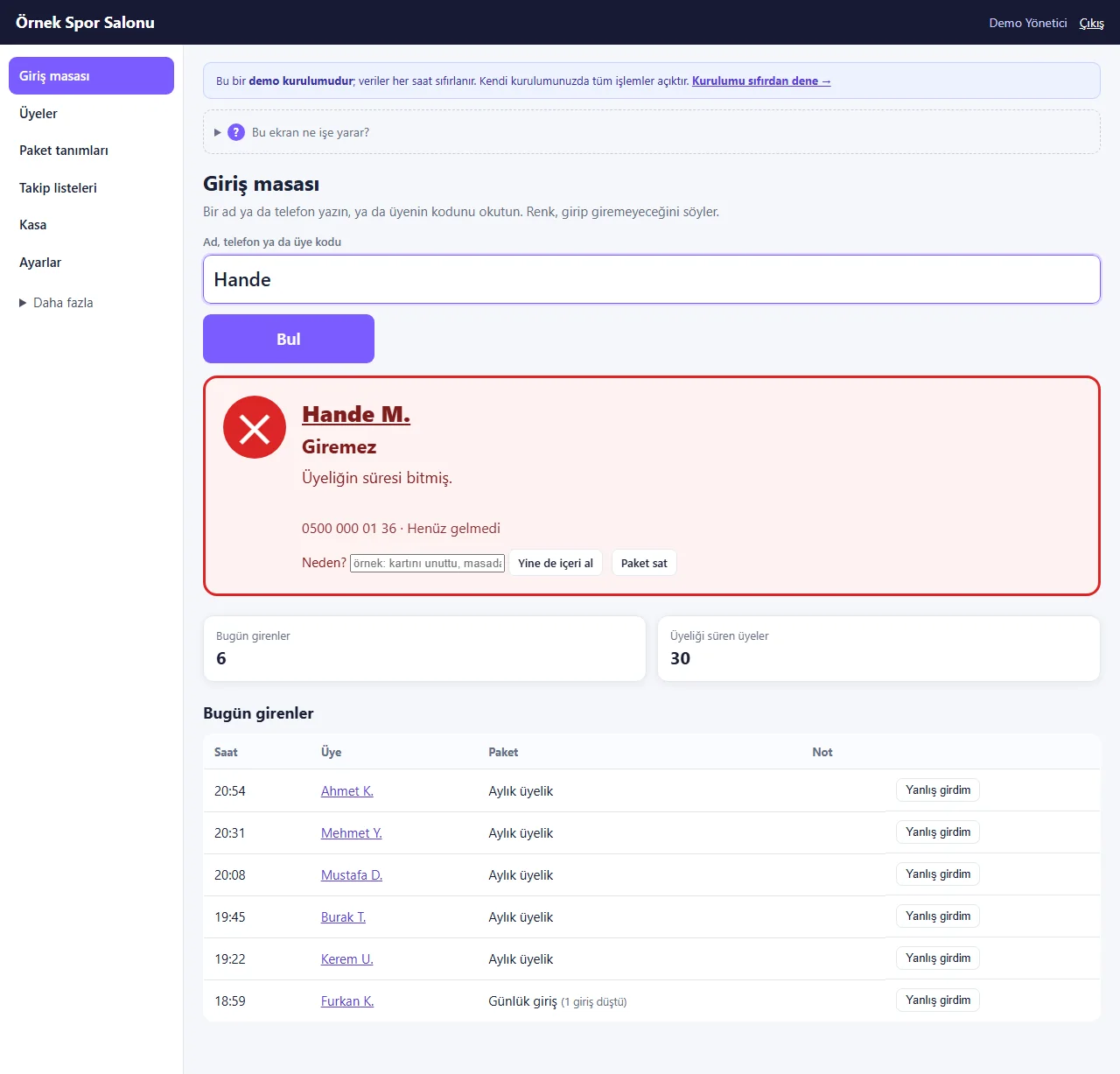
Expired membership
A member whose membership has ended, who has no visits left or who has no package is red as well. You go from the result box straight to selling a package.
- On screen (Turkish interface)
- “Giremez” — cannot enter
- “Üyeliğin süresi bitmiş.” — the membership has expired
- “Henüz gelmedi” — has not come yet
-
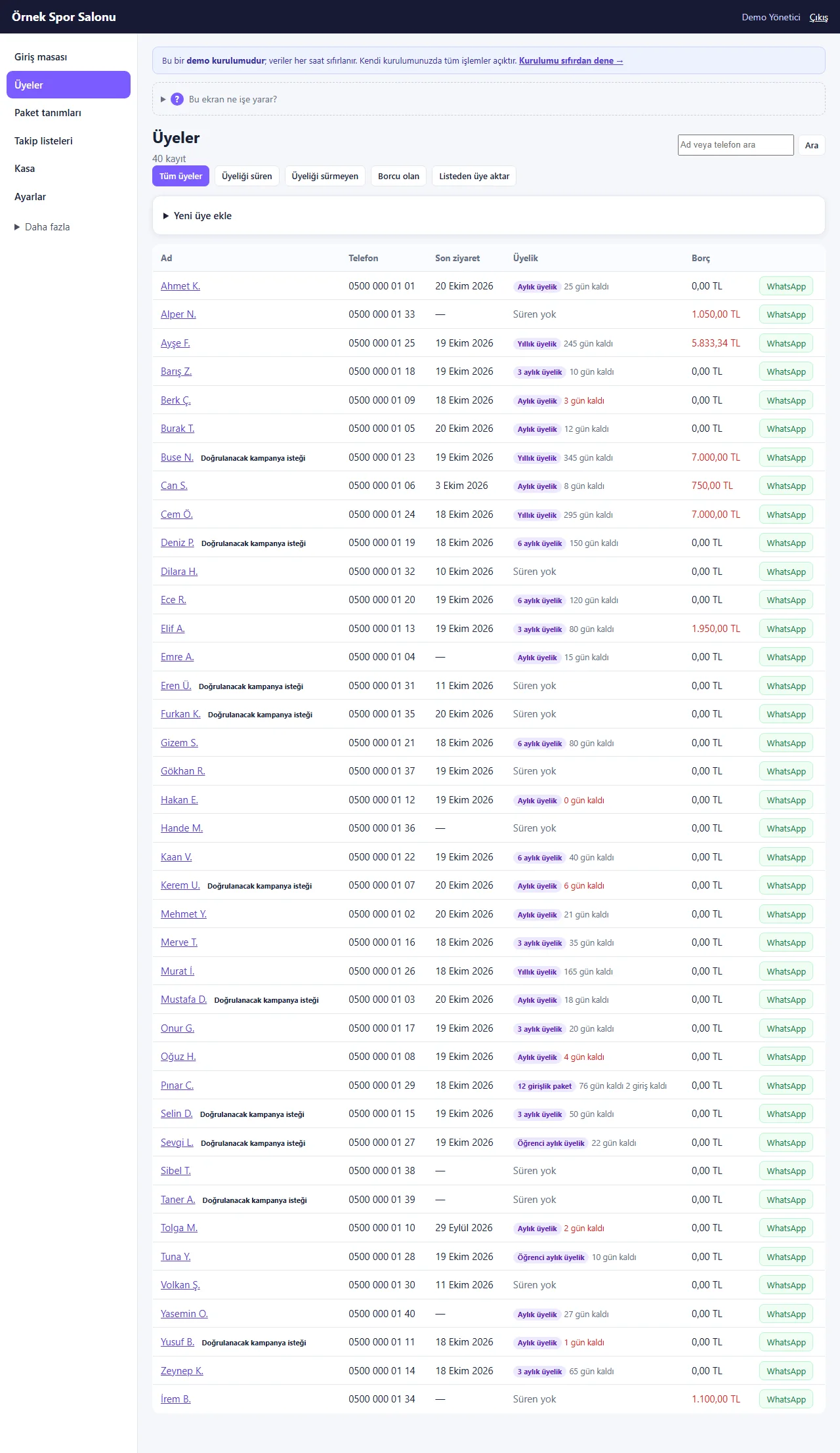
Members
The membership column shows the package and the days or visits left; there are running, not running and owing filters and a search by name or phone. Every row has a ready WhatsApp button.
- On screen (Turkish interface)
- “Üyeler” — members
- “Üyeliği süren” — membership running
- “Borcu olan” — owing a balance
- “Listeden üye aktar” — import members from a list
- “Yeni üye ekle” — add a new member
-
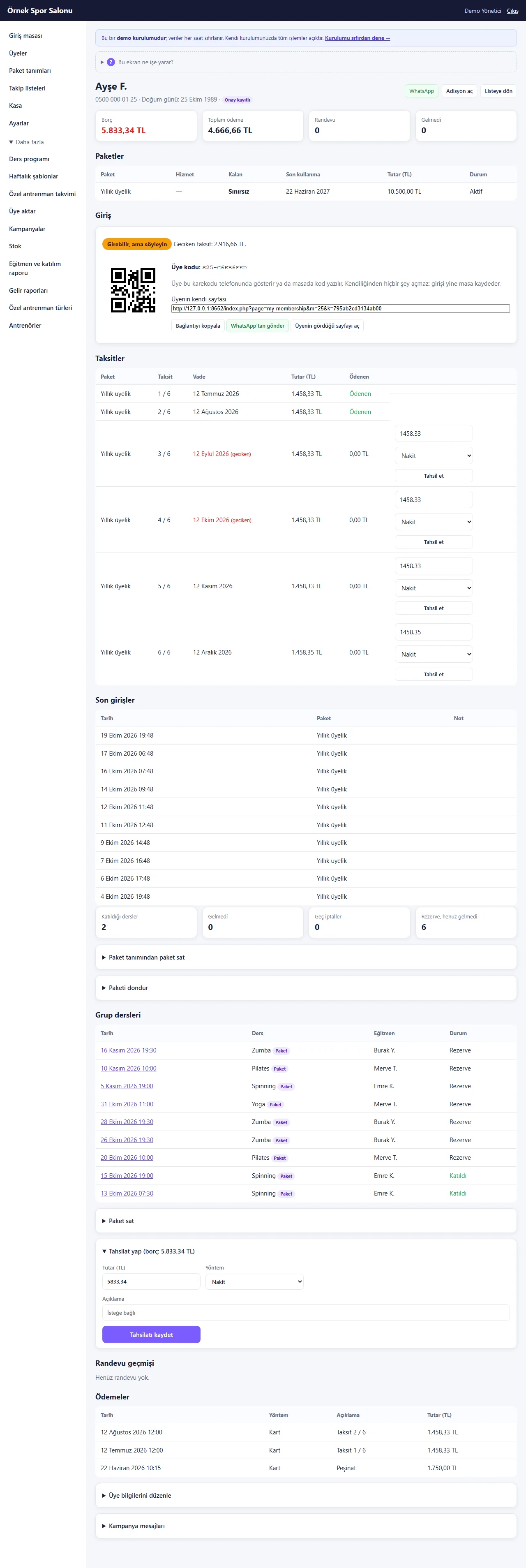
Member card
Balance, total paid, packages, the member’s QR code and the link to their own page, instalments, recent entries, group classes and payments are on one page. A package is sold, frozen and each instalment collected from here.
- On screen (Turkish interface)
- “Borç” — balance owed
- “Paketler” — packages
- “Üye kodu” — member code
- “Taksitler” — instalments
- “Tahsil et” — collect
- “Son girişler” — recent entries
- “Paketi dondur” — freeze the package
-
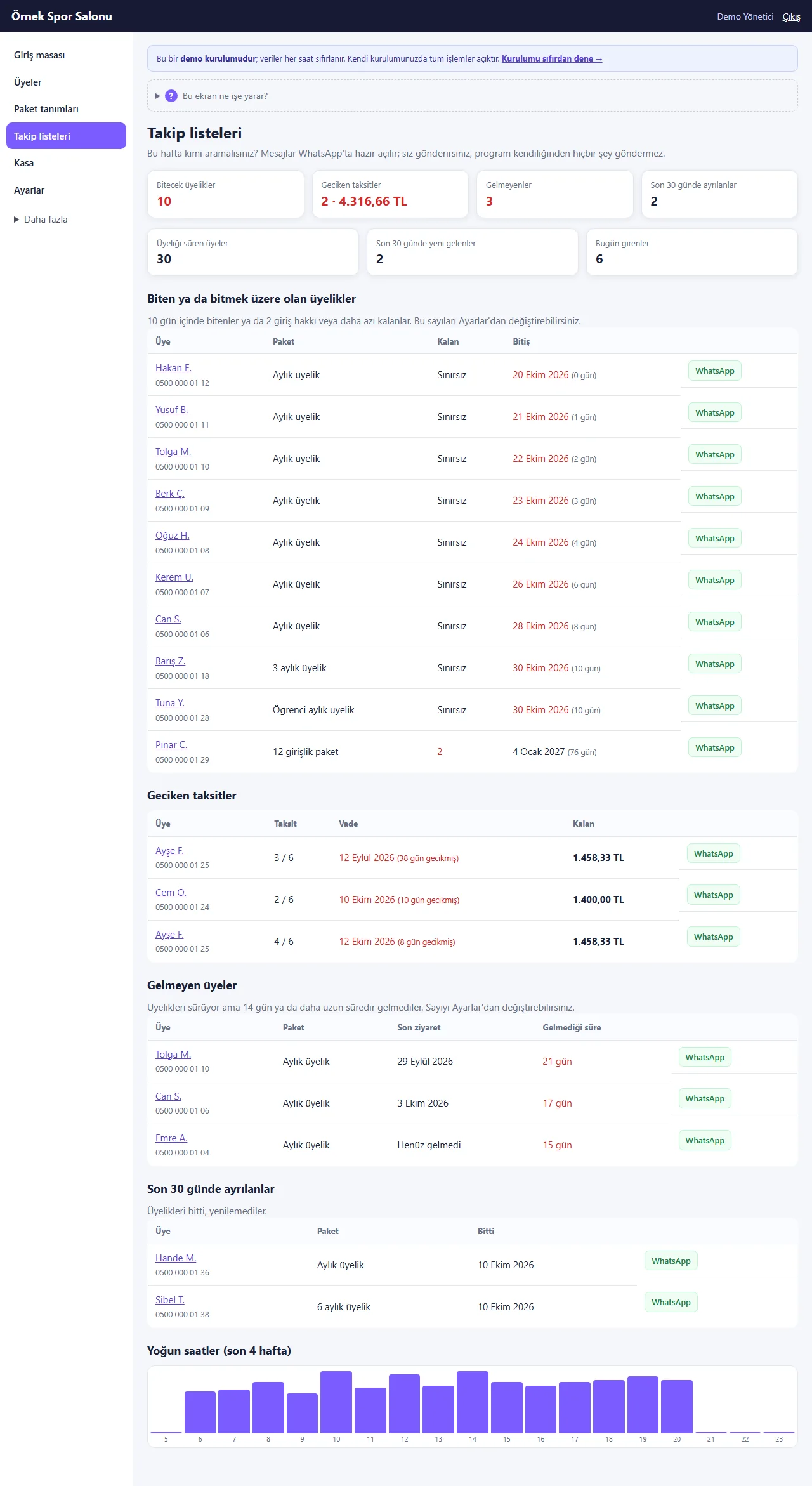
Follow-up lists
Memberships about to end, late instalments, members who stopped coming, those who left in the last 30 days and busy hours; a ready WhatsApp message opens from each row, and the program never sends anything on its own.
- On screen (Turkish interface)
- “Takip listeleri” — follow-up lists
- “Bitecek üyelikler” — memberships about to end
- “Geciken taksitler” — late instalments
- “Gelmeyen üyeler” — members not coming
- “Yoğun saatler” — busy hours
-
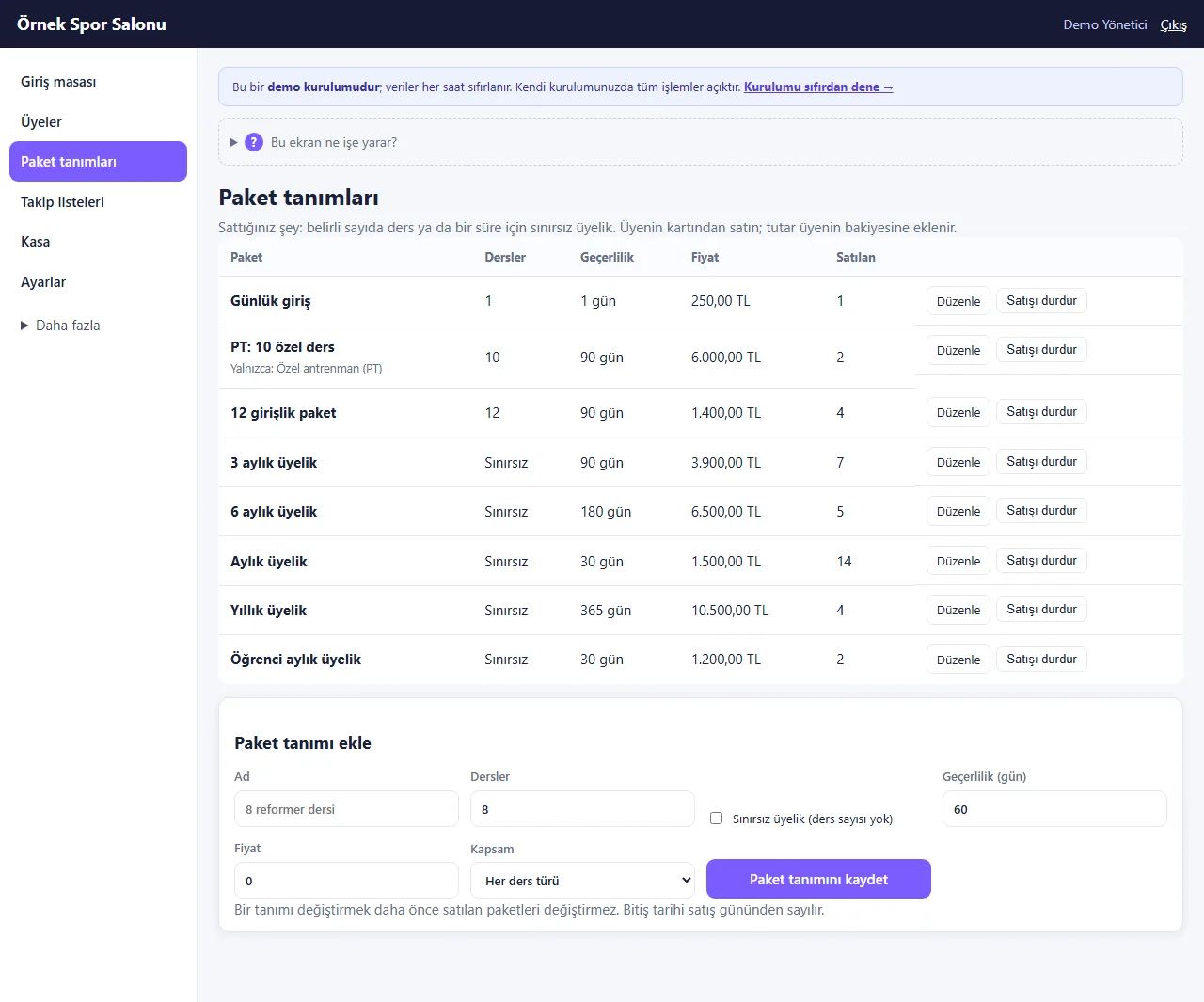
Package definitions
Day pass, visit-count card, monthly, 3 and 6 month, yearly, student and personal-training packages; the duration, number of visits and price are set. Changing a definition does not change packages sold earlier.
- On screen (Turkish interface)
- “Paket tanımları” — package definitions
- “Günlük giriş” — day pass
- “12 girişlik paket” — 12-visit package
- “Aylık üyelik” — monthly membership
- “Paket tanımı ekle” — add a package definition
-
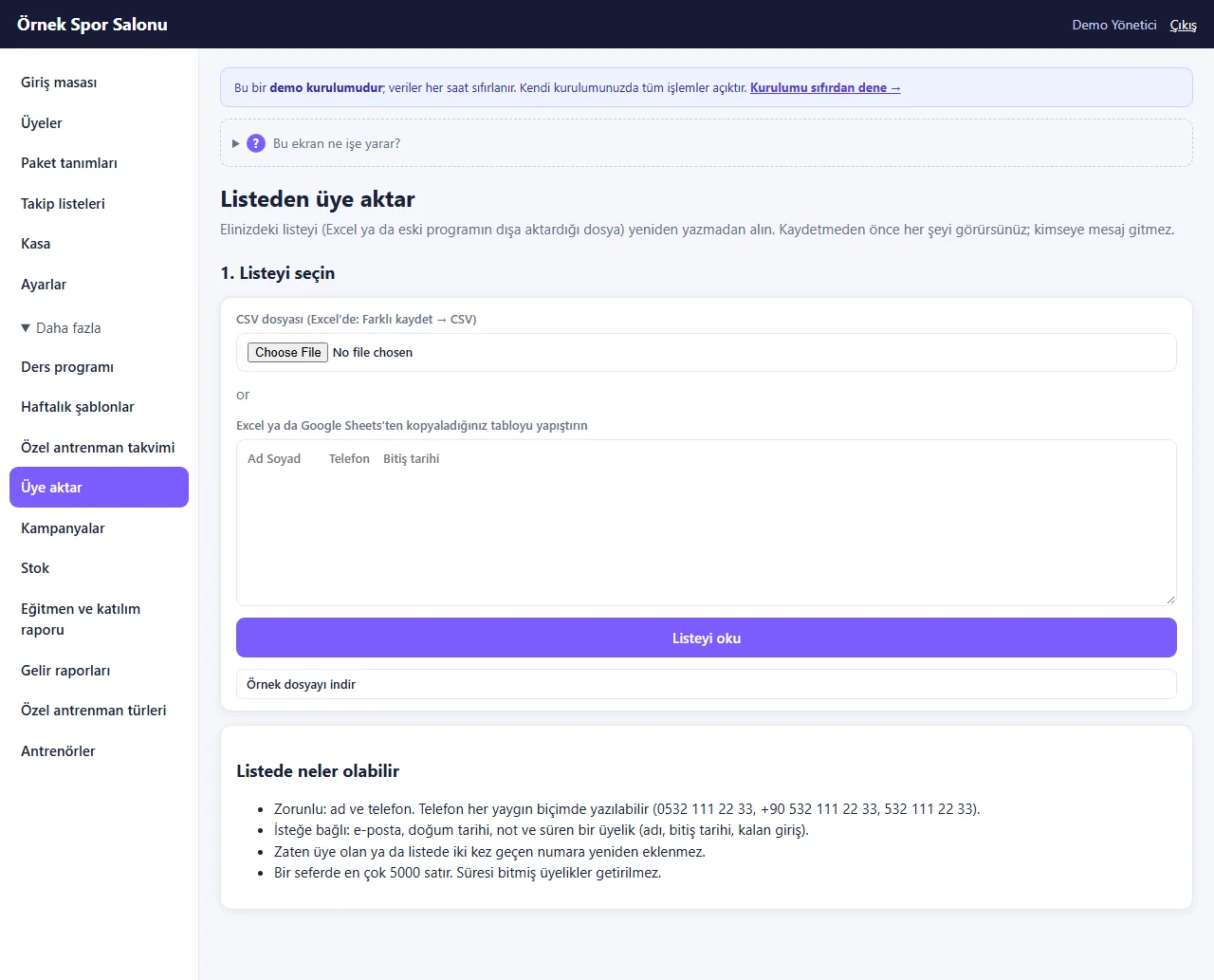
Importing members: choosing the list
The list in hand is uploaded as a CSV saved from Excel or pasted from a table; a sample file can be downloaded. It says up front that nobody will be messaged.
- On screen (Turkish interface)
- “Listeden üye aktar” — import members from a list
- “Listeyi seçin” — choose the list
- “Listeyi oku” — read the list
- “Örnek dosyayı indir” — download the sample file
-
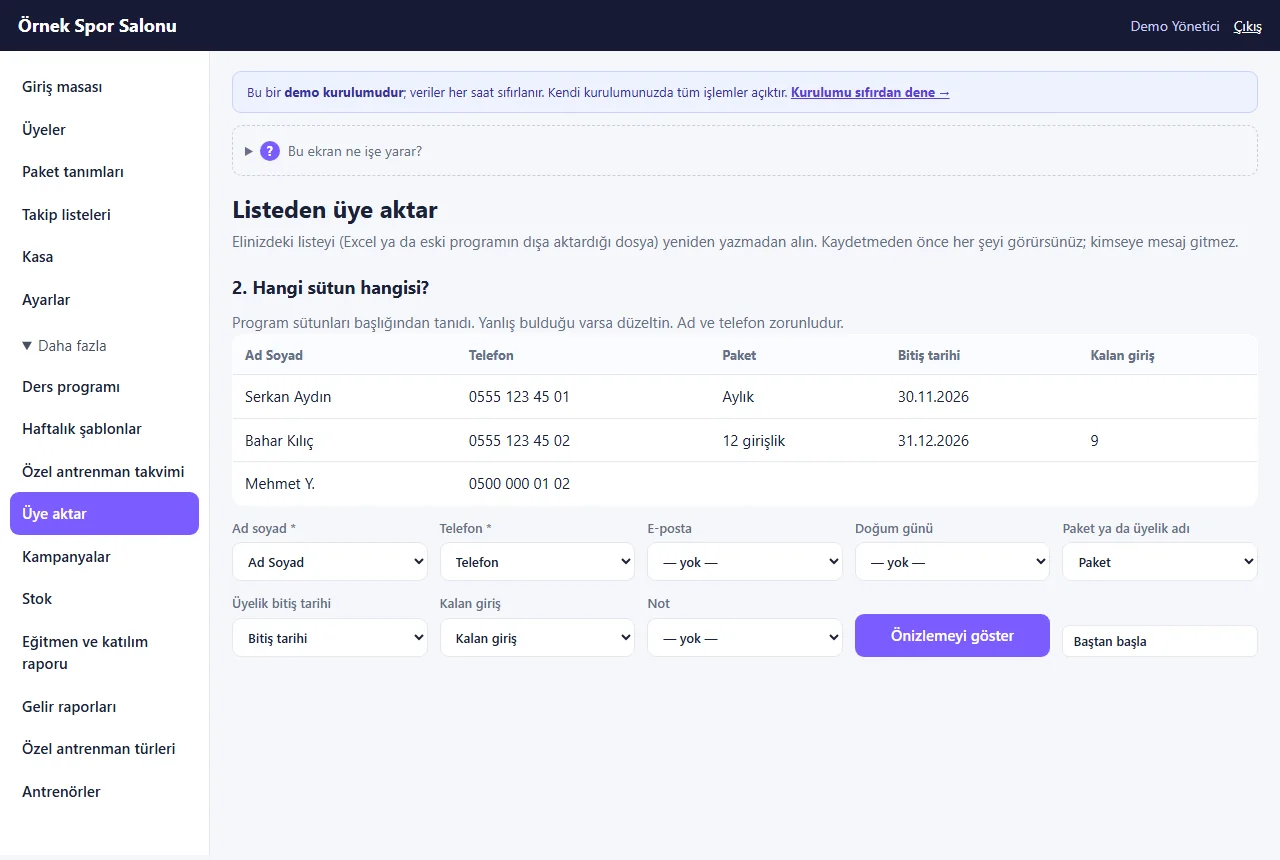
Importing members: columns
The columns are recognised from their headers; if one is wrong you correct it from the list. Name and phone are required.
- On screen (Turkish interface)
- “Hangi sütun hangisi?” — which column is which?
- “Ad soyad” — full name
- “Telefon” — phone
- “Önizlemeyi göster” — show the preview
-
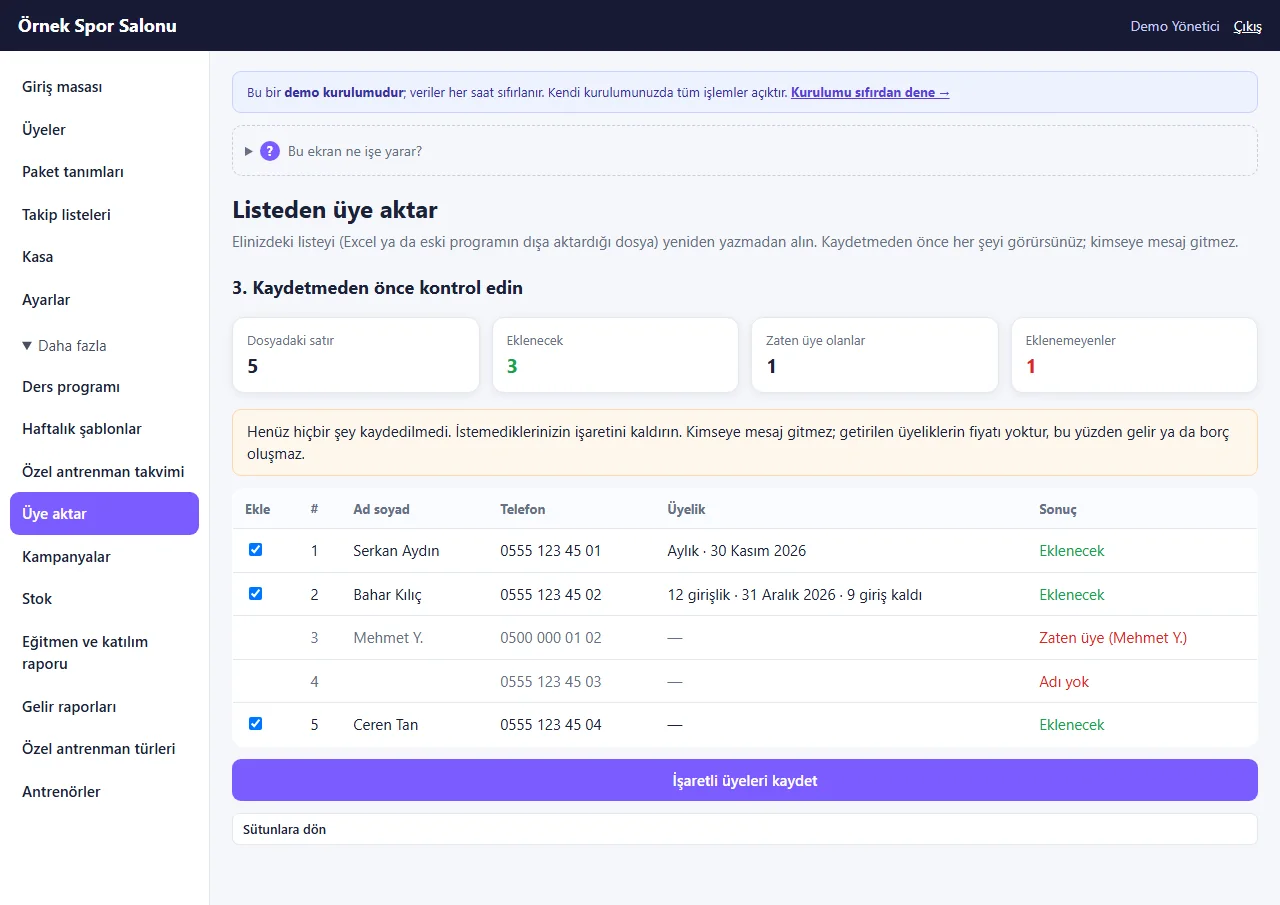
Importing members: preview
Before saving, the rows to be added, those already members and those that cannot be added are shown separately; an unwanted row is unticked. The last import can be undone afterwards.
- On screen (Turkish interface)
- “Kaydetmeden önce kontrol edin” — check before saving
- “Eklenecek” — to be added
- “Zaten üye” — already a member
- “Adı yok” — no name
- “İşaretli üyeleri kaydet” — save the ticked members
-
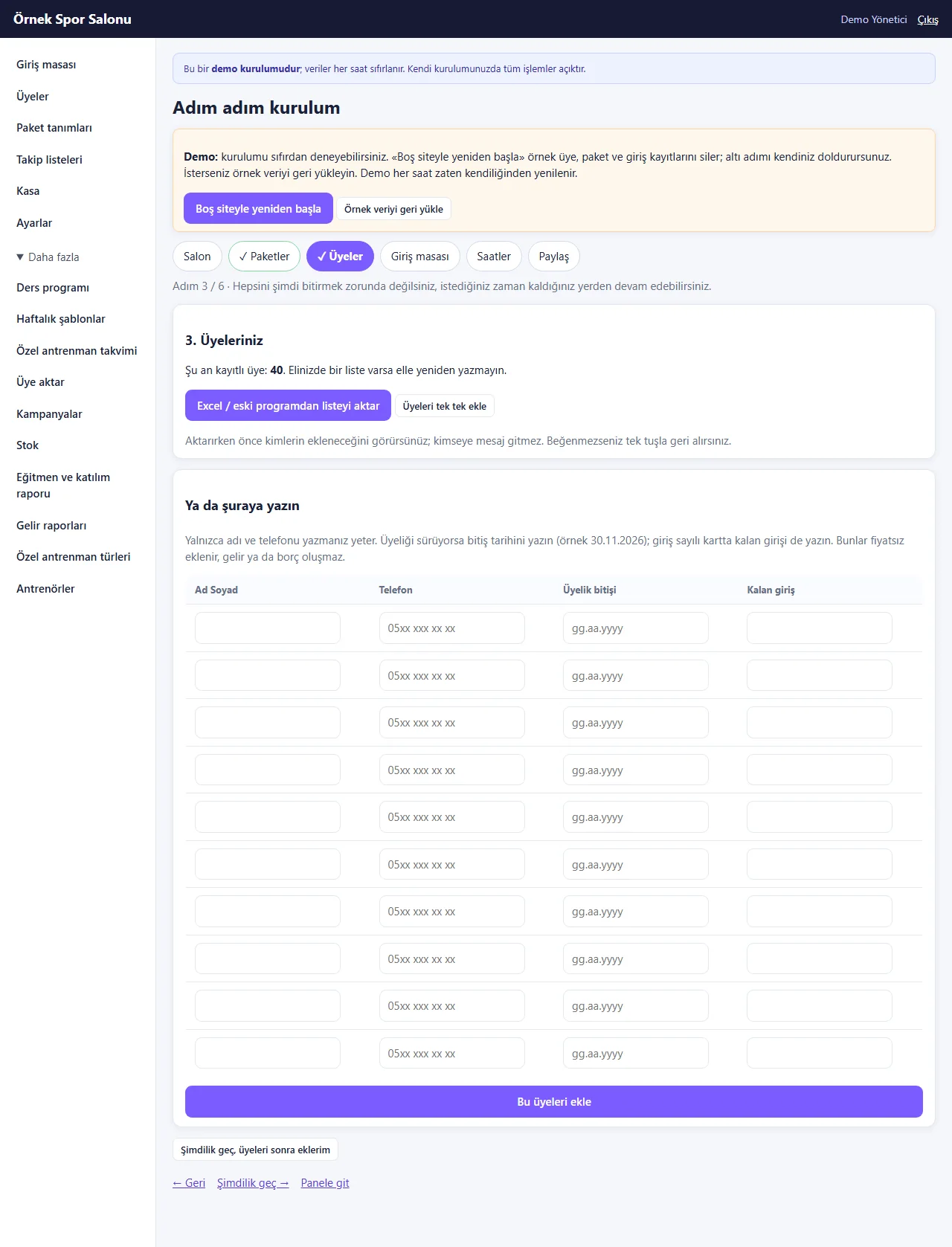
Setup wizard: members
The members step of the six-step setup: import a list or type only the name and phone into a ready-made table. The demo has “Boş siteyle yeniden başla” and “Örnek veriyi geri yükle” buttons.
- On screen (Turkish interface)
- “Adım adım kurulum” — step-by-step setup
- “Boş siteyle yeniden başla” — start with an empty site
- “Örnek veriyi geri yükle” — restore the sample data
- “Üyeleriniz” — your members
- “Bu üyeleri ekle” — add these members
-
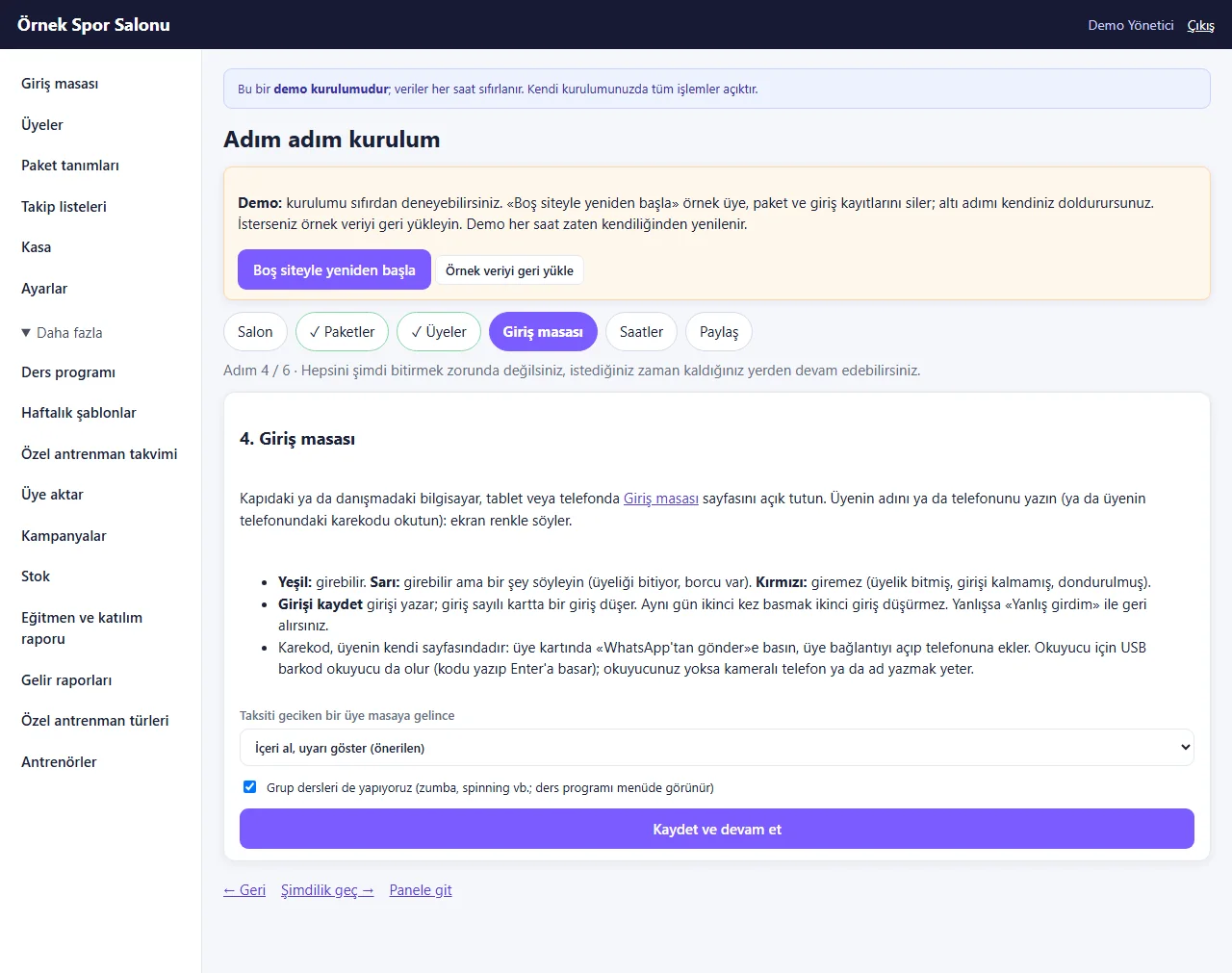
Setup wizard: check-in desk
It explains how to use the check-in desk, what the colours mean and how to scan the QR code; you choose what happens at the desk when an instalment is late and whether group classes are switched on.
- On screen (Turkish interface)
- “Giriş masası” — check-in desk
- “Yeşil: girebilir. Sarı: girebilir ama bir şey söyleyin.” — green: can enter. amber: can enter but say something.
- “Kırmızı: giremez” — red: cannot enter
- “Kaydet ve devam et” — save and continue
-
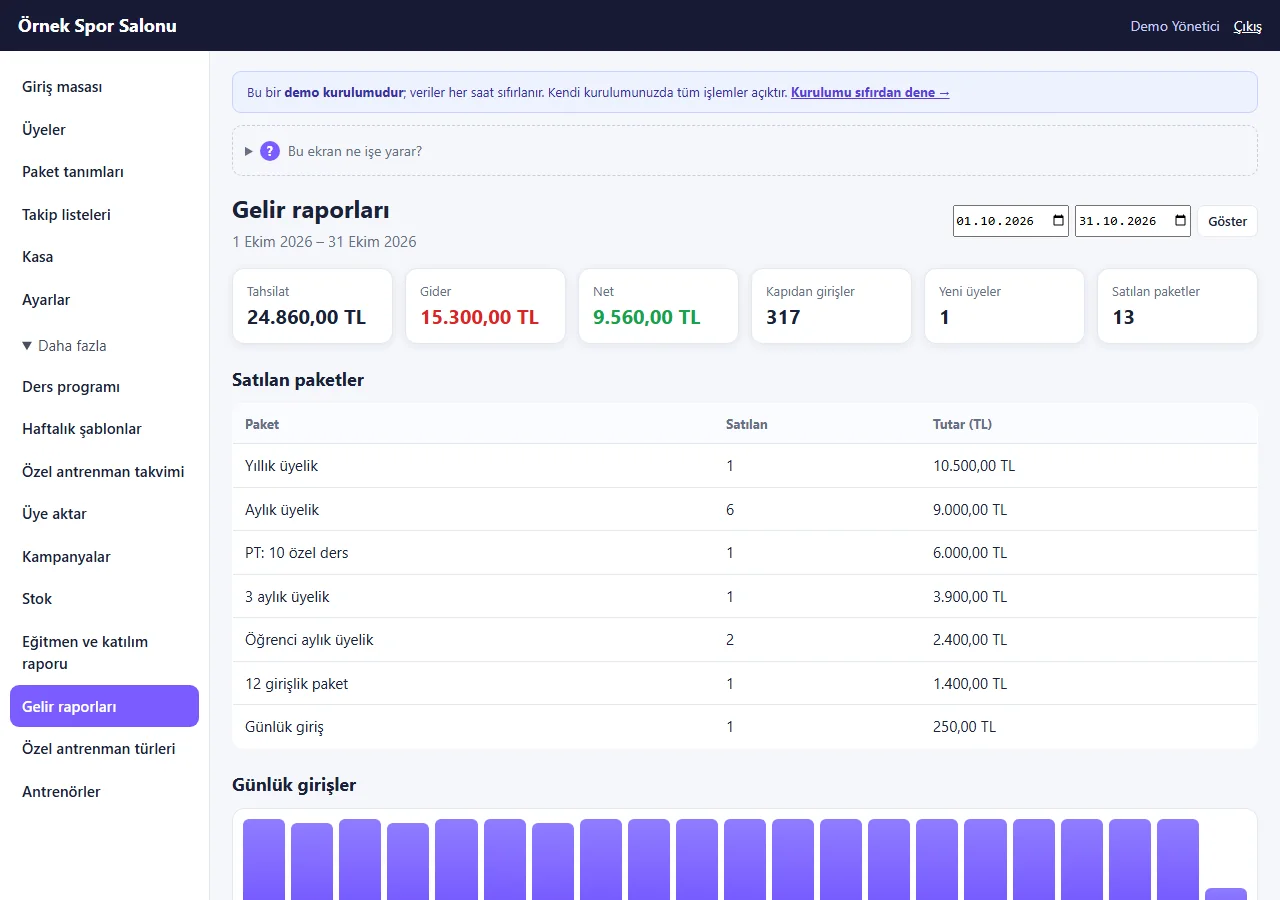
Income reports
For a date range: collection, expense and net, entries at the door, new members and a breakdown of packages sold. The sample data shows a collection of 24,860, an expense of 15,300 and a net of +9,560 TL; the rest of the page, below this screen, has the daily entry and turnover charts, trainer performance and birthdays. This screen was taken from the 1.0.3 live demo.
- On screen (Turkish interface)
- “Gelir raporları” — income reports
- “Tahsilat” — collection
- “Gider” — expense
- “Satılan paketler” — packages sold
- “Günlük girişler” — daily entries
- “Kapıdan girişler” — entries at the door
- “Net” — net
-
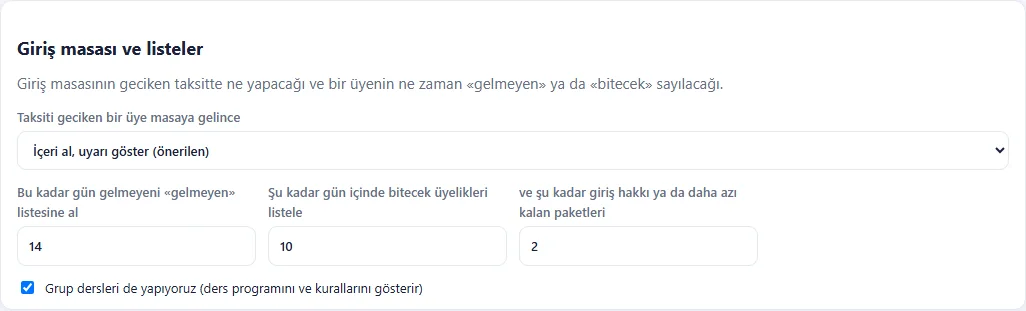
Settings: front desk and lists
What to do at the desk for a member with a late instalment, after how many days of absence someone counts as “not coming”, within how many days an ending counts as “about to end” and how many remaining visits get a card listed are changed here.
- On screen (Turkish interface)
- “Giriş masası ve listeler” — front desk and lists
- “Taksiti geciken bir üye masaya gelince” — when a member with a late instalment comes to the desk
- “İçeri al, uyarı göster (önerilen)” — let in, show a warning (recommended)
-
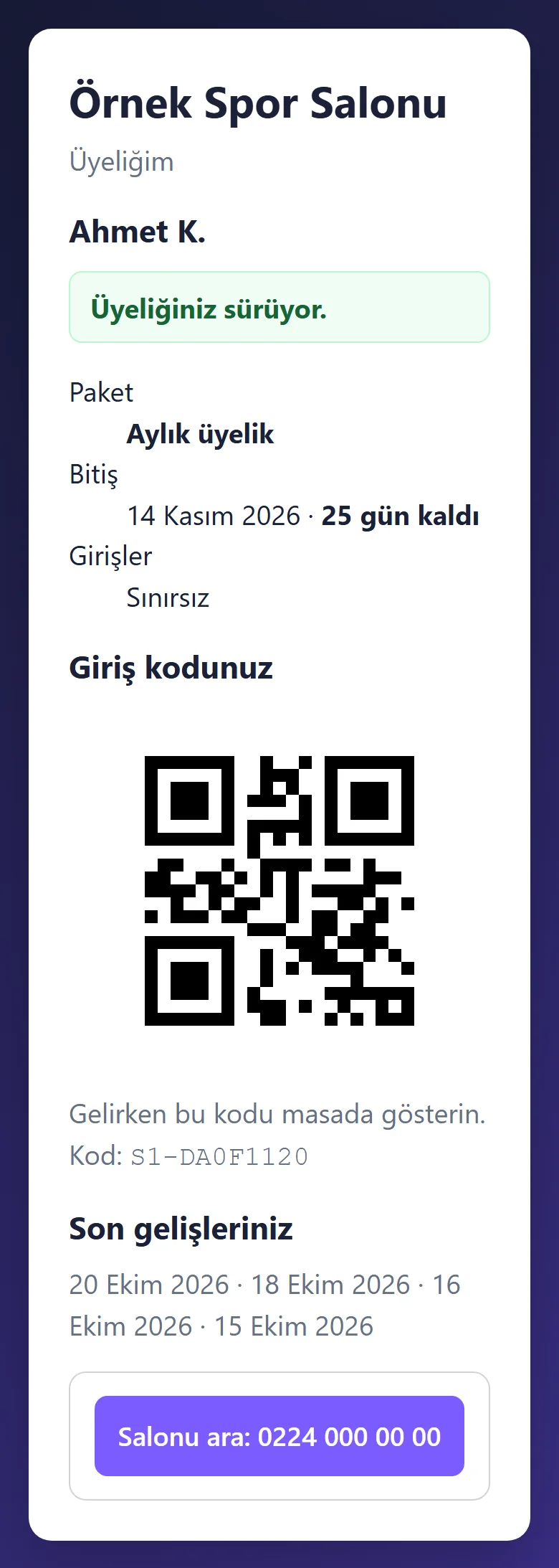
The member’s own page on a phone
With the link received on WhatsApp the member sees their package, end date and days left; the QR code and code to show at the desk are on the same page. The button to call the gym is below.
- On screen (Turkish interface)
- “Üyeliğim” — my membership
- “Üyeliğiniz sürüyor.” — your membership is running
- “Giriş kodunuz” — your entry code
- “Salonu ara” — call the gym
-
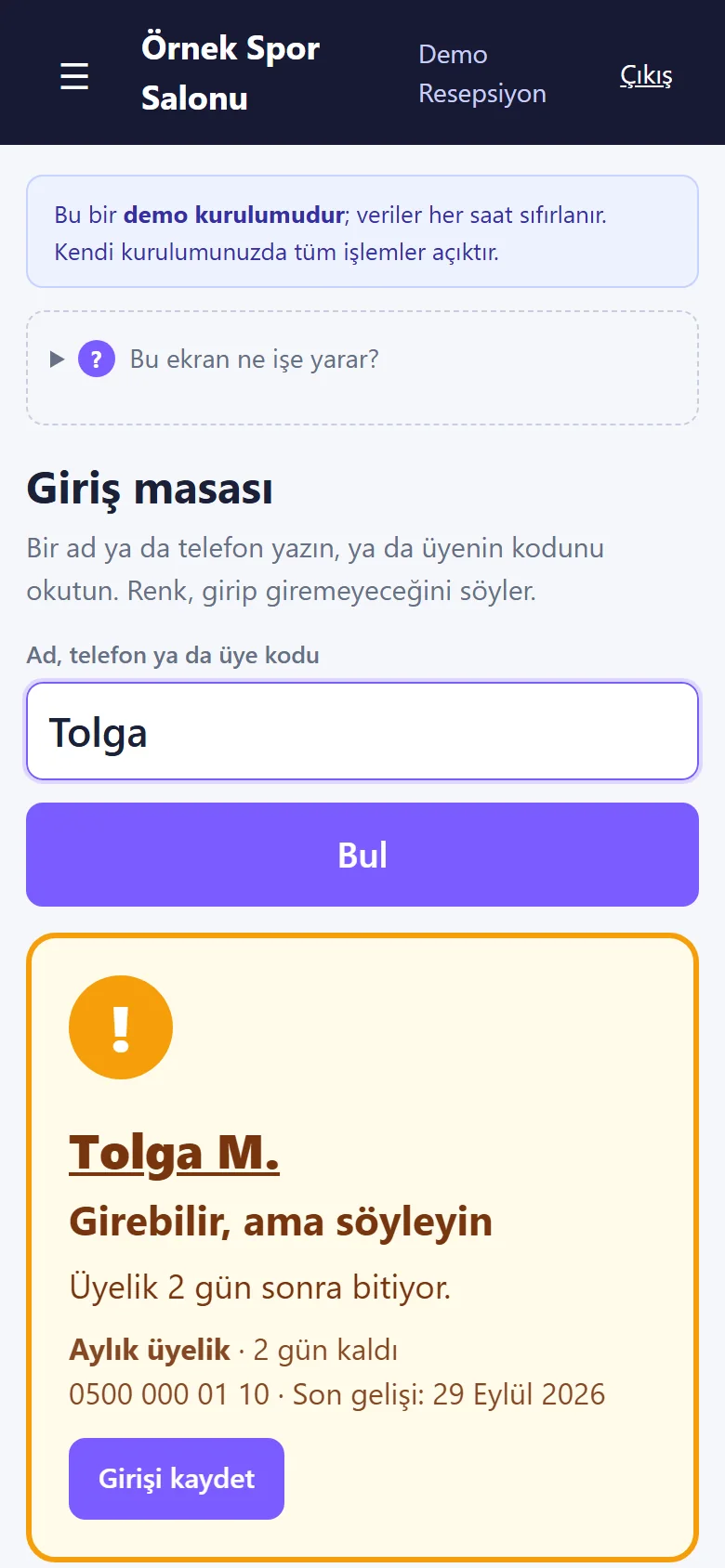
Check-in desk on a phone
The check-in desk is a single column on a phone; with a large search box and buttons, the result box (amber here) and the record-entry button are shown.
- On screen (Turkish interface)
- “Giriş masası” — check-in desk
- “Bul” — find
- “Girebilir, ama söyleyin” — can enter, but tell them
- “Girişi kaydet” — record the entry
-
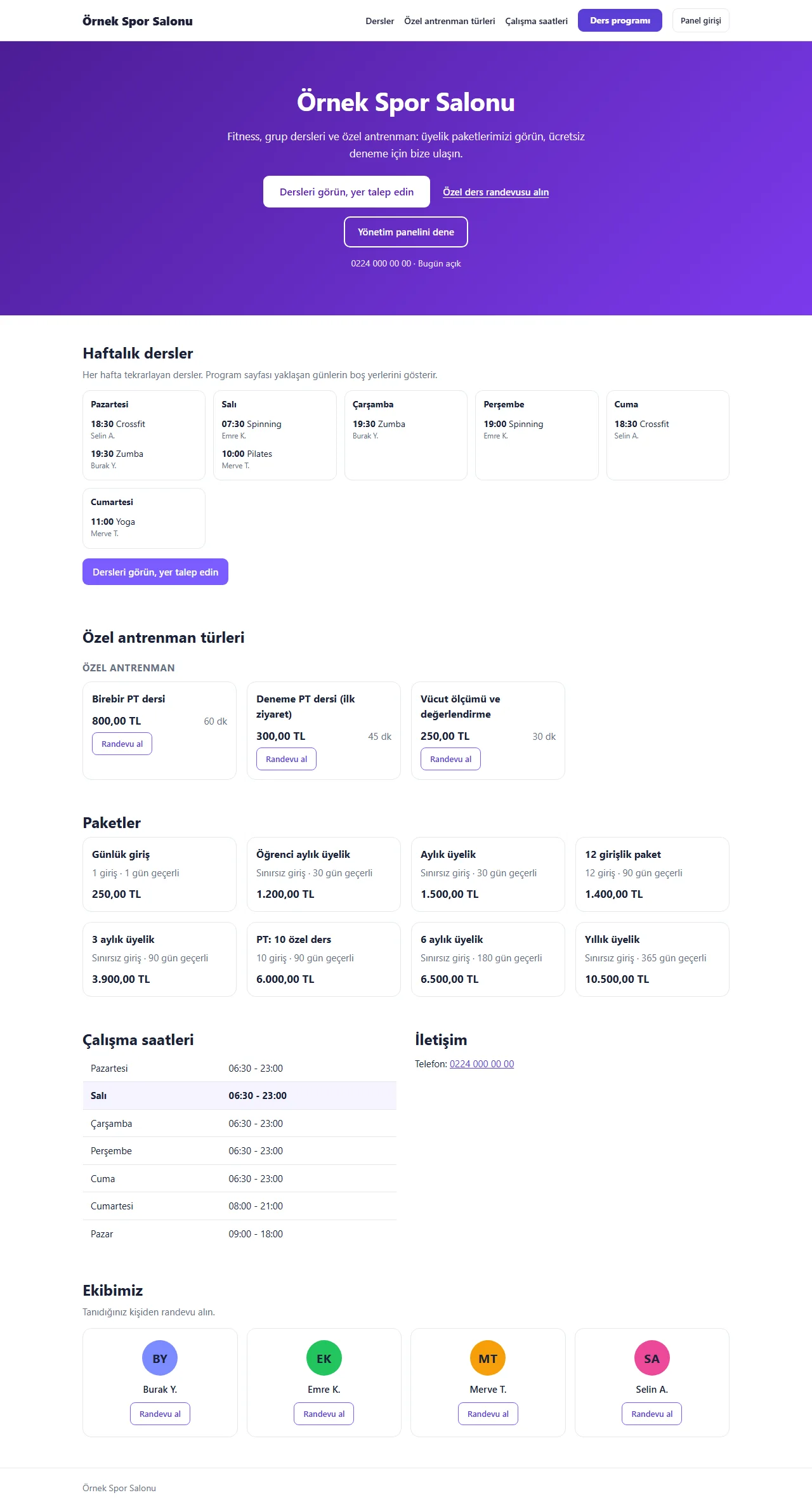
The gym’s public page
The weekly class schedule, personal-training types, packages, opening hours and the team; a visitor requests a place in a class or books an appointment with a trainer.
- On screen (Turkish interface)
- “Haftalık dersler” — weekly classes
- “Özel antrenman türleri” — personal-training types
- “Paketler” — packages
- “Çalışma saatleri” — opening hours
- “Randevu al” — book an appointment
- What do they see at the end?
- The screen says with a colour and a reason whether the member may enter; the entry is recorded, and the package, instalments, balance and recent visits appear on the member card.
- What is it good for?
- Memberships, end dates and balances do not scatter across a notebook; who may enter is clear at the door; members who stopped coming and those about to end show up in a list every week.
Everything that is not included, and all limits
- Not delivered to a client and not used by a real gym. The gym, members, phone numbers and amounts on the screens are made up; no user trial has been held in a gym. The interface in the screens is Turkish; there is no English interface in the panel.
- There is no connection to turnstiles, door locks, card, fingerprint or face readers: the front desk does not open the door, it only records the entry and tells you with a colour.
- There is no automatic card charging or virtual POS; payments are entered by hand in the till. There is no automatic SMS; a ready WhatsApp text opens and the gym sends it from its own phone. There is no e-invoice or pre-accounting, and no multi-branch use.
- Camera QR scanning does not work in iPhone Safari or Firefox; there you type the name or use a USB reader. It has not been tried on an iPhone or in Safari.
- Free phone notifications were tried in desktop Chrome and on one Android phone; they have not been tried on an iPhone or in Safari. The member’s page link is a secret address; anyone who knows the link can see that member’s remaining days and balance.
- There is no family or couple package (two separate memberships are opened); a balance owed in an old program is not imported; a running membership that is imported has no price.
- The live demo was run on one hosting account only (PHP 8.3, SQLite); MariaDB was only tested locally.
- In the demo the data is reset every hour; sign-in is without a password through role buttons; Settings opens but cannot be saved. A normal installation asks for an e-mail and password.
Delivery and sales status
There is no cart, customer account or online payment on this site for now. Reach out by phone, WhatsApp or the form; in a first conversation your need and the software’s fit are reviewed. The form does not create an order, a contract or a payment.
Possible delivery options
Price
There is no package on offer right now, so there is no list price. If a package is defined, the price and payment method are settled then.
Requirements and version history
Installation requirements
- PHP 8.1 or newer (with the pdo_mysql, mbstring and openssl extensions), MariaDB 10.4 or newer or MySQL, and HTTPS are needed; the live demo runs on SQLite. The product was tried locally with PHP 8.3 and MariaDB 11.4; the live demo was run on a single hosting account only (PHP 8.3).
Release notes
- No version has been delivered to a client. The sample-data demo is open to everyone and is shown with the screenshots on this page.
- 1.1.3–1.1.4 (28 October 2026): one-tap manager, reception, trainer and member screens from the product page (demo only; closed on a real installation); no new permission, data or schema change.
- 1.0.0 (20 October 2026): first version; a front desk with a colour result, a visit deducted on a visit-count card, undo and a manager exception, a member code and QR code, the member’s own page, an instalment plan and part-by-part collection, follow-up lists and ready WhatsApp messages, member import from Excel/CSV with undo, a six-step setup wizard, reports, roles, backup and restore.
- 1.0.1 and 1.0.2 (21 October 2026): three bugs found in the live-demo review were fixed: the trainer sign-in, sample entries shown at night hours, and one text on the member page.
- 1.0.3 (21 October 2026): the sample expenses in the demo were corrected; the report screen now shows a positive net.
- 1.0.4 – 1.0.6 (21 October 2026): small fixes: the correct version number in notifications, English texts left in the Turkish panel, and a repeated package name in the WhatsApp membership message.
- 1.0.7 (21 October 2026): member import also reads an Excel (.xlsx) file.
- 1.0.8 (26 October 2026): links, buttons and forms a role may not use are not shown to it (the discount form for a trainer, the “add staff” link for reception); the server still refuses an address typed by hand.
- 1.0.9 (27 October 2026): “Today’s revenue” on a trainer’s calendar counts only the trainer’s own appointments and does not show the gym’s ticket sales.
- 1.0.10 (27 October 2026): the pages members and guests see say “salon” instead of “stüdyo” (studio); the “no permission” message is in Turkish; the stock form starts with the unit “adet”; the messages for stopping and putting a package on hold were corrected.
- 1.1.0 (27 October 2026): time off over several days on the private-training calendar: a first and a last day, “all day” or the same hours every day; days that already hold an appointment are left open and named in the message; the “Yaklaşan izin ve kapalı saatler” (upcoming time off) list shows consecutive days as one line and removes them together; a trainer sees only their own. The demo sample data has a three-day leave of one trainer.
- 1.1.1 – 1.1.2 (28 October 2026): “Takvime ekle” (add to calendar) on the member’s private-training appointment page (1.1.1) and class page (1.1.2): an “Add to Google Calendar” link and “Dosya olarak indir (.ics)” (download the file; a reminder one hour before; no phone number or note is carried and nothing is sent to the gym). On the class page it shows only for a confirmed, upcoming, not cancelled place; not for a request or a waiting-list entry. No new permission, data or schema change.