Moving companiesDemo with sample data
Home Moving Job Tracking: screen-by-screen guide
The full version of the short description on the product page: every feature, how each screen is used step by step, all limits and the delivery details.
All features
The flows below were run on a local installation (PHP 8.3, SQLite) with sample data; the product’s automated tests (unit, demo, end-to-end HTTP, setup wizard) all passed, 1,139 checks, on version 1.2.1. Version 1.2.1 runs on the live demo; the demo was walked through by eye in the owner and staff roles at desktop and phone size (no horizontal overflow). The sample-data demo is live; its address is the button below.
- Customer and request records: contact details, the requested move date, pick-up and drop-off addresses, floor, elevator status, room count, notes on items and packing, and the request source (web, phone, walk-in, referral)
- A customer sends a quote request from the company’s page and follows it on a status page; a request that arrives by phone is added by staff in the same form. The page calculates no price
- Request stages: new, survey pending, quote prepared, approved, completed, cancelled; the cancellation reason and an event history are recorded
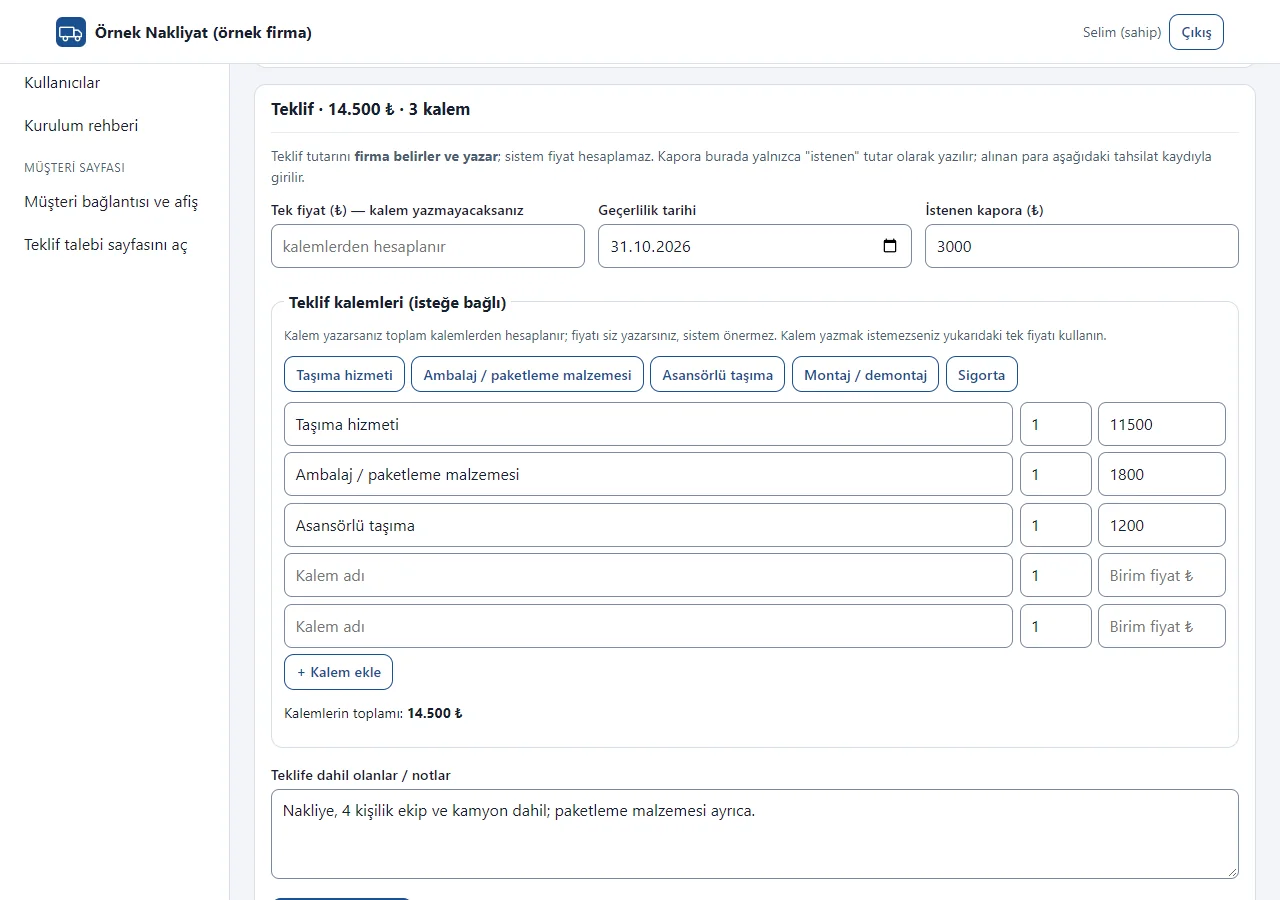
- The quote and the requested deposit are written by the company: quick quote items (ready item buttons, quantity, unit price; the total is calculated from the items) or a single price, a validity date and the requested deposit; an expired quote shows as a warning on the Today screen. A printable quote document. The system calculates and suggests no price
- Service contract (1.2.0): on the contract template screen a ready “home moving service contract” sample text is edited; the request’s details (name, addresses, amount, item list) fill into the text. Print / PDF, “WhatsApp ile gönder” (a ready text; you send it) and a customer link are provided. On the status page the customer reads the text and gives a simple electronic approval by typing their full name; the name, the time and a document digest (SHA-256) are recorded. The approval is not a qualified e-signature; the text is a sample and needs legal review
- Room-by-room item list (1.2.0): items are added to rooms such as living room, kitchen and bedroom with ready item buttons (tapping the same button again raises the quantity); quantity, a condition note, and “Kırılgan” (fragile) and “Firma paketledi” (packed by the company) marks; an item and quantity summary at the top. It shows in the job summary, the contract and the field screen. No photos are uploaded
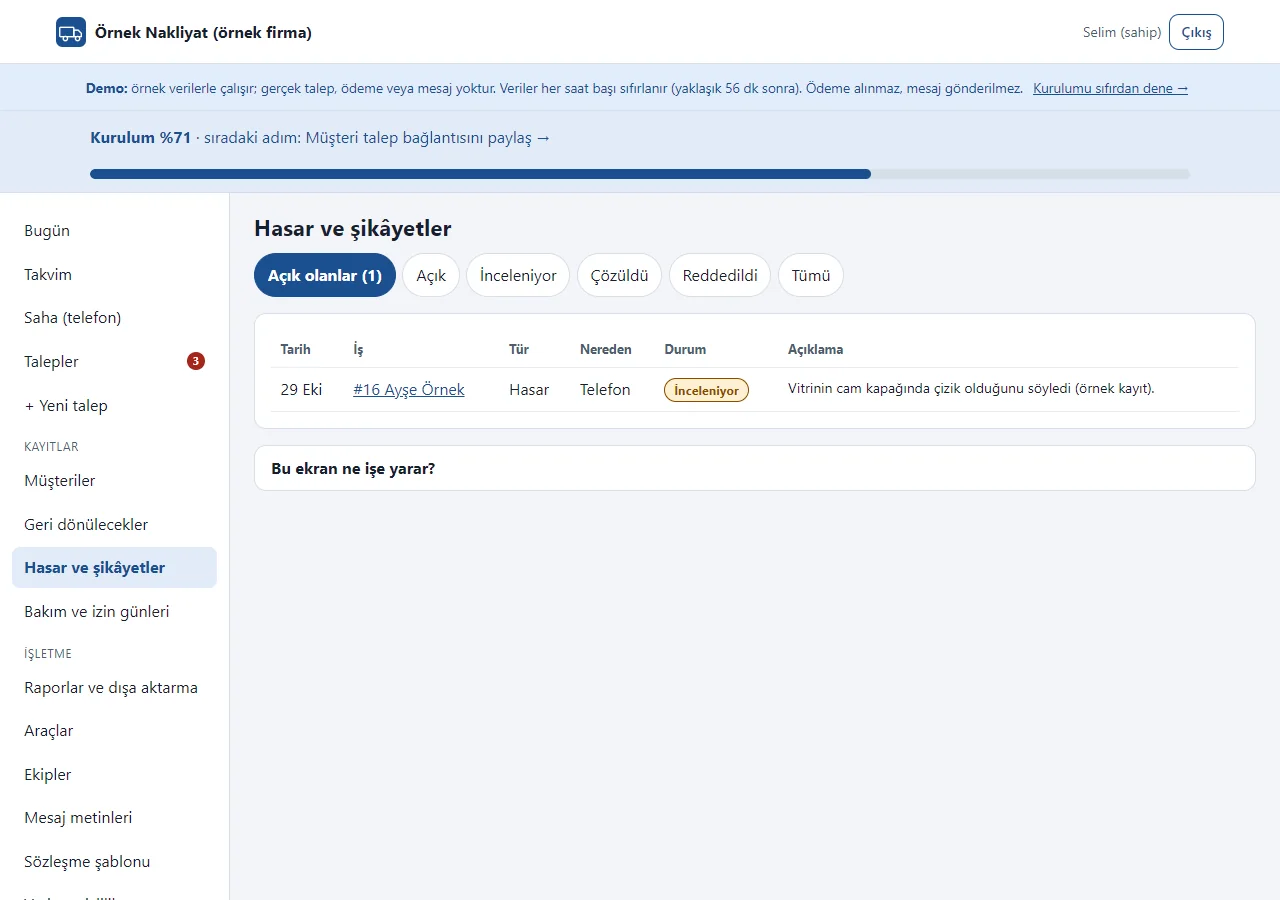
- Damage and problem record (1.2.0): on an approved or completed job a record is opened with a type (damage, lost or missing item, delay, staff conduct, other), where it was learned and a description; the status is Open, Under review, Resolved or Rejected (a note is required to close). The damage and complaints page has a list and CSV, an open record warns on the Today screen, and the customer can use “Sorun bildir” (report a problem) on the status page (rate-limited). There are no photos and no compensation calculation
- Field screen (1.2.0): Today, Tomorrow and This week tabs with a crew filter; a large-type job card with the time, calling the customer, the pick-up and drop-off addresses (open in maps), vehicle and crew, an item summary and the amount still due at delivery. The crew filter choice is remembered for the session; there is no recorded link between a user and a crew
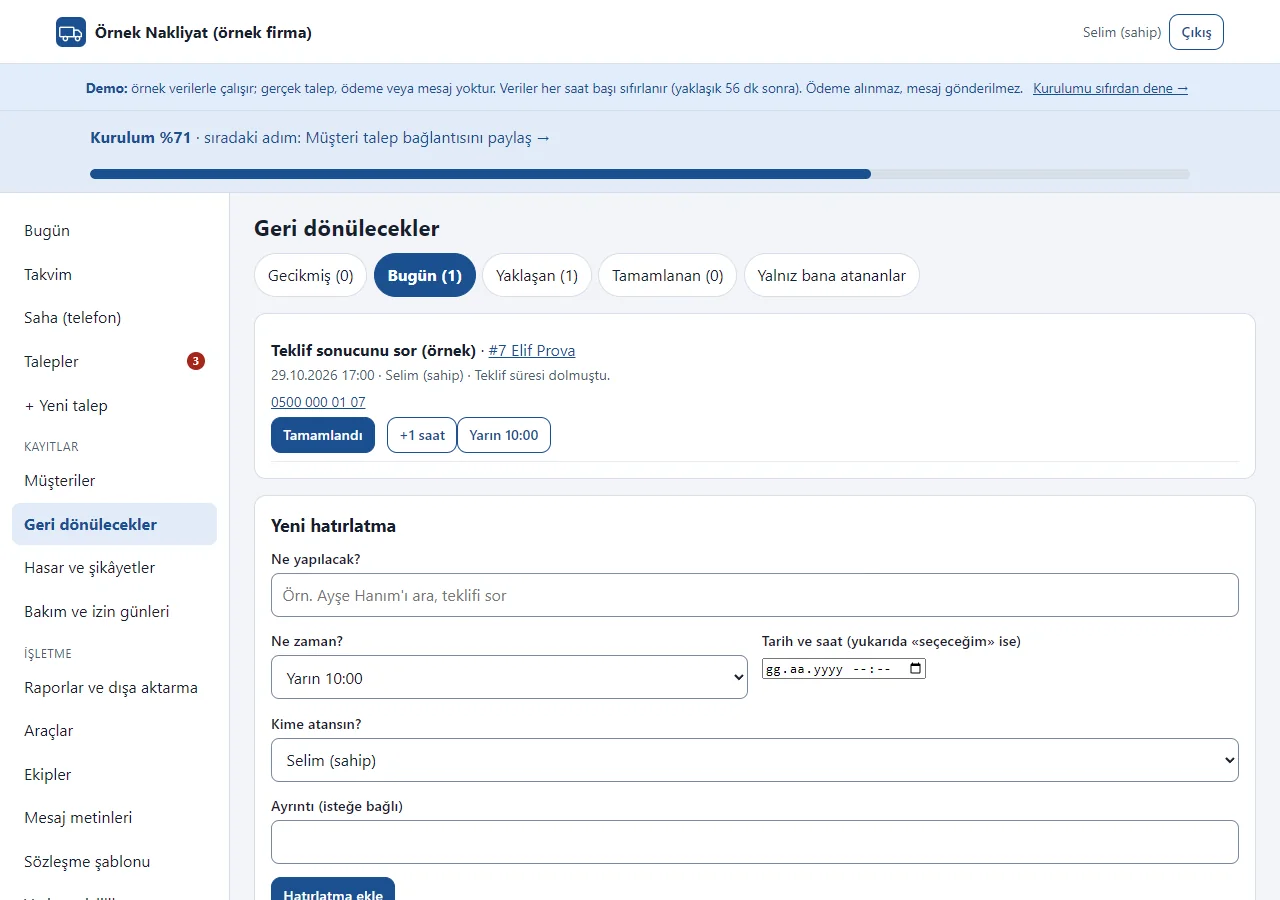
- Follow-ups (1.2.0): reminders such as asking about a quote’s result are recorded with a date and an assigned person and show on the Today screen; one tap makes them “Tamamlandı” (done), “+1 saat” (+1 hour) or “Yarın 10:00” (tomorrow 10:00). It sends no automatic message
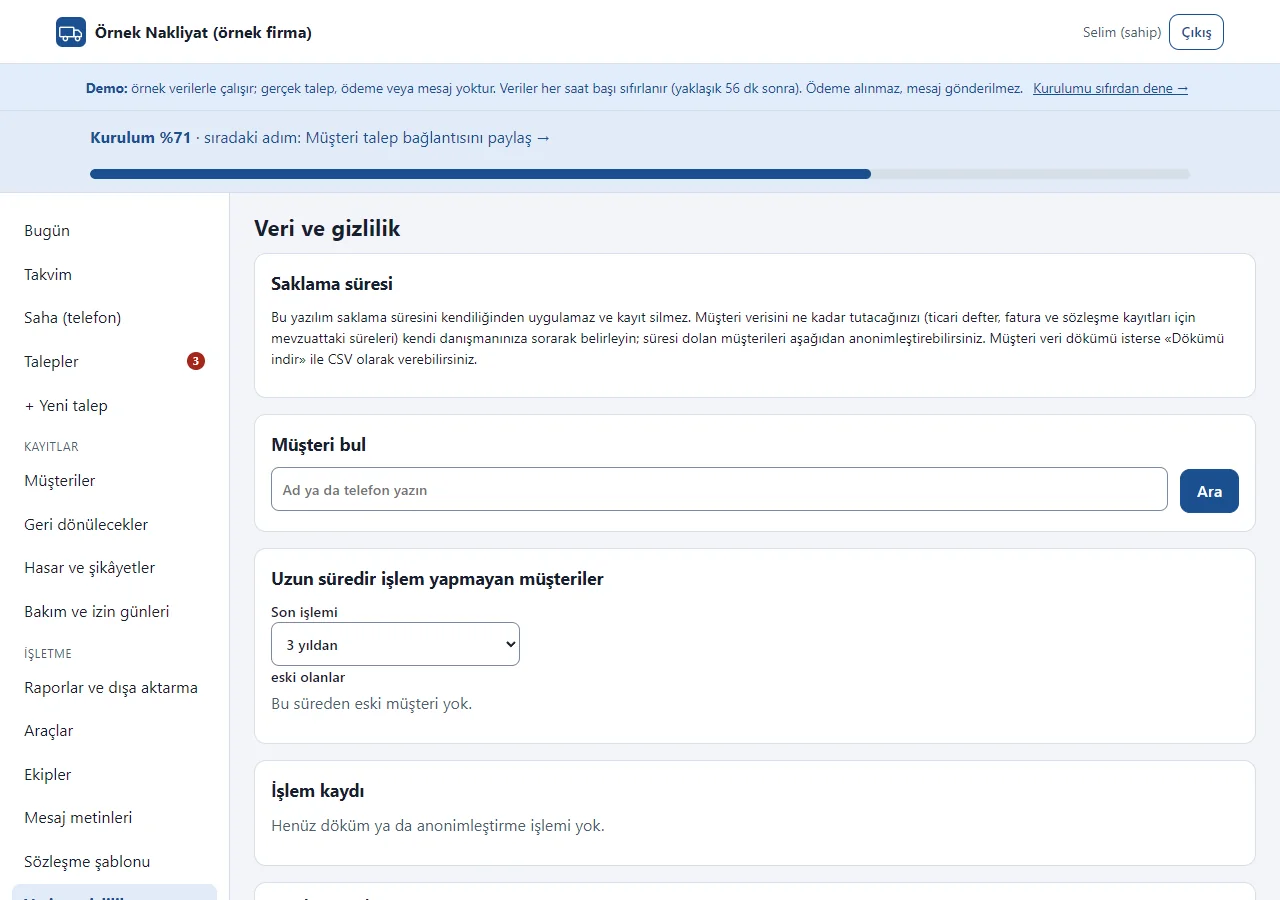
- Data and privacy (KVKK, 1.2.0): a customer is found, a data export downloads as CSV, customers with no activity for a long time are anonymised and an activity log is kept. The software does not apply a retention period and deletes no record; the company sets the period after asking its adviser. Anonymisation is locked in the demo
- Collapsible sections on the request page (1.2.1): Survey, Item list, Quote, Date/vehicle/crew, Scope change, Payments, Contract, Damage and problem record and Follow-up are sections with a summary heading (“Eşya listesi · 11 kalem, 35 adet”); a section awaiting action comes open and the page is shorter on a phone
- Deposits and remaining payments are tracked as records only (amount, method, date, note); an entry above the quote or dated in the future is refused and open balances are listed. The app takes no payment
- Change of job scope (1.0.2): extra work or reduced scope found on an approved job is kept as a separate record with its reason, the amount difference and the customer’s approval channel and date; the base quote does not change, only the customer-approved difference reaches the remaining balance, reports and CSV, and an unapproved draft is not counted as a debt
- An approved job gets a date, a time, an estimated duration, a vehicle and a crew; a clashing job for the same vehicle or crew and maintenance/leave days raise a warning (also when requests arrive at the same moment)
- A weekly job calendar and a daily vehicle and crew hour timeline, filterable by vehicle and crew
- Customer history: all their requests, completed jobs and open balance. A monthly job and income summary: requests, approval and cancellation rate, request sources, vehicle and crew use, recorded payments
- A printable quote and a job summary for the crew; CSV export of requests and payments (owner only)
- Ready message texts for survey, quote, confirmation, reminder, thank-you and cancellation (the company opens them in WhatsApp and sends them itself; the app sends nothing)
- Warnings for vehicle inspection and insurance end dates; owner and staff roles; a Turkish panel that works on a phone with a bottom menu
- Setup guide and guidance (1.1.0): a step-by-step guide on first sign-in, a setup-percentage and next-step bar on every panel page, a closed “What is this screen for?” box on every screen, a “Henüz … yok → Ekle” (nothing yet → Add) button on empty lists; customer link and poster: a ready WhatsApp message in one tap, copy the link and a QR A4 poster; “no account needed” and a small maker line (cannot be switched off) on customer pages; the demo has “Start with an empty site” and “Restore sample data” buttons
- Add to phone and a free notification (1.1.0): a sign-in-free setup page for the company and an “add” box in the panel on a phone (Android one button, iPhone steps); a free instant phone notification and an optional notice e-mail on a new web request, and the customer can get a notice on their own phone when the status changes. There is no SMS; no notification or e-mail is sent in the demo
Screen by screen: how it is used
The app’s interface in these screens is Turkish; only the captions and explanations on this page are in English. The screens come from the app’s own demo mode with sample data; the company (“Örnek Nakliyat”, a made-up name), the people, the phone numbers, the plates, the addresses and the amounts are sample data. The Today, Field, Item list, Contract, Quote items, Damage and complaints, Follow-ups, Data and privacy, Requests, Request page and panel sign-in screens come from version 1.2.1 of the live demo (29 October 2026); the other screens come from earlier versions, so their layout may differ slightly. On very long pages only the first part is shown.
- Who uses it?
- The customer who writes the move details and asks for a quote; the moving company owner, who runs requests, quotes, the vehicle and crew plan and the payment record; staff who handle the requests.
- Where do they start?
- The customer fills in the form on the company’s page, or staff add a phone request to the panel. The company signs in and starts at the Today screen.
What do they do on screen? Step by step
-
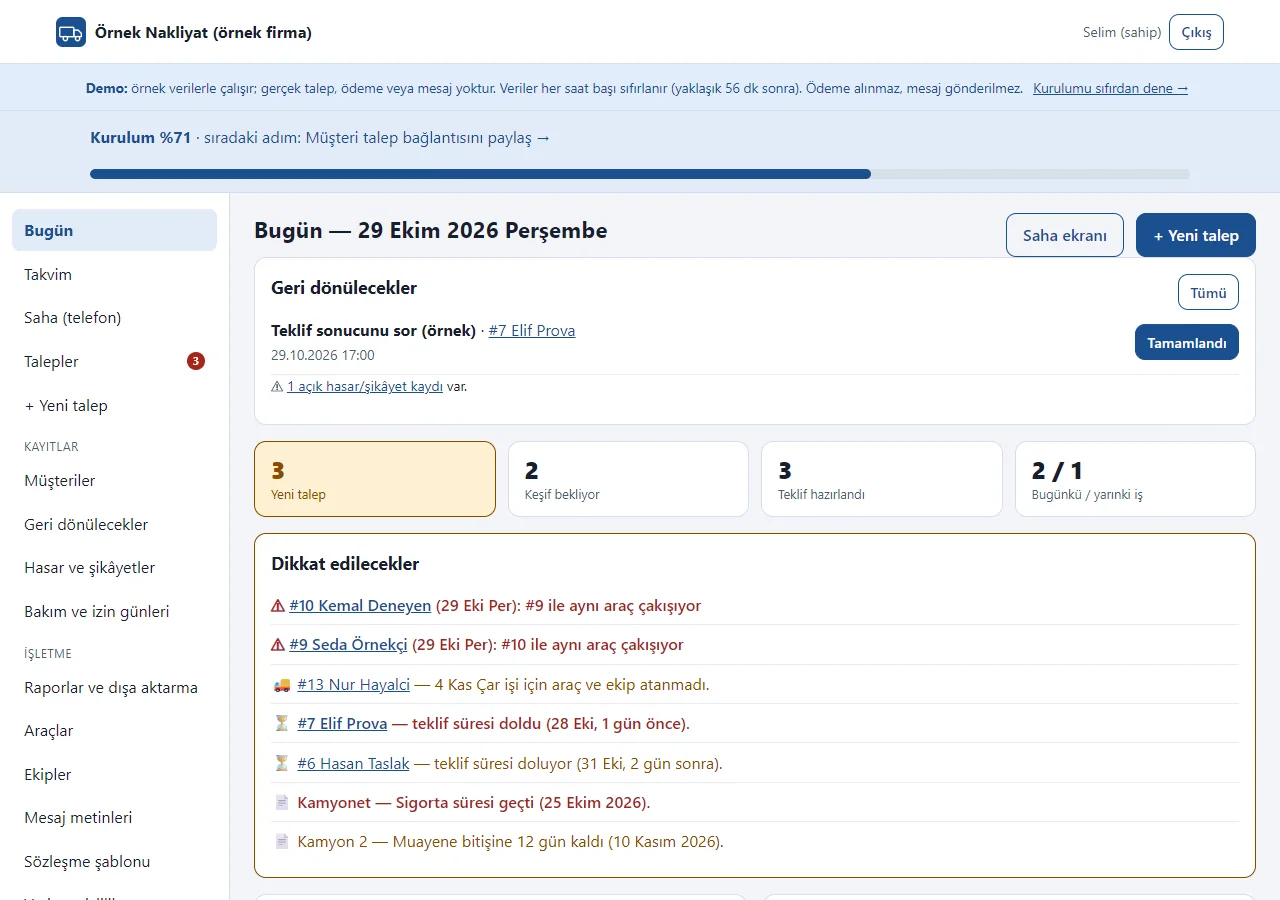
1.2.1 · 29 October 2026 Today screen
New requests, pending surveys, and today’s and tomorrow’s jobs at a glance. Pending “Geri dönülecekler” (follow-ups) and an open damage or complaint record are reminded at the top; the “Dikkat edilecekler” (things to watch) box gathers clashing jobs, jobs without a vehicle or crew, expired quotes and vehicle document dates. The “Saha ekranı” (field screen) and “+ Yeni talep” (new request) buttons sit at the top. The picture shows the first part.
- On screen (Turkish interface)
- “Geri dönülecekler” — follow-ups
- “Dikkat edilecekler” — things to watch
- “Yeni talep / Keşif bekliyor / Teklif hazırlandı” — new request / survey pending / quote prepared
- “Bugünkü / yarınki iş” — today’s / tomorrow’s jobs
- “Saha ekranı” — field screen
-
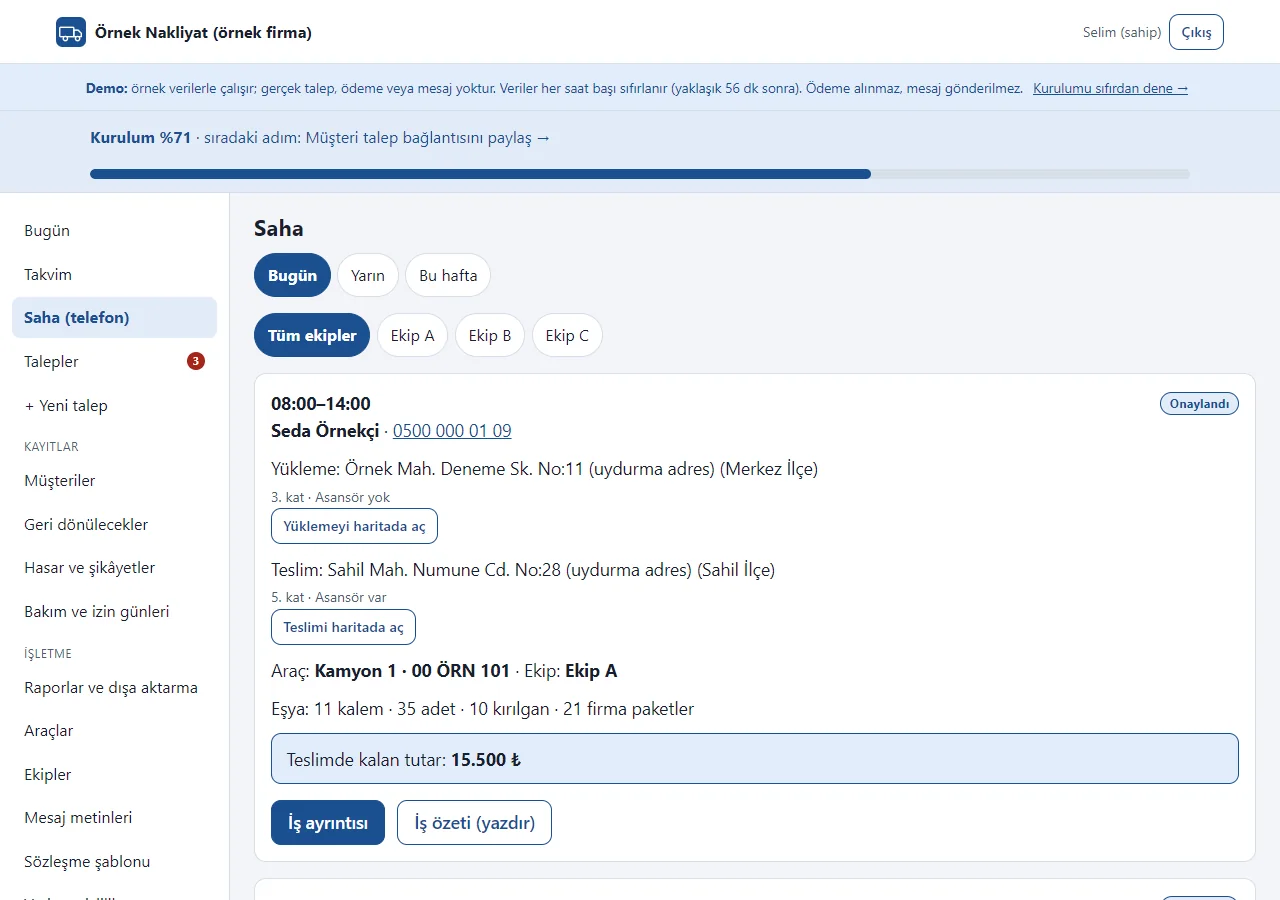
1.2.1 · 29 October 2026 Field screen
Menu > Saha (telefon): Bugün (today), Yarın (tomorrow) and Bu hafta (this week) tabs and crew filter buttons; each job is a large-type card with the time, the customer (tap to call), the pick-up and drop-off addresses (“open in maps”), the vehicle and crew, an item summary and the amount still due at delivery. “İş ayrıntısı” and “İş özeti (yazdır)” sit under the card. The crew filter choice is remembered for the session; there is no recorded link between a user and a crew.
- On screen (Turkish interface)
- “Bugün / Yarın / Bu hafta” — today / tomorrow / this week
- “Tüm ekipler / Ekip A” — all crews / Crew A
- “Yüklemeyi haritada aç / Teslimi haritada aç” — open the pick-up / drop-off in maps
- “Teslimde kalan tutar” — amount due at delivery
- “İş ayrıntısı / İş özeti (yazdır)” — job details / job summary (print)
-
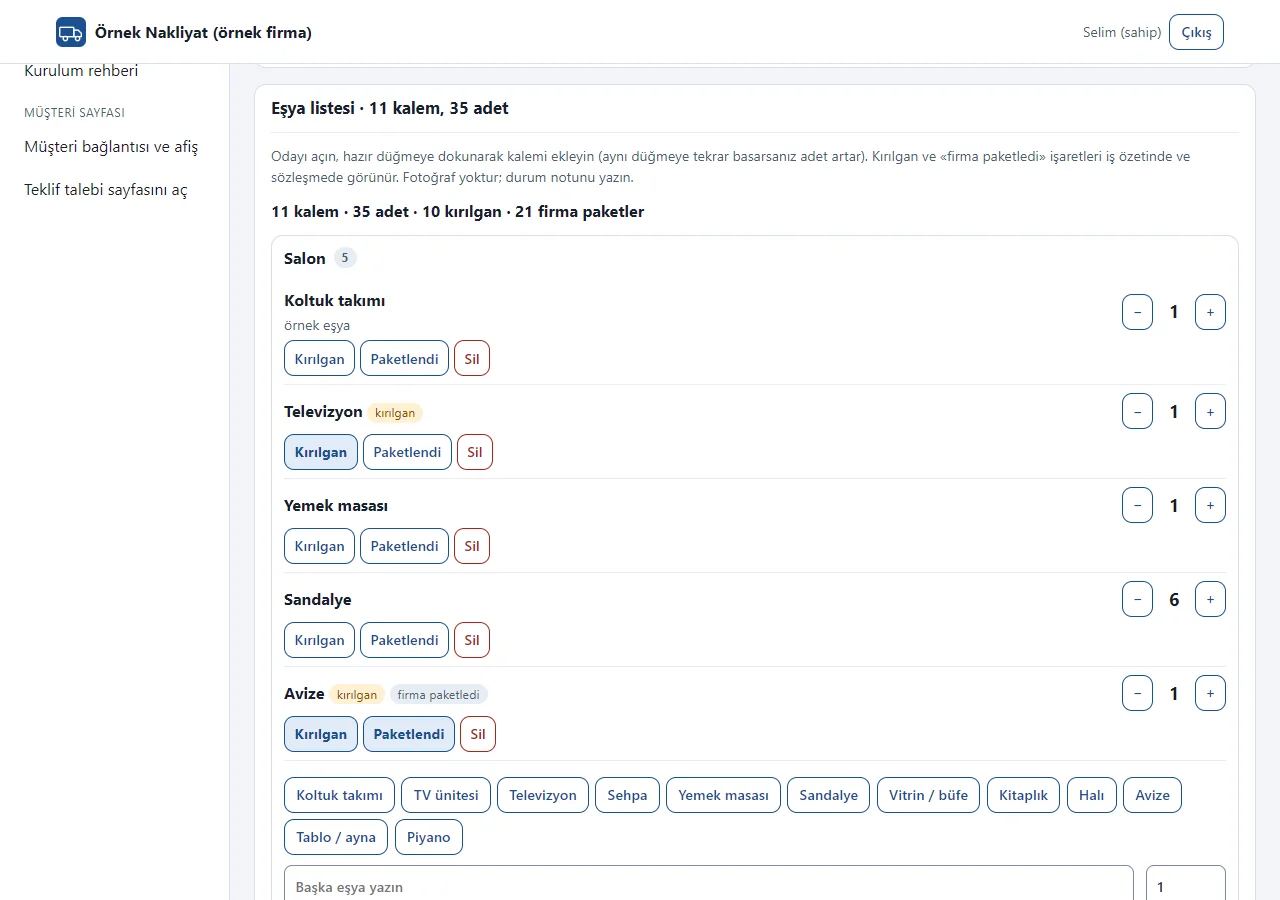
1.2.1 · 29 October 2026 Room-by-room item list
In the “Eşya listesi” section of the request page a room is opened and items are added by tapping a ready item button (sofa set, television, chair…); tapping the same button again raises the quantity. A custom item, a quantity, a condition note and “Kırılgan” (fragile) and “Paketlendi” (packed) marks can be entered; an item and quantity summary shows at the top. The list appears in the job summary, the contract and the field screen. No photos are uploaded.
- On screen (Turkish interface)
- “Eşya listesi” — item list
- “Kırılgan / Paketlendi / Sil” — fragile / packed / delete
- “Başka eşya yazın” — type another item
- “Firma paketledi” — packed by the company
- “Ekle” — add
-
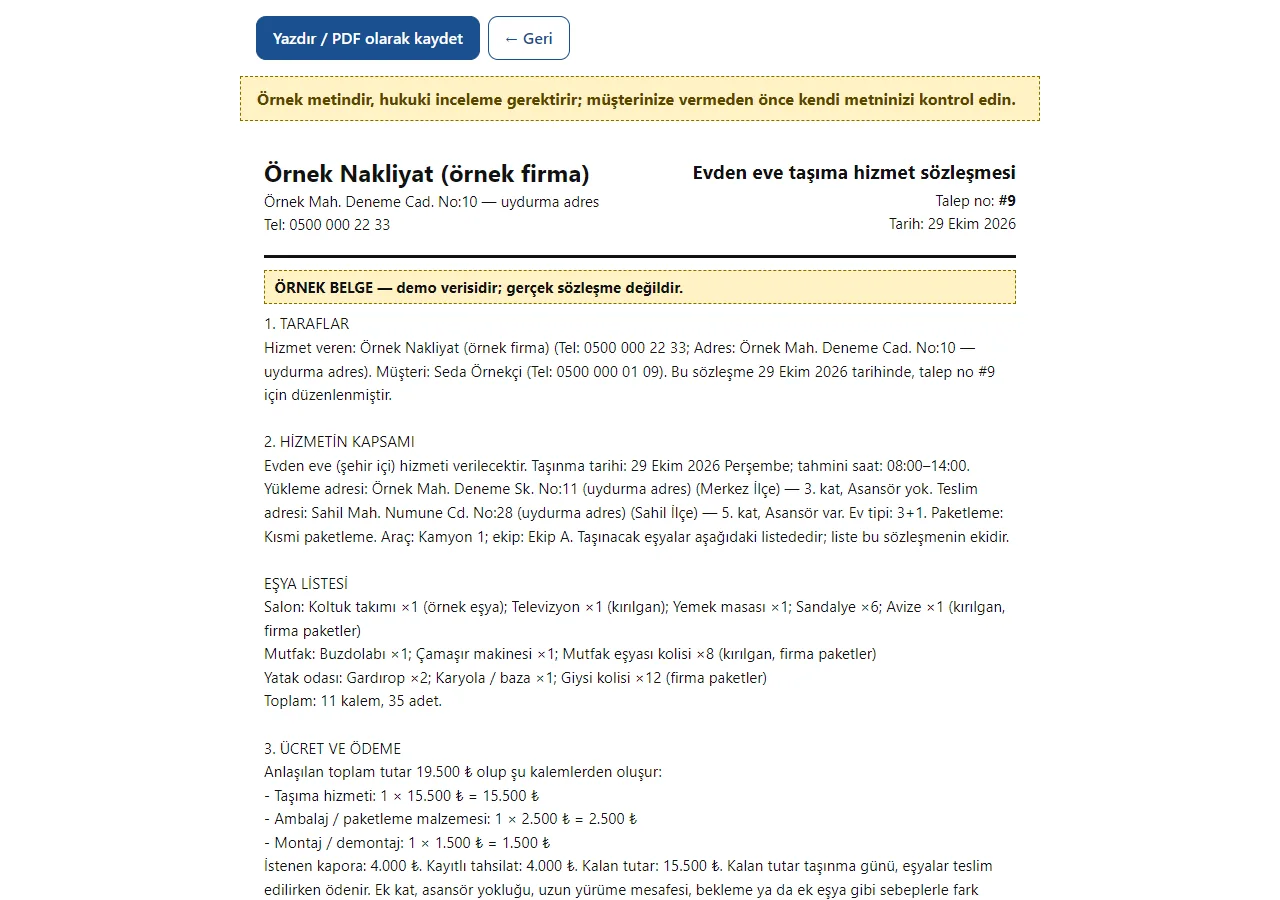
1.2.1 · 29 October 2026 Service contract
On an approved job, the “Sözleşme hazırla” (prepare contract) button writes the request’s details (name, addresses, date, amount, item list) into a ready template; “Yazdır / PDF olarak kaydet” opens the document. “WhatsApp ile gönder” opens the ready text and the customer link can be copied. On the status page the customer reads the text, types their full name and says “Okudum, kabul ediyorum” (I have read it and accept); the name, the time and a document digest are recorded. The text is a sample and needs legal review; the approval is not a qualified e-signature.
- On screen (Turkish interface)
- “Evden eve taşıma hizmet sözleşmesi” — home moving service contract
- “Örnek metindir, hukuki inceleme gerektirir” — a sample text; legal review is needed
- “Yazdır / PDF olarak kaydet” — print / save as PDF
- “ÖRNEK BELGE” — SAMPLE DOCUMENT
- “EŞYA LİSTESİ” — ITEM LIST
-
1.2.1 · 29 October 2026 Quote items
In the “Teklif” section of the request page, ready item buttons (moving service, packing materials, moving with an elevator, assembly, insurance) fill an item name, quantity and unit price row; the total is calculated from the items. If you do not want to write items, a single price is entered; the validity date and the requested deposit are in the same place. The company writes the price; the system calculates and suggests none.
- On screen (Turkish interface)
- “Teklif kalemleri” — quote items
- “Tek fiyat” — single price
- “Geçerlilik tarihi / İstenen kapora” — validity date / requested deposit
- “+ Kalem ekle” — add an item
- “Kalemlerin toplamı” — total of the items
- “Teklifi güncelle” — update the quote
-
1.2.1 · 29 October 2026 Damage and problem record
The menu’s “Hasar ve şikâyetler” (damage and complaints) list shows open, under-review, resolved and rejected records in tabs; a record is opened from the job page or from the “Sorun bildir” (report a problem) link on the customer’s status page. A note is required for resolved and rejected; an open record becomes a warning on the Today screen. There are no photos and no compensation calculation.
- On screen (Turkish interface)
- “Açık olanlar / Açık / İnceleniyor” — open ones / open / under review
- “Çözüldü / Reddedildi / Tümü” — resolved / rejected / all
- “Tür / Nereden / Durum / Açıklama” — type / source / status / description
- “Hasar” — damage
-
1.2.1 · 29 October 2026 Follow-ups
Reminders such as asking about a quote’s result are recorded with a date, a time and an assigned person. They are followed in the Gecikmiş (overdue), Bugün (today), Yaklaşan (upcoming) and Tamamlanan (completed) tabs; one tap makes a reminder “Tamamlandı” (done), “+1 saat” (+1 hour) or “Yarın 10:00” (tomorrow 10:00). The app sends no automatic message to anyone.
- On screen (Turkish interface)
- “Gecikmiş / Bugün / Yaklaşan / Tamamlanan” — overdue / today / upcoming / completed
- “Tamamlandı / +1 saat / Yarın 10:00” — done / +1 hour / tomorrow 10:00
- “Yeni hatırlatma” — new follow-up
- “Kime atansın?” — who is it assigned to?
-
1.2.1 · 29 October 2026 Data and privacy (KVKK)
Seen by the owner only. A customer is found by name or phone and a data export downloads as CSV; customers with no activity for a long time (1, 2, 3, 5, 7 or 10 years) are listed and can be anonymised, and every export or anonymisation is written to an activity log. The software does not apply a retention period and deletes no record; the company sets the period after asking its adviser. Anonymisation is locked in the demo.
- On screen (Turkish interface)
- “Saklama süresi” — retention period
- “Müşteri bul” — find a customer
- “Uzun süredir işlem yapmayan müşteriler” — customers with no activity for a long time
- “İşlem kaydı” — activity log
- “Dökümü indir” — download the data export
-
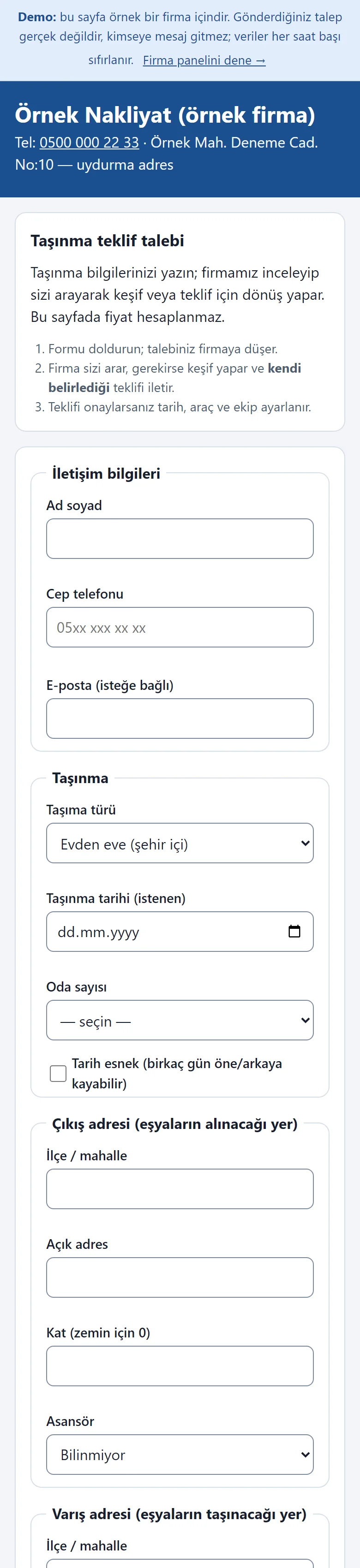
Customer quote request page
The company’s own page as a customer sees it on a phone: name, phone, move date and room count are filled in. The page calculates no price; the request goes to the company, which gives its own quote. The page is long; the picture shows the first part.
- On screen (Turkish interface)
- “Taşınma teklif talebi” — moving quote request
- “Ad soyad / Cep telefonu” — full name / mobile phone
- “Taşınma tarihi / Oda sayısı” — move date / room count
- “Tarih esnek” — flexible date
-

Address, floor, elevator and items
Floor and elevator status for the pick-up and drop-off address, an items note and the packing choice are filled in; the company bases its quote on this. In the picture the form is filled in but not sent. The page is long; the picture shows the first part.
- On screen (Turkish interface)
- “Çıkış adresi / Varış adresi” — pick-up address / drop-off address
- “Kat” — floor
- “Asansör” — elevator
- “Paketleme” — packing
- “Teklif talebini gönder” — send the quote request
-
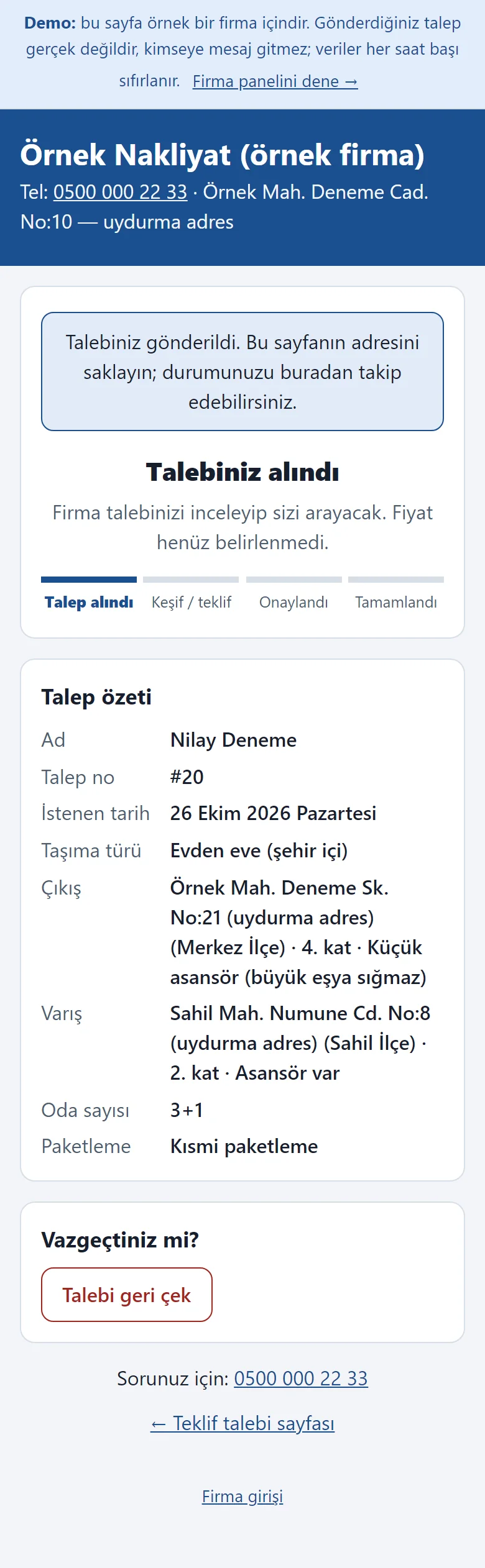
Request sent: status page
The request reaches the company. The customer follows it from this page’s address; the price is not set yet. An unapproved request can be withdrawn.
- On screen (Turkish interface)
- “Talebiniz alındı” — your request was received
- “Talep özeti” — request summary
- “Talebi geri çek” — withdraw the request
-
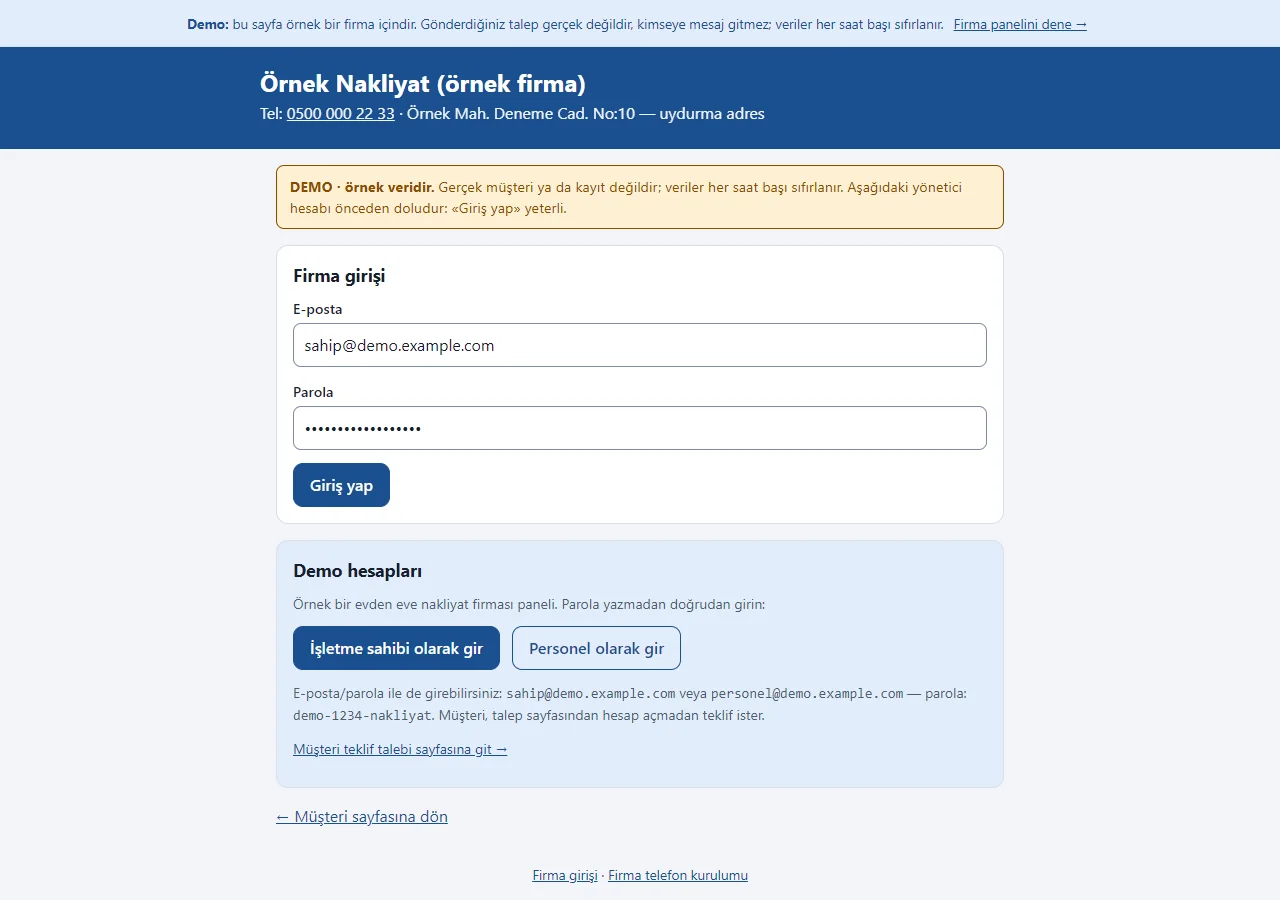
1.2.1 · 29 October 2026 Panel sign-in
The company panel sign-in. On the demo’s sign-in page a “DEMO · örnek veridir” (sample data) notice sits at the top, the e-mail and password fields come prefilled with the manager account, and a “Demo hesapları” (demo accounts) box holds password-free “… olarak gir” (sign in as …) buttons for owner and staff and a link to the customer page. Both show only in the demo; a normal installation has empty fields.
- On screen (Turkish interface)
- “DEMO · örnek veridir” — DEMO · sample data
- “Demo hesapları” — demo accounts
- “İşletme sahibi olarak gir” — enter as business owner
- “Personel olarak gir” — enter as staff
- “Giriş yap” — sign in
-
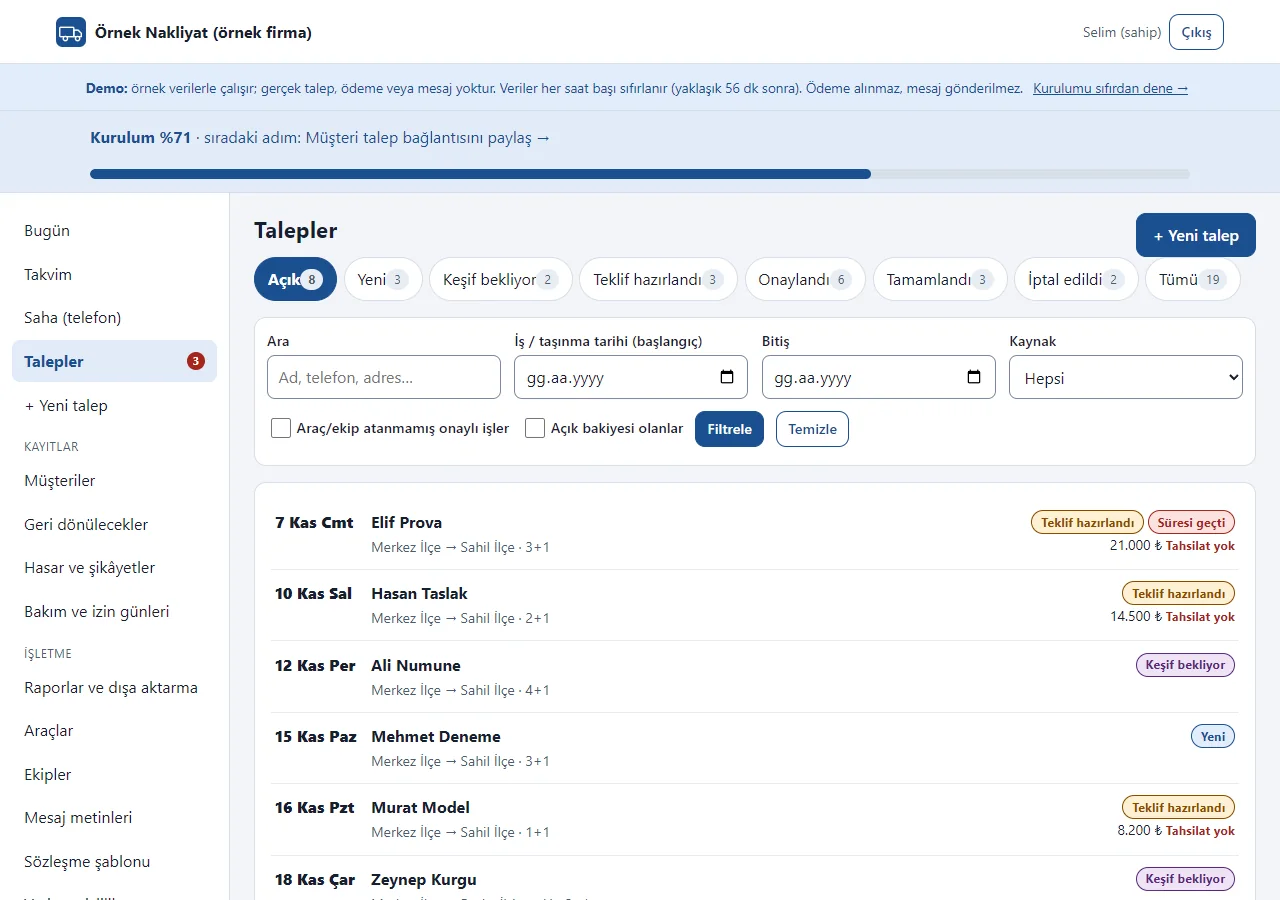
1.2.1 · 29 October 2026 Request list
Requests are filtered by stage: new, survey pending, quote prepared, approved, completed, cancelled. Search by name, phone, address, date and source; approved jobs without a vehicle or crew and jobs with an open balance have their own filters.
- On screen (Turkish interface)
- “Açık / Yeni / Keşif bekliyor” — open / new / survey pending
- “Teklif hazırlandı / Onaylandı” — quote prepared / approved
- “Tamamlandı / İptal edildi” — completed / cancelled
- “Araç/ekip atanmamış onaylı işler” — approved jobs without a vehicle/crew
- “Açık bakiyesi olanlar” — those with an open balance
-
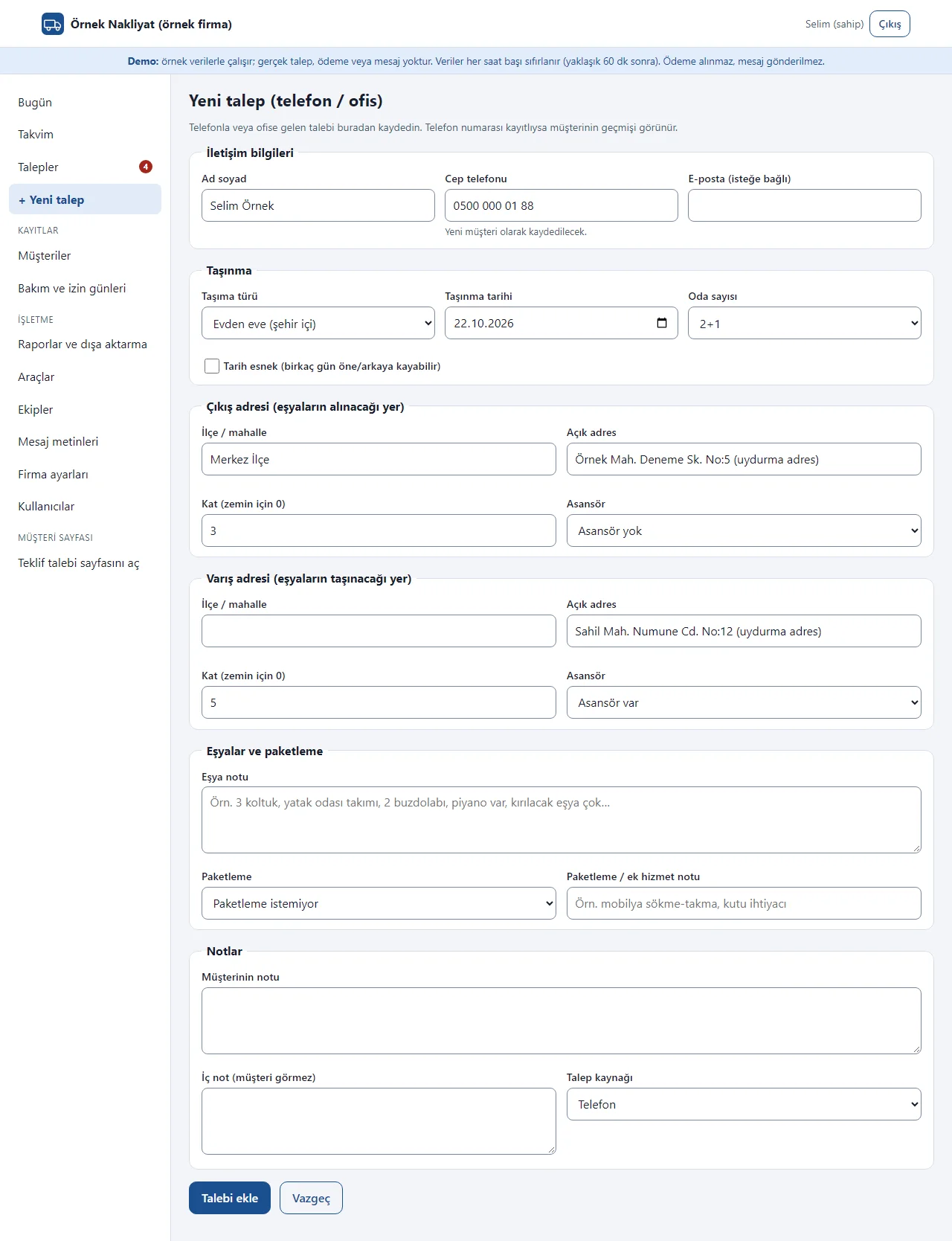
Adding a phone request
A request that arrives by phone or at the office is entered by staff in the same form, with the request source and an internal note the customer does not see. If the phone number is known, the customer’s history appears.
- On screen (Turkish interface)
- “Yeni talep (telefon / ofis)” — new request (phone / office)
- “Talep kaynağı” — request source
- “İç not (müşteri görmez)” — internal note (customer does not see it)
- “Talebi ekle” — add the request
-
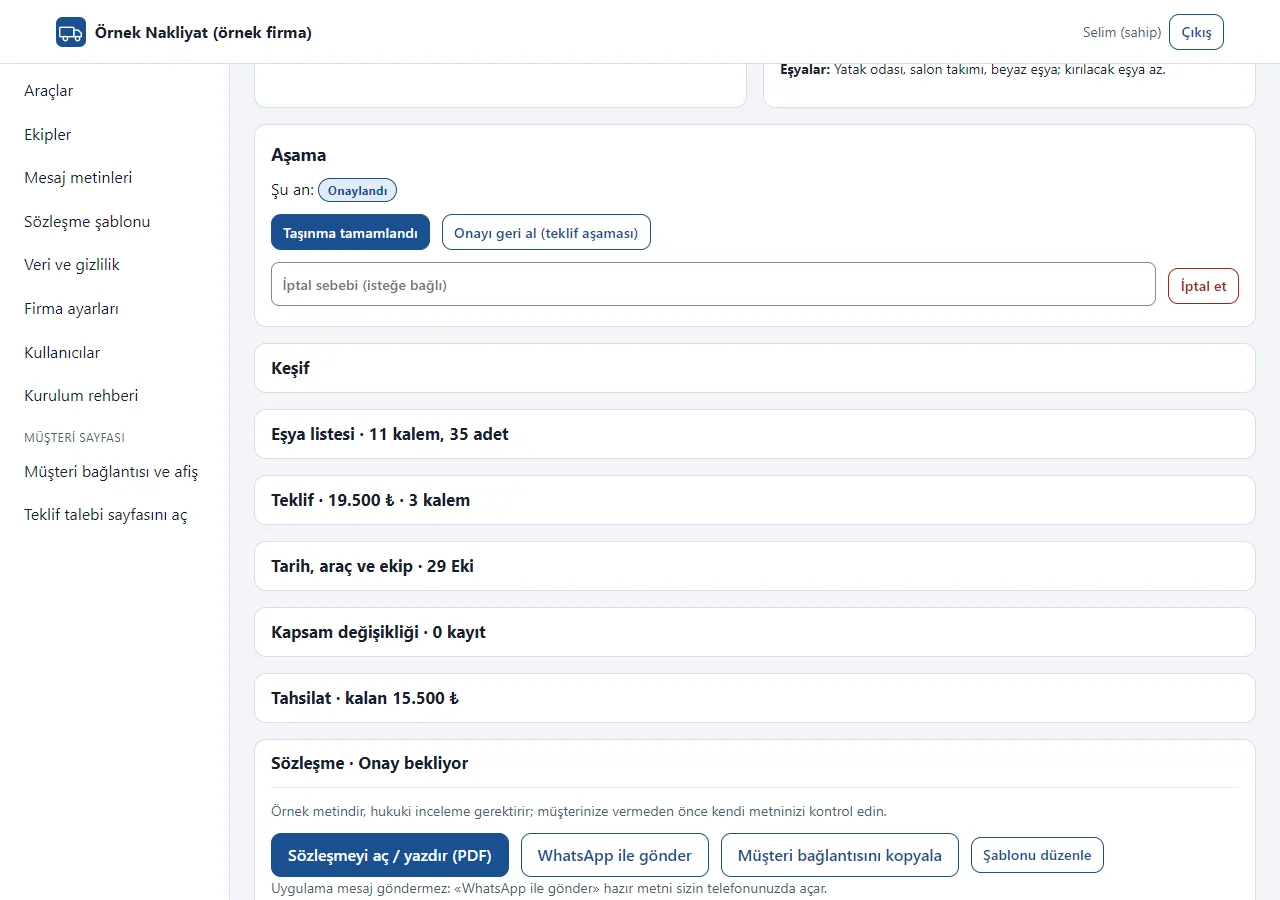
1.2.1 · 29 October 2026 Request page: collapsible sections
Customer and move details and the stage buttons are at the top; below are collapsible sections: Keşif (survey), Eşya listesi (item list), Teklif (quote), Tarih/araç/ekip (date/vehicle/crew), Kapsam değişikliği (scope change), Tahsilat (payments), Sözleşme (contract), Hasar ve sorun kaydı (damage and problem record) and Geri dön hatırlatması (follow-up). The heading shows a summary (“Eşya listesi · 11 kalem, 35 adet”, “Tahsilat · kalan 15.500 ₺”); a section awaiting action comes open.
- On screen (Turkish interface)
- “Aşama” — stage
- “Keşif” — survey
- “Eşya listesi · 11 kalem, 35 adet” — item list · 11 items, 35 pieces
- “Teklif” — quote
- “Tahsilat · kalan 15.500 ₺” — payments · 15,500 ₺ left
- “Sözleşme · Onay bekliyor” — contract · awaiting approval
-
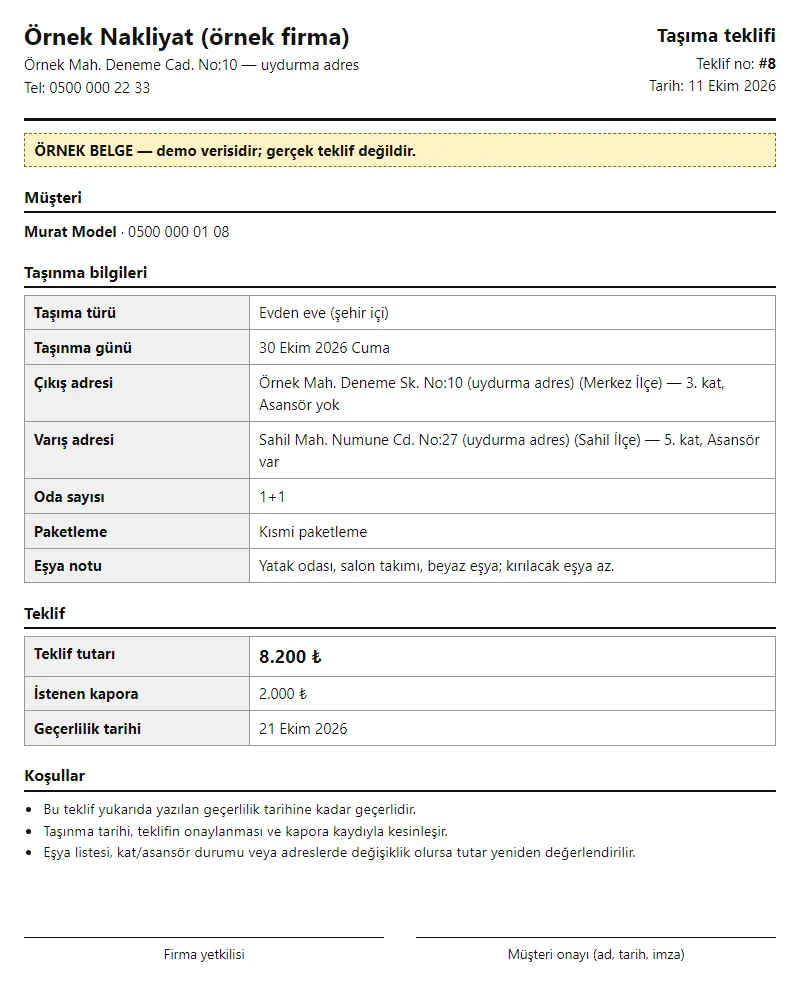
Printable quote
Company details, customer, addresses, floor and elevator, quote amount, validity date, terms and signature lines. Print it or save it as a PDF from the browser; the terms text is changed in the company settings.
- On screen (Turkish interface)
- “Taşıma teklifi” — moving quote
- “Teklif tutarı / İstenen kapora” — quote amount / requested deposit
- “Geçerlilik tarihi” — validity date
- “Koşullar” — terms
- “Firma yetkilisi / Müşteri onayı” — company representative / customer approval
-
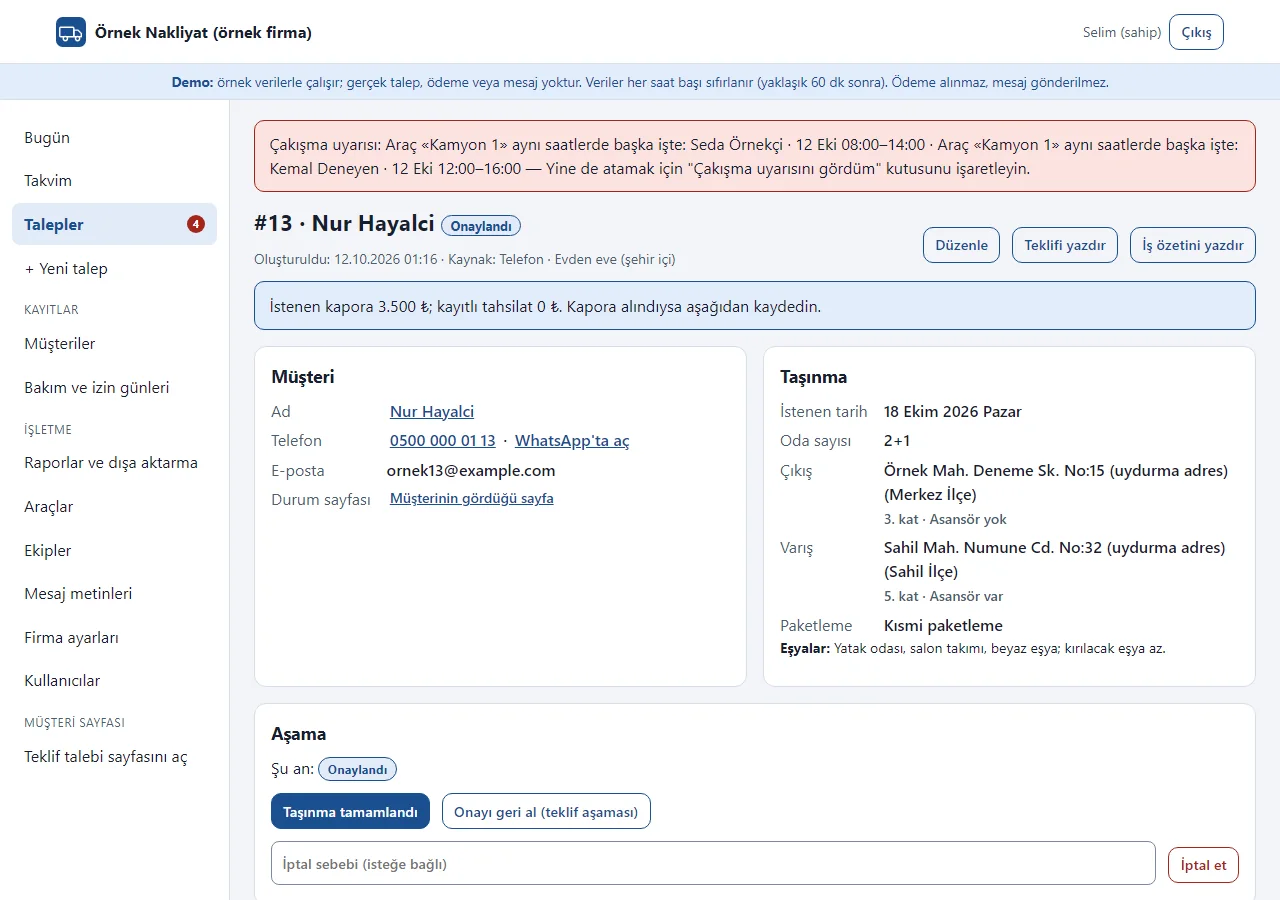
Clash warning
If the same vehicle or crew is already on another job at those hours, or on a maintenance or leave day, the assignment stops with a warning. It can still be saved on purpose with “I saw the clash warning, assign anyway”.
- On screen (Turkish interface)
- “Çakışma uyarısı” — clash warning
- “Aynı saatlerde başka işte” — on another job at the same hours
- “Çakışma uyarısını gördüm, yine de ata” — I saw the clash warning, assign anyway
-
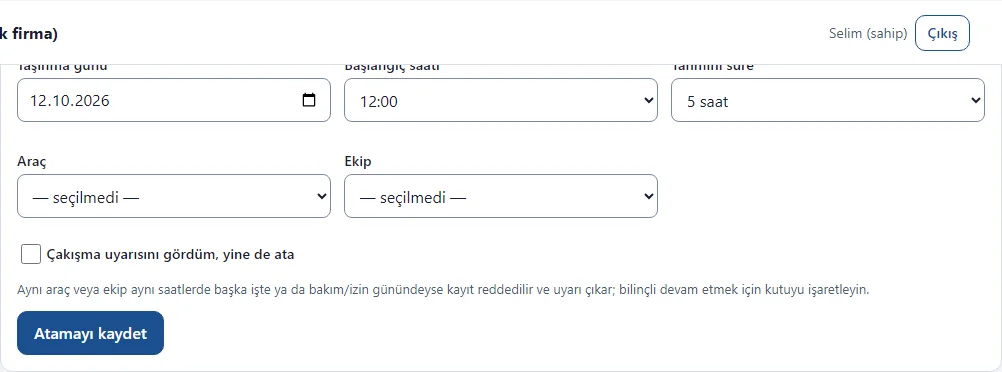
Date, vehicle and crew assignment
An approved job gets a move day, a start time, an estimated duration, a vehicle and a crew. Once saved it shows on the calendar and the job summary.
- On screen (Turkish interface)
- “Tarih, araç ve ekip” — date, vehicle and crew
- “Taşınma günü / Başlangıç saati / Tahmini süre” — move day / start time / estimated duration
- “Araç / Ekip” — vehicle / crew
- “Atamayı kaydet” — save the assignment
-
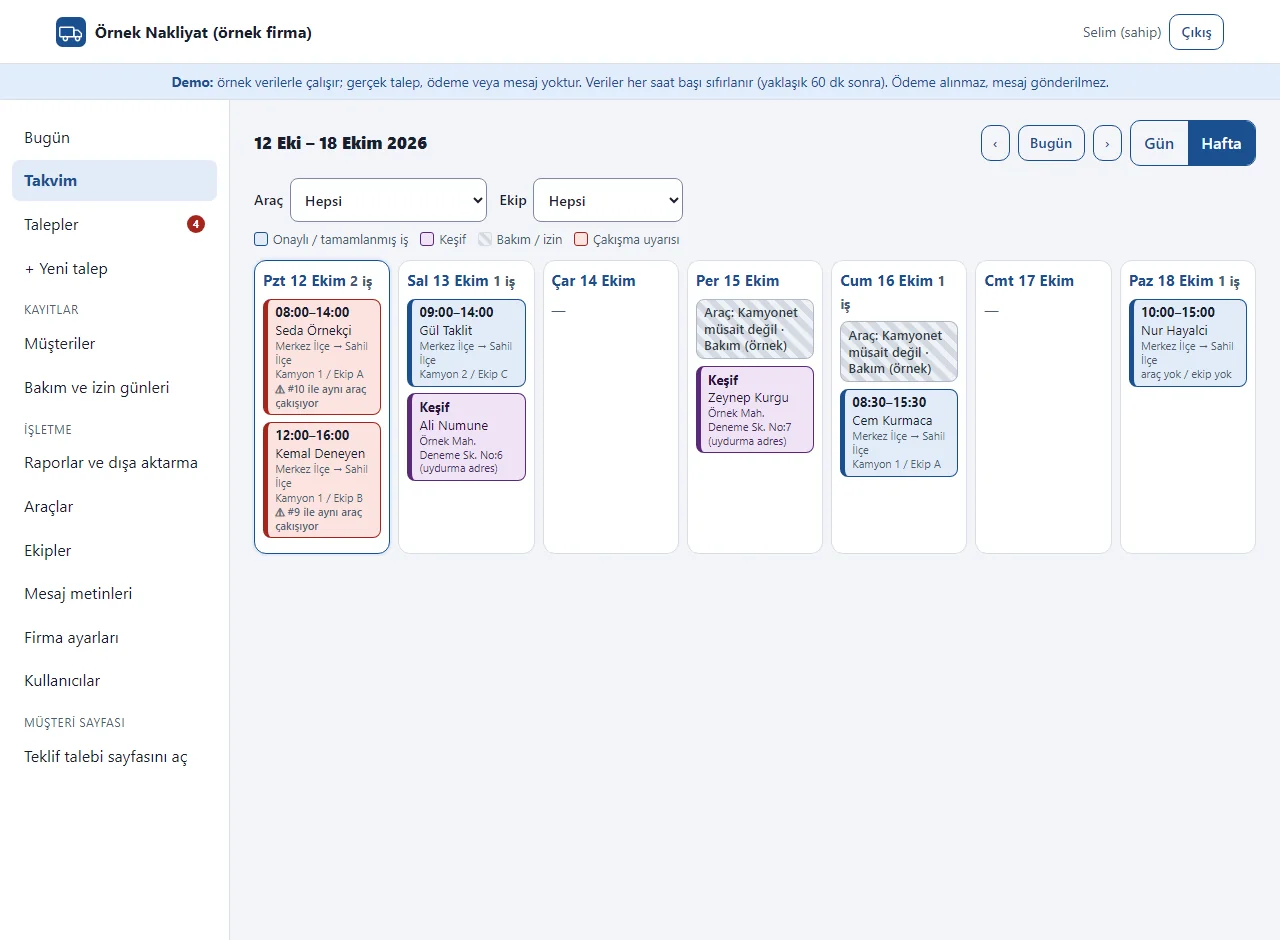
Weekly job calendar
Each day’s jobs, surveys and maintenance or leave entries side by side, filterable by vehicle and crew. Clashing jobs get a red frame.
- On screen (Turkish interface)
- “Gün / Hafta” — day / week
- “Keşif” — survey
- “Bakım / izin” — maintenance / leave
- “Çakışma uyarısı” — clash warning
-
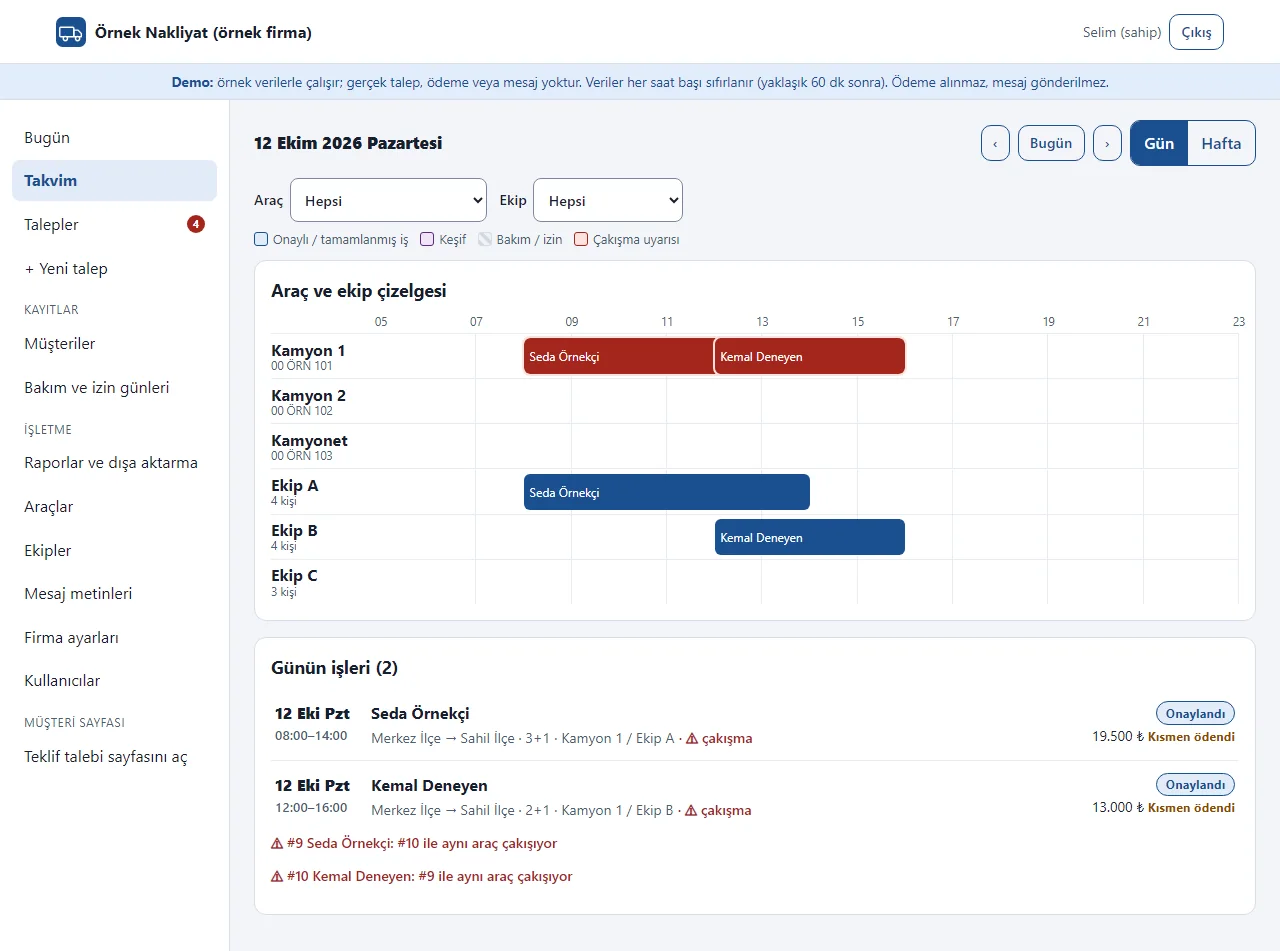
Daily vehicle and crew timeline
An hour timeline for every vehicle and crew shows at a glance who is busy when. The clashing bar is red.
- On screen (Turkish interface)
- “Araç ve ekip çizelgesi” — vehicle and crew timeline
- “Günün işleri” — the day’s jobs
- “Kamyon / Kamyonet / Ekip” — truck / pickup / crew
-
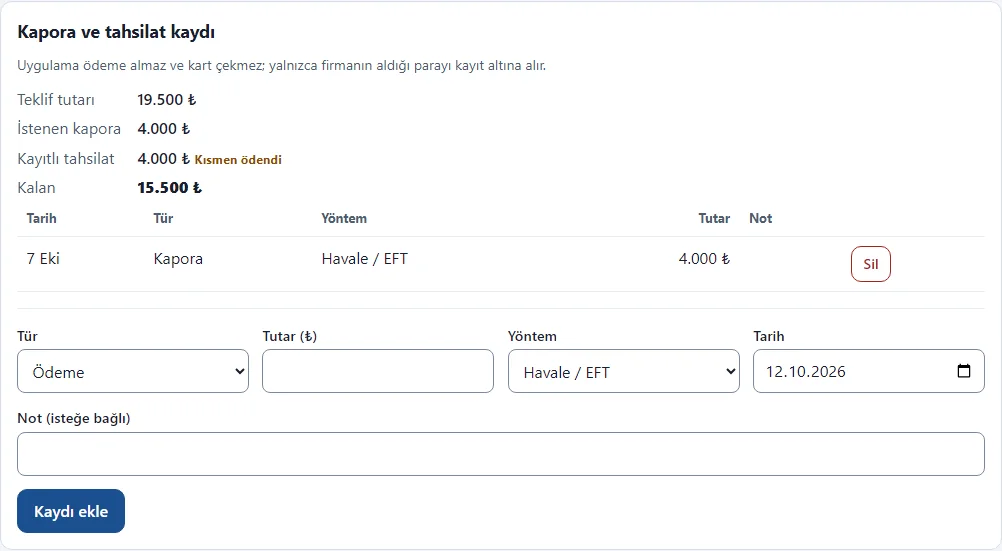
Deposit and remaining-payment record
Deposits and payments received are kept as records only: amount, method (cash, bank transfer, card), date and note. The remaining amount is shown; an entry above the quote or dated in the future is refused. The app takes no payment.
- On screen (Turkish interface)
- “Kapora ve tahsilat kaydı” — deposit and payment record
- “Teklif tutarı / İstenen kapora” — quote amount / requested deposit
- “Kayıtlı tahsilat / Kalan” — recorded payments / remaining
- “Kapora / Ödeme / İade” — deposit / payment / refund
-
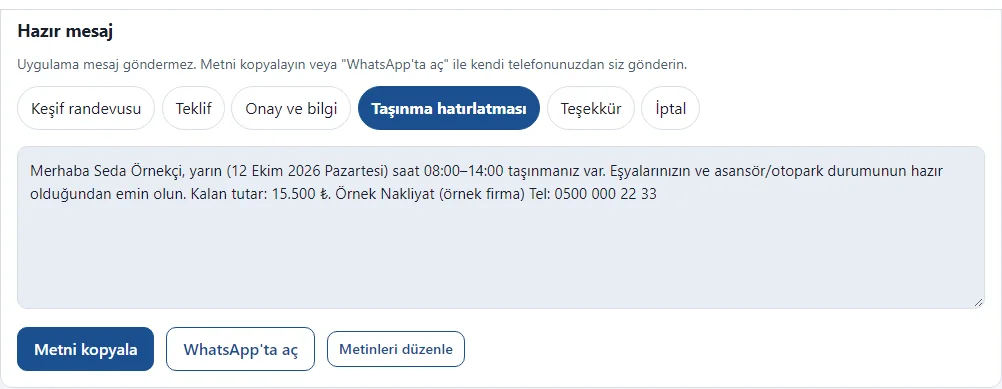
Ready message
The survey, quote, confirmation, reminder, thank-you and cancellation texts come filled in with the customer’s details. “WhatsApp’ta aç” opens the chat with the text filled in; the company sends it from its own phone and the app sends nothing.
- On screen (Turkish interface)
- “Hazır mesaj” — ready message
- “Keşif randevusu / Teklif / Onay ve bilgi” — survey appointment / quote / confirmation and details
- “Taşınma hatırlatması / Teşekkür / İptal” — moving reminder / thank-you / cancellation
- “Metni kopyala” — copy the text
- “WhatsApp’ta aç” — open in WhatsApp
-
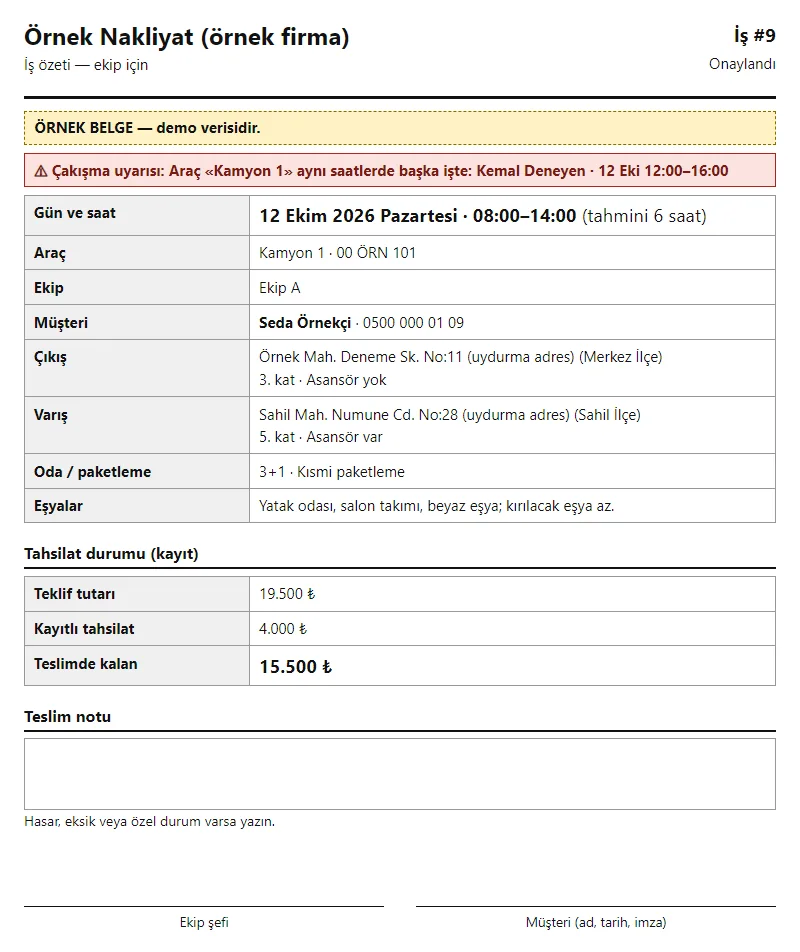
Job summary for the crew
Day and time, vehicle, crew, addresses, floor and elevator, notes on items, the amount due at delivery, a delivery note and signature lines. Printed for an approved or completed job.
- On screen (Turkish interface)
- “İş özeti” — job summary
- “Teslimde kalan” — due at delivery
- “Teslim notu” — delivery note
- “Ekip şefi / Müşteri” — crew leader / customer
-
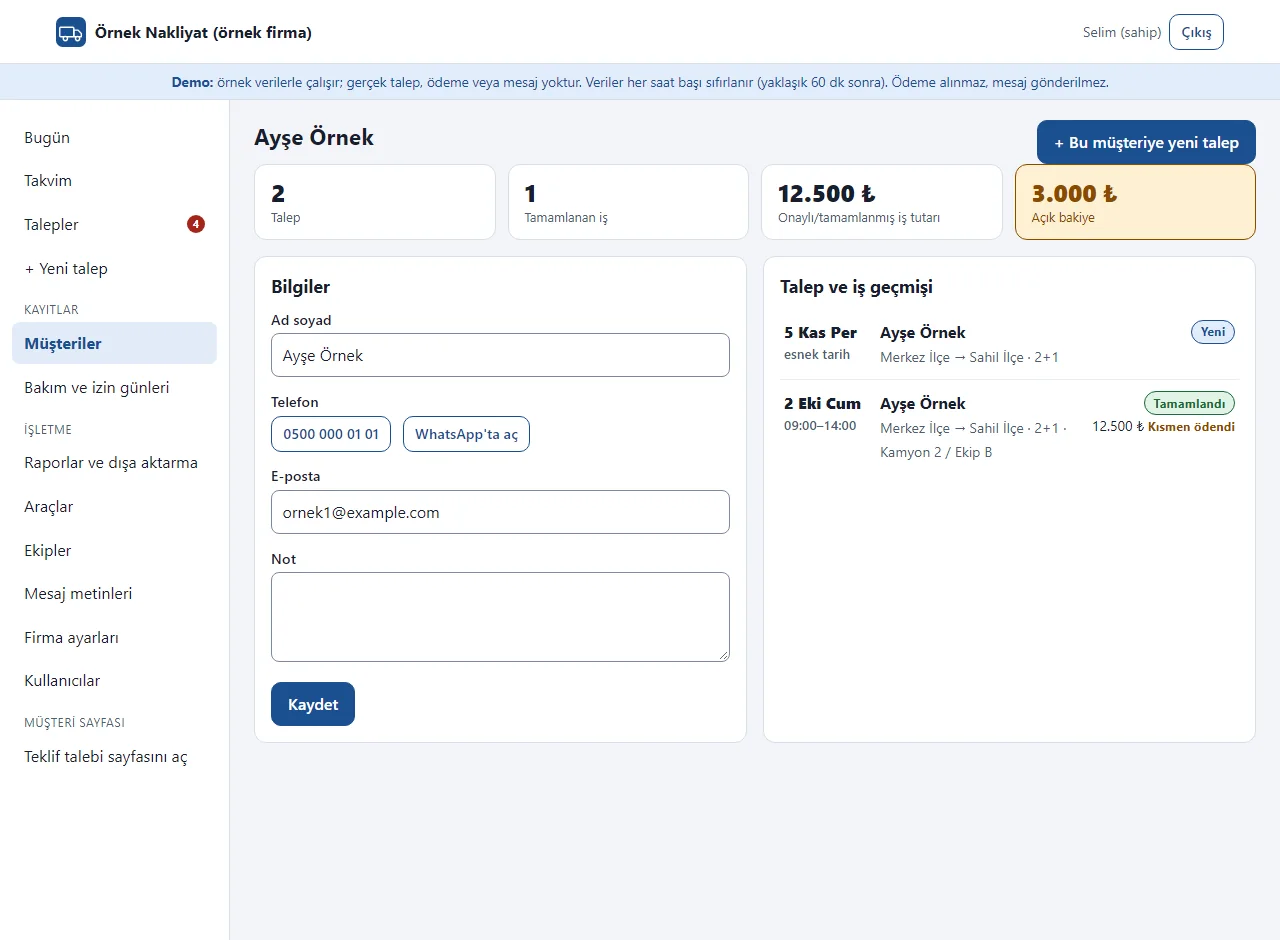
Customer history
The customer card: contact, note, all their requests, completed jobs and open balance. Requests with the same phone are linked to the same customer. The sample customers are made up.
- On screen (Turkish interface)
- “Talep ve iş geçmişi” — request and job history
- “Tamamlanan iş” — completed jobs
- “Açık bakiye” — open balance
- “Bu müşteriye yeni talep” — new request for this customer
-
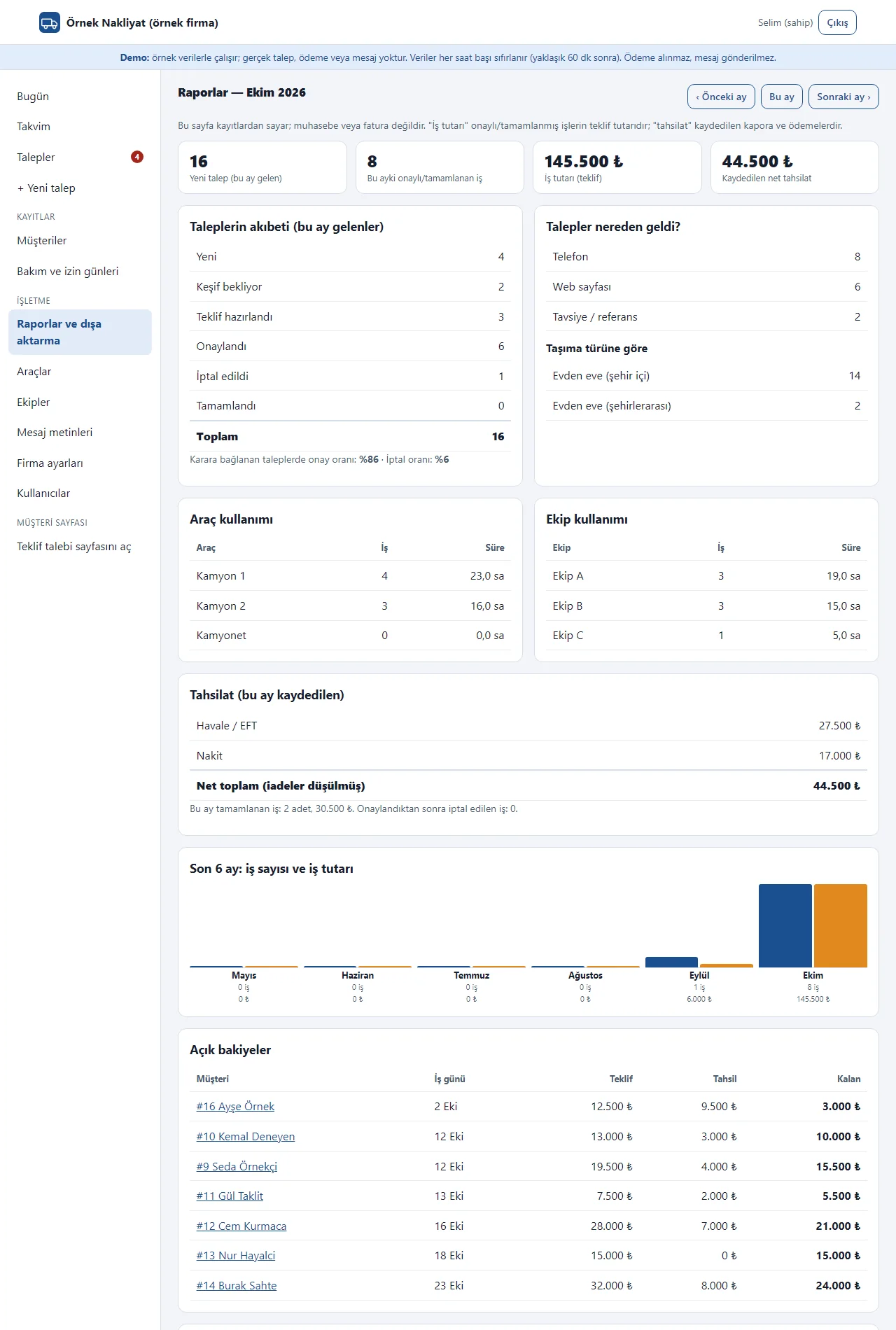
Job and income summary
Seen by the owner only. For the chosen month: requests, the split by stage, approval and cancellation rate, request sources, vehicle and crew use, recorded payments, open balances and the last 6 months; requests and payments download as CSV. It is not accounting; it counts from the records. The picture shows the first part.
- On screen (Turkish interface)
- “Raporlar” — reports
- “Talebin akıbeti” — what became of the requests
- “Talepler nereden geldi?” — where did the requests come from?
- “Araç kullanımı / Ekip kullanımı” — vehicle use / crew use
- “CSV dışa aktarma” — CSV export
-
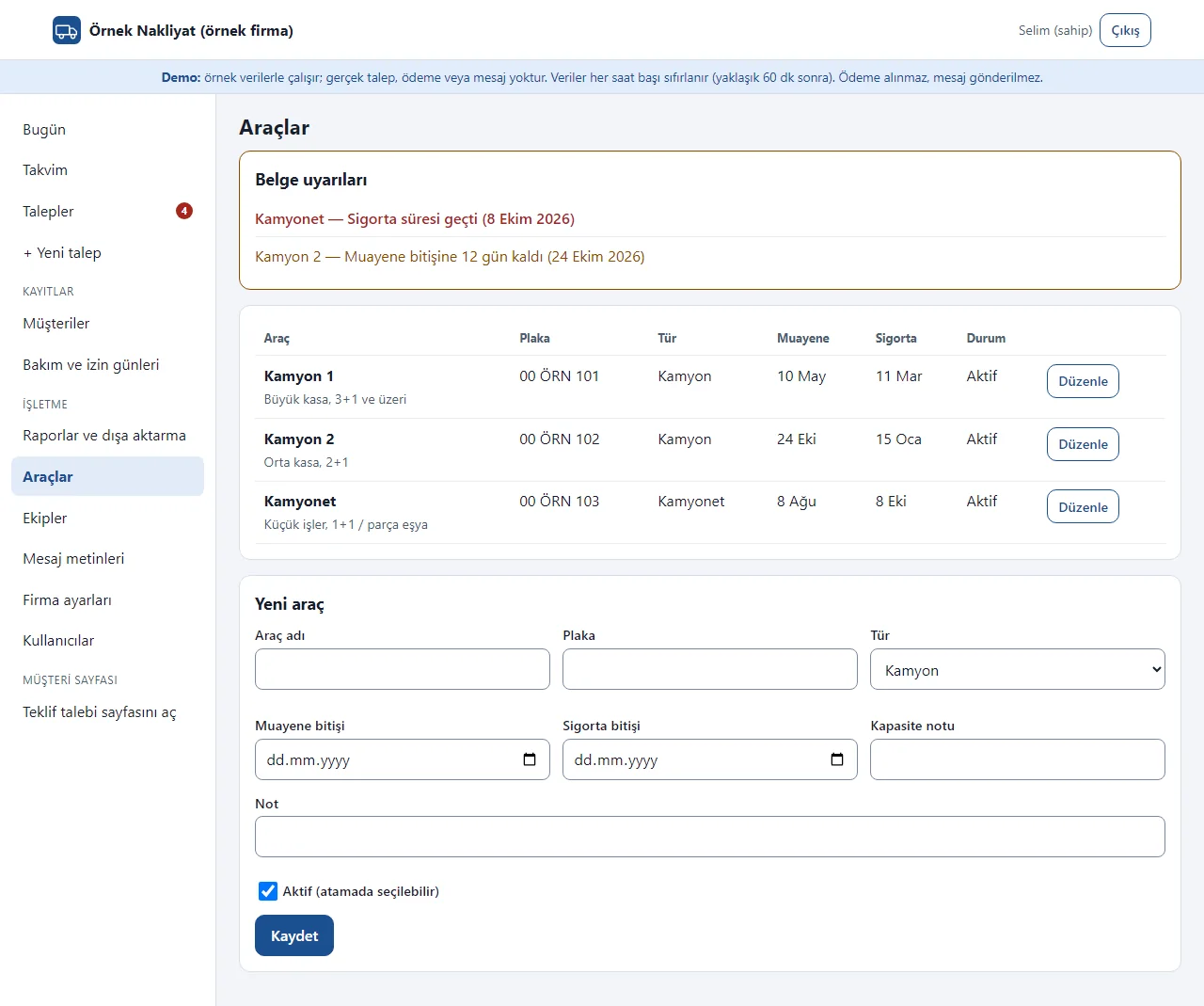
Vehicles and document warnings
Vehicle set-up (owner only): plate, type, capacity note, inspection and insurance end dates. Documents about to expire or expired also show as warnings on the Today screen.
- On screen (Turkish interface)
- “Belge uyarıları” — document warnings
- “Muayene / Sigorta” — inspection / insurance
- “Araçlar” — vehicles
- “Aktif (atamada seçilebilir)” — active (can be picked in an assignment)
-
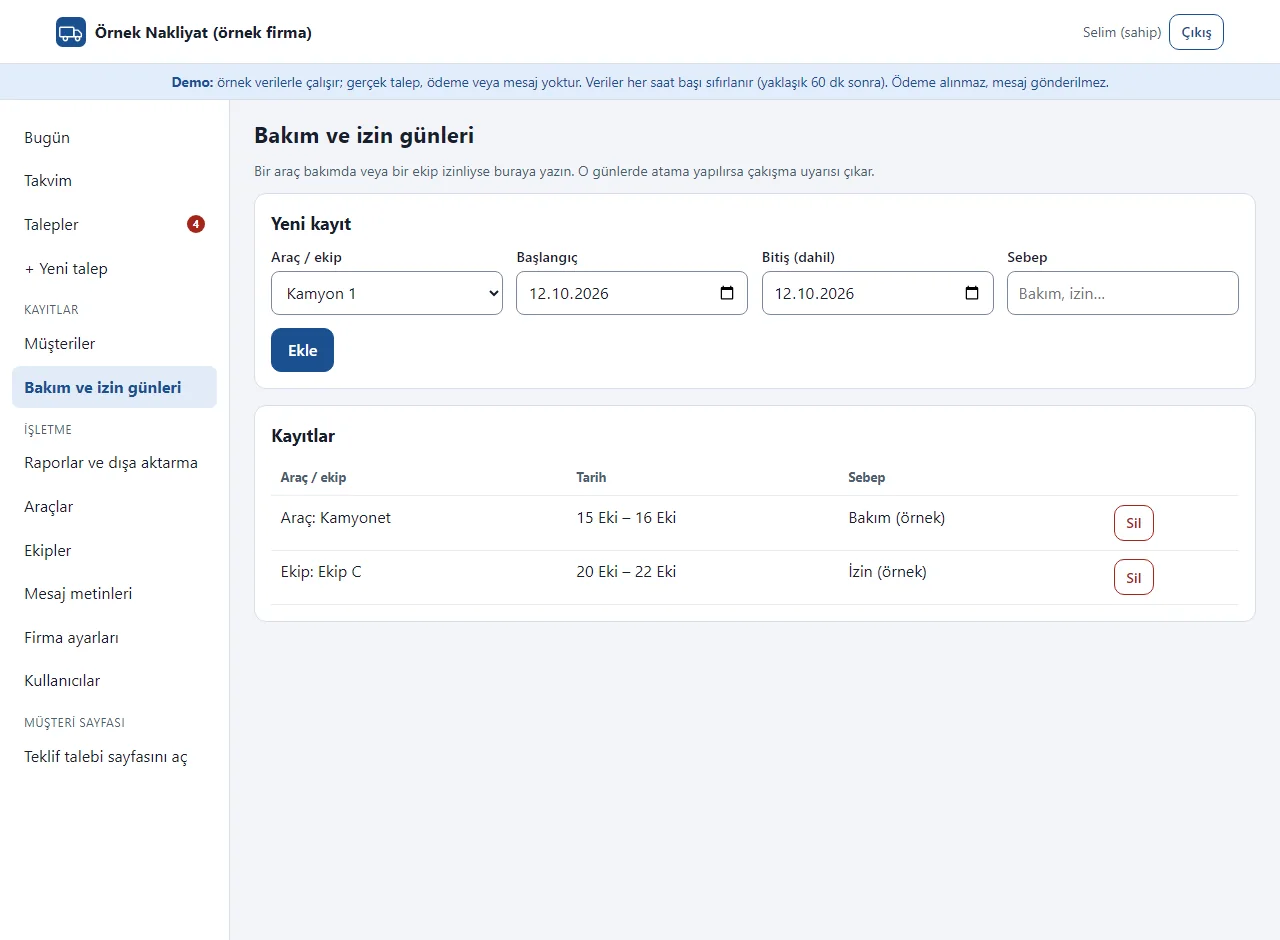
Maintenance and leave days
Mark a vehicle as in maintenance or a crew as on leave with a date range; assigning on those days raises a clash warning.
- On screen (Turkish interface)
- “Bakım ve izin günleri” — maintenance and leave days
- “Araç / ekip” — vehicle / crew
- “Başlangıç / Bitiş” — start / end
- “Sebep” — reason
- What do they see at the end?
- The request goes through survey and quote stages and is approved; an approved job gets a date, a vehicle and a crew, with a warning on a clash. Deposits and remaining payments are recorded, a quote and a crew job summary are printed and the message for the customer comes ready. An approved job gets a contract and an item list.
- What is it good for?
- Requests, quotes, deposits and the vehicle-crew plan do not scatter across the phone, WhatsApp and a notebook; the same truck or crew is not written into two jobs at one time; you see which quote has expired and how much is still to collect.
Everything that is not included, and all limits
- Not delivered to a client and not used by a real moving company. The company on the screens (“Örnek Nakliyat”, a made-up name), the people, the phone numbers, the plates, the addresses and the amounts are sample data; no real personal details should be entered in the demo.
- The system does not set the price: there is no automatic price calculation or distance or volume tariff; the company writes the quote amount. Quote items only add up the amounts written; there is no job profitability calculation.
- There is no online payment, virtual POS or online deposit: choosing cash, bank transfer or card only sets a record label, and the app takes no payment. There is no e-invoice, accounting export, expense or ledger tracking.
- There is no automatic SMS or WhatsApp sending: the message text comes ready and the company sends it from its own phone; there is a free phone notification. There is no live GPS or routing, no official-system reporting (such as U-ETDS), no photo upload (item or damage photos), no qualified electronic signature, no compensation or insurance calculation, no warehouse tracking, no carrier–shipper marketplace and no mobile app. The contract approval is a simple electronic approval; the text is a sample template, not a legal text.
- It is for a single company; there is no multi-branch view. One vehicle and one crew are assigned to a job.
- Tried locally with PHP 8.3 and SQLite; the sample-data demo is live on a DirectAdmin/LiteSpeed account with PHP 8.3. It has not been tried on any other hosting or PHP version. The phone view was observed in a browser at phone size (412 pixels); not tried on a real phone.
- In the demo the data is reset every hour, no payment is taken, no message is sent, anonymisation is locked and the pages are closed to search engines; the sign-in page has the manager account prefilled and a “Demo hesapları” (demo accounts) box with “enter as business owner” and “enter as staff” buttons that need no password (the notice and the box show only in the demo). A normal installation asks for an e-mail and password. The interface is Turkish; there is no English interface in the panel.
Delivery and sales status
How does it work?
You try the demo and tell us about your moving company, and we send you a quote. We install it and we host it. The yearly price includes installation, hosting, data transfer and support.
Price
The yearly list price is 3,000 TL. Installation, one year of hosting, data transfer, bug fixes and written usage support are included. Online payment, automatic SMS and WhatsApp messages, e-invoice and GPS are not included. New feature requests and work beyond the scope are priced separately and you are told before it is done.
Possible delivery options
Other delivery options
Requirements and version history
Installation requirements
- It uses plain PHP 8.1 or newer and SQLite; no separate database server is needed. The product was tried locally with PHP 8.3; it has not been tried on other PHP versions.
Release notes
- No version has been delivered to a client. A live sample-data demo exists.
- 1.0.0 (12 October 2026): first version; request and customer records, a customer quote request page, request stages, a quote and requested deposit, deposit and remaining-payment records, date, vehicle and crew assignment with clash warnings, maintenance and leave days, a weekly calendar and daily timeline, customer history, a job and income summary, a printable quote and job summary, CSV export, ready message texts.
- 1.0.1 (12 October 2026): a ready WhatsApp message button on the customer status page; the customer sends the message.
- 1.0.2 (17 October 2026): a scope-change record on an approved job (reason, amount difference, customer approval); only the approved difference reaches the balance, reports and CSV; existing records are kept on upgrade.
- 1.0.3 (17 October 2026): buttons that ask for confirmation open an in-page dialog instead of the browser box; after a customer reports acceptance the status heading reads “Your acceptance has reached the company”; vehicle dates show the year.
- 1.0.4 (17 October 2026): a start guide and a “Your links” section for the owner (customer request address and panel login, with copy and WhatsApp sharing); “no account needed” and address copying on customer pages; a maker line that can be switched off in settings; field-code buttons in message texts.
- 1.0.5 (18 October 2026): demo sign-in page: a demo notice, fields prefilled with the manager account and password-free “… olarak gir” (sign in as …) buttons for owner and staff (demo mode only; on a real installation there is no notice, box or prefilled field).
- 1.0.6 (21 October 2026): customer import from Excel/CSV for the owner only: file upload or paste, columns recognised from the header, a preview before saving, the same phone number counts as one person and is not added twice, the last import can be undone; no request or amount is written.
- 1.0.7 (26 October 2026): staff can no longer pick a past date in the “Taşınma günü” (moving day) field of the job assignment form.
- 1.0.8 (28 October 2026): a one-press role screen from the product page (demo only): opens as the owner or as staff without a password; closed on a real installation. No new permission, data or schema change.
- 1.0.9 (28 October 2026): “Takvime ekle” (add to calendar) on the customer’s status page: an “Add to Google Calendar” link and “Dosya olarak indir (.ics)” (download the file; a reminder one hour before). Shown only once the move is approved and the “move day + time range” row is visible. Because the time can be an estimate until the crew is planned, the event title says “(tahmini saat)” (estimated time) and the page says so; no customer name, phone number, address, note, quote amount or deposit is carried and nothing is sent to the company. No new permission, data or schema change.
- 1.1.0 (29 October 2026): a guidance package: a step-by-step setup guide with a progress bar, “What is this screen for?” boxes, a customer link (a ready WhatsApp message, copy the link, a QR A4 poster), a sign-in-free add-to-phone page for the company, a free instant notification (no SMS; not sent in the demo), guidance on empty screens; the demo has “Start with an empty site” and “Restore sample data”; the maker line on customer pages can no longer be switched off; owner-only areas are hidden from staff. New settings keys are added and existing data is kept.
- 1.1.1 (29 October 2026): fixed the setup bar breaking the page layout on desktop.
- 1.2.0 (29 October 2026): a service contract (an editable sample template, print / PDF, send by WhatsApp, reading and a simple electronic approval on the customer’s status page); a room-by-room item list; quick quote items and a single-price entry; a damage and problem record (from the job and from the customer’s status page); a field screen; a data export and anonymisation for KVKK; a follow-up reminder. New tables are added and existing data is kept; the system still sets no price.
- 1.2.1 (29 October 2026): the sections on the request page became collapsible sections with a summary heading, the item row was made compact and the number of empty quote rows was reduced; on a phone the request page went from about 11,800 pixels to 3,200 pixels. Data and permissions did not change. The live demo runs version 1.2.1.
Decisions not made yet
- Rights to use, modify, transfer and receive the source code: to be set in a written agreement; not decided yet.
- Whose name the hosting and domain are opened in, and where the software is installed, have not been decided yet.
There is no cart, customer account or online payment on this site for now. Reach out by phone, WhatsApp or the form; in a first conversation your need and the software’s fit are reviewed. The form does not create an order, a contract or a payment.