Retail and e-commerceDemo with sample data
Online bookshop: screen-by-screen guide
The full version of the short description on the product page: every feature, how each screen is used step by step, all limits and the delivery details.
All features
Every feature listed here can be seen in the screenshots.
- School book list: paste the lines, exact matches come pre-selected, uncertain ones are flagged
- “Buy 3, pay 2” offer, coupon and free-shipping threshold in the cart
- Admin panel: edit prices and stock in the table, bulk price increase per publisher with a preview
- Order status updated from the panel; customers track orders by order number
Screen by screen: how it is used
The demo’s interface is in Turkish and there is no English version; only the captions and explanations on this page are in English.
- Who uses it?
- A customer who wants to buy books (especially a parent arriving with the school’s book list) and the bookshop staff who handle the orders.
- Where do they start?
- The customer searches for a book or browses the categories on the home page. The shop side opens, in the demo, from the “Yönetim paneli” (admin panel) button at the top.
What do they do on screen? Step by step
-
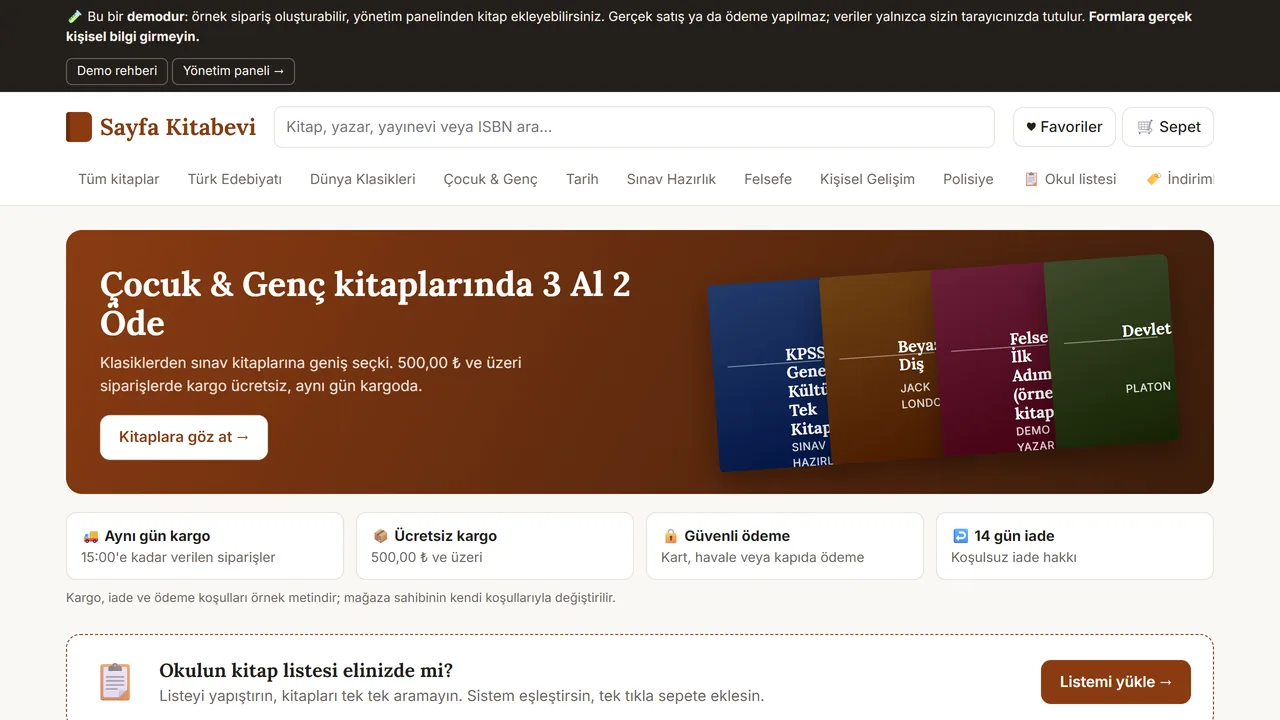
Home page
The visitor sees the book categories, a search box and an offer banner. There is also a separate section for the school’s book list.
- On screen (Turkish interface)
- “Sayfa Kitabevi” — the demo site’s name
- “Çocuk & Genç kitaplarında 3 Al 2 Öde” — the offer banner: buy 3, pay 2 on kids’ and young-adult books
- “Kitaplara göz at →” — the banner’s button, opens the catalogue
- “Ücretsiz kargo · Güvenli ödeme · 14 gün iade” — trust badges under the banner
- “Okulun kitap listesi elinizde mi?” — callout for the school-list feature below the banner
-
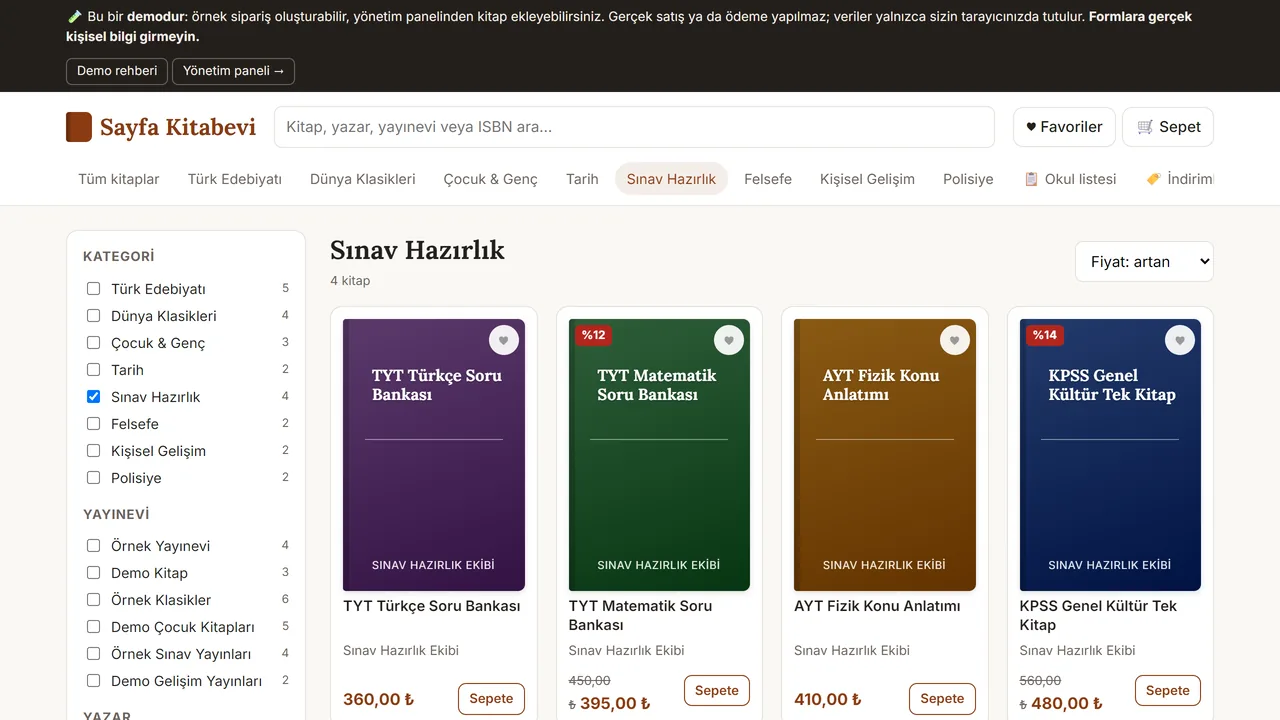
Browse by category and price
Pick a category and sort the books by price (here: exam preparation, cheapest first).
- On screen (Turkish interface)
- “KATEGORİ / YAYINEVİ” — filter panel headings: category / publisher
- “4 kitap” — result count
- “Sepete” — add-to-cart button on each card
-
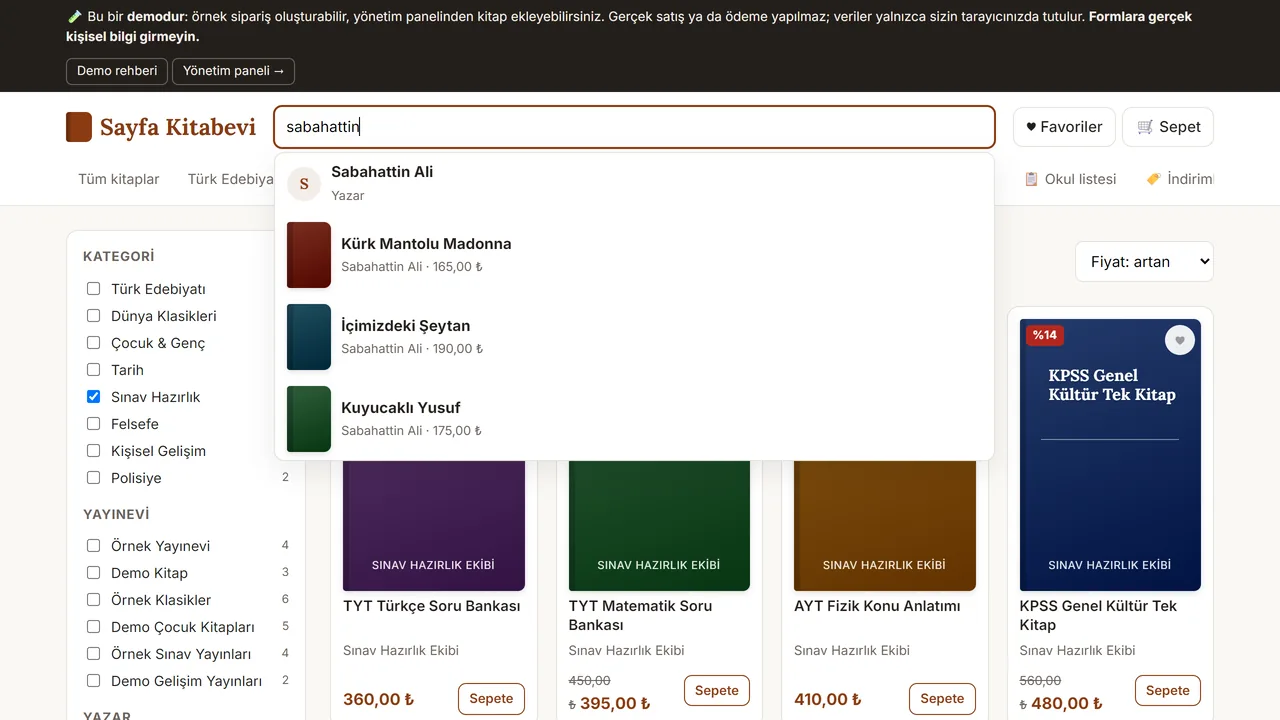
Results appear as you type
Type a title, author, publisher or ISBN and suggestions open straight away.
- On screen (Turkish interface)
- “Kitap, yazar, yayınevi veya ISBN ara...” — search box placeholder
- “Yazar” — tag under an author match
-
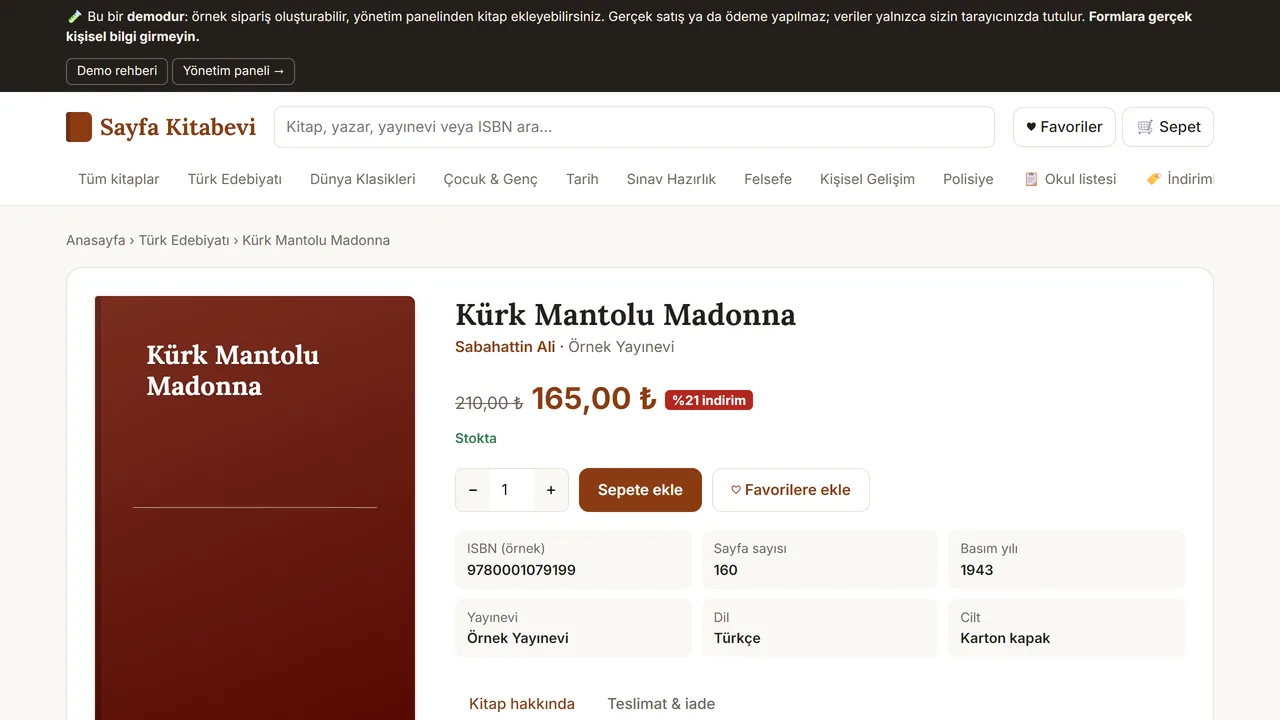
Book page
The book’s details, stock status and discount on one page. Adding it to the cart is a single button.
- On screen (Turkish interface)
- “Stokta” — in-stock badge
- “Sepete ekle” — add-to-cart button
- “♡ Favorilere ekle” — add-to-favourites button
- “ISBN (örnek) / Sayfa sayısı / Basım yılı / Yayınevi / Dil / Cilt” — spec table labels
- “Kitap hakkında / Teslimat & iade” — tabs: about this book / shipping & returns
-
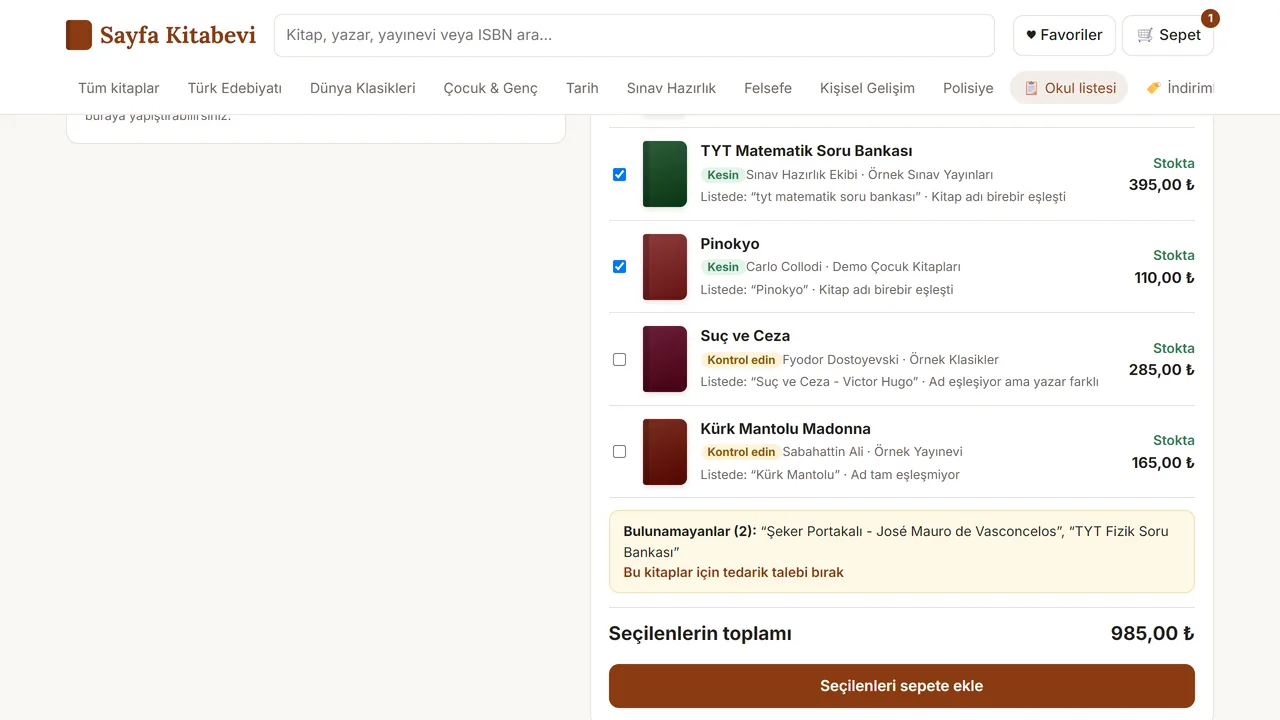
Paste the school book list
The list a parent already has is pasted in. Sure matches come pre-selected; uncertain ones are flagged “Kontrol edin” (please check) and stay unselected.
- On screen (Turkish interface)
- “Kesin” — green badge: exact match
- “Ad eşleşiyor ama yazar farklı” — note: title matches but the author differs
- “Bulunamayanlar (2)” — not-found section
- “Seçilenleri sepete ekle” — add-selected-to-cart button
-
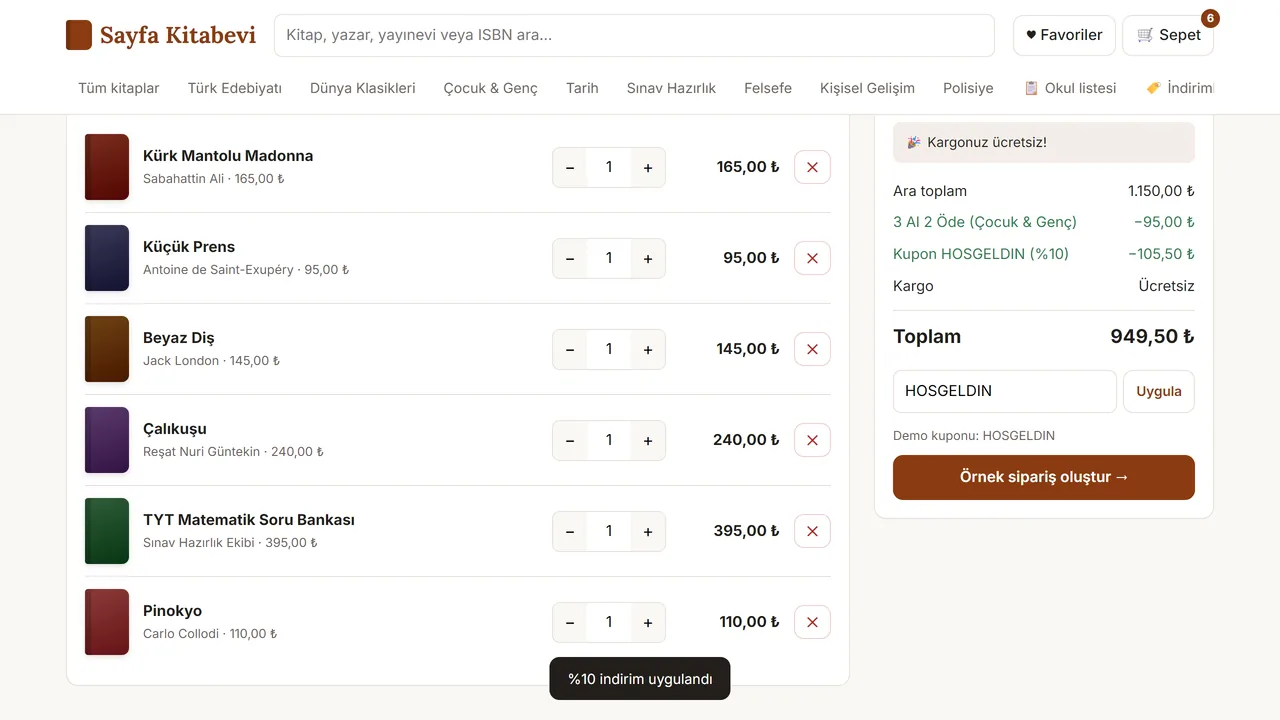
Cart
A “buy 3, pay 2” offer, a coupon code and a free-shipping threshold are worked out in the cart; the total updates at once.
- On screen (Turkish interface)
- “Kargonuz ücretsiz!” — free-shipping-reached message
- “Kupon HOSGELDIN (%10)” — applied coupon, 10% off
- “Ara toplam / Toplam” — subtotal / total
- “Örnek sipariş oluştur →” — checkout button: create sample order
-
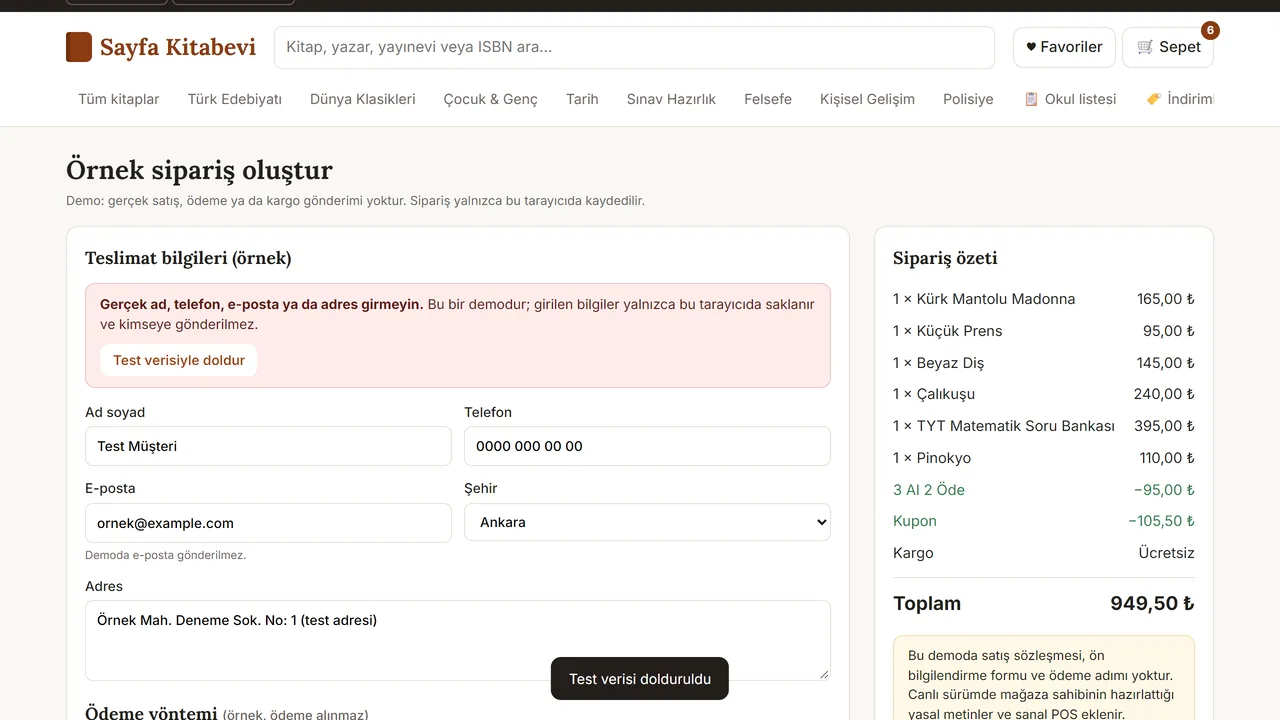
Sample order form
The demo has no real sale or payment. A button fills the form with test data; no real personal details are entered.
- On screen (Turkish interface)
- “Gerçek ad, telefon, e-posta ya da adres girmeyin.” — warning: don’t enter real personal details
- “Ad soyad / Telefon / E-posta / Şehir / Adres” — form field labels
- “Ödeme yöntemi (örnek, ödeme alınmaz)” — payment-method field, marked sample-only
- “Bu demoda satış sözleşmesi, ön bilgilendirme formu ve ödeme adımı yoktur.” — note: this demo skips the real sales contract, pre-info form and payment step
-
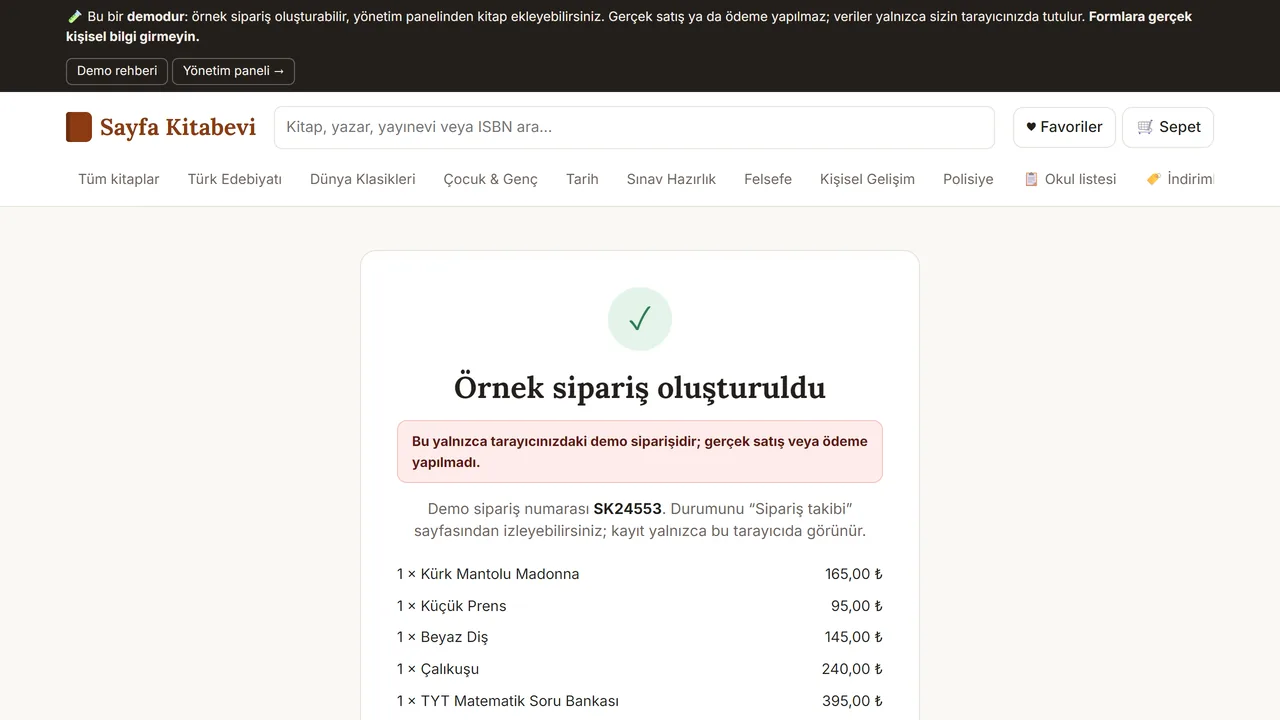
Result screen
An order number appears. This is only a sample order kept in the browser: it is not sent to anyone and no payment is taken.
- On screen (Turkish interface)
- “Örnek sipariş oluşturuldu” — confirmation heading
- “Demo sipariş numarası” — demo order number label
-
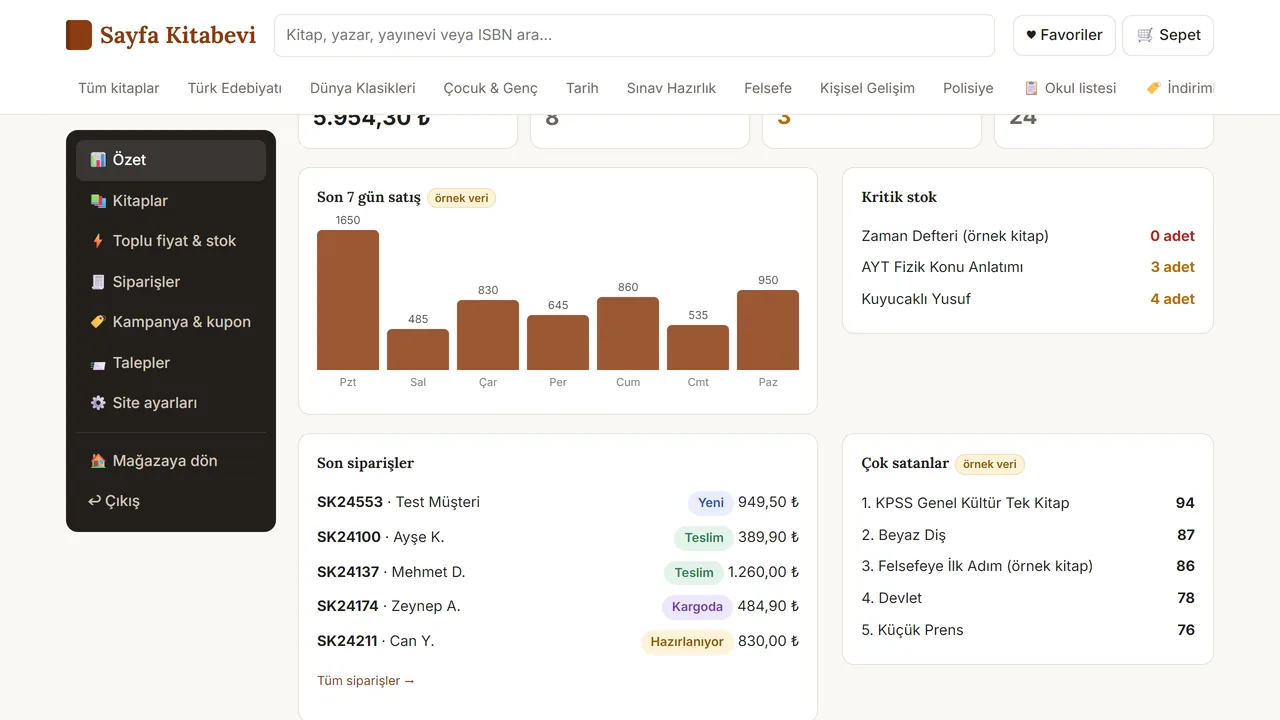
Admin panel: overview
On the shop side: the last seven days of sales, low stock and the latest orders together. The figures are sample data.
- On screen (Turkish interface)
- “Özet / Toplu fiyat & stok” — admin sidebar nav items
- “Kritik stok” — low-stock panel
- “Son siparişler / Çok satanlar” — recent orders / best sellers panels
-
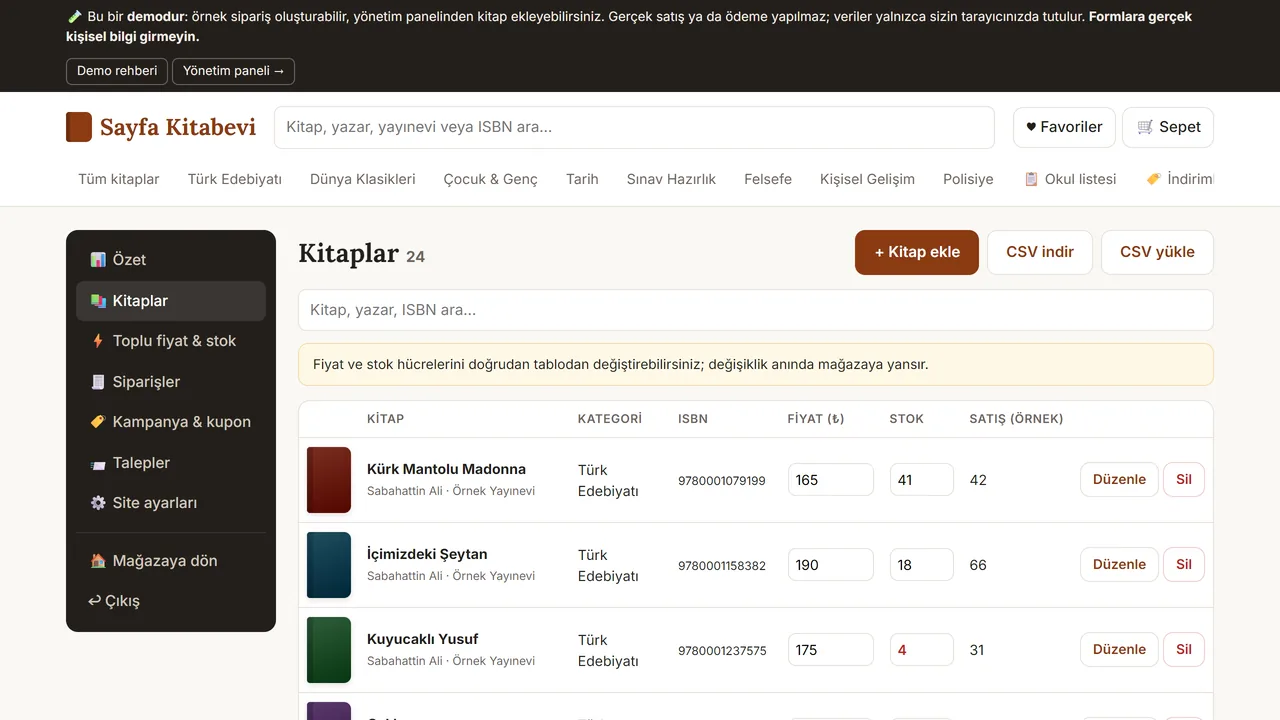
Books table
Price and stock are edited right in the table. A CSV file can also be uploaded for many books at once.
- On screen (Turkish interface)
- “+ Kitap ekle” — add-book button
- “CSV indir / CSV yükle” — download CSV / upload CSV
- “KİTAP / KATEGORİ / FİYAT (₺) / STOK / SATIŞ (ÖRNEK)” — table column headers
- “değişiklik anında mağazaya yansır” — note: changes apply to the live store instantly
-
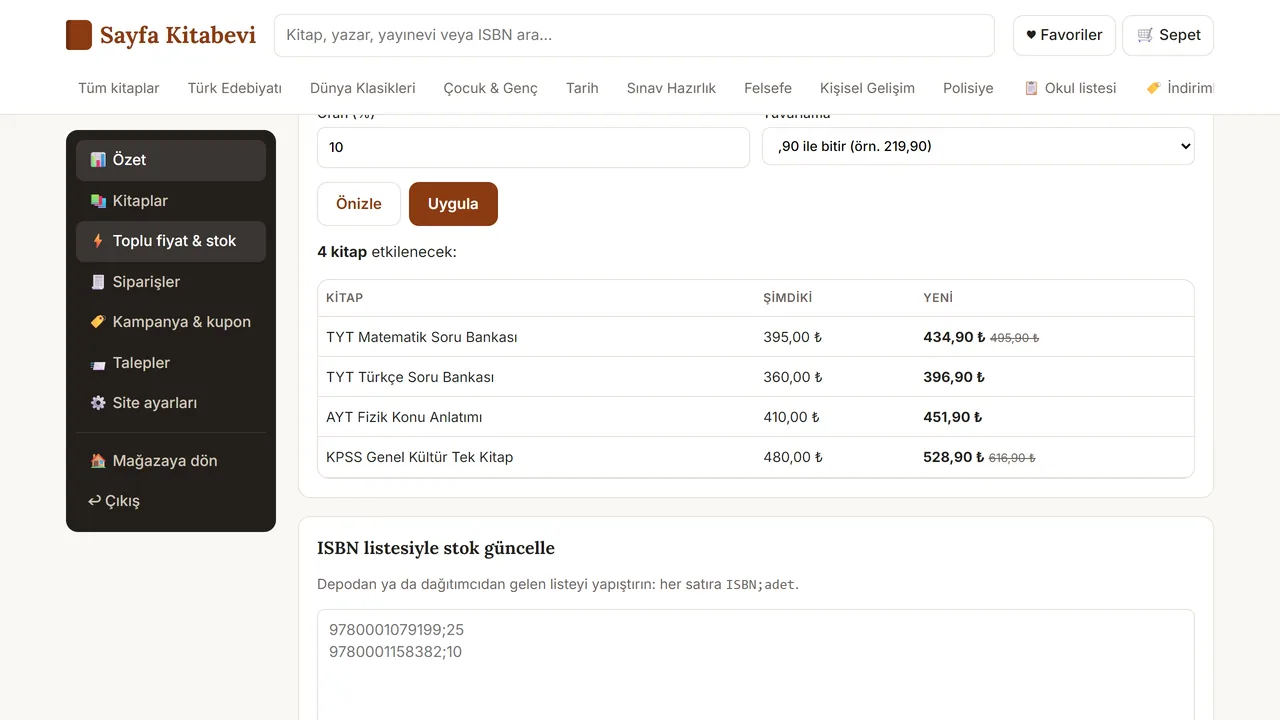
Price increase for a publisher
A percentage increase is entered for one publisher’s books. The old and new prices are previewed first and applied only once confirmed.
- On screen (Turkish interface)
- “Oran (%) / Yuvarlama” — rate and rounding fields
- “Önizle / Uygula” — preview / apply buttons
- “4 kitap etkilenecek:” — affected-books count
- “ŞİMDİKİ / YENİ” — before/after price columns
-
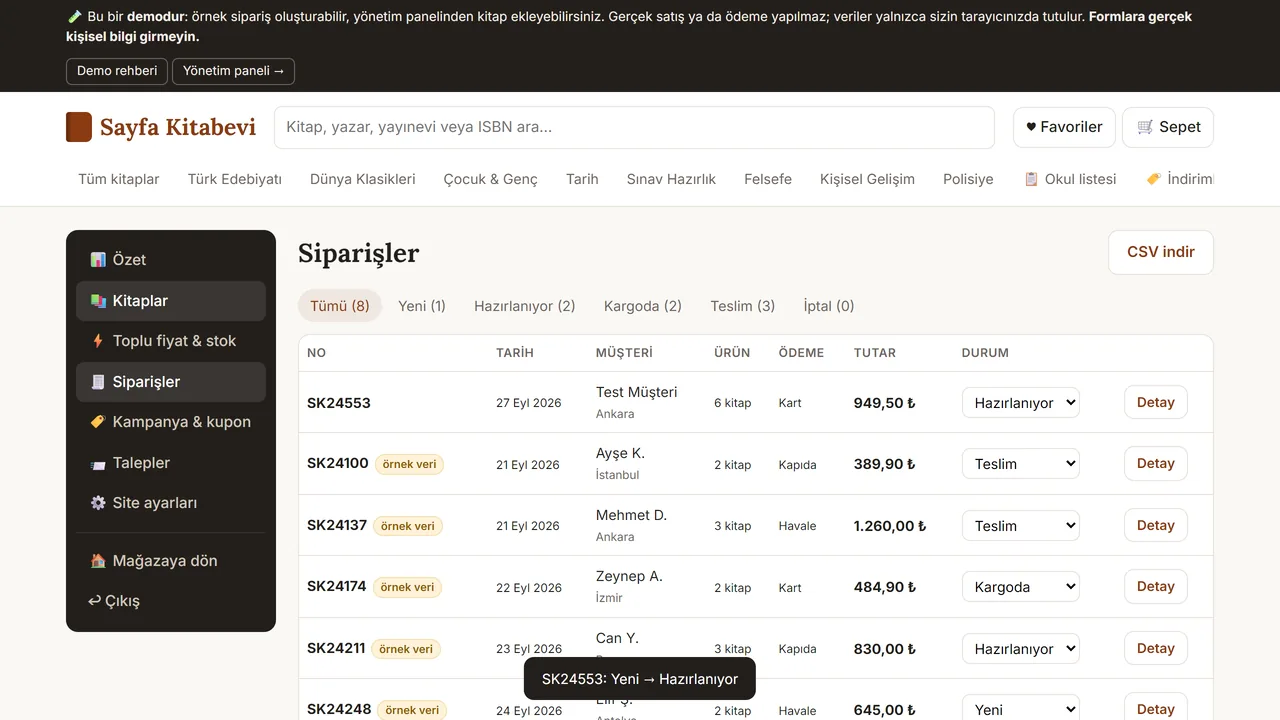
Following orders
Each order’s status (New, Preparing, Shipped, Delivered) is changed from the list. The customer follows the order by its number.
- On screen (Turkish interface)
- “NO / TARİH / MÜŞTERİ / ÜRÜN / ÖDEME / TUTAR / DURUM” — table column headers
- “Kart / Kapıda / Havale” — payment-method values: card / cash on delivery / bank transfer
- “Tümü (8)” — all-orders count tab
- What do they see at the end?
- The customer sees the chosen books in the cart with the offer and shipping worked out, and places a sample order. The shop sees its orders, with their status, in one table.
- What is it good for?
- A parent does not have to look up each title on the list, and the shop manages prices, stock and orders in one place.
Everything that is not included, and all limits
- Not delivered to a client and not used by a real business; the sales package and price have not been set yet (details: the “Delivery and sales status” section).
- The demo has no real payment, customer login or server; sample orders stay in the browser.
- Payments, a database and notifications can only be scoped and built separately, based on your needs.
- Books, prices and orders in the screenshots are sample data. The demo has no English version; its interface is in Turkish.
Delivery and sales status
There is no cart, customer account or online payment on this site for now. Reach out by phone, WhatsApp or the form; in a first conversation your need and the software’s fit are reviewed. The form does not create an order, a contract or a payment.
Possible delivery options
What the package contains
- A sample-data storefront page: one HTML file
- Catalogue, cart, sample order and admin panel sections
- Not included: real payment, a server and database, real customer login, e-mail and shipping connections
Price
There is no list price yet; the price, package and payment method have not been set yet.
Requirements and version history
What you do
- You upload the file to your own web hosting.
- You change the books and texts yourself, or have us do it; the scope of that work has not been set yet.
Installation requirements
- No server or database is needed.
- The page connects to outside services on the internet for fonts and book covers (Google Fonts, Open Library).
- There is no installation guide yet.
Release notes
- This work has no version number or version history; it is a one-file sample storefront. The source copy is dated 27 September 2026 and is identical line by line to the published demo (comparison of 3 October 2026). It has not been delivered to a client.
Decisions not made yet
- What the product is exactly: only a sample storefront, or whether a server side will be built separately.
- Rights to use, modify, transfer and receive the source code: to be set in a written agreement; not decided yet.
- How the terms of use of the fonts and book-cover images will be stated in the sales package.
- The price and payment method have not been decided yet.