Packaging and supplies wholesalersDemo with sample data
Packaging and Supplies Stock and Order Tracking: screen-by-screen guide
The full version of the short description on the product page: every feature, how each screen is used step by step, all limits and the delivery details.
All features
The flows below were run in the app’s version with sample data (0.1.0). The screens were taken on 15 November 2026 from the live demo of the same version; the business is “Örnek Ambalaj Toptan” (sample), and its customers, products, prices, phone numbers and amounts are made up. The application sends customers no automatic messages, issues no invoices and offers no ordering site to customers.
- Installs on a phone or computer; the panel can be added to the home screen
- Unit and box: every product has a unit, pieces per box, a box (wholesale) price and its own running-low threshold; stock is kept in pieces
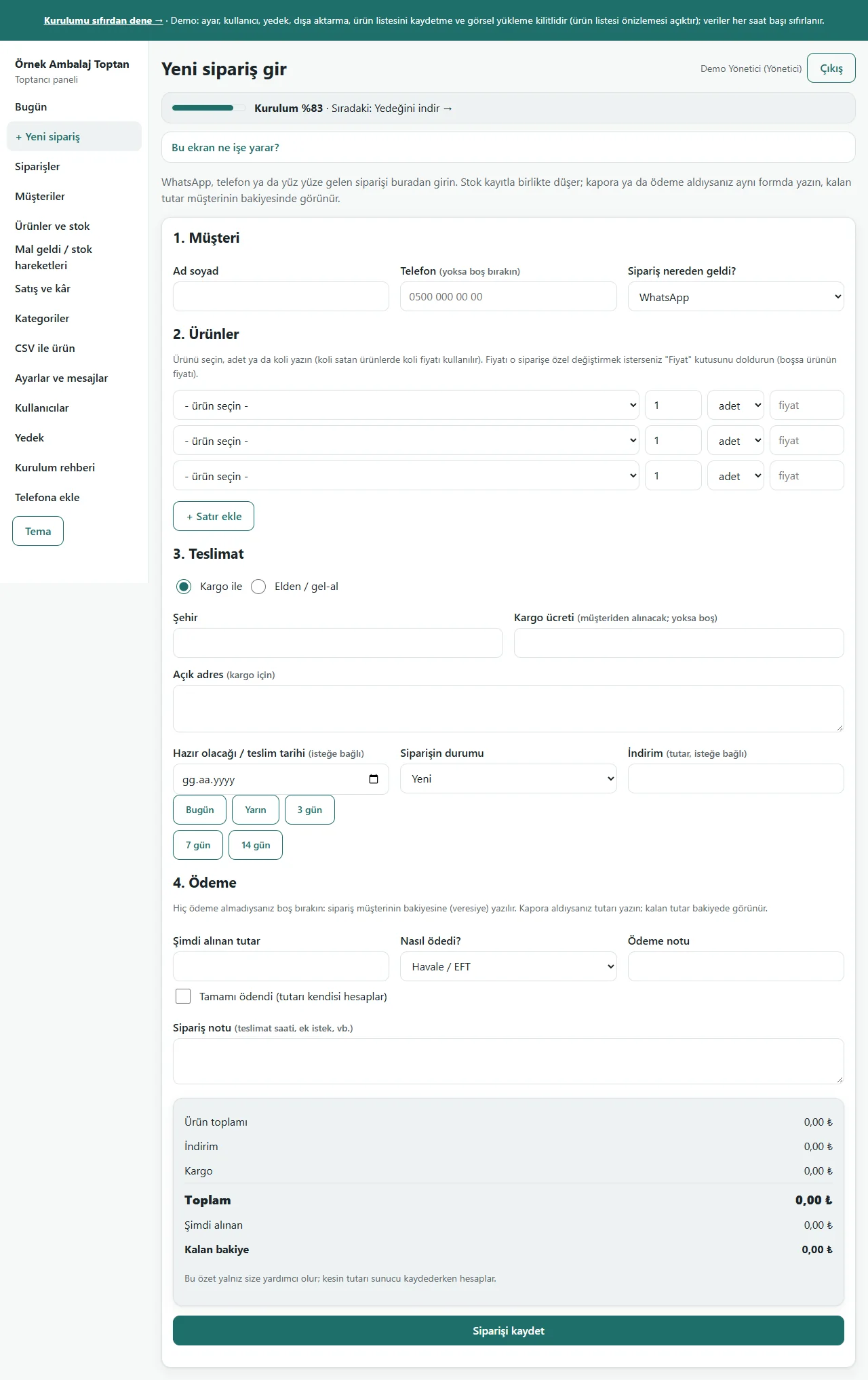
- Quick order: pick the customer, and on every line pick the product, the quantity and piece or box; the box price is used, more than the stock is refused, and a deposit or payment is written on the same form
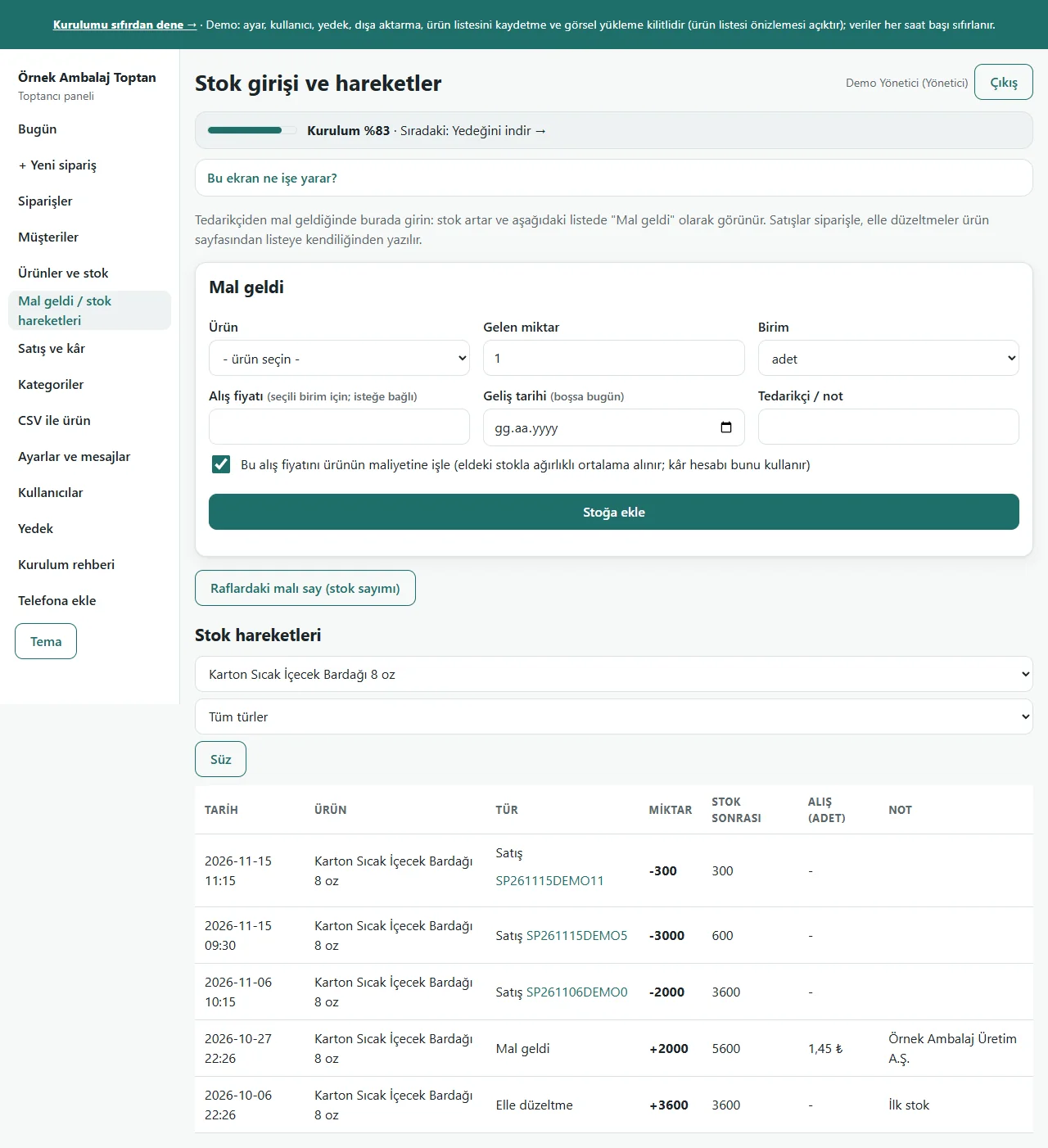
- Goods in: written with the product, quantity (pieces or boxes), date and a supplier note; stock goes up; if a buying price is written the product’s cost is averaged with the stock on the shelf (owner only)
- Stock movements: every goods-in entry, sale, cancellation or return, manual correction and count is listed with the stock after it; filtered by product and type
- Stock count: the stock on the shelf is counted and written, the system’s stock becomes your count and the difference is written as “Sayım düzeltmesi” (count correction); a product you leave empty is not touched
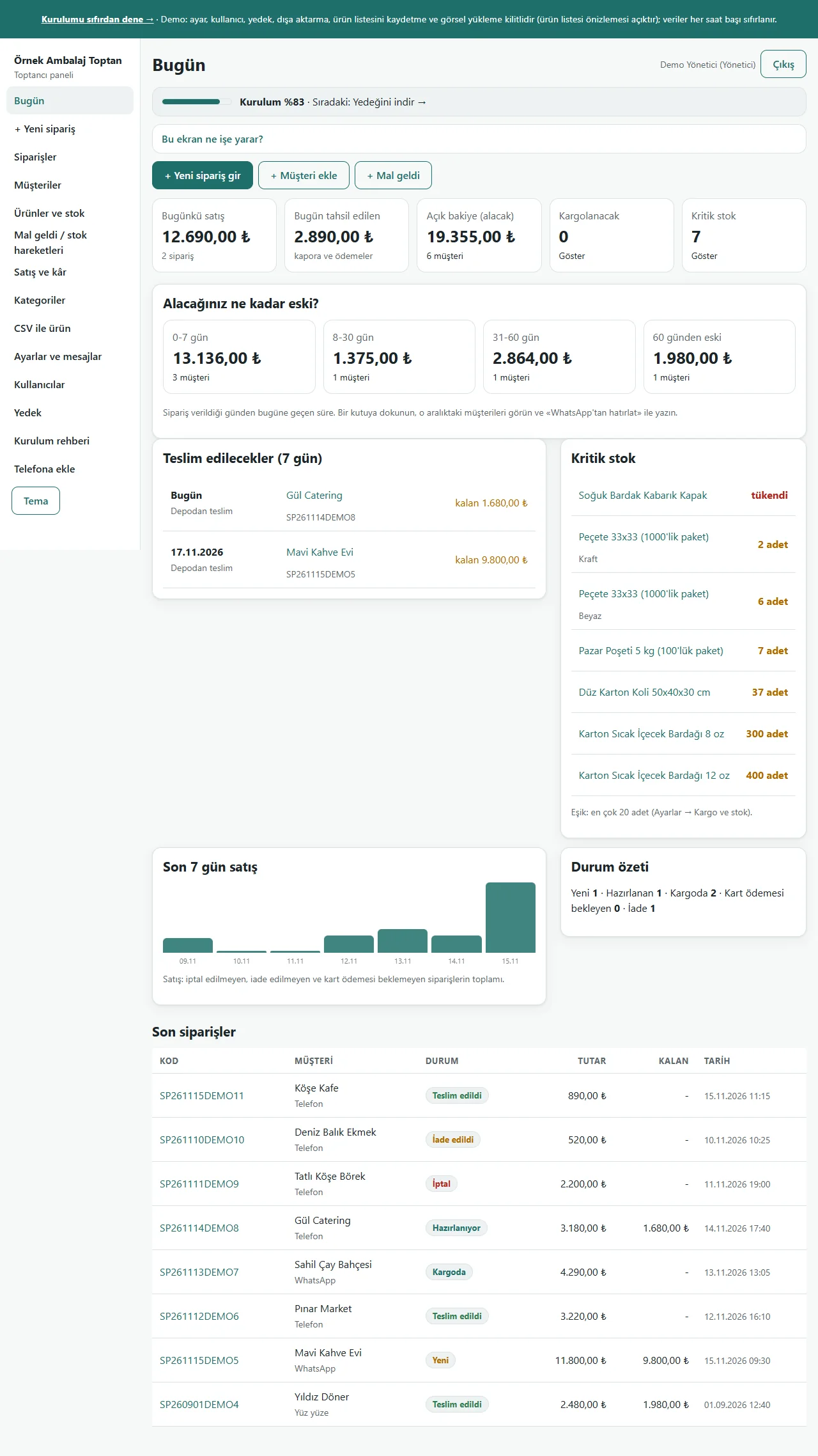
- Running low: the Today screen shows critical stock against the product’s own or the general threshold
- Customer card: deposit, partial payment, credit, one payment spread from the oldest order, the balance left and the age of what is owed (0-7, 8-30, 31-60, over 60 days); a ready WhatsApp reminder text
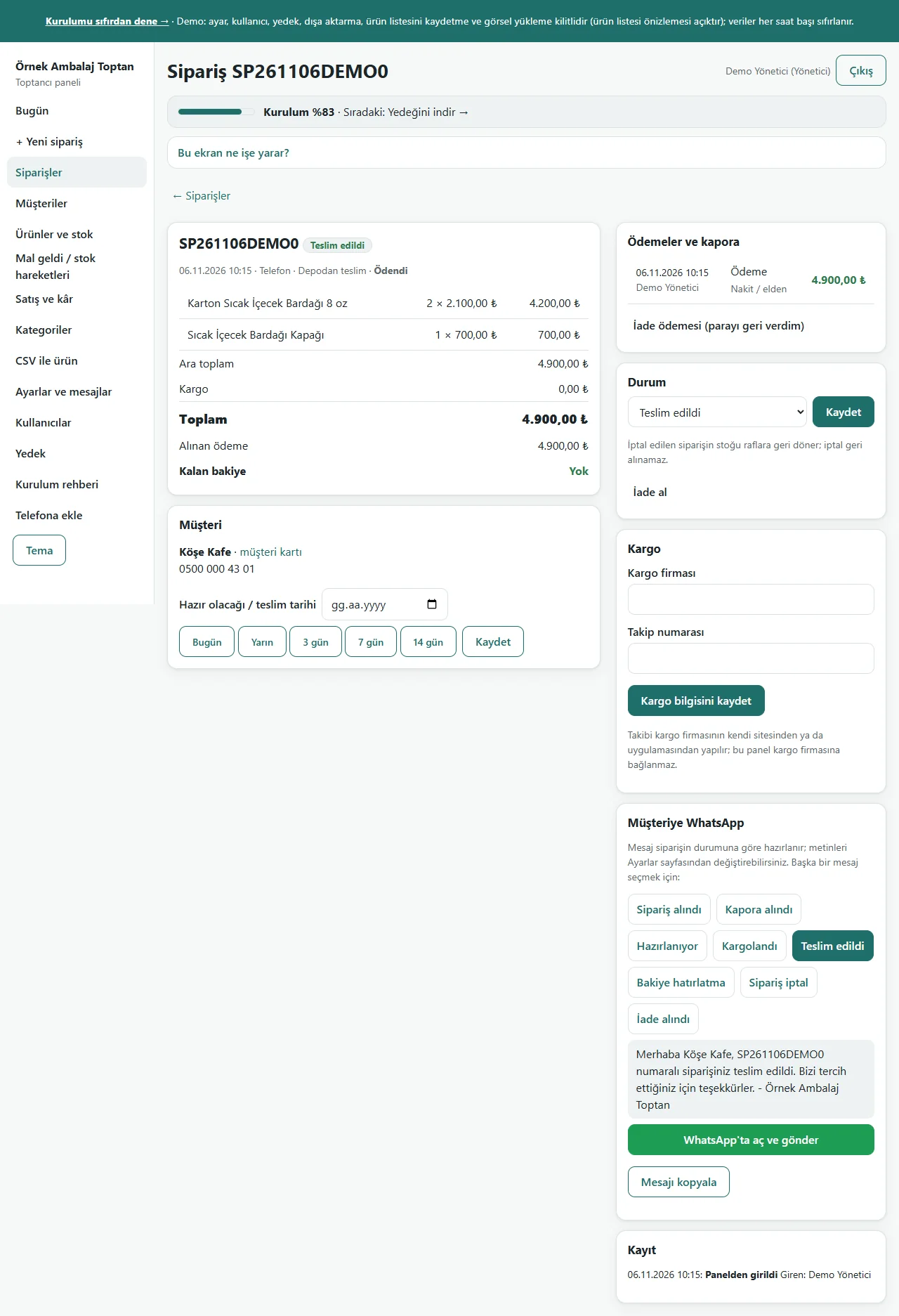
- Order status and ready messages: new, preparing, shipped, delivered, cancelled, returned; a cancellation or return gives the stock back as boxes × pieces per box; you send the message from WhatsApp
- Sales and profit: the chosen day, week, month or range’s sales, collection and estimated profit; lines without a buying price are not guessed, they are counted apart; the cost copied onto an order does not change afterwards
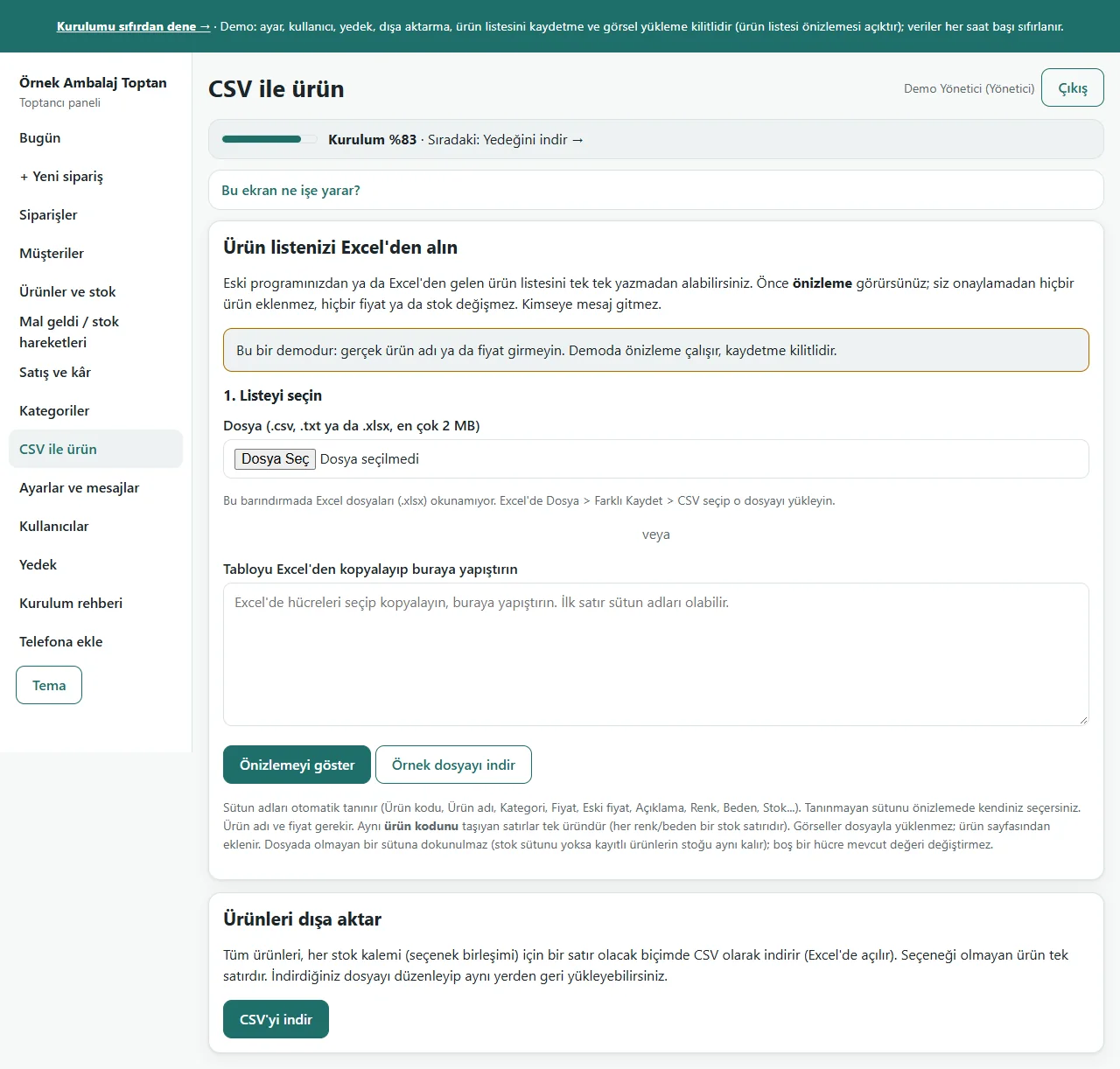
- Importing the product and stock list from Excel/CSV: a file or a paste, unit, pieces-per-box, box-price and threshold columns, a preview before saving, leaving out faulty rows and undoing the last import; nobody is sent a message
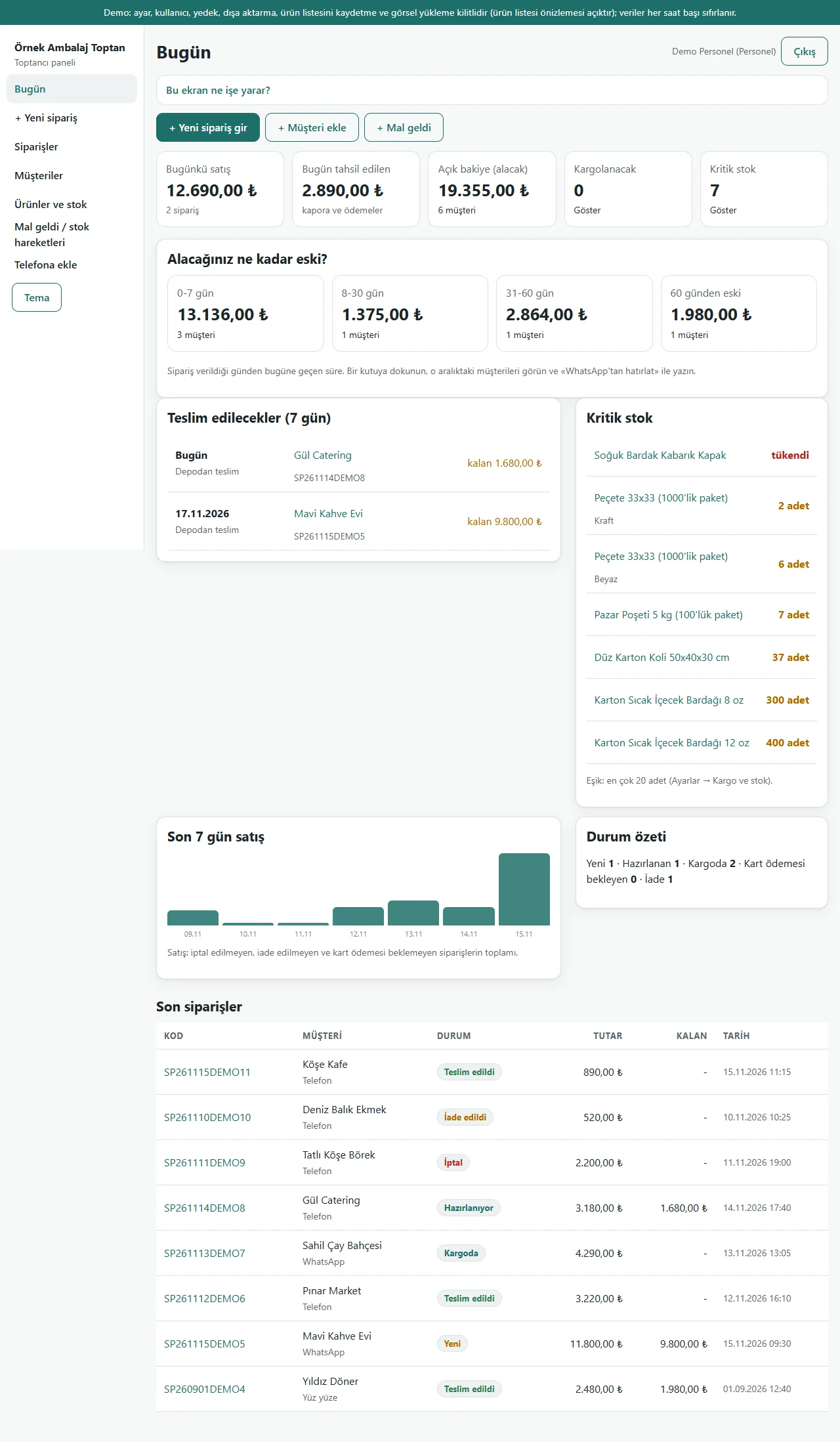
- Roles: owner and staff; staff never see the buying price, the report, settings, users or the backup, and the server refuses an address typed by hand
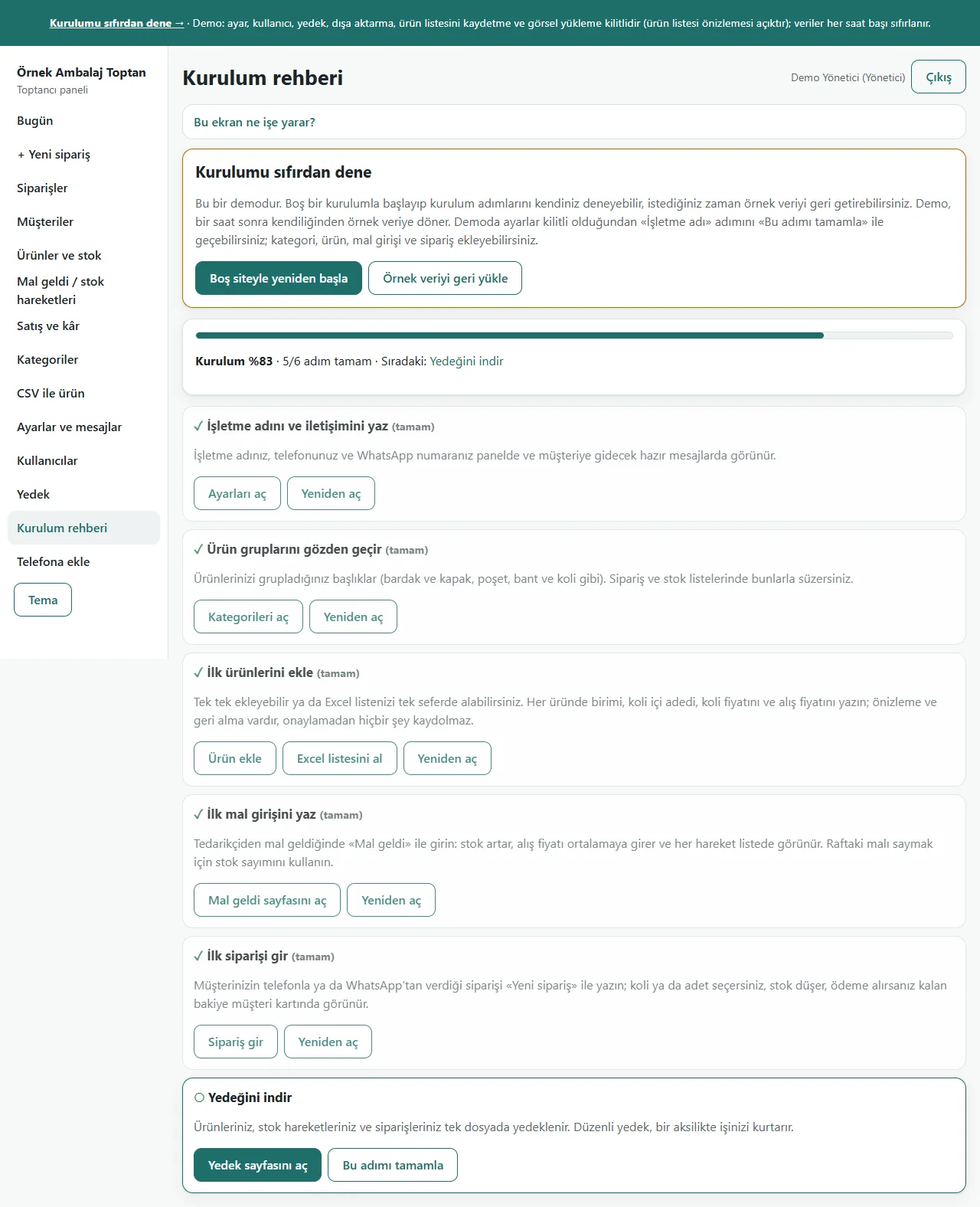
- Setup guide, a progress bar and a closed “Bu ekran ne işe yarar?” (what is this screen for) box on every screen; backup and restore; in the demo a “Demo hesapları” (demo accounts) box, “Boş siteyle yeniden başla” (start again with an empty site) and “Örnek veriyi geri yükle” (restore the sample data)
Screen by screen: how it is used
The interface in these screens is Turkish; only the captions and explanations on this page are in English. The screens were taken on 15 November 2026 from the live demo of version 0.1.0 of the app. The business (“Örnek Ambalaj Toptan”), customers, products, prices, phone numbers and amounts are made up.
- Who uses it?
- A small single-business packaging wholesaler, and the owner or staff member who takes the order by phone or WhatsApp and writes it into the panel.
- Where do they start?
- Products are recorded with their unit, pieces per box, box price and buying price. When goods arrive from a supplier they are entered with “Mal geldi” (goods in); when a customer orders, the order is written with piece or box picked on each line and a deposit is entered on the same form.
What do they do on screen? Step by step
-
0.1.0 · 15 November 2026 Today screen
Today’s sales and collection, the open balance, orders to ship, critical stock and the “Alacağınız ne kadar eski?” (how old is what you are owed) boxes on one screen; tapping a box opens its list. At the top are the “+ Yeni sipariş gir” (new order), “+ Müşteri ekle” (add a customer) and “+ Mal geldi” (goods in) buttons.
-
0.1.0 · 15 November 2026 Goods in and stock movements
Goods from a supplier are entered with the product, quantity (pieces or boxes), date and a supplier note; stock goes up. If the owner writes the buying price the product’s cost is averaged with the stock on the shelf. Below, every entry, sale, return, correction and count is listed with the stock after it; filtered by product and type.
-
0.1.0 · 15 November 2026 New order
An order that came by phone or WhatsApp is written here: the customer’s name and phone, and on each line the product, the quantity and “adet” (piece) or “koli” (box). A product sold by the box uses its box price; more than the stock is refused. The delivery date, a discount and a deposit or payment taken are on the same form.
-
0.1.0 · 15 November 2026 Order detail
The order’s lines in boxes and pieces, its total, payments, balance left, status and delivery details are shown. The status buttons move the order along; a cancellation gives the stock back as boxes × pieces per box. The ready WhatsApp message for the customer is on the page.
-
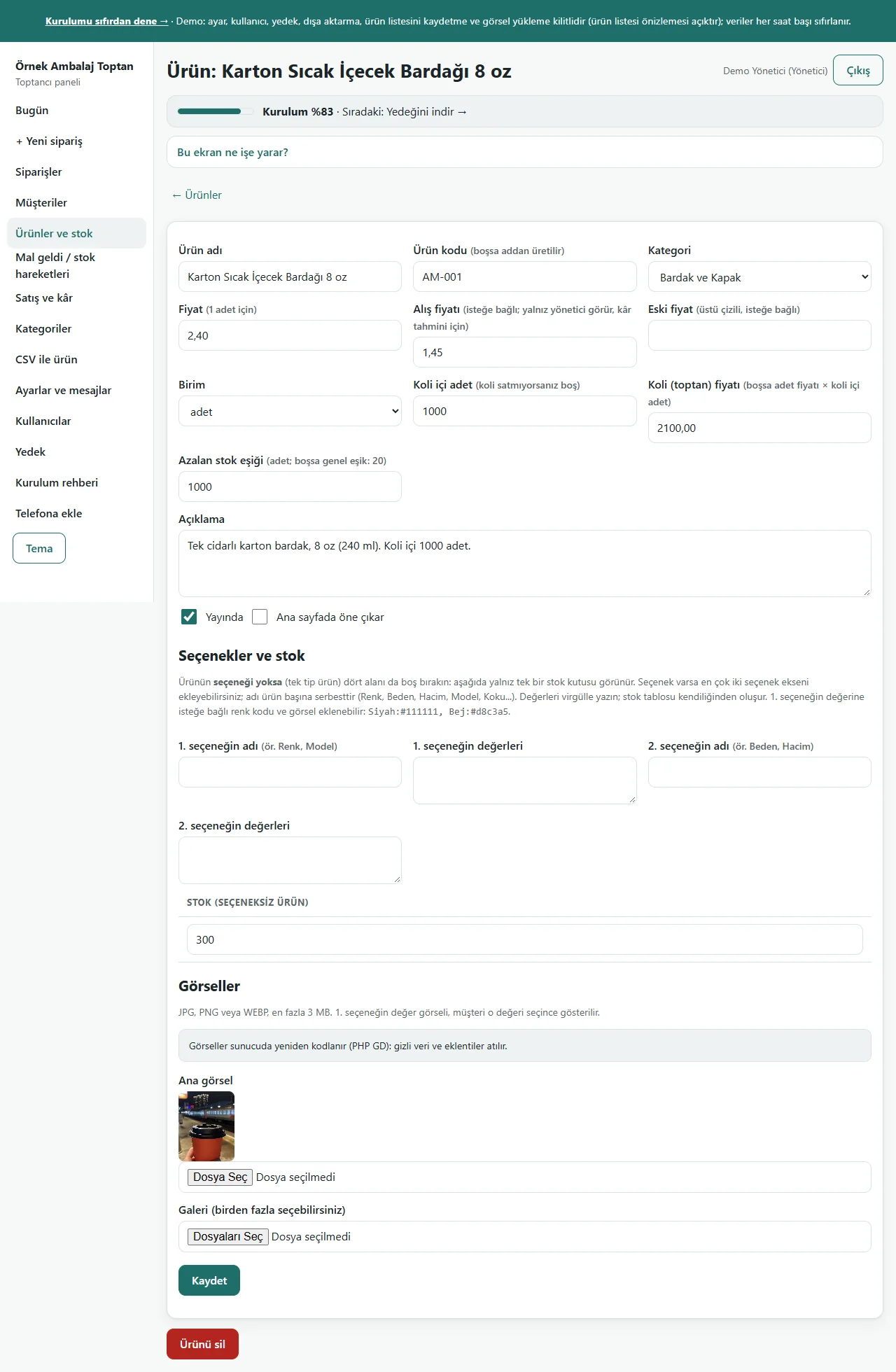
0.1.0 · 15 November 2026 Product card
The product’s name, price per piece, unit, pieces per box, box (wholesale) price, its own running-low threshold and the buying price (only the owner sees it) are written. If the box price is empty, price per piece × pieces per box is used. Stock is in pieces.
-
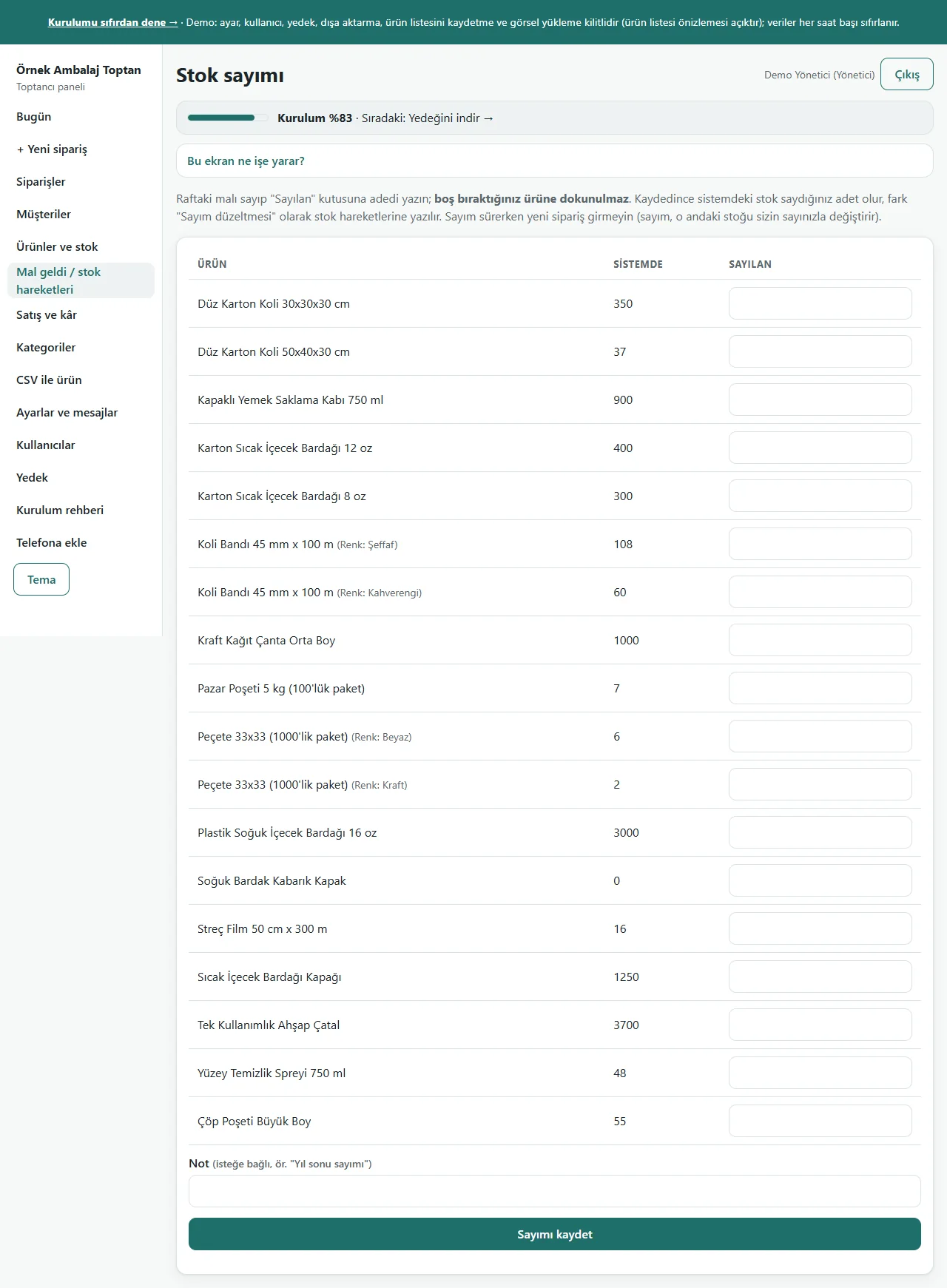
0.1.0 · 15 November 2026 Stock count
The stock on the shelf is counted and written in the “Sayılan” (counted) box; a product you leave empty is not touched. On saving, the system’s stock becomes your count and the difference is written to the stock movements as “Sayım düzeltmesi” (count correction). If one box is faulty nothing is saved.
-
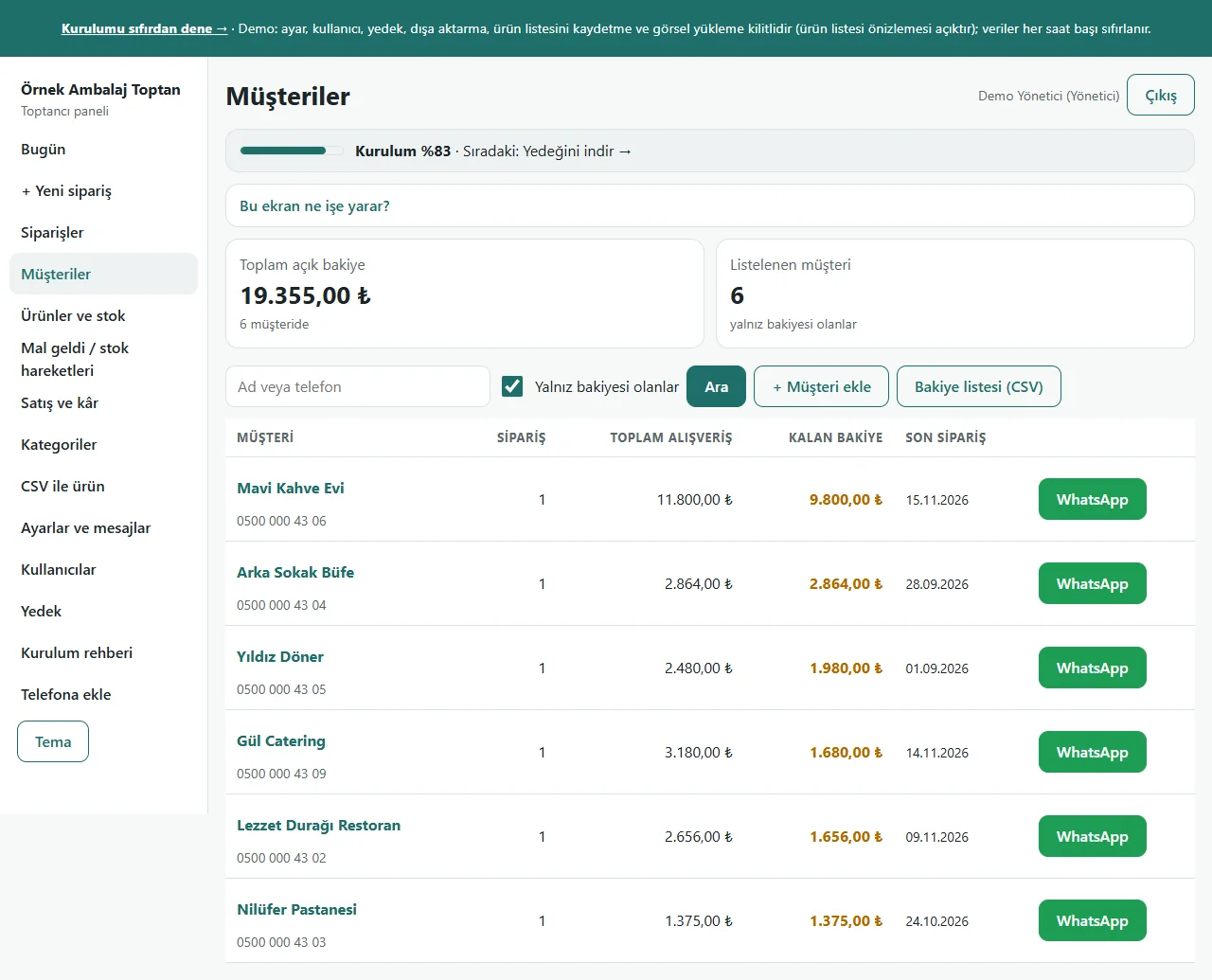
0.1.0 · 15 November 2026 Customers with a balance
Customers with an open balance are listed with total purchases, paid and the balance left, and can be filtered by the age of what is owed. One payment is entered from the customer card (spread from the oldest order) and the ready WhatsApp reminder opens.
-
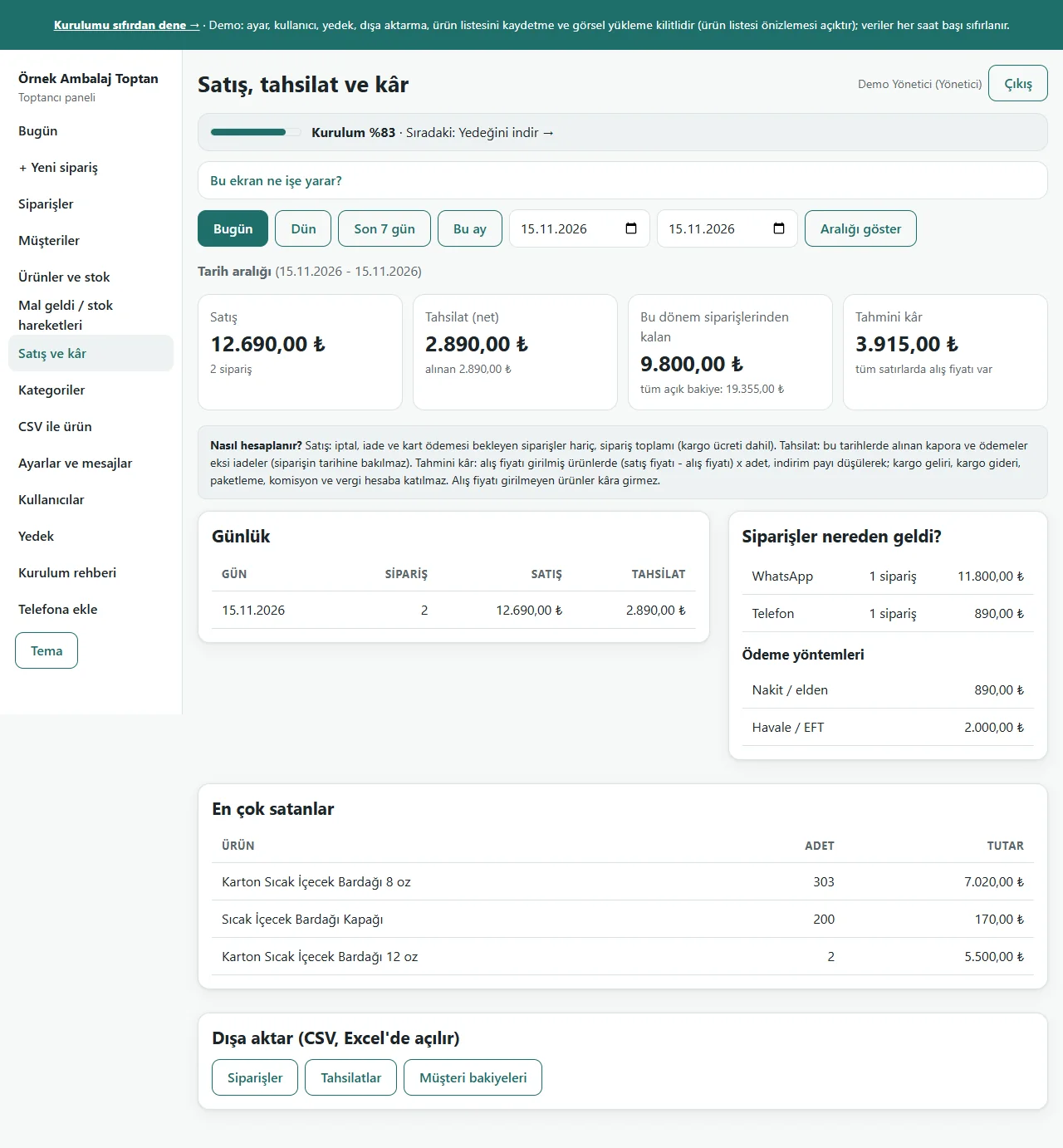
0.1.0 · 15 November 2026 Sales, collection and profit
The chosen period’s sales, collection and estimated profit; a daily table and the best sellers. Profit is worked out with the buying cost copied onto the order; lines without a buying price are not guessed, they are counted apart. Only the owner sees it.
-
0.1.0 · 15 November 2026 Product list from Excel/CSV
The product list is brought in from a file or a table pasted in; unit, pieces-per-box, box-price, running-low-threshold, buying-price and stock columns can be used. A preview before saving shows what will be added; the last import is undone with one tap. Nobody is sent a message.
-
0.1.0 · 15 November 2026 Setup guide
Setup is six small steps: business details, product groups, products, the first goods in, the first order and a backup. Each step is saved on its own and the progress bar shows the next one. In the demo there are the “Boş siteyle yeniden başla” (start with an empty site) and “Örnek veriyi geri yükle” (restore the sample data) buttons.
-
0.1.0 · 15 November 2026 The staff member’s screen
Signed in as staff, taking orders and payments, goods in, stock counts and customer cards are open; the buying price, the Sales and profit report, CSV, settings, users and the backup never show in the menu, and the server refuses an address typed by hand.
- What do they see at the end?
- Stock comes off in pieces, every movement is written to the list with its balance, the customer’s balance and the age of what is owed are updated; at the end of the month the count difference is booked and the Sales and profit report gives the estimated profit.
- What is it good for?
- Instead of converting boxes and pieces by hand, searching for when goods arrived and why the stock changed, and losing credit in a notebook, it all sits in one place.
Everything that is not included, and all limits
- Not delivered to a client and not used by a real wholesaler. The business, customers, products, prices, phone numbers and amounts on the screens are made up.
- There is no site where a customer orders on their own: you write the order into the panel. There is also no card payment over the internet, e-invoice, e-waybill or export to an accounting program.
- There is no automatic SMS or WhatsApp sending: a ready WhatsApp text opens and you send it from your own phone. There is no barcode scanning, multiple warehouses or branches, or a purchase-order document for suppliers.
- A product’s cost is kept to the kuruş (two decimals); on very cheap items rounding can affect the profit. Profit is worked out only for products with a buying price; shipping, packaging, commission and tax are left out.
- A stock count replaces the current stock with the counted figure; an order entered during the count is overwritten by the difference. A real phone, Safari and Firefox have not been tried; it was run on PHP 8.3 and a single hosting account (PHP, SQLite) only.
- In the demo the data is reset every hour; sign-in is without a password through role buttons. The licence of the sample photographs and responsibility for using them lie with whoever uses the software. The app interface in the screens is in Turkish.
Delivery and sales status
There is no cart, customer account or online payment on this site for now. Reach out by phone, WhatsApp or the form; in a first conversation your need and the software’s fit are reviewed. The form does not create an order, a contract or a payment.
Possible delivery options
Price
There is no package on offer right now, so there is no list price. If a package is defined, the price and payment method are settled then.
Requirements and version history
Installation requirements
- PHP 8.1 or newer (with the pdo_sqlite, mbstring and openssl extensions) and HTTPS are needed; the data is kept in a SQLite file. The live demo was run on a single hosting account and PHP 8.3 only.
Release notes
- No version has been delivered to a client. The sample-data demo is open to everyone and is shown with the screenshots on this page.
- 0.1.0 (15 November 2026): stock in pieces and boxes, a box price and a per-product running-low threshold, “Mal geldi” (goods in) entry and stock movements, a stock count, weighted-average cost, quick orders (by the piece or the box), deposits, credit, payments and the age of what is owed, a sales and estimated-profit report, a product list from Excel/CSV, owner and staff roles, a setup guide and a demo. There is no customer-facing storefront.