Retail and e-commerceDemo with sample data
Ready-made e-commerce site and software: screen-by-screen guide
The full version of the short description on the product page: every feature, how each screen is used step by step, all limits and the delivery details.
All features
Every feature except PayTR can be seen in the screenshots or in the tests. Card payment through PayTR has code behind it, but it was not tried with a real account and does not appear in the screens.
- Size and colour options for clothing and boutiques: two axes (Colour, Size), with stock kept per colour-and-size combination; a size that is out of stock cannot be chosen; a colour can carry a colour code and an image, and when all values are clothing sizes (S, M, L...) the size order comes by itself
- Products with and without options in one shop: a single-stock product or at most two option axes (the name is free per product: Colour, Size, Volume, Model, Scent...); a value that is out of stock cannot be chosen
- Stock never goes below zero; two buyers cannot both get the last piece (tried with simultaneous orders); a cancellation returns stock and the coupon use
- Option and price filters, sorting, search; coupons (percentage or fixed amount, minimum total, usage limit, end date), a free-shipping threshold and a “Buy now” button
- Guest checkout: bank transfer (the time after which an unpaid order is cancelled is set in the panel) and cash on delivery with a service fee; tracking by order code and the last 4 digits of the phone
- Card payment through PayTR (test mode): the code and signature calculations were tried with fake keys, not with a real account
- Star reviews (approved in the panel), favourites, “ask on WhatsApp” and a ready-made WhatsApp status message to the customer (you send the message)
- Admin panel: a sales and low-stock overview; order status and tracking number; administrator and staff roles
- Products are added in the panel or by CSV; if one CSV row is wrong, nothing is saved
- On the order confirmation page a “Siparişimi WhatsApp ile mağazaya gönder” (send my order to the shop on WhatsApp) button (when the shop’s WhatsApp number is set): the code, items and quantities, total, payment method and customer details open as a ready message and the customer taps “send”; the site sends nothing on its own. In the panel, a “Paket fişini aç / yazdır” (open / print the packing slip) per order and a “CSV indir (Excel)” (download CSV) for the orders matching the filters (1.0.4)
- Backup and restore (tried locally); a backup that belongs to another product is rejected
- Turkish and English storefront, dark and light theme, a fixed bottom menu on phones
Screen by screen: how it is used
The script’s interface is in Turkish. The screens come from the 1.0.0 (candidate) package, installed and run locally in demo mode; the “Örnek Mağaza” shop, products, reviews, orders, phone numbers and IBAN are sample data and the product images are mostly royalty-free (CC0) sample photographs, a few are drawings. Some screens are cropped to the relevant part of the page; nothing was added to them. There is also a live demo with sample data (demo mode); these screens come from the local installation, not from that demo; only the admin sign-in screen comes from the live demo (version 1.0.7). The panel is in Turkish only.
- Who uses it?
- A customer shopping in the store, and the shop owner who manages products, stock, orders and coupons.
- Where do they start?
- The customer goes to a category from the home page, or searches, and picks the options if the product has any. The owner signs in to the admin panel with their own account.
What do they do on screen? Step by step
-
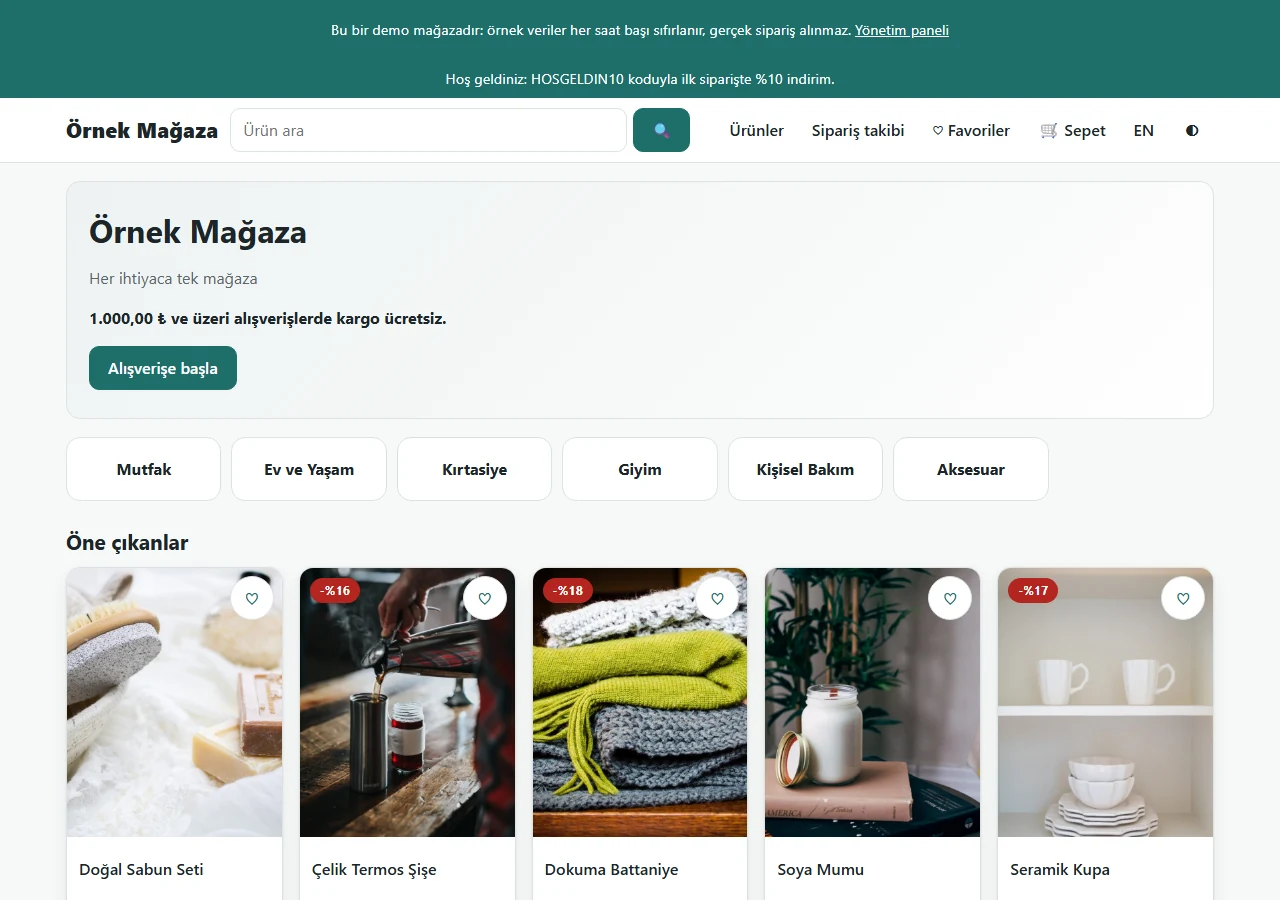
Home page
The shop name, free-shipping note, category buttons, featured products and new arrivals; a demo strip, search box and menu on top. The sample shop is not tied to one sector.
- On screen (Turkish interface)
- “Bu bir demo mağazadır” — demo strip: this is a demo shop
- “Ürün ara” — search placeholder
- “Ürünler / Sipariş takibi / Favoriler / Sepet” — nav: products / order tracking / favourites / cart
- “Alışverişe başla” — start shopping button
- “Öne çıkanlar / Yeni gelenler” — featured / new arrivals
-
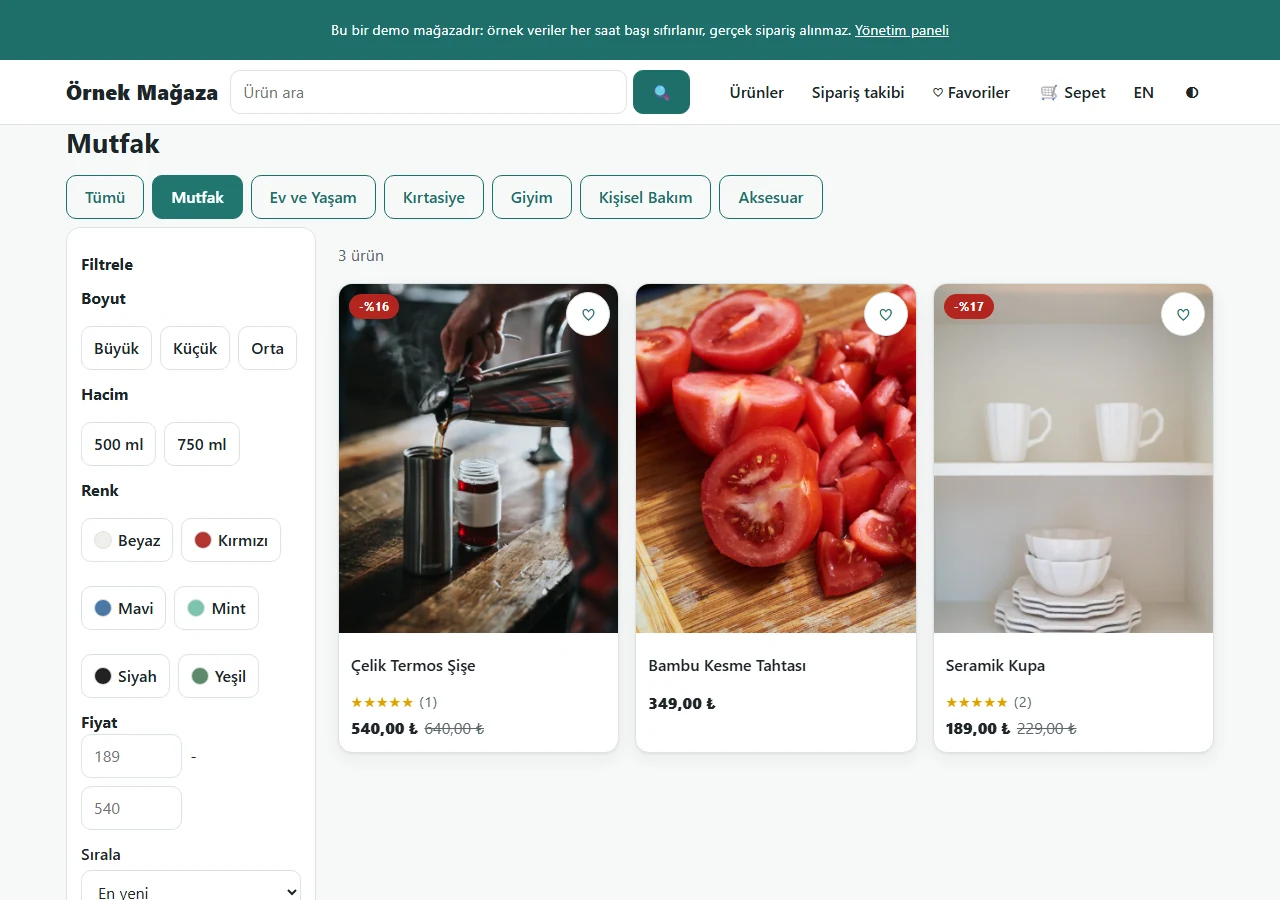
Category and option filter
The filter is grouped by the option names products use (Boyut, Hacim, Renk); a price range and sorting too. Cards show the old price struck through.
- On screen (Turkish interface)
- “Filtrele / Boyut / Hacim / Renk / Fiyat / Sırala” — filter / size / volume / colour / price / sort
- “Tümü” — all categories
- “Uygula” — apply button
- “En yeni” — sort: newest
-
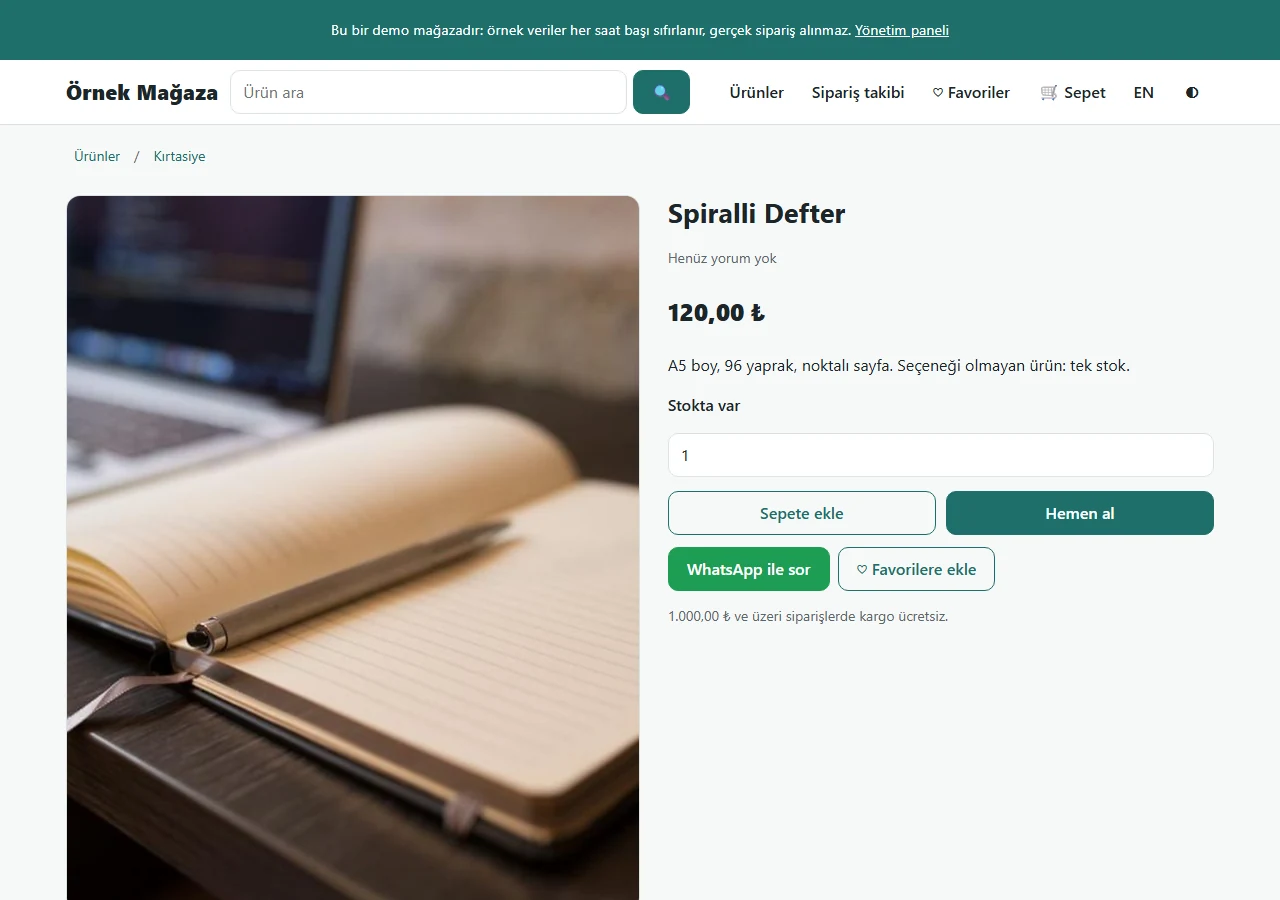
A product without options
No choice to make: only a quantity box and the Add to cart, Buy now, ask-on-WhatsApp and favourites buttons. Availability is read from the single stock figure.
- On screen (Turkish interface)
- “Stokta var” — in stock
- “Sepete ekle / Hemen al” — add to cart / buy now
- “WhatsApp ile sor / Favorilere ekle” — ask on WhatsApp / add to favourites
- “Yorumlar / Yorum yaz” — reviews / write a review
-
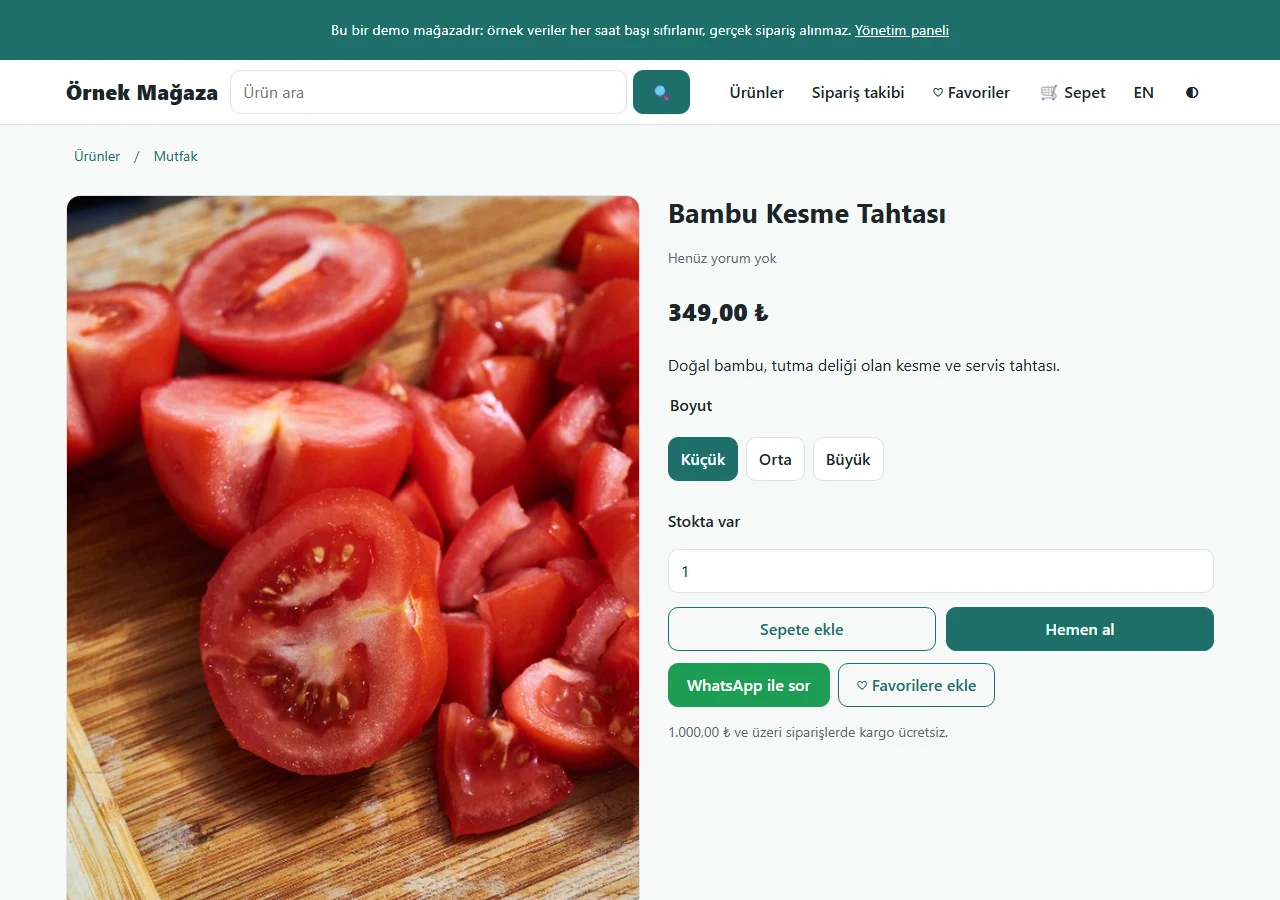
A product with one option
The shop owner types the option’s name; here it is “Boyut” (size). No colour code was entered, so there is no colour dot, only text buttons.
- On screen (Turkish interface)
- “Boyut: Küçük / Orta / Büyük” — size: small / medium / large
- “Stokta var” — in stock
- “Sepete ekle / Hemen al” — add to cart / buy now
-
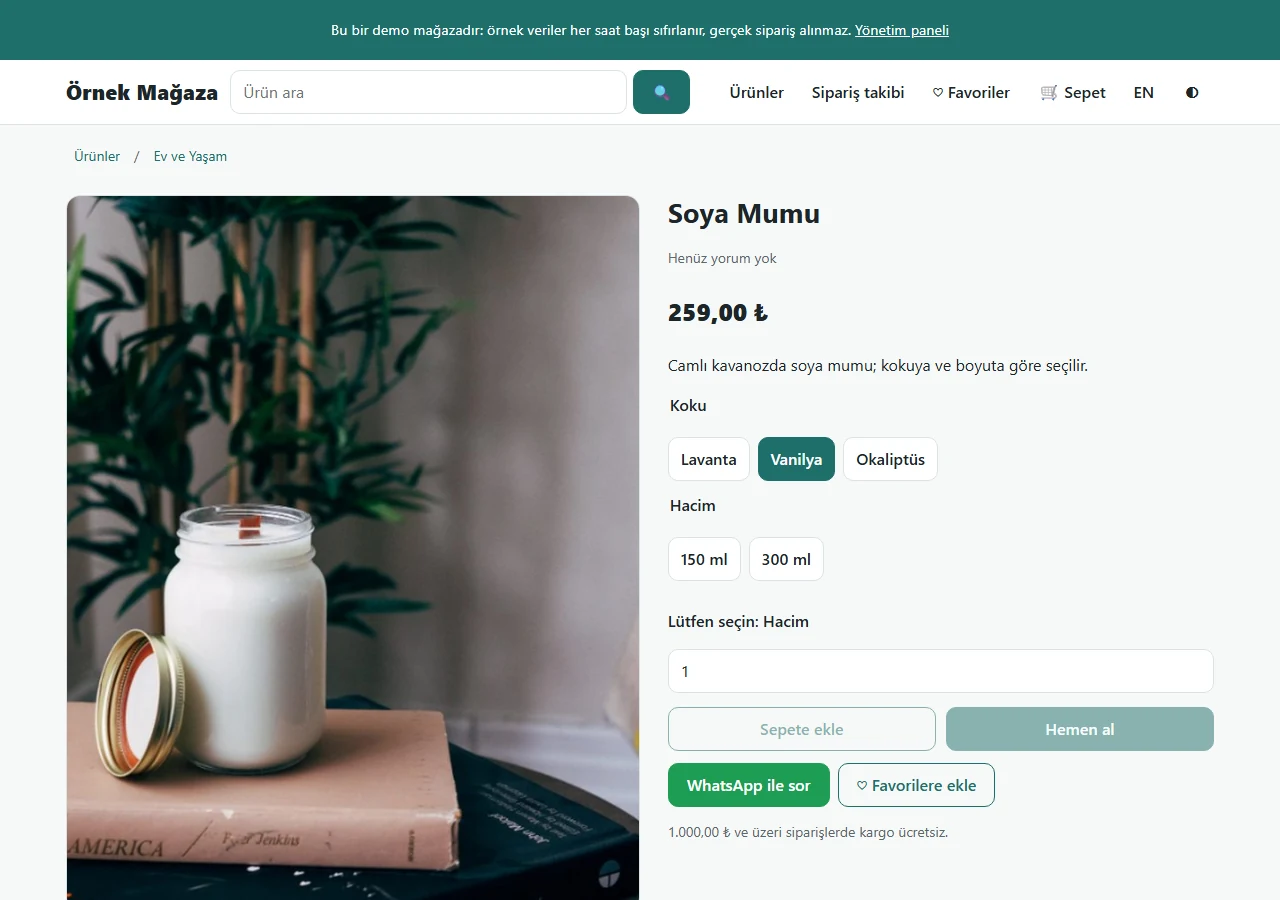
A product with two options
Here the options are “Koku” (scent) and “Hacim” (volume). The picture changes with the chosen value; the product cannot be added until the choice is complete.
- On screen (Turkish interface)
- “Koku: Lavanta / Vanilya / Okaliptüs” — scent: lavender / vanilla / eucalyptus
- “Hacim: 150 ml / 300 ml” — volume: 150 ml / 300 ml
- “Lütfen seçin: Hacim” — please choose: volume
-
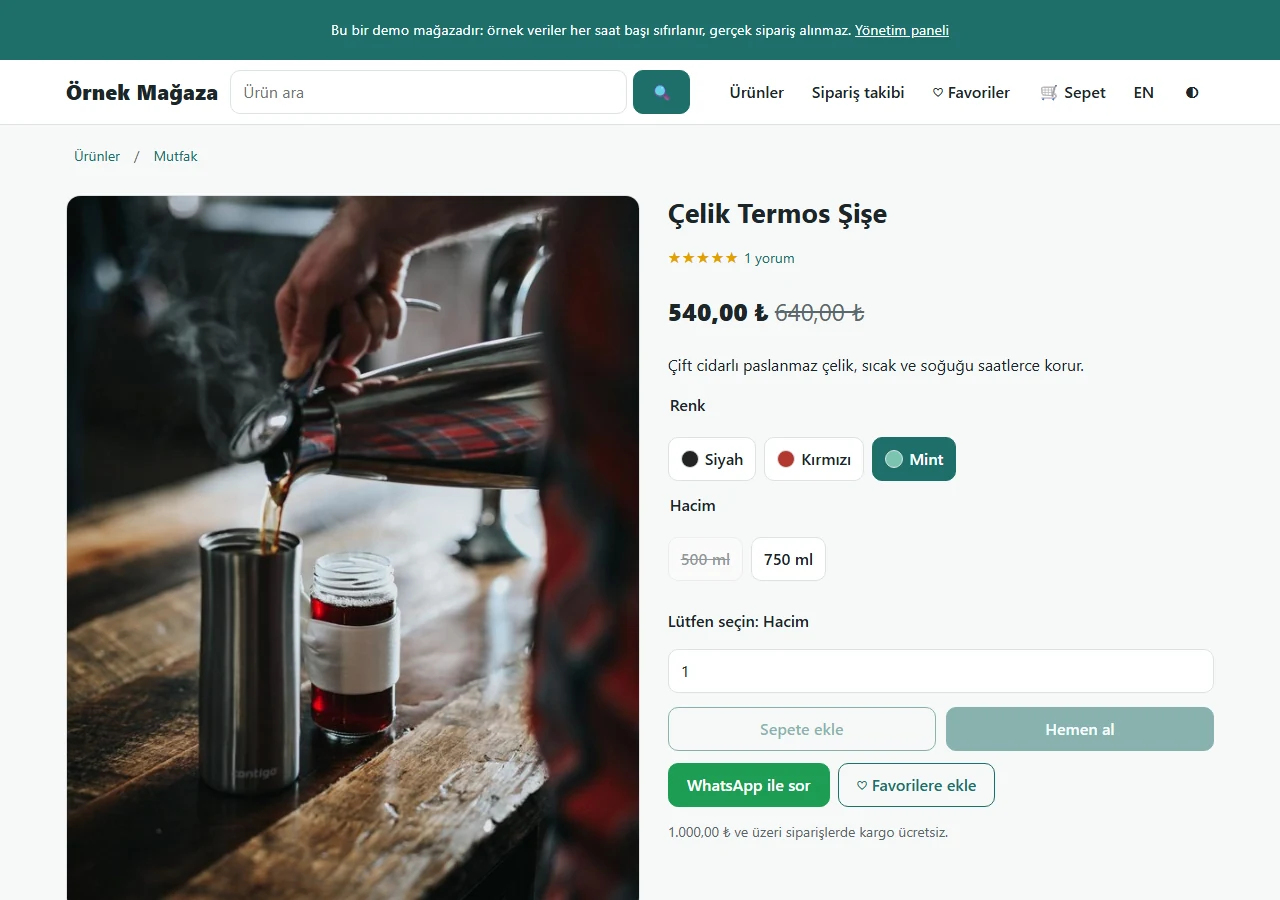
Colour and volume: a sold-out option
Colour options show a small colour dot. A value that is out of stock is struck through and cannot be chosen; “Lütfen seçin” asks for the missing choice.
- On screen (Turkish interface)
- “Renk: Siyah / Kırmızı / Mint” — colour: black / red / mint
- “Hacim: 500 ml / 750 ml” — volume: 500 ml / 750 ml
- “Lütfen seçin: Hacim” — please choose: volume
-
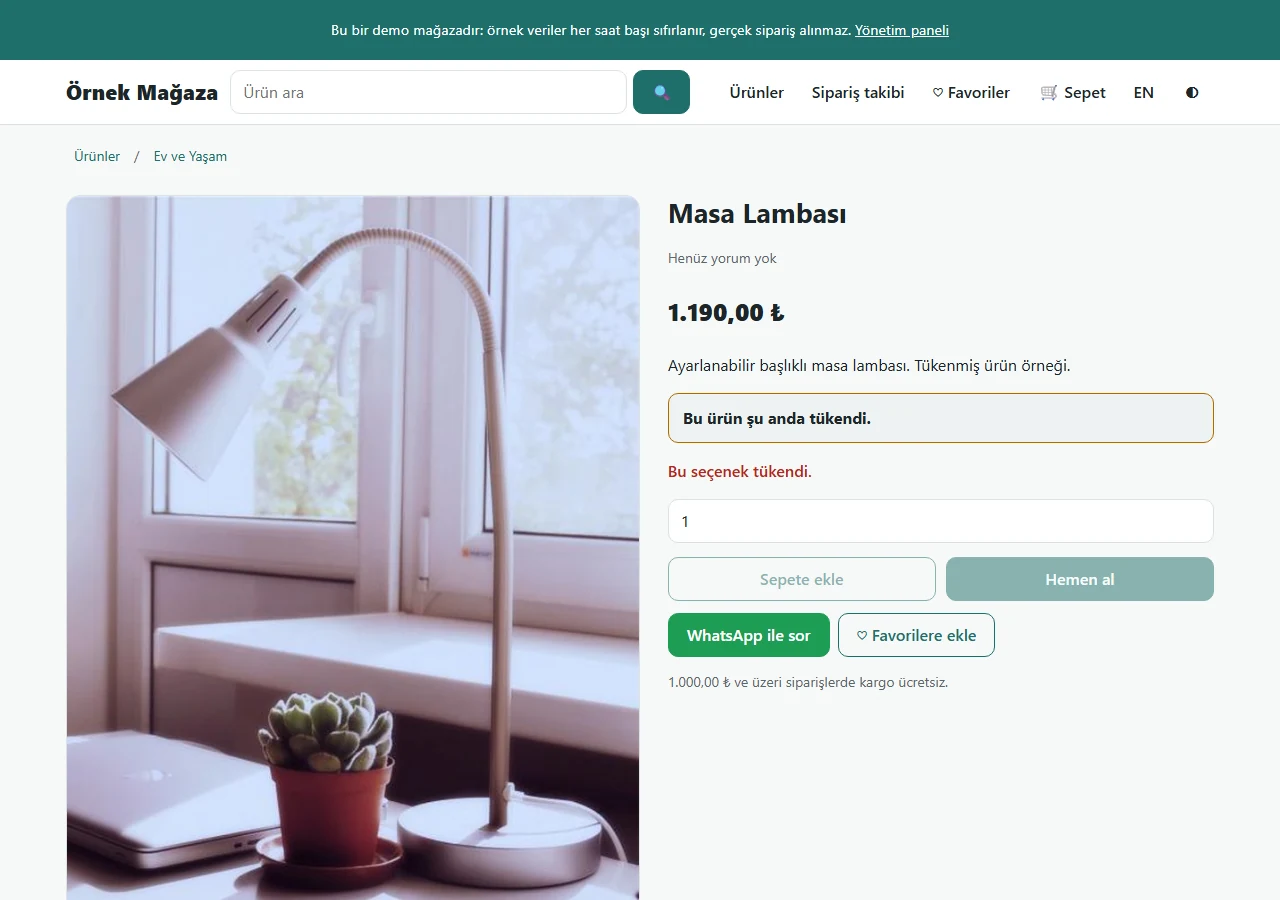
A sold-out product
When a single-stock product runs out, the page says “Bu ürün şu anda tükendi” (this product is sold out) and the shopping buttons are disabled.
- On screen (Turkish interface)
- “Bu ürün şu anda tükendi.” — this product is currently sold out
- “Sepete ekle / Hemen al” — add to cart / buy now (disabled)
-
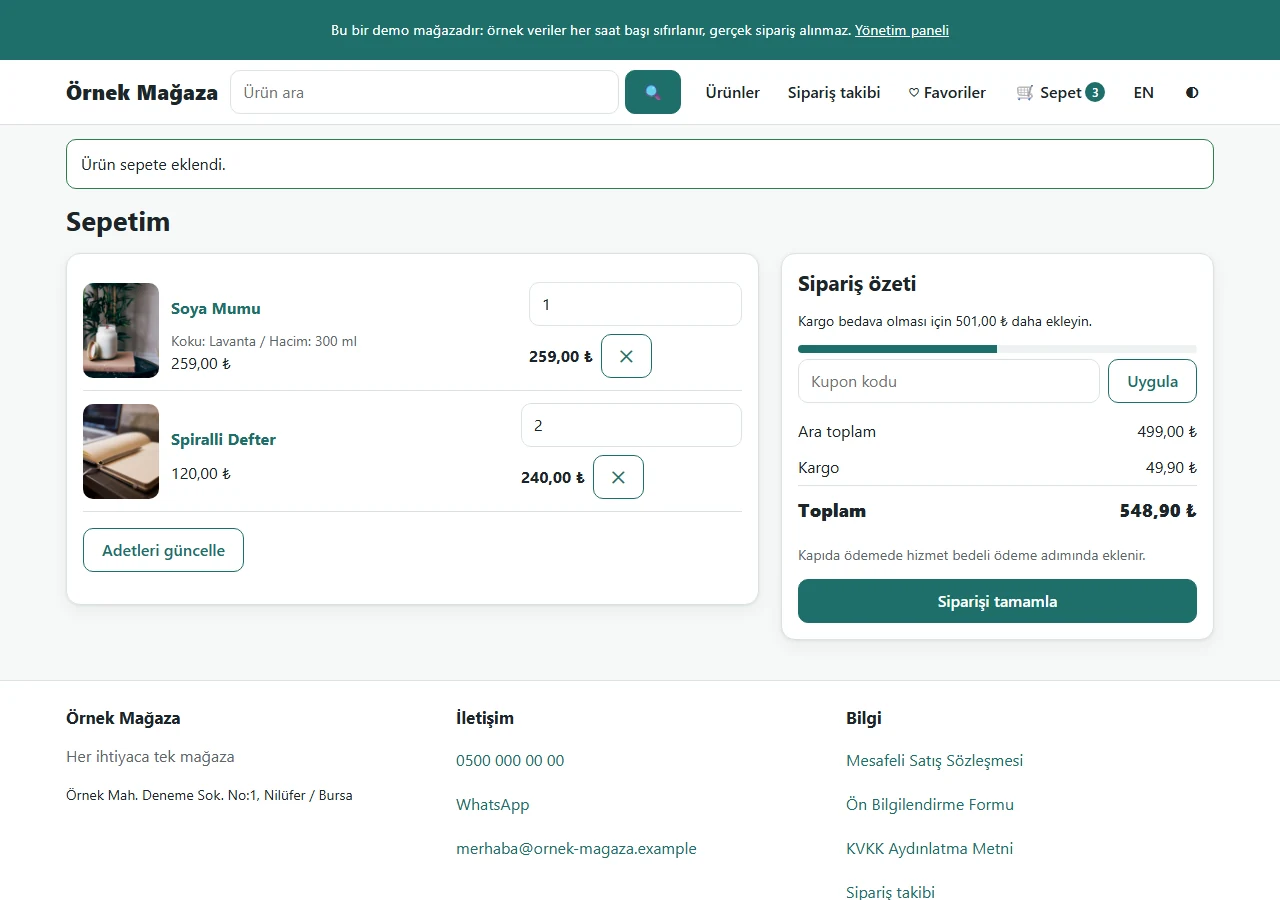
Cart
Products with and without options in one cart (option values shown); a coupon-code field, subtotal, shipping and total, and how much is left for free shipping.
- On screen (Turkish interface)
- “Sepetim / Sipariş özeti” — my cart / order summary
- “Koku: Lavanta / Hacim: 300 ml” — scent: lavender / volume: 300 ml
- “Kupon kodu / Uygula” — coupon code / apply
- “Ara toplam / Kargo / Toplam” — subtotal / shipping / total
- “Adetleri güncelle” — update quantities
- “Siparişi tamamla” — complete the order
-
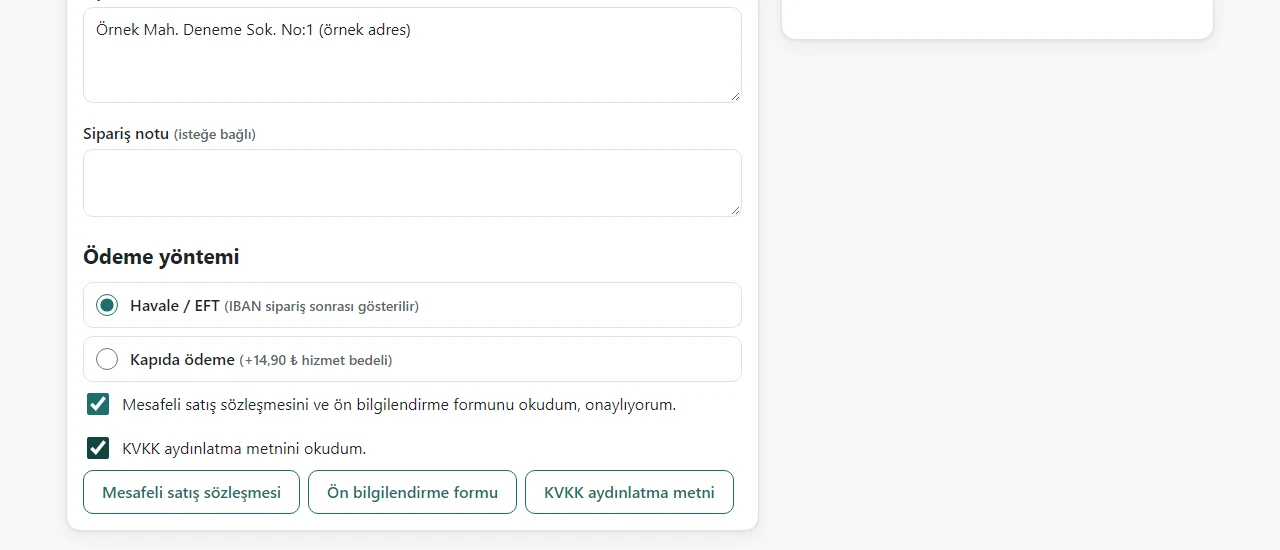
Guest checkout: payment part
The customer orders without an account. Payment methods: bank transfer and cash on delivery with a fee; distance-sales and privacy confirmations too. Top of the form cropped.
- On screen (Turkish interface)
- “Ödeme yöntemi” — payment method
- “Havale / EFT (IBAN sipariş sonrası gösterilir)” — bank transfer (IBAN shown after the order)
- “Kapıda ödeme (+14,90 ₺ hizmet bedeli)” — cash on delivery (+14.90 TRY service fee)
- “Mesafeli satış sözleşmesi / Ön bilgilendirme formu / KVKK aydınlatma metni” — distance-sales contract / pre-information form / privacy notice
-
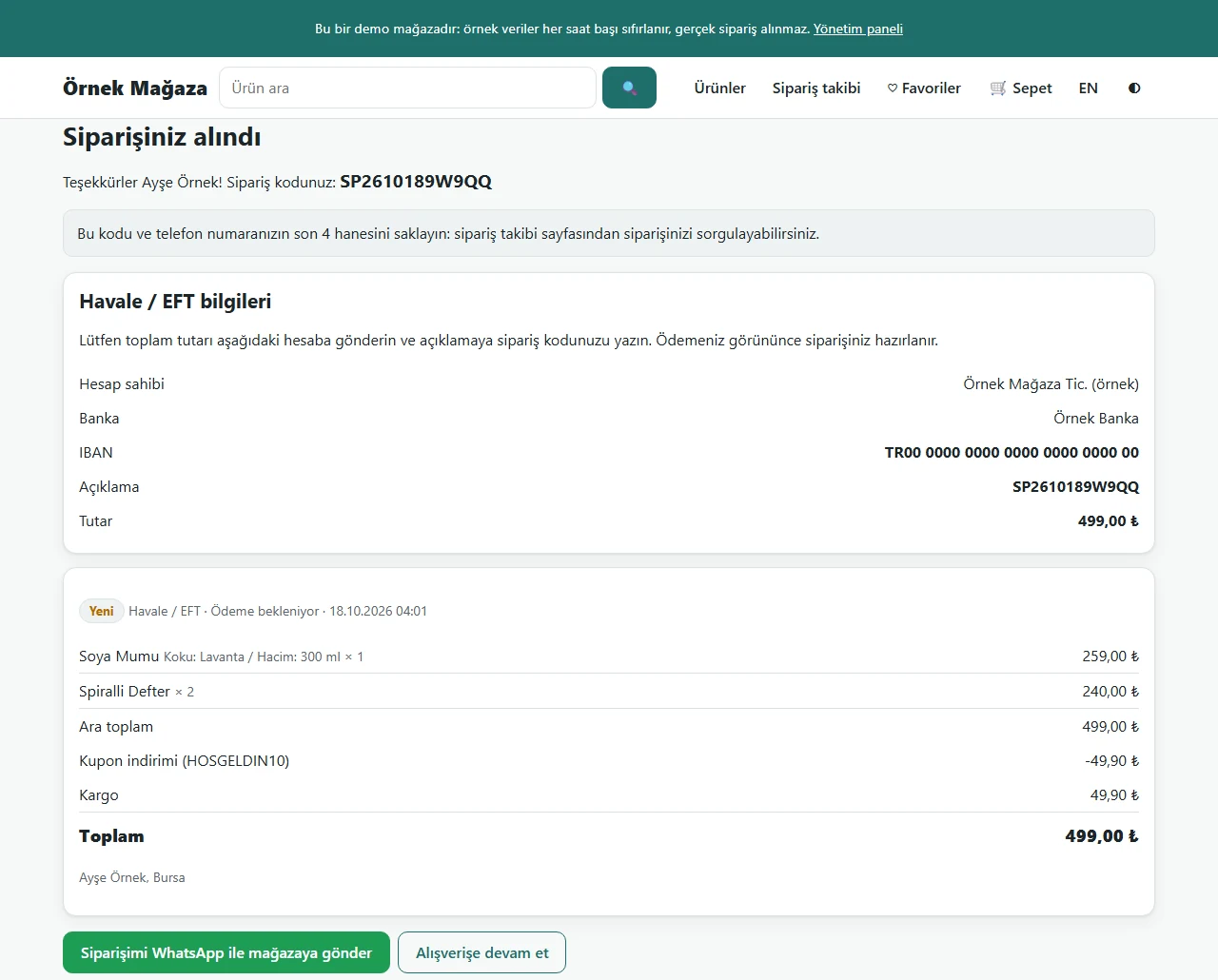
Order placed
An order code is given; the customer keeps it with the last 4 digits of their phone. For bank transfer, the account details (a sample IBAN here) and the code for the description appear.
- On screen (Turkish interface)
- “Siparişiniz alındı” — your order has been received
- “Havale / EFT bilgileri” — bank transfer details
- “Hesap sahibi / Banka / IBAN / Açıklama / Tutar” — account holder / bank / IBAN / description / amount
-
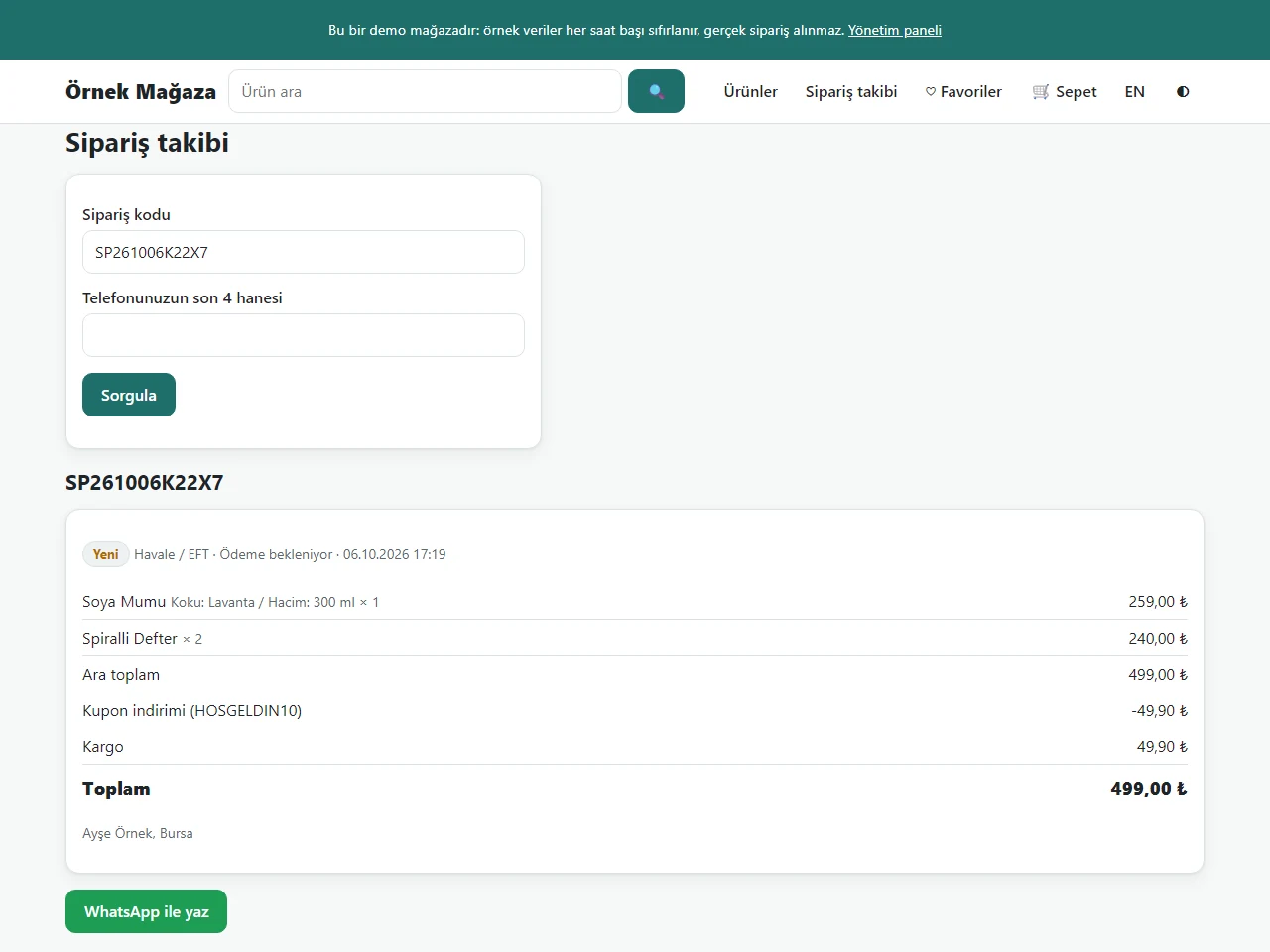
Order tracking
The customer checks the order status with the order code and the last 4 digits of their phone; no sign-in is needed.
- On screen (Turkish interface)
- “Sipariş takibi” — order tracking
- “Sipariş kodu” — order code
- “Telefonunuzun son 4 hanesi” — last 4 digits of your phone
- “Sorgula” — look up
-
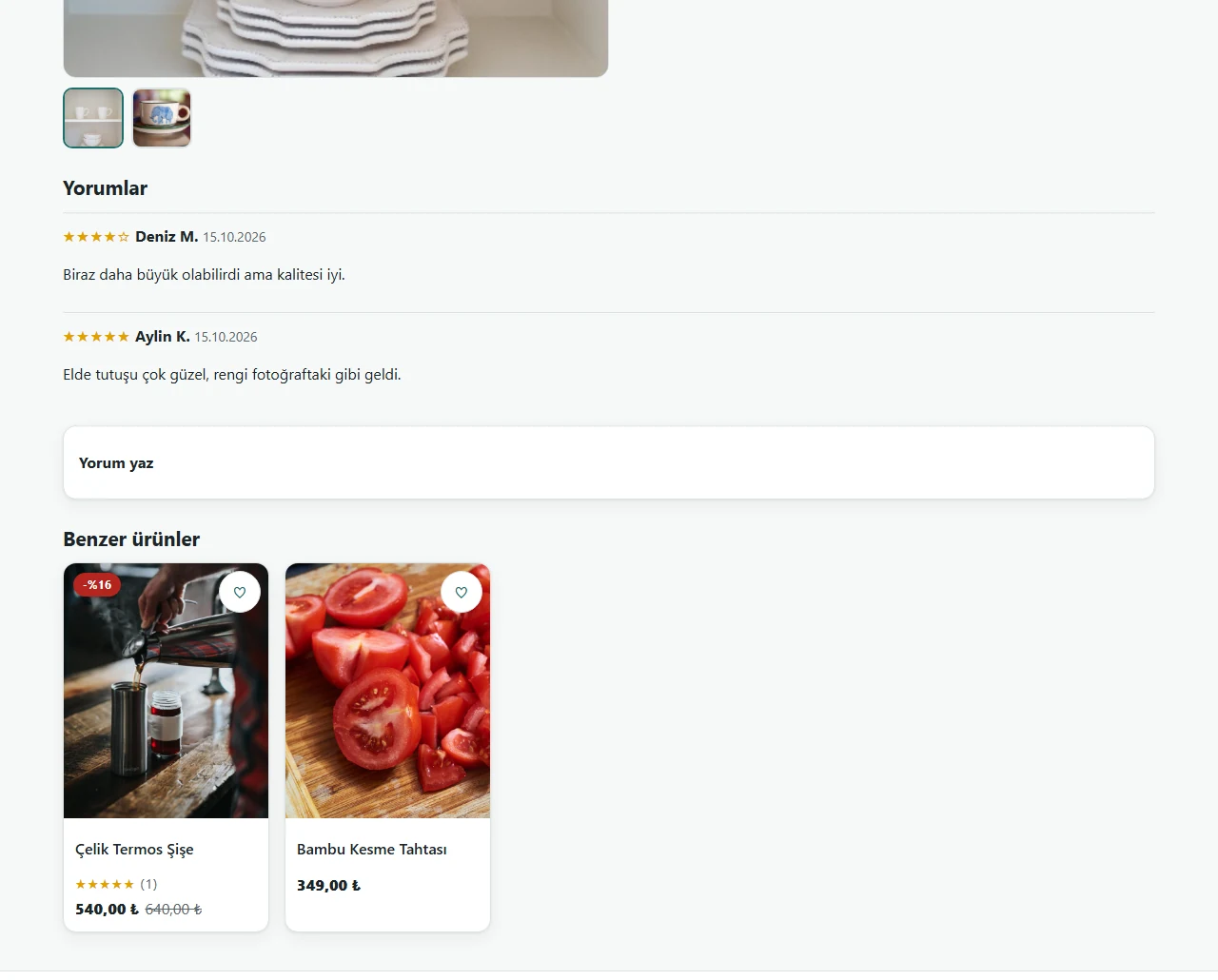
Reviews and similar products
Below the product are star reviews from customers, a “write a review” box and similar products. Reviews go live once approved in the panel.
- On screen (Turkish interface)
- “Yorumlar / Yorum yaz” — reviews / write a review
- “Benzer ürünler” — similar products
-
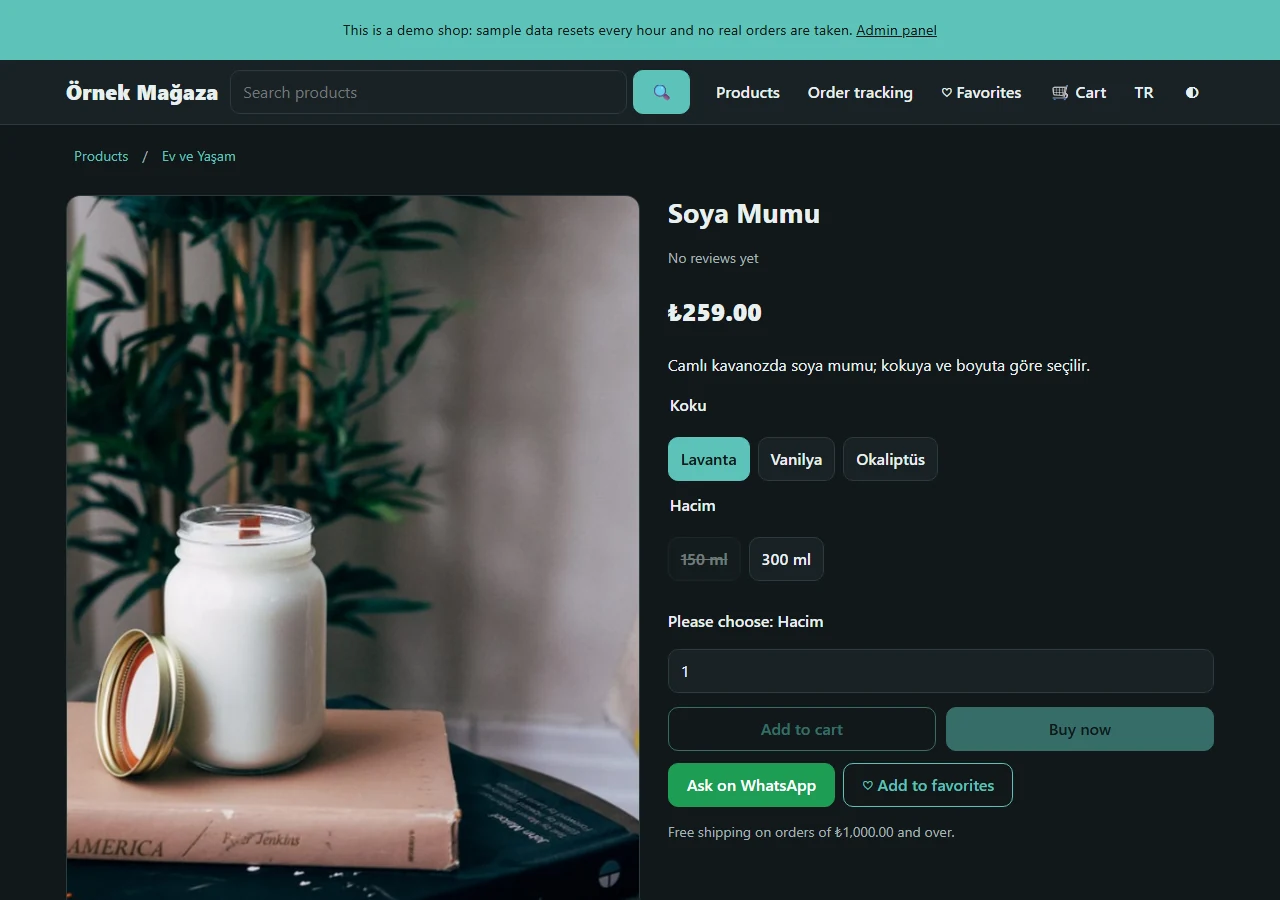
English storefront
The storefront can switch to English. Option names (here “Boyut”) and values are typed by the shop owner and not translated; the panel and legal templates are Turkish only.
-
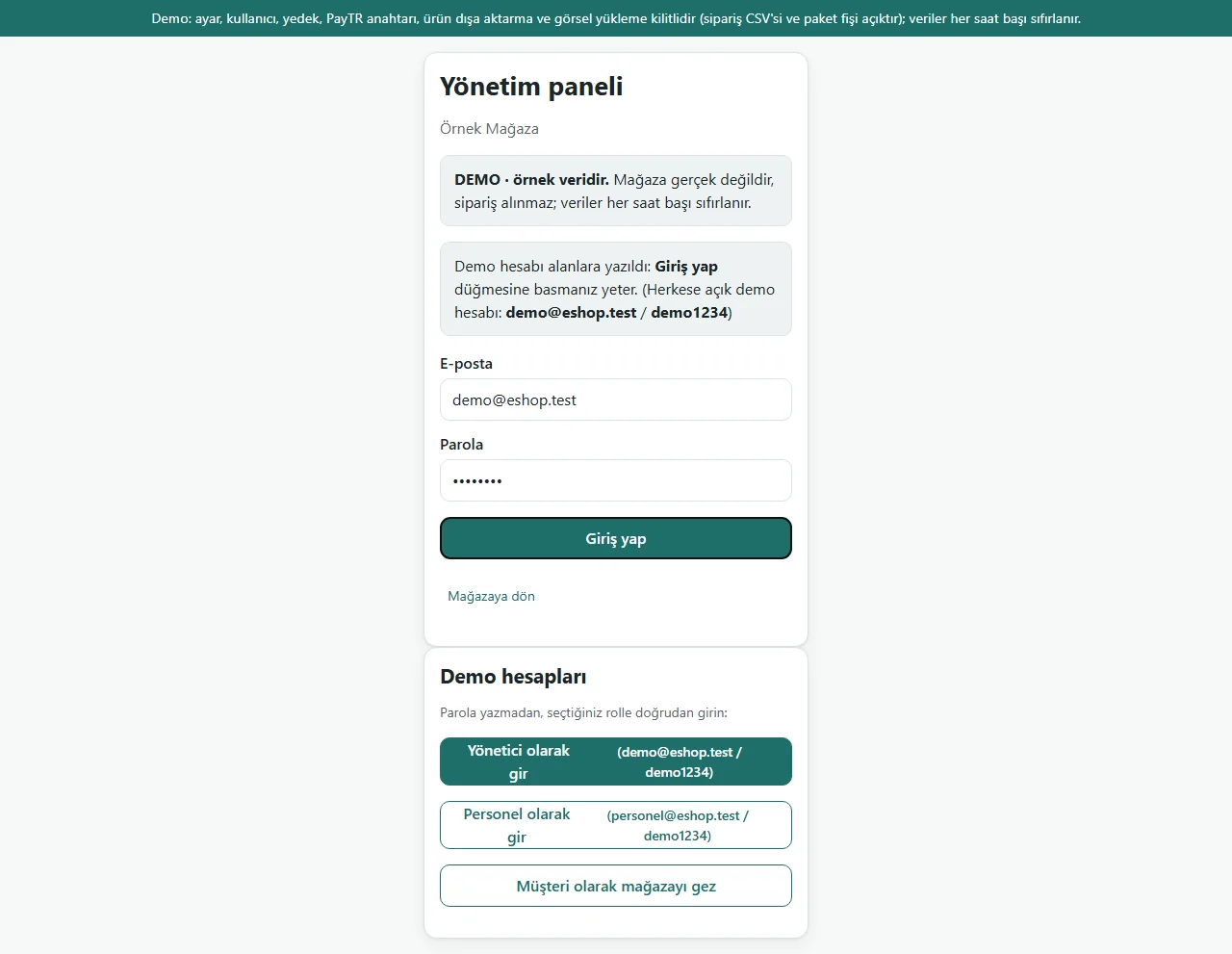
1.0.7 · 21 October 2026 Admin sign-in (demo)
The demo’s admin sign-in page (version 1.0.7): a “DEMO · örnek veridir” (sample data) notice, fields prefilled with the administrator account and a “Demo hesapları” (demo accounts) box with password-free “… olarak gir” (sign in as …) buttons for administrator and staff. The notice and the box show only in demo mode; a real shop has neither and asks for an e-mail and password.
- On screen (Turkish interface)
- “DEMO · örnek veridir” — DEMO · sample data
- “Demo hesapları” — demo accounts
- “Yönetici olarak gir” — sign in as administrator
- “Personel olarak gir” — sign in as staff
- “Giriş yap” — sign in
-
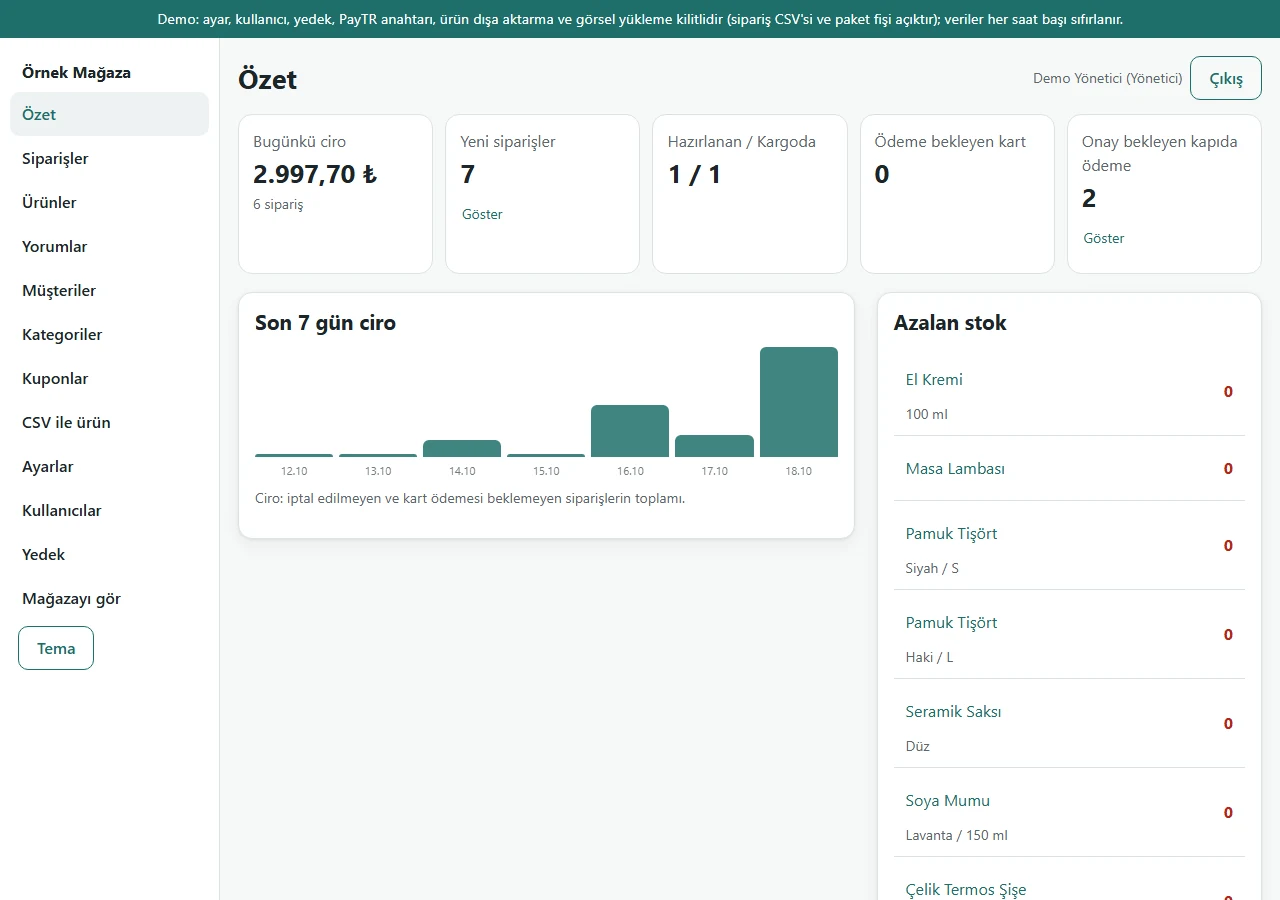
Panel: overview
Sales today, the last 7 days, order counts and low stock; the single stock of a product without options is in this list too. Figures are sample data.
- On screen (Turkish interface)
- “Özet / Siparişler / Ürünler / Yorumlar / Müşteriler / Kategoriler / Kuponlar” — sidebar: overview / orders / products / reviews / customers / categories / coupons
- “CSV ile ürün / Ayarlar / Kullanıcılar / Yedek” — CSV products / settings / users / backup
- “Bugünkü ciro” — today’s sales
- “Azalan stok” — low stock
-
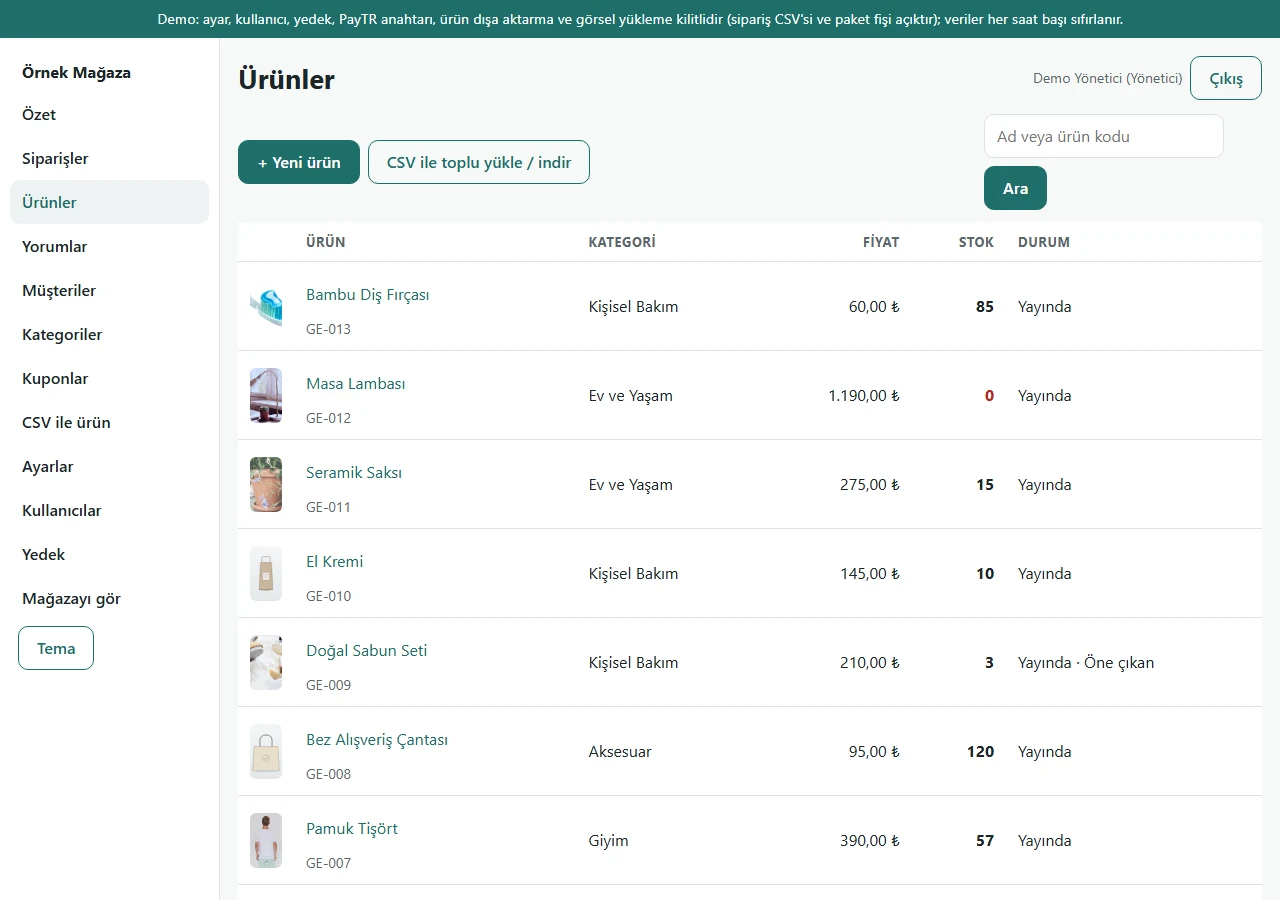
Panel: products
Products are listed with total stock, publish status and the featured mark.
- On screen (Turkish interface)
- “+ Yeni ürün” — new product
- “Stok / Durum” — stock / status
-
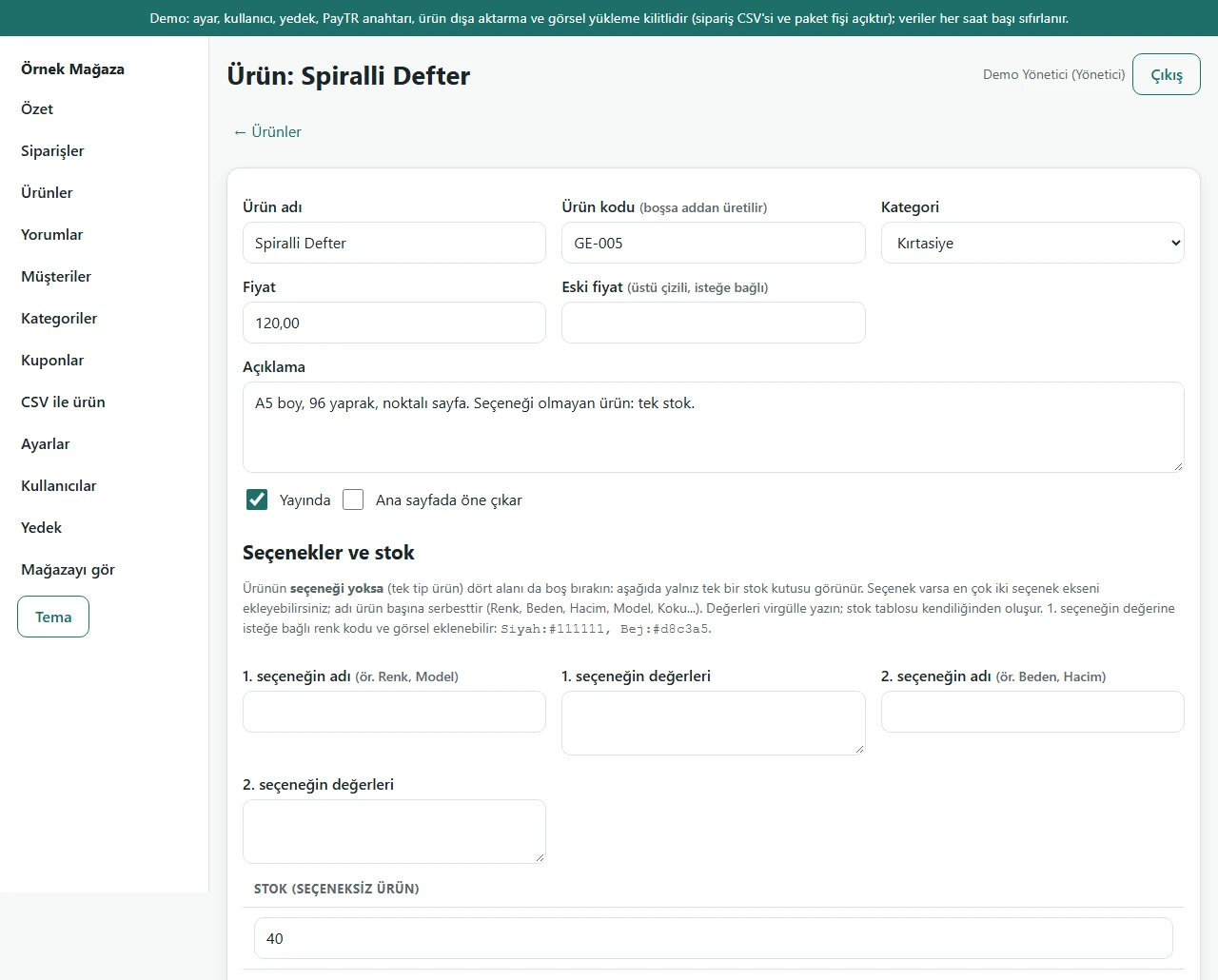
Product form: no options
If the option fields are left empty, the product has a single stock and the form shows only one stock box.
- On screen (Turkish interface)
- “Seçenekler ve stok” — options and stock
- “1. seçeneğin adı / 2. seçeneğin adı” — name of the 1st option / name of the 2nd option
- “Stok (seçeneksiz ürün)” — stock (product without options)
- “Kaydet” — save
-
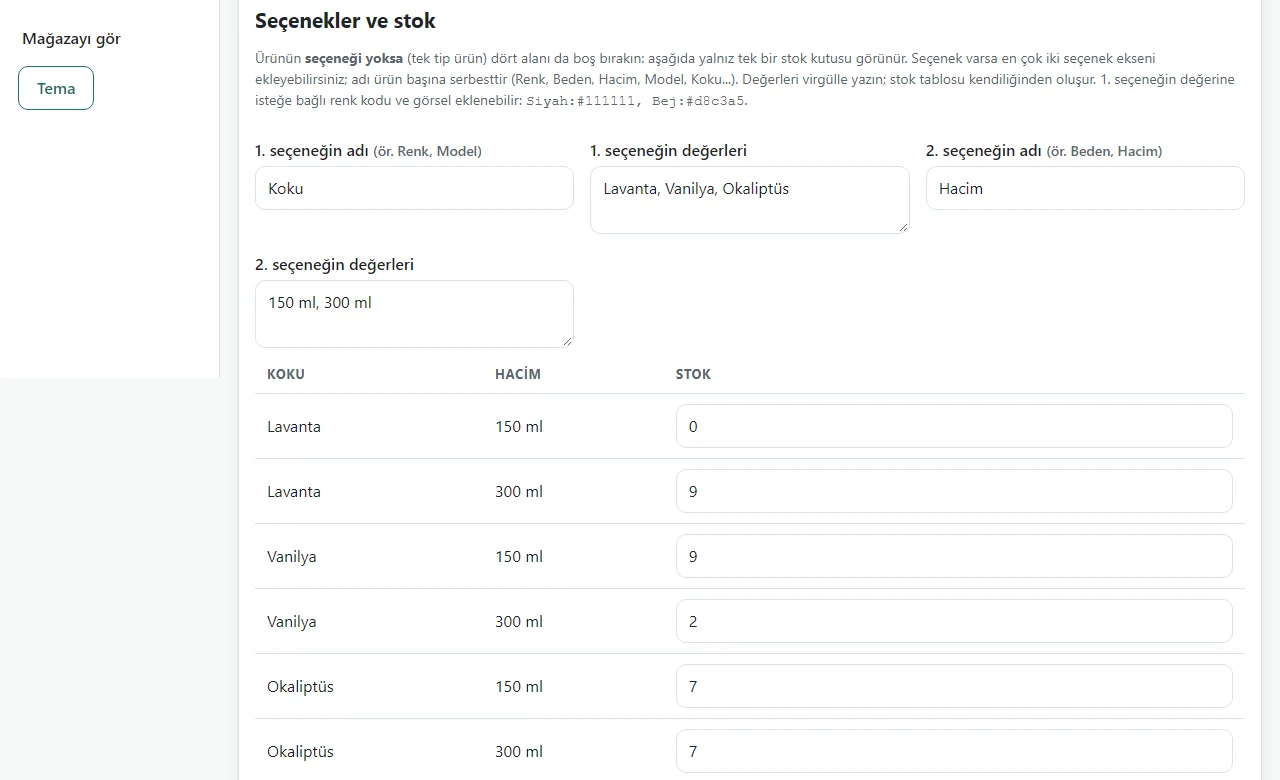
Product form: product with options
Once the option names and values are typed (here Koku and Hacim), a stock row for every combination builds itself.
- On screen (Turkish interface)
- “Koku / Hacim / Stok” — scent / volume / stock
- “Seçenekler ve stok” — options and stock
-
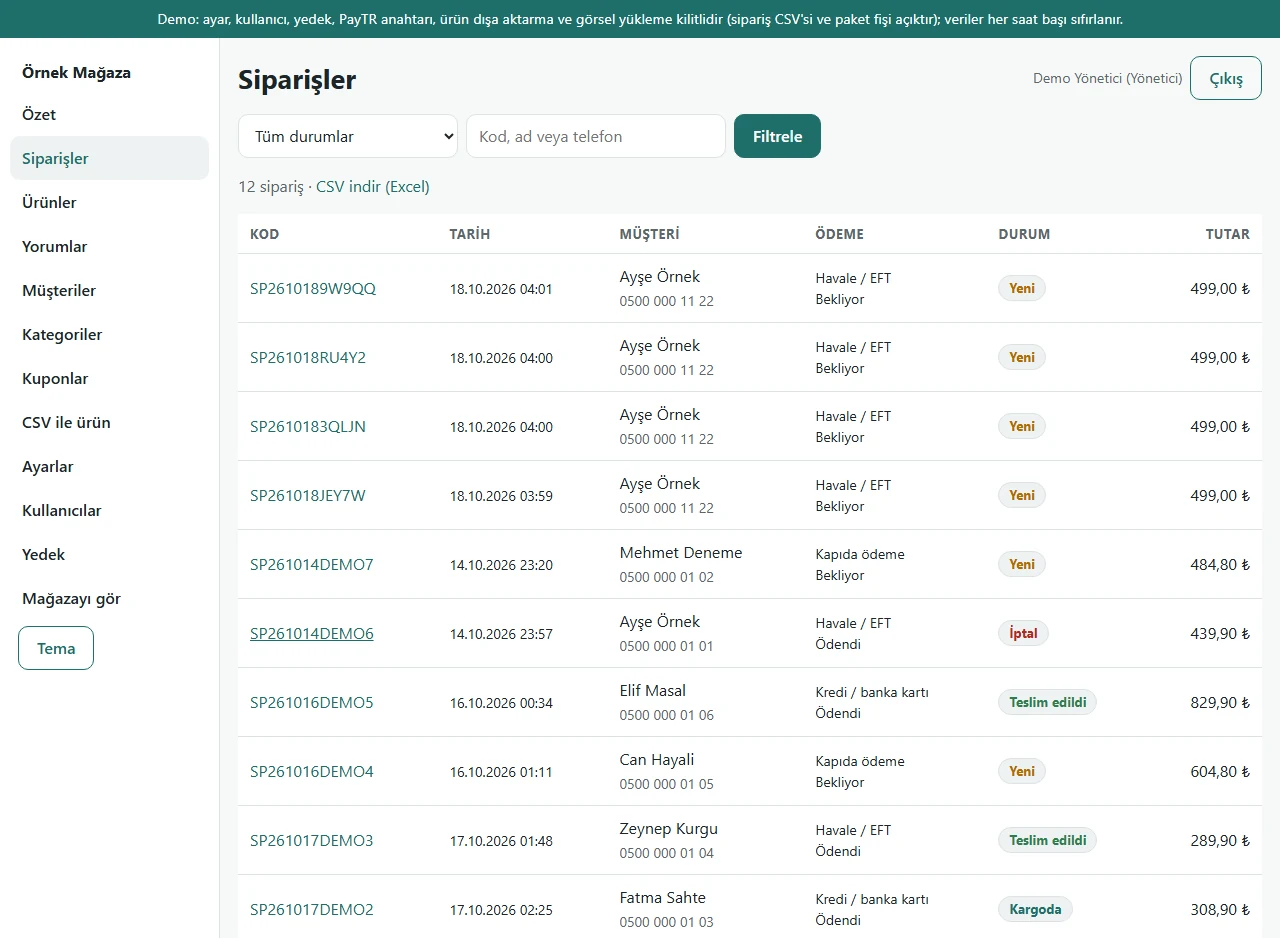
Panel: orders
Orders are listed with code, date, customer, payment method, status and total; they can be filtered by status and searched by code, name or phone.
- On screen (Turkish interface)
- “Tüm durumlar / Filtrele” — all statuses / filter
- “Kod, ad veya telefon” — code, name or phone
- “Kod / Tarih / Müşteri / Ödeme / Durum / Tutar” — code / date / customer / payment / status / total
-
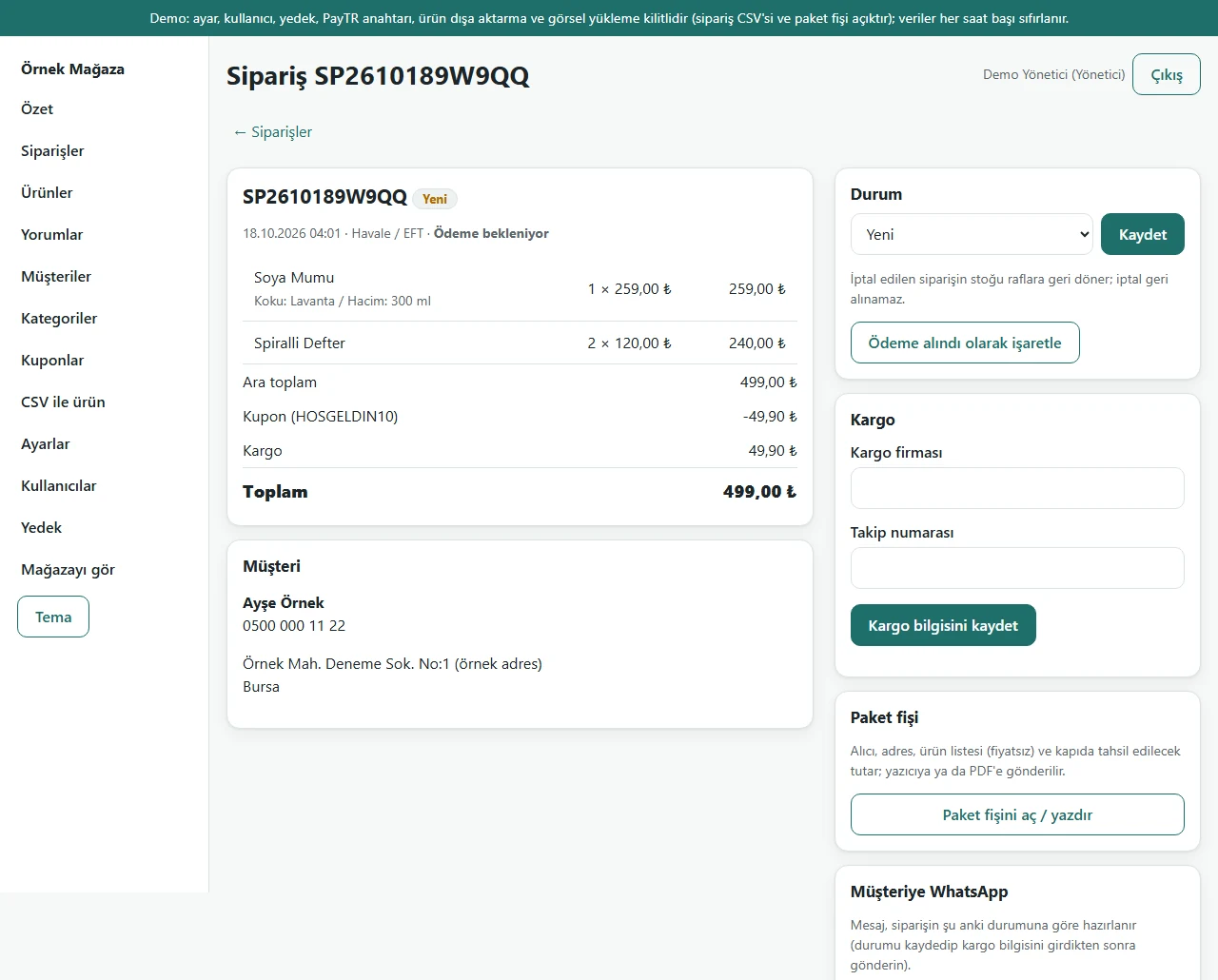
Order detail and shipping
Items show the option name and value; status change, mark as paid, carrier and tracking number, and a customer WhatsApp message prepared from the current status.
- On screen (Turkish interface)
- “Durum / Kaydet” — status / save
- “Ödeme alındı olarak işaretle” — mark as paid
- “Kargo firması / Takip numarası / Kargo bilgisini kaydet” — carrier / tracking number / save shipping info
- “Müşteriye WhatsApp” — WhatsApp to the customer
-
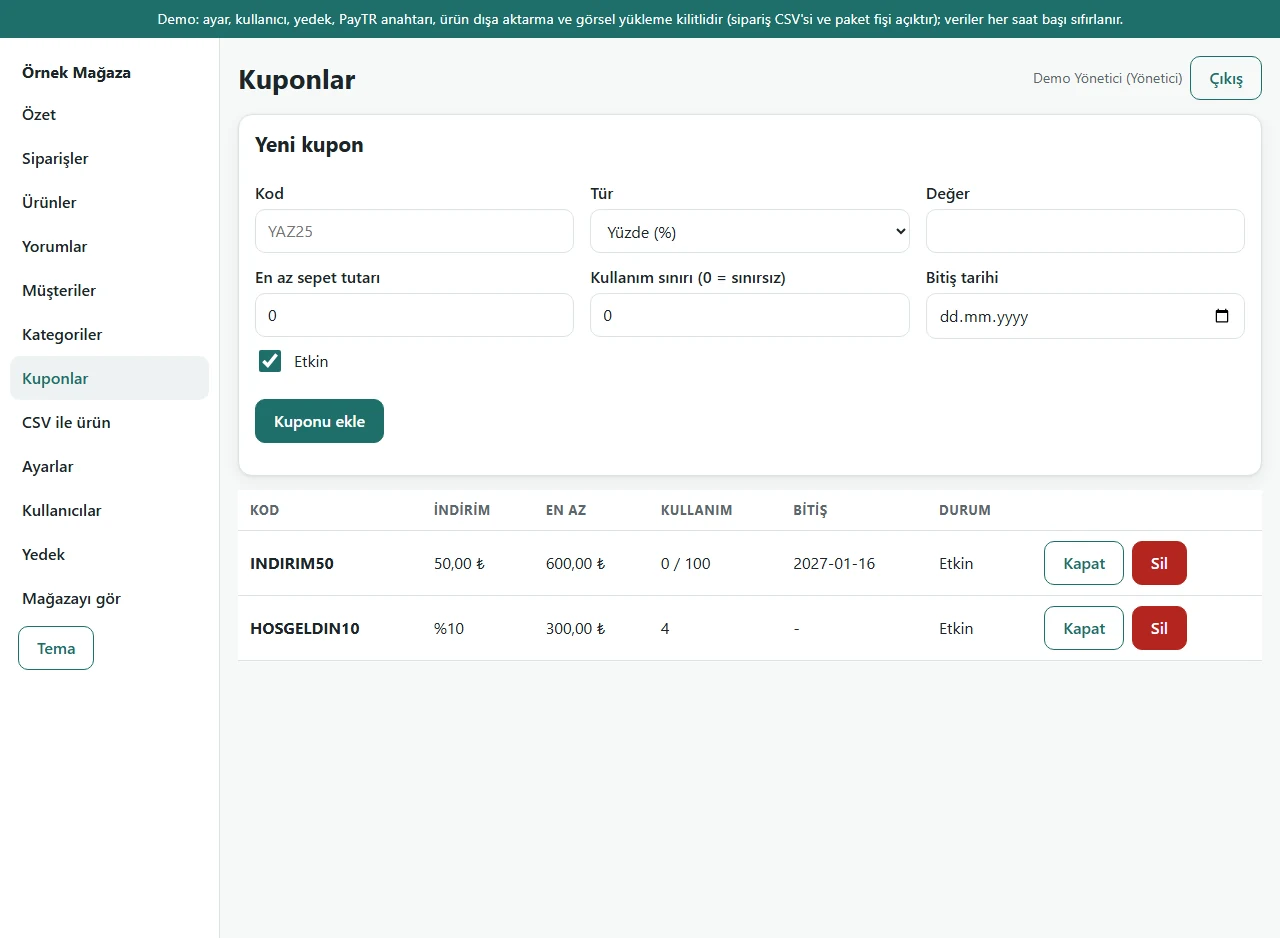
Coupons
A new coupon takes a code, type (percentage or fixed amount), value, minimum cart total, usage limit and end date. The usage and state of existing coupons show in the table.
- On screen (Turkish interface)
- “Yeni kupon” — new coupon
- “Kod / Tür / Değer” — code / type / value
- “En az sepet tutarı / Kullanım sınırı (0 = sınırsız) / Bitiş tarihi” — minimum cart total / usage limit (0 = unlimited) / end date
- “Kuponu ekle” — add the coupon
-
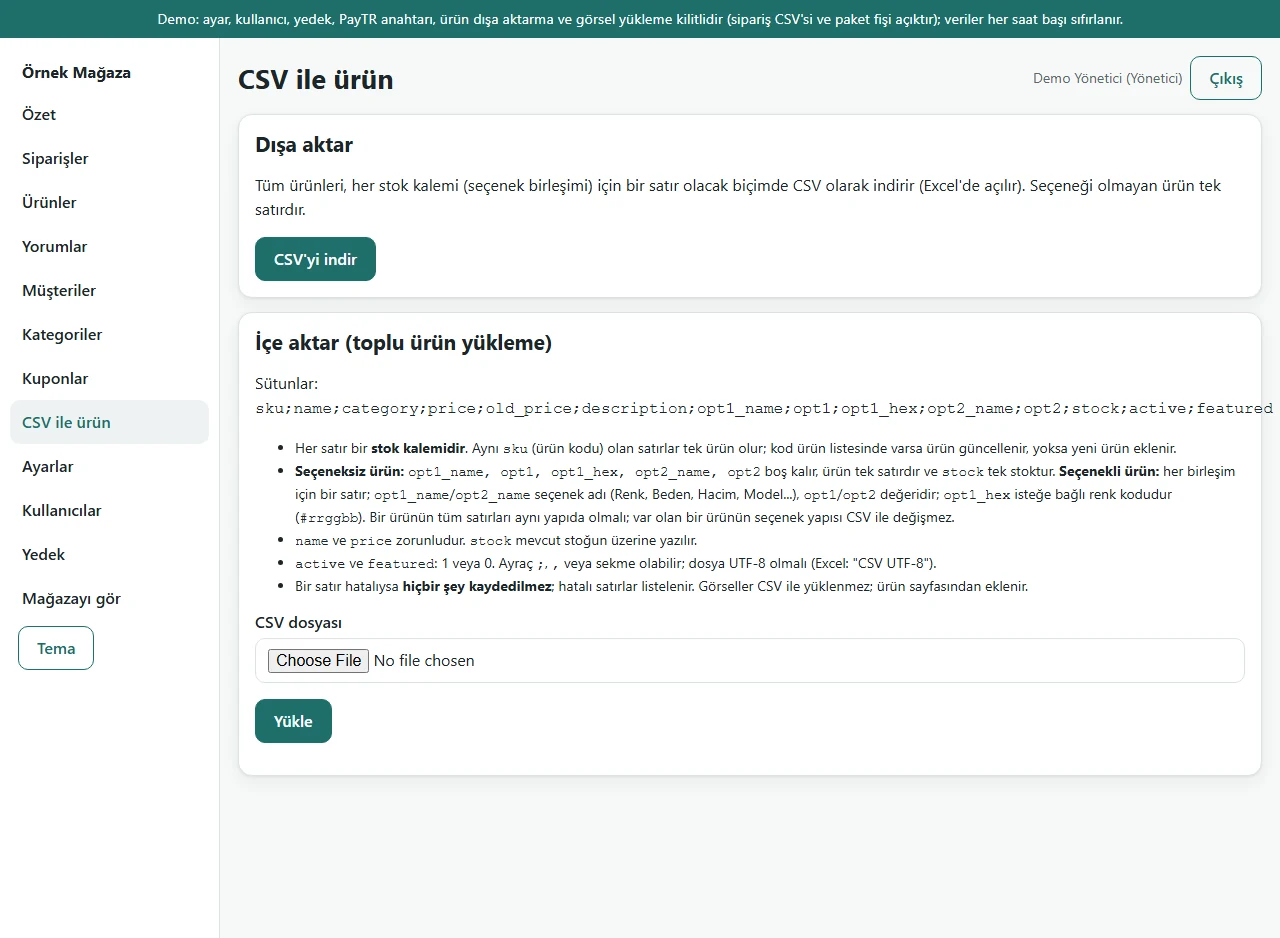
Products by CSV
A product without options downloads as one row and a product with options as one row per combination; a prepared CSV can be uploaded. This image was taken in demo mode, where import is locked.
- On screen (Turkish interface)
- “Dışa aktar / CSV’yi indir” — export / download the CSV
- “İçe aktar (toplu ürün yükleme)” — import (bulk product upload)
- “CSV dosyası / Yükle” — CSV file / upload
-
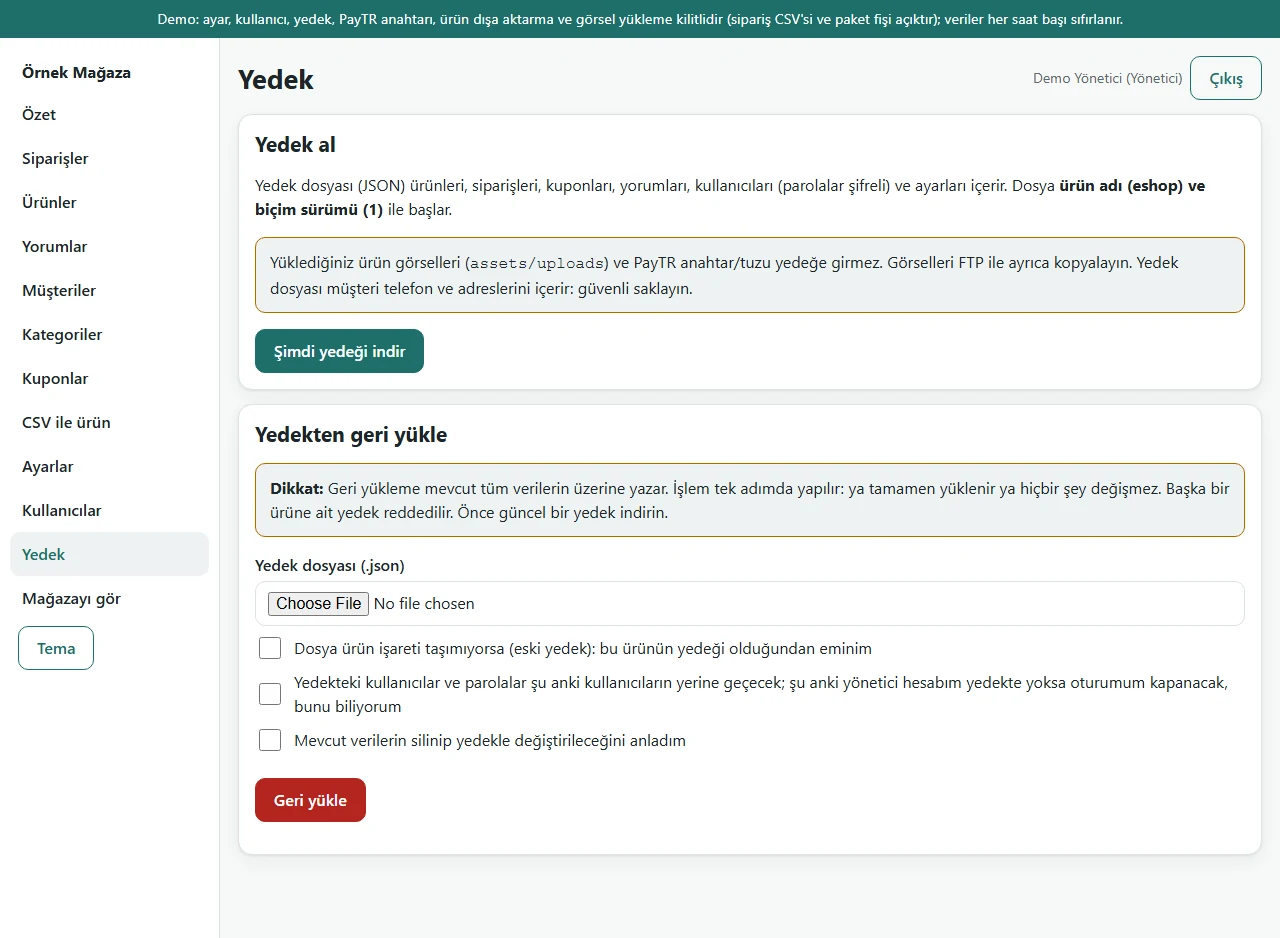
Backup and restore
The backup file holds products, orders, coupons, reviews and settings; uploaded images are copied separately. A backup from another product is rejected. This section is locked in demo mode.
- On screen (Turkish interface)
- “Yedek al / Şimdi yedeği indir” — take a backup / download the backup now
- “Yedekten geri yükle” — restore from a backup
- “Yedek dosyası (.json)” — backup file (.json)
- “Geri yükle” — restore
-
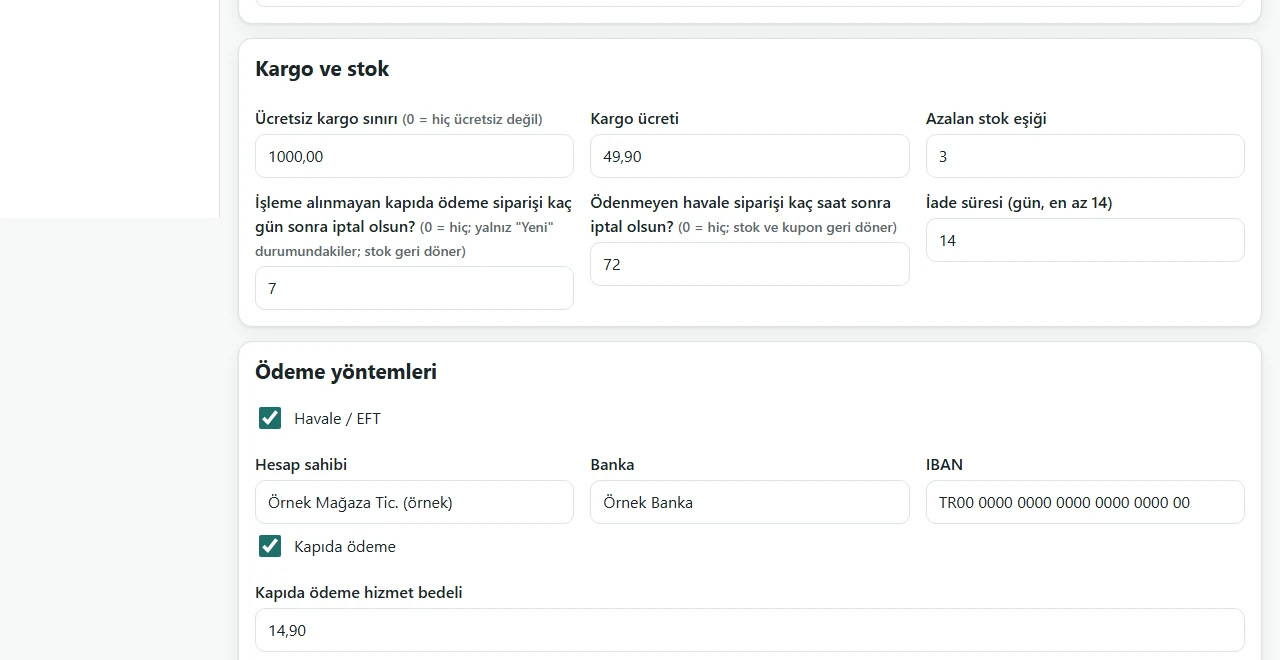
Settings: shipping and payment
Free-shipping threshold, shipping fee, low-stock threshold, the cancel time for unpaid transfers; the bank account and cash-on-delivery fee. PayTR fields are not in this image.
- On screen (Turkish interface)
- “Kargo ve stok” — shipping and stock
- “Ücretsiz kargo sınırı / Kargo ücreti / Azalan stok eşiği” — free-shipping threshold / shipping fee / low-stock threshold
- “Ödeme yöntemleri” — payment methods
- “Havale / EFT / Hesap sahibi / Banka / IBAN” — bank transfer / account holder / bank / IBAN
- “Kapıda ödeme / Kapıda ödeme hizmet bedeli” — cash on delivery / cash-on-delivery service fee
- What do they see at the end?
- The customer places an order without an account and follows it by order code. The owner sees the order in the panel, updates its status, enters the tracking number and sends the customer a ready-made WhatsApp message; the stock of a cancelled order goes back on the shelf.
- What is it good for?
- Products with and without options work in one shop; stock never goes below zero; orders, coupons, reviews and shipping details run from one panel; the site lives on the shop’s own domain and hosting.
Everything that is not included, and all limits
- Not delivered to a client and not used by a real shop. The “Örnek Mağaza” shop, products, reviews, orders, phone numbers and IBAN in the screenshots are sample data; the product images are mostly royalty-free (CC0) sample photographs; a few products without a suitable photo are drawings.
- There is a live demo with sample data (demo mode, PHP 8.3.31 and SQLite): card payment is off, no e-mail is sent, no real order is taken; settings, users and passwords, backup, the PayTR key, export and image upload are locked. By design the data returns to sample data at the start of every hour; this reset was observed once on the live site (6 October 2026), it is not guaranteed to keep working, and in hours without visitors the reset happens at the next visit. The demo’s sign-in page shows a public demo administrator account; the live demo runs version 1.0.7, its sign-in page comes with the administrator account prefilled and a “Demo hesapları” (demo accounts) box with “Yönetici olarak gir” (sign in as administrator) and “Personel olarak gir” (sign in as staff) buttons that need no password (the box shows only in demo mode; the two role buttons, “CSV indir (Excel)” and “Paket fişini aç / yazdır” (open / print the packing slip) in the panel, and the “Siparişimi WhatsApp ile mağazaya gönder” (send my order to the shop on WhatsApp) button after an order were seen on the live demo on 21 October 2026). One order was tried end to end in the demo (product, cart, bank-transfer order, tracking, payment and preparing status in the panel); emulating iPhone and Android profiles showed no horizontal overflow or console errors on six pages, and it was not tried on a real device. The screenshots were taken from the locally run installation.
- Its unit and end-to-end tests passed on SQLite and on MariaDB 11.4 on 6 October 2026. It has not been tried on PHP versions other than 8.3 (8.1 and 8.2), on MySQL, on real hosting where the Apache/LiteSpeed settings file actually closes the private folders, on a real phone, or in Safari and Edge.
- The PayTR connection has not been tried with a real merchant account and does not appear in the screenshots. Before going live it should be tried in test mode with the shop’s own PayTR account.
- The admin panel is in Turkish only.
- The software does not send e-mail. There is no SMS, carrier connection, marketplace, e-invoicing, iyzico, instalments, subscriptions or multi-shop, and no more than two option axes. These can be scoped separately.
Frequently asked questions
Which businesses is this e-commerce software for?
Small businesses that sell from a single shop, in any sector. A multi-shop marketplace, subscriptions or several currencies are out of scope and would be scoped separately.
Can I sell products that come in colours, sizes or volumes?
Yes. A product takes at most two option axes and you type their names (Colour, Size, Volume, Model, Scent and so on). Products without options work in the same shop with a single stock. A sold-out option cannot be chosen; there are no more than two axes.
Can I take card payments?
The code for card payment through PayTR exists, but it was not tried with a real PayTR account. Before going live it should be tried in test mode with the shop’s own account. Bank transfer and cash on delivery with a service fee were tried locally.
What hosting is needed?
The documented requirement is PHP 8.1 or newer and MariaDB or MySQL. It was actually tried only with PHP 8.3 and MariaDB 11.4; an installation on a customer’s hosting has not been tried yet (the live demo runs on PHP 8.3.31 and SQLite). Fit is assessed in a first conversation with your hosting details.
Is there e-mail, SMS, a carrier connection or e-invoicing?
No. The software sends no e-mail; the customer is notified through a ready-made WhatsApp message that you send yourself. Other connections would be scoped separately based on your needs.
Is there a live demo, and how do installation and price work?
Yes, there is a live demo with sample data; it runs in demo mode (card payment off, no e-mail sent, no real order taken) and by design its data is reset every hour. The sign-in page shows a public demo administrator account. The installation options, their scope and the price are set in a written quote; there is no list price. The software has not been delivered to a client.
Do the legal texts come ready?
The distance-sales contract, pre-information form and privacy notice come as templates, in Turkish only. They must be filled in with the shop’s details and checked by a lawyer.
Delivery and sales status
There is no cart, customer account or online payment on this site for now. Reach out by phone, WhatsApp or the form; in a first conversation your need and the software’s fit are reviewed. The form does not create an order, a contract or a payment.
Possible delivery options
What the package contains
- The software package (genel-eticaret 1.0.0 candidate, one zip file) and the setup wizard
- An installation document and a user guide for the shop owner
- The storefront and admin panel; products with and without options, orders, coupons, reviews, CSV and backup
- Not included: e-mail and SMS sending, a carrier connection, marketplace, e-invoicing, iyzico, multi-shop, an English admin panel, more than two option axes, product photos, design and logo work
Price
There is no list price. The price is set in a written quote based on the installation, support and extra development scope; the payment method has not been decided yet.
Requirements and version history
What you do
- You arrange the hosting and domain (whose name they are opened in is set in the written quote).
- You enter the shop details, your bank account, the shipping fee and your products (in the panel or by CSV), or have the scope of that work written into the quote.
- If you want card payment, you try PayTR in test mode with your own account.
Installation requirements
- PHP 8.1 or newer (as written in the documents); the pdo_mysql and mbstring extensions; curl and openssl for card payment; GD is recommended for image uploads.
- MariaDB 10.4 or newer, or MySQL. It was actually tried only on Windows 11 with PHP 8.3.33, SQLite and MariaDB 11.4.13; PHP 8.1 and 8.2, MySQL 5.7/8, the Apache/LiteSpeed settings file, nginx and a customer’s hosting were not tried; the public demo address runs in demo mode on PHP 8.3.31 and SQLite.
- The software sends no e-mail; notifications are ready-made WhatsApp messages.
Release notes
- 1.0.0 (candidate, 6 October 2026): generalised from the earlier e-commerce script; options became optional (a single-stock product and at most two freely named option axes). The package has not been delivered to a client; it runs only at the public demo address, in demo mode.
- 1.0.3 (8 October 2026): the demo sign-in fields come prefilled.
- 1.0.4 (11 October 2026): the WhatsApp button on the order confirmation page opens the whole order as a ready message; in the panel, packing-slip printing and orders to CSV (Excel).
- 1.0.6 (18 October 2026): the sample-data demo’s product images are mostly royalty-free (CC0) photographs instead of drawings; two products keep a drawing.
- 1.0.7 (18 October 2026): demo sign-in page: a demo notice, fields prefilled with the manager account and password-free “… olarak gir” (sign in as …) buttons for administrator and staff (demo mode only; on a real installation there is no notice, box or prefilled field).
Decisions not made yet
- Which delivery option and package scope this software will be offered with has not been decided yet; the options above are a scope outline for a written quote, not a sales acceptance.
- Rights to use, modify, transfer and receive the source code: to be set in a written agreement; not decided yet.
- The price and payment method have not been decided yet.
- Whose name the hosting and domain are opened in, and where the software is installed, have not been decided yet.