Workflow guide
What records are needed for dues and partial payments?
A sample record structure separating units, period charges, opening balances and receipts, with a worked partial-payment example.
This guide is based on the record flow of the sample-data demo shown on this site. It is not a ready-made product or a customer deployment; a similar project needs its own agreed scope.
Keep a stable unit identifier
Use the building block and unit number as a shared identity. Plan how to preserve old transactions when an owner or tenant changes instead of creating a second unit under a new name. This sample work includes unit, owner and tenant details, Excel import and opening balances. Do not publish real residents’ personal details in examples.
Keep charges separate from receipts
Record each monthly due or extra charge with its period, type and amount. Add a separate receipt when a payment arrives. Overwriting the charge amount with the paid amount hides the original charge and payment date. Separate transactions let both management and residents review the account history.
Check a partial-payment example
A purely hypothetical example: a unit with no opening balance receives a 1,000 TRY charge and a 400 TRY receipt. With no other transactions, 600 TRY remains. A later 600 TRY payment should appear as a second receipt. These figures are not actual dues for a building or a software price. Where several periods exist, explain payment allocation using the applicable recording rule.
Identify the source of a receipt
Keep the payment date, amount, cash or bank method and description traceable. If a bank transaction was matched, check that it was not recorded again as a second receipt. The resident balance and management history should represent the same records. Do not describe a receipt screen as an electronic invoice or a live bank connection.
Verify opening balances and backups
Try the initial Excel/CSV list on a sample copy (the sample application shows a preview before saving, lets you leave out an unwanted row and can take back the last import) and compare the unit count, total opening balance and missing fields. Check report totals against individual sample units. This application has backup and restore workflows; test restoration before commissioning it with real data. This guide is about records, rather than legal or accounting advice on setting dues.
Let residents and management read the same statement
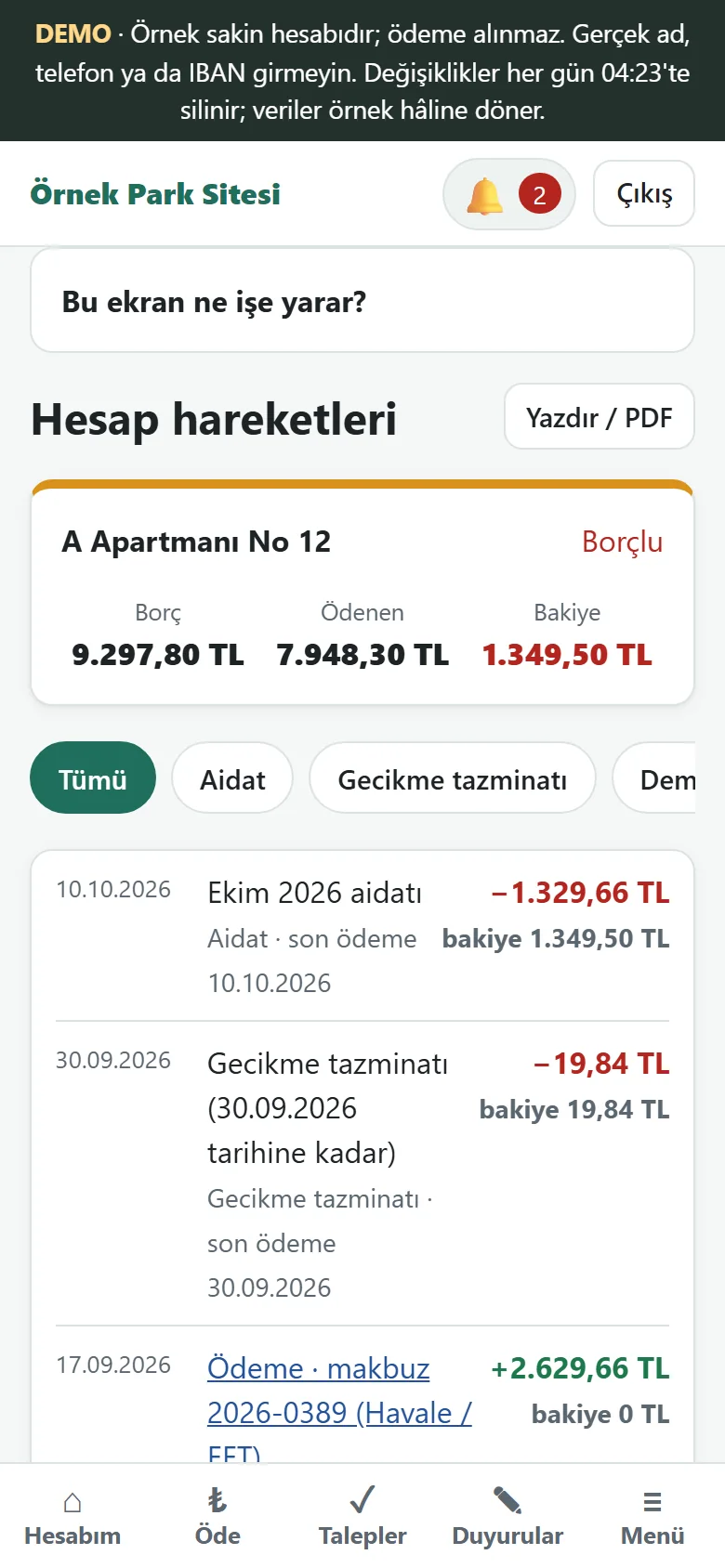
When a resident says “my balance is wrong”, the quickest fix is for both sides to look at the same lines. In the sample application the resident opens the account movements on their own phone: dues, late fees and payments are listed in date order, each with its effect on the balance, and the page has a print / PDF button. The management panel shows the same movements. When a disagreement comes up, looking together at which line was written, on which date and for which amount replaces the argument about what the figure “should” be. A late fee is not an amount quietly absorbed into the balance; it is a line of its own, so point to that line when you explain it.
Keep a payment notice apart from a receipt
When a resident sends a “I have paid” notice, that does not mean the money has reached the account. In the sample application the resident sees the IBAN and a flat-specific payment code on the payment details screen, makes the transfer and sends a notice from the account page. The notice waits for approval in the management panel, and the resident’s balance does not change until it is approved. Management approves the notice after seeing the bank movement, or enters the receipt itself. Opening the notice box once a day and clearing what is waiting also prevents the same payment from being written twice, once from the notice and once by hand.
A hypothetical three-month example
Think in purely invented figures: a unit with no opening balance is charged 1,000 TRY for three months in a row. It pays 1,000 TRY in the first month and 500 TRY in the second. Because a receipt entered by hand closes the oldest debt first, the first period shows as fully paid, 500 TRY stays open on the second, and the third is already written; the total balance is 1,500 TRY. In the dues table this unit shows as “paid” for the first month, “partly paid” for the second and, for the third, “unpaid” or “not yet due” by colour. These figures are not a building’s real dues or a price; the point is to be able to explain to a resident which period a partial payment closed.
Three tables to read at month-end
The first is the dues table: paid, partly paid, unpaid and not-yet-due states are colour-coded by flat and month, with print, Excel and CSV output. The second is the debtors list: overdue balances are ordered by age, each row has a remind and a receipt button; the reminder opens a prepared WhatsApp text and the manager sends it, because the program sends nothing by itself. The third is the income and expense report: for the chosen month range, accruals, late fees, collections, expenses and the difference appear as monthly rows. The three should explain one another; when they do not, the gap usually comes from a record entered against the wrong flat or entered twice.
Common mistakes
Writing the paid amount over the charge line hides the earlier charge and its date. Entering the same transfer both from a notice and by hand throws the balance off against the resident. Editing an opening balance by hand after the first set-up makes the totals impossible to explain. Mixing up a letter or a digit when typing a payment code can drop the money on another flat. Sharing real residents’ names and phone numbers in public places, a screenshot for instance, is as serious a problem as a record error; the screens on this site contain sample data only.
The limits of this guide
The guide explains how to separate and check records. How dues are set, by which rule a late fee is calculated or how a debt is collected are not its subject; those depend on the complex’s own decisions and, where needed, on expert advice. Automatic bank movement import, card payment and e-invoicing are not in the sample application. The screens come from a sample-data demo and do not show a real building.
Three questions people ask when starting
What is an opening balance? It is each flat’s earlier debt or credit on the date you move to the record system; later movements are written on top of it, so check the total flat by flat at first set-up. Why does the receipt matter? Every payment entered by hand opens a receipt; it is the record, for management and for the resident, of when and by which method a payment was taken. Why try the Excel list first? Because your column layout, empty cells and spelling differences show up there for the first time; before uploading the real list, try a ten-flat copy and check the count and the total.
Quick checklist
- Is each unit identifier unique?
- Are opening balances, charges and receipts separate?
- Is the remaining partial-payment balance correct?
- Could a payment have been recorded twice?
Related guide
Matching bank statement transactions to dues payments
Review suggestions using a payment code, sender and amount, then check ambiguous and previously processed transactions.
Read the guide →