Workflow guide
Matching bank statement transactions to dues payments
Review suggestions using a payment code, sender and amount, then check ambiguous and previously processed transactions.
This guide is based on the record flow of the sample-data demo shown on this site. It is not a ready-made product or a customer deployment; a similar project needs its own agreed scope.
Distinguish a suggestion from a posted receipt
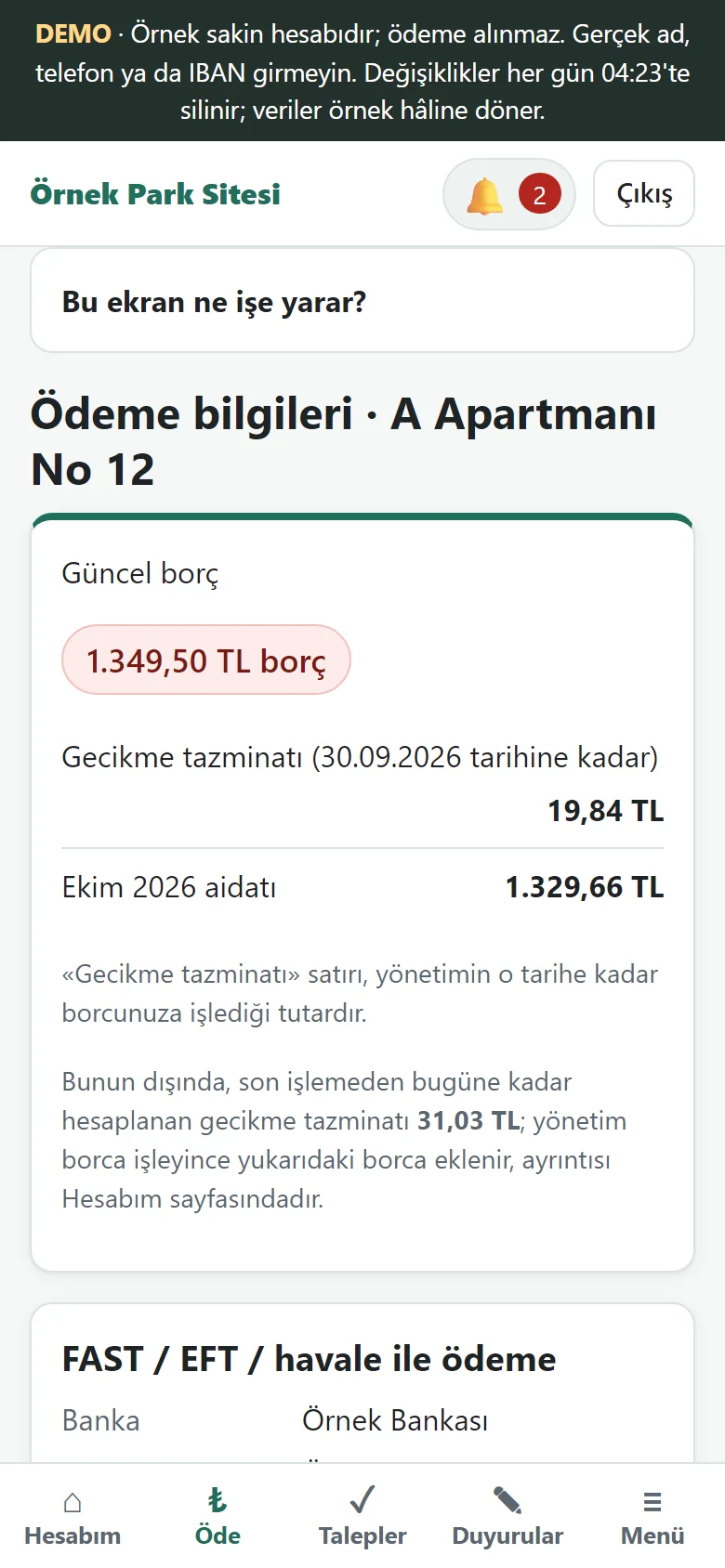
A transaction appearing in a bank list does not mean a receipt was posted to a unit. Review the suggested unit and matching reason before processing the record, then verify the result. In the dues application a statement file downloaded from internet banking is uploaded by hand; the matching suggestion and the processed status are separate steps, and records are posted after the manager’s approval. There is no automatic bank movement import and no automatic matching. The payment code a resident sees (the screen shown) is one of the details used for matching.
Check the payment code
A unit’s payment code in the description is a useful record clue. Confirm that it belongs to the unit: an old code or typing error could direct the receipt to another account. The code shown to the resident should match the code expected by management. Finding a code does not remove the need to check the amount and transaction.
A sender name may be ambiguous
One person may pay for several units, or a relative may send a resident’s payment. Review a name-based suggestion alongside the unit and description. Verify an ambiguous source rather than assigning a receipt by guesswork. This guide publishes no real bank data; the screens use sample records.
Review the amount and partial payment
An amount equal to the monthly due does not uniquely identify a unit. Many units may owe the same amount, and a lower amount may be a partial payment. This example displays matching reasons based on the code, sender and amount. After processing, compare the result with the unit’s transaction history and balance.
Check for duplicate posting
Check whether the transaction was already processed and whether the payment was manually entered elsewhere. Preserving the relationship between a bank transaction and its receipt helps identify duplicate records. Start with a small sample set covering matched, ambiguous, partial and already processed cases. Connecting a real bank, authorising access and testing real accounts require separate project scope.
Prepare before you upload the file
In the dues application bank movements do not arrive in the program by themselves; the manager uploads the statement file downloaded from internet banking. The quality of the matching therefore depends largely on the quality of the file. Before uploading, compare the file’s date range with the previous upload: if the ranges overlap, the same transfers meet you a second time; if there is a gap, some payments never appear. Open the file only from the management account and share it with no one, because it contains residents’ names and account details.
Put three situations in your own trial set
Before moving to real data, prepare a small trial set that contains all of these: a transfer whose description carries the correct payment code, a transfer without a code that is recognisable only by the sender’s name, and a transfer for less than the dues. With the first, the suggestion is strong; with the second, you have to read the suggestion together with the flat and the description; with the third, you assume a partial payment and check the remaining balance. Trying these three once as the manager makes the decisions you take on live data faster.
What to do with a transfer that does not match
A transfer with an empty description, a wrong code or an unknown sender always turns up. Here a person has to decide; a suggestion should not be trusted blindly. There are two ways: contact the person who paid, ask which flat the money was for and then enter the receipt by hand, or, if the resident has sent a payment notice, compare the notice with the bank movement and approve it. Whichever you choose, write the decision on the record as a note; three months later the answer to “why was this movement posted to that flat” should be sitting there.
Verify a posted receipt from the resident’s screen
After posting a movement as a receipt, you can tell whether the job is done from the screen the resident sees. In the resident’s account movements the payment line appears with its date, amount, method and receipt number, and the balance updates accordingly. If the line is missing or the balance is not what you expected, the movement may be on the wrong flat or may have stayed unposted. Do this check after every upload in the first weeks; once it is a habit, it is enough to do it for ambiguous movements only.
Three hypothetical transfers
Imagine three transfers arriving; the figures are invented. In the first the description has the correct flat code and the amount equals that flat’s dues: the suggestion is strong, and before approving you only confirm that the flat is right. In the second the sender’s name resembles the owners of two different flats and the description is empty: do not post the suggestion; first confirm whose payment it is. In the third the code is right but the amount is half the dues: this is probably a partial payment, and after posting you look at the flat’s remaining balance. All three can come from the same file; what matters is deciding each one separately.
A short weekly routine
A management that uploads the statement file once a week reviews a few movements each time instead of facing hundreds at month-end. After an upload, look at the pending payment notices, check the receipts of the posted payments and refresh the debtors list. That way, at month-end the income and expense report and the debtors list explain each other, and if a gap appears you search one week for its source rather than a whole month.
The limits of this guide
The guide explains how to judge a matching suggestion. Automatic bank movement import and automatic matching are not in the sample application; records are posted after the manager’s approval. Connecting to a live bank, authorising access and trying a real account are a separate project scope. The IBAN and the people on the screens are samples; they do not show a bank or a real account.
Three questions people ask when starting
What format should the file be? The application takes a CSV or Excel statement file downloaded from internet banking; how your own bank’s file looks is something you need to see in your own trial. What happens if I upload the same file twice? This guide does not promise anything about it; try the second upload once on your own trial set and note the result. Why is there no automatic fetch from the bank? It is outside the current version and a postponed development; the statement is uploaded by hand, so every movement passes in front of you.
Quick checklist
- Is the matching reason explicit?
- Were code, sender and amount checked together?
- Was ambiguity resolved?
- Were the resulting balance and duplicate risk checked?
Related guide
What records are needed for dues and partial payments?
A sample record structure separating units, period charges, opening balances and receipts, with a worked partial-payment example.
Read the guide →