Guide
How to set up an e-commerce website: a step-by-step checklist
From writing down what you sell to a test order before launch: the order of decisions and checks when setting up an e-commerce website.
This guide is general information, not legal, financial or tax advice. The steps are independent of any one software; information specific to the software on this site is on its product page, with its limits.
First write down what you sell, to whom and how
How many products will you sell? Do they have options such as colour, size, volume or scent, or is each product single-stock? Can a customer order without an account? Which payment methods will you offer and who ships the goods? These answers decide which software or platform fits; a product may or may not have options, and you may need both kinds in the same shop.
Choose how to set it up
When choosing between a hosted platform, software installed on your own hosting and custom software, look at who controls the site and the data, who owns maintenance and updates, whether the feature you need already exists, whether you can take your data with you if you leave, and whether the payment methods have really been tried. For the cost side, use the item list in the guide “The cost of setting up an e-commerce website”.
Domain, hosting and HTTPS
Choose a domain that fits your brand and make sure whose name it is registered in; ownership of the domain and hosting is something that can cause trouble later. The order form handles personal data and payment details, so the site must be served over HTTPS. If you will install software on your own hosting, check beforehand that the hosting supports the PHP and database versions the software asks for.
Prepare products and options
Each product needs a name, description, price and photo. For products with options (for example colour and size, or scent and volume), stock should be kept per combination, a sold-out option must not be selectable, and the last piece must not be sold to two people; do not trust this until you have tried it in the software. If you have many products, ask about bulk loading the list (for example CSV) before it becomes a problem.
Decide the payment methods
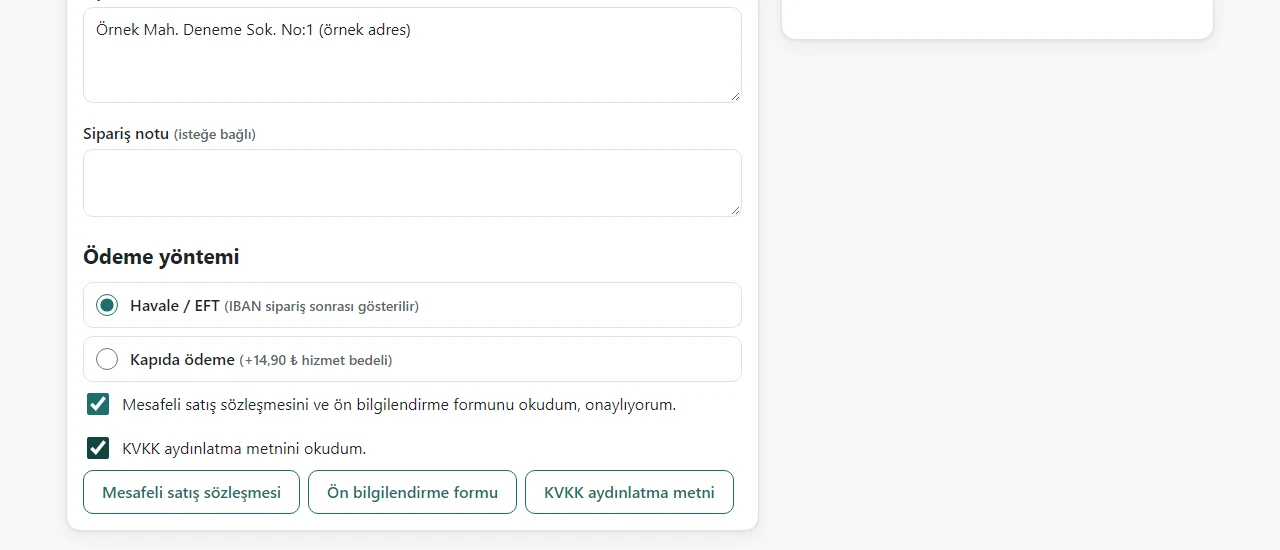
Bank transfer, cash on delivery and card payment bring different workloads. Card payment needs an account with a payment institution or virtual-POS provider; do not say “card payment works” before you have tried it end to end in the provider’s test mode with your own account. For transfer and cash on delivery, decide when an order counts as “paid” and when an unpaid order is cancelled.
Write down shipping, returns and withdrawal
Set the shipping fee, the free-shipping threshold and which carrier you use. In distance sales the consumer has a right of withdrawal and must be informed about it before the contract; the regulation lists the products for which the right cannot be used, so check your own products. Think in advance about how stock and the order are updated when a return arrives.
Complete the legal texts and duties
The law asks that the total price be visible before payment details are entered and that receipt of the order be confirmed without delay. You need a distance-sales contract, a pre-information form and a KVKK privacy notice; ready-made templates must be filled in with the shop’s details and checked by a lawyer. Find out from the Ministry of Trade whether ETBİS registration applies to you and from your accountant how invoicing is arranged.
Test everything end to end before launch
Place your own order like a customer: a product with options and one without, the cart, a coupon, every payment method, order tracking; then see the order in the admin panel, update its status and shipping details, and cancel an order to check that the stock comes back. Try it on a phone and in at least two browsers. Take a backup and restore it on a separate installation. If the software is on your own hosting, check that the private folders (settings file, data and backup folders) cannot be downloaded from a browser.
What to do regularly after launch
Take backups regularly and know where they are kept; remember that a backup of uploaded images may be separate. Settle who applies updates and security fixes. Check new orders, low stock and customer reviews regularly.
Which of these steps does the software on this site cover?
The ready-made e-commerce software presented on this site includes products with and without options, guest ordering, bank transfer and cash on delivery, coupons, order tracking, an admin panel, product loading by CSV and backup; which of these were tried is written on its product page. Card payment through PayTR was not tried with a real account and it has not been installed on real hosting. Installation options are set by written quote.
Quick checklist
- Have I written down what, how many products and which options I sell?
- Whose name are the domain and hosting in, and is HTTPS on?
- Was card payment tried end to end in the provider’s test mode?
- Were the legal texts filled in and checked?
- Did I try every flow before launch, on a phone too?
- Was a backup taken and a restore tried?
Sources
- Law on the Regulation of Electronic Commerce (6563), articles 3 and 4 — Mevzuat Bilgi Sistemi (Turkish legislation portal, in Turkish)
- Distance Contracts Regulation — Official Gazette, 27 November 2014, no. 29188 (see the current text with later amendments; in Turkish)
- Electronic Commerce Information System (ETBİS) — Republic of Türkiye Ministry of Trade (in Turkish)
Sources checked on 6 October 2026; legislation and practice may change.
Related guide
The cost of setting up an e-commerce website: items and what changes them
The cost is not one figure: platform, domain, hosting, payment, legal text, invoicing and maintenance items and what each depends on.
Read the guide →