Beauty centersDemo with sample data
Beauty Center Sessions and Booking: screen-by-screen guide
The full version of the short description on the product page: every feature, how each screen is used step by step, all limits and the delivery details.
All features
The functions below were tried in the app’s demo mode with sample data and covered by automated tests (unit, HTTP end-to-end, MariaDB); the live demo runs on a single host with sample data; they have not been tried on a real phone. The live demo runs version 1.0.23; its three roles (manager, reception, staff) and the customer’s booking flow were walked through end to end on the live demo on 24 October 2026. Adding to the phone and notifications are built but have not been tried on a real phone.
- A session-packages screen: customers due for the next session, packages about to end (last session left, or 30 days to the end date) and packages that ended with sessions unused; each row has a ready WhatsApp message (the center sends it)
- Deposit and an instalment plan (up to 12) when a package is sold; one-press collection on the due-payments screen; the same instalment cannot be collected twice
- Marking an appointment “Geldi” (arrived) takes the session from the customer’s package, online bookings included, and the service is not billed a second time
- The customer card shows the session history (which session, date, specialist) and a suggested date for the next session based on the “days between sessions” the center sets per service
- Missed appointments: the last days’ no-shows, how many times each customer missed, whether they booked again, and a “contacted” mark; a missed appointment is not charged and takes no session from a package
- An optional one-line skin / sensitivity note with a KVKK warning, shown to the specialist on the calendar; it never goes into messages, exports, the booking page or the API
- Online booking: the customer picks a service, a specialist, a day and a free time; the request waits for your approval; overlapping bookings are refused
- Multi-day leave and closed hours: a start and an end date, all day or the same hours every day; those days show closed on the customer’s booking page too, a day with an appointment is never cancelled silently, and the “upcoming leave and closed hours” list undoes it
- A setup wizard, a progress bar and a closed “what is this screen for?” box on every screen; adding customers from Excel/CSV; in the demo “start again with an empty site” and “restore the sample data”
- “Send to customers”: a ready WhatsApp message in one tap, copy the link and a QR A4 poster; adding the panel and the customer’s booking page to the phone’s home screen; the browser’s free notification for a new request (not tried on a real phone)
- Tickets, daily till, stock, specialist commission and reports; roles: manager, reception, specialist (a specialist sees only their own calendar; a button, form or link the role may not use is not shown to it)
- Closing a problem customer to online booking: “Close online booking for this customer” on the customer card; a closed number cannot book on the booking page or through the API (the server checks it too) and is pointed to “call us / write on WhatsApp” buttons; you can still book them from the calendar (with a note). In Settings you choose how many hours before an appointment a customer can no longer cancel online, how many days ahead a booking may be made, and whether service prices are shown to customers
- Several services in one booking: on the booking page the customer picks “Aynı randevuya bir hizmet daha ekle” (add another service; up to three more); minutes and prices are added up, the times offered fit the total, and it is one booking. A package and its instalments stay tied to the first service. With “Fark etmez” (doesn’t matter) the free specialist with the fewest bookings that day is assigned
- Repeat a booking (weekly, every two weeks, monthly; up to 24 times): every date that could not be booked is named with its reason (already booked, time off, closed day) instead of being skipped silently; the series is removed with one tap, “Tüm seriyi iptal et (N)” (this booking and the scheduled ones after it; ones already marked arrived or missed stay)
- Review after a visit: the card of an appointment marked “Geldi” (arrived) has “Değerlendirme iste (WhatsApp)” with the message ready; the customer gives a 1–5 rating and an optional comment on a large, plain page without signing in (once per visit); the Reviews page shows the average, a “low ratings only (1–3)” filter and a ready message for an unhappy customer. Nothing is sent automatically; the salon sends the message
- Reports: busy hours, each service’s share of revenue (%), staff fill and kept rate, the customers who paid the most (VIP) and customers with no visit in 90 days (passive; a ready WhatsApp invitation on each row; someone with a booking ahead is not listed)
- Staff phone permission: on the panel logins in the Staff page a “Telefonu görür / Telefon gizli” (sees the phone / phone hidden) button; when hidden, that staff member does not see customers’ phone numbers, the call and WhatsApp buttons do not appear and a search by number finds nothing; the server checks it too (default: they see it). In the demo a second staff login opens with the phone hidden
- Warning note: a one-line “skin / sensitivity note” (colour / allergy, sensitivity) on the customer card; a red “Uyarı” badge on the card and on that customer’s booking cards, visible to the staff member doing the job. It never goes into messages, exports or the customer’s own page (KVKK: it can be special-category data; keep it short and known to the customer)
- “Geleceğim” (I am coming) button: on their own booking page the customer says in one tap that they will come; the calendar card shows a green “✓ Geleceğim”. No message is sent, the cancel rule is unchanged, and moving the booking clears the mark
- Floating “WhatsApp’tan yaz” (write on WhatsApp) and “Ara” (call) buttons: two big buttons at the bottom of the showcase and the booking page (WhatsApp opens with the words ready and the customer sends it); drawn only when the salon has a phone number
- Approved reviews on the showcase: on the Reviews page each review has “Göster / Gizle” (show / hide; hidden by default; a 1–3 rating asks again); the showcase then has a “Müşterilerimiz ne diyor” (what our customers say) section with stars, the comment and only the first name plus the first letter of the surname, never a phone number or address; the average counts every review received, hidden ones included, and says how many
- Weekly days and hours per specialist: for each specialist day by day “shop hours”, “not working” or “own hours”; customers can book that specialist only at the hours they work (“Fark etmez” chooses only among those working), and the API refuses too; you can still book from the panel and are warned; without a record the specialist works the shop’s hours
- Activity log (manager): who did what and when with bookings, payments, settings and panel logins; filter by kind, person and date; no customer name, phone, e-mail or note is written; the connection source (address) is kept; lines older than 180 days are deleted; if a line cannot be written the action still goes through
Screen by screen: how it is used
The app’s interface in these screens is Turkish: the product is made for businesses in Turkey, and the program can also be switched to English in its settings. Only the captions and explanations on this page are in English. The screens come from the app’s demo mode with sample data; the center, the people, the phone numbers starting with 0500, the amounts and the “days between sessions” values are sample data (not medical advice). The sign-in page, the calendar, the setup wizard, “Müşteriye gönder” (send to customers) and the upcoming-leave screens come from the live demo (version 1.0.15, 24 October 2026), the booking form and the time-and-details screens from the live demo (version 1.0.5), the other screens from the app’s demo mode. The phone-size screens come from a browser set to a phone’s size.
- Who uses it?
- A customer booking an appointment, and the beauty center’s owner or front desk running the calendar, session packages, instalments and missed appointments.
- Where do they start?
- The customer presses “Randevu al” (book) on the center’s showcase page. The center signs in to the panel with its e-mail and password and starts from the calendar, which has a column per specialist.
What do they do on screen? Step by step
-
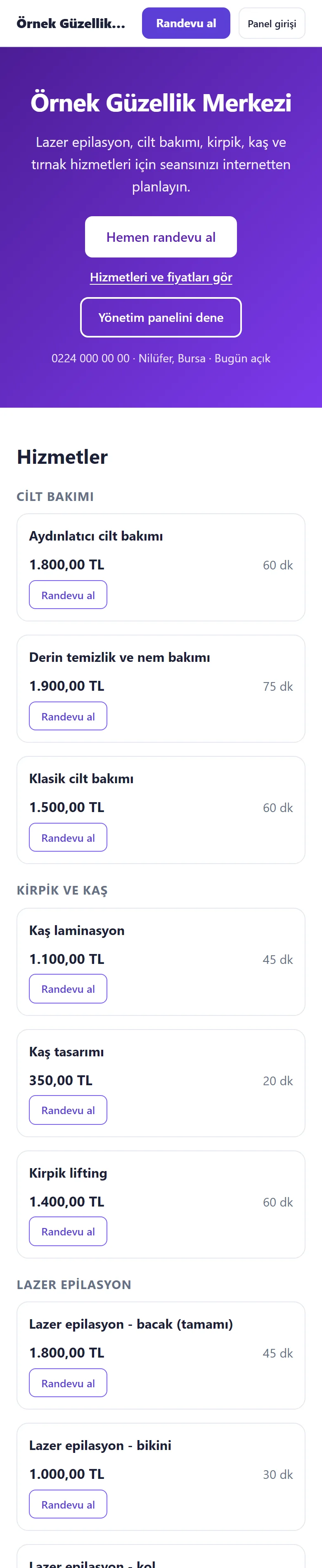
Showcase page
The center’s page lists services by category with prices and durations; the customer starts with “Randevu al” (book). Phone size.
- On screen (Turkish interface)
- “Randevu al / Panel girişi” — book / staff sign-in
- “Hemen randevu al” — book now
- “Hizmetleri ve fiyatları gör” — see services and prices
- “Hizmetler” — services
-
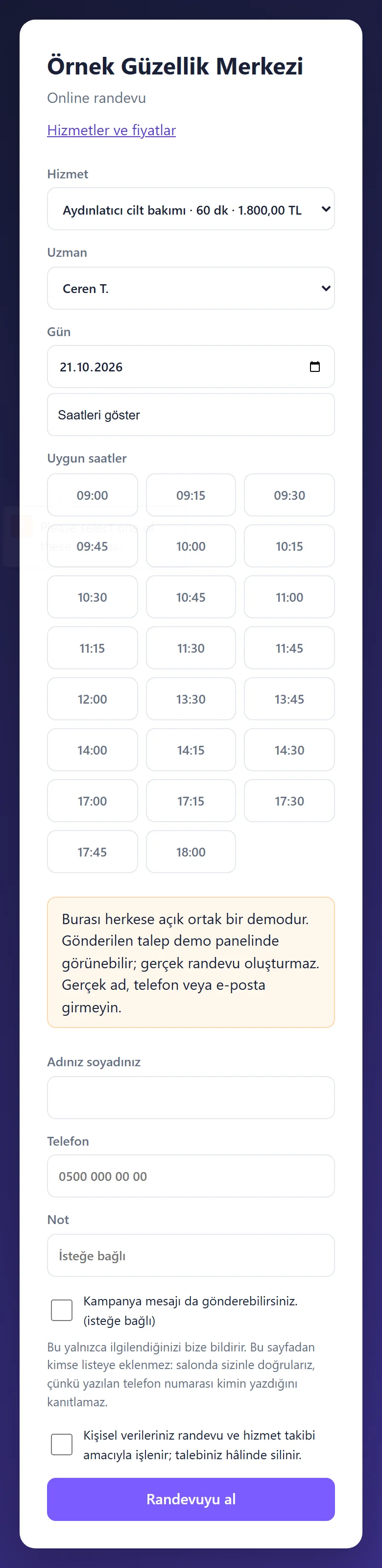
1.0.5 · 21 October 2026 Service, specialist, day and time
A service and a specialist are picked; a day then shows its free times.
- On screen (Turkish interface)
- “Hizmet / Uzman / Gün” — service / specialist / day
- “Saatleri göster” — show times
- “Uygun saatler” — available times
-
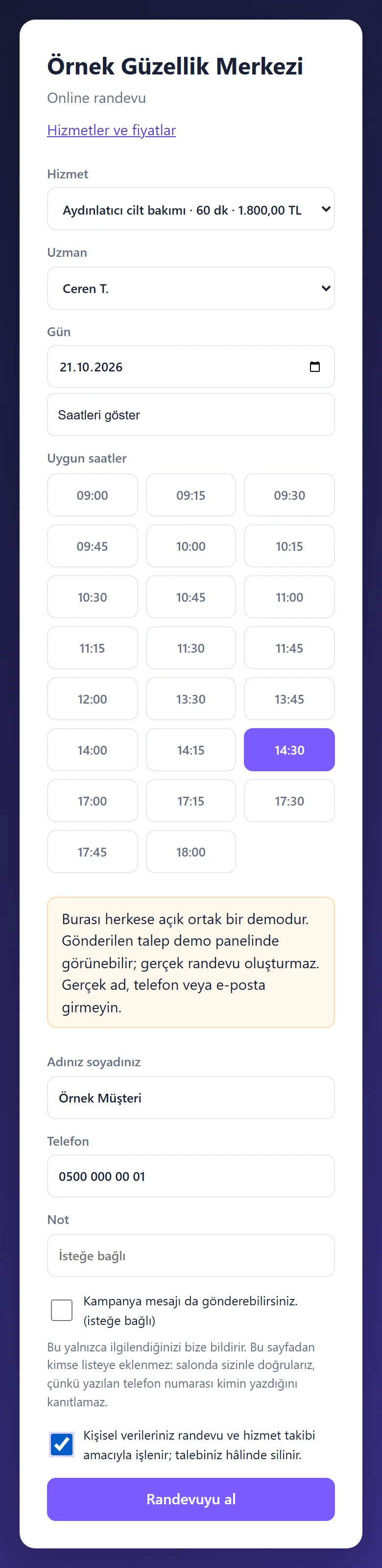
1.0.5 · 21 October 2026 Time and details
The customer taps a time (here 14:30), enters name and phone and ticks the privacy consent. Permission for offers is separate and optional. The public demo form warns not to enter real details. After booking, a “Salona WhatsApp ile haber ver” (tell the salon on WhatsApp) button on the customer’s own appointment page opens a ready message in the salon’s WhatsApp; the customer taps “send”, the program sends nothing on its own.
- On screen (Turkish interface)
- “Adınız soyadınız / Telefon / Not” — full name / phone / note
- “Kampanya mesajı da gönderebilirsiniz. (isteğe bağlı)” — you may also send me offers (optional)
- “Randevuyu al” — book the appointment
-
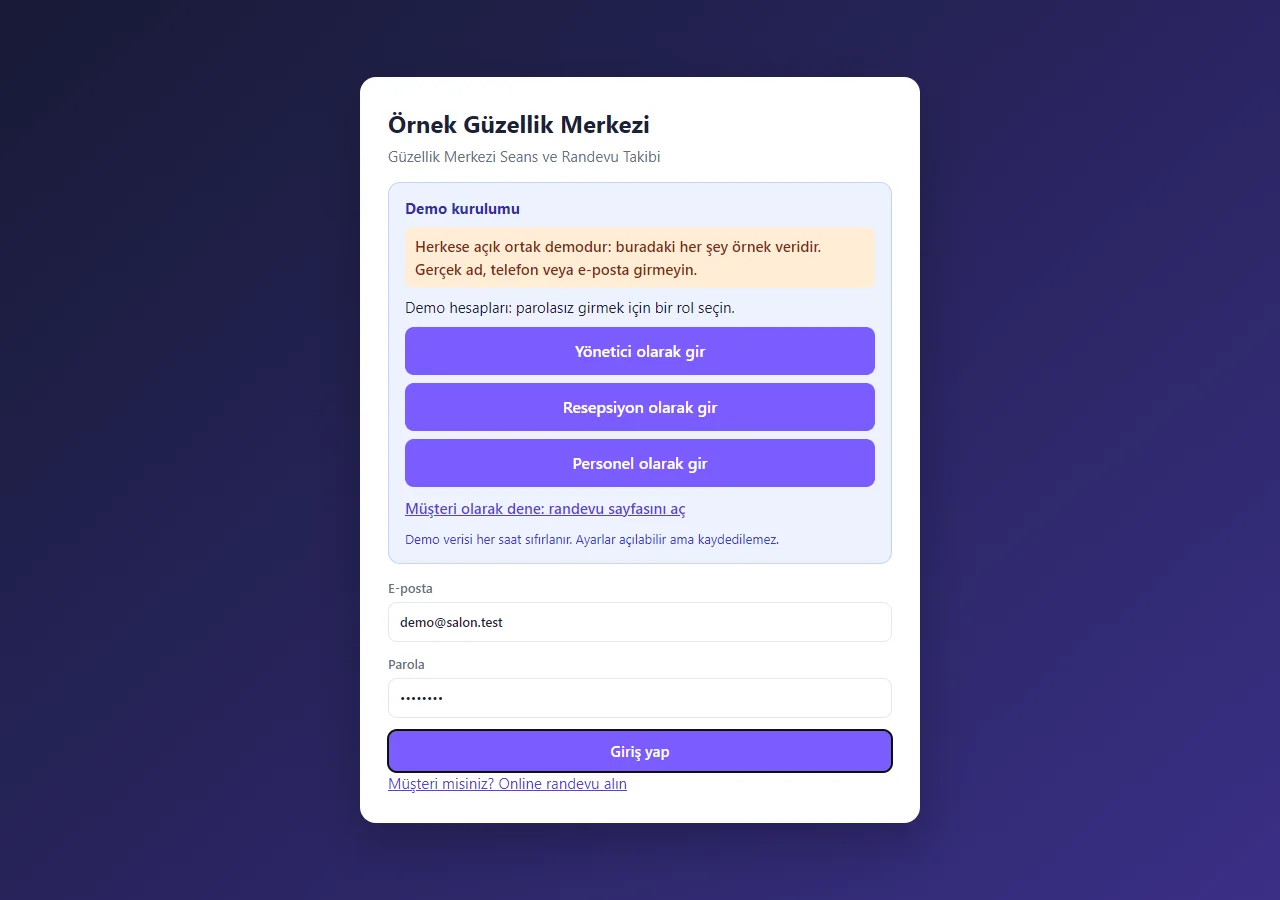
1.0.5 · 21 October 2026 Business sign-in
On the demo’s sign-in page (version 1.0.15) a “Demo kurulumu” (demo installation) box holds the shared-demo warning, password-free “… olarak gir” (sign in as …) buttons for manager, reception and staff, and a link to the customer booking page; the e-mail and password fields come prefilled with the manager account. The box shows only in demo mode; a normal installation has empty fields and asks for an e-mail and password.
- On screen (Turkish interface)
- “Demo kurulumu” — demo installation
- “Yönetici olarak gir / Resepsiyon olarak gir / Personel olarak gir” — sign in as manager / reception / staff
- “Müşteri olarak dene” — try as a customer
- “Giriş yap” — sign in
-
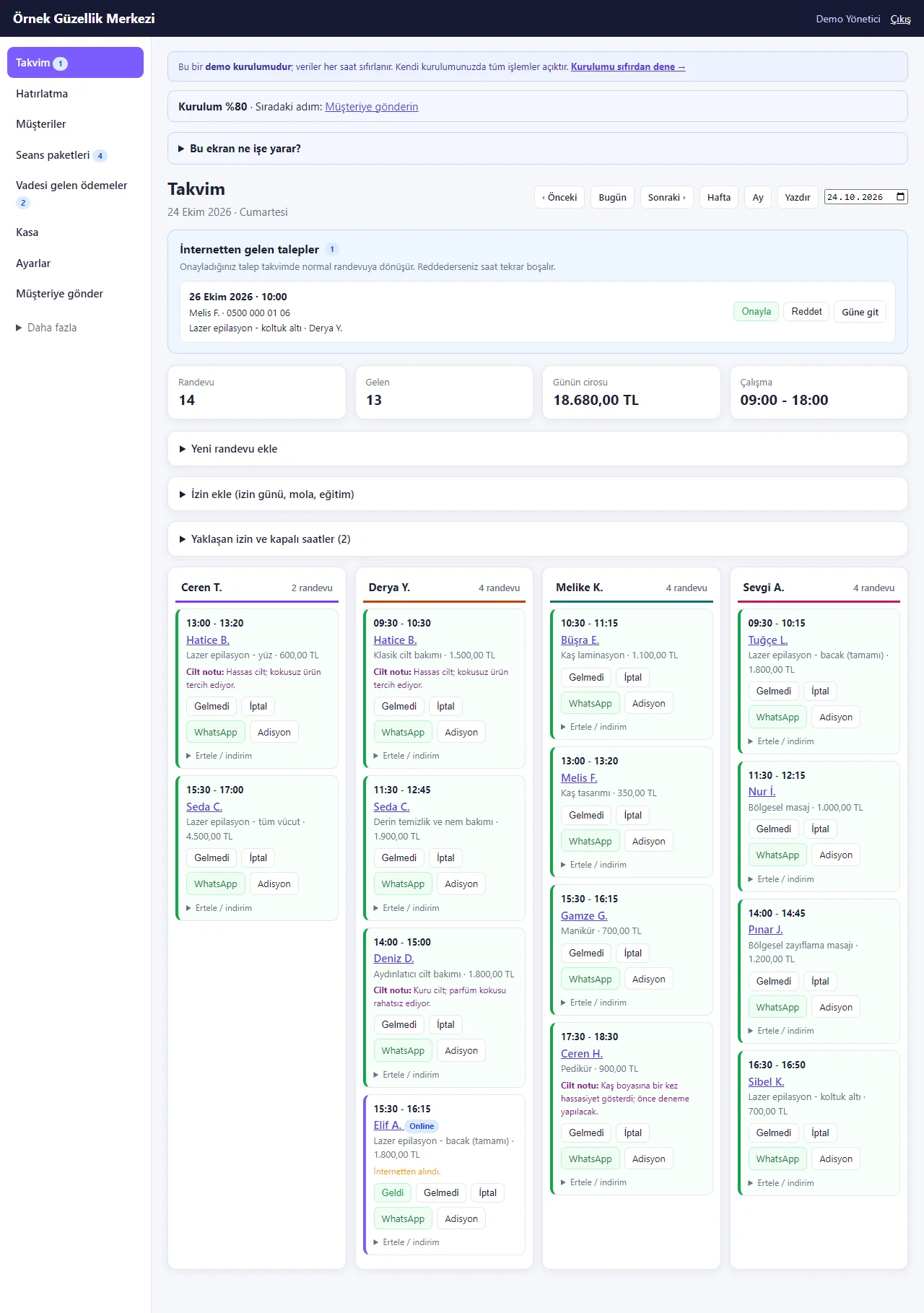
Day calendar
One column per specialist. Menu counts for packages, due payments and missed appointments; a waiting online request; the customer’s short “Cilt notu” (skin note) on the cards.
- On screen (Turkish interface)
- “Seans paketleri” — session packages
- “Vadesi gelen ödemeler” — due payments
- “Gelmeyenler” — missed appointments
- “İnternetten gelen talepler” — online requests
- “Cilt notu” — skin note
-
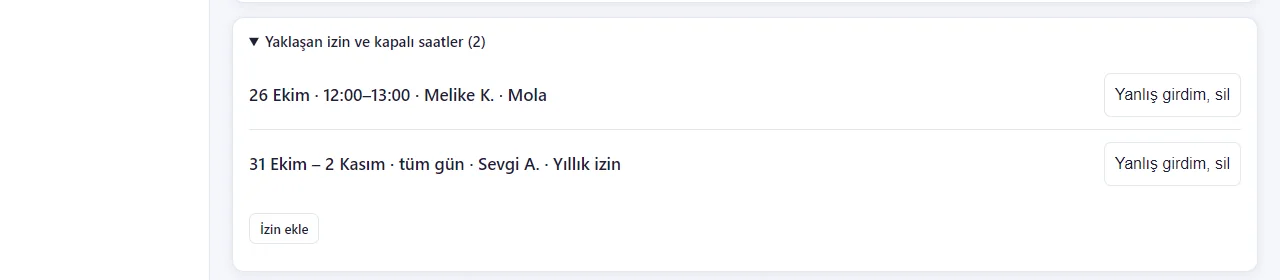
Upcoming leave and closed hours
“İzin ekle” (add leave) takes a start date, an end date and “Tüm gün” (all day), or the same hours every day; the program closes those days itself and the customer page shows them closed. Each leave is one line in the list and “Yanlış girdim, sil” (I made a mistake, delete) undoes it. A day that already has an appointment is warned about, never cancelled silently. Staff add and delete only their own leave.
- On screen (Turkish interface)
- “İzin ekle” — add leave
- “Tüm gün” — all day
- “Yanlış girdim, sil” — I made a mistake, delete
-
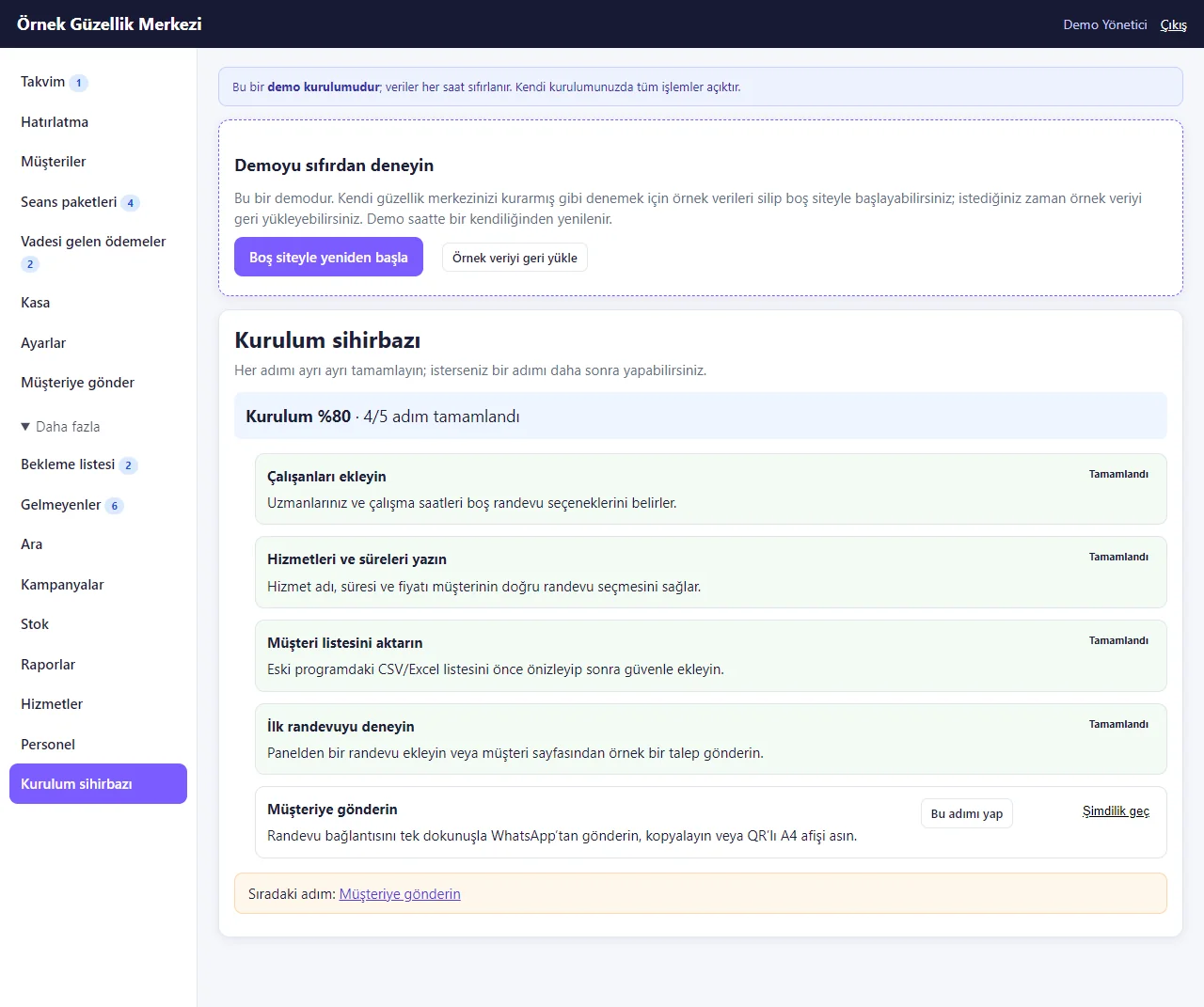
Setup wizard
Step-by-step setup for an owner who has never used the app: staff, services, the customer list (Excel/CSV), a first appointment and sending the link. A “Kurulum %80” (setup 80%) bar shows the next step on every panel page. In the demo, “Boş siteyle yeniden başla” (start again with an empty site) deletes the sample data and opens the wizard at 0%, and “Örnek veriyi geri yükle” brings it back; a real installation has no such box.
- On screen (Turkish interface)
- “Kurulum sihirbazı” — setup wizard
- “Boş siteyle yeniden başla” — start again with an empty site
- “Örnek veriyi geri yükle” — restore the sample data
- “Şimdilik geç” — skip for now
-
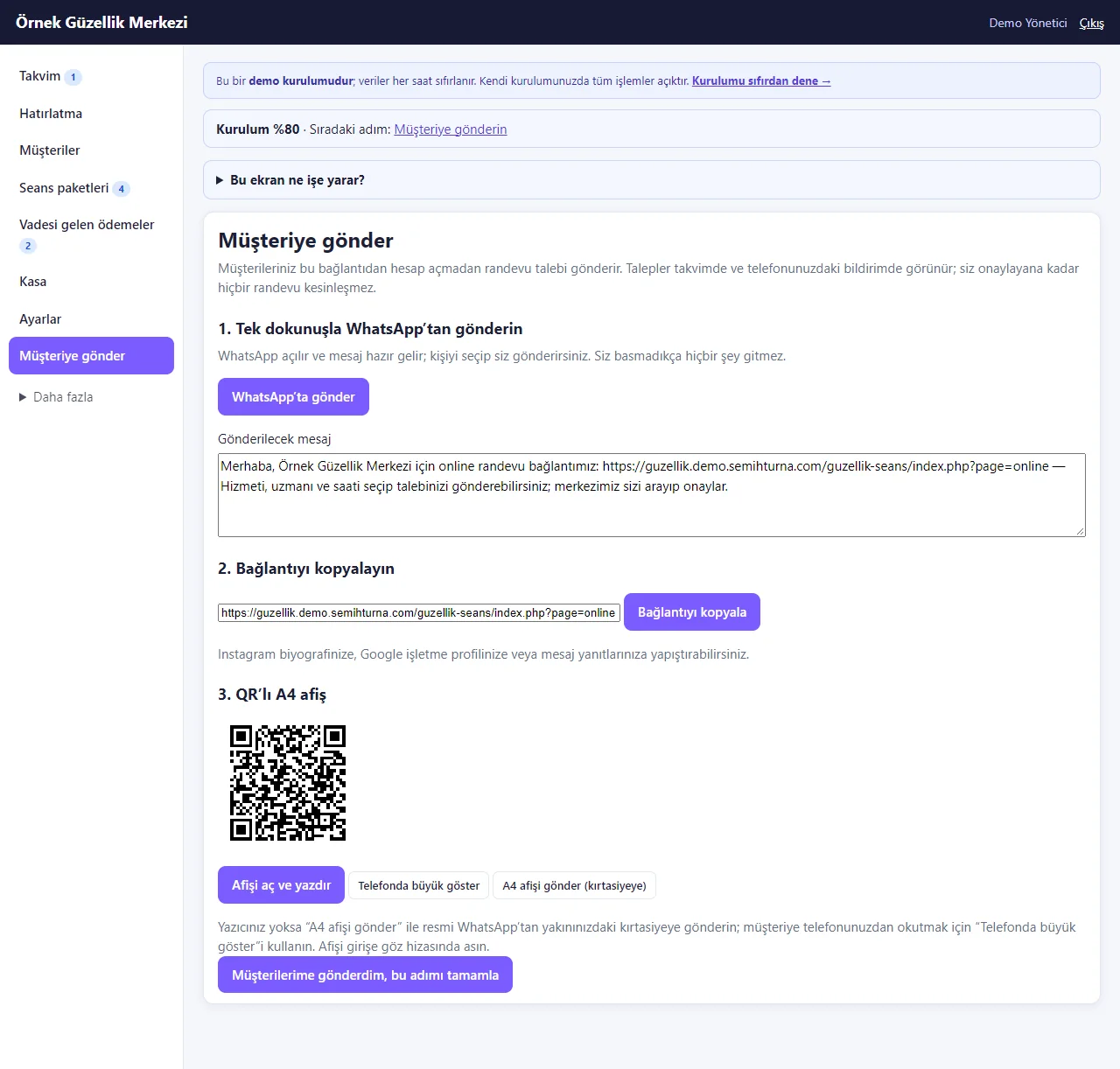
Send to customers
The booking link opens as a ready WhatsApp message in one tap (the center presses send), can be copied, or becomes an A4 poster with a QR code that is printed or sent to a print shop on WhatsApp. A customer sends a request without an account; a new request reaches the center’s phone as an app notification (the browser’s own free notification; not tried on a real phone).
- On screen (Turkish interface)
- “Müşteriye gönder” — send to customers
- “WhatsApp’ta gönder” — send on WhatsApp
- “Bağlantıyı kopyala” — copy the link
- “A4 afişi gönder (kırtasiyeye)” — send the A4 poster (to a print shop)
-
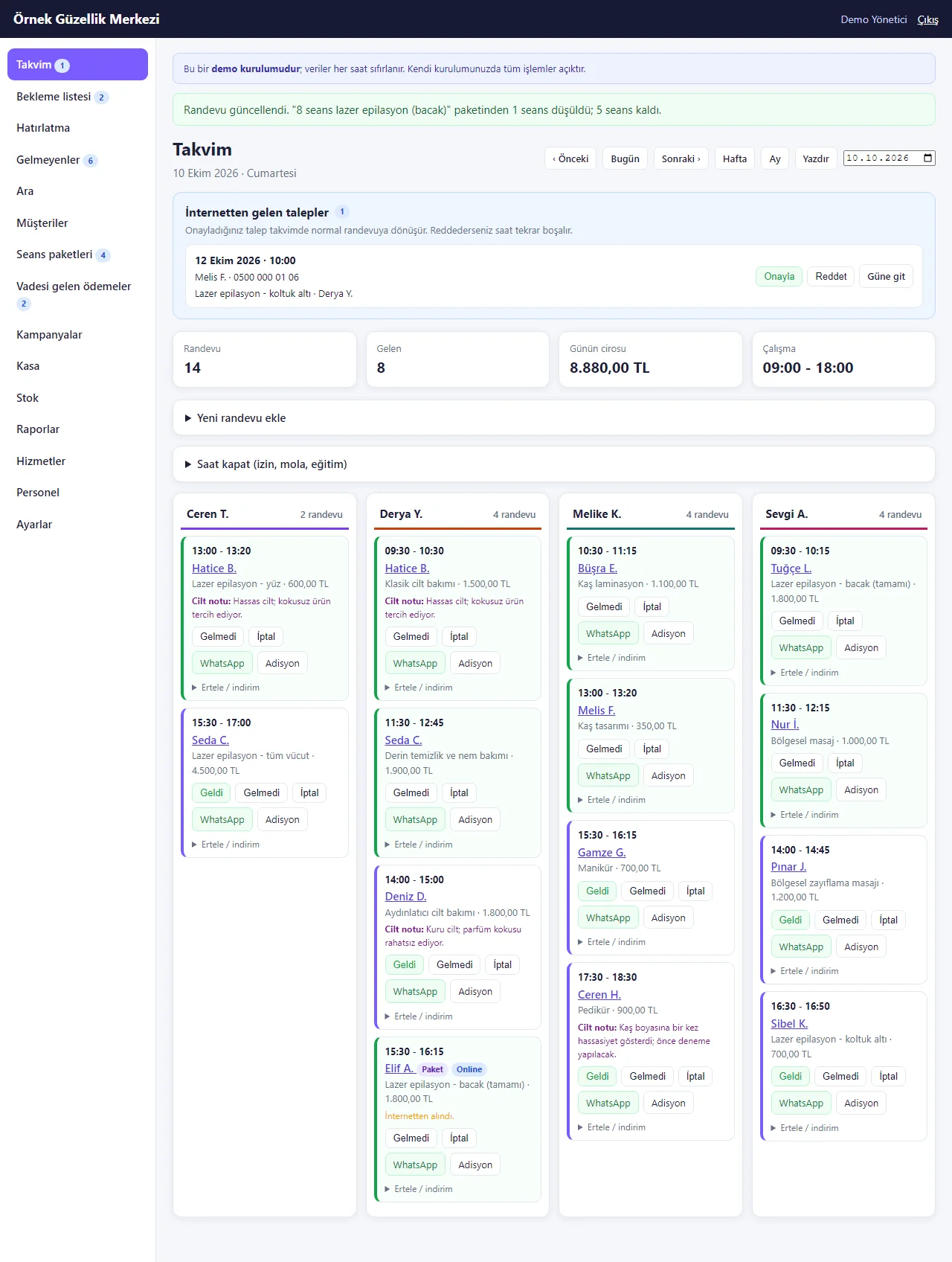
Arrived: the session comes out of the package
Marking Elif A.’s online appointment “Geldi” (arrived) takes one session from her package (“5 left”); the service is not billed again.
- On screen (Turkish interface)
- “Geldi” — arrived
- “paketinden 1 seans düşüldü; 5 seans kaldı” — one session was taken from the package; 5 left
- “Paket / Online” — package / online
-
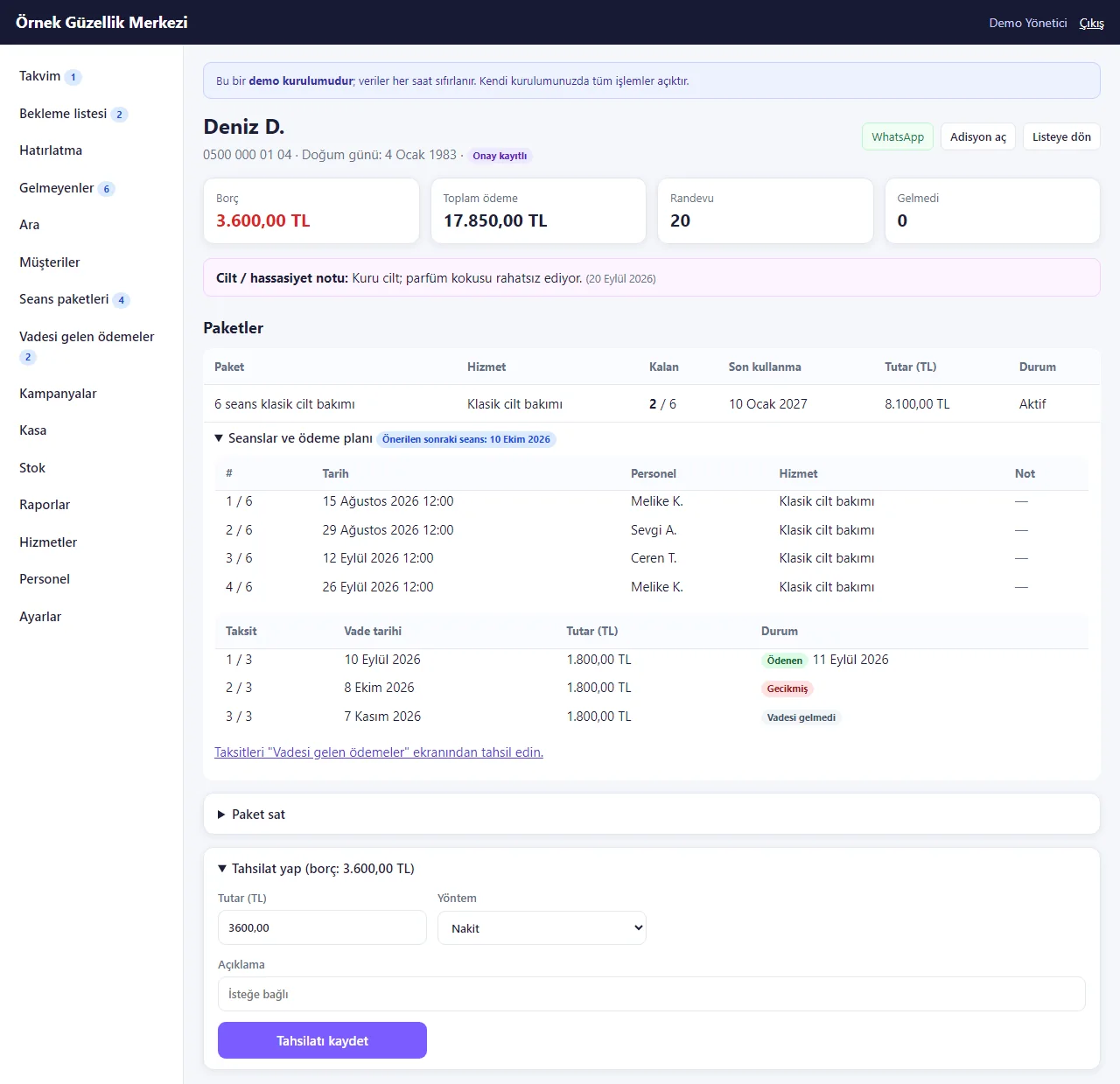
Customer card
Balance and payments, the short skin / sensitivity note, the package, the session history (which session, date, specialist), the payment plan and the suggested date of the next session.
- On screen (Turkish interface)
- “Cilt / hassasiyet notu” — skin / sensitivity note
- “Paketler / Kalan / Son kullanma” — packages / left / valid until
- “Seanslar ve ödeme planı” — sessions and payment plan
- “Ödenen / Gecikmiş / Vadesi gelmedi” — paid / late / not due yet
- “Önerilen sonraki seans” — suggested next session
-
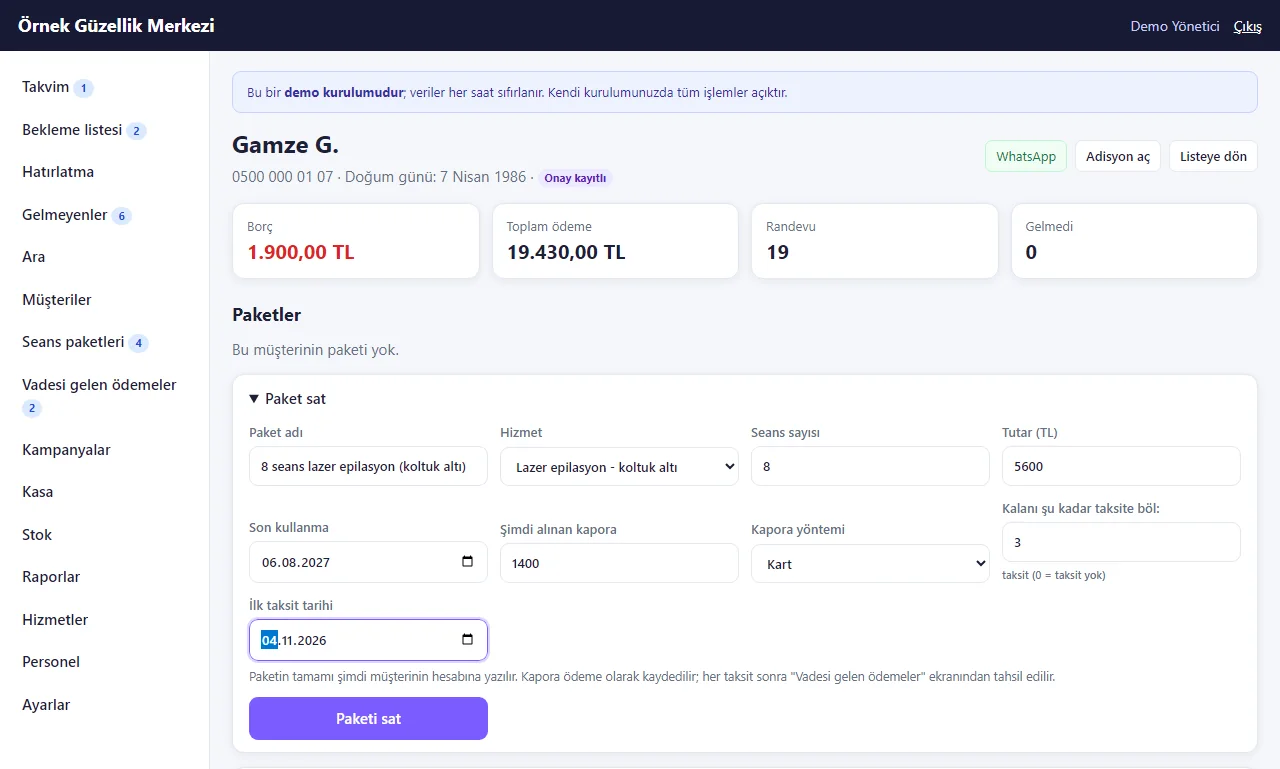
Selling a package
Name, service, number of sessions, price and end date; an optional deposit and the number of instalments with the first due date. The whole price goes on the account on the sale day.
- On screen (Turkish interface)
- “Paket sat” — sell package
- “Şimdi alınan kapora / Kapora yöntemi” — deposit paid now / deposit method
- “Kalanı şu kadar taksite böl” — split the rest into instalments
- “İlk taksit tarihi” — first instalment due
- “Paketi sat” — sell the package
-
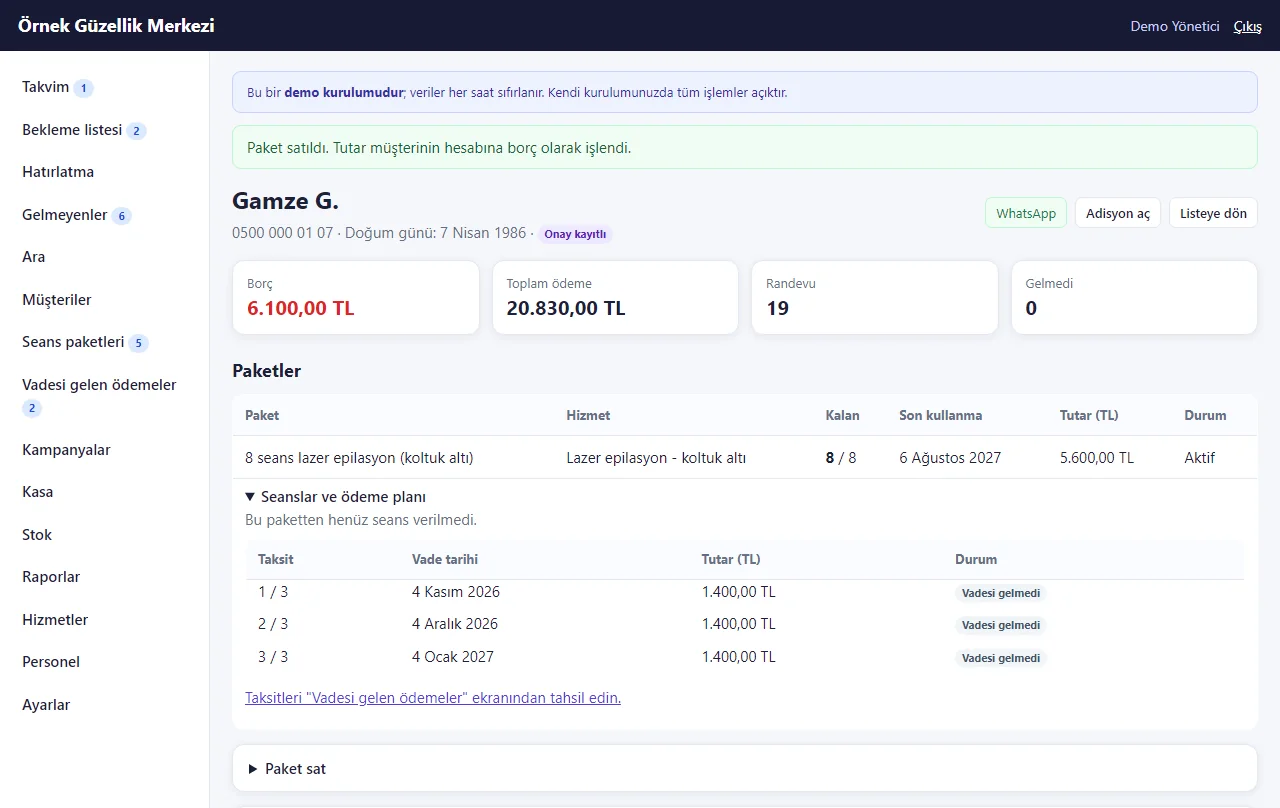
Package sold
The package is on the card with 8 of 8 sessions and its three instalments with dates; the deposit went into the cash register as a payment.
- On screen (Turkish interface)
- “Paket satıldı.” — package sold.
- “Vadesi gelmedi” — not due yet
-
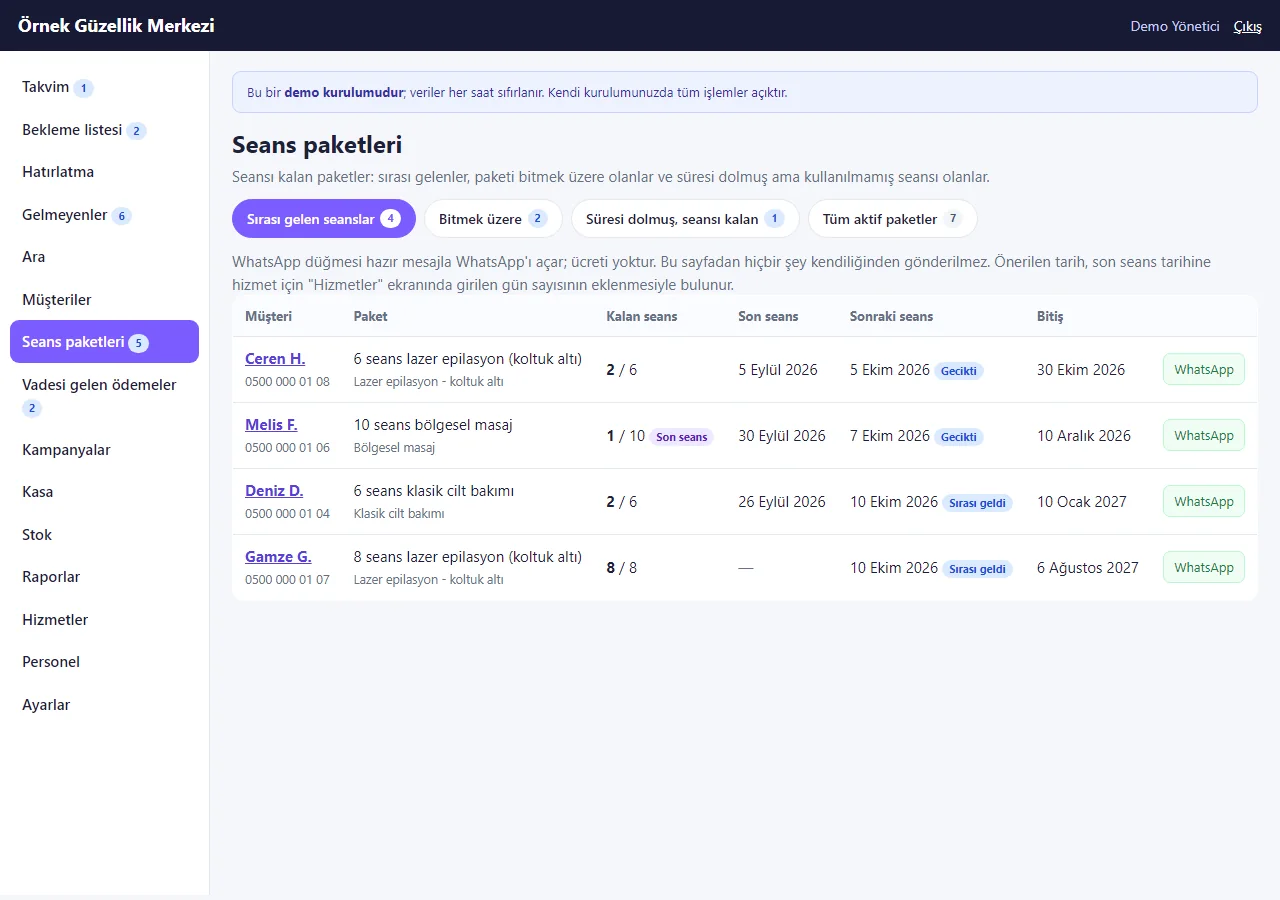
Session packages: next session due
Customers whose days between sessions (set per service) have passed with nothing booked; a ready WhatsApp message (the center sends it).
- On screen (Turkish interface)
- “Sırası gelen seanslar” — next session due
- “Kalan seans / Son seans / Sonraki seans / Bitiş” — sessions left / last session / next session / ends
- “Gecikti / Sırası geldi” — overdue / due
-
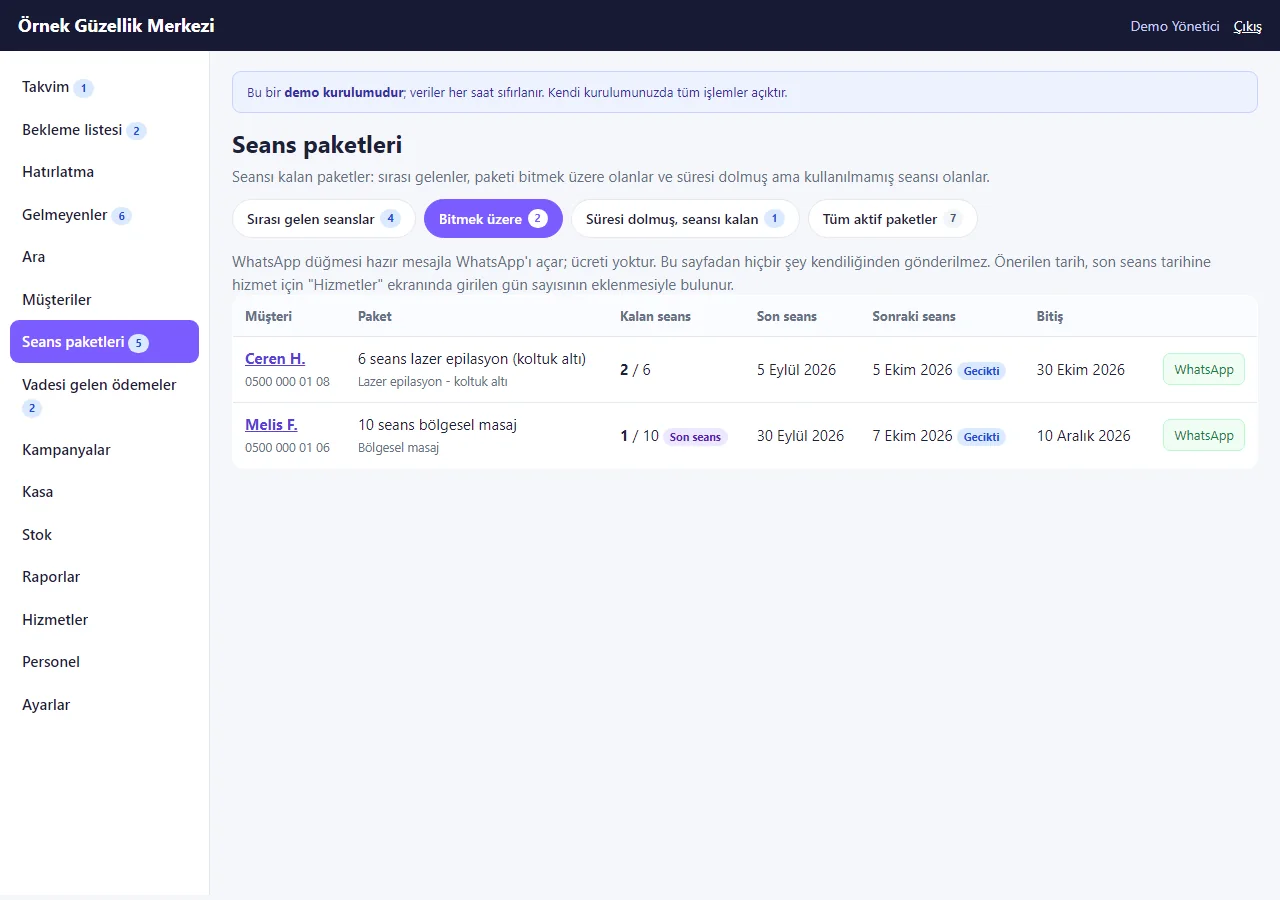
Ending soon
A package with one session left, or with 30 days or less to its end date.
- On screen (Turkish interface)
- “Bitmek üzere” — ending soon
- “Son seans” — last session
-
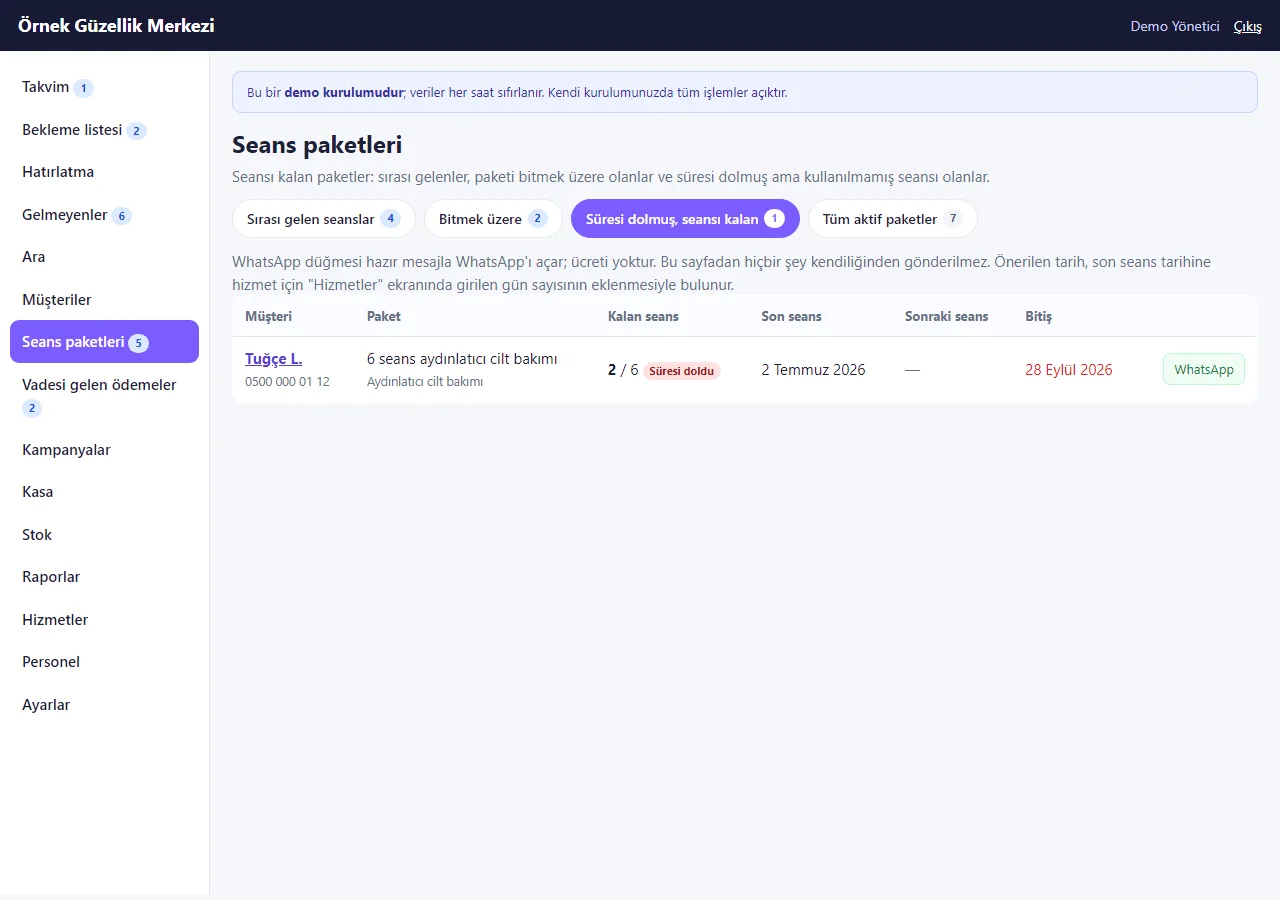
Ended with sessions left
Packages past their end date with sessions unused; what to do is the center’s decision.
- On screen (Turkish interface)
- “Süresi dolmuş, seansı kalan” — ended with sessions left
- “Süresi doldu” — ended
-
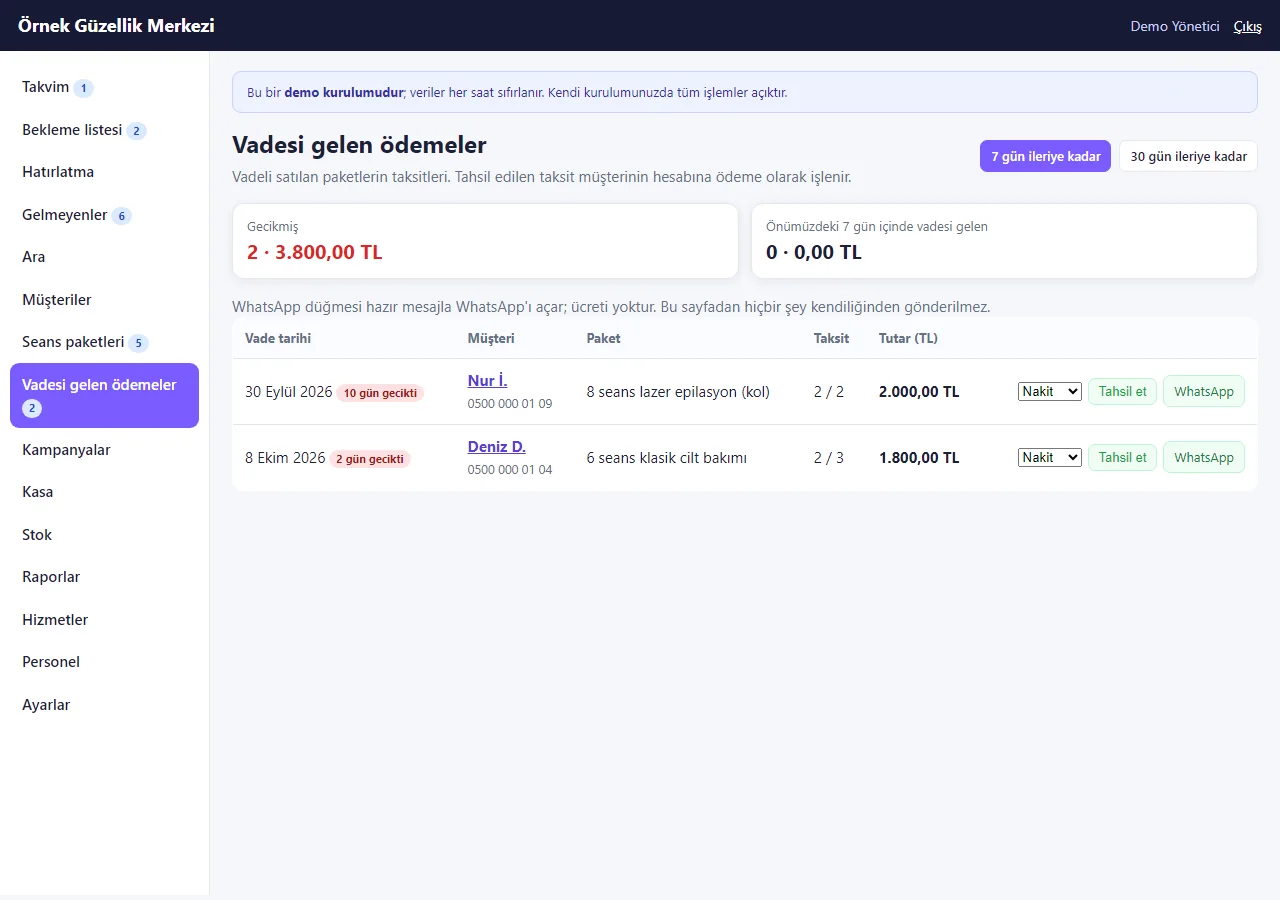
Due payments
Late and upcoming instalments; each row has a payment method, “Tahsil et” (collect) and WhatsApp.
- On screen (Turkish interface)
- “Gecikmiş” — late
- “Tahsil et” — collect
- “gün gecikti” — days late
-
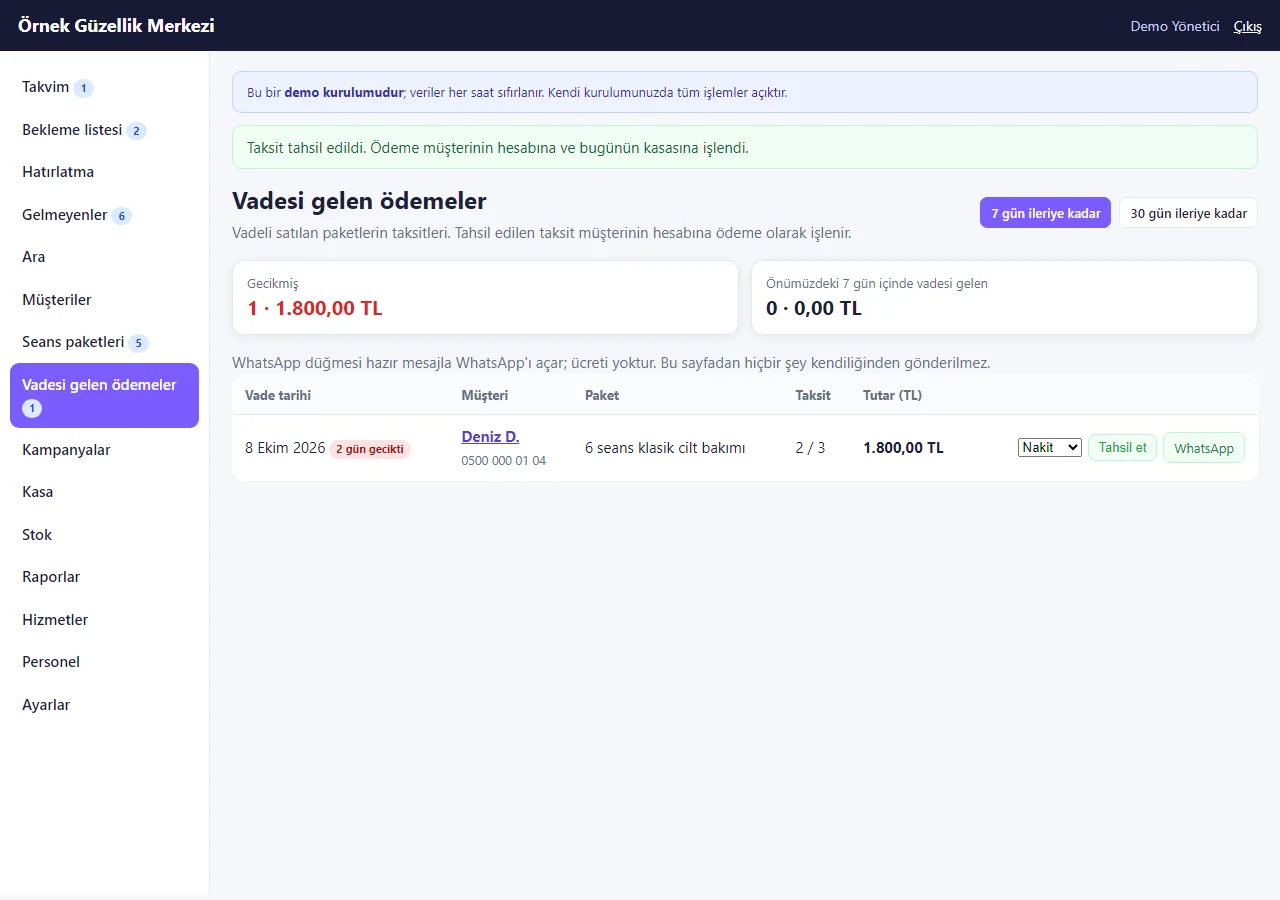
Collecting
“Tahsil et” records the payment on the customer’s account and in the day’s cash register and closes the instalment; the same instalment cannot be collected twice.
- On screen (Turkish interface)
- “Taksit tahsil edildi.” — instalment collected.
-
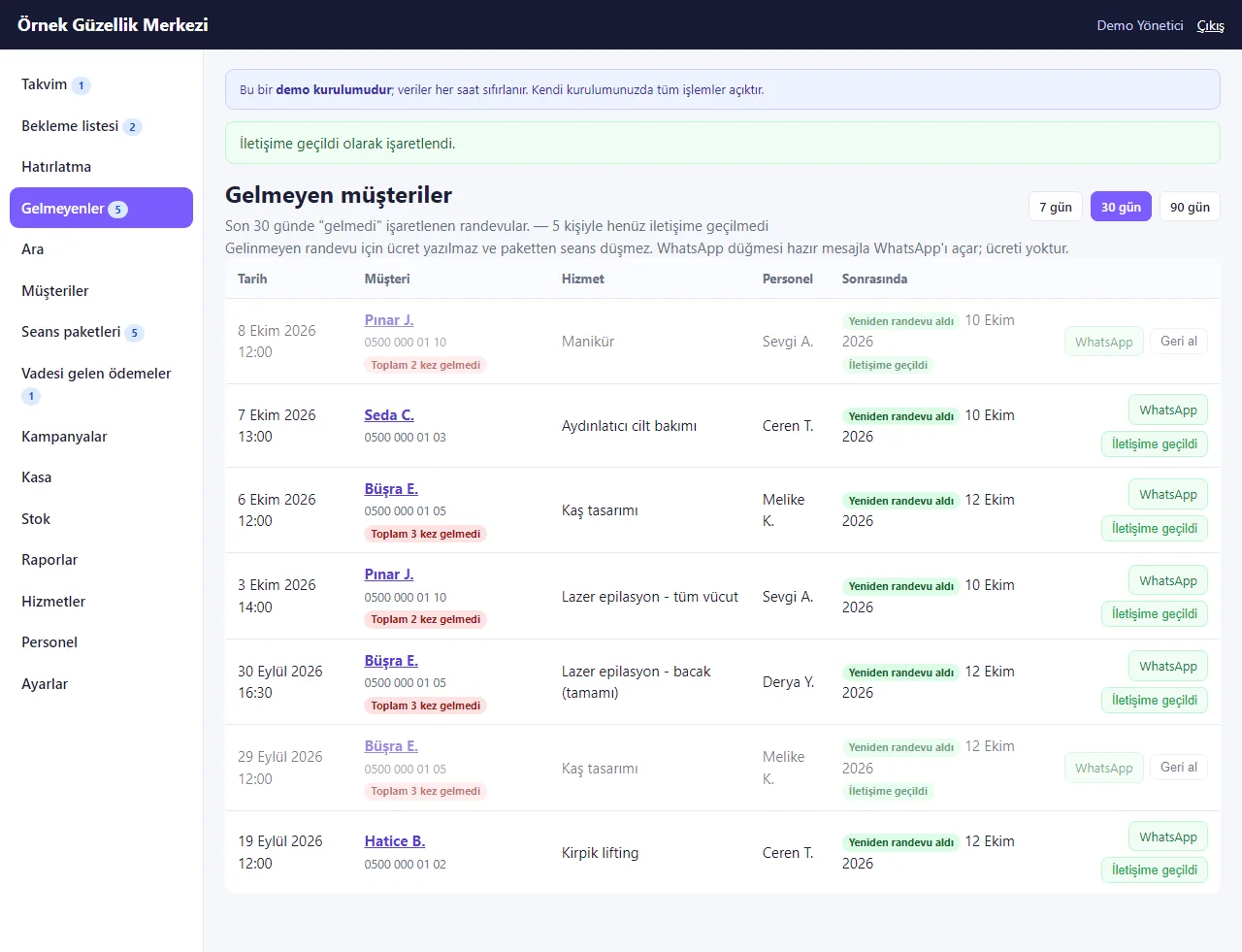
Missed appointments
The last days’ no-shows, how many times each customer missed, whether they booked again; a “contacted” mark. A missed appointment is not charged and takes no session from a package.
- On screen (Turkish interface)
- “Gelmeyen müşteriler” — missed appointments
- “Yeniden randevu aldı” — booked again
- “İletişime geçildi” — contacted
- “Toplam 2 kez gelmedi” — missed 2 times in all
-
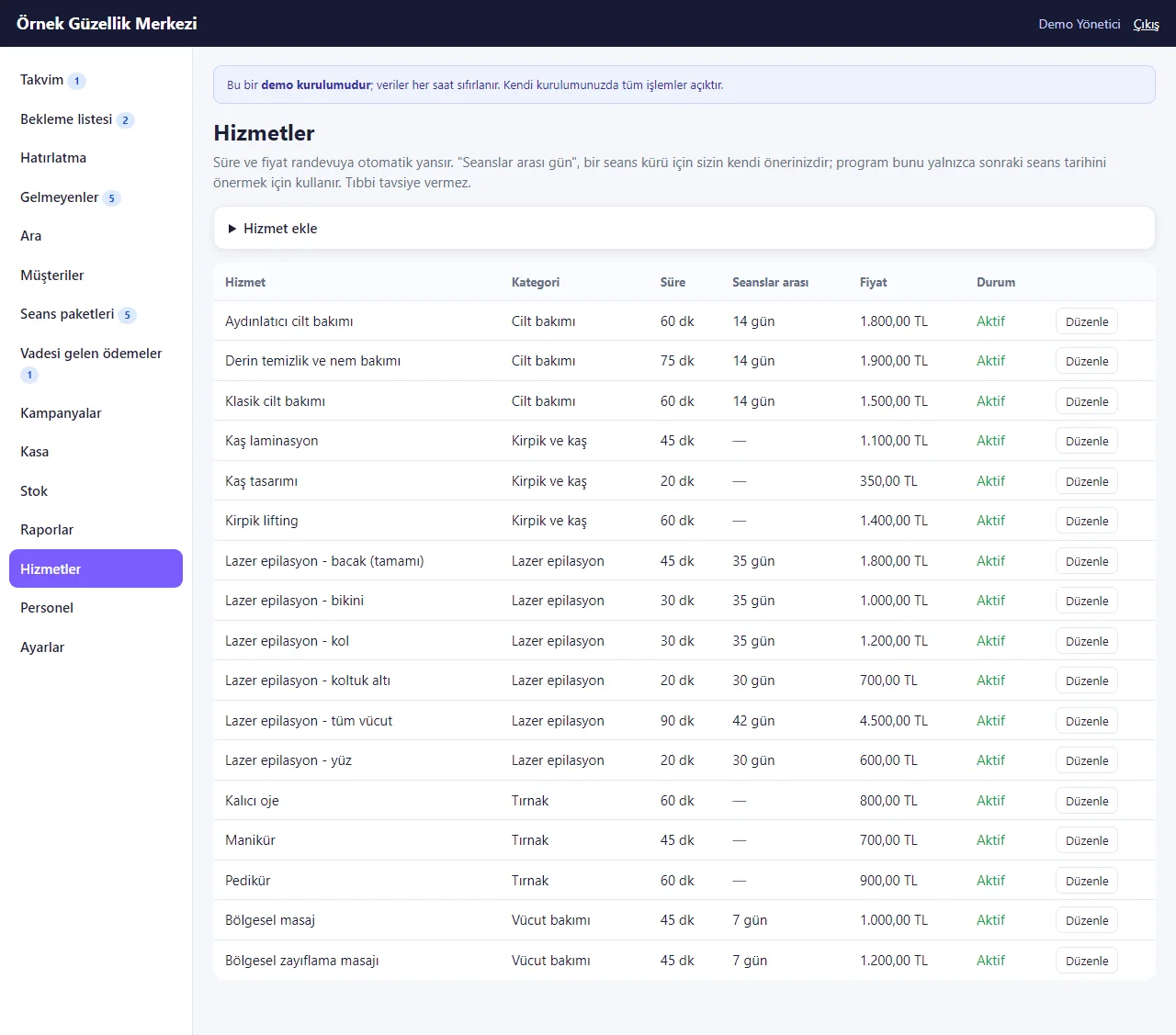
Services and days between sessions
Duration, price and the center’s own “days between sessions”; the program uses it only to suggest the date of the next session.
- On screen (Turkish interface)
- “Hizmetler” — services
- “Seanslar arası” — between sessions
- “Aktif” — active
-
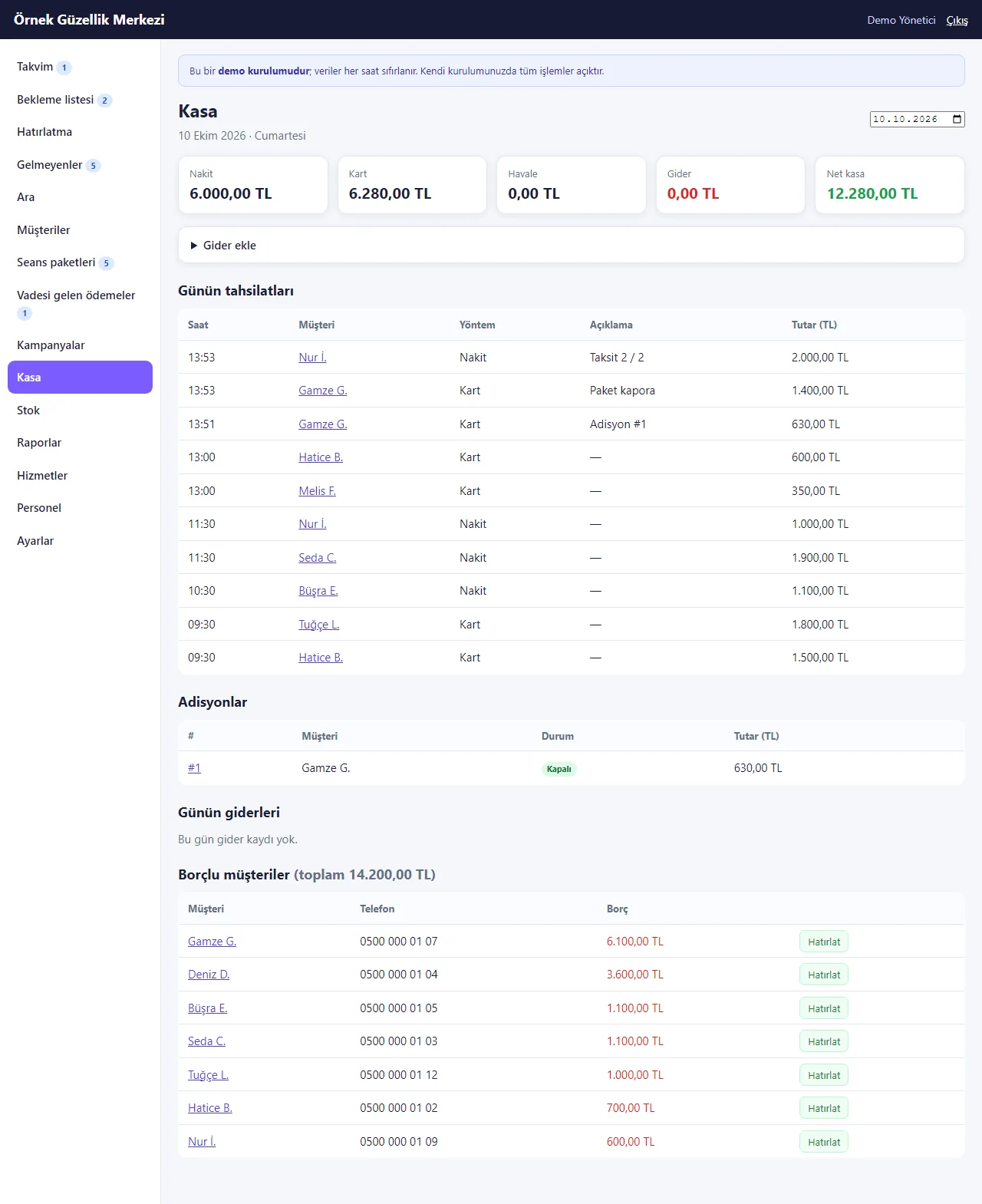
Daily cash register
Cash, card, transfer, expenses and net; among the day’s payments the “Paket kapora” (package deposit) and “Taksit 2 / 2” (instalment) ones, the ticket and customers who owe.
- On screen (Turkish interface)
- “Kasa” — cash register
- “Günün tahsilatları” — the day’s payments
- “Borçlu müşteriler” — customers who owe
-

Session packages on a phone
The same list at phone width; each package is a card, touch targets at least 44 px.
-
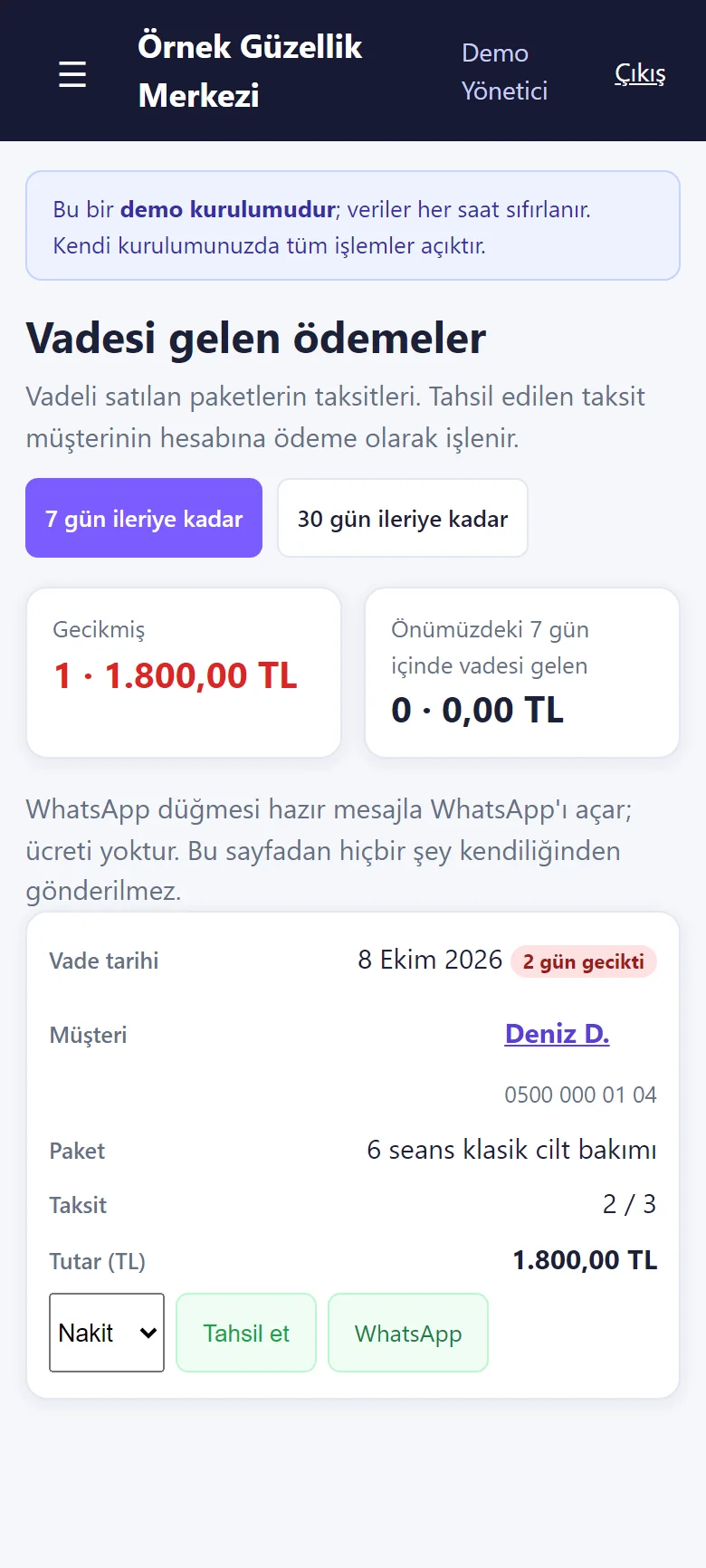
Due payments on a phone
A late instalment as a card; method, “Tahsil et” and WhatsApp.
-
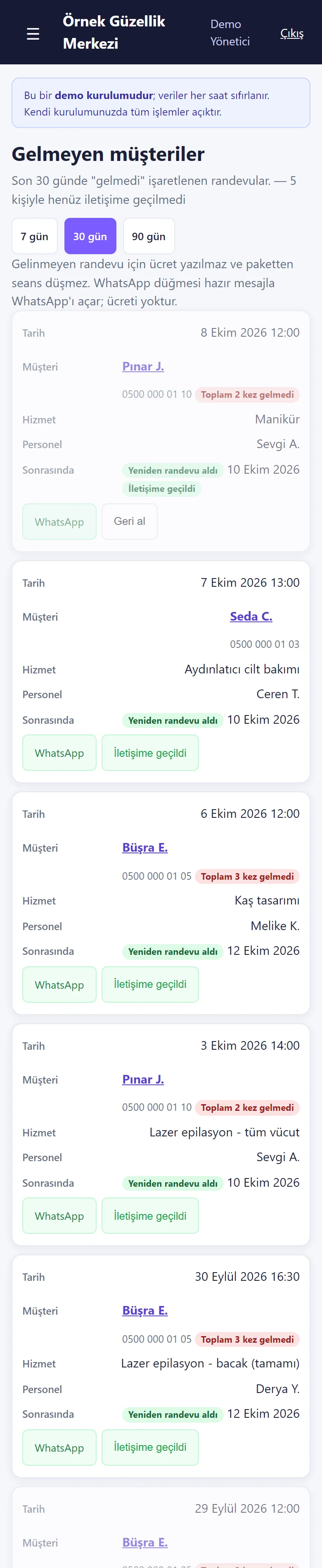
Missed appointments on a phone
Each appointment is a card with the customer, service, specialist, whether they booked again and two buttons.
-
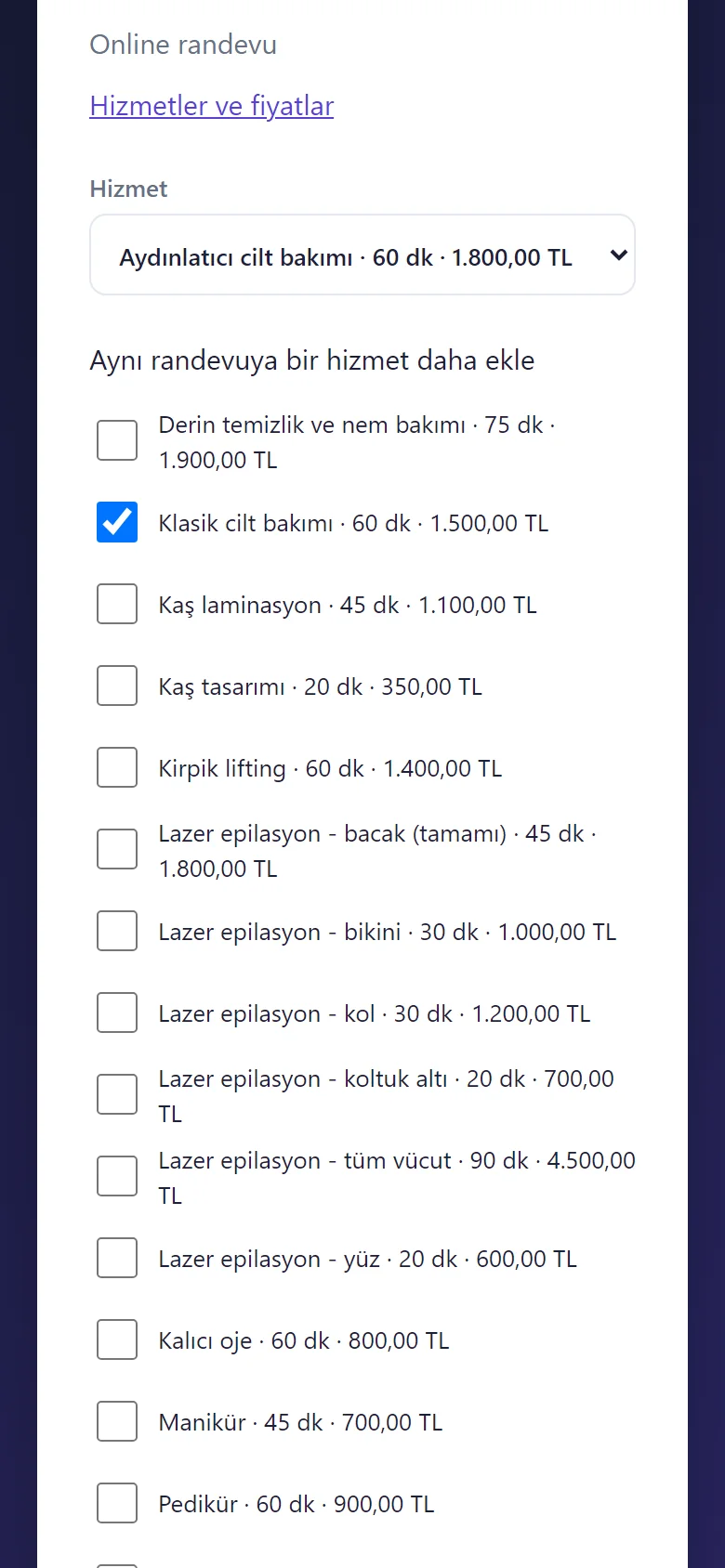
1.0.16 · 25 October 2026 Several services on the booking page
The customer opens “Aynı randevuya bir hizmet daha ekle” (add another service) and ticks the extra service (up to three); the total time and price are shown, the times offered fit the total, and it becomes one booking. The second service is ticked here but no booking was sent.
-
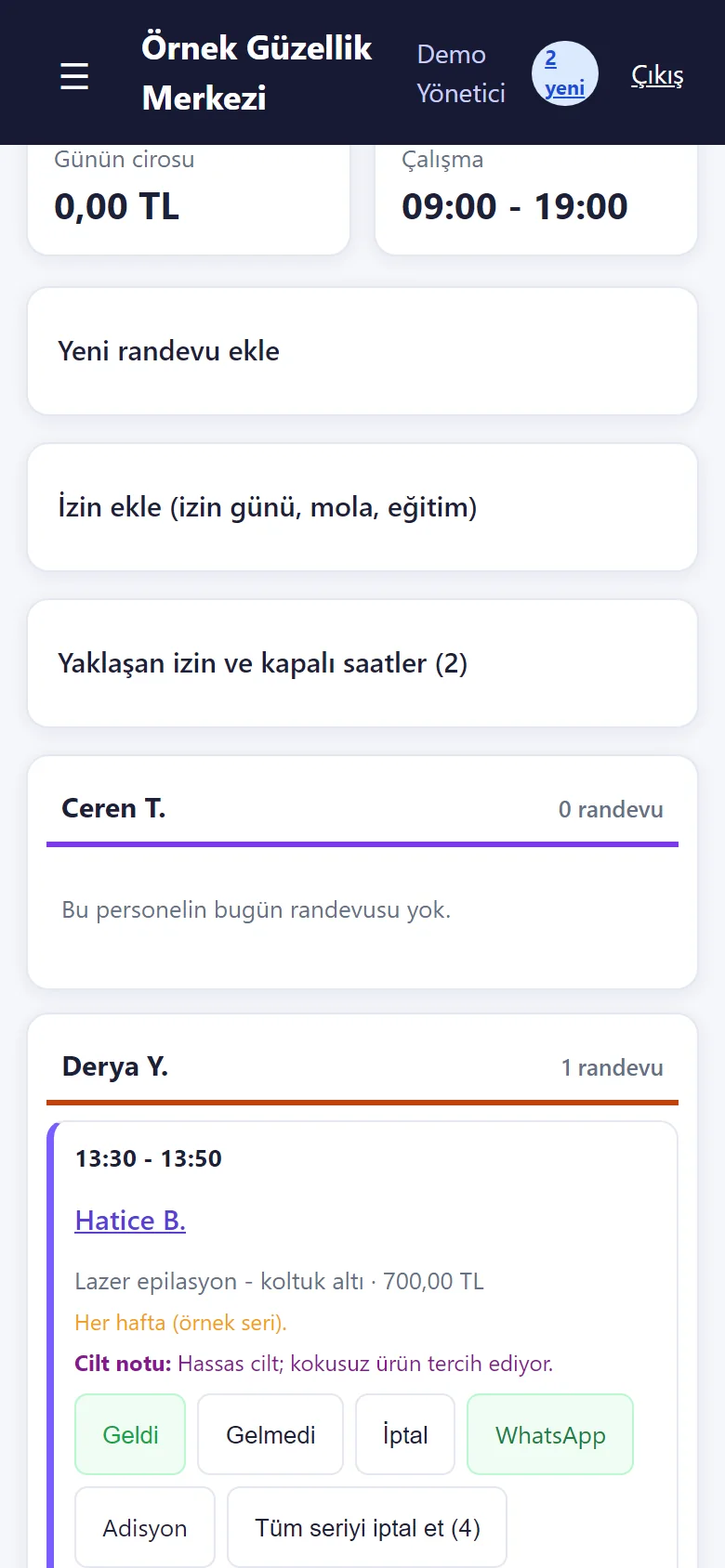
1.0.16 · 25 October 2026 A repeated booking: “Tüm seriyi iptal et”
On the opened card of a weekly repeated booking the “Tüm seriyi iptal et (4)” (cancel the whole series) button removes this booking and the ones after it; ones already marked arrived or missed stay. When the series is saved, dates that could not be booked are named with their reason (already booked, time off, closed day). The screen was taken without pressing the button.
-
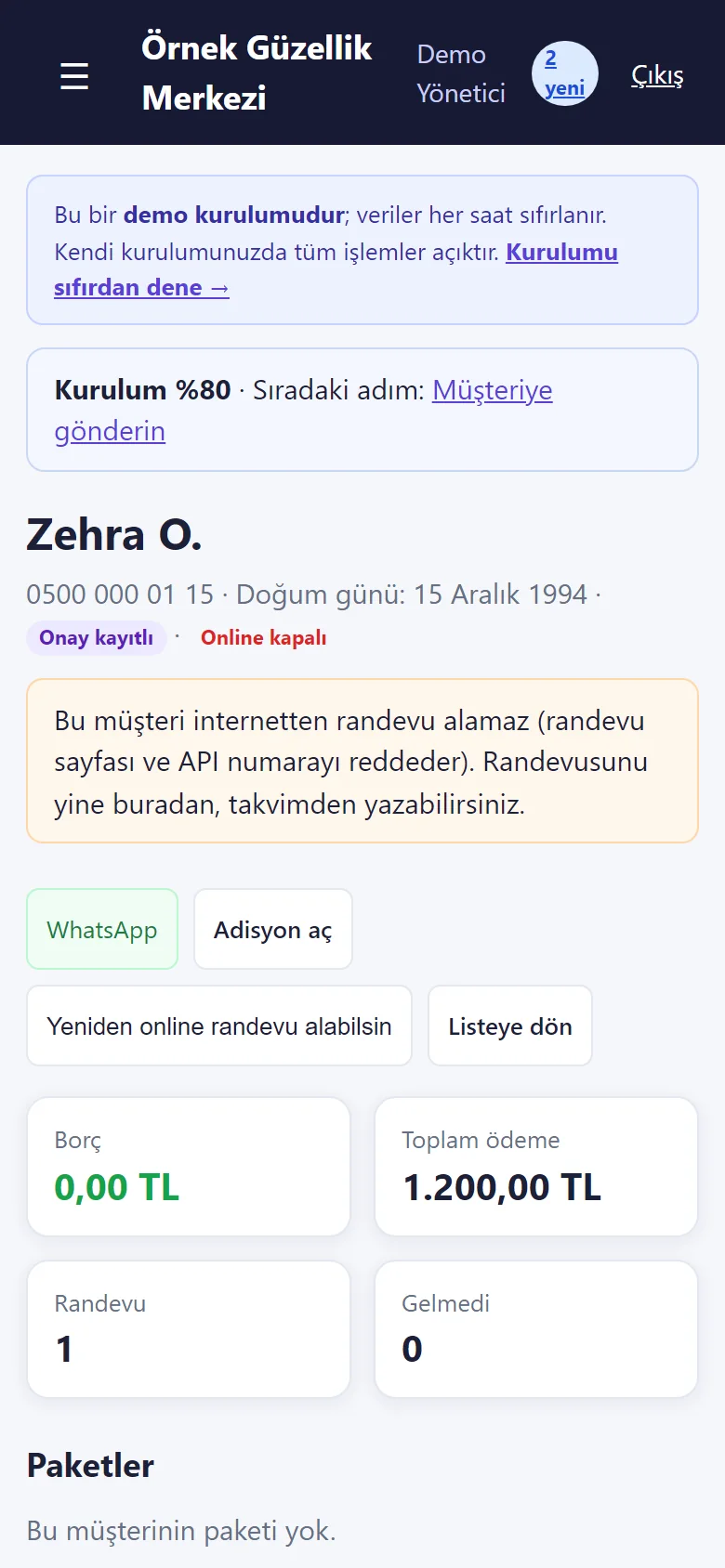
1.0.16 · 25 October 2026 Closing a customer to online booking
On the customer card: an “Online kapalı” (closed online) mark with its explanation and a “Yeniden online randevu alabilsin” (let them book online again) button. A closed number cannot book on the booking page or through the API and is shown call / WhatsApp buttons; you can still book them from the calendar. The customer is sample data.
-
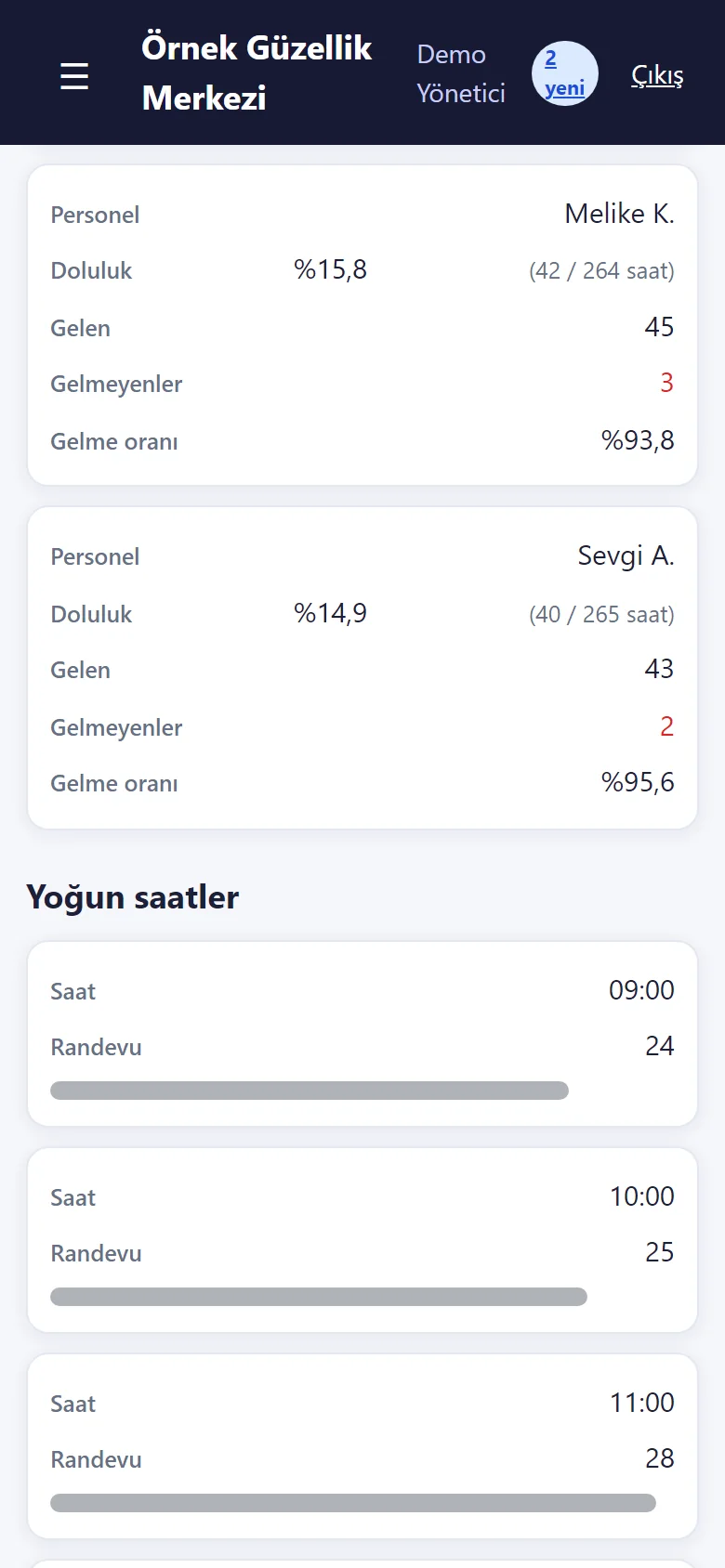
1.0.16 · 25 October 2026 Reports: staff fill and busy hours
New sections in Reports: for each staff member the fill (against open hours), kept, missed and the kept rate; below it the number of appointments hour by hour. The service table also has a share-of-revenue percentage.
-
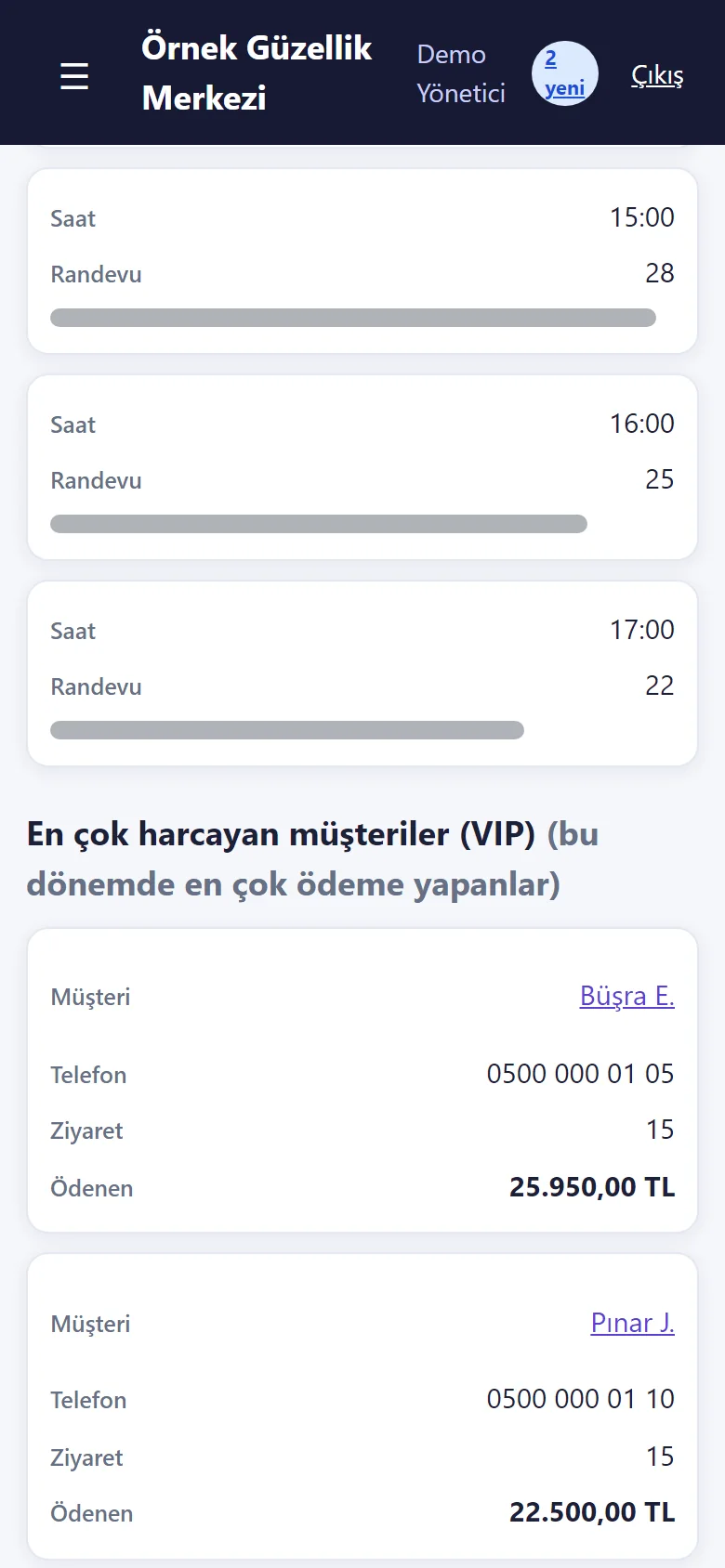
1.0.16 · 25 October 2026 Reports: the customers who paid the most (VIP)
The customers who paid the most in the chosen period (visits and amount paid); below it, customers with no visit in 90 days (passive) are listed with a ready WhatsApp invitation on each row. A customer with a booking ahead is not on the passive list.
-
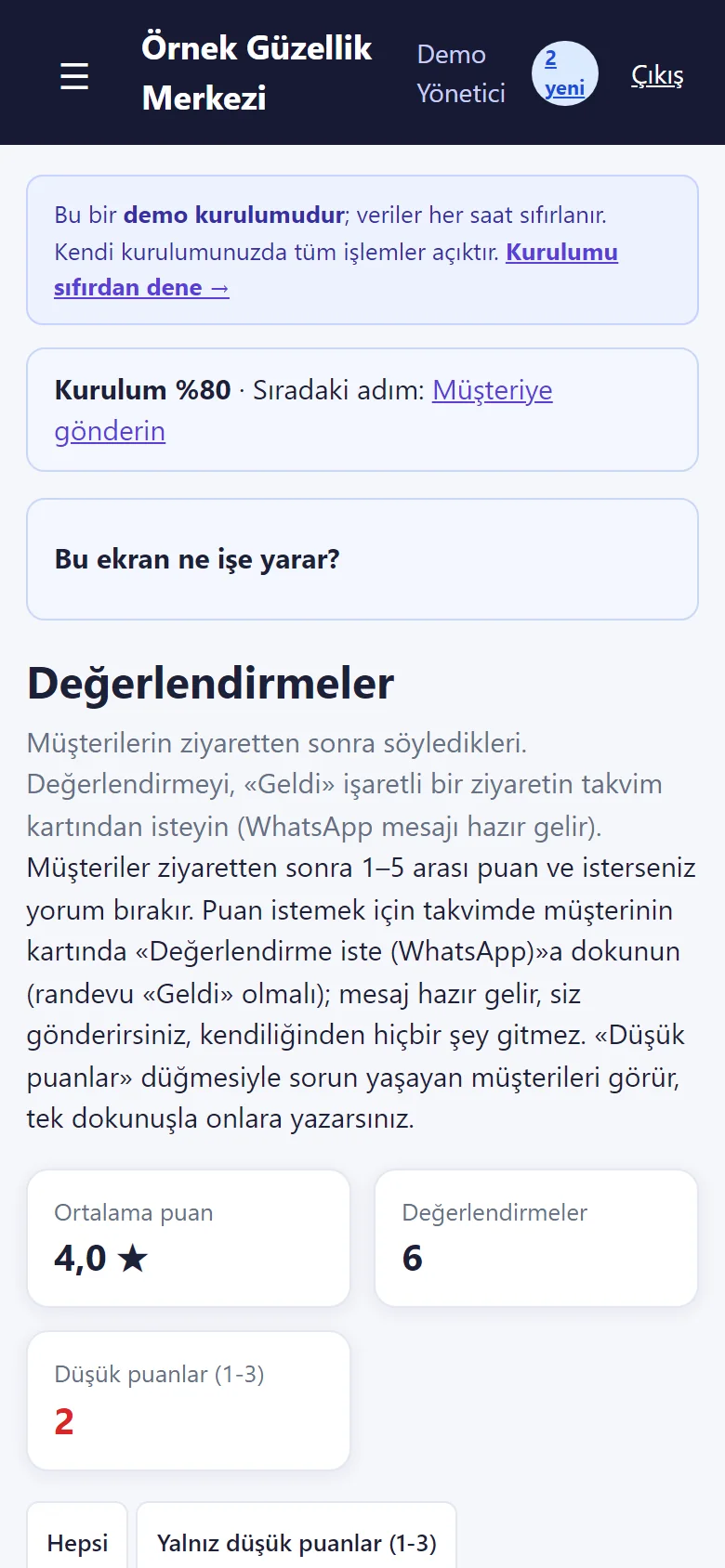
1.0.16 · 25 October 2026 Reviews
What customers rated after their visit: the average, the number of reviews, the number of low ratings and a “low ratings only (1–3)” filter; each entry shows the customer, service, staff member, rating and comment, and a low rating has “Müşteriye yaz” (write to the customer: a ready WhatsApp message). The ratings are demo sample data.
-
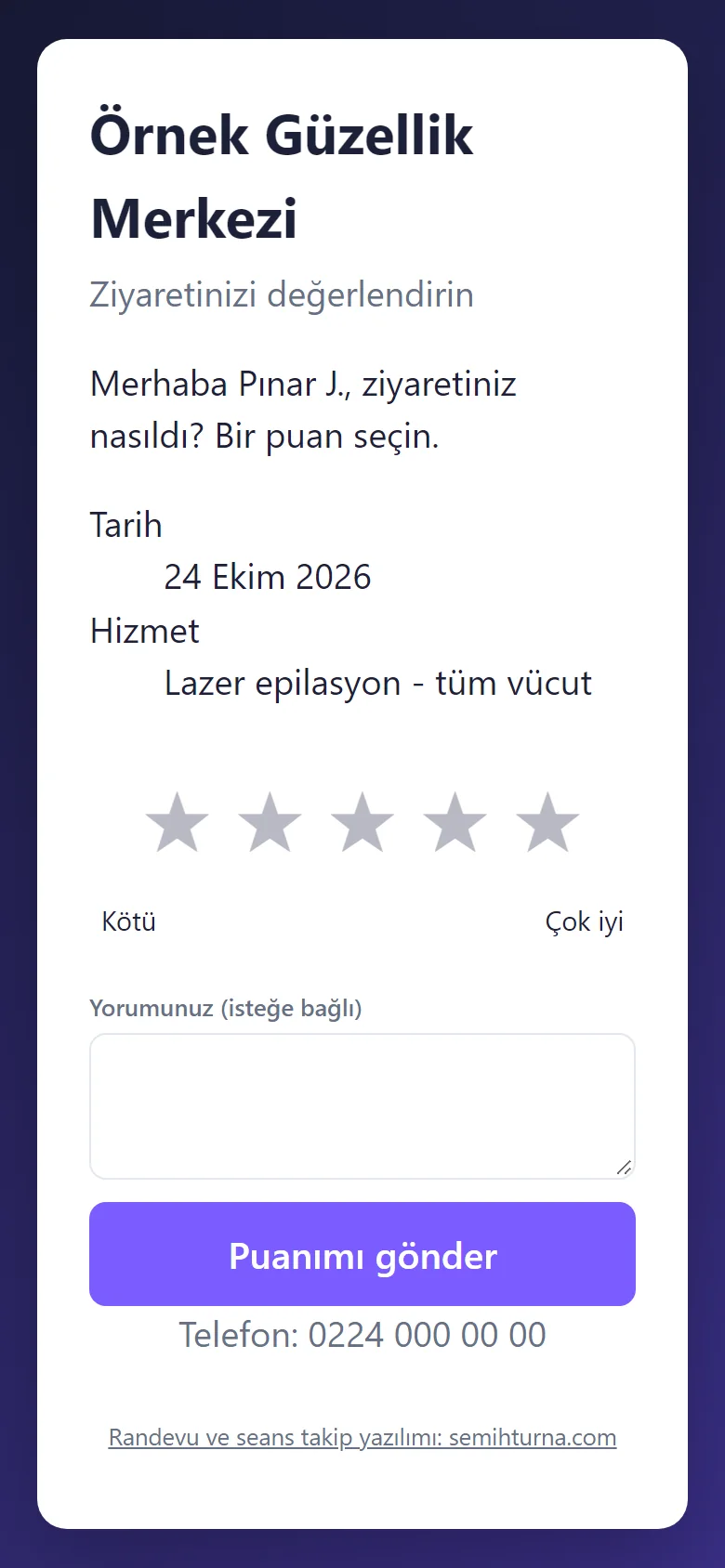
1.0.16 · 25 October 2026 The customer’s review page
The customer opens this page without signing in from the link the salon sent on WhatsApp: 1–5 stars and an optional comment; it does not open before the visit is marked “Geldi” (arrived) and a visit is rated once. Nothing is sent automatically. The screen was taken without sending a rating.
-
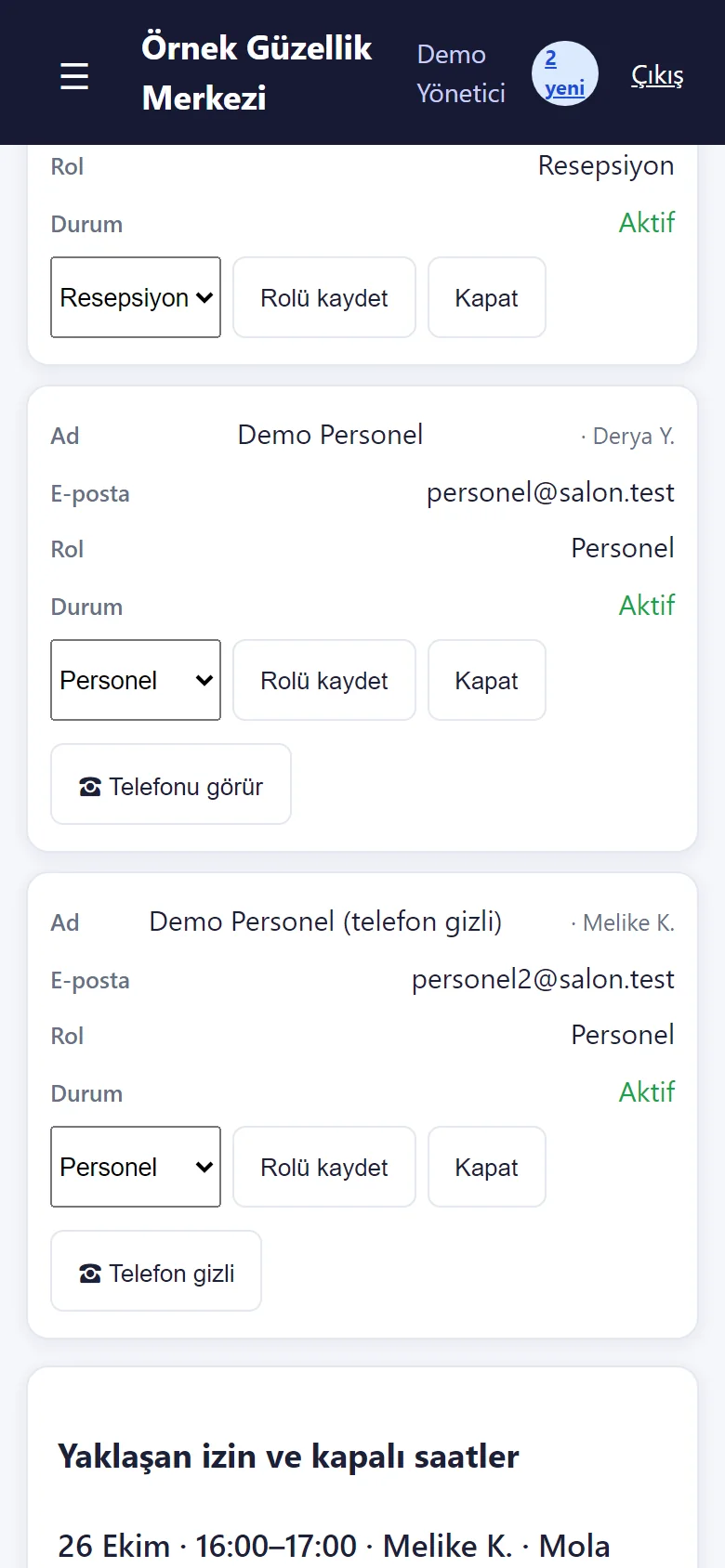
1.0.16 · 25 October 2026 Staff phone permission
On the panel logins in the Staff page a “Telefonu görür / Telefon gizli” (sees the phone / phone hidden) button for each staff member; when hidden, that staff member does not see customers’ phone numbers, the call and WhatsApp buttons do not appear and a search by number finds nothing. Default: they see it. In the demo a second staff login opens with the phone hidden.
-
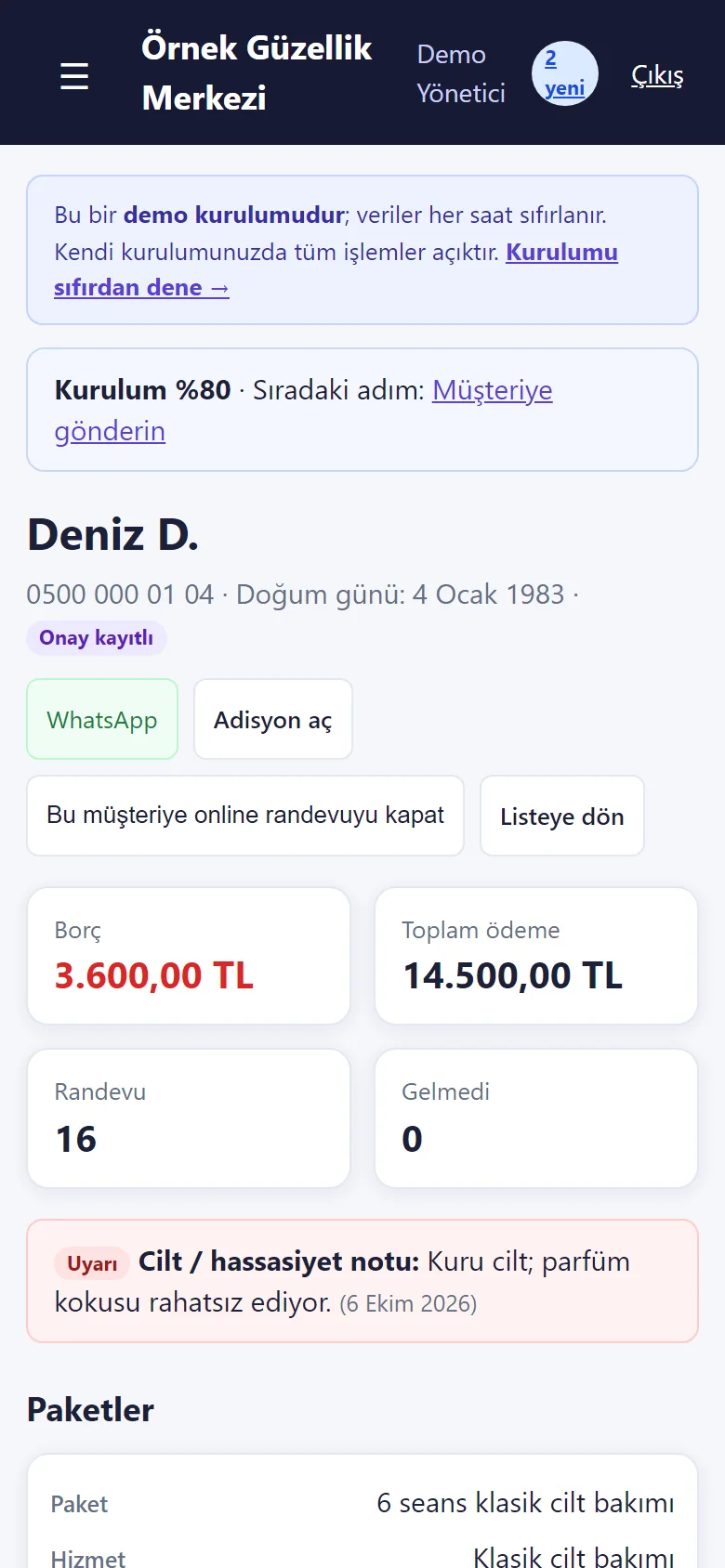
1.0.22 · 26 October 2026 The customer card’s warning note
The skin / sensitivity note is one line on the customer card and shows with a red “Uyarı” badge; the same badge sits on the customer’s booking card where the staff member doing the job sees it. It does not go into messages or exports. The note is sample data.
-
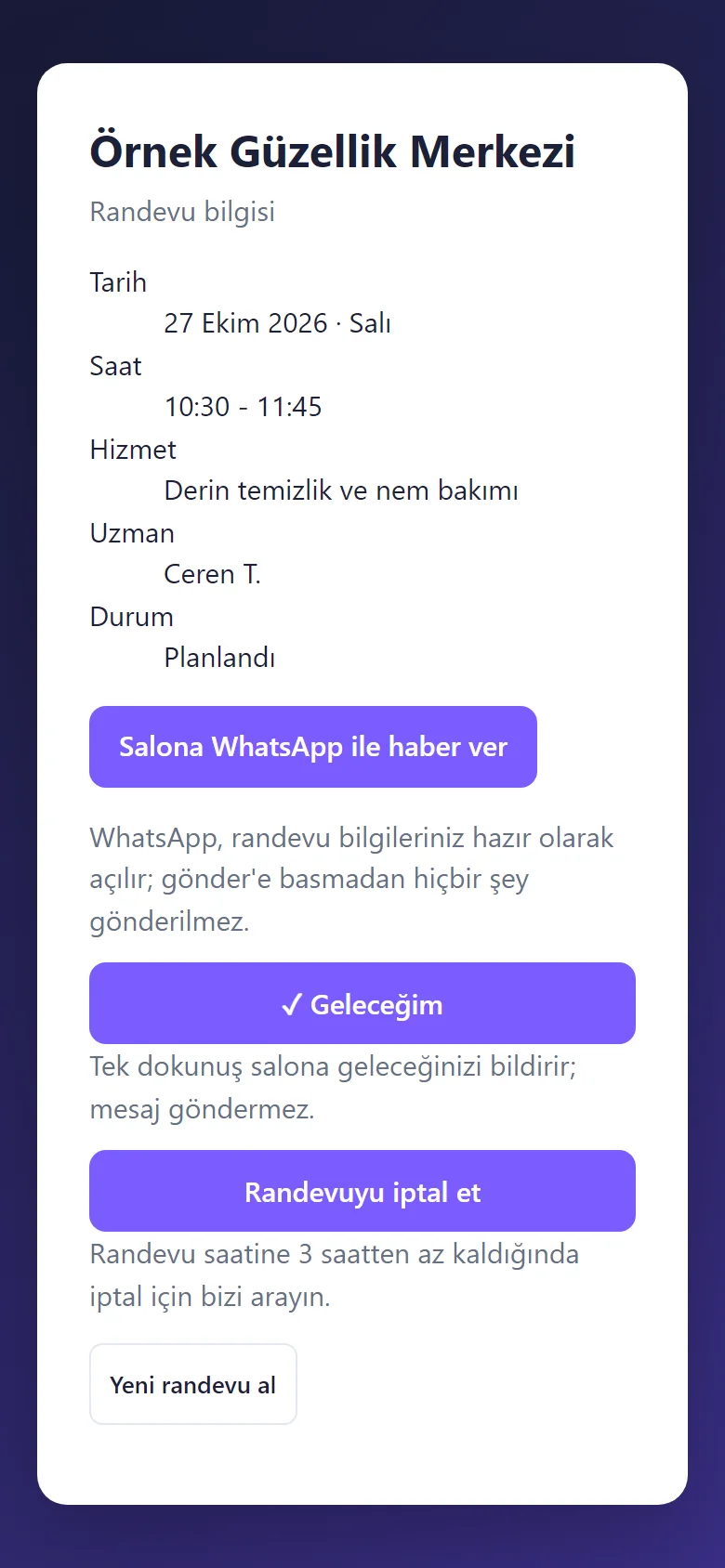
1.0.22 · 26 October 2026 The customer’s “Geleceğim” button
On the customer’s own booking page a big “Geleceğim” (I am coming) button tells the business in one tap that they will come; it sends no message and does not change the cancel rule; the calendar card then shows “✓ Geleceğim”. The screen was taken without pressing the button.
-
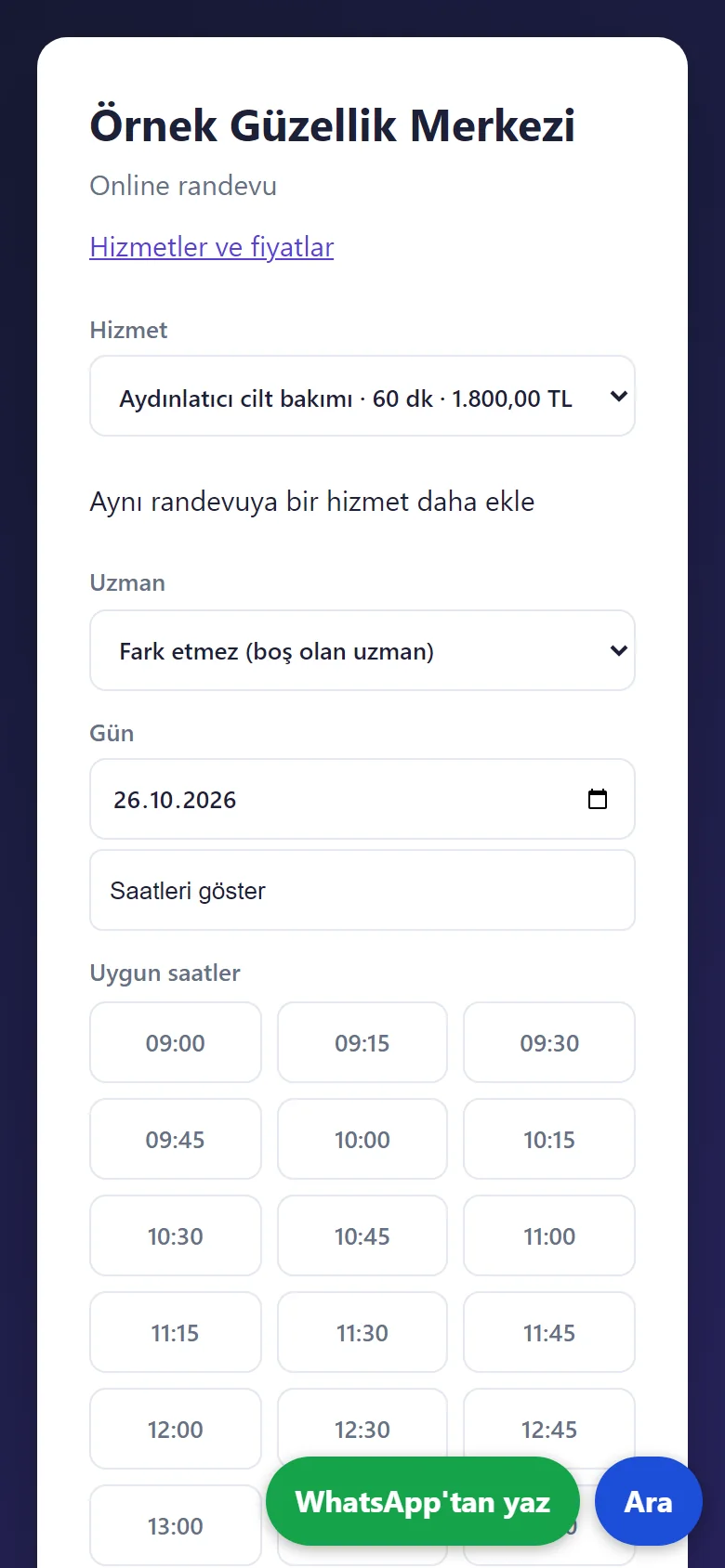
1.0.22 · 26 October 2026 Floating “WhatsApp’tan yaz” and “Ara”
Two big buttons at the bottom of the booking page (and the showcase): “WhatsApp’tan yaz” (write on WhatsApp) opens WhatsApp with the words ready and “Ara” (call) rings the salon. They are not drawn when the salon has no phone number; in the demo WhatsApp’s chooser opens.
-
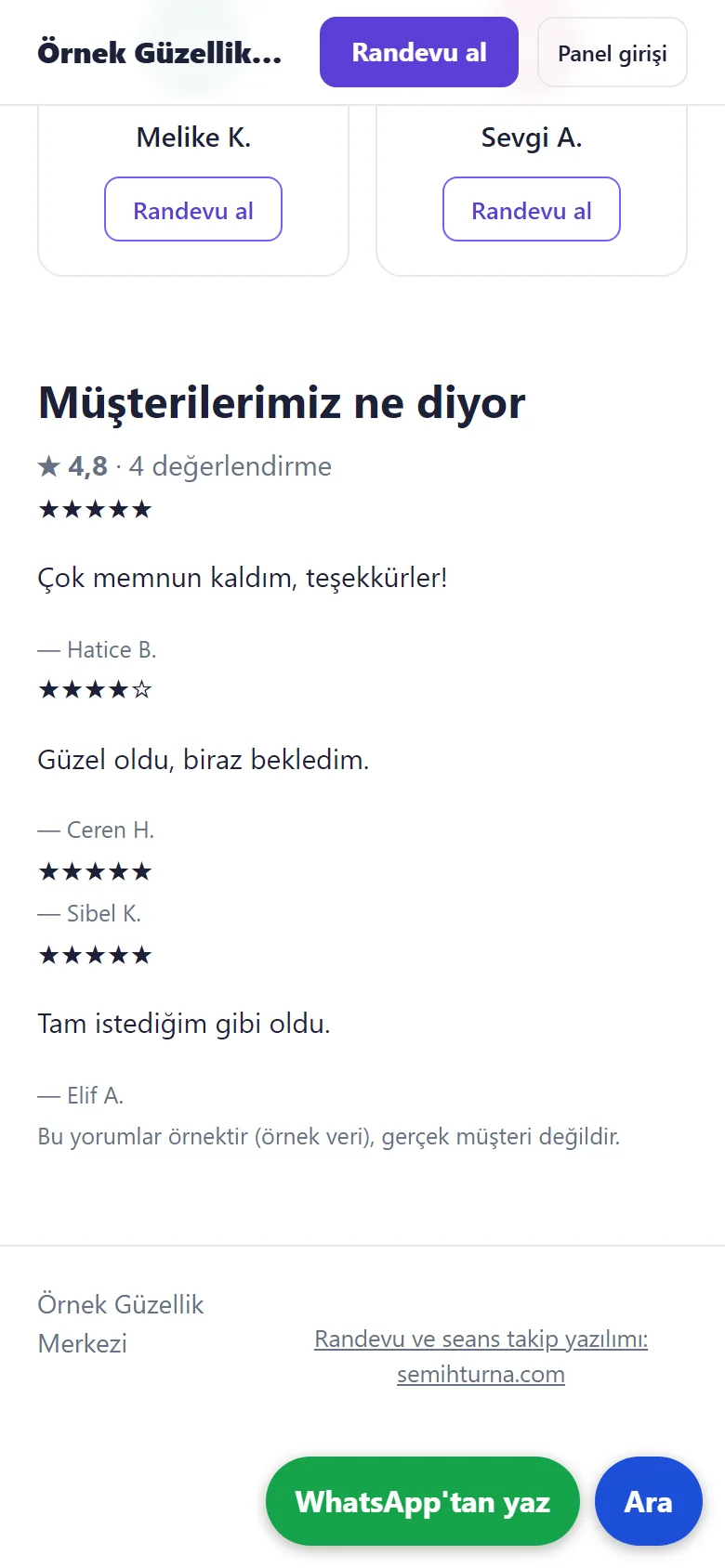
1.0.22 · 26 October 2026 Customer reviews on the showcase
On the showcase, “Müşterilerimiz ne diyor” (what our customers say): the reviews the owner marked “Göster” (show) on the Reviews page appear with stars and only the first name plus the first letter of the surname; the average counts every review received, hidden ones included, and says how many. The reviews are sample data and the screen says so.
-
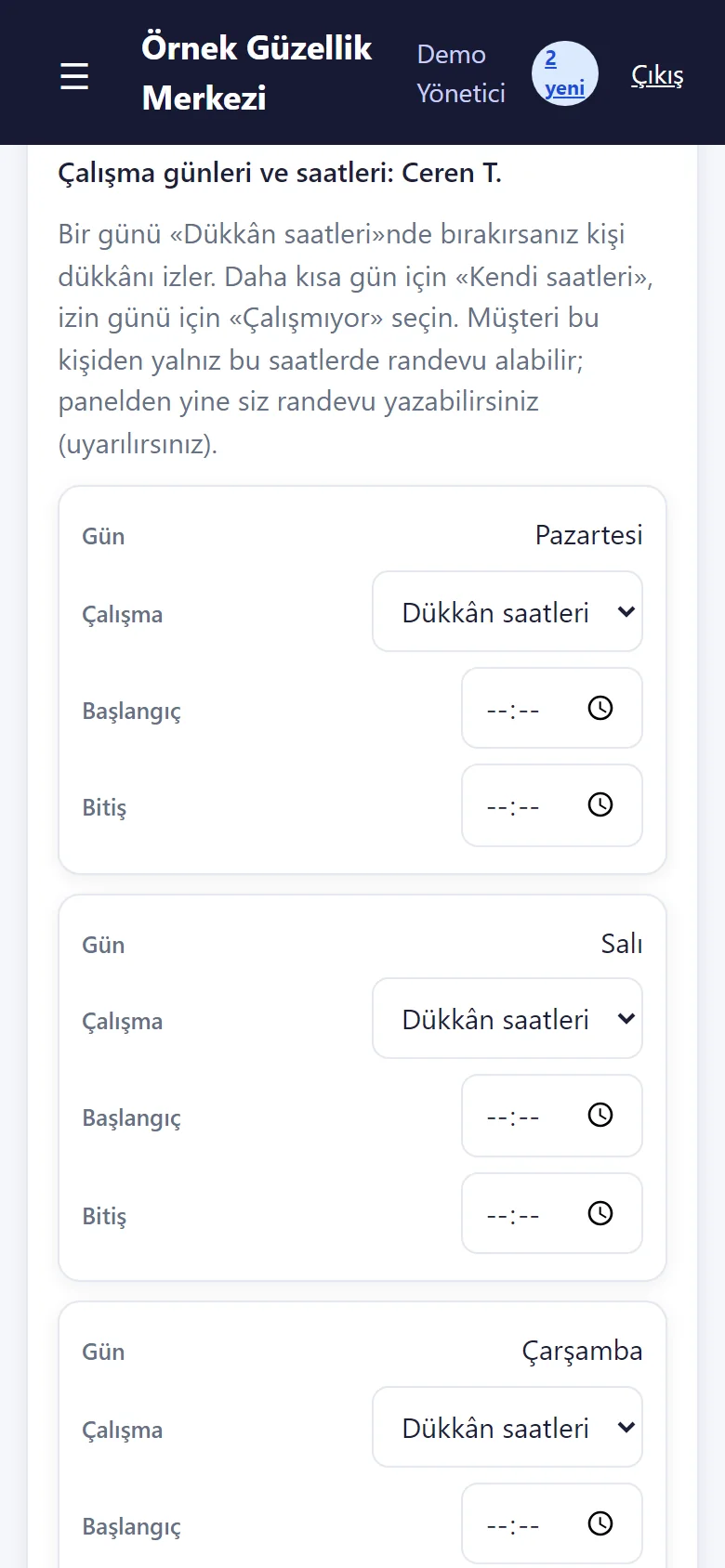
1.0.22 · 26 October 2026 Weekly days and hours per specialist
On the Staff page (“Haftalık gün ve saatler”, weekly days and hours) each specialist gets, day by day, “shop hours”, “not working” or “own hours”. Customers can book that specialist only at the hours they work; you can still book from the panel and are warned. Without a record the specialist works the shop’s hours.
- What do they see at the end?
- The customer’s request lands on the calendar; when the appointment is marked “Geldi” (arrived) the session comes out of the customer’s package. The session-packages screen lists packages due for the next session, about to end or ended with sessions unused; the due-payments screen lists instalments; the missed-appointments screen lists no-shows; every row has a ready WhatsApp message.
- What is it good for?
- Sessions left, end dates, instalment due dates and customers who did not come do not get lost in a notebook or a chat; who should be called, and when, is on a list.
Everything that is not included, and all limits
- Not delivered to a client and not used by a real center. The center (“Örnek Güzellik Merkezi”, i.e. “Sample Beauty Center”), the people, the phone numbers starting with 0500, the amounts and the “days between sessions” values are sample data; the intervals are not medical advice, each center enters its own protocol.
- Tried locally with its setup wizard (SQLite and MariaDB 11.4) and every automated test passed; the live demo runs on a single DirectAdmin account with MySQL (MariaDB); it has not been tried on a real phone (the phone-size screens come from a browser set to a phone’s size).
- There is no automatic sending of SMS or WhatsApp, no online payment or deposit collection, no multi-branch view, no e-invoicing, no device- or room-based booking and no digital consent form. A deposit is taken by hand and recorded; messages open WhatsApp with a ready text and the center sends them.
- A package is tied to one service. A wrongly marked instalment collection can be undone, and a package can be cancelled or transferred to another customer (manager and reception; a reason is required and who did it and when is recorded); no money is paid back, it is only recorded. What happens to the sessions left of an expired package is the center’s decision; the program only warns.
- The skin note can count as special-category personal data: keep it short, optional and with the customer’s knowledge; never write a diagnosis, a medicine or an illness. The privacy notice, the consent and the package agreement have to be written for the center and checked by a lawyer.
- The live demo uses sample data and resets every hour; the screens are shown here as well. Installation, hosting, support and price are agreed with the center. Hair salons have a separate product: Hair Salon Booking and Business Tracking.
- The app’s interface in these screens is Turkish; the program can also be switched to English in its settings.
- The review request is a ready WhatsApp message that the salon sends; there is no automatic message, no SMS and no phone verification code. Closing a customer to online booking only closes the web page and the API; it does not stop you booking a customer who phones the salon. Hiding the phone is an interface and server rule; it cannot stop a staff member from reaching a customer another way (such as their own contacts).
Frequently asked questions
What does the program cost?
The yearly list price is 2,500 TL. Installation, one year of hosting, data transfer, a daily automatic backup and written usage support are included; automatic SMS, card collection and a store app are not. The live demo is free; installation is done by quote.
Delivery and sales status
How does it work?
You try the demo and tell us about your beauty center, and we send you a quote. We install it, we host it and we take a daily backup. The yearly price includes installation, hosting, data transfer and support.
Price
The yearly list price is 2,500 TL. Installation, one year of hosting, data transfer, a daily automatic backup, bug fixes and written usage support are included. You send booking messages yourself from WhatsApp; automatic SMS, card collection and a store app are not included. New feature requests and work beyond the scope are priced separately and you are told before anything is done. The renewal price is notified in writing at least 30 days before the term ends. The payment method and the paperwork are settled in the quote.
Possible delivery options
Other delivery options
Requirements and version history
Installation requirements
- Requirements as written in the documents: PHP 8.1 or newer, the pdo_mysql and mbstring extensions, MariaDB 10.4 or newer. Tried locally with PHP 8.3.33, SQLite and MariaDB 11.4.13; the live demo runs on a DirectAdmin hosting account and it has not been tried on a customer’s own hosting.
Release notes
- Summarised from the package’s version history; no version has been delivered to a client.
- 1.0.0 (10 October 2026): first version; the session-packages screen, a session taken from the customer’s package when the appointment is marked “Geldi” (arrived), a deposit and instalment plan, due payments, session history and a suggested next session, a missed-appointments list, an optional short skin note and sample data made for a beauty center.
- 1.0.3 (11 October 2026): a “Salona WhatsApp ile haber ver” (tell the salon on WhatsApp) button on the customer’s own appointment page (a ready message; the customer taps “send”, the program sends nothing on its own).
- 1.0.4 (12 October 2026): a demo and personal-data notice on the public booking form.
- 1.0.5 (18 October 2026): demo sign-in page: a demo notice, fields prefilled with the manager account and password-free “… olarak gir” (sign in as …) buttons for manager, reception and staff (demo mode only; on a real installation there is no notice, box or prefilled field).
- 1.0.6 (21 October 2026): “Excel/CSV’den müşteri al” (add customers from Excel/CSV) on the Customers page: a list from an old program or Excel is uploaded as a file or pasted; columns are recognised by their header, the preview shows new, already registered and wrong rows, an unwanted row is left out with “Alma” (do not take) and the last import can be taken back. Nobody is messaged; no package, session right or balance is written.
- 1.0.7 (22 October 2026): multi-day leave and closed hours; an upcoming-leave list with “Yanlış girdim, sil” (I made a mistake, delete). A day with an appointment is never cancelled silently.
- 1.0.8–1.0.10 (22 October 2026): a setup wizard, a progress bar and a closed “Bu ekran ne işe yarar?” (what is this screen for?) box on every screen; a no-sign-in “Telefona ekle” (add to the phone) page whose panel icon opens the sign-in; the customer’s booking page can be added to the phone with its own icon.
- 1.0.11–1.0.13 (22 October 2026): a new online request is written to a notification inbox that keeps it in the panel even if the e-mail or the notification fails.
- 1.0.14 (24 October 2026): “Boş siteyle yeniden başla” (start again with an empty site) and “Örnek veriyi geri yükle” (restore the sample data) in the demo; “Müşteriye gönder” (send to customers: a ready WhatsApp message, copy the link, a QR A4 poster); the browser’s free notification carries a new request to the owner’s phone and the approval or refusal to the customer’s phone (not tried on a real phone); an add-to-phone window; a shorter menu; sample data is now optional at installation.
- 1.0.15 (24 October 2026): a staff member can be added in the demo (no panel login can be made there); the staff form no longer takes the browser’s autofill; empty staff, service and customer lists say what to do.
- 1.0.16 (25 October 2026): closing a problem customer to online booking and the booking rules (cancel window, furthest day, show / hide prices), in Reports busy hours, service share, staff fill and kept rate, VIP and customers with no visit in 90 days, a review after a visit, the reasons when a booking is repeated and “Tüm seriyi iptal et” (cancel the whole series), up to three extra services in one booking and “Fark etmez” (doesn’t matter), a phone permission for staff; the index order in upgrades was fixed.
- 1.0.17–1.0.22 (25 October 2026): a skin / sensitivity note with a red “Uyarı” badge, a “Geleceğim” (I am coming) button (no message is sent), floating “WhatsApp’tan yaz” and “Ara” buttons, approved reviews on the showcase (low ratings hidden by default), weekly days and hours per specialist, an activity (audit) log (no personal data written; the connection address is kept as the source; 180 days).
- 1.0.23 (26 October 2026): what a role may not use is no longer shown to it: staff do not see the discount form in the calendar (“Ertele / saat değiştir”, postpone / change time, stays in the summary); when the staff or stock list is empty, a role that may not open those pages sees a “the manager adds them” note instead of a link. The server still refuses an address typed by hand.
- 1.0.24 (28 October 2026): “Takvime ekle” (add to calendar) on the customer’s appointment page: an “Add to Google Calendar” link (it opens with the appointment filled in; the customer presses Save) and “Dosya olarak indir (.ics)” (download the file; a reminder one hour before; no phone number or note is carried and nothing is sent to the salon). Shown only for an approved appointment that is still ahead. No new permission, data or schema change.
Decisions not made yet
- Rights to use, modify, transfer and receive the source code: to be set in a written agreement; not decided yet.
- Whose name the hosting and domain are opened in, and where the software is installed, have not been decided yet.
There is no cart, customer account or online payment on this site for now. Reach out by phone, WhatsApp or the form; in a first conversation your need and the software’s fit are reviewed. The form does not create an order, a contract or a payment.