Car dealershipsDemo with sample data
Car Dealership Stock and Profit Tracking: screen-by-screen guide
The full version of the short description on the product page: every feature, how each screen is used step by step, all limits and the delivery details.
All features
The flows below were run in the app’s demo mode with sample data, and the screens were taken from that installation. The dealership, cars, people, phone numbers and amounts are made up; the car pictures are sample drawings, not real photos. The sample-data demo is live (version 1.1.0; the role buttons and the customer showcase were tried on the live demo on 28 October 2026); its address is the button below.
- A vehicle card: brand, model, year, mileage, plate or stock code (generated if left empty) and purchase date; status in stock, reserved, sold or inactive; search by brand, model, plate and stock code
- The purchase price and the expertise, maintenance, bodywork and paint, tyre and spare part, listing and advertising and other costs are recorded separately; the total cost, the estimated profit against the target sale price and, after the sale, the actual profit or loss are worked out automatically
- Days in stock show on every car; cars past an adjustable threshold (45 days by default) are gathered in a separate long-waiting list
- Customer and prospective buyer records: the car they want, a budget range, call notes, offers made, follow-up date and stage (new, contacted, shown a car, offer made, bought, gave up); a follow-up list of overdue, today’s and the next seven days’ customers
- Cars in stock that match what a customer wants, and open customers that match a car, are listed on screen; no notification or message is sent
- When reserving, the customer, end date and deposit received are recorded; on a sale, the sale price, date and buyer; deposits, payments and refunds are records only, total payments cannot exceed the sale price, and the app takes no payment
- Up to 10 photos per car (JPEG or PNG, with a cover choice; location and device data are stripped from the file); timestamped notes on the car, and status, cost, payment and price changes drop into the car’s history automatically
- An in-house vehicle detail printout (cost and profit included for the owner, with a “do not show to customers” warning) and a customer information sheet with no plate, purchase price, costs or profit; both can be printed or saved as PDF
- A ready text about the car to send to a customer (no cost or profit in it): copy it or open it in the dealership’s own WhatsApp; the dealership sends the message, the app does not
- A daily summary: counts of cars in stock, reserved and waiting long, customers to call today, the total cost of the stock, the target sales total and this month’s actual profit
- A stock cost report, a sales profitability report for a chosen date range and a customer stage summary; stock, sales, cost and customer lists download as CSV
- Owner and staff roles: staff do not see purchase prices, costs, profit, reports, settings or users; the panel works on a phone with a bottom menu
- Customer showcase (no sign-in): a public page switched on in the settings; only cars in stock are listed, with photos, year, mileage, fuel, gearbox, the asking price and the listing note. The purchase price, costs, profit, plate, customers and reserved or sold information are never shown; if the dealership phone is set, “ask on WhatsApp” and “call” links appear, and there is no form or data collection. It is off by default on a real installation
Screen by screen: how it is used
The app’s interface in these screens is Turkish; only the captions and explanations on this page are in English. The screens come from the app’s own demo mode with sample data; the dealership (“Örnek Oto Galeri”, a made-up name), the cars, the people, the phone numbers and the amounts are sample data, and the car pictures are sample drawings, not real photos. The panel sign-in page comes from the live demo (version 1.0.2), the other screens from the app’s own demo mode. The phone views were taken with a browser set to a phone’s size and show the first screen; the bottom menu bar sits at the bottom of the phone screen.
- Who uses it?
- The dealership owner, who manages buying and selling cars; sales staff, who use the stock, customer and follow-up screens.
- Where do they start?
- Sign in to the panel as owner or staff and start at the Daily summary; a new car is added to the stock with a vehicle card.
What do they do on screen? Step by step
-
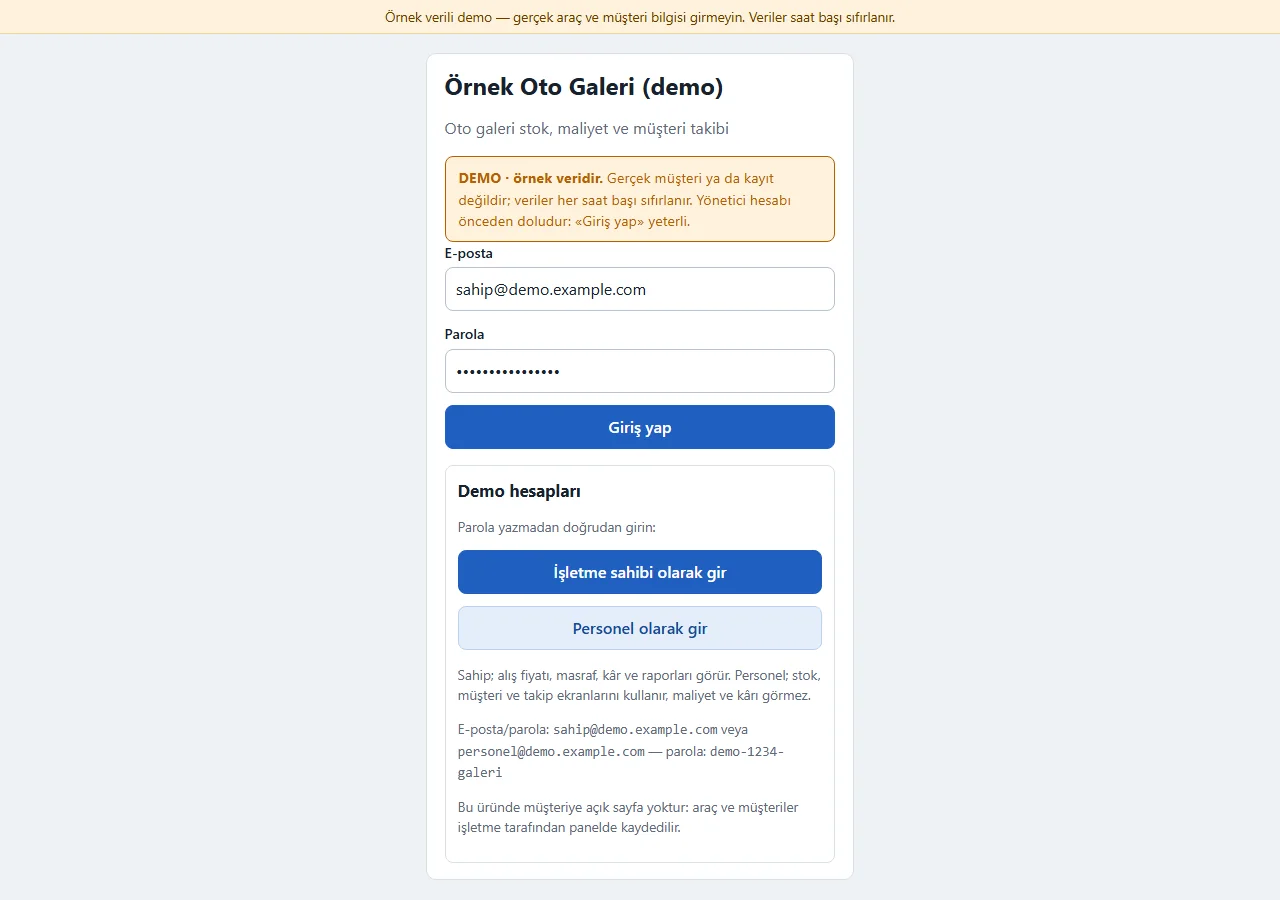
1.0.2 · 21 October 2026 Panel sign-in
On the demo’s sign-in page (version 1.0.2) a “DEMO · örnek veridir” (sample data) notice sits at the top, the e-mail and password fields come prefilled with the manager account, and a “Demo hesapları” (demo accounts) box holds password-free “… olarak gir” (sign in as …) buttons for owner and staff. Both show only in the demo; a normal installation has empty fields. Staff do not see costs or profit.
- On screen (Turkish interface)
- “DEMO · örnek veridir” — DEMO · sample data
- “Demo hesapları” — demo accounts
- “İşletme sahibi olarak gir” — enter as owner
- “Personel olarak gir” — enter as staff
- “Giriş yap” — sign in
-
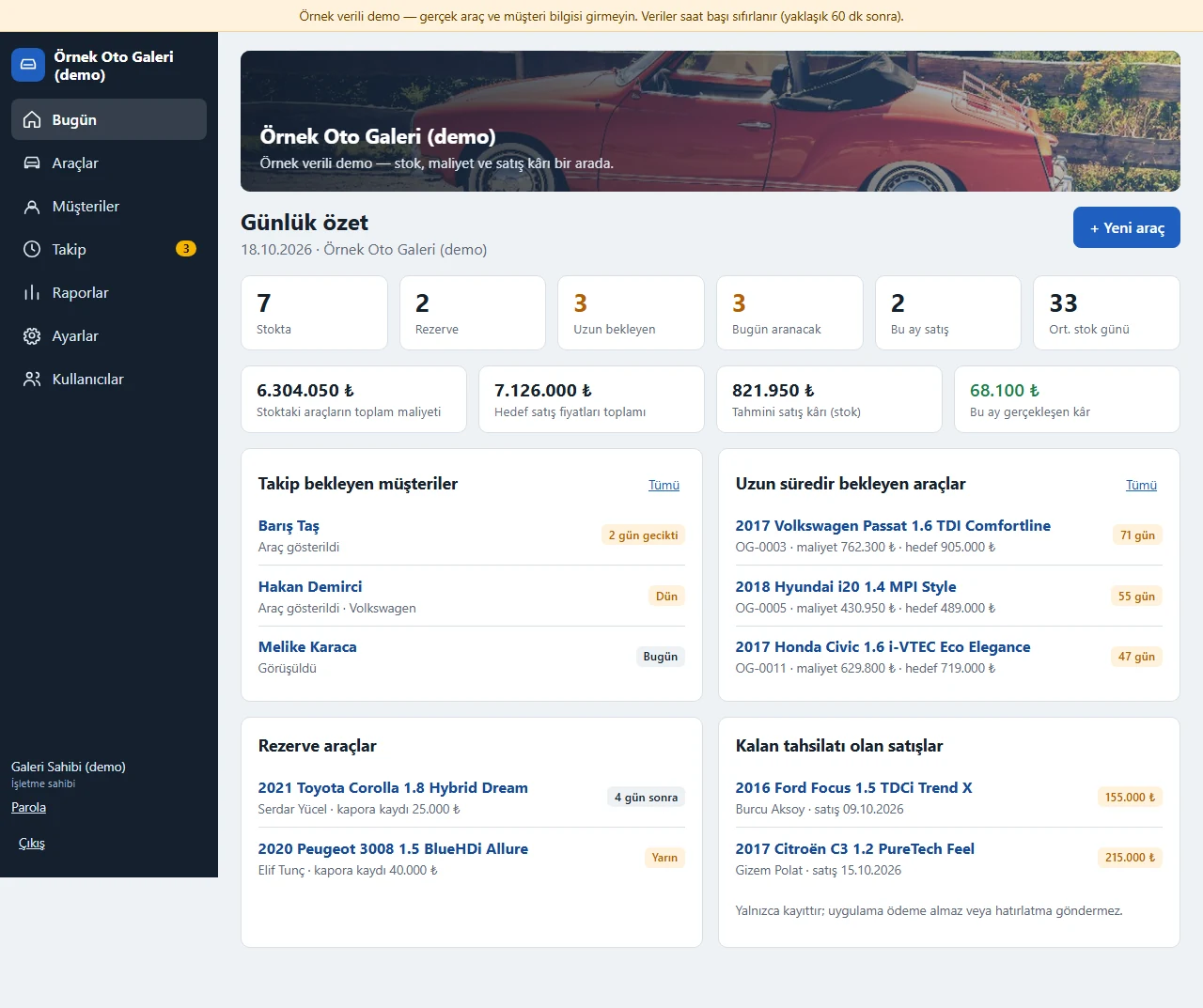
Daily summary
Counts of cars in stock, reserved and waiting long, customers to call today, the total cost of the stock, the target sales total and this month’s profit at a glance.
- On screen (Turkish interface)
- “Günlük özet” — daily summary
- “Stokta / Rezerve / Uzun bekleyen” — in stock / reserved / waiting long
- “Bugün aranacak” — to call today
- “Tahmini satış kârı (stok)” — estimated sale profit (stock)
- “Bu ay gerçekleşen kâr” — actual profit this month
-
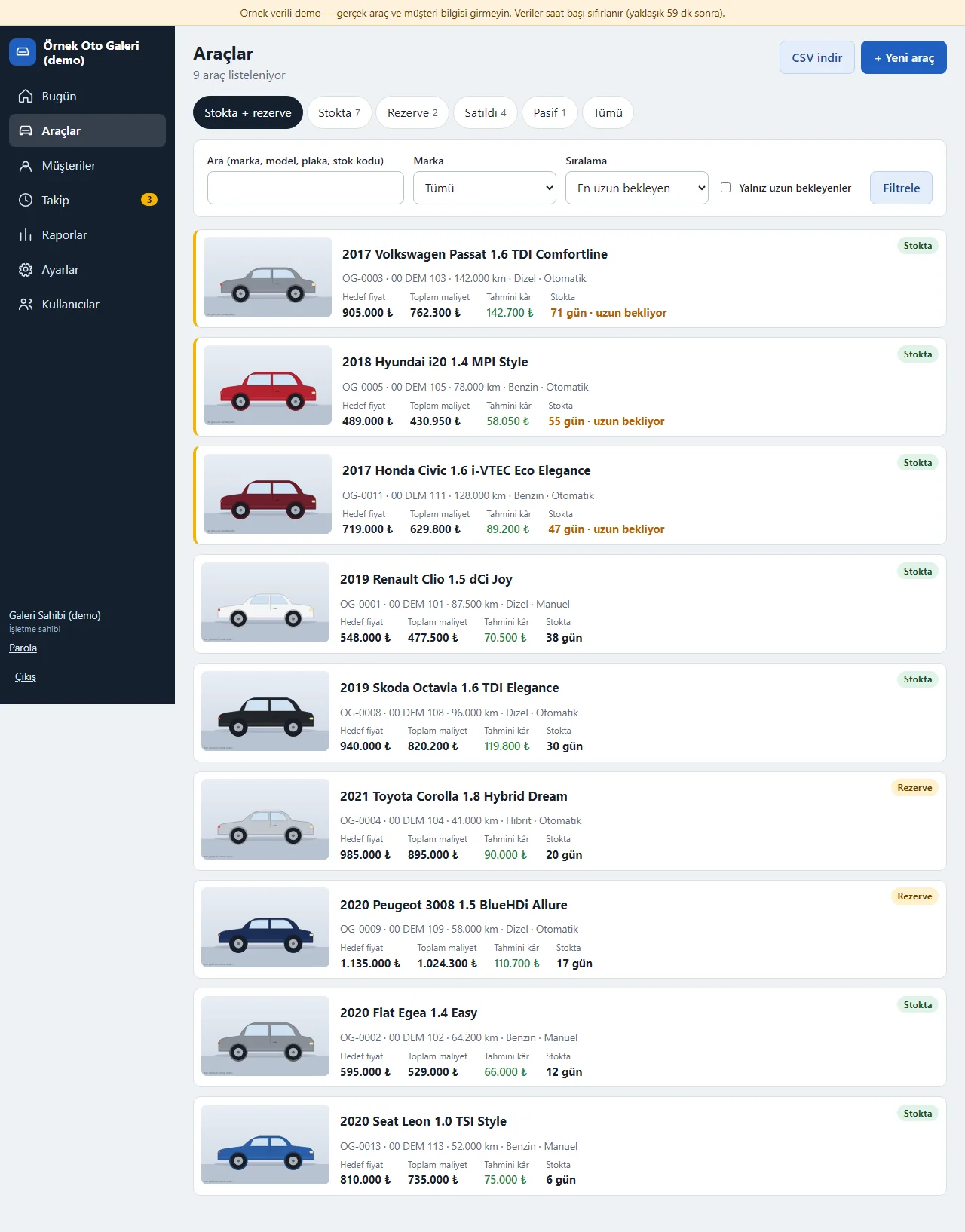
Stock list
Each car shows its photo, target price, total cost, estimated profit and days in stock. Search by brand, model, plate or stock code; the list downloads as CSV.
- On screen (Turkish interface)
- “Araçlar” — vehicles
- “Stokta + rezerve / Satıldı / Pasif” — in stock + reserved / sold / inactive
- “Hedef fiyat / Toplam maliyet / Tahmini kâr” — target price / total cost / estimated profit
- “71 gün · uzun bekliyor” — 71 days · waiting long
- “CSV indir” — download CSV
-
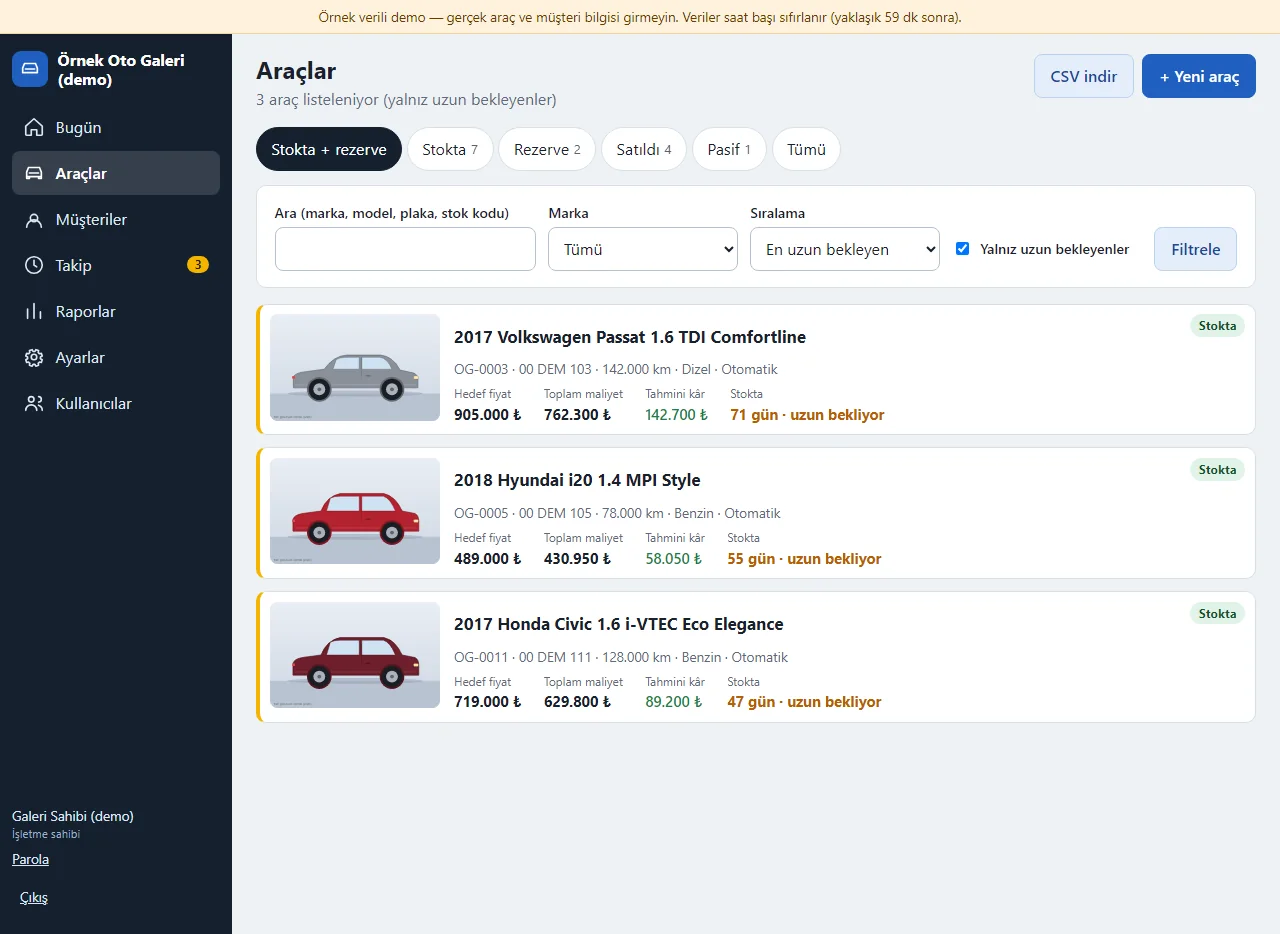
Long-waiting cars
Cars past the number of days you set (45 in the example) are marked amber and listed separately; the one waiting longest is at the top.
- On screen (Turkish interface)
- “Yalnız uzun bekleyenler” — only long-waiting cars
- “uzun bekliyor” — waiting long
- “En uzun bekleyen” — longest waiting (sort order)
-
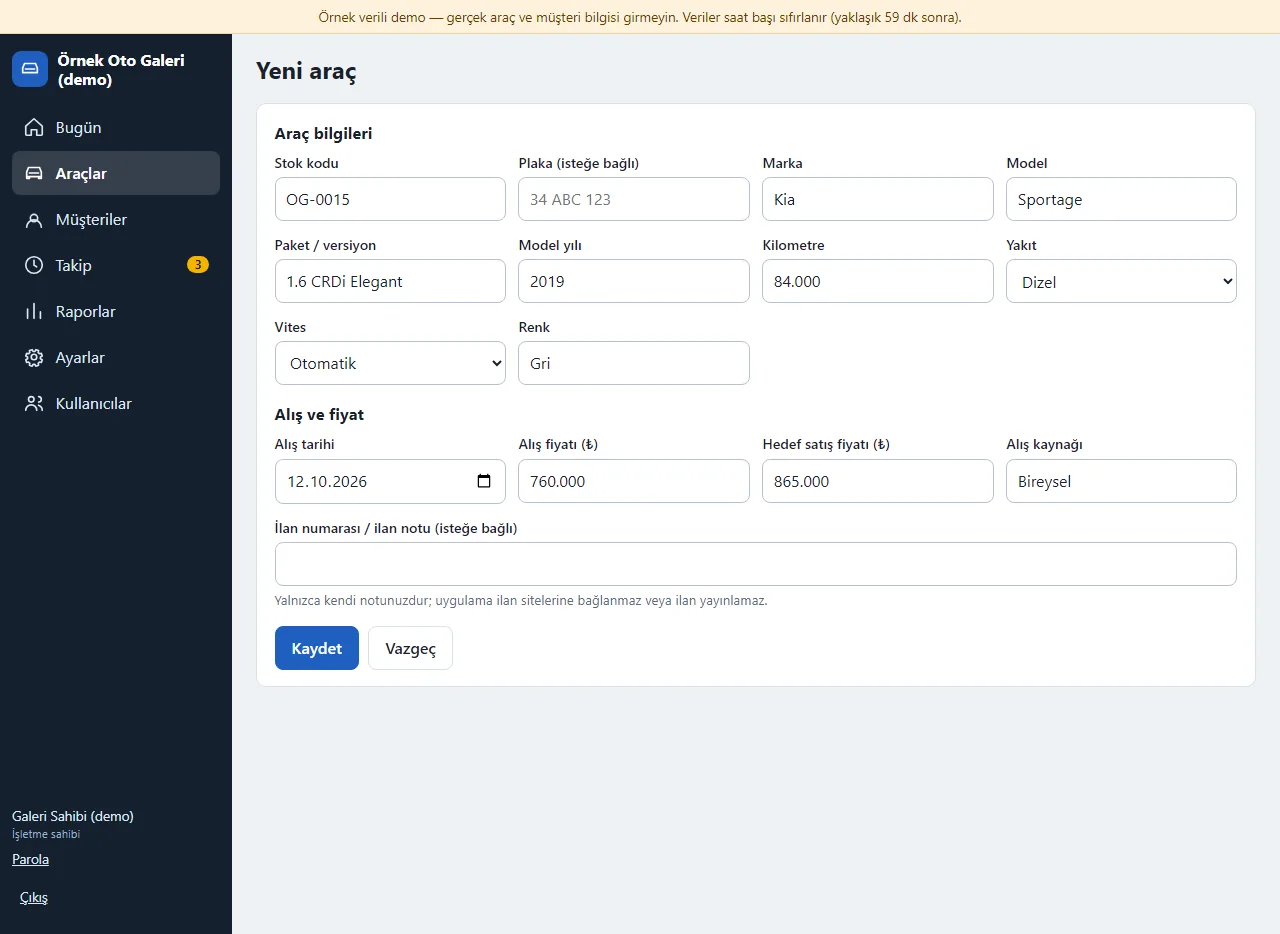
Vehicle card form
Brand, model, year, mileage, plate or stock code, purchase date, purchase and target sale price are entered; a stock code is generated if left empty. The listing note is a free note.
- On screen (Turkish interface)
- “Yeni araç” — new vehicle
- “Stok kodu / Plaka (isteğe bağlı)” — stock code / plate (optional)
- “Alış fiyatı / Hedef satış fiyatı” — purchase price / target sale price
- “İlan numarası / ilan notu (isteğe bağlı)” — listing number / note (optional)
- “Kaydet” — save
-
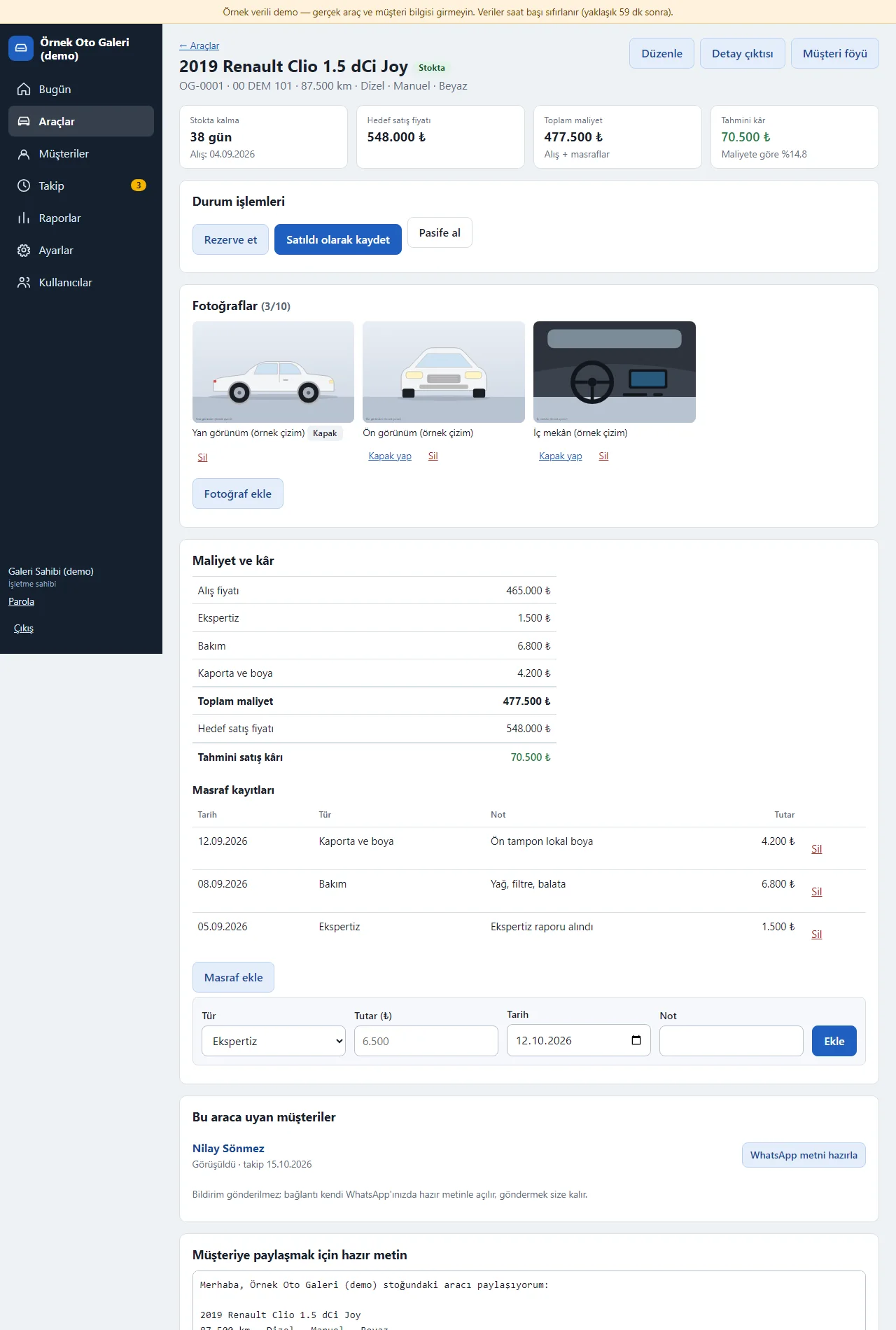
Vehicle detail: cost and profit
The purchase price and the expertise, maintenance, and bodywork and paint costs are added on separate lines; total cost and estimated sale profit are worked out automatically.
- On screen (Turkish interface)
- “Stokta kalma” — days in stock
- “Toplam maliyet / Tahmini kâr” — total cost / estimated profit
- “Durum işlemleri” — status actions
- “Maliyet ve kâr” — cost and profit
- “Masraf kayıtları” — cost records
- “Düzenle / Detay çıktısı / Müşteri föyü” — edit / vehicle printout / customer sheet
-
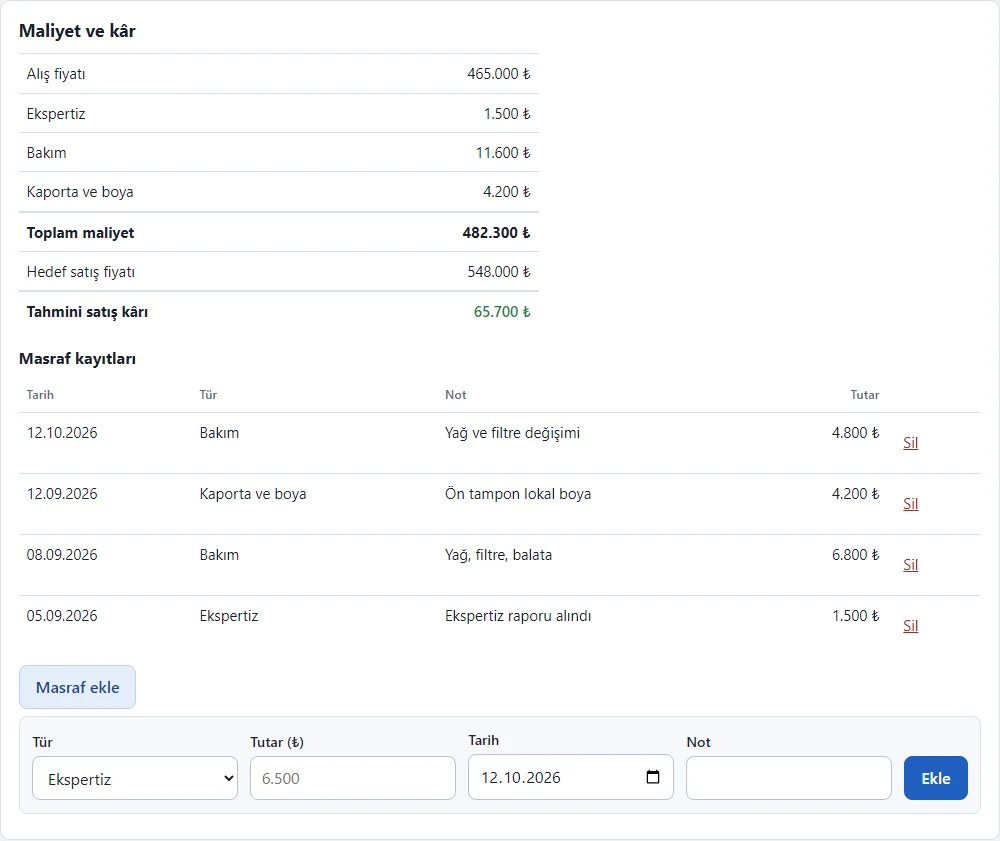
Adding a cost
When a cost is added, the total cost and profit are worked out again. Costs show on separate lines by type; a wrong entry can be deleted.
- On screen (Turkish interface)
- “Masraf ekle” — add a cost
- “Masraf kayıtları” — cost records
- “Sil” — delete
- “Toplam maliyet / Tahmini satış kârı” — total cost / estimated sale profit
-
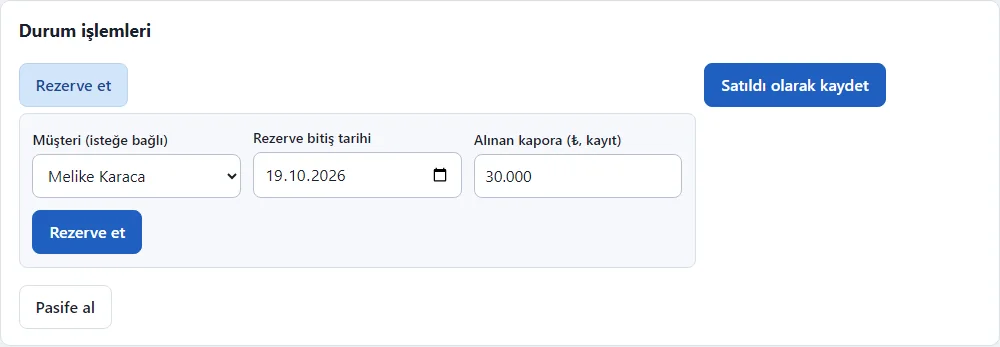
Reserving a car
When reserving, the customer, end date and deposit received are entered. The deposit is a record only; the app takes no payment. The sold and inactive buttons are here too.
- On screen (Turkish interface)
- “Rezerve et” — reserve
- “Rezerve bitiş tarihi” — reservation end date
- “Alınan kapora” — deposit received (record only)
- “Satıldı olarak kaydet” — record as sold
- “Pasife al” — make inactive
-
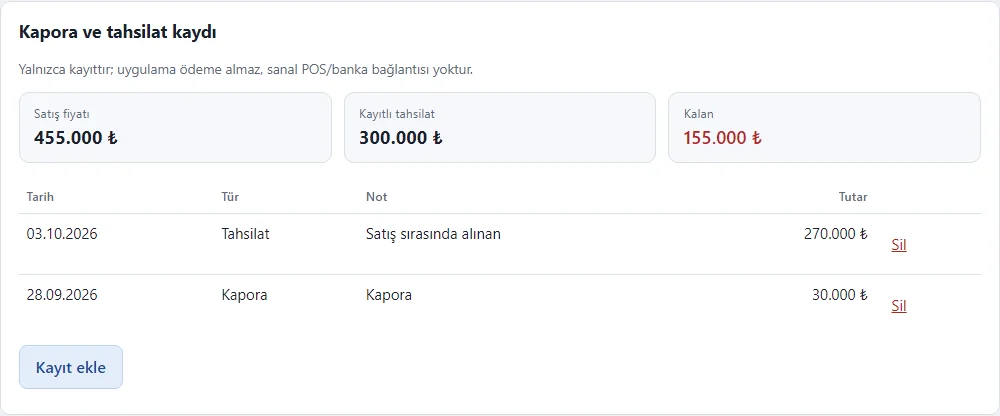
Sale and payment record
The sale price, recorded deposits and payments and the remaining amount are shown; total payments cannot exceed the sale price. It is a record only; no payment is taken through the app.
- On screen (Turkish interface)
- “Kapora ve tahsilat kaydı” — deposit and payment record
- “Yalnızca kayıttır; uygulama ödeme almaz” — a record only; the app takes no payment
- “Kayıtlı tahsilat” — recorded payments
- “Kalan” — remaining
- “Kayıt ekle” — add a record
-
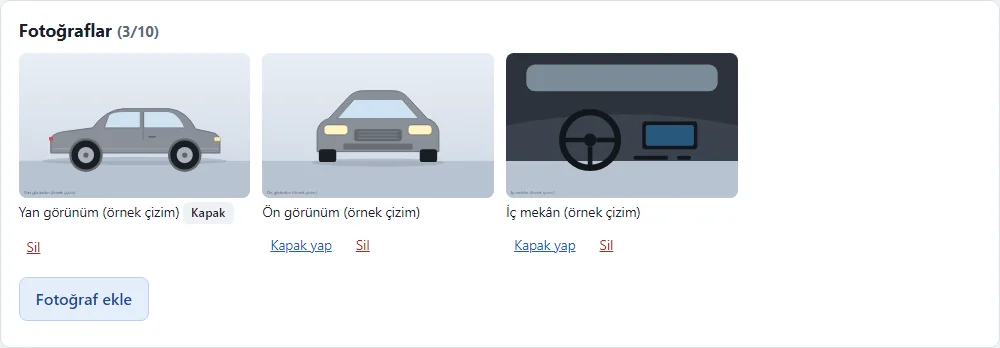
Vehicle photos
Up to 10 photos are kept per car and a cover is chosen; location and device data are stripped from uploaded JPEG or PNG files. The pictures in the demo are sample drawings and upload is off.
- On screen (Turkish interface)
- “Fotoğraflar (3/10)” — photos (3 of 10)
- “Kapak / Kapak yap” — cover / make cover
- “Fotoğraf ekle” — add a photo
- “(örnek çizim)” — (sample drawing)
-
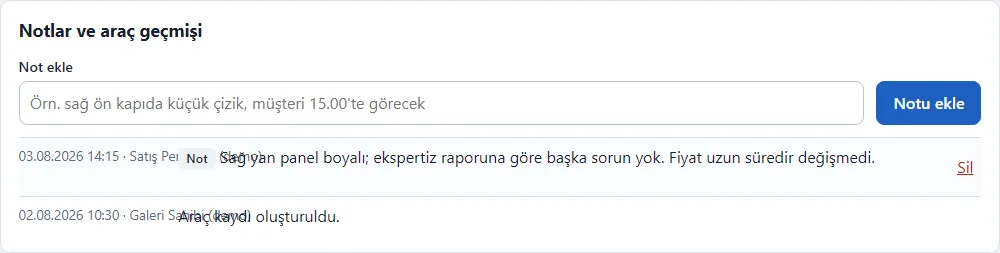
Notes and vehicle history
Timestamped notes are written on the car; status, cost, payment and price changes drop into the car’s history automatically.
- On screen (Turkish interface)
- “Notlar ve araç geçmişi” — notes and vehicle history
- “Not ekle” — add a note
- “Notu ekle” — add the note
- “Sil” — delete
-
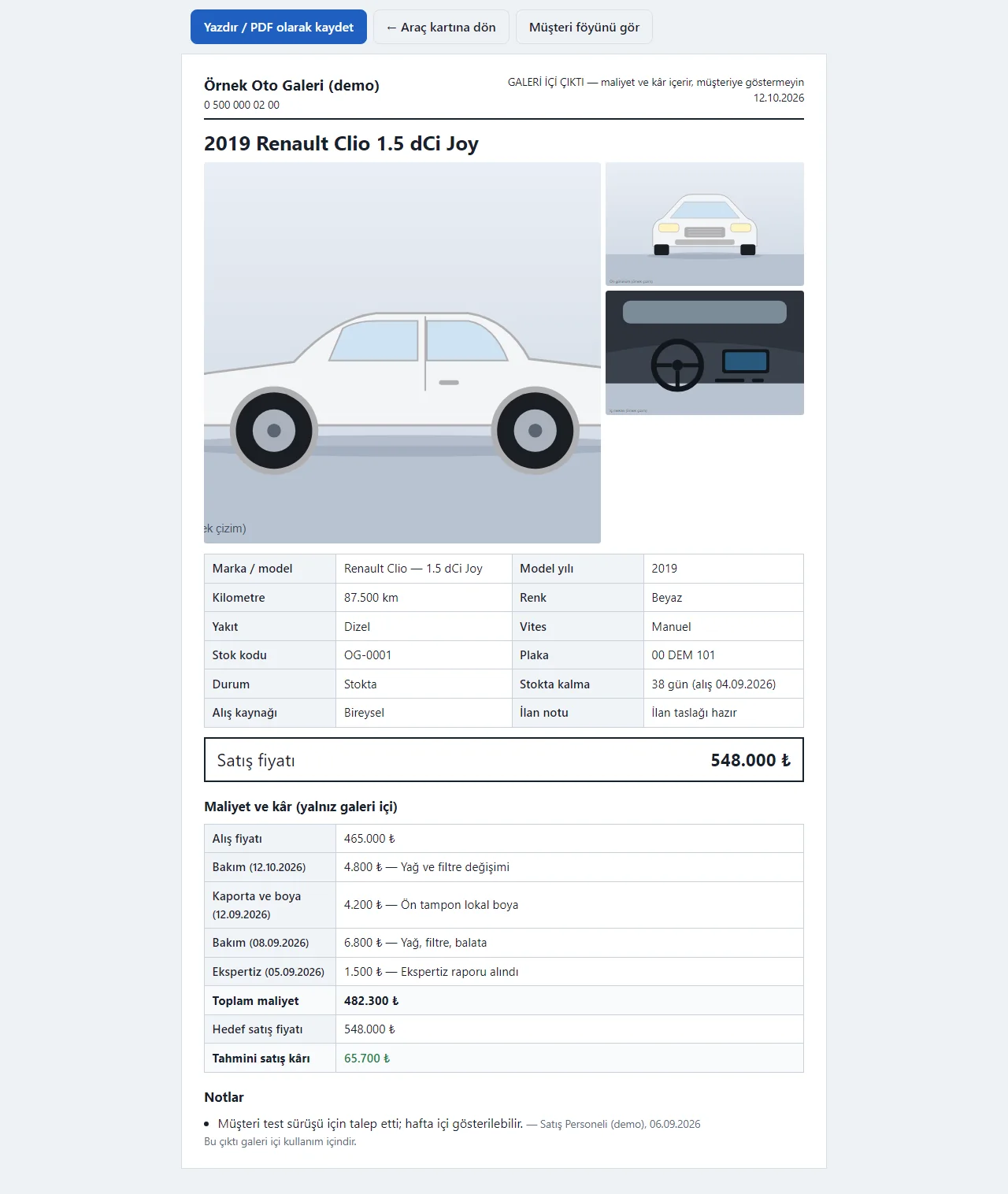
In-house vehicle detail printout
Photos, specifications, notes and, for the owner, cost and profit; a “do not show to customers” warning is at the top. Print it or save it as PDF.
- On screen (Turkish interface)
- “Yazdır / PDF olarak kaydet” — print / save as PDF
- “GALERİ İÇİ ÇIKTI — maliyet ve kâr içerir, müşteriye göstermeyin” — in-house printout: contains cost and profit, do not show to customers
- “Maliyet ve kâr (yalnız galeri içi)” — cost and profit (in-house only)
- “Müşteri föyünü gör” — see the customer sheet
-
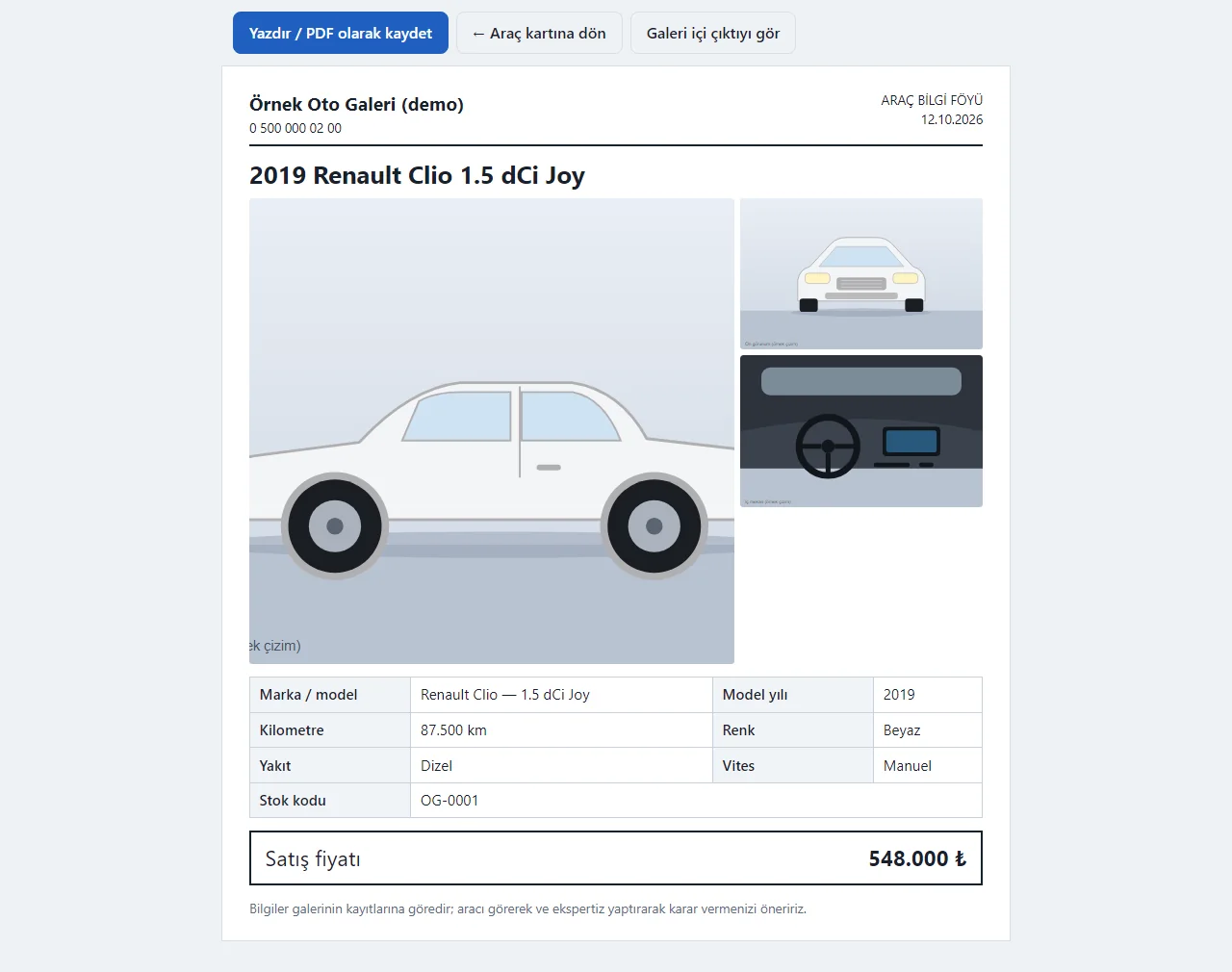
Customer information sheet
The sheet to show a customer has only photos, specifications and the sale price; no plate, purchase price, costs or profit. Print it or save it as PDF.
- On screen (Turkish interface)
- “ARAÇ BİLGİ FÖYÜ” — vehicle information sheet
- “Satış fiyatı” — sale price
- “Galeri içi çıktıyı gör” — see the in-house printout
- “Yazdır / PDF olarak kaydet” — print / save as PDF
-
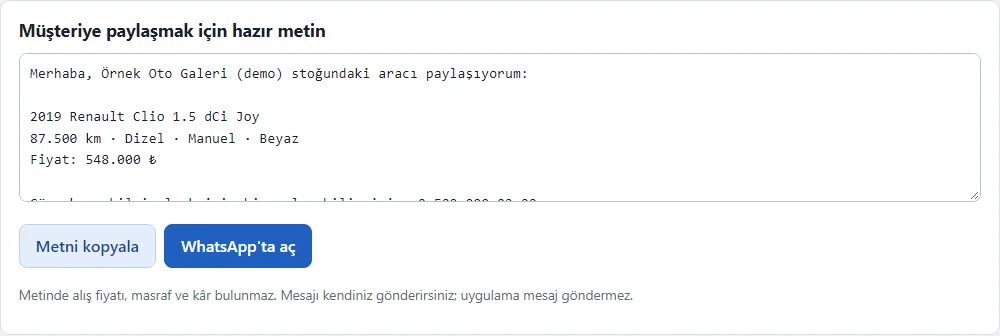
Ready WhatsApp text
The ready text about the car has no cost or profit. Copy it or open it in the dealership’s own WhatsApp; the dealership sends the message, the app does not.
- On screen (Turkish interface)
- “Müşteriye paylaşmak için hazır metin” — ready text to share with the customer
- “Metni kopyala” — copy the text
- “WhatsApp’ta aç” — open in WhatsApp
- “Mesajı kendiniz gönderirsiniz; uygulama mesaj göndermez” — you send the message yourself; the app sends none
-
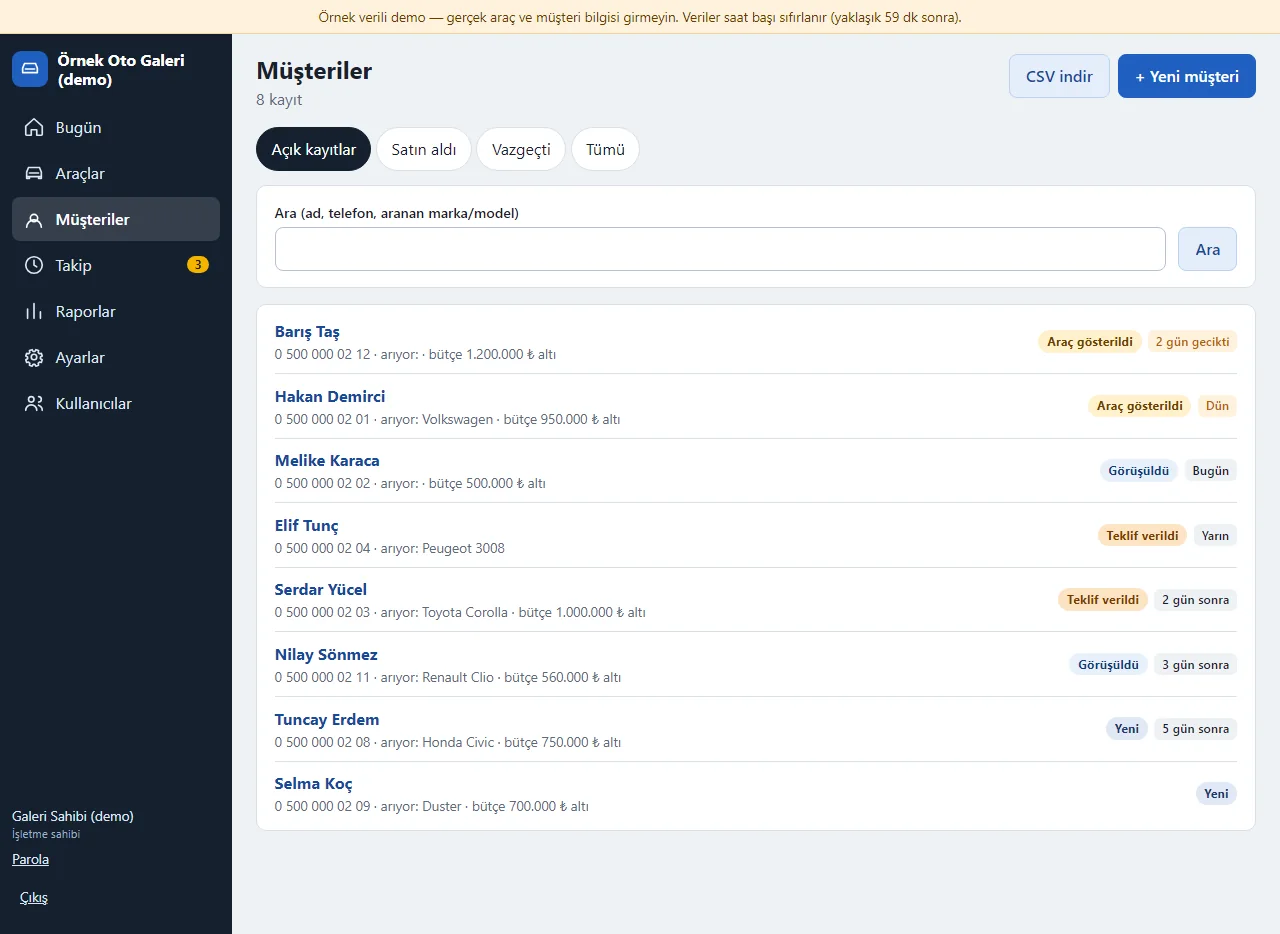
Customer list
Customers and prospective buyers are listed with their stage (new, contacted, shown a car, offer made, bought, gave up), the car they want, budget and follow-up date.
- On screen (Turkish interface)
- “Müşteriler” — customers
- “Açık kayıtlar / Satın aldı / Vazgeçti” — open records / bought / gave up
- “Yeni / Görüşüldü / Araç gösterildi / Teklif verildi” — new / contacted / shown a car / offer made
- “2 gün gecikti” — 2 days overdue
- “+ Yeni müşteri” — new customer
-
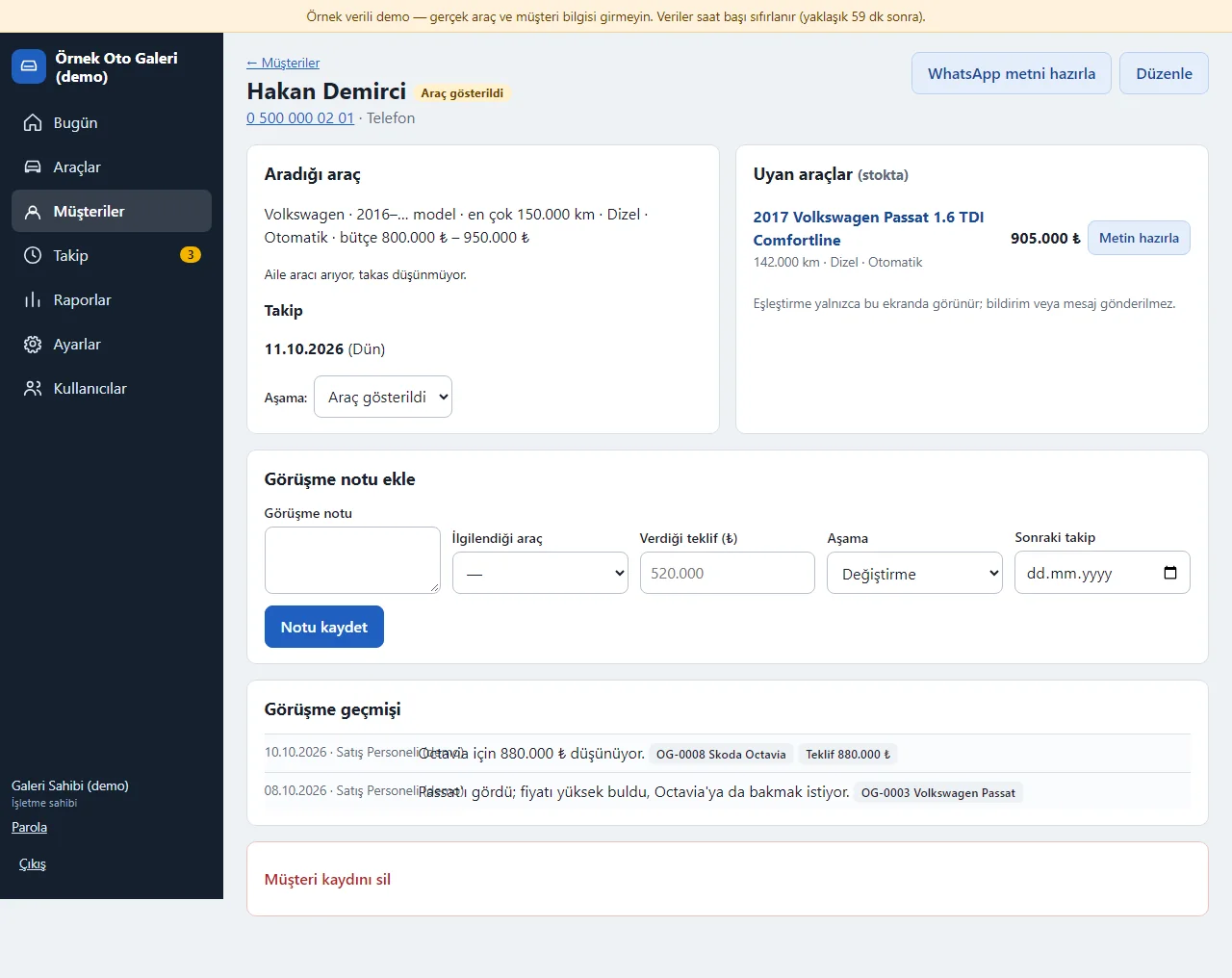
Customer card and matching cars
The car they want, budget and follow-up date show; matching cars in stock are listed and no notification is sent. A call note, the car of interest and the offer are entered.
- On screen (Turkish interface)
- “Aradığı araç” — the car they want
- “Uyan araçlar (stokta)” — matching cars (in stock)
- “Eşleştirme yalnızca bu ekranda görünür; bildirim veya mesaj gönderilmez” — the matching only shows on this screen; no notification or message is sent
- “Görüşme notu ekle” — add a call note
- “İlgilendiği araç / Verdiği teklif / Sonraki takip” — car of interest / offer made / next follow-up
-
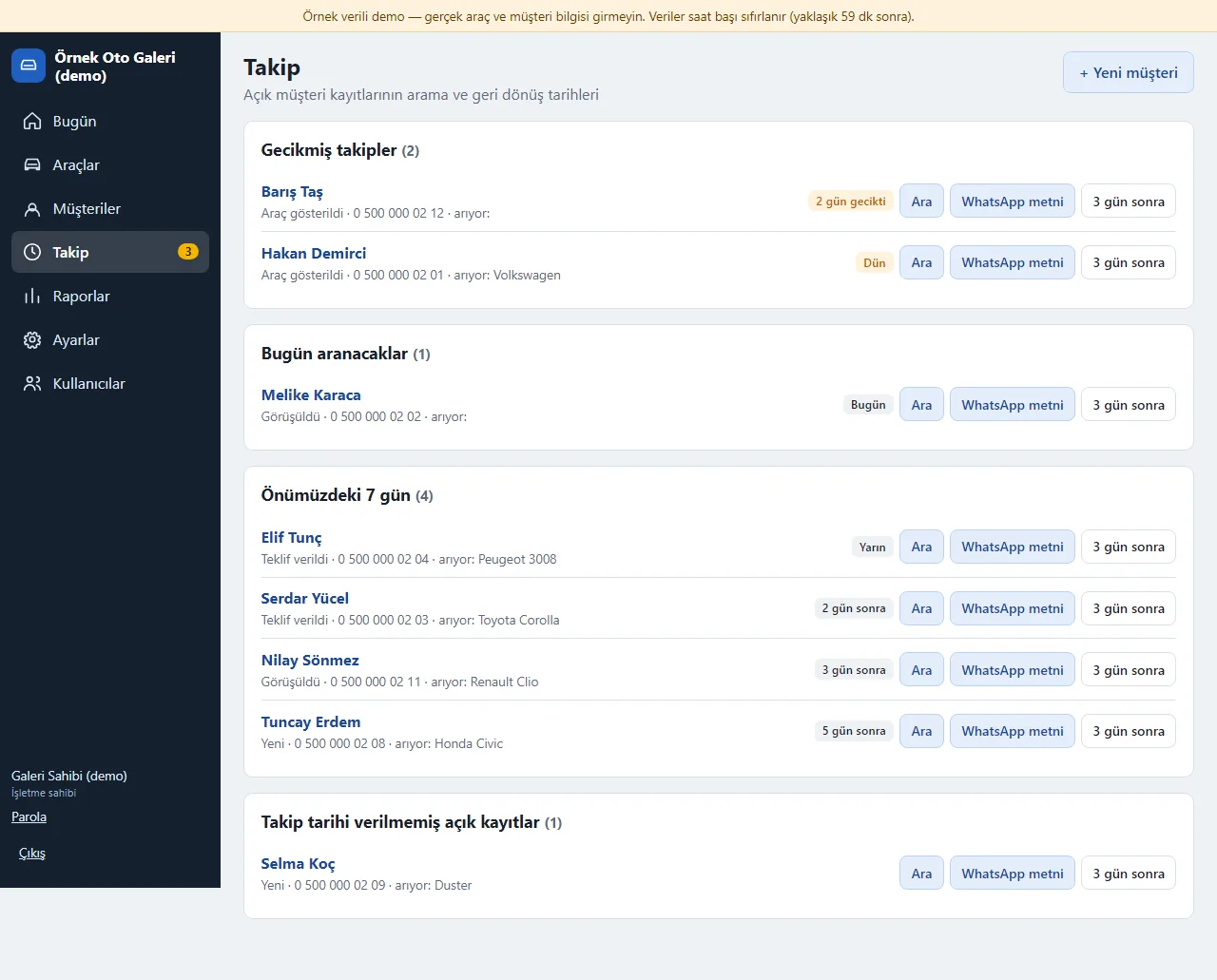
Follow-up list
Customers who are overdue, to call today and in the next seven days. The call button opens the phone app; the WhatsApp text comes ready for the dealership to send.
- On screen (Turkish interface)
- “Gecikmiş takipler” — overdue follow-ups
- “Bugün aranacaklar” — to call today
- “Önümüzdeki 7 gün” — the next 7 days
- “Ara” — call
- “WhatsApp metni” — WhatsApp text
- “3 gün sonra” — in 3 days (postpones the follow-up)
-
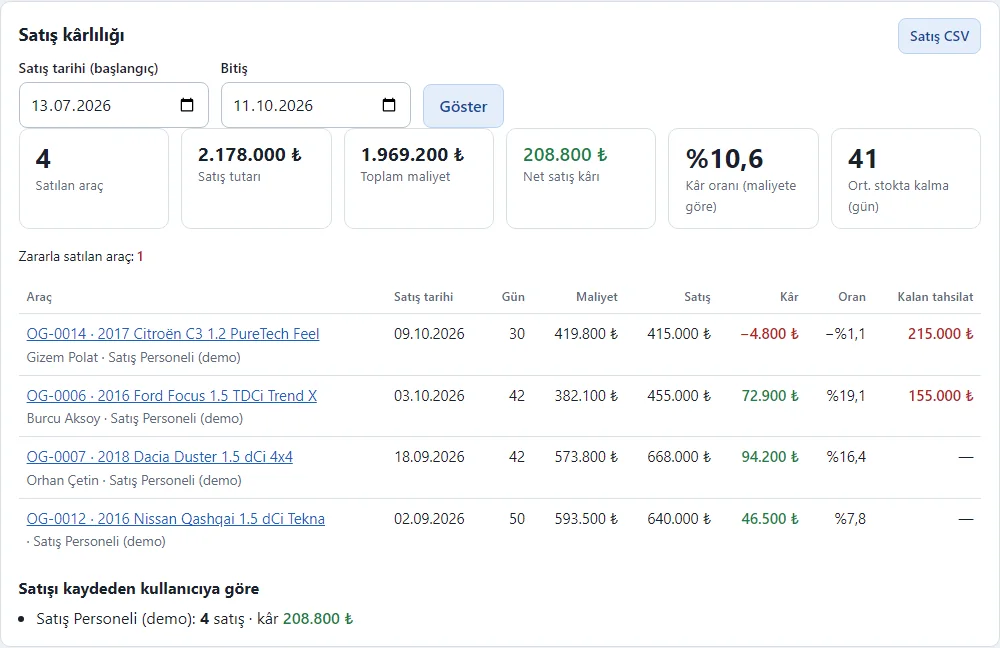
Sales profitability report
Cost, sale, profit, rate and days in stock of cars sold in the chosen dates; a car sold at a loss is flagged. Only the owner sees it; it downloads as CSV.
- On screen (Turkish interface)
- “Satış kârlılığı” — sales profitability
- “Satış tarihi (başlangıç) / Bitiş” — sale date (from) / to
- “Net satış kârı / Kâr oranı (maliyete göre)” — net sale profit / profit rate (on cost)
- “Zararla satılan araç” — cars sold at a loss
- “Satış CSV” — sales CSV
-
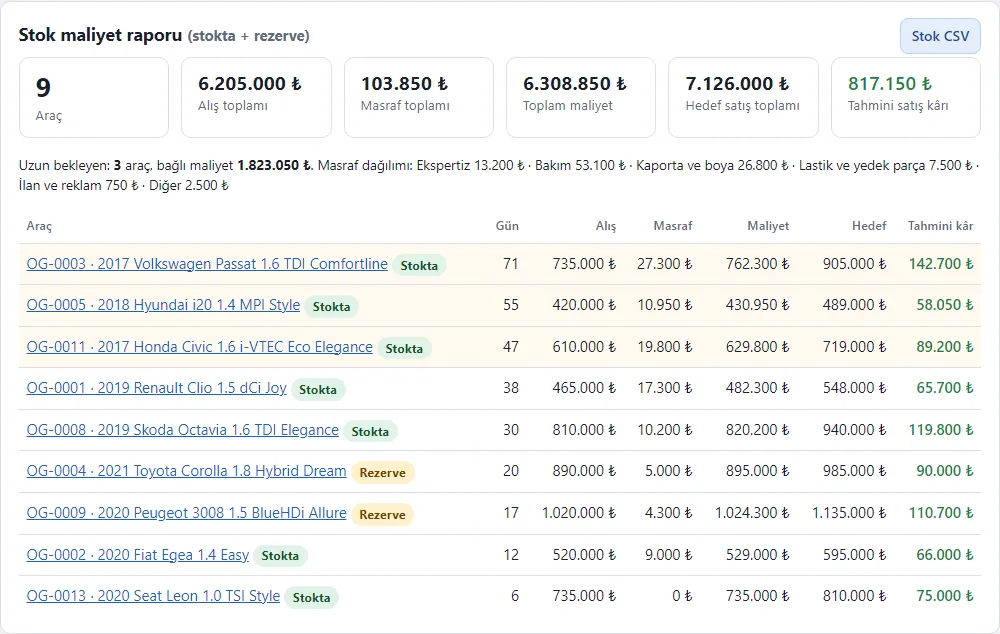
Stock cost report
Purchase, costs and total cost of cars in stock and reserved, the target sales total, estimated profit and the split of costs by type. Only the owner sees it; it downloads as CSV.
- On screen (Turkish interface)
- “Stok maliyet raporu (stokta + rezerve)” — stock cost report (in stock + reserved)
- “Toplam maliyet / Hedef satış toplamı / Tahmini satış kârı” — total cost / target sales total / estimated sale profit
- “Masraf dağılımı” — cost split
- “Stok CSV” — stock CSV
-
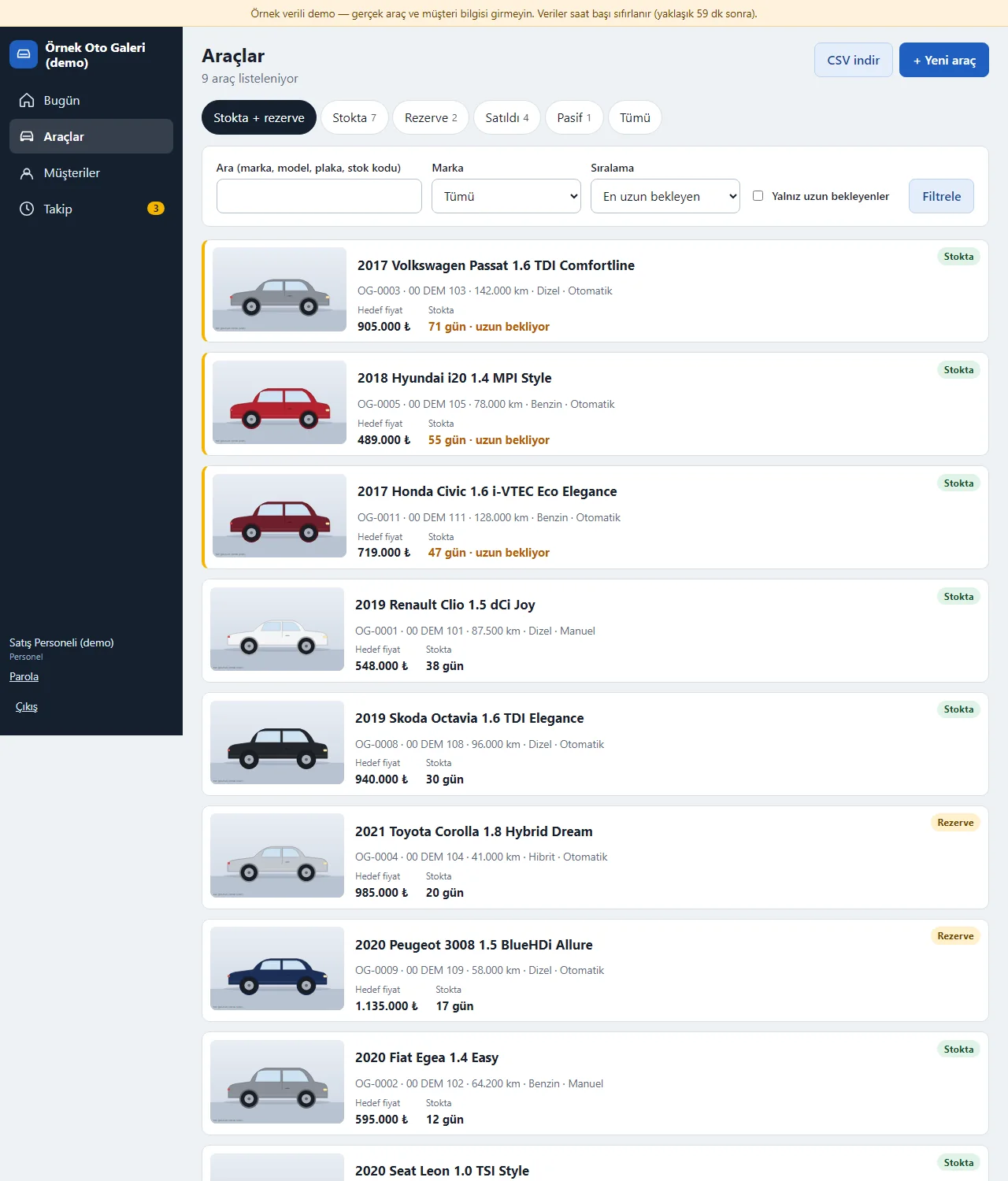
Staff view
Staff use the stock, customer and follow-up screens; the purchase price, cost, profit, report, settings and user screens are not shown.
- On screen (Turkish interface)
- “Bugün / Araçlar / Müşteriler / Takip” — today / vehicles / customers / follow-up
- “Hedef fiyat” — target price
- “Personel” — staff
-
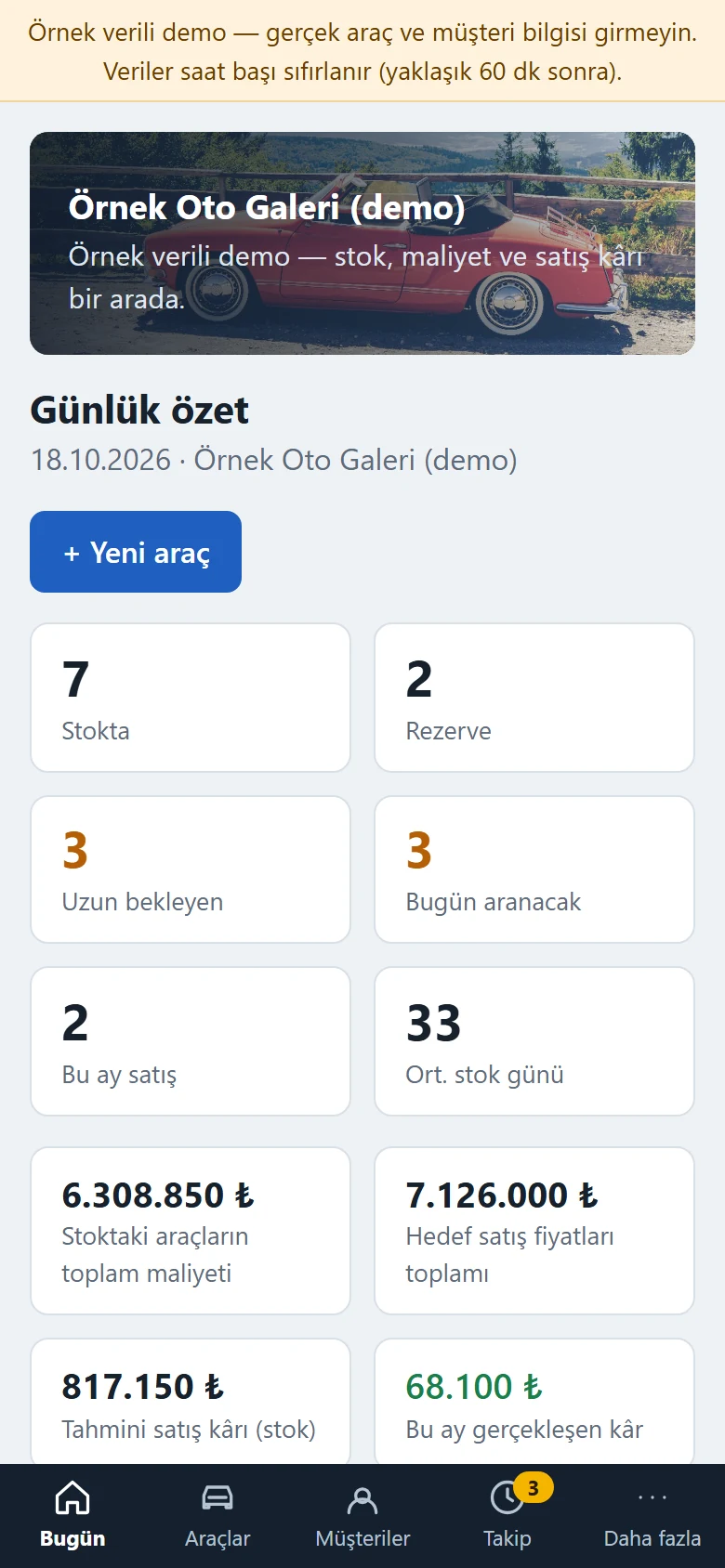
Daily summary on a phone
The panel on a phone: the bottom menu opens Today, Vehicles, Customers and Follow-up, and “More” opens the other screens. The summary tiles are on the first screen.
- On screen (Turkish interface)
- “Bugün / Araçlar / Müşteriler / Takip / Daha fazla” — today / vehicles / customers / follow-up / more
- “Günlük özet” — daily summary
-
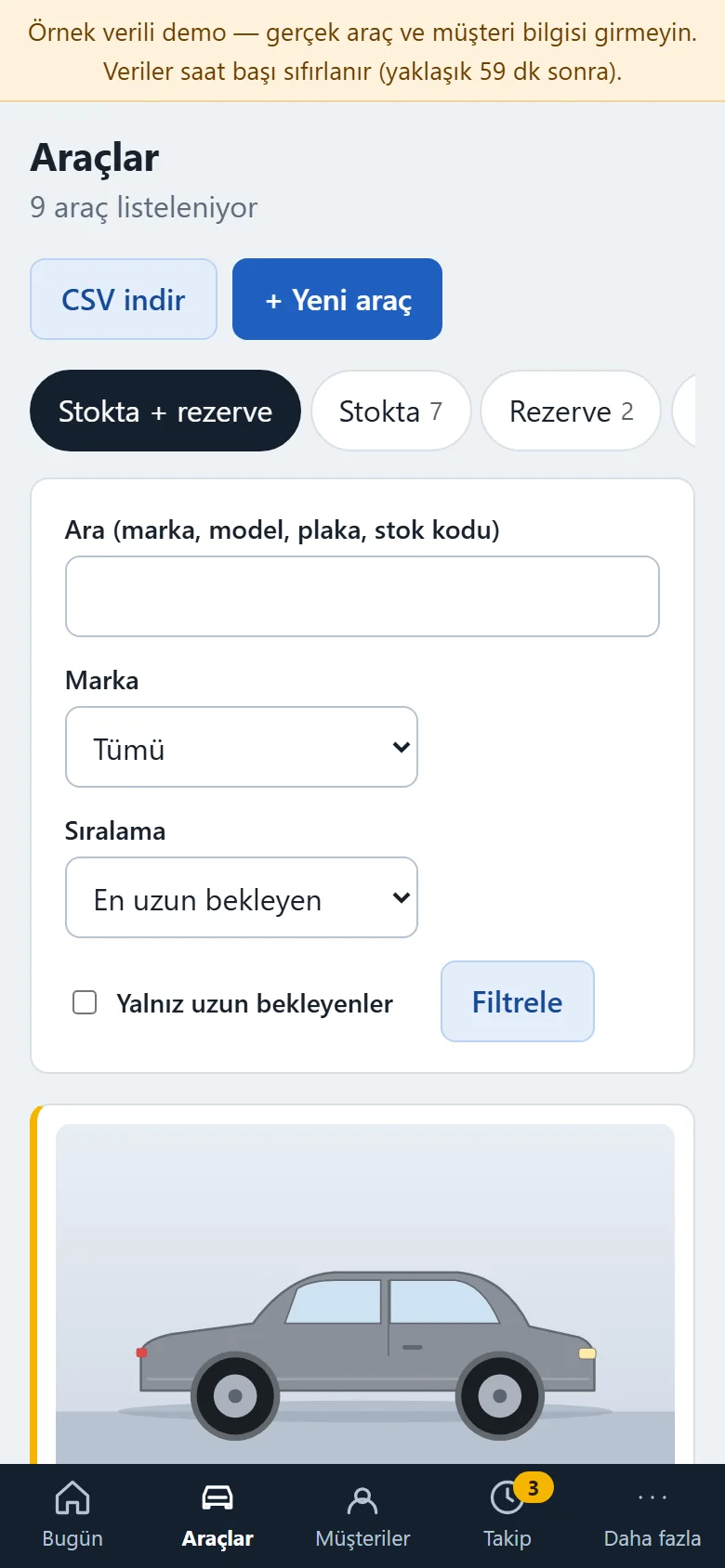
Stock list on a phone
The stock list on a phone: the photo, price, cost, estimated profit and days in stock are inside each card.
- On screen (Turkish interface)
- “Araçlar” — vehicles
- “Hedef fiyat / Toplam maliyet / Tahmini kâr” — target price / total cost / estimated profit
- “Filtrele” — filter
-
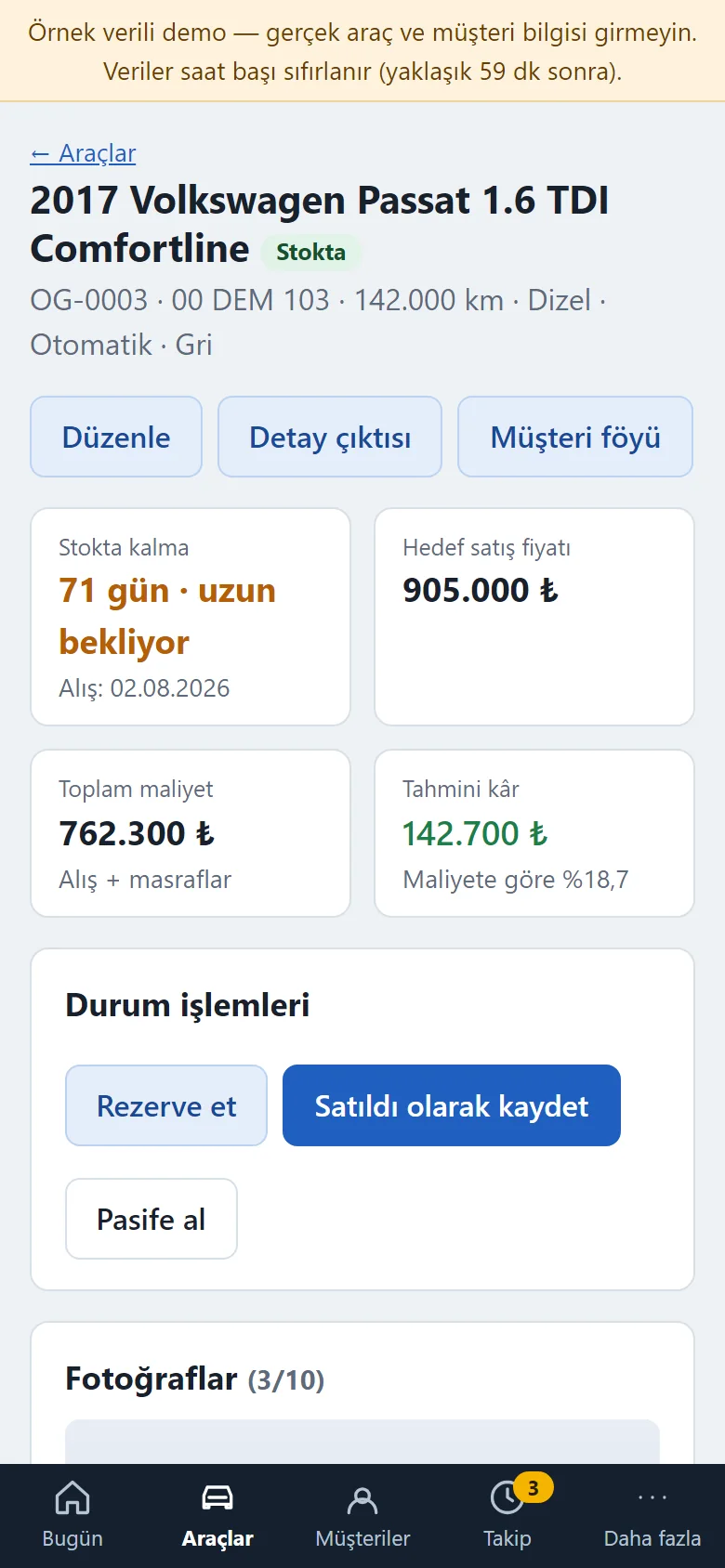
Vehicle detail on a phone
The vehicle detail on a phone: days in stock, the cost and profit tiles, the status actions and the photos.
- On screen (Turkish interface)
- “Stokta kalma” — days in stock
- “Toplam maliyet / Tahmini kâr” — total cost / estimated profit
- “Durum işlemleri” — status actions
- “Fotoğraflar (3/10)” — photos (3 of 10)
- What do they see at the end?
- Every car shows its total cost, estimated profit and days in stock; when a car is sold, the actual profit or loss is worked out. Customer follow-ups and deposit records sit in the same panel.
- What is it good for?
- Purchase, cost, sale and customer details do not scatter across a ledger, receipts and WhatsApp; a car that waits too long and a follow-up that is overdue get noticed; the profit or loss of each sale is visible car by car.
Everything that is not included, and all limits
- Not delivered to a client and not used by a real dealership. The dealership on the screens (“Örnek Oto Galeri”), the cars, people, phone numbers and amounts are made up; no real car or customer details should be entered in the demo.
- The car pictures in the demo are sample drawings, not real photos, and photo upload is switched off in the demo.
- There is no online payment, virtual POS or bank connection: deposits, payments and refunds are records only, and the app takes no payment.
- There is no automatic SMS or WhatsApp sending: the car text comes ready and the dealership sends it from its own phone. The customer follow-up and the matching-cars list only show on screen; no notification is sent.
- The app does not connect to listing sites, publish listings or work as a listings marketplace; the listing number or note is a free note field. There is no car valuation, loan calculation, live expertise or official lookup.
- Profit is worked out only from the purchase price the dealership enters and the costs spent on the car. There are no general expenses (rent, salaries, bills), no accounting, no e-invoice and no GPS vehicle tracking, and no multi-branch view. There is no store app; the panel opens in a phone browser.
- There is no document storage (registration papers, PDFs); only photos and notes are kept for each car.
- Tried locally with PHP 8.3 and SQLite, and on a DirectAdmin/LiteSpeed demo account with PHP 8.3; it has not been tried on any other hosting or PHP version. There is no MariaDB or MySQL support; only SQLite is used.
- In the demo the data is reset every hour; the sign-in page has the manager account prefilled and a “Demo hesapları” (demo accounts) box with “İşletme sahibi olarak gir” (enter as owner) and “Personel olarak gir” (enter as staff) buttons that need no password (the notice and the box show only in the demo). A normal installation asks for an e-mail and password.
- The interface in the screens is Turkish; there is no English interface in the panel.
Delivery and sales status
There is no cart, customer account or online payment on this site for now. Reach out by phone, WhatsApp or the form; in a first conversation your need and the software’s fit are reviewed. The form does not create an order, a contract or a payment.
Possible delivery options
Price
There is no package on offer right now, so there is no list price. If a package is defined, the price and payment method are settled then.
Requirements and version history
Installation requirements
- It uses plain PHP 8.1 or newer and SQLite; no separate database server is needed, and MariaDB or MySQL are not supported. The product was tried locally and on the demo account with PHP 8.3; it has not been tried on other PHP versions.
Release notes
- No version has been delivered to a client. A live sample-data demo exists.
- 1.0.0 (12 October 2026): first version; vehicle cards and statuses, days in stock and a long-waiting list, cost and profit, customer and follow-up records, deposit and payment records, photos, notes and history, a vehicle printout and customer sheet, a ready WhatsApp text, a daily summary and reports, CSV, owner and staff roles.
- 1.0.1 (18 October 2026): a demo-only header with a copyright-free (CC0) photo on the main screen of the sample-data demo; the vehicle intake angle drawings did not change.
- 1.0.2 (18 October 2026): demo sign-in page: a demo notice, fields prefilled with the manager account and password-free “… olarak gir” (sign in as …) buttons for owner and staff (demo mode only; on a real installation there is no notice, box or prefilled field).