Car rentalDemo with sample data
Car Rental Fleet and Booking Tracker: screen-by-screen guide
The full version of the short description on the product page: every feature, how each screen is used step by step, all limits and the delivery details.
All features
The flows below were run on a local installation (PHP 8.3, SQLite) with sample data; 435 automated checks (rule unit tests, domain logic, an 8-process concurrent-booking test and real HTTP end-to-end tests) passed. On the live demo, which runs the same sample data, 56 checks passed (11 October 2026); the 1.1.0 extra-charge record and the deposit deduction limit were tried by hand on the live demo on 17 October 2026. The app went through an independent AI security review and its findings were fixed; no human expert review was done. On 28 October 2026 the 1.4.0 screens for extra services, coupons, VAT, contract, receipt and payments were opened on the live demo and their amounts checked.
- Vehicle card: plate (the same plate cannot be added twice), model year, mileage, fuel or energy type (petrol, diesel, LPG, hybrid, electric), daily rate; inspection, traffic insurance and service dates with colour indicators; a vehicle is taken out of service, never deleted
- Booking calendar: by vehicle and date range; a booking that overlaps another on the same vehicle is not saved (back-to-back bookings do not count as an overlap; when two requests arrive at once only one is saved); a vehicle × 14 days view
- Hand-over record: mileage, fuel or charge level, damage status and note; optional photos (up to 6; switched off in the live demo)
- Return record: the mileage cannot be lower than at hand-over; the distance driven and a return taken later than planned are shown; “return without a physical meeting” can be ticked
- A printable hand-over and return document (business name, authorisation certificate number, signature lines); the document is not an official form
- The document is marked as given or sent to the renter; if it is not, the “Bugün” screen shows a late warning
- Deposits: the upper-limit calculation (up to 3 days’ rent for rentals up to 6 days, up to 7 days’ rent for 7–29 days; an amount above the limit is not saved), collection, refund and deduction records (a deduction needs a reason and the renter’s consent), a refund due date and a late warning
- Charges tied to return findings (1.1.0): after the return record, an extra charge is saved with a reason, an amount and the renter’s consent, plus an optional evidence note; there is no automatic tariff. A deposit deduction cannot be lower than the total of the approved charges; there is no collection record for an amount above the deposit
- The “Bugün” summary: today’s hand-overs and returns, late returns, past-due bookings not yet handed over, documents not delivered, deposit refunds, inspection, insurance and service dates falling due, and the next 7 days
- A “Kurallar” (Rules) page: which rule of the regulation is calculated, which is shown for information only, which is not in the app, and the points that could not be verified
- Renter records (name, phone, optional document numbers); a Turkish interface that works on a phone; light and dark themes
- Out-of-service dates: maintenance or repair days are closed with a start and end date (or the same hours every day); no booking is saved on them, the calendar shows them grey, and there is an upcoming list with “Entered by mistake, delete”
- Setup guide and onboarding: it opens step by step on first sign-in, a progress bar shows on every page and every screen has a “What is this screen for?” box; the demo has “Start with an empty site” and “Restore sample data” buttons
- Add to phone and notifications: a sign-in-free setup page, send by WhatsApp, copy the link and an A4 setup card with a QR code; free push notification for new bookings and an optional e-mail (no SMS)
- Renter page (no sign-in): the renter picks the pick-up and return time, sees the vehicles free in that range (closed and out-of-service days and clashing bookings excluded) and an estimated amount, picks extra services and enters a coupon code to see the amount line by line (rent, extras, discount, VAT, total; payment is made at the business or at hand-over), and sends a request with a name and phone; a request holds no vehicle until the business approves it, and is approved or rejected under “Incoming requests” in the panel (clashes are checked again on approval); the renter’s own status page; on a confirmed future booking, “Add to calendar” (a Google Calendar link and an .ics, a reminder one hour before; no name, phone, plate or amount is added); online requests can be switched off in settings; an hourly limit per address
- Extra services and daily rates by length of rental (1.4.0): child seat, additional driver, HGS toll tag, navigation, damage packages, a young-driver package and winter tyres come as a ready sample list (the prices are examples); each is priced per day or per item, and a booking keeps its own copy of the name and price. Length bands on a vehicle’s page (e.g. 1–3, 4–7, 8+ days) apply a lower daily rate on longer rentals by themselves
- VAT and coupons: a VAT rate and “included in / added to the price” are set; a booking shows the items, subtotal, VAT and grand total (VAT breakdown). A percentage or fixed-amount coupon is defined with an optional last day and use limit; the discount comes off the vehicle rent only
- Rental contract and receipt: printed from the booking page. The contract text is a sample template edited in Settings (not a legal text); the receipt shows the items and a payment summary and is not an official invoice or e-invoice
- Payment record: a booking shows the total, the amount paid and the amount left; cash, card or bank transfer is saved as “I collected it” and a wrong entry can be deleted (no online payment is taken). A badge says Unpaid, Partly paid or Paid; the deposit and the charges after return are kept apart from this total
Screen by screen: how it is used
The app’s interface in these screens is Turkish; only the captions and explanations on this page are in English. The screens come from the app’s own demo mode with sample data; the business, the vehicles, the renters, the plates, the document numbers and the phone numbers starting with 0500 are sample data. The yellow strip at the top is the demo-mode notice. The phone view was taken with a browser set to a phone’s size. The picture of the Rules page shows only its first part. In the demo the rules apply as a preview from 01.01.2026, before the entry-into-force date. The extra services, renter form, amount and payments, receipt and contract screens come from version 1.4.0 of the live demo.
- Who uses it?
- The business owner or office staff member who follows vehicles, bookings, hand-overs and returns, and deposits.
- Where do they start?
- On the sign-in page the demo account comes filled in; “Giriş yap” (Sign in) opens the “Bugün” (Today) screen.
What do they do on screen? Step by step
-
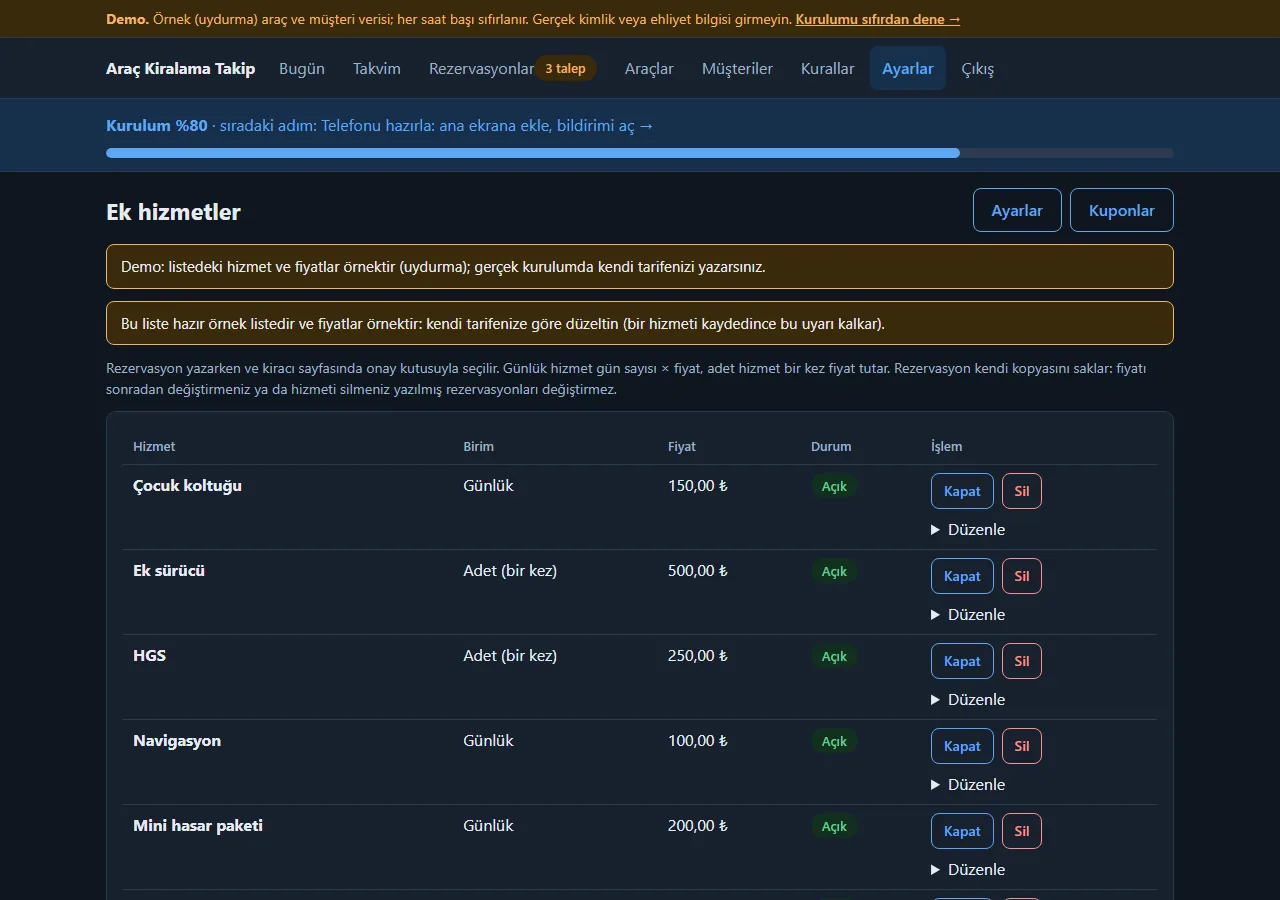
1.4.0 · 28 October 2026 Extra services
Settings → “Ek hizmetler”: items such as a child seat, an additional driver, an HGS toll tag, navigation and damage packages are priced per day (days × price) or per item (once). An empty page gets a ready sample list; the prices are examples to correct to your own tariff. A booking keeps its own copy of the name and price, so a later price change does not alter a booking already written.
- On screen (Turkish interface)
- “Ek hizmetler” — extra services
- “Günlük / Adet (bir kez)” — per day / per item (once)
- “Kapat / Sil / Düzenle” — switch off / delete / edit
- “Kuponlar” — coupons
-
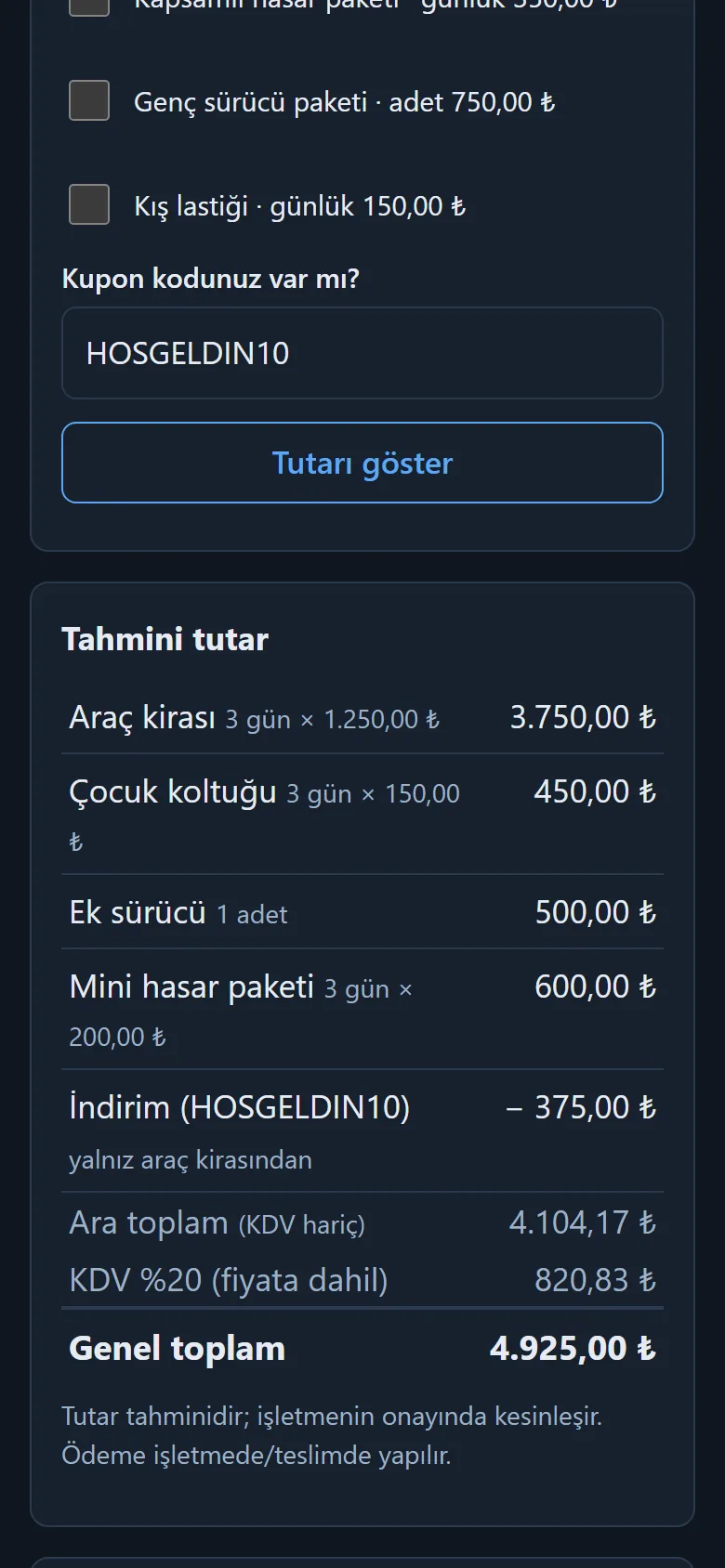
1.4.0 · 28 October 2026 Extra services and a coupon on the renter’s request form
On the sign-in-free renter page extra services are ticked, a coupon code is typed and “Tutarı göster” shows the estimated amount line by line: vehicle rent, extras, discount (on the vehicle rent only), VAT and the grand total. No payment is taken; payment is made at the business or at hand-over, and the amount is settled when the business approves.
- On screen (Turkish interface)
- “Ek hizmet ve kupon” — extra services and coupon
- “Kupon kodunuz var mı?” — do you have a coupon code?
- “Tutarı göster” — show the amount
- “Tahmini tutar” — estimated amount
- “Genel toplam” — grand total
-
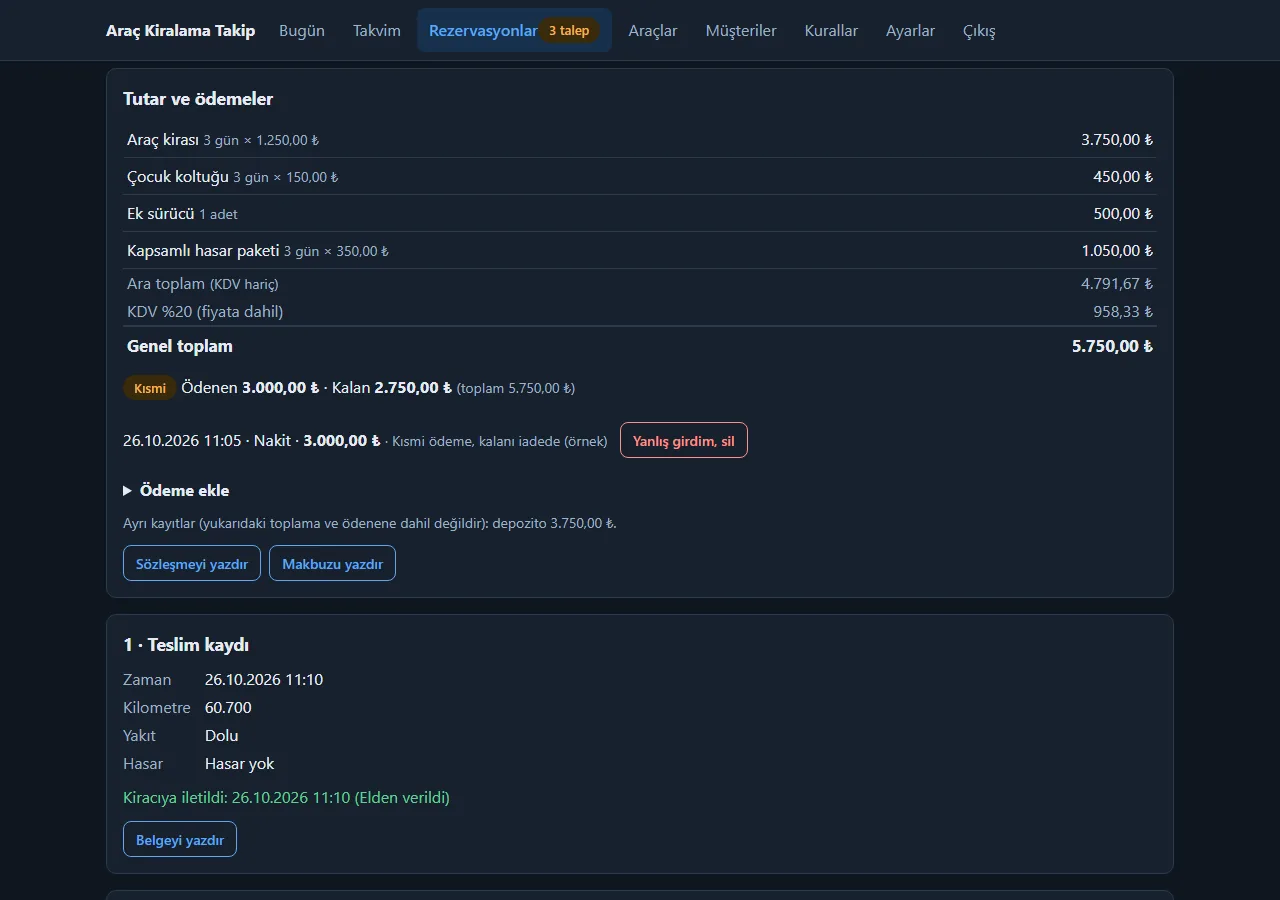
1.4.0 · 28 October 2026 Amount and payments
On the booking page: the items, subtotal, VAT and grand total; below them the amount paid and left and an Unpaid, Partly paid or Paid badge. “Ödeme ekle” records money collected in cash, by card or by bank transfer; a wrong entry is deleted with “Yanlış girdim, sil”. The program takes no payment, it only totals what the business collected; the deposit is kept apart from this total.
- On screen (Turkish interface)
- “Tutar ve ödemeler” — amount and payments
- “Kısmi” — partly paid
- “Ödeme ekle” — add a payment
- “Yanlış girdim, sil” — entered by mistake, delete
- “Sözleşmeyi yazdır / Makbuzu yazdır” — print the contract / print the receipt
-
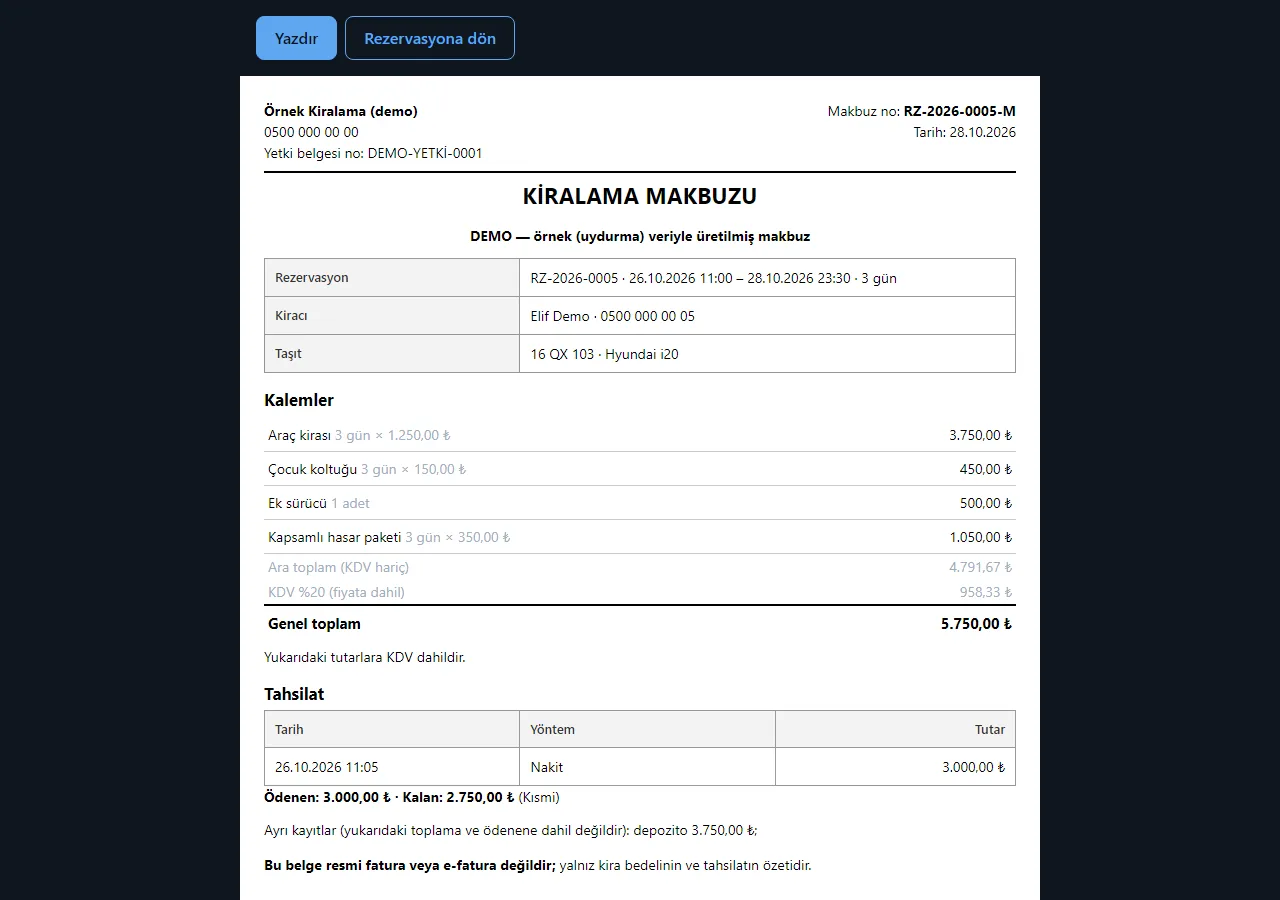
1.4.0 · 28 October 2026 Rental receipt
Printed from the booking page: business details, items, VAT, a payment summary and the amount left. The bottom of the document says it is not an official invoice or e-invoice.
- On screen (Turkish interface)
- “KİRALAMA MAKBUZU” — rental receipt
- “Kalemler” — items
- “Tahsilat” — payments
- “Bu belge resmi fatura veya e-fatura değildir” — this document is not an official invoice or e-invoice
-
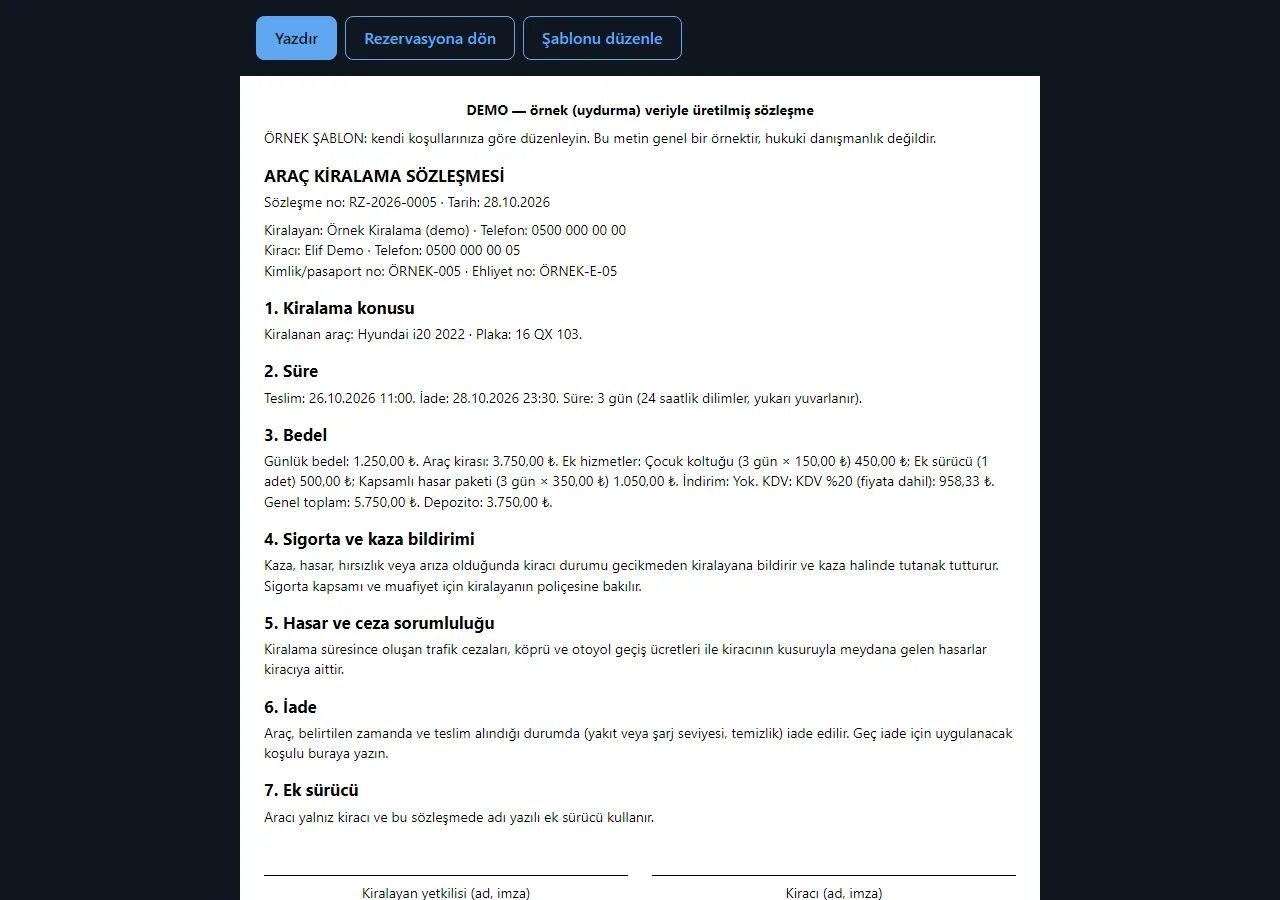
1.4.0 · 28 October 2026 Rental contract
The name, plate, period, price and extra services from the booking are filled into a ready template and printed. The text is a short sample template edited in Settings; it is not a legal text and should be edited to your own terms.
- On screen (Turkish interface)
- “ARAÇ KİRALAMA SÖZLEŞMESİ” — car rental contract
- “Şablonu düzenle” — edit the template
- “Kiralayan yetkilisi / Kiracı (ad, imza)” — lessor’s representative / renter (name, signature)
-
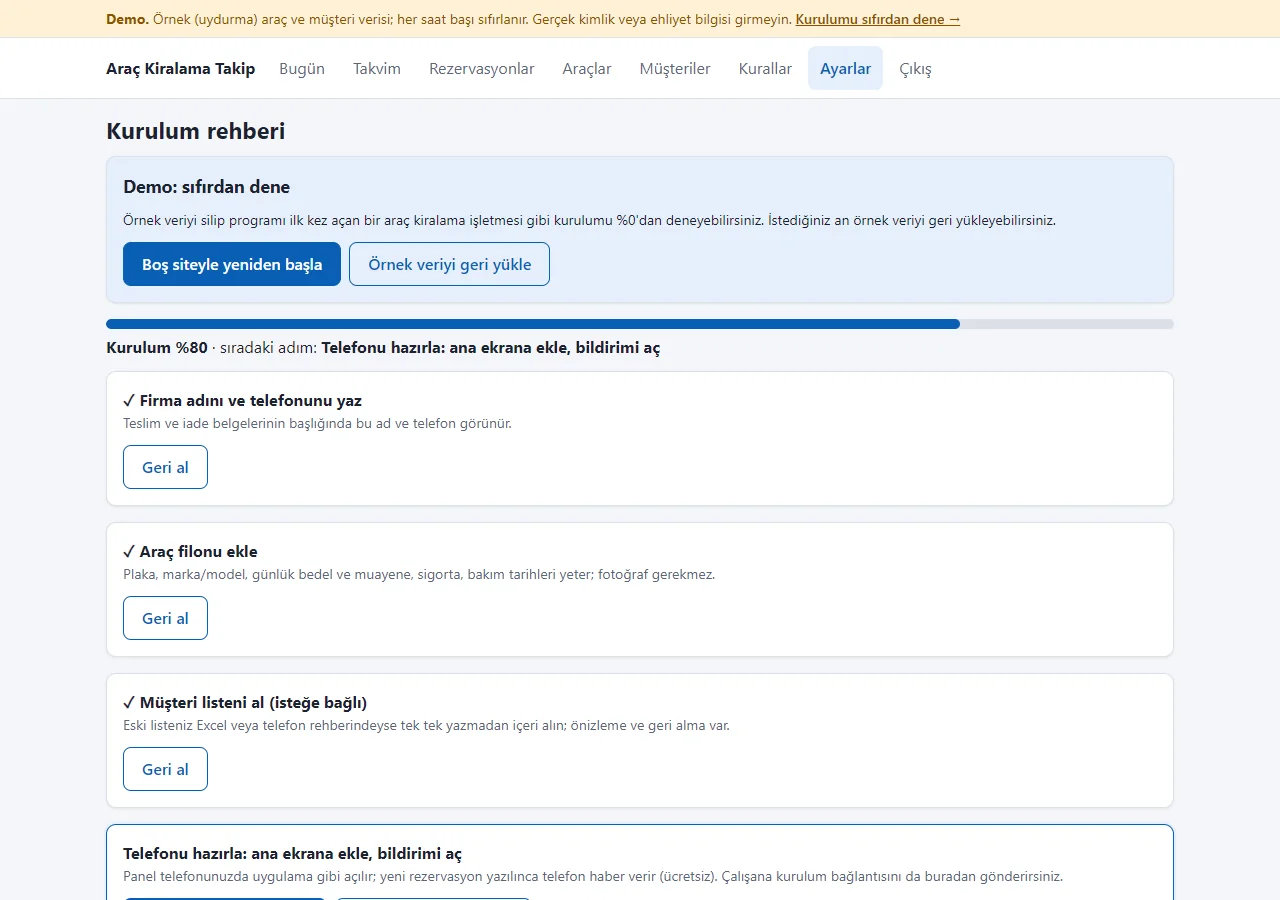
Setup guide
Opens on first sign-in: company name and phone, the vehicle fleet, the customer list and getting the phones ready are ticked off one by one; every step can be skipped. Two demo-only buttons at the top, “Start with an empty site” and “Restore sample data”, let you try the guide from scratch.
-
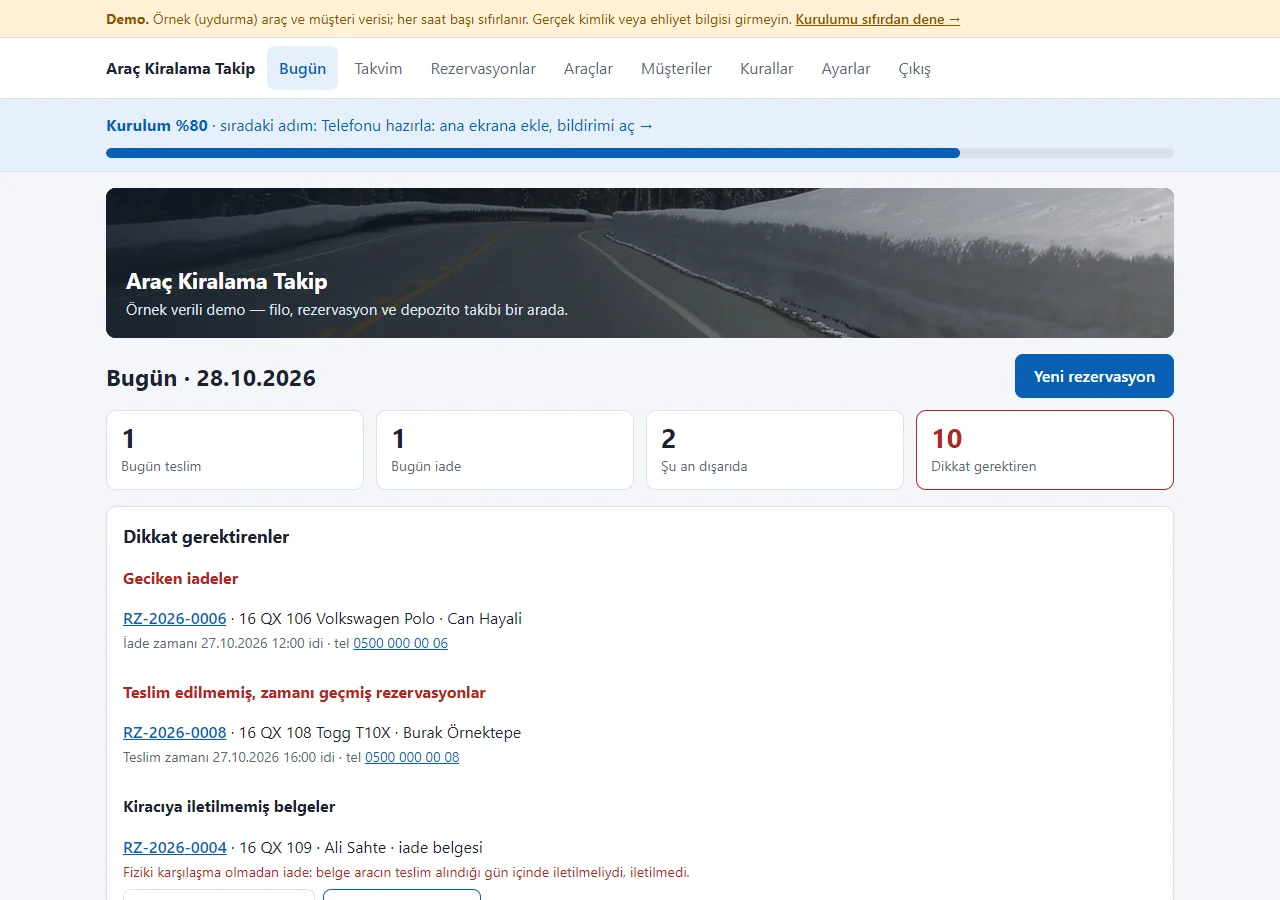
Progress bar on the Today screen
Until the steps are done, a “Setup 80% · next step…” bar sits at the top of every page; the next step is one tap away. Every main screen has a closed “What is this screen for?” box.
-
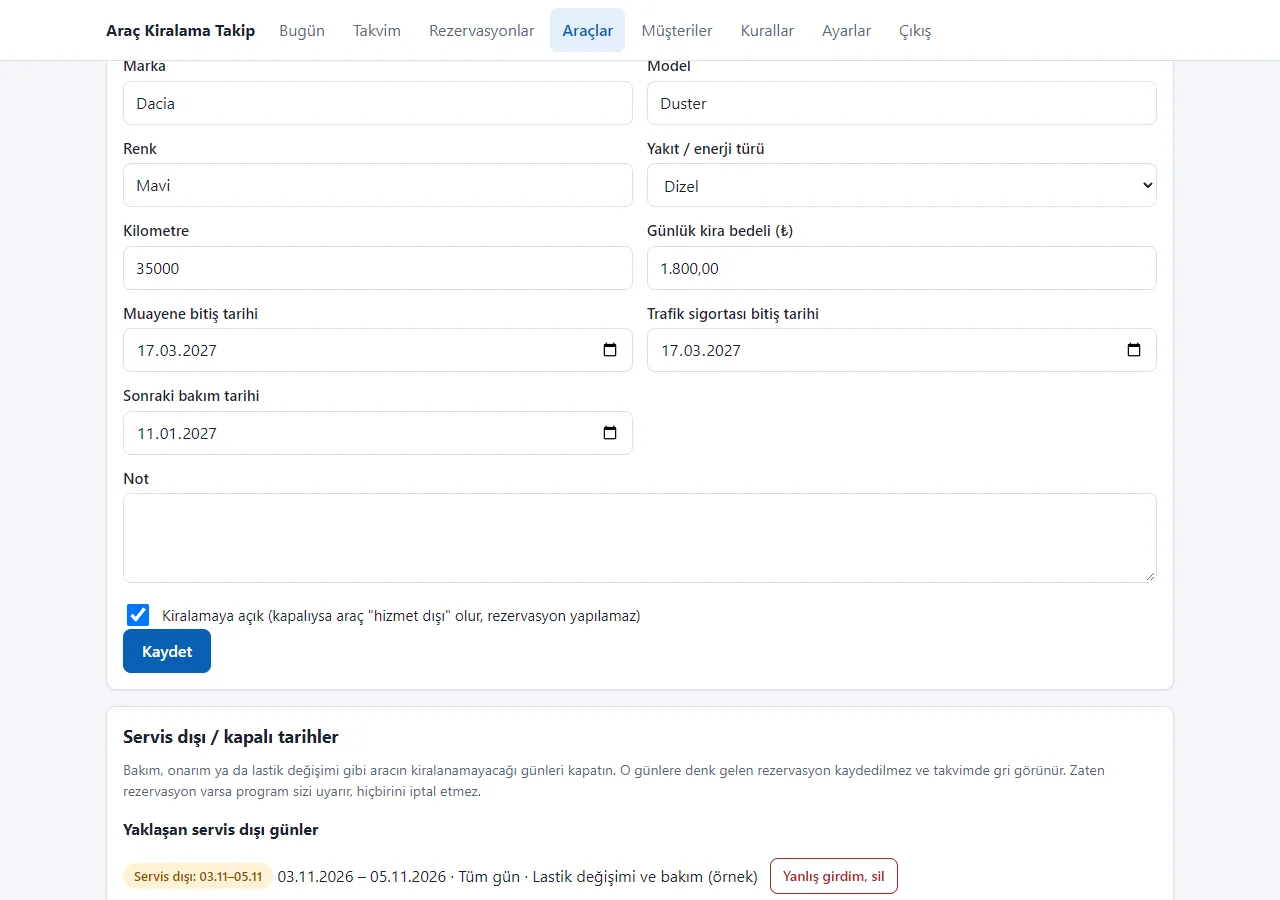
Out-of-service dates
Days when a vehicle cannot be rented (maintenance, repair, tyres) are closed with a start and end date, or the same hours every day. No booking is saved on those days and the calendar shows them grey; if a booking already exists the program warns and cancels nothing. Upcoming closures are listed, each with “Entered by mistake, delete”.
-
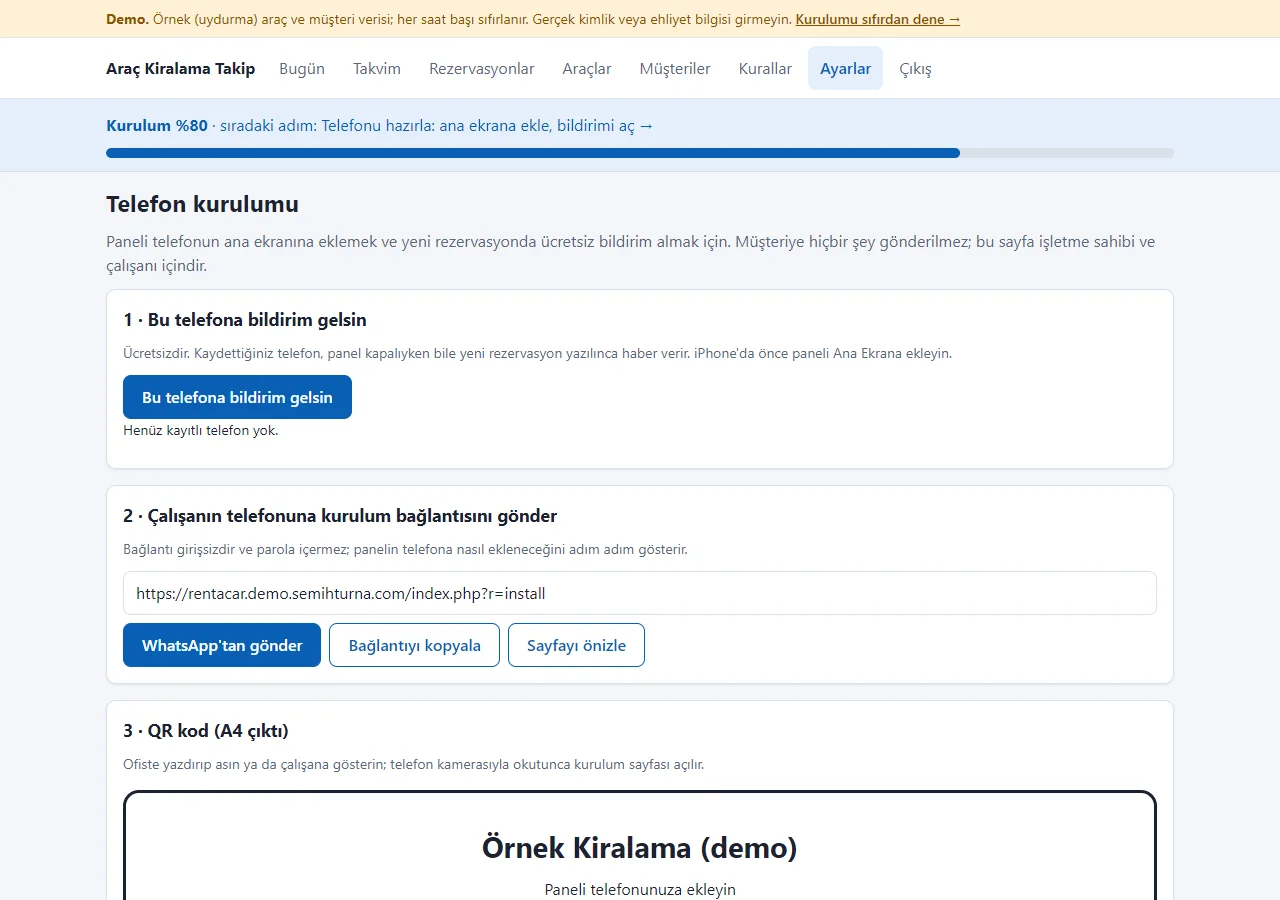
Send the link to the team
The panel’s phone-setup link goes out as a ready WhatsApp message or is copied in one tap; an A4 setup card with a QR code for the office wall is here too. The link needs no sign-in and contains no password.
-
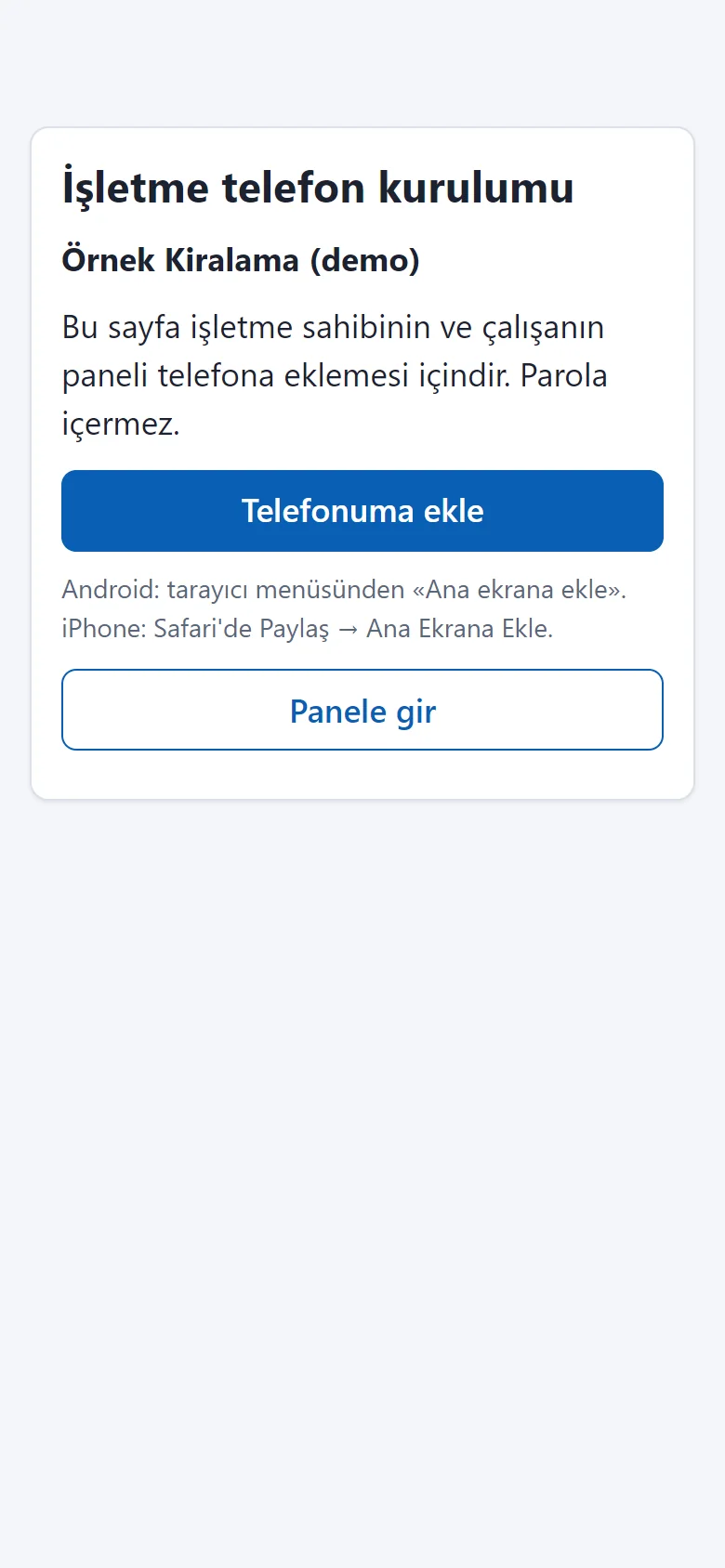
Add-to-phone page
A page without sign-in that opens on an employee’s phone: a large “Add to my phone” button, short steps for Android and iPhone, and “Open the panel”. The icon opens the panel sign-in directly; a new booking can send a free push notification.
-
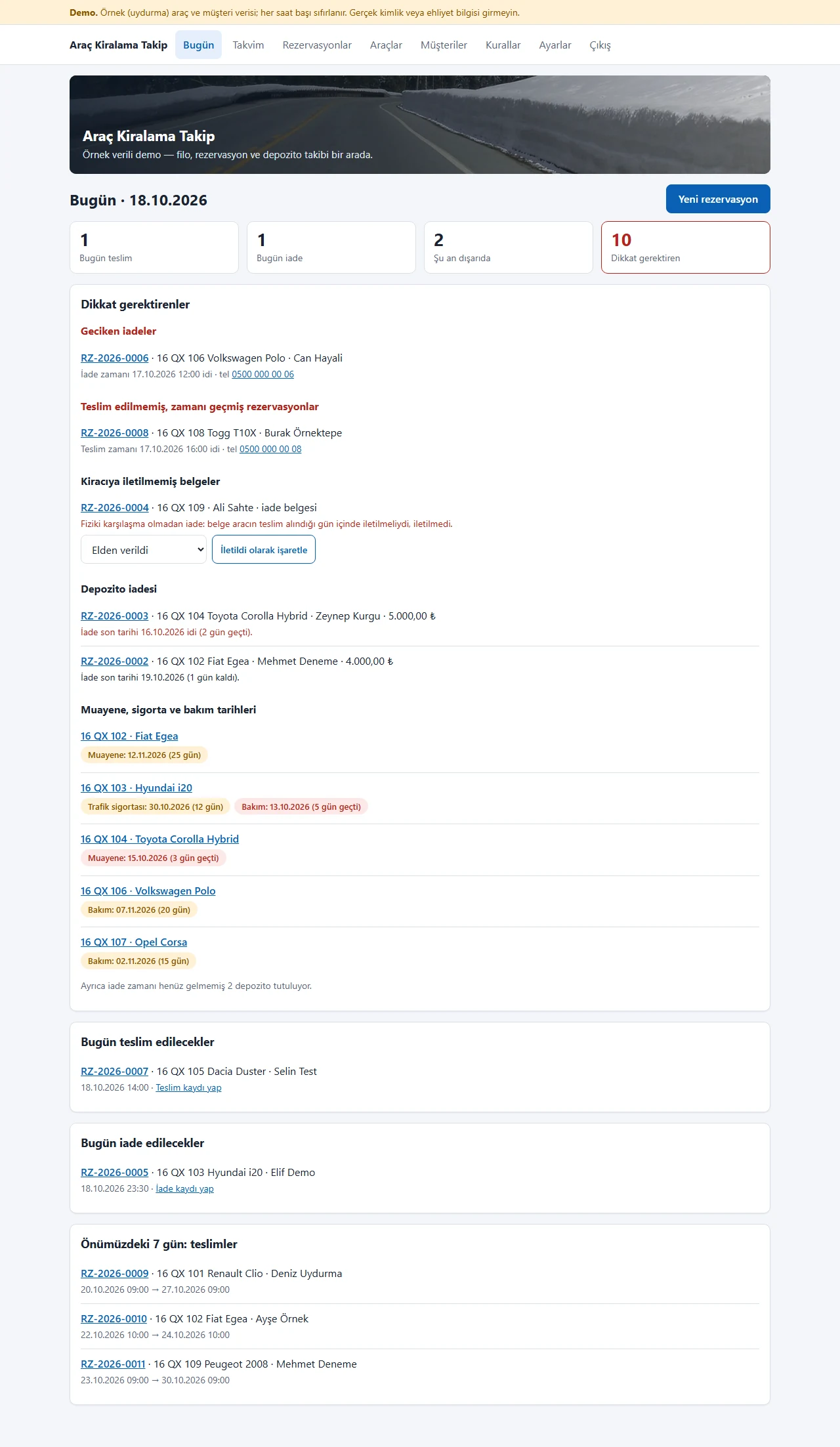
Today screen
Hand-overs and returns today and vehicles out; late returns, undelivered documents, deposit refunds, inspection, insurance and service dates falling due; below, today’s work and the next 7 days.
- On screen (Turkish interface)
- “Bugün” — today
- “Geciken iadeler” — late returns
- “Kiracıya iletilmemiş belgeler” — documents not delivered to the renter
- “Depozito iadesi” — deposit refund
-
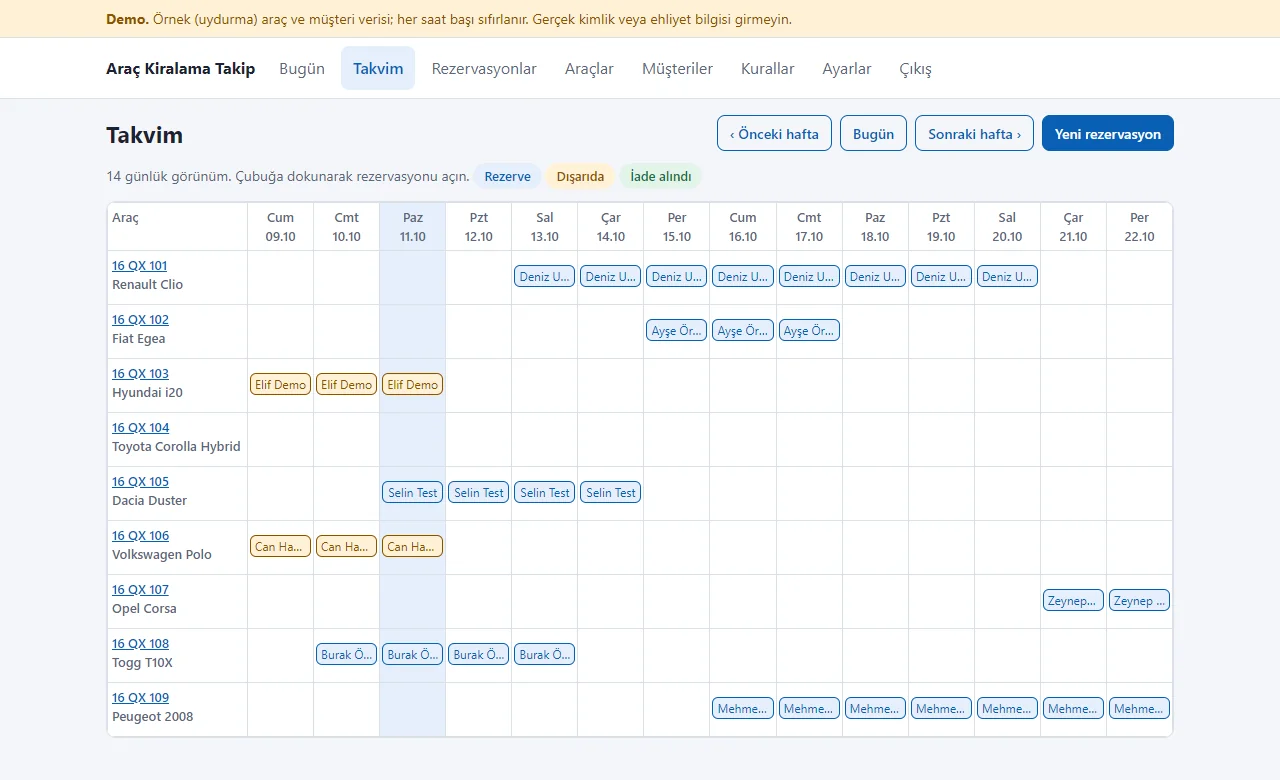
Booking calendar
A row per vehicle, 14 days as columns; each booking is a bar coloured reserved, out or returned. Tapping a bar opens the booking.
- On screen (Turkish interface)
- “Takvim” — calendar
- “Rezerve / Dışarıda / İade alındı” — reserved / out / returned
- “Önceki hafta / Bugün / Sonraki hafta” — previous week / today / next week
-
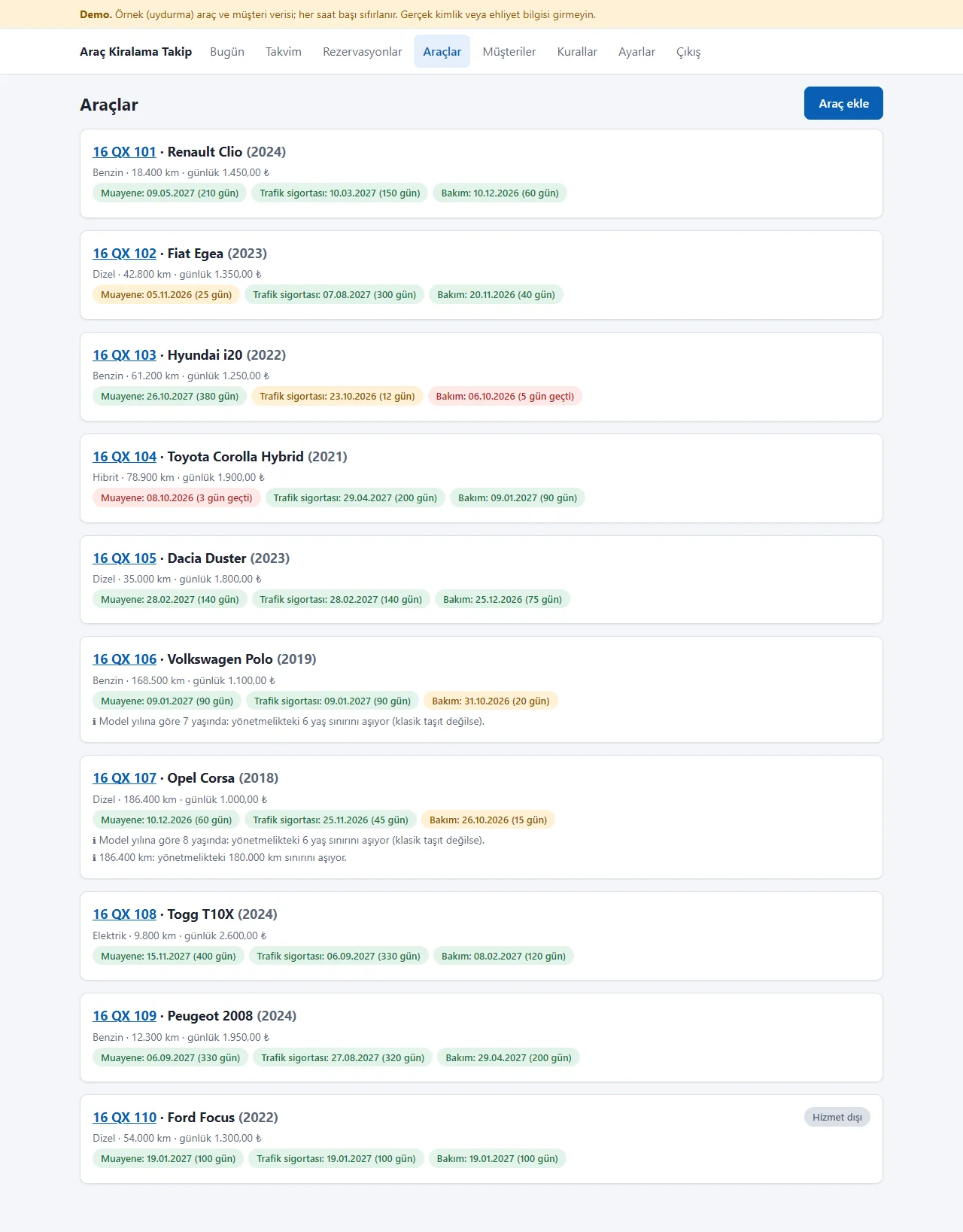
Vehicle list
Plate, model, fuel type, mileage and daily rate; inspection, insurance and service dates show as green, yellow or red badges with the days left. An out-of-service vehicle stays, labelled.
- On screen (Turkish interface)
- “Araçlar / Araç ekle” — vehicles / add a vehicle
- “Muayene / Trafik sigortası / Bakım” — inspection / traffic insurance / service
- “Hizmet dışı” — out of service
-
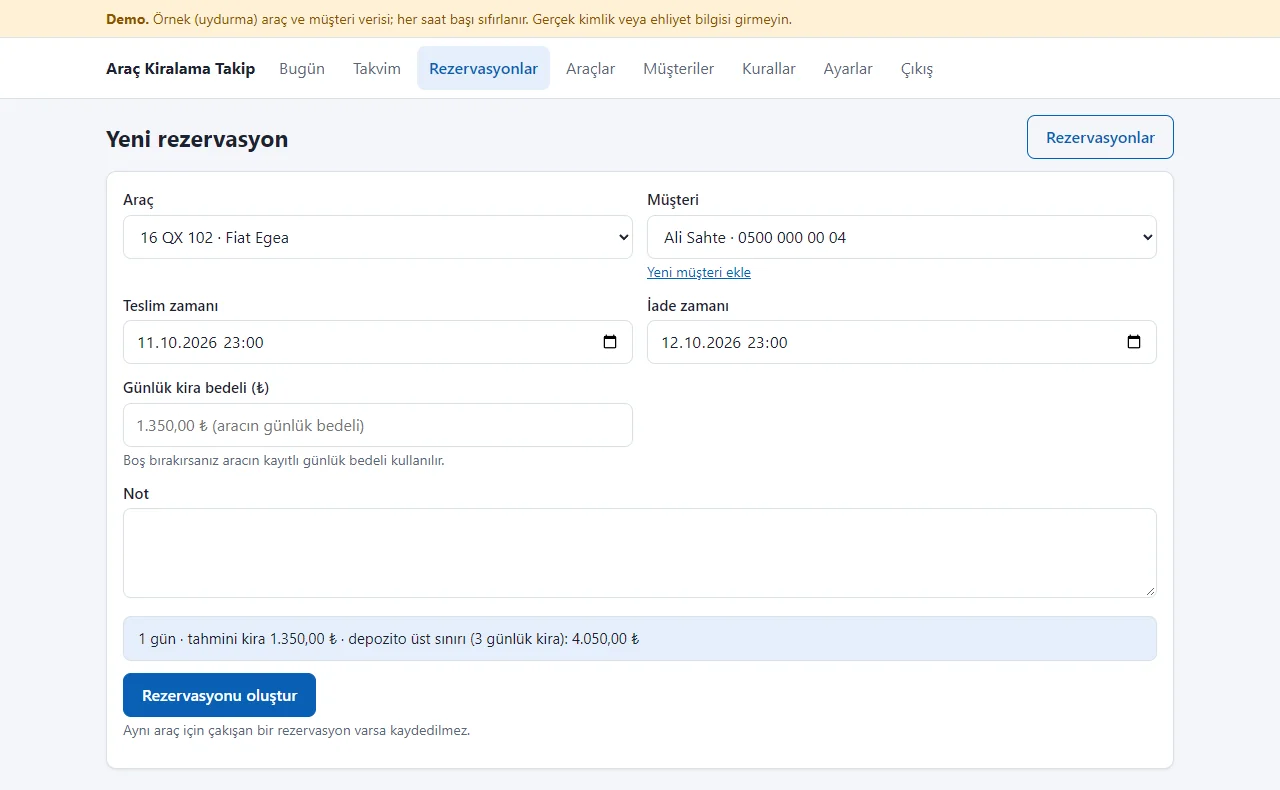
New booking
Pick a vehicle, a renter and the hand-over and return times; the form shows the days, the estimated rent and the deposit upper limit. An overlapping booking is not saved.
- On screen (Turkish interface)
- “Rezervasyonu oluştur” — create the booking
- “depozito üst sınırı” — deposit upper limit
- “Yeni müşteri ekle” — add a new renter
-
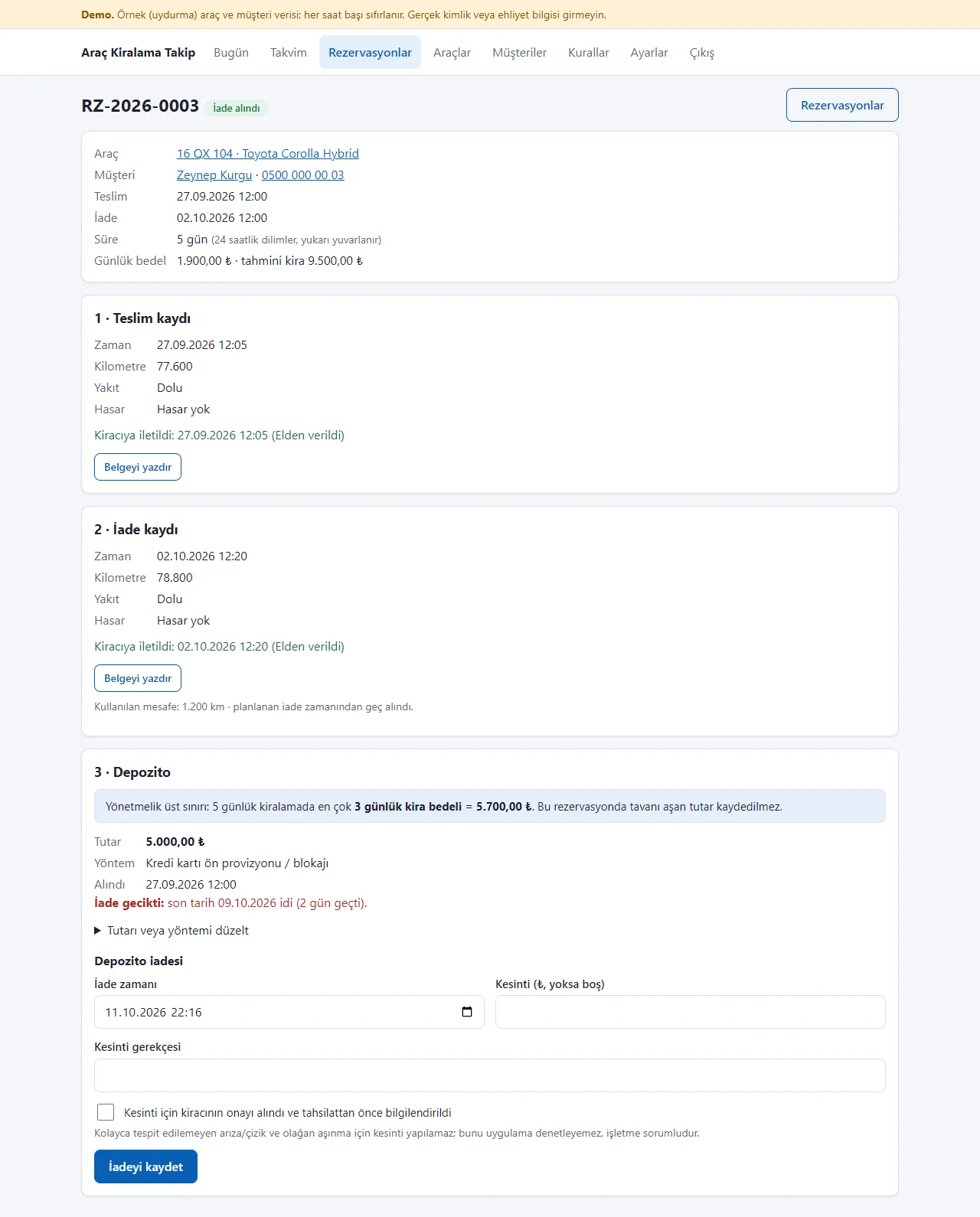
Hand-over and return records
Time, mileage, fuel and damage at hand-over and return, and the distance driven. It shows the document was delivered to the renter; “Belgeyi yazdır” opens it.
- On screen (Turkish interface)
- “Teslim kaydı / İade kaydı” — hand-over record / return record
- “Kiracıya iletildi” — delivered to the renter
- “Elden verildi” — handed over in person
- “Belgeyi yazdır” — print the document
-
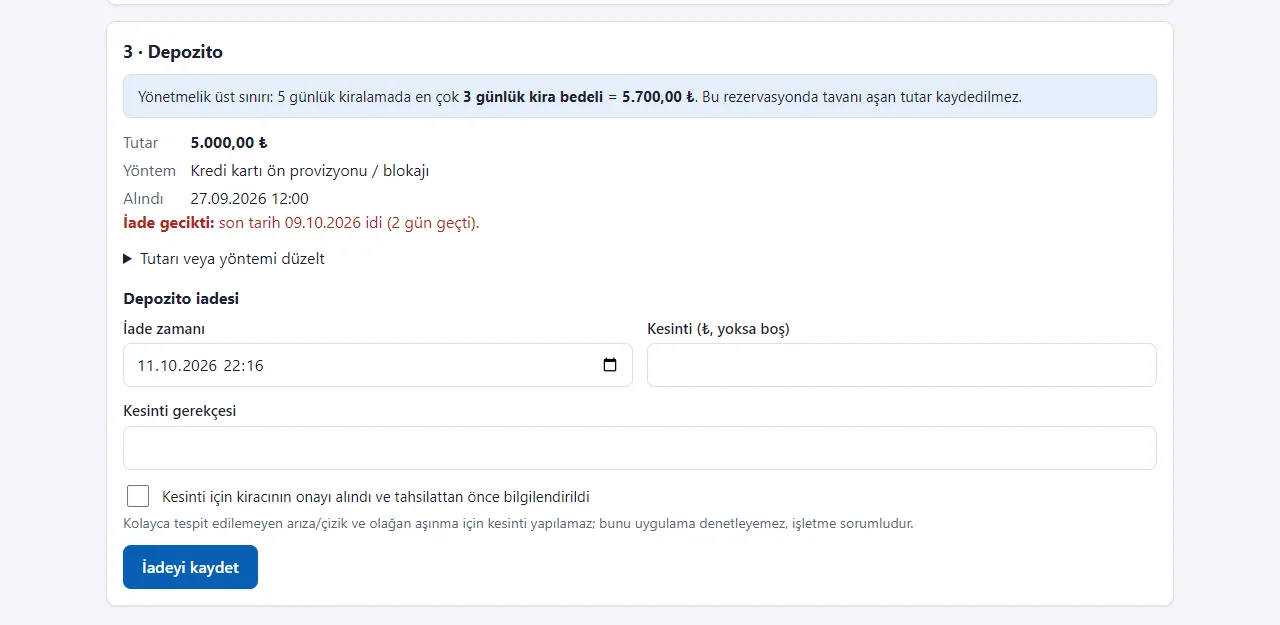
Deposit
The regulation’s upper limit is calculated from the rental length and a larger amount is not saved. Amount, method and refund due date show; a deduction needs a reason and the renter’s consent.
- On screen (Turkish interface)
- “Yönetmelik üst sınırı” — the regulation’s upper limit
- “İade gecikti” — the refund is late
- “Kesinti gerekçesi” — reason for the deduction
- “Kesinti için kiracının onayı alındı ve tahsilattan önce bilgilendirildi” — the renter’s consent was obtained and they were informed before collection
- “İadeyi kaydet” — save the refund
-
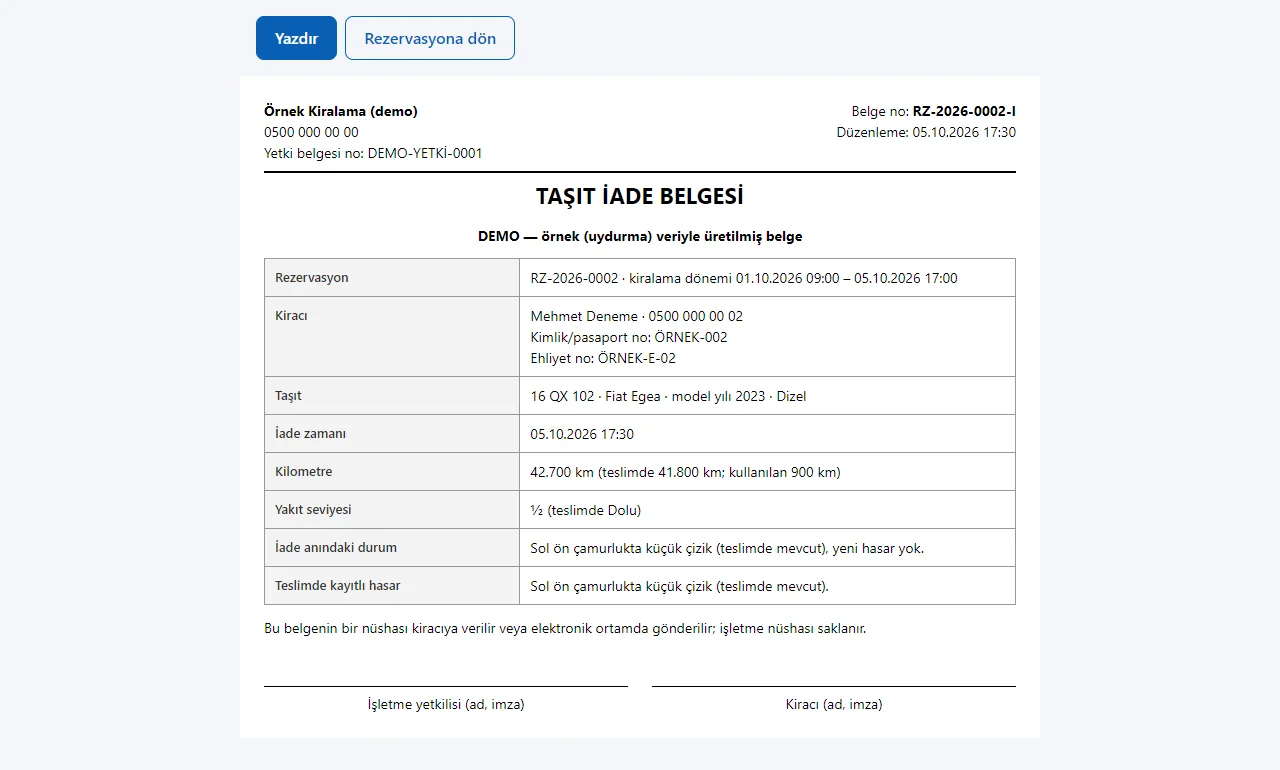
Return document
A printable “Taşıt İade Belgesi”: renter, vehicle, return time, mileage, fuel, condition, the damage recorded at hand-over and signature lines. It is not an official form.
- On screen (Turkish interface)
- “TAŞIT İADE BELGESİ” — vehicle return document
- “Yazdır” — print
- “İşletme yetkilisi / Kiracı (ad, imza)” — business representative / renter (name, signature)
-
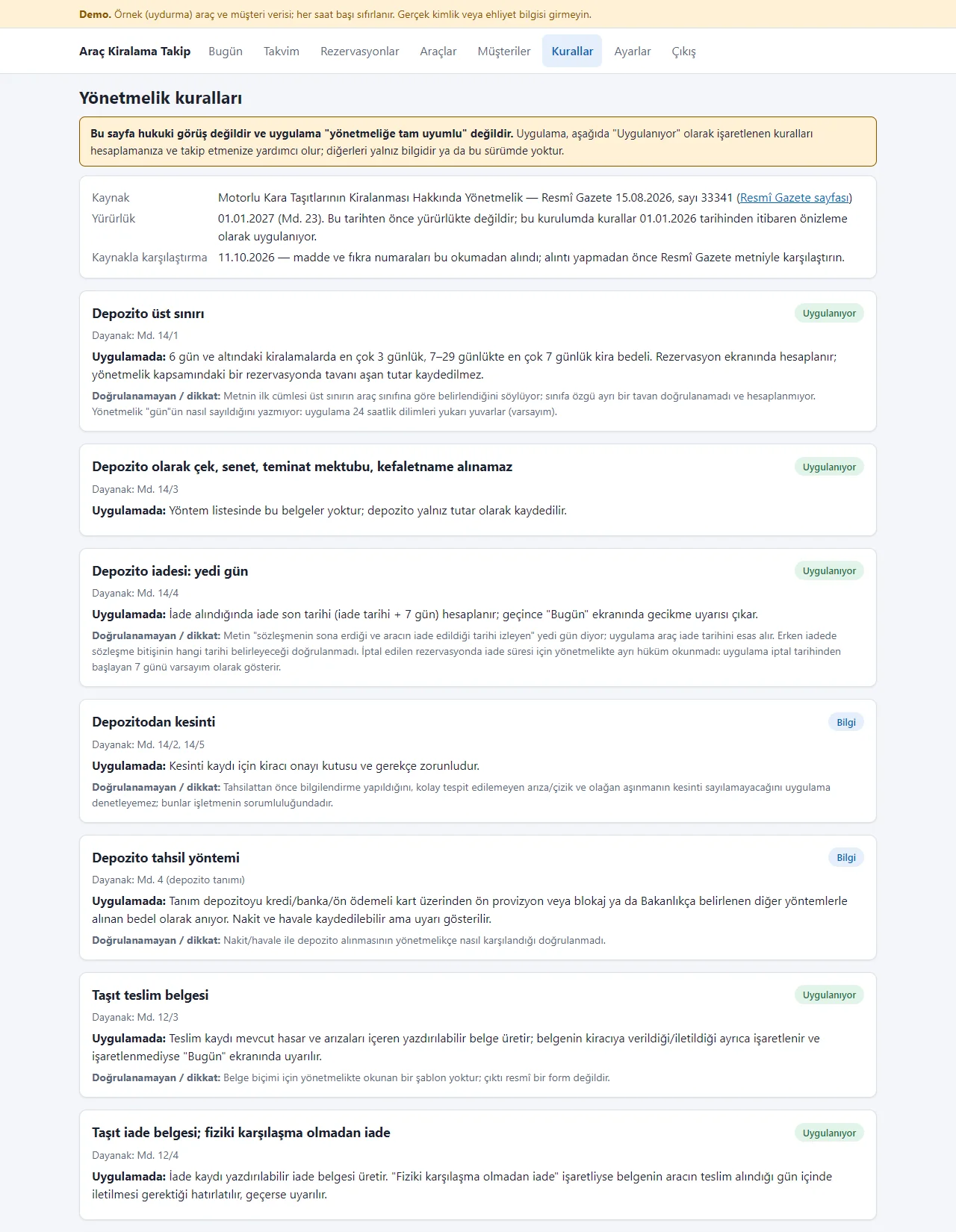
Regulation rules
The source, entry-into-force date and each rule’s basis, with an “Uygulanıyor” (applied) or “Bilgi” (information only) label and unverified points. Not legal advice; it helps track only some rules.
- On screen (Turkish interface)
- “Uygulanıyor” — applied in the app
- “Bilgi” — information only
- “Dayanak” — basis (article)
- “Doğrulanamayan / dikkat” — could not be verified / caution
-

Today screen on a phone
The same screen in one column: the summary boxes sit two to a row and the lists and cards stack. The picture was taken with a browser set to a phone’s size; not tried on a real phone.
- What do they see at the end?
- A booking goes onto the calendar; at hand-over and return a record and a document are produced and the deposit is recorded. Extra services, a coupon and VAT go into the amount, payments are recorded and a contract and a receipt are printed. Late returns, undelivered documents, deposit refunds and dates falling due are gathered on the “Bugün” screen.
- What is it good for?
- Vehicle dates, bookings, the state at hand-over and return, and deposits do not scatter across a notebook, spreadsheets and WhatsApp, and late items show up by themselves.
Everything that is not included, and all limits
- Not delivered to a client and not used by a real rental business. The business, the vehicles, the renters, the plates, the document numbers and the phone numbers starting with 0500 are sample data; no real ID, driving licence or customer data should be entered in the demo.
- It is not legal advice. The app does not cover the regulation as a whole: the Regulation on the Rental of Motor Land Vehicles, published in Official Gazette no. 33341 of 15 August 2026, enters into force on 1 January 2027, and the app only helps track some of its rules (the deposit upper limit and refund period, the hand-over and return document, keeping records, inspection, insurance and service dates). It has no link to the Ministry’s information system.
- Where the regulation gives no method, an assumption is used (for example, 24-hour periods are rounded up when counting days); the points that could not be verified are written on the app’s Rules page. The app cannot check whether a deposit deduction is justified; the reason and the renter’s consent are only recorded, and the responsibility stays with the business.
- In the demo, settings are open but it is a public demo, and photo upload is locked; the data is reset every hour. Photo upload was tried locally with a real upload and was not shown on the live demo.
- Tried locally with PHP 8.3 and SQLite; the live demo runs on a single DirectAdmin account with PHP 8.3. Only SQLite is supported. The phone view was observed in a browser set to a phone’s size; not tried on a real phone or on a customer’s hosting.
- There is no web setup wizard: the administrator account is created from the command line. There are no multiple users or permission levels.
- A booking cannot be edited; it is cancelled and created again. Extra services and a coupon are added only while the booking is written, not afterwards. The contract text is a short sample template, not a legal text, and should be edited to your own terms.
- There is no online payment, SMS, WhatsApp API, virtual POS, e-invoice, GPS, map or listing-site integration; the payment record only notes money the business collected. The receipt is not an invoice. The interface is in Turkish only.
Delivery and sales status
How does it work?
You try the demo and tell us about your fleet, and we send you a quote. We install it and we host it. The yearly price includes installation, hosting, data transfer and support.
Price
- Up to 30 vehicles: 3,000 TL
- Fleets above 30 vehicles: by quote
The yearly list price is 3,000 TL for up to 30 vehicles; a fleet above 30 vehicles is quoted. Installation, one year of hosting, data transfer, bug fixes and written usage support are included. Online payment, automatic SMS, e-invoice and GPS and map links are not included. New feature requests and work beyond the scope are priced separately and you are told before it is done.
Possible delivery options
Other delivery options
Requirements and version history
Installation requirements
- PHP 8.1 or newer and SQLite (pdo_sqlite); no paid third-party component. The product was tried locally with PHP 8.3.33 and on the live demo with PHP 8.3.31; only SQLite is supported.
Release notes
- Summarised from the version history; no version has been delivered to a client. A live sample-data demo exists.
- 1.2.0 (28 October 2026): a step-by-step setup guide with a progress bar, “What is this screen for?” boxes, an add-to-phone page and QR card, a free phone notification (no SMS), multi-day “out of service / closed dates” for a vehicle (no booking is saved in a closed range; a wrong entry can be deleted); the demo has “Start with an empty site” and “Restore sample data”.
- 1.0.0 (11 October 2026): first version; vehicle cards with inspection, insurance and service dates, bookings that block overlaps and a 14-day calendar, hand-over and return records with a printable document, a document-delivery mark and late warning, the deposit upper limit with collection, refund and deduction records, the “Bugün” (Today) summary and a regulation Rules page.
- 1.1.0 (17 October 2026): extra charges tied to return findings (reason, amount, renter’s consent, evidence note); a deposit deduction cannot be lower than the total of approved charges; existing records are kept on upgrade.
- 1.2.1 (28 October 2026): one-tap manager screen from the product page (demo only). 1.3.0 (28 October 2026): a sign-in-free renter page: the renter picks the pick-up and return time and sees the vehicles free in that range and an estimated amount, and sends a request; a request holds no vehicle until the business approves it, and is approved or rejected under “Incoming requests” in the panel (clashes and out-of-service days are checked again on approval); the renter’s own status page; on a confirmed future booking, “Add to calendar” (a Google Calendar link and an .ics, a timed event, a reminder one hour before; no name, phone, plate or amount is added); online requests can be switched off in settings; two new tables are added and existing data is kept.
- 1.4.0 (28 October 2026): extra services (a ready sample list, priced per day or per item, copied into the booking); a daily rate by length-of-rental band for each vehicle; a VAT rate and “included in / added to the price” with a VAT breakdown; a percentage or fixed-amount coupon (the discount comes off the vehicle rent only); a printable rental contract (an editable sample template) and a receipt (not an invoice); a cash, card or bank-transfer payment record with a paid / amount-left badge (no online payment); on the renter page, extra services, a coupon and an estimated-amount breakdown; new tables are added and existing data is kept. The live demo runs version 1.4.0.
Decisions not made yet
- Rights to use, modify, transfer and receive the source code: to be set in a written agreement; not decided yet.
- Whose name the hosting and domain are opened in, and where the software is installed, have not been decided yet.
There is no cart, customer account or online payment on this site for now. Reach out by phone, WhatsApp or the form; in a first conversation your need and the software’s fit are reviewed. The form does not create an order, a contract or a payment.