Driving schoolsDemo with sample data
Driving School Student and Lesson Tracking: screen-by-screen guide
The full version of the short description on the product page: every feature, how each screen is used step by step, all limits and the delivery details.
All features
The flows below were run in the app’s version with sample data (1.0.0). The screens were taken on 3 November 2026 from the local demo mode of the same code; the school in the demo is “Yıldız Sürücü Kursu (örnek)” (sample), and the students, phone numbers, addresses and amounts are made up; no real name, phone number or e-mail should be entered. The sample licence-class fees are not an official tariff. The phone notification and adding to the home screen have not been tried on a real phone.
- Student record: quick add with a name and phone, licence class, birth and enrolment dates, status (in progress, finished, dropped); the same phone is not added twice; the national ID number and the contents of a health report are not stored
- Licence class and fee plan: A1, A2, B, B automatic and B-to-A2 conversion examples; the course fee, driving-hour fee, theory and driving exam fees and the theory and driving lesson hours are edited to the school’s own tariff
- Contract and instalments: cash or 2–24 instalments, monthly due dates, the amount is frozen in the contract; a payment is recorded as cash, transfer or card and can be undone; the balance and overdue instalments show; the program takes no payment
- Printable contract draft and a promissory-note draft per instalment: sample drafts, not an official MEB (Ministry of National Education) form; the ID number and signature are filled in by hand and the school checks its own wording and current regulations
- Document status: for the health report, passport photo, criminal record, education certificate and signed contract only “var” (present) or “eksik” (missing) is ticked; the document itself is not stored
- Driving-lesson timetable: a weekly table with an instructor and car tab, bulk lesson entry with multi-select and “müsait değil” (not available) closing; a lesson cannot be written into a full slot, into two places at the same hour or for an instructor on time off; a printable schedule
- Driving-lessons counter: the allowance comes from the driving hours of the licence class (for example 7/14); planned and done lessons count, no-shows and cancellations do not; when the allowance is used up a lesson can still be written but a warning shows
- Student page: a secret link of their own for each student, no account; remaining lessons, planned lessons, the next instalment (no payment is taken), missing documents, the exam date and a request for a free slot; a request is not a lesson, the school calls and writes the lesson; the page can be added to the phone
- Exam tracking: theory and driving exam day, bulk student entry, result entry (passed, failed, did not attend), attempt number; a student who passed is not written for the same exam again; the program makes no exam application and fetches no result
- Vehicle document calendar: traffic insurance, inspection and periodic maintenance dates, “yaklaşıyor” (due soon) at 30 days or less, “geçti” (overdue) when the date passes; shown on the Today screen and in the follow-up list
- Today screen and follow-up list: overdue instalments (call and “WhatsApp’tan hatırlat”, remind on WhatsApp), pending lesson requests, lessons not marked, exams without results and upcoming exams, vehicle documents, missing documents; the program sends nobody a message on its own
- Instructor screen: on the phone an instructor sees only their own lessons for today and the next 2 weeks and taps Yapıldı or Gelmedi; the student list, contracts and fee details are never shown to an instructor
- Multi-day instructor time off: all day or the same hours every day; no lesson can be written in that range and an existing lesson is not cancelled silently; an “upcoming time off and closed hours” list and “Yanlış girdim, sil” (entered by mistake, delete); there is no leave-entitlement counter
- Importing students from Excel/CSV: column recognition from the header, phone-format matching, duplicate removal, a preview before saving and undo for the last import; ID number and document number columns are not taken; no message is sent
- Report, export and privacy: a monthly summary of payments, contracts, lessons and exams; student and instalment lists as CSV; a personal data dump and anonymisation (locked in the demo)
- Set-up and guidance: a 7-step setup guide with a progress percentage, a “Bu ekran ne işe yarar?” (what is this screen for) box on every screen, adding to the phone, a free phone notification for a new lesson request; “Boş siteyle yeniden başla” and “Örnek veriyi geri yükle” in the demo
- Roles: manager and instructor; pages, menu items and buttons not allowed are never shown and the server refuses an address typed by hand; an optional 15-day trial installation (when the time ends, sign-in and CSV download stay open and no data is deleted)
Screen by screen: how it is used
The interface in these screens is Turkish; only the captions and explanations on this page are in English. The screens were taken on 3 November 2026 from the demo mode of version 1.0.0 of the app (with sample data, run locally). The school (“Yıldız Sürücü Kursu (örnek)”), students, phone numbers, addresses and amounts are made up; the sample licence-class fees are not an official tariff. The phone screens are phone views, 390 px wide; the dates on the screens follow the demo’s sample data.
- Who uses it?
- The manager of a driving school, a driving instructor and a student.
- Where do they start?
- The manager adds a student or imports an old list, and writes a contract and instalments from the licence class.
What do they do on screen? Step by step
-
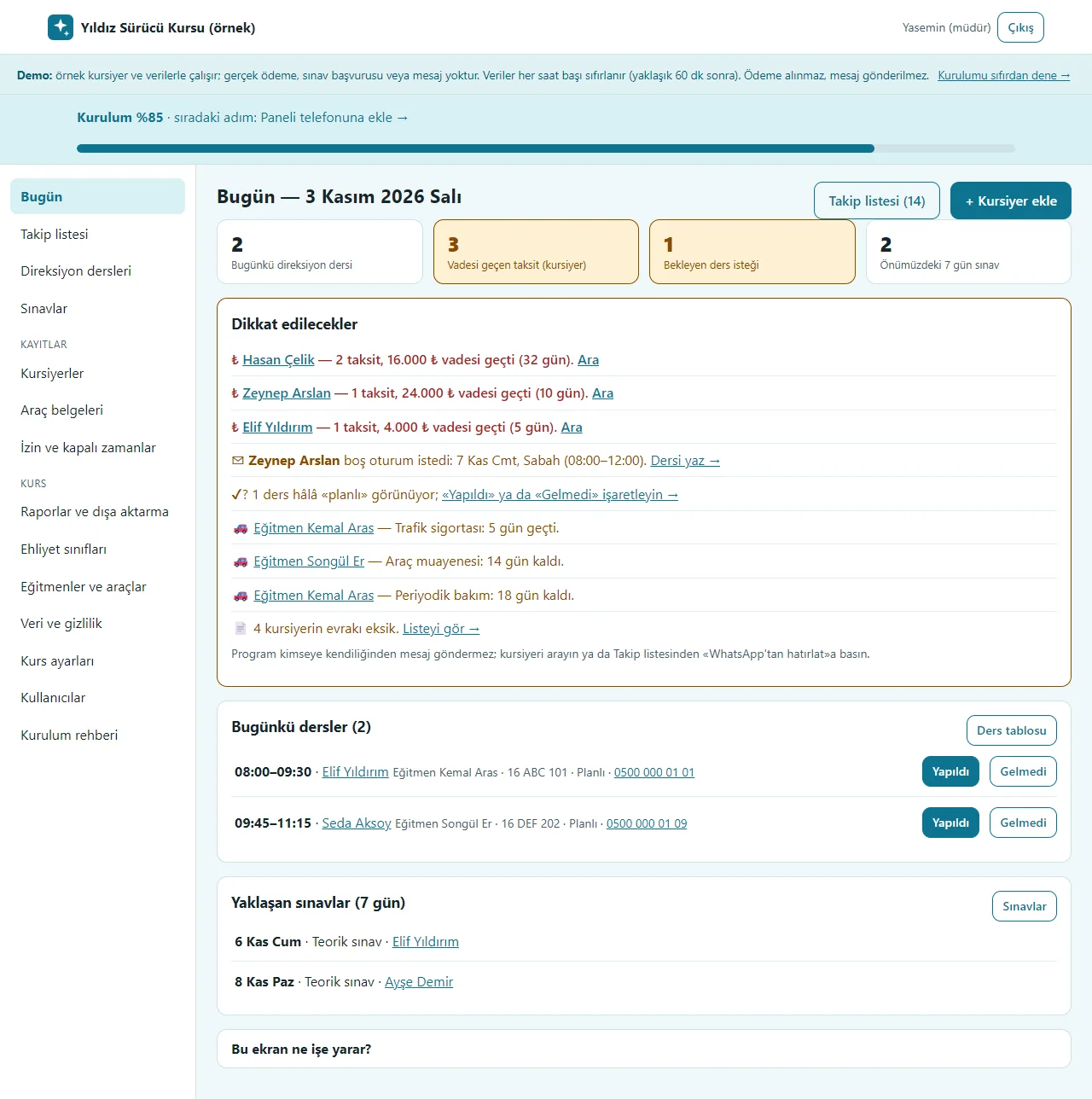
Today screen
Today’s driving lessons, overdue instalments, pending lesson requests and exams in the next 7 days show as tappable boxes; the “Dikkat edilecekler” list holds overdue instalments (Ara), a lesson request, a lesson not marked, a vehicle document and missing documents. The setup progress and the next step show at the top.
- On screen (Turkish interface)
- “Bugün” — today
- “Takip listesi” — follow-up list
- “Dikkat edilecekler” — things to watch
- “Vadesi geçen taksit” — overdue instalment
- “Bekleyen ders isteği” — pending lesson request
- “Bugünkü dersler” — today’s lessons
- “Yapıldı” — done
- “Gelmedi” — no-show
- “Kurulum” — setup
-
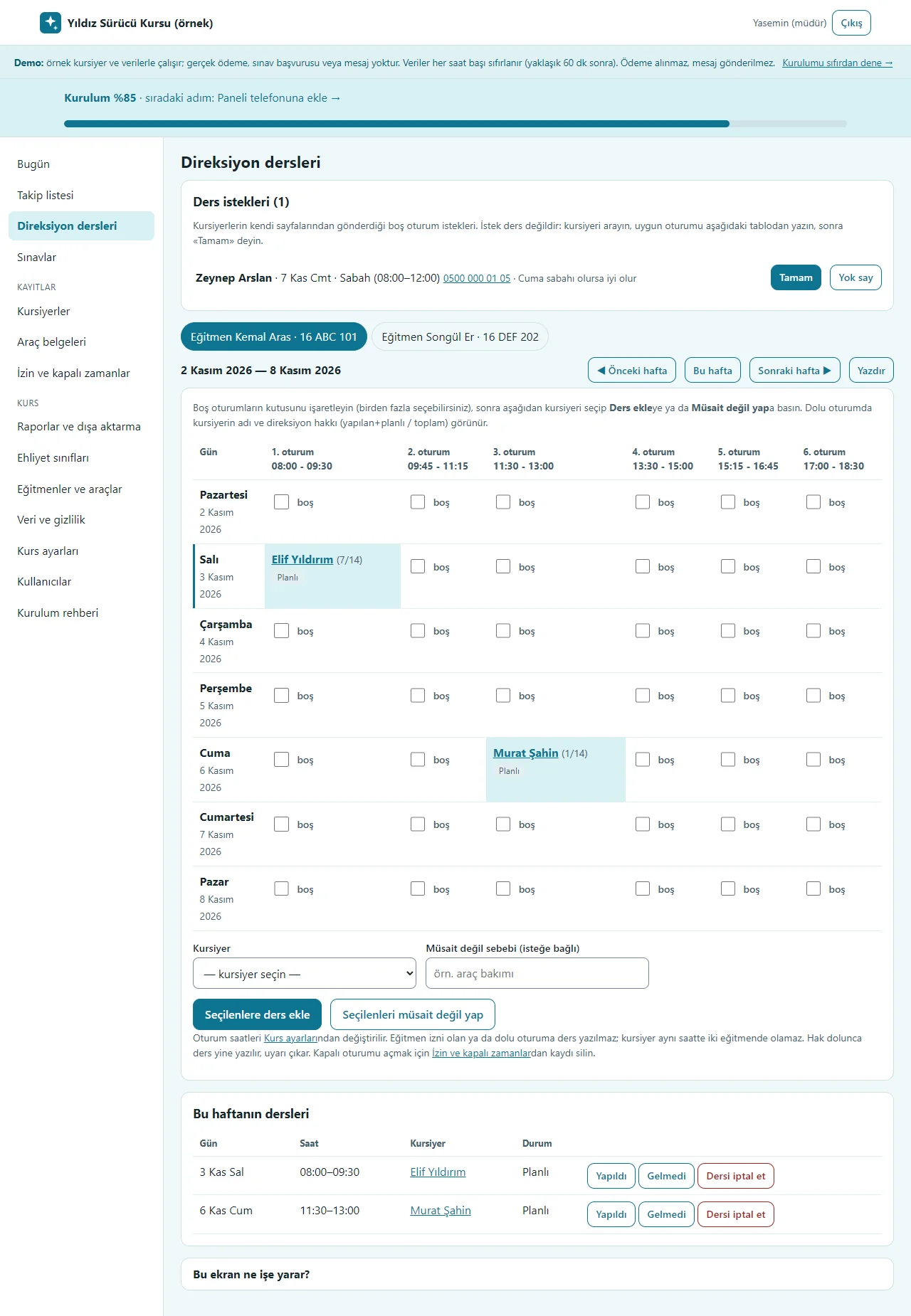
Driving lessons
A weekly table with instructor and car tabs: free slots are ticked and written to a student in bulk, or marked “müsait değil” (not available). A full slot shows the student’s name and allowance (7/14); two students cannot be written into one slot or one student into two places at the same hour. Lesson requests sent by students are handled at the top with “Tamam” or “Yok say”; Yazdır prints the weekly schedule.
- On screen (Turkish interface)
- “Direksiyon dersleri” — driving lessons
- “Ders istekleri” — lesson requests
- “Tamam” — done
- “Yok say” — ignore
- “boş” — free
- “Seçilenlere ders ekle” — add a lesson to the selected
- “Seçilenleri müsait değil yap” — mark the selected not available
- “Yazdır” — print
- “Dersi iptal et” — cancel the lesson
-
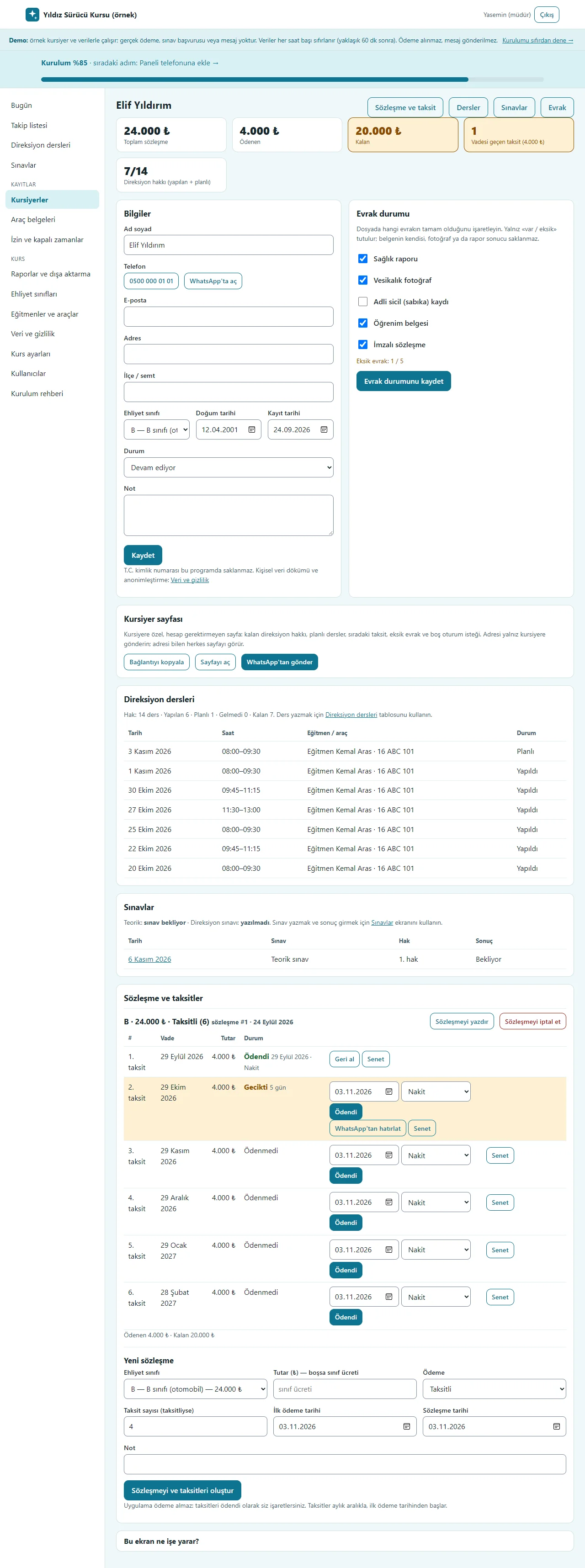
The student card
Summary boxes (total contract, paid, remaining, overdue instalment, driving allowance), the details form, document status (only “var” or “eksik”), the student page link (copy, open, send on WhatsApp), driving lessons, exams and the contract and instalment table. When money is received “Ödendi”, if wrong “Geri al”; an overdue instalment has “WhatsApp’tan hatırlat” and every instalment has “Senet”. The national ID number is not stored.
- On screen (Turkish interface)
- “Toplam sözleşme” — total contract
- “Ödenen” — paid
- “Kalan” — remaining
- “Evrak durumu” — document status
- “Kursiyer sayfası” — student page
- “Bağlantıyı kopyala” — copy the link
- “WhatsApp’tan gönder” — send on WhatsApp
- “Sözleşme ve taksitler” — contract and instalments
- “Ödendi” — paid
- “Geri al” — undo
- “Senet” — promissory note
- “Sözleşmeyi yazdır” — print the contract
-
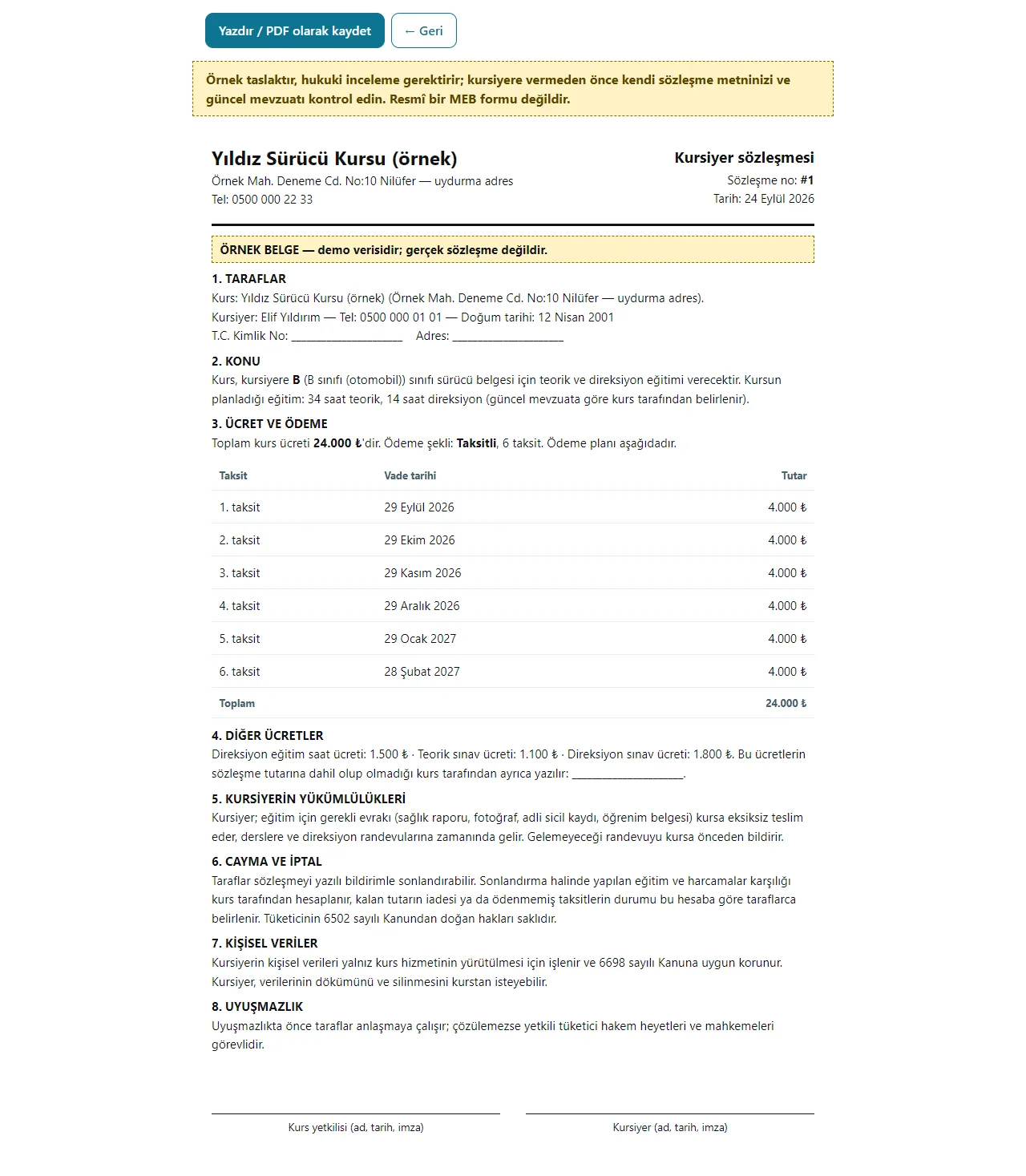
The printable contract draft
“Sözleşmeyi yazdır” opens the contract draft: parties, subject, fee and instalment plan, the student’s obligations, withdrawal and personal data clauses. A warning at the top says it is a sample draft that needs legal review and is not an official MEB form; the ID number and signatures are filled in by hand. The promissory-note draft prints the same way.
- On screen (Turkish interface)
- “Yazdır / PDF olarak kaydet” — print / save as PDF
- “Kursiyer sözleşmesi” — student contract
- “Taraflar” — parties
- “Ücret ve ödeme” — fee and payment
- “Örnek taslaktır” — it is a sample draft
- “Resmî bir MEB formu değildir” — it is not an official MEB form
-
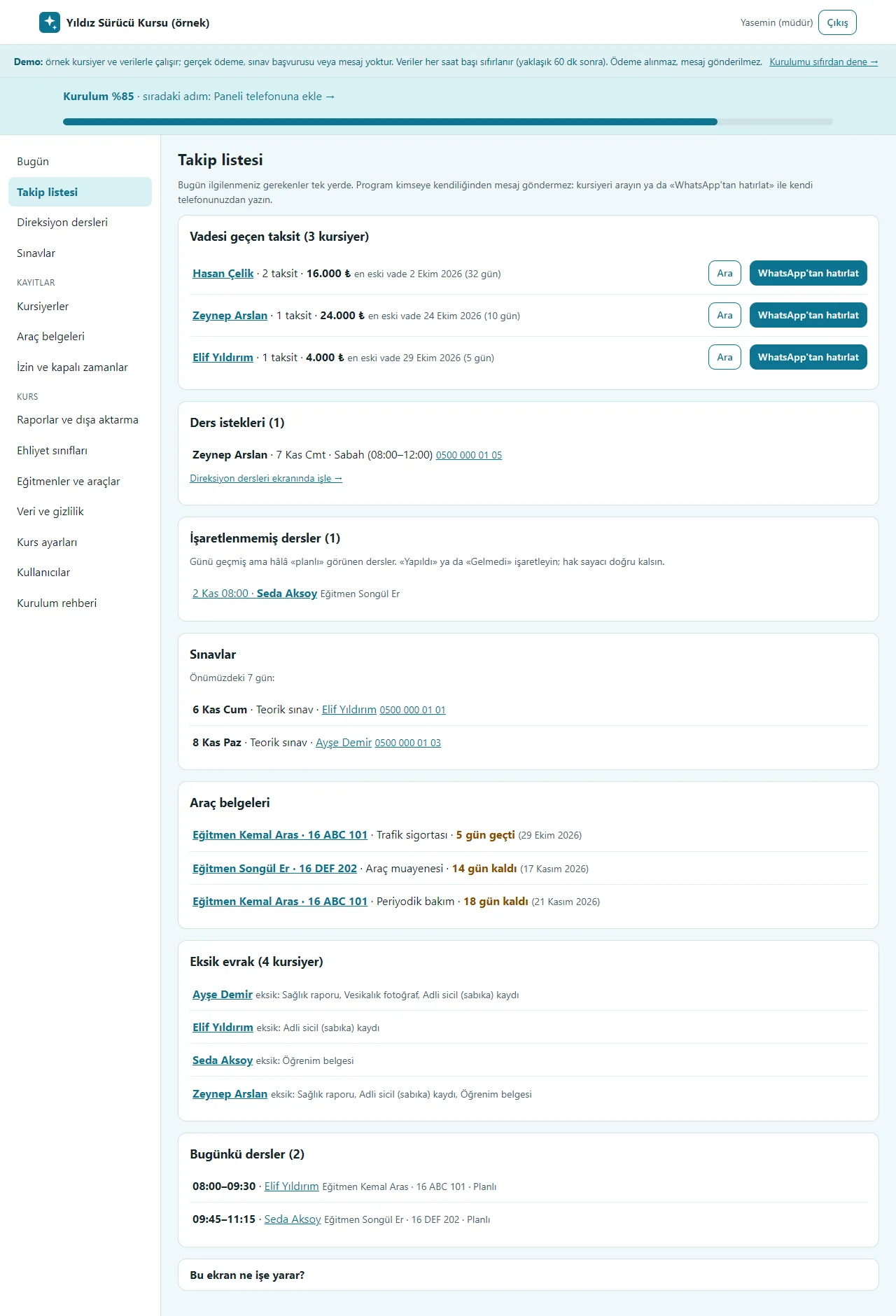
Follow-up list
What needs attention today, in detail: overdue instalments (Ara and “WhatsApp’tan hatırlat”), lesson requests, lessons not marked, exams in the next 7 days, vehicle documents and missing documents. The program sends nobody a message on its own; you call the student or send the ready message from your own phone.
- On screen (Turkish interface)
- “Takip listesi” — follow-up list
- “Vadesi geçen taksit” — overdue instalment
- “Ara” — call
- “WhatsApp’tan hatırlat” — remind on WhatsApp
- “İşaretlenmemiş dersler” — lessons not marked
- “Araç belgeleri” — vehicle documents
- “Eksik evrak” — missing documents
-
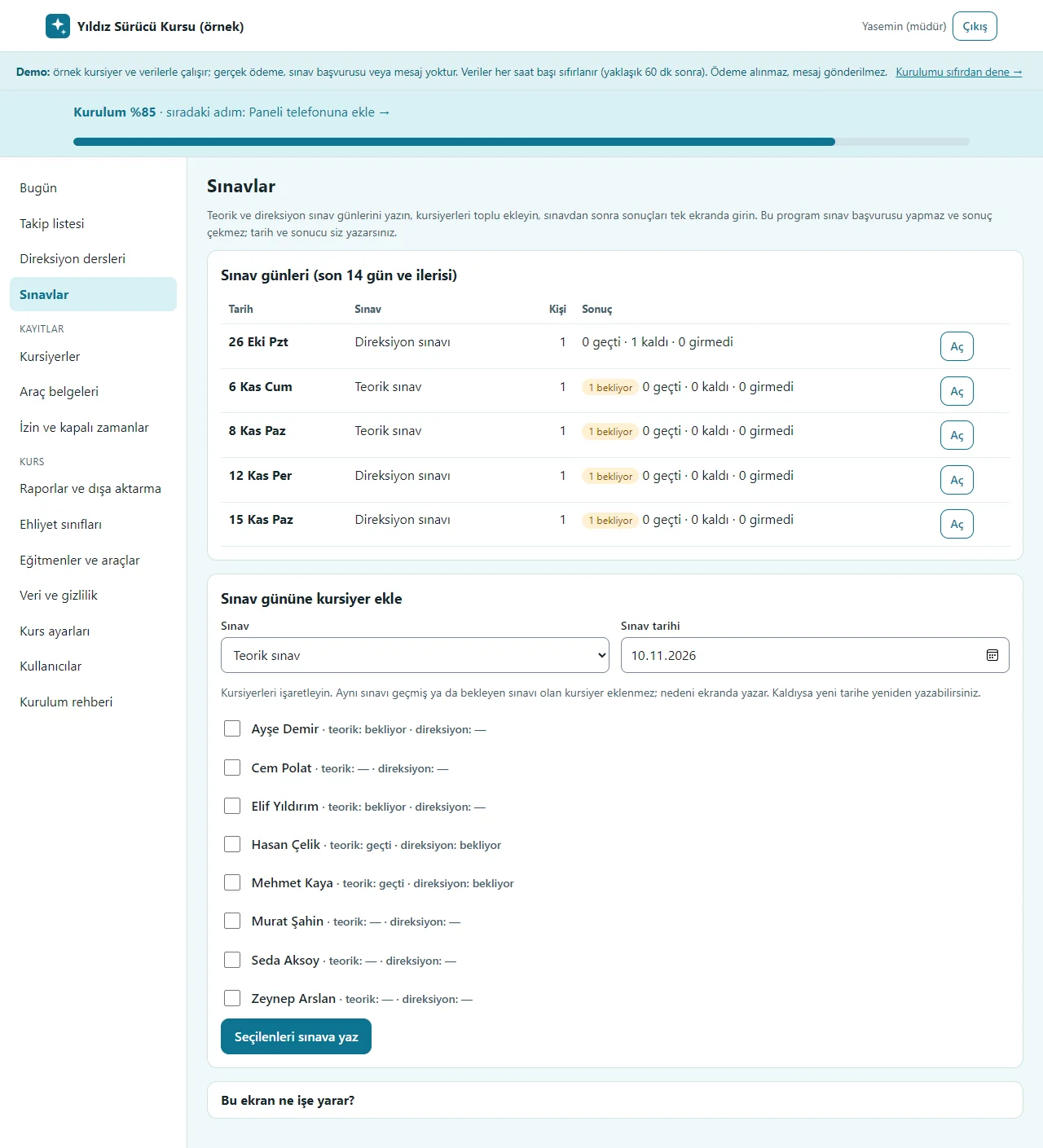
Exams
Theory and driving exam days are listed; students are written to the chosen day in bulk (one who passed the same exam or has one pending is not added, and the reason is written). After the exam “Aç” opens the results (passed, failed, did not attend) on one screen. The program makes no exam application and fetches no result.
- On screen (Turkish interface)
- “Sınavlar” — exams
- “Teorik sınav” — theory exam
- “Direksiyon sınavı” — driving exam
- “bekliyor” — pending
- “Aç” — open
- “Sınav gününe kursiyer ekle” — add students to an exam day
- “Seçilenleri sınava yaz” — write the selected to the exam
-
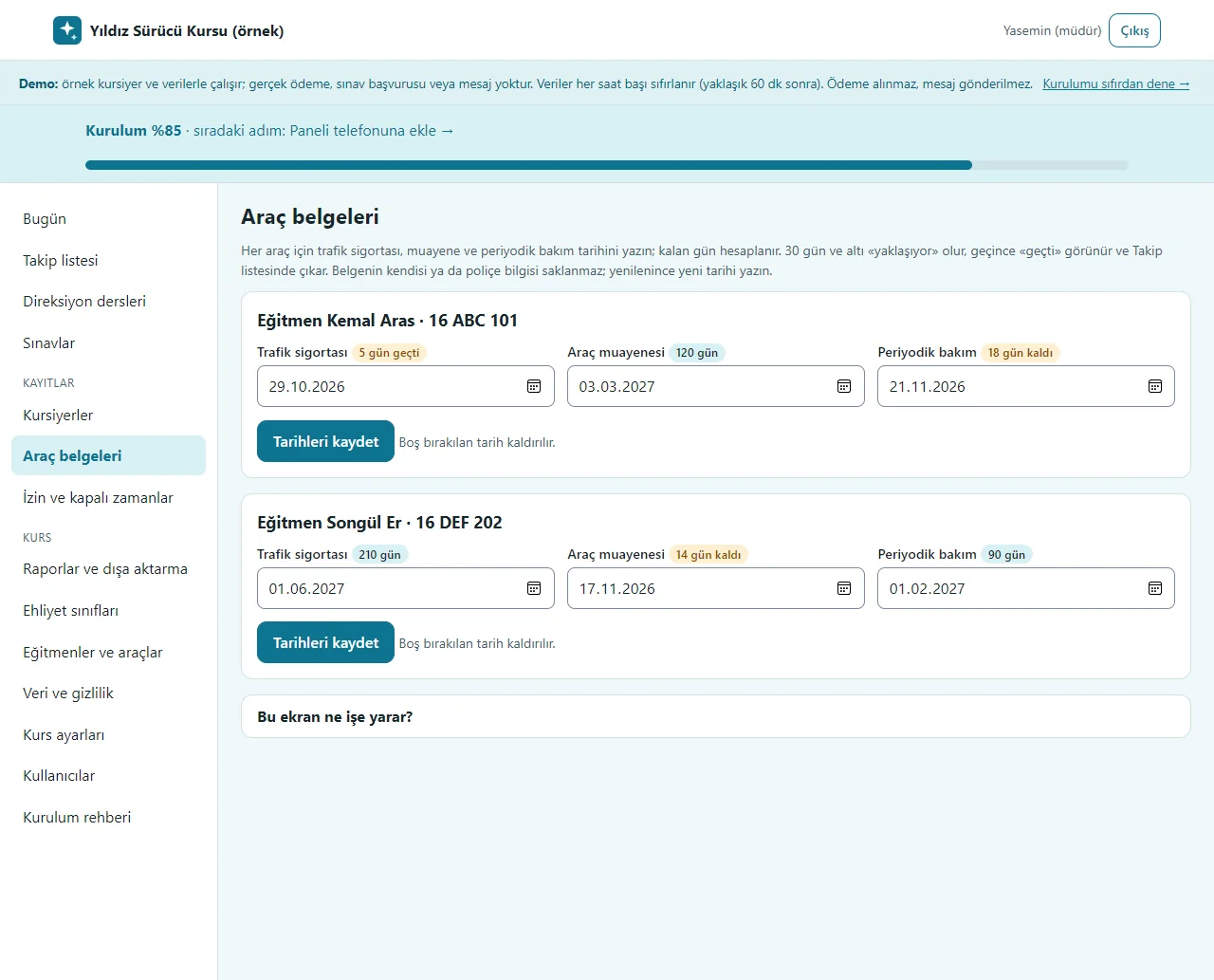
Vehicle documents
For each car the traffic insurance, inspection and periodic maintenance dates are entered; the days left are worked out, “yaklaşıyor” (due soon) shows at 30 days or less and “geçti” (overdue) once past, and it appears on the Today screen and the follow-up list. The document itself and the policy details are not stored.
- On screen (Turkish interface)
- “Araç belgeleri” — vehicle documents
- “Trafik sigortası” — traffic insurance
- “Araç muayenesi” — vehicle inspection
- “Periyodik bakım” — periodic maintenance
- “gün geçti” — days overdue
- “gün kaldı” — days left
- “Tarihleri kaydet” — save the dates
-
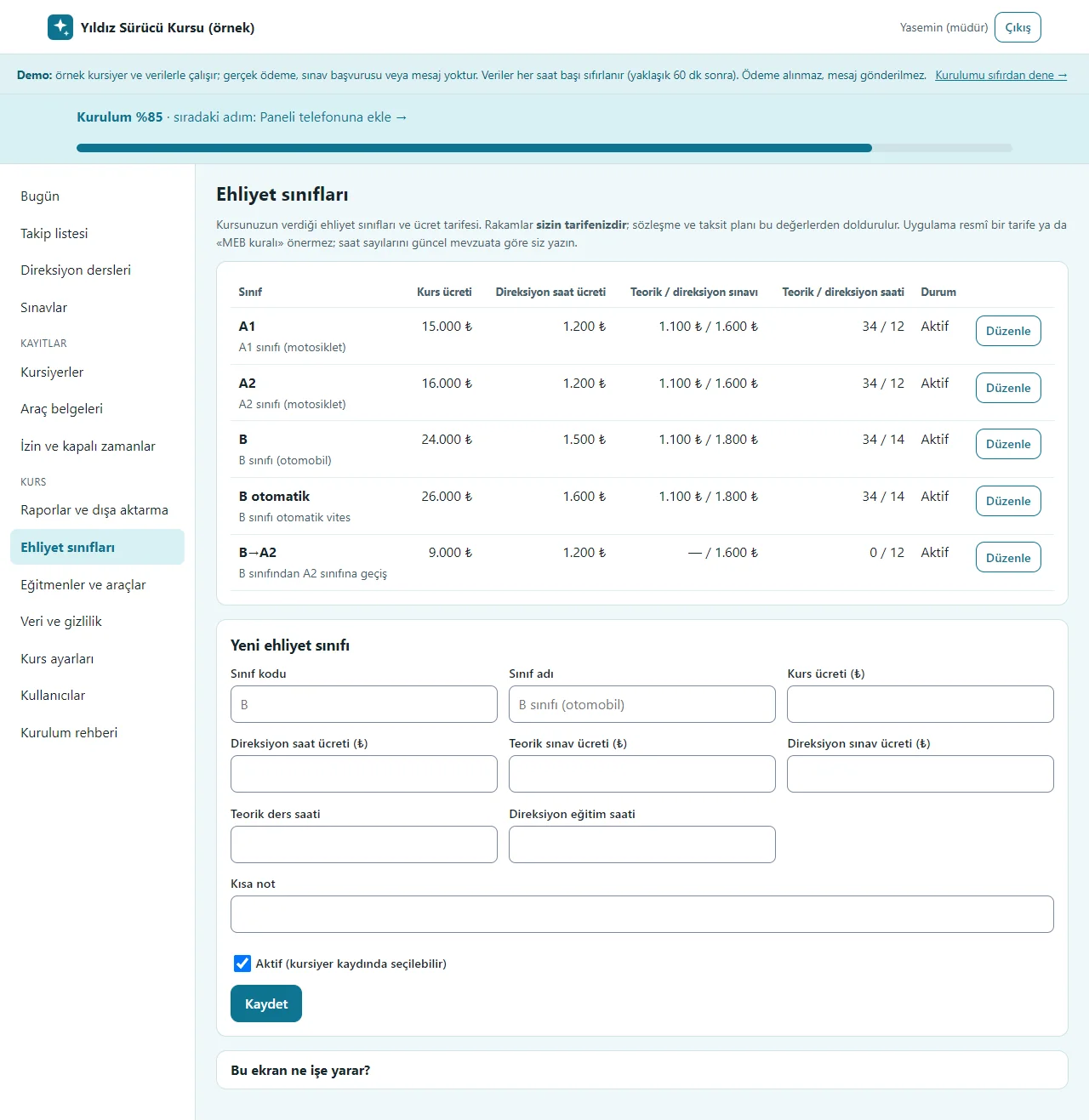
Licence classes
A1, A2, B, B automatic and B-to-A2 conversion come ready with sample fees; the course fee, driving-hour fee, theory and driving exam fees and the theory and driving lesson hours are edited to the school’s own tariff. The contract amount and the student’s driving allowance come from here. The app suggests no official tariff or “MEB rule”.
- On screen (Turkish interface)
- “Ehliyet sınıfları” — licence classes
- “Kurs ücreti” — course fee
- “Direksiyon saat ücreti” — driving-hour fee
- “Teorik / direksiyon sınavı” — theory / driving exam
- “Teorik / direksiyon saati” — theory / driving hours
- “Düzenle” — edit
- “Yeni ehliyet sınıfı” — new licence class
-
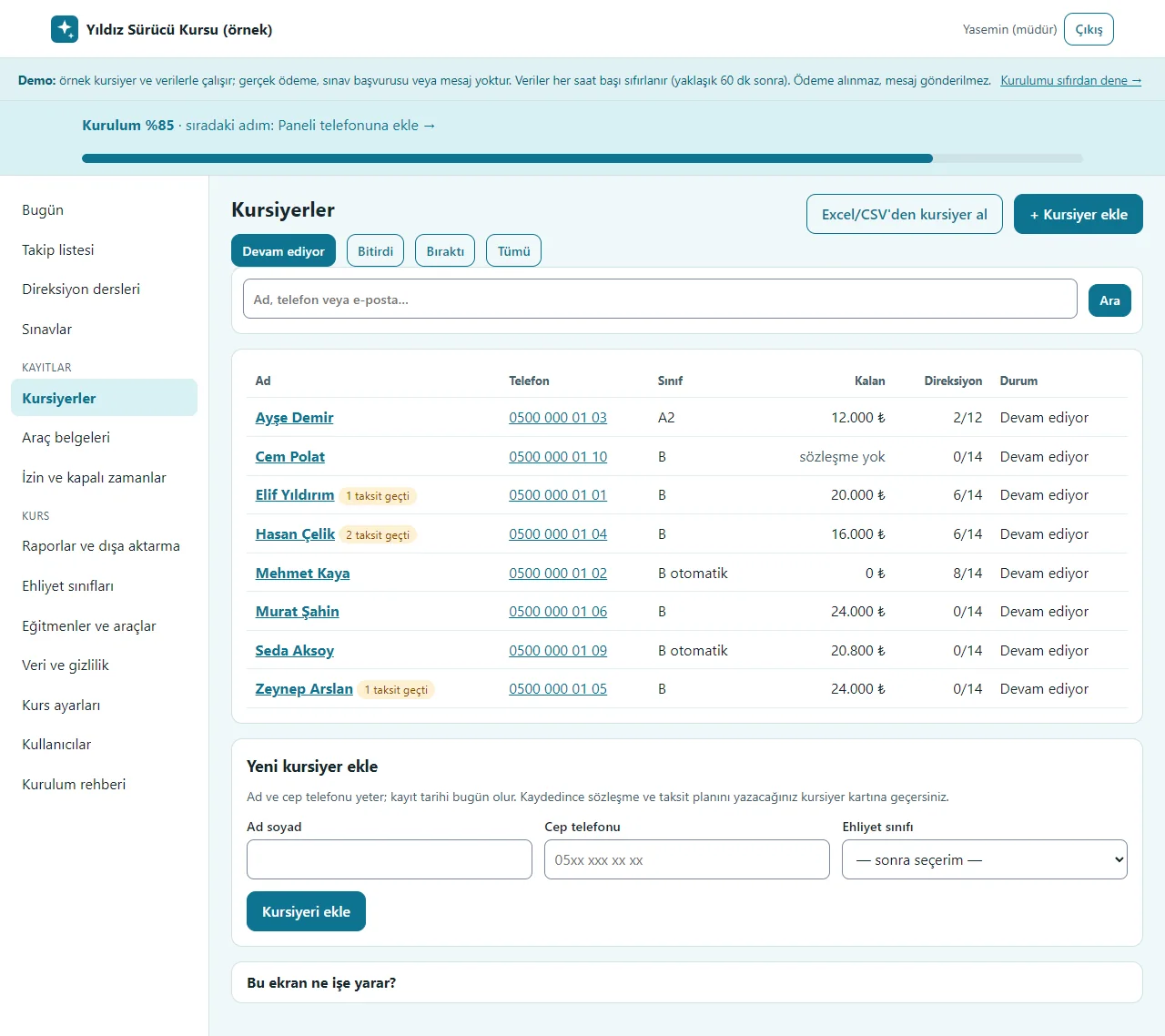
Students
The student ledger: name, phone, class, remaining amount, driving allowance and status, with a status filter and search; an overdue instalment shows as a badge. “+ Kursiyer ekle” opens a quick add with a name and phone; “Excel/CSV’den kursiyer al” brings in an old list with a preview and the last import can be undone.
- On screen (Turkish interface)
- “Kursiyerler” — students
- “Excel/CSV’den kursiyer al” — import students from Excel/CSV
- “+ Kursiyer ekle” — add a student
- “Devam ediyor” — in progress
- “Bitirdi” — finished
- “Bıraktı” — dropped
- “Kursiyer ara” — search students
- “taksit geçti” — instalment overdue
-
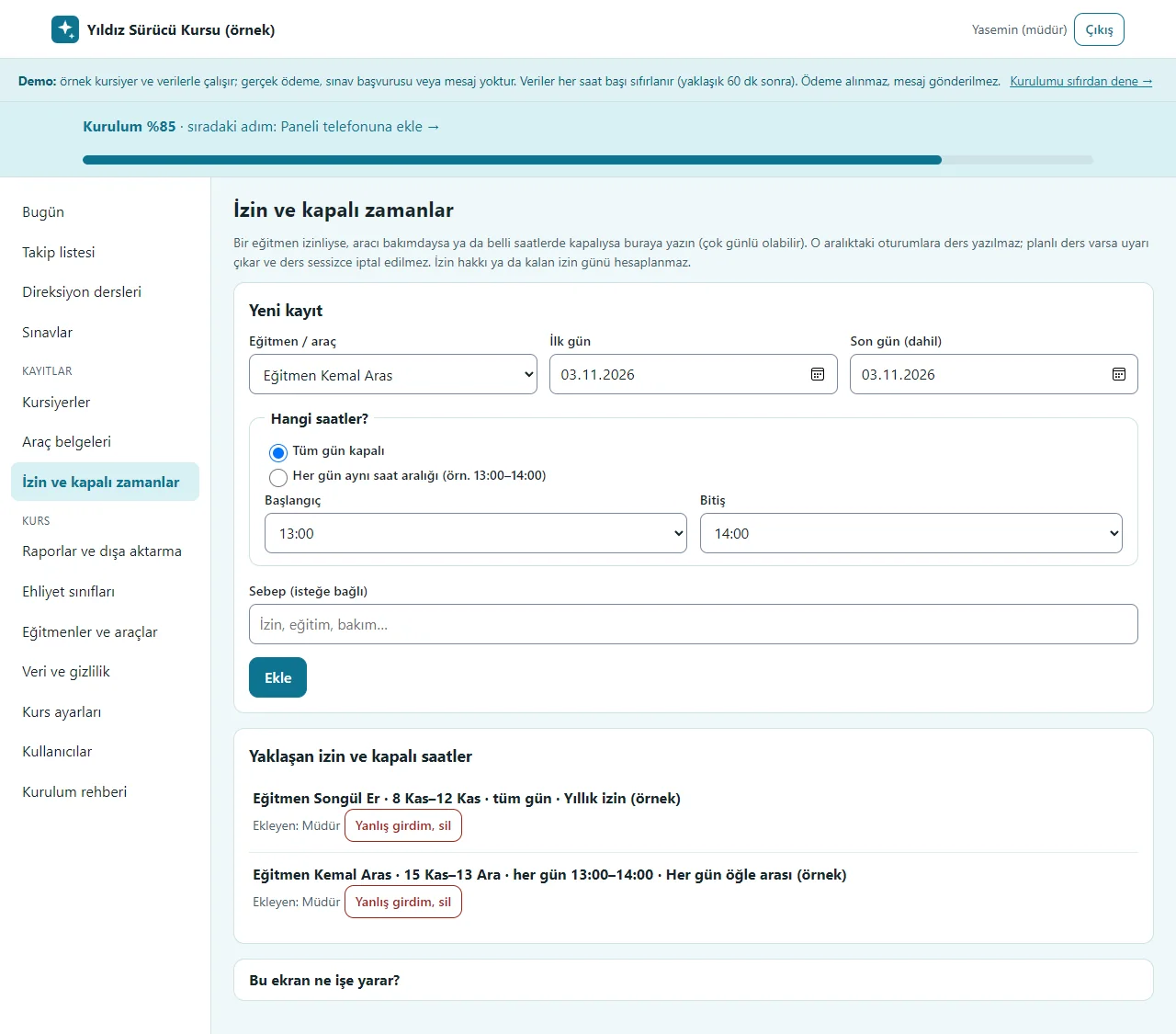
Time off and closed periods
If an instructor is off for several days or a car is closed at certain hours, a first and last day are entered, with “tüm gün” (all day) or “her gün aynı saat aralığı” (the same hours every day). No lesson can be written in that range and an existing lesson is not cancelled silently; upcoming time off is listed and a wrong entry is removed with “Yanlış girdim, sil”. There is no leave-entitlement counter.
- On screen (Turkish interface)
- “İzin ve kapalı zamanlar” — time off and closed periods
- “Yeni kayıt” — new entry
- “Tüm gün kapalı” — closed all day
- “Her gün aynı saat aralığı” — the same hours every day
- “Yaklaşan izin ve kapalı saatler” — upcoming time off and closed hours
- “Yanlış girdim, sil” — entered by mistake, delete
-
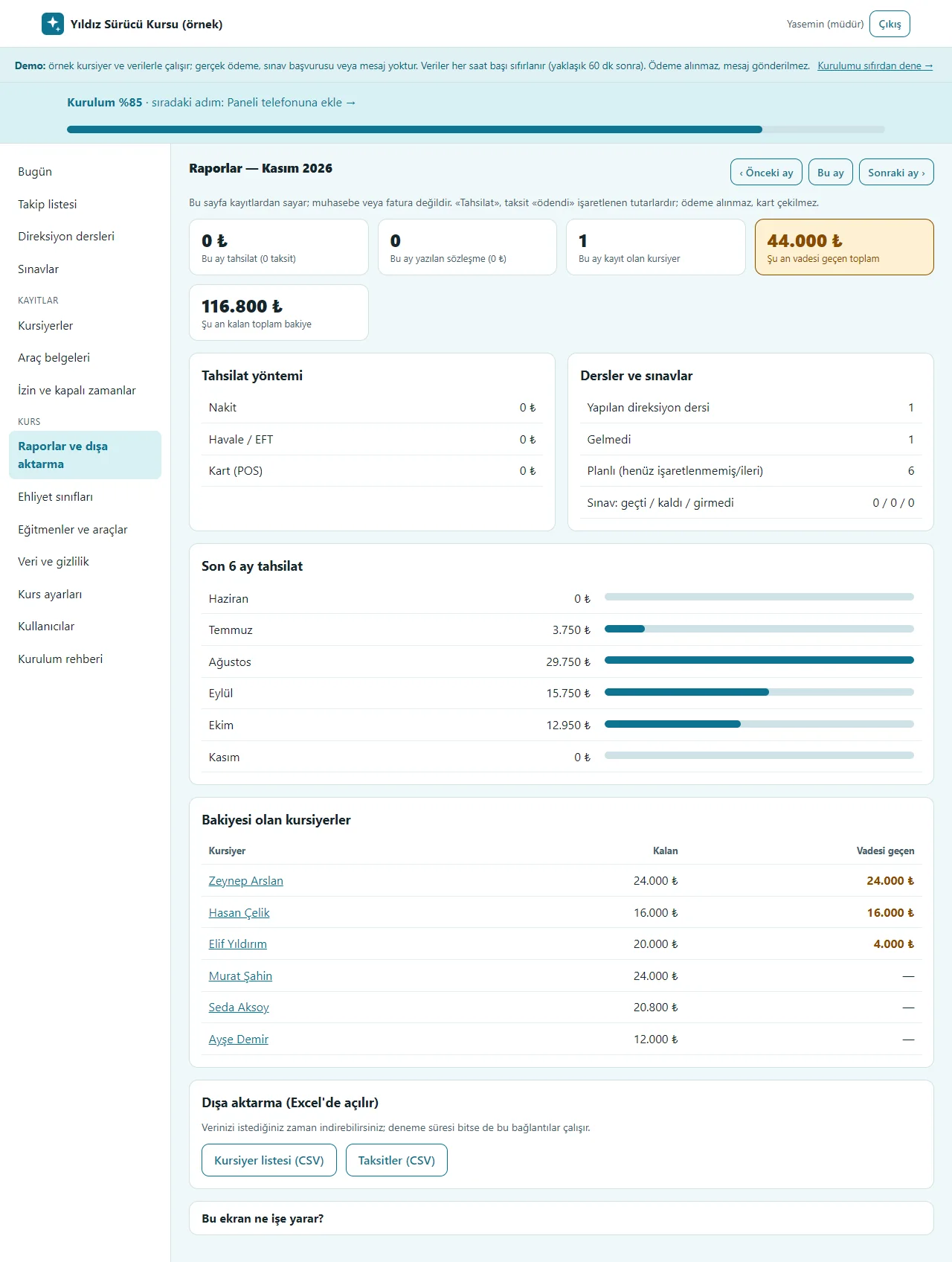
Reports and export
For the chosen month: payments (by method), contracts written, new students, lessons done and missed, exam results, the last 6 months of payments and students with a balance. The page counts from the records; it is not accounting or an invoice. The student list and instalments download as CSV.
- On screen (Turkish interface)
- “Raporlar” — reports
- “Tahsilat yöntemi” — payment method
- “Nakit” — cash
- “Havale / EFT” — transfer
- “Kart (POS)” — card (POS)
- “Dersler ve sınavlar” — lessons and exams
- “Bakiyesi olan kursiyerler” — students with a balance
- “Kursiyer listesi (CSV)” — student list (CSV)
- “Taksitler (CSV)” — instalments (CSV)
-
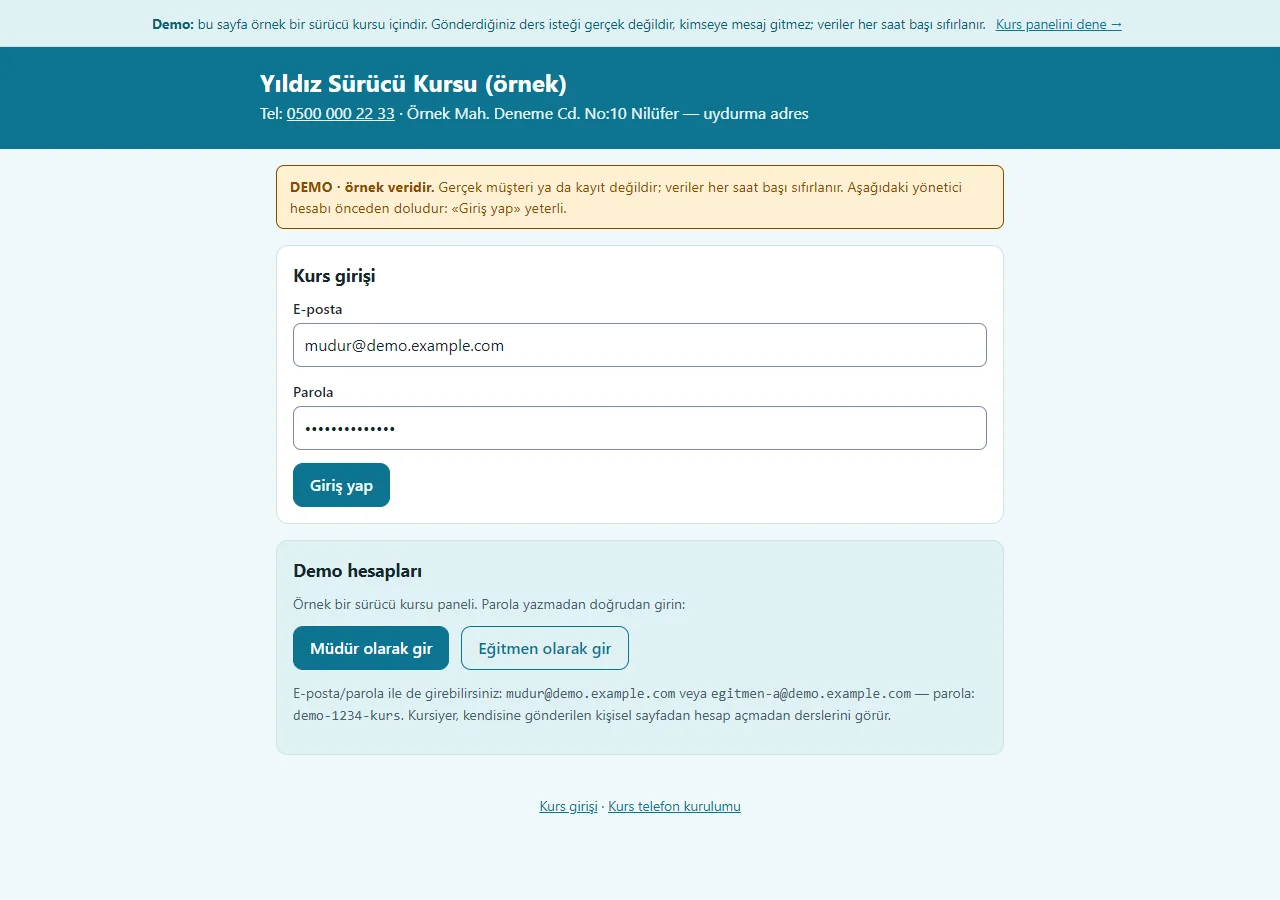
Demo sign-in page
The demo needs no password: one click on “Müdür olarak gir” (enter as manager) or “Eğitmen olarak gir” (enter as instructor). A normal installation asks for an e-mail and password. A student opens their lessons without an account from the personal link sent to them.
- On screen (Turkish interface)
- “Kurs girişi” — school sign-in
- “Demo hesapları” — demo accounts
- “Müdür olarak gir” — enter as manager
- “Eğitmen olarak gir” — enter as instructor
- “Giriş yap” — sign in
-
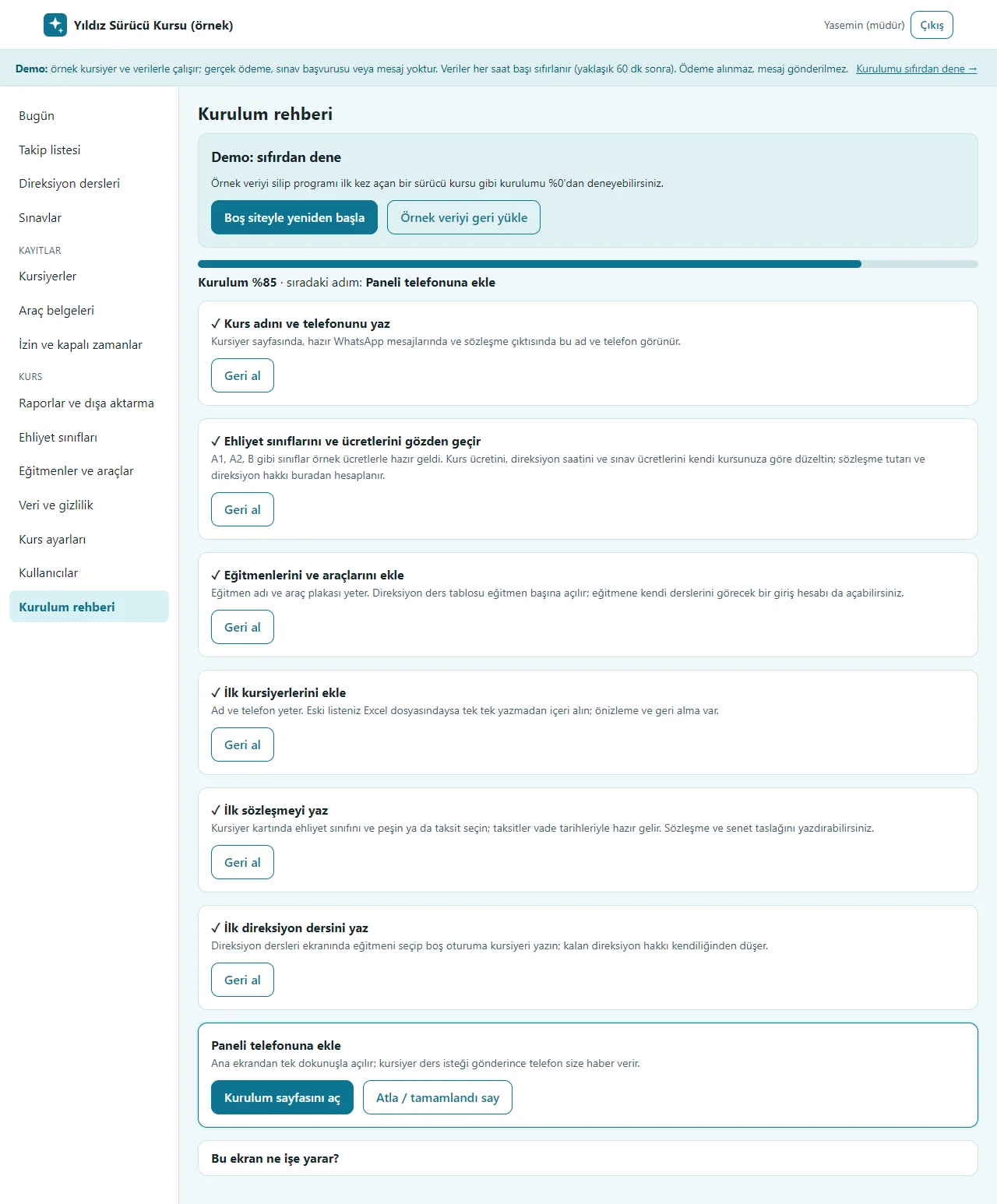
Setup guide
Seven steps show a progress percentage and the next step: school name and phone, licence classes, instructors and cars, first students, first contract, first driving lesson, adding to the phone. Steps tick themselves as they are done and any step can be skipped. In the demo, “Boş siteyle yeniden başla” at the top deletes the sample data and opens the guide at 0%, and “Örnek veriyi geri yükle” brings it back.
- On screen (Turkish interface)
- “Kurulum rehberi” — setup guide
- “Boş siteyle yeniden başla” — start with an empty site
- “Örnek veriyi geri yükle” — restore the sample data
- “Geri al” — undo
- “Paneli telefonuna ekle” — add the panel to the phone
-
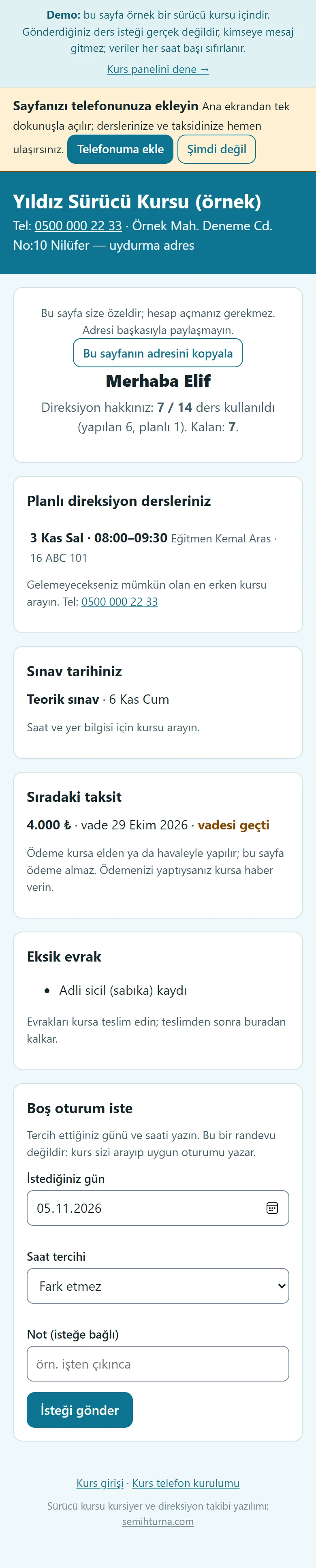
Student on a phone: their own page
On a secret link of their own no account is needed: the remaining driving allowance (7/14), planned lessons, the exam date, the next instalment (no payment is taken on this page), missing documents and the “Boş oturum iste” (ask for a free slot) form. A request is not an appointment; the school calls and writes the suitable slot. With the “Telefonuma ekle” box the page is added to the home screen.
- On screen (Turkish interface)
- “Planlı direksiyon dersleriniz” — your planned driving lessons
- “Sınav tarihiniz” — your exam date
- “Sıradaki taksit” — next instalment
- “Eksik evrak” — missing documents
- “Boş oturum iste” — ask for a free slot
- “İsteği gönder” — send the request
- “Telefonuma ekle” — add to my phone
-
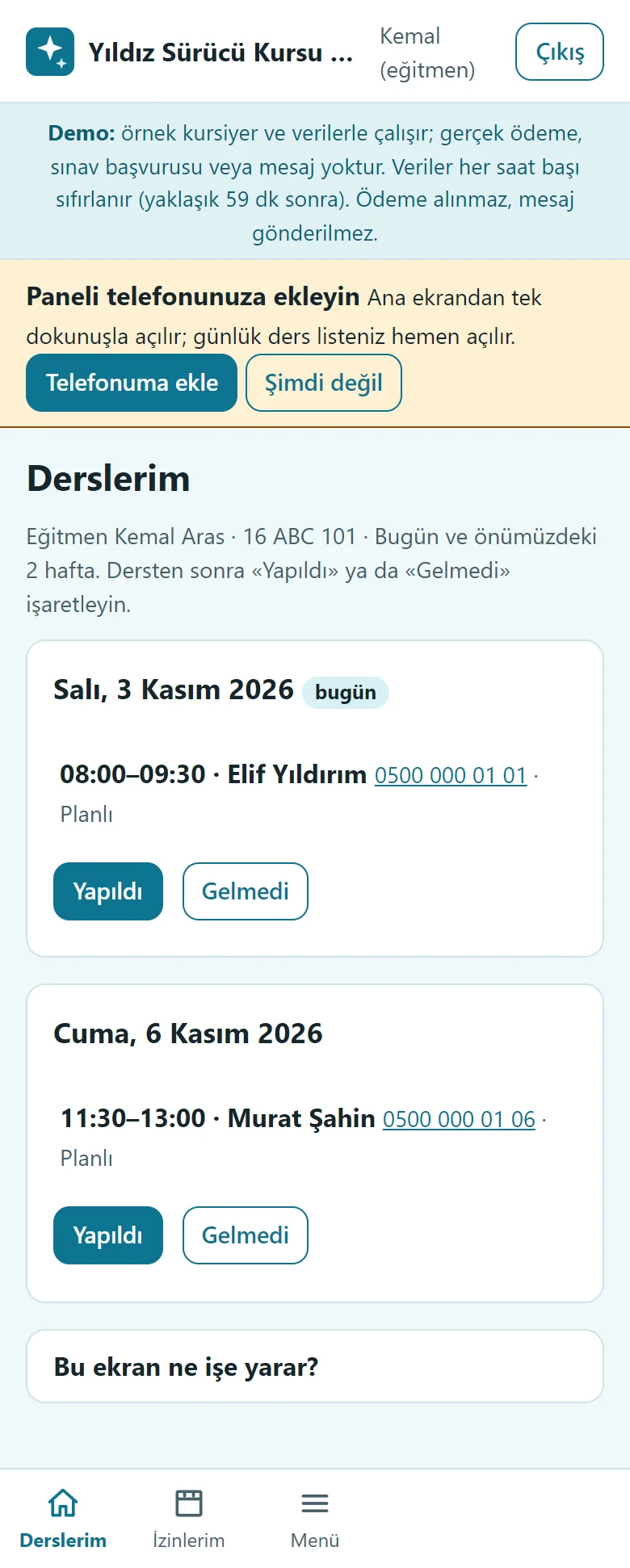
Instructor on a phone: Derslerim
An instructor who signs in sees only their own lessons: today and the next 2 weeks, the student’s name and phone, and the “Yapıldı” and “Gelmedi” buttons. The bottom menu has only Derslerim and İzinlerim; the student list, contracts and fee details are not shown to an instructor.
- On screen (Turkish interface)
- “Derslerim” — my lessons
- “İzinlerim” — my time off
- “Menü” — menu
- “Yapıldı” — done
- “Gelmedi” — no-show
- “bugün” — today
-
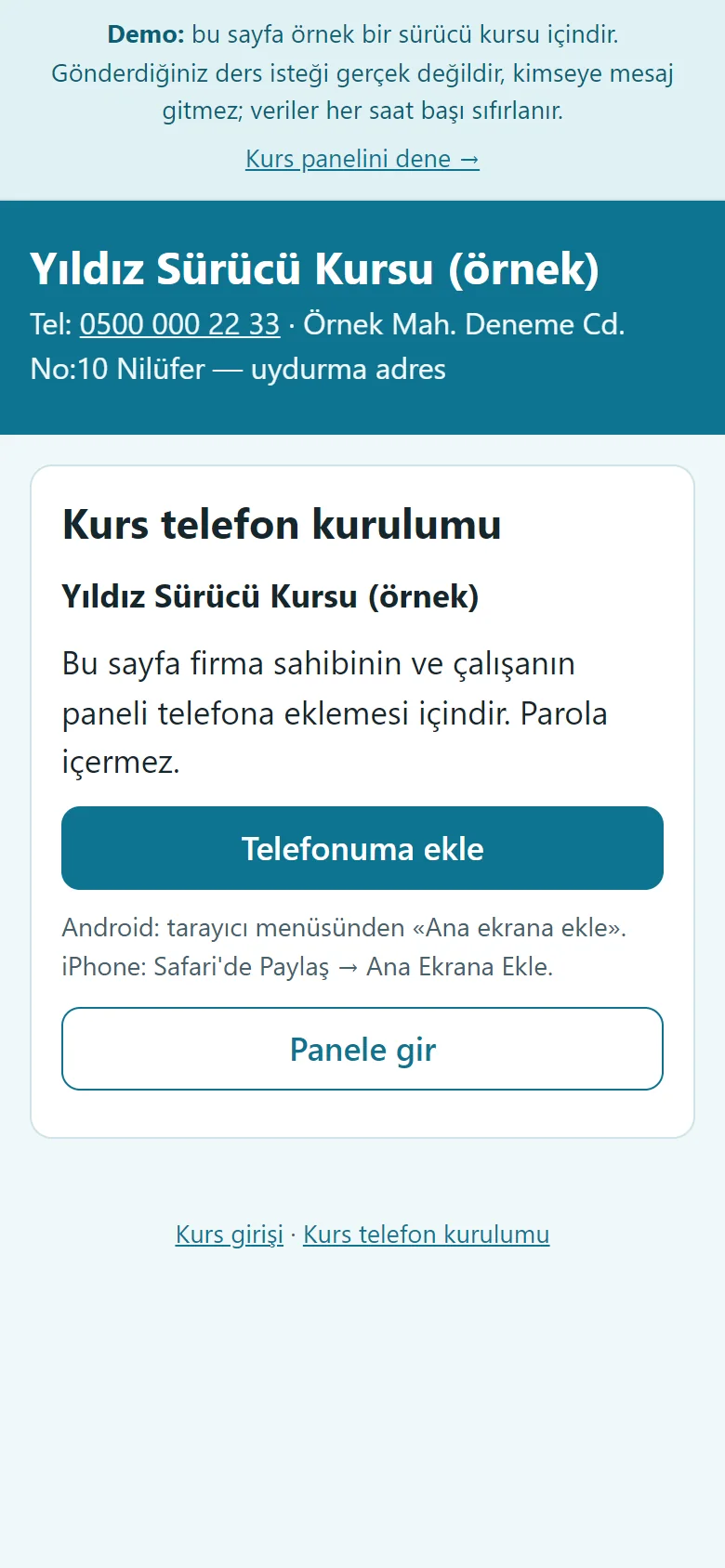
The school’s set-up page on a phone
A sign-in-free page sent to the manager or an instructor: the school name, a large “Telefonuma ekle” button, instructions for Android and iPhone, and “Panele gir”. It holds no password; it has not been tried on a real phone.
- On screen (Turkish interface)
- “Telefonuma ekle” — add to my phone
- “Panele gir” — go to the panel
-
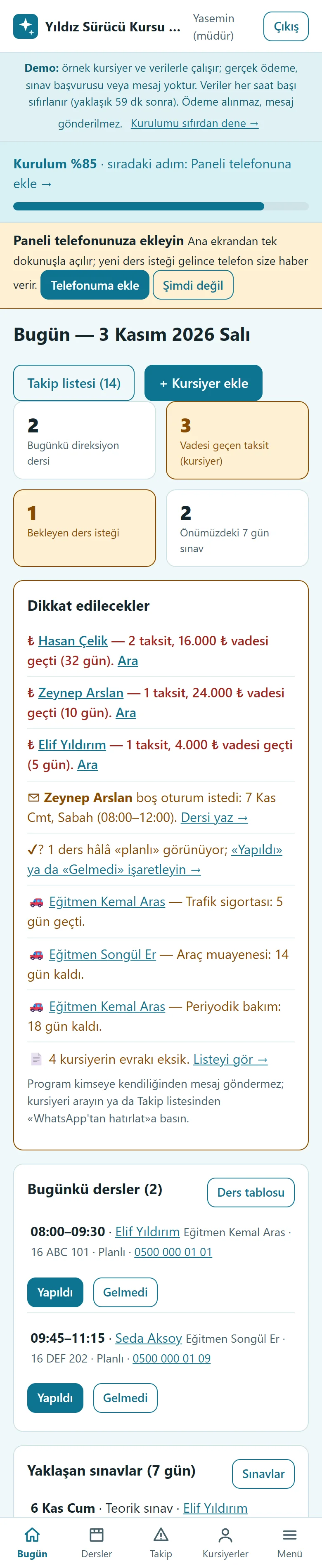
Manager on a phone: Today
The manager’s phone bottom menu is Bugün, Dersler, Takip, Kursiyerler and Menü. The summary boxes and the “Dikkat edilecekler” list stack on a narrow screen; the Ara button on an overdue instalment calls with one tap and the “Telefonuma ekle” box suggests adding the panel to the home screen.
- On screen (Turkish interface)
- “Bugün” — today
- “Dersler” — lessons
- “Takip” — follow-up
- “Kursiyerler” — students
- “Menü” — menu
- “Ara” — call
- “Telefonuma ekle” — add to my phone
-
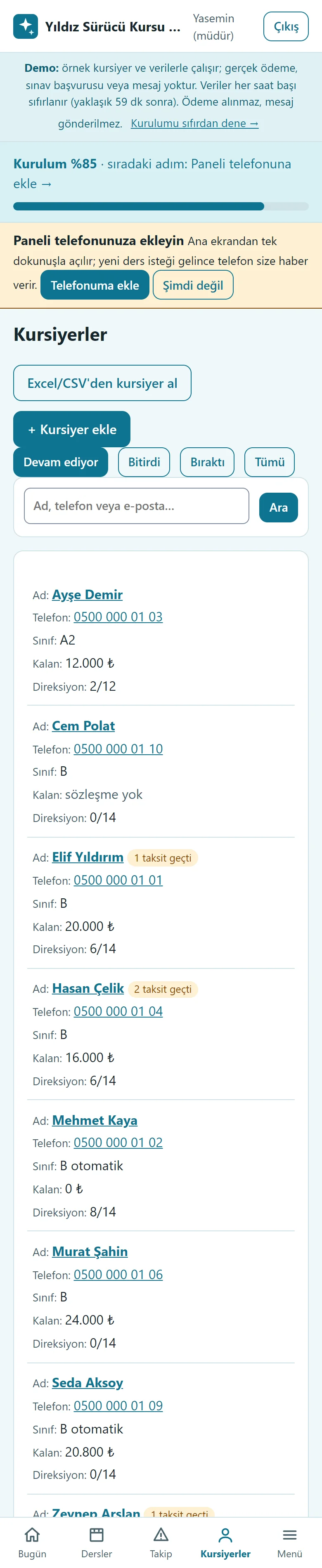
Student list on a phone
On a phone the student ledger is in a card layout: name, phone, class, remaining amount, driving allowance and status read one under another; the status filter, search and “+ Kursiyer ekle” stay in place. The page does not scroll sideways.
- On screen (Turkish interface)
- “Kursiyerler” — students
- “+ Kursiyer ekle” — add a student
- “Kursiyer ara” — search students
- “Devam ediyor” — in progress
- What do they see at the end?
- Driving lessons are written on the instructor and car timetable (a clash is refused), the instructor taps Yapıldı or Gelmedi on the phone and the remaining allowance falls; the student sees their allowance and next instalment on a page of their own.
- What is it good for?
- Students, instalments and the driving schedule no longer scatter across a notebook and Excel; who used how many lessons, which instalment is overdue and which vehicle document is due are on one screen.
Everything that is not included, and all limits
- Not delivered to a client and not used by a real driving school. The school, students, phone numbers, addresses and amounts on the screens are made up; the sample licence-class fees are not an official tariff.
- There is no MEBBİS or e-exam integration: the program makes no exam application, fetches no exam result and does not replace an official record or lesson count; lesson and exam details are entered by hand.
- There is no automatic SMS or WhatsApp sending; a ready WhatsApp text opens and the school sends it from its own phone. The program sends nobody a message on its own.
- There is no online card payment; payments are entered by hand. There is no e-invoice or accounting integration; the records are not an invoice or accounting.
- The national ID number and the contents of a health report are not stored. The contract and promissory-note printouts are sample drafts, not an official MEB form; the school checks its own wording and current regulations.
- There is no multi-branch use. Adding to the phone and the free phone notification have not been tried on a real phone, in iPhone/Safari or in the WhatsApp in-app browser. A student’s page is a secret address; anyone who knows the link sees that student’s information.
- An Excel file is not read directly; save it as CSV from Excel or paste the table.
- The live demo was run on one hosting account only. In the demo the data is reset every hour; sign-in is without a password through role buttons. A normal installation asks for an e-mail and password.
Delivery and sales status
There is no cart, customer account or online payment on this site for now. Reach out by phone, WhatsApp or the form; in a first conversation your need and the software’s fit are reviewed. The form does not create an order, a contract or a payment.
Possible delivery options
Price
There is no package on offer right now, so there is no list price. If a package is defined, the price and payment method are settled then.
Requirements and version history
Installation requirements
- PHP 8.1 or newer (with the pdo_sqlite, mbstring and openssl extensions; curl is recommended for the phone notification) and HTTPS are needed; the data is kept in a SQLite file. The live demo was run on a single hosting account only.
Release notes
- No version has been delivered to a client. The sample-data demo is open to everyone and is shown with the screenshots on this page.
- 1.0.0 (3 November 2026): the first version; student records and licence-class fees, contract and instalment tracking, a printable contract and promissory-note draft, document status, a driving-lesson timetable with instructor and car tabs and a remaining-lessons counter, the student’s own page and a request for a free slot, exam tracking, a vehicle document calendar, the Today screen and follow-up list, an instructor screen, multi-day instructor time off, CSV student import, privacy (KVKK) tools, a setup guide and an empty-start in the demo, a free phone notification (not tried on a real phone), roles.