FloristsDemo with sample data
Florist order and delivery software: screen-by-screen guide
The full version of the short description on the product page: every feature, how each screen is used step by step, all limits and the delivery details.
All features
The storefront and panel screens are from the 1.3.8 demo and the ordering flow from the 1.3.5 screens; the new contract flow is shown separately in 1.1.0-dev screens; the 1.3.7 and 1.3.8 features passed automated tests; on the live demo only the version, the new customer-import address and the staff menu were checked, the Excel import end to end and the staff wording were not tried live.
- The customer picks a product and an option, then the delivery area, day and time slot (each slot shows “Uygun”, available, or “Son 2 yer”, last 2 places)
- The card message, the name shown on the card and the sender are entered separately; the sender’s name can be kept from the recipient
- A tracking code at the end of the order: the customer follows the status with the code and the last 4 digits of their phone (the recipient’s name is shortened, the address is not shown)
- Web orders awaiting approval in the shop’s panel; a step bar and a “next step” box on every order; printing the card message and a delivery slip
- On their phone, the courier sees only their own deliveries, calls the recipient, opens the address in maps, and closes a delivery by entering who received it
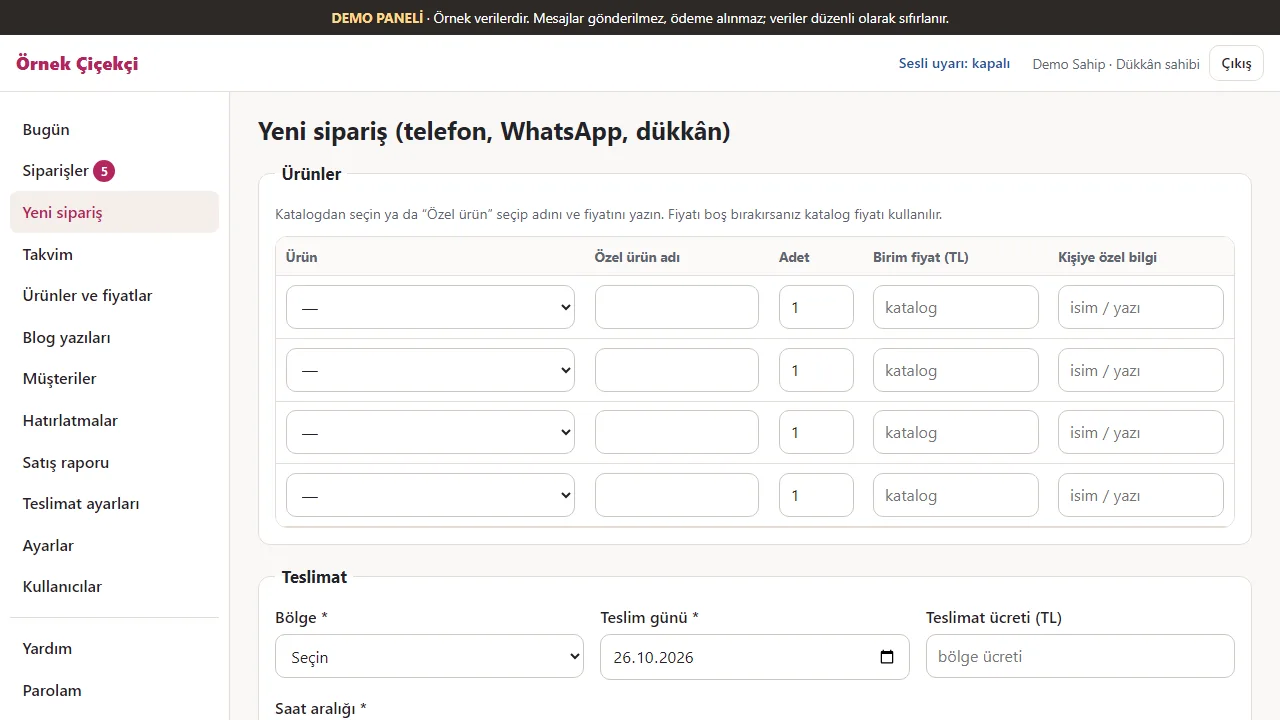
- Phone and WhatsApp orders entered in the panel; a calendar with each day’s orders and capacity; changing a day’s time-slot capacity or closing the day
- Special-date reminders the customer agreed to (no automatic messages), a sales report, a screen that checks whether the private folders are closed to the outside, and backups; the panel also works on a phone
- From version 1.1.0 on (including the current 1.3.8), optional contract and personal-data-text acceptance for web orders: submission without the box stops, and the order shows the acceptance time and text fingerprint; off in demo mode and for phone orders
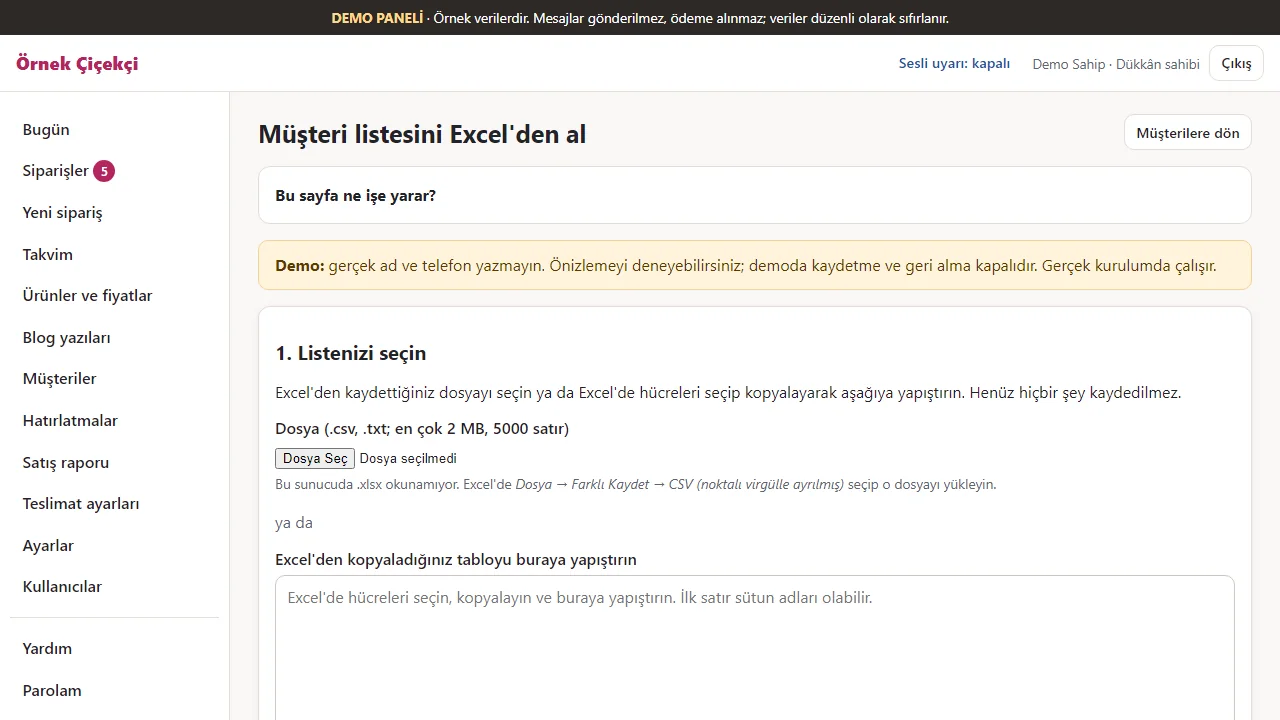
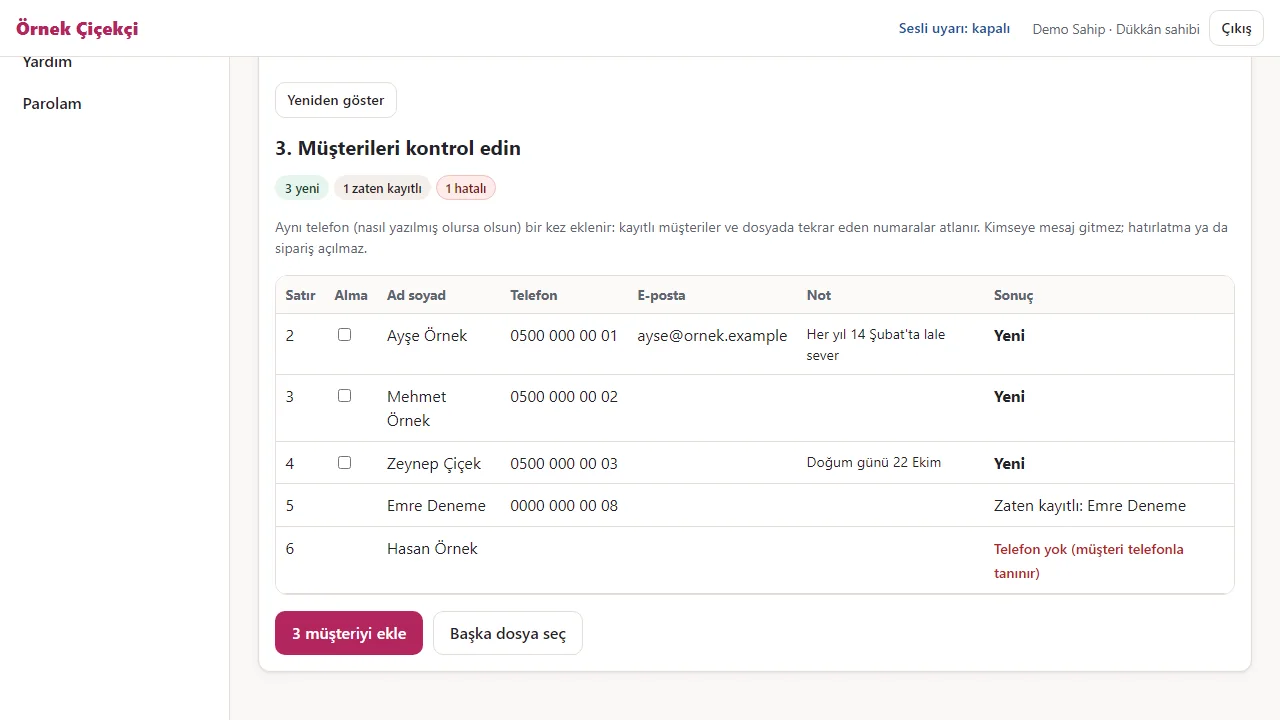
- Customer list import from Excel/CSV (1.3.7; shop owner only, Müşteriler → Excel’den müşteri al): columns are recognised from the header, a preview comes before saving, the same phone number is added once, no message goes to imported customers and the last import can be undone; in the demo the preview works and saving is switched off
- Staff and couriers see only the pages, buttons and links they may open (1.3.8): for example, with no courier set up, staff read “Kurye eklemek için dükkân sahibine söyleyin” (ask the shop owner to add a courier); the server-side permission check still applies
Screen by screen: how it is used
The interface is Turkish. Sixteen screens from the storefront, the shop panel, the customer-list import and the courier’s phone were taken on 26 October 2026 from the 1.3.8 sample demo (the version is written under them). The ordering steps are from the 1.3.5 demo, the personalised-order screen from the 1.3.1 demo and the data and backup screen from the 1.0.3 demo; the last four contract screens are from a separate local 1.1.0-dev installation. Contract consent is off in demo mode.
- Who uses it?
- The customer ordering flowers; the shop owner or staff who approve and prepare the order; the courier who delivers it.
- Where do they start?
- The customer opens the shop’s page on a phone or a computer. The shop owner and the courier sign in to the panel with their own user names.
What do they do on screen? Step by step
-
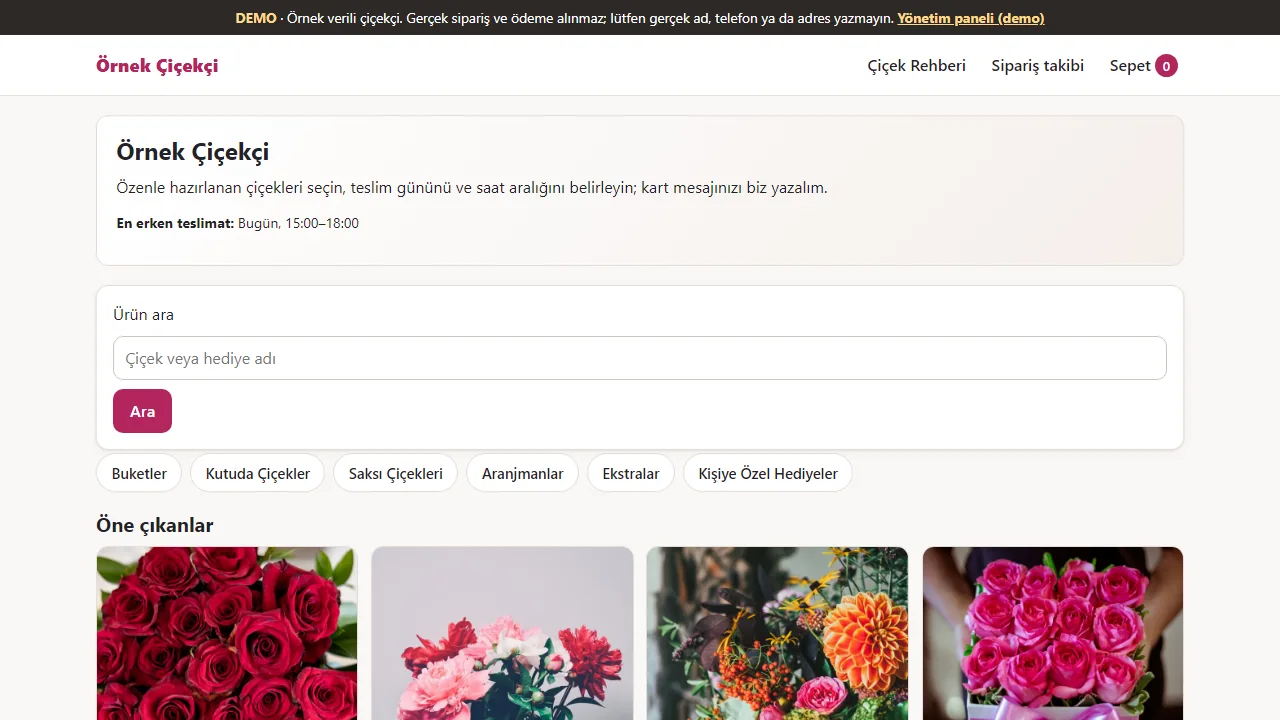
1.3.8 · 26 October 2026 The shop’s page
The customer sees the shop’s name, the earliest delivery time, the categories and featured products. The strip at the top says this is a demo with sample data.
- On screen (Turkish interface)
- “DEMO” — top strip: a florist with sample data; no real orders or payments are taken
- “En erken teslimat: Bugün, 09:00–12:00” — earliest delivery: today, 09:00–12:00
- “Buketler / Kutuda Çiçekler / Saksı Çiçekleri / Aranjmanlar / Ekstralar” — categories: bouquets / boxed flowers / potted plants / arrangements / extras
- “Öne çıkanlar” — featured
-
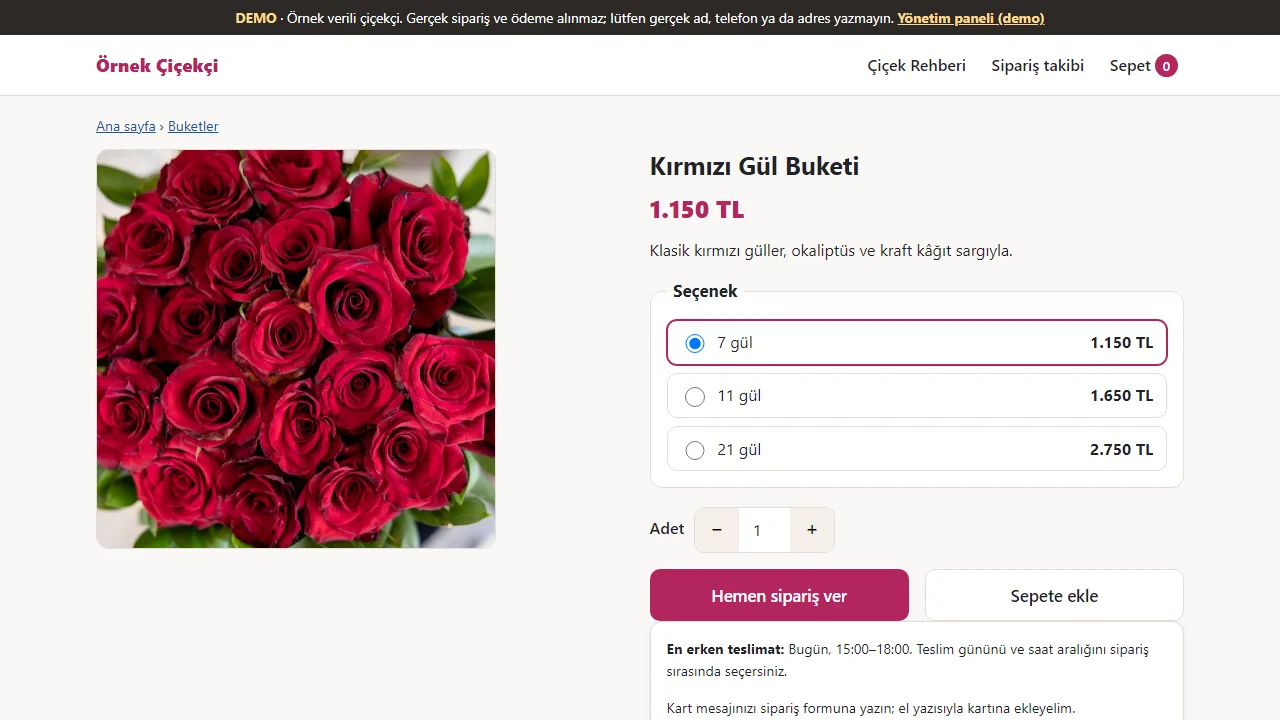
1.3.8 · 26 October 2026 Product and option
The options (here 7, 11 or 21 roses) are listed with their prices; the chosen one’s price shows under the title. “Hemen sipariş ver” (order now) opens the order form.
- On screen (Turkish interface)
- “Seçenek: 7 gül / 11 gül / 21 gül” — option: 7 / 11 / 21 roses
- “Adet” — quantity
- “Hemen sipariş ver / Sepete ekle” — order now / add to basket
-
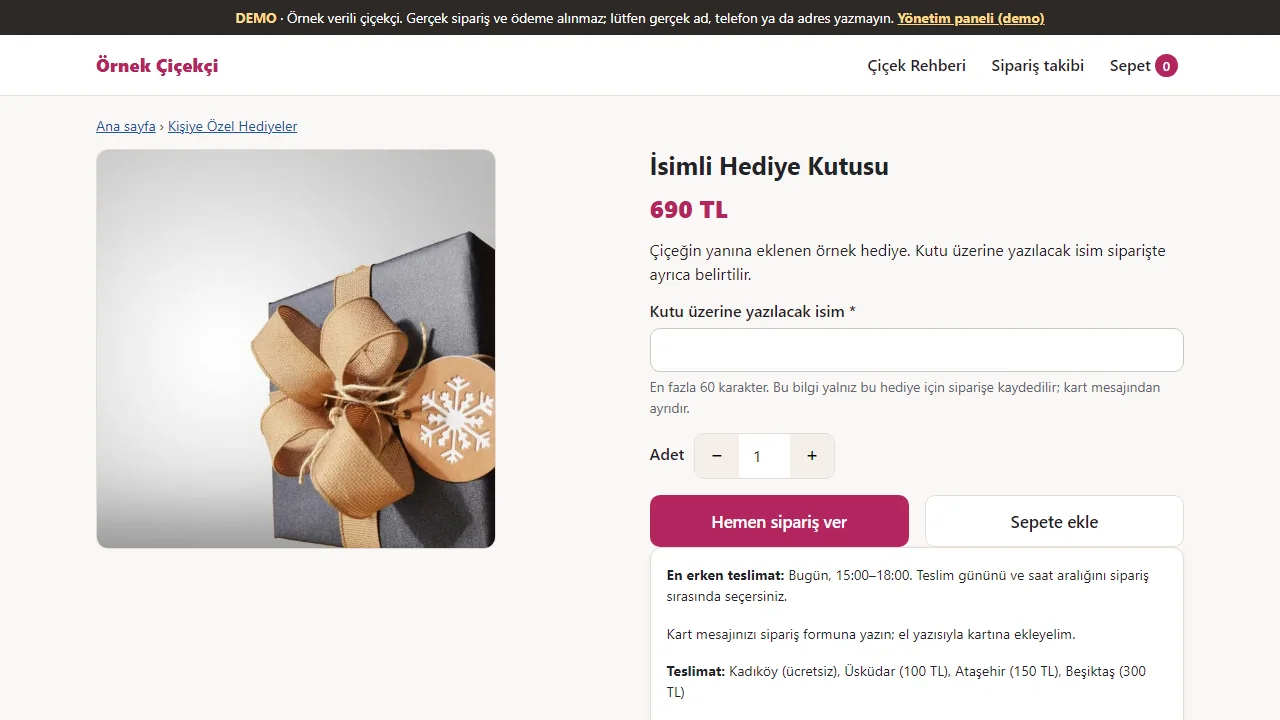
1.3.8 · 26 October 2026 A personalised gift product
On a gift product the name for the box is a field of its own (at most 60 characters), apart from the card message. Delivery day and slot are chosen when ordering.
- On screen (Turkish interface)
- “Kutu üzerine yazılacak isim” — name to be written on the box
- “En fazla 60 karakter” — at most 60 characters
- “Hemen sipariş ver / Sepete ekle” — order now / add to cart
- “En erken teslimat” — earliest delivery
-
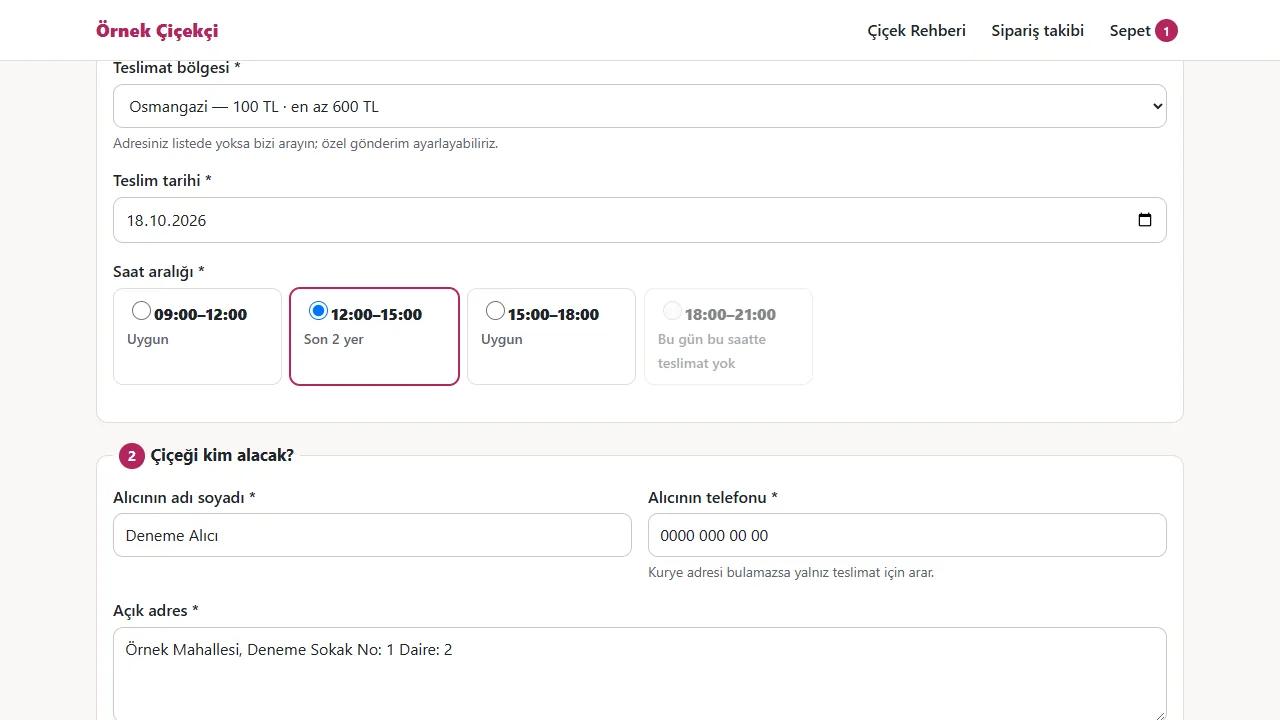
Area, day and time slot
The delivery area (with its fee and minimum order), the day and the time slot are chosen. Each slot shows its state: “Uygun” (available) or, when few places are left, “Son 2 yer”.
- On screen (Turkish interface)
- “Teslimat bölgesi: Osmangazi — 100 TL · en az 600 TL” — delivery area, fee and minimum order
- “Teslim tarihi” — delivery date
- “Saat aralığı: Uygun / Son 2 yer” — time slot: available / last 2 places
- “Çiçeği kim alacak?” — who is receiving the flowers?
-
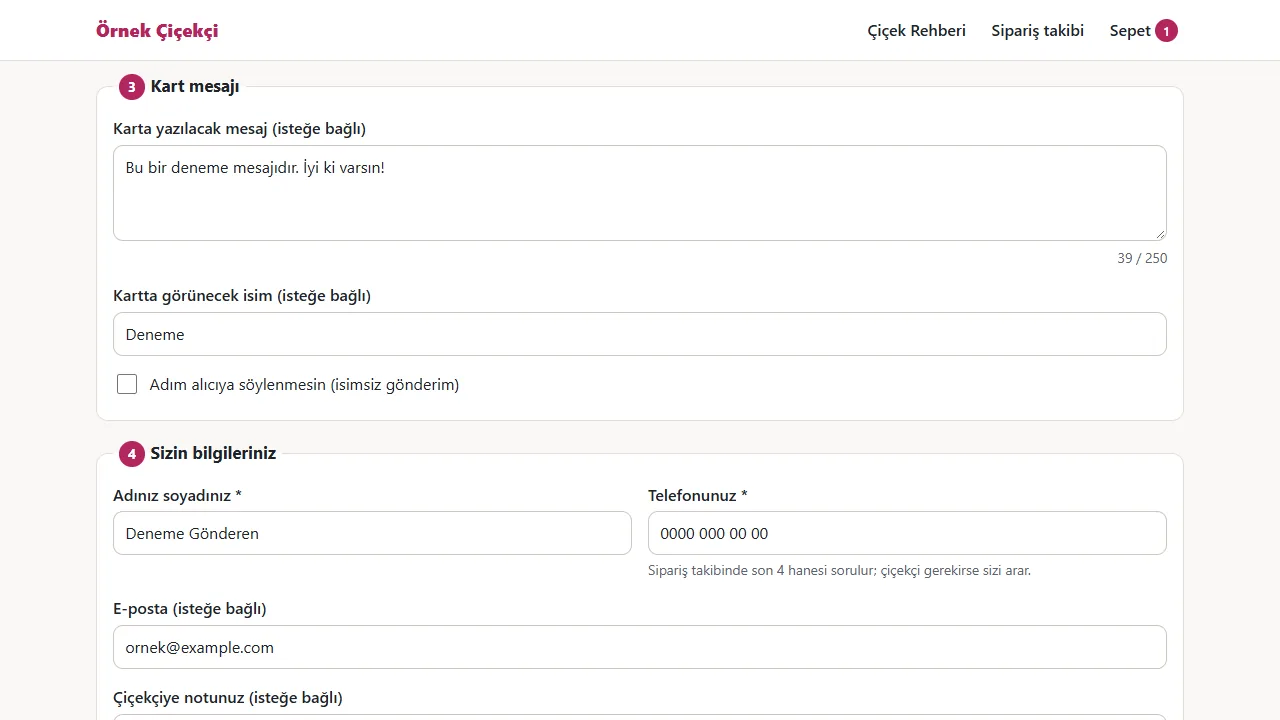
Card message and sender
The card message (with a 250-character counter), the name shown on the card and the sender’s details are separate fields; the sender’s name can be kept from the recipient.
- On screen (Turkish interface)
- “Karta yazılacak mesaj (isteğe bağlı)” — message for the card (optional)
- “Kartta görünecek isim” — name shown on the card
- “Adım alıcıya söylenmesin (isimsiz gönderim)” — do not tell the recipient my name (anonymous)
- “Sizin bilgileriniz” — your details (the sender)
-
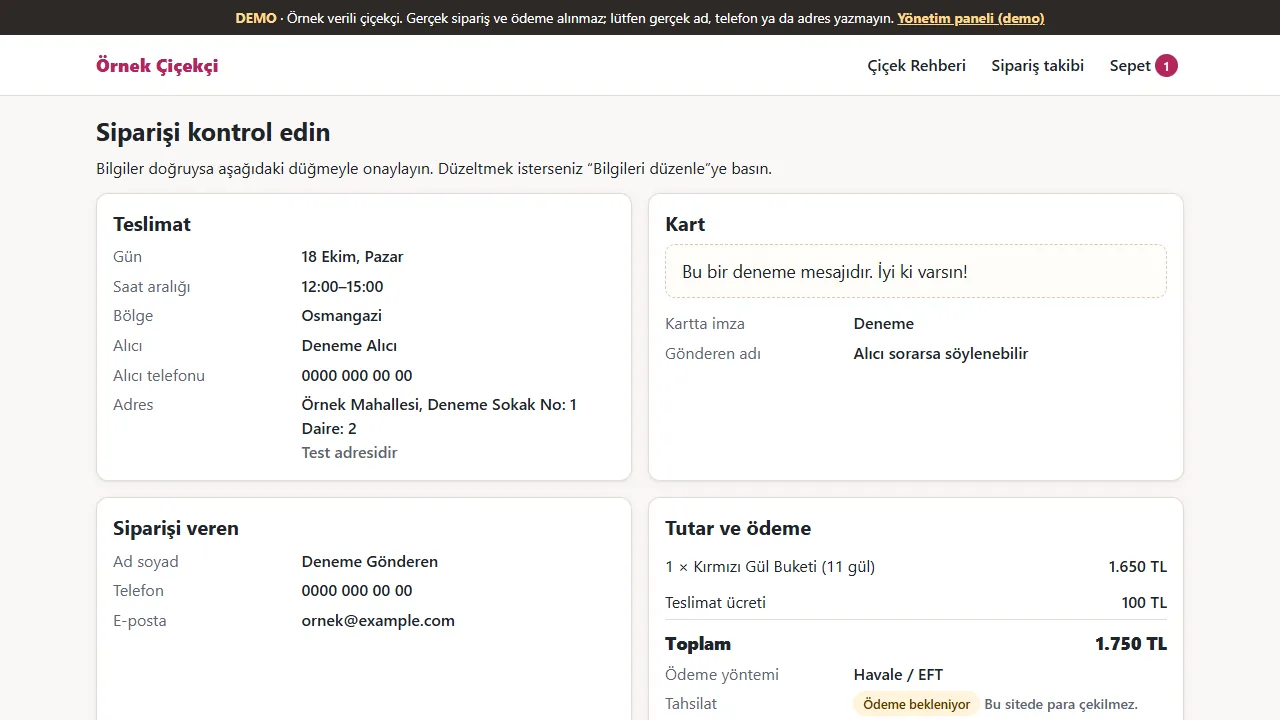
Order summary
Before confirming, delivery, card, sender, delivery fee and total are shown on one page; the order is created only on confirmation.
- On screen (Turkish interface)
- “Siparişi kontrol edin” — check your order
- “Teslimat / Kart / Siparişi veren / Tutar ve ödeme” — delivery / card / sender / amount and payment
- “Teslimat ücreti / Toplam” — delivery fee / total
-
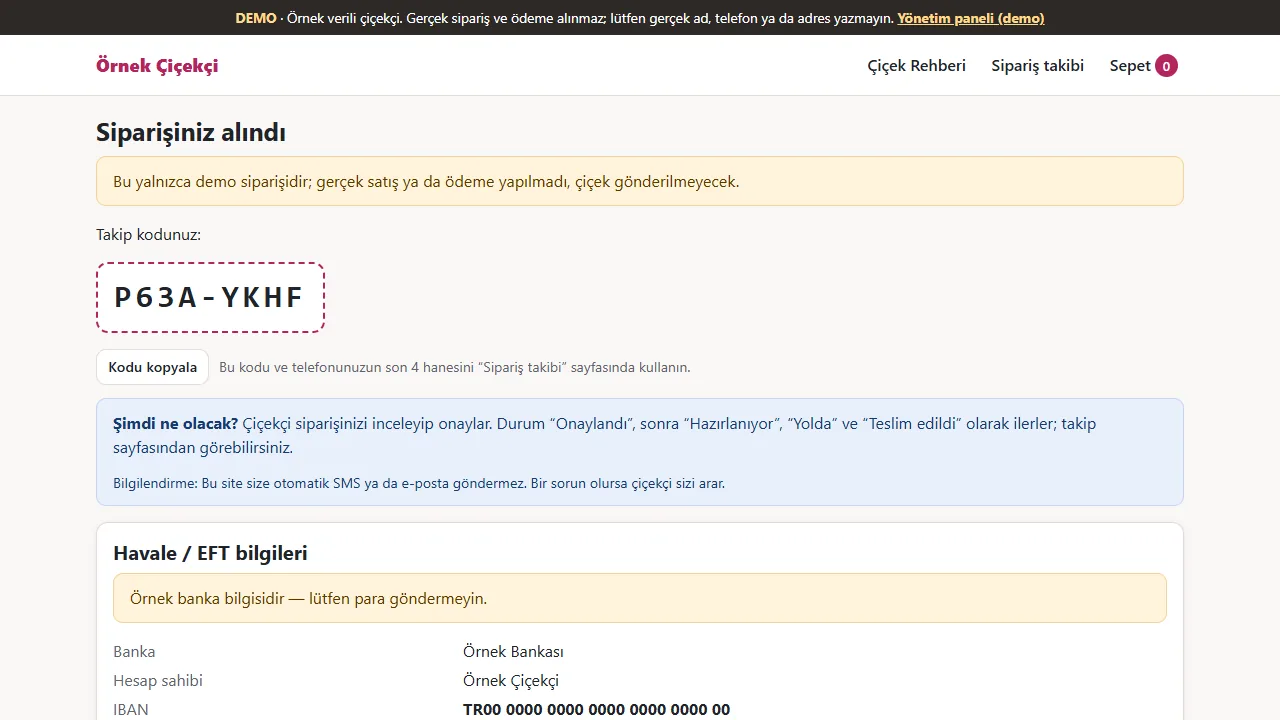
Tracking code
Once the order is in, a tracking code is issued and the next steps are listed. For a bank transfer the bank details appear; in the demo they are samples and it says not to send money.
- On screen (Turkish interface)
- “Siparişiniz alındı” — your order has been received
- “Takip kodunuz” — your tracking code
- “Şimdi ne olacak?” — what happens now?
- “Örnek banka bilgisidir — lütfen para göndermeyin.” — sample bank details: please do not send money
-
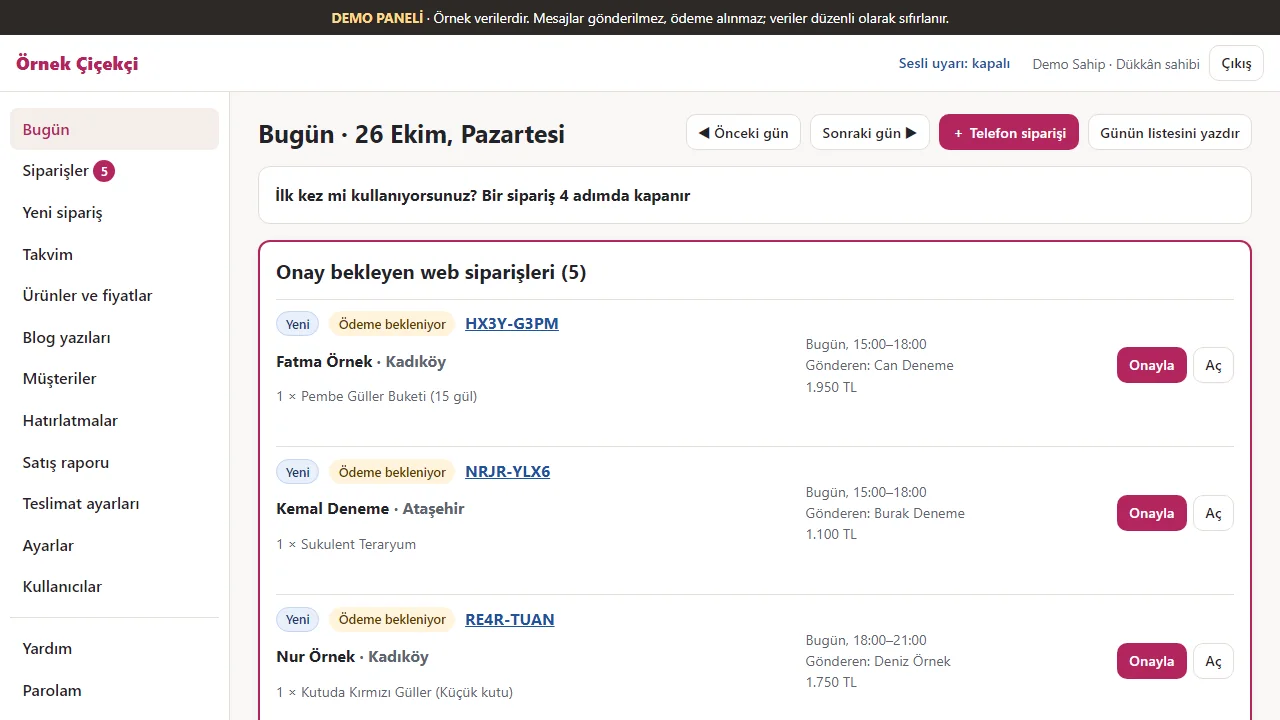
1.3.8 · 26 October 2026 Shop: the “Today” board
The shop owner first sees the web orders awaiting approval: product, delivery time, sender and amount. Each order has an “Onayla” (approve) and an “Aç” (open) button.
- On screen (Turkish interface)
- “Bugün · 28 Eylül, Pazartesi” — today · 28 September, Monday
- “Onay bekleyen web siparişleri” — web orders awaiting approval
- “Yeni / Ödeme bekleniyor” — new / payment pending
- “+ Telefon siparişi / Günün listesini yazdır” — add a phone order / print the day’s list
-
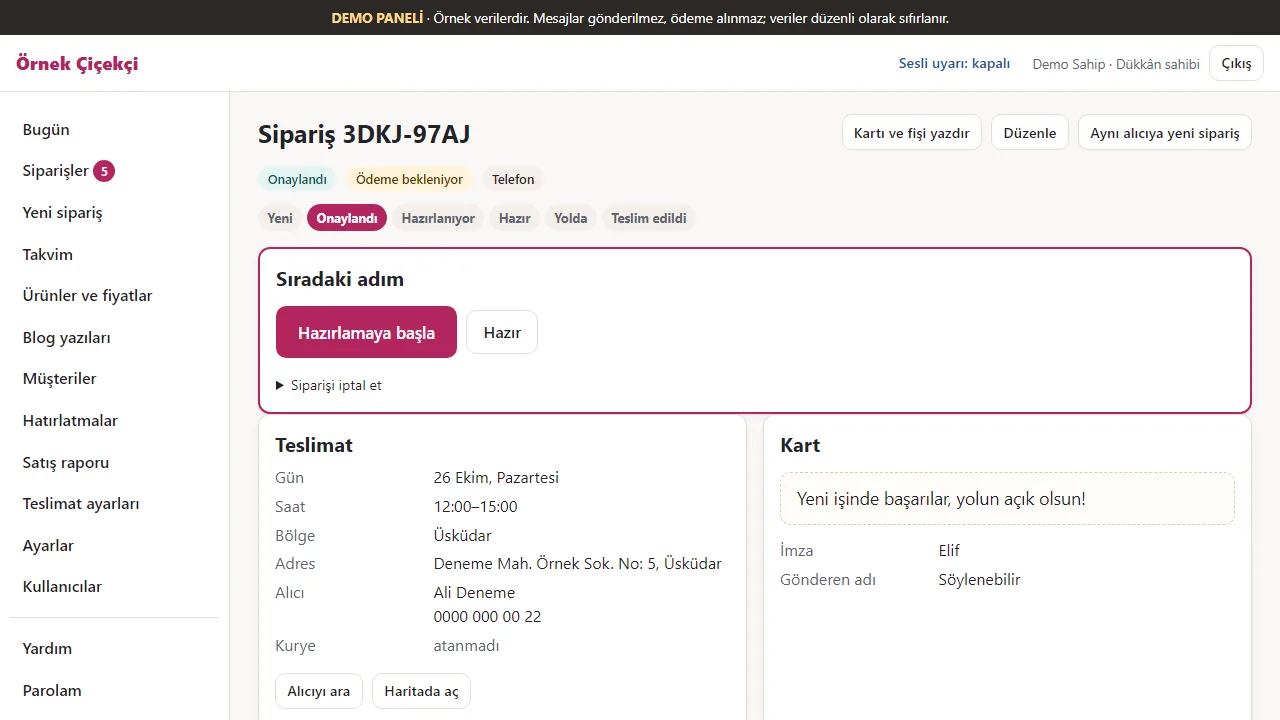
1.3.8 · 26 October 2026 Order and next step
A step bar (new, approved, being prepared, ready, out for delivery, delivered) and a “next step” box; delivery and card details on the same page.
- On screen (Turkish interface)
- “Yeni / Onaylandı / Hazırlanıyor / Hazır / Yolda / Teslim edildi” — the steps, from new to delivered
- “Sıradaki adım” — next step
- “Hazırlamaya başla” — start preparing
- “Kartı ve fişi yazdır” — print the card and the slip
-
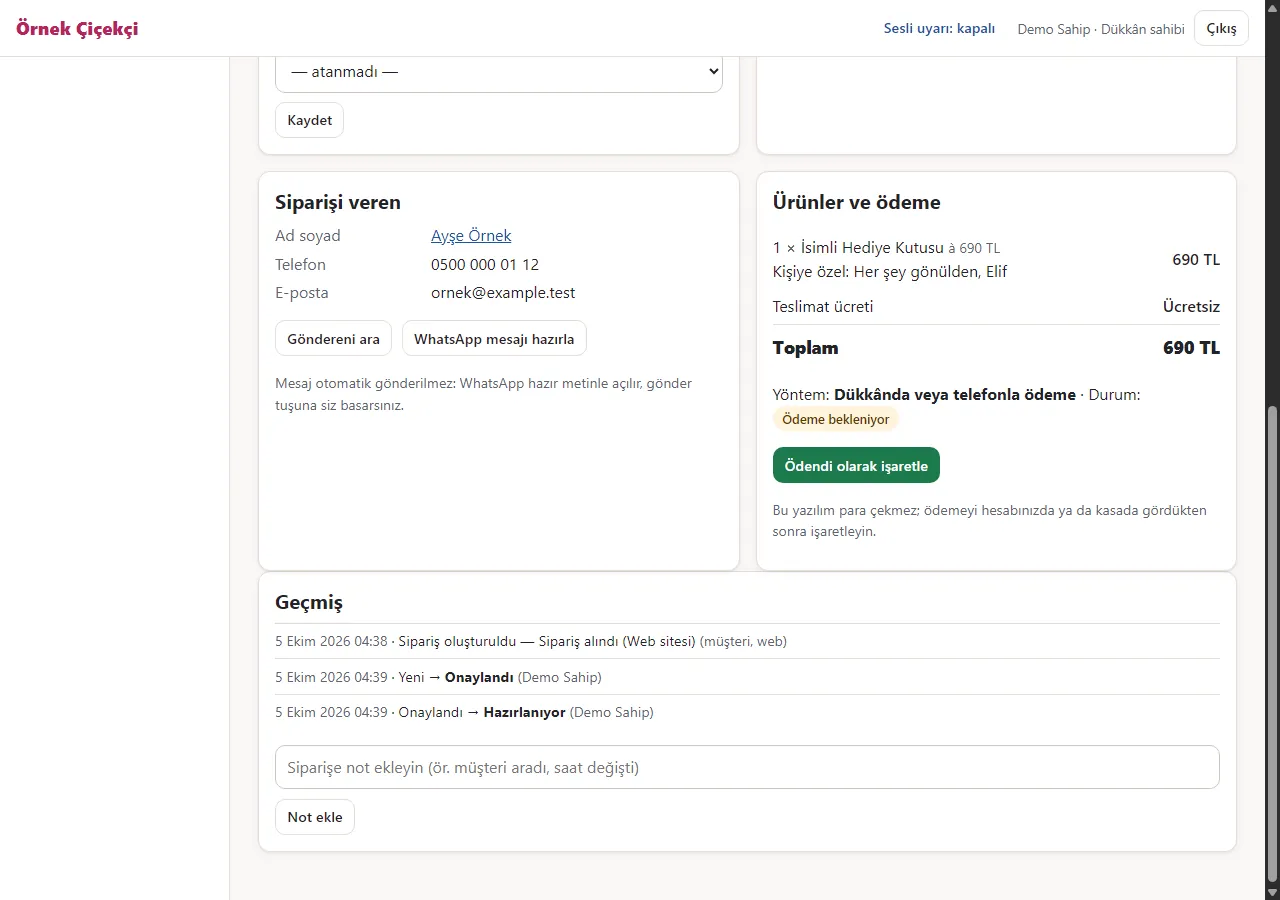
Personalisation and history on the order
Lower on the order page: who ordered, products and payment, the “Kişiye özel: …” line on the product row, and a dated history of who changed what. Live demo (1.3.1).
- On screen (Turkish interface)
- “Siparişi veren” — the person ordering
- “Ürünler ve ödeme” — products and payment
- “Kişiye özel: …” — personalised: …
- “Geçmiş” — history
-
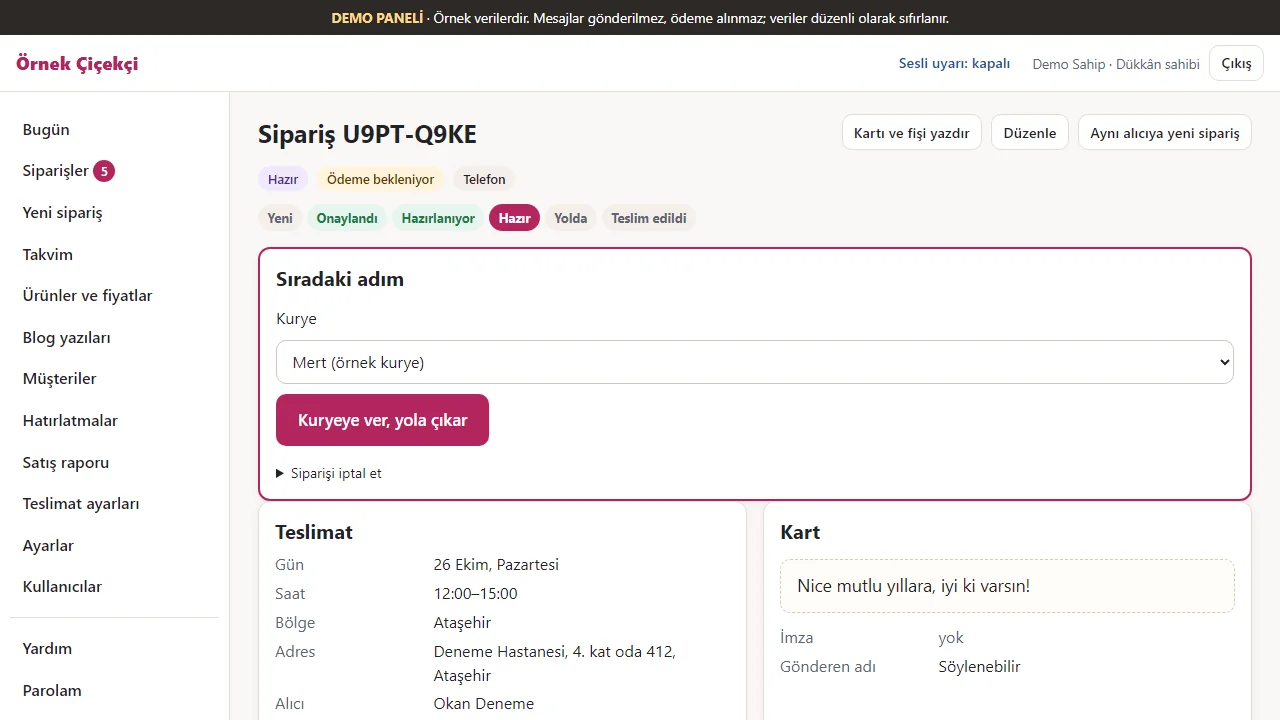
1.3.8 · 26 October 2026 Handing to a courier
For a ready order a courier is chosen, and “Kuryeye ver, yola çıkar” (hand to the courier, send out) sends the order out.
- On screen (Turkish interface)
- “Kurye: Mert (örnek kurye)” — courier: Mert (a sample courier)
- “Kuryeye ver, yola çıkar” — hand to the courier, send out
-
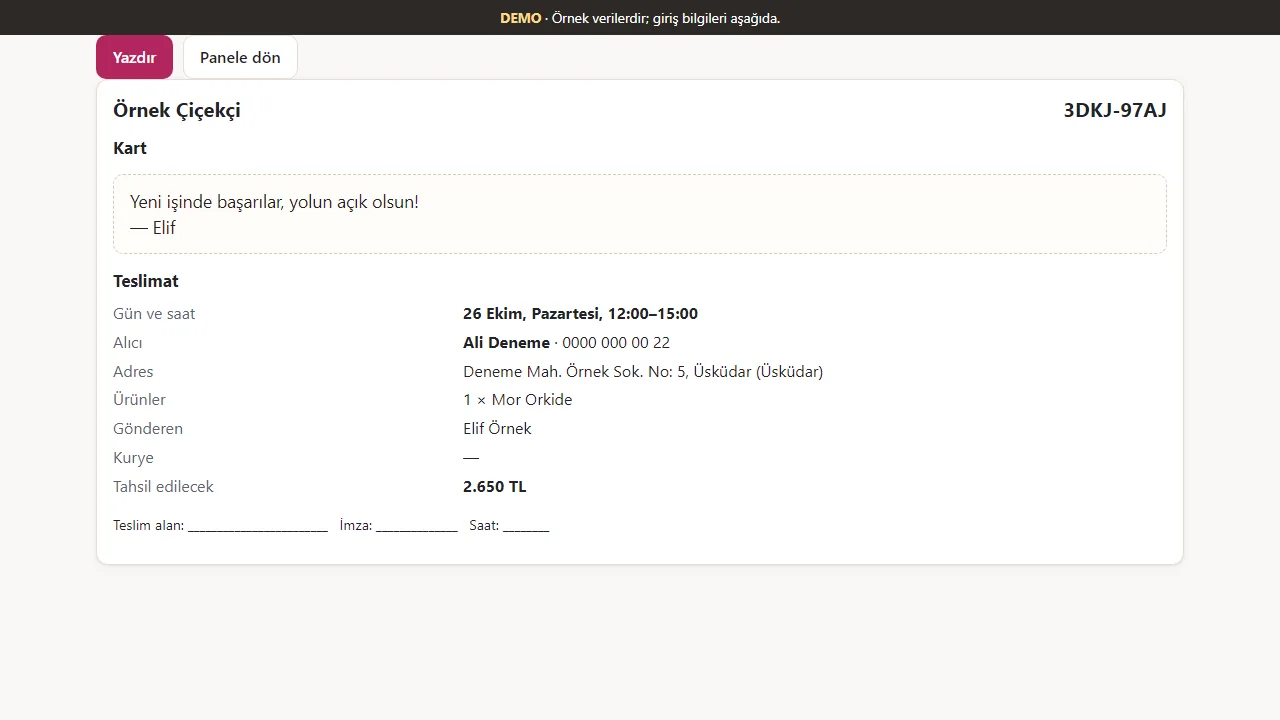
1.3.8 · 26 October 2026 Card and delivery slip
The card message and a delivery slip (day and time, recipient, address, product, courier, received-by and signature lines) are printed; the card does not have to be handwritten.
- On screen (Turkish interface)
- “Kart / Teslimat” — card / delivery
- “Gün ve saat / Alıcı / Adres / Ürünler / Gönderen / Kurye” — day and time / recipient / address / products / sender / courier
- “Teslim alan / İmza / Saat” — received by / signature / time
-
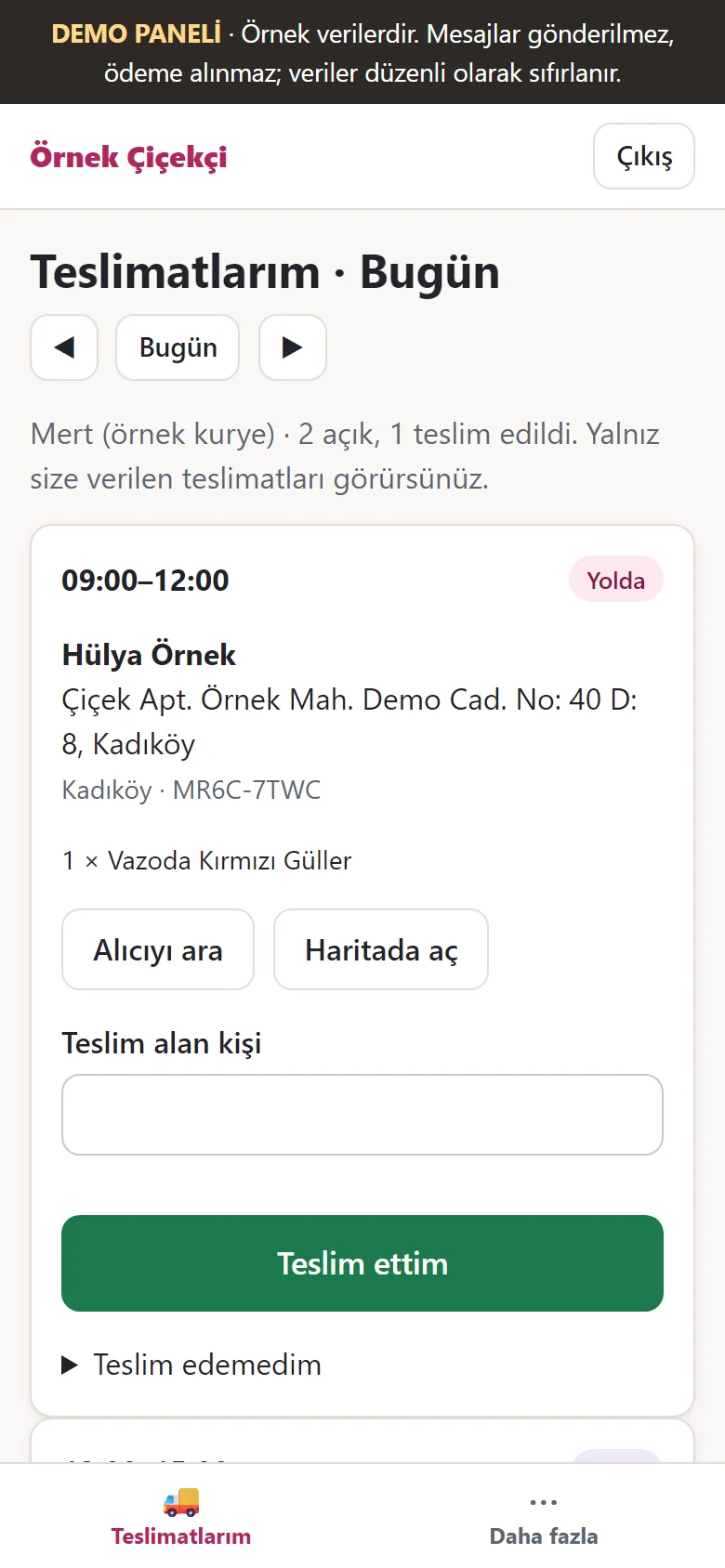
1.3.8 · 26 October 2026 On the courier’s phone
The courier sees only their own deliveries (recipient, address, product) with “call the recipient” and “open in maps”, then enters who received it and taps “Teslim ettim” (delivered).
- On screen (Turkish interface)
- “Alıcıyı ara / Haritada aç” — call the recipient / open in maps
- “Teslim alan kişi” — person who received it
- “Teslim ettim / Teslim edemedim” — delivered / could not deliver
-
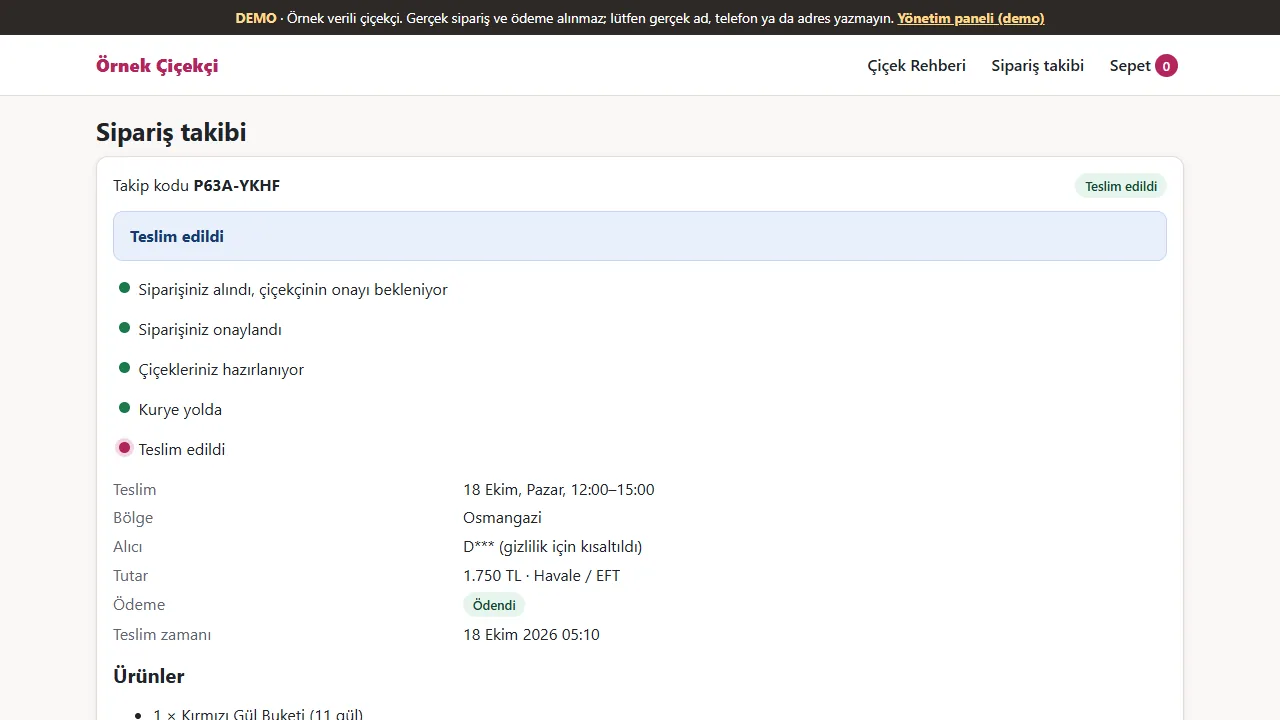
Customer: order tracking
With the tracking code and the last 4 digits of their phone, the customer sees the steps, the delivery time and the payment status. The recipient’s name is shortened; no address is shown.
- On screen (Turkish interface)
- “Sipariş takibi” — order tracking
- “Teslim edildi / Ödendi” — delivered / paid
- “Teslim zamanı” — time of delivery
- “D*** (gizlilik için kısaltıldı)” — recipient’s name, shortened for privacy
-
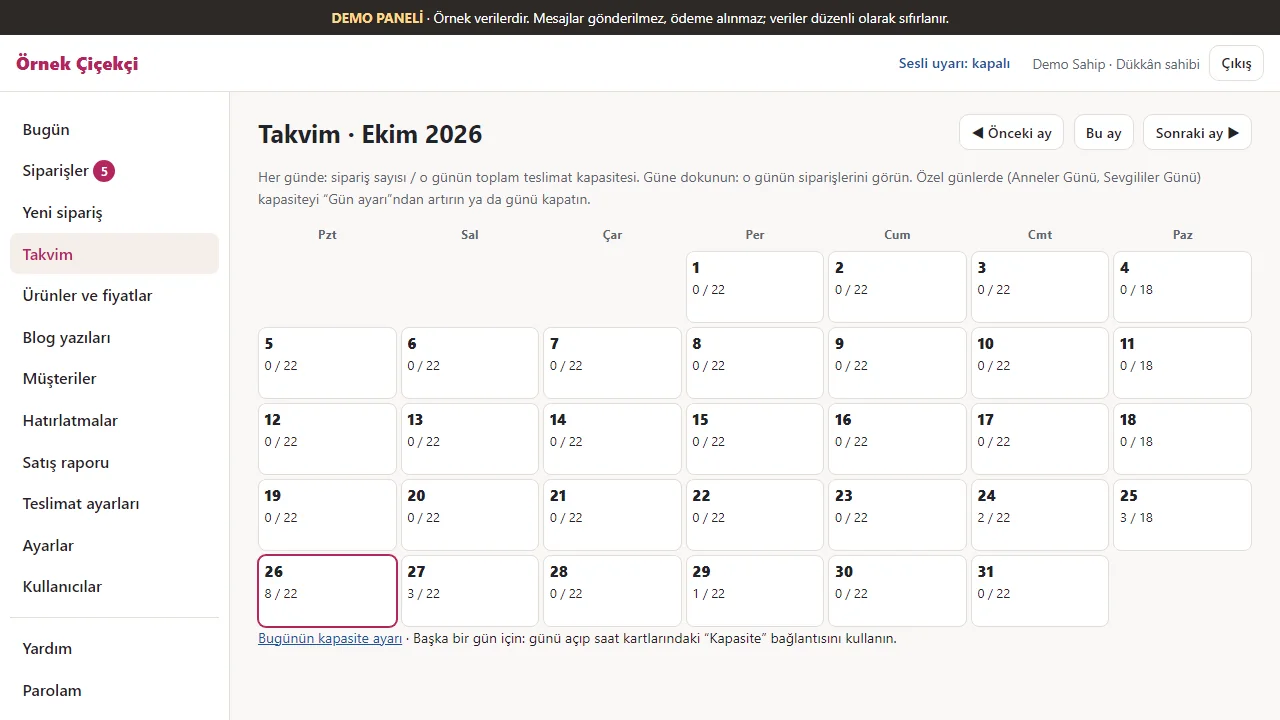
1.3.8 · 26 October 2026 Calendar
A monthly calendar shows each day’s number of orders and its capacity (e.g. 8 / 22); tapping a day opens that day’s orders.
- On screen (Turkish interface)
- “Takvim · Eylül 2026” — calendar · September 2026
- “8 / 22” — orders / capacity for that day
- “Önceki ay / Bu ay / Sonraki ay” — previous month / this month / next month
-
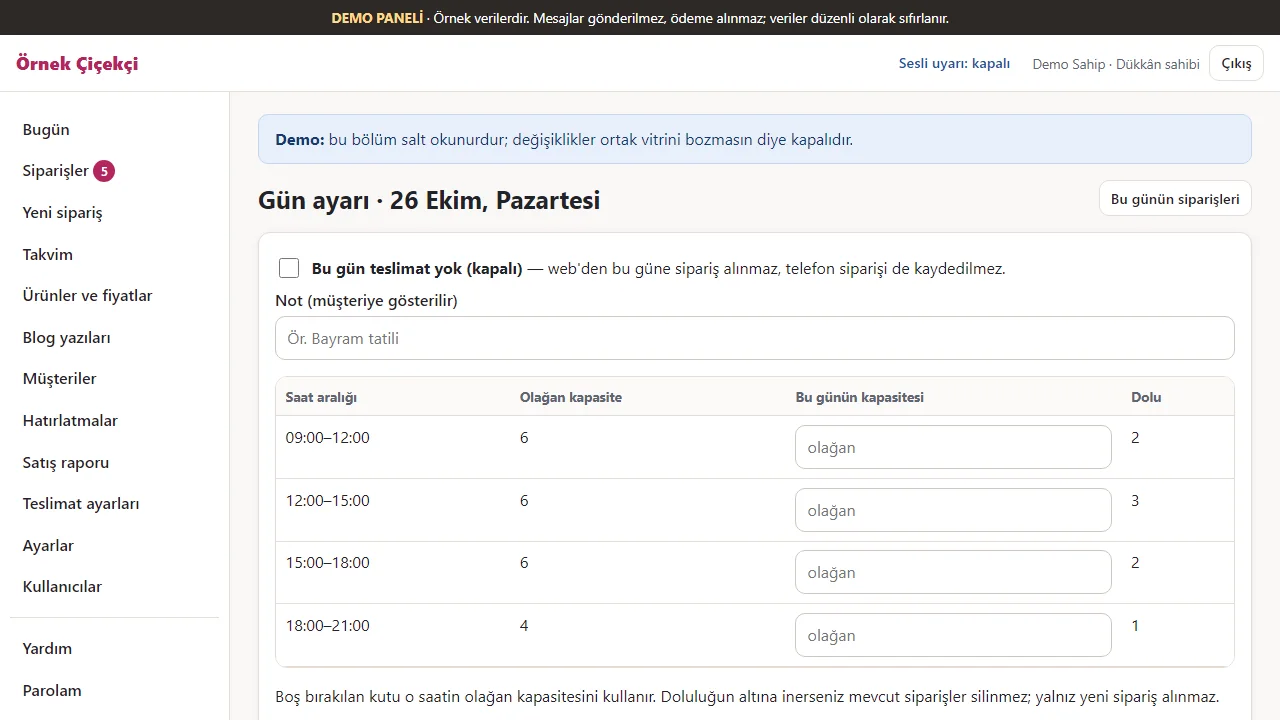
1.3.8 · 26 October 2026 A day’s capacity
For one day, each time slot’s capacity can be changed or the day closed to deliveries; for busy days such as Mother’s Day.
- On screen (Turkish interface)
- “Gün ayarı” — day settings
- “Bu gün teslimat yok (kapalı)” — no deliveries this day (closed)
- “Olağan kapasite / Bu günün kapasitesi / Dolu” — usual capacity / this day’s capacity / booked
-
1.3.8 · 26 October 2026 Phone and WhatsApp orders
An order that came by phone, WhatsApp or in the shop is entered in the panel; a custom product outside the catalogue and a manual price can be typed in.
- On screen (Turkish interface)
- “Yeni sipariş (telefon, WhatsApp, dükkân)” — new order (phone, WhatsApp, in the shop)
- “Özel ürün adı / Birim fiyat (TL)” — custom product name / unit price (TL)
- “katalog” — left blank, the catalogue price is used
-
1.3.8 · 26 October 2026 Importing the customer list from Excel
The shop owner brings the old customer list in as a CSV file saved from Excel, or as a table copied in Excel and pasted; a sample CSV can be downloaded. Nothing is saved at this stage. The demo shows a notice not to enter real names and phones.
- On screen (Turkish interface)
- “Müşteri listesini Excel’den al” — import the customer list from Excel
- “Örnek CSV indir” — download a sample CSV
- “Dosya (.csv, .txt)” — file (.csv, .txt)
-
1.3.8 · 26 October 2026 Preview before saving
The program recognises the columns from the header (change them if wrong) and writes each row’s result: new, already registered or faulty. The same phone number, however written, is added once; a row you do not want gets its “Alma” (do not take) box ticked. No message goes to anyone. In the demo saving and undoing are switched off; on a real installation “… müşteriyi ekle” saves and the last import can be undone.
- On screen (Turkish interface)
- “3 yeni” — 3 new
- “1 zaten kayıtlı” — 1 already registered
- “1 hatalı” — 1 faulty
- “Alma” — do not take
-
1.3.8 · 26 October 2026 Delivery settings
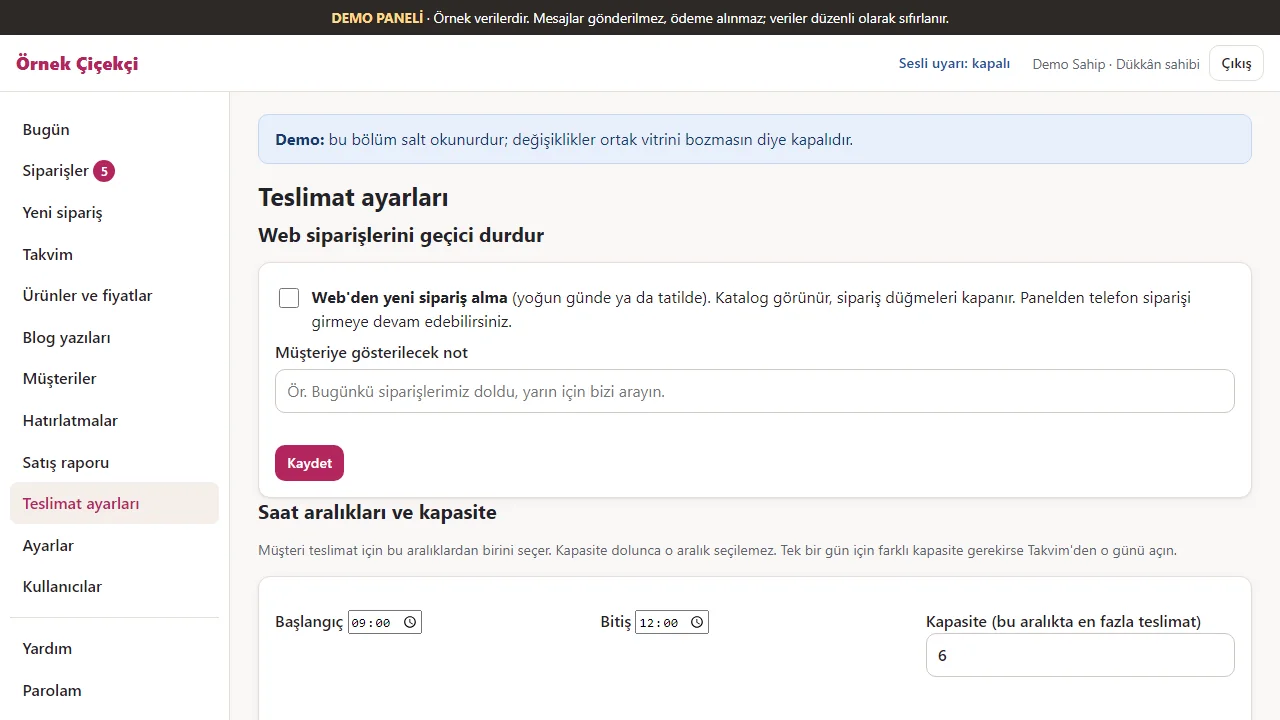
Taking orders from the web can be paused for a while; the time slots, the days they apply to and each slot’s capacity are set here.
- On screen (Turkish interface)
- “Web siparişlerini geçici durdur” — pause web orders for a while
- “Web’den yeni sipariş alma” — do not take new web orders
- “Saat aralıkları ve kapasite” — time slots and capacity
- “Başlangıç / Bitiş / Kapasite” — start / end / capacity
-
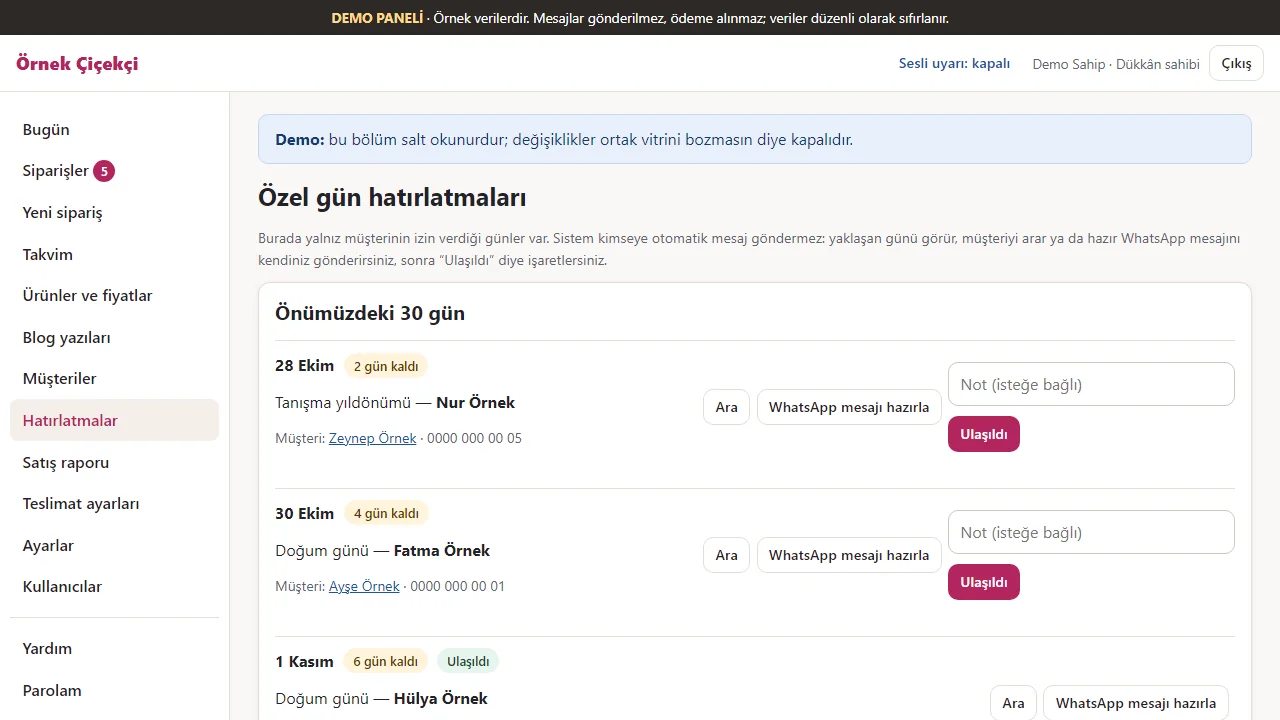
1.3.8 · 26 October 2026 Special-date reminders
Special dates the customer agreed to appear in the list as they approach. The system sends no messages; the shop calls or sends the ready WhatsApp message itself.
- On screen (Turkish interface)
- “Özel gün hatırlatmaları” — special-date reminders
- “Önümüzdeki 30 gün” — next 30 days
- “Ara / WhatsApp mesajı hazırla / Ulaşıldı” — call / prepare a WhatsApp message / reached
- “2 gün kaldı” — 2 days left
-
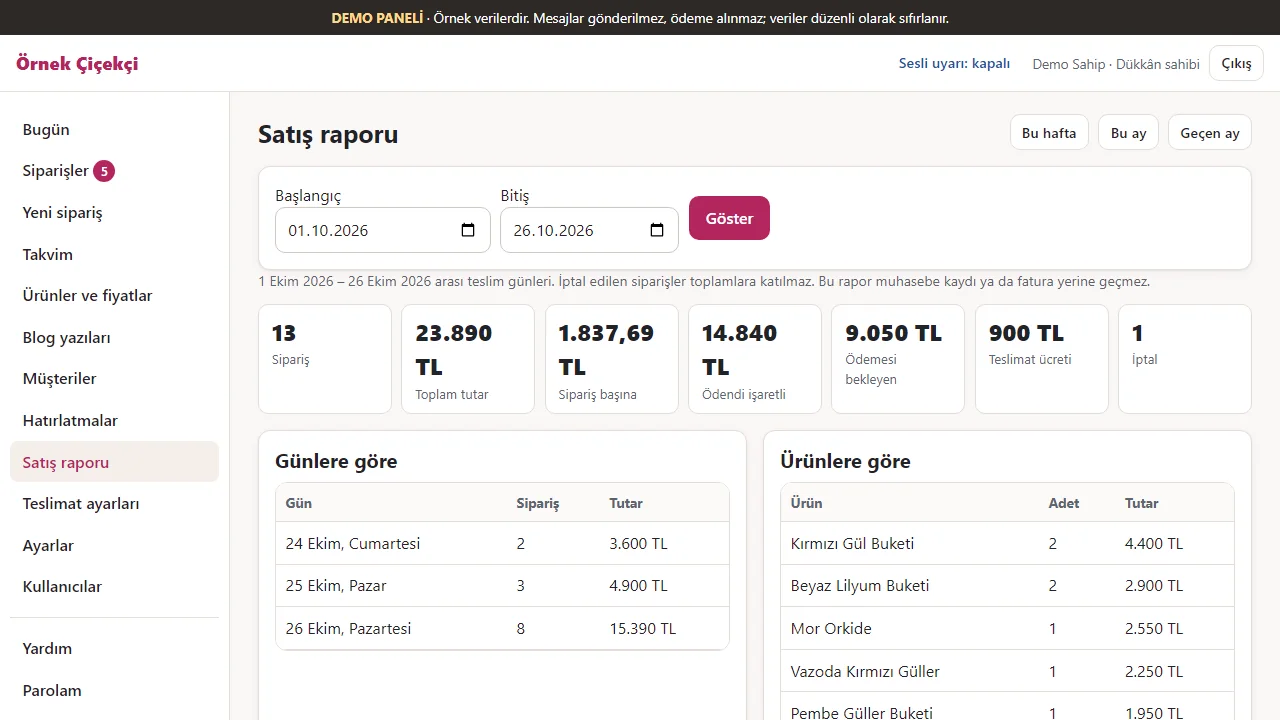
1.3.8 · 26 October 2026 Sales report
For a chosen date range: number of orders, total amount, amounts paid and pending, split by day and by product. It does not replace accounting records or an invoice.
- On screen (Turkish interface)
- “Satış raporu” — sales report
- “Bu hafta / Bu ay / Geçen ay” — this week / this month / last month
- “Toplam tutar / Ödendi işaretli / Ödemesi bekleyen” — total / marked paid / awaiting payment
- “Günlere göre / Ürünlere göre” — by day / by product
-
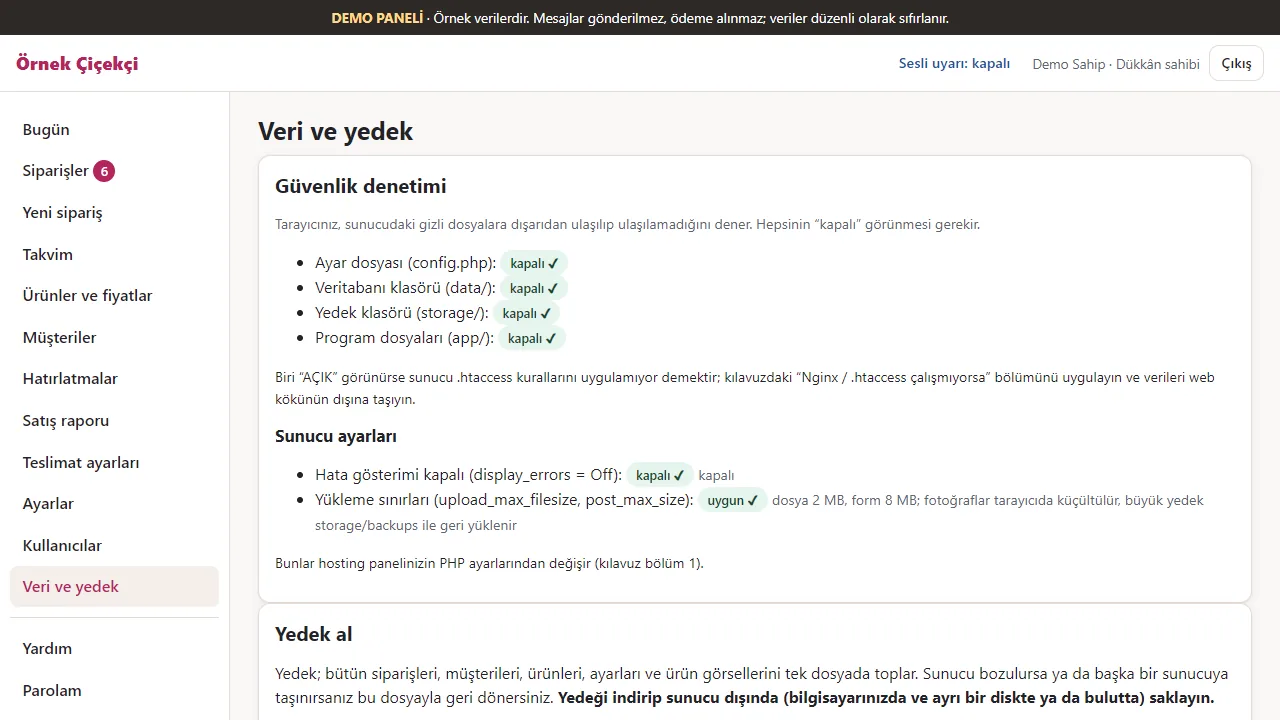
Data and backup
The security check tests that the private folders cannot be reached from outside; the server settings’ state is shown; backups are taken here.
- On screen (Turkish interface)
- “Güvenlik denetimi: kapalı ✓” — security check: closed
- “Sunucu ayarları” — server settings
- “Yedek al” — take a backup
-
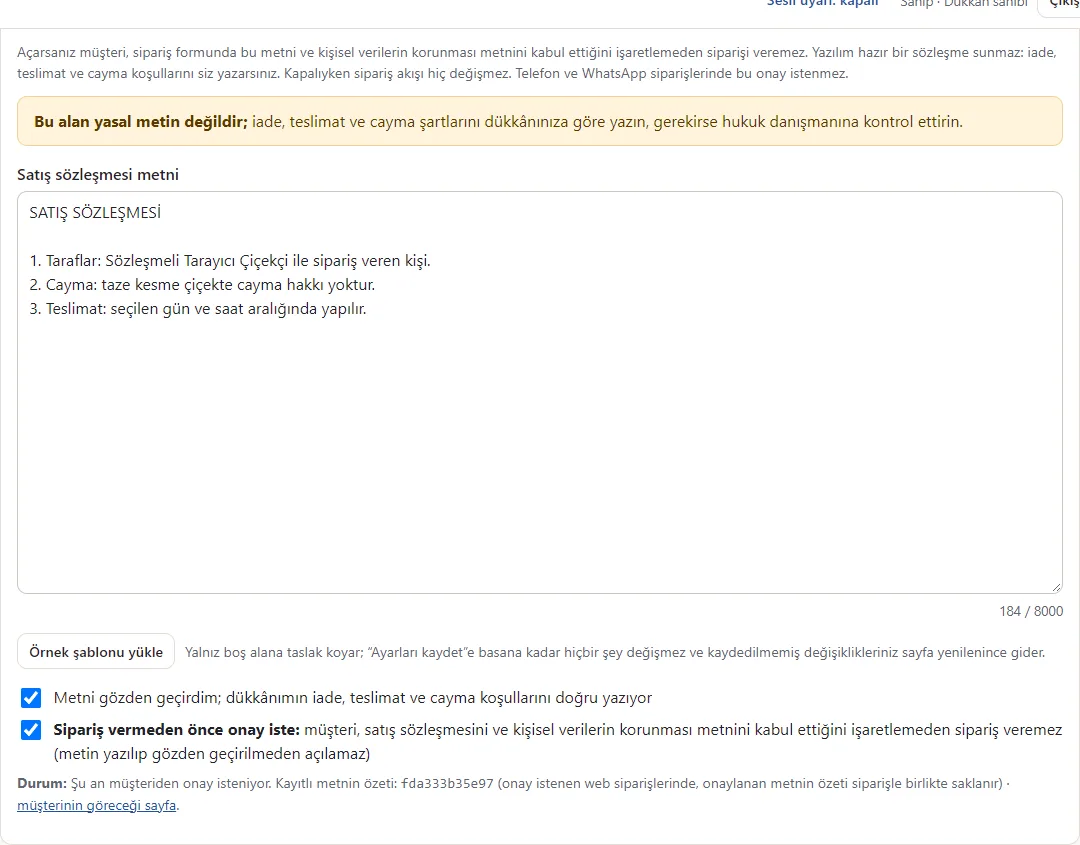
New: contract settings (1.1.0-dev)
The shop writes its own sales contract, marks the text as reviewed and can require acceptance for web orders. It starts off. The on-screen wording is test data, not legal advice.
-
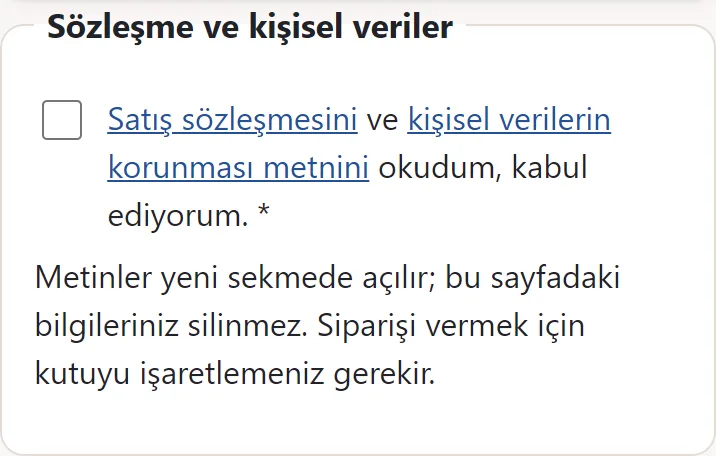
New: customer consent box (1.1.0-dev)
When enabled, the customer can open both texts in separate tabs and must tick the box before reviewing the order. Phone orders entered in the panel do not use this box.
-
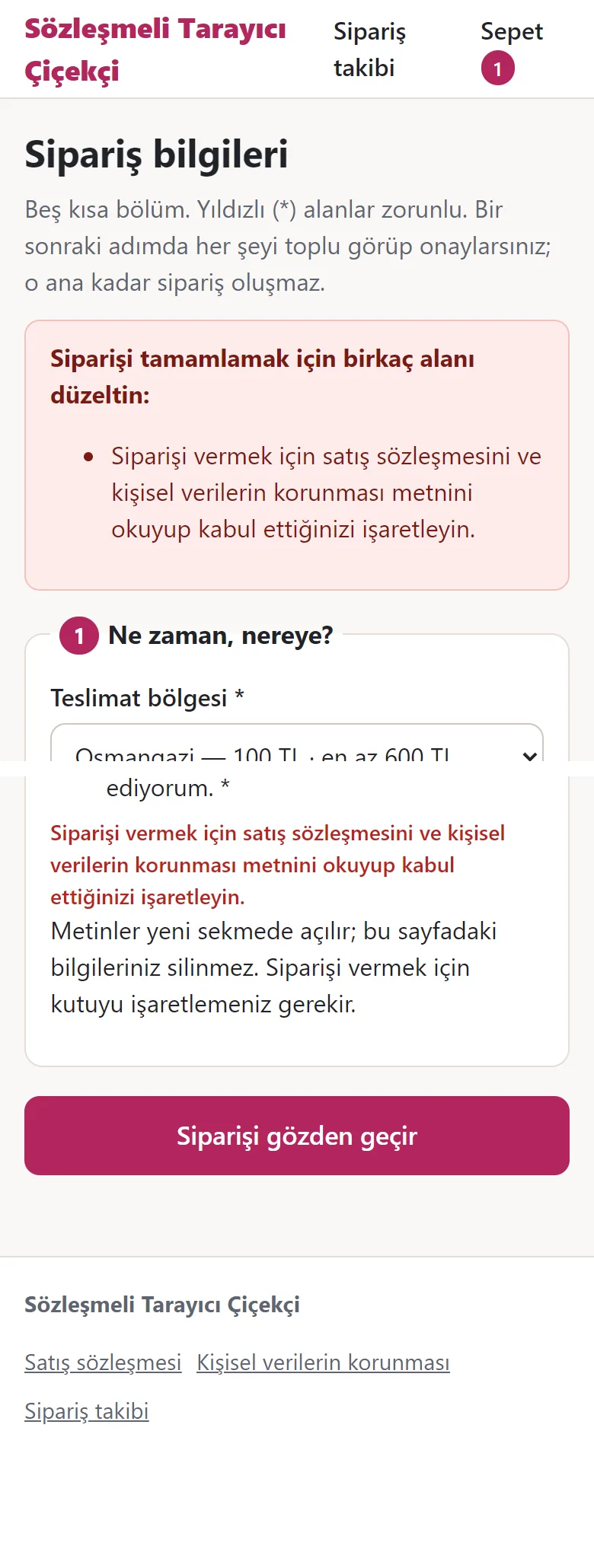
New: no consent, no order (1.1.0-dev)
The Turkish error and unticked box come from one phone screen. Its top and bottom were joined, omitting the long form between them. Entered details stay; no order is created.
-
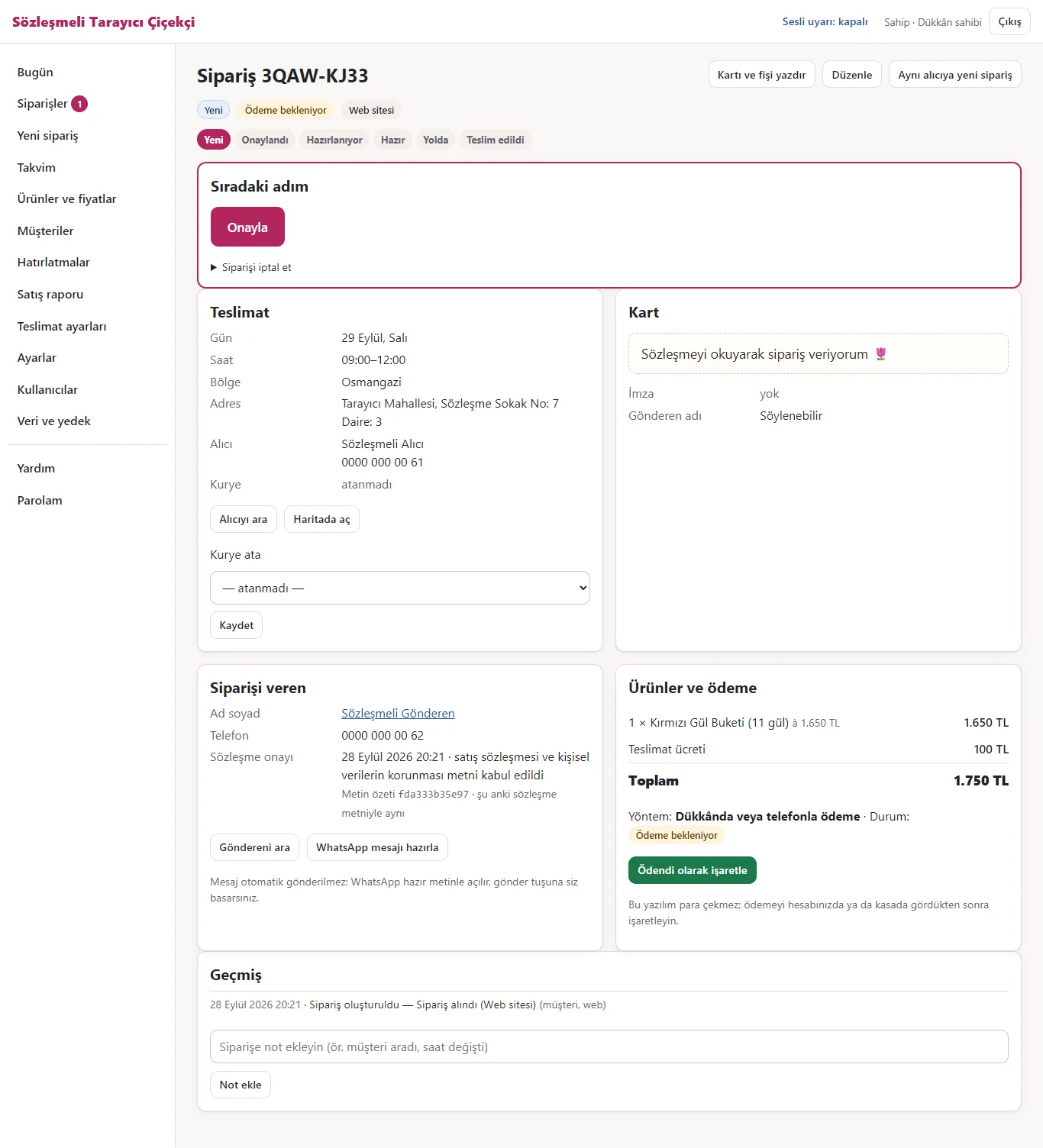
New: acceptance record on the order (1.1.0-dev)
The shop sees the acceptance time and a short fingerprint of the contract text accepted for that web order. No consent is invented for older orders.
- What do they see at the end?
- The customer orders without an account, gets a tracking code and follows the status. The shop sees the order in the panel, approves it, prepares it and hands it to the courier; once the courier delivers, the customer sees “Teslim edildi” (delivered) on the tracking page.
- What is it good for?
- Orders are collected in one list; a time slot never takes more orders than its capacity; the card message and the address reach the courier in writing; customers see the status without calling.
Everything that is not included, and all limits
- This is a demo with sample data: not delivered to a client and not used by a real shop; the sales package and price have not been set yet (details: the “Delivery and sales status” section). Products, names and orders on screen are sample data; the product images are royalty-free sample photos.
- Installed locally with its setup wizard on SQLite and on MariaDB 11.4; passed its automated tests on PHP 8.2, 8.3, 8.4 and 8.5 and a local simulation of shared-hosting settings. Not yet installed on real hosting, and not tried on real phones (Android, iPhone Safari).
- There is no online card payment, no SMS and no automatic WhatsApp message. Payment is by bank transfer, in the shop or on delivery, and the shop marks it “Ödendi” (paid) in the panel; the WhatsApp buttons only open a ready message.
- E-mail notification is optional and uses the host’s mail() function; it was not tried on a real server and may not work on some hosts.
- The contract-acceptance feature (present since 1.1.0 and in the current 1.3.8) was verified through local tests only; it is off in the live demo. These screens are not in the 1.0.3 demo; the feature is in the current 1.3.8 demo but has not been tested on a customer’s own hosting or a real phone.
- There is a live demo with sample data (reset every day); the screenshots are shown here too.
- The interface is in Turkish only; there is no English version.
Delivery and sales status
There is no cart, customer account or online payment on this site for now. Reach out by phone, WhatsApp or the form; in a first conversation your need and the software’s fit are reviewed. The form does not create an order, a contract or a payment.
Possible delivery options
Price
There is no package on offer right now, so there is no list price. If a package is defined, the price and payment method are settled then.
Requirements and version history
Installation requirements
- PHP 8.2 or newer; pdo with pdo_sqlite or pdo_mysql, plus mbstring, json, openssl, fileinfo and zip.
- SQLite (default) or MySQL/MariaDB. The documents say “MySQL 8 / MariaDB 10.6+”; 1.3.1 was tried only on PHP 8.3, with SQLite and with MariaDB 11.4, and lower versions were not tried on 1.3.1.
- Settings file ready for Apache/LiteSpeed; Nginx rules are in the documents. E-mail notification is optional and has not been tried on a real server.
Release notes
- Summarised from the package’s version history; no version has been delivered to a client. The live demo runs version 1.3.8.
- 1.3.8 (26 October 2026): staff never land on a “you are not allowed” screen; with no courier set up they read “Kurye eklemek için dükkân sahibine söyleyin” (ask the shop owner to add a courier) and the add-courier link is shown only to the owner; the server-side permission check still applies.
- 1.3.7 (21 October 2026): importing a customer list from Excel/CSV (shop owner only): columns are recognised from the header, a preview comes before saving, the same phone number is added once, no message goes to imported customers and the last import can be undone; a sample CSV can be downloaded. In the demo the preview works and saving is switched off.
- 1.3.6 (18 October 2026): in demos set up before the photos, product and blog images now come as photos.
- 1.3.5 (18 October 2026): the demo’s product and blog images are royalty-free sample photos instead of drawings.
- 1.3.4 (12 October 2026): tapping a product twice quickly no longer adds it twice.
- 1.3.3 (10 October 2026): a security-fix version: invalid UTF-8 corrupting a backup, the sign-in limit, session files, address limits and the shared-data protections in the demo were fixed.
- 1.3.2 (8 October 2026): in demo mode the panel sign-in page comes prefilled and the demo storefront has a “Yönetim paneli (demo)” link.
- 1.3.1 (5 October 2026): read-only fields in demo mode; the gift personalisation text is limited to 60 characters and appears in the extra outputs.
- 1.3.0 (4 October 2026): the two earlier development lines merged: gift personalisation, search, blog and the Istanbul sample profile; database schema 4.
- 1.1.0 (3 October 2026): optional sales-contract acceptance; fixes for restoring old backups and for updating.
- 1.0.3 (28 September 2026): activity log in Turkish. First version 1.0.0, 27 September 2026.
Decisions not made yet
- Rights to use, modify, transfer and receive the source code: to be set in a written agreement; not decided yet.
- The price and payment method have not been decided yet.
- Whose name the hosting and domain are opened in, and where the software is installed, have not been decided yet.