Hotels, guesthouses and bungalowsDemo with sample data
Hotel, Guesthouse and Bungalow Booking Tracking: screen-by-screen guide
The full version of the short description on the product page: every feature, how each screen is used step by step, all limits and the delivery details.
All features
The flows below were run in the app’s live demo with sample data. The screens were taken from the live demo (version 0.3.0; some from 0.2.2–0.2.3, which look the same) on 25 October 2026. The live demo is on version 0.3.5 today: in 0.3.1 a deposit or payment larger than the remaining balance is not saved, and in 0.3.2 areas a staff account may not use, such as reports, setup and CSV import, are not shown; the staff sign-in was tried on the live demo on 26 October 2026. In 0.3.3 a search that matches nothing in the Customers and Reservations lists says “No record matches your search” with a “Clear search” button, an empty list shows a “None yet → add one” prompt, and Reports shows a message for a date range with no records (reports are for the business owner only; this report message was not tried on the live demo). In 0.3.5 the guest’s status page shows “Add to calendar” buttons for a confirmed future booking; they do not appear for a request, option, cancelled or past booking; the request, approval, cancellation and invalid-address flow was tried on the live demo on 28 October 2026, not on a real phone. The business (“Örnek Bungalov Konaklama”), guests, phone numbers and amounts are made up; no real name, phone number or e-mail should be entered in the demo.
- Availability and clashes: a night count with the check-in day included and the check-out day excluded; a clashing booking on the same unit, a closed date and a capacity overrun are not saved, and with simultaneous requests only one booking is taken
- Price rules: weekend (Friday and Saturday nights), a season range and a special date or holiday; per unit or general; for a night the special date applies first, then season, then weekend, then the base price
- Customer page: picking dates without an account and seeing which unit is free and the total, sending a request, a status page of their own after the request, “Add to calendar” on a confirmed future booking (a Google Calendar link and an .ics file; the stay shows as all-day from the check-in day up to the morning of check-out, the check-out day itself is outside the event; a reminder one day before; no name, phone or amount is added), adding it to the phone and, if the guest wishes, a free phone notification when the status changes (approved, option, cancelled)
- Today board: arrivals, departures, guests in the house and pending requests; Approve, Checked in and Checked out are one tap each; records whose departure was not marked are flagged; a monthly calendar grid
- Statuses: request, option, confirmed, checked in, checked out, cancelled and no-show; deposits, payments and refunds are kept as records only, the program charges nothing
- A ready WhatsApp message: on every reservation the guest’s name, dates, status and their own status link come ready; copy the message and the link; you send the message yourself
- Multi-day closed dates: several days for maintenance or a closed season, for the whole business or one unit; if a reservation falls in the range it warns, does not add the closure unless “Yine de kapat” (close anyway) is chosen and never cancels reservations; “Yanlış girdim, sil” (entered by mistake, delete) in the list of upcoming closures
- Importing the customer list: CSV or pasting, column recognition from the header, phone-format matching, duplicate removal, a preview before saving and undo; no reservation, payment or message is created
- News of a new request: a notice box and badge in the panel, a free phone notification (Web Push) and an optional e-mail; no message or SMS goes to the guest (if the guest turns the notification on themselves, only news of their own reservation arrives). The phone notification was tried end to end in a real Chrome (phone view) on the live demo: the request, approval and option notices arrived; it has not been tried on a real phone, in iPhone/Safari or in the WhatsApp in-app browser
- Set-up and guidance: a five-step setup guide (steps tick themselves), a “Bu ekran ne işe yarar?” (what is this screen for) box on every screen, a sign-in-free set-up page for the business phone, a customer poster with a QR code that prints, a ready-made multi-row table for rooms, fix buttons next to error messages; “Boş siteyle yeniden başla” and “Örnek veriyi geri yükle” (restore the sample data) in the demo
- Roles and reports: owner and staff; staff do not see the settings, prices, units, closure, report and setup screens or the customer-list import (the server refuses an address typed by hand); occupancy, a reservation list and CSV export are open to the owner only; a backup tool
Screen by screen: how it is used
The interface in these screens is Turkish; only the captions and explanations on this page are in English. The screens were taken from the live demo (with sample data, 25 October 2026; version 0.3.0, the new and renewed screens from 0.3.0, the others from 0.2.2–0.2.3, which look the same in these versions); the live demo is now 0.3.3 (0.3.1: an overpayment is not recorded; 0.3.2: reports, setup and CSV import are not shown to staff; 0.3.3: “No record matches your search” with “Clear search”, and an “add one” prompt when a list is empty). The business (“Örnek Bungalov Konaklama”), guests, phone numbers and amounts are made up. The customer pages and the set-up page are phone views, 390 px wide.
- Who uses it?
- The owner of a guesthouse, apartment or bungalow business, the front-desk staff and a guest who wants to book.
- Where do they start?
- The guest picks dates on the customer page and sends a request, or a request that arrives by phone is recorded in the panel.
What do they do on screen? Step by step
-
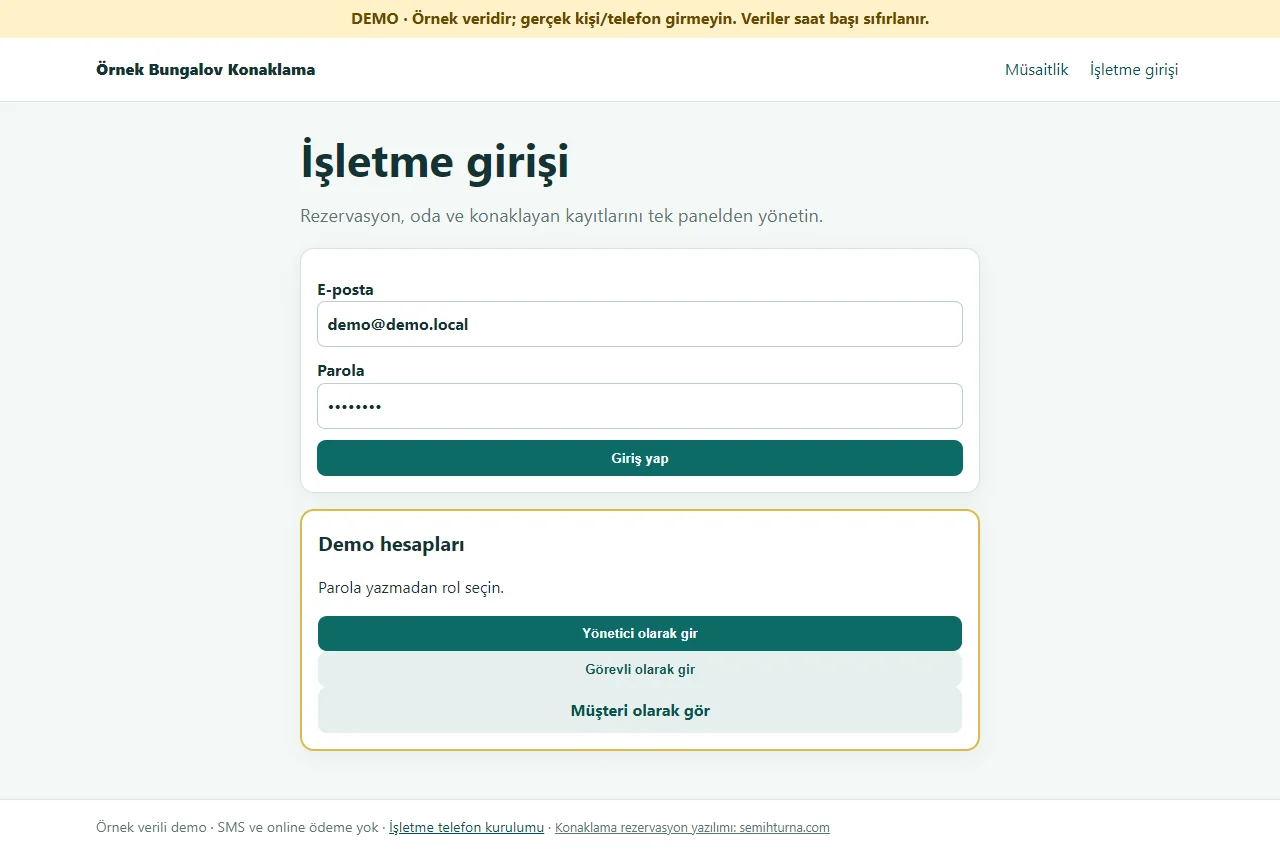
Demo sign-in page
The demo needs no password: one click on “Yönetici olarak gir” (enter as manager) or “Görevli olarak gir” (enter as staff), and the customer’s booking page opens from here too. A normal installation asks for an e-mail and password.
- On screen (Turkish interface)
- “Demo hesapları” — demo accounts
- “Yönetici olarak gir” — enter as manager
- “Görevli olarak gir” — enter as staff
- “Müşteri olarak gör” — see it as a customer
-
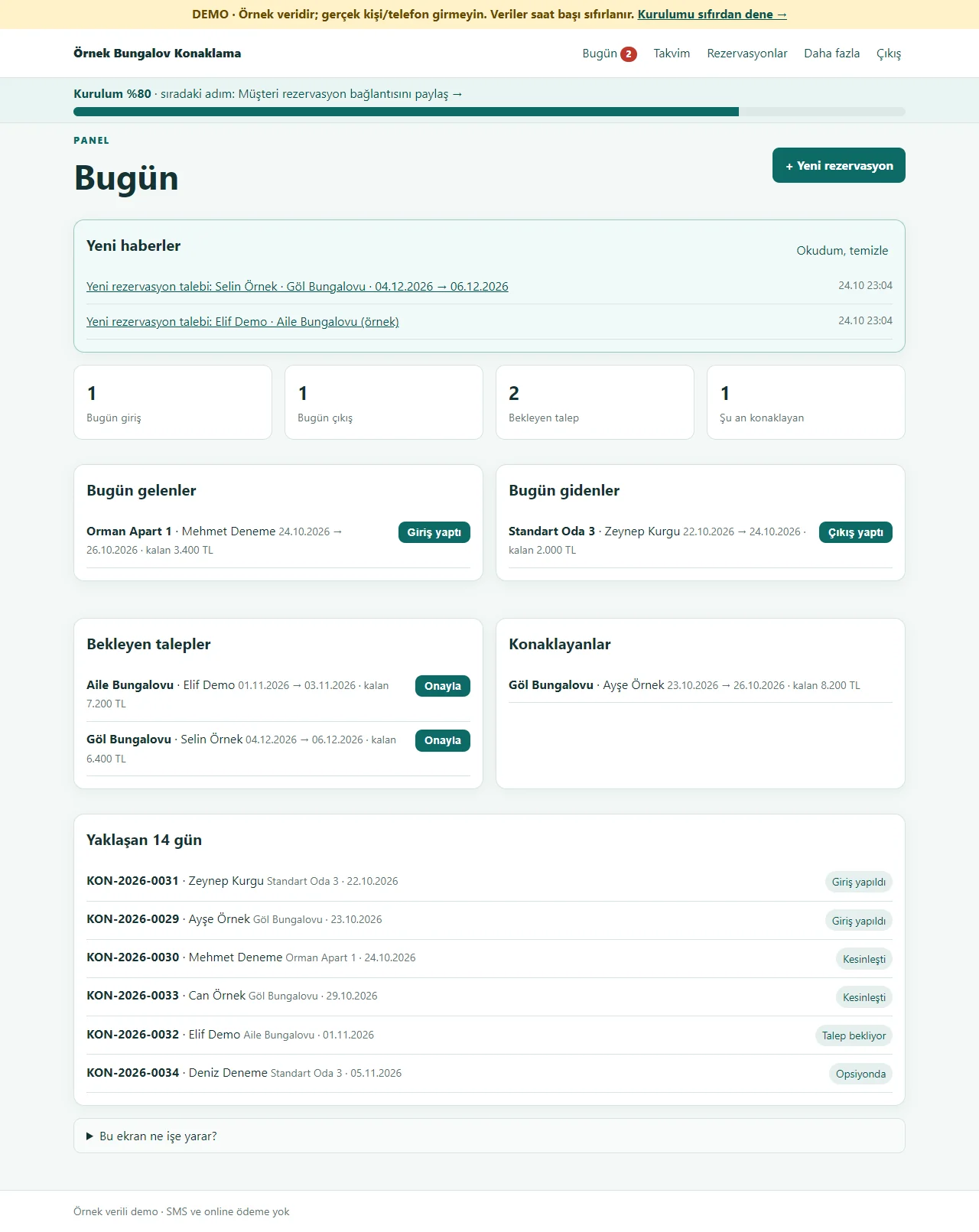
Today board
The notice of a new request, today’s arrivals, today’s departures, pending requests and guests in the house are on one screen. “Onayla”, “Giriş yaptı” and “Çıkış yaptı” are one tap each; records past their departure day that were not marked are flagged separately.
- On screen (Turkish interface)
- “Yeni haberler” — new notices
- “Bugün gelenler” — arriving today
- “Bugün gidenler” — leaving today
- “Bekleyen talepler” — pending requests
- “Konaklayanlar” — guests in the house
- “Onayla” — approve
- “Giriş yaptı” — checked in
- “Çıkış yaptı” — checked out
-
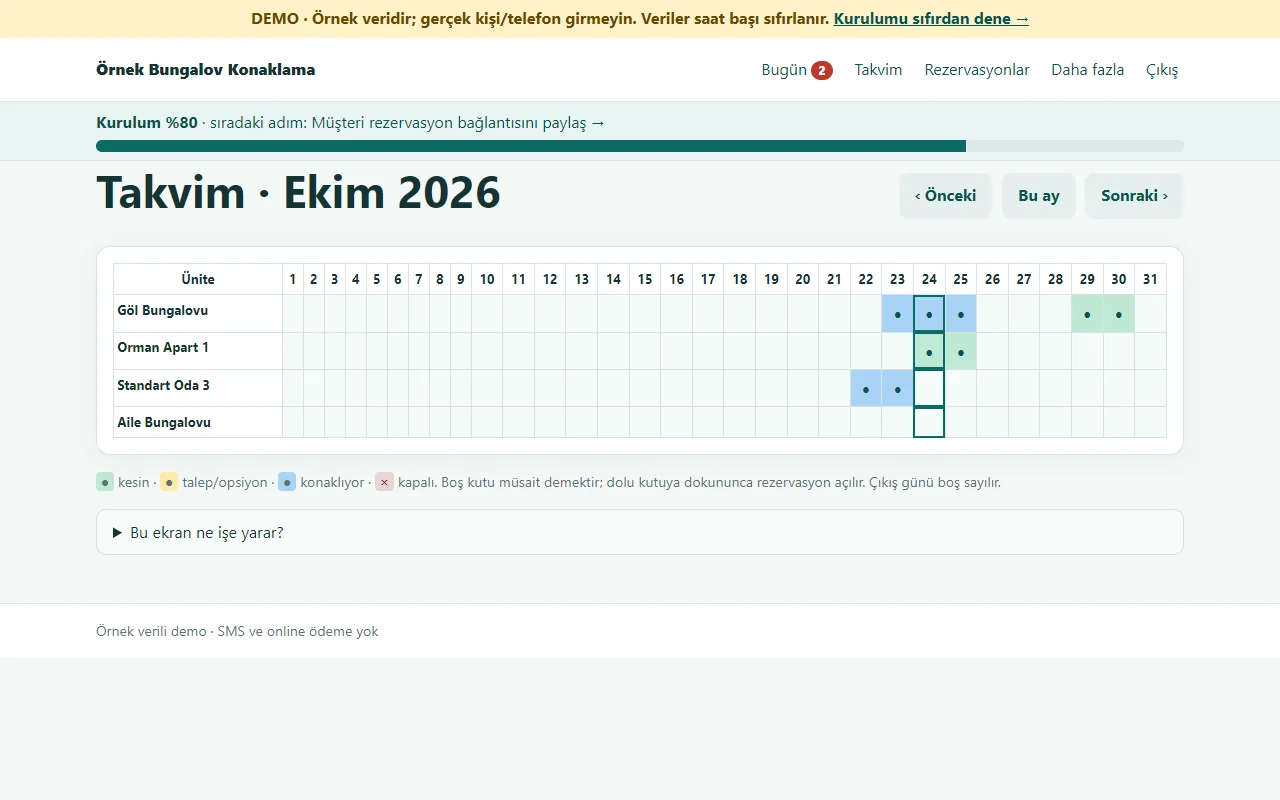
Monthly calendar
Each row is a room, apartment or bungalow; each cell is a night. Green is confirmed, amber a request or option, blue staying now, a cross closed; an empty cell means free. A tap on a filled cell opens the reservation, and the departure day counts as free.
- On screen (Turkish interface)
- “Takvim” — calendar
- “Önceki” — previous
- “Bu ay” — this month
- “Sonraki” — next
- “kesin” — confirmed
- “kapalı” — closed
-
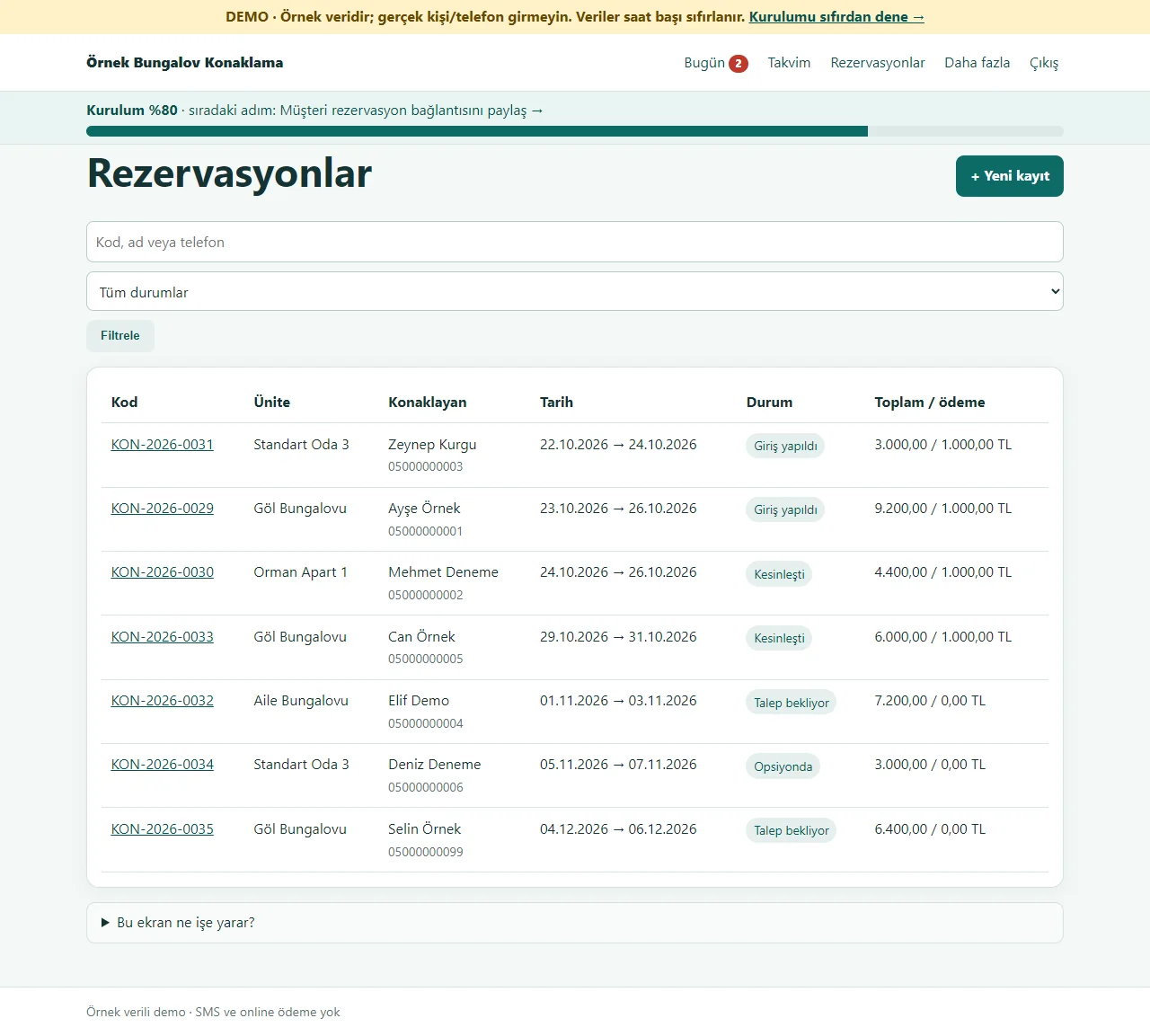
Reservation list
All reservations are listed with code, unit, guest, dates, status and payment; search by code, name or phone and filter by status. A tap on a record opens its details.
- On screen (Turkish interface)
- “Rezervasyonlar” — reservations
- “Yeni kayıt” — new record
- “Tüm durumlar” — all statuses
- “Filtrele” — filter
- “Toplam / ödeme” — total / payment
-
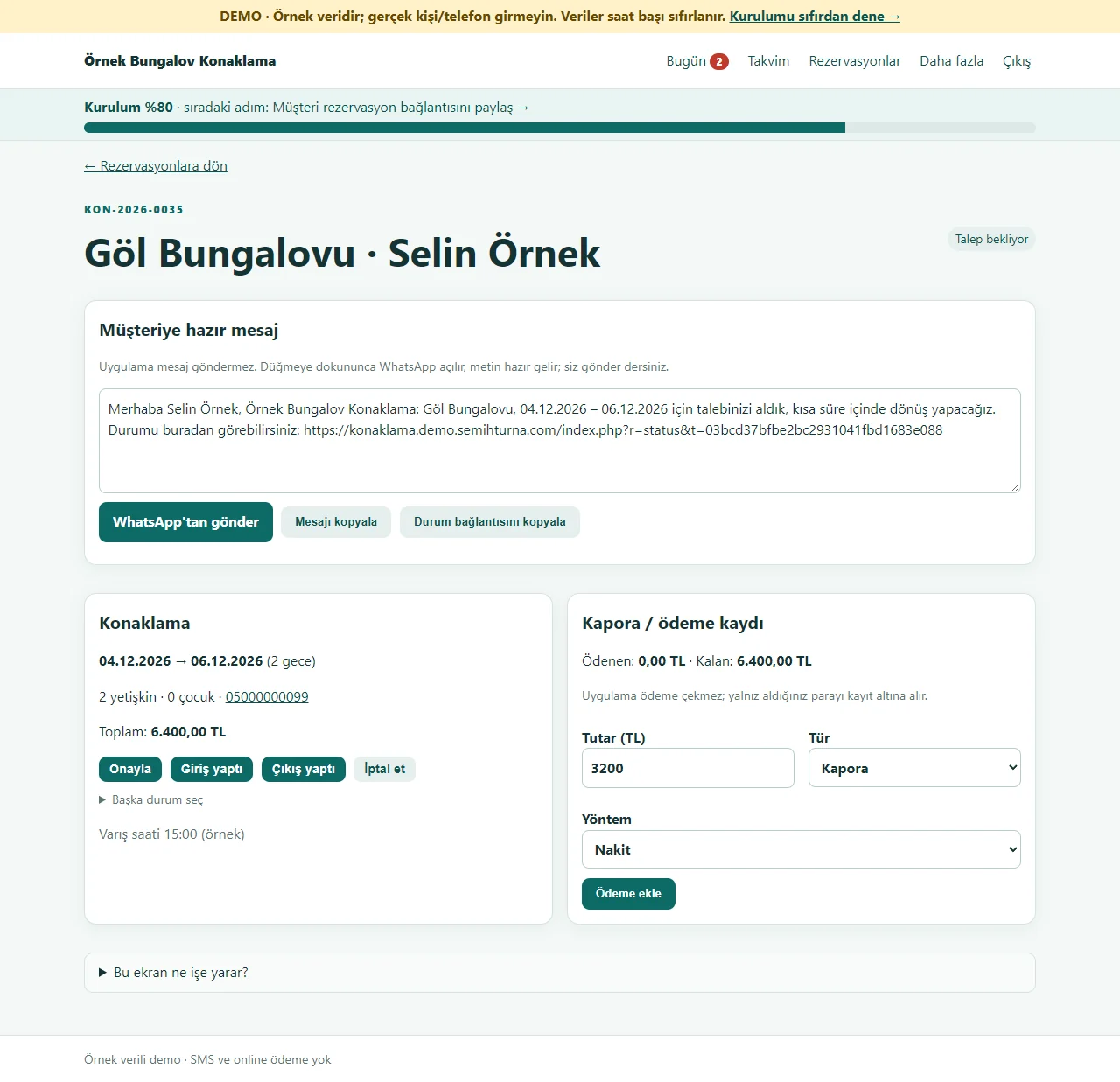
Reservation: ready message and deposit
The message for the guest is ready: “WhatsApp’tan gönder” opens WhatsApp and you send the text yourself; the program never sends a message on its own. The same screen has the status buttons and a deposit, payment or refund record; the program does not charge anything, it records what you received.
- On screen (Turkish interface)
- “Müşteriye hazır mesaj” — ready message for the guest
- “WhatsApp’tan gönder” — send on WhatsApp
- “Mesajı kopyala” — copy the message
- “Durum bağlantısını kopyala” — copy the status link
- “Kapora / ödeme kaydı” — deposit / payment record
- “Ödeme ekle” — add payment
-
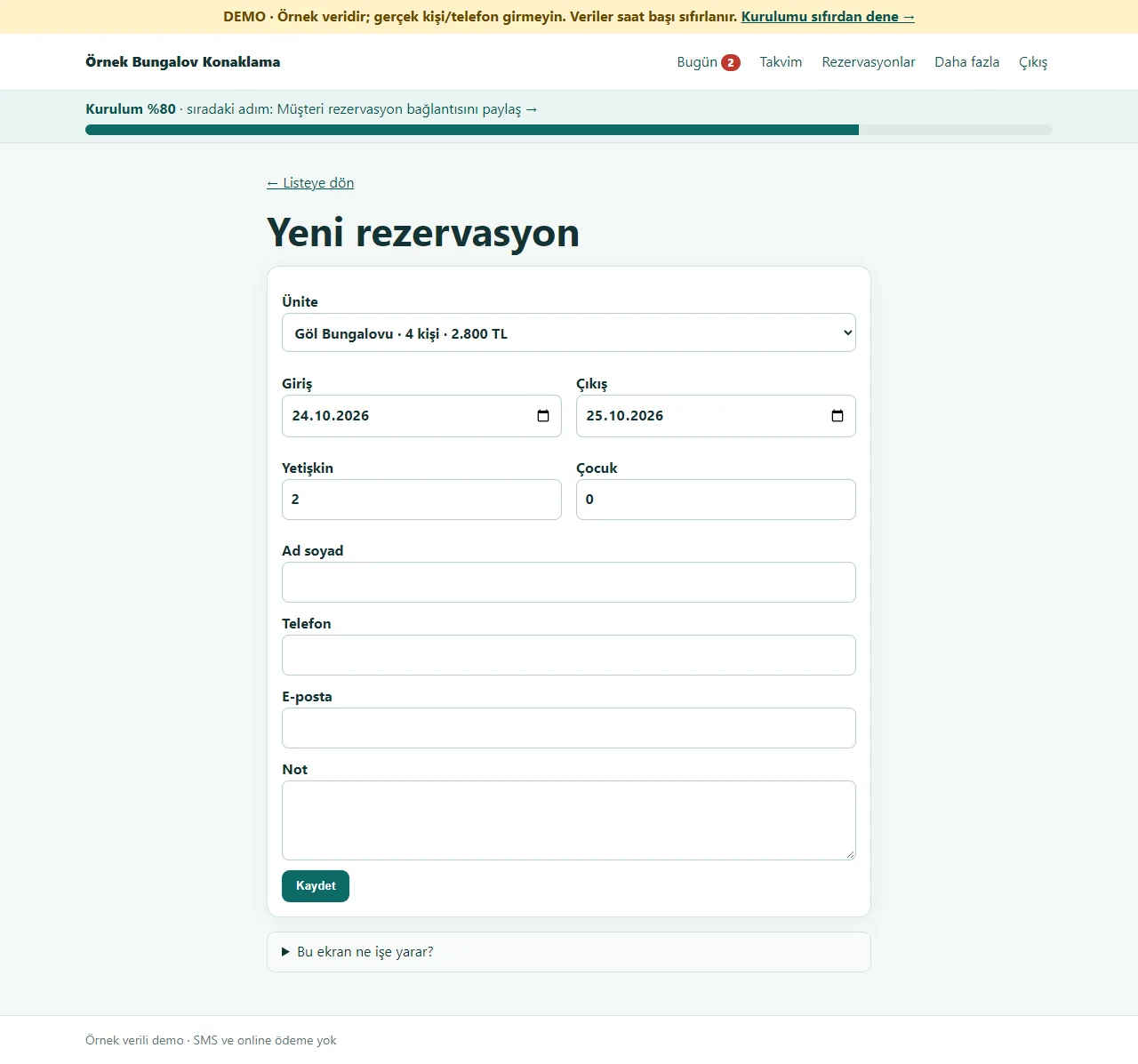
Recording a reservation made by phone
You enter the unit, check-in and check-out dates, number of guests, name and phone. A second booking on the same night, a closed date and a capacity overrun are not saved; if the phone number is already known the person is not retyped.
- On screen (Turkish interface)
- “Yeni rezervasyon” — new reservation
- “Ünite” — unit
- “Giriş” — check-in
- “Çıkış” — check-out
- “Yetişkin” — adults
- “Çocuk” — children
- “Ad soyad” — full name
- “Kaydet” — save
-
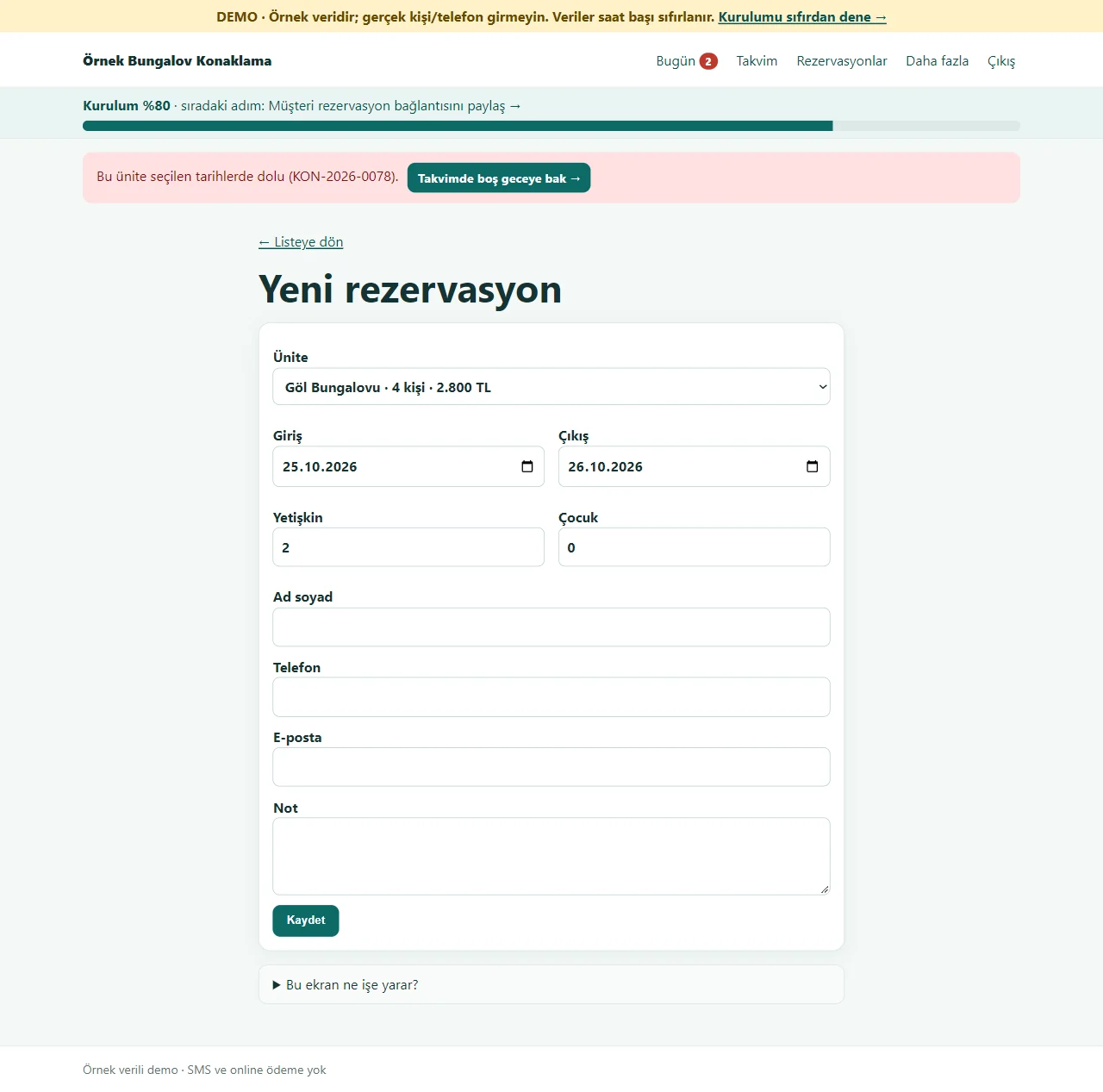
A refused record comes with its fix
When a second booking is tried on a taken night, the error stays on the same form and a fix button appears next to it: “Takvimde boş geceye bak” (look at the calendar for a free night) for staff, “Bu tarihlerde müsait birimlere bak” (look at the units free on these dates) for a guest. What was typed is not wiped.
- On screen (Turkish interface)
- “Bu ünite seçilen tarihlerde dolu” — this unit is taken on the chosen dates
- “Takvimde boş geceye bak” — look at the calendar for a free night
- “Yeni rezervasyon” — new reservation
-
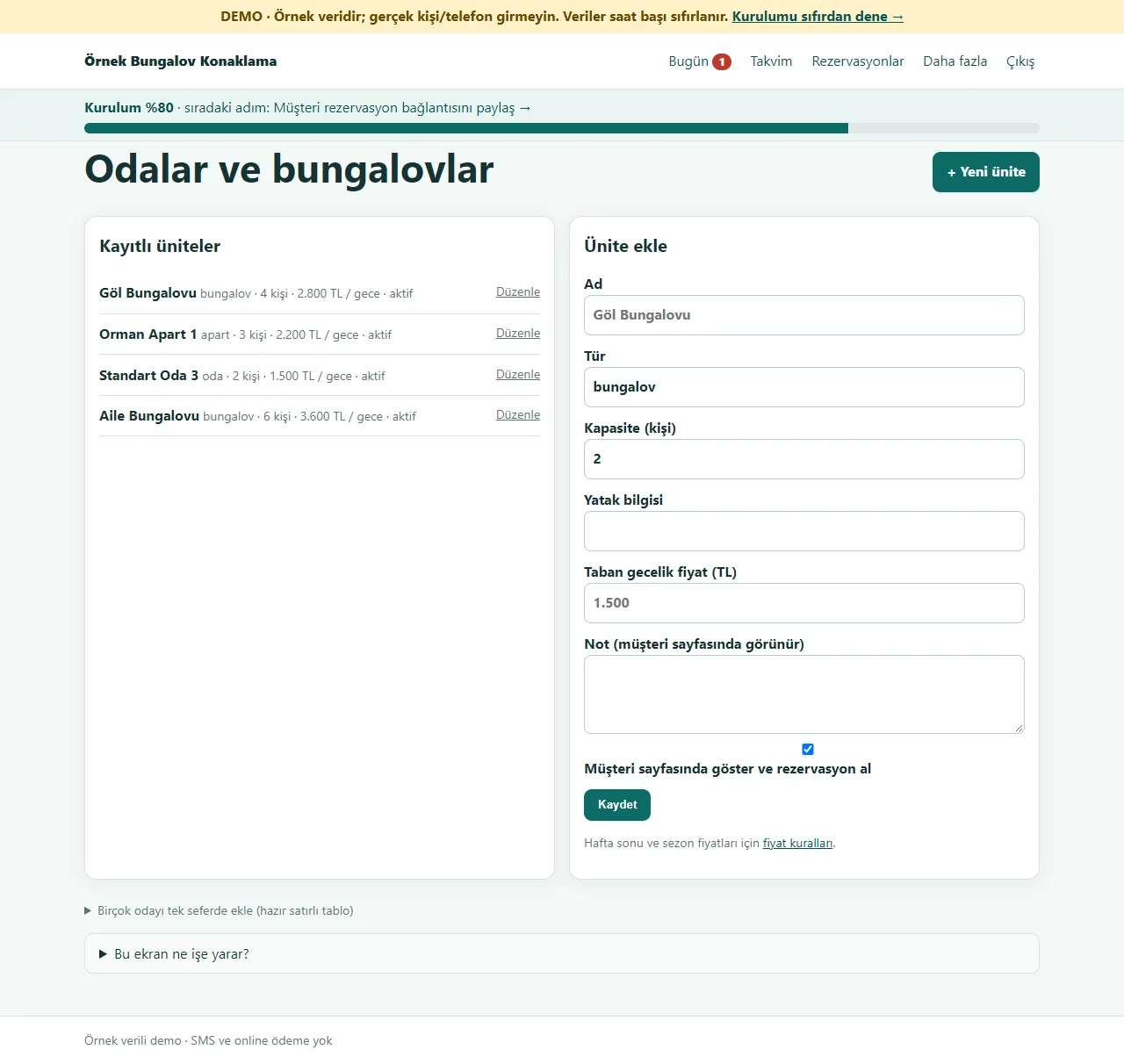
Rooms and bungalows
The units the business sells: name, type, capacity, bed details, base nightly price and the note shown on the customer page. A passive unit does not appear on the customer page; a tap on a unit edits it. With many rooms, the “Birçok odayı tek seferde ekle” (add many rooms at once) table opens.
- On screen (Turkish interface)
- “Odalar ve bungalovlar” — rooms and bungalows
- “Kayıtlı üniteler” — saved units
- “Ünite ekle” — add a unit
- “Taban gecelik fiyat (TL)” — base nightly price (TL)
-
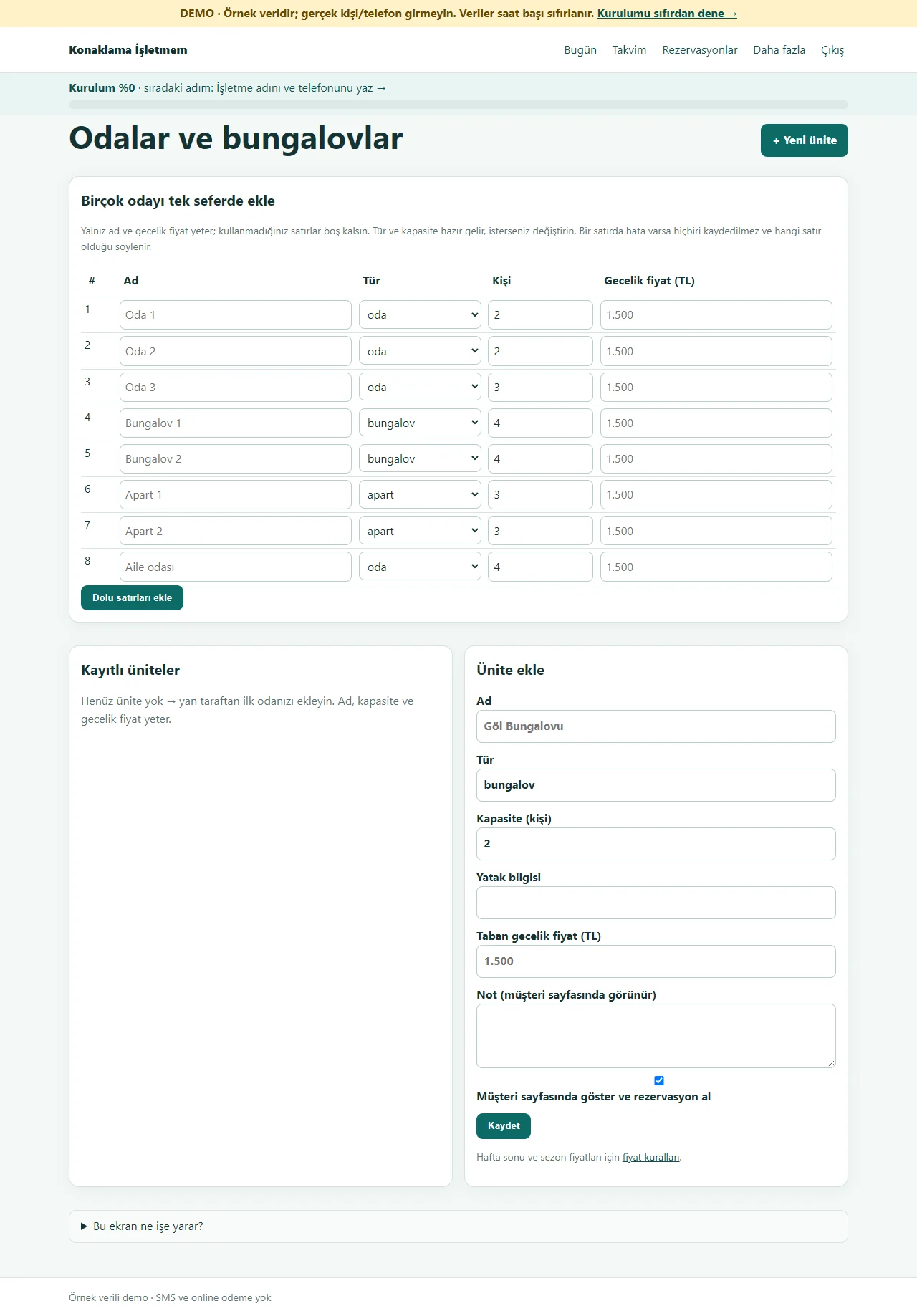
Adding rooms with a ready-made table
On first setup an eight-row table opens: only the name and the nightly price are typed, the type and number of guests are ready and unused rows stay empty. If a row has an error nothing is saved and it says which row.
- On screen (Turkish interface)
- “Birçok odayı tek seferde ekle” — add many rooms at once
- “Ad” — name
- “Tür” — type
- “Kişi” — guests
- “Gecelik fiyat (TL)” — nightly price (TL)
- “Dolu satırları ekle” — add the filled rows
-
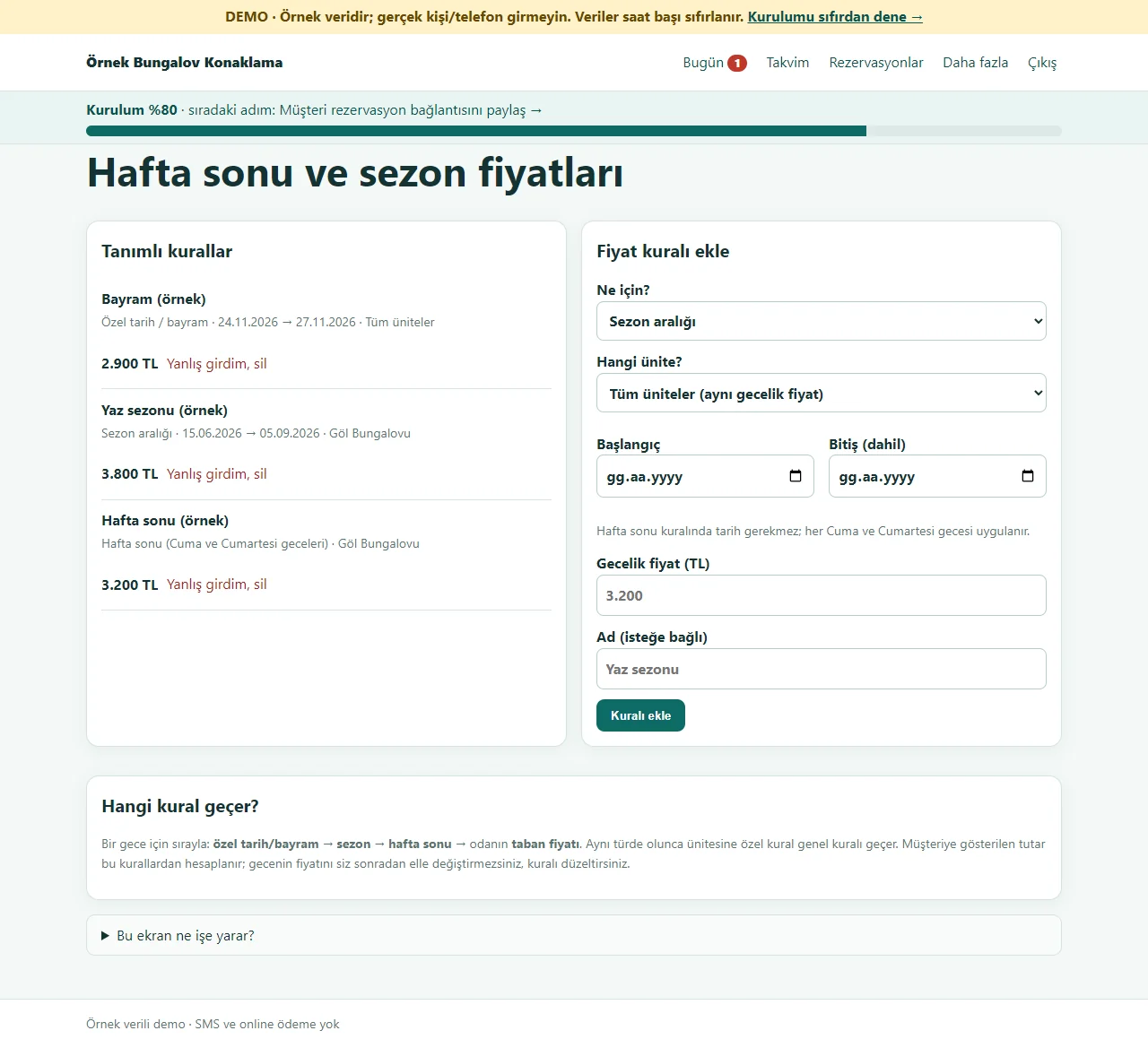
Weekend and season prices
A separate nightly price is entered for Friday and Saturday nights, a summer season or a holiday, for one unit or all of them. For a night the order is special date, then season, then weekend, then the base price; the total shown to the guest is worked out from these rules.
- On screen (Turkish interface)
- “Hafta sonu ve sezon fiyatları” — weekend and season prices
- “Tanımlı kurallar” — rules in place
- “Fiyat kuralı ekle” — add a price rule
- “Hangi kural geçer?” — which rule applies?
- “Yanlış girdim, sil” — entered by mistake, delete
- “Kuralı ekle” — add the rule
-
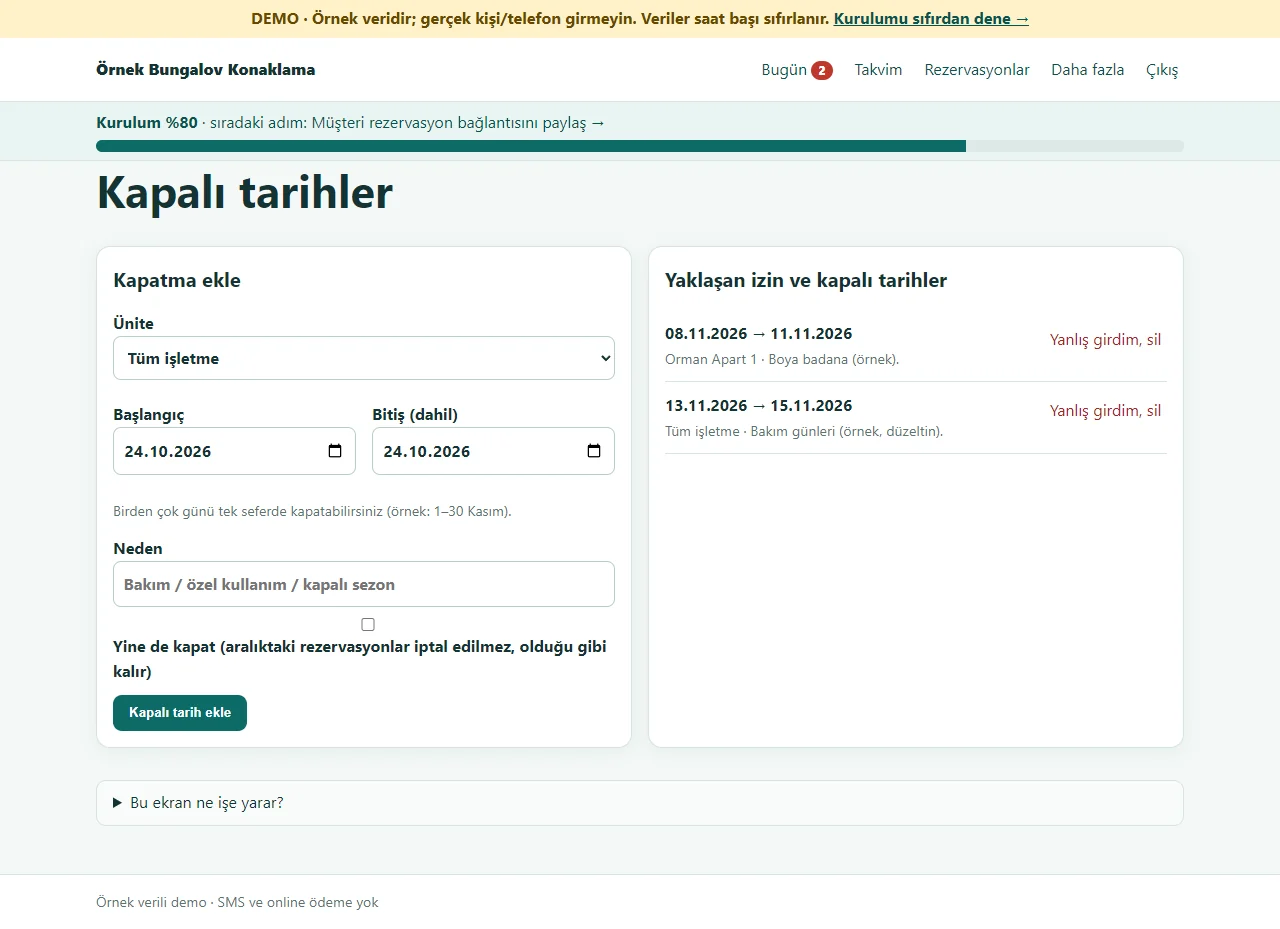
Closed dates
Several days are closed in one go for maintenance, private use or a closed season, for the whole business or one unit. If a reservation falls in the range the program warns first and does not add the closure unless “Yine de kapat” is ticked; existing reservations are never cancelled silently.
- On screen (Turkish interface)
- “Kapalı tarihler” — closed dates
- “Kapatma ekle” — add a closure
- “Yine de kapat” — close anyway
- “Yaklaşan izin ve kapalı tarihler” — upcoming time off and closed dates
- “Kapalı tarih ekle” — add a closed date
-
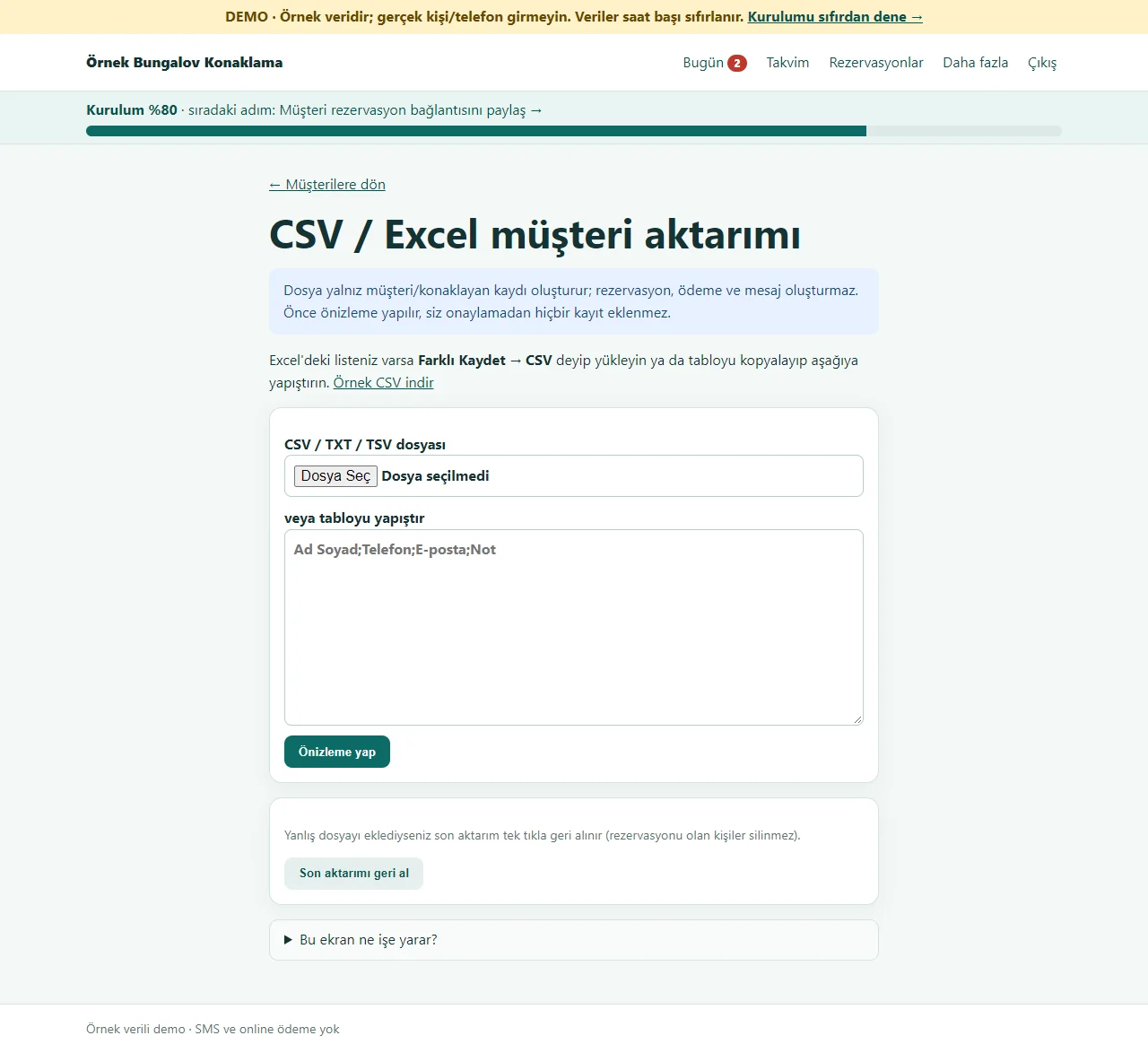
Importing the customer list
A list from an old program or Excel is uploaded as CSV or pasted; the columns are recognised from the header. Before saving, new, already known and faulty rows are shown separately and an unwanted row is unticked. No reservation, payment or message is created, and the last import can be undone. This page is open to the owner only; in a staff account the button is not shown.
- On screen (Turkish interface)
- “CSV / Excel müşteri aktarımı” — CSV / Excel customer import
- “Örnek CSV indir” — download a sample CSV
- “Önizleme yap” — preview
- “Son aktarımı geri al” — undo the last import
-
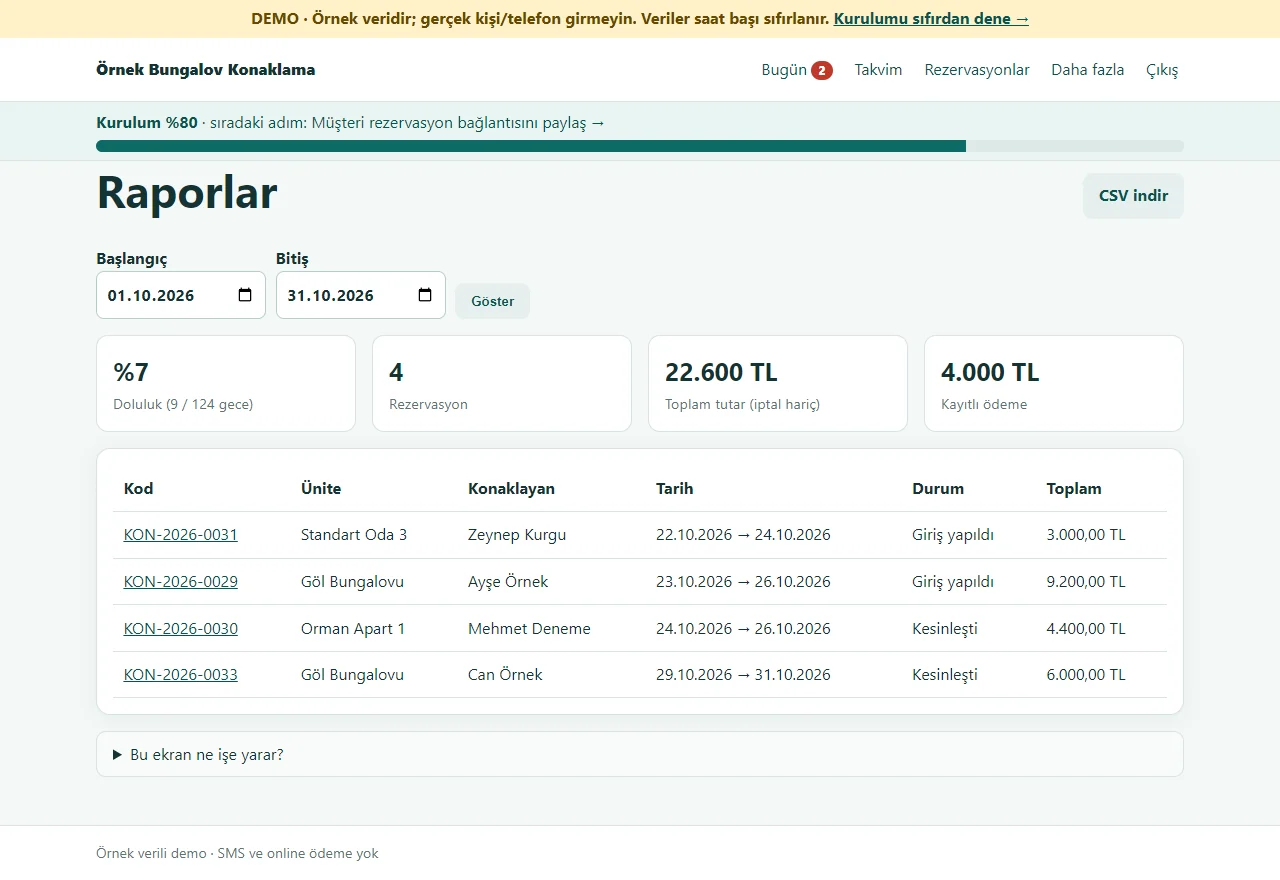
Reports
For the chosen date range: occupancy, number of reservations, total amount and recorded payments; the list downloads as CSV. Reports are open to the owner only; in a staff account the menu item is not shown.
- On screen (Turkish interface)
- “Raporlar” — reports
- “CSV indir” — download CSV
- “Doluluk” — occupancy
- “Rezervasyon” — reservations
- “Kayıtlı ödeme” — recorded payment
-
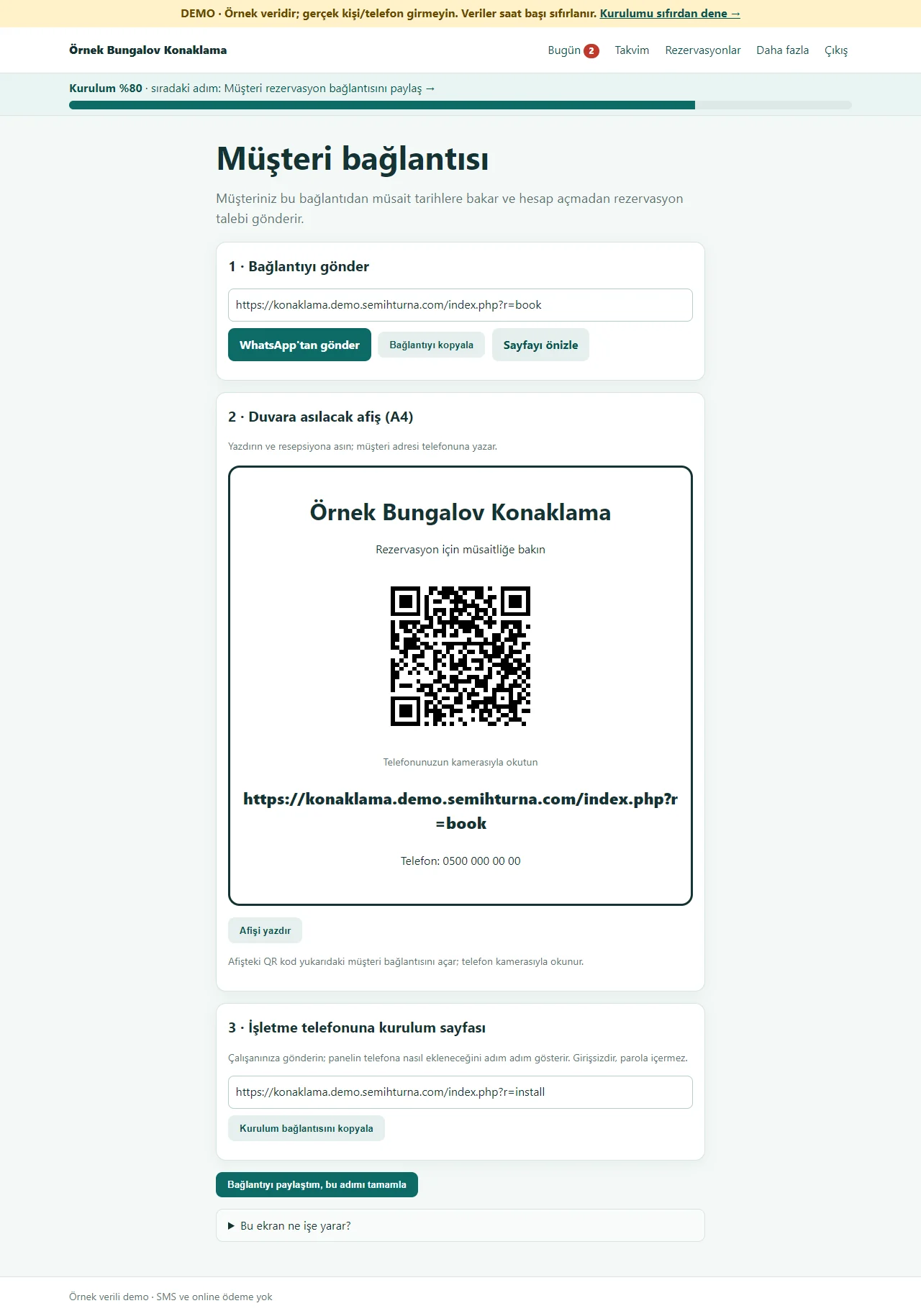
Customer link and a poster with a QR code
The address where a guest checks availability is sent on WhatsApp with one tap or copied. The A4 poster for the front desk carries a QR code of that address that a guest scans with the phone camera. The link to the sign-in-free set-up page that puts the panel on a staff phone is here as well.
- On screen (Turkish interface)
- “Müşteri bağlantısı” — customer link
- “Bağlantıyı kopyala” — copy the link
- “Telefonunuzun kamerasıyla okutun” — scan with your phone camera
- “Afişi yazdır” — print the poster
- “Kurulum bağlantısını kopyala” — copy the set-up link
-
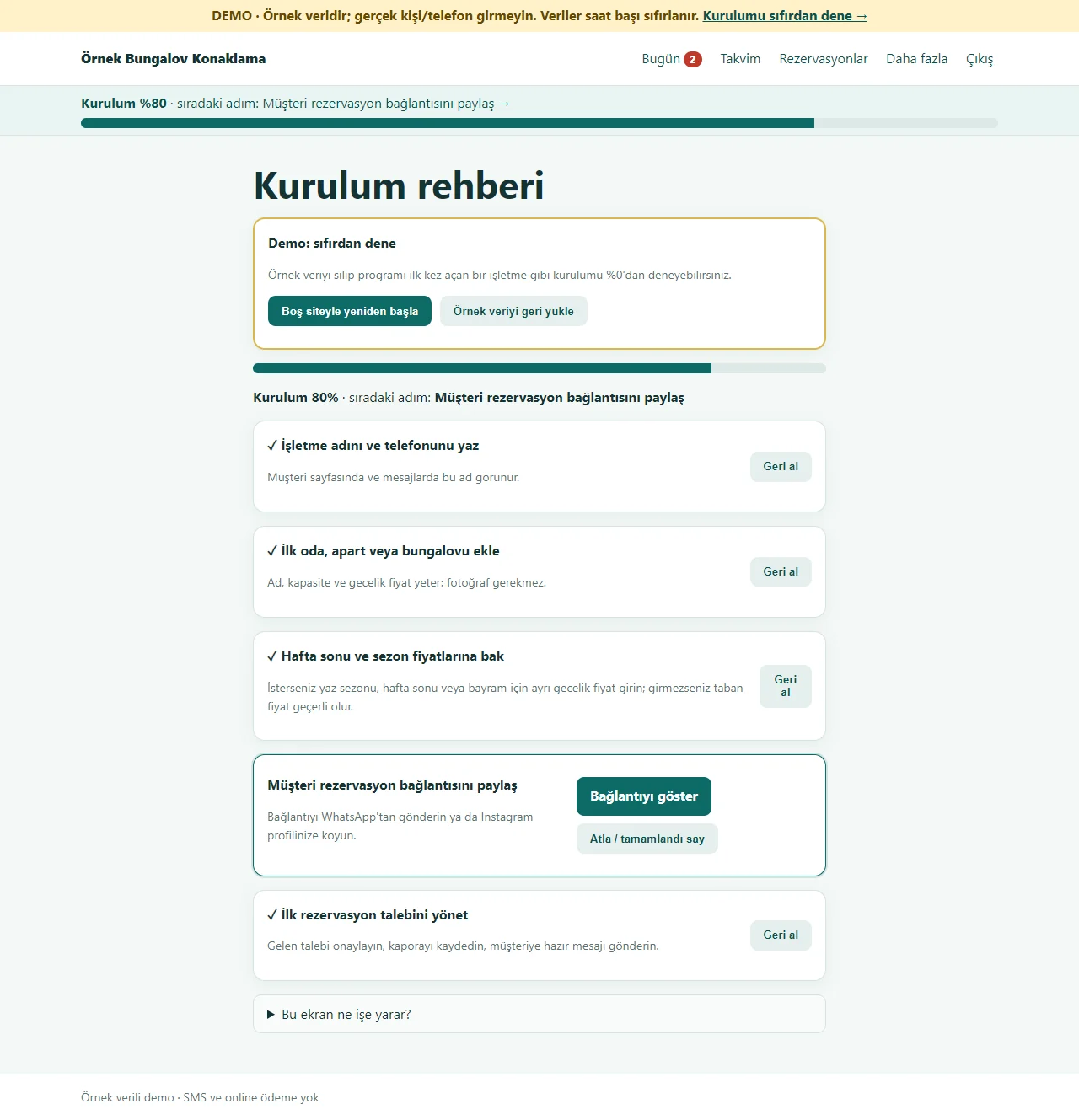
Setup guide
Five steps show a progress percentage and the next step; steps tick themselves as they are done and any step can be skipped. In the demo, “Boş siteyle yeniden başla” at the top deletes the sample data and opens the guide at 0%, and “Örnek veriyi geri yükle” brings it back.
- On screen (Turkish interface)
- “Kurulum rehberi” — setup guide
- “Boş siteyle yeniden başla” — start with an empty site
- “Örnek veriyi geri yükle” — restore the sample data
- “Atla / tamamlandı say” — skip / count as done
-
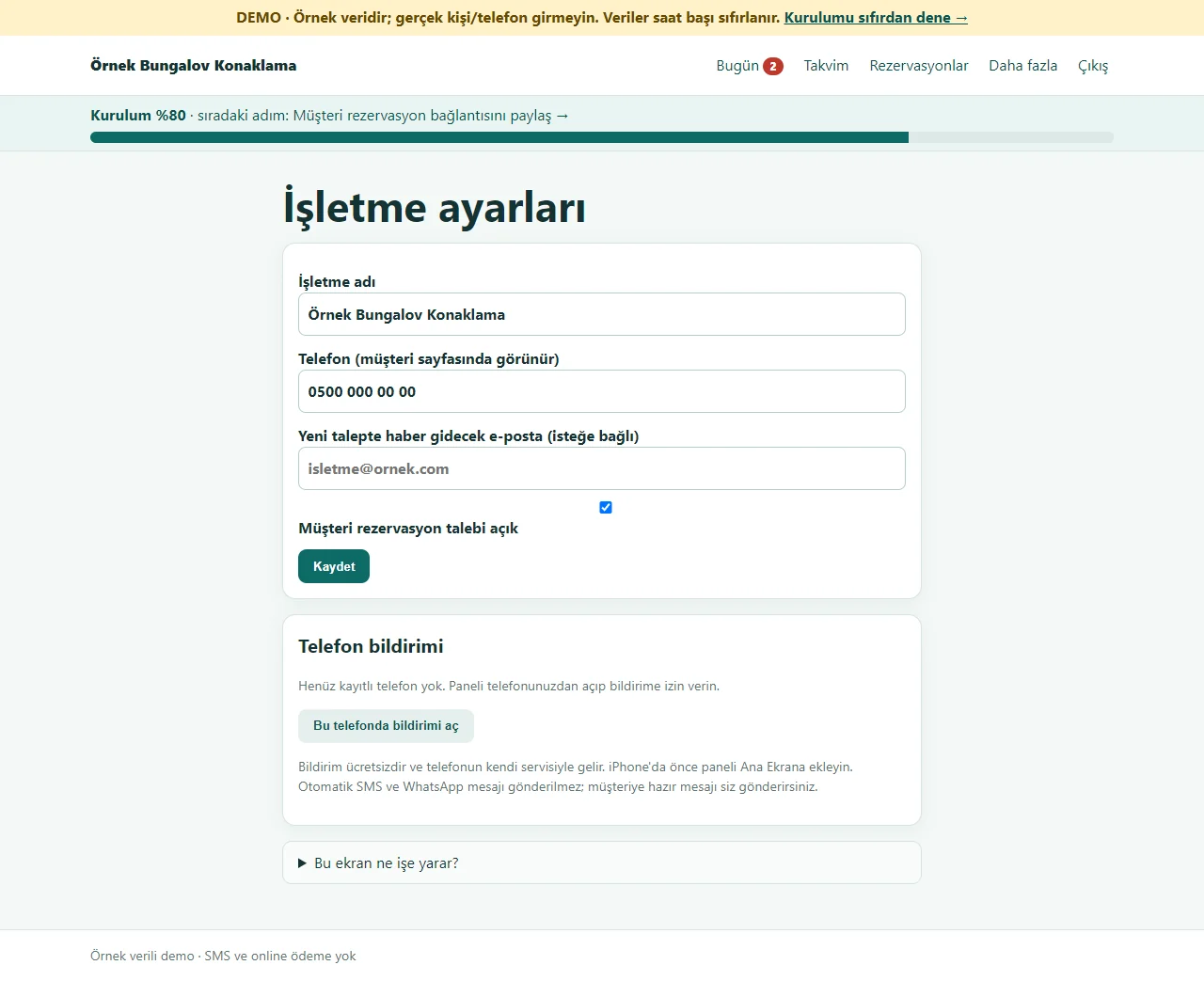
Settings and phone notification
The business name, phone and the e-mail that gets news of a new request; a switch to pause customer requests. “Bu telefonda bildirimi aç” makes the owner’s phone receive a free instant notice. In the demo these settings are not kept or are reset; sending to a real phone has not been tried.
- On screen (Turkish interface)
- “İşletme ayarları” — business settings
- “Telefon bildirimi” — phone notification
- “Bu telefonda bildirimi aç” — turn notifications on on this phone
-

Customer on a phone: availability and total
Without an account the guest picks the check-in and check-out dates, sees which unit is free and the total amount (here Friday and Saturday nights are worked out at the weekend price). A taken date says “Bu tarihlerde dolu”.
- On screen (Turkish interface)
- “Müsaitliği göster” — show availability
- “Bu tarihlerde müsait” — free on these dates
- “Talep gönder” — send a request
-
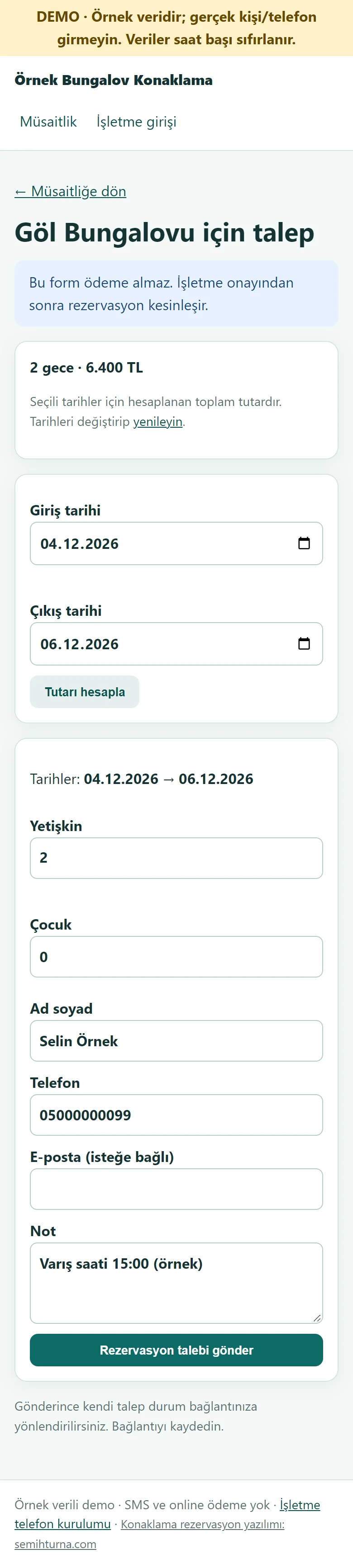
Customer on a phone: the request form
Name, phone, number of guests and a note are entered; the form takes no payment. The chosen dates and the worked-out total sit above the form; on a taken or closed date the error is shown on the same form without wiping what was typed.
- On screen (Turkish interface)
- “Rezervasyon talebi gönder” — send the reservation request
- “Tutarı hesapla” — work out the total
- “Ad soyad” — full name
- “Telefon” — phone
-
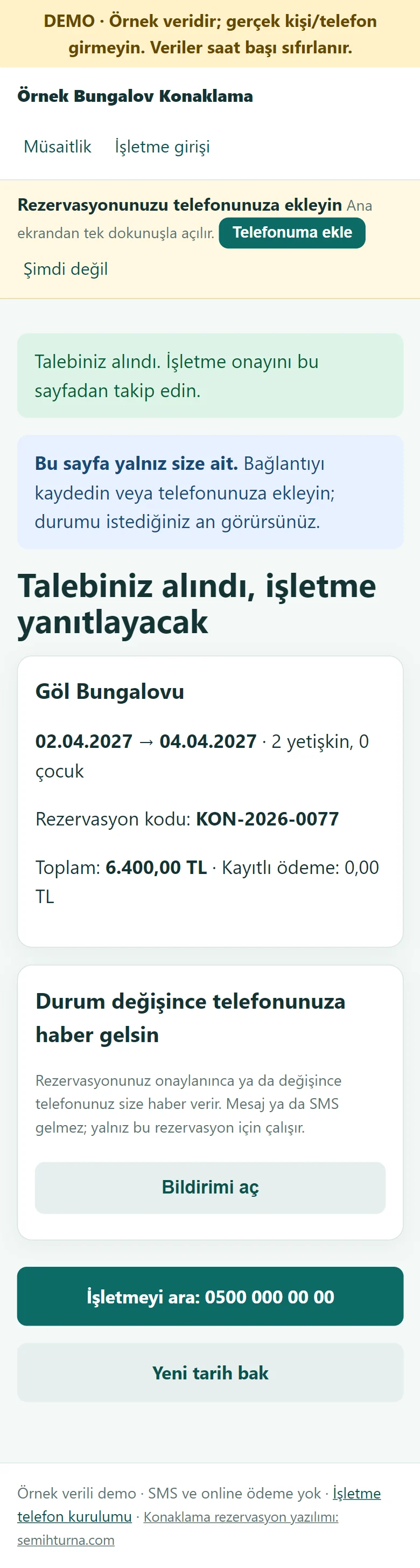
Customer on a phone: their own status page and notification
After sending, the guest lands on their own page: status, dates, code, total and recorded payment. With “Bildirimi aç” (turn notification on) the phone gets a free notice when this reservation is approved, held as an option or cancelled (only news of that reservation; no message or SMS is sent). The page can be added to the home screen and the icon opens that reservation.
- On screen (Turkish interface)
- “Talebiniz alındı, işletme yanıtlayacak” — your request was received, the business will answer
- “Durum değişince telefonunuza haber gelsin” — let your phone know when the status changes
- “Bildirimi aç” — turn notification on
- “Telefonuma ekle” — add to my phone
- “Yeni tarih bak” — look at new dates
-
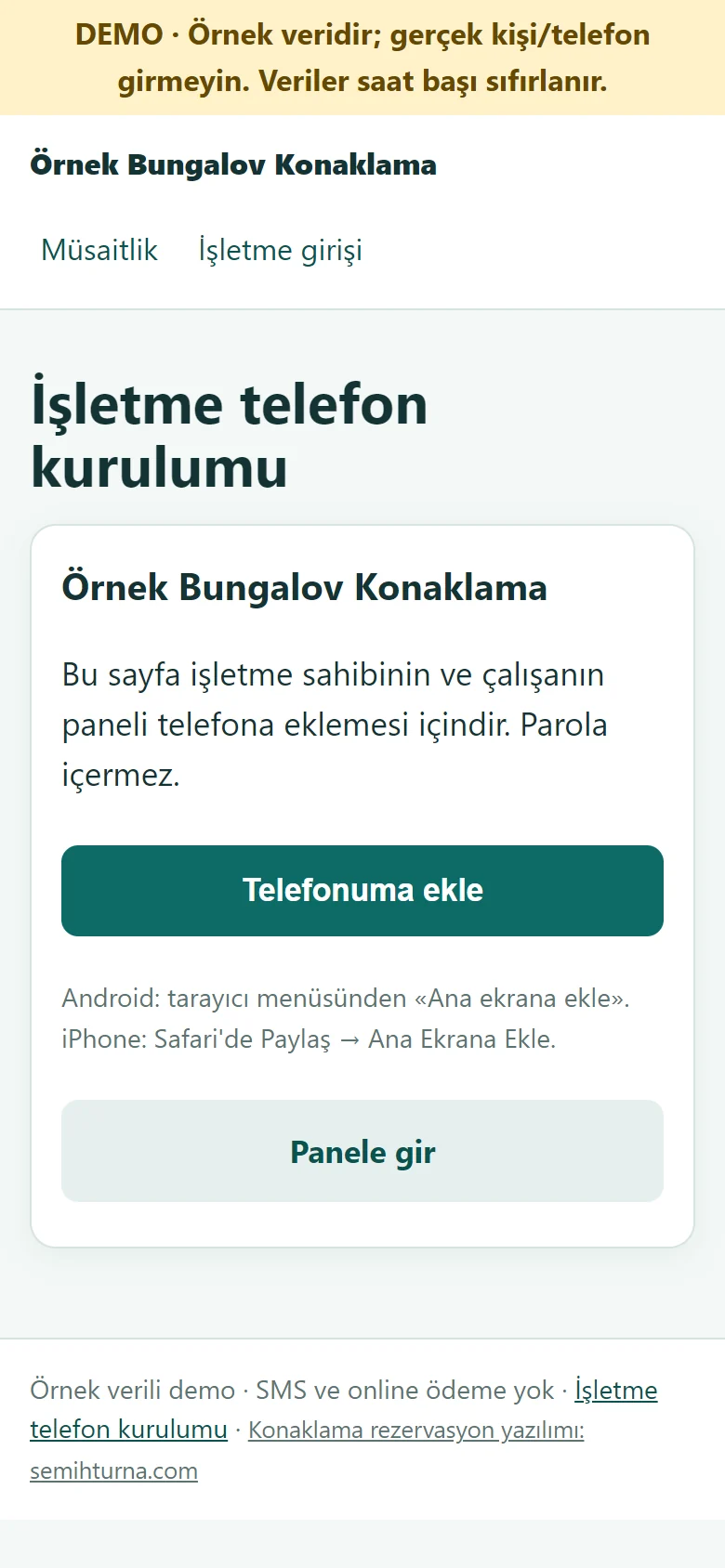
The business’s set-up page on a phone
A sign-in-free page sent to the owner or staff: a large “Telefonuma ekle” button, instructions for Android and iPhone, and “Panele gir”. The panel icon opens the sign-in page directly.
- On screen (Turkish interface)
- “İşletme telefon kurulumu” — business phone set-up
- “Telefonuma ekle” — add to my phone
- “Panele gir” — go to the panel
- What do they see at the end?
- A second booking on the same night is not accepted and the total comes from the price rules; the request is approved, the deposit is recorded and a ready WhatsApp message goes to the guest.
- What is it good for?
- Which unit is taken on which night no longer scatters across a notebook and the phone; you get a notice of a new request and check-in and check-out are one tap each.
Everything that is not included, and all limits
- Not delivered to a client and not used by a real business. The business, guests, phone numbers and amounts on the screens are made up; it has not been tried on a real phone or by users in a business.
- There is no online payment or card collection; deposits and payments are entered by hand. There is no automatic SMS or paid WhatsApp API; a ready WhatsApp text opens and the business sends it from its own phone; there is no guest ID notification (KBS), no e-invoice and no pre-accounting; the business files the guest ID notification from its own KBS screen. There is no channel management (such as Booking.com), no multiple languages (the interface in the screens is Turkish; there is no English interface in the panel) and no promotional website.
- There is no channel manager such as Booking.com or Airbnb, and no calendar syncing; no multi-branch use.
- There are no room photos or gallery. Breakfast and extra-service items are not worked out separately; there is only a nightly price.
- Adding to the phone and the free phone notification were tried on the live demo in a real Chrome (phone view, the real notification service); they have not been tried on a real phone, in iPhone/Safari or in the WhatsApp in-app browser. The guest’s status page is a secret address; anyone who knows the link sees that reservation.
- A reservation’s dates or unit cannot be changed later; it is cancelled and a new one opened. An Excel file is not read directly; save it as CSV from Excel or paste the table. There is no per-employee time off or day counter; a closure is for a unit or the business.
- The live demo was run on one hosting account only (PHP 8.3, SQLite).
- In the demo the data is reset every hour; sign-in is without a password through role buttons. A normal installation asks for an e-mail and password.
Frequently asked questions
What does the program cost?
The yearly list price is 1,500 TL. Installation, one year of hosting, data transfer, a daily automatic backup and written usage support are included; guest ID notification (KBS), e-invoicing, channel management, taking payments online, automatic SMS, multiple languages and a promotional website are not. The live demo is free; installation is done by quote.
Delivery and sales status
How does it work?
You try the demo and tell us about your property, and we send you a quote. We install it, we host it and we take a daily backup. The yearly price includes installation, hosting, data transfer and support.
Price
The yearly list price is 1,500 TL. Installation, one year of hosting, data transfer, a daily automatic backup, bug fixes and written usage support are included. You send the guest messages yourself from WhatsApp; guest ID notification (KBS), e-invoicing, channel management (such as Booking.com), taking payments online, automatic SMS, multiple languages and a promotional website are not included. Requests for new features and work beyond the scope are priced separately and told to you before they are done. The renewal price is notified in writing at least 30 days before the term ends. The payment method and document arrangement are settled in the quote.
Possible delivery options
Other delivery options
Requirements and version history
Installation requirements
- PHP 8.1 or newer (with the pdo_sqlite, mbstring and openssl extensions; curl is recommended for the phone notification) and HTTPS are needed; the data is kept in a SQLite file. The product was tried locally with PHP 8.3; the live demo was run on a single hosting account only (PHP 8.3).
Release notes
- No version has been delivered to a client. The sample-data demo is open to everyone and is shown with the screenshots on this page.
- 0.2.0 – 0.3.5 (24 – 28 October 2026): the first published versions; a clash check on units and date ranges, weekend, season and holiday prices, a today board and a monthly calendar, a ready WhatsApp message, deposit and payment records, multi-day closures with a warning, CSV customer import with undo, the guest’s own status page, adding to the phone, a free phone notification (not tried on a real phone), a setup guide and an empty-start in the demo, roles. 0.2.3: the hourly reset of the public demo also clears the phones visitors registered. 0.3.0: a poster with a QR code, fix buttons next to error messages, a status notification for the guest and a ready-made multi-row table for rooms. 0.3.1: a payment larger than the remaining balance, or a refund larger than what was paid, is not recorded. 0.3.2: reports, the setup guide and CSV import are not shown in a staff account; reports are for the business owner only. 0.3.3: a search that matches nothing in the Customers and Reservations lists says “No record matches your search” with a “Clear search” button, an empty list shows a “None yet → add one” prompt, and Reports shows a message for a date range with no records (owner only). 0.3.4: demo links from the product page that open the manager and staff screens in one tap. 0.3.5: on the guest’s own status page, “Add to calendar” on a confirmed future booking: a Google Calendar link and an .ics file, an all-day event (the check-out day is outside the event), a reminder one day before, no personal data.
Decisions not made yet
- Rights to use, modify, transfer and receive the source code: to be set in a written agreement; not decided yet.
- Whose name the hosting and domain are opened in, and where the software is installed, have not been decided yet.
There is no cart, customer account or online payment on this site for now. Reach out by phone, WhatsApp or the form; in a first conversation your need and the software’s fit are reviewed. The form does not create an order, a contract or a payment.