Local newsDemo with sample data
Local news website script: screen-by-screen guide
The full version of the short description on the product page: every feature, how each screen is used step by step, all limits and the delivery details.
All features
The gallery shows the public site and admin panel. Setup and core flows passed automated tests locally; on real hosting, only the sample-data demo has been checked, not a client installation.
- Headlines and a breaking-news strip; search across categories, tags and story text
- Story writing and image upload; drafts, immediate publication or scheduling for a later date
- Administrator and editor roles; disable users and change passwords
- RSS, an XML sitemap and NewsArticle structured data on story pages
- Five advertisement slots, including the top banner, side column and below a story
- A WhatsApp tip-off line: for the number written in the settings, a button in the top bar, the footer and under every story; it opens the reader’s WhatsApp with a ready message that includes the story title. It is a free link, no extra service is needed on the server; with no number the button does not show
- PHP setup wizard, SQLite database and an option to start with sample stories
Screen by screen: how it is used
The script’s interface is in Turkish. The home page, story, sign-in and settings screens and two phone screens come from the live demo (taken while it ran version 1.0.5; the live demo now runs 1.0.6); the others come from the 1.0.2 package, installed and run locally in demo mode; the “Örnek Haber” (sample news) site, its stories, author names and pictures are invented (the pictures are drawings). The panel screens show the demo mode’s “saving and deleting are off” strip.
- Who uses it?
- The visitor reading the site, and the editor or administrator of a small local news site who writes and publishes stories and manages categories, pages and advertisement slots.
- Where do they start?
- The visitor goes from the home page to the headline, a category or the search. The editor and the administrator sign in to the admin panel with their own user name and password.
What do they do on screen? Step by step
-
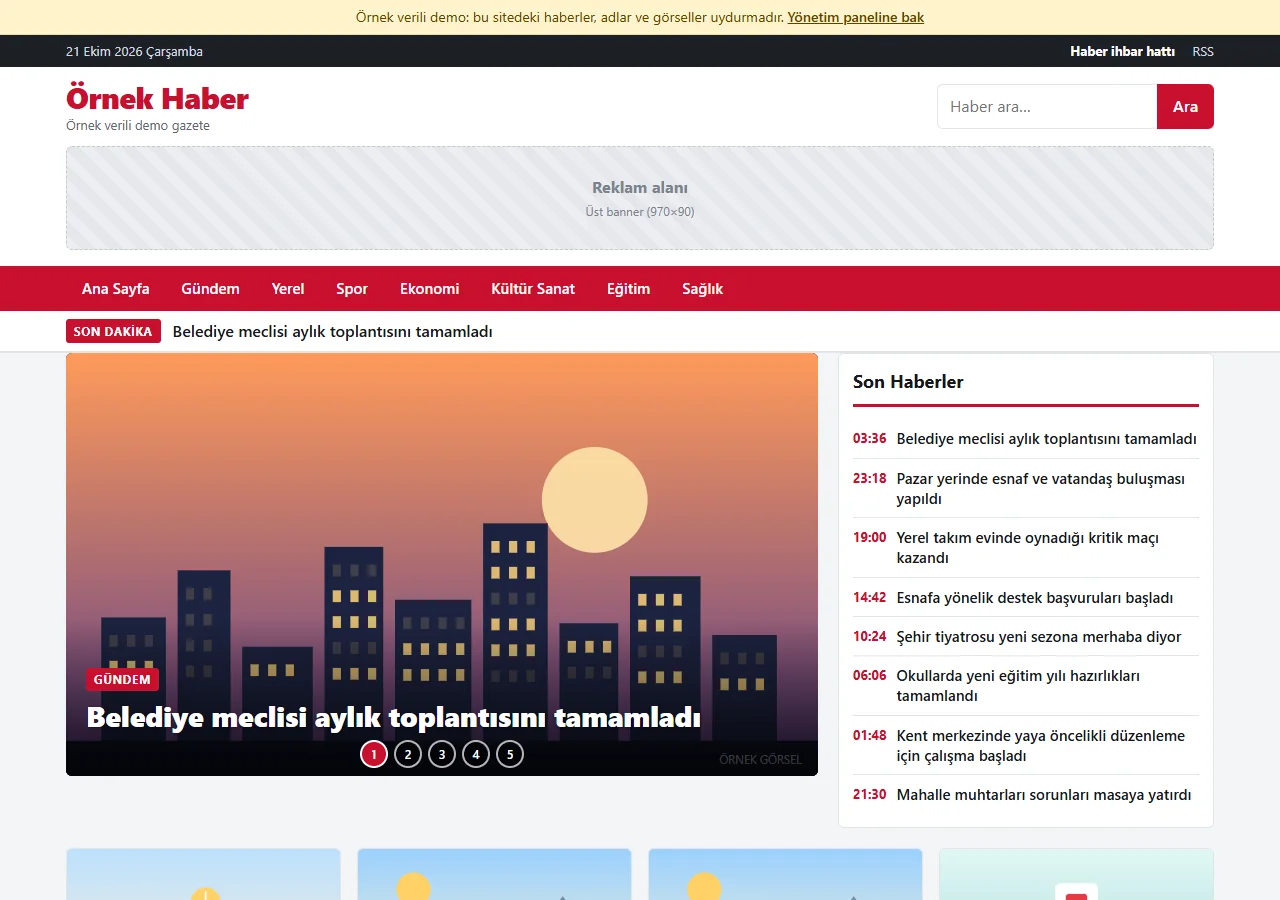
1.0.5 · 21 October 2026 Home page
A breaking-news strip, a sliding headline area and a “Son Haberler” (latest stories) list at the top; featured stories, category blocks and “En Çok Okunanlar” (most read) below. The advertisement slots are empty placeholders in this demo. A “Haber ihbar hattı” (news tip-off line) link sits in the top bar.
- On screen (Turkish interface)
- “SON DAKİKA” — breaking news
- “Ana Sayfa / Gündem / Yerel / Spor / Ekonomi / Kültür Sanat / Eğitim / Sağlık” — nav: home / news of the day / local / sport / economy / culture and art / education / health
- “Son Haberler / En Çok Okunanlar” — latest stories / most read
- “Reklam alanı” — advertisement slot
- “Ara” — search button
-
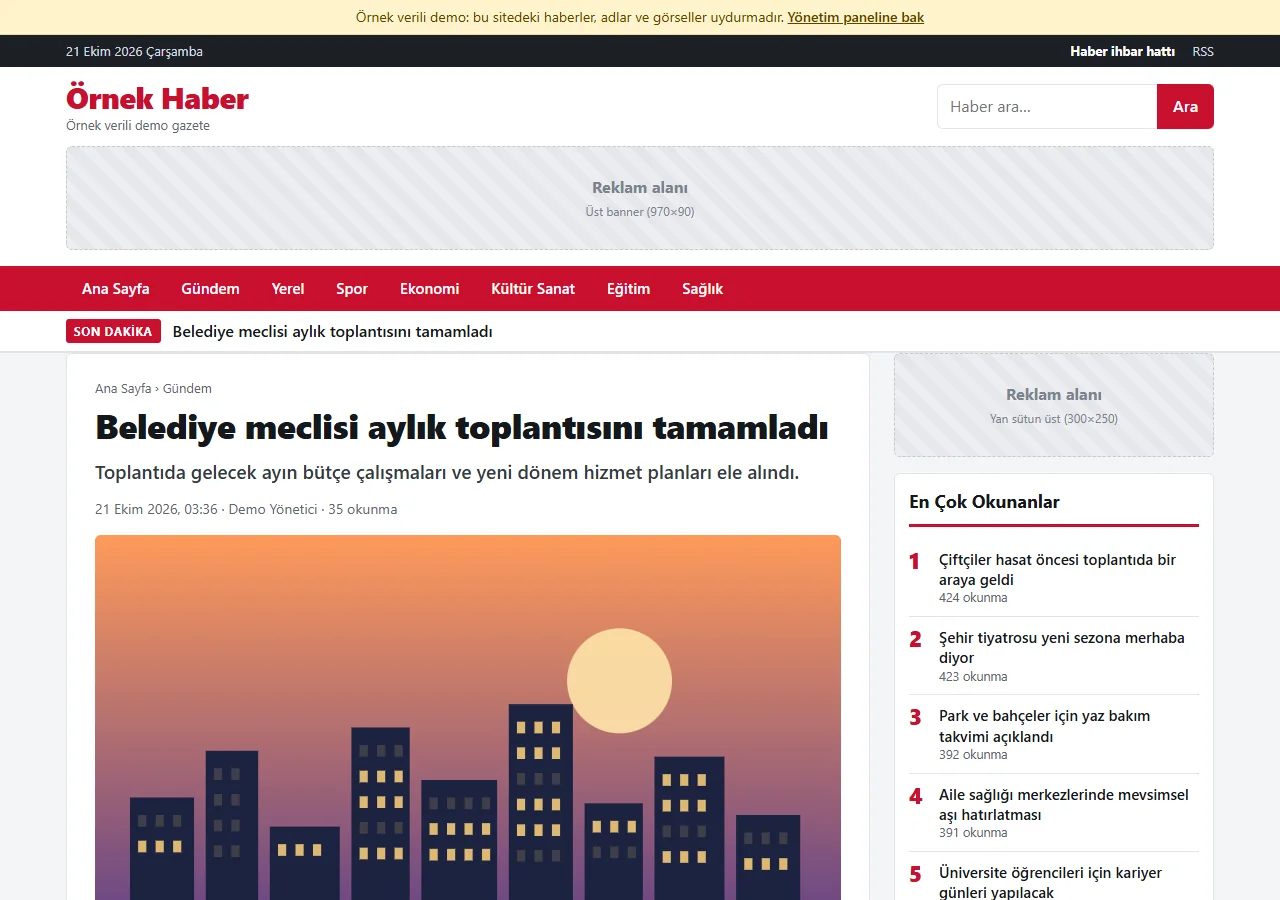
1.0.5 · 21 October 2026 Story page
The category path, headline, summary, date, author and read count, and the picture; share buttons for WhatsApp, X, Facebook and copying the link. Tags and related stories follow below; when the tip-off number is set, a “WhatsApp ile haber gönder” (send a story by WhatsApp) button also appears under the story.
- On screen (Turkish interface)
- “okunma” — reads
- “Paylaş: WhatsApp / X / Facebook / Bağlantıyı kopyala” — share: WhatsApp / X / Facebook / copy the link
- “En Çok Okunanlar” — most read
-
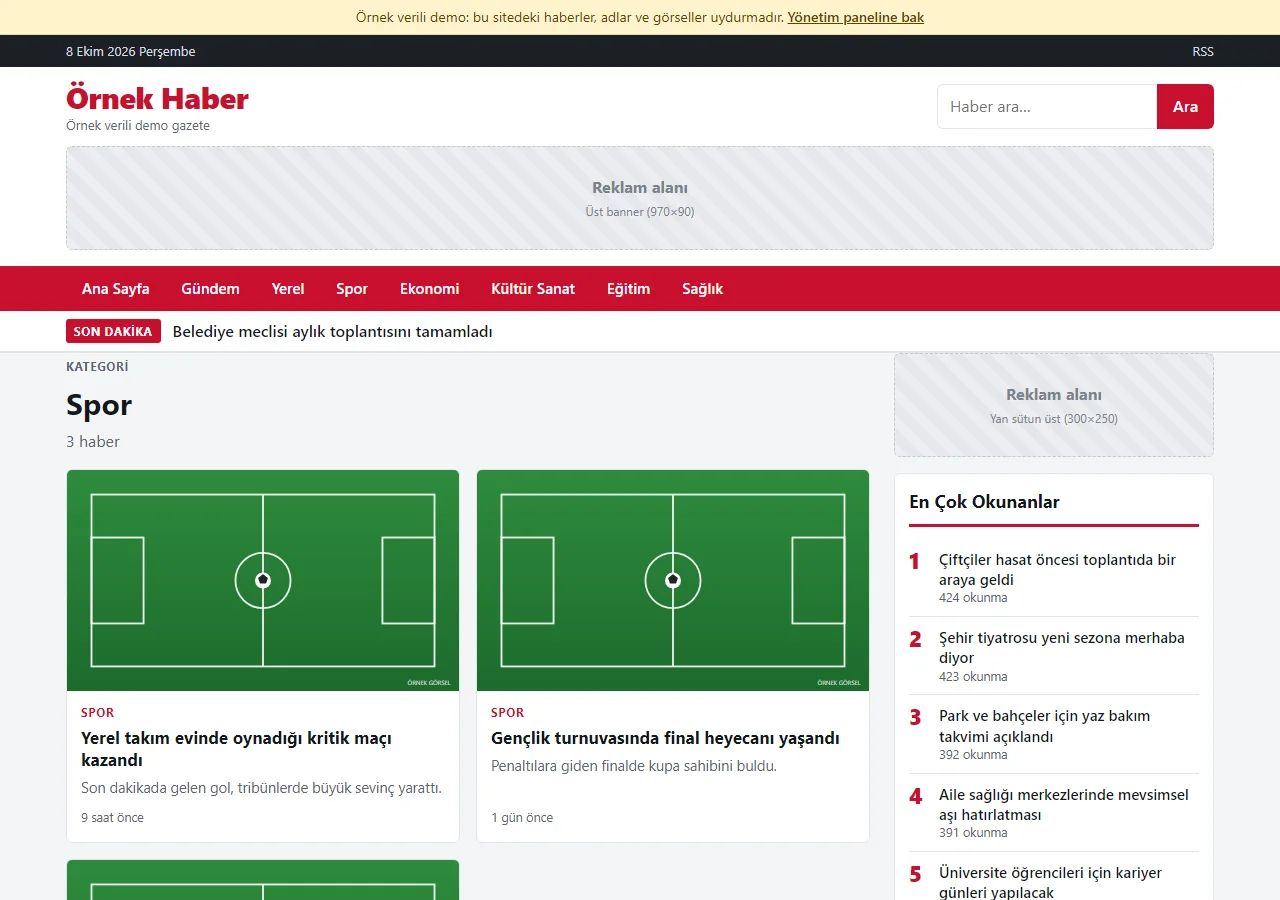
Category page
The stories of the chosen category are listed newest first, 12 to a page, with page numbers.
- On screen (Turkish interface)
- “Kategori / haber” — category / stories
- “Önceki / Sonraki” — previous / next
-
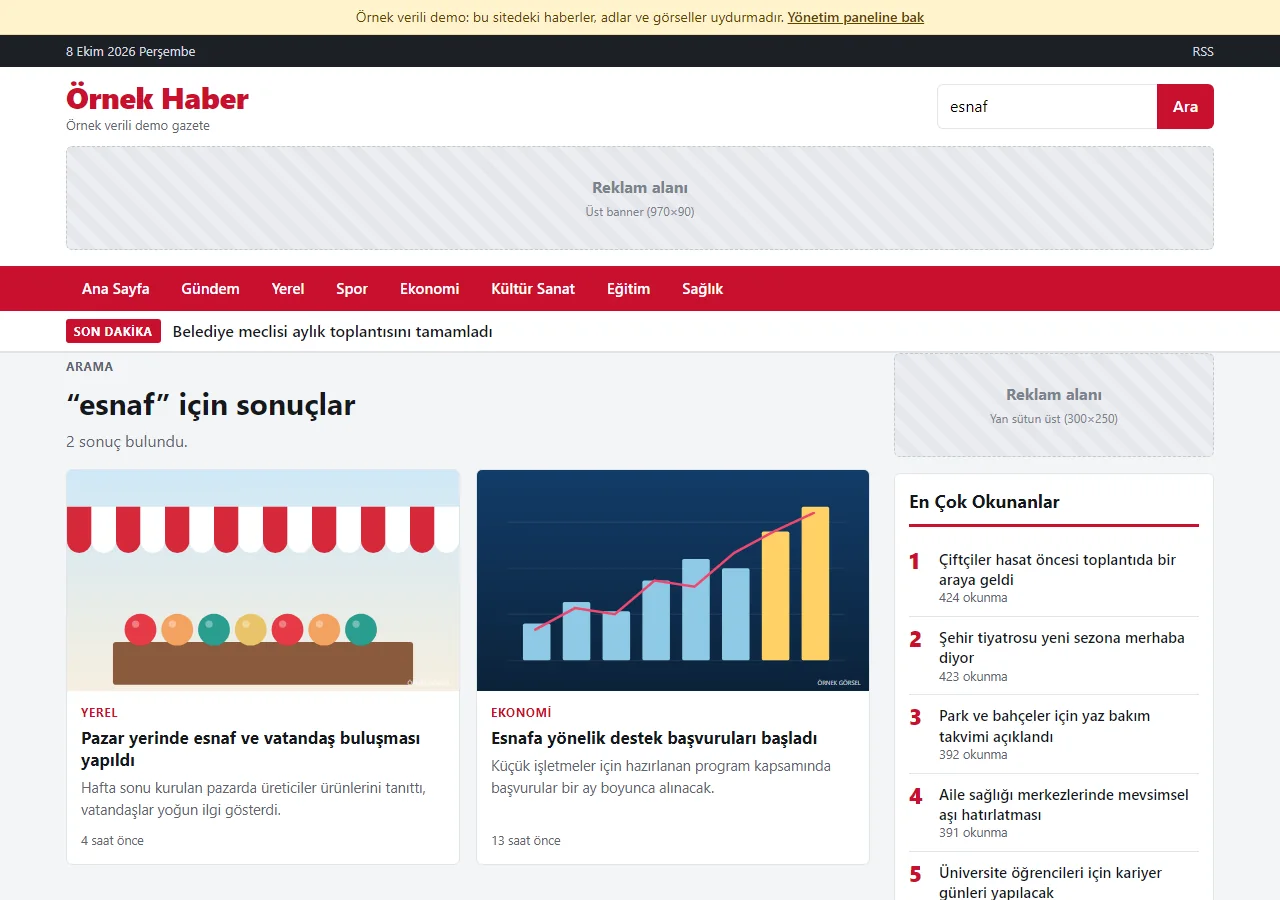
Search
The search box looks in headlines, summaries and story text, and says how many results it found.
- On screen (Turkish interface)
- “sonuç bulundu” — results found
- “Haber ara…” — search stories…
-
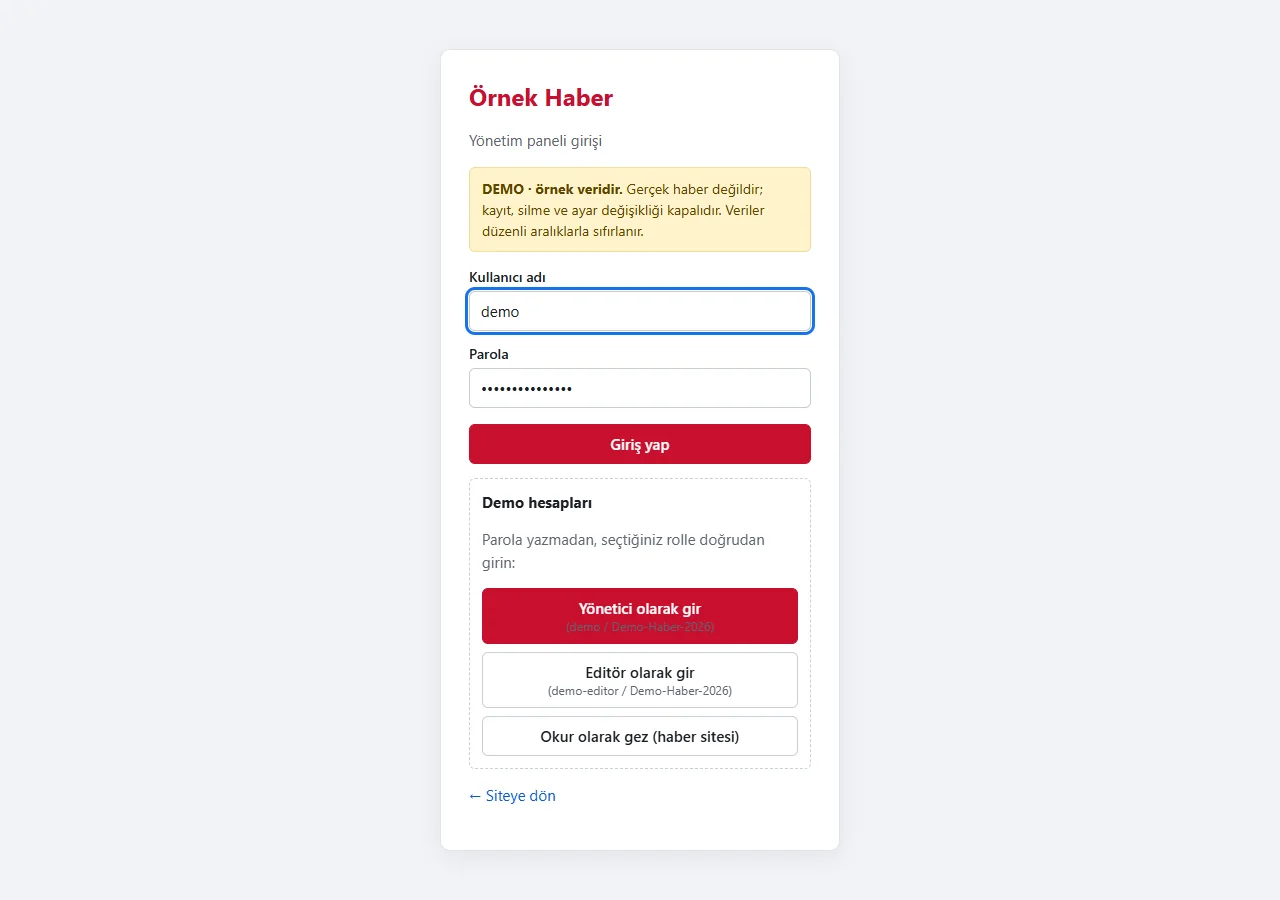
1.0.5 · 21 October 2026 Admin sign-in
The panel takes a user name and a password. After six failed attempts the user must wait 15 minutes. The “Demo hesapları” (demo accounts) box has password-free “Yönetici olarak gir” (sign in as administrator), “Editör olarak gir” (sign in as editor) and “Okur olarak gez” (browse as a reader) buttons; the box appears only in this demo.
- On screen (Turkish interface)
- “Yönetim paneli girişi” — admin panel sign-in
- “Kullanıcı adı / Parola / Giriş yap” — user name / password / sign in
- “Yönetici olarak gir / Editör olarak gir” — sign in as administrator / editor
-
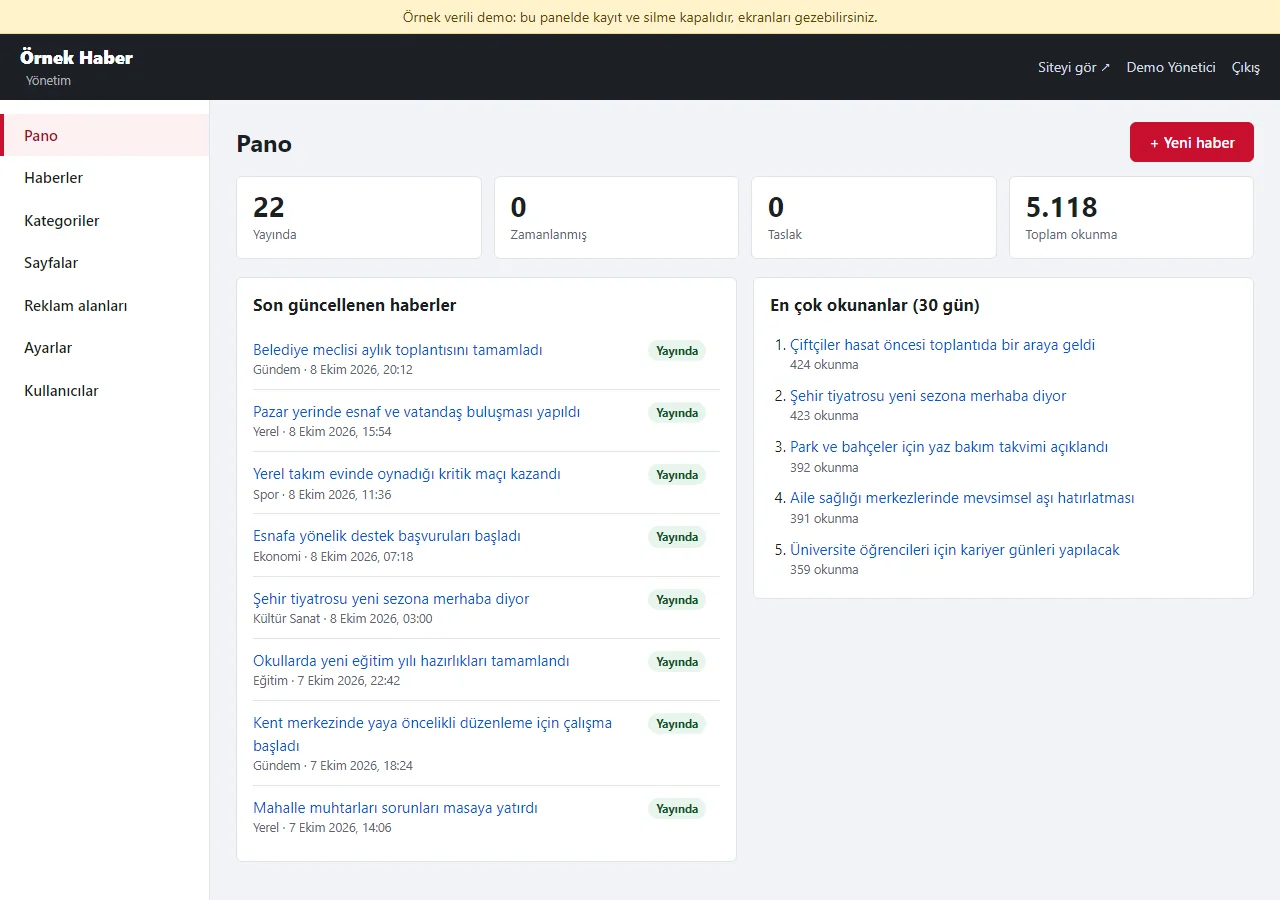
Panel: dashboard
The counts of published, scheduled and draft stories and the total reads; the recently updated stories and the most read of the last 30 days. Figures are sample data.
- On screen (Turkish interface)
- “Pano / Haberler / Kategoriler / Sayfalar / Reklam alanları / Ayarlar / Kullanıcılar” — sidebar: dashboard / stories / categories / pages / advertisement slots / settings / users
- “Yayında / Zamanlanmış / Taslak / Toplam okunma” — published / scheduled / draft / total reads
- “+ Yeni haber” — new story
-
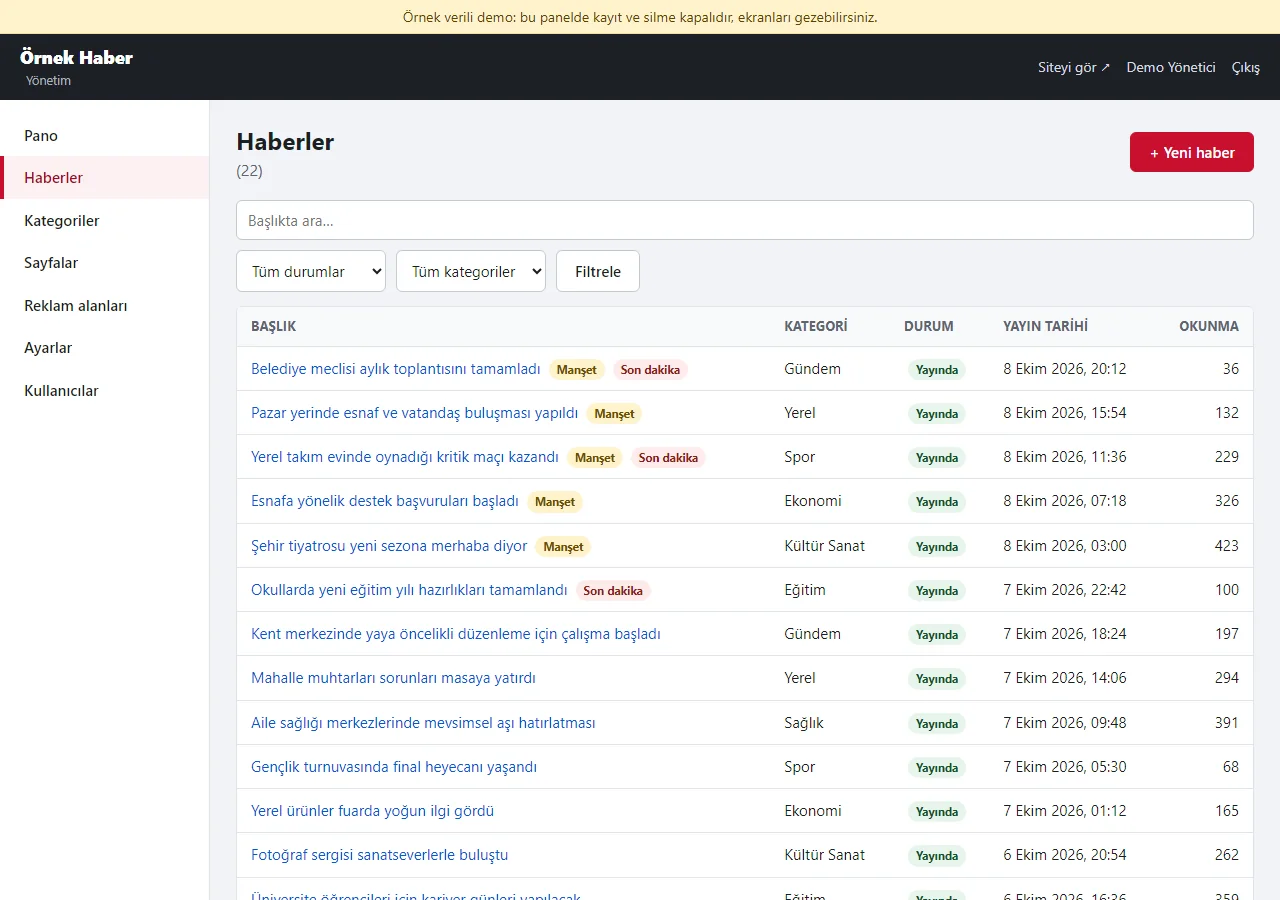
Panel: stories
Stories are listed with title, category, status (Yayında, Zamanlanmış, Taslak), publication time and reads; “Manşet” (headline) and “Son dakika” (breaking) marks show next to the title. The list filters by title, status and category.
- On screen (Turkish interface)
- “Başlık / Kategori / Durum / Yayın tarihi / Okunma” — title / category / status / publication time / reads
- “Manşet / Son dakika” — headline / breaking news
- “Tüm durumlar / Tüm kategoriler / Filtrele” — all statuses / all categories / filter
-
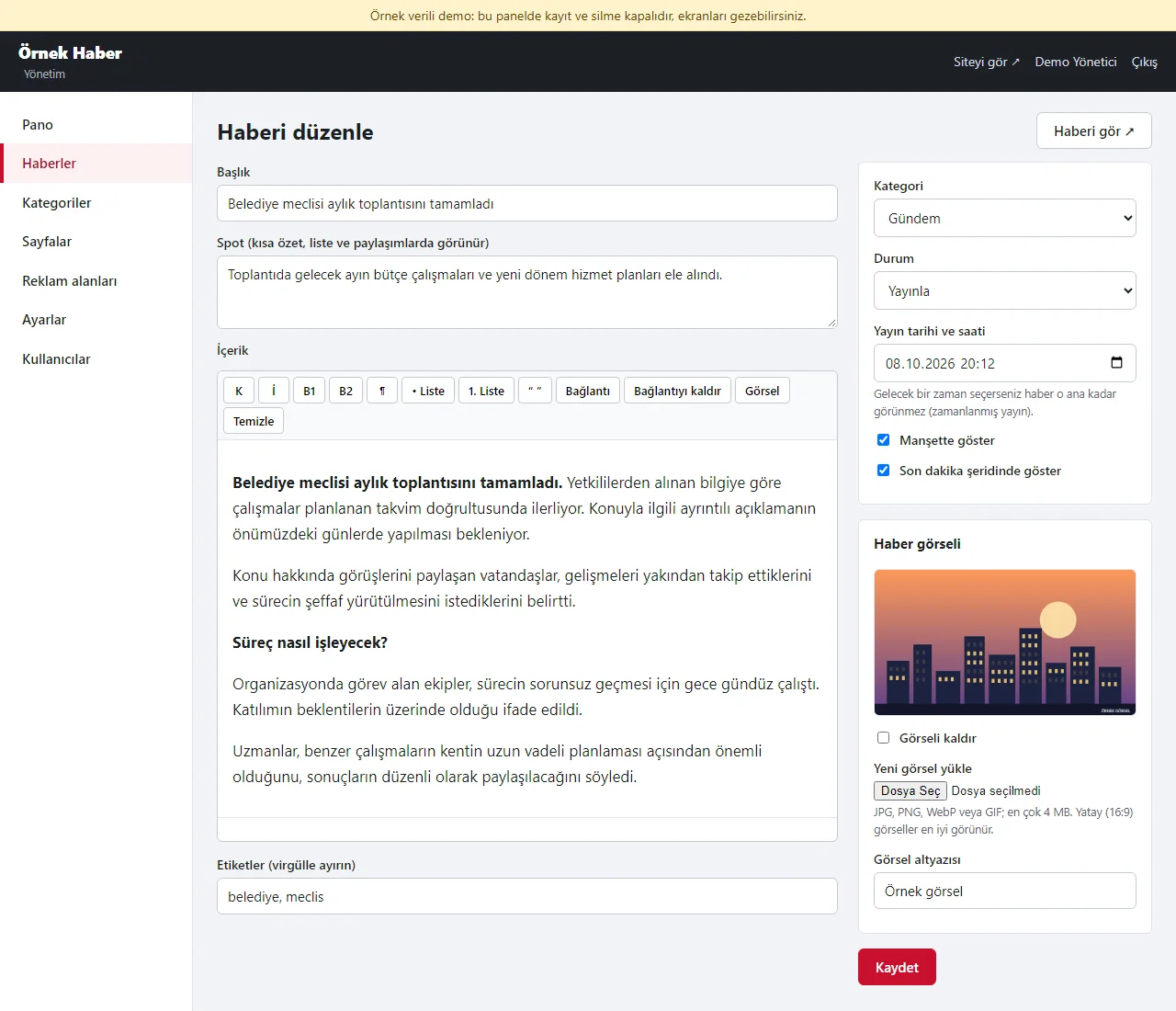
Panel: story editor
Title, summary, a content box with formatting buttons (bold, headings, lists, quote, link, picture) and tags; at the side the category, status, publication time, “show as headline” and “show in the breaking-news strip” options and the story picture. A future time keeps the story hidden until then. In demo mode “Kaydet” (save) does not work.
- On screen (Turkish interface)
- “Başlık / Spot / İçerik / Etiketler” — title / summary / content / tags
- “K / İ / B1 / B2 / Liste / Alıntı / Bağlantı / Görsel” — bold / italic / heading / small heading / list / quote / link / picture
- “Kategori / Durum / Yayın tarihi ve saati” — category / status / publication date and time
- “Manşette göster / Son dakika şeridinde göster” — show as headline / show in the breaking-news strip
- “Haber görseli / Görsel açıklaması / Kaydet” — story picture / picture description / save
-
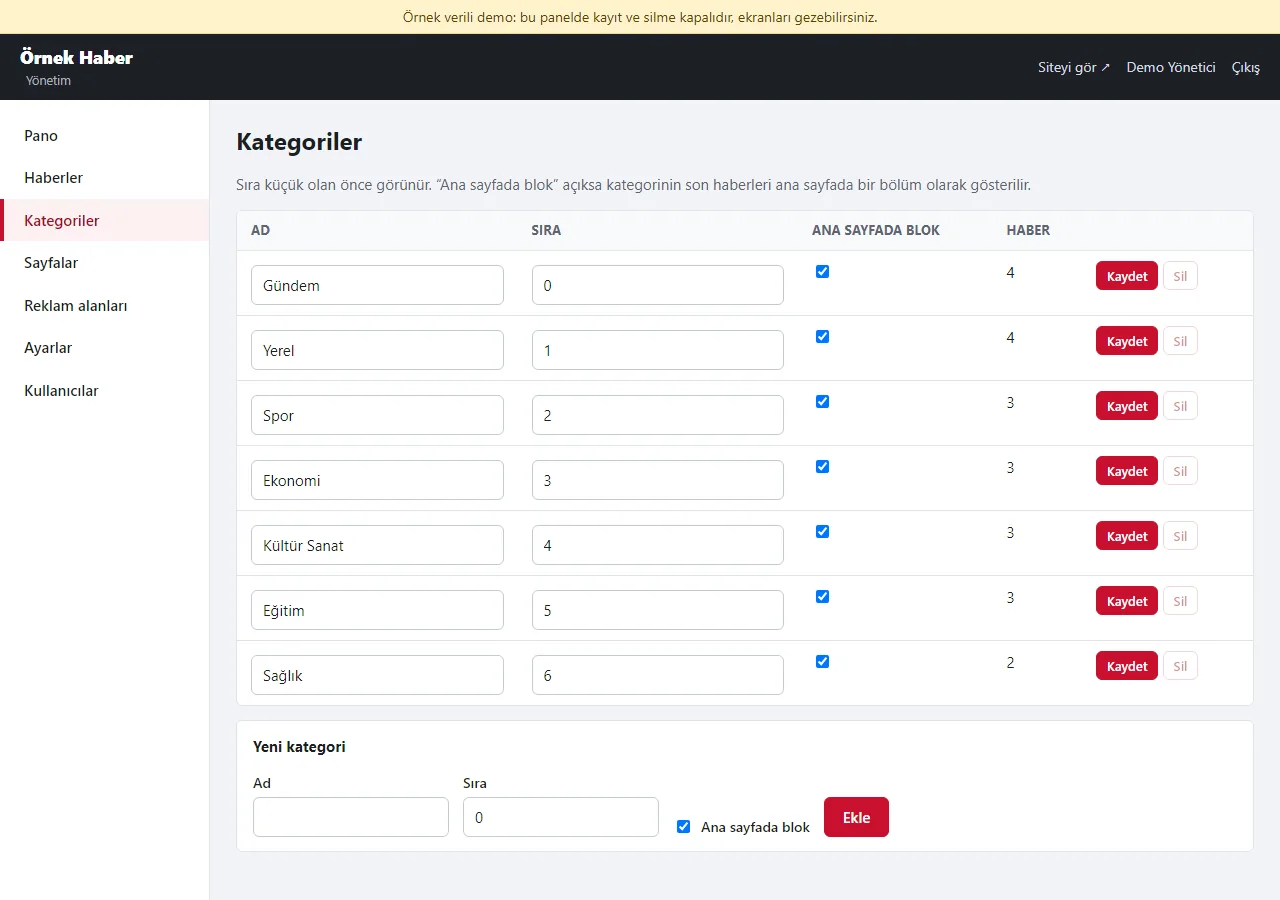
Panel: categories
Category name, order and the “block on the home page” option; the number of stories in each category shows. A category that holds stories cannot be deleted.
- On screen (Turkish interface)
- “Ad / Sıra / Ana sayfada blok / Haber” — name / order / block on the home page / stories
- “Kaydet / Sil / Yeni kategori / Ekle” — save / delete / new category / add
-
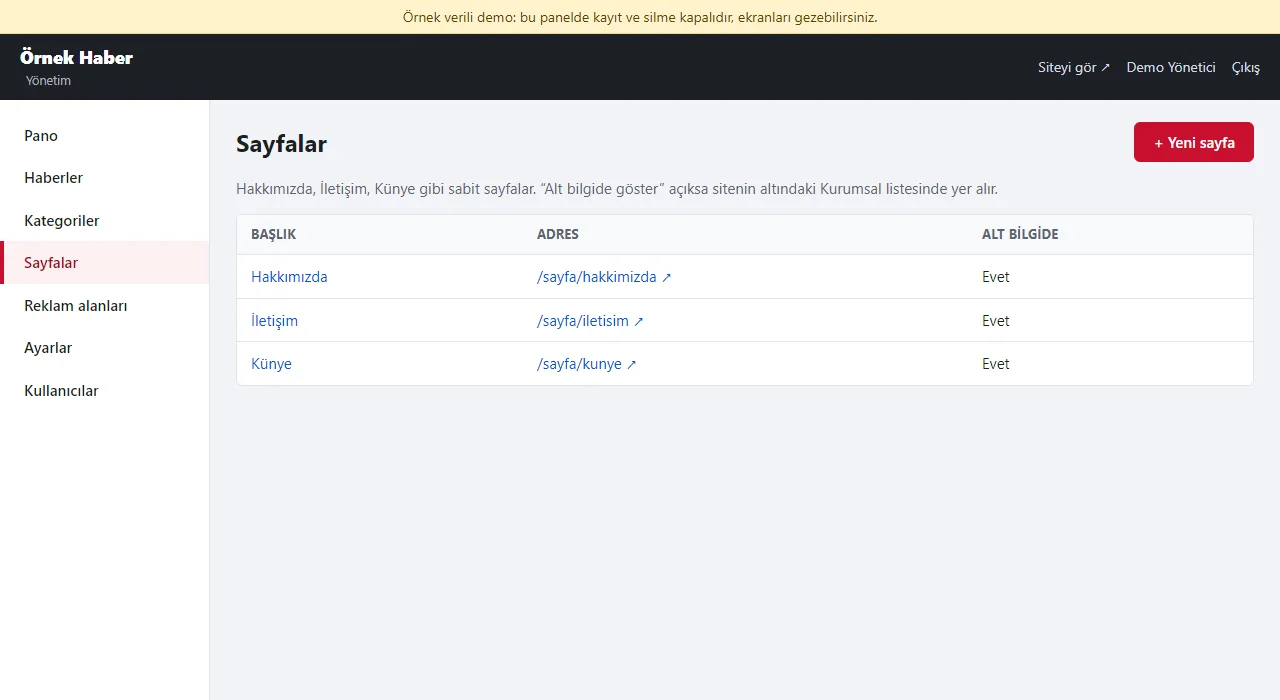
Panel: pages
Fixed pages such as Hakkımızda (About), İletişim (Contact) and Künye (Imprint); with “show in the footer” on, a page joins the Kurumsal (company) list under the site. The page texts are placeholders; legal texts are written with the customer’s own verification.
- On screen (Turkish interface)
- “Başlık / Adres / Alt bilgide” — title / address / in the footer
- “+ Yeni sayfa” — new page
-
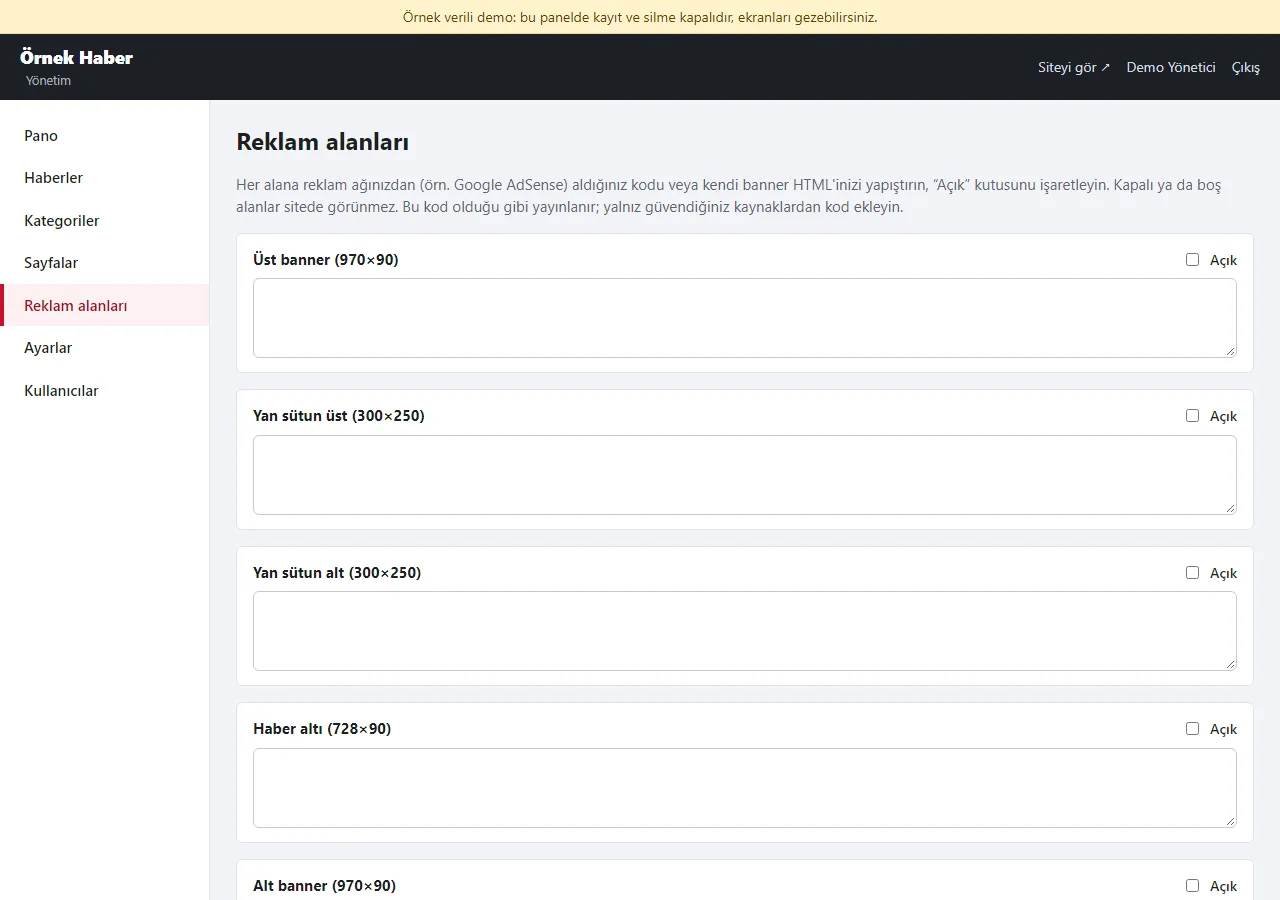
Panel: advertisement slots
Five slots: top banner, sidebar top and bottom, below the story, bottom banner. Each takes a code from an advertising network or your own banner HTML, and “Açık” (on) is ticked. Joining an advertising network and being approved is a separate process.
- On screen (Turkish interface)
- “Üst banner / Yan sütun üst / Yan sütun alt / Haber altı / Alt banner” — top banner / sidebar top / sidebar bottom / below the story / bottom banner
- “Açık / Kaydet” — on / save
-
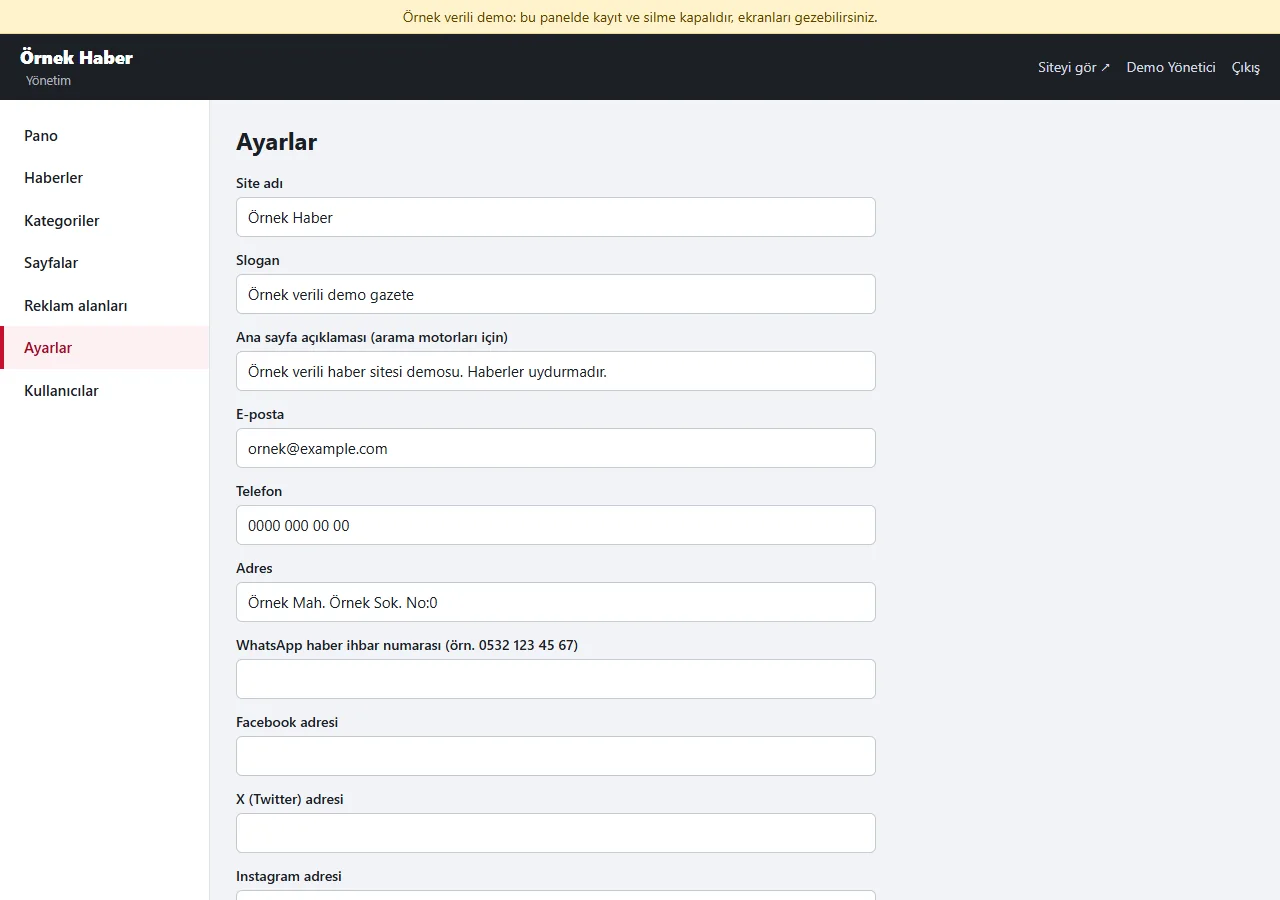
1.0.5 · 21 October 2026 Panel: settings
Site name, tagline, the description for search engines, contact details, the WhatsApp tip-off number, social-media addresses, the footer text and an extra <head> code (a search-console verification, statistics and the like).
- On screen (Turkish interface)
- “Site adı / Slogan / Ana sayfa açıklaması” — site name / tagline / home page description
- “E-posta / Telefon / Adres” — e-mail / phone / address
- “Facebook / X / Instagram / YouTube adresi” — Facebook / X / Instagram / YouTube address
- “Alt bilgi metni / Ek <head> kodu” — footer text / extra <head> code
-
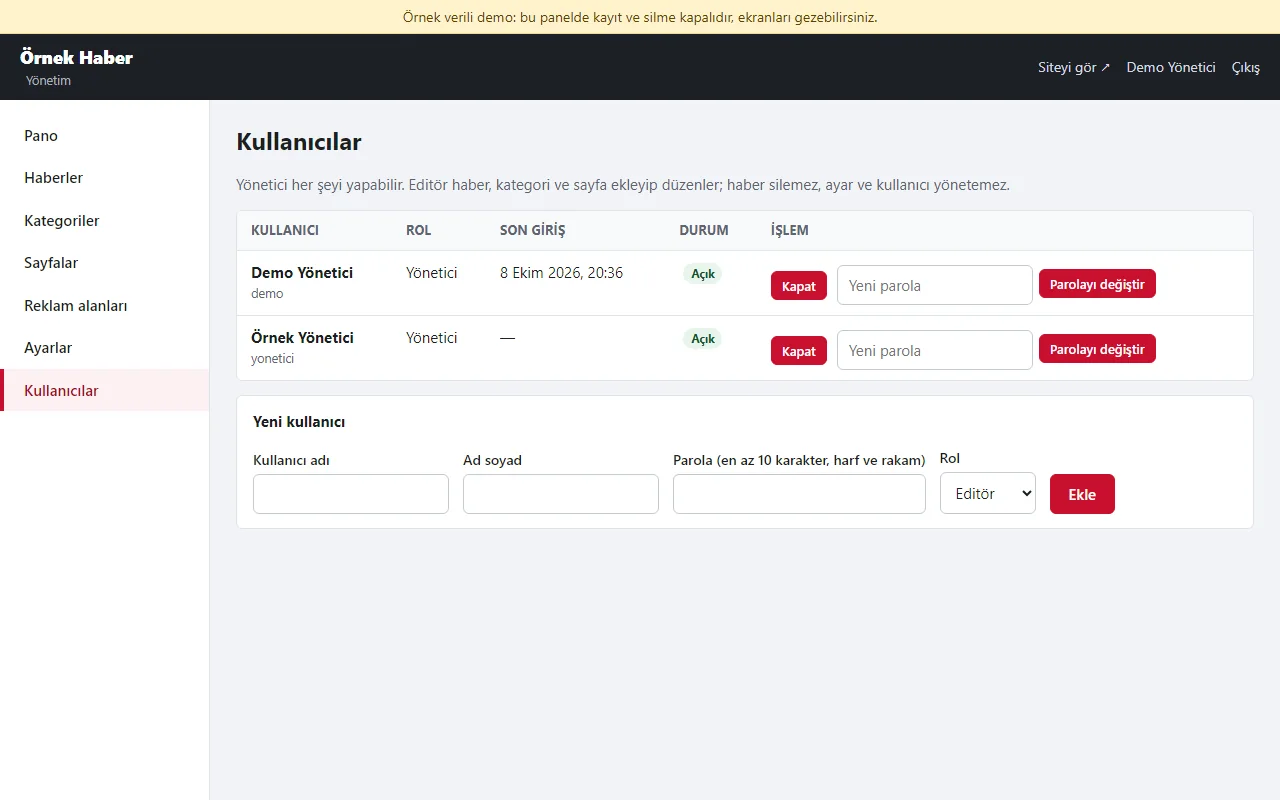
Panel: users
The administrator can do everything; an editor adds and edits stories, categories and pages but cannot delete stories or manage settings and users; a “Sil” (delete) button the editor has no right to use is not shown to the editor at all (in categories only the administrator sees it). A user can be switched off and given a new password.
- On screen (Turkish interface)
- “Kullanıcı / Rol / Son giriş / Durum / İşlem” — user / role / last sign-in / status / action
- “Yönetici / Editör” — administrator / editor
- “Kapat / Parolayı değiştir / Yeni kullanıcı / Ekle” — switch off / change the password / new user / add
- What do they see at the end?
- The editor writes the story, adds its picture, picks a category and tags, and publishes it right away or schedules it for a later time. The story then shows on the home page, the category page, the search, the RSS feed and the sitemap by itself; the headline and breaking-news marks shape the home page.
- What is it good for?
- Writing stories, setting the publication time, choosing the headline and adding an advertisement code all happen in one panel; the site lives on its own domain and hosting and needs no database server.
Everything that is not included, and all limits
- The live demo runs version 1.0.6 and is still a candidate; not delivered to a client or deployed by a real news organisation. Stories, names and pictures in the demo and screenshots are invented.
- The live demo runs PHP 8.3 and SQLite; setup and feature tests ran locally on PHP 8.3. Installation with install.php on a customer’s hosting, other PHP versions and real devices have not been tried.
- Writing, deletion and uploads are disabled in the demo; sample data is configured to reset every six hours. That interval has not yet been observed working regularly on the live host.
- The interface is in Turkish only. There is no MySQL, membership, comments, multi-step publishing approval, automatic RSS import, e-mail or SMS.
- Uploaded images are not resized automatically; there has been no load or performance test for high traffic. Acceptance by Google News or AdSense is not promised.
Delivery and sales status
There is no cart, customer account or online payment on this site for now. Reach out by phone, WhatsApp or the form; in a first conversation your need and the software’s fit are reviewed. The form does not create an order, a contract or a payment.
Possible delivery options
What the package contains
- Candidate package: News Website 1.0.6 (PHP and SQLite)
- Admin panel, story writing, scheduling, categories, search, RSS and sitemap
- The setup guide is a draft; licence and client-use terms have not been decided.
Price
There is no list price yet; the price, package and payment method have not been set yet.
Requirements and version history
What you do
- If a real installation is considered, hosting and domain selection, setup scope and responsibilities are first set down in writing.
Installation requirements
- The draft setup guide lists PHP 8.1+, pdo_sqlite, mbstring, dom, libxml and fileinfo; HTTPS; Apache or LiteSpeed. Nginx needs an extra rule.
- The live example runs PHP 8.3 and SQLite; the setup wizard has not been tried on a separate client hosting account.
Release notes
- 1.0.6 (26 October 2026, candidate): permission view: for the editor role the disabled “Sil” (delete) button on a category row is no longer shown (only the administrator sees it); the server-side check stays the same.
- 1.0.5 (18 October 2026, candidate): a demo sign-in page: a demo notice, the administrator fields filled and password-free “Yönetici olarak gir” (sign in as administrator) / “Editör olarak gir” (sign in as editor) buttons (demo mode only; on a real installation the address answers 404).
- 1.0.4 (11 October 2026, candidate): a WhatsApp tip-off line: for the number in the settings, a button in the top bar, the footer and under every story; a free wa.me link.
- 1.0.3 (10 October 2026, candidate): security and bug fixes to the sign-in lock, sessions, draft tags and RSS/sitemap (the findings of a separate code scan).
- 1.0.2 (8 October 2026, candidate): the raw HTML field in the admin panel is hidden; it was found and fixed in the live demo. 180 local unit and end-to-end checks passed.
- 1.0.1 (8 October 2026, candidate): fixed a rule that blocked requests to robots.txt on the real server.
Decisions not made yet
- Rights to use, modify, transfer and receive the source code: to be set in a written agreement; not decided yet.
- The price and payment method have not been decided yet.