Pilates and reformer studiosDemo with sample data
Pilates and Reformer Studio Management: screen-by-screen guide
The full version of the short description on the product page: every feature, how each screen is used step by step, all limits and the delivery details.
All features
The screens below come from the live demo; that places are never over-booked under simultaneous requests was checked on SQLite and MariaDB with a multi-process test, and the class and cancellation rules with unit and end-to-end tests. The “Boş siteyle yeniden başla” (start with an empty site) button sits on the demo’s setup page and was tried end to end on the live demo (20 October 2026: emptying, the six steps and restoring the sample data all passed); notifications do not appear in the screens, and their limits are under “Limits”.
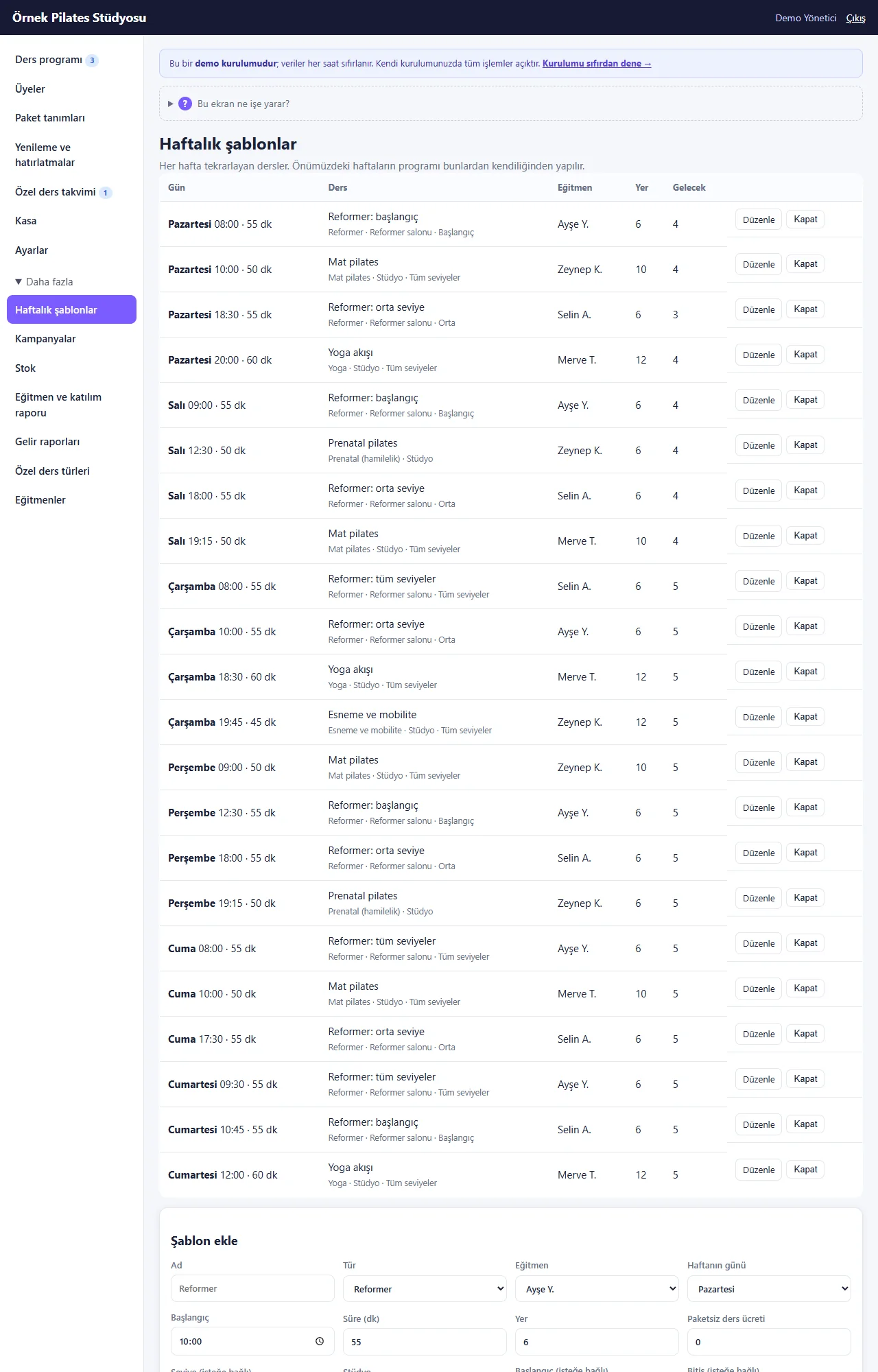
- Weekly class templates (day, time, length, instructor, places, kind of class); the coming weeks’ classes are made from them by themselves, and single classes can be added or cancelled
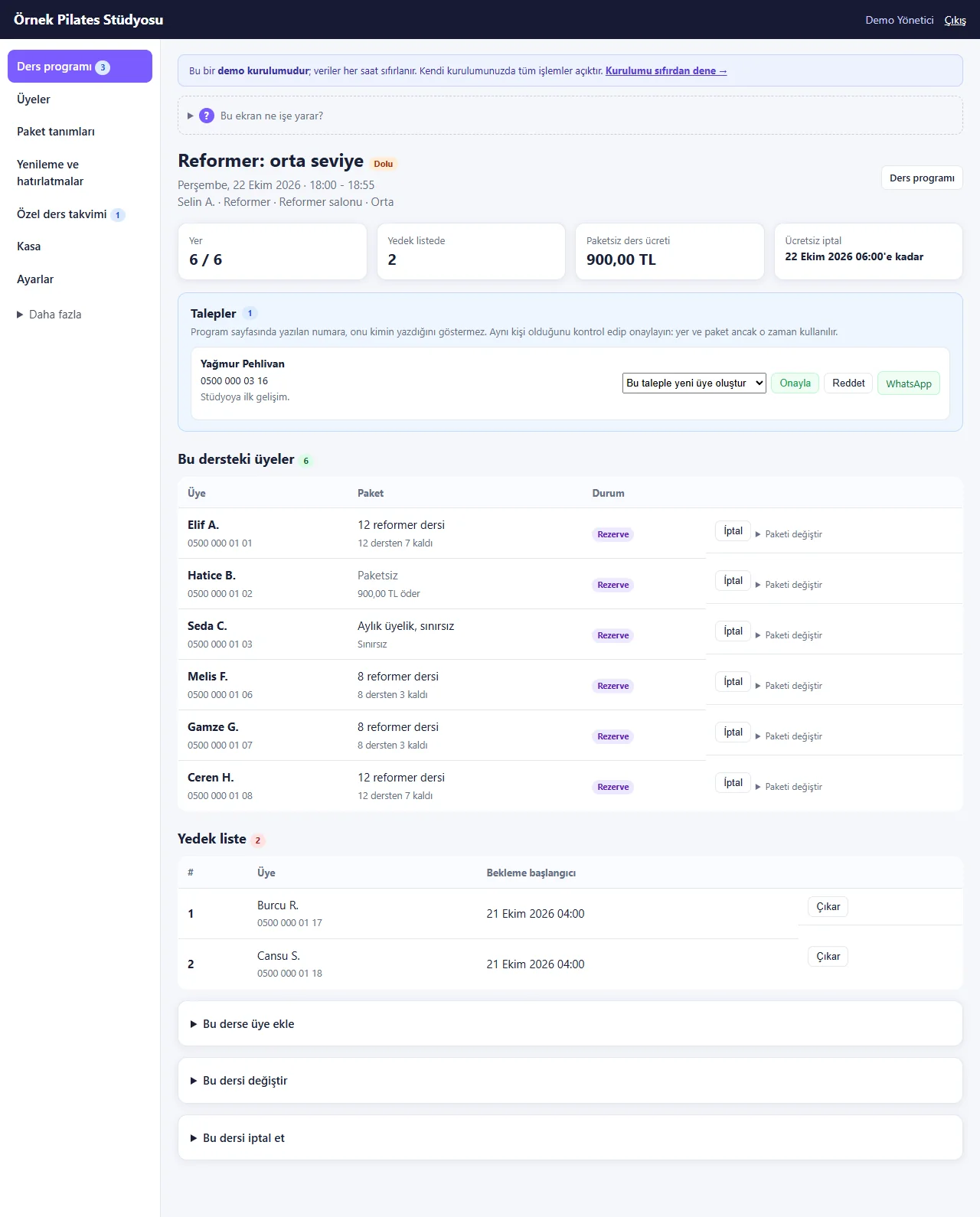
- Places and a waiting list: when a class is full the member joins the queue; when a place is cancelled the first on the list is moved up (or you are warned, by setting) and you get a ready WhatsApp message to tell them
- Class packages: 8/12 classes, a monthly unlimited membership, packages for one kind of class; a class comes off when the member is marked present (or, by setting, when the free cancellation time runs out) and comes back if the mark is undone. When a package is sold from a member’s card the amount fills in with the chosen plan’s price
- A “free cancellation until X hours before” rule (the hours are a setting): a cancellation after that time, and a no-show, use up the class; on the class page you undo it with “İptal et (süre geçti)” (cancel, time has passed) and “Mazur say (ders düşmesin)” (excuse, do not use a class), and “Kalan herkesi geldi say” (mark everybody left as present) marks the rest in one go
- Package holds: while a member is away the package pays for no class and its end date moves by the days on hold
- Attendance (Came / Did not come), no-show tracking, reports and CSV by instructor and kind of class; reminder lists with ready WhatsApp messages for packages ending or running low, balances and members who missed classes
- A printable weekly programme and a public programme page (in larger type) members open on their phone: free places are shown and a request is sent with a name and a phone number. A member who sends one request lands on their own request page, with “Stüdyoya WhatsApp ile haber ver” (tell the studio on WhatsApp) and a big “Stüdyoyu ara” (call the studio) button
- Step-by-step setup wizard: six steps (studio, instructors, classes, packages, hours, sharing); each step saves by itself, can be skipped and picked up later. The classes step offers a ready weekly programme (12 lines) and the packages step a ready package list (6 plans); the prices are samples and a step counts as done only after you have looked and saved
- Guidance: a closed “Bu ekran ne işe yarar?” (what is this screen for?) box on every main screen, a short menu (the seven daily pages; the rest under “Daha fazla”, more) and buttons that fix an error such as a clash or a missing instructor. On a real installation a progress bar (“Kurulum %33 · sıradaki adım…”, setup 33% · next step) shows on every panel page until the six steps are done
- Sending the programme address to members: on the wizard’s last step a ready WhatsApp message, copy the link, a scannable code and a printable poster (also as an A4 picture to send to a stationer); the member opens no account, ticks classes on the programme and types a name and a phone number
- Adding to the phone and notifications: a separate page without sign-in (studio name, a big “Telefonuma ekle” add-to-my-phone button, steps for the phone, “Panele gir” go to the panel); the panel icon opens the sign-in page directly. A free instant notification (Web Push) goes to the owner’s phone for a new class request and when one is withdrawn, and to the requesting member’s phone when the studio approves, puts them on the waiting list or declines; it is not an SMS or a WhatsApp message, so there is no message fee. The owner can also get an e-mail for a new request (when e-mail sending is on)
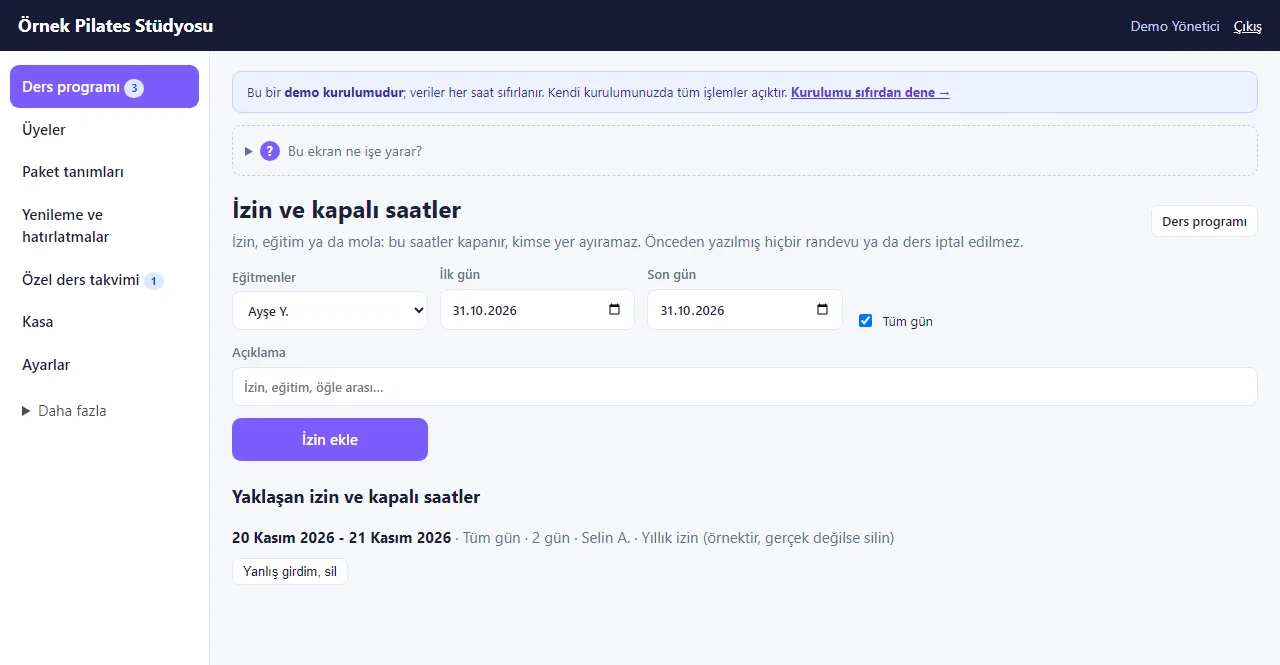
- Multi-day instructor time off: a first day, a last day and “Tüm gün” (all day) or the same hours every day are entered; the “Yaklaşan izin ve kapalı saatler” (upcoming time off and closed hours) list has “Yanlış girdim, sil” (typed wrong, delete) on each row. A class or appointment already written for those hours is not cancelled, only shown with a warning; no remaining-leave counter is worked out
- QR attendance: the member’s card link is sent on WhatsApp (a page without sign-in) and shows a QR code that changes every day and a six-digit code; before the class the instructor marks the member present with the phone camera or by typing the code. Check-in opens before the class (the time is a setting) and closes when it ends
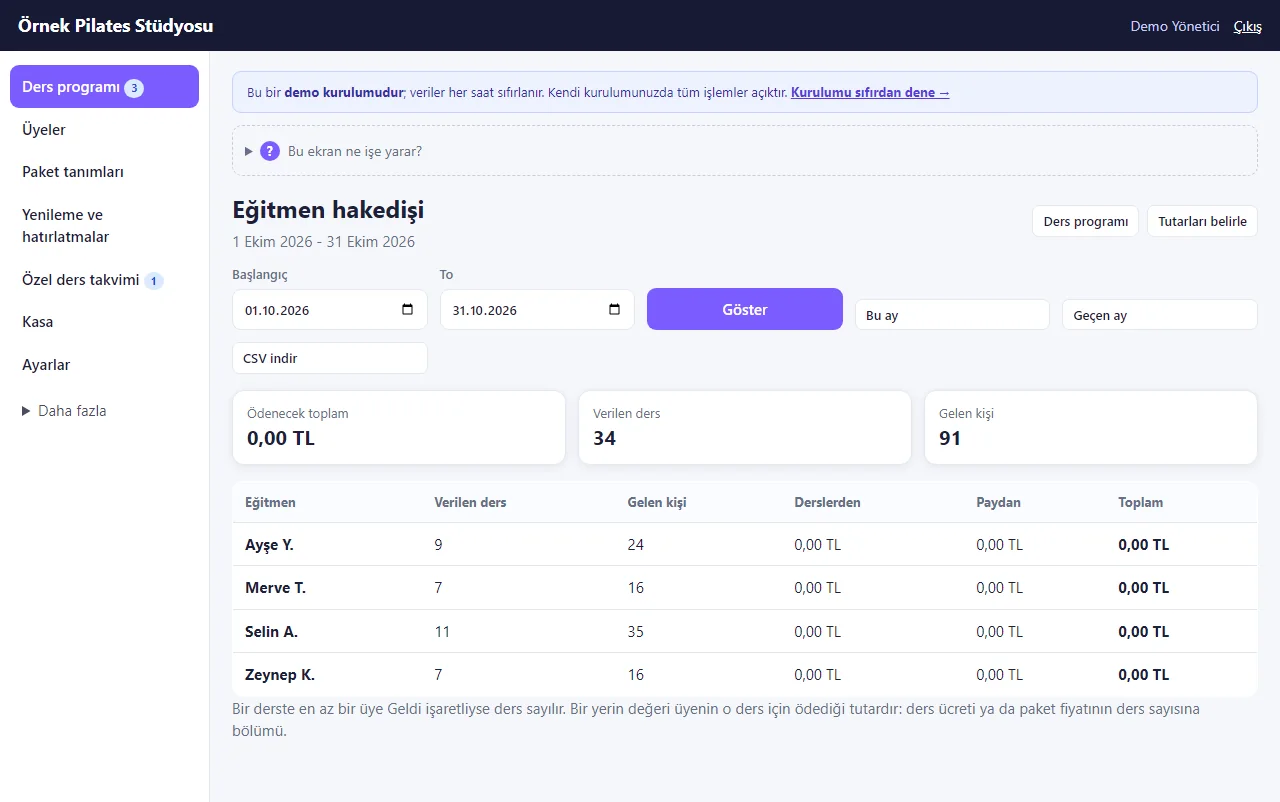
- Instructor pay: an amount per class or a percentage of the value of those who came is typed on the instructor’s record; the page works out classes given, people who came and the total for the chosen dates, with a CSV download. The manager sees everyone, an instructor only their own row; the page pays nothing
- Package and class rules: a package can carry an “at most this many classes a week or a month” limit or be bought only once per member (a trial package); each class can have its own free-cancellation hours; when the setting is on a member can bring a guest (one more place and one more class from the package)
- Events and workshops: when a single class is added with “Etkinlik (biletli atölye)” (event, ticketed workshop) ticked, packages do not pay for it, the price is the ticket price (0 = free) and members who get a place are charged it
- Body measurements on the member card (weight, fat percentage, optional waist and hip; they stay on the card) and equipment maintenance on the Stock page: last and next service dates are entered and a warning shows at the top of the class schedule for equipment due within 14 days or overdue
- Options that start switched off in Settings: the trial-class option, a waiver or consent text members must tick, and an e-mail to the member a week before a package ends (needs the e-mail setting and an address on the card; nothing is sent in the demo). The summary cards above the class schedule can be tapped
- Panel logins by role: the manager sees everything; reception works with members, classes and payments; an instructor sees only their own classes and marks attendance; a button, form or link a role may not use is not shown to it (for example an instructor does not see the discount form on an appointment card). On the live demo there are password-free “… olarak gir” (sign in as …) buttons for manager, reception and instructor
Screen by screen: how it is used
The app’s interface in these screens is Turkish; only the captions and explanations on this page are in English. The screens come from the live demo (version 1.4.0, 31 October 2026; the setup, showcase and request screens were taken from 1.2.0 and are the same in this version); the studio, the people, the phone numbers starting with 0500 and the amounts are sample data. The “Reformer 1” equipment row was added to the demo for the screenshot; the demo resets every hour. Three class requests named “Elif Örnek” were sent to the demo while the first screens were taken and withdrawn straight away. The phone views come from a browser set to a phone’s size.
- Who uses it?
- The member who asks for a place; the studio owner or reception who manage classes, places, packages, attendance and reports; the instructor, who sees only their own classes.
- Where do they start?
- The member opens the studio’s showcase page and taps “Dersleri görün, yer talep edin” (see the classes and ask for a place). The studio signs in with the demo button on the sign-in page or with an e-mail and password; a new installation opens the step-by-step setup first, then the class schedule.
What do they do on screen? Step by step
-

1.2.0 · 21 October 2026 Showcase page
The studio’s page with the weekly classes, packages and private lesson types; the member starts with the first button. Phone size.
-
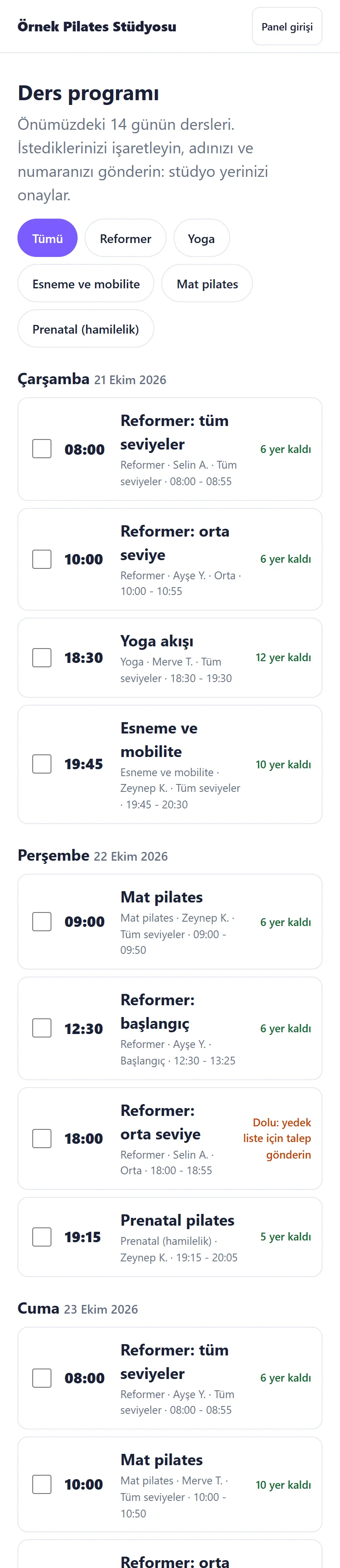
1.2.0 · 21 October 2026 The public class programme
The classes of the next 14 days: time, instructor, level and places left. A full class takes a waiting-list request; the list can be filtered by kind.
-
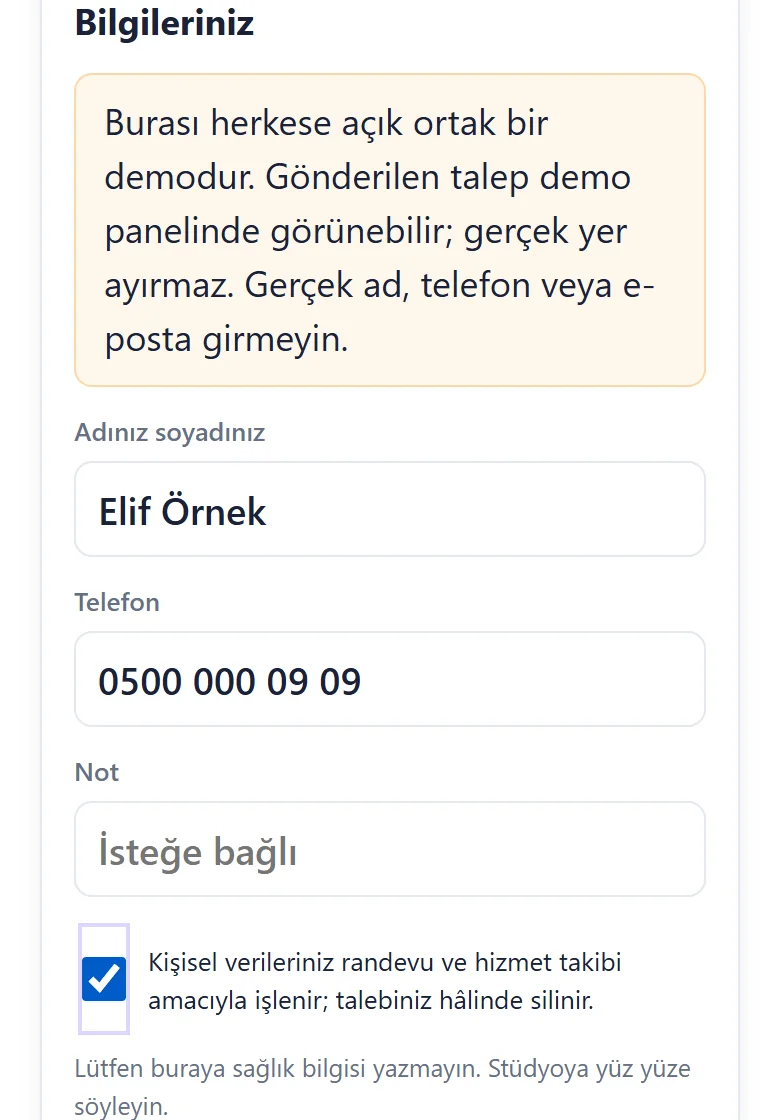
1.2.0 · 21 October 2026 Name, phone and privacy tick
Under the ticked classes the member types a name and a number and accepts the privacy text; a line asks them not to write health details. The public demo also shows a “do not enter real details” notice.
-
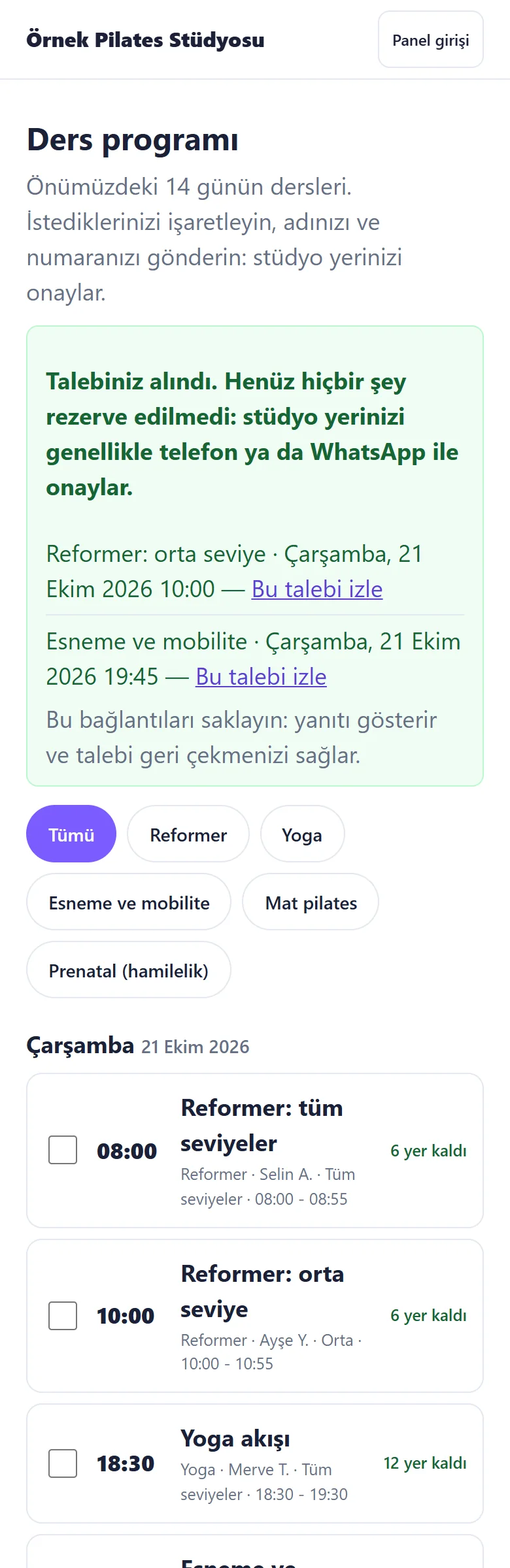
1.2.0 · 21 October 2026 Request received
Nothing is booked yet; the studio will confirm. A private follow link is given for each class.
-
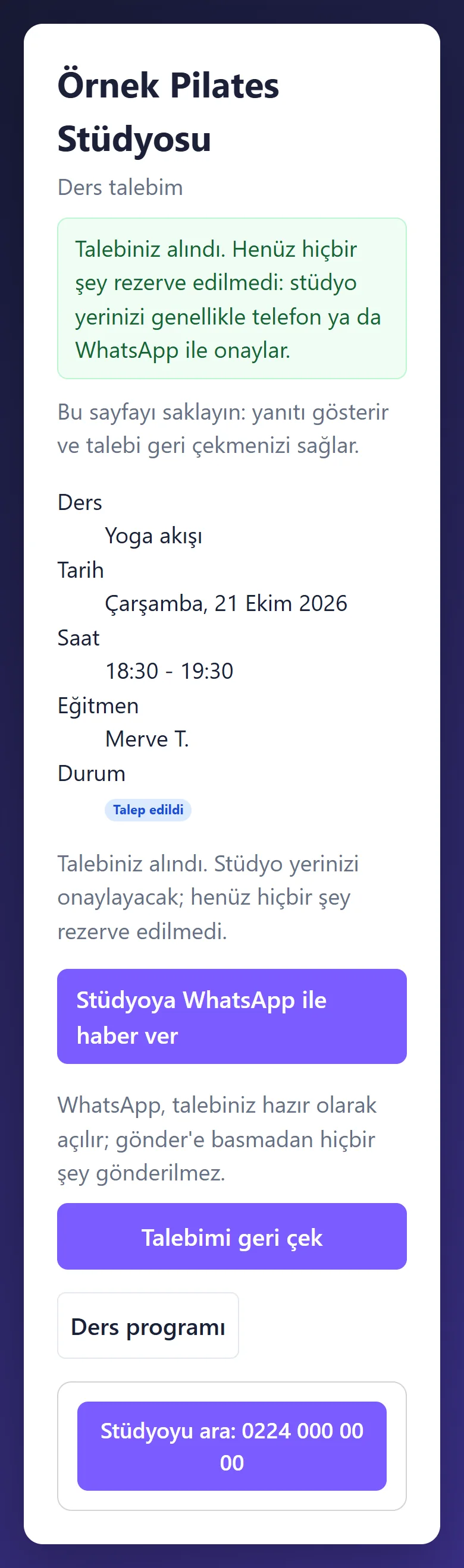
1.2.0 · 21 October 2026 Following the request
A member who sends a request for one class lands straight on this page: the status is “Talep edildi” (Requested), with “Stüdyoya WhatsApp ile haber ver” (tell the studio on WhatsApp), “Talebimi geri çek” (withdraw my request) and a big “Stüdyoyu ara” (call the studio) button. Once approved it reads “Rezerve” (Booked).
-
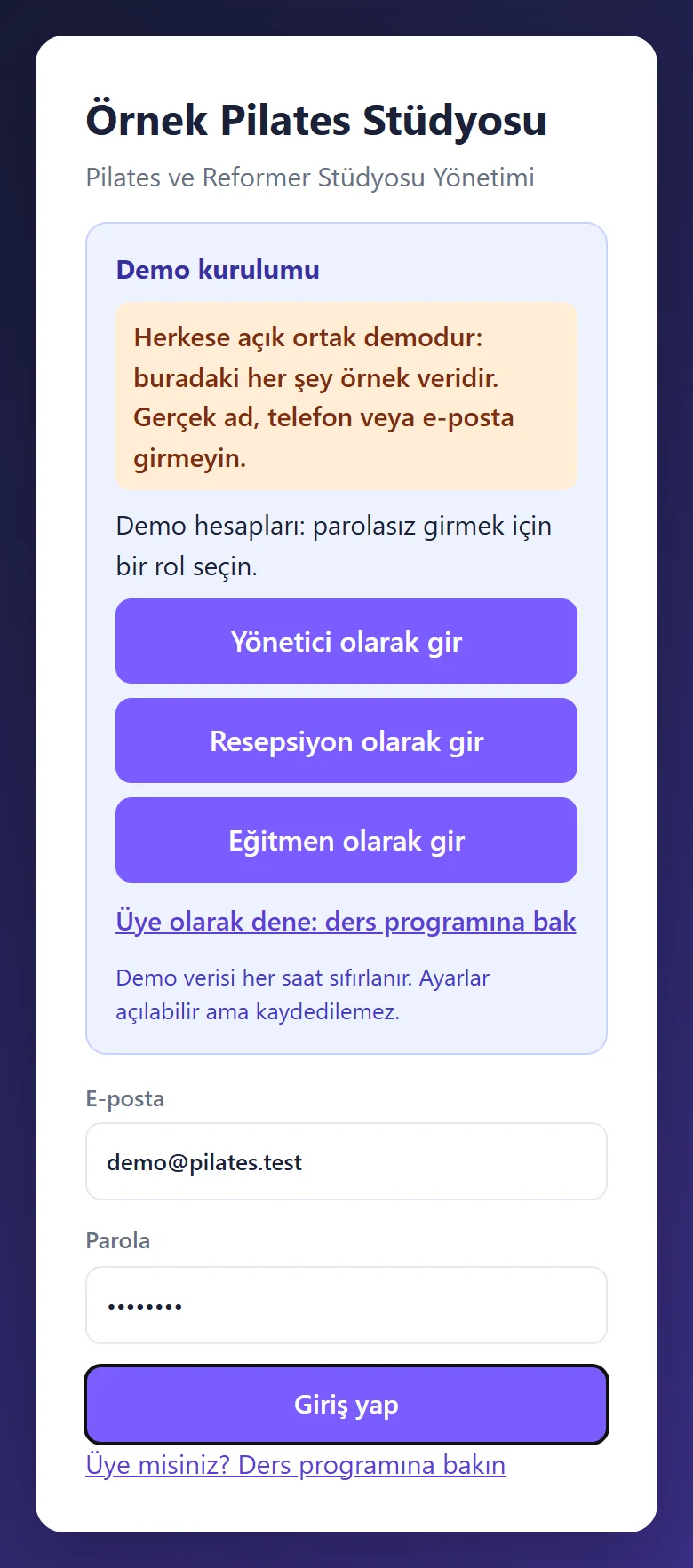
1.2.0 · 21 October 2026 Demo sign-in page
A demo notice, the manager’s fields already filled and a password-free “… olarak gir” (sign in as …) button for each role (manager, reception, instructor); shown only in the demo, never on a real installation.
-
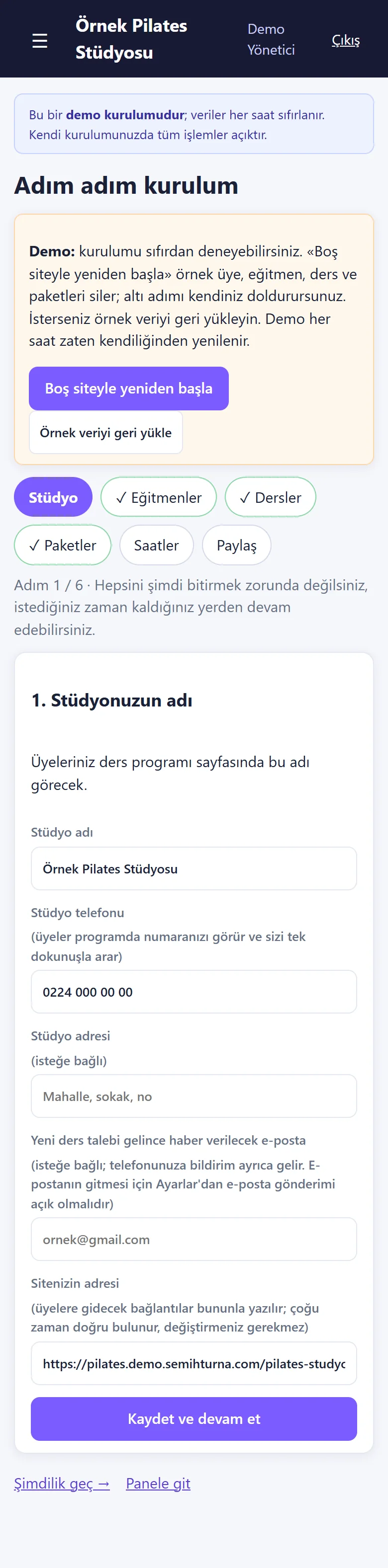
1.2.0 · 21 October 2026 Setup wizard: the studio
Six steps: studio, instructors, classes, packages, hours, sharing. Each step saves by itself, can be skipped with “Şimdilik geç” (skip for now) and picked up later. In the demo there are “Boş siteyle yeniden başla” (start with an empty site) and “Örnek veriyi geri yükle” (restore the sample data) buttons on top (demo only; tried end to end on the live demo on 20 October 2026).
-

1.2.0 · 21 October 2026 A ready weekly programme
Step 3 brings a ready weekly class programme; a step counts as done once you have looked at it and saved. You change day, time, instructor and places to suit your studio.
-

1.2.0 · 21 October 2026 A ready package list
Step 4 brings a ready package list; the prices are samples and the step counts as done once you have looked and saved.
-

1.2.0 · 21 October 2026 Send it to members
The last step sends the programme address to members: a ready WhatsApp message, copy the link, a scannable code and a printable poster. The member opens no account; they tick a class and type a name and a phone number.
-
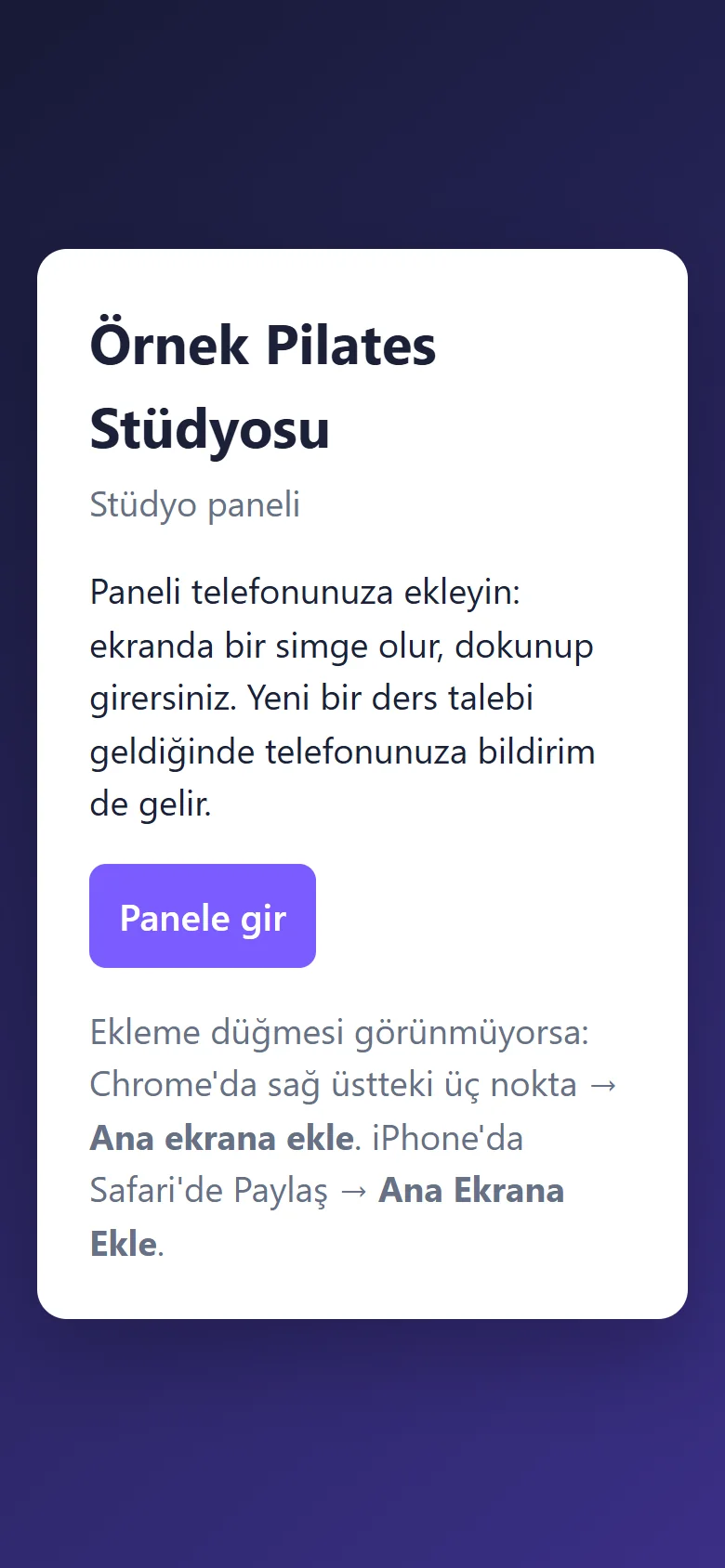
1.2.0 · 21 October 2026 Add-to-phone page
A page without sign-in: the studio name, a short explanation, “Panele gir” (go to the panel) and the steps for Chrome and iPhone. When the browser allows it, a big “Telefonuma ekle” (add to my phone) button also appears on a phone; it does not show on this screen. The panel icon opens the sign-in page directly.
-
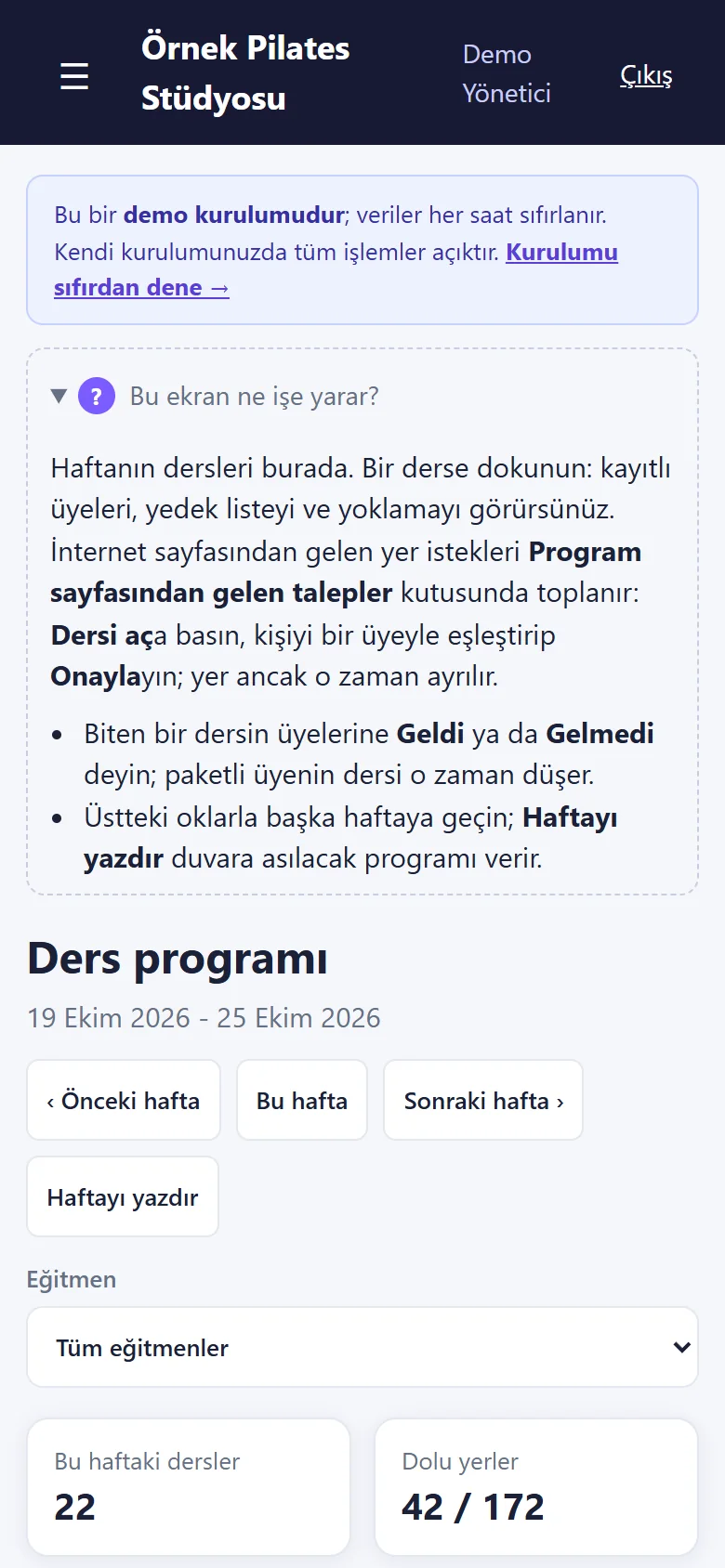
1.2.0 · 21 October 2026 “Bu ekran ne işe yarar?”
On every main screen a closed box opens to say what the screen is for and what to do next. The demo strip on top has a “Kurulumu sıfırdan dene →” (try the setup from scratch) link.
-
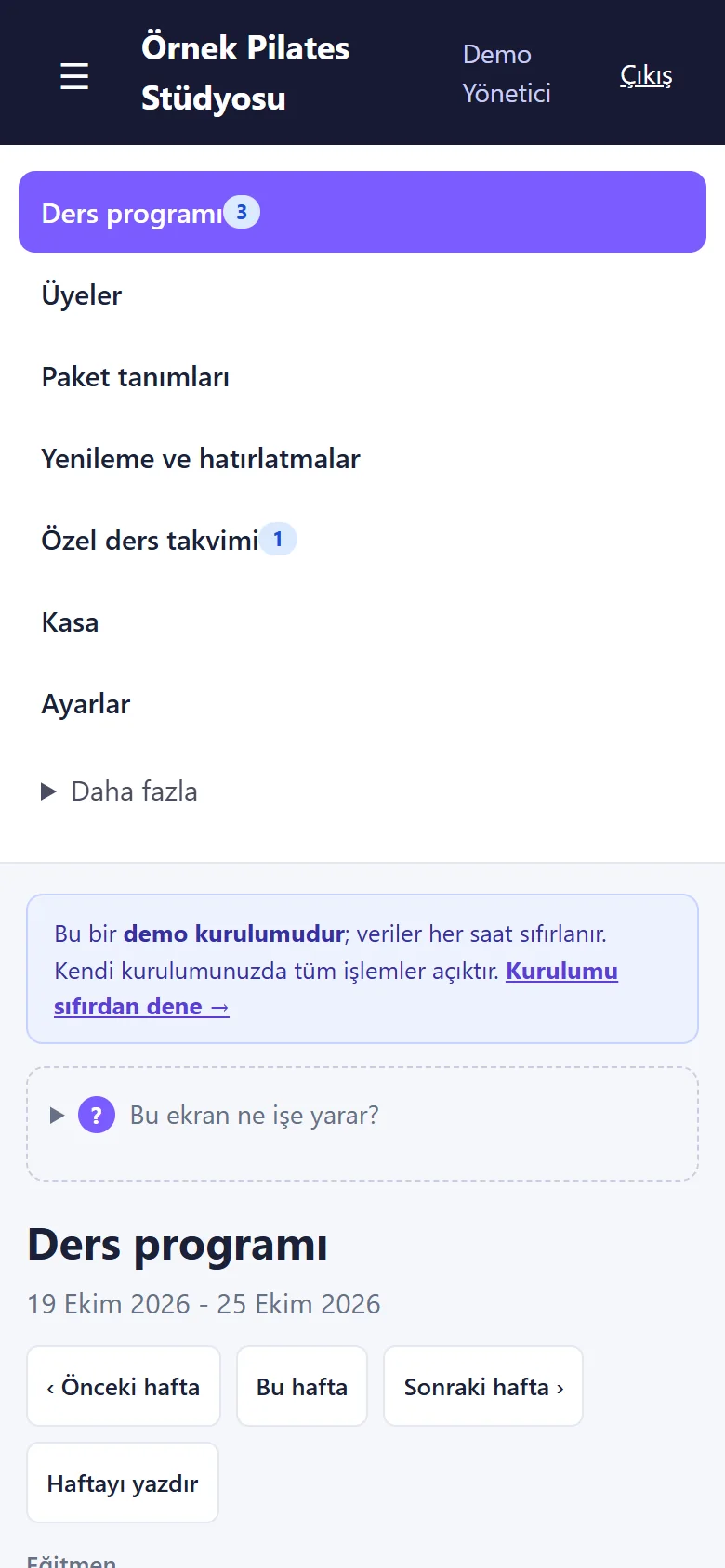
1.2.0 · 21 October 2026 The short menu
The seven daily pages come first: Ders programı, Üyeler, Paket tanımları, Yenileme ve hatırlatmalar, Özel ders takvimi, Kasa, Ayarlar. On a phone it opens with ☰.
-
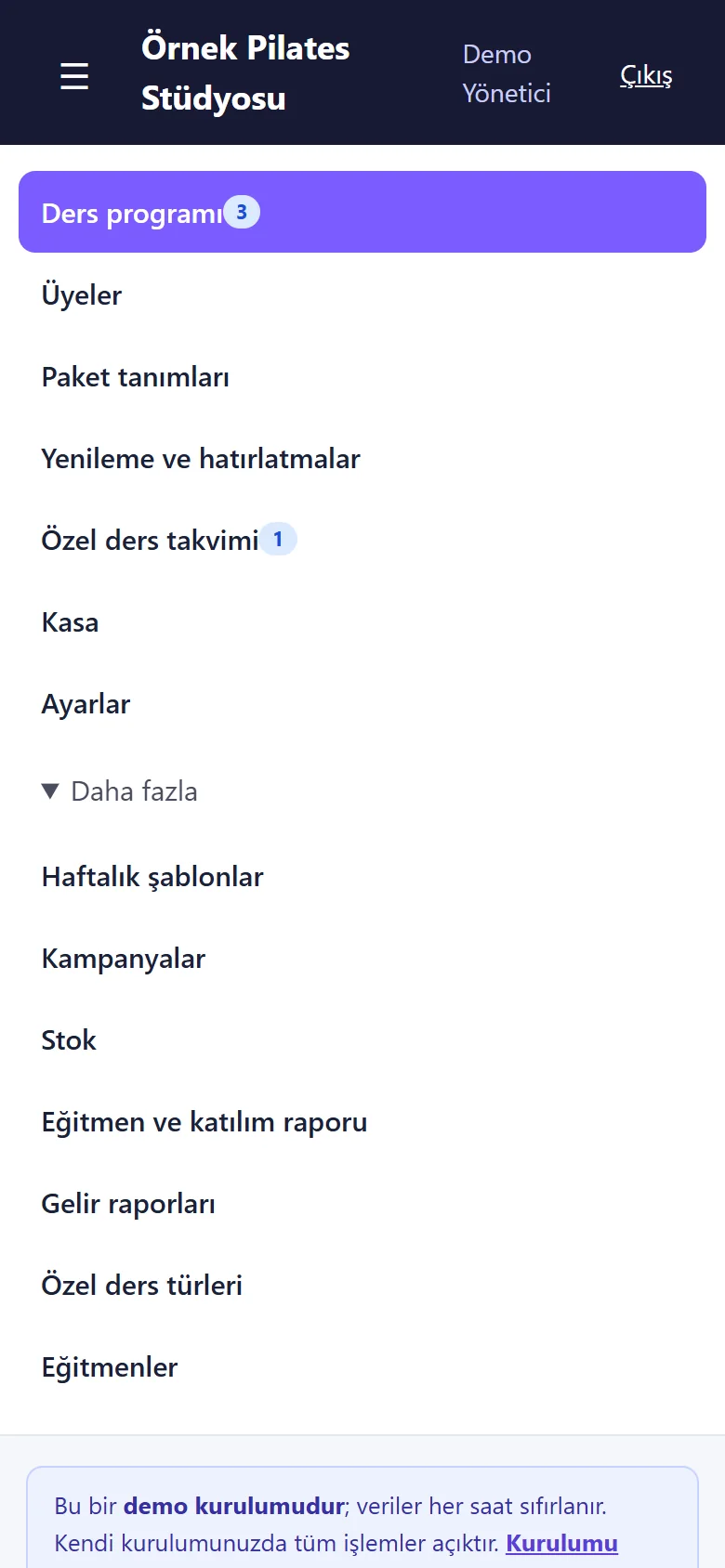
1.2.0 · 21 October 2026 “Daha fazla” (more)
Weekly templates, campaigns, stock, the instructor and attendance report, income reports, private lesson types and instructors sit under “Daha fazla”; it opens by itself when the open page is one of them.
-
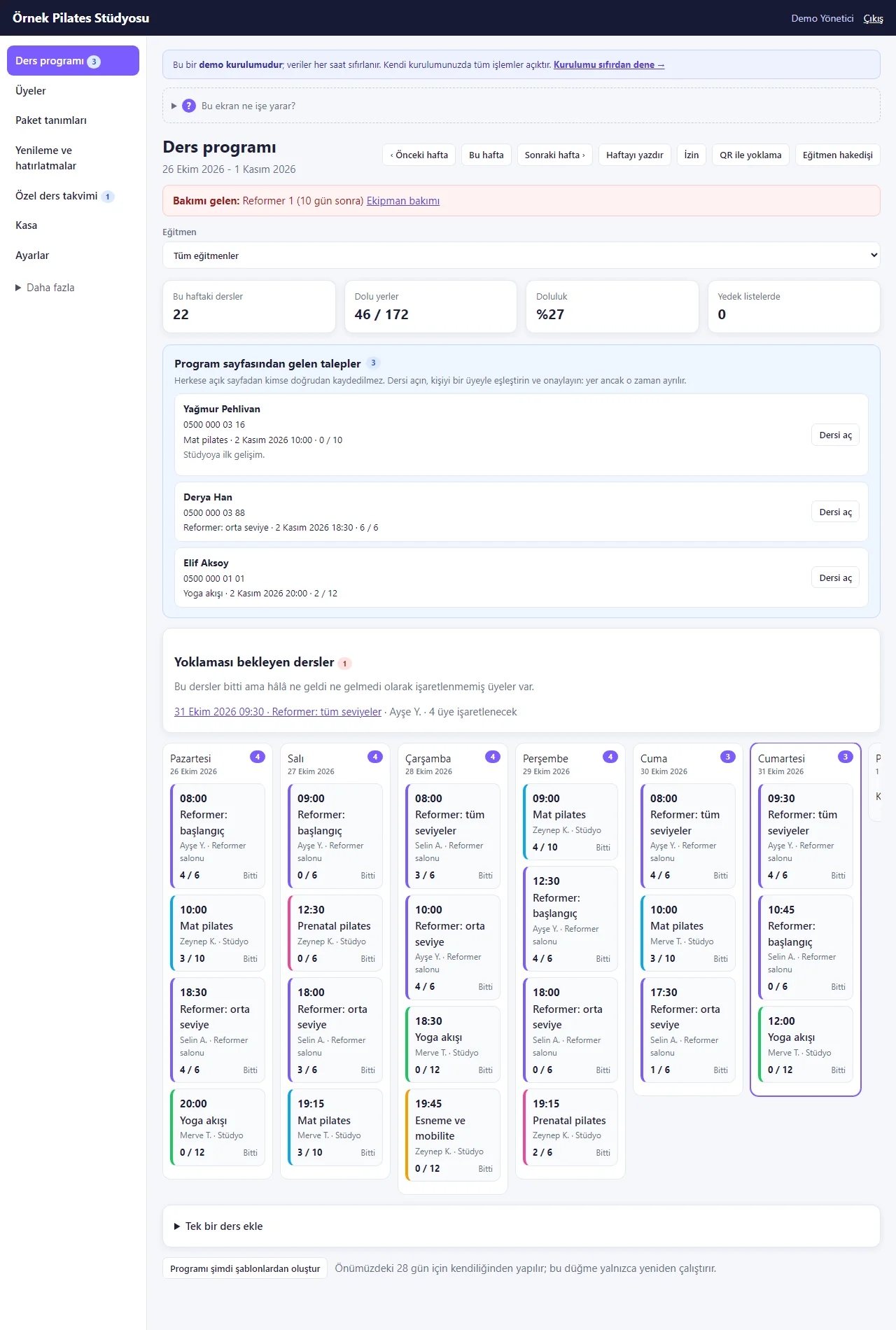
1.2.0 · 21 October 2026 The weekly schedule
Each card shows time, class, instructor and places taken; full classes, waiting lists and requests are marked. On top: tappable summary cards (the week’s classes, places taken, fill rate, waiting lists) and the “İzin” (time off), “QR ile yoklama” (attendance by QR) and “Eğitmen hakedişi” (instructor pay) buttons; a red warning when a piece of equipment is due for maintenance. Below: the requests from the programme page and the classes still waiting for attendance.
-
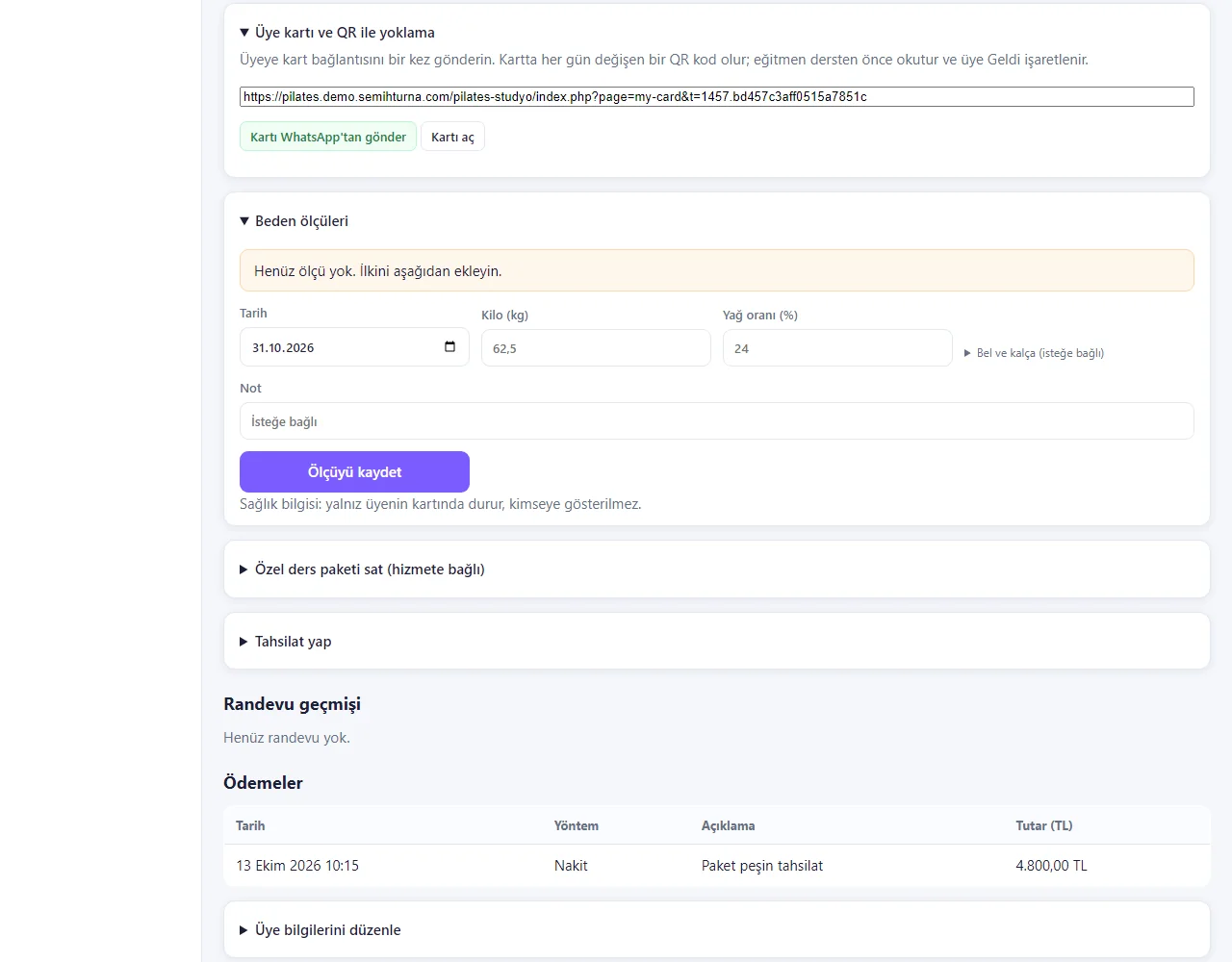
Member card: QR and body measurements
The “Üye kartı ve QR ile yoklama” (member card and QR attendance) box on the member card gives the card link: “Kartı WhatsApp’tan gönder” (send the card on WhatsApp) or “Kartı aç” (open the card). The card carries a QR code that changes every day; the instructor scans it before the class and the member is marked present. The “Beden ölçüleri” (body measurements) box below takes weight, fat percentage and, optionally, waist and hip; the measurements stay on this card only.
-
Instructor pay
A date range is chosen (this month, last month, download CSV); per instructor: classes given, people who came, from classes (an amount per class), from share (a percentage of the value of those who came) and the total. The amounts are typed on the instructor’s record; none is set in this demo, so 0,00 TL shows. The manager sees everyone, an instructor only their own row, reception cannot open it. The page pays nothing, it only works the figures out.
-
Multi-day time off and the upcoming list
Time off for an instructor is added with a first day, a last day and “Tüm gün” (all day) or the same hours every day; below it is the “Yaklaşan izin ve kapalı saatler” (upcoming time off and closed hours) list, with “Yanlış girdim, sil” (typed wrong, delete) on each row. A class or appointment already written for those hours is not cancelled, only shown with a warning; no remaining-leave counter is worked out.
-
1.2.0 · 21 October 2026 Weekly templates
Day, time, length, instructor, places and kind are entered once; the coming weeks’ classes are made by themselves. One instructor cannot have two classes at once.
-
1.2.0 · 21 October 2026 Matching and approving a request
If the number belongs to a member a hint shows; the studio approves for that member, makes a new one or declines. A number does not prove who typed it.
-
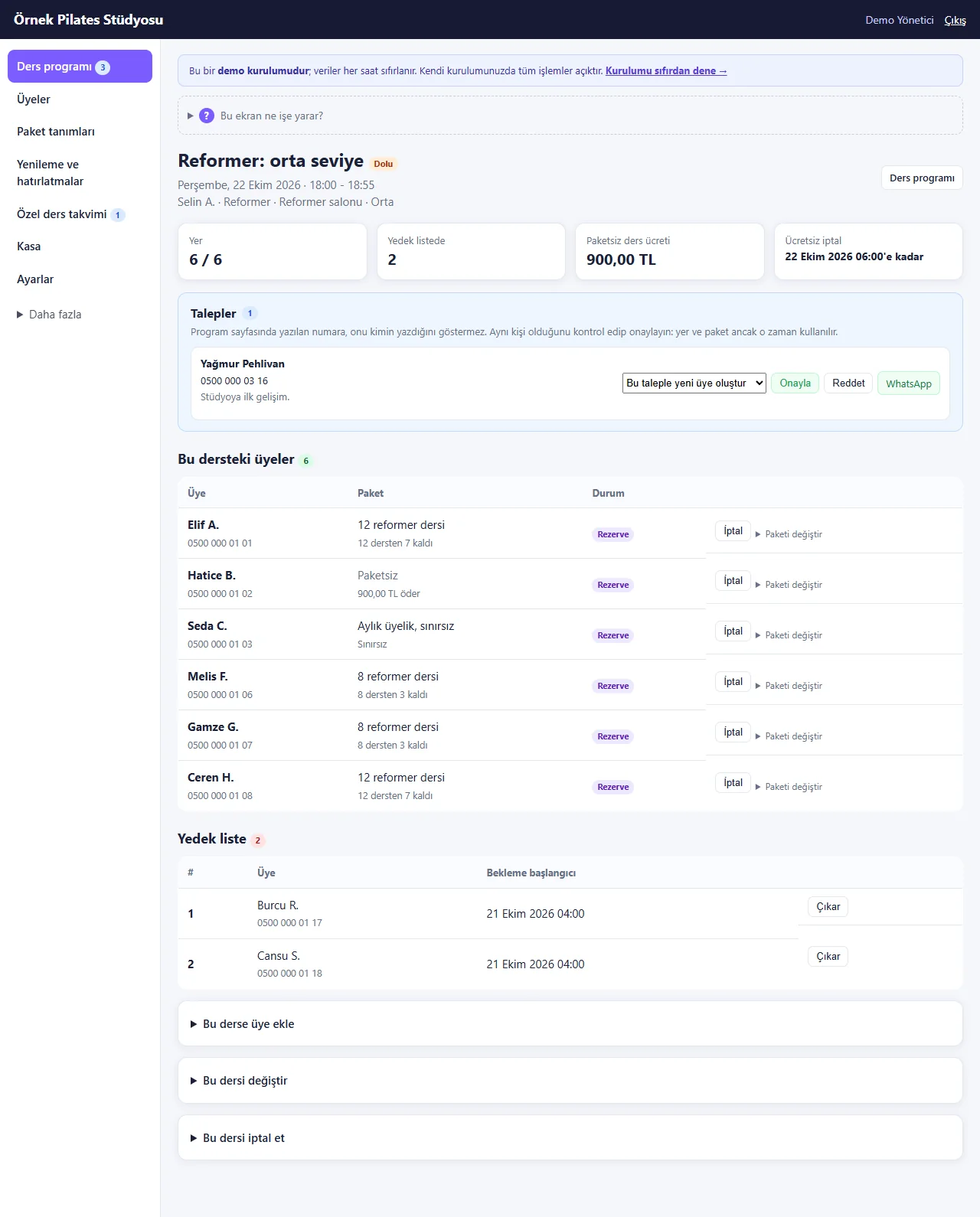
1.2.0 · 21 October 2026 A full class and its waiting list
When places run out the next members wait on the list. When a place is cancelled the first is moved up and a ready WhatsApp message appears to tell them.
-
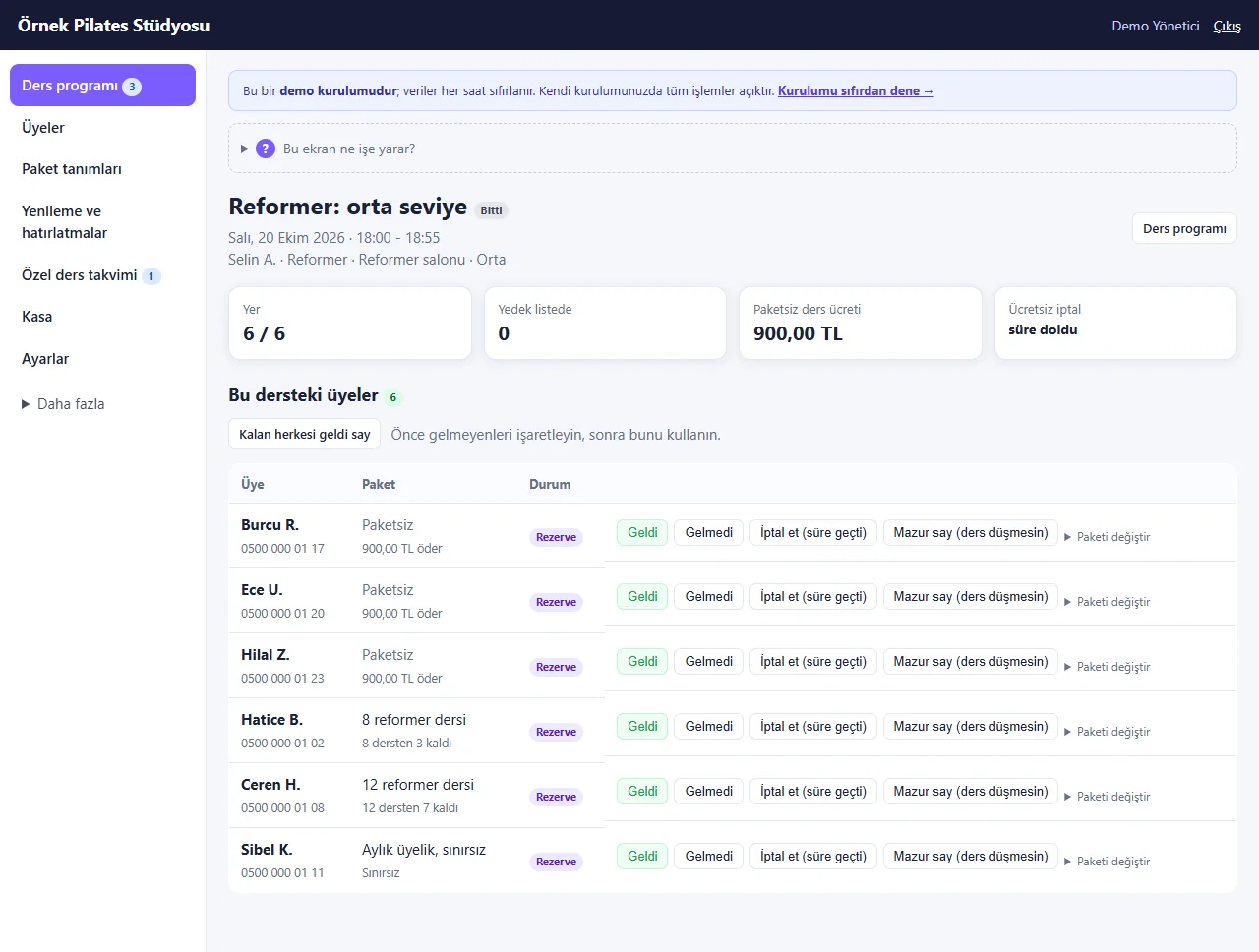
1.2.0 · 21 October 2026 Attendance
When the class is over, Came / Did not come, “İptal et (süre geçti)” (cancel, time has passed) and “Mazur say (ders düşmesin)” (excuse, do not use a class) buttons appear; “Kalan herkesi geldi say” marks everybody still booked as present. Marking present takes a class off the package, and undoing gives it back.
-
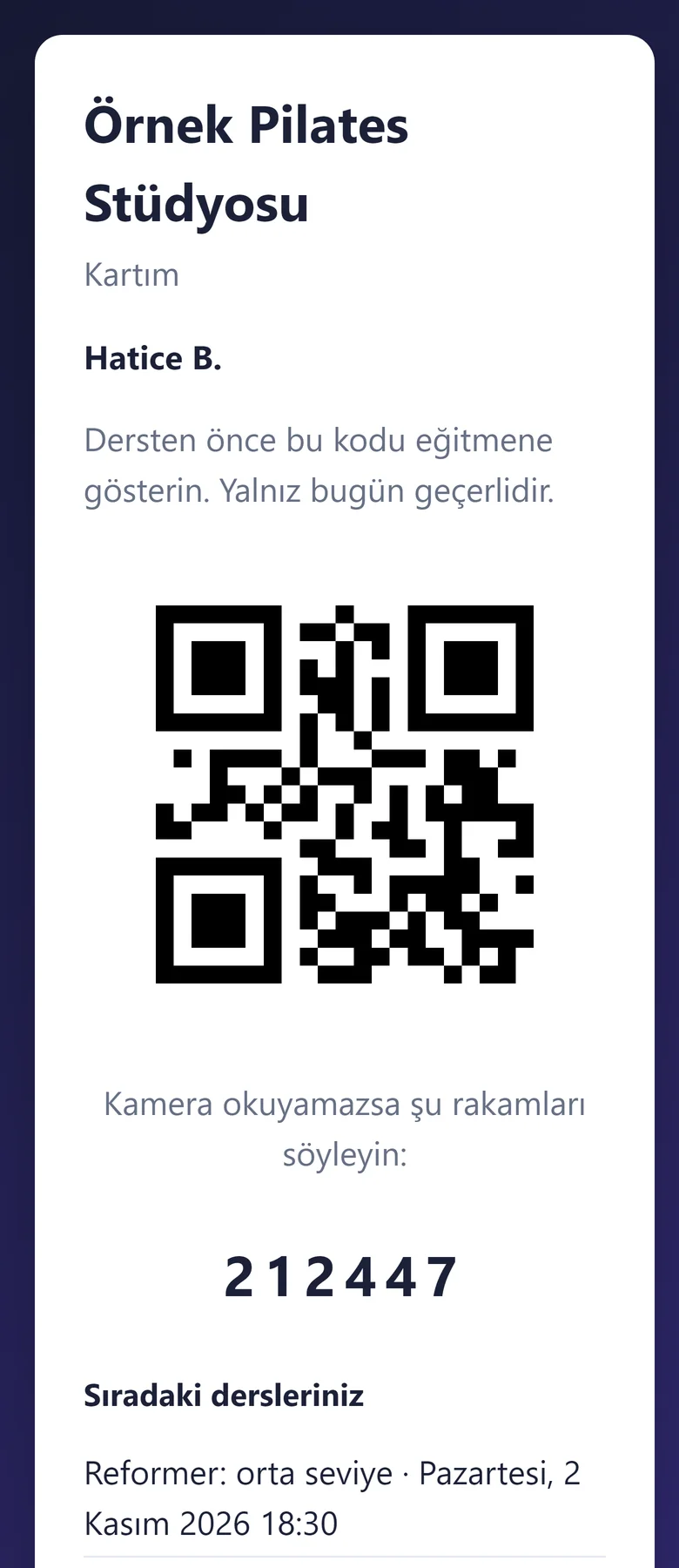
The member’s card (on the phone)
The member’s card page, with no sign-in: the studio name, the member’s name, “Dersten önce bu kodu eğitmene gösterin. Yalnız bugün geçerlidir.” (show this code to the instructor before the class; valid today only), the QR code and the six digits to read out if the camera cannot read it; the next classes below.
-
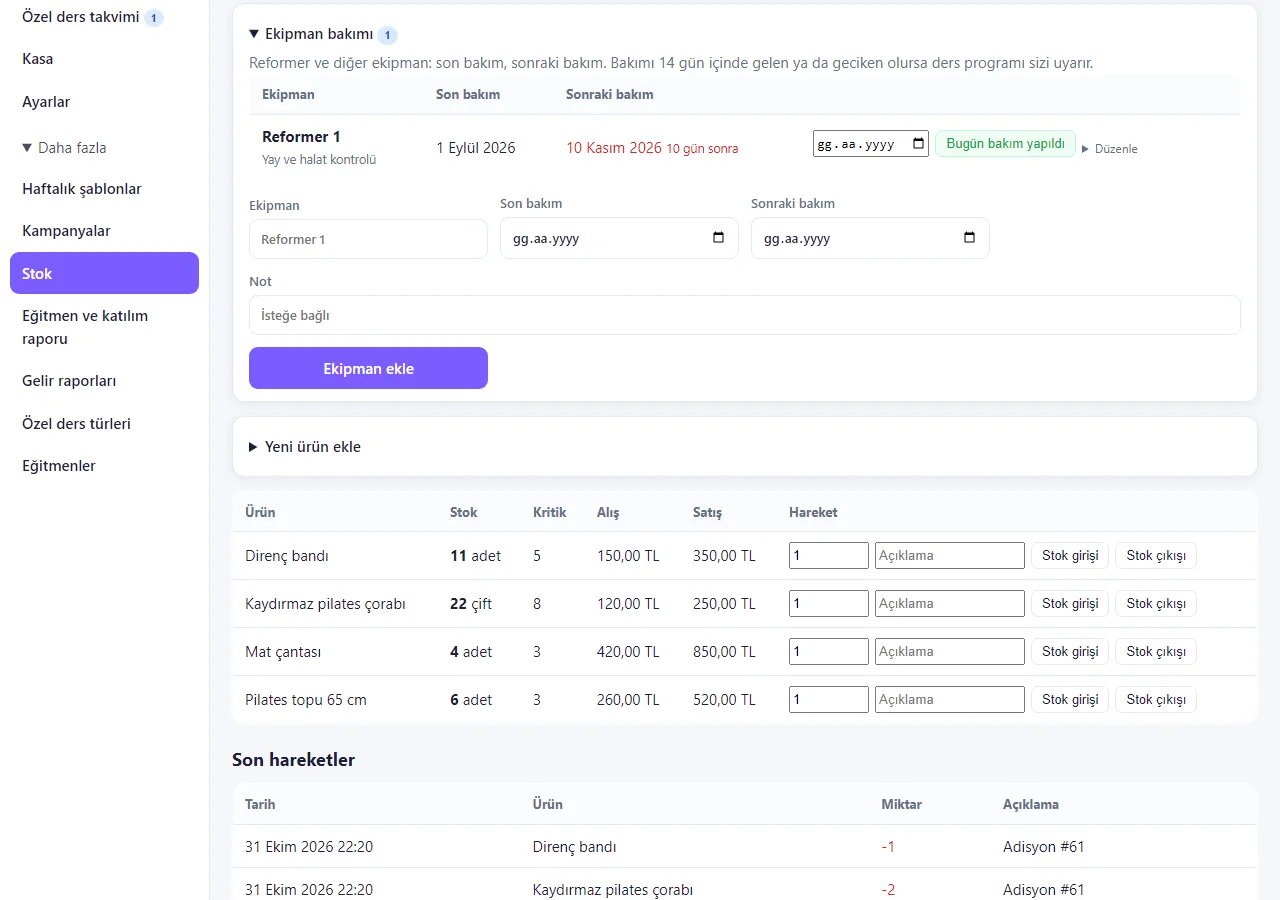
Equipment maintenance
In the “Ekipman bakımı” (equipment maintenance) box on the stock page the equipment, last service, next service and a note are entered; a warning shows at the top of the class schedule for equipment due within 14 days or overdue, and the row has a “Bugün bakım yapıldı” (serviced today) button. The “Reformer 1” row was added for the screenshot.
-
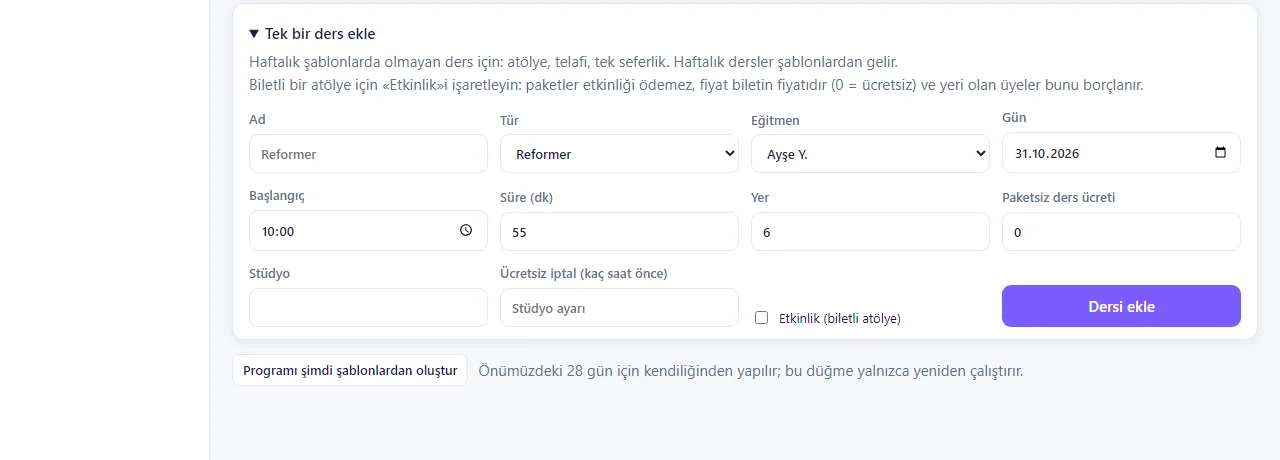
A single class and a ticketed event
The “Tek bir ders ekle” (add a single class) form is for a workshop, a make-up or a one-off class; “Ücretsiz iptal (kaç saat önce)” (free cancellation, hours before) is set for that class alone. If “Etkinlik (biletli atölye)” (event, ticketed workshop) is ticked, packages do not pay for it, the price is the ticket price (0 = free) and members who get a place are charged it.
-
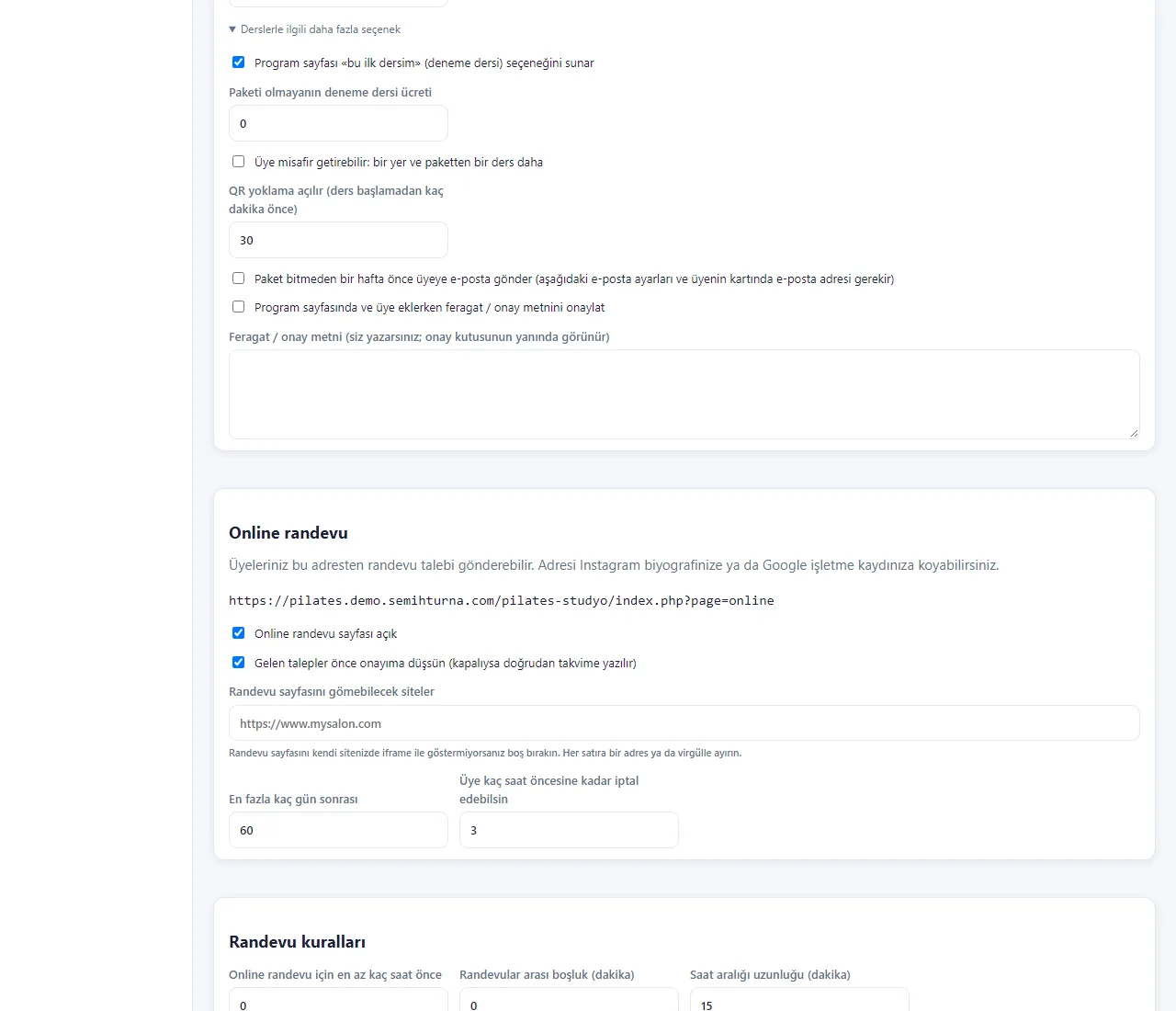
More options for classes
In this box in Settings you switch on or off the trial-class option and its fee, a member bringing a guest (one more place and one more class from the package), how many minutes before a class QR attendance opens, an e-mail to the member a week before a package ends (needs the e-mail setting and an address on the card) and a waiver or consent text.
-
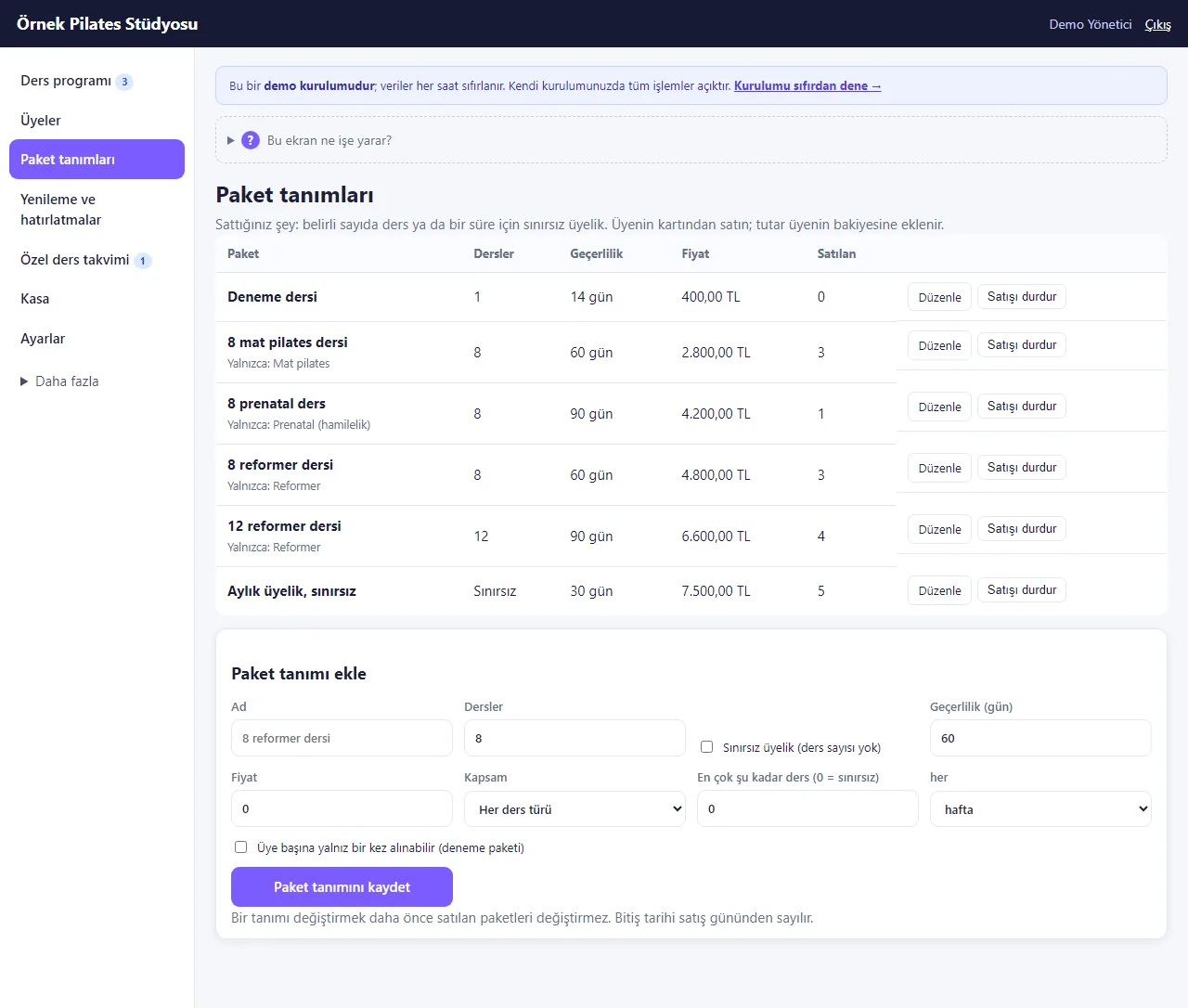
1.2.0 · 21 October 2026 Package plans
8/12 classes, a monthly unlimited membership and packages for one kind of class, with validity and price. The plan form has an “at most this many classes a week or a month” limit and a “can be bought only once per member (trial package)” option. Sold from the member’s card.
-
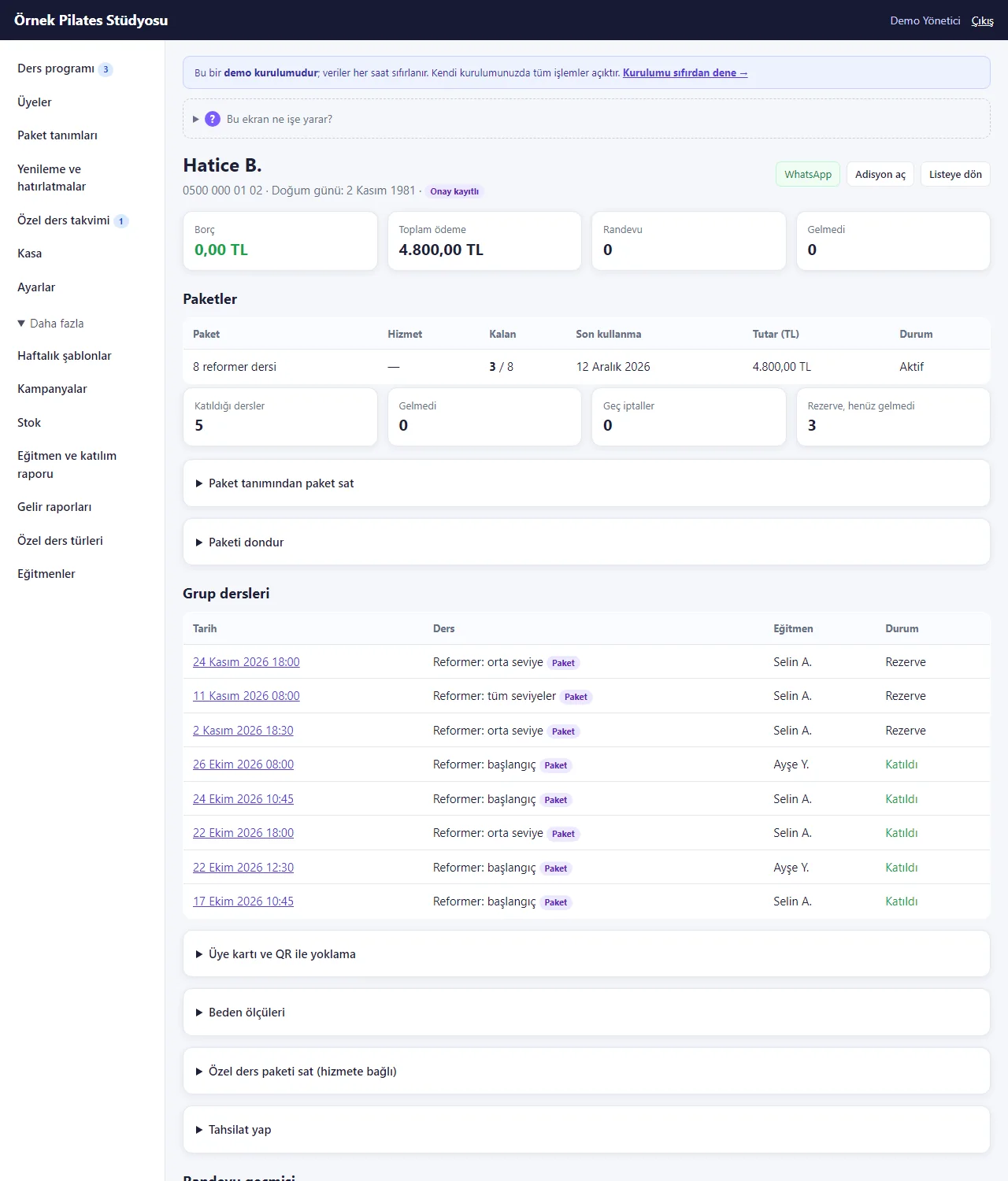
1.2.0 · 21 October 2026 Member card and package hold
The member card shows packages, the hold form, class history, the card and QR box, body measurements, collection and payments. The days on hold are added to the end date and no class is taken in them.
-
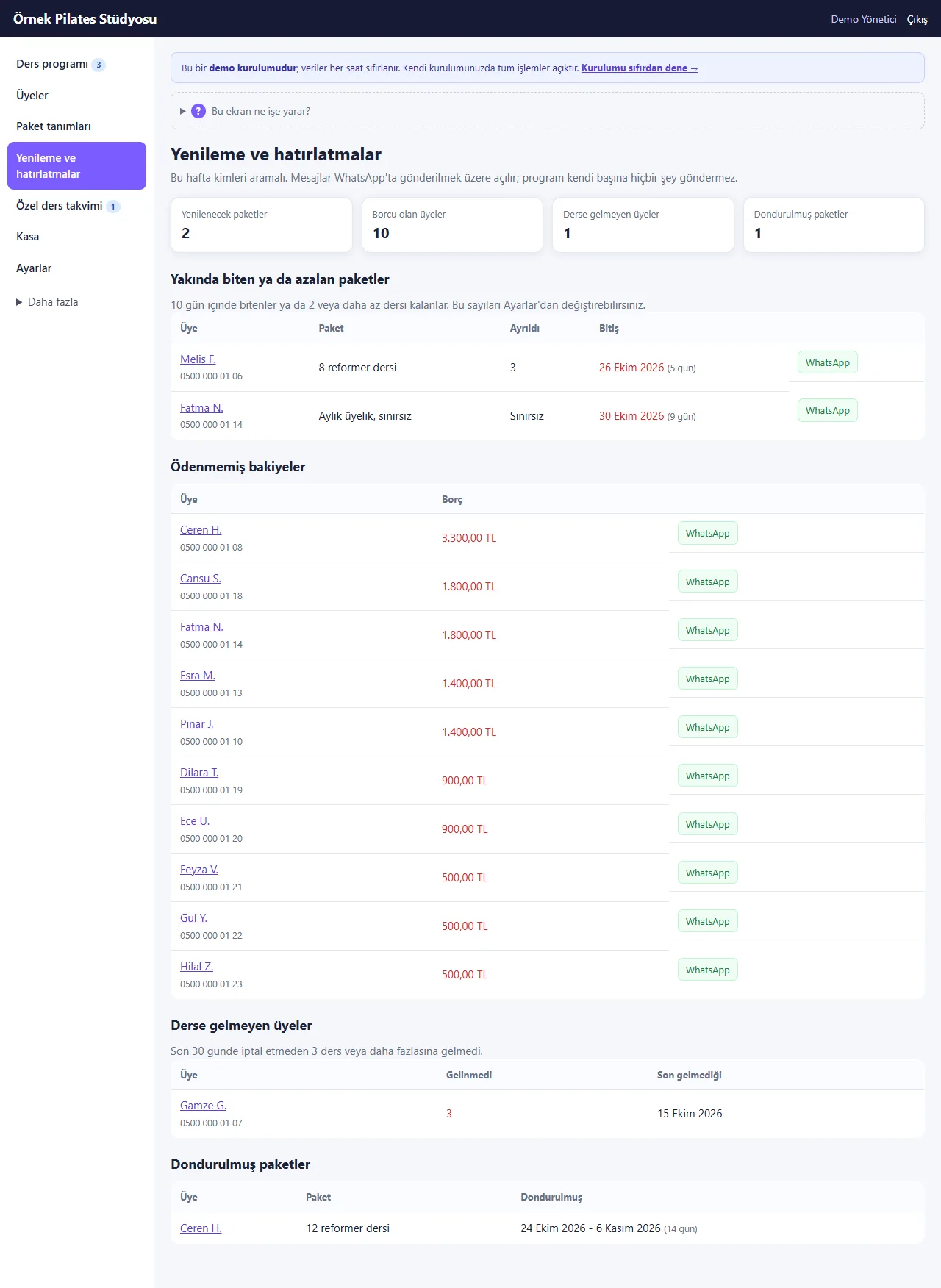
1.2.0 · 21 October 2026 Renewal and reminder lists
Packages ending soon or running low, balances owed, members who missed classes and packages on hold, each with a ready WhatsApp message.
-
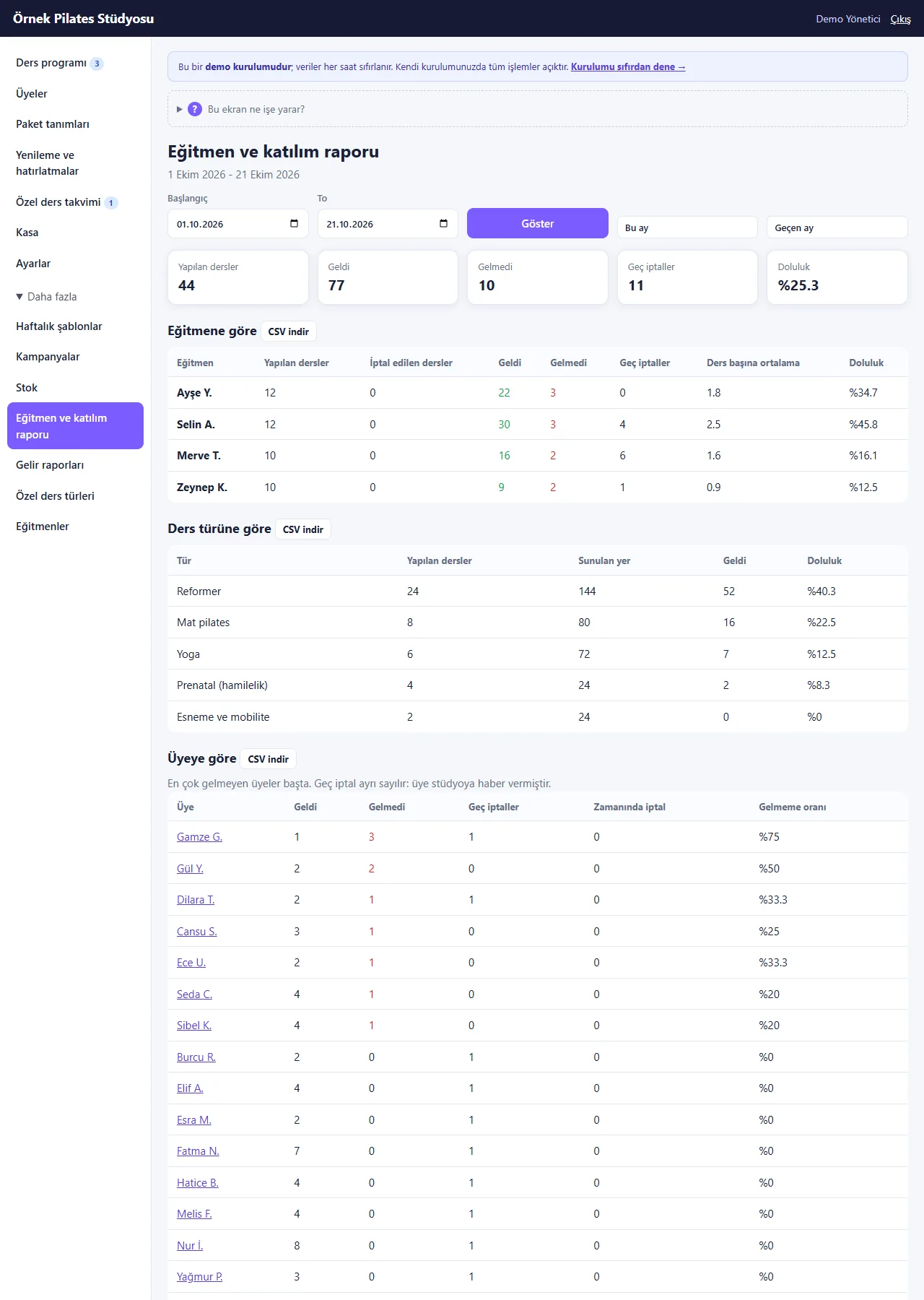
1.2.0 · 21 October 2026 Instructor and attendance report
Classes held, came, did not come, late cancellations and fill rate by instructor, kind and member for a date range, with CSV download.
-
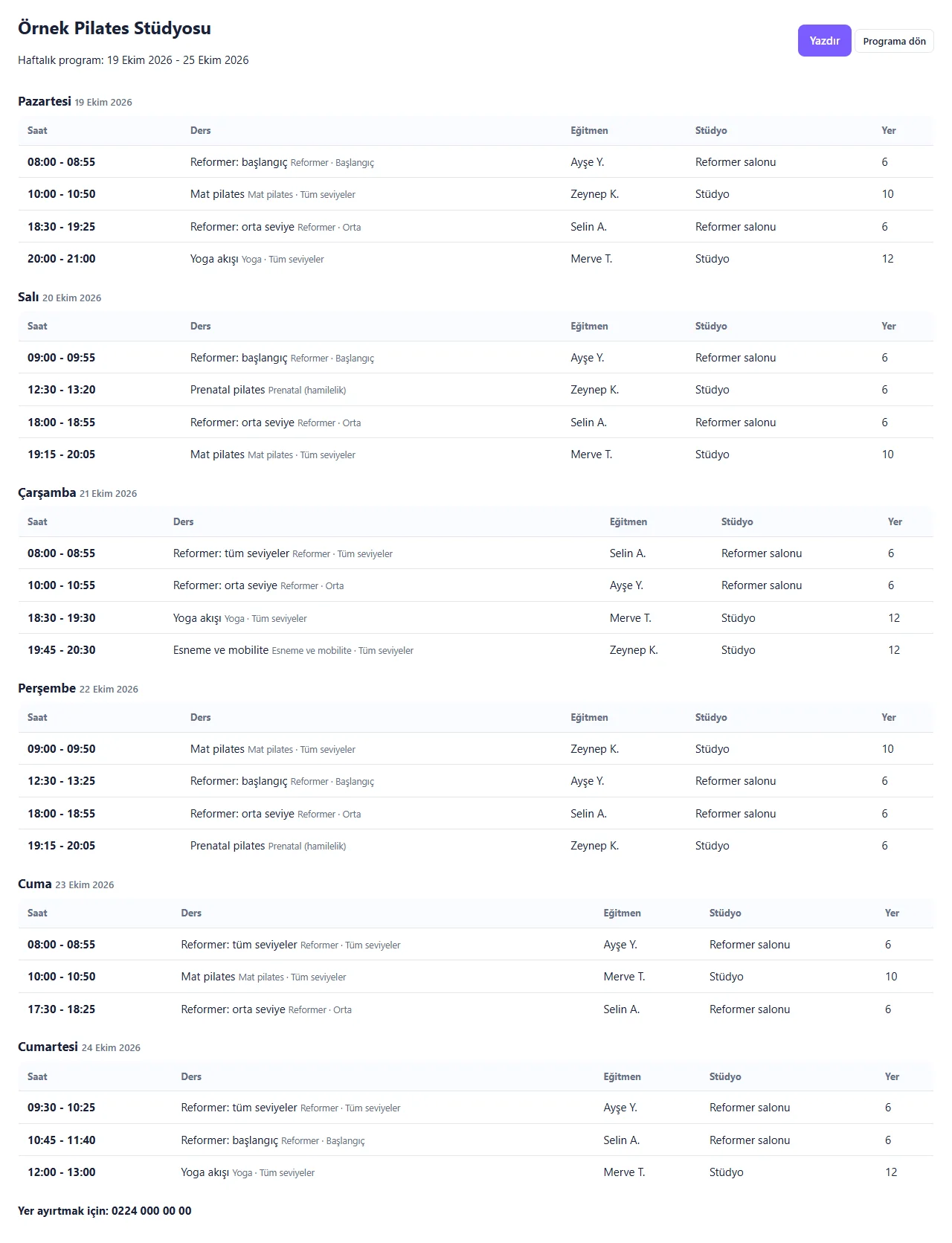
1.2.0 · 21 October 2026 Printable weekly programme
Day by day time, class, instructor, room and places; no member names or numbers.
-
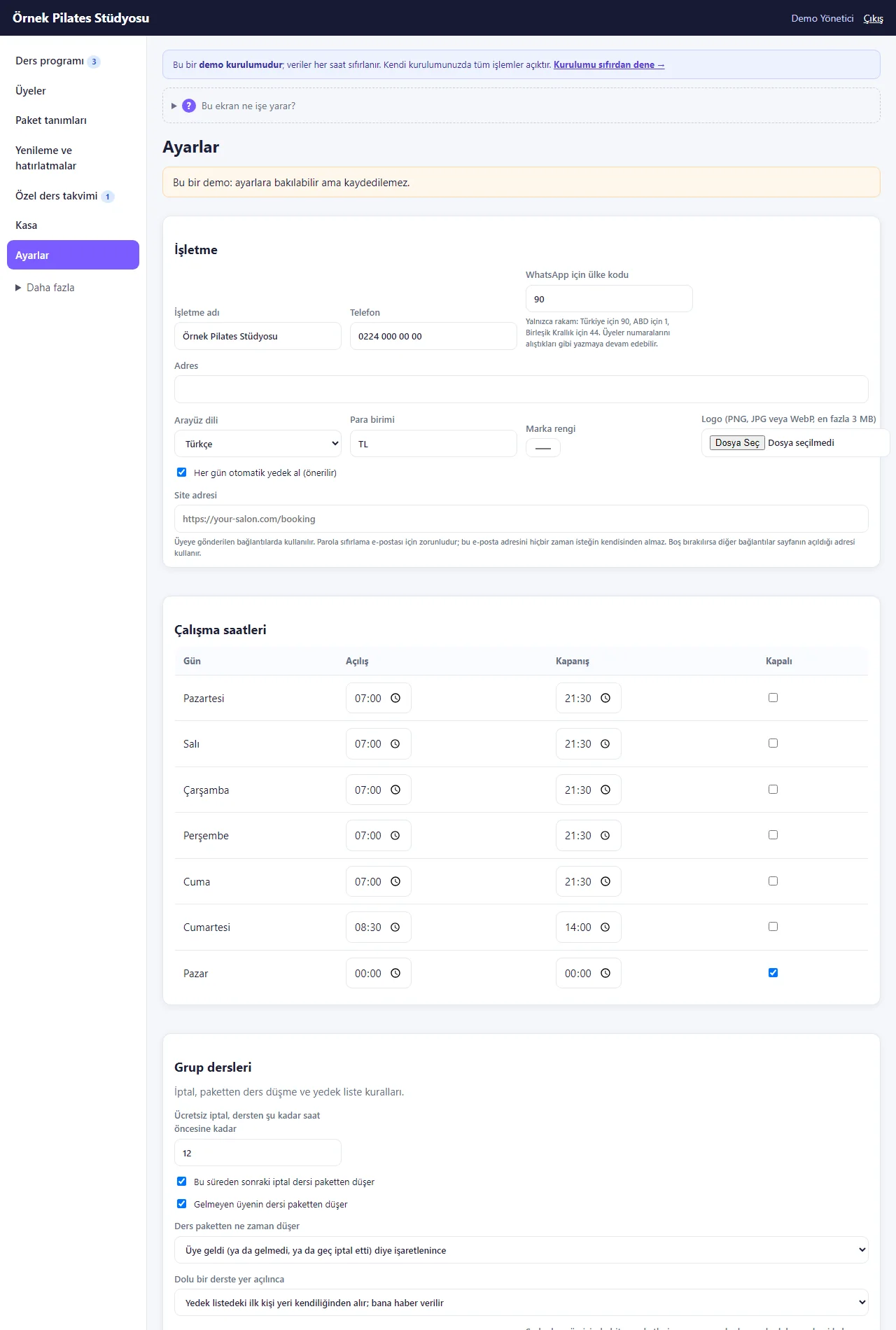
1.2.0 · 21 October 2026 Group class rules
The free-cancellation hours, whether late cancellation and no-show use up a class, when a class is taken, the waiting-list rule and the public programme page. Settings cannot be saved in the demo.
-
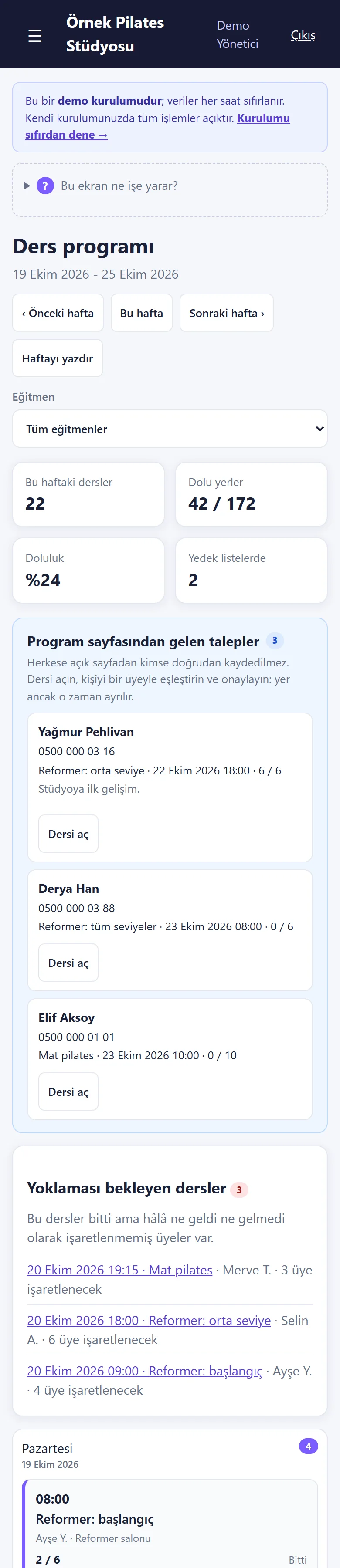
1.2.0 · 21 October 2026 The panel on a phone
The schedule in one column at phone width; the cards are touch-sized.
-
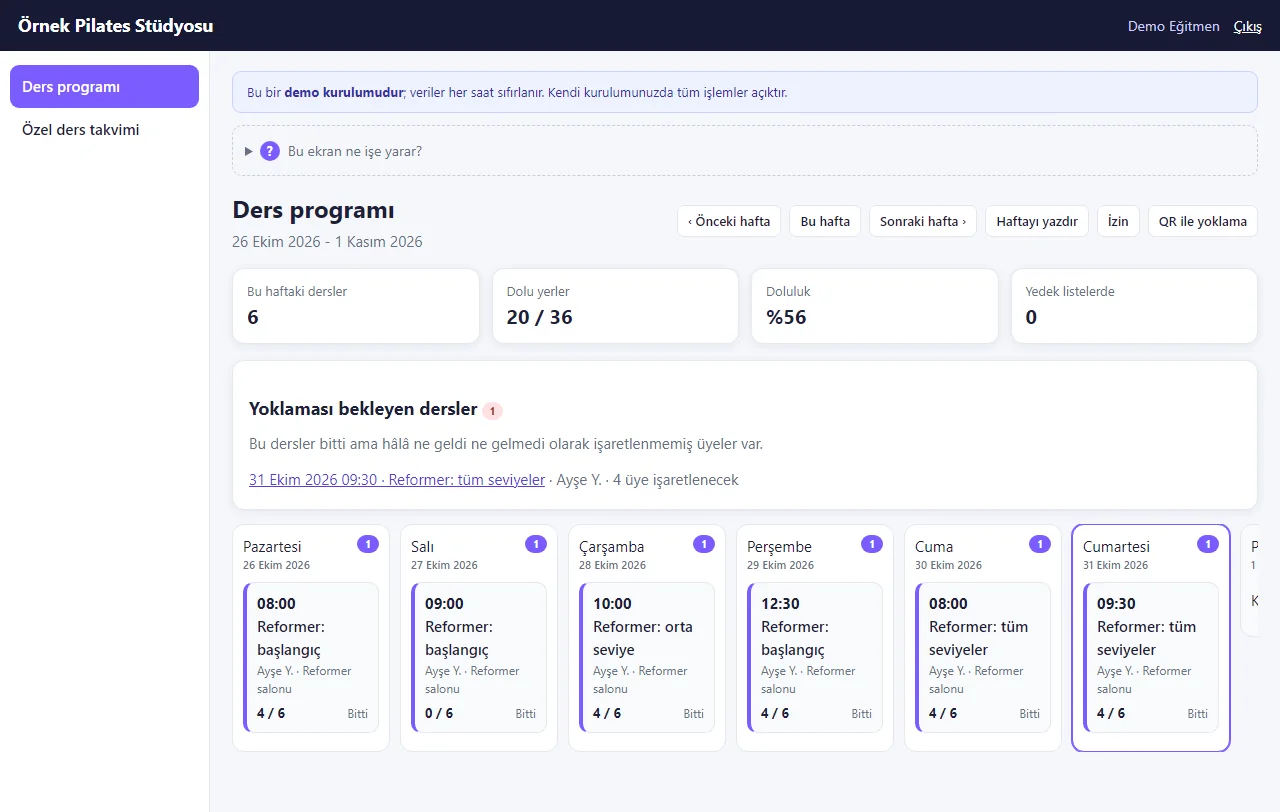
1.2.0 · 21 October 2026 Instructor login
An instructor sees only their own classes, no phone numbers, and marks attendance; “İzin” (time off) and “QR ile yoklama” (attendance by QR) buttons are on top, and the instructor pay page shows only their own row. Templates, reports, stock and settings are closed.
- What do they see at the end?
- A member’s request, once approved, takes a place in the class; in a full class they join the waiting list. A class comes off the package by attendance; reports and reminder lists are made by themselves.
- What is it good for?
- Two people are not written in for the last place, the waiting list works when somebody cancels, the classes left and the end date of a package are not forgotten, and classes and attendance per instructor are not counted by hand.
Everything that is not included, and all limits
- Not delivered to a client and not used by a real studio. The studio (“Örnek Pilates Stüdyosu”, i.e. “Sample Pilates Studio”), the people, the prices and the phone numbers starting with 0500 are sample data.
- Tried locally on SQLite and MariaDB 11.4 and every automated test passed. The live demo runs on a single DirectAdmin account with MySQL (MariaDB), with sample data, and resets every hour. Not yet tried on a customer’s own server or on a real phone; the phone-size screens come from a browser set to a phone’s size.
- A request from the public page holds no place: because a phone number does not prove who typed it, the studio matches it to a member and approves it. Members cannot sign in and book on their own.
- There is no automatic SMS or WhatsApp sending, no online payment or deposit, no multi-branch view, no door or turnstile integration and no store app; messages are prepared and the studio sends them from its own WhatsApp. Instructor pay is worked out but not paid; the studio pays it itself. An event ticket is not paid online either, the amount is written to the member’s balance.
- Notifications: an instant heads-up with no delivery guarantee; on an iPhone they work only in an app added to the home screen. Notifications and the add-to-phone button have not yet been tried on a real phone and are not shown on this page.
- The setup wizard’s progress bar shows only on a real installation (not in the demo). A trial period, a usage summary and automatic charging are not part of this product.
- There is no separate field for health information (pregnancy, injury); if it is written at all it goes in the free note, briefly and with consent. The privacy notice and the agreement have to be written for the studio and checked by a lawyer.
- Installation, hosting, support and price are agreed with the studio; none of them has been decided. Hair salons and barbershops have separate products.
- The interface in the screens is Turkish; the program can also be switched to English in its settings, but the guidance texts (setup steps, help boxes) exist only in the Turkish panel.
- QR attendance has not been tried with a real phone camera and the package-ending e-mail has not been tried on a real e-mail server; the demo sends no e-mail. No instructor pay amounts are set in the demo, so 0,00 TL shows on that screen.
- The screens were taken from version 1.4.0 of the live demo (31 October 2026); the setup, showcase and request screens were taken from 1.2.0 and are the same in this version. Settings cannot be saved in the demo. The “Reformer 1” equipment row was added to the demo for the screenshot and the demo resets every hour; the three class requests named “Elif Örnek” are test records sent to the demo while the first screens were taken and withdrawn straight away.
Delivery and sales status
How does it work?
You try the demo and tell us about your studio, and we send you a quote. We install it and we host it. The yearly price includes installation, hosting, data transfer and support.
Price
The yearly list price is 3,000 TL. Installation, one year of hosting, data transfer, bug fixes and written usage support are included. Automatic SMS and WhatsApp reminders, online card payment, an app published in the app stores (there is a web app that installs on the phone) and turnstile or door integration are not included. New feature requests and work beyond the scope are priced separately and you are told before it is done.
Possible delivery options
Other delivery options
Requirements and version history
Installation requirements
- Requirements as written in the documents: PHP 8.1 or newer, the pdo_mysql and mbstring extensions, MariaDB 10.4 or newer. The product was tried locally with PHP 8.3 and MariaDB 11.4; MariaDB 10.4 and real hosting have not been tried for this product.
Release notes
- Summarised from the version history; no version has been delivered to a client. The live demo runs version 1.4.0; 1.4.0 is still a “candidate” and is not in the delivery folder.
- 1.4.0 (31 October 2026): instructor pay (an amount per class and a percentage of those who came; the manager sees everyone, an instructor only themselves); QR attendance on the member’s card (a QR code that changes daily and a six-digit code, read by the instructor with the camera or typed); body measurements for members; equipment maintenance on the Stock page with a warning in the schedule; an “at most this many classes a week or a month” limit on a package and a once-per-member package; a free-cancellation time per class; bringing a guest; a waiver or consent text; ticketed events and workshops; an e-mail to the member a week before a package ends (when the e-mail setting is on; not sent in the demo). The new options start switched off in Settings.
- 1.3.0 (29 October 2026): multi-day instructor time off (a first day, a last day, all day or the same hours every day) and an “Yaklaşan izin ve kapalı saatler” (upcoming time off and closed hours) list; an instructor on leave has their classes closed in the schedule; the summary cards in the class schedule can be tapped.
- 1.2.5 (28 October 2026): one-tap role screens from the product page: the demo sign-in link opens the manager, reception or instructor screen directly (demo only).
- 1.2.4 (28 October 2026): “Takvime ekle” (add to calendar) on the member’s appointment and class pages: an “Add to Google Calendar” link and “Dosya olarak indir (.ics)” (download the file; a reminder one hour before; no phone number or note is carried and nothing is sent to the studio). On the class page it shows only for a confirmed, upcoming, not cancelled place; not for a request or a waiting-list entry. No new permission, data or schema change.
- 1.2.3 (26 October 2026): what a role may not use is no longer shown to it: an instructor does not see the discount form on an appointment card; with no instructor or stock item yet, reception sees a “the manager adds them” note instead of a link to a page it may not open; the way-out buttons under an error message lead only to pages the role can open. The server still refuses an address typed by hand.
- 1.2.2 (25 October 2026): the two package sale forms on the member card now have different names (“Paket tanımından paket sat” – sell from a package plan – and “Özel ders paketi sat (hizmete bağlı)” – sell a private-lesson package tied to a service); a package that is on hold shows “Dondurulmuş · end date” (on hold · end date) in its row; the Excel/CSV page has one help box; .md files such as CHANGELOG.md and README.md are no longer served over the web.
- 1.2.1 (21 October 2026): “Excel/CSV’den üye al” (add members from Excel/CSV) on the Members page: a list from a notebook or an old program is uploaded as a file or pasted from Excel; columns are recognised by their header, the preview shows new, already registered and wrong rows, an unwanted row is left out with “Alma” (do not take) and the last import can be taken back. Nobody is messaged; no package, class right or balance is written.
- 1.2.0 (20 October 2026): a six-step setup wizard (a ready weekly programme and package list), a “Bu ekran ne işe yarar?” (what is this screen for?) box on every screen, a short menu and “Daha fazla” (more), buttons that fix an error, sending the programme address to members on WhatsApp, as a scannable code and as a poster, a setup page without sign-in for adding the panel to a phone, a free instant notification (Web Push) on the phone for a new class request and an e-mail to the owner, landing on the member’s own request page after a single request, and in the demo “Boş siteyle yeniden başla” (start with an empty site) / “Örnek veriyi geri yükle” (restore the sample data).
- 1.0.6 (18 October 2026): password-free “… olarak gir” (sign in as …) buttons for each role on the demo sign-in page.
- 1.0.5 (12 October 2026): a “Stüdyoya WhatsApp ile haber ver” (tell the studio on WhatsApp) button on the member’s request page.
- 1.0.3 and 1.0.4 (11 and 12 October 2026): security fixes to the public programme request and the setup wizard; a shared-demo and personal-data notice on the public form.
- 1.0.0 (10 October 2026): first version; on the salon core (1.4.0): weekly class templates, places and a waiting list, class packages, a free-cancellation rule, package holds, attendance, instructor reports, reminder lists, a printable programme and a public programme page.
Decisions not made yet
- Rights to use, modify, transfer and receive the source code: to be set in a written agreement; not decided yet.
- Whose name the hosting and domain are opened in, and where the software is installed, have not been decided yet.
There is no cart, customer account or online payment on this site for now. Reach out by phone, WhatsApp or the form; in a first conversation your need and the software’s fit are reviewed. The form does not create an order, a contract or a payment.