Residential complexes and apartmentsDemo with sample data
Residential Dues Management: screen-by-screen guide
The full version of the short description on the product page: every feature, how each screen is used step by step, all limits and the delivery details.
All features
The flows below were tried on the live demo and on a local sample installation. Automated tests also verified that the same statement row cannot create a second payment. The “Boş siteyle yeniden başla” (start with an empty site) button on the demo’s setup page was not tried for this page; the demo never sends notifications, so they do not appear in the screens (their limits are under “Limits”).
- Blocks, flats, owners and tenants; flat numbers are filled in a table of ready rows by typing only a name (and a phone if wanted), by pasting a list from WhatsApp or Excel, or by an Excel/CSV file; a preview is shown before saving (columns are recognised by their header, an unwanted row is left out, the last import can be taken back); carried-forward balances
- Monthly dues: the same amount for every flat or a simple calculator from the expenses (equal, by square metres or by land share); where there is central heating, the heating charge is written as a separate line. For a charge you only pick the month, the preview shows the total and nothing is written before you approve; an optional “monthly automatic charge” setting exists (off by default)
- Cash or bank-transfer payments entered by hand (the amount comes ready as the debt, the method starts as the last one used), bulk collection (overdue flats in a table, tick who paid, a separate receipt for each flat), approval of the resident’s payment notice, receipts, partial payments, expenses and transfers between accounts; on the debtors page a tap on a row opens “Tahsilat gir” (record a payment), “WhatsApp’tan hatırlat” (remind on WhatsApp) and “Hesabı aç” (open the account)
- Statement file (CSV/Excel) upload with an explained matching suggestion by flat payment code, sender and amount, posted after the manager’s approval
- A step-by-step setup wizard with a progress bar (“Kurulum %50 · Sıradaki: …”, setup 50% · next): when one step is done the next opens; a closed “Bu ekran ne işe yarar?” (what is this screen for?) box on each panel screen; faulty rows and empty screens say the next job in a sentence
- Telling residents: a ready WhatsApp message, copy the link and an A4 poster with a scannable code for the door; the resident portal has a balance card, annual summary, monthly chart, statement and payment details; payment notices and requests are worded from the resident’s side (“Yönetim kontrol ediyor”, “Ödemeniz alındı”, “Aldık”, “Tamamlandı”)
- Plain screen (on in a new installation): big buttons on the home screen: “Ödeme aldım” (I took a payment), “Kimler borçlu?” (who owes?), “Bu ayın aidatını yaz” (write this month’s dues), “Kim ödedi?” (who paid?), “Duyuru yaz” (write an announcement), “Gider yaz” (write an expense); rarer pages under “Diğer işlemler” (other tasks); larger type. You can switch to the detailed screen
- Free instant notification (Web Push): to the manager and staff for a new payment notice and a new request, to the resident for “ödemeniz alındı” (your payment was received), an announcement and a request update; it carries no name, phone number or balance. There is an add-to-phone button and a setup page without sign-in; the management icon opens the management sign-in and the resident icon the resident page. It is not an SMS or a WhatsApp message, so there is no message fee
- Şeffaf Kasa (open ledger, off by default): when management switches it on, a monthly summary that anyone with the secret-key address opens without signing in; what was collected, spending by expense type, the cash left and a “X / Y flats paid” bar. No names, phones, debtor list or expense supplier are shown; each expense can be hidden from the list, the address can be renewed and the page is closed to search engines
- Building directory (firms such as lift, cleaning and security, plus the caretaker and building staff; a resident taps a number to call) and building rules (management writes plain text, residents read it)
- “Kime ulaştı?” (who was reached) under an announcement: how many flats it was opened to, how many of them have a resident portal account, how many opened it in the portal and a flat-by-flat list; it says plainly that flats without a portal account are not reached through the portal. A PDF (up to 5 MB) can be attached to a request next to a photo
- Staff and residents see only the pages, buttons and links they are allowed to use; no path to a page they cannot open is shown (the server still refuses an address typed by hand)
- Maintenance requests, announcements with ready texts, a debtor list (“everybody with a balance owed” or only the overdue), income and expense reports, backups and restore
- On the live demo there are password-free “… olarak gir” (sign in as …) buttons for manager, staff and resident
Screen by screen: how it is used
The app interface in these real screenshots is Turkish. The English explanations below translate the relevant controls; the app itself has no English interface.
- Who uses it?
- The residential manager, staff and residents checking their own flat account.
- Where do they start?
- Management signs in to the demo with a password-free button; on a new installation the setup wizard shows the next step: it records blocks and flats, owners and tenants, sets the monthly dues, makes the charge and sends residents the link. Residents sign in on their phones.
What do they do on screen? Step by step
-
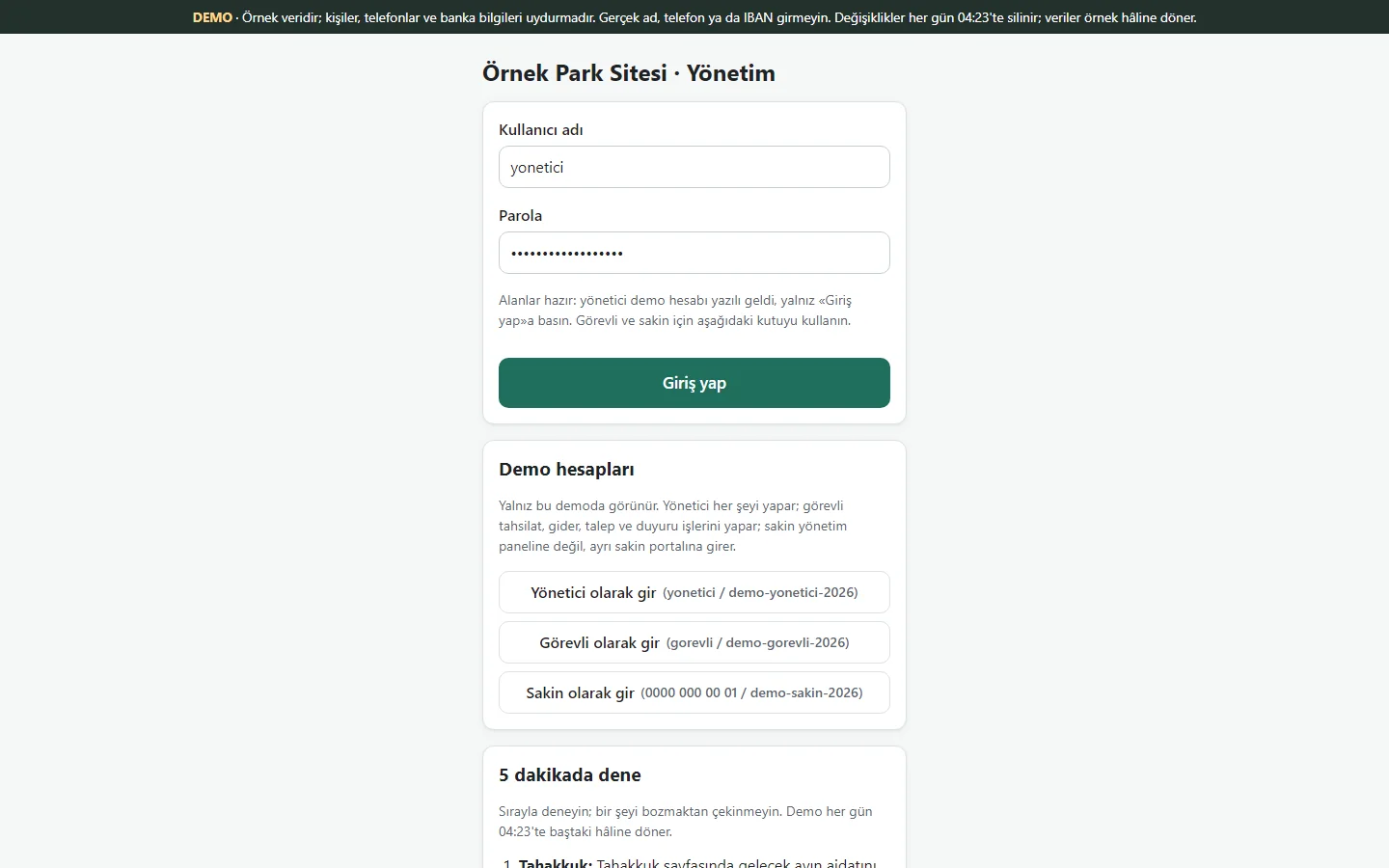
1.1.32 · 26 October 2026 Demo sign-in page
A demo notice, the manager’s fields already filled and a password-free “… olarak gir” (sign in as …) button for each role (manager, staff, resident); shown only in the demo, never on a real installation.
- On screen (Turkish interface)
- “Yönetici olarak gir” – sign in as manager
- “Demo hesapları” – demo accounts
-
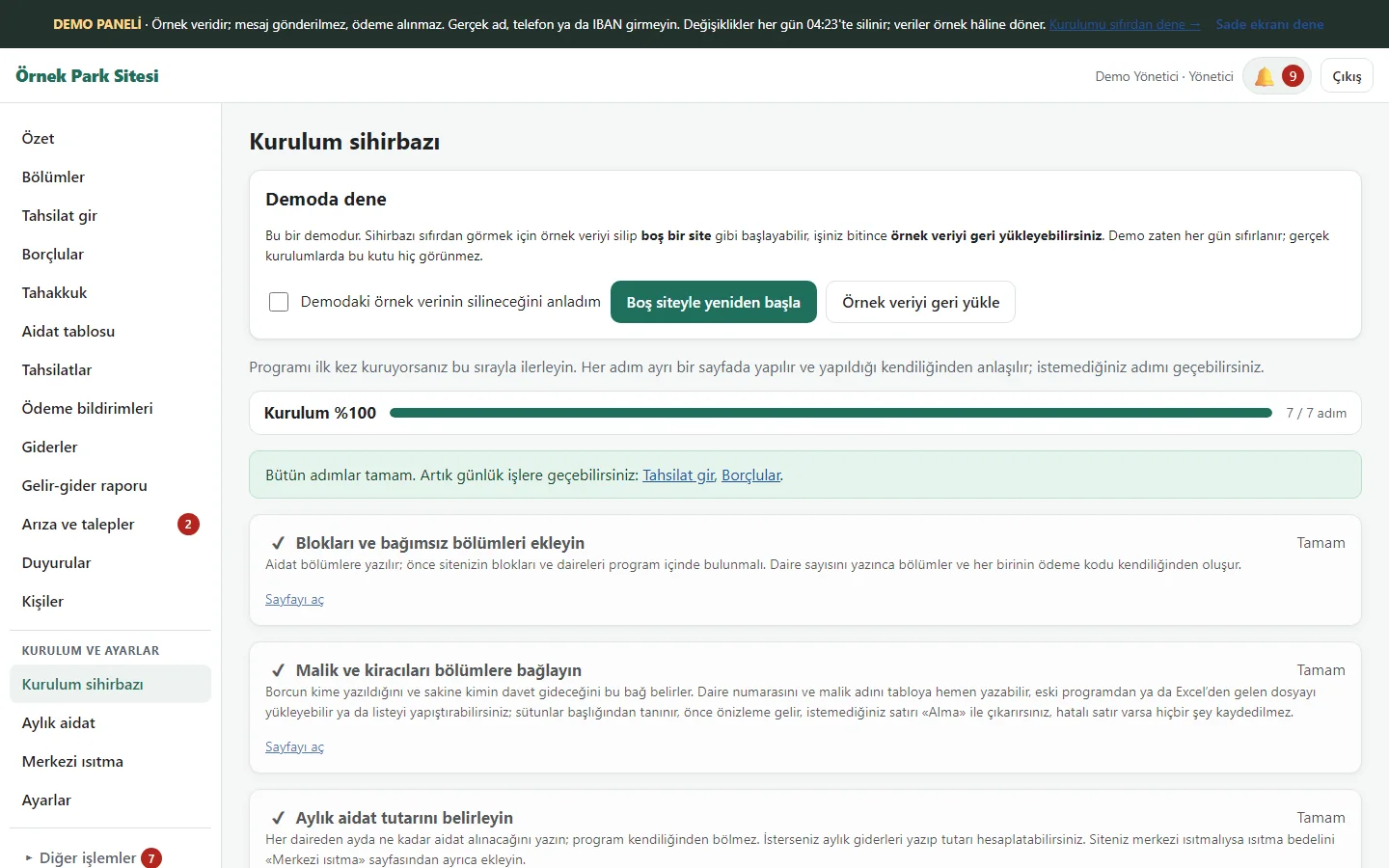
1.1.32 · 26 October 2026 Setup wizard
Seven steps: blocks and flats, owners and tenants, monthly dues, central heating, bank account, first charge, resident invitation. A finished step reads “Tamam” (done), and each step’s card opens that step’s page. In the demo there are “Boş siteyle yeniden başla” (start with an empty site) and “Örnek veriyi geri yükle” (restore the sample data) buttons on top (demo only; not tried on this page).
- On screen (Turkish interface)
- “Kurulum sihirbazı” – setup wizard
- “Tamam” – done
- “Sayfayı aç” – open the page
-
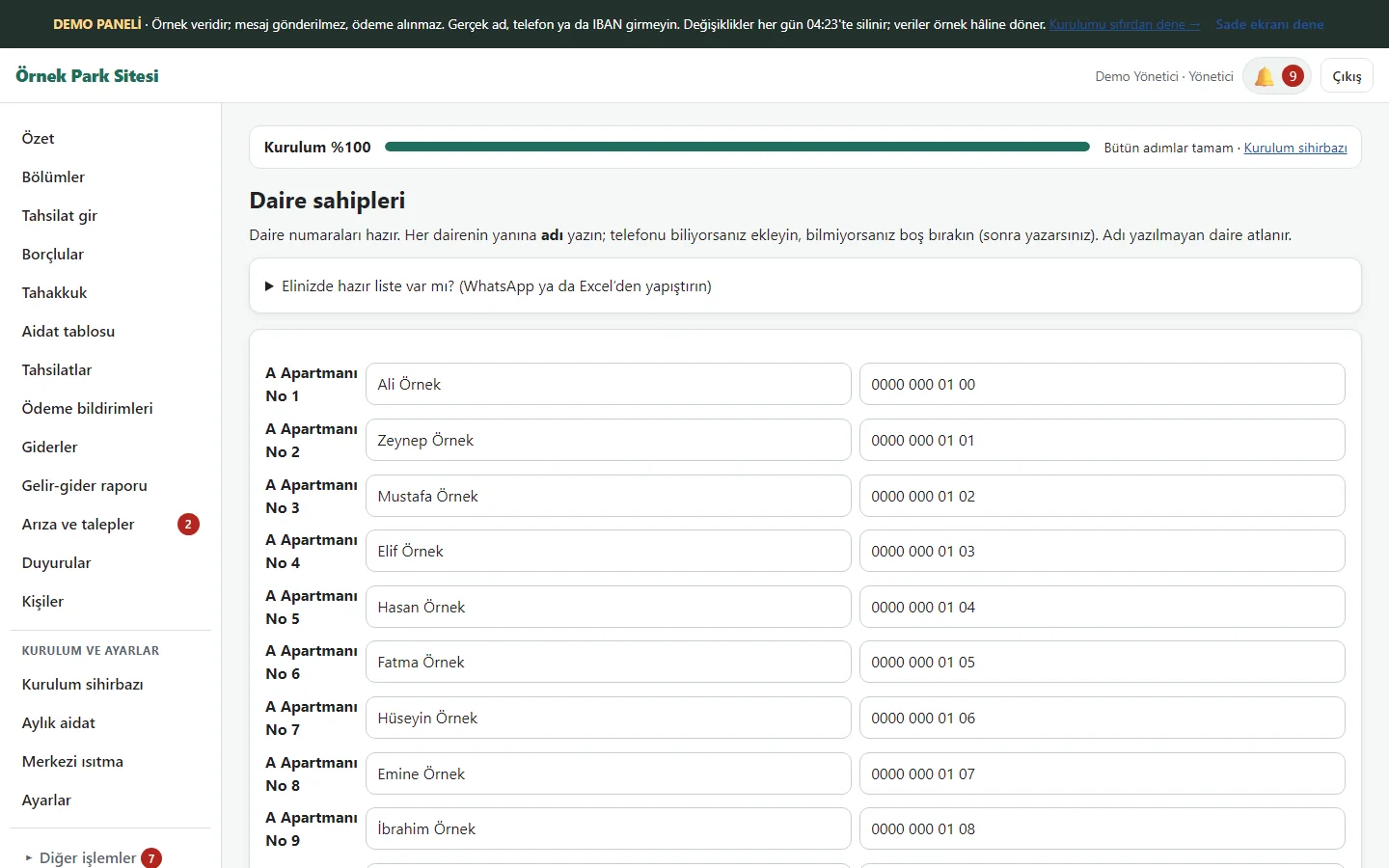
1.1.32 · 26 October 2026 Flat owners: ready rows
The flat numbers come as ready rows; only a name (and a phone if wanted) is typed. A list copied from WhatsApp or Excel settles into the rows when pasted; an Excel/CSV file from an old program can be uploaded as well (columns are recognised by their header). In the preview an unwanted row is left out with “Alma” (do not take), saving happens after the preview, and the last import can be taken back if it was wrong.
- On screen (Turkish interface)
- “Daire sahipleri” – flat owners
- “Elinizde hazır liste var mı?” – do you have a ready list?
-
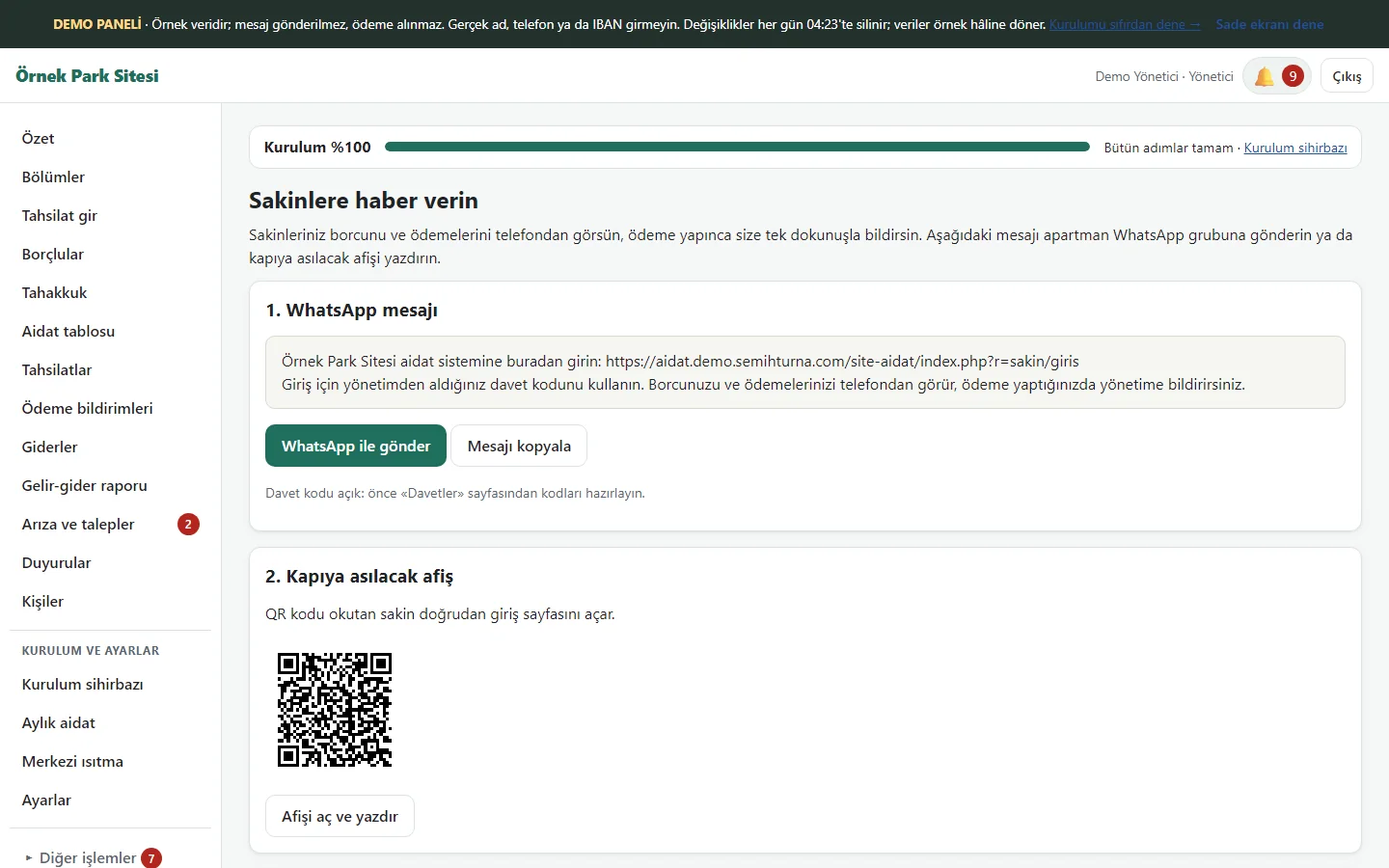
1.1.32 · 26 October 2026 Tell the residents
A ready WhatsApp message (send in one tap or copy) and an A4 poster with a scannable code for the door. A resident who scans the code opens the sign-in page and sees their own balance on the phone.
- On screen (Turkish interface)
- “Sakinlere haber verin” – tell the residents
- “WhatsApp ile gönder” – send on WhatsApp
- “Afişi aç ve yazdır” – open and print the poster
-
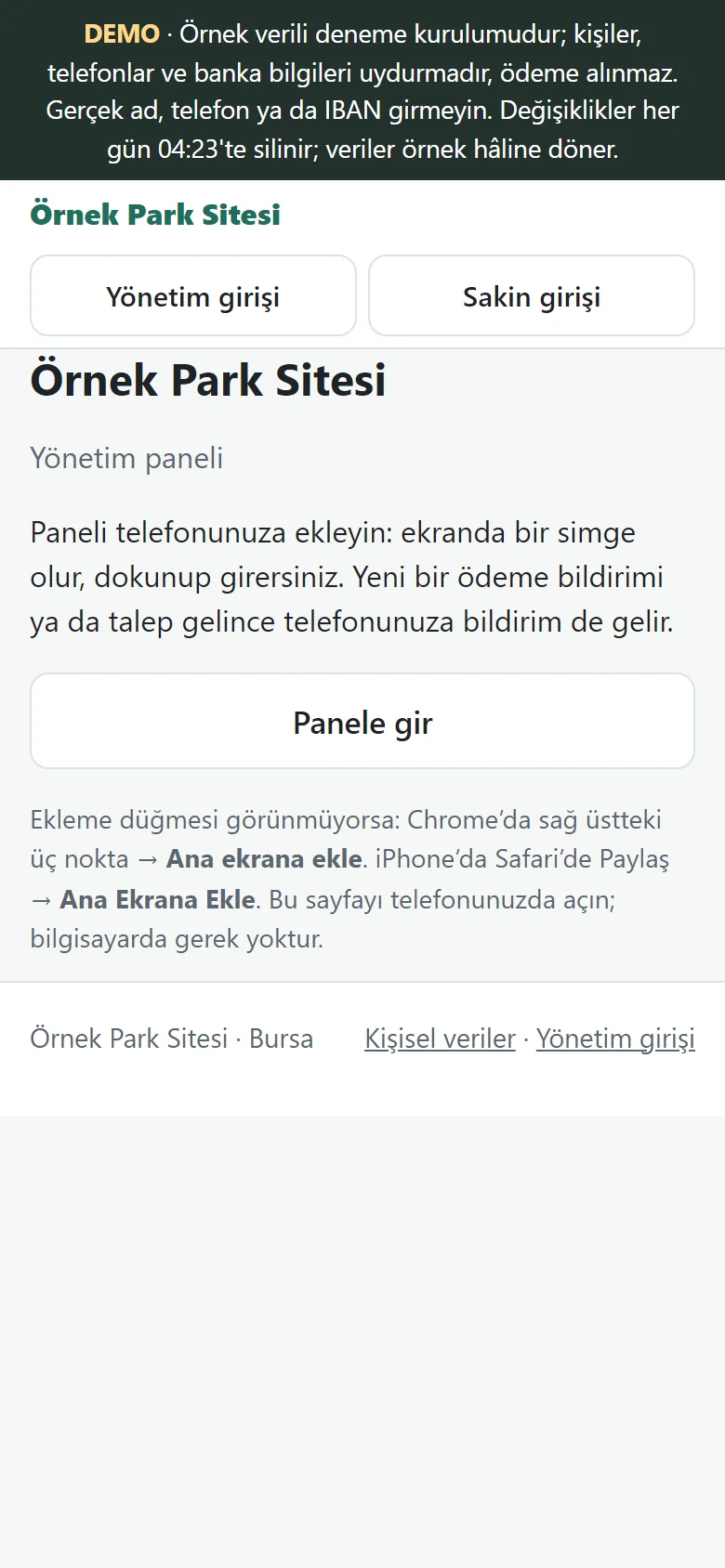
1.1.32 · 26 October 2026 Add-to-phone page
A page without sign-in: the site name, “Yönetim girişi” (management sign-in) and “Sakin girişi” (resident sign-in) links and the steps for adding to the phone. The management icon opens the management sign-in directly; this page is sent to the manager or staff. When the browser allows it an add button also appears; it does not show on this screen.
- On screen (Turkish interface)
- “Yönetim girişi” – management sign-in
- “Sakin girişi” – resident sign-in
-
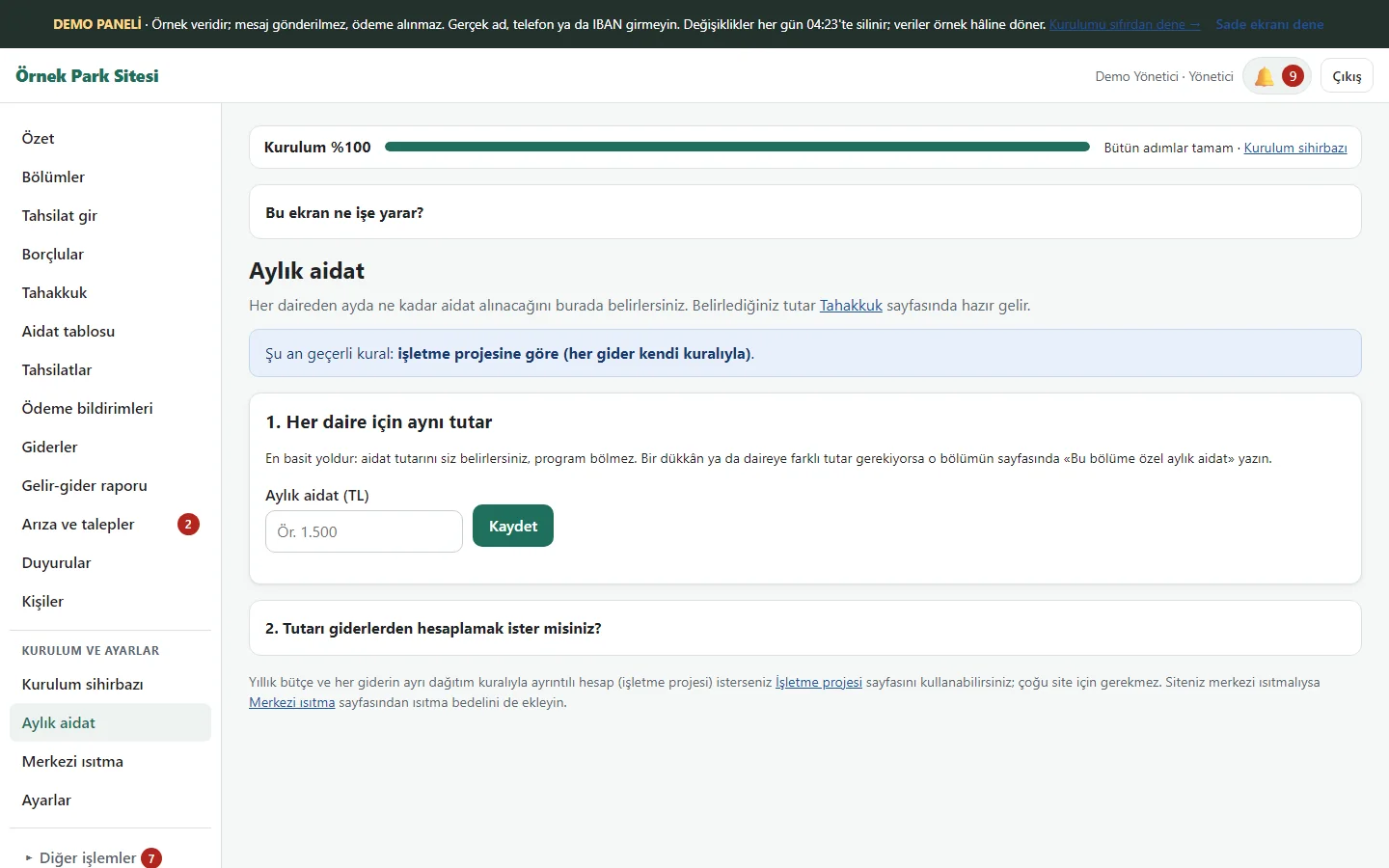
1.1.32 · 26 October 2026 Monthly dues
The same amount is written for every flat, or a simple calculator from the expenses (equal, by square metres, by land share) finds each flat’s dues. The amount set here comes ready on the charge page.
- On screen (Turkish interface)
- “Aylık aidat” – monthly dues
- “Her daire için aynı tutar” – the same amount for every flat
-
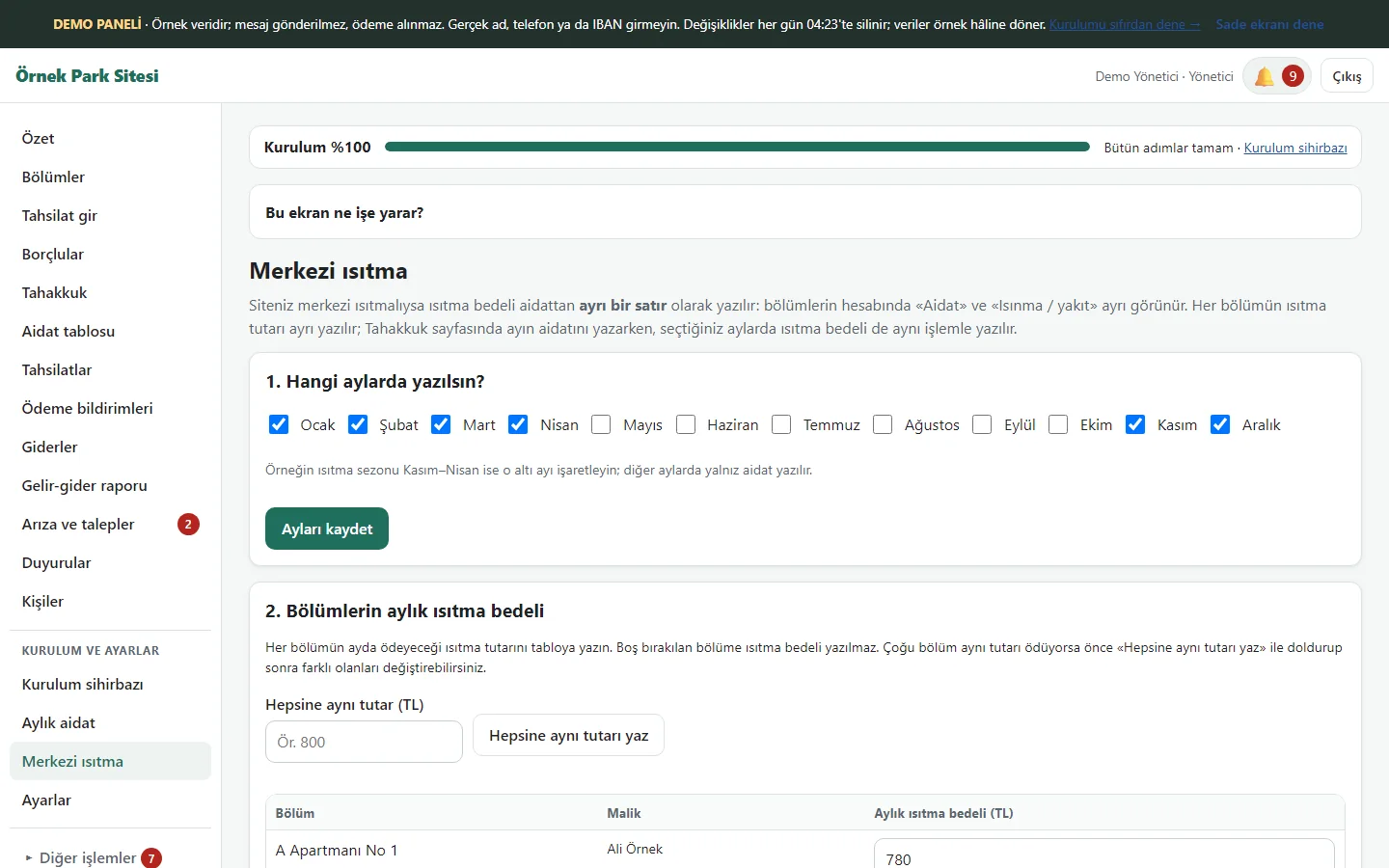
1.1.32 · 26 October 2026 Central heating
Where the site has central heating, the months to charge it and each unit’s monthly heating amount are entered; it is written as a separate line from the dues. The amount is fixed, not calculated from consumption.
- On screen (Turkish interface)
- “Merkezi ısıtma” – central heating
- “Hangi aylarda yazılsın?” – in which months?
-
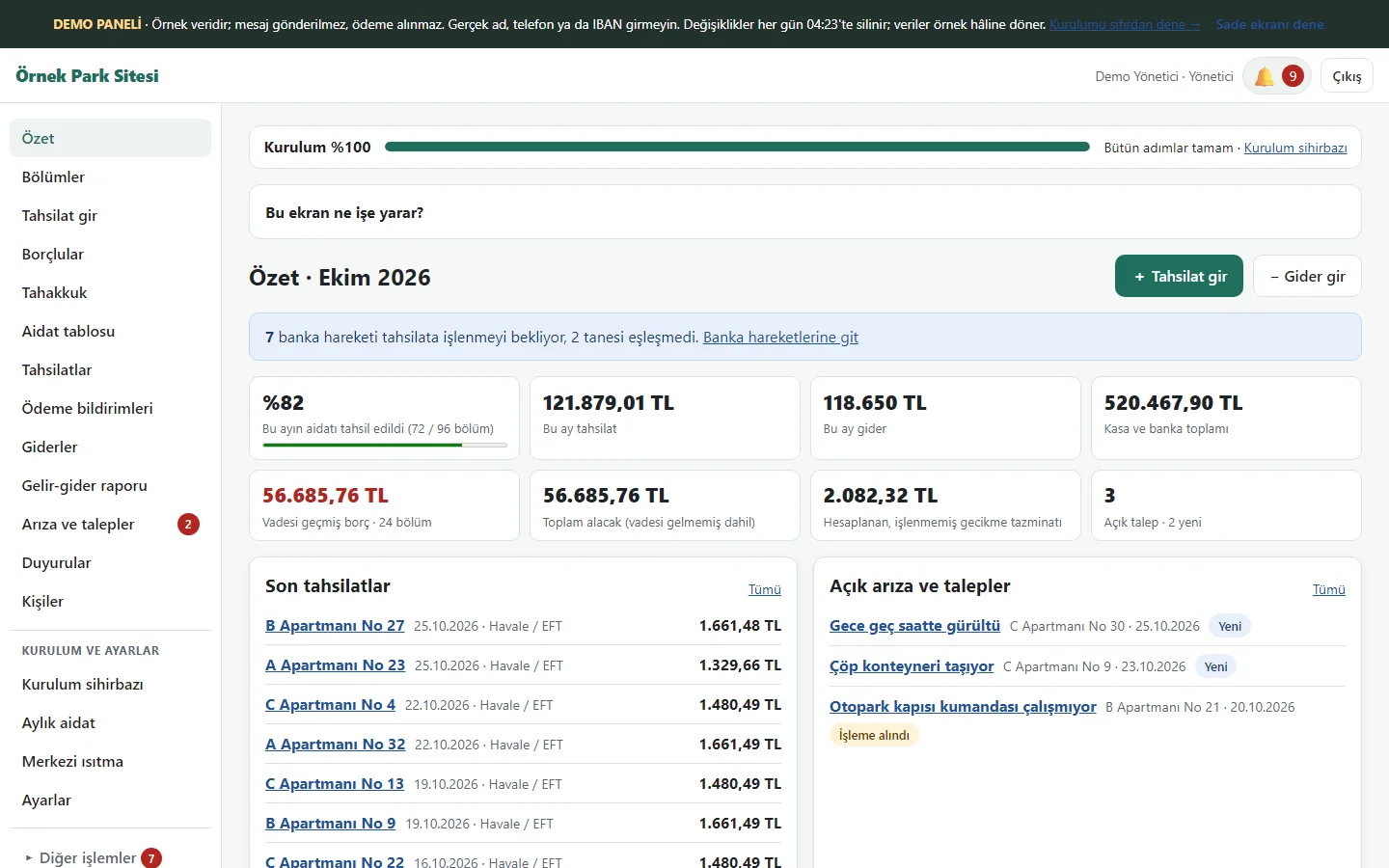
1.1.32 · 26 October 2026 Management summary
The setup bar, this month’s collection rate, collections and expenses, overdue balances, the cash and bank total, recent collections and open requests are on one screen.
- On screen (Turkish interface)
- “Özet” – summary
- “Tahsilat” – collections
- “Gider” – expenses
-
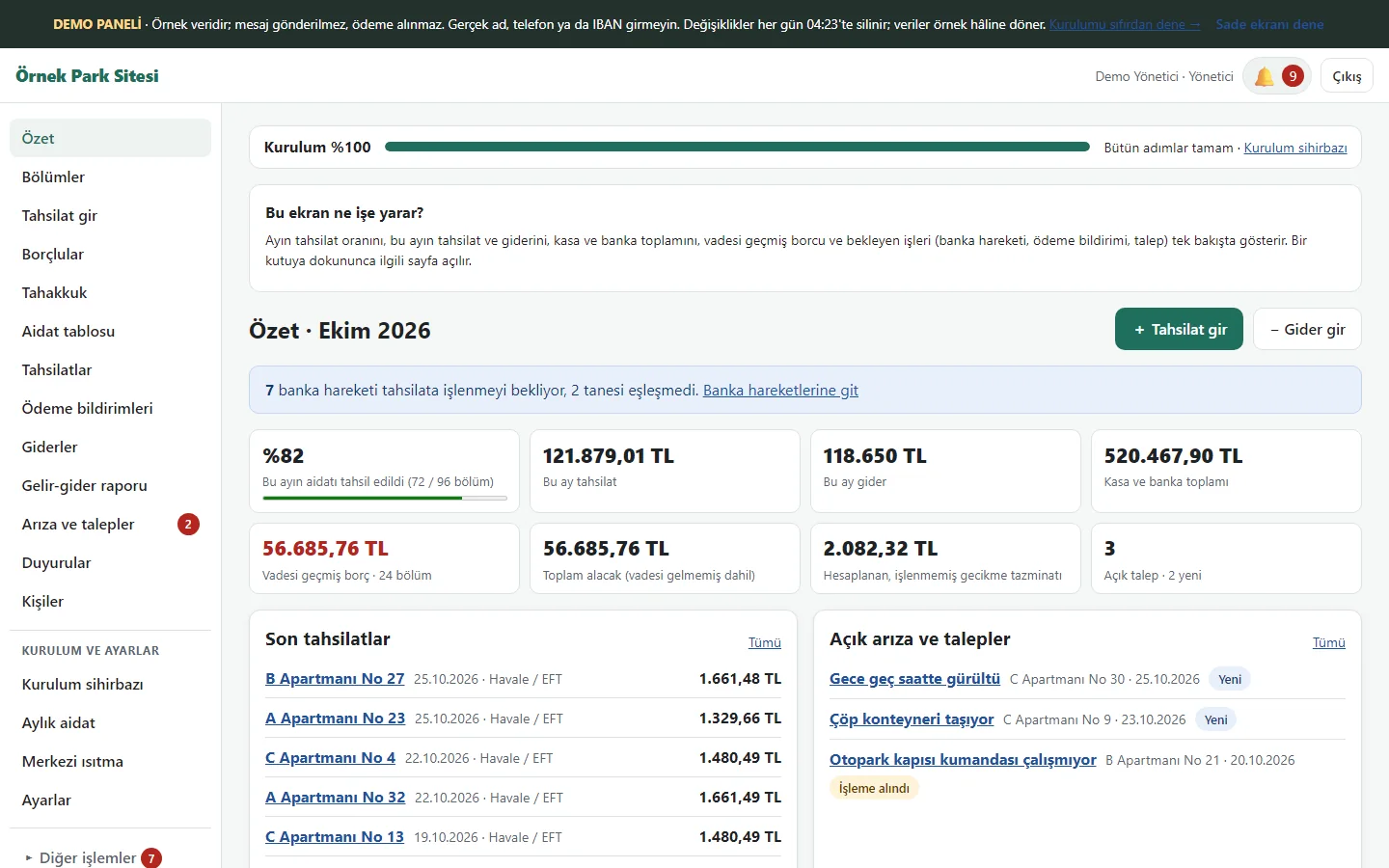
1.1.32 · 26 October 2026 “Bu ekran ne işe yarar?”
On every panel screen a closed box opens to say what the screen is for and what to do next. The bar on top shows how much of the setup is done and the next step.
- On screen (Turkish interface)
- “Bu ekran ne işe yarar?” – what is this screen for?
- “Kurulum” – setup
-
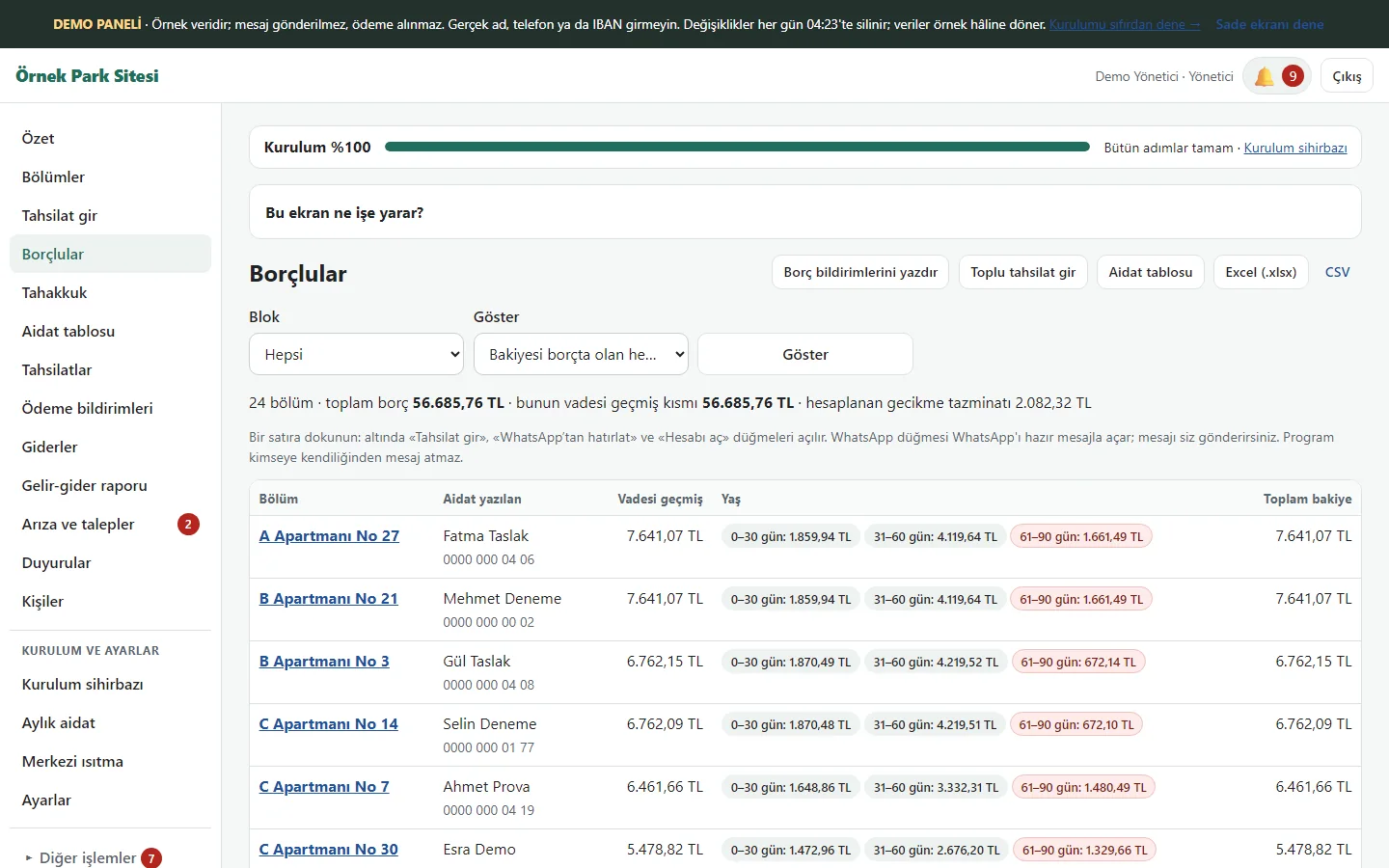
1.1.32 · 26 October 2026 Debtors
“Everybody with a balance owed” or only those overdue are listed; the total debt and its overdue part are written on top. Rows show age bands, “Tahsilat gir” (record a payment) and “WhatsApp’tan hatırlat” (remind on WhatsApp); the reminder opens a ready WhatsApp text and nothing is sent automatically.
- On screen (Turkish interface)
- “Borçlular” – debtors
- “Hatırlat” – remind
- “Tahsilat” – record payment
-
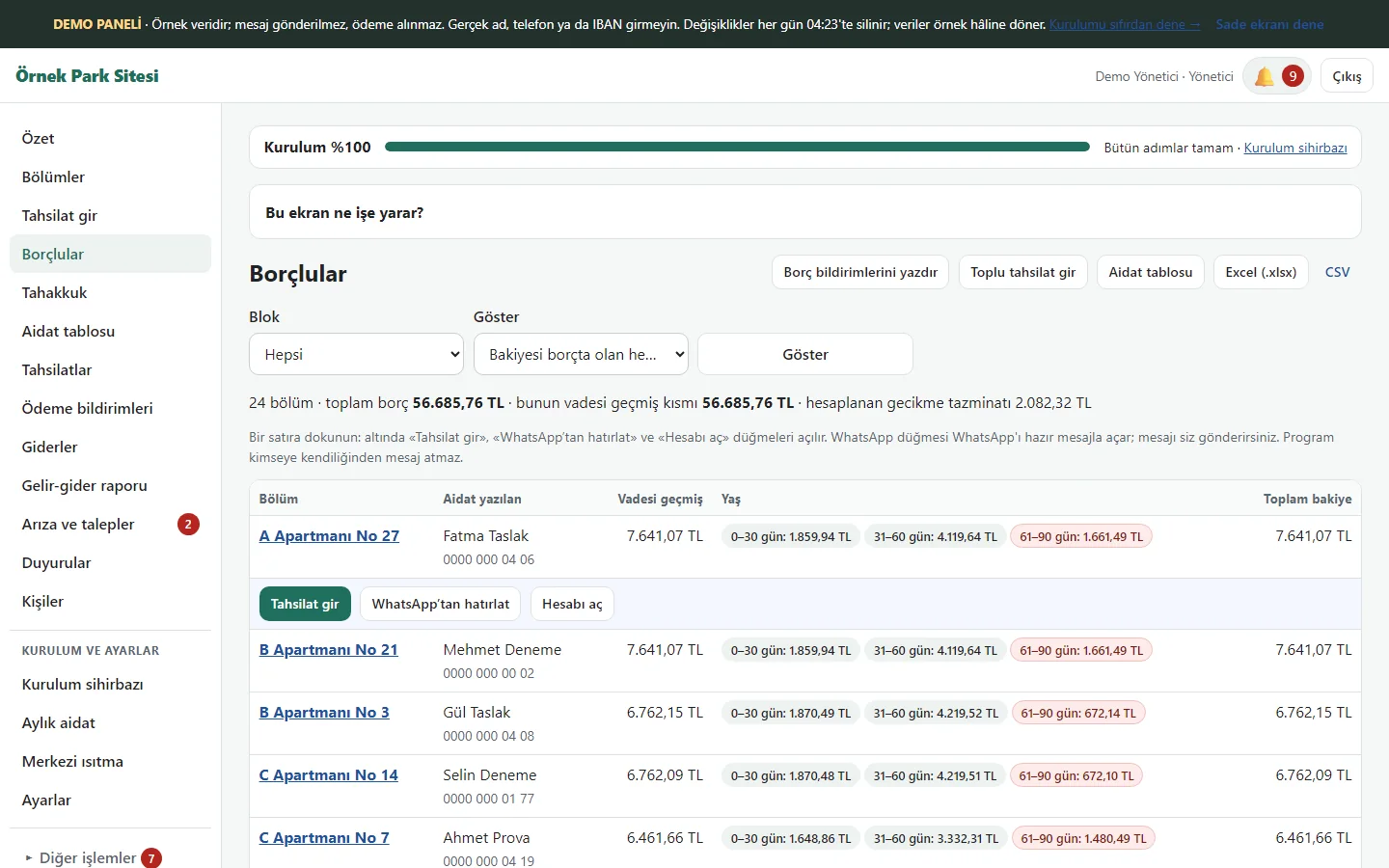
1.1.32 · 26 October 2026 Tap a row
On the debtors list a tap on a row opens “Tahsilat gir” (record a payment), “WhatsApp’tan hatırlat” (remind on WhatsApp) and “Hesabı aç” (open the account) under it. The reminder opens a ready WhatsApp text; the manager sends it.
- On screen (Turkish interface)
- “Tahsilat gir” – record a payment
- “WhatsApp’tan hatırlat” – remind on WhatsApp
- “Hesabı aç” – open the account
-
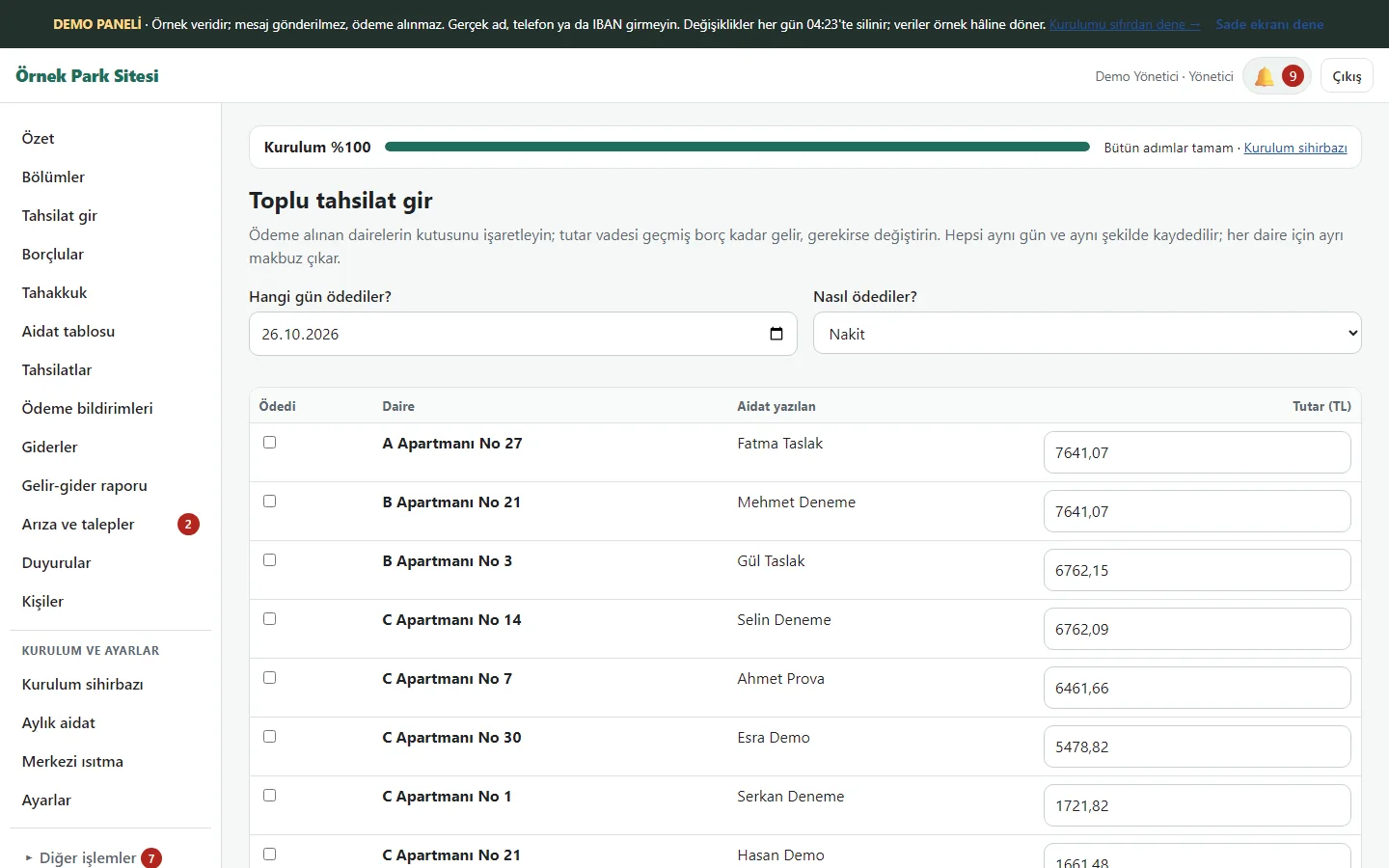
1.1.32 · 26 October 2026 Bulk collection
Overdue flats come in a table with the amount ready as the debt; tick who paid and save them all with one button. Each flat gets its own receipt; even if the same form is sent twice the payment is not written twice.
- On screen (Turkish interface)
- “Toplu tahsilat gir” – enter bulk collection
- “Ödedi” – paid
-
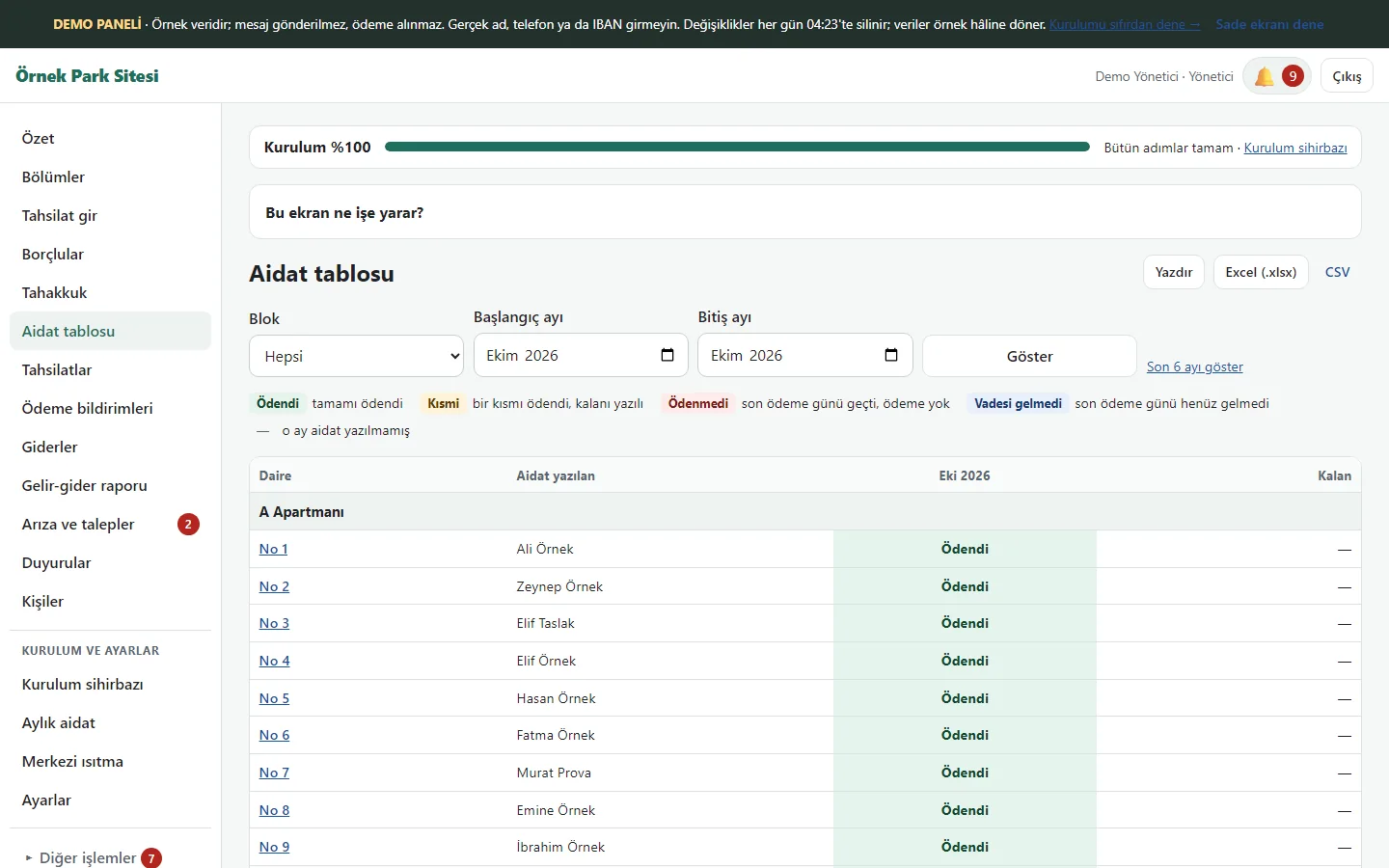
1.1.32 · 26 October 2026 Dues table
Paid, partly paid, unpaid and not-yet-due states are colour-coded by flat and month; print, Excel and CSV exports are available.
- On screen (Turkish interface)
- “Aidat tablosu” — dues table
- “Ödendi” — paid
- “Kısmi” — partly paid
-
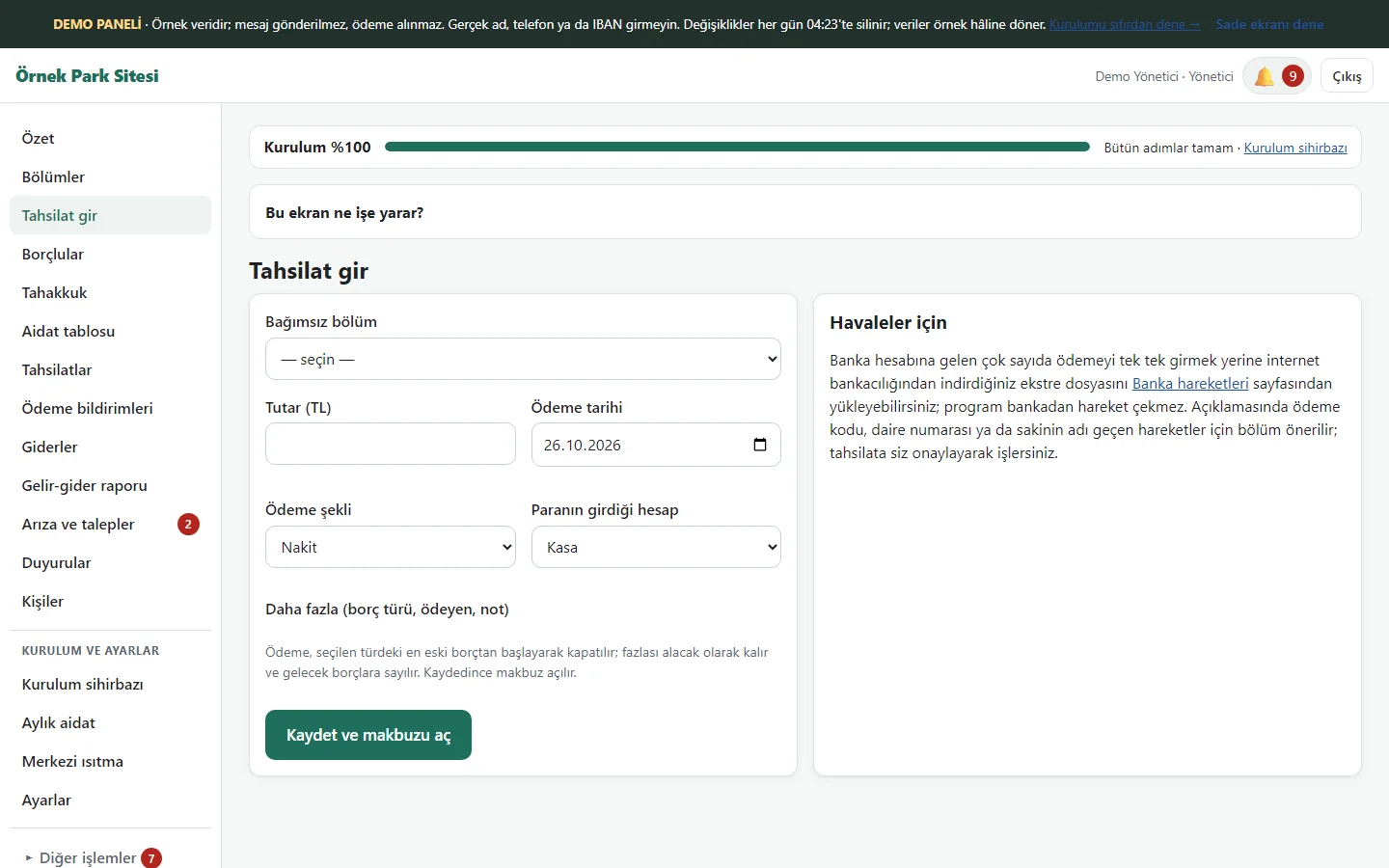
1.1.32 · 26 October 2026 Recording a payment by hand
Choose the flat, amount, date, method and account; the payment closes the oldest debt first and a receipt is created. The screen also points to statement-file upload.
- On screen (Turkish interface)
- “Tahsilat gir” — record a payment
- “Kaydet ve makbuzu aç” — save and open the receipt
-
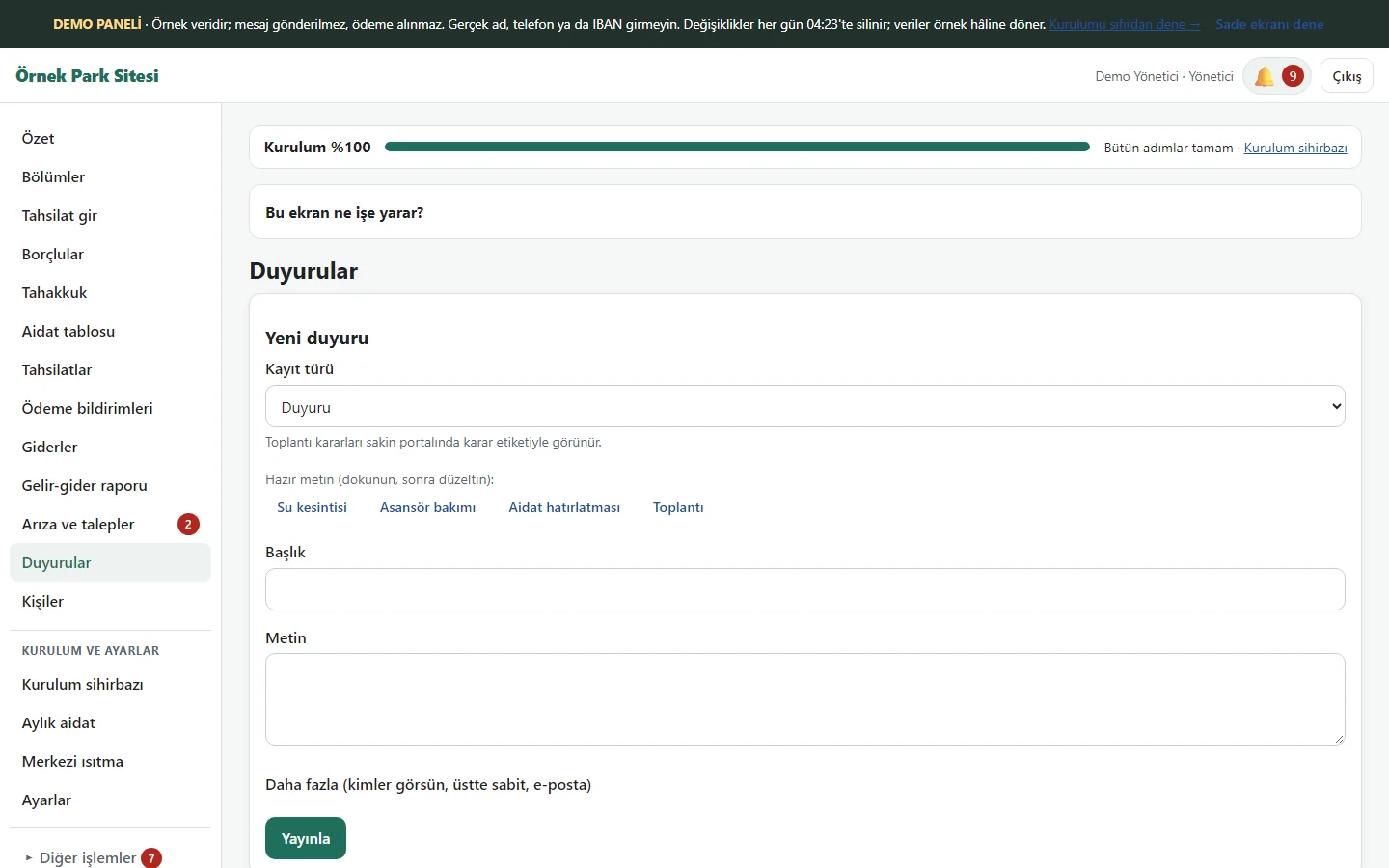
1.1.32 · 26 October 2026 Announcements
The new-announcement form has ready texts (water cut, lift maintenance, dues reminder, meeting), a title, a text and “Yayınla” (publish); who sees it, pin to top and e-mail settings are in a “Daha fazla” (more) box.
- On screen (Turkish interface)
- “Duyurular” – announcements
- “Yayınla” – publish
-
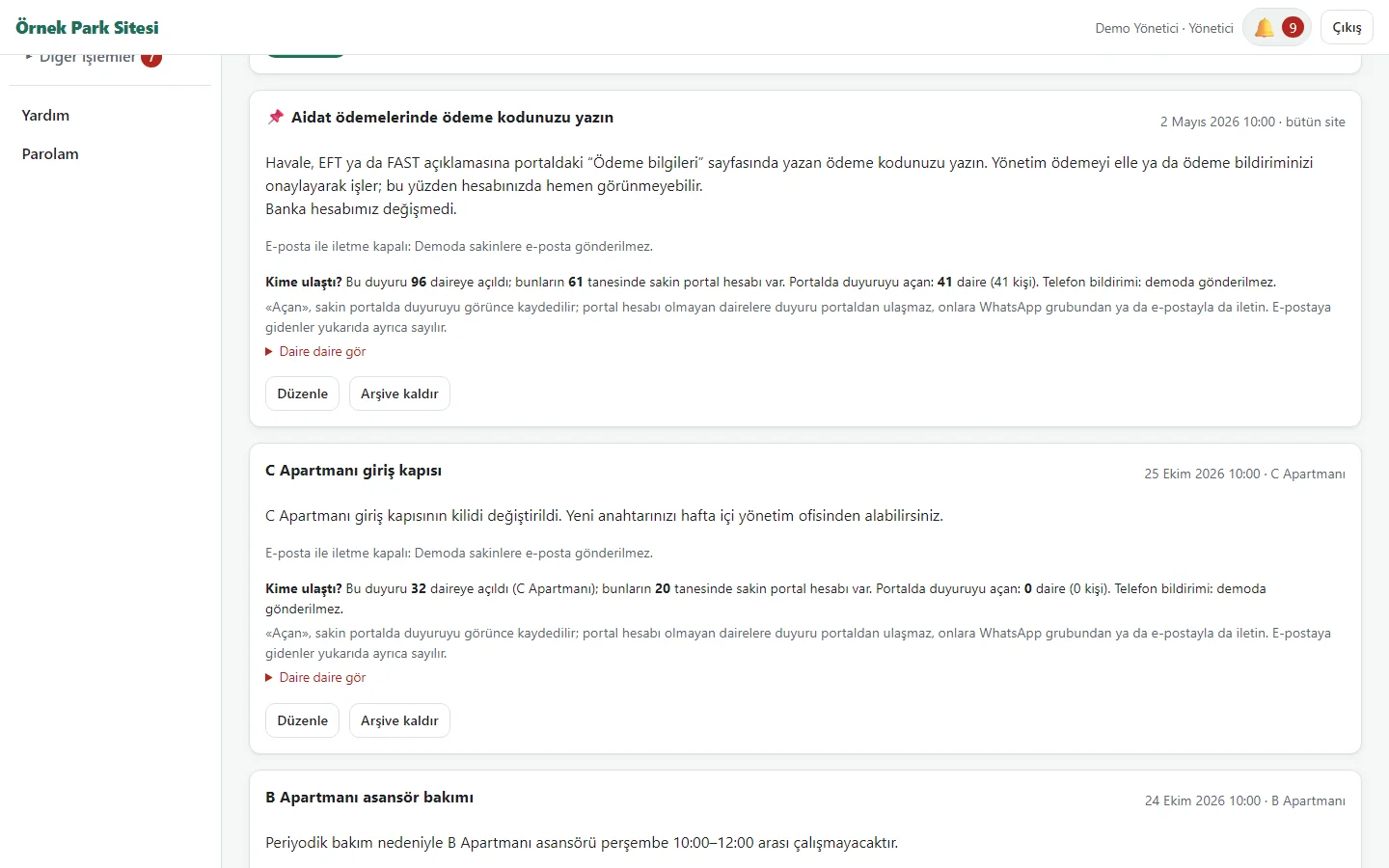
1.1.32 · 26 October 2026 Announcements: “Kime ulaştı?”
Under each announcement: how many flats it was opened to, how many have a portal account, how many opened it, and a flat-by-flat list (Açtı, Henüz açmadı, Portal hesabı yok). It says plainly that flats without a portal account are not reached through the portal; the phone notification is not sent in the demo.
- On screen (Turkish interface)
- “Kime ulaştı?” – who was reached?
- “Daire daire gör” – see flat by flat
-
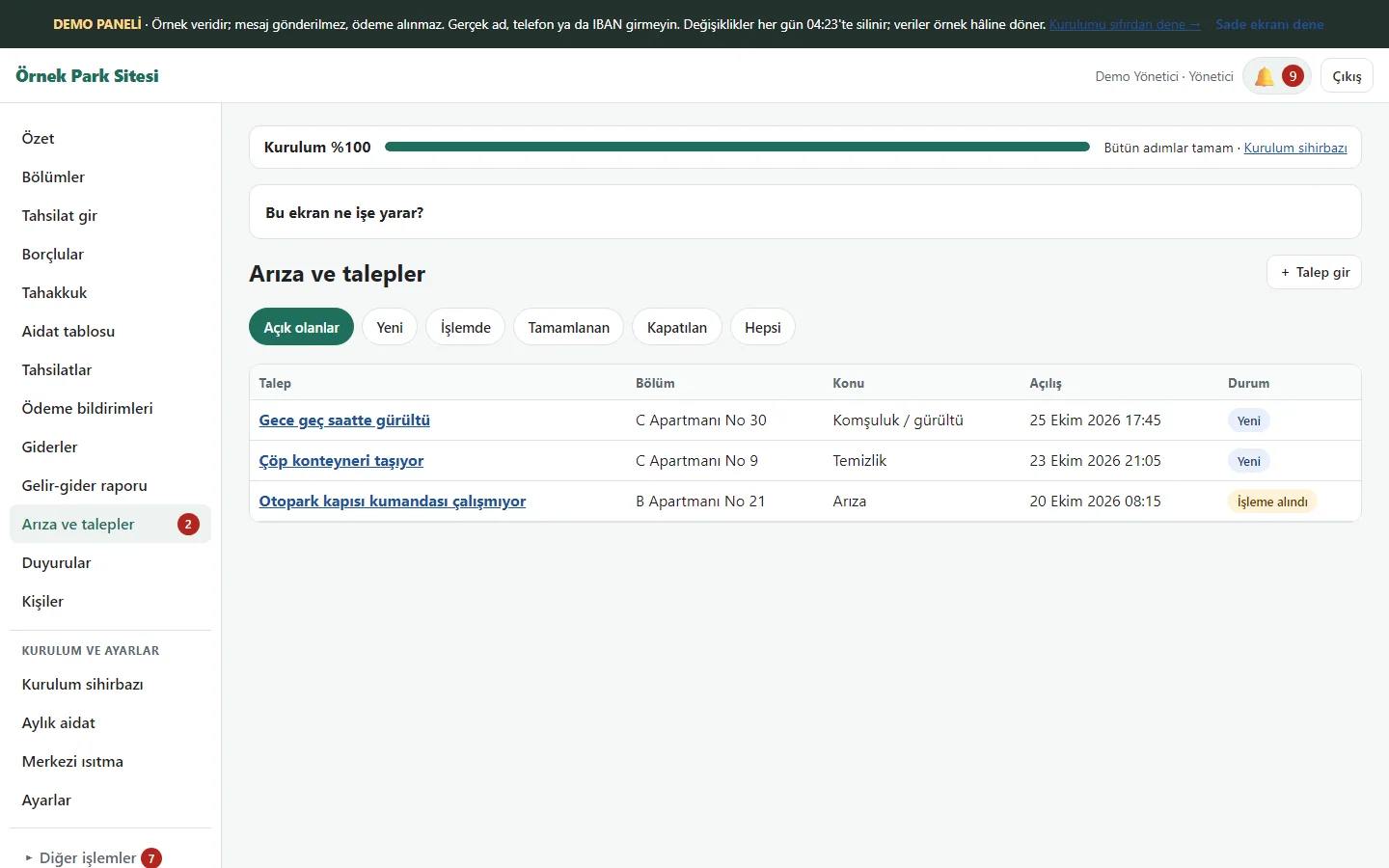
1.1.32 · 26 October 2026 Maintenance requests
Requests reported by residents are listed in the management panel with topic, flat and status. On the request form a PDF (a quote, a report) can be attached next to a photo, up to 5 MB; file upload is restricted in the demo.
- On screen (Turkish interface)
- “Arıza ve talepler” — faults and requests
- “Durum” — status
-
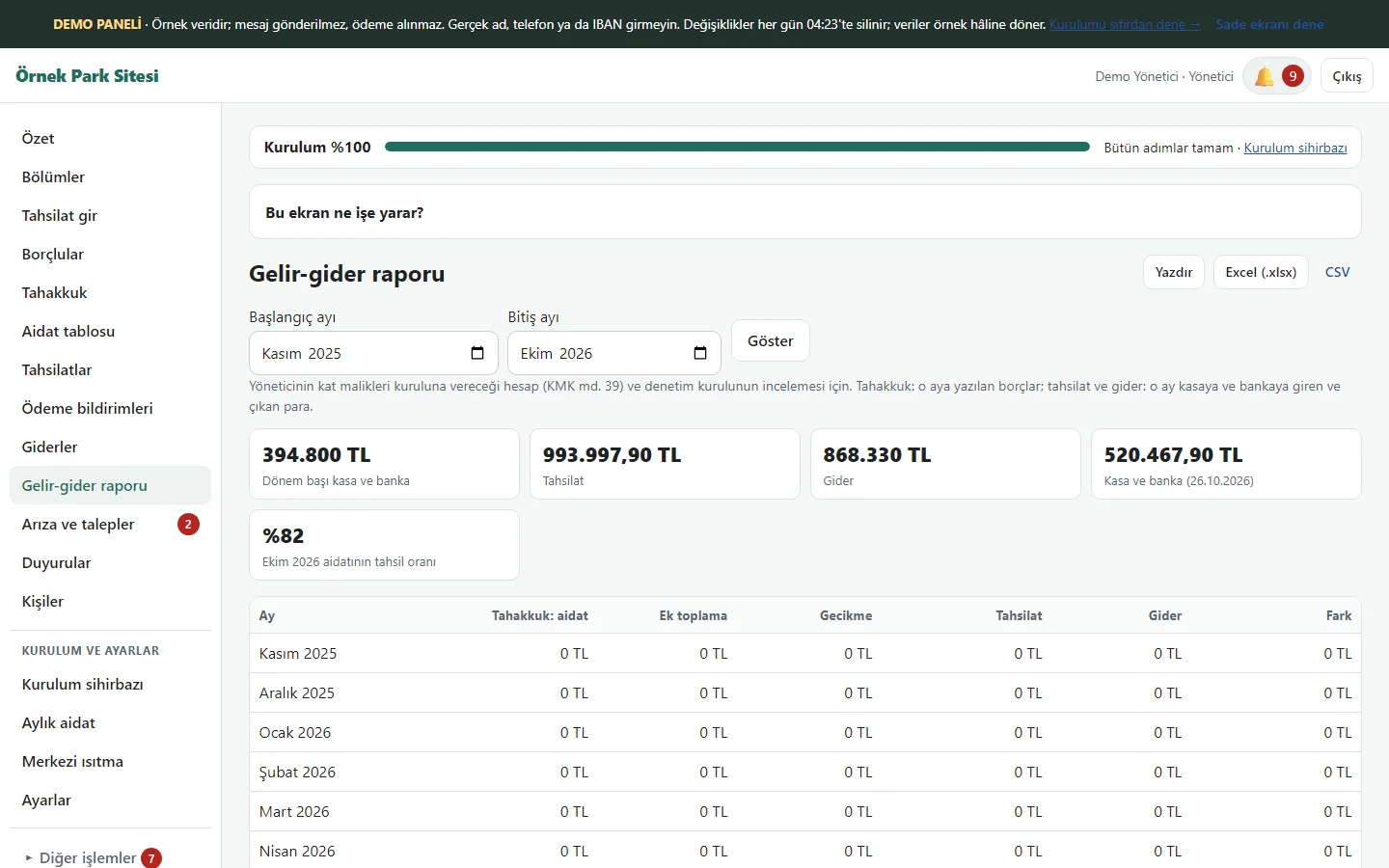
1.1.32 · 26 October 2026 Income and expense report
For the chosen month range, accruals, late fees, collections, expenses and the difference are reported month by month, with print, Excel and CSV.
- On screen (Turkish interface)
- “Gelir-gider” — income and expenses
- “Tahsilat” — collections
-
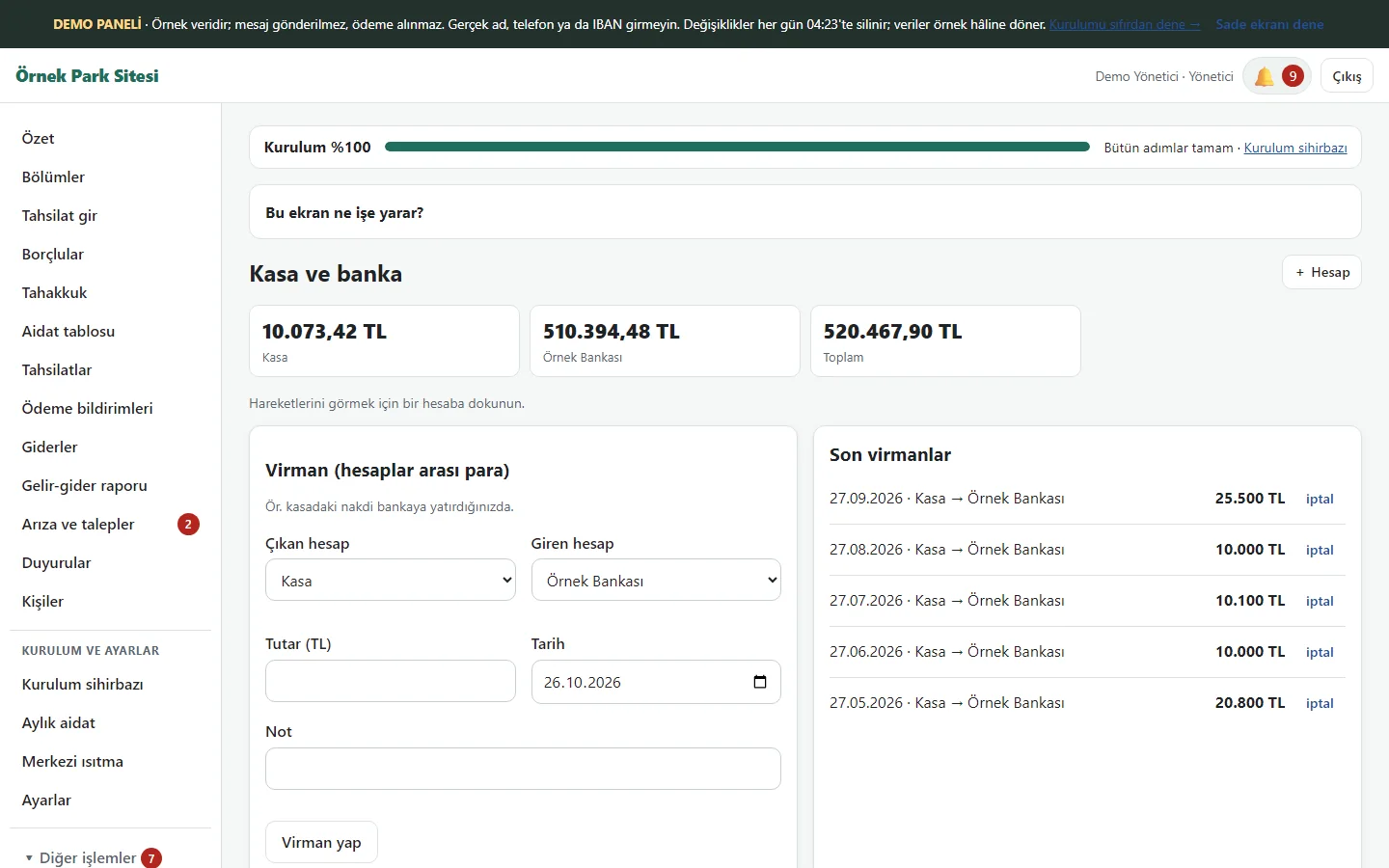
1.1.32 · 26 October 2026 Cash and bank
Cash and bank balances, transfers between accounts and expense types are on this page.
- On screen (Turkish interface)
- “Kasa” — cash box
- “Virman” — transfer between accounts
-
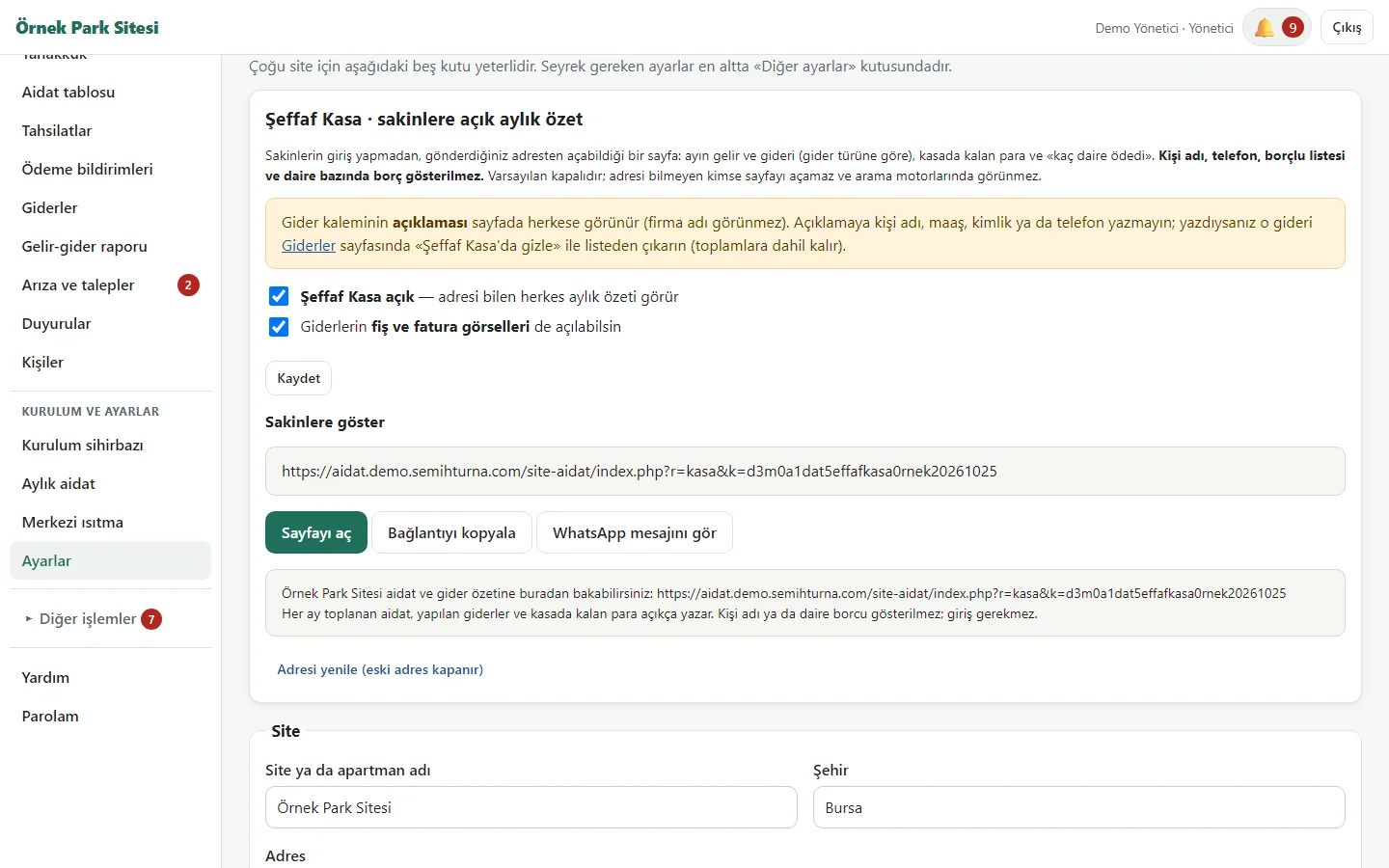
1.1.32 · 26 October 2026 Settings: Şeffaf Kasa
Off by default; when ticked it shows a secret-key address for residents: “Sayfayı aç”, “Bağlantıyı kopyala”, a ready WhatsApp message and “Adresi yenile” (the old address closes). No names, phones, debtor list or per-flat debt are shown. In the demo the box is on as an example and the address is fixed.
- On screen (Turkish interface)
- “Şeffaf Kasa” – open ledger
- “Bağlantıyı kopyala” – copy the link
- “Adresi yenile” – renew the address
-
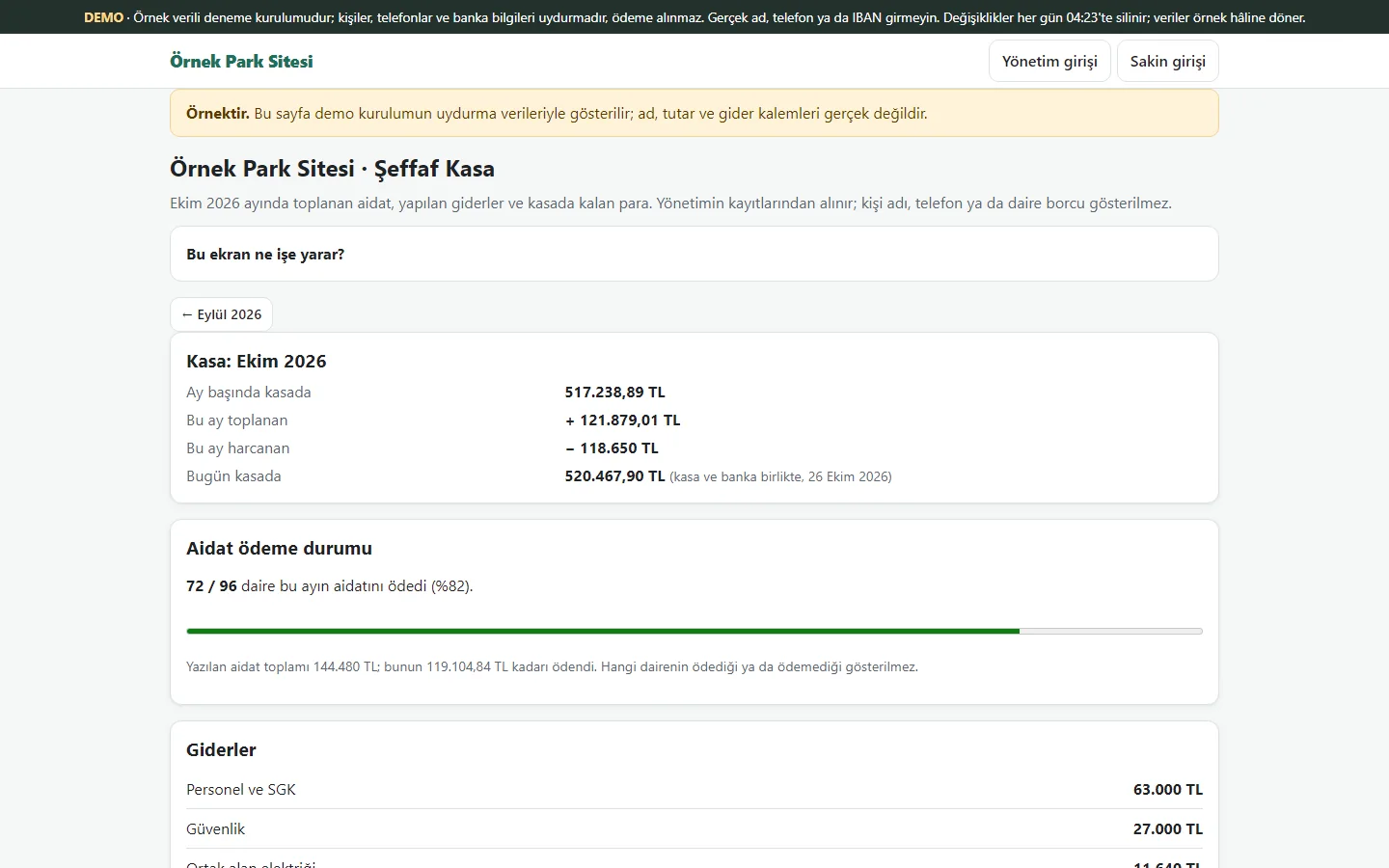
1.1.32 · 26 October 2026 Şeffaf Kasa: the public monthly summary
A page without sign-in, opened by whoever has the address: the cash at the start of the month, what was collected and spent that month, spending by expense type and a “72 / 96 flats paid this month’s dues (82%)” bar; links to earlier months. Which flat paid or did not is not shown. In the demo the page says “Örnektir” (this is a sample).
- On screen (Turkish interface)
- “Aidat ödeme durumu” – dues payment status
- “Giderler” – expenses
- “Örnektir” – this is a sample
-
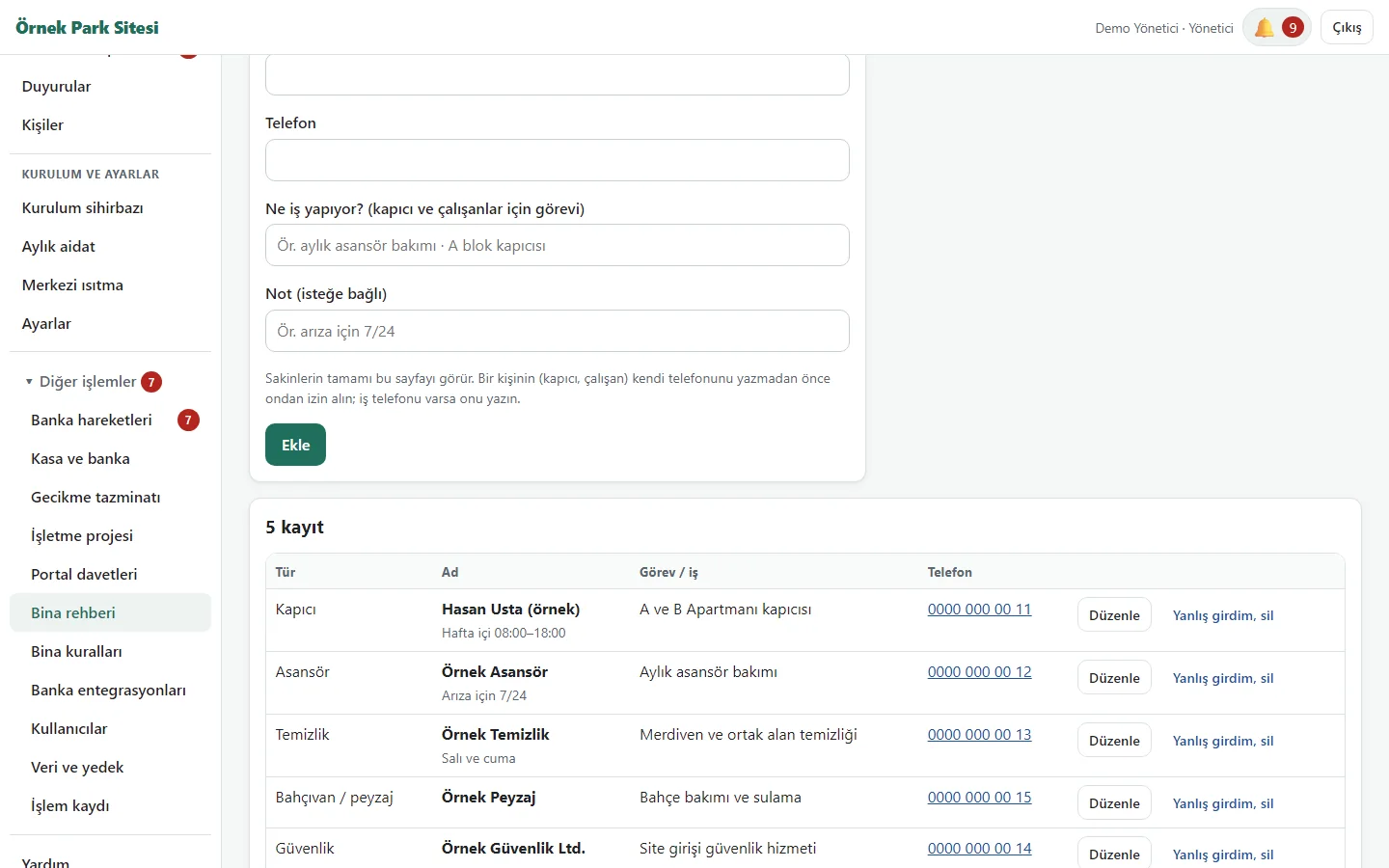
1.1.32 · 26 October 2026 Building directory
Companies such as the lift, cleaning, gardening and security firms, plus the caretaker and building staff, are written with name, role, phone and a note; management adds, edits and deletes with “Yanlış girdim, sil” (I made a mistake, delete). The demo has five sample records.
- On screen (Turkish interface)
- “Bina rehberi” – building directory
- “Rehbere ekle” – add to the directory
- “Yanlış girdim, sil” – I made a mistake, delete
-
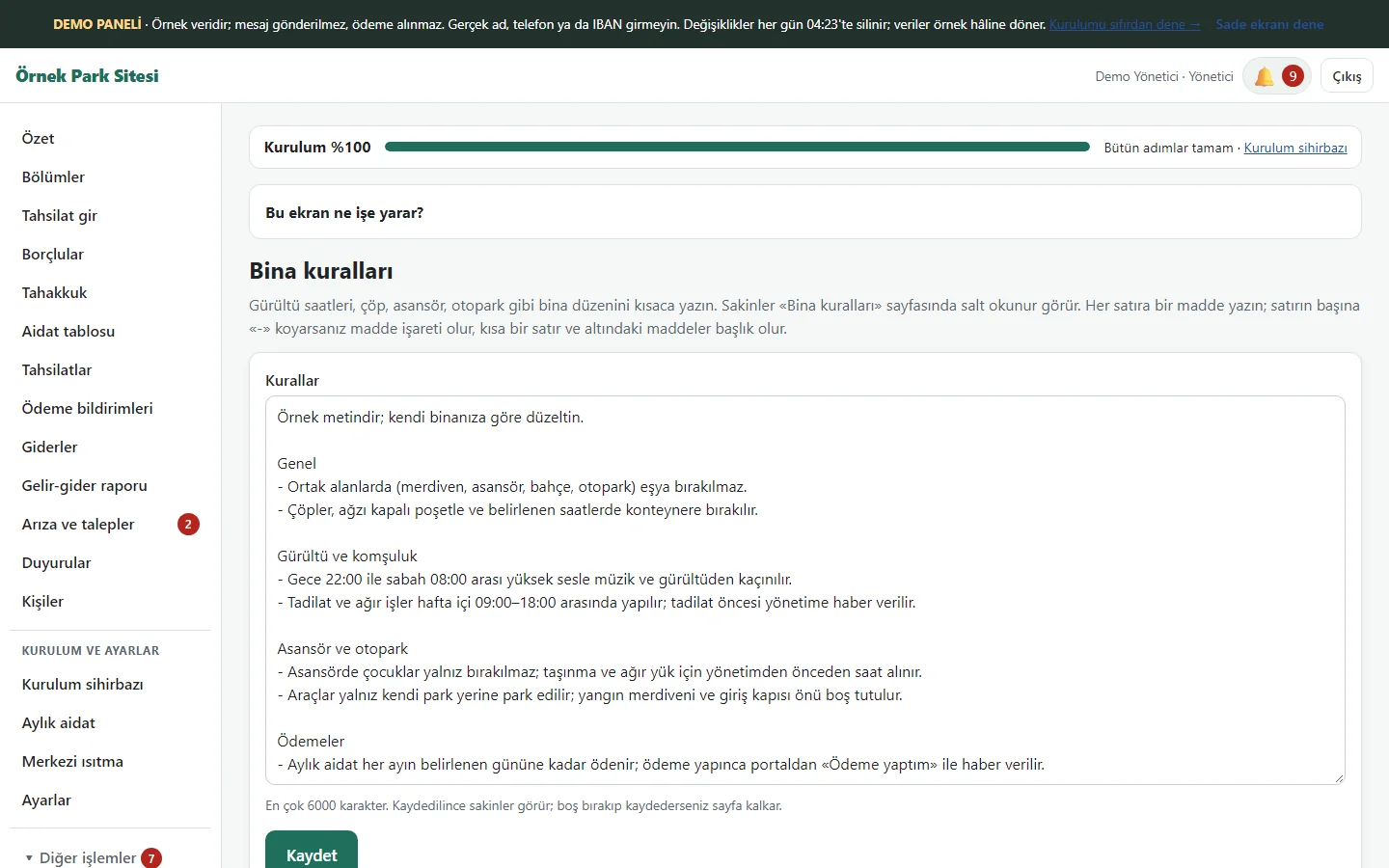
1.1.32 · 26 October 2026 Building rules
Management writes the rules as plain text (a heading, items with “-”); residents see them read-only. While the page is empty a ready sample text can be brought in; in the demo the sample text carries the note “Örnek metindir; kendi binanıza göre düzeltin” (sample text; correct it for your own building).
- On screen (Turkish interface)
- “Bina kuralları” – building rules
- “Kaydet” – save
-
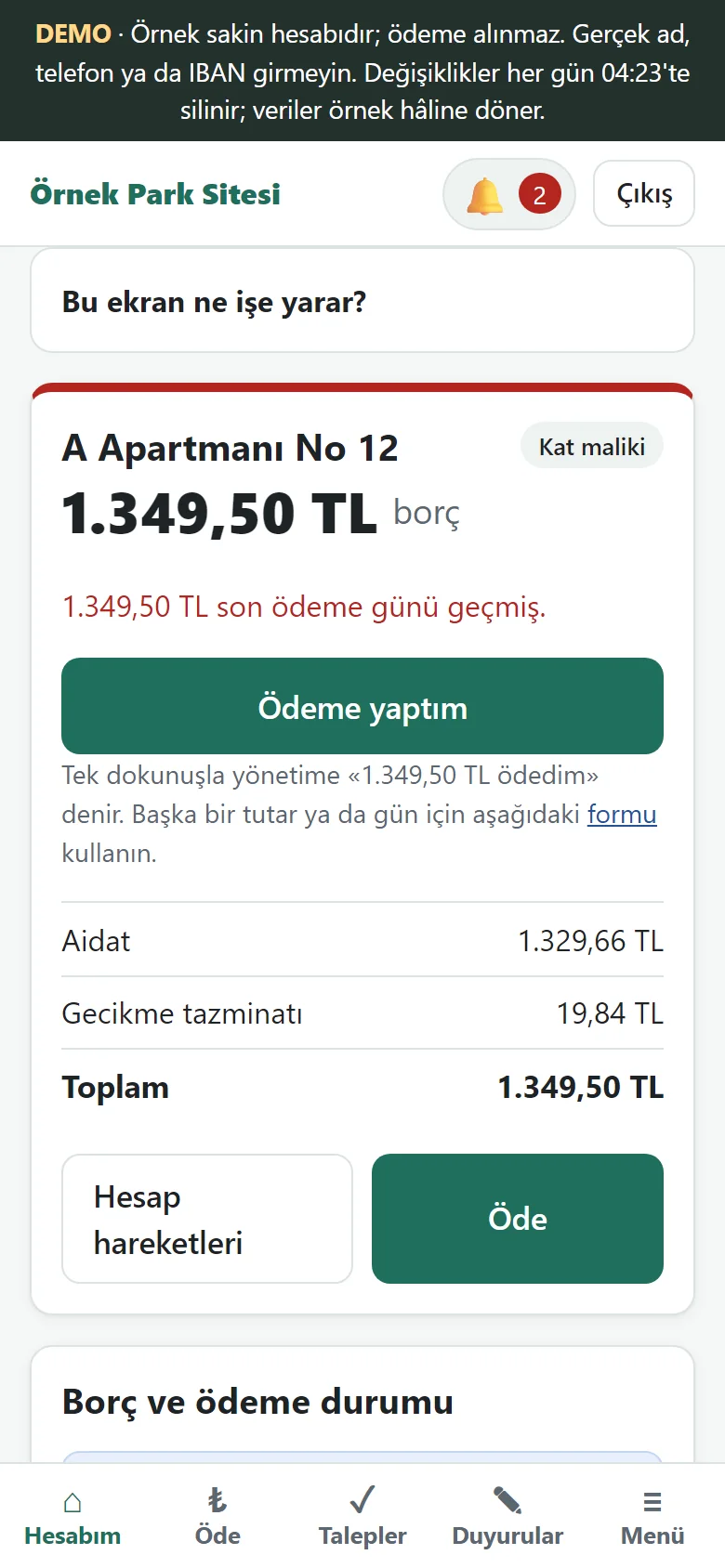
1.1.32 · 26 October 2026 Resident account
The phone screen shows the balance card (dues, late fee and total), the “Pay” and “Account movements” buttons, and a switch between two flats.
- On screen (Turkish interface)
- “Borç” — amount due
- “Öde” — pay
- “Hesap hareketleri” — account movements
-
1.1.32 · 26 October 2026 Payment details
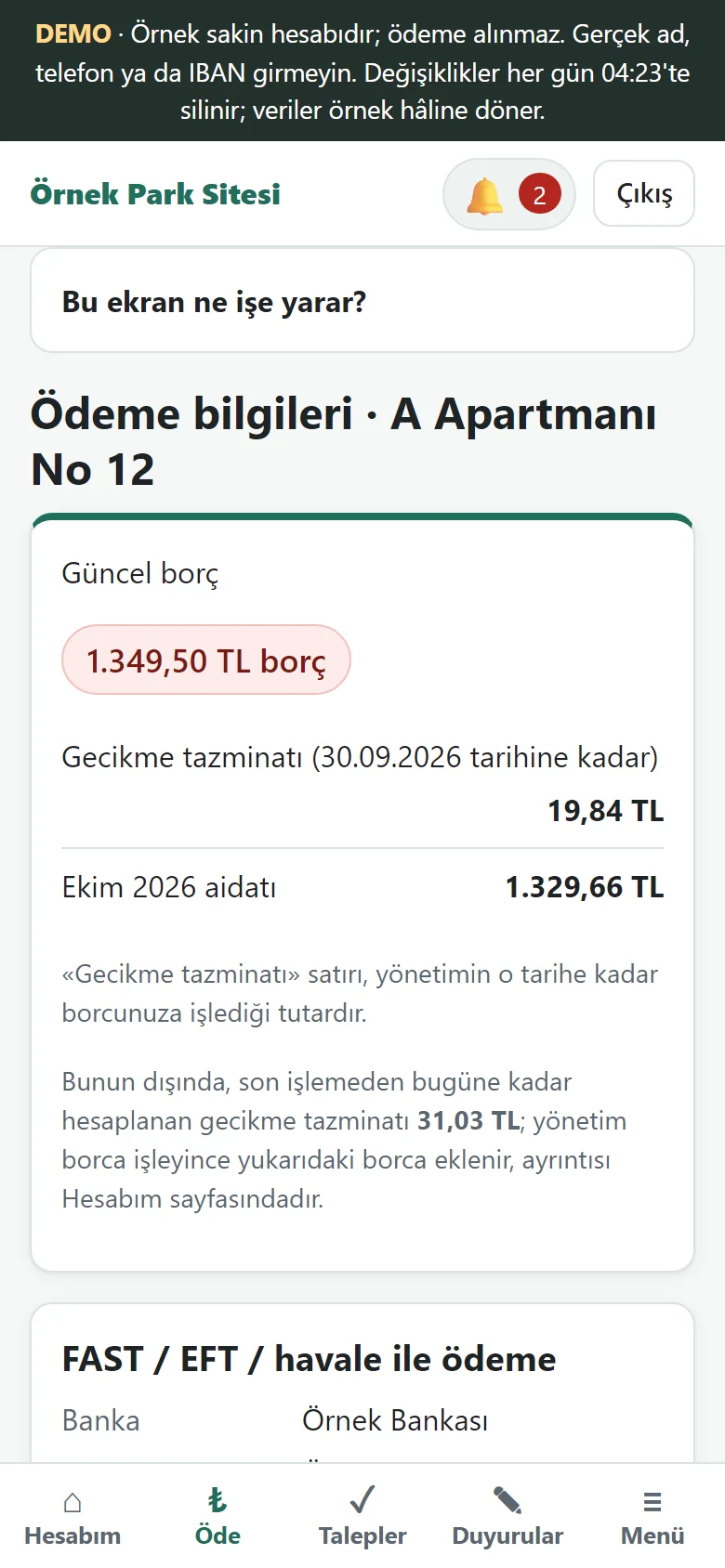
The current balance, the manager’s bank and IBAN, and a flat-specific payment code are shown; the resident puts the code in the transfer description. The late fee is explained as two separate figures: the amount management has already added to the debt and the amount calculated up to today that has not yet been added. The IBAN in the demo is a placeholder.
- On screen (Turkish interface)
- “Ödeme bilgileri” — payment details
- “Açıklama” — description (payment code)
-
1.1.32 · 26 October 2026 Account movements
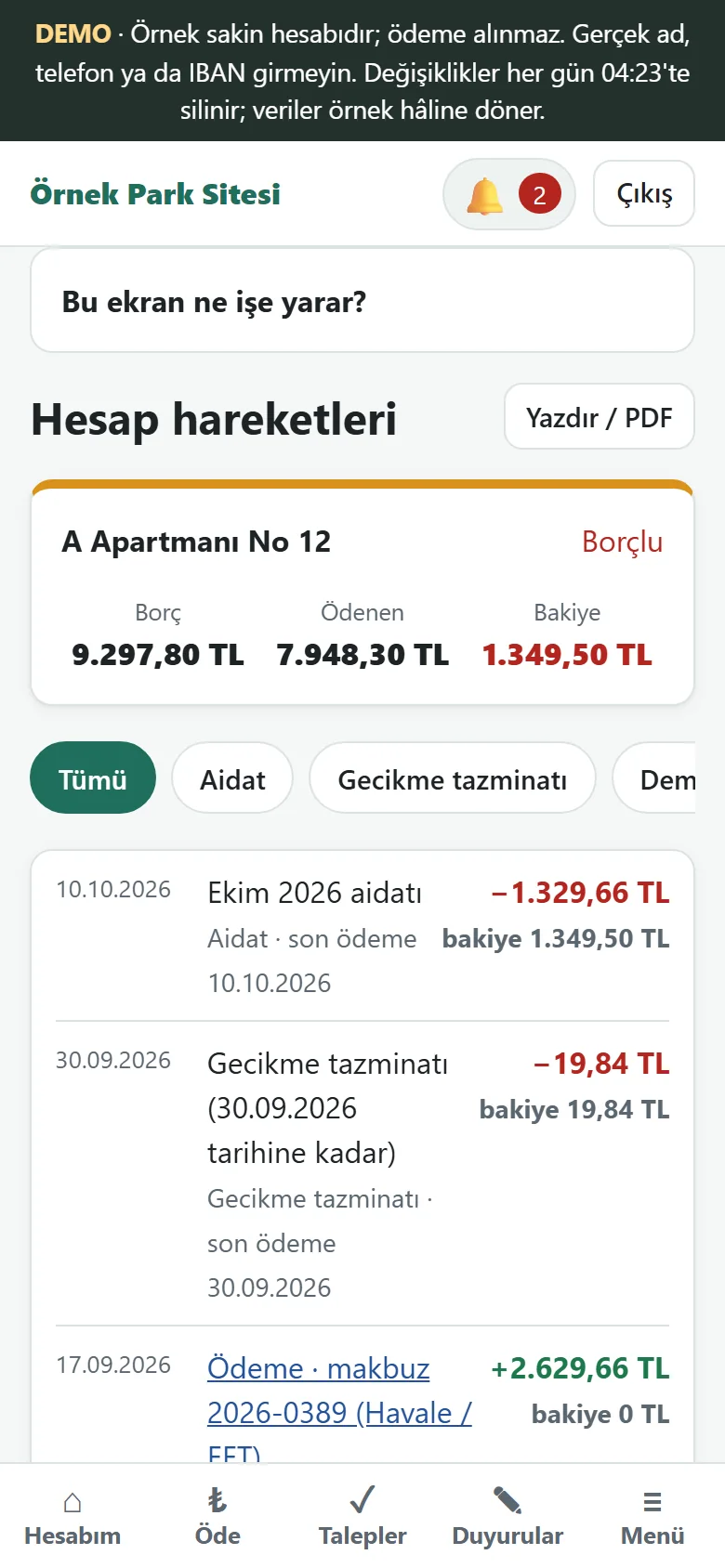
Dues, late fees and payments are listed in date order with their effect on the balance; there is a print / PDF button.
- On screen (Turkish interface)
- “Hesap hareketleri” — account movements
- “Bakiye” — balance
-
1.1.32 · 26 October 2026 Resident: Building directory
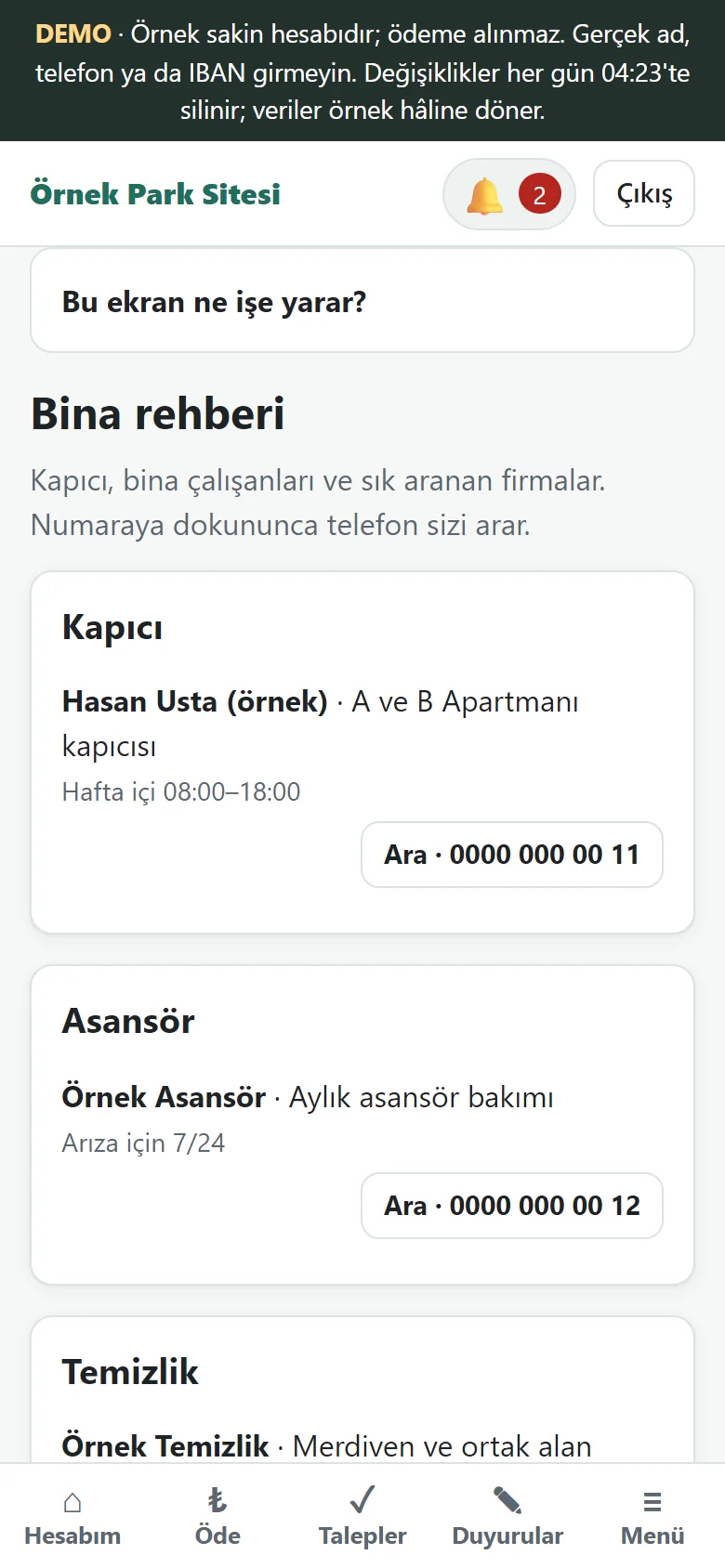
If management has written the directory, “Bina rehberi” (building directory) and, once written, “Bina kuralları” (building rules) appear in the resident’s bottom menu; the caretaker, firms and staff are listed and a tap on a number calls.
- On screen (Turkish interface)
- “Bina rehberi” — building directory
- “Ara” — call
- What do they see at the end?
- The resident sees the balance and payment code. The manager records the payment by hand or approves the resident’s payment notice; a receipt is created and the resident’s balance is updated.
- What is it good for?
- Which payment was posted to which flat is visible in the record, and residents and management see the same current balance. Staff and residents see only the pages, buttons and links they are allowed to use.
Everything that is not included, and all limits
- A demo with sample data. It has not been delivered to a client or used by a real residential complex. People, flats and bank details in the screens are fictional.
- There is no automatic bank movement import or automatic matching (out of scope for now, a postponed development); statement files are only uploaded by hand. There is also no online card payment and no automatic SMS or WhatsApp sending; a reminder is a ready WhatsApp message that the manager sends.
- Notifications are an instant heads-up with no delivery guarantee; on an iPhone they work only in an app added to the home screen. The optional automatic reminder in the settings goes only to residents who allowed notifications, is off by default and is never sent in the demo. Notifications and add-to-phone have not yet been tried on a real phone and are not shown on this page.
- Shared-area booking, polls, visitors, parcels, vehicles, meter reading and rent management are outside this version. The central heating charge is a fixed monthly amount written for each flat; it is not calculated from consumption.
- The online demo uses sample data. Manager, staff and resident accounts can be tried using the buttons on the login pages.
- The app interface is in Turkish. This English page explains it; there is no English app interface.
- The receipt and invoice link in Şeffaf Kasa and the PDF attachment on a request were not tried in the demo (file upload is restricted there); Şeffaf Kasa is on with sample data in the demo and off by default on a real installation.
- The screens were taken from the live demo running version 1.1.32 on 26 October 2026; the demo returns to its sample state every day at 04:23.
Frequently asked questions
What can an apartment resident see?
The resident portal shows their own balance card, annual payment summary, monthly chart, account movements and payment details. The flats and people shown on this page are sample data.
Is it connected to a real bank account?
No. There is no automatic bank movement import or automatic matching (out of scope for now). Collections are recorded by hand, a resident’s payment notice is approved, or a statement file downloaded from internet banking is uploaded and posted after the manager’s approval. There are no card payments either.
Where does a manager who has never used it start?
A seven-step setup wizard shows the next job: the flat numbers come as ready rows, a list pasted from WhatsApp or Excel settles into the rows, and the link for residents comes as a ready WhatsApp message and a poster with a scannable code. Every screen has a closed “Bu ekran ne işe yarar?” (what is this screen for?) box. On the live demo the setup wizard page has a “Boş siteyle yeniden başla” (start with an empty site) button.
Does the manager get told when a payment notice comes in?
On your own installation, yes: a free instant notification (Web Push) goes to the manager’s and staff’s phones; the panel has to be added to the phone and notifications allowed. It is not an SMS or a WhatsApp message, so there is no message fee. The demo never sends notifications; a notification is an instant heads-up with no delivery guarantee and has not been tried on a real phone.
Can our building start using it immediately?
This is a sample-data demo tested locally and on the live demo. Real hosting, phone and pilot use still need verification. Use the contact form to describe your block and flat counts, current tracking method and needs.
What does the dues program cost?
The yearly list price per building depends on the number of flats: 1,800 TL for 1–20 flats, 90 TL per flat for 21–40 flats, and a flat 3,900 TL for 41–150 flats; buildings over 150 flats are by quote. Installation, one year of hosting, data transfer, a daily automatic backup and written usage support are included; card collection, automatic SMS, automatic bank movement retrieval and a store app are not. The live demo is free; installation is done by quote.
Delivery and sales status
How does it work?
You try the demo and tell us your number of flats, and we send you a quote. We install it, we host it and we take a daily backup. The yearly price includes installation, hosting, data transfer and support.
Price
- 1–20 flats: 1,800 TL
- 21–40 flats: 90 TL per flat (examples: 30 flats 2,700 TL, 40 flats 3,600 TL)
- 41–150 flats: a flat 3,900 TL (for example, the same 3,900 TL for 60, 120 or 150 flats)
- Buildings over 150 flats: by quote
The yearly list price per building depends on the number of flats. Installation, one year of hosting, data transfer, a daily automatic backup, bug fixes and written usage support are included. Card collection, automatic SMS, automatic bank movement retrieval and a store app are not included. New feature requests and work beyond the scope are priced separately and you are told before anything is done. The renewal price is notified in writing at least 30 days before the term ends. The payment method and the paperwork are settled in the quote.
Possible delivery options
Other delivery options
What the package contains
- The yearly service (included in the list price): installation at a separate address for your building, one year of hosting, entering the flat list into the program from a file you provide (data transfer), a daily automatic backup, bug fixes and written usage support
- The application package (ZIP), with the installation and user documents inside it
- Blocks, sections and flats; owners and tenants; monthly dues; payments and receipts; late-payment interest; list of debtors
- Expense and document records, cash and bank accounts, income and expense report, dues table, attendance list for meetings
- Announcements, maintenance requests, roles, Excel/CSV transfer, encrypted backup and restore
- Upload of a statement file (CSV/Excel); processed after the manager approves
- A phone-friendly resident portal; a step-by-step setup wizard, a plain screen, a WhatsApp message and a poster with a scannable code for residents, a free instant notification (Web Push)
- Şeffaf Kasa (a public monthly summary, off by default, showing no names or debts), a building directory, building rules, “Kime ulaştı?” under an announcement and a PDF attachment on a request; staff and residents see only the areas they are allowed to use
- The announcement and dues e-mail is sent only by the manager’s button; sending through a real mail server has not been tried yet
- Not included: automatic bank movement retrieval, card payment, automatic SMS or WhatsApp, e-invoicing
- Modules that could be added on request (they do not exist yet and are not built; they are handled separately): polls and voting, common-area booking, visitor log, vehicles and parking, parcel tracking, meter and heating-cost sharing, rent tracking, bulk SMS
Requirements and version history
What you do
- With your own installation (A): you prepare the hosting, domain, secure connection (SSL) and database; upload the package, run the setup wizard, and set up backups and scheduled tasks.
- With our installation (B): you open the hosting and domain account in your own name, give access through a secure channel, provide the details on the data-transfer form and approve the acceptance list.
- In both cases: you enter the block, section and people details or import them from Excel.
Installation requirements
- PHP 8.2 or newer; pdo with pdo_sqlite or pdo_mysql, plus the mbstring, json, openssl, fileinfo and zip extensions.
- SQLite or MariaDB; tested with MariaDB 10.11 and 11.4. On other versions, extra checks are needed after installation.
- A secure connection (HTTPS) is required; at least 200 MB of free space.
- A settings file for Apache/LiteSpeed is ready; Nginx rules are in the documents.
Release notes
- Summarised from the package’s release notes (CHANGELOG). The live demo runs version 1.1.32; 1.1.32 is still marked as a “candidate” and has not been tried on a customer’s hosting.
- 1.1.32 (26 October 2026): in the demo Şeffaf Kasa, the building directory and the building rules come with sample data; staff and residents see no link, button or row that leads to a page they are not allowed to open (the server still refuses it); the activity log is in Turkish; the resident menu has the building directory and rules; on the resident’s payment details the late fee is explained as two separate figures.
- 1.1.31 (25 October 2026): Şeffaf Kasa (the open ledger: a public monthly summary, off by default, showing no names or debts); the building directory (firms, caretaker, staff); “Kime ulaştı?” (who was reached) under an announcement; a PDF attachment on a request next to a photo; building rules. The database schema goes from 5 to 6 and old data is kept.
- 1.1.30 (21 October 2026): “Bölüm ve kişi ekle” (add units and people) takes a list from your old program or Excel as it is: columns are recognised by their header (Daire No, Ad Soyad, Telefon, Borç…), a column that is not recognised is chosen by hand in the preview, an unwanted row is left out with “Alma” (do not take), and the last import can be taken back with one tap; nobody is messaged in the preview or during the import.
- 1.1.29 (20 October 2026): in the setup wizard each step’s card opens that step’s page; the debtors page opens with “everybody with a balance owed”; the dues table opens on the current month; the announcement form was simplified.
- 1.1.28 (19 October 2026): an optional monthly automatic charge (off by default), bulk collection, status wording from the resident’s side on the resident page.
- 1.1.20–1.1.27 (19 October 2026): a simple setup that keeps people from getting stuck: a wizard that moves on when a step is done, a flat list with ready rows and pasting, telling residents (a ready WhatsApp message, a poster with a scannable code), a hint when stuck, an optional automatic reminder (off by default), a tap on a row opens its card, a two-step confirmation for deleting a person’s details.
- 1.1.19 (18 October 2026): a plain screen (a home screen with big buttons), an add-to-phone button and a setup page without sign-in, a free instant notification (Web Push) for manager and resident.
- 1.1.9–1.1.18 (18 October 2026): a guidance package (a setup wizard and progress bar, a “Bu ekran ne işe yarar?” box on each screen), “Boş siteyle yeniden başla” / “Örnek veriyi geri yükle” in the demo, a three-way page for adding flats and people, a simpler Settings page, a monthly dues page and central heating, a simpler charge page.
- 1.1.3 (7 October 2026): the web app manifest and the colour sheet no longer leave an unnecessary session cookie.
- 1.1.2 (6 October 2026): “Add to home screen” support for the resident portal (web app manifest, home-screen icons, help steps); there is no offline mode.
- 1.1.1 (4 October 2026): text and label corrections only; screen texts now match the scope of “no automatic bank movement retrieval or matching”, and the code behaviour did not change.
- 1.1.0 (4 October 2026): an optional meeting link (https address) on a meeting decision; announcement and dues e-mails sent by the manager’s button (the same message never goes to the same person twice); database schema 3 to 4.
- 1.0.18 (4 October 2026): printing the dues table is limited to 12 months.
- 1.0.13 (3 October 2026): the dues table, Excel (.xlsx) export, and a demo with three buildings and 96 flats.
Decisions not made yet
- Rights to use, modify, transfer and receive the source code: to be set in a written agreement; not decided yet.
- The tax and invoicing arrangement has not been decided yet.
There is no cart, customer account or online payment on this site for now. Reach out by phone, WhatsApp or the form; in a first conversation your need and the software’s fit are reviewed. The form does not create an order, a contract or a payment.