Veterinary clinicsDemo with sample data
Veterinary Clinic Appointments and Patient Records: screen-by-screen guide
The full version of the short description on the product page: every feature, how each screen is used step by step, all limits and the delivery details.
All features
The flows below were run on a local installation (PHP 8.3, SQLite) with sample data; the product’s unit tests (3,150 checks) and its clinic end-to-end tests (873 checks, package 1.1.1; the dental and veterinary products share the core) passed. The live demo runs version 1.1.1; the booking form and sign-in screens come from the live demo (1.0.5) and the new setup wizard screens are not among the pictures on this page. On 27 October 2026 about 150 checks were made on the live demo as manager, reception, vet and owner: the setup wizard was started from an empty site and walked step by step, leave over several days was added and the refusals for an overlap, a reversed date and a day with an appointment were seen, an owner who sent a booking request landed on their own appointment page, where an add-to-home-screen box appeared; a payment above the amount due and an instalment plan larger than the balance were refused.
- A day, week and month calendar with a column per vet: double booking is blocked and free times are suggested; repeating appointments, a vet’s leave (several whole days, or the same hours every day) and breaks, a waiting list; upcoming leave is listed with “Yanlış girdim, sil” (I made a mistake, delete) on each row, a day with an appointment is never cancelled silently, and no leave-days-left count is kept
- Online booking: the owner picks the service, vet, day and time and gives the animal’s name and species; no appointment exists until the clinic approves it. Emergency words in the note such as “vomiting”, “seizure” or “bleeding” bring up a “This may be an emergency; please phone the clinic” warning (the form is never blocked; the clinic decides)
- Animal cards: several animals under one owner; species (dog, cat, rabbit, bird, rodent, reptile, horse), breed, sex, neutered, birth date, microchip number; a red health warning and badges; search by animal, owner, phone or chip; records are archived, never deleted
- A vaccination and parasite schedule: each administration is recorded (date, batch number, next date, vet), the usual interval is suggested and the status shows as up to date, due soon or overdue; choosing a stock item takes one unit off stock; a printable vaccination card
- On their own appointment page the owner sees, for a pending request, a “Kliniğe WhatsApp ile haber ver” (tell the clinic on WhatsApp) button: a ready message with only the name, date, time and clinic name opens in WhatsApp for the clinic’s phone and the owner presses “send”; the program sends nothing itself and the message carries no treatment, diagnosis or animal details
- A recall list: vaccination, parasite and check-up due dates; filters for overdue, 30–90 days and the year; one click gives a ready WhatsApp message (it names only the kind of visit and carries no free note) and a “called” note; the recall closes when the animal books
- Visit notes (complaint, findings, diagnosis, treatment done, advice, weight, temperature, next visit), a weight chart drawn from the weights entered, prescription lines and a prescription printout on the clinic’s letterhead
- Treatment plans and offers: lines from the price list or free lines; only a line marked “done” goes onto the owner’s account; payments, an instalment plan (the pennies divide exactly), a cash book and expenses
- Consent forms (general treatment, anaesthesia and surgery, euthanasia, hospitalisation; the texts are editable): a signature drawn on screen with a finger or mouse, a copy of the signed text, printing; uploading X-rays, photos and test results
- Stock (critical level, batch and expiry warnings), clinic reports (treatments done, vet share, people with a balance, animals by species, vaccinations due in the next 30 days) and an examination register report that can be downloaded as CSV
- Roles and an access log: the manager; reception works with prices, payments and appointments and does not see clinical content; a vet opens only animals with an appointment or a note of theirs; who opened a record is kept (the text of a note is not); a button, form or link a role may not use is not shown to it: a vet sees no amounts or prices in the calendar views and no discount form
- A setup wizard: clinic name and hours, the first vet, the service and price list (a ready sample list), the first animal, sending the booking address to owners (WhatsApp, copy, an A4 poster with a QR code) and adding the panel to a phone; each step is saved on its own and can be skipped, a “Kurulum %…” (setup %) bar shows on every page until the steps are done, and the main screens have a closed “Bu ekran ne işe yarar?” (what is this screen for?) box; in the demo, “Boş siteyle yeniden başla” (start again with an empty site) and “Örnek veriyi geri yükle” (bring the sample data back) let you run the wizard from 0%
- Adding to the phone and notices: after sending a booking request the owner lands on their own appointment page and can add it to the home screen from there (one button on Android, steps on iPhone); the clinic panel has a sign-in-free “add to phone” page and its icon opens the panel sign-in; a new request or an owner’s cancellation reaches the manager and reception as a free instant notification (and by e-mail too), and the owner is told when a request is approved, declined or moved
Screen by screen: how it is used
The app’s interface in these screens is Turkish; only the captions and explanations on this page are in English. The booking form and the sign-in page come from the live demo (version 1.0.5), the other screens from the app’s own demo mode with sample data; the clinic (“Örnek Veteriner Kliniği”, i.e. “Sample Veterinary Clinic”), the owners, the animals, the vets, the microchip numbers, the phone numbers starting with 0500 and the amounts are sample data. The phone views were taken with a browser set to a phone’s size. On very long pages only the first part is shown.
- Who uses it?
- The animal’s owner who asks for an appointment; reception and the clinic manager, who run the calendar, animal cards, vaccination schedule, accounts, stock and reports; the vet, who opens only their own animals.
- Where do they start?
- The owner sends a booking request from the clinic’s public page. The clinic signs in to the panel with an e-mail and password and starts at the appointment calendar.
What do they do on screen? Step by step
-

Public page
The clinic’s page as an owner sees it on a phone: a booking button, short service blurbs, priced service groups, opening hours and the vets. Every service opens the online booking form. The page is long; the picture shows the first part.
-
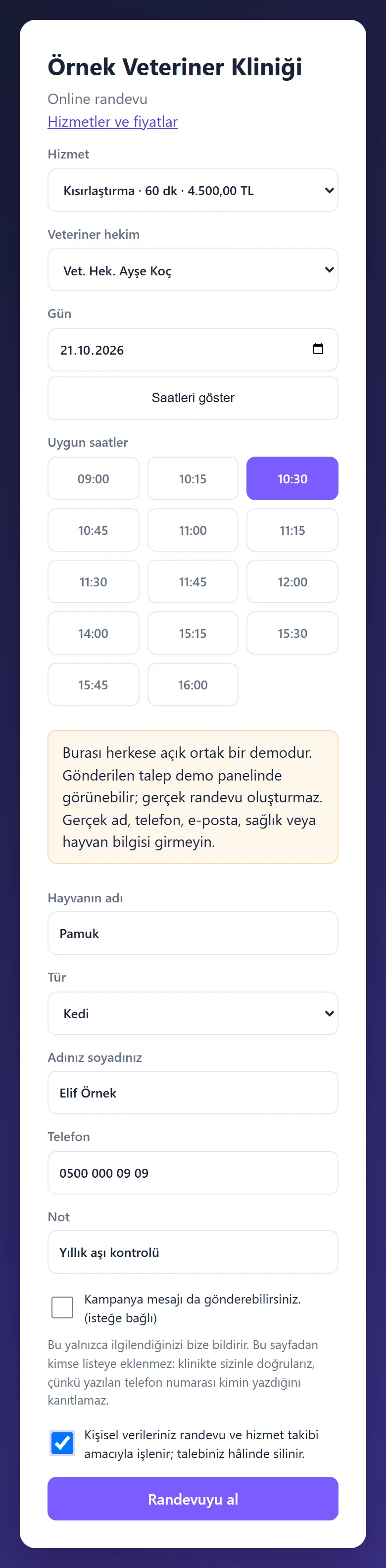
1.0.5 · 21 October 2026 Online booking form
The owner picks the service, vet, day and a free time and gives the animal’s name and species. An emergency phrase in the note, such as “kusuyor” (vomiting), shows a warning “Bu acil olabilir; lütfen kliniği arayın” (this may be an emergency; please phone the clinic) and the clinic’s phone; the form is never blocked. The picture shows the form filled in but not sent; the public demo adds a notice not to enter real details.
- On screen (Turkish interface)
- “Bu acil olabilir; lütfen kliniği arayın” — this may be an emergency; please phone the clinic
- “Hayvanın adı” — the animal’s name
- “Uygun saatler” — free times
-
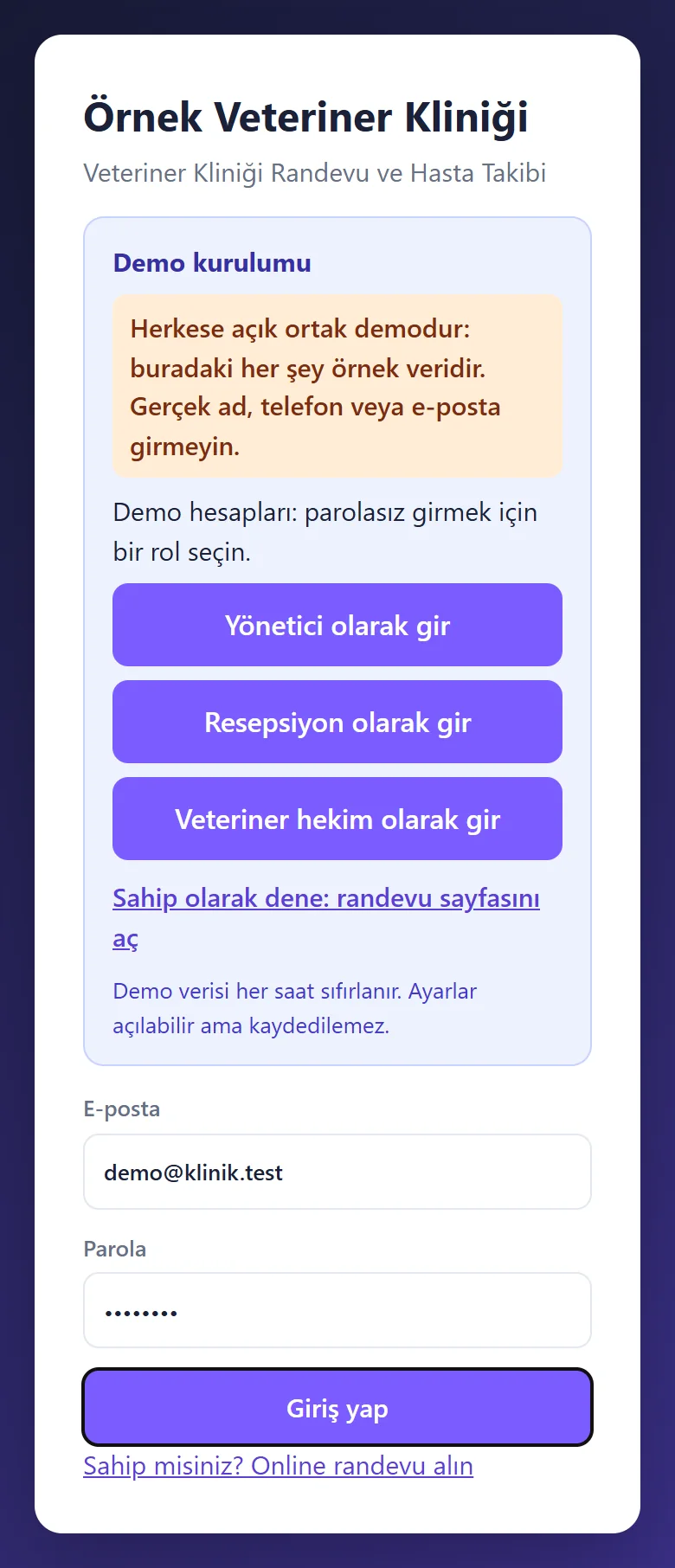
1.0.5 · 21 October 2026 Demo sign-in page
A demo notice, the manager’s fields already filled and a password-free “… olarak gir” (sign in as …) button for each role (manager, reception, veterinarian); shown only in the demo, never on a real installation.
- On screen (Turkish interface)
- “Yönetici olarak gir” — sign in as manager
- “Demo hesapları” — demo accounts
-
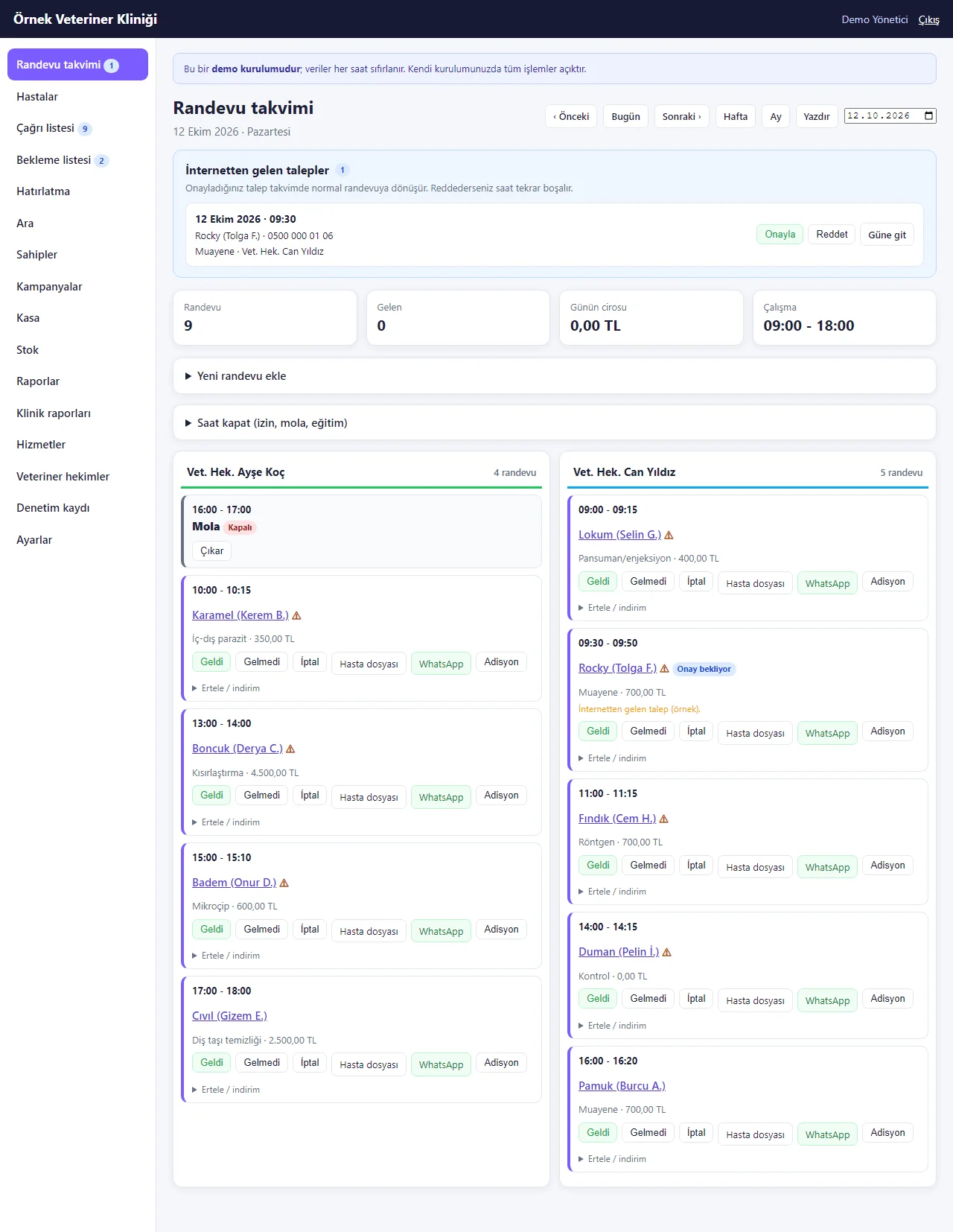
Appointment calendar
One column per vet; requests from the web wait for approval. Each booking has Geldi, Gelmedi and İptal, patient file, WhatsApp and bill buttons, and a health-warning mark beside the animal’s name.
- On screen (Turkish interface)
- “Geldi / Gelmedi / İptal” — arrived / no-show / cancel
- “Adisyon” — bill
-
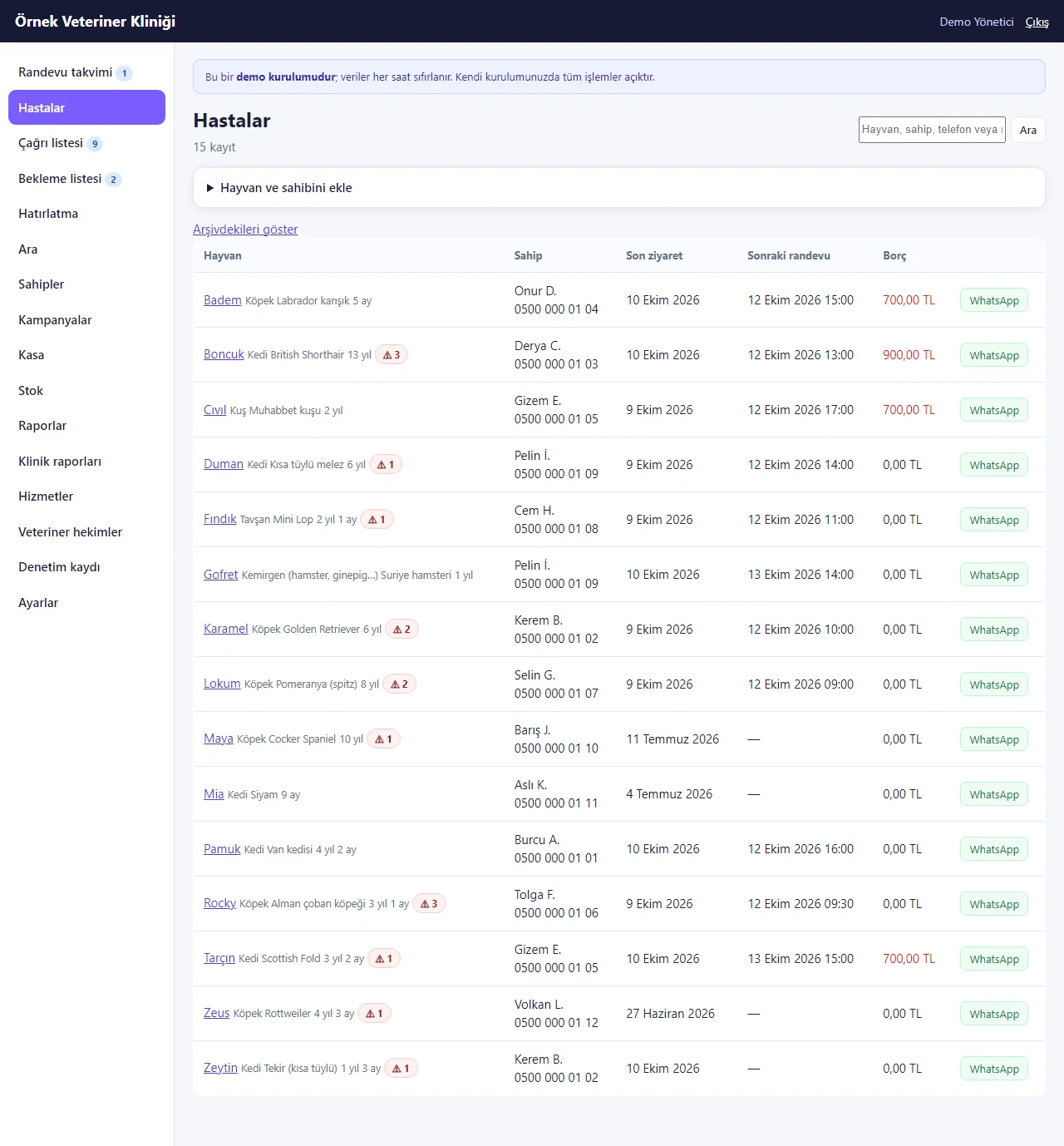
Animal list
Search by name, owner or phone; each row shows species, owner, number of warnings, last visit, next appointment, balance and WhatsApp.
-
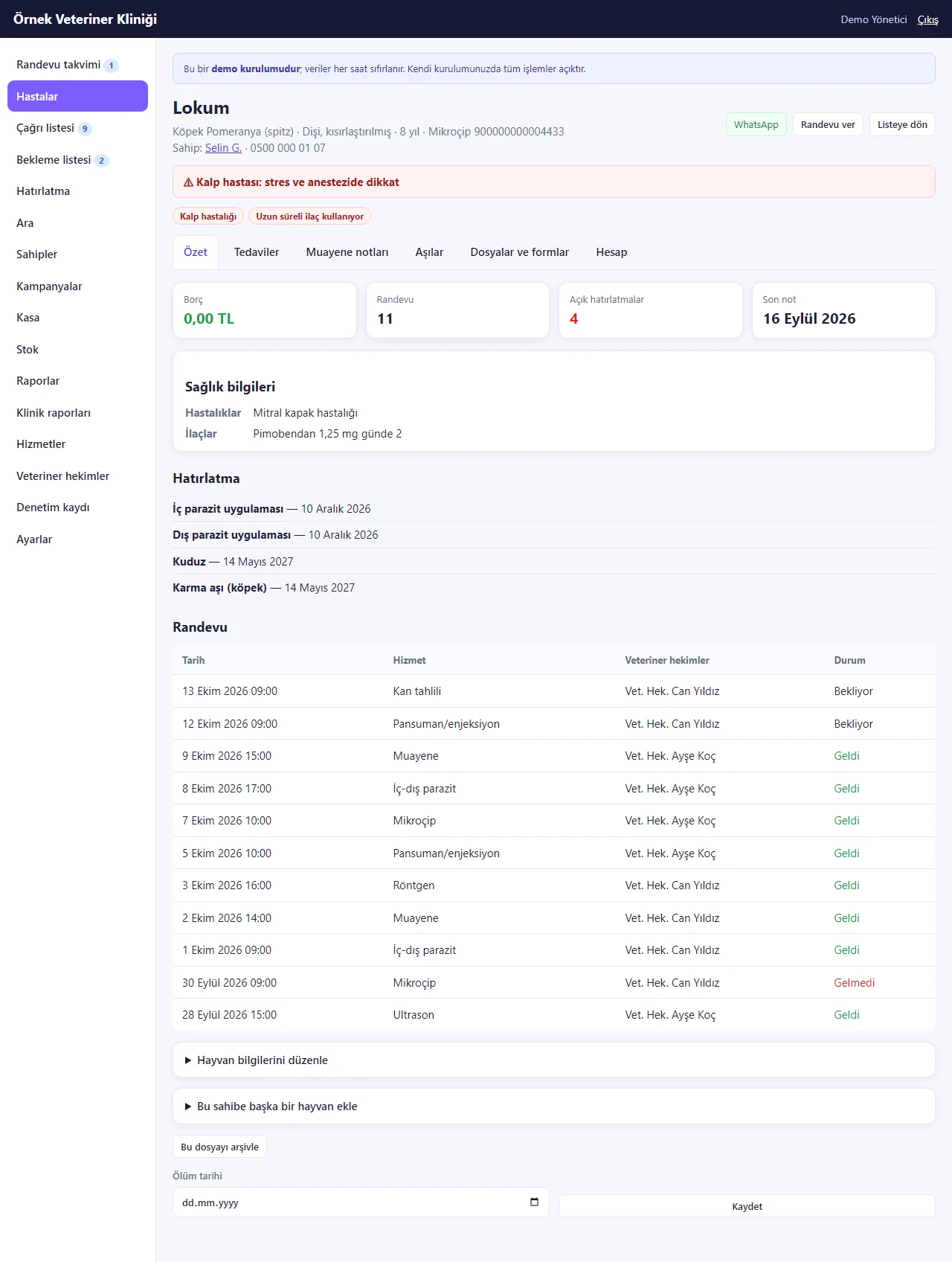
Animal card summary
Species, breed, sex, age, microchip number and owner are in the header; a red health warning and badges (heart disease, long-term medication...), balance, appointment count, reminders, vaccination and treatment due dates and the appointment history follow.
- On screen (Turkish interface)
- “Özet / Tedaviler / Muayene notları / Aşılar / Dosyalar ve formlar / Hesap” — summary / treatments / visit notes / vaccinations / files and forms / account
- “Mikroçip” — microchip
- “Sahip” — owner
-
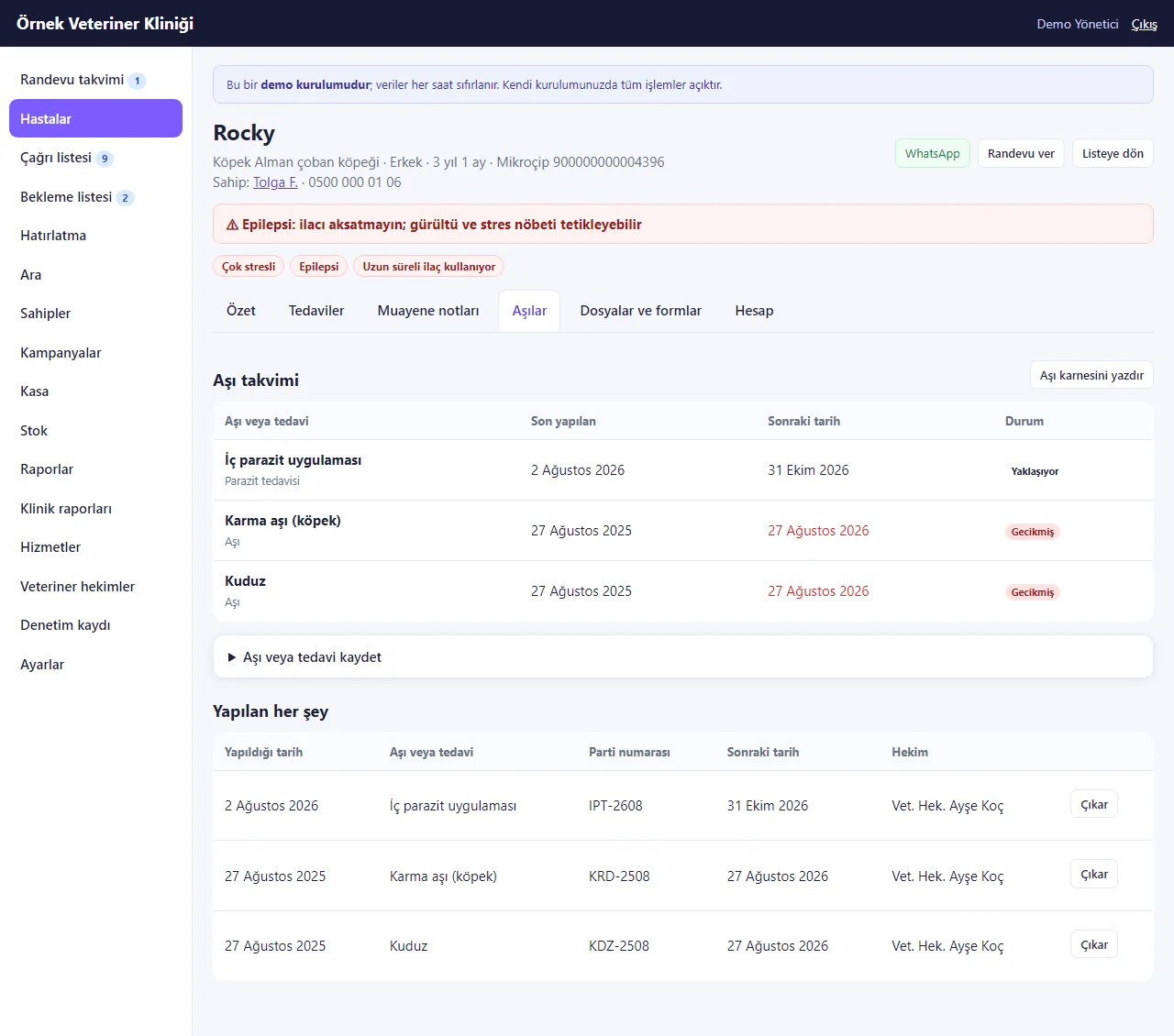
Vaccination schedule
For every vaccine and parasite treatment it shows the last and next date with a status (up to date, due soon, overdue); every administration is listed below with batch number and vet.
- On screen (Turkish interface)
- “Aşı takvimi” — vaccination schedule
- “Gecikmiş / Yaklaşıyor” — overdue / due soon
- “Aşı karnesini yazdır” — print the vaccination card
- “Aşı veya tedavi kaydet” — record a vaccine or treatment
-
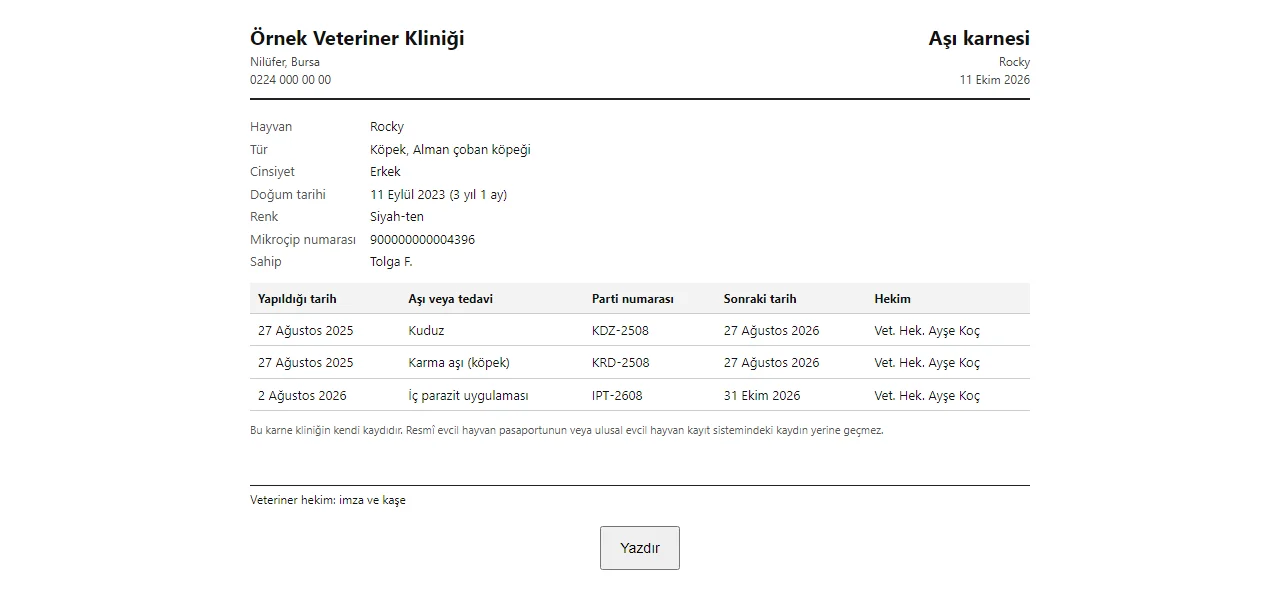
Vaccination card printout
Clinic letterhead, the animal’s name, species, breed, birth date, colour, microchip number and owner, and a table of vaccinations (date, batch, next date, vet). The page says the card is the clinic’s own record and does not replace an official pet passport.
-
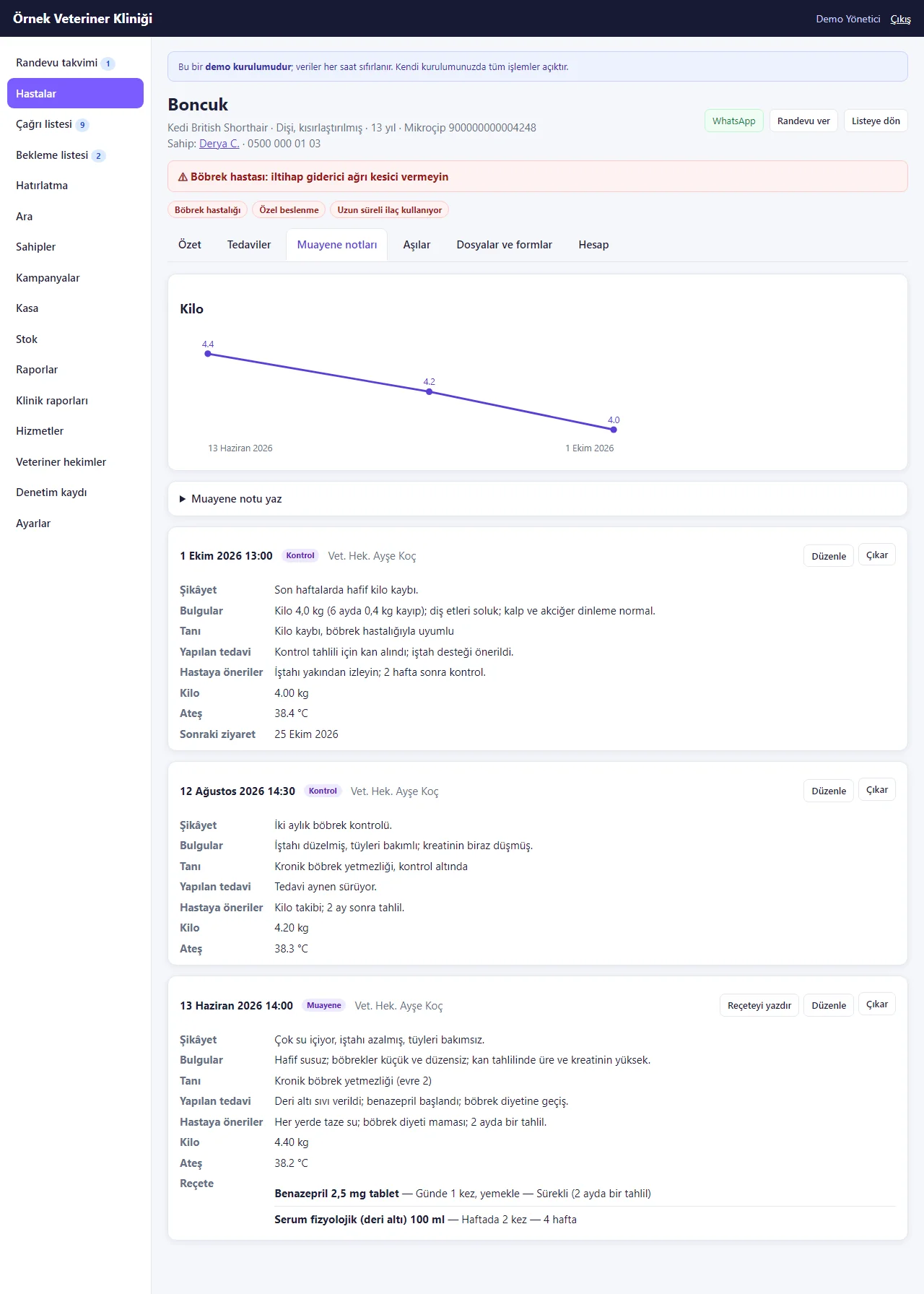
Visit notes and weight chart
The chart is drawn from the weights entered in the visits; below it each visit shows complaint, findings, diagnosis, treatment, advice, weight, temperature, next visit and prescription lines.
- On screen (Turkish interface)
- “Muayene notları” — visit notes
-
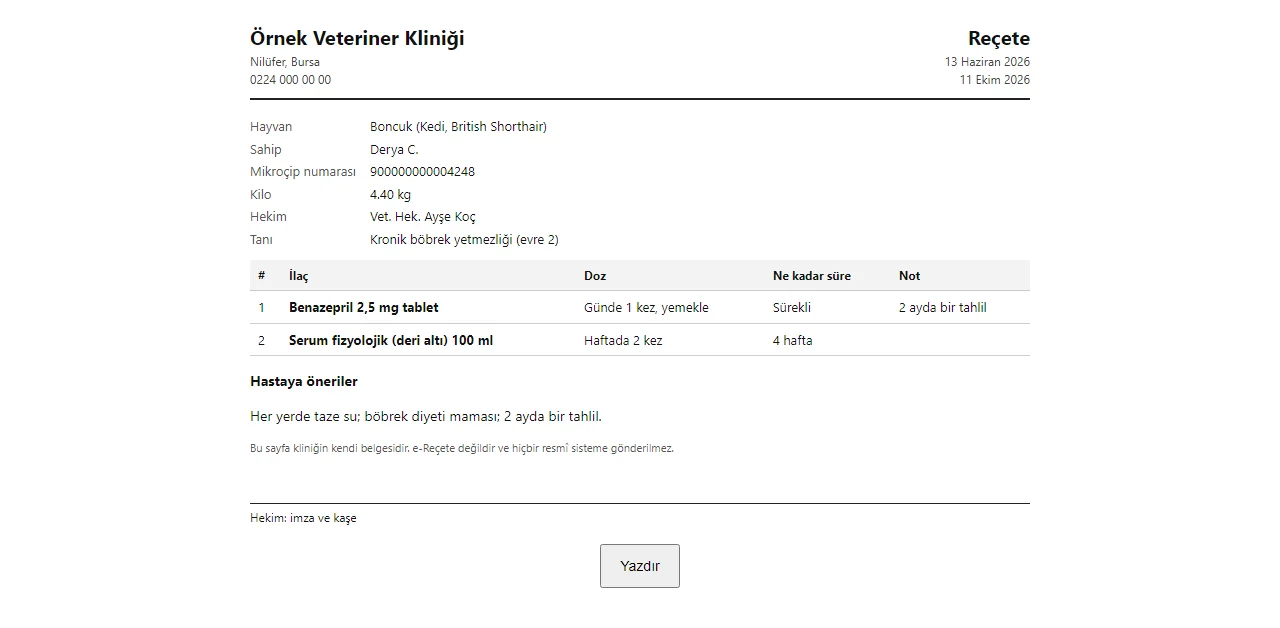
Prescription printout
Clinic letterhead, animal, owner, vet, diagnosis and a table of medicine, dose and duration with a space for signature and stamp. The page itself says it is the clinic’s own document, not an e-prescription, and is sent to no official system.
-
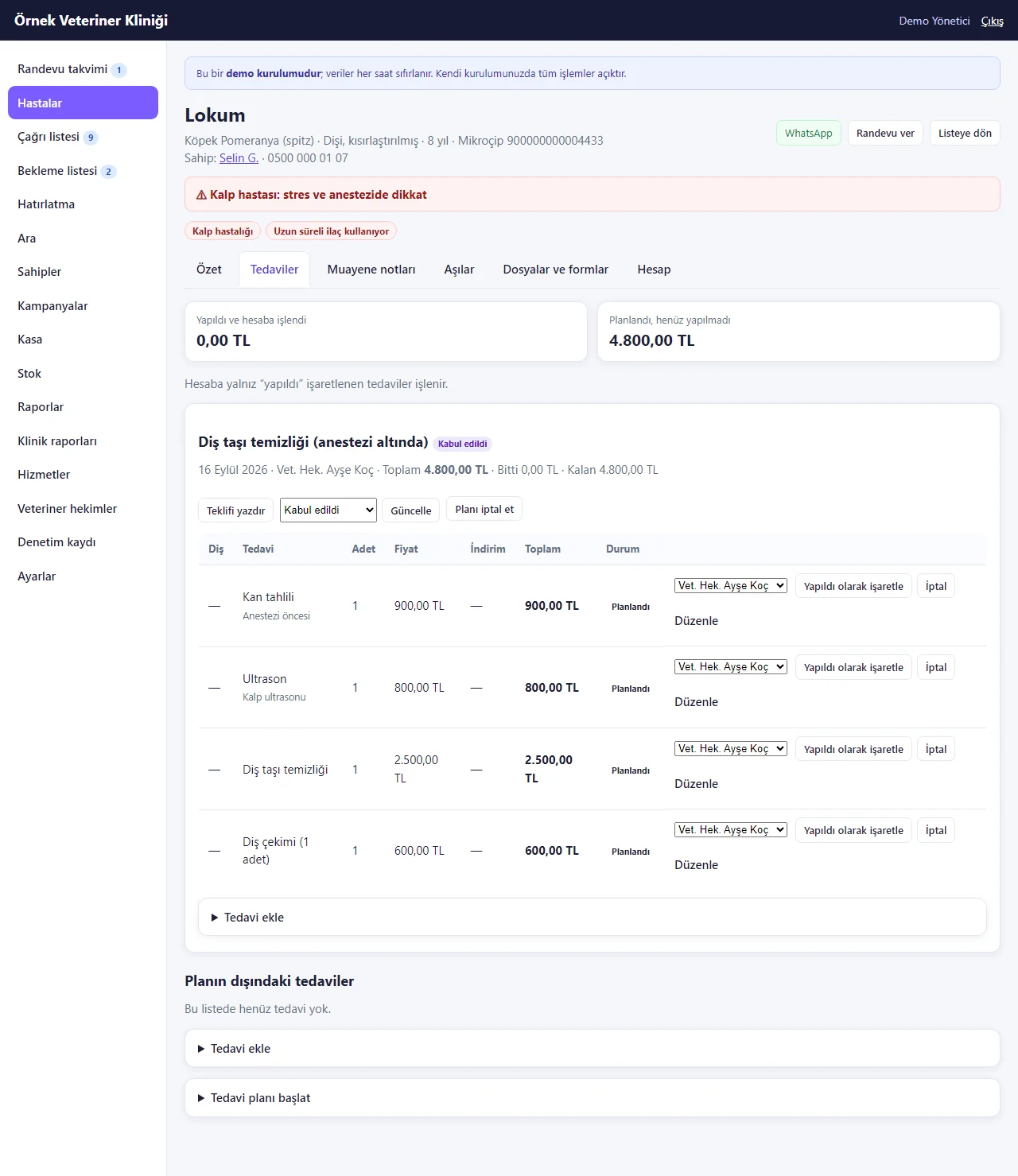
Treatment plan
An accepted plan (for example scaling under anaesthesia: blood test, ultrasound, scaling, extraction) is listed line by line with price and status; lines ticked as done are booked to the account, and an offer can be printed for the plan.
- On screen (Turkish interface)
- “Tedaviler” — treatments
-
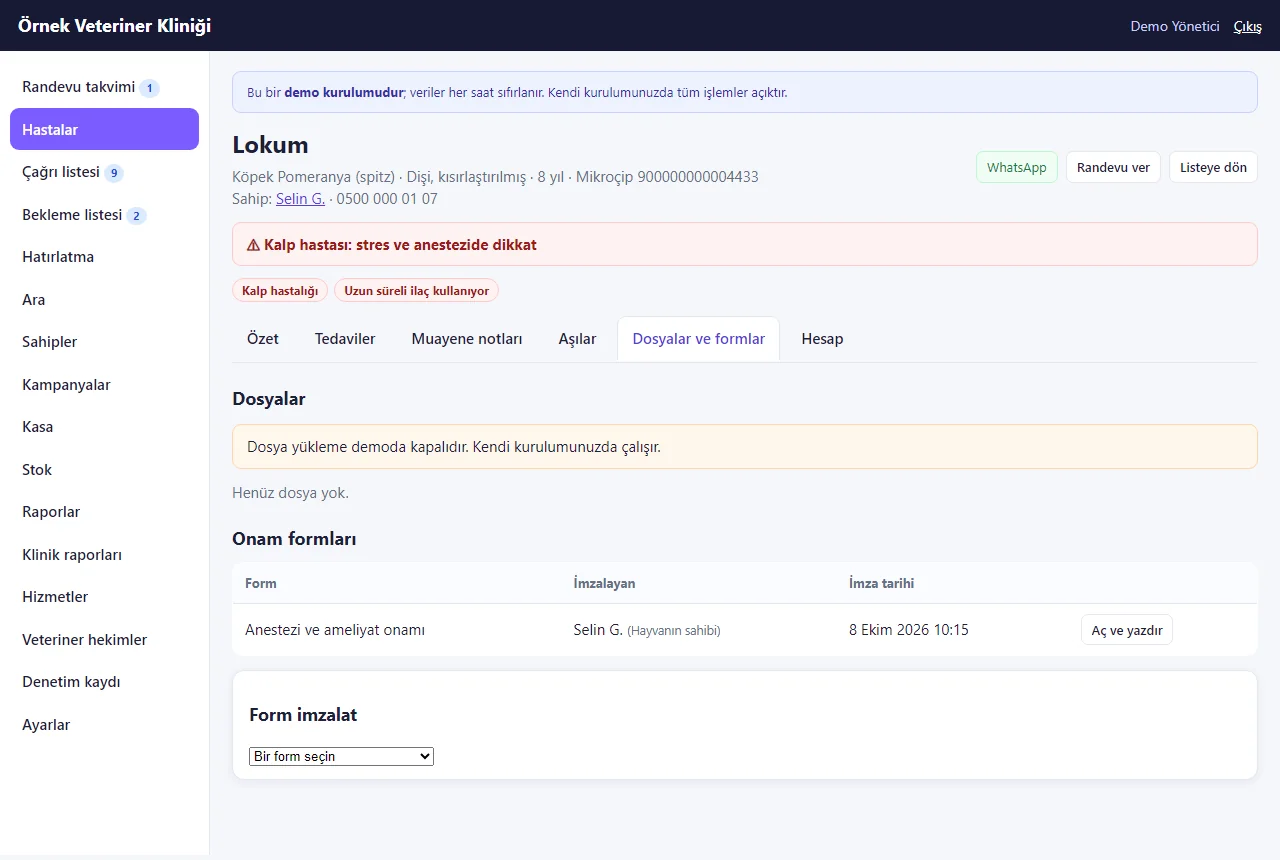
Files and consent forms
Signed forms (here an anaesthesia and surgery consent signed by the animal’s owner) are listed with form name, signer and date and can be opened and printed; the area to have a new form signed sits below. File upload is off in the demo, and the screen says so.
-
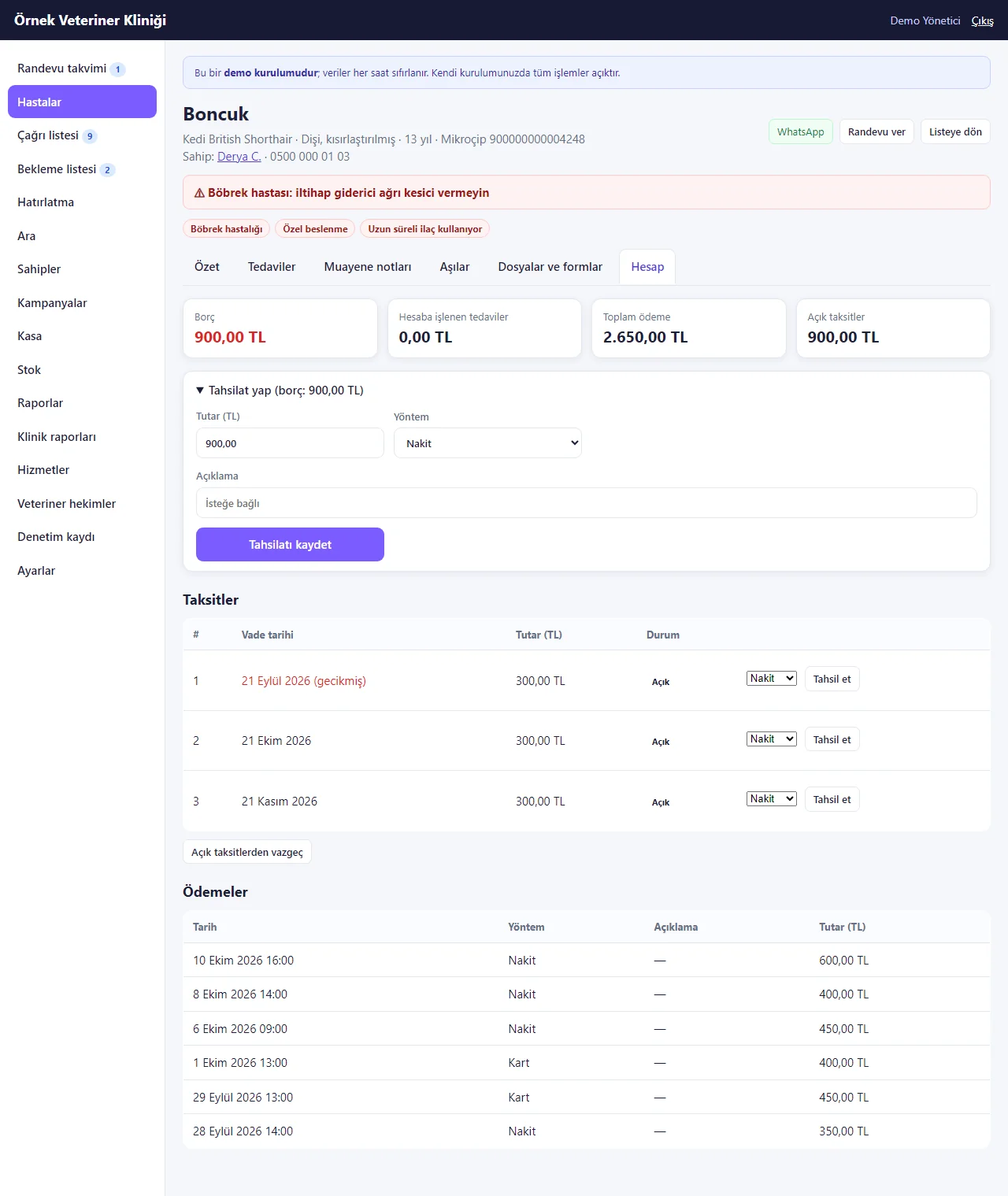
Animal account and instalments
Balance, treatments booked, total paid and open instalments; the collection form, the instalment plan (overdue and open parts) and the payment history. The sample data had no instalment plan, so for this picture a 3-part plan was made on the balance with the product’s own “Taksit planı yap” (make an instalment plan) form. The account is shared by everyone on the owner’s contact card.
- On screen (Turkish interface)
- “Taksit planı yap” — make an instalment plan
-
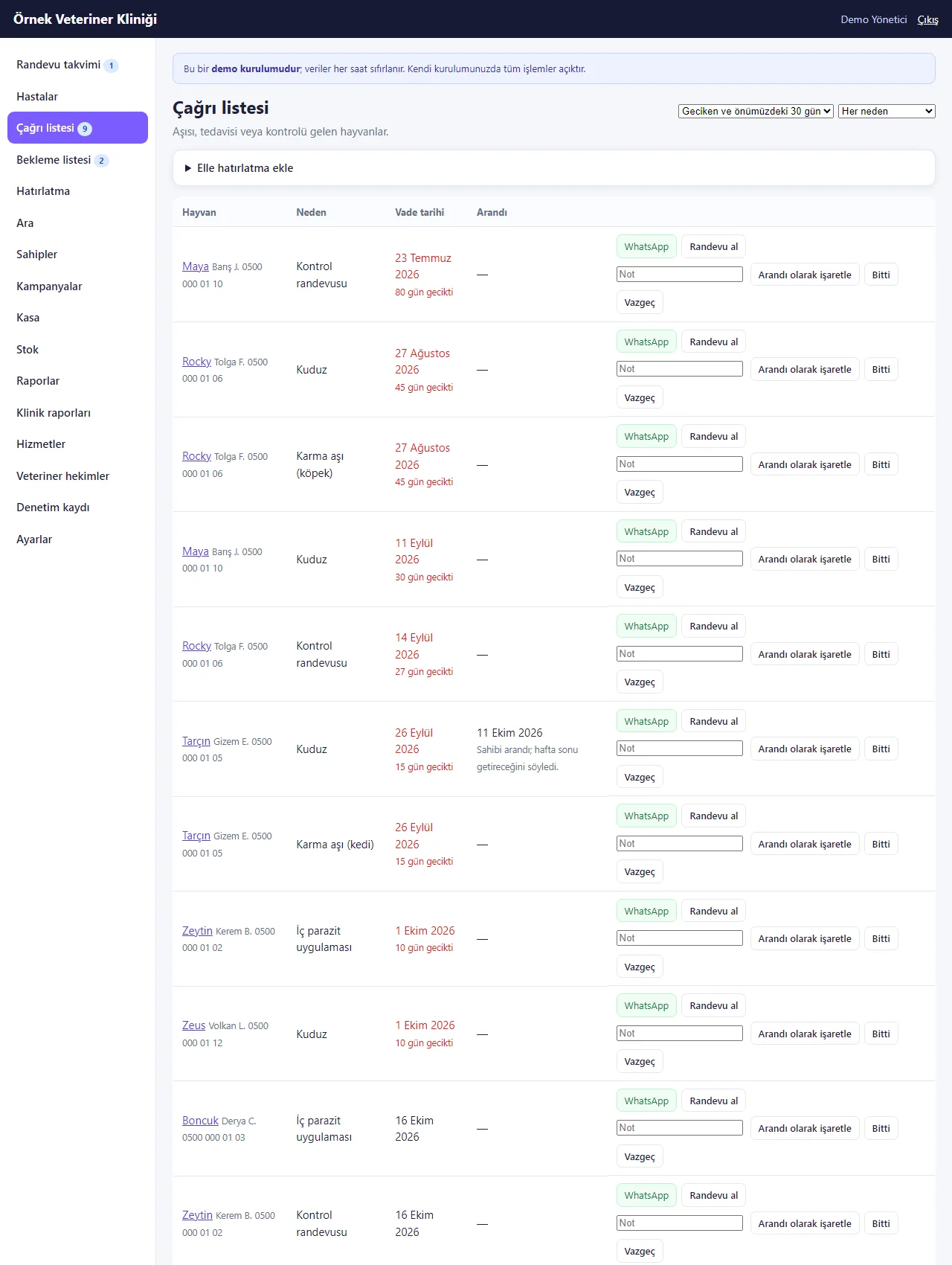
Recall list
Animals whose vaccination, parasite treatment or check-up is due. Delays show in red with the number of days; each row has a call-the-owner link, WhatsApp, a booking button, a note, “Arandı olarak işaretle”, “Bitti” and “Vazgeç”. The page is long; the picture shows its first part.
- On screen (Turkish interface)
- “Arandı olarak işaretle” — mark as called
- “Bitti” — done
- “Vazgeç” — drop
-
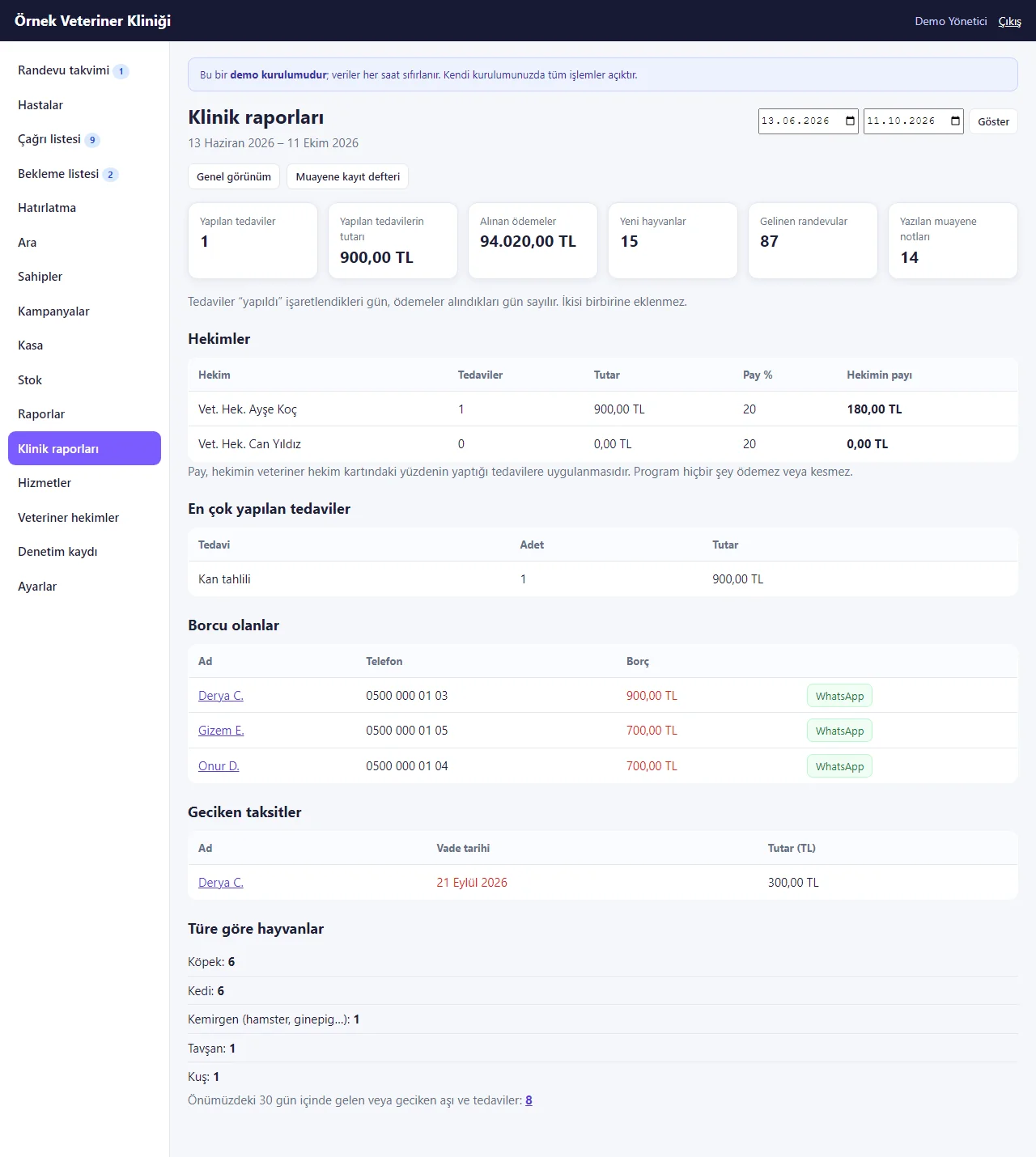
Clinic reports
For a chosen period: treatments done and their value, payments taken, new animals, appointments kept; the vet-share table, most-performed treatments, people with a balance, overdue instalments, animals by species and the number of vaccinations due in the next 30 days.
- On screen (Turkish interface)
- “Klinik raporları” — clinic reports
-
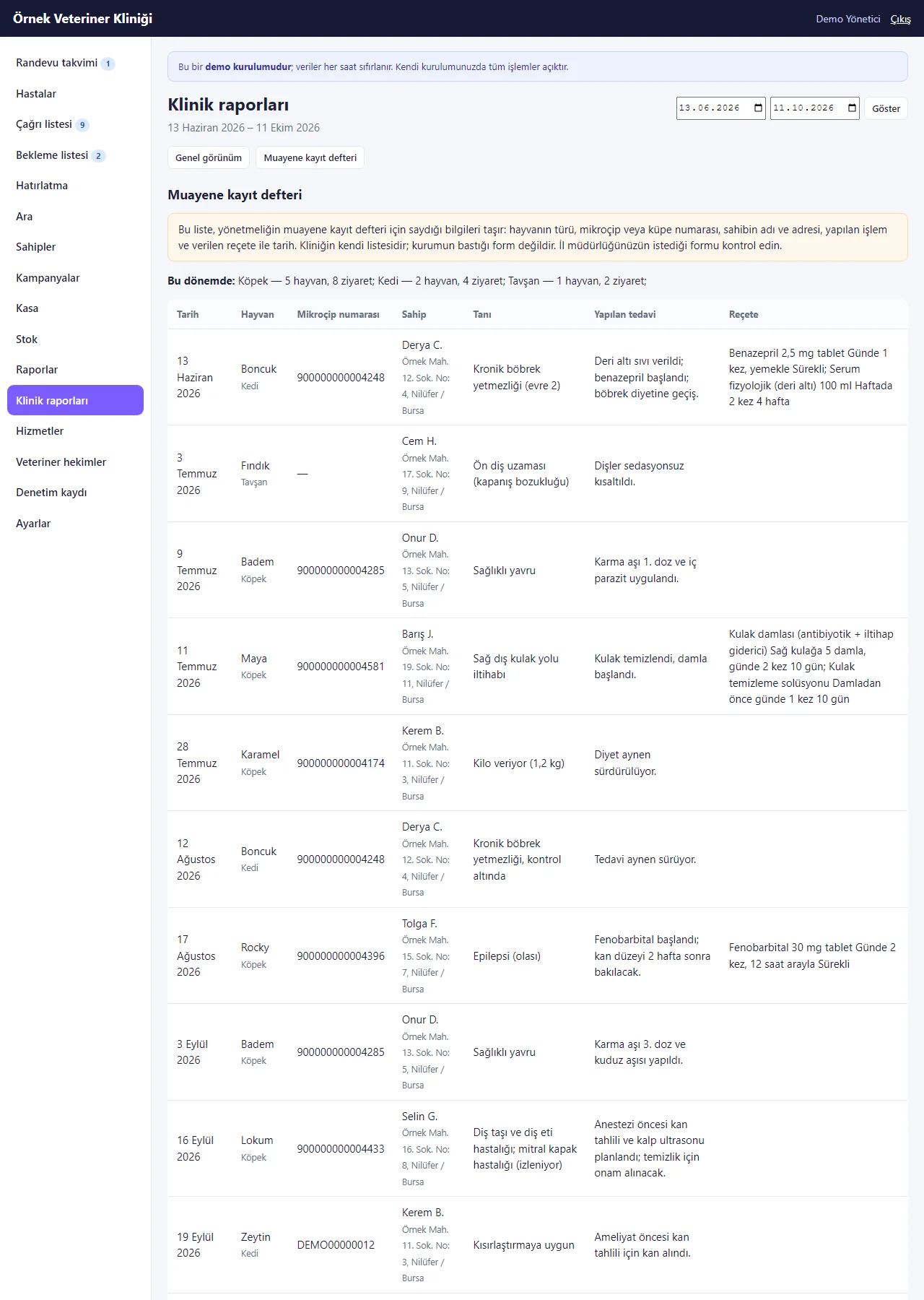
Examination register report
Date, animal and species, microchip number, owner name and address, diagnosis, treatment and prescription are gathered in one list, with counts of animals and visits by species at the top. The list is the clinic’s own and not a form issued by an authority; the page says so.
-
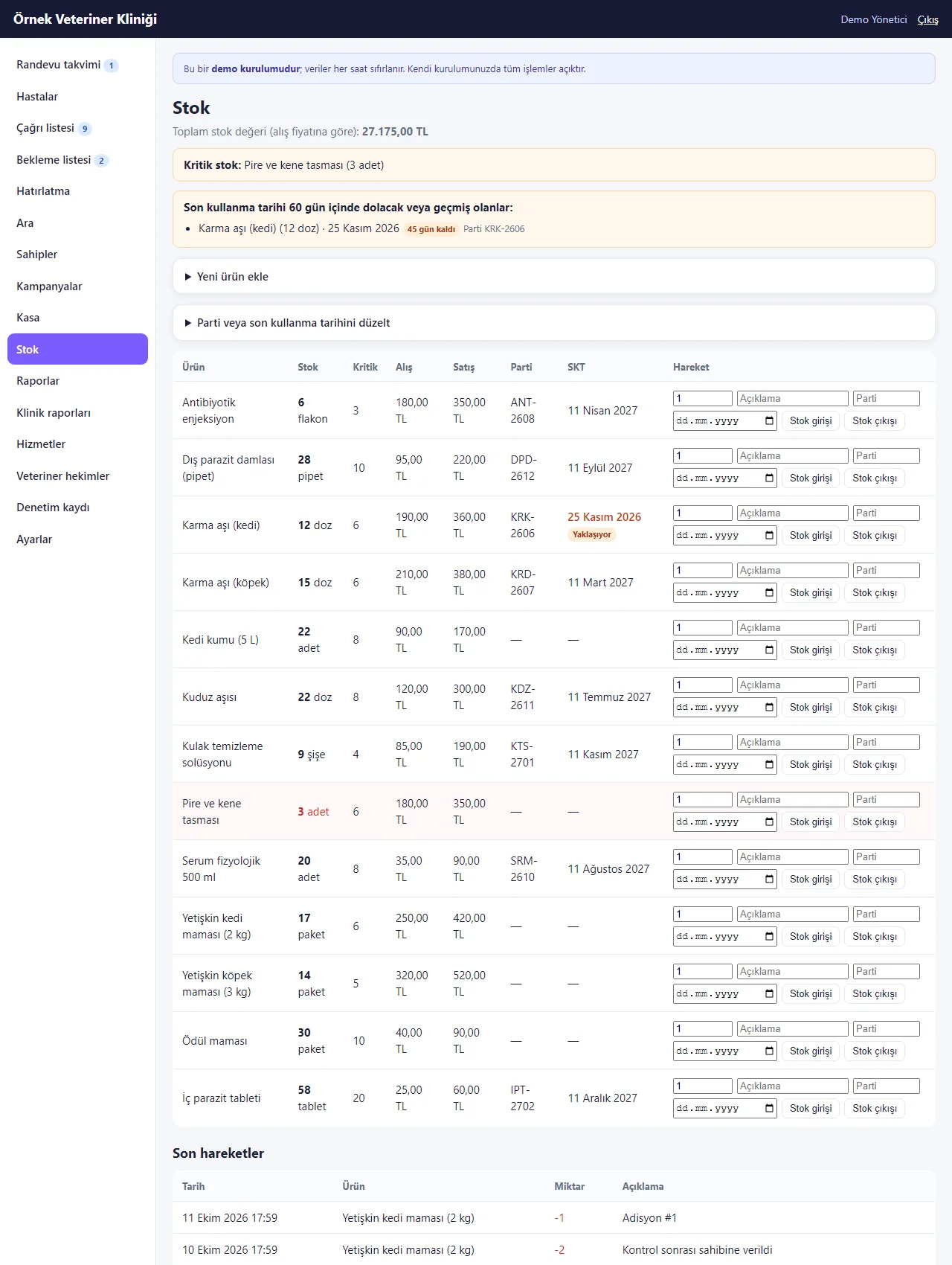
Stock
The total stock value, a critical-stock warning and products expiring within 60 days (with batch number) sit at the top; the table shows product, stock, critical level, cost and sale price, batch and expiry date, and stock in and out on every row. Giving a vaccine takes it off the stock.
- On screen (Turkish interface)
- “Stok” — stock
-
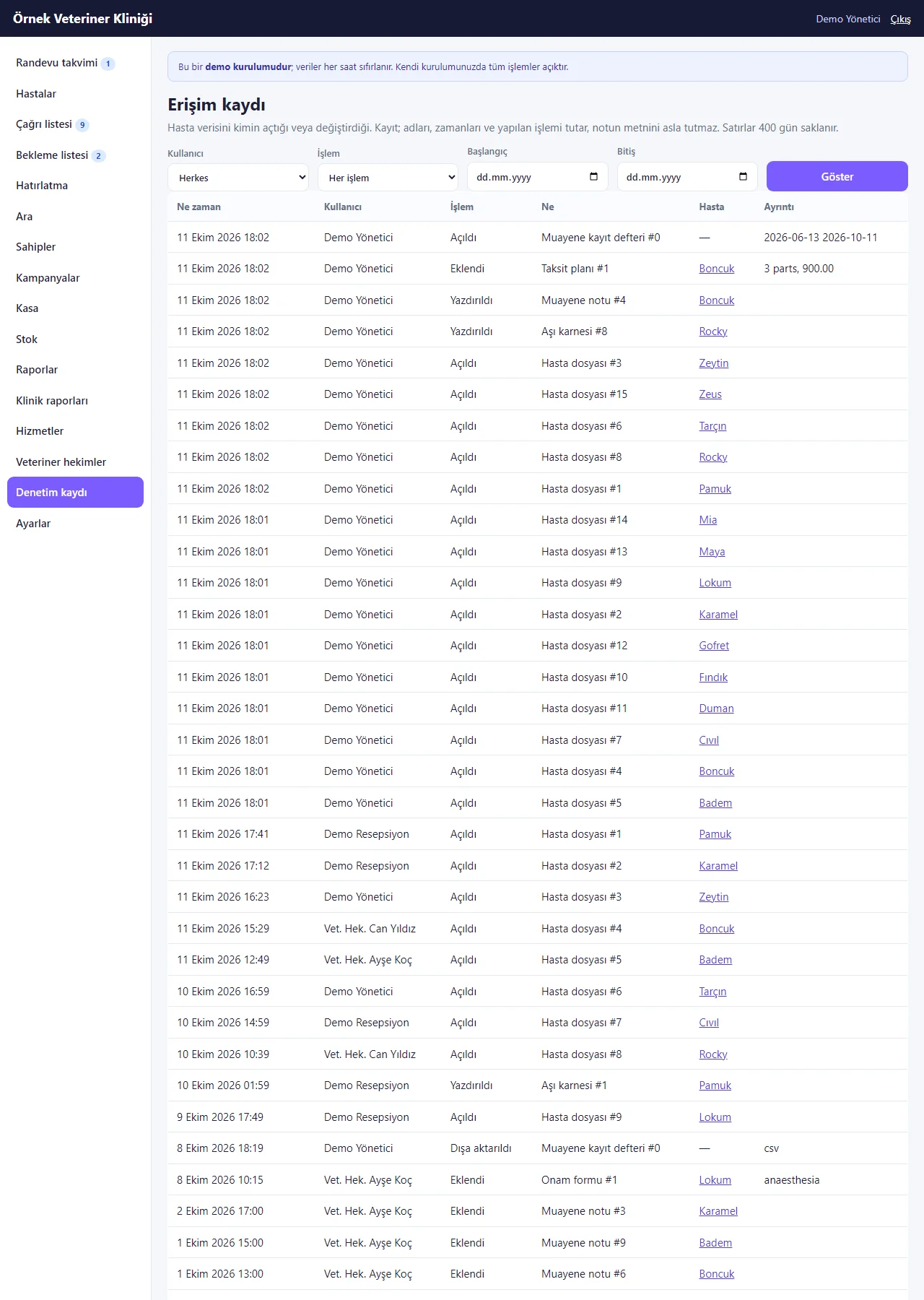
Access log
Called “Denetim kaydı” in the menu. It lists who opened or changed animal and owner data and when, and can be filtered by user, action and date. It keeps names, times and the action, never the text of a note.
- On screen (Turkish interface)
- “Denetim kaydı” — audit (access) log
-
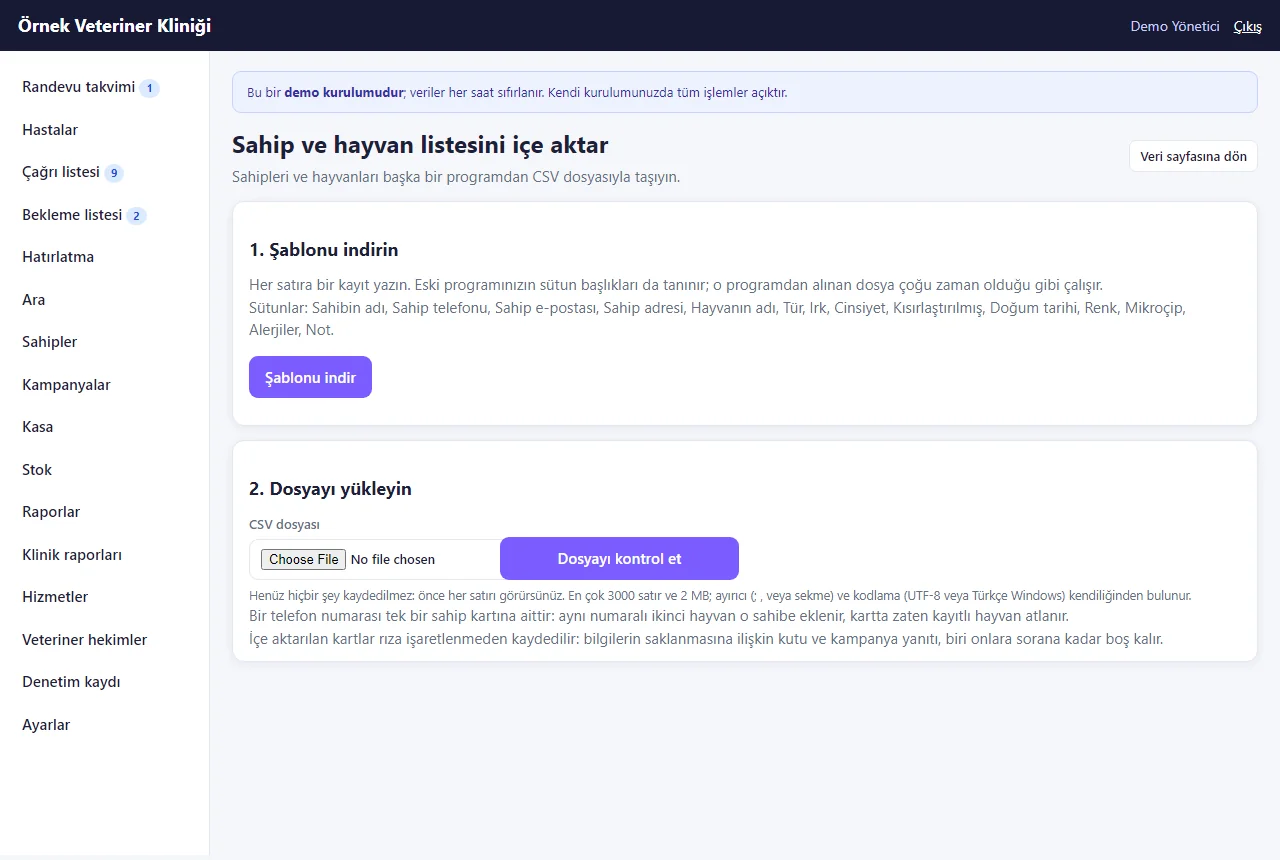
List import
An animal and owner list is imported from CSV: a template is downloaded, the file uploaded and every row is shown before anything is saved; owners on the same phone are gathered on one contact card. Import is switched off in the demo.
-
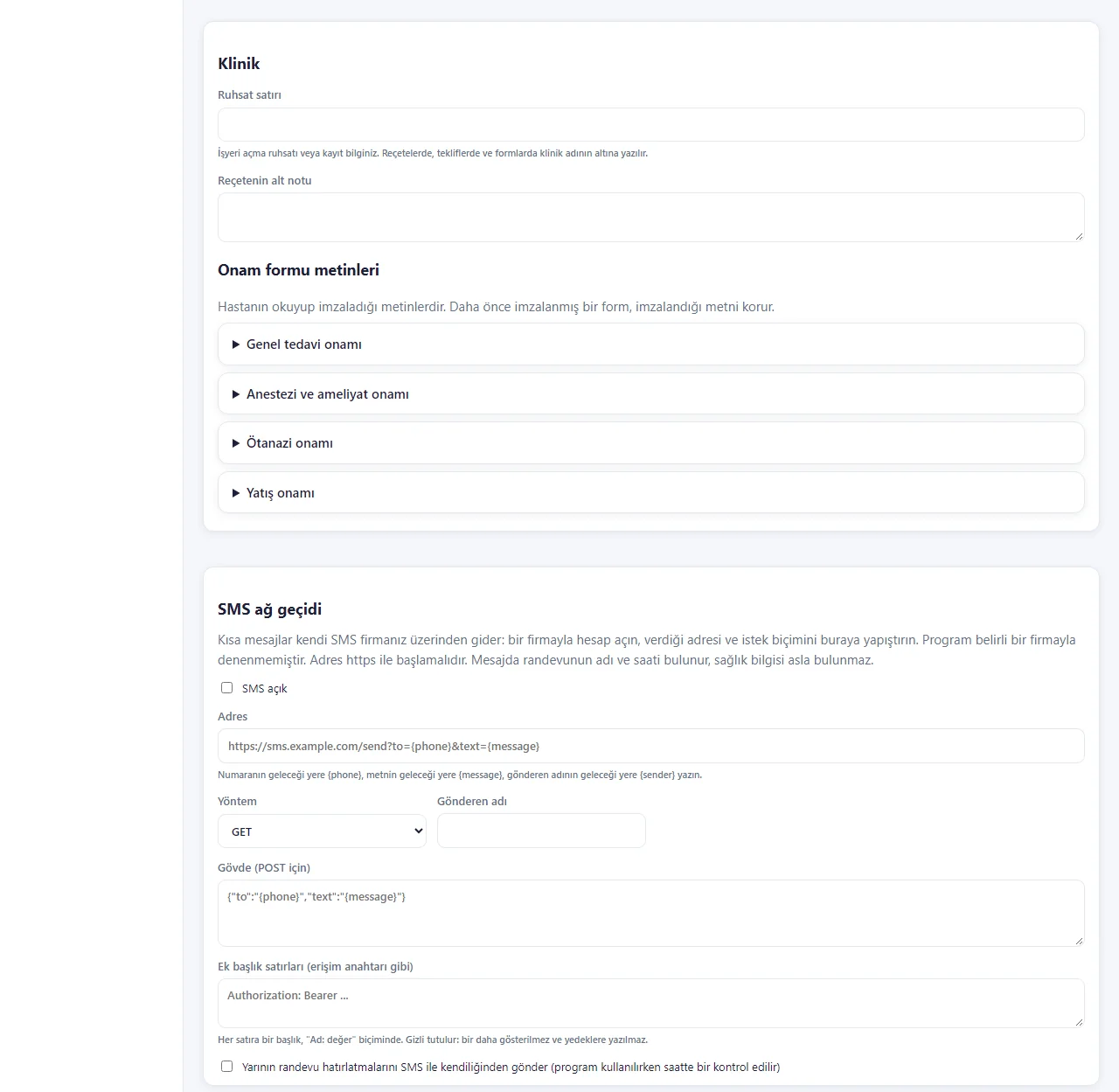
Settings
The Clinic and SMS gateway parts: licence line, prescription footer and editable consent texts (general treatment, anaesthesia and surgery, euthanasia, hospitalisation); the address, method, sender name, body and headers of the clinic’s own SMS provider. Settings cannot be saved in the demo.
-

Animal card on a phone
The warning strip, badges and scrolling tabs sit in one column; the cards and the appointment table stack, with table rows shown as labelled cards. The screen does not scroll sideways.
- What do they see at the end?
- An approved request becomes an appointment in the calendar. The vet records the visit note, weight, prescription and vaccination on the animal’s card; the next vaccination and check-up dates land on the recall list and are followed up with a ready WhatsApp message; the treatment done goes onto the owner’s account.
- What is it good for?
- Vaccination and parasite dates, microchip numbers, visit notes and what is owed do not scatter across a notebook, spreadsheets and WhatsApp, and overdue vaccinations and approaching expiry dates show up by themselves.
Everything that is not included, and all limits
- Not delivered to a client and not used by a real clinic. The clinic (“Örnek Veteriner Kliniği”, i.e. “Sample Veterinary Clinic”), the owners, the animals, the vets, the microchip numbers, the prices and the phone numbers starting with 0500 are sample data; no real person or animal data should be entered in the demo.
- It is not an official health information management system and sends no data to PETVET, TARBİL, e-Prescription, e-Nabız or any other official system; there is no connection to them. The examination register report is the clinic’s own list, not the register form issued by an authority.
- The offer, prescription, vaccination card and consent printouts are the clinic’s own documents; they do not replace an invoice, an e-prescription or an official pet passport, and there is no e-invoice or e-archive connection. The signature on a consent form is drawn on screen and is not a secure electronic signature.
- Tried locally with PHP 8.3 and SQLite; the live demo runs on a single DirectAdmin account with SQLite and is set to refresh its sample data every hour. Tried on MariaDB 10.11.19 only, as a local and partial run (the core and the microchip and vaccination-stock tests); not tried on MySQL or other versions. The phone-size screens come from a browser set to a phone’s size; not tried on a real phone. Instant notifications and add-to-home-screen were tested automatically only, not on a real Android phone or iPhone; notifications need HTTPS and the user’s permission in the browser.
- The live demo’s sign-in page has password-free “… olarak gir” (sign in as …) buttons for manager, reception and veterinarian (demo only; on a real installation the box is not shown). The public booking form shows a demo and personal-data notice.
- In the demo, settings, staff, file upload, data export and import, e-mail and SMS are switched off, and the add-to-phone window and notification box are not drawn; in a normal installation they are on and were tested automatically.
- There is no automatic WhatsApp sending: messages are prepared and sent from the clinic’s own WhatsApp. For SMS the clinic enters the HTTPS address of its own SMS provider; it has not been tried with a particular provider. There is no owner portal, hospital-ward chart, boarding or hotel, pet grooming, farm or large-animal module, laboratory device or chip-reader link, online payment, store app or multi-site view.
- Known small limits: two animals that already shared a microchip number before 1.0.3 are not corrected automatically (since 1.0.4 such animals can be saved again) — an administrator sees them in a list and fixes them by hand; putting the stock unit back when an older (pre-1.0.3) vaccination record is deleted depends on the person ticking a box (since 1.0.4 there is a box for it); uploaded files are not part of the backup file and their folder is backed up separately.
- The interface in the screens is Turkish; the program can also be switched to English in its settings. Dental clinics have a separate product.
Delivery and sales status
How does it work?
You try the demo and tell us about your clinic, and we send you a quote. We install it, we host it and we take a daily backup. The yearly price includes installation, hosting, data transfer and support.
Price
The yearly list price is 3,000 TL. Installation, one year of hosting, data transfer, a daily automatic backup, bug fixes and written usage support are included.
Possible delivery options
Other delivery options
Requirements and version history
Installation requirements
- Requirements as written in the documents: PHP 8.1 or newer, the pdo_mysql and mbstring extensions, MariaDB/MySQL 10.4 or newer (pdo_sqlite for the demo and trials). The product was tried locally with PHP 8.3.33 and SQLite; tried on MariaDB 10.11.19 only, as a local and partial run (the core and the microchip and vaccination-stock tests); not tried on MySQL or other versions.
Release notes
- Summarised from the version history; no version has been delivered to a client. A live sample-data demo exists.
- 1.1.2 (28 October 2026): “Takvime ekle” (add to calendar) on the owner’s appointment page: an “Add to Google Calendar” link and “Dosya olarak indir (.ics)” (download the file; a reminder one hour before). The link and the file carry no animal or owner name, phone number or note (only the clinic name, the service and the vet’s name); not shown for an appointment waiting for approval or a cancelled one. No new permission, data or schema change.
- 1.1.1 (27 October 2026): an instalment plan may not exceed the balance still owed (no plan when nothing is owed) and a part cannot be collected above what is owed either, so the account never ends up in credit.
- 1.1.0 (27 October 2026): a step-by-step setup wizard (clinic name and hours, vet, a ready service list, the first animal, sending the booking address, adding to the phone), a progress bar and “Bu ekran ne işe yarar?” (what is this screen for?) boxes; in the demo “Boş siteyle yeniden başla” (start again with an empty site) and “Örnek veriyi geri yükle” (bring the sample data back); after a booking request the owner lands on their own page and can add it to the home screen; a sign-in-free add-to-phone page; free instant notifications for a new request or a cancellation; a vet’s leave over several days and an upcoming-leave list (a day with an appointment is not cancelled silently, there is no leave-days-left counter); a payment above the amount due (closing a ticket or taking a payment) is refused.
- 1.0.7 (26 October 2026): what a role may not use is no longer shown to it: a vet sees no amounts or prices in the day, week and month views and no discount form, and in an animal file the owner or contact name is plain text, not a link; with no stock item or staff member yet, reception sees “ask the manager” instead of a link to a page it may not open; the export and delete buttons that did nothing on the demo are no longer drawn. The server still refuses an address typed by hand.
- 1.0.6 (21 October 2026): patient (animal) list import also checks an Excel (.xlsx) file or a table pasted from Excel next to a CSV file (.xlsx only when the server has the zip extension, otherwise a save-as-CSV note appears); every preview row has a “Alma” (do not take) box and there is “Son içe aktarmayı geri al” (undo the last import); nobody is messaged during the import. Import is closed in the demo.
- 1.0.5 (18 October 2026): password-free “… olarak gir” (sign in as …) buttons for each role on the demo sign-in page (demo mode only; on a real installation the address answers 404).
- 1.0.4 (14 October 2026): an animal that already shared a microchip number with another before 1.0.3 can be saved again and an administrator sees such animals in a list; removing an older vaccination record can put one stock unit back when the person removing it knows it took one.
- 1.0.3 (13 October 2026): a microchip number already on another animal is refused (form and CSV import; a unique index in new installations); removing a new vaccination record gives back the stock unit it took, in one step with the removal.
- 1.0.2 (12 October 2026): a “Kliniğe WhatsApp ile haber ver” (tell the clinic on WhatsApp) button on the owner’s own appointment page (a ready message with the name, date, time and clinic name).
- 1.0.1 (12 October 2026): a demo and personal-data notice on the public booking form.
- 1.0.0 (11 October 2026): first version; a clinic module on the salon core (1.4.0) with the pilates 1.0.3 security fixes: animal cards and health warnings, a vaccination and parasite schedule, a recall list, visit notes, a weight chart and prescription printouts, treatment plans and offers, instalments, consent signatures, stock with expiry warnings, an examination register report and an access log.
Decisions not made yet
- Rights to use, modify, transfer and receive the source code: to be set in a written agreement; not decided yet.
- Whose name the hosting and domain are opened in, and where the software is installed, have not been decided yet.
There is no cart, customer account or online payment on this site for now. Reach out by phone, WhatsApp or the form; in a first conversation your need and the software’s fit are reviewed. The form does not create an order, a contract or a payment.