Retail and e-commerceDemo with sample data
WooCommerce WhatsApp Order and Quote Plugin: screen-by-screen guide
The full version of the short description on the product page: every feature, how each screen is used step by step, all limits and the delivery details.
All features
The flows below were tried in a browser on the live demo shop and on a local installation (WordPress 7.1.3, WooCommerce 11.2.1, PHP 8.3); automatic tests for the message, price format, phone number and visibility rules (19 JS, 39 PHP and 15 checks inside WordPress) passed. How the message lands in WhatsApp on a real phone was not tried.
- An “Order on WhatsApp” button and an optional “Get a quote” button on the product page; the customer sends the ready message themselves, nothing goes out automatically
- The message carries the product name, product link, unit price, chosen quantity, total and SKU; a sale price and the shop’s own currency format (separators and symbol position) are used
- For a variable product the chosen colour and size, that option’s price and its SKU go into the message, and the product link in it opens with the choice selected. Pressing the button before the options are chosen does not open WhatsApp and shows a notice; the order button is hidden for an out-of-stock option
- From WooCommerce → WhatsApp Sipariş: the number (written as 0555… or +90…), button labels, message templates, colours, corner radius, icon, position and behaviours, with a preview of the placeholders on a sample product. A line whose placeholder is empty is left out of the message
- Turn it on or off per product and per category: a “WhatsApp düğmeleri” box on the product edit screen and fields on categories. The order is product, category, then the general setting; on a category, “Hide” beats “Show”
- A product without a price gets only “Get a quote”; an out-of-stock product hides the order button and keeps “Get a quote” if you want it
- It does not touch theme files: it hooks into WooCommerce, and a [wast_dugme] shortcode is there for a theme that does not use those hooks. The interface is Turkish, with short set-up steps on the settings screen and in the plugin description; deleting the plugin removes its own settings
Screen by screen: how it is used
The first three screens and the phone view come from the live demo shop (Turkish interface, sample products); the admin screens come from a local installation of the same plugin, because the live demo’s admin area is not open to visitors. The phone view was taken with a browser set to a phone’s size and was not tried on a real phone. WhatsApp’s own screen is not in these pictures.
- Who uses it?
- A customer who buys or asks for a quote in the shop; the shop owner, who installs the plugin and sets the number, button labels and message templates.
- Where do they start?
- The customer opens a product page, picks a colour and size if needed, enters a quantity and presses “WhatsApp’tan sipariş ver” (Order on WhatsApp) or “Teklif al” (Get a quote).
What do they do on screen? Step by step
-
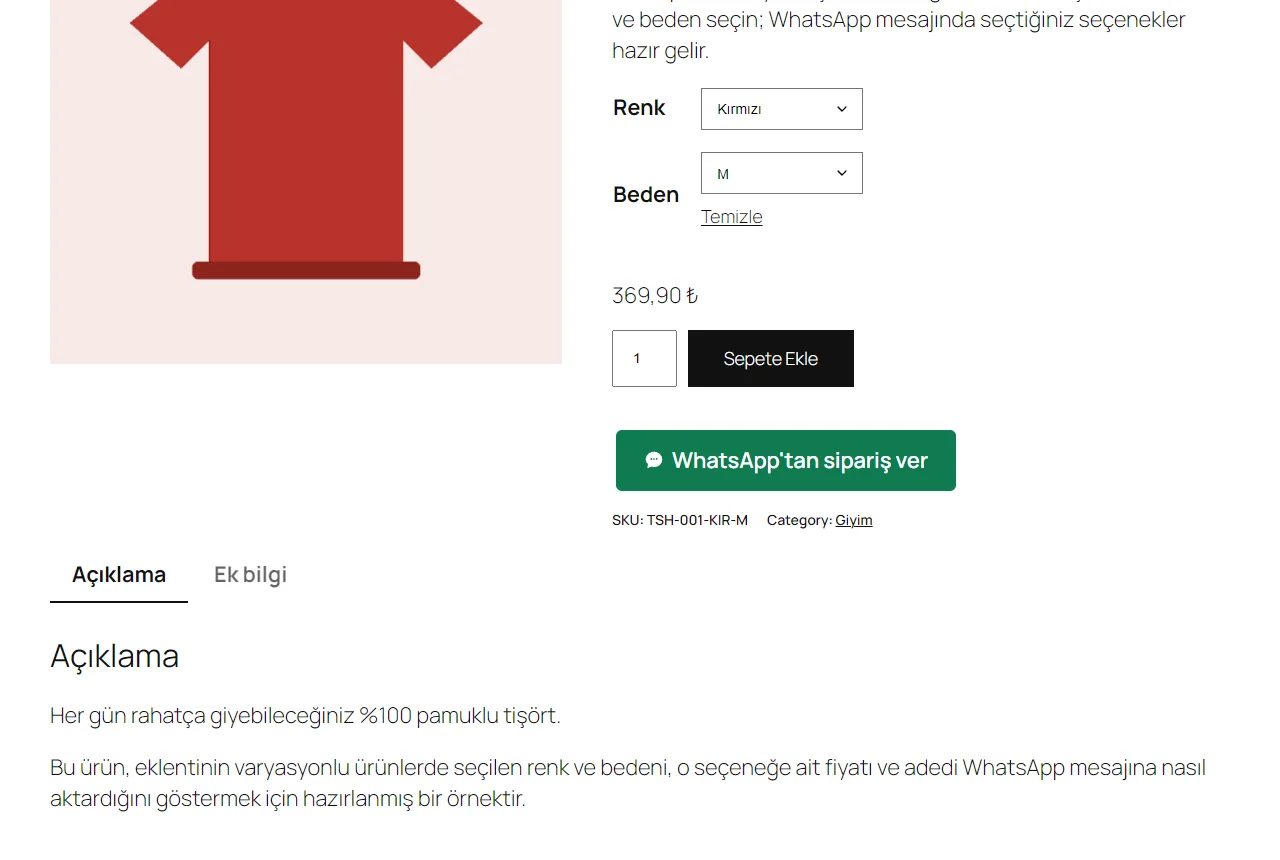
Variable product
Once a colour and size are chosen the price follows the option (369,90 ₺) and a green “WhatsApp’tan sipariş ver” button appears below the add-to-cart button. Pressing it puts the chosen colour and size, that option’s price, the quantity and the total in the message, and the product link in it opens with the same choice. Pressing before the options are chosen does not open WhatsApp and shows a notice.
- On screen (Turkish interface)
- “Renk / Beden” — colour / size
- “Sepete Ekle” — add to cart
- “WhatsApp’tan sipariş ver” — order on WhatsApp
-
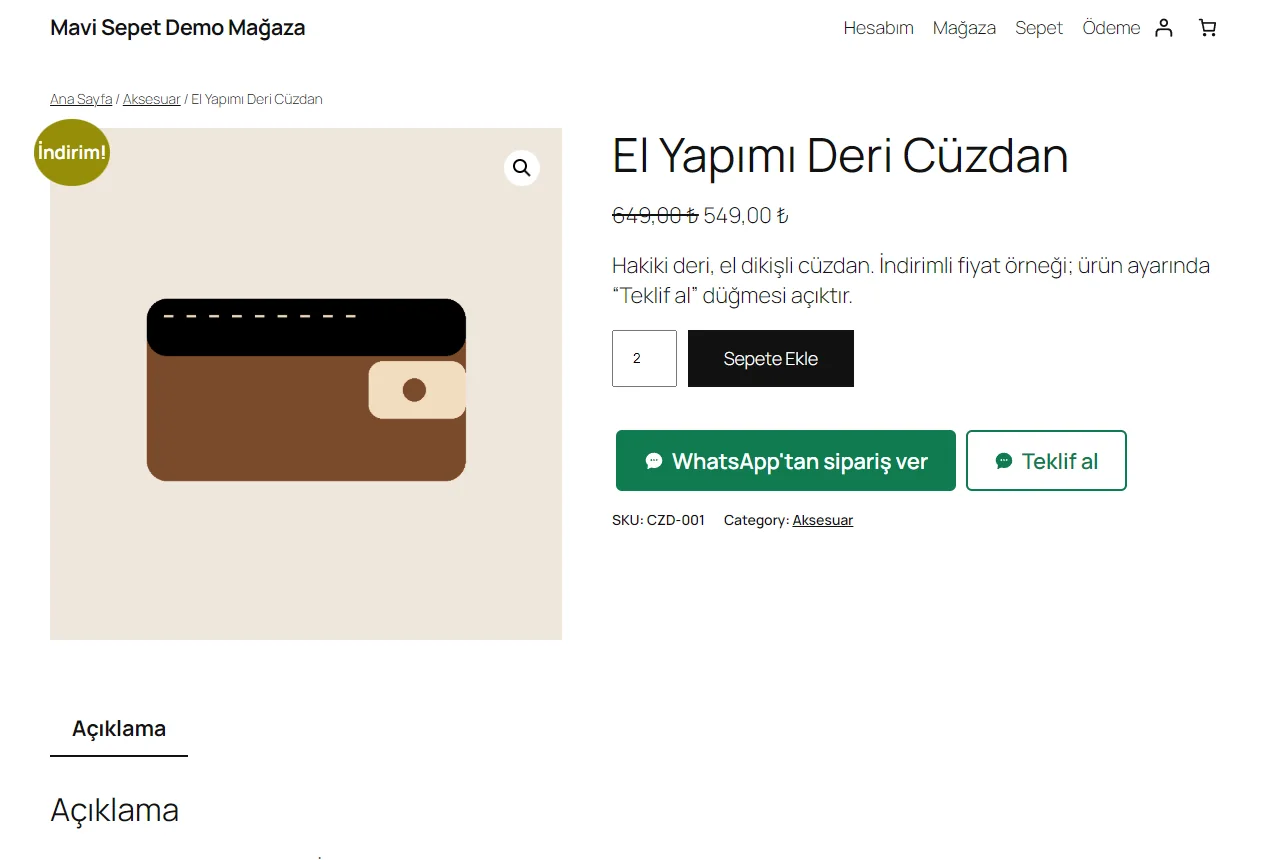
Simple product: order and quote
On a product with a sale price (quantity 2) two buttons sit side by side: the filled green “WhatsApp’tan sipariş ver” and the outlined “Teklif al”. “Teklif al” shows here because it is switched on in this product’s settings; it is off in the general setting.
- On screen (Turkish interface)
- “WhatsApp’tan sipariş ver” — order on WhatsApp
- “Teklif al” — get a quote
- “Sepete Ekle” — add to cart
-
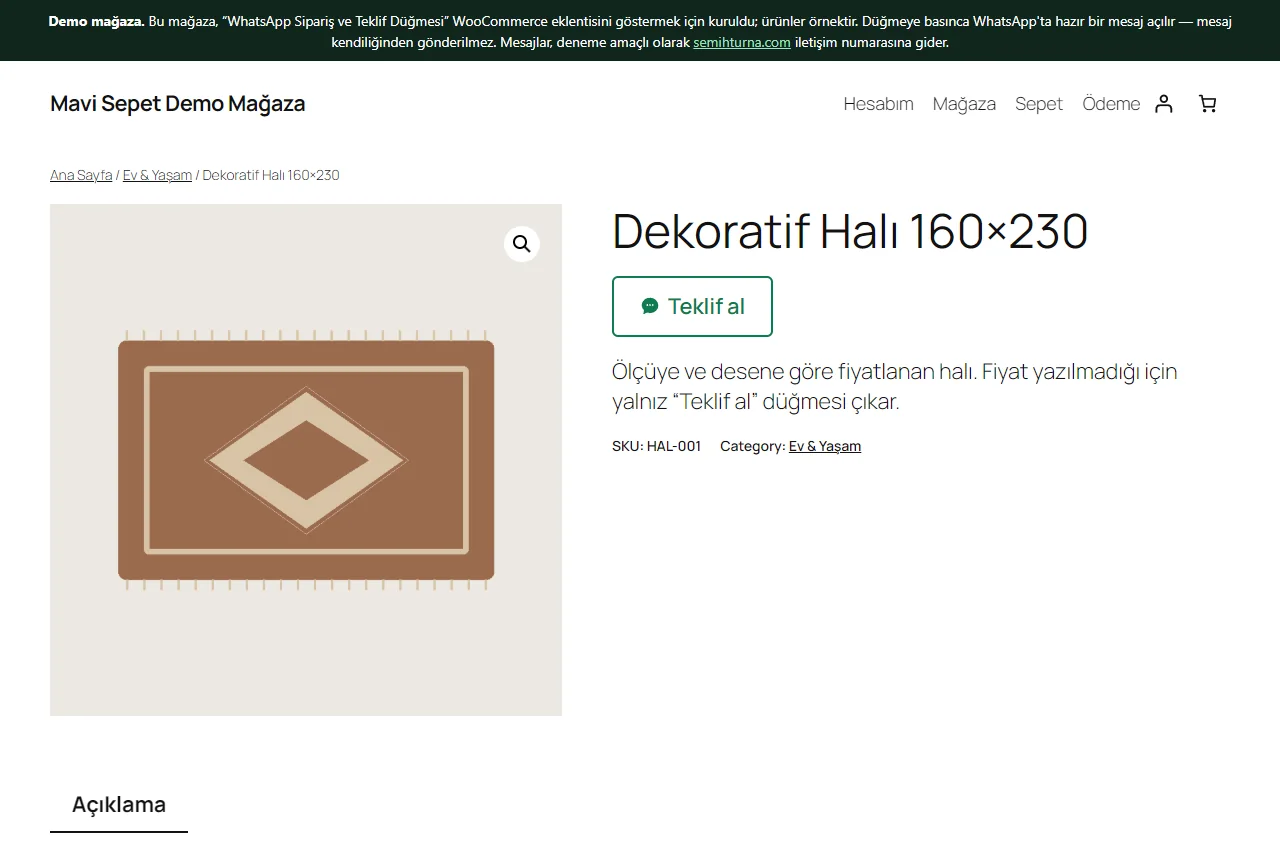
Product without a price
A product with no price shows no order button, only “Teklif al”; with no price there is no add-to-cart button either. The message carries the product’s name and link, and the price line is left out of it.
- On screen (Turkish interface)
- “Teklif al” — get a quote
-
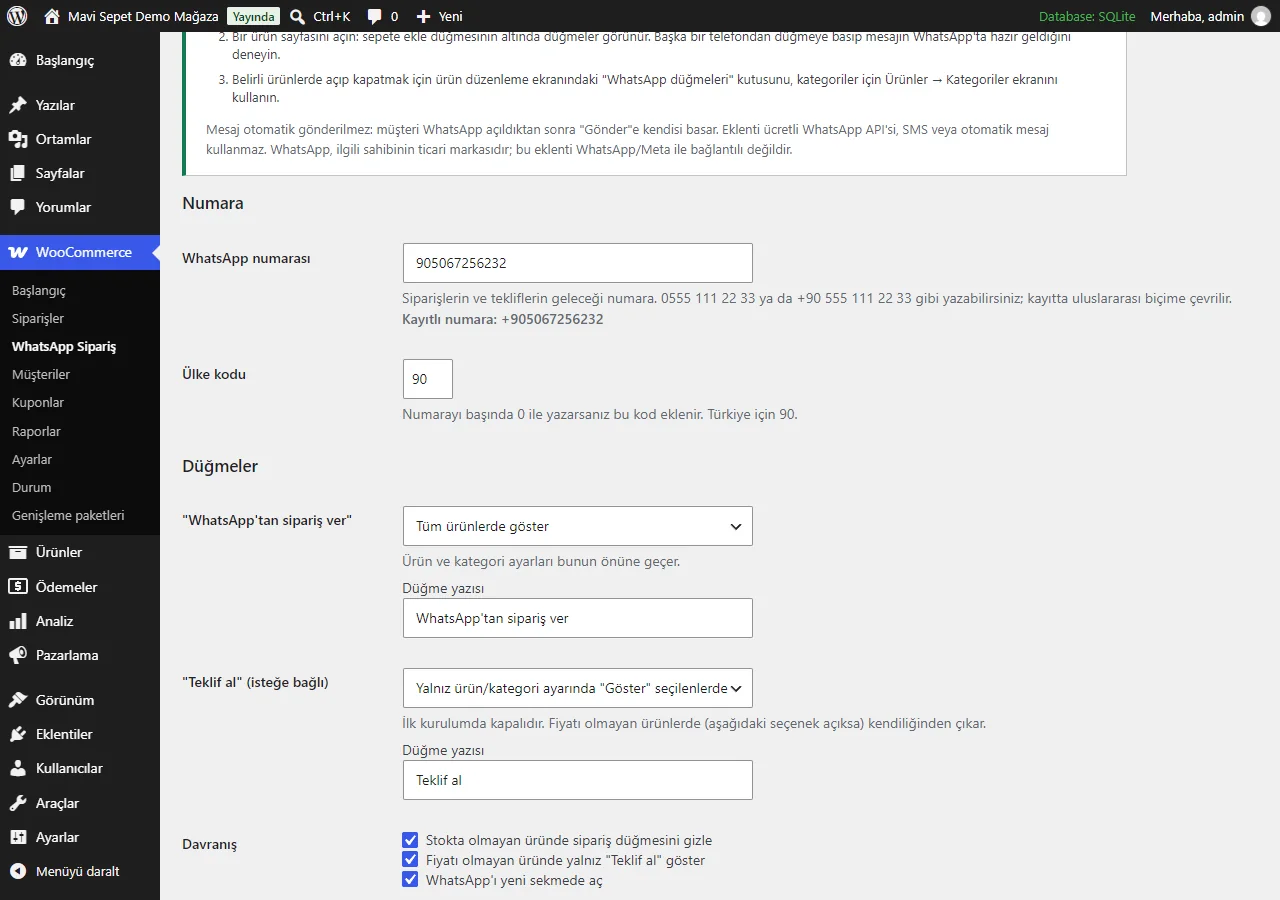
Number and button settings
The WooCommerce → WhatsApp Sipariş screen: short set-up steps at the top, then the number (written as 0555… or +90… and stored in international form), the country code, the rule for switching the order and quote buttons on, the button labels and the behaviour options.
- On screen (Turkish interface)
- “WhatsApp numarası” — WhatsApp number
- “Ülke kodu” — country code
- “Düğmeler” — buttons
- “Düğme yazısı” — button label
- “Davranış” — behaviour
-
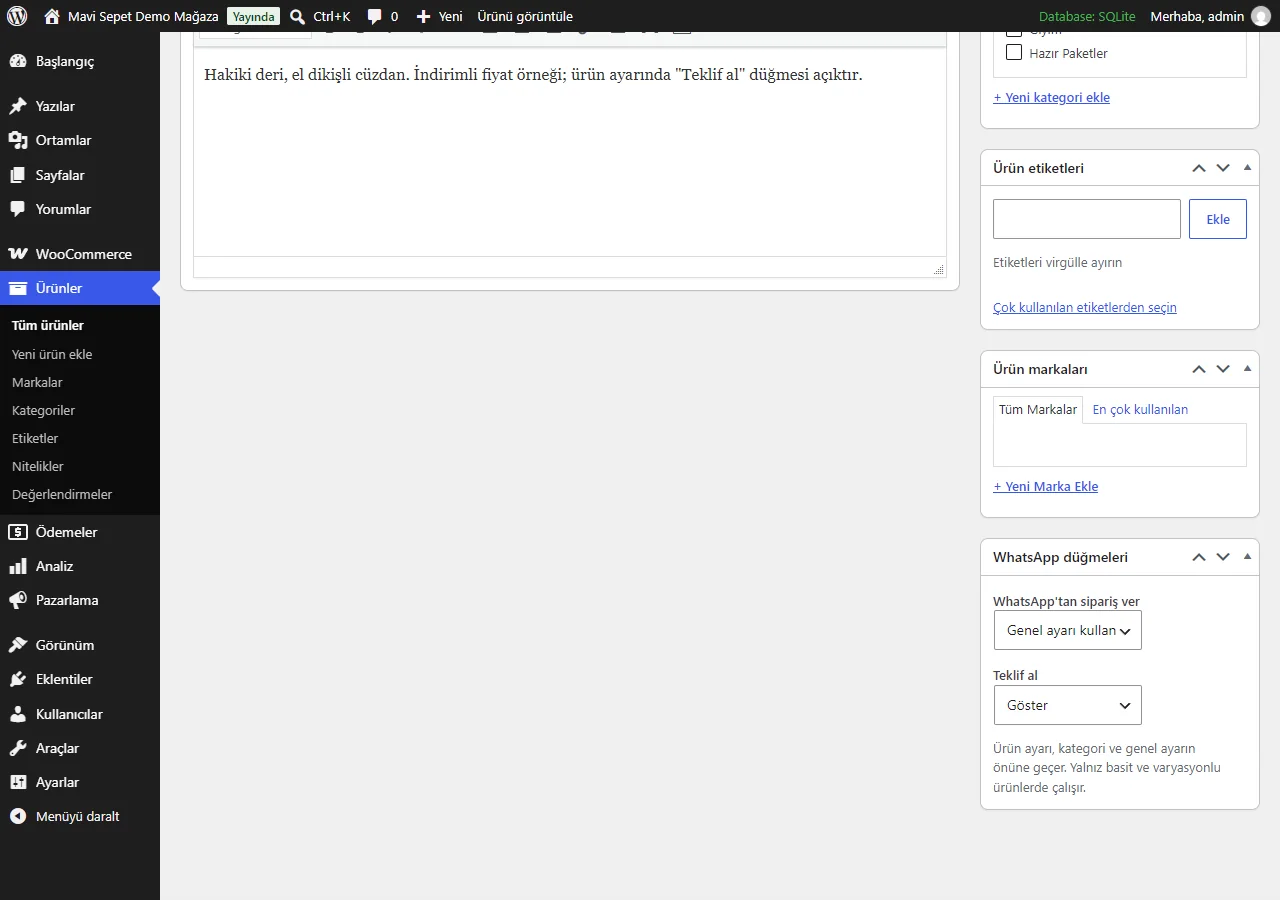
Switching on and off per product
A “WhatsApp düğmeleri” box in the side column of the product edit screen: “Genel ayarı kullan” (use the general setting), “Göster” (show) or “Gizle” (hide) for the order and the quote button. The product setting beats the category and the general setting; categories have the same fields.
- On screen (Turkish interface)
- “WhatsApp düğmeleri” — WhatsApp buttons
- “Genel ayarı kullan” — use the general setting
- “Göster / Gizle” — show / hide
-
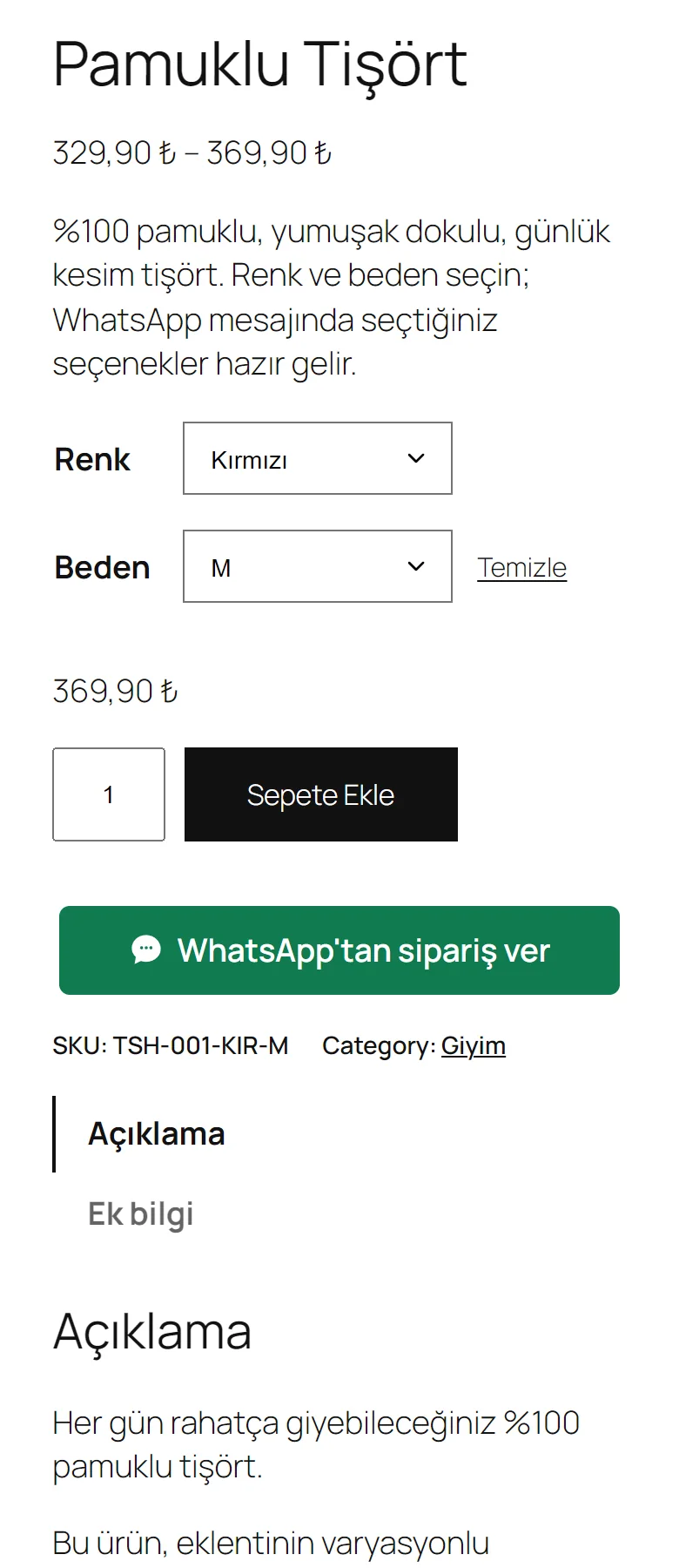
Product page on a phone
At a phone’s width the options, quantity and add-to-cart button stack; the “WhatsApp’tan sipariş ver” button takes the full width and nothing needs sideways scrolling.
- On screen (Turkish interface)
- “Renk / Beden” — colour / size
- “WhatsApp’tan sipariş ver” — order on WhatsApp
- What do they see at the end?
- WhatsApp opens with the product’s name, link, unit price, quantity, total and the chosen colour and size ready in the message box. The customer presses “Send” themselves; nothing is sent automatically.
- What is it good for?
- The customer does not type the product and option by hand and the seller sees which product was meant from the link; for products without a price the quote is asked for the same way.
Everything that is not included, and all limits
- Not delivered to a client and not used by a real shop. The demo shop (“Mavi Sepet Demo Mağaza”), its products, pictures and prices are samples; completing a payment is switched off. The buttons in the demo point to the semihturna.com contact number and the message starts with a demo note.
- How the message lands in WhatsApp on a real phone was not tried; only the link format (wa.me) and its redirect to WhatsApp were checked. How WhatsApp itself behaves on a given app or version is outside the plugin’s hands.
- Tried only with WordPress 7.1.3, WooCommerce 11.2.1 and PHP 8.3; the live demo runs on SQLite. Other versions, MySQL/MariaDB, other themes and colour/size swatch plugins were not tried.
- It works only on simple and variable products, on the single product page (and through the shortcode); there is no button for grouped or external products, on product lists, or on the cart and checkout pages. The plugin does not create a WooCommerce order: the order is settled with the seller on WhatsApp.
- There is no paid WhatsApp API, SMS, automatic or bulk messaging, virtual POS, e-invoice or marketplace link; the plugin is not affiliated with WhatsApp or Meta.
- The demo shop’s admin screen is not open to visitors; the admin screenshots come from a local installation of the same plugin. The security review was done by AI only, on code I wrote myself.
Delivery and sales status
There is no cart, customer account or online payment on this site for now. Reach out by phone, WhatsApp or the form; in a first conversation your need and the software’s fit are reviewed. The form does not create an order, a contract or a payment.
Possible delivery options
Price
There is no package on offer right now, so there is no list price. If a package is defined, the price and payment method are settled then.
Requirements and version history
Installation requirements
- Requirements as written in the plugin header: WordPress 6.4, WooCommerce 8.0 and PHP 7.4 or newer. Tried only with WordPress 7.1.3, WooCommerce 11.2.1 and PHP 8.3 (the live demo runs on SQLite); not tried on MySQL/MariaDB or other versions.
Release notes
- Summarised from the version history; no version has been delivered to a client. A live sample-data demo shop exists.
- 1.0.0 (11 October 2026): first version; the order-on-WhatsApp and get-a-quote buttons, variation and quantity in the message, a settings screen, message templates, switching on and off per product and category, the [wast_dugme] shortcode.
Decisions not made yet
- Rights to use, modify, transfer and receive the source code: to be set in a written agreement; not decided yet.
- The price and payment method have not been decided yet.
- Whose name the hosting and domain are opened in, and where the software is installed, have not been decided yet.