BarbershopDemo with sample data
Barbershop Booking and Business Tracking: screen-by-screen guide
The full version of the short description on the product page: every feature, how each screen is used step by step, all limits and the delivery details.
All features
The booking, ticket, till and walk-in flows were tried with real records on a local installation and on the live demo and can be seen in the screens below; the time-off form and the customer-import preview were opened on the demo and are shown without saving anything. The no-overlap rule, the time-off and import logic, the reminder list and the panel roles are also covered by automated tests. Notifications are off in the demo, so they do not appear in the screens; their limits are written under “Limits”.
- Instant, free notification to the shop’s phone for a new booking and for a cancellation (Web Push): you hear when a customer books and when they cancel; the panel has to be added to the phone and notifications allowed. It is not an SMS or a WhatsApp message, so there is no message fee; notifications are off in the demo
- The booking link for customers: a ready message on WhatsApp in one tap, copy the link, a scannable code (show it big on the phone or send it as a picture) and an A4 poster; the customer books without an account, picks a barber or “Fark etmez” (doesn’t matter), sees the status on their own booking page and can cancel
- Calendar with a column per barber: bookings are cards in time order, tapping a card opens its actions, and one button says “Geldi · parayı aldım” (arrived · took the money; cash only on the plain screen, cash, card or transfer when it is off); the same barber cannot be booked twice for the same time, and bookings taken by phone are added from the calendar and moved to another time
- “İzin ekle” (time off, over several days): pick the barber, the first and the last day, then “all day” or a time range applied to every day (e.g. a lunch break). Days the shop is closed are skipped; a day that already has a booking or other time off is not closed, and the app tells you which days were skipped. The “Yaklaşan izin ve kapalı saatler” (upcoming time off) list sits on the staff page and on the calendar, each line with “Yanlış girdim, sil” (I made a mistake, delete)
- “Excel/CSV’den müşteri al” (import customers; manager): a file or a table pasted from Excel; the columns are guessed, the preview shows new, already-saved (same phone number) and faulty rows, nothing is saved before you confirm, no message is sent to anyone, and “Son içe aktarmayı geri al” (undo the last import) is there. An .xlsx file is read only when the server has the zip extension; the live demo’s hosting does not, and the page asks you to save as CSV
- Plain screen (Settings; on in a new installation): while on, campaigns, search, stock, packages, commission, panel users and card payment are hidden; switching it off brings all of it back, nothing is deleted
- Guided setup: a five-step setup wizard (Shop, Staff, Services, Hours, Share), a “Bu ekran ne işe yarar?” (what is this screen for?) box on every main screen, next-step buttons on empty screens, buttons that fix an error (e.g. “Boş saatleri göster”, show free times) and the first free time pre-filled in the quick-add form
- Walk-in queue: people are added in arrival order and you see how many minutes each has waited; when their turn comes you choose the barber as you take them in, and payment is taken on the ticket afterwards
- Customer card with a note for the usual cut (e.g. “beard: clipper guard 3, flat neckline”), appointment history, balance due, total paid and no-show count; the note stays on the card when the barber changes
- Quick ticket: a service (e.g. a beard trim) closes on one bill; selling a product (e.g. beard oil), each line with its barber and taking it off the stock come back when the plain screen is switched off
- Daily till: a cash-focused summary on the plain screen; cash, card, transfer, expenses and net when it is off; this month’s commission per barber, each with their own percentage (from service revenue only), also shows once the plain screen is off
- Booking approval is a setting: a booking is confirmed at once or waits for the shop to press “Onayla” (approve) or “Reddet” (decline); on the live demo it is confirmed at once
- A ready-made WhatsApp reminder message for tomorrow’s (or a chosen day’s) appointments; the shop sends it from its own WhatsApp
- Panel logins by role: the manager sees everything; reception works with bookings, customers and payments; a barber sees only their own calendar; a button, form or link a role may not use is never shown to it (e.g. no discount form and no customer-link box on the barber calendar; the server refuses them too). On the live demo there are password-free “… olarak gir” (sign in as …) buttons for manager, reception and staff
- Closing a problem customer to online booking: “Close online booking for this customer” on the customer card; a closed number cannot book on the booking page or through the API (the server checks it too) and is pointed to “call us / write on WhatsApp” buttons; you can still book them from the calendar (with a note). In Settings you choose how many hours before an appointment a customer can no longer cancel online, how many days ahead a booking may be made, and whether service prices are shown to customers
- Several services in one booking: on the booking page the customer picks “Aynı randevuya bir hizmet daha ekle” (add another service; up to three more); minutes and prices are added up, the times offered fit the total, and it is one booking (e.g. “Men’s haircut + Beard shave”). With “Fark etmez” (doesn’t matter) the free specialist with the fewest bookings that day is assigned
- Repeat a booking (weekly, every two weeks, monthly; up to 24 times): every date that could not be booked is named with its reason (already booked, time off, closed day) instead of being skipped silently; the series is removed with one tap, “Tüm seriyi iptal et (N)” (this booking and the scheduled ones after it; ones already marked arrived or missed stay)
- Review after a visit: the card of an appointment marked “Geldi” (arrived) has “Değerlendirme iste (WhatsApp)” with the message ready; the customer gives a 1–5 rating and an optional comment on a large, plain page without signing in (once per visit); the Reviews page shows the average, a “low ratings only (1–3)” filter and a ready message for an unhappy customer. Nothing is sent automatically; the salon sends the message
- Reports: busy hours, each service’s share of revenue (%), staff fill and kept rate, the customers who paid the most (VIP) and customers with no visit in 90 days (passive; a ready WhatsApp invitation on each row; someone with a booking ahead is not listed)
- Staff phone permission: on the panel logins in the Staff page (full screen) a “Müşteri telefonlarını görebilir” (can see customers’ phone numbers) box; when off, that staff member does not see the number, the call and WhatsApp buttons do not appear and a search by number finds nothing; the server checks it too (default: they see it)
- Warning note: a one-line “sensitivity note” (colour / allergy, sensitivity) on the customer card; a red “Uyarı” badge on the card and on that customer’s booking cards, visible to the staff member doing the job. It never goes into messages, exports or the customer’s own page (KVKK: it can be special-category data; keep it short and known to the customer)
- “Geleceğim” (I am coming) button: on their own booking page the customer says in one tap that they will come; the calendar card shows a green “✓ Geleceğim”. No message is sent, the cancel rule is unchanged, and moving the booking clears the mark
- “Takvime ekle” (add to calendar): on their own booking page the customer adds an approved appointment to their phone calendar, either with the “Add to Google Calendar” link (it opens filled in; press Save) or with a downloaded .ics file (with a reminder one hour before); no phone number or note is carried, nothing is sent to the salon and there is no SMS cost.
- Floating “WhatsApp’tan yaz” (write on WhatsApp) and “Ara” (call) buttons: two big buttons at the bottom of the showcase and the booking page (WhatsApp opens with the words ready and the customer sends it); drawn only when the salon has a phone number
- Approved reviews on the showcase: on the Reviews page each review has “Göster / Gizle” (show / hide; hidden by default; a 1–3 rating asks again); the showcase then has a “Müşterilerimiz ne diyor” (what our customers say) section with stars, the comment and only the first name plus the first letter of the surname, never a phone number or address; the average counts every review received, hidden ones included, and says how many
- Weekly days and hours per specialist: for each specialist day by day “shop hours”, “not working” or “own hours”; customers can book that specialist only at the hours they work (“Fark etmez” chooses only among those working), and the API refuses too; you can still book from the panel and are warned; without a record the specialist works the shop’s hours
- Activity log (manager): who did what and when with bookings, payments, settings and panel logins; filter by kind, person and date; no customer name, phone, e-mail or note is written; the source is a keyed hash of the address; lines older than 180 days are deleted; if a line cannot be written the action still goes through
Screen by screen: how it is used
The app’s interface in these screens is Turkish: the product is made for businesses in Turkey, and the program can also be switched to English in its settings. Only the captions and explanations on this page are in English. The screens were taken from the live demo (version 1.1.6) at phone size (390×844); the desktop calendar is the only wide screen. The business, the people, the phone numbers starting with 0500 and the amounts are sample data; the booking named “Emre Örnek” is a test record written to the demo while the screens were taken and cancelled afterwards. The time-off form and the customer-import preview were filled in and shown without saving anything. Notifications are off in the demo, so neither the notification box nor a notification appears in these screens.
- Who uses it?
- A customer who books or walks in, and the barbershop owner, barber or front desk running the calendar, the queue and the till.
- Where do they start?
- The customer picks a service, a barber (or “Fark etmez”, “doesn’t matter”) and a time from the shop’s booking link (a WhatsApp message, a QR code or a poster); no account is needed. A walk-in is added to the waiting list. The shop signs in to the panel (in the demo with “Yönetici olarak gir”, “Sign in as manager”) and starts from the calendar.
What do they do on screen? Step by step
-
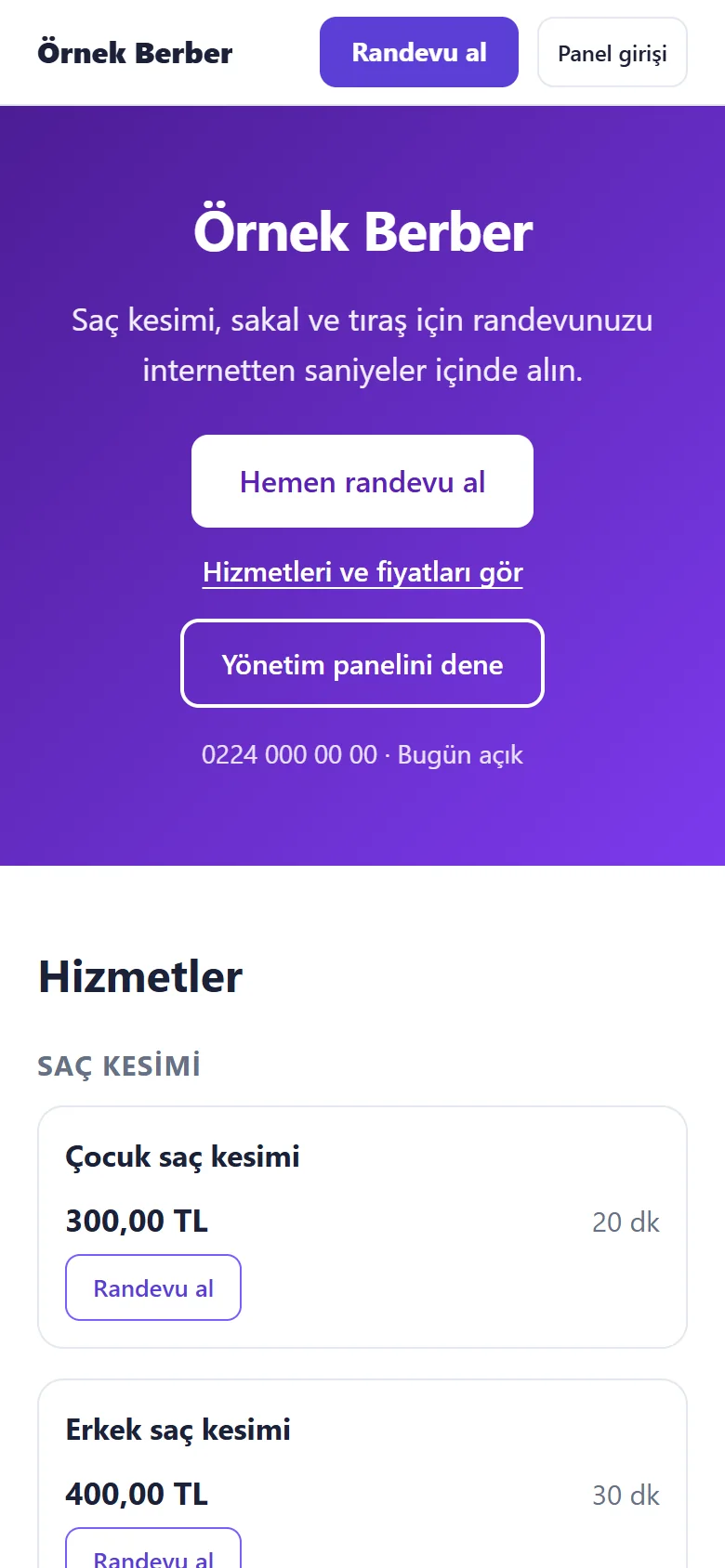
1.1.6 · 20 October 2026 The shop’s page
What the customer sees: the shop’s name, “Hemen randevu al” (book now), the services and prices. Phone size.
- On screen (Turkish interface)
- “Randevu al / Panel girişi” — book / staff sign-in
- “Saç kesimi, sakal ve tıraş için randevunuzu internetten saniyeler içinde alın.” — book online in seconds for a haircut, beard or shave
- “Hemen randevu al” — book now
- “Hizmetleri ve fiyatları gör” — see services and prices
- “Yönetim panelini dene” — try the management panel (demo only)
-
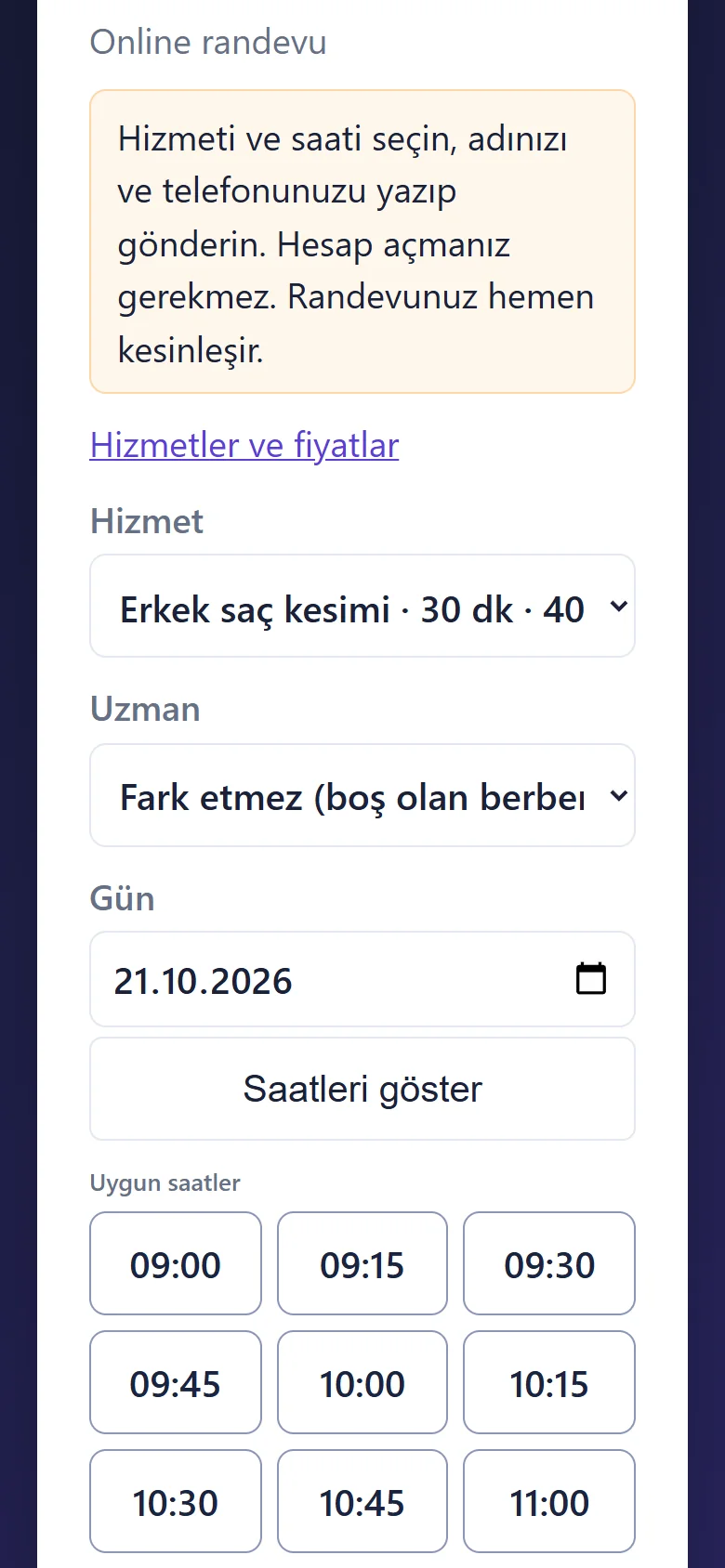
1.1.6 · 20 October 2026 Service, barber, day and time
Without opening an account the customer picks the service; as the specialist they choose a barber or “Fark etmez (boş olan berber)” (doesn’t matter, whichever barber is free), then a day and see the free times.
- On screen (Turkish interface)
- “Online randevu” — online booking
- “Hesap açmanız gerekmez. Randevunuz hemen kesinleşir.” — no account needed; your booking is confirmed at once
- “Hizmet / Uzman / Gün” — service / specialist / day
- “Fark etmez (boş olan berber)” — doesn’t matter (whichever barber is free)
- “Saatleri göster / Uygun saatler” — show times / available times
-
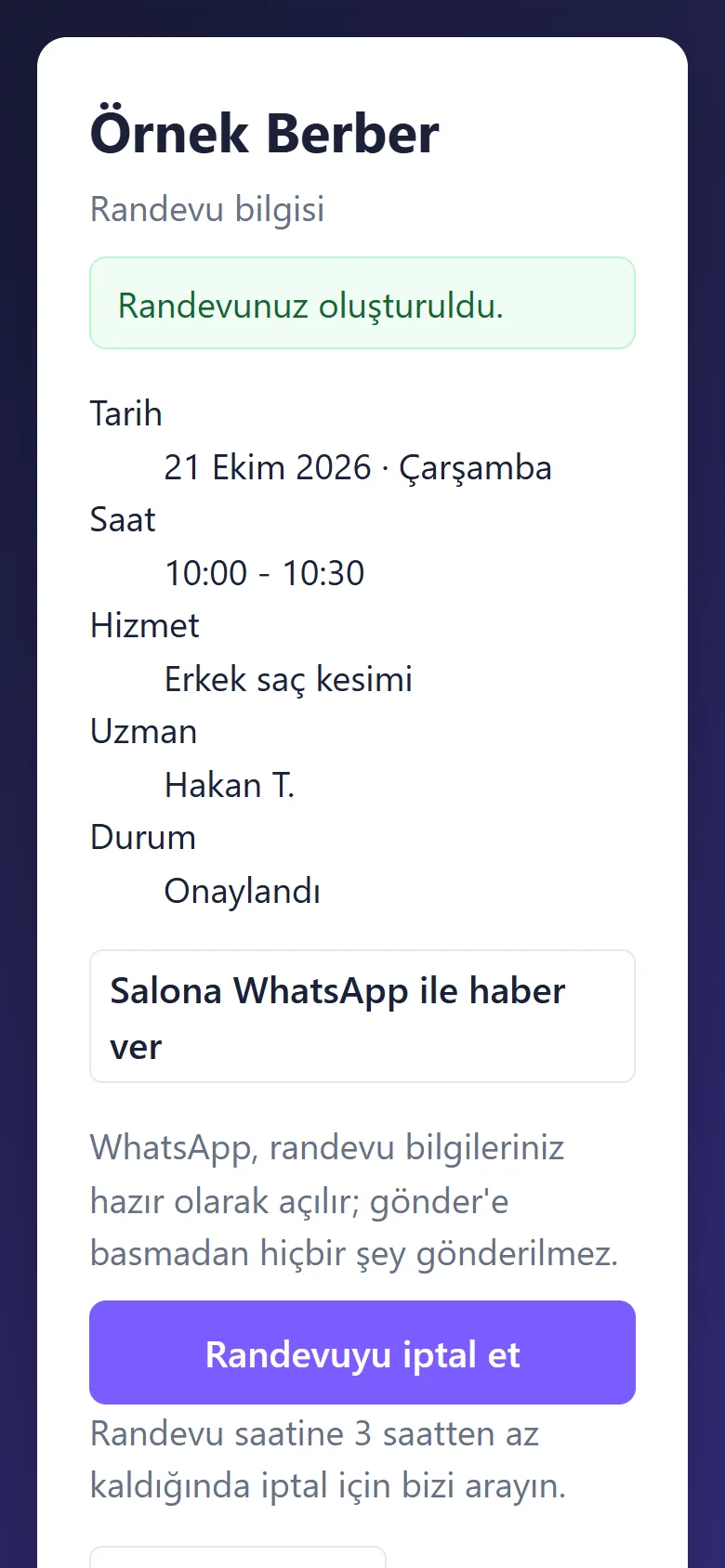
1.1.6 · 20 October 2026 The customer’s own booking page
After sending, the customer lands on their own booking page: date, time, service, specialist and the status “Onaylandı” (confirmed), a button to tell the shop on WhatsApp and “Randevuyu iptal et” (cancel; within 3 hours of the time they have to call). This page can be added to the phone.
- On screen (Turkish interface)
- “Randevu bilgisi” — booking details
- “Randevunuz oluşturuldu.” — your booking has been made
- “Tarih / Saat / Hizmet / Uzman / Durum” — date / time / service / specialist / status
- “Onaylandı” — confirmed
- “Salona WhatsApp ile haber ver” — tell the shop on WhatsApp
- “Randevuyu iptal et” — cancel the booking
- “Randevu saatine 3 saatten az kaldığında iptal için bizi arayın.” — within 3 hours of the time, call to cancel
-
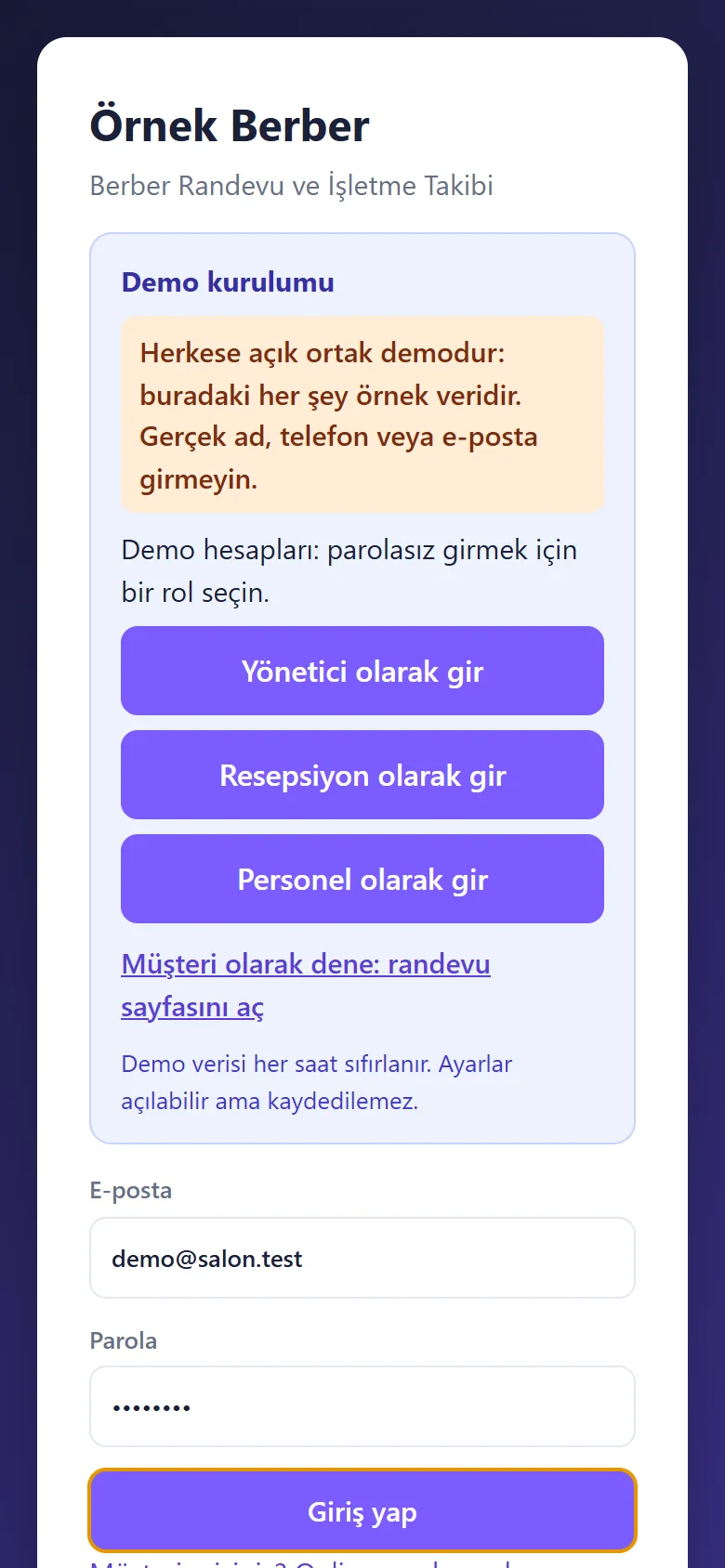
1.1.6 · 20 October 2026 Sign-in without a password in the demo
The demo’s sign-in page has password-free “… olarak gir” buttons for manager, reception and staff; they appear only in the demo, never on a real installation.
- On screen (Turkish interface)
- “Demo kurulumu” — demo installation
- “Herkese açık ortak demodur: buradaki her şey örnek veridir.” — a shared public demo: everything here is sample data
- “Yönetici / Resepsiyon / Personel olarak gir” — sign in as manager / reception / staff
- “Müşteri olarak dene: randevu sayfasını aç” — try as a customer: open the booking page
-
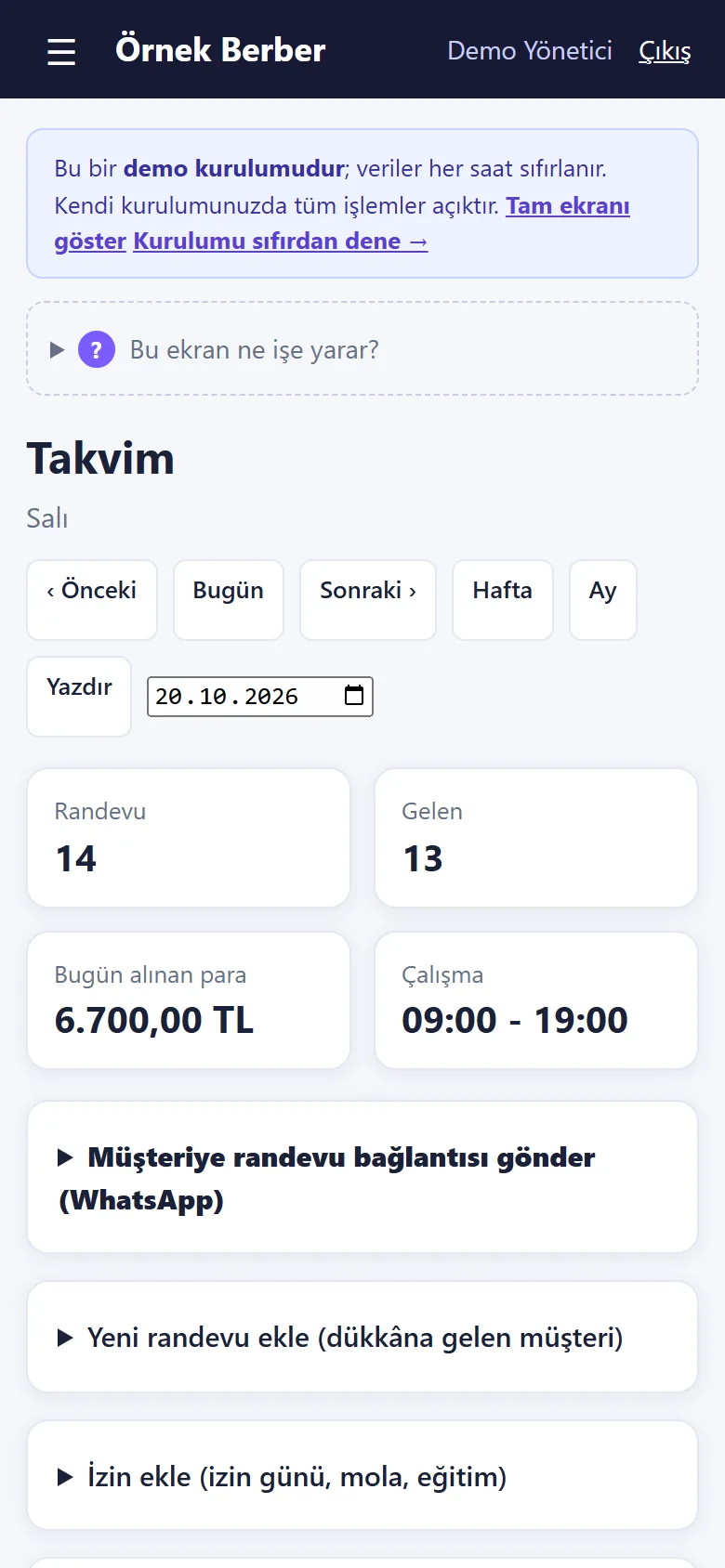
1.1.6 · 20 October 2026 Calendar
The day’s bookings, how many arrived, the money taken that day and the opening hours sit in tappable tiles; below are sending the booking link to a customer, adding a booking, adding time off and the upcoming time off. The demo bar on top offers “Tam ekranı göster” and “Kurulumu sıfırdan dene →”.
- On screen (Turkish interface)
- “Bu ekran ne işe yarar?” — what is this screen for?
- “Randevu / Gelen / O gün alınan para / Çalışma” — bookings / arrived / money taken that day / opening hours
- “Müşteriye randevu bağlantısı gönder (WhatsApp)” — send the booking link to a customer (WhatsApp)
- “Yeni randevu ekle (dükkâna gelen müşteri)” — add a booking (a customer at the shop)
- “İzin ekle (izin günü, mola, eğitim)” — add time off (leave day, break, training)
- “Yaklaşan izin ve kapalı saatler (2)” — upcoming time off and closed hours (2)
- “Tam ekranı göster / Kurulumu sıfırdan dene →” — show the full screen / try the setup from scratch
-
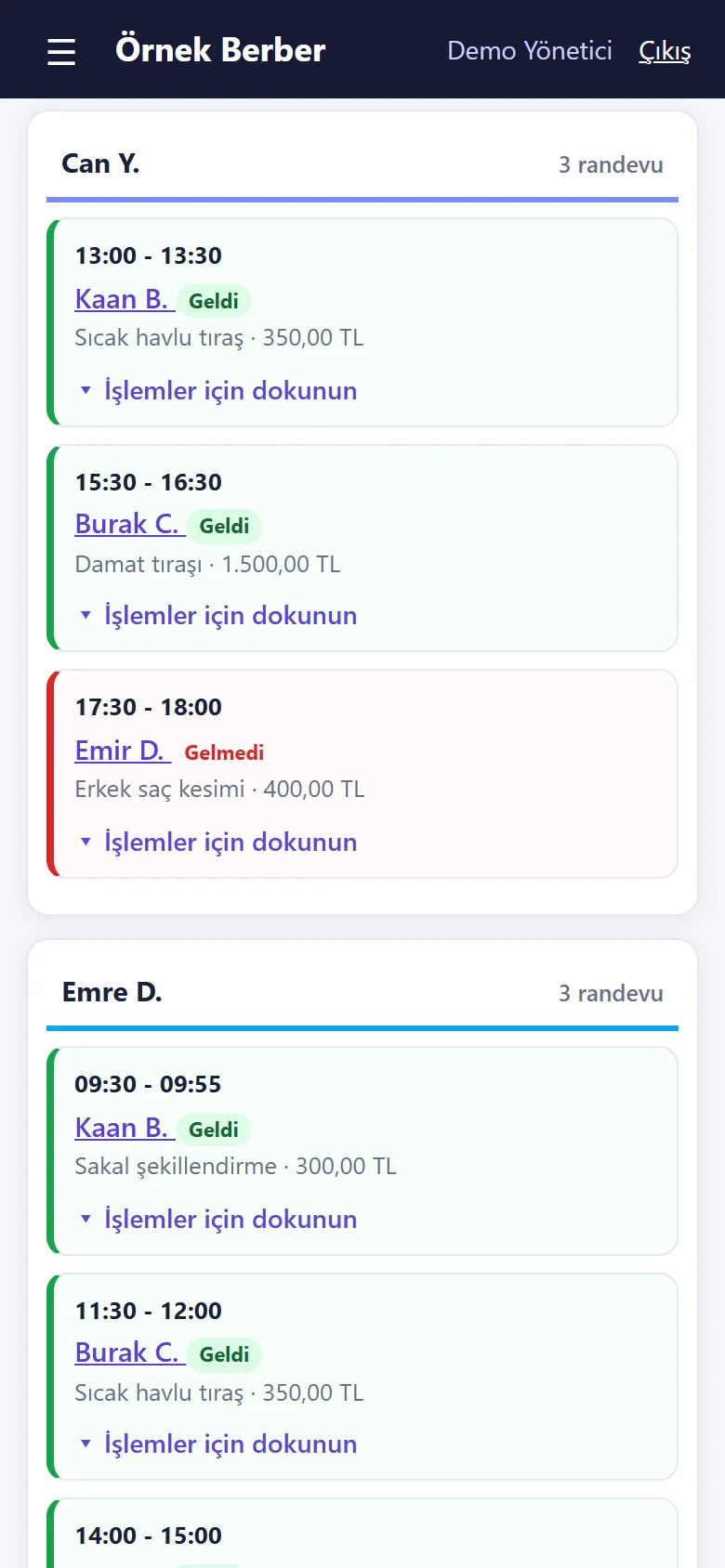
1.1.6 · 20 October 2026 Cards in time order
In each barber’s column the bookings are cards in time order with service and price; one that came from the internet carries an “Online” label. “İşlemler için dokunun” under a card opens it.
- On screen (Turkish interface)
- “5 randevu” — 5 bookings (the column header)
- “Online” — booked on the internet
- “İşlemler için dokunun” — tap for actions
-
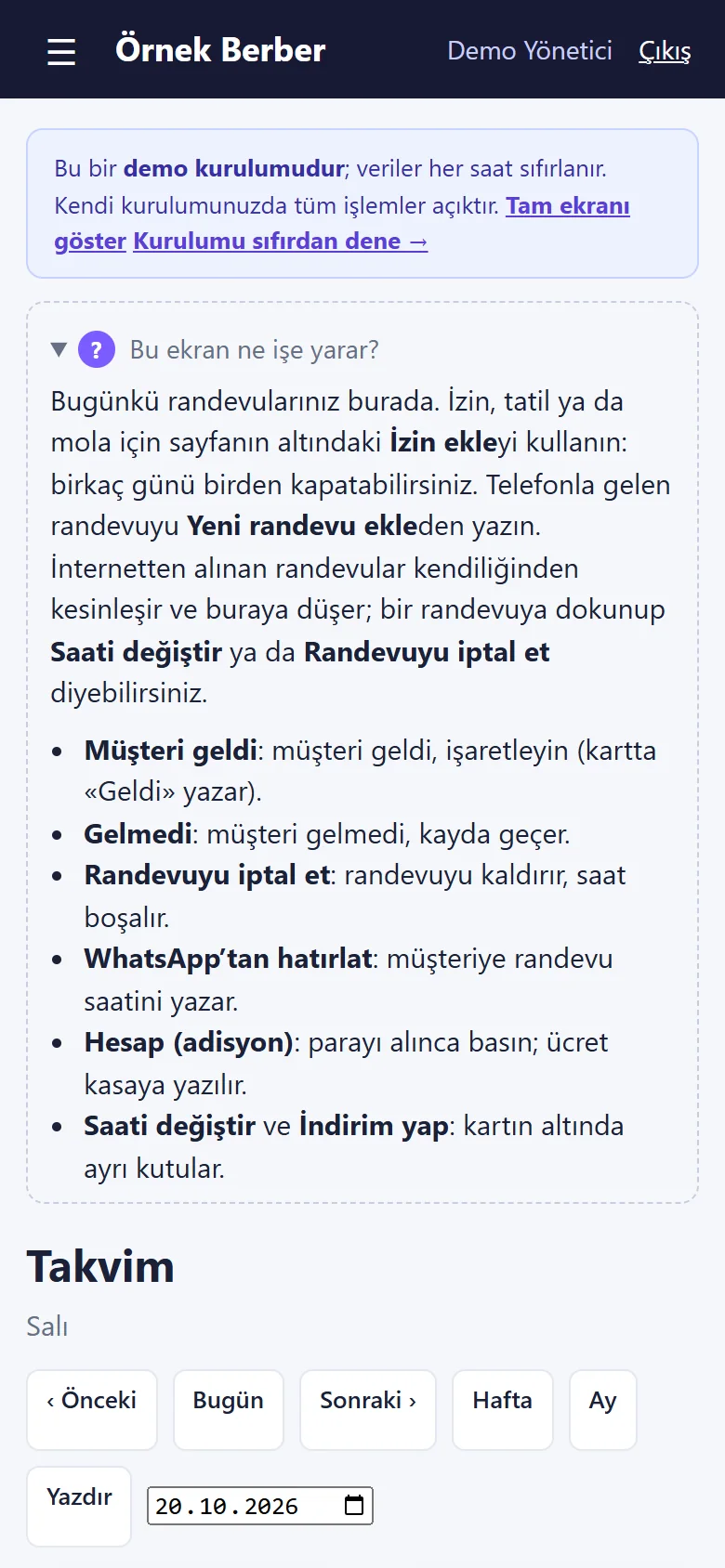
1.1.6 · 20 October 2026 “Bu ekran ne işe yarar?”
Every main screen has a closed help box on top; opened, it says what the screen is for and what the buttons on a card mean.
- On screen (Turkish interface)
- “Bu ekran ne işe yarar?” — what is this screen for?
- “Müşteri geldi / Gelmedi / Randevuyu iptal et” — arrived / no-show / cancel the booking
- “WhatsApp’tan hatırlat” — remind on WhatsApp
- “Hesap (adisyon)” — the bill (ticket)
- “Saati değiştir / İndirim yap” — change the time / give a discount
-
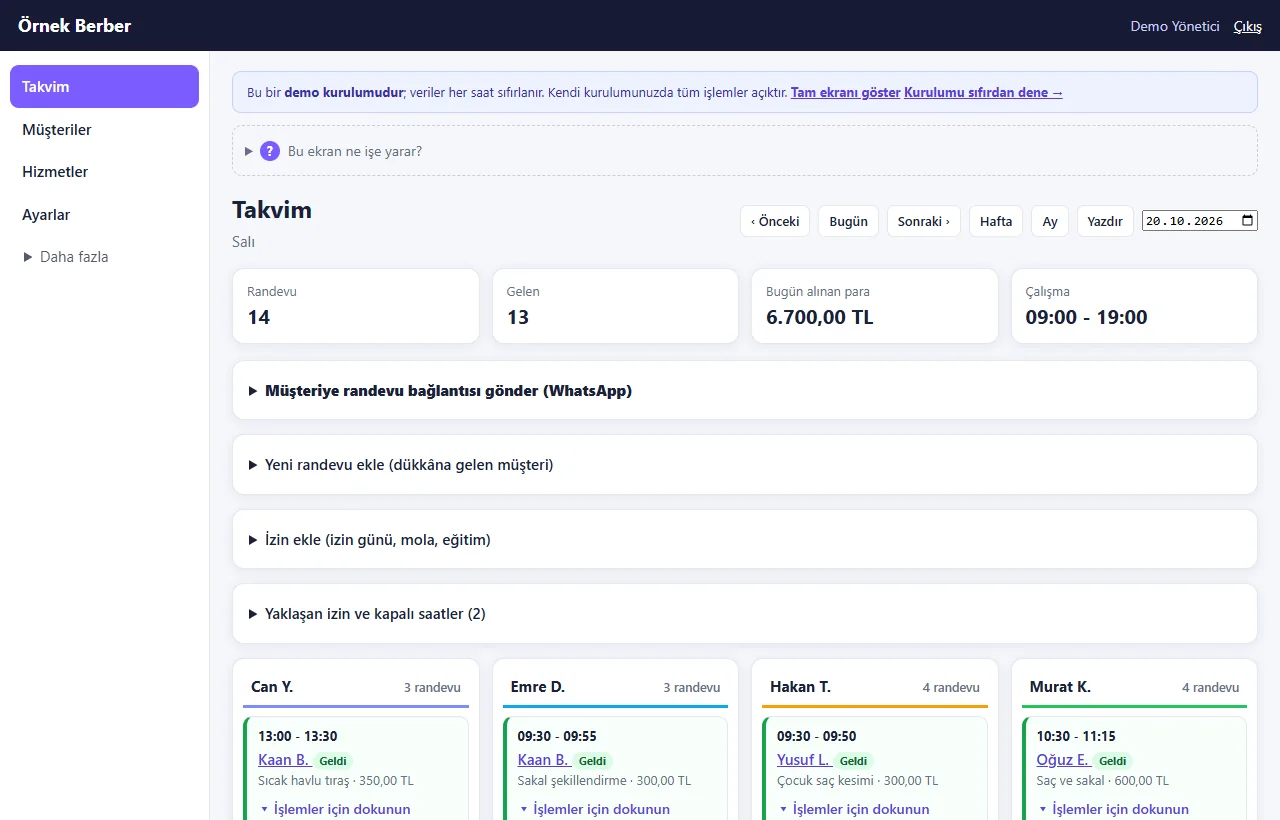
1.1.6 · 20 October 2026 The calendar on a computer
The same calendar on a wide screen: the menu on the left and the barbers side by side in four columns.
- On screen (Turkish interface)
- “Takvim / Müşteriler / Hizmetler / Ayarlar / Daha fazla” — calendar / customers / services / settings / more
-
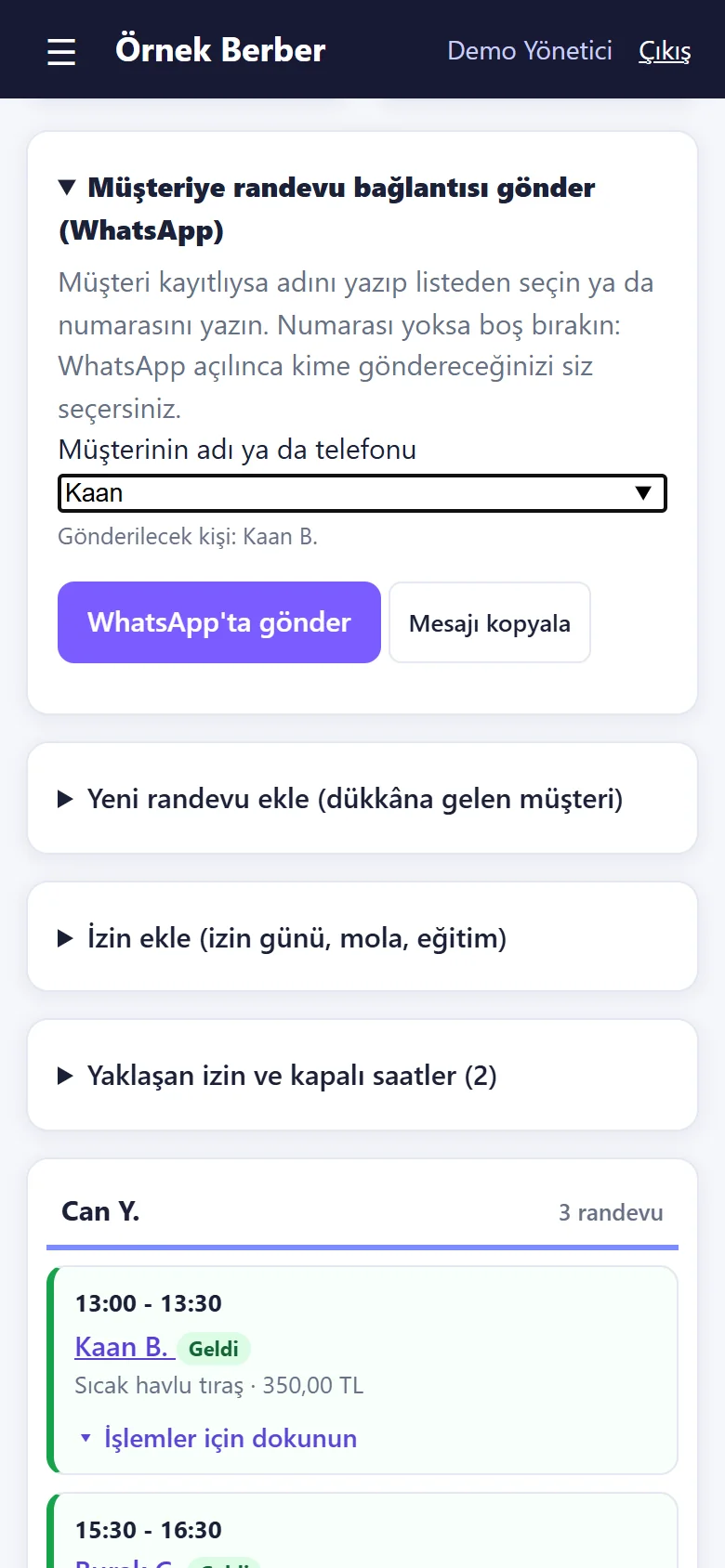
1.1.6 · 20 October 2026 Send the booking link to a customer
Type a saved customer’s name (or a number) and pick them; “WhatsApp’ta gönder” opens WhatsApp with a ready message, and “Mesajı kopyala” is for SMS and other apps. The shop does the sending.
- On screen (Turkish interface)
- “Müşteriye randevu bağlantısı gönder (WhatsApp)” — send the booking link to a customer (WhatsApp)
- “Müşterinin adı ya da telefonu” — the customer’s name or phone
- “WhatsApp’ta gönder / Mesajı kopyala” — send on WhatsApp / copy the message
-
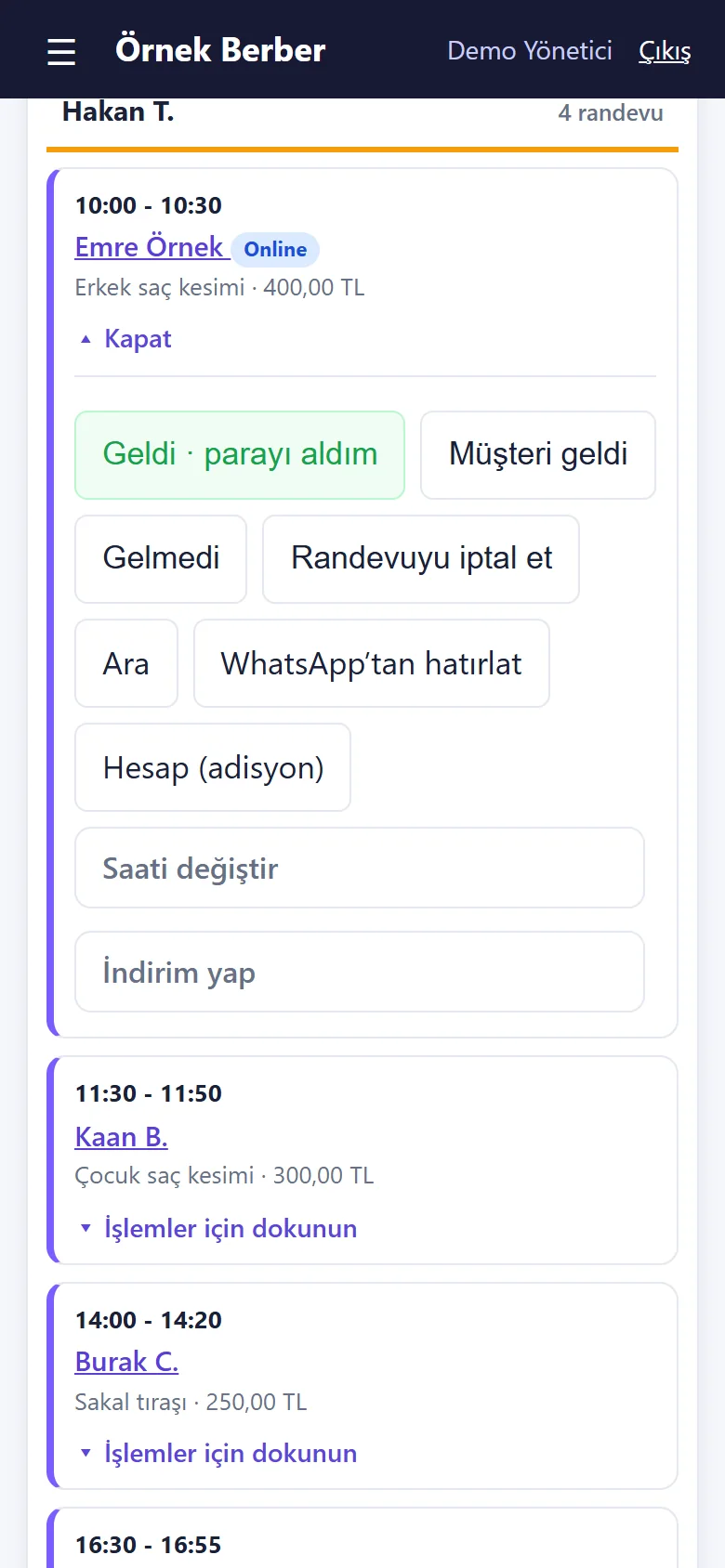
1.1.6 · 20 October 2026 Tap a card for its actions
The card opens: “Geldi · parayı aldım”, “Müşteri geldi”, “Gelmedi”, “Randevuyu iptal et”, “Ara”, “WhatsApp’tan hatırlat”, “Hesap (adisyon)”; below, “Saati değiştir” and “İndirim yap”.
- On screen (Turkish interface)
- “Geldi · parayı aldım” — arrived · took the money
- “Müşteri geldi / Gelmedi” — arrived / no-show
- “Randevuyu iptal et” — cancel the booking
- “Ara / WhatsApp’tan hatırlat” — call / remind on WhatsApp
- “Hesap (adisyon)” — the bill (ticket)
- “Saati değiştir / İndirim yap” — change the time / give a discount
-
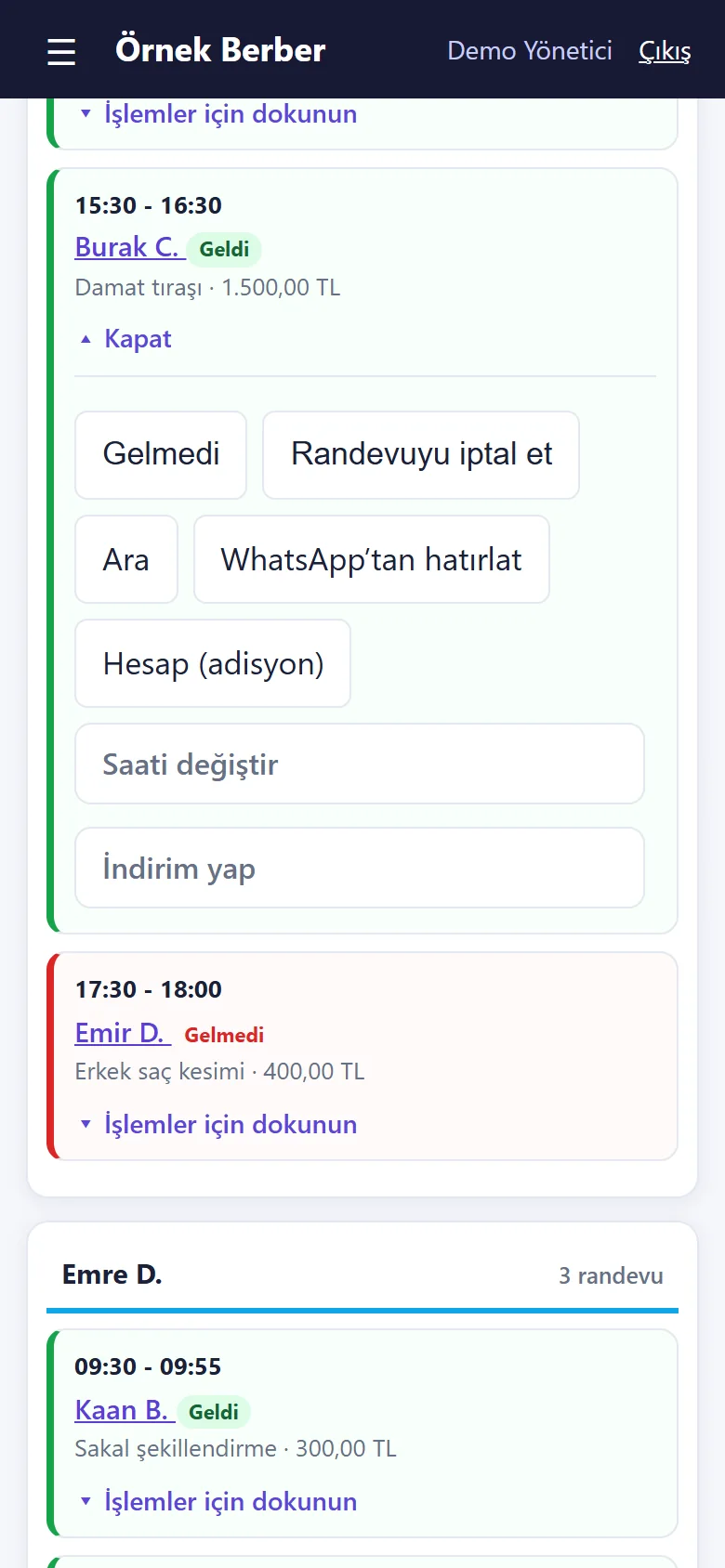
1.1.6 · 20 October 2026 Geldi · parayı aldım
One tap counts the customer as arrived, takes the price in cash and closes the bill; the card says “Geldi” (arrived). (With the plain screen on, cash only; with it off you choose cash, card or transfer.)
- On screen (Turkish interface)
- “Geldi” — arrived
- “Online” — booked on the internet
-
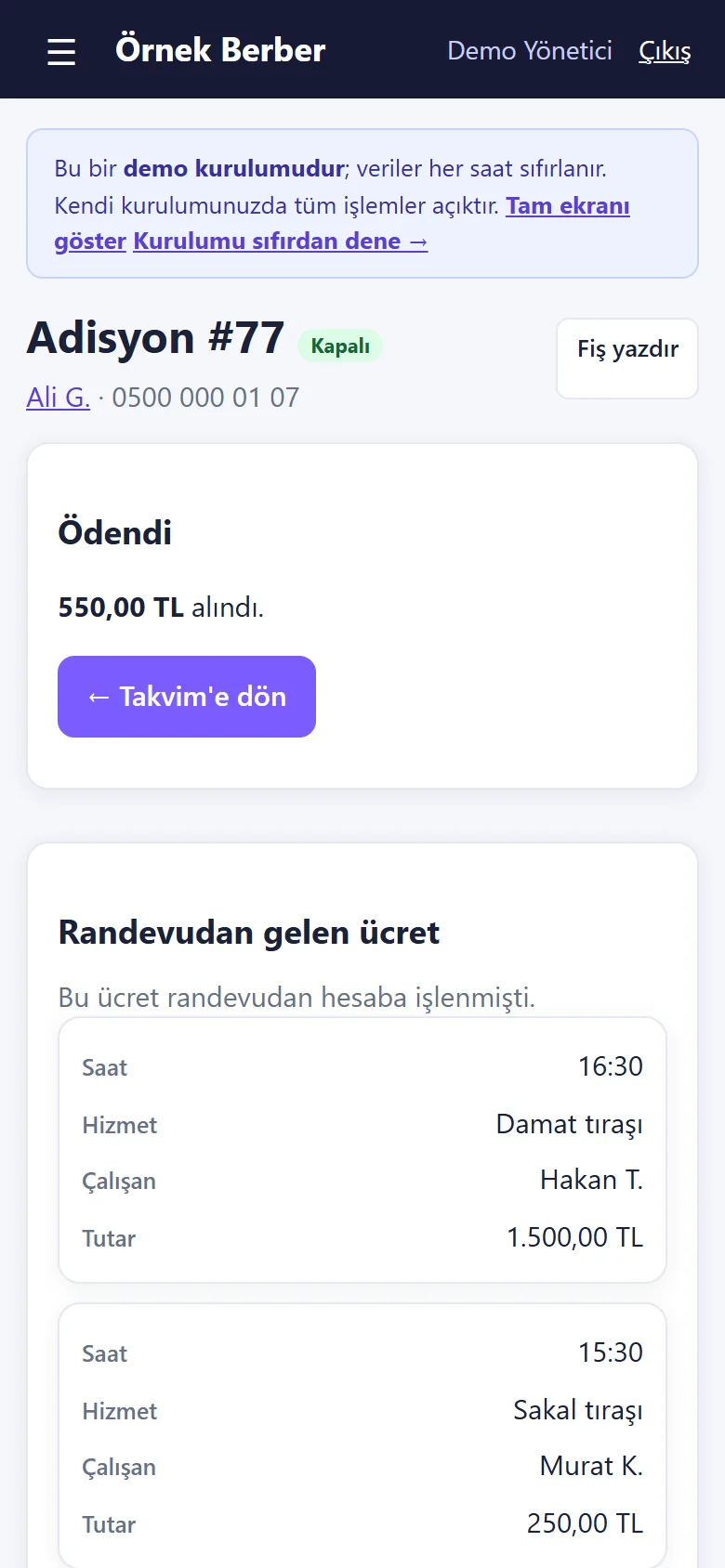
1.1.6 · 20 October 2026 A closed bill
The bill is “Kapalı” (closed): how much was taken, “Fiş yazdır” (print the slip), a “← Takvim’e dön” (back to the calendar) button and the fee that came with the booking.
- On screen (Turkish interface)
- “Kapalı” — closed
- “Ödendi” — paid
- “alındı” — taken
- “← Takvim’e dön” — back to the calendar
- “Randevudan gelen ücret” — the fee from the booking
- “Fiş yazdır” — print the slip
-
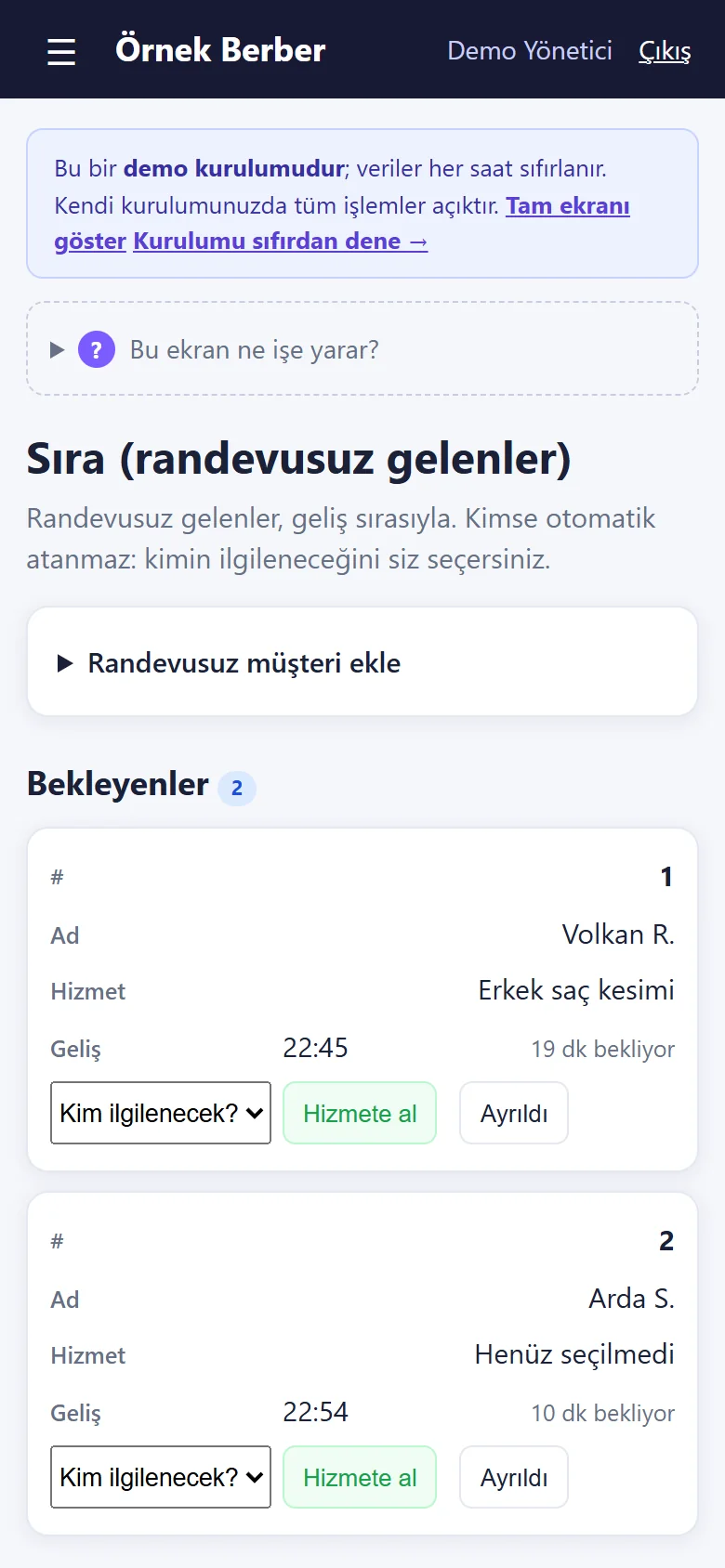
1.1.6 · 20 October 2026 Queue (walk-ins)
People who walk in are listed in arrival order with how long they have waited; on top is an add form with name, phone, service and note. Nobody is assigned automatically: with “Hizmete al” (take in) you choose who serves them.
- On screen (Turkish interface)
- “Sıra (randevusuz gelenler)” — queue (walk-ins)
- “Randevusuz müşteri ekle” — add a walk-in
- “Ad / Telefon (isteğe bağlı) / Hizmet (isteğe bağlı) / Not (isteğe bağlı)” — name / phone / service / note (all optional except the name)
- “Sıraya ekle” — add to the queue
- “Bekleyenler” — waiting
-
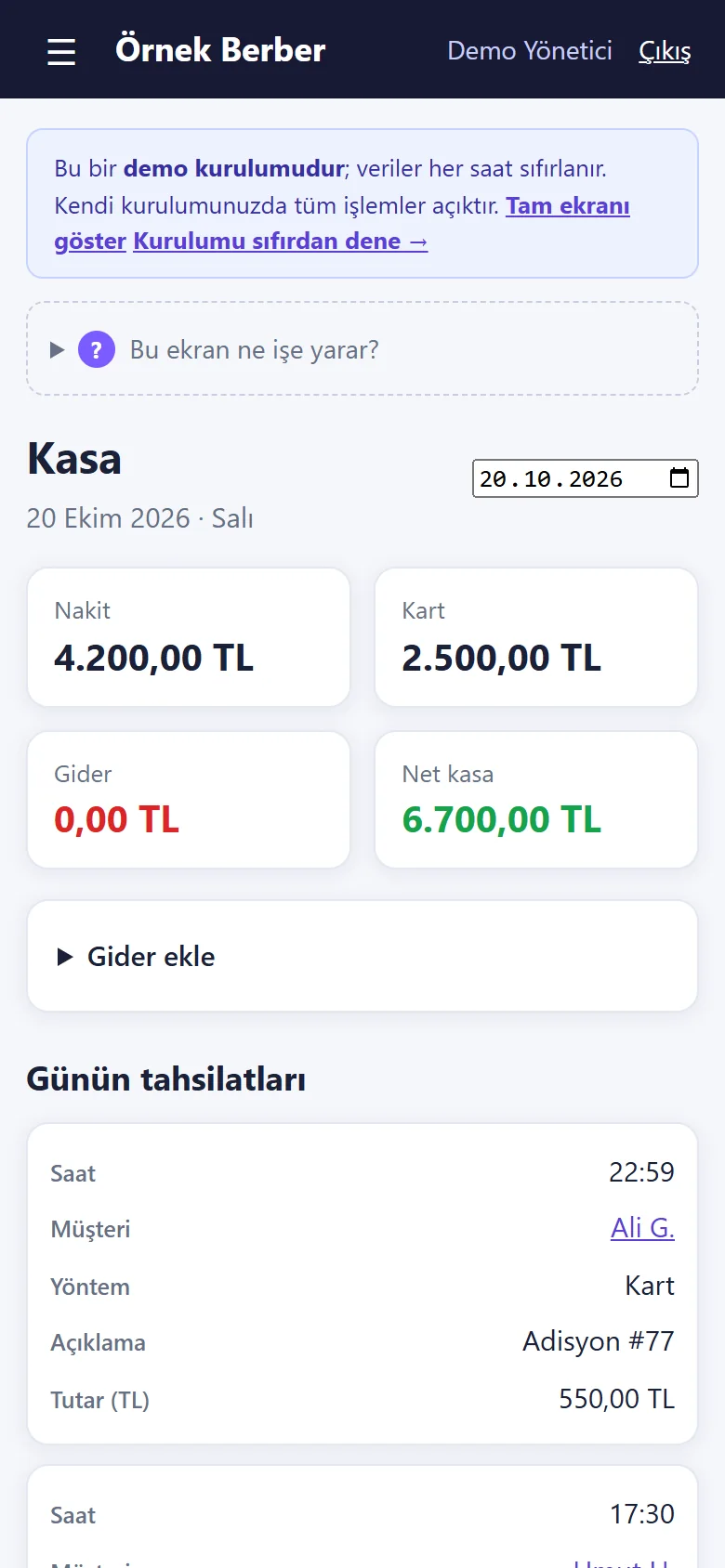
1.1.6 · 20 October 2026 Daily till
The day’s cash, card and net till; adding an expense and the day’s takings (customer, method, amount). The card and transfer tiles show only when there is money in them.
- On screen (Turkish interface)
- “Kasa” — till
- “Nakit / Kart / Gider / Net kasa” — cash / card / expenses / net till
- “Gider ekle” — add an expense
- “Günün tahsilatları” — the day’s takings
-
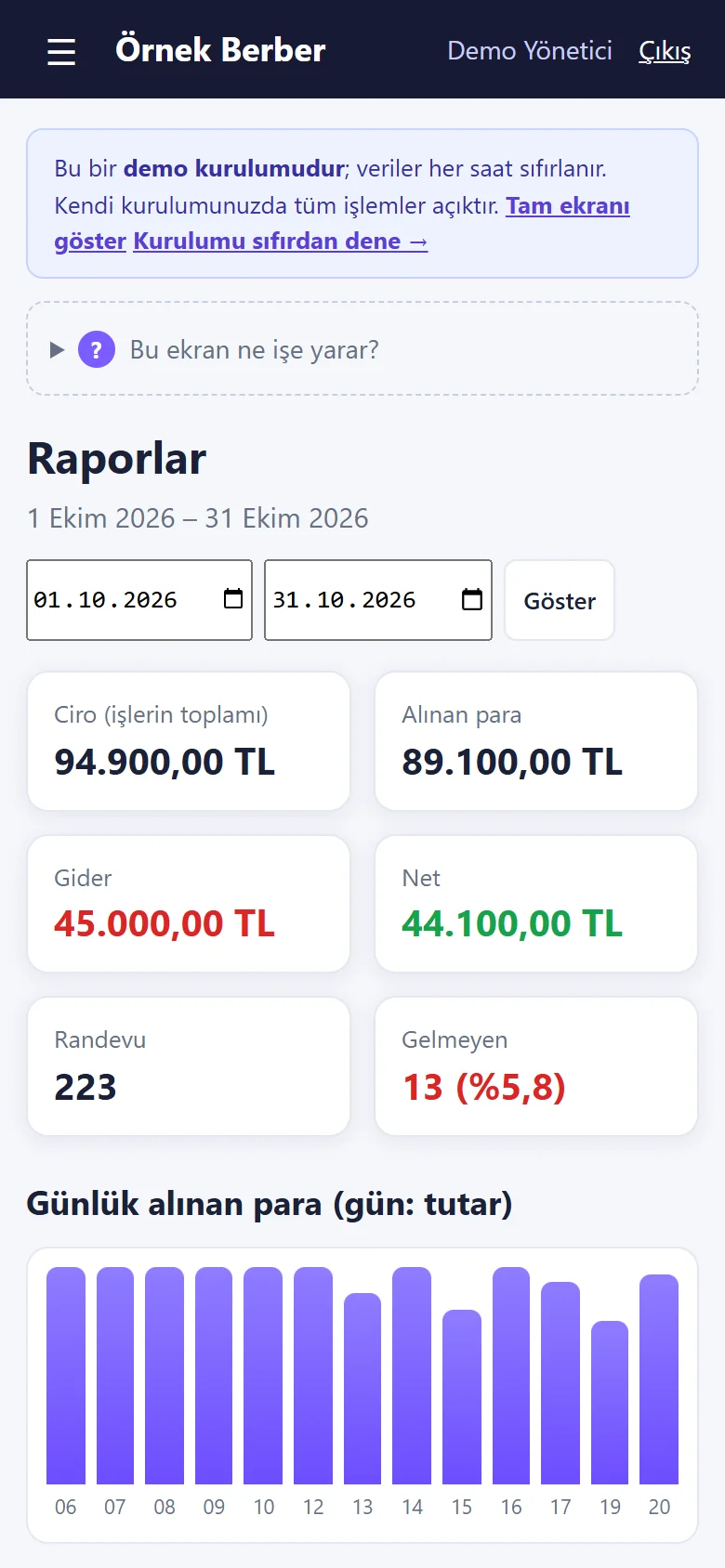
1.1.6 · 20 October 2026 Reports
For the chosen period: revenue, money taken, expenses, net, the number of bookings and the no-show rate; a chart of daily money taken, and breakdowns by barber and by service.
- On screen (Turkish interface)
- “Raporlar” — reports
- “Ciro (işlerin toplamı) / Alınan para / Gider / Net” — revenue (all jobs) / money taken / expenses / net
- “Randevu / Gelmeyen” — bookings / no-shows
- “Günlük alınan para” — daily money taken
- “Berberlere göre / Hizmet dağılımı” — by barber / by service
-
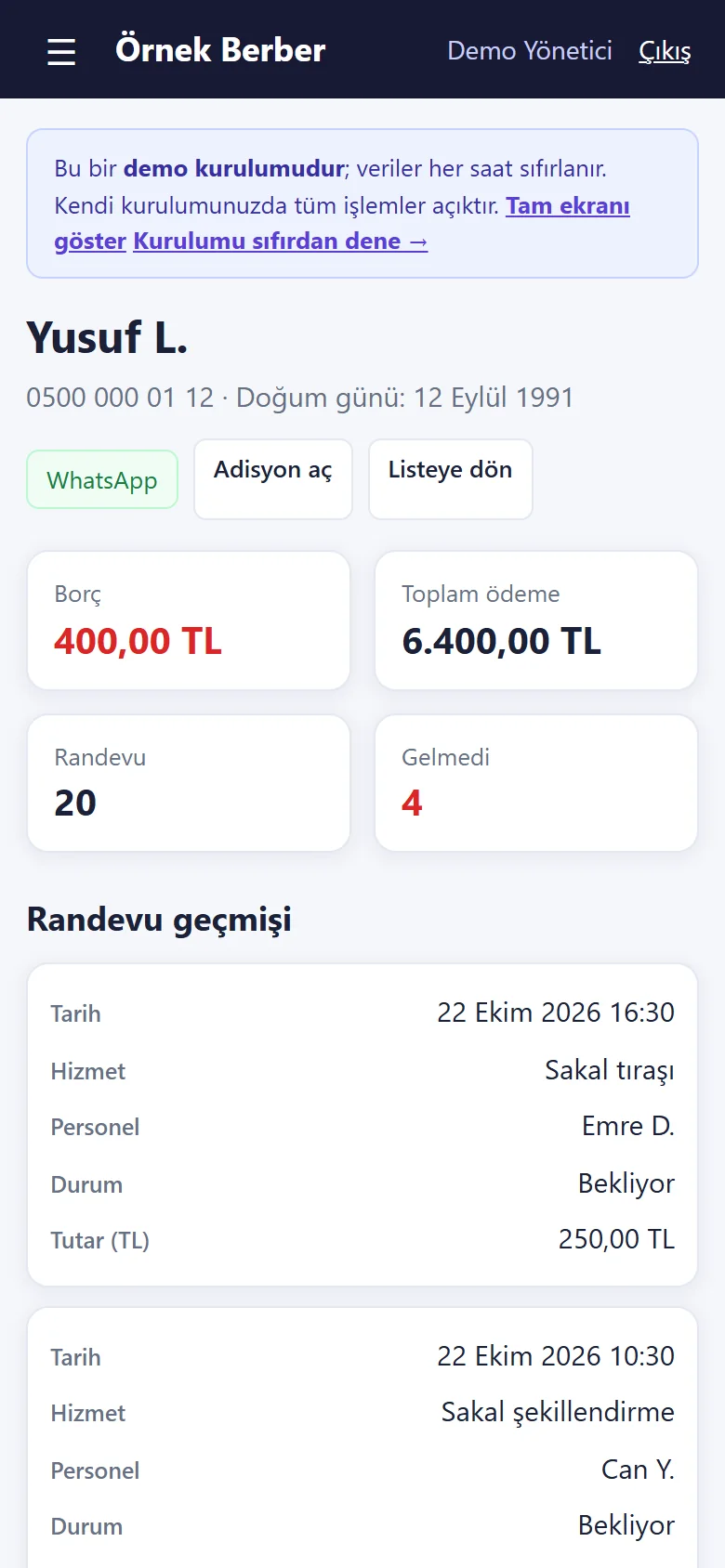
1.1.6 · 20 October 2026 Customer card
Phone and birthday; balance due, total paid, bookings and no-show count; “WhatsApp” and “Adisyon aç” (open a bill) buttons and the booking history.
- On screen (Turkish interface)
- “WhatsApp / Adisyon aç / Listeye dön” — WhatsApp / open a bill / back to the list
- “Borç / Toplam ödeme / Randevu / Gelmedi” — balance due / total paid / bookings / no-shows
- “Randevu geçmişi” — booking history
-
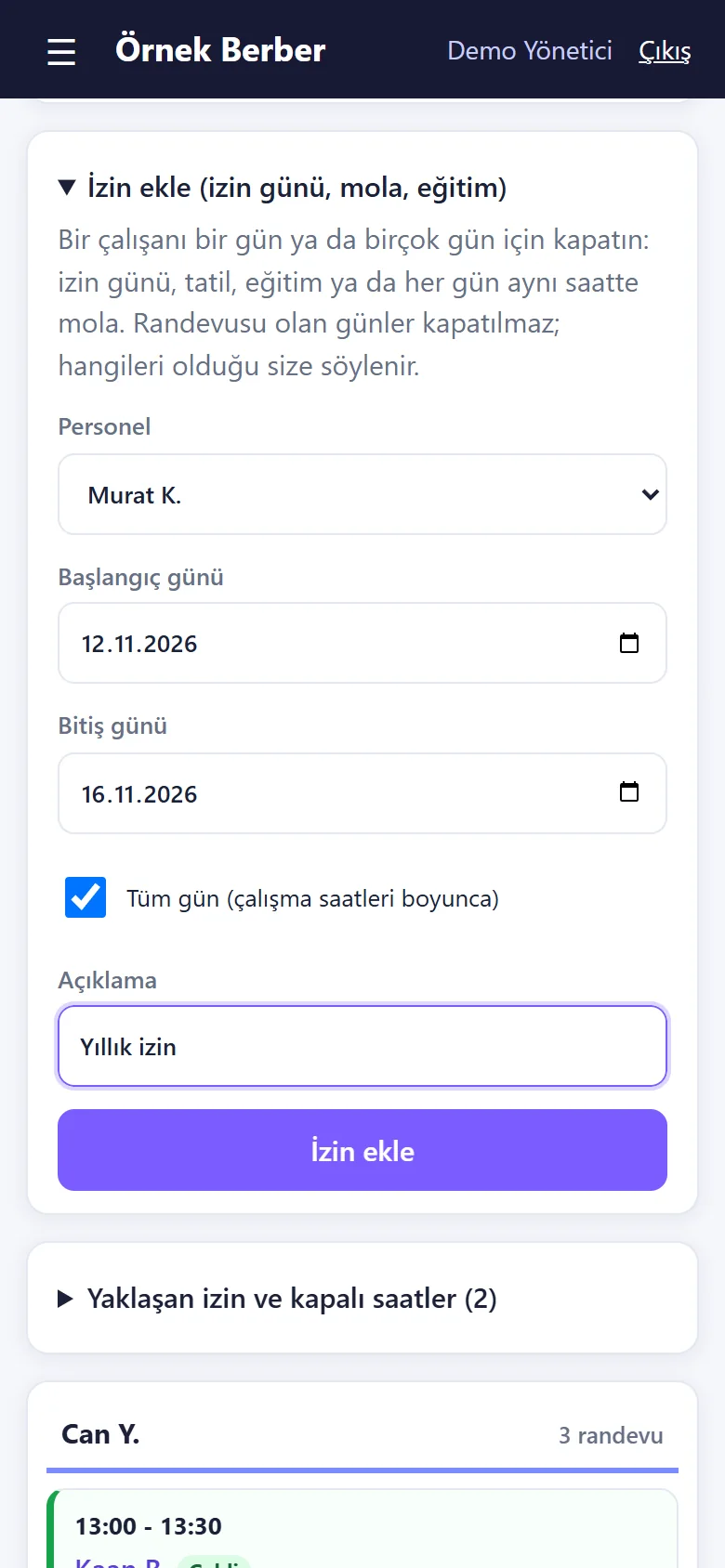
1.1.6 · 20 October 2026 Add time off (several days)
On the calendar, “İzin ekle”: the barber, the first and last day (here 12–16 November), an “all day” box or a time range applied to each day, and a description (Yıllık izin, annual leave). Days the shop is closed are skipped; a day with a booking is not closed. The form was filled in but nothing was saved.
- On screen (Turkish interface)
- “İzin ekle” — add time off
- “Personel / Başlangıç günü / Bitiş günü” — staff / first day / last day
- “Tüm gün (çalışma saatleri boyunca)” — all day (during opening hours)
- “Açıklama” — description
-
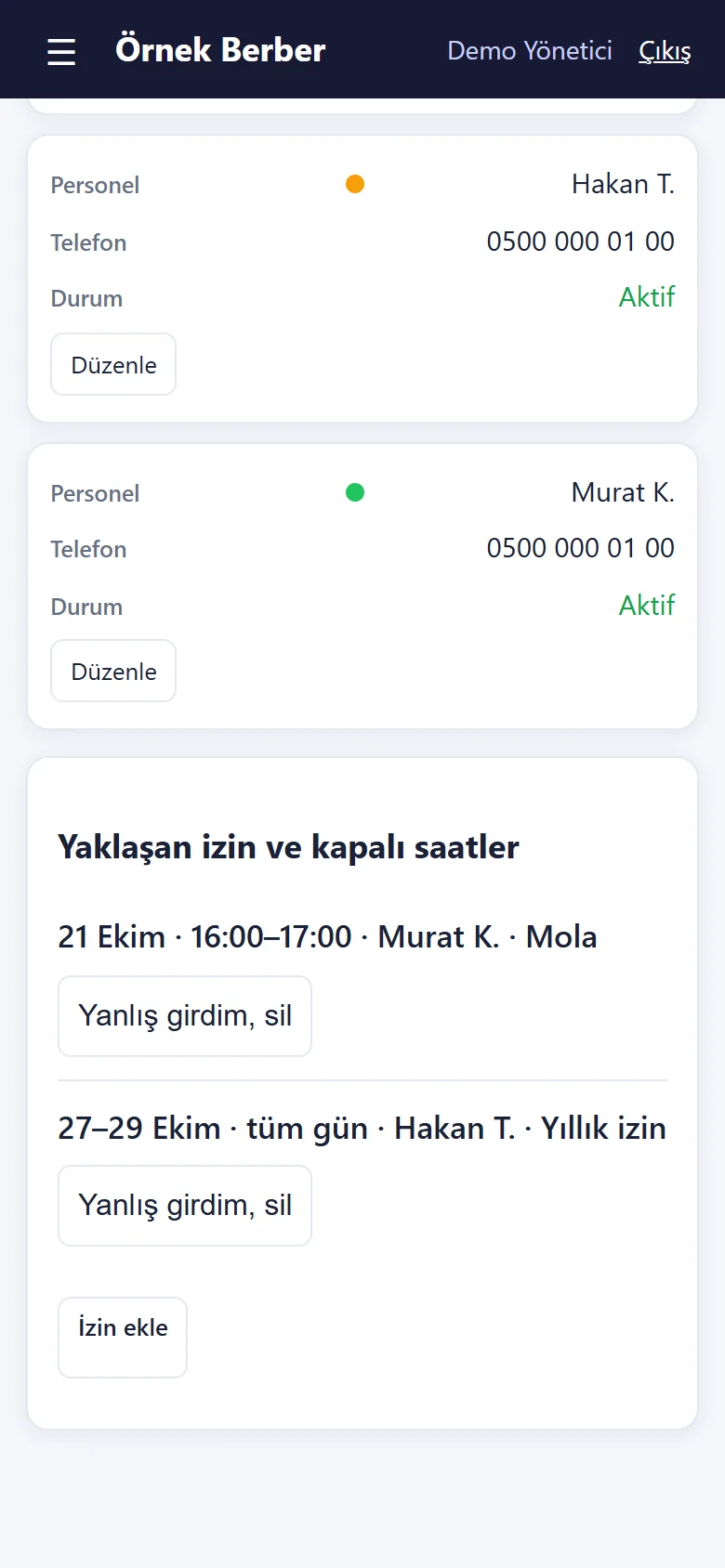
1.1.6 · 20 October 2026 Upcoming time off and closed hours
On the staff page, “Yaklaşan izin ve kapalı saatler”: consecutive days are one line (27–29 October · all day · Hakan T. · Yıllık izin); each line has “Yanlış girdim, sil” (I made a mistake, delete). The same list sits folded on the calendar.
- On screen (Turkish interface)
- “Yaklaşan izin ve kapalı saatler” — upcoming time off and closed hours
- “27–29 Ekim · tüm gün · Hakan T. · Yıllık izin” — 27–29 October · all day · Hakan T. · annual leave
- “Yanlış girdim, sil” — I made a mistake, delete
- “İzin ekle” — add time off
-
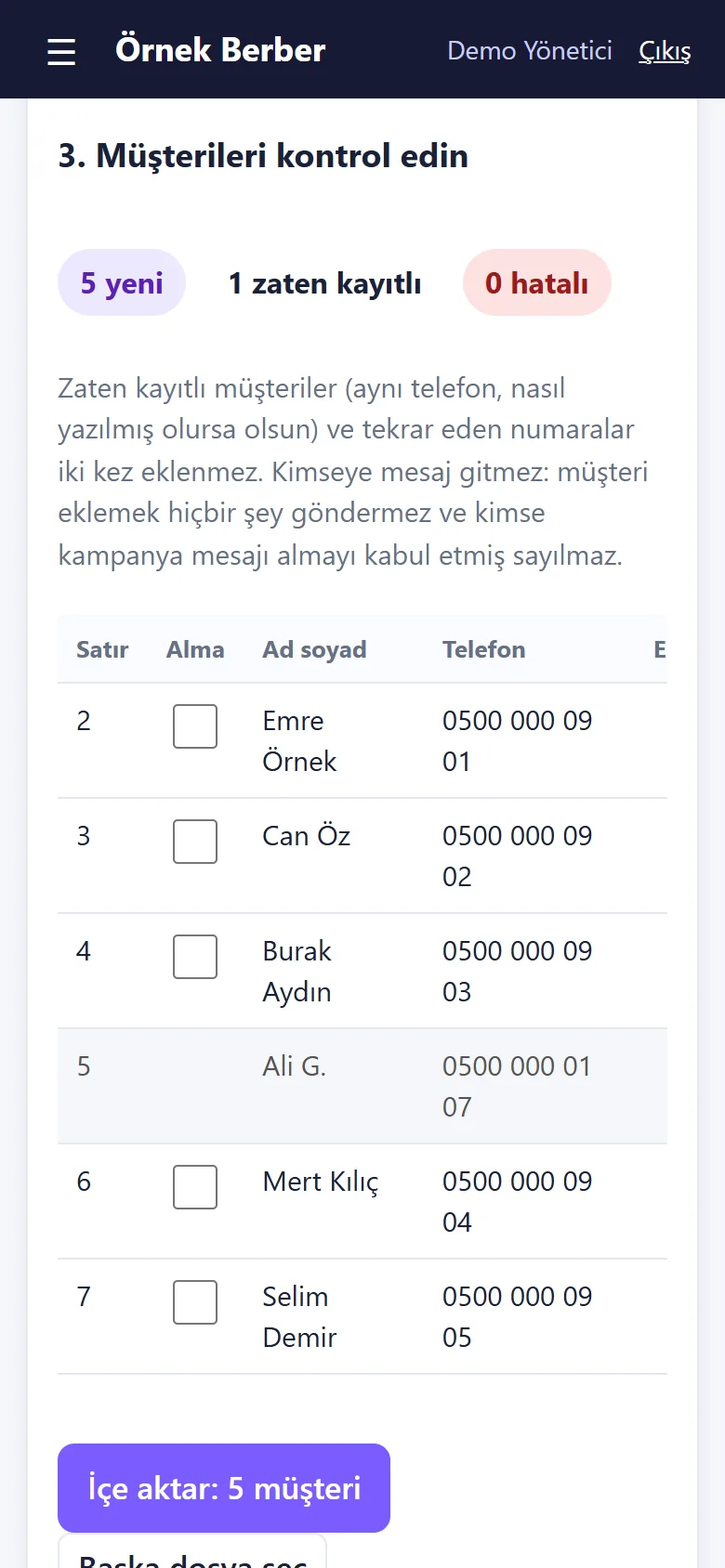
1.1.6 · 20 October 2026 Import customers from Excel/CSV
“Excel/CSV’den müşteri al” on the Customers page: a table copied from Excel was pasted; the columns were guessed, and the preview shows 5 new, 1 already saved (same phone number) and 0 faulty rows. Nothing is saved until “İçe aktar” (import) is pressed, and no message is sent to anyone. Nothing was saved here.
- On screen (Turkish interface)
- “3. Müşterileri kontrol edin” — 3. Check the customers
- “5 yeni / 1 zaten kayıtlı / 0 hatalı” — 5 new / 1 already saved / 0 faulty
- “Alma” — skip
- “Sonuç: Yeni / Zaten kayıtlı” — result: new / already saved
- “Kimseye mesaj gitmez” — no message is sent to anyone
-
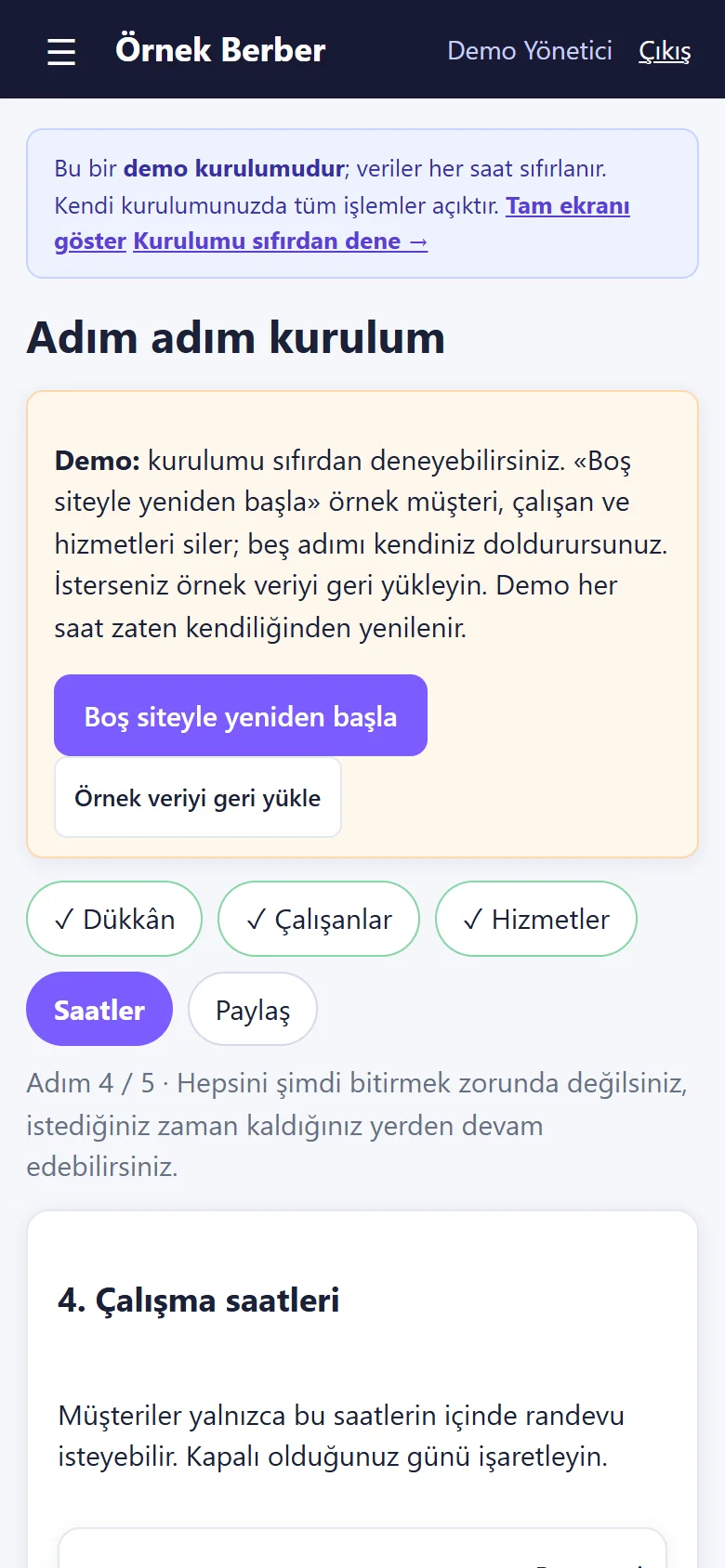
1.1.6 · 20 October 2026 Step-by-step setup
The setup wizard has five steps: Dükkân (shop), Çalışanlar (staff), Hizmetler (services), Saatler (hours), Paylaş (share). Each step saves on its own and can be skipped. In the demo, “Boş siteyle yeniden başla” and “Örnek veriyi geri yükle” sit on top; a real installation does not have them.
- On screen (Turkish interface)
- “Adım adım kurulum” — step-by-step setup
- “Boş siteyle yeniden başla / Örnek veriyi geri yükle” — start again with an empty site / restore the sample data
- “Adım 4 / 5 · Hepsini şimdi bitirmek zorunda değilsiniz” — step 4 of 5; you do not have to finish it all now
- “4. Çalışma saatleri” — 4. Opening hours
-
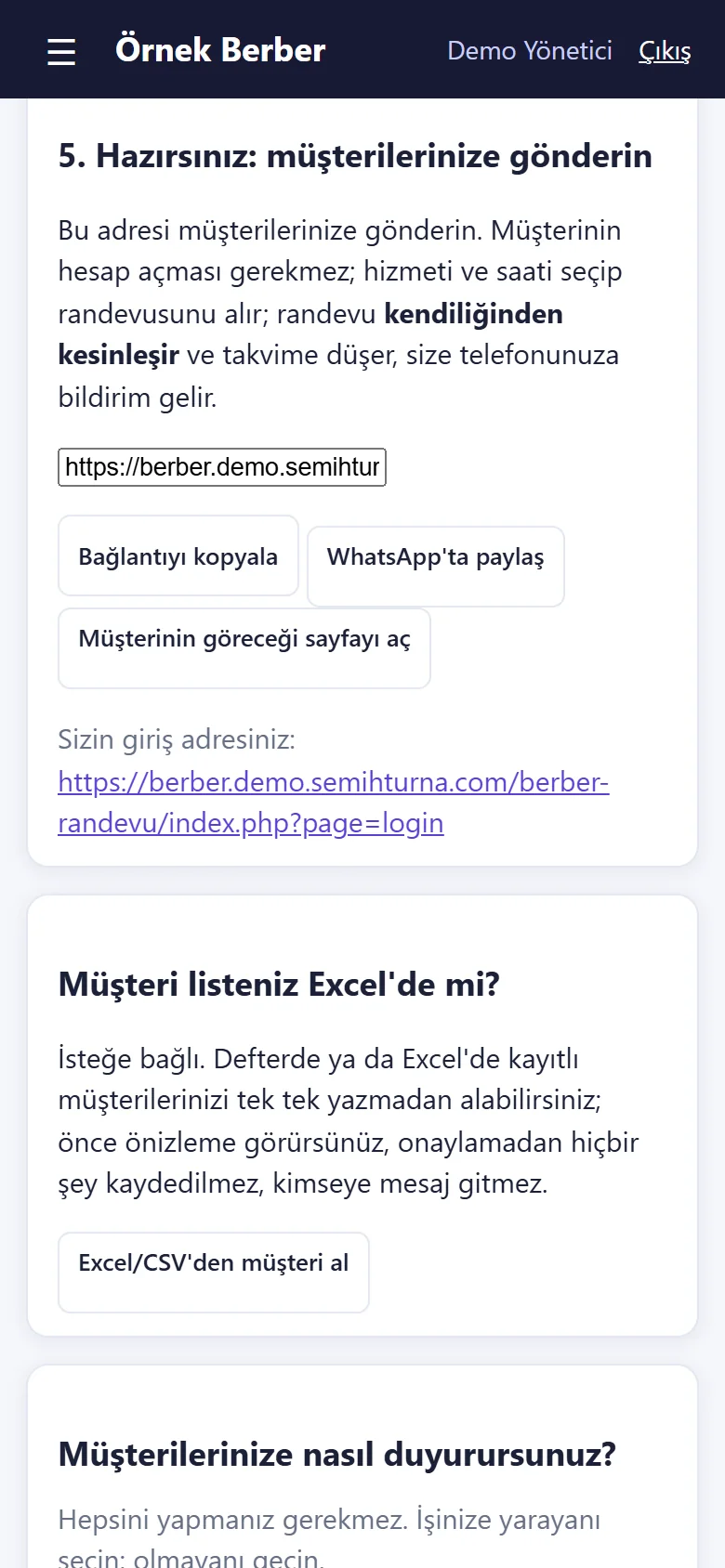
1.1.6 · 20 October 2026 Send it to your customers
The last step has the link for customers ready: “Bağlantıyı kopyala” (copy), “WhatsApp’ta paylaş” (share on WhatsApp), “Müşterinin göreceği sayfayı aç” (open what the customer sees); below it, the Excel customer-import link and a ready WhatsApp message.
- On screen (Turkish interface)
- “5. Hazırsınız: müşterilerinize gönderin” — 5. You are ready: send it to your customers
- “Bağlantıyı kopyala / WhatsApp’ta paylaş” — copy the link / share on WhatsApp
- “Müşterinin göreceği sayfayı aç” — open the page the customer will see
-
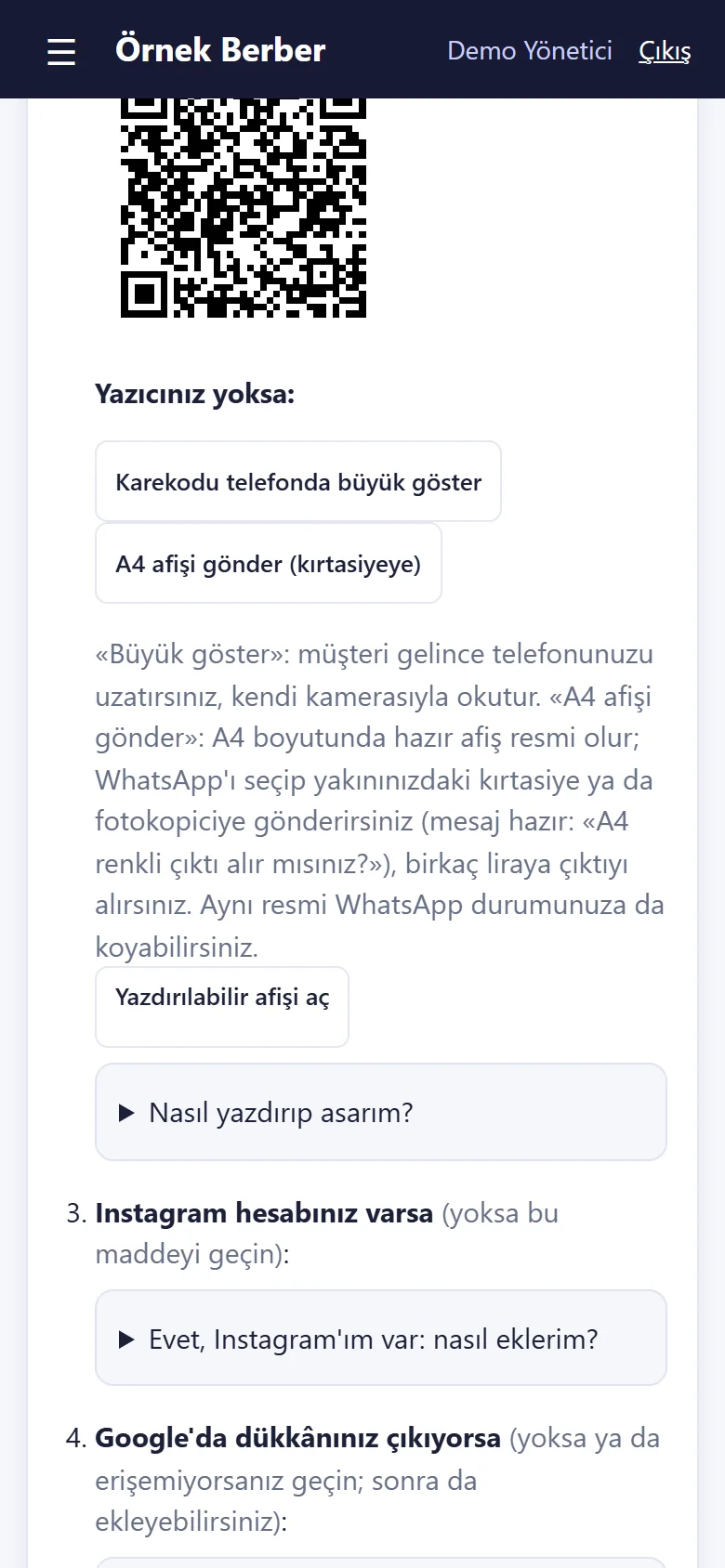
1.1.6 · 20 October 2026 Hang it in the shop: QR code and poster
For the QR code there is “Yazdırılabilir afişi aç” (open the printable poster); without a printer, “Karekodu telefonda büyük göster” (show the QR code big on the phone) and “A4 afişi gönder (kırtasiyeye)” (send an A4 poster to a stationery shop).
- On screen (Turkish interface)
- “Dükkânda asın.” — hang it in the shop
- “Yazıcınız yoksa:” — if you have no printer:
- “Karekodu telefonda büyük göster” — show the QR code big on the phone
- “A4 afişi gönder (kırtasiyeye)” — send an A4 poster (to a stationery shop)
- “Yazdırılabilir afişi aç” — open the printable poster
-
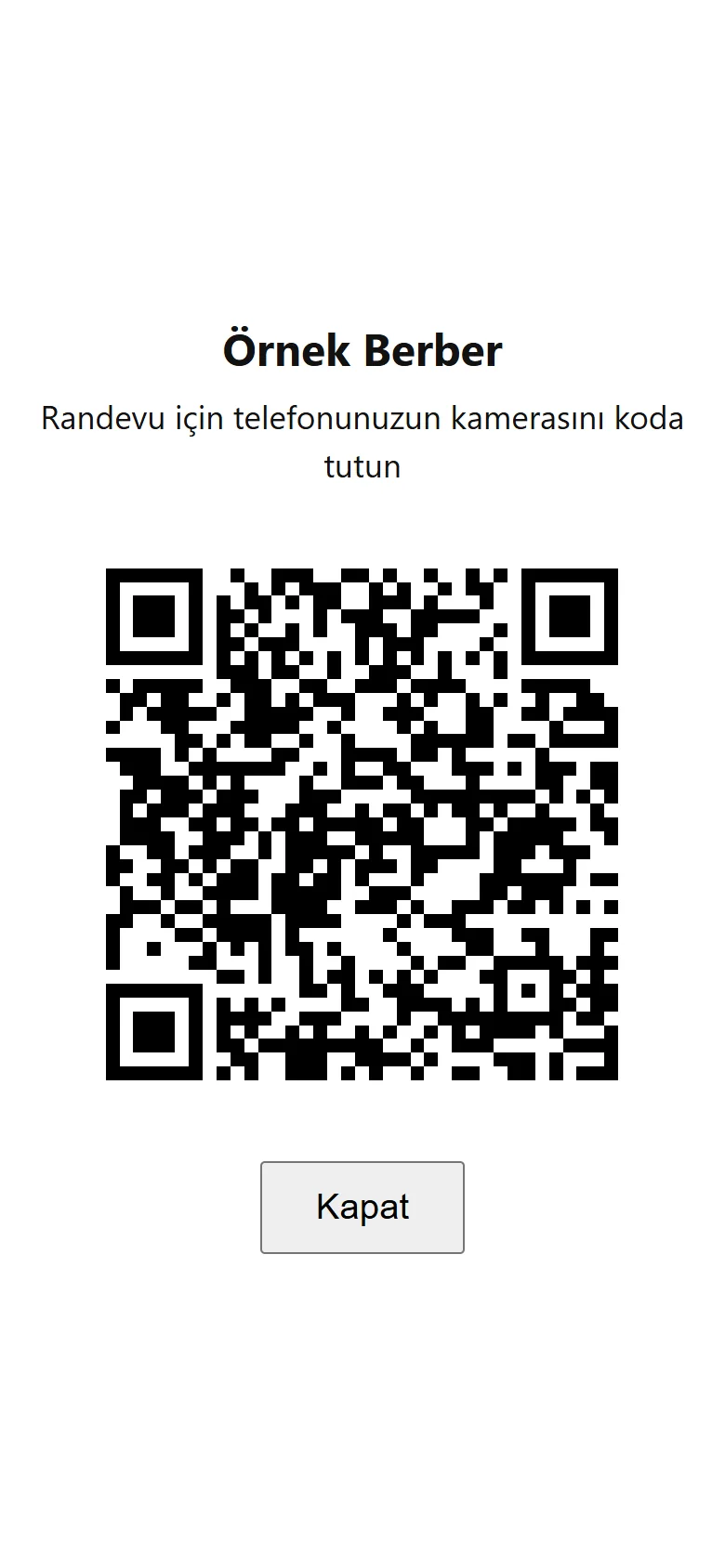
1.1.6 · 20 October 2026 QR code full screen
When a customer is in the shop the phone is held out; they point their own camera at the code and the booking page opens.
- On screen (Turkish interface)
- “Randevu için telefonunuzun kamerasını koda tutun” — hold your phone’s camera to the code to book
- “Kapat” — close
-
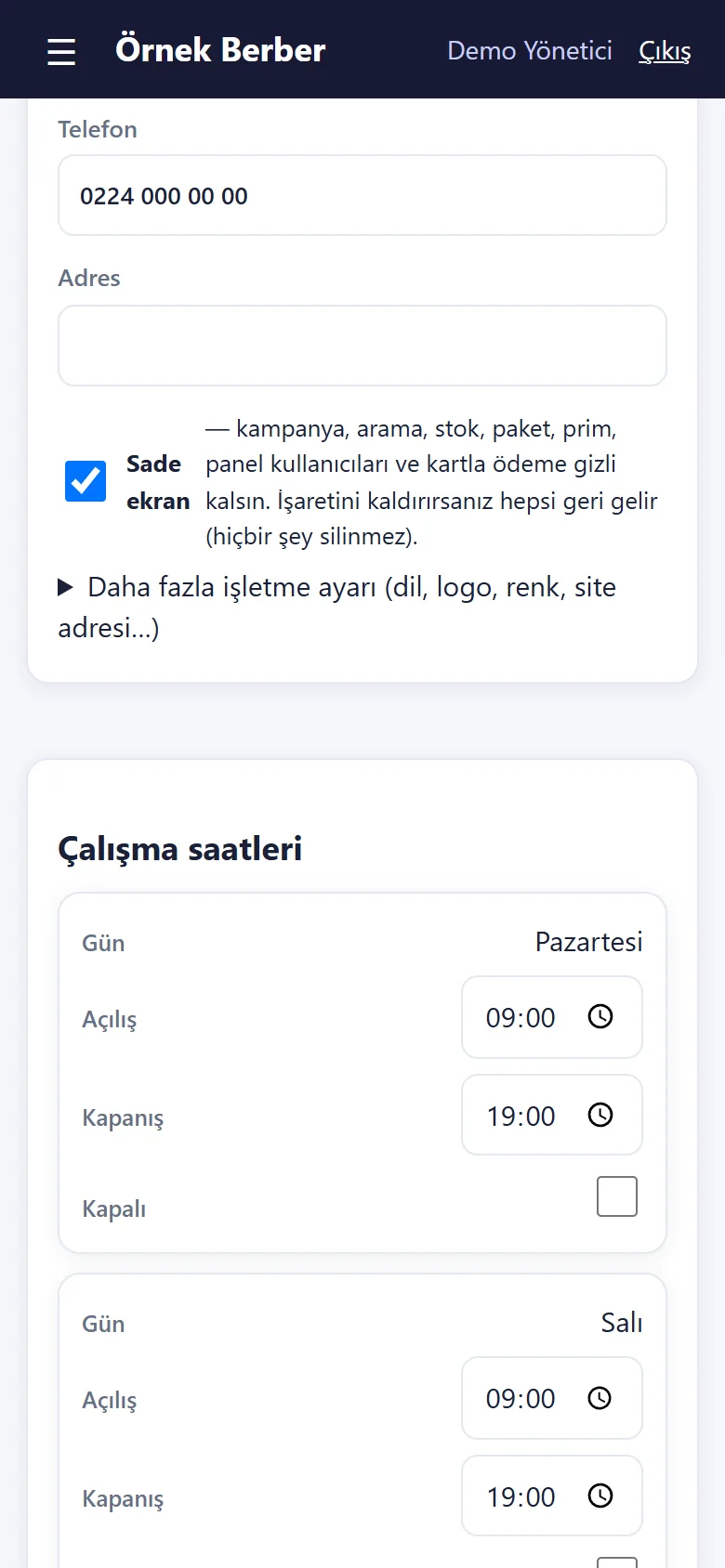
1.1.6 · 20 October 2026 Settings: Sade ekran
The “Sade ekran” (plain screen) box: ticked, campaigns, search, stock, packages, commission, panel users and card payment are hidden; untick it and all of it returns, nothing is deleted. It starts ticked on a new installation. In the demo, settings cannot be saved.
- On screen (Turkish interface)
- “Sade ekran” — plain screen
- “kampanya, arama, stok, paket, prim, panel kullanıcıları ve kartla ödeme gizli kalsın” — keep campaigns, search, stock, packages, commission, panel users and card payment hidden
- “İşaretini kaldırırsanız hepsi geri gelir (hiçbir şey silinmez).” — untick it and it all comes back (nothing is deleted)
-
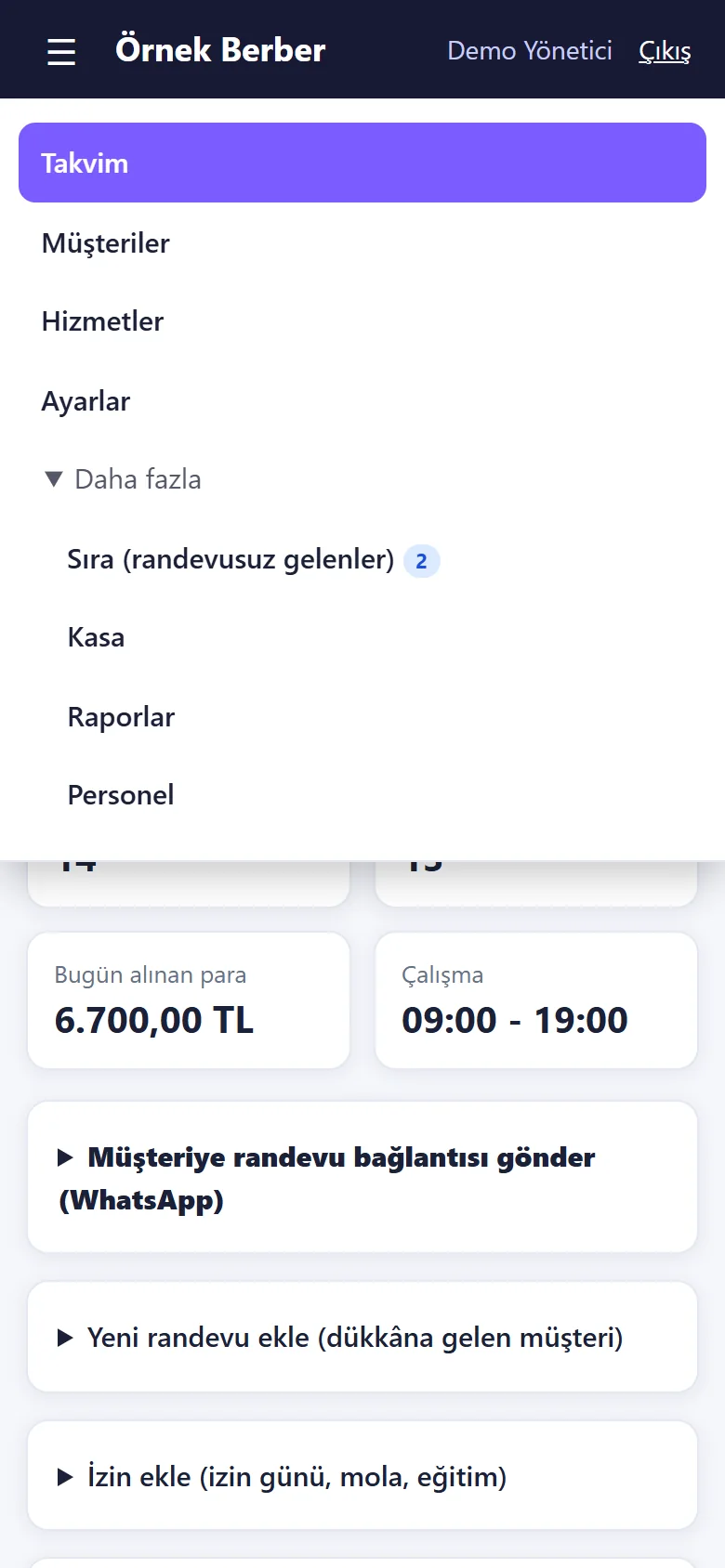
1.1.6 · 20 October 2026 Menu: plain screen
With the plain screen the menu is short: Takvim (calendar), Müşteriler (customers), Hizmetler (services), Ayarlar (settings); under “Daha fazla” (more) Sıra, Kasa, Raporlar, Personel.
- On screen (Turkish interface)
- “Takvim / Müşteriler / Hizmetler / Ayarlar” — calendar / customers / services / settings
- “Daha fazla” — more
- “Sıra (randevusuz gelenler) / Kasa / Raporlar / Personel” — queue (walk-ins) / till / reports / staff
-
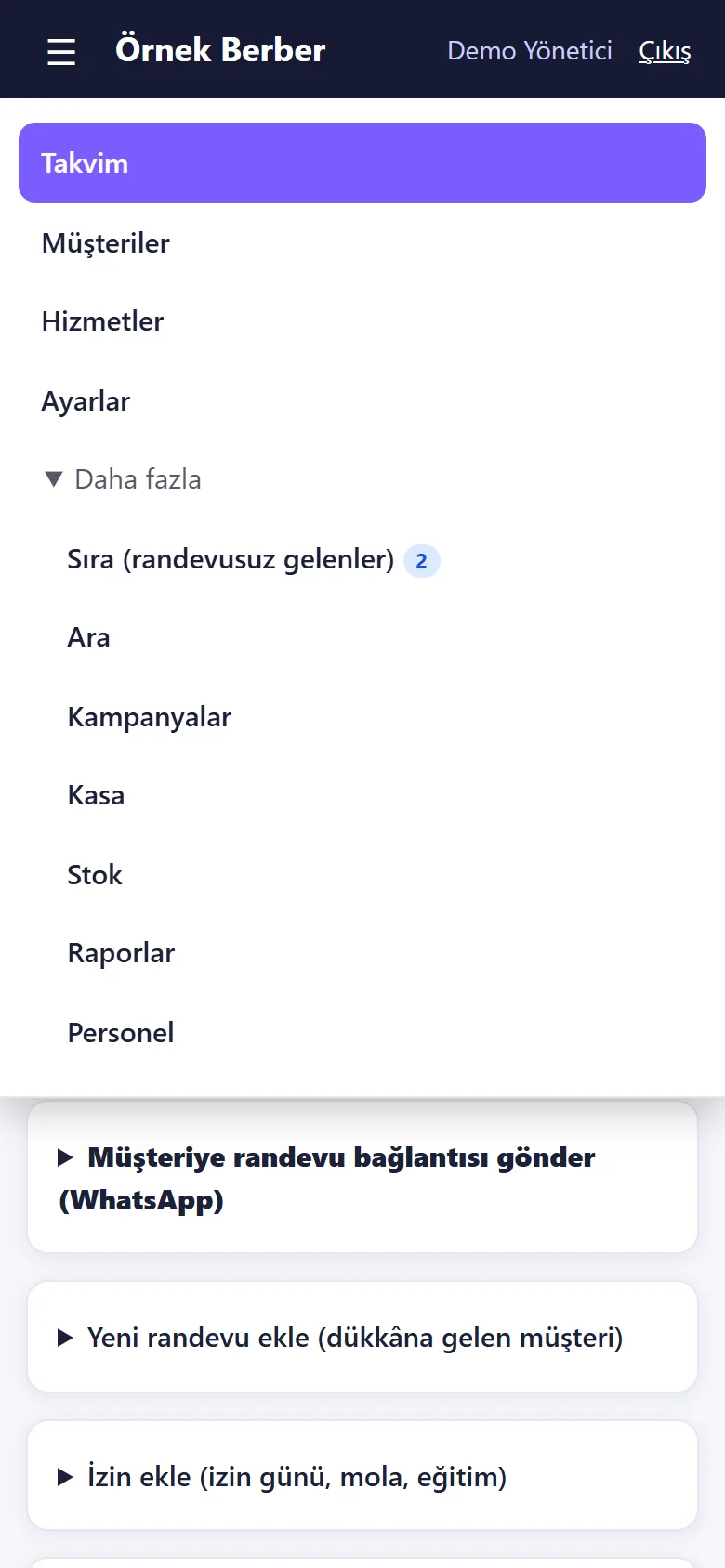
1.1.6 · 20 October 2026 Menu: full screen
“Tam ekranı göster” on the demo bar changes only the visitor’s own session; the menu then also shows Ara (search), Kampanyalar (campaigns) and Stok (stock). The demo bar now says “Sade ekrana dön” (back to the plain screen).
- On screen (Turkish interface)
- “Ara / Kampanyalar / Stok” — search / campaigns / stock
- “Sade ekrana dön” — back to the plain screen
-
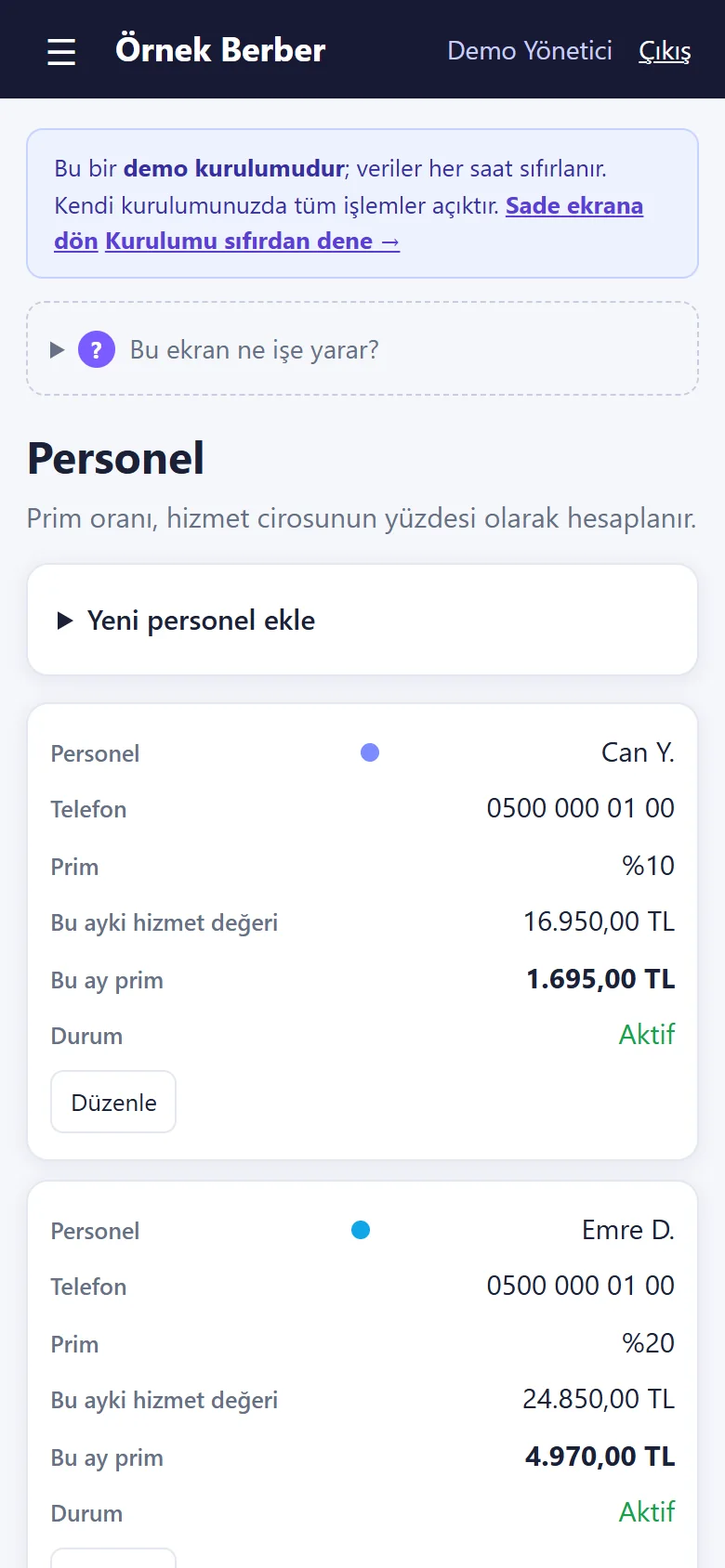
1.1.6 · 20 October 2026 Staff and commission (full screen)
With the full screen, the Personel page: each barber’s commission rate (a percentage of service revenue), this month’s service value and this month’s commission; upcoming time off and panel users below. With the plain screen this information is hidden.
- On screen (Turkish interface)
- “Personel” — staff
- “Prim oranı, hizmet cirosunun yüzdesi olarak hesaplanır.” — the commission rate is a percentage of service revenue
- “Prim / Bu ayki hizmet değeri / Bu ay prim” — commission rate / this month’s service value / this month’s commission
- “Sade ekrana dön” — back to the plain screen
-
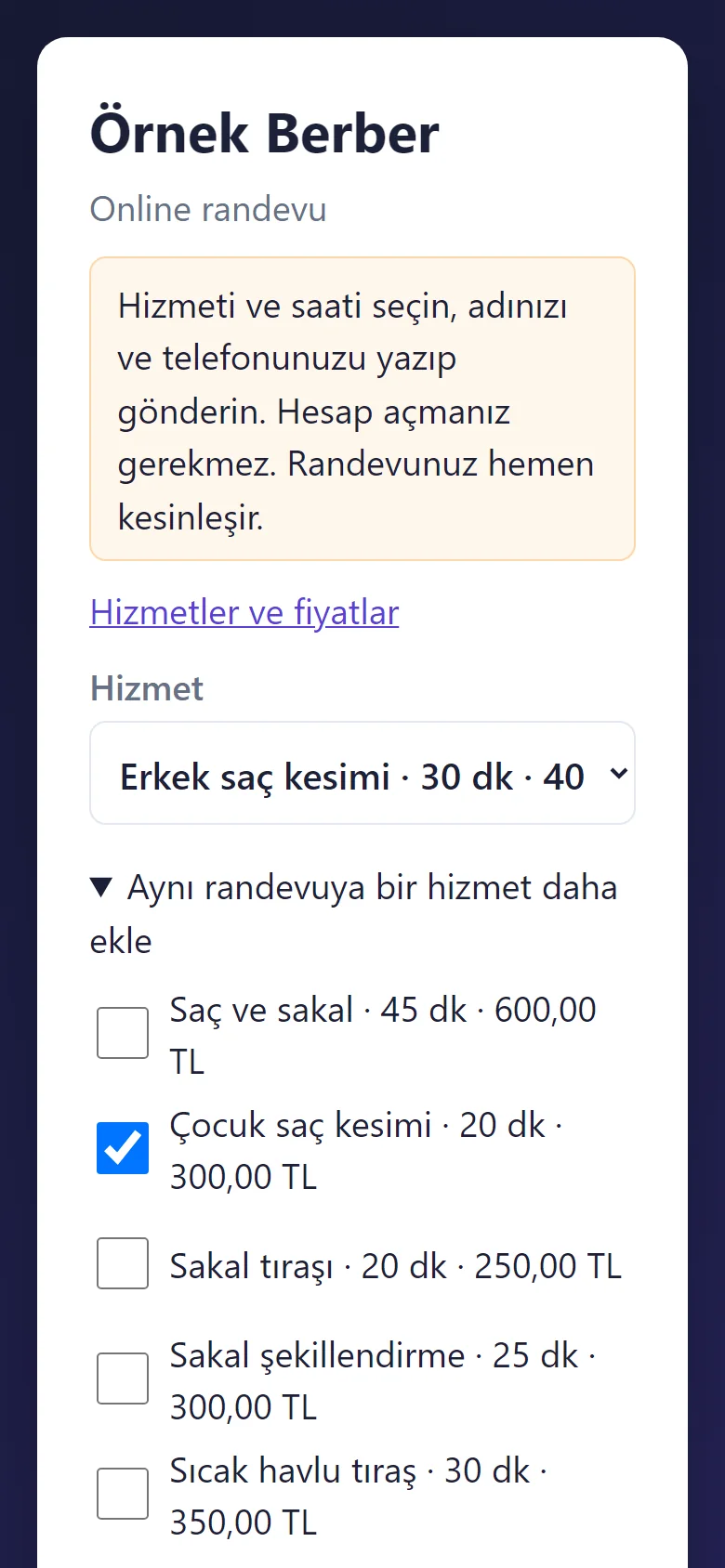
1.1.7 · 25 October 2026 Several services on the booking page
The customer opens “Aynı randevuya bir hizmet daha ekle” (add another service) and ticks the extra service (up to three); the total time and price are shown, the times offered fit the total, and it becomes one booking. The second service is ticked here but no booking was sent.
-
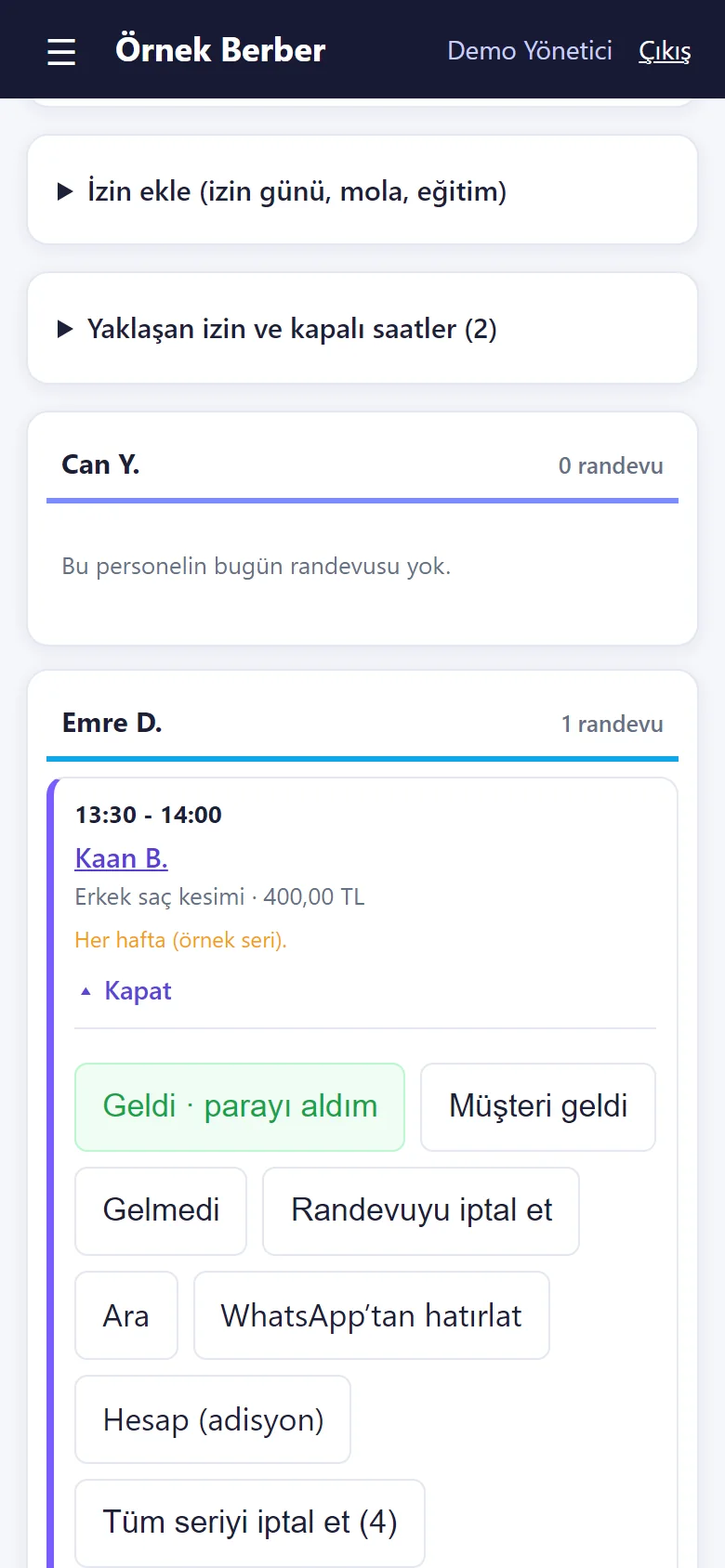
1.1.7 · 25 October 2026 A repeated booking: “Tüm seriyi iptal et”
On the opened card of a weekly repeated booking the “Tüm seriyi iptal et (4)” (cancel the whole series) button removes this booking and the ones after it; ones already marked arrived or missed stay. When the series is saved, dates that could not be booked are named with their reason (already booked, time off, closed day). The screen was taken without pressing the button.
-
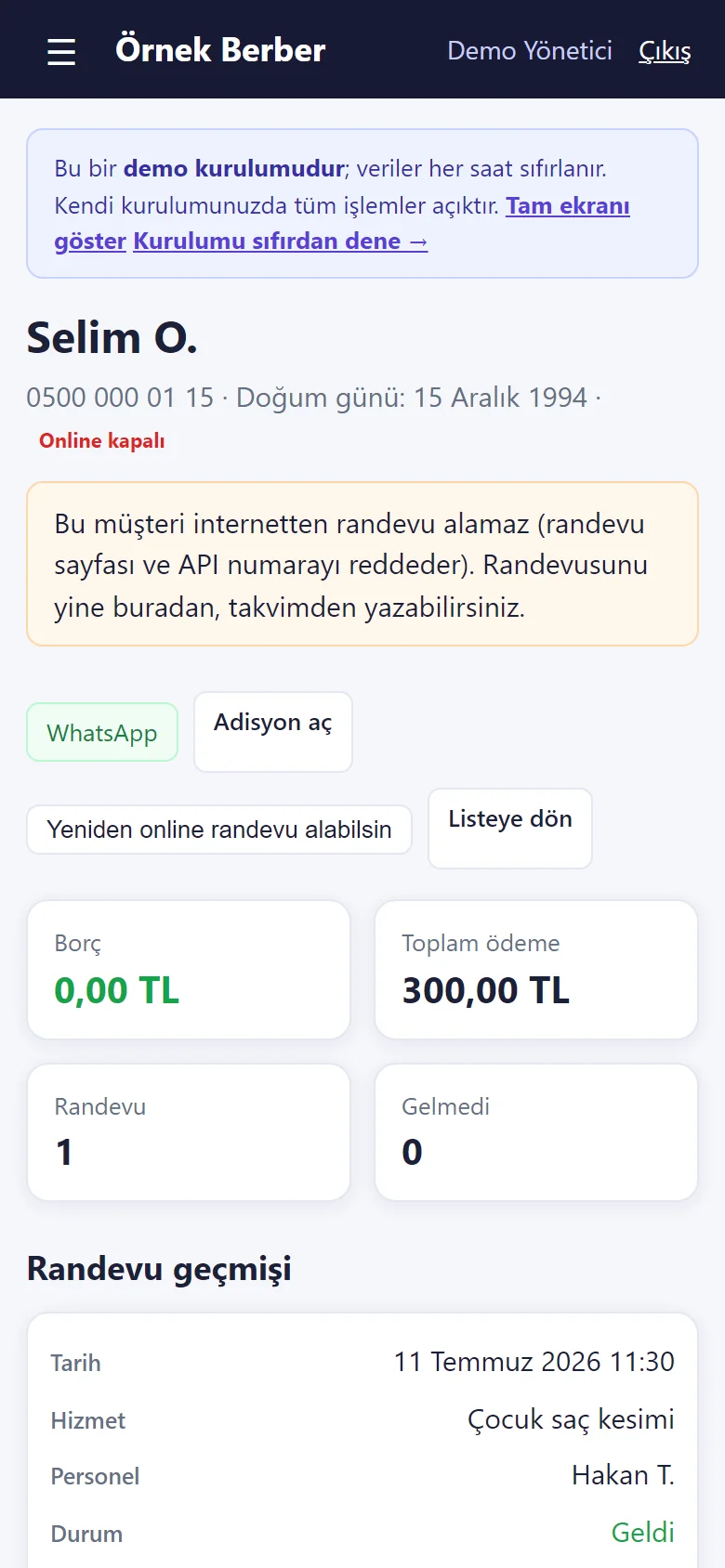
1.1.7 · 25 October 2026 Closing a customer to online booking
On the customer card: an “Online kapalı” (closed online) mark with its explanation and a “Yeniden online randevu alabilsin” (let them book online again) button. A closed number cannot book on the booking page or through the API and is shown call / WhatsApp buttons; you can still book them from the calendar. The customer is sample data.
-
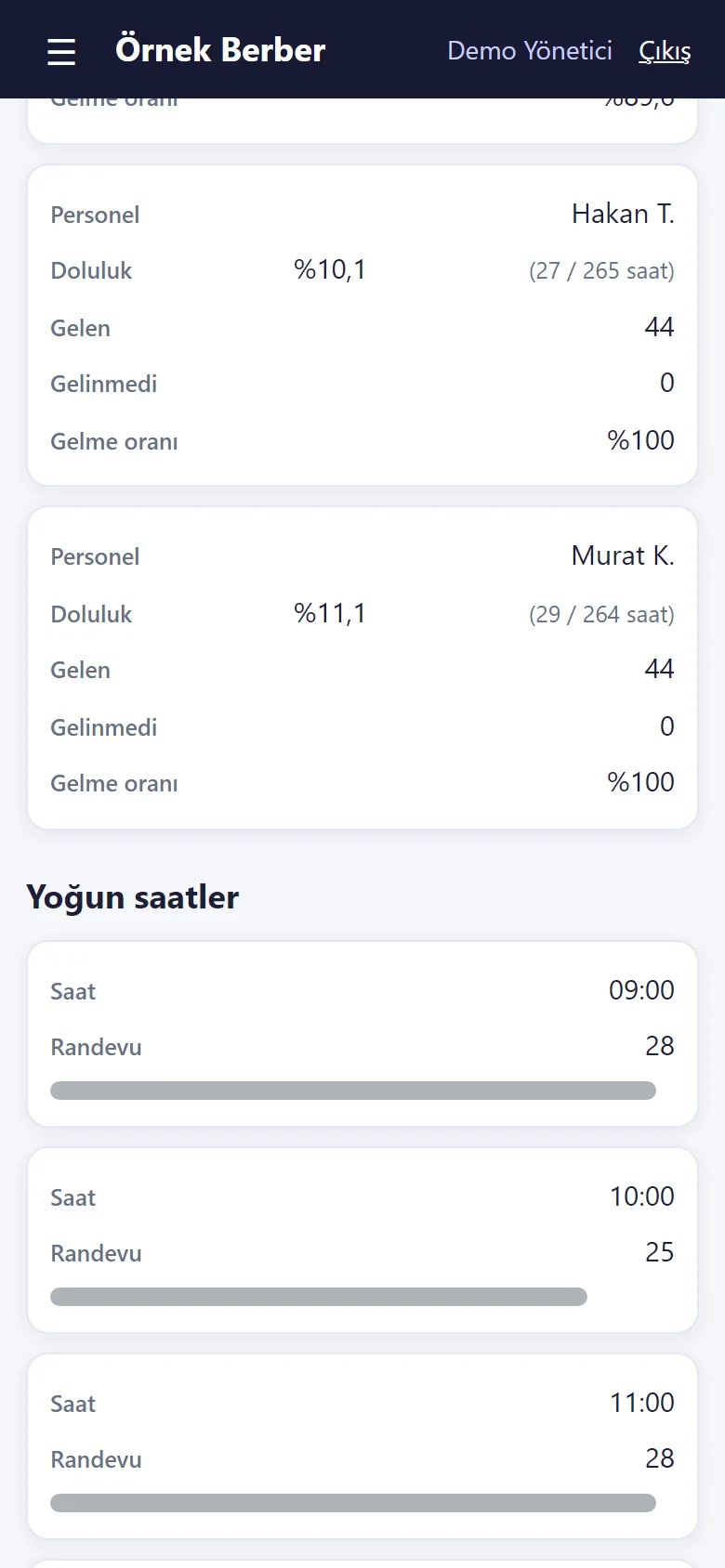
1.1.7 · 25 October 2026 Reports: staff fill and busy hours
New sections in Reports: for each staff member the fill (against open hours), kept, missed and the kept rate; below it the number of appointments hour by hour. The service table also has a share-of-revenue percentage.
-
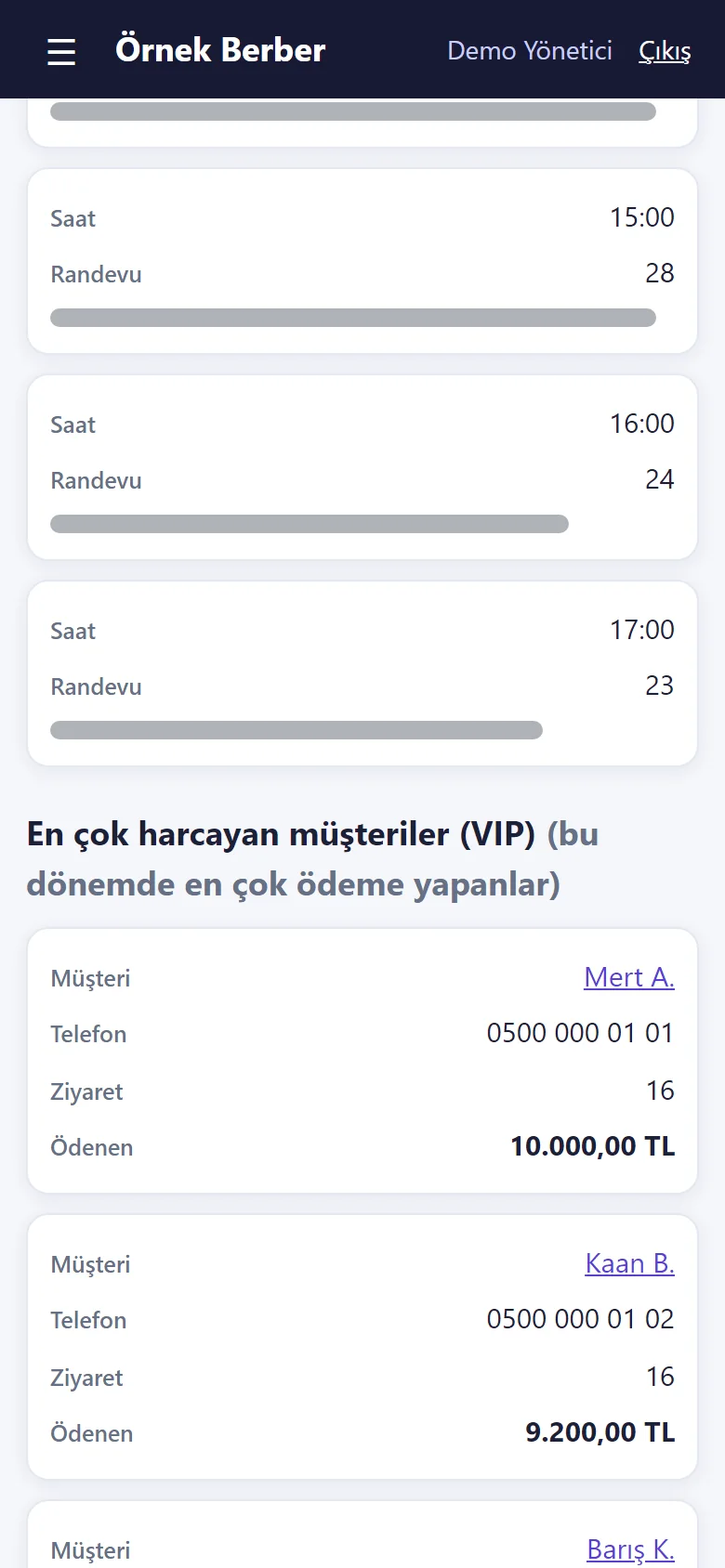
1.1.7 · 25 October 2026 Reports: the customers who paid the most (VIP)
The customers who paid the most in the chosen period (visits and amount paid); below it, customers with no visit in 90 days (passive) are listed with a ready WhatsApp invitation on each row. A customer with a booking ahead is not on the passive list.
-
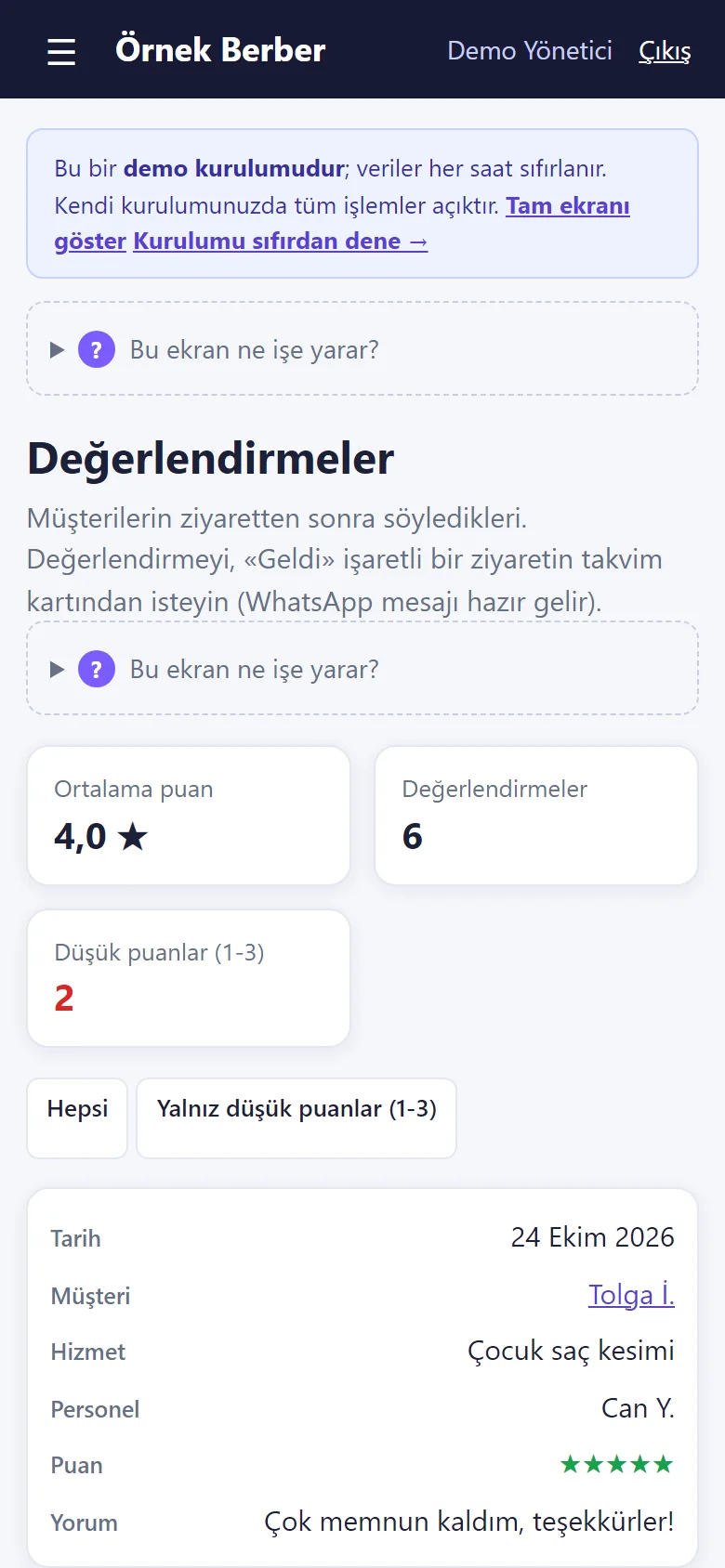
1.1.7 · 25 October 2026 Reviews
What customers rated after their visit: the average, the number of reviews, the number of low ratings and a “low ratings only (1–3)” filter; each entry shows the customer, service, staff member, rating and comment, and a low rating has “Müşteriye yaz” (write to the customer: a ready WhatsApp message). The ratings are demo sample data.
-
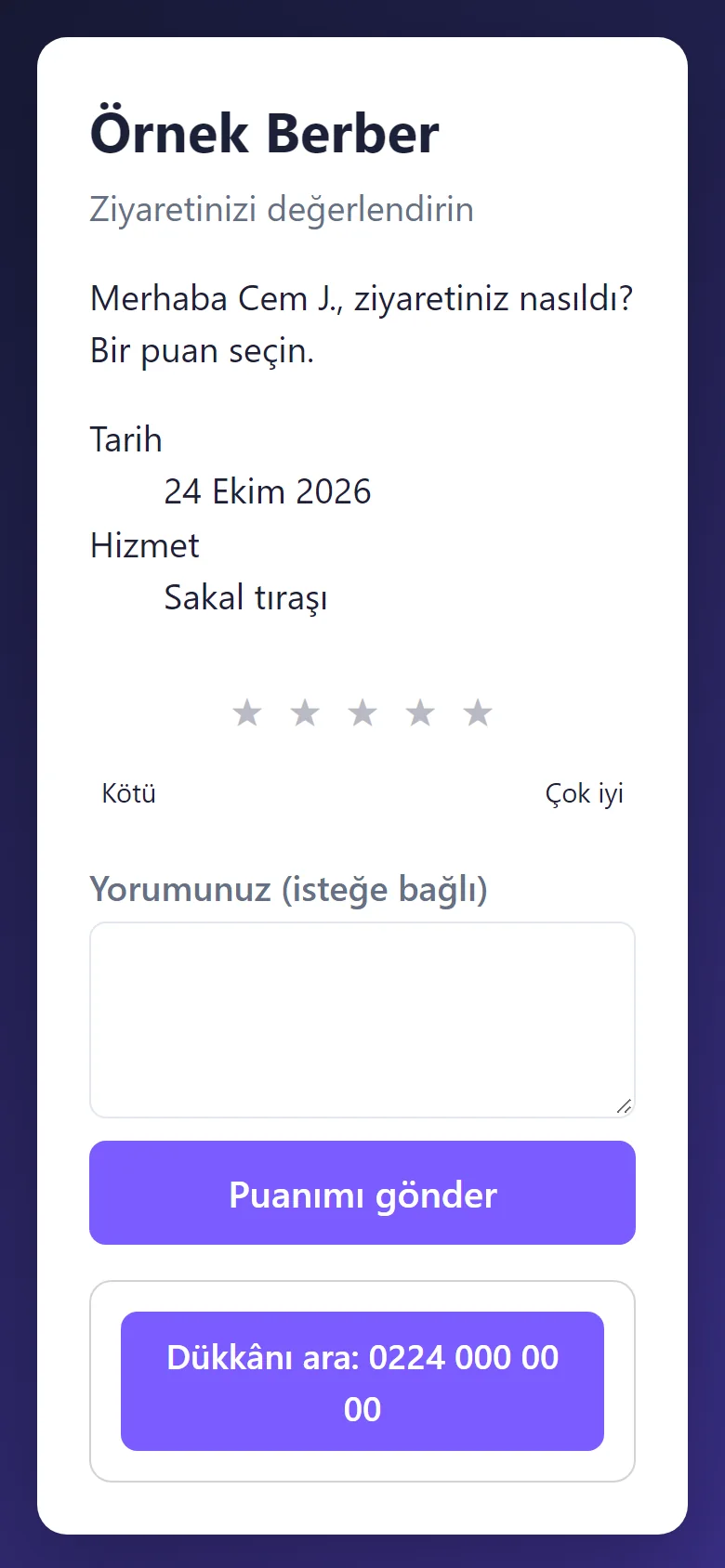
1.1.7 · 25 October 2026 The customer’s review page
The customer opens this page without signing in from the link the salon sent on WhatsApp: 1–5 stars and an optional comment; it does not open before the visit is marked “Geldi” (arrived) and a visit is rated once. Nothing is sent automatically. The screen was taken without sending a rating.
-
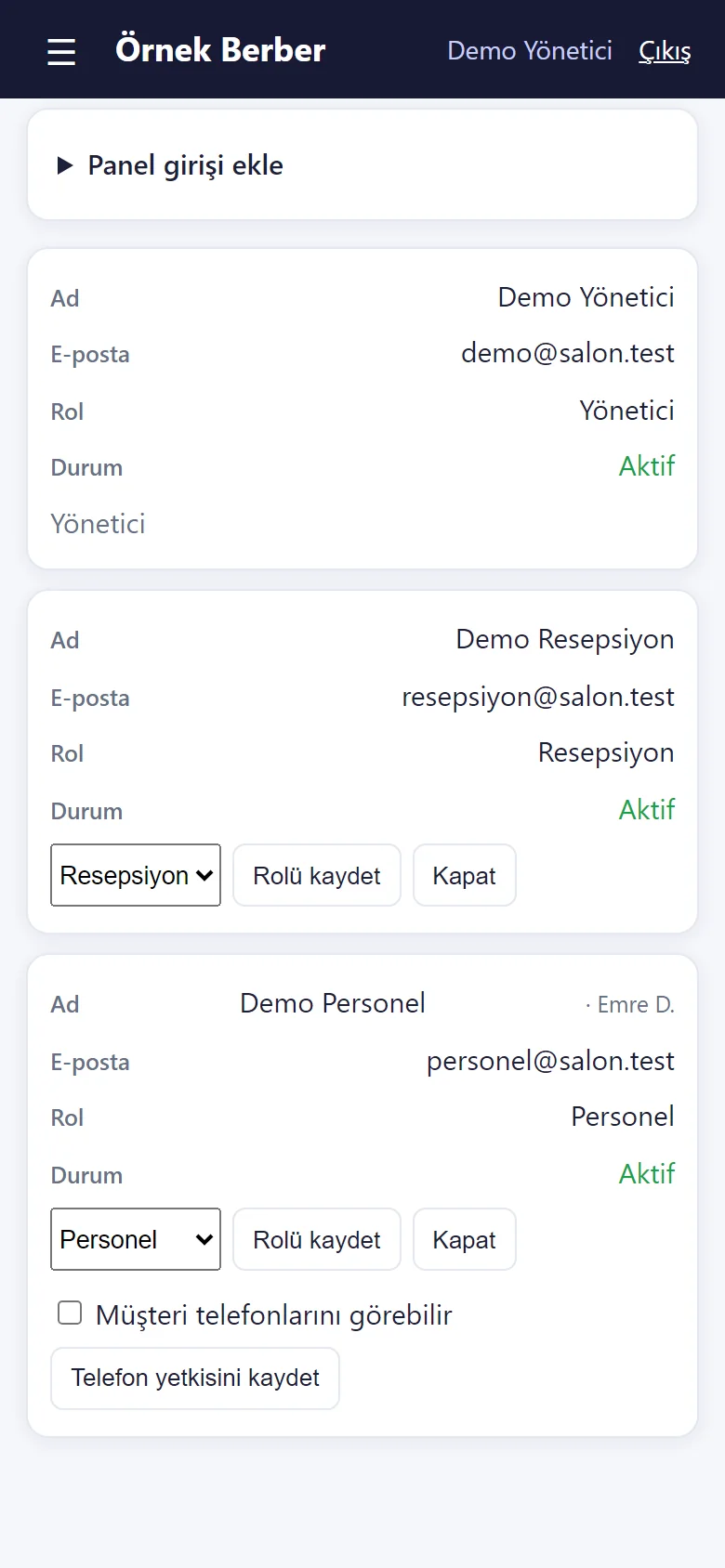
1.1.7 · 25 October 2026 Staff phone permission
On the panel logins in the Staff page a “Müşteri telefonlarını görebilir” (can see customers’ phone numbers) box for the staff member; when off, that staff member does not see customers’ phone numbers, the call and WhatsApp buttons do not appear and a search by number finds nothing. Default: they see it. In the demo a sample staff login opens with the phone hidden.
-
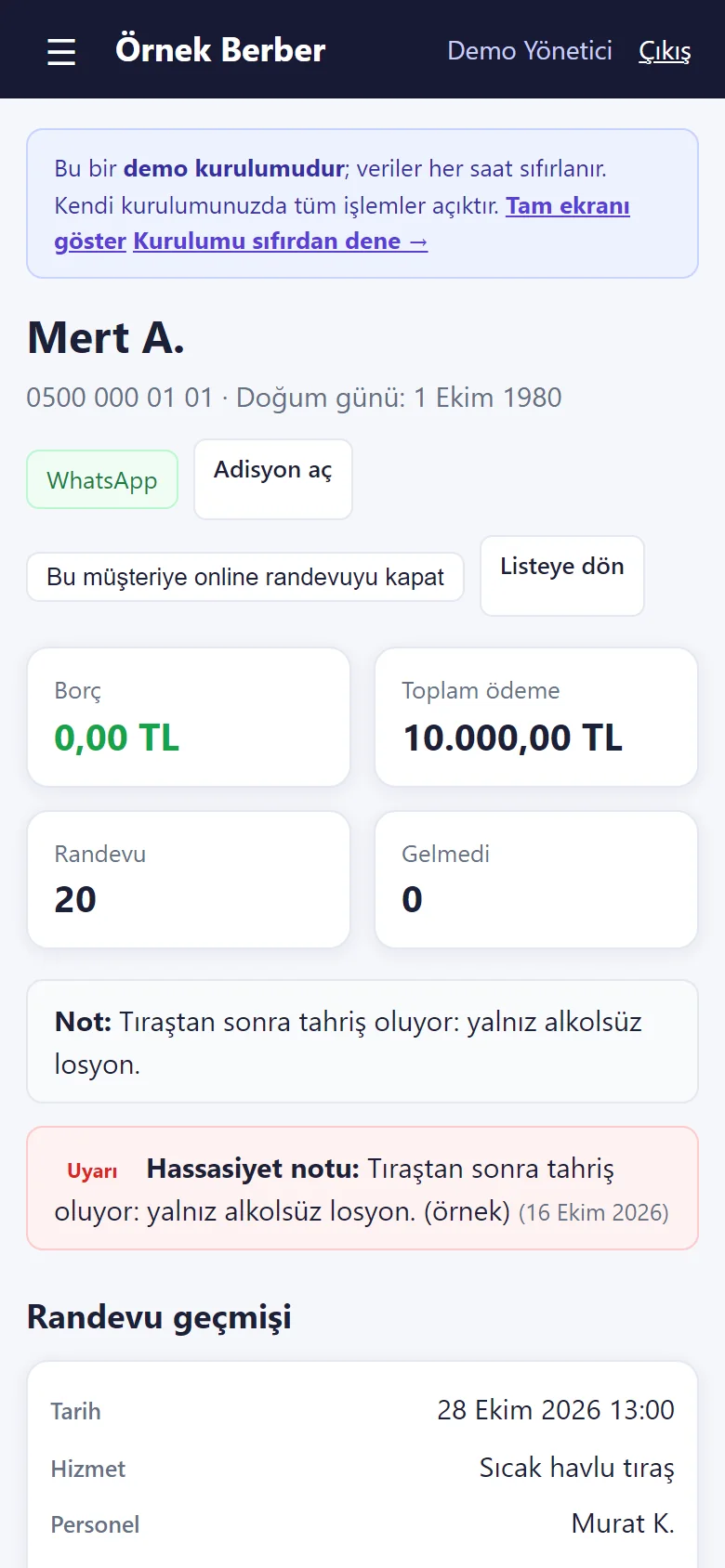
1.1.13 · 26 October 2026 The customer card’s warning note
The sensitivity note is one line on the customer card and shows with a red “Uyarı” badge; the same badge sits on the customer’s booking card where the staff member doing the job sees it. It does not go into messages or exports. The note is sample data.
-
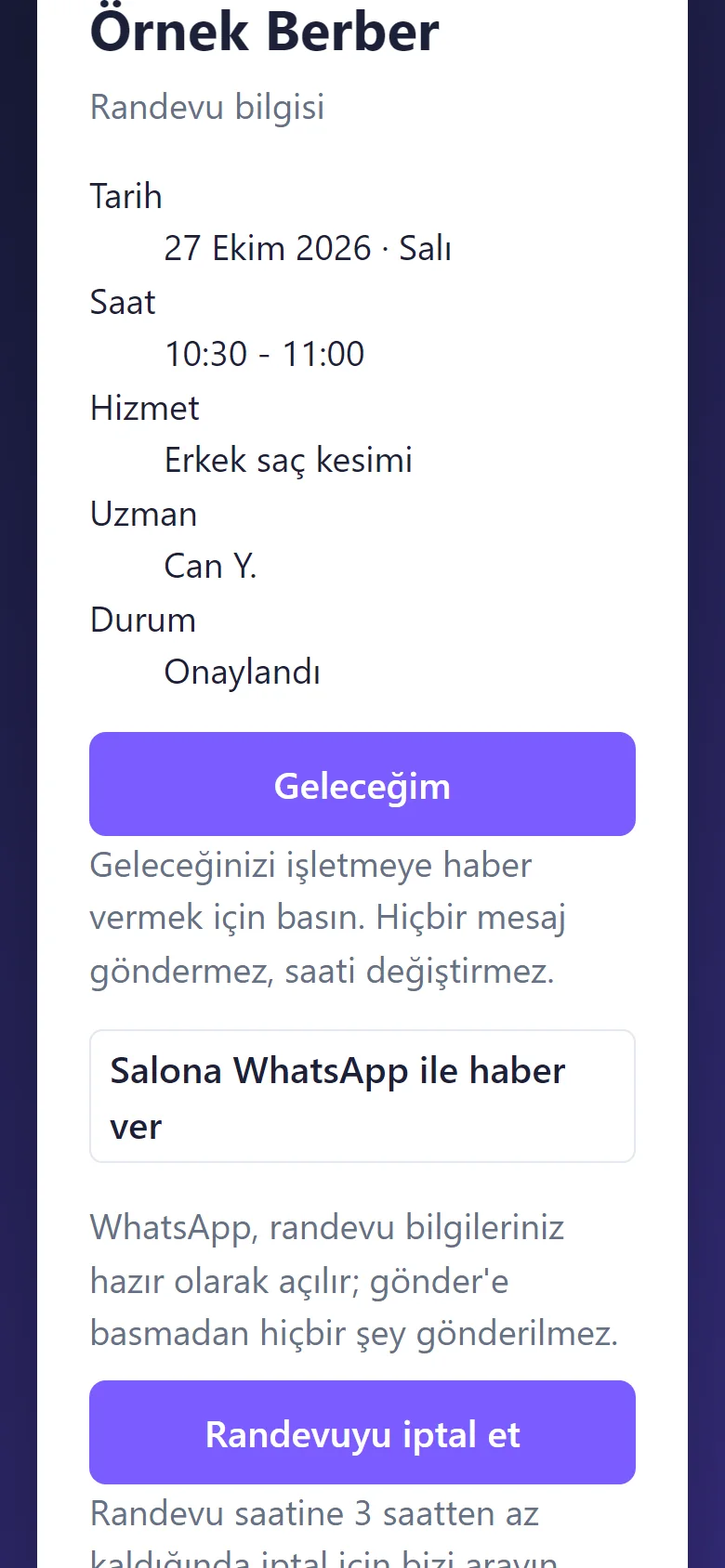
1.1.13 · 26 October 2026 The customer’s “Geleceğim” button
On the customer’s own booking page a big “Geleceğim” (I am coming) button tells the business in one tap that they will come; it sends no message and does not change the cancel rule; the calendar card then shows “✓ Geleceğim”. The screen was taken without pressing the button.
-
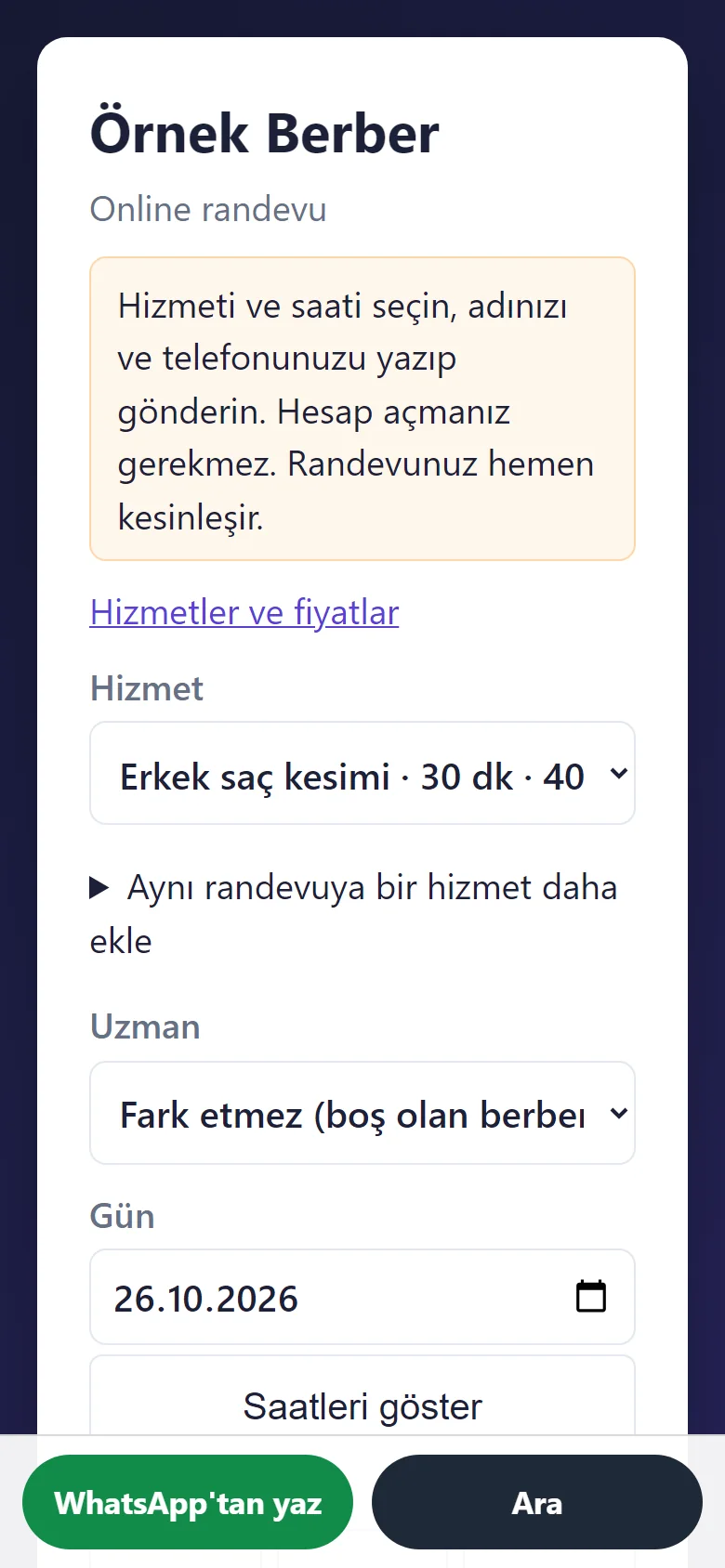
1.1.13 · 26 October 2026 Floating “WhatsApp’tan yaz” and “Ara”
Two big buttons at the bottom of the booking page (and the showcase): “WhatsApp’tan yaz” (write on WhatsApp) opens WhatsApp with the words ready and “Ara” (call) rings the salon. They are not drawn when the salon has no phone number; in the demo WhatsApp’s chooser opens.
-
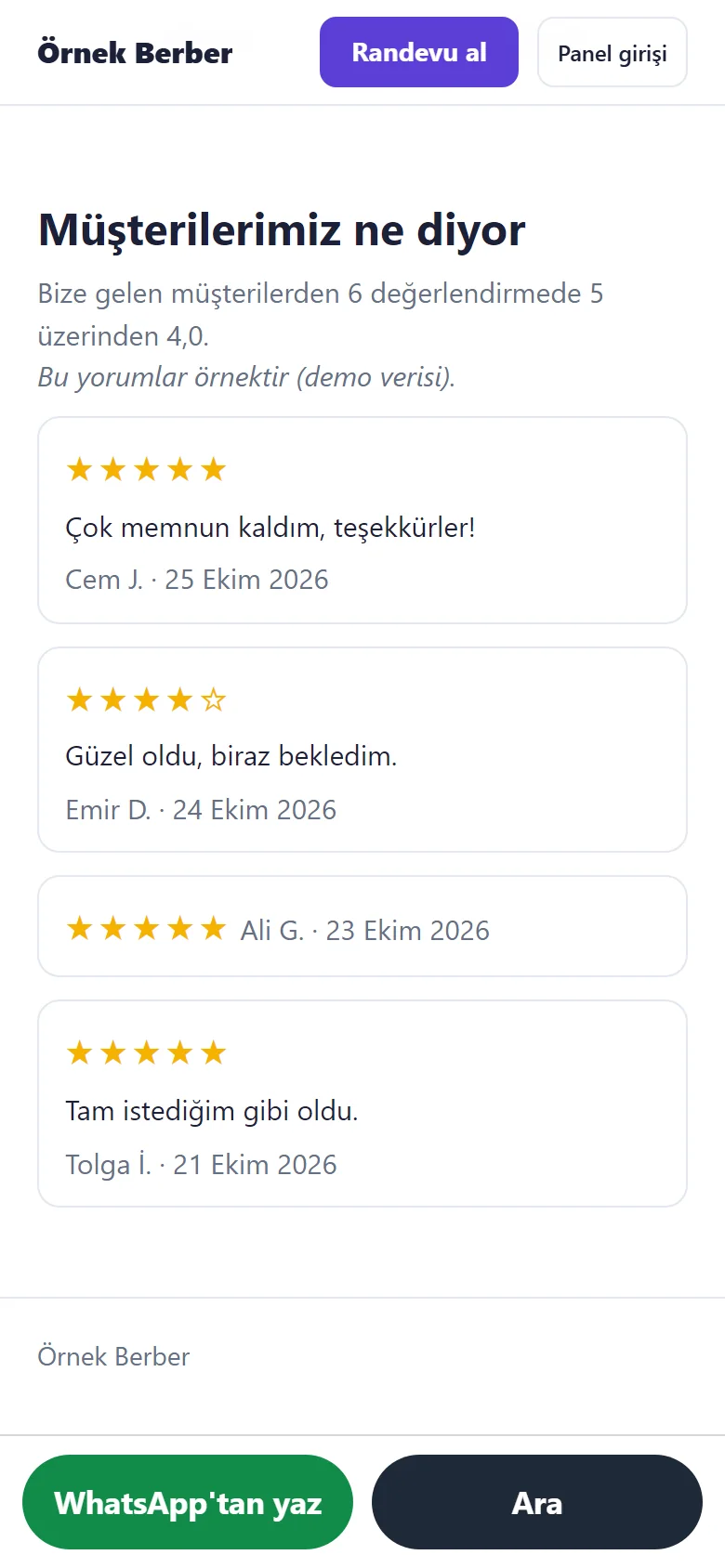
1.1.13 · 26 October 2026 Customer reviews on the showcase
On the showcase, “Müşterilerimiz ne diyor” (what our customers say): the reviews the owner marked “Göster” (show) on the Reviews page appear with stars and only the first name plus the first letter of the surname; the average counts every review received, hidden ones included, and says how many. The reviews are sample data and the screen says so.
-
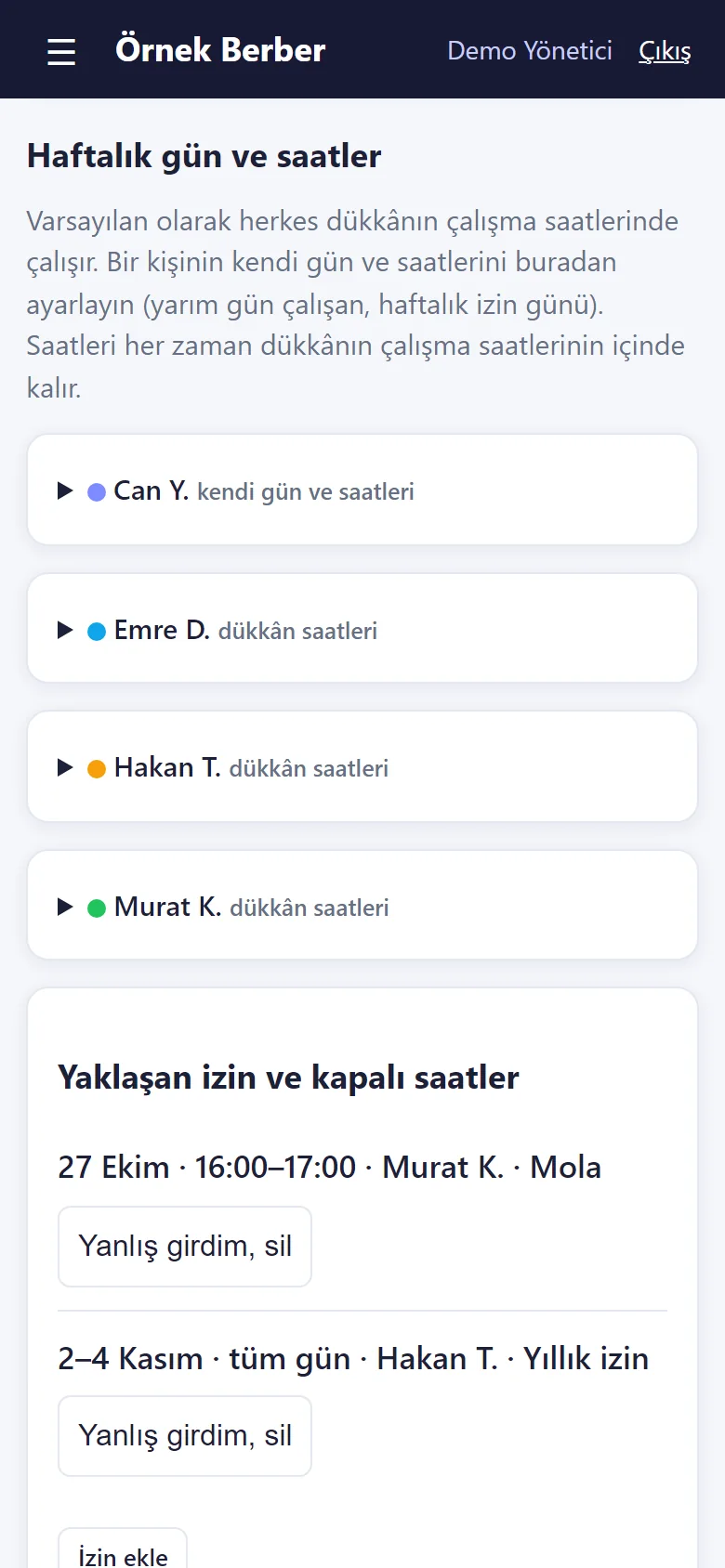
1.1.13 · 26 October 2026 Weekly days and hours per specialist
On the Staff page (“Haftalık gün ve saatler”, weekly days and hours) each specialist gets, day by day, “shop hours”, “not working” or “own hours”. Customers can book that specialist only at the hours they work; you can still book from the panel and are warned. Without a record the specialist works the shop’s hours.
-
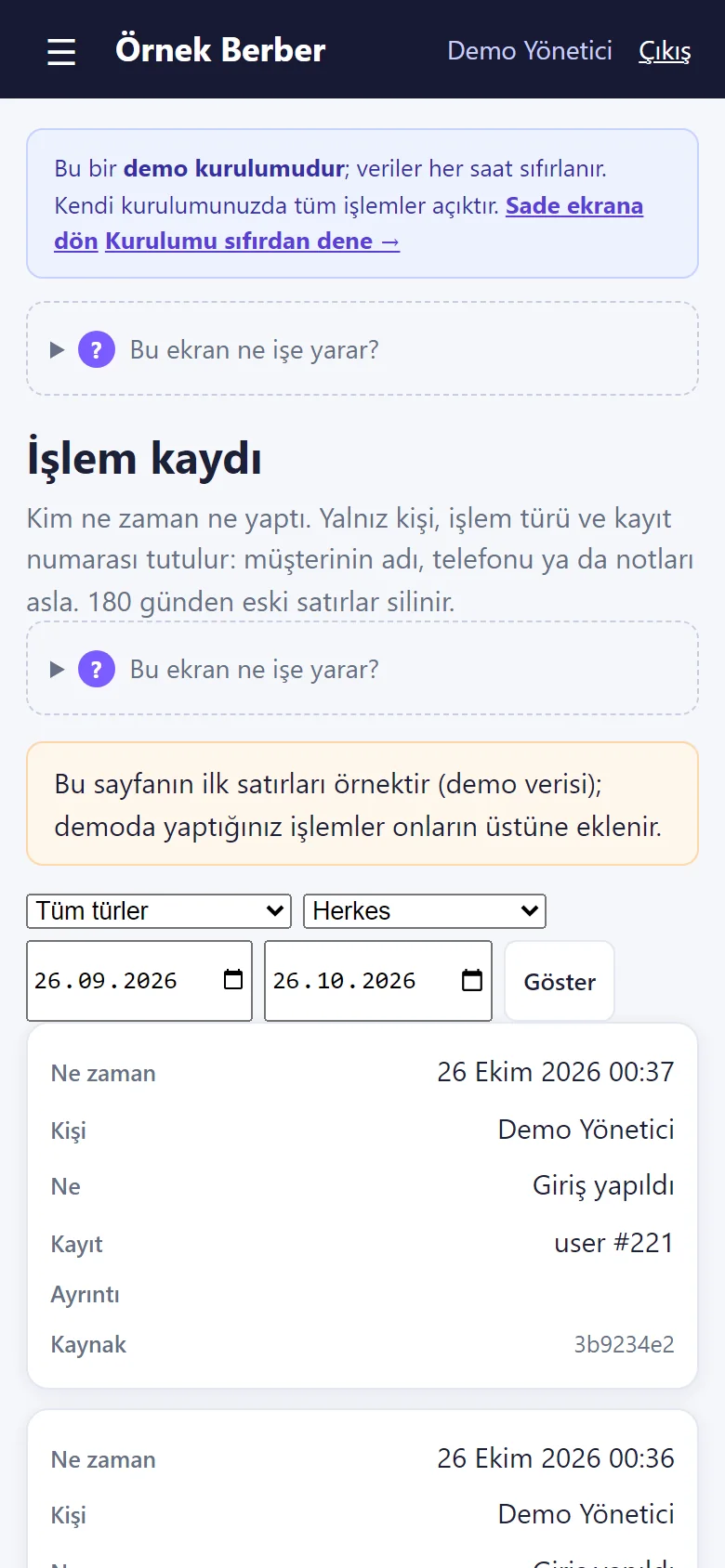
1.1.13 · 26 October 2026 Activity log
The manager’s “İşlem kaydı” (activity log) page: who did what and when with bookings, payments, settings and panel logins, with a kind, person and date filter. No customer name, phone, e-mail or note is written; the source is a keyed hash of the address; lines older than 180 days are deleted. The first lines are sample data and the page says so.
- What do they see at the end?
- The booking lands on the calendar (confirmed at once or waiting for approval, depending on a setting; in the demo it is confirmed at once); phone bookings are added from the calendar; walk-ins are taken in in arrival order. When the customer arrives, one button on the card, “Geldi · parayı aldım” (arrived · took the money), closes it, and the day’s till adds up by itself. A barber’s time off and the old customer list are entered from the panel too.
- What is it good for?
- No two customers for the same barber at the same time, nobody in the queue is forgotten; a customer’s usual cut stays on their card when the barber changes, and the till is not worked out by hand in the evening.
Everything that is not included, and all limits
- Not delivered to a client and not used by a real business. The business (“Örnek Berber”, i.e. “Sample Barbershop”), the people and the phone numbers starting with 0500 are sample data.
- Installed with its setup wizard locally on MariaDB 11.4 and on a DirectAdmin shared hosting account (MariaDB 10.4); the flows were tried and every automated test passed. Not yet tried on a customer’s own hosting; the app was tried on an iPhone and worked. The phone-size screens on this page come from a browser set to a phone’s size.
- Notifications: off in the demo, working on your own installation. A notification is an instant heads-up; there is no delivery guarantee. On an iPhone it works only in an app added to the home screen. The app was tried on an iPhone and worked; the phone’s print preview and a picture of the notification are not shown on this page.
- The walk-in queue is kept simple on purpose: no automatic barber assignment, no priority by service and no wait-time prediction; these can be scoped separately. The queue does not block the calendar; it warns when the chosen barber has an appointment coming up.
- Several services in one booking (“Men’s haircut + Beard shave”) exist only for a booking the customer makes on the internet: up to three extra services, with minutes and prices added up; a booking entered in the panel is a single service (the common “haircut and beard” pairing can also be defined as a service of its own). Commission is worked out from service revenue, extra services included.
- There is no SMS or automatic reminder sent to customers, no online payment or deposit, no multi-branch view and no e-invoicing; a reminder is a ready-made WhatsApp message that the shop sends. The receipt is an information slip, not a tax document.
- There is a live demo with sample data (reset every hour); the screens are shown here too. Installation, hosting, support and price are agreed with the business. Hair salons have a separate product: Hair Salon Booking and Business Tracking.
- Time off is entered for at most 120 days at a time; there is no leave entitlement or days-left counter. The customer import does not read the old .xls format, and the preview lists the first 100 rows (the rest are handled by the same rules); an imported customer is not counted as having agreed to offers, and nobody is sent a message.
- The app’s interface in these screens is Turkish; the program can also be switched to English in its settings.
- The first screens come from the live demo at version 1.1.6, the next eight from version 1.1.7 and the last six from version 1.1.13; in the demo settings cannot be saved and notifications are off. The booking named “Emre Örnek” is a test record written to the demo while the screens were taken and cancelled afterwards; the time-off form and the customer-import preview were filled in and shown without saving anything.
- The review request is a ready WhatsApp message that the salon sends; there is no automatic message, no SMS and no phone verification code. Closing a customer to online booking only closes the web page and the API; it does not stop you booking a customer who phones the salon. The phone permission is an interface and server rule; it cannot stop a staff member from reaching a customer another way (such as their own contacts).
Frequently asked questions
How are walk-in customers tracked?
Customers are added to a waiting list. The business selects the next person and the barber; payment is collected on a ticket after the service. There is no automatic barber assignment or queue prediction.
How do I enter a barber’s annual leave or lunch break for several days?
In the “İzin ekle” (add time off) form on the calendar you pick the barber, the first and the last day, then “all day” or a time range applied to every day. Days the shop is closed are skipped; a day that already has a booking is not closed, and the app says which days were skipped. Each line of the “Yaklaşan izin ve kapalı saatler” (upcoming time off) list has “Yanlış girdim, sil” (I made a mistake, delete). There is no leave entitlement or days-left counter.
Can I import my old customer list from Excel?
Yes. The manager picks a file on the “Excel/CSV’den müşteri al” (import customers) page or pastes a table copied from Excel; the preview shows new, already-saved (same phone number) and faulty rows, and nothing is saved before you confirm. No message is sent to anyone, and the last import can be undone. An .xlsx file is read only when the server has the zip extension; otherwise it has to be saved as CSV.
Can two bookings overlap for the same barber?
A second booking for the same employee at the same time is prevented. Phone bookings can be added through the calendar and moved to another time.
Is this software available to buy?
Yes, by quote: the yearly list price is 2,500 TL; installation, one year of hosting, data transfer, a daily automatic backup and written usage support are included. There is a free live demo; no paid client delivery has been made yet. Get in touch to talk about how it could work in your business.
How do I manage booked and walk-in customers at the same time?
Bookings sit in the calendar with a column per barber, and walk-ins in a separate waiting list. The waiting list does not write to the calendar; it warns when the chosen barber has an appointment coming up as you take someone in.
How is barber commission worked out?
Each barber gets a percentage of their own; separate percentages can be entered for master, journeyman or apprentice. Commission is calculated from service revenue only; product sales such as beard oil do not earn it. There is no seat-based revenue. A new installation starts with the plain screen on, which hides commission; it shows once the plain screen is switched off in Settings.
Does the barber get told when a booking comes in?
On your own installation, yes: a free instant notification (Web Push) goes to the shop’s phone when a customer books and when they cancel; the panel has to be added to the phone and notifications allowed. It is not an SMS or a WhatsApp message, so there is no message fee. Notifications are off in the demo; a notification is an instant heads-up with no delivery guarantee. On an iPhone it works only in an app added to the home screen; the app was tried on an iPhone and worked.
Does a customer have to open an account to book?
No. The customer picks a service, a barber (or “Fark etmez”, doesn’t matter) and a free time from the booking link (a WhatsApp message, a scannable code or an A4 poster); no account is opened. They see the status on their own booking page and can cancel. Approval is a setting: a booking is confirmed at once or waits for the shop; on the live demo it is confirmed at once.
Can I record a customer’s clipper guard number and neckline?
It goes in the note on the customer card (e.g. “beard: clipper guard 3, flat neckline”); the note stays on the card when the barber changes.
Can a pairing such as “haircut and beard” be entered?
Yes: when booking on the internet the customer picks “Aynı randevuya bir hizmet daha ekle” (add another service); the minutes and prices of up to three extra services are added up and it is one booking. A booking entered in the panel is a single service; a frequent pairing such as “haircut and beard” can also be defined as a service of its own.
How are no-shows tracked?
A booking is marked “Gelmedi” (no-show); the customer card shows the no-show count and the reports show the no-show share.
Does it run in my account or on my own domain?
The app is made to run on the business’s own domain and its own hosting (PHP and MariaDB); it is not a cloud membership account. Installation is done by quote; the yearly list price is in the price box and the details are in the delivery and sales status on the product page.
What does the program cost?
The yearly list price is 2,500 TL. Installation, one year of hosting, data transfer, a daily automatic backup and written usage support are included; automatic SMS, card collection and a store app are not. The live demo is free; installation is done by quote.
Try it free in your barbershop for 15 days
On request, we prepare a separate empty installation for your business. Once setup is complete, you can use it with your own data free for 15 days. After that, new records and online booking close; you can still view and download your data. Setup and access details are arranged after your request.
Delivery and sales status
How does it work?
You try the demo and tell us about your shop, and we send you a quote. We install it, we host it and we take a daily backup. The yearly price includes installation, hosting, data transfer and support.
Price
The yearly list price is 2,500 TL. Installation, one year of hosting, data transfer, a daily automatic backup, bug fixes and written usage support are included. You send booking messages yourself from WhatsApp; automatic SMS, card collection and a store app are not included. New feature requests and work beyond the scope are priced separately and you are told before anything is done. The renewal price is notified in writing at least 30 days before the term ends. The payment method and the paperwork are settled in the quote.
Possible delivery options
Other delivery options
Requirements and version history
Installation requirements
- Requirements as written in the documents: PHP 8.1 or newer, the pdo_mysql and mbstring extensions, MariaDB 10.4 or newer. MariaDB 10.4 was tried on a DirectAdmin shared hosting account; these have not been tried on a customer’s own hosting.
Release notes
- Summarised from the package’s version history; no version has been delivered to a client. The live demo runs version 1.1.20; 1.1.20 is still a “candidate” and is not in the delivery folder.
- 1.1.20 (31 October 2026): a page opened by hand without permission now shows “You do not have permission for this action.” in the interface language with a “Return to the panel” button (still HTTP 403); a package with no end date reads “No expiry” (“Süresiz” in Turkish) on the customer card. No new permission, data or schema change.
- 1.1.19 (28 October 2026): in the demo only, the “Enter as manager / reception / staff” buttons on this site’s product page open that role’s calendar screen directly, with no sign-in screen and no password; on a real installation it is off (404). No new permission, data or schema change.
- 1.1.18 (28 October 2026): next to the calendar file, the customer’s appointment page also has an “Add to Google Calendar” link (it opens with the appointment filled in; the customer presses Save); the file button stays, labelled “Dosya olarak indir (.ics)”. No new permission, data or schema change.
- 1.1.17 (27 October 2026): an “Add to calendar” (“Takvime ekle”) button on the customer’s own booking page; it saves an approved appointment that is still ahead to the phone calendar with a reminder one hour before, the file carries no phone number or note, and nothing is sent to the salon. No new permission, data or schema change.
- 1.1.16 (26 October 2026): on a real installation whose setup wizard is not finished, reception and staff land on the calendar after signing in instead of a setup page they may not open (the demo is not affected).
- 1.1.15 (26 October 2026): a staff login is no longer shown a “Daha fazla” (more) menu that opened empty (it is drawn only when the role may use a page in it); on the demo the setup page’s “Yazdırılabilir afişi aç” (open the printable poster) link opens the printable booking poster instead of a 404. No new permission, data or schema change.
- 1.1.14 (26 October 2026): a role is no longer shown a button, form or link it may not use (the server still refuses an address typed by hand). The staff member’s calendar no longer has the “İndirim yap” (give a discount) form or the “Müşteriye randevu bağlantısı gönder” box, which put every customer’s name and WhatsApp number into the page; reception no longer sees the demo bar’s “Kurulumu sıfırdan dene” (start again from scratch) link or the data-deletion / Excel sentence in the Customers help. On an empty installation the “Hizmet ekle”, “Çalışan ekle” and Stock links are replaced by “…yönetici ekler.” (the manager adds them) sentences (that last part was tried by automated tests only; the demo has no empty screen). No new permission, data or schema change.
- 1.1.8–1.1.13 (25 October 2026): a warning note on the customer card with a red “Uyarı” badge, a “Geleceğim” (I am coming) button on the customer’s own page (no message is sent), floating “WhatsApp’tan yaz” and “Ara” buttons on the showcase and booking page, approved reviews on the showcase (first name + first letter of the surname, low ratings hidden by default), weekly days and hours per specialist (the booking page and API refuse, the panel books with a warning), an activity (audit) log for the manager (no personal data written, 180 days).
- 1.1.7 (25 October 2026): closing a problem customer to online booking (checked on the booking page and in the API, on the server; call / WhatsApp pointers), call / WhatsApp buttons when the cancel window says no, a furthest-day limit in the API, a “show service prices to customers” setting; in Reports busy hours, service share, staff fill and kept rate, the customers who paid the most (VIP) and customers with no visit in 90 days; a review after a visit (a page without sign-in, a ready WhatsApp message, a low-rating filter; no automatic message); the reasons for dates that could not be booked when a booking is repeated and “Tüm seriyi iptal et” (cancel the whole series); up to three extra services in one booking (minutes and prices added up); a “can see customers’ phone numbers” permission for a staff login (checked on the server). An upgrade bug that created indexes before the columns they need was fixed.
- 1.1.6 (20 October 2026): “İzin ekle” (add time off) over several days (first and last day, all day or a time range; a day with a booking is skipped), the “Yaklaşan izin ve kapalı saatler” (upcoming time off) list, customer import from Excel/CSV (preview, duplicate phone numbers, undo; no message is sent; .xlsx only when the server has the zip extension).
- 1.1.5 (20 October 2026): a plain-screen report note fixed in the hair salon product; barbershop behaviour is the same.
- 1.1.4 (20 October 2026): guided screens and the plain screen added to the hair salon product; barbershop behaviour is the same, only the version number changed.
- 1.1.3 (19 October 2026): the trial is 15 days by default; a different length is given only for one installation through a setting (trial_days).
- 1.1.2 (19 October 2026): on the plain screen the staff table in Raporlar (reports) no longer shows the commission column.
- 1.1.1 (19 October 2026): in the demo a booking is confirmed at once (matching its help text); on the plain screen the Card and Transfer tiles in Kasa (till) show only when there is money in them, and the customer list has no campaign badge and the staff help text no longer explains commission.
- 1.1.0 (19 October 2026): a “Sade ekran” (plain screen) setting (on in a new installation), guided screens (setup steps, “what is this screen for?” boxes, a next-step button on empty screens, buttons that fix an error), the booking link for customers (WhatsApp, scannable code, A4 poster), one button for “Geldi · parayı aldım” (arrived · took the money), password-free role sign-in in the demo and “Boş siteyle yeniden başla” / “Örnek veriyi geri yükle” on the setup page.
- 1.0.2 (5 October 2026): product and format marker on backups, rejection of another product’s backup, a package timestamp that stops old code from running after an update, touch targets on narrow screens.
- 1.0.1 (28 September 2026): the reminder list no longer shows a request that is still waiting for approval.
- 1.0.0 (28 September 2026): first version; walk-in waiting list and product-specific sample data.
Decisions not made yet
- Rights to use, modify, transfer and receive the source code: to be set in a written agreement; not decided yet.
- Whose name the hosting and domain are opened in, and where the software is installed, have not been decided yet.
There is no cart, customer account or online payment on this site for now. Reach out by phone, WhatsApp or the form; in a first conversation your need and the software’s fit are reviewed. The form does not create an order, a contract or a payment.