Boutique and home businessDemo with sample data
Boutique Order and Stock Panel: screen-by-screen guide
The full version of the short description on the product page: every feature, how each screen is used step by step, all limits and the delivery details.
All features
Every feature below was verified locally with automated tests (SQLite and MariaDB 11.4) and can be seen in the screens; the live demo runs on one host with sample data, nothing has been tried on a real phone.
- Quick order form: enter an order that came by DM, WhatsApp, phone or in person on one page: customer, product with colour/size, quantity, cargo or pick-up, ready-by day and deposit; stock goes down on saving and more than the stock cannot be entered
- Deposits, part payments and customers on account: every order has its payments and remaining balance; the customer card shows the total balance and one payment is spread over the oldest orders first
- Customer card: by phone or only by Instagram name; notes, orders, total spent, remaining balance and a ready balance-reminder message
- Cargo company and tracking number are typed in; a ready WhatsApp message by status (order received, deposit, shipped, delivered, balance reminder, cancelled, returned) is editable in the settings; you send it yourself in WhatsApp
- Returns: the item goes back to stock if it is fine; the money received is recorded as a refund
- Today screen: sales, money collected, open balance, orders to ship, critical stock, orders due soon and a warning for missing tracking numbers
- Sales, collection and estimated profit report (day, week, month, range; by source) and CSV export; profit is only worked out for products with a buying price and does not include shipping, commission or tax
- Catalogue link for Instagram and WhatsApp; on the product page a ready “Order on WhatsApp” message with the chosen colour/size and quantity; the cart is optional
- Colour/size stock, a critical-stock list, backup and restore, manager/staff roles (links to manager-only screens are not shown to staff)
Screen by screen: how it is used
The app’s interface in these screens is Turkish: the product is made for businesses in Turkey. Only the captions and explanations on this page are in English. The screens come from the app installed locally with sample data; the shop (“Nar Butik & Atölye”), the people, phone numbers starting with 0500 and amounts are sample data. The phone views were taken with a browser set to a phone’s size.
- Who uses it?
- A boutique owner or home-business seller who takes orders on Instagram, WhatsApp and by phone, and an assistant; the customer who looks at the catalogue.
- Where do they start?
- The seller puts the catalogue link on Instagram and WhatsApp. When an order arrives, they sign in to the panel with their e-mail and password and press “Yeni sipariş gir” (new order) on the Today screen.
What do they do on screen? Step by step
-
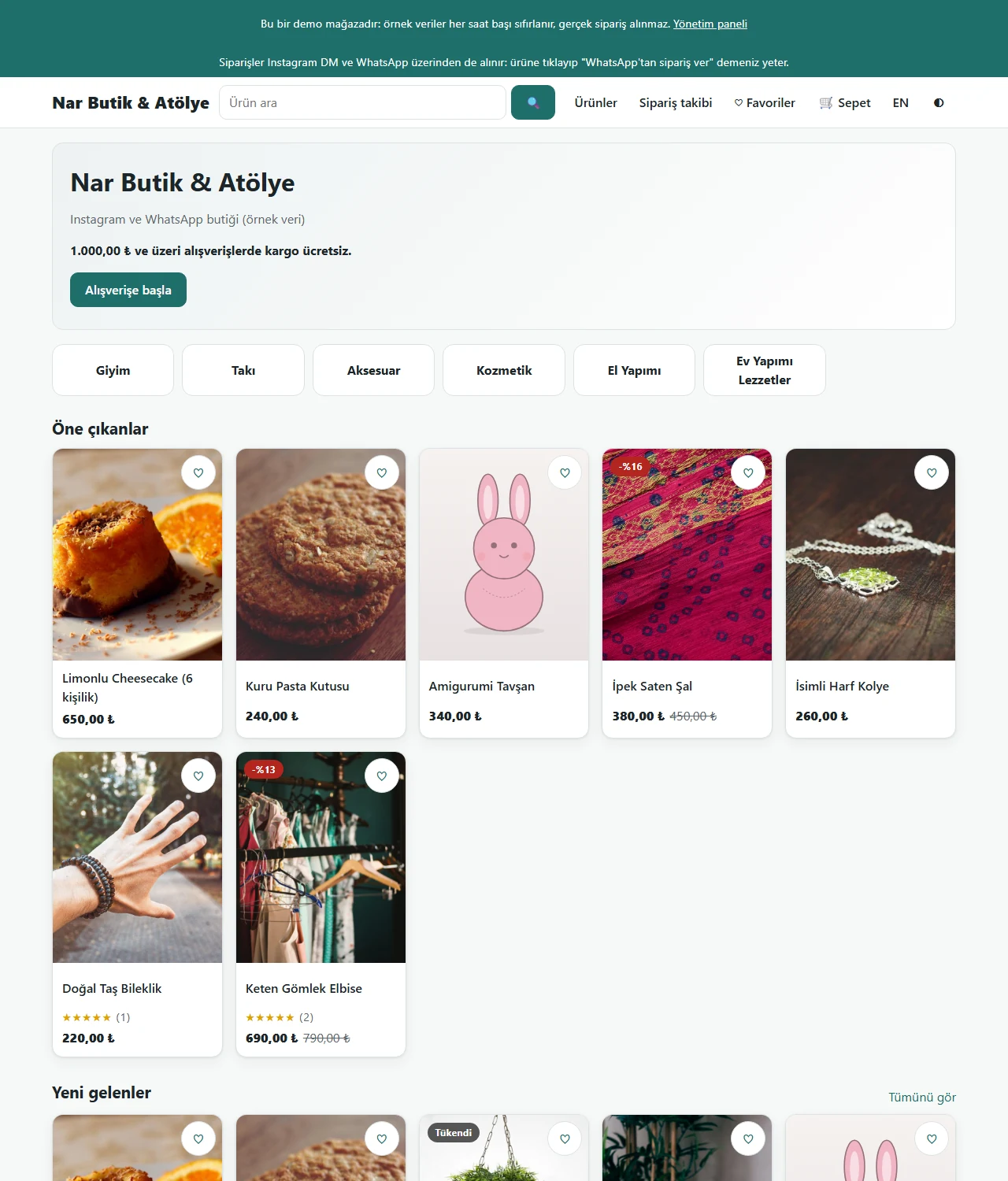
Catalogue
The catalogue customers see: categories, featured and new products. The seller puts this page’s link on Instagram and WhatsApp.
- On screen (Turkish interface)
- “Alışverişe başla” — start shopping
- “Öne çıkanlar” — featured
- “Yeni gelenler” — new arrivals
- “Siparişler Instagram DM ve WhatsApp üzerinden de alınır” — orders can also be taken through Instagram DM and WhatsApp
-
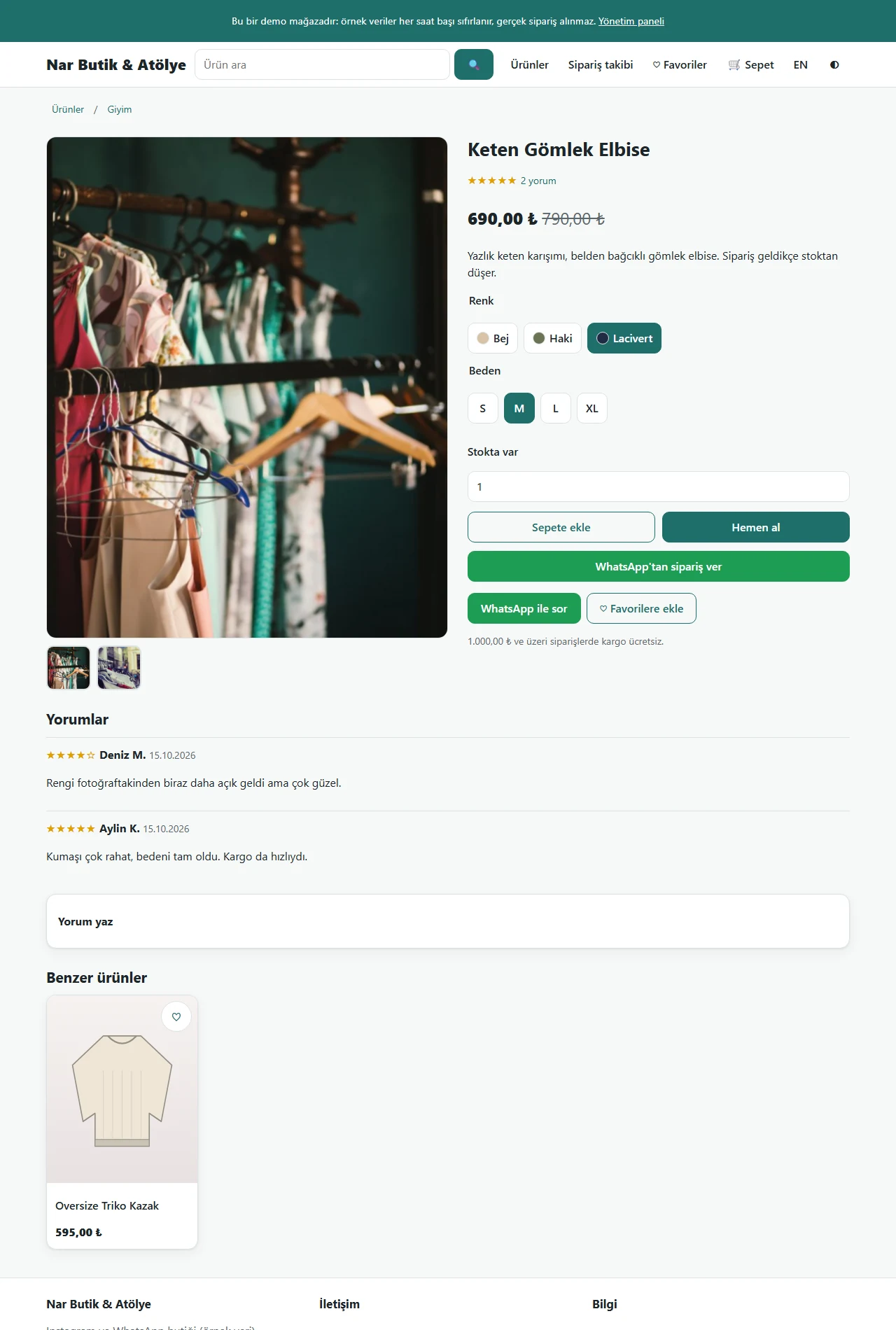
Product page and ordering on WhatsApp
Colour and size are chosen and stock is shown; “WhatsApp’tan sipariş ver” (order on WhatsApp) writes the choice and quantity into a ready message. The cart works too.
- On screen (Turkish interface)
- “Renk / Beden” — colour / size
- “Stokta var” — in stock
- “Sepete ekle / Hemen al” — add to cart / buy now
- “WhatsApp’tan sipariş ver” — order on WhatsApp
- “WhatsApp ile sor” — ask on WhatsApp
-
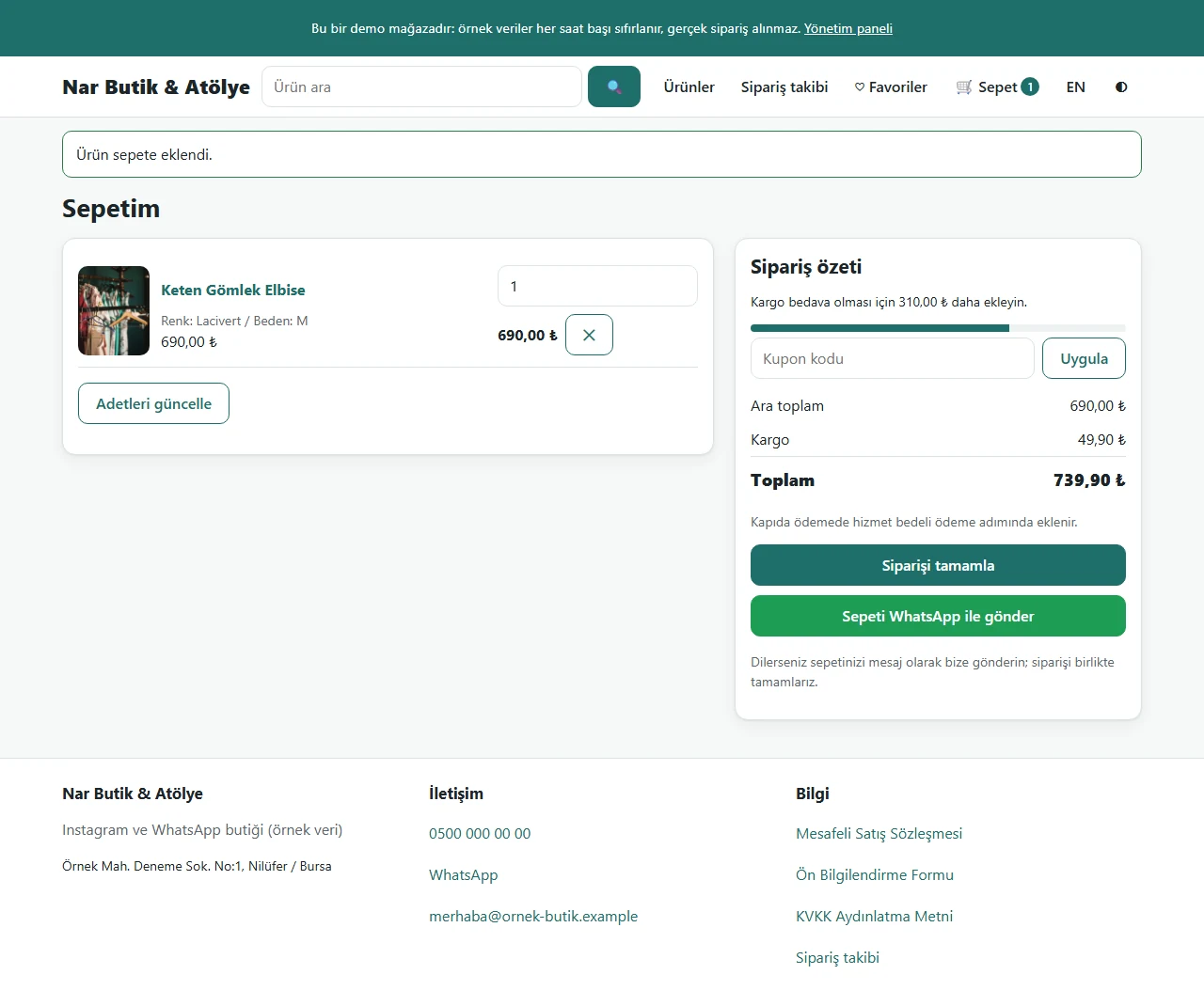
Sending the cart on WhatsApp
The customer can finish the order on the site or send the cart as a message with one click; a catalogue without a cart can be chosen as well.
- On screen (Turkish interface)
- “Sepetim” — my cart
- “Siparişi tamamla” — complete the order
- “Sepeti WhatsApp ile gönder” — send the cart on WhatsApp
-
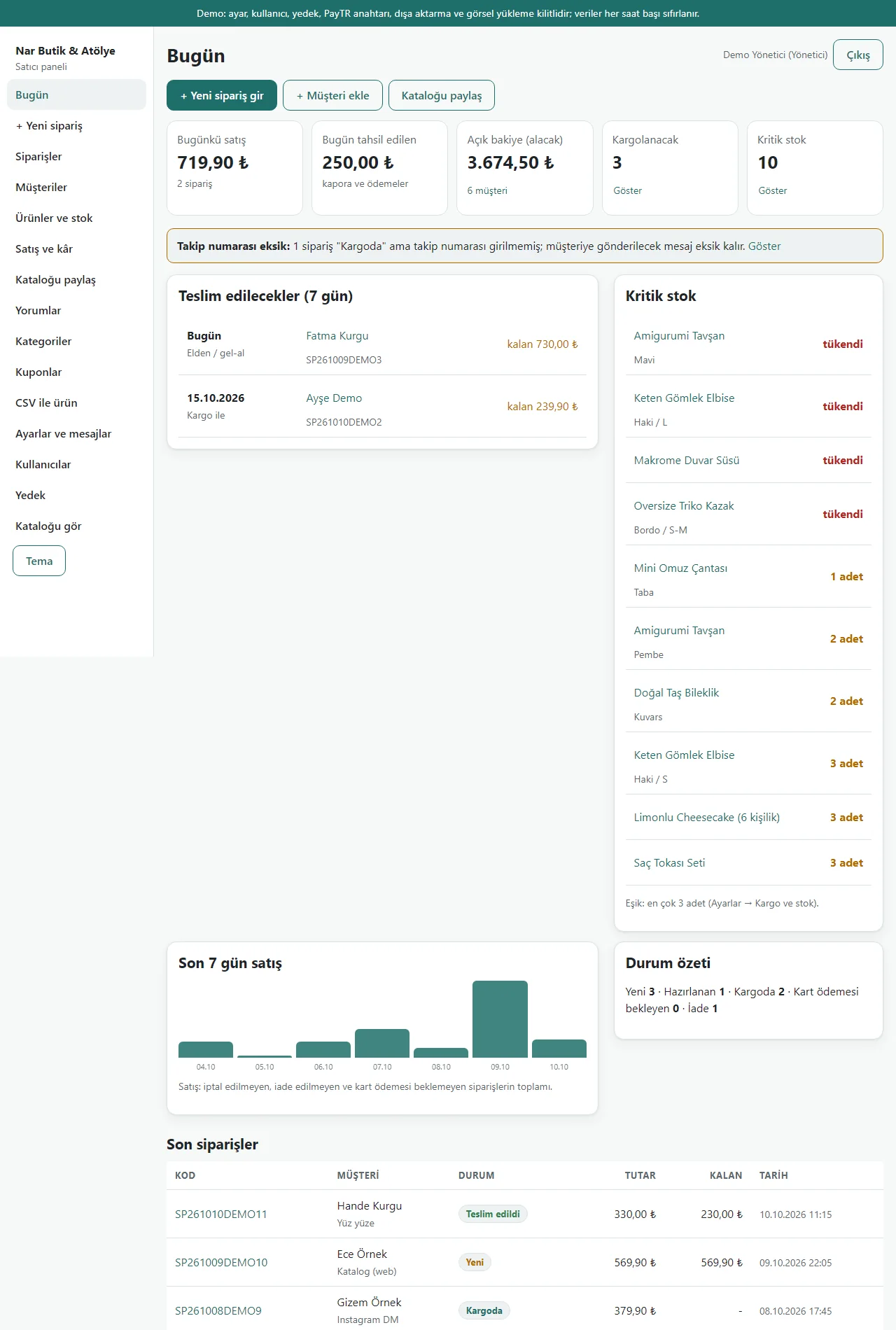
Today screen
Sales today, money collected today, open balance, orders to ship and critical stock; orders due soon and a warning for missing tracking numbers.
- On screen (Turkish interface)
- “Bugünkü satış / Bugün tahsil edilen” — sales today / collected today
- “Açık bakiye (alacak)” — open balance (receivable)
- “Kargolanacak / Kritik stok” — to ship / critical stock
- “Takip numarası eksik” — tracking number missing
- “Teslim edilecekler (7 gün)” — to be delivered (7 days)
-
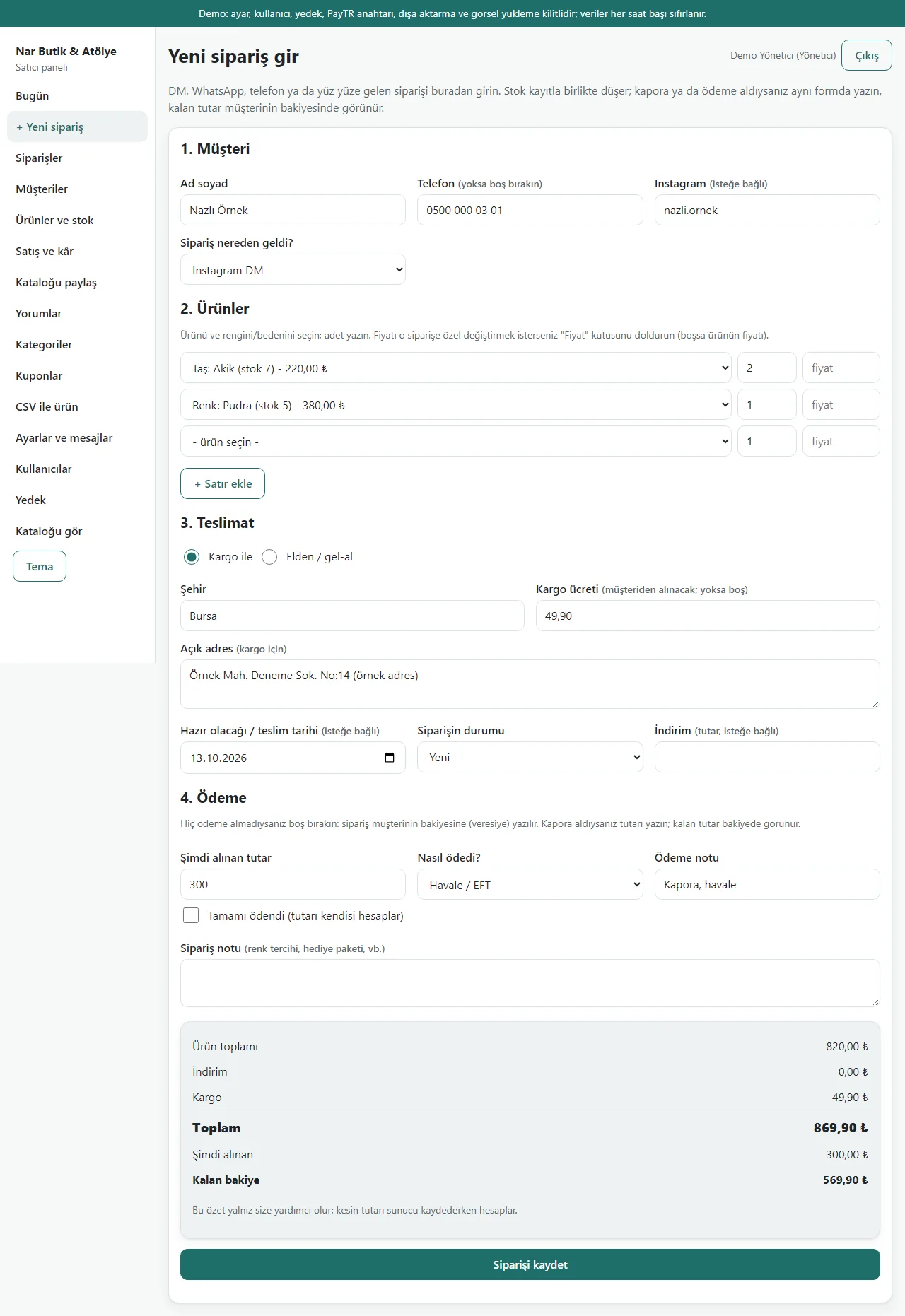
Quick order form
An order that came by DM: customer (phone or Instagram name), two product lines, a cargo address, a ready-by day and a 300 TL deposit. The box below shows the total and balance.
- On screen (Turkish interface)
- “Yeni sipariş gir” — enter a new order
- “Müşteri / Ürünler / Teslimat / Ödeme” — customer / products / delivery / payment
- “Şimdi alınan tutar” — amount received now
- “Kalan bakiye” — remaining balance
- “Siparişi kaydet” — save the order
-
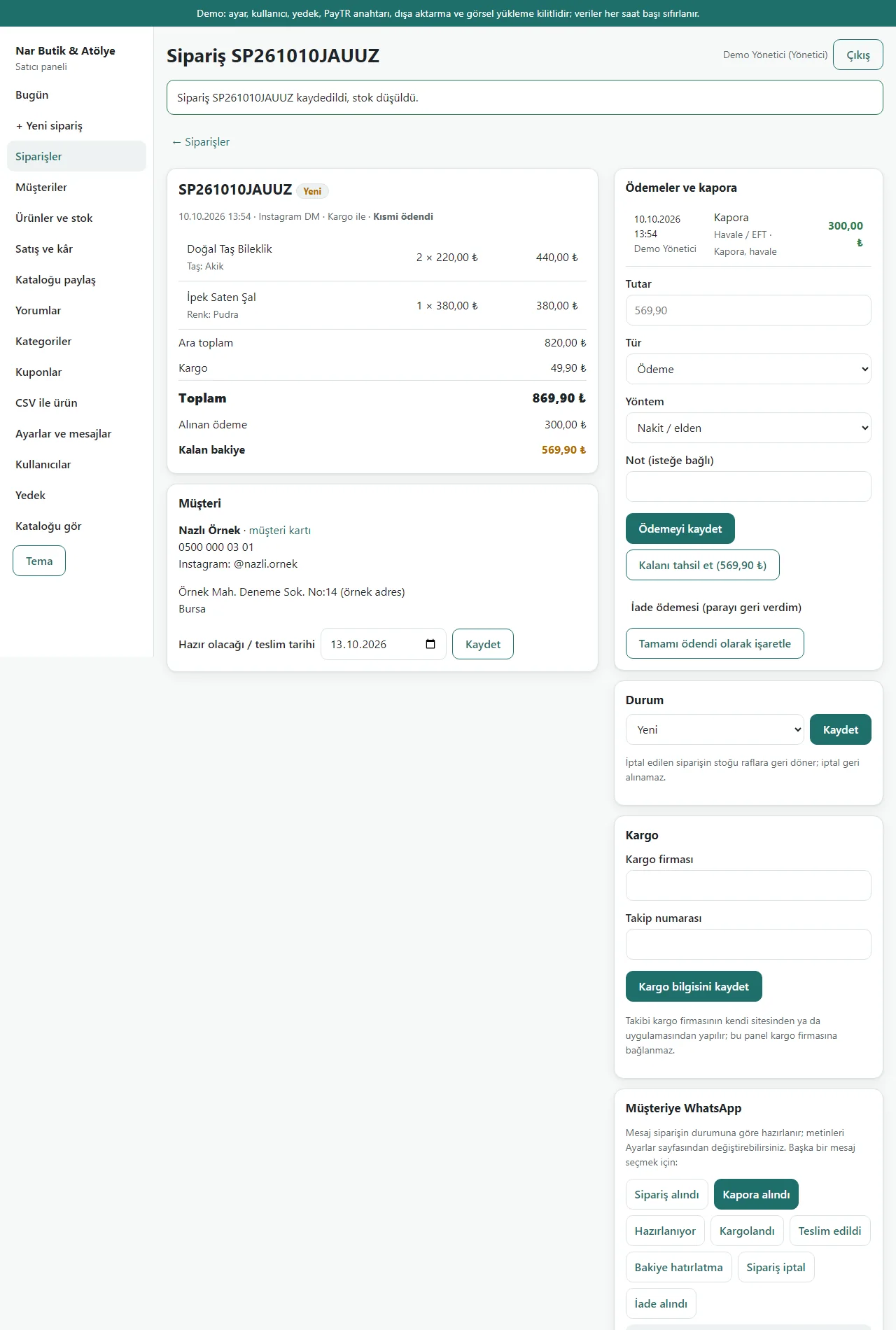
The saved order
Stock goes down, the deposit goes in the payment book and the balance is shown; further payments are added with “Kalanı tahsil et” (collect the rest). The deposit message is preselected.
- On screen (Turkish interface)
- “kaydedildi, stok düşüldü” — saved, stock deducted
- “Ödemeler ve kapora” — payments and deposit
- “Kalanı tahsil et” — collect the rest
- “Kapora alındı” — deposit received
-
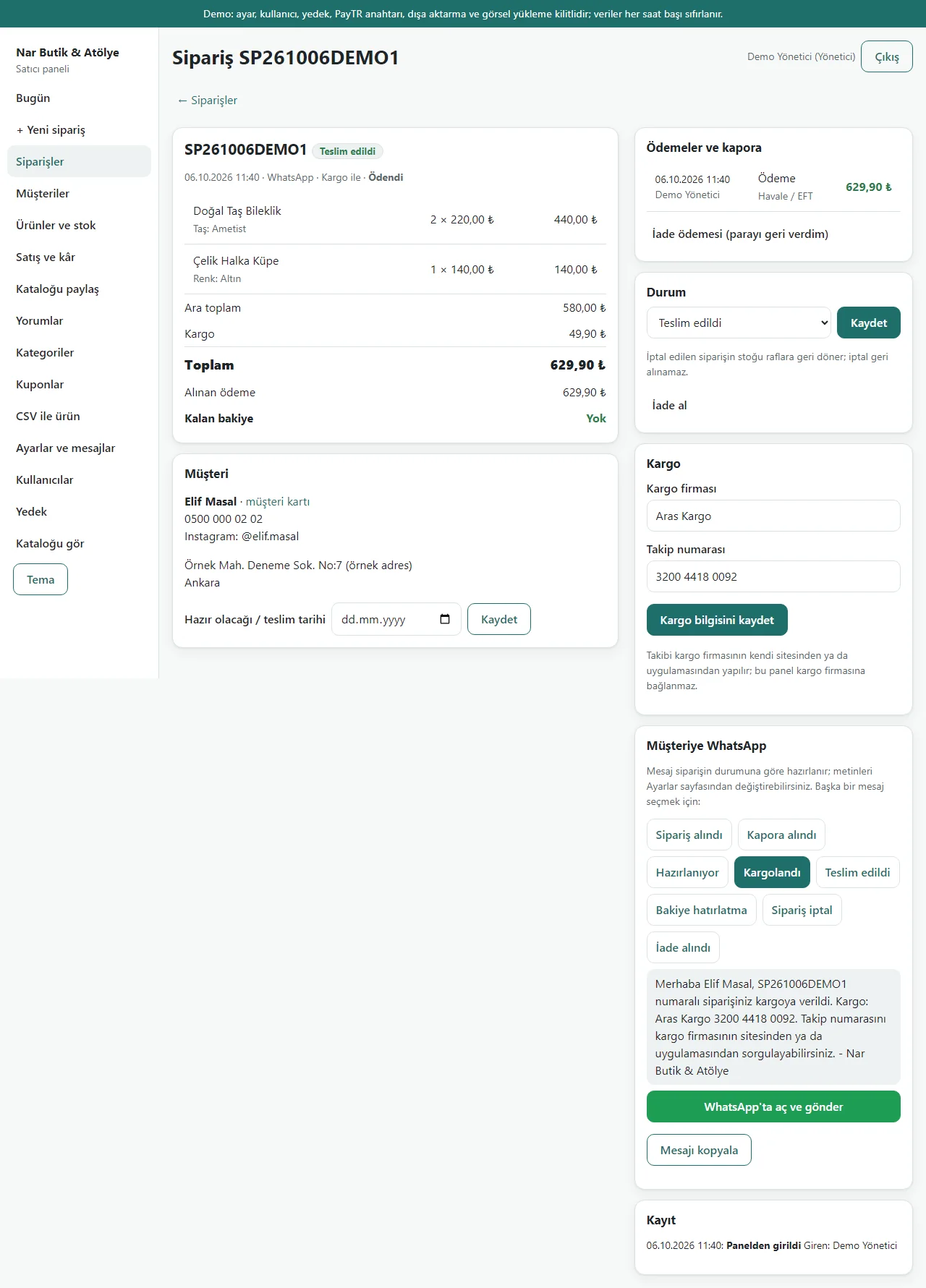
Cargo and the ready message
The carrier and tracking number are typed in and the “shipped” message is ready; “WhatsApp’ta aç ve gönder” opens WhatsApp. No carrier connection.
- On screen (Turkish interface)
- “Kargo firması / Takip numarası” — carrier / tracking number
- “Kargolandı” — shipped
- “WhatsApp’ta aç ve gönder” — open in WhatsApp and send
- “Mesajı kopyala” — copy the message
- “bu panel kargo firmasına bağlanmaz” — this panel is not connected to the carrier
-
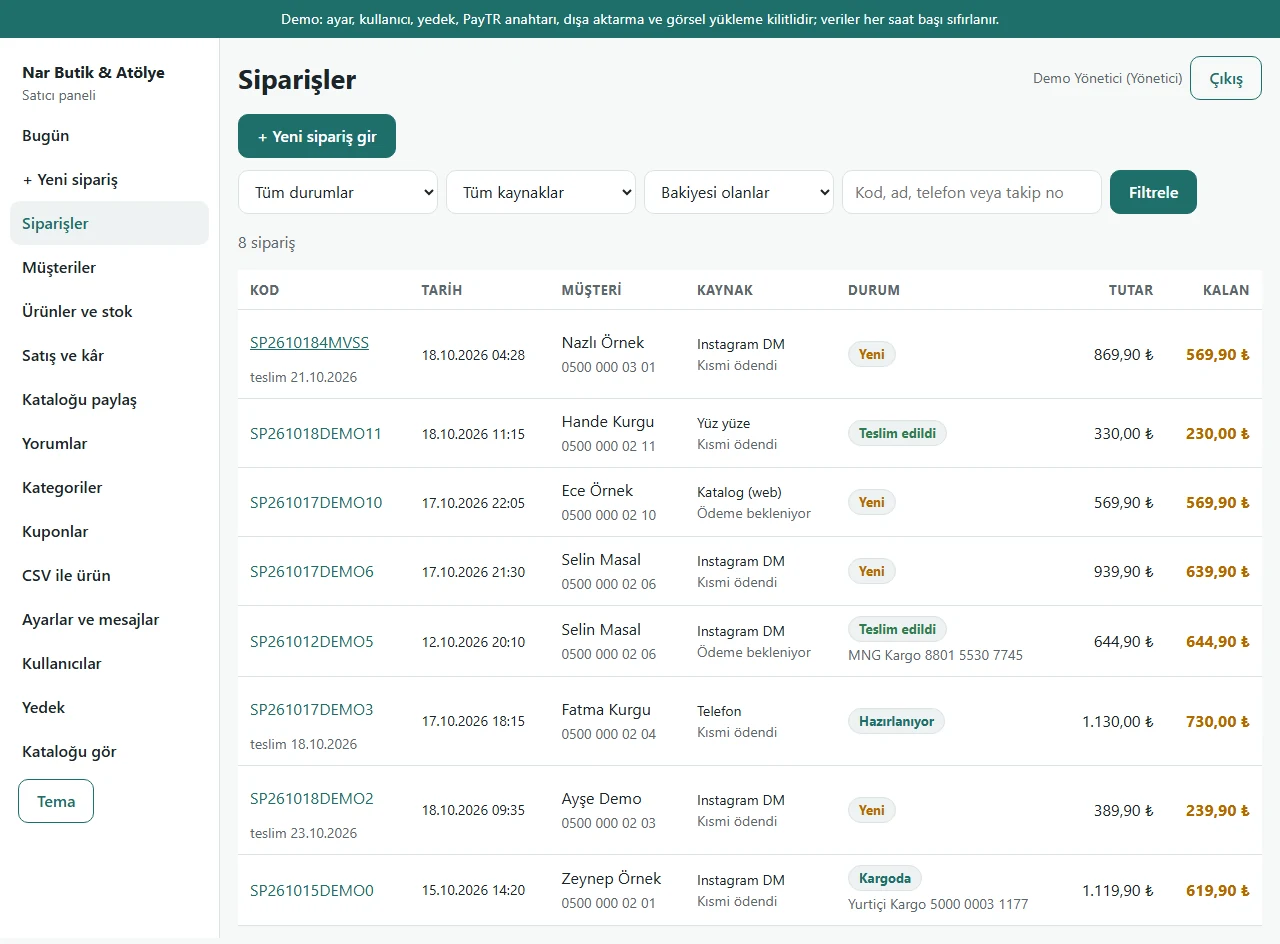
Orders with a balance
With a filter: who still owes how much, where the order came from (Instagram DM, WhatsApp, in person, catalogue) and its status.
- On screen (Turkish interface)
- “Bakiyesi olanlar” — with a balance
- “Instagram DM / Telefon / Yüz yüze / WhatsApp / Katalog (web)” — Instagram DM / phone / in person / WhatsApp / catalogue (web)
- “Kalan” — remaining
-
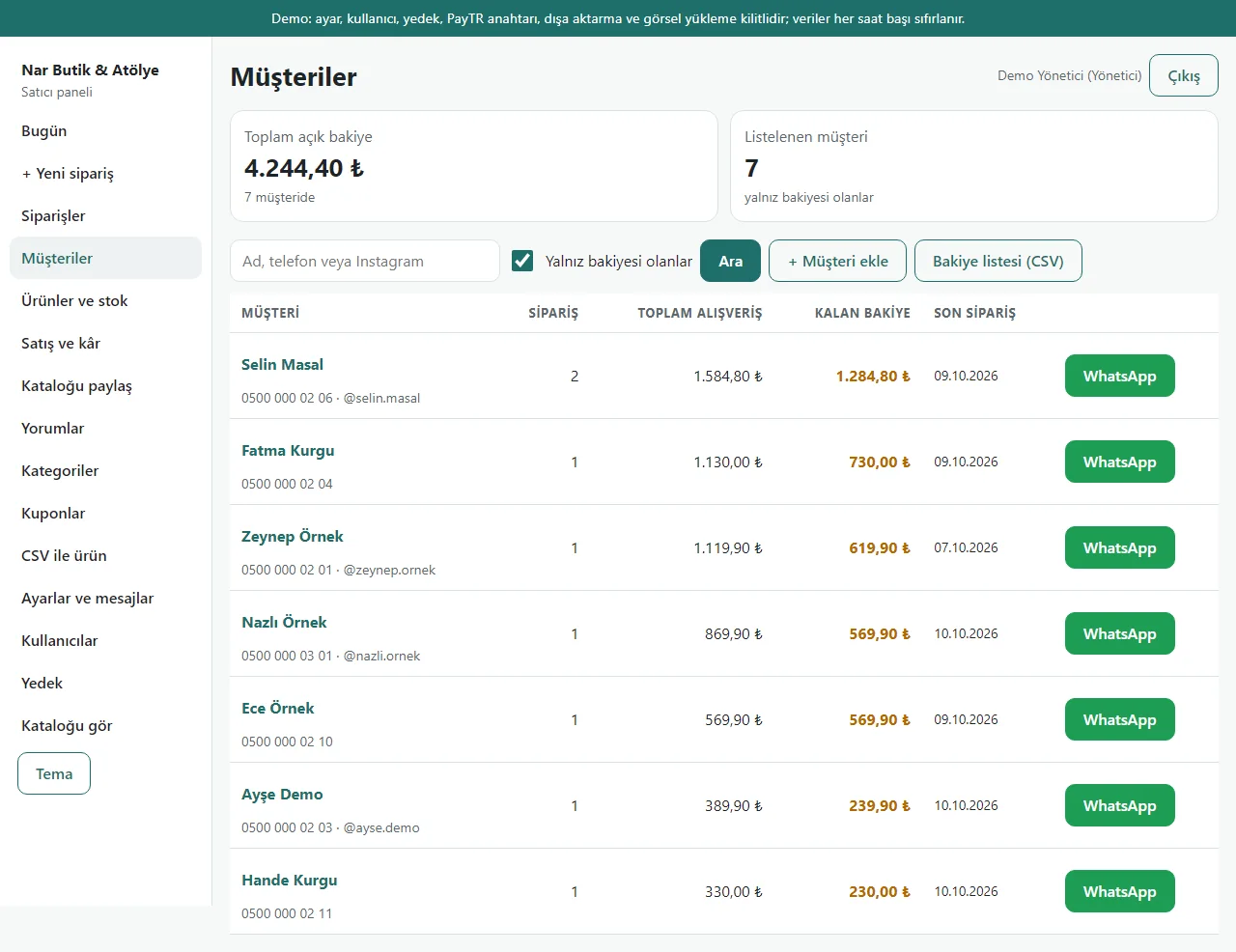
Customers and remaining balances
The total open balance and the amount left per person; cards kept by phone or only by Instagram name.
- On screen (Turkish interface)
- “Toplam açık bakiye” — total open balance
- “Yalnız bakiyesi olanlar” — only those with a balance
- “Kalan bakiye” — remaining balance
- “Bakiye listesi (CSV)” — balance list (CSV)
-
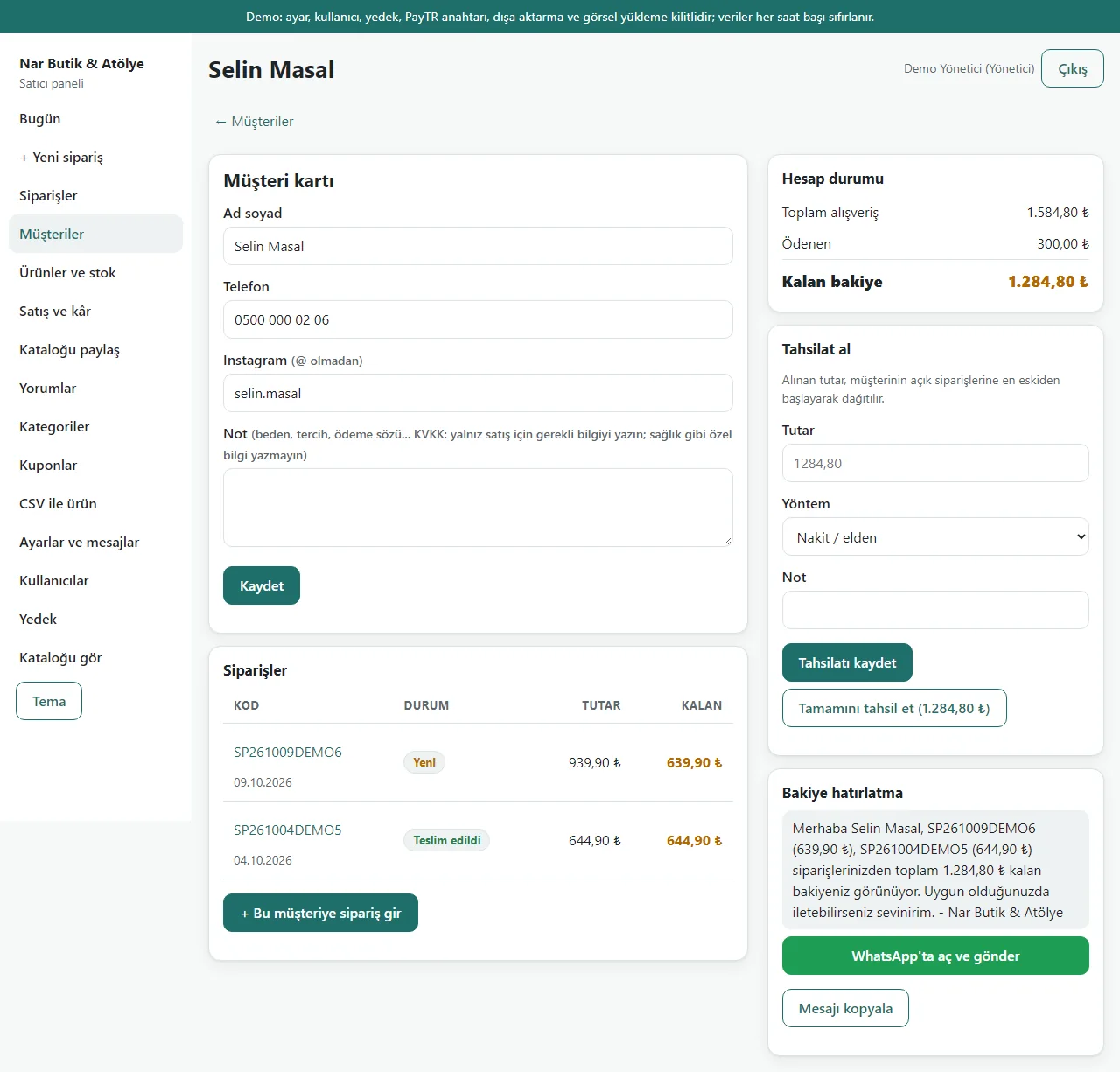
Customer card and collecting a payment
Notes, orders, total spent, remaining balance. “Tahsilat al” (collect payment) spreads one payment over the open orders, oldest first; a balance reminder message is ready.
- On screen (Turkish interface)
- “Müşteri kartı” — customer card
- “Hesap durumu” — account status
- “Tahsilat al” — collect payment
- “Tamamını tahsil et” — collect all
- “Bakiye hatırlatma” — balance reminder
-
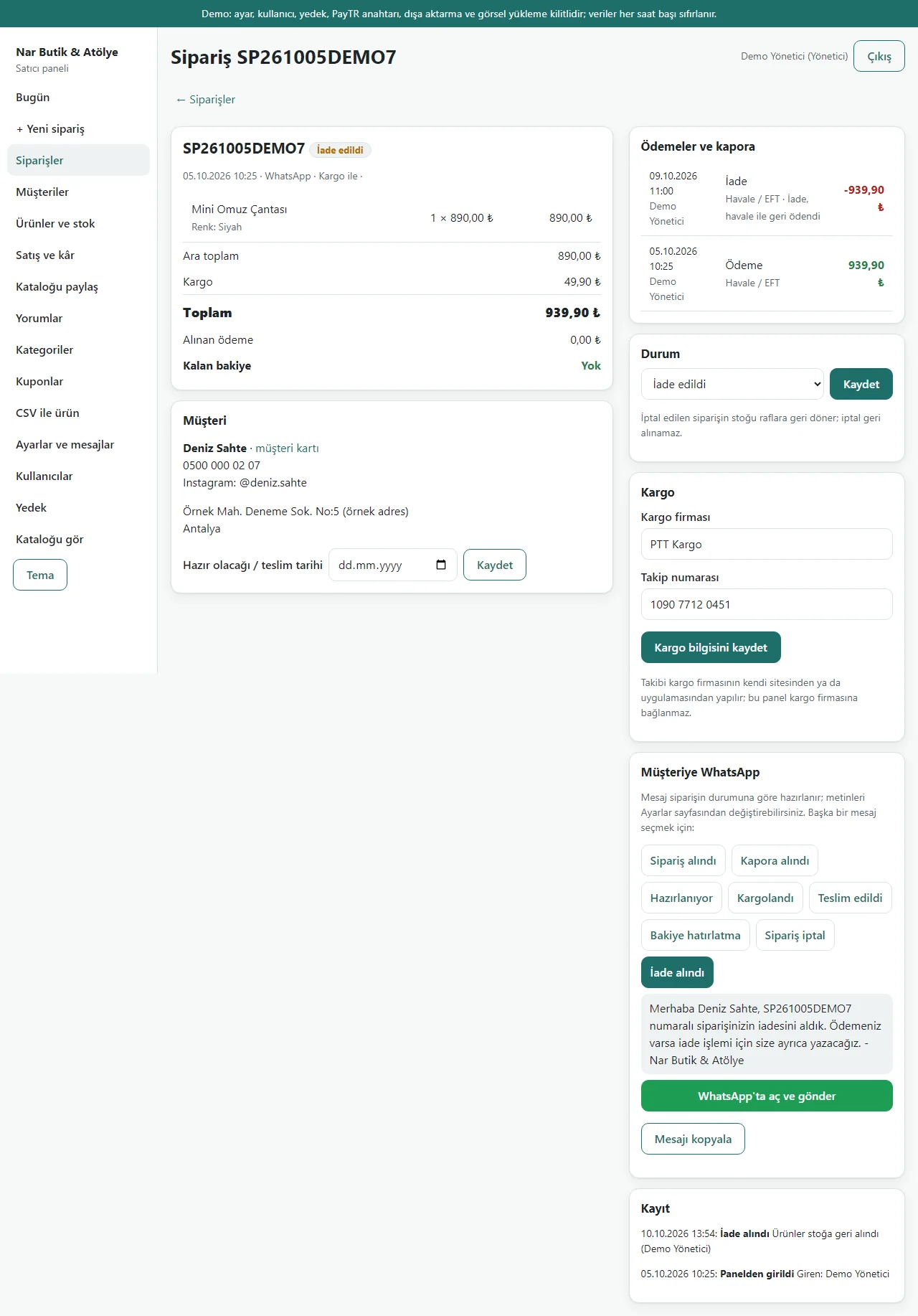
Returns
A delivered order was taken back; the item went back to stock and the money received was written in the book as a refund.
- On screen (Turkish interface)
- “İade edildi” — returned
- “İade” — refund
- “Ürünler stoğa geri alındı” — products put back in stock
-
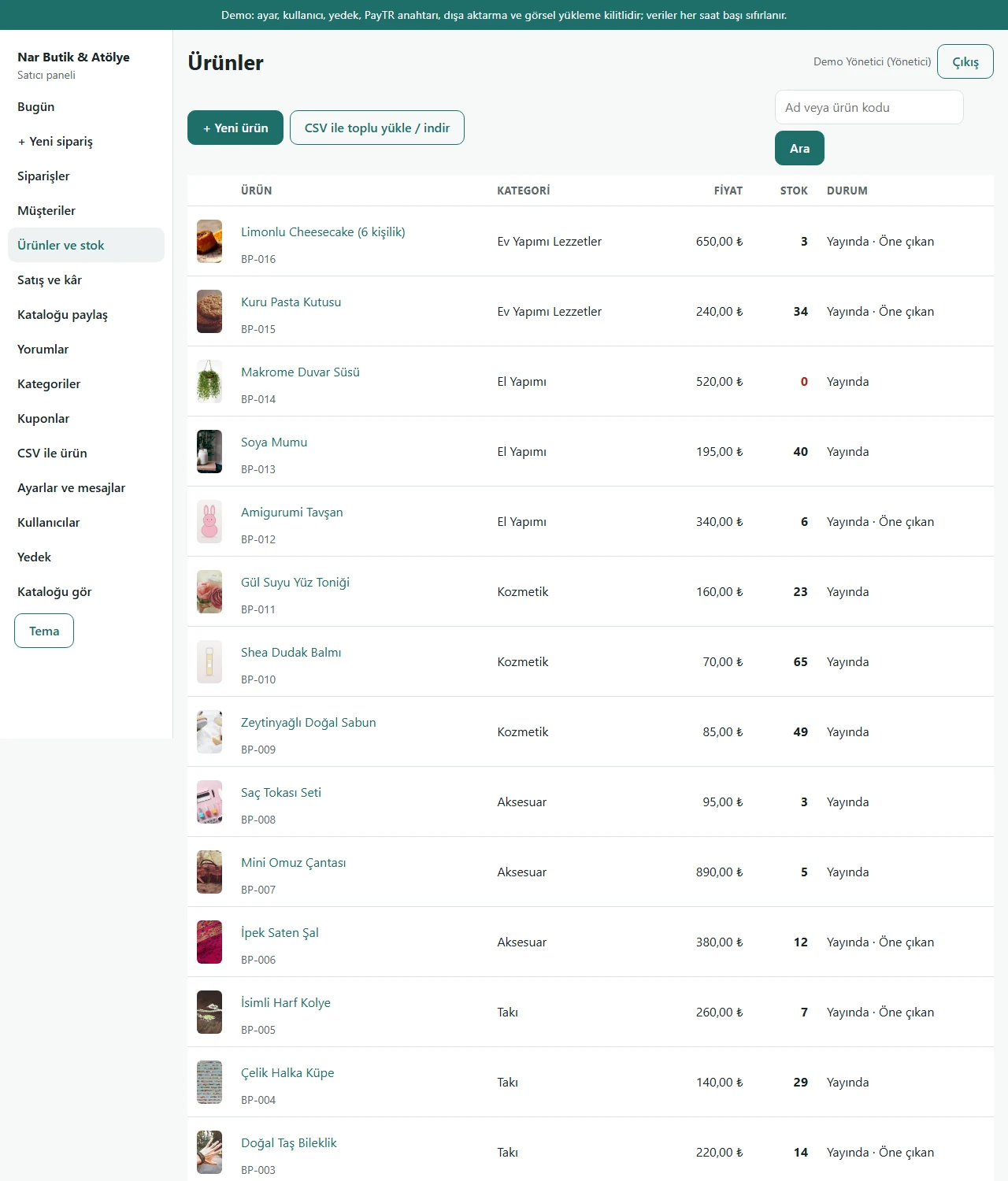
Products and stock
Total stock per product; sold-out items in red. A product’s page has the colour/size stock table and (visible to the owner only) the buying price.
- On screen (Turkish interface)
- “Ürünler” — products
- “Stok” — stock
- “CSV ile toplu yükle / indir” — bulk upload / download with CSV
- “Yayında · Öne çıkan” — published · featured
-
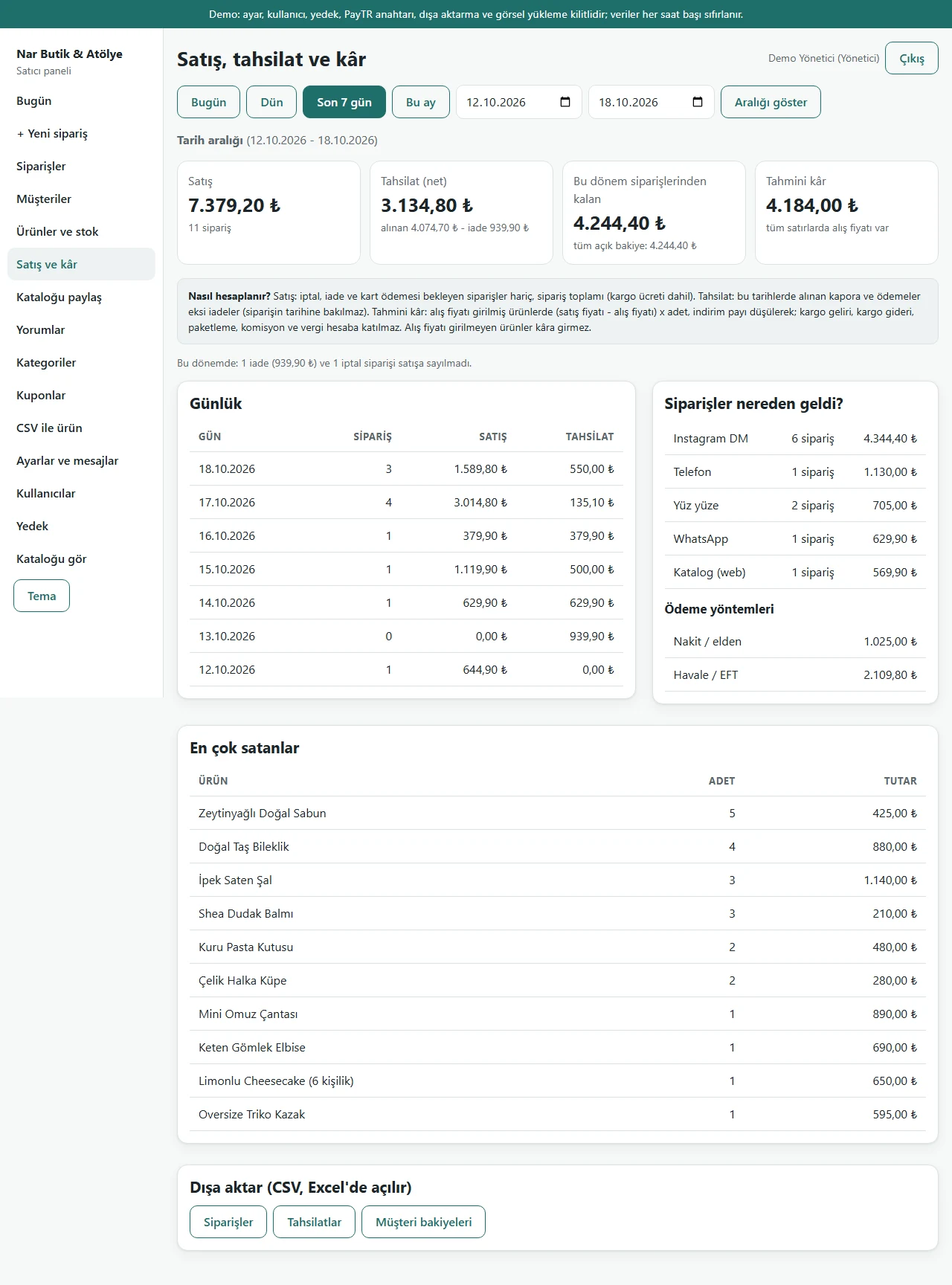
Sales, collection and estimated profit
Sales, net collection, what is still owed and estimated profit for 7 days, with a daily table and a split by source. Profit counts only products with a buying price.
- On screen (Turkish interface)
- “Satış, tahsilat ve kâr” — sales, collection and profit
- “Nasıl hesaplanır?” — how it is worked out
- “Tahmini kâr” — estimated profit
- “Siparişler nereden geldi?” — where orders came from
- “Dışa aktar (CSV, Excel’de açılır)” — export (CSV, opens in Excel)
-
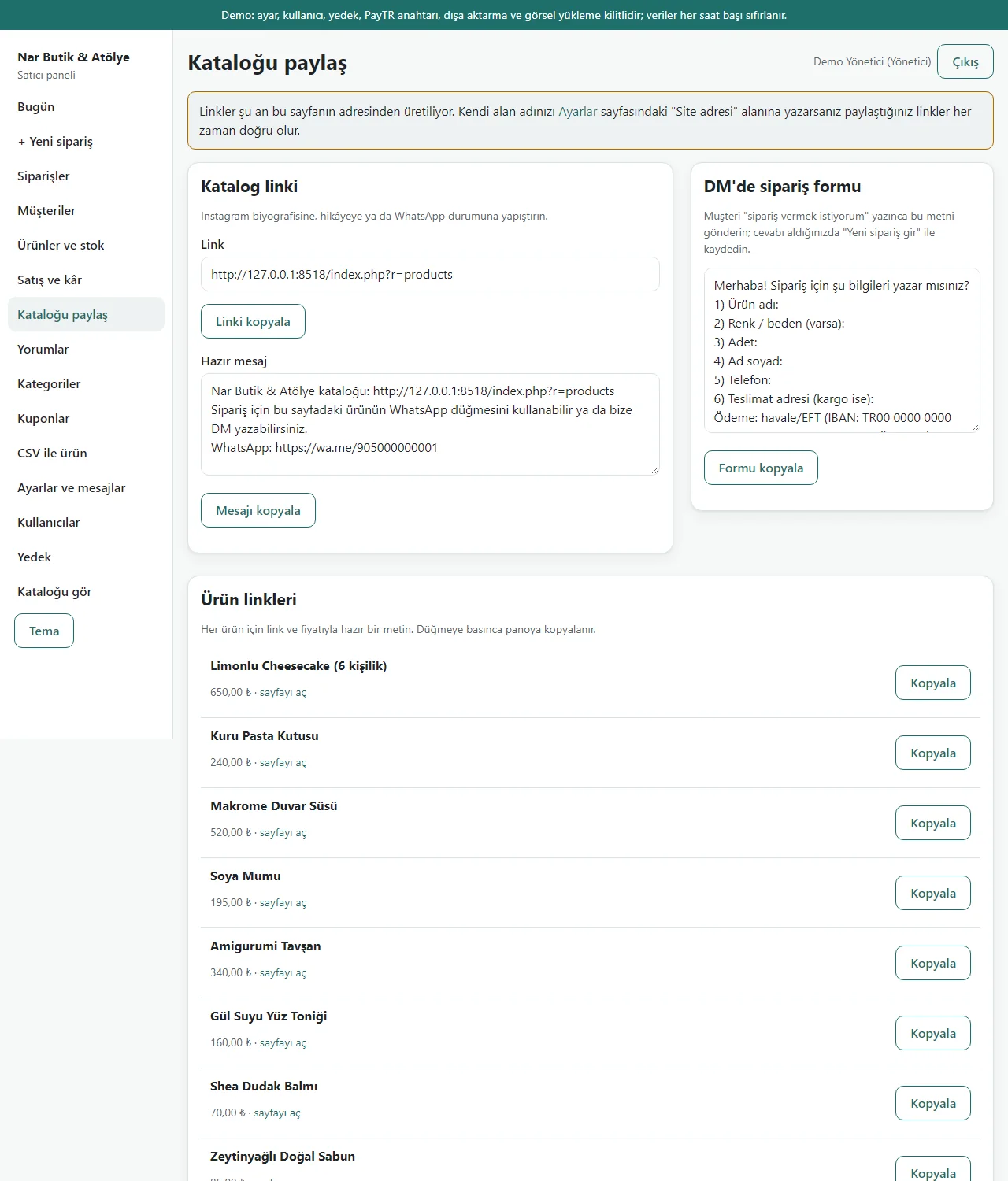
Share the catalogue
The catalogue link, a ready sharing text, a ready form to ask a customer for order details in a DM and a link+price text per product; copied with one click.
- On screen (Turkish interface)
- “Katalog linki” — catalogue link
- “DM’de sipariş formu” — order form for DMs
- “Ürün linkleri” — product links
- “Kopyala” — copy
-
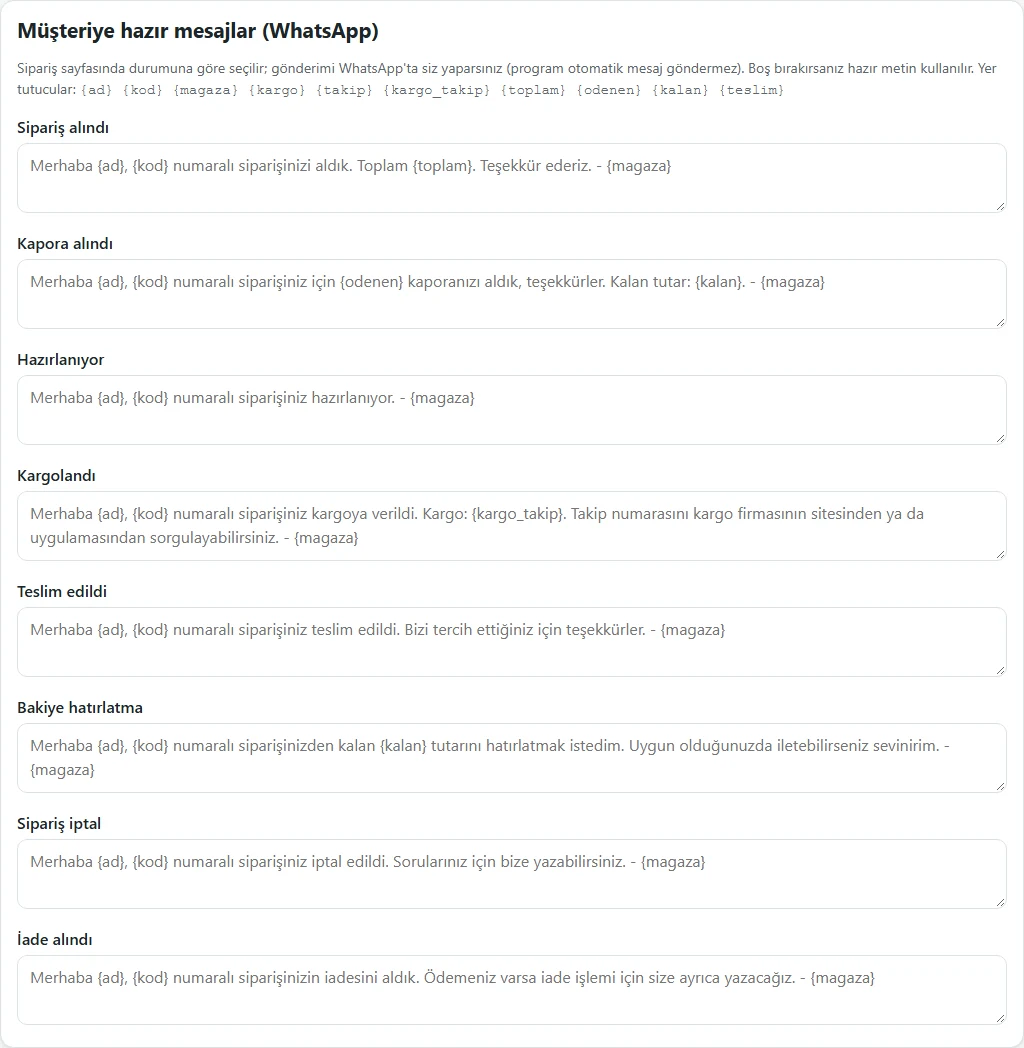
Ready message settings
Eight ready messages (with placeholders such as {ad}, {kod}, {kargo_takip}, {kalan}) are edited in the settings.
- On screen (Turkish interface)
- “Müşteriye hazır mesajlar (WhatsApp)” — ready messages for customers (WhatsApp)
- “Sipariş alındı / Kapora alındı / Kargolandı” — order received / deposit received / shipped
- “program otomatik mesaj göndermez” — the program does not send messages automatically
-
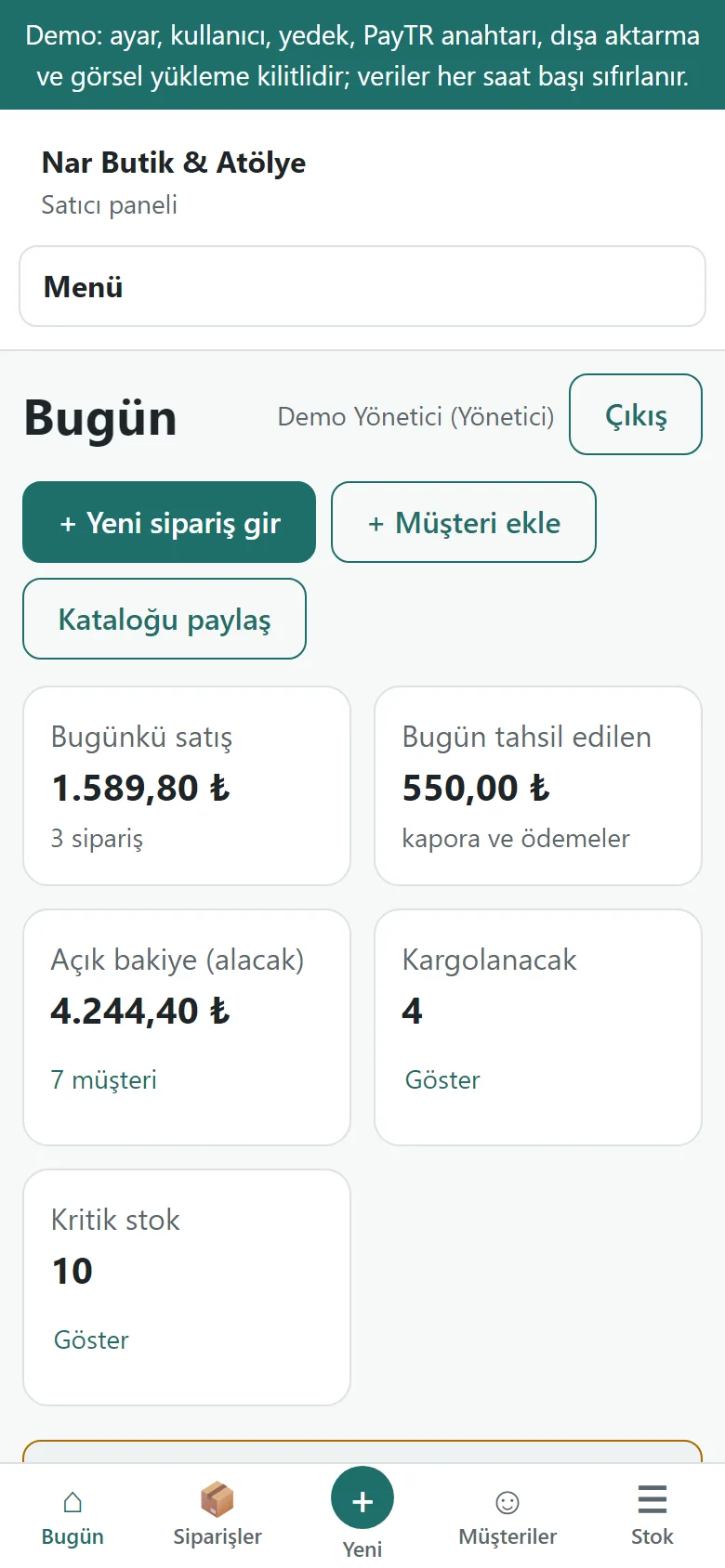
Today screen on a phone
The same screen at phone width; a quick menu at the bottom (Today, Orders, New, Customers, Stock).
- On screen (Turkish interface)
- “Bugün / Siparişler / Yeni / Müşteriler / Stok” — today / orders / new / customers / stock
-
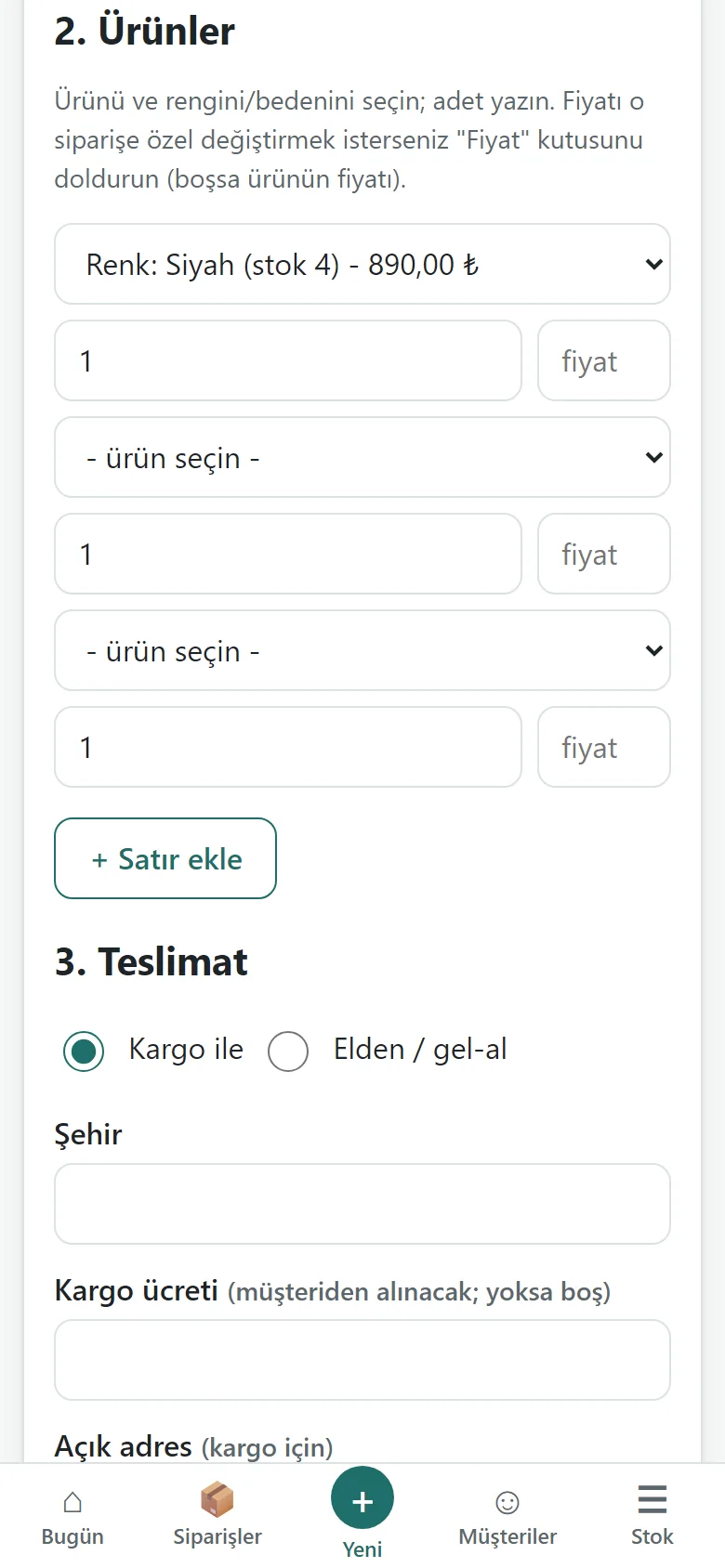
Quick order on a phone
Product lines stacked, for entering a DM order from the phone.
- On screen (Turkish interface)
- “Ürünler / Teslimat” — products / delivery
- “Satır ekle” — add a line
- What do they see at the end?
- The order is saved and stock goes down; the deposit and remaining balance show on the customer’s card; once the cargo details are entered the message for the customer is ready; returns, daily sales, money collected and estimated profit are followed in the same panel.
- What is it good for?
- The order, the deposit, what is still owed and the tracking number do not scatter across DMs and notebooks, and stock and the day’s figures are not kept by hand.
Everything that is not included, and all limits
- Not delivered to a client and not used by a real boutique. The shop (“Nar Butik & Atölye”), the people and the phone numbers starting with 0500 are sample data.
- Tried locally on SQLite and MariaDB 11.4; the live demo runs on a single DirectAdmin account with SQLite. Not tried on a real phone or with a boutique owner. The phone-size screens come from a browser set to a phone’s size.
- It does not connect to cargo companies: the company and tracking number are typed in and tracking is done on the carrier’s own site. There are no automatic labels.
- No automatic WhatsApp, Instagram or e-mail messages are sent; you send the ready message yourself. There is no SMS, e-invoicing or live payment taking.
- The estimated profit is a simple calculation: shipping income and cost, packaging, commission and tax are not counted; products without a buying price are left out.
- The customer note is free text; write only what the sale needs. The privacy notice and agreement have to be written for the business and checked by a lawyer.
- The catalogue is in Turkish and English; the panel is Turkish only. The online demo uses sample data, resets every hour and takes no real orders; installation, hosting, support and price are agreed with the business. For a cart-based site for a clothing shop only, see the Boutique E-commerce Script; for a single shop in any sector, the Ready-made E-commerce Site and Software.
Delivery and sales status
There is no cart, customer account or online payment on this site for now. Reach out by phone, WhatsApp or the form; in a first conversation your need and the software’s fit are reviewed. The form does not create an order, a contract or a payment.
Possible delivery options
Price
There is no package on offer right now, so there is no list price. If a package is defined, the price and payment method are settled then.
Requirements and version history
Installation requirements
- Requirements as written in the documents: PHP 8.1 or newer, the pdo_mysql (pdo_sqlite for trials) and mbstring extensions, MariaDB/MySQL. PHP 8.3.33 and MariaDB 11.4.13 were tried locally; PHP 8.1/8.2, MySQL and real hosting were not.
Release notes
- Summarised from the package’s version history; no version has been delivered to a client.
- 1.0.0 (10 October 2026): first version. Turned from the working base of the general e-commerce script (1.0.3) into a seller panel: quick order form, deposits and part payments, customer card and balance, returns, ready WhatsApp messages, buying price and estimated profit, Today screen, report and CSV, catalogue sharing.
- 1.0.1 (18 October 2026): the demo product pictures are mostly copyright-free (CC0) real photographs now; three products keep a drawing.
- 1.0.2 (18 October 2026): demo sign-in page: a demo notice and password-free “… olarak gir” (sign in as …) buttons for manager and staff (demo mode only; on a real installation the box is not shown and the address answers 404).
- 1.0.3 (21 October 2026): the product-list import from Excel/CSV was rewritten: a file (.csv, .txt; .xlsx when the server has the zip extension) or pasting from Excel, header recognition, a preview before saving (new, to be updated, already registered, wrong), a product already in the shop changes only when its “update” box is ticked, and the last import is undone; orders, payments and customer data are not touched and no message is sent. In the demo the preview is open and saving and undo are locked.
- 1.0.4 (26 October 2026): on the “Kataloğu paylaş” (share the catalogue) page the “Ayarlar” (settings) link in the notice shown when no site address is set is visible only to the manager; staff see “tell the shop manager”.
Decisions not made yet
- Rights to use, modify, transfer and receive the source code: to be set in a written agreement; not decided yet.
- The price and payment method have not been decided yet.
- Whose name the hosting and domain are opened in, and where the software is installed, have not been decided yet.