Car washesDemo with sample data
Car Wash Vehicle Intake and Tracking: screen-by-screen guide
The full version of the short description on the product page: every feature, how each screen is used step by step, all limits and the delivery details.
All features
The flows below were run in the app’s version with sample data (0.5.2). The screens were taken on 4 November 2026 from the live demo; the business in the demo is “Örnek Oto Yıkama (demo)” (sample), and its customers, plates, phone numbers and amounts are made up.
- Quick vehicle intake by plate: the plate is typed and a known car and customer appear; ready packages are ticked and their services are added to the job automatically; the worker and the estimated delivery are chosen
- Vehicle flow: queued (Sırada), washing (Yıkanıyor), done and ready (Bitti), delivered (Teslim edildi); a cancellation is written with a reason; only the manager can undo a delivered or cancelled job
- Job board: queued, washing and ready cars in three columns; filtered by worker; late jobs and jobs promised for today come first
- Ready packages and services: packages such as inside + outside wash or detailed wash are added to a job in one tap; the total is worked out automatically and the VAT rate is set in settings
- Cash records: cash, card (the business’s own POS) and bank transfer are entered by hand; open balances are listed; the program takes no payment
- Expense records: water, electricity, chemicals and supplies, staff, rent, repairs and other; the monthly difference between takings and expenses and a breakdown by type (manager only)
- Worker performance: for the chosen month the number and amount of washes delivered per worker; if a commission percentage is set in settings an estimated commission shows (a calculation only, no payment)
- Loyalty counter: “every Nth wash free” is set; a reminder shows on the customer card and the job; the business applies the discount itself on the job
- Online booking with bay capacity: a customer picks a day and time on a sign-in-free page; when the number of cars that can be washed at once (bays) is full the time cannot be chosen; a request does not enter the booking book until approved; the customer has a status page of their own and an add-to-calendar link
- Ready WhatsApp messages: call the customer, wash started, car ready, balance reminder; the message opens and sending it is the business’s choice, the program sends nothing on its own
- Product stock: items for sale such as air fresheners, polish and mats with a low-stock warning; a scratch and damage map and a printable intake form and job sheet
- Importing customers and cars from Excel/CSV: column recognition from the header, a preview before saving and undo for the last import; no message is sent during an import
- Roles: manager and worker; pages, menu items and buttons not allowed are never shown and the server refuses an address typed by hand; a setup guide, adding to the phone and a free phone notification for a new booking request
Screen by screen: how it is used
The interface in these screens is Turkish; only the captions and explanations on this page are in English. The screens were taken on 4 November 2026 from the live demo of version 0.5.2 of the app (with sample data). The business (“Örnek Oto Yıkama (demo)”), customers, plates, phone numbers and amounts are made up.
- Who uses it?
- The owner of a car wash, the worker who washes the car and the customer who asks for a booking.
- Where do they start?
- A car arrives; the plate is typed, a ready package is ticked and the car joins the queue. A customer can send a booking request from a sign-in-free page.
What do they do on screen? Step by step
-
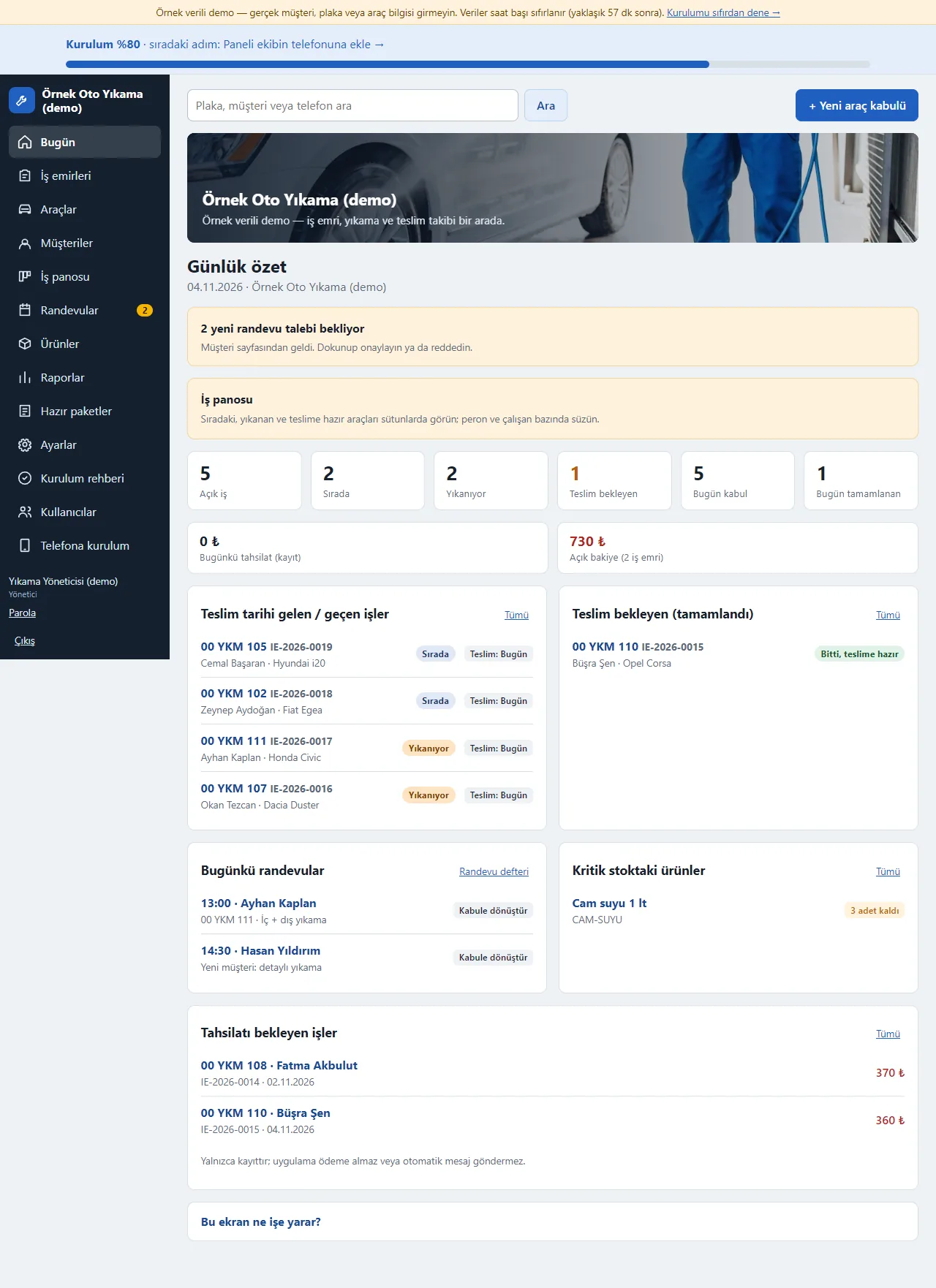
Today screen
Open jobs, queued, washing, waiting for delivery, taken in today and finished today show as tappable boxes; today’s takings, open balance, jobs due, today’s bookings, low-stock items and jobs waiting for payment are listed one under another. New booking requests wait at the top as a notice.
-
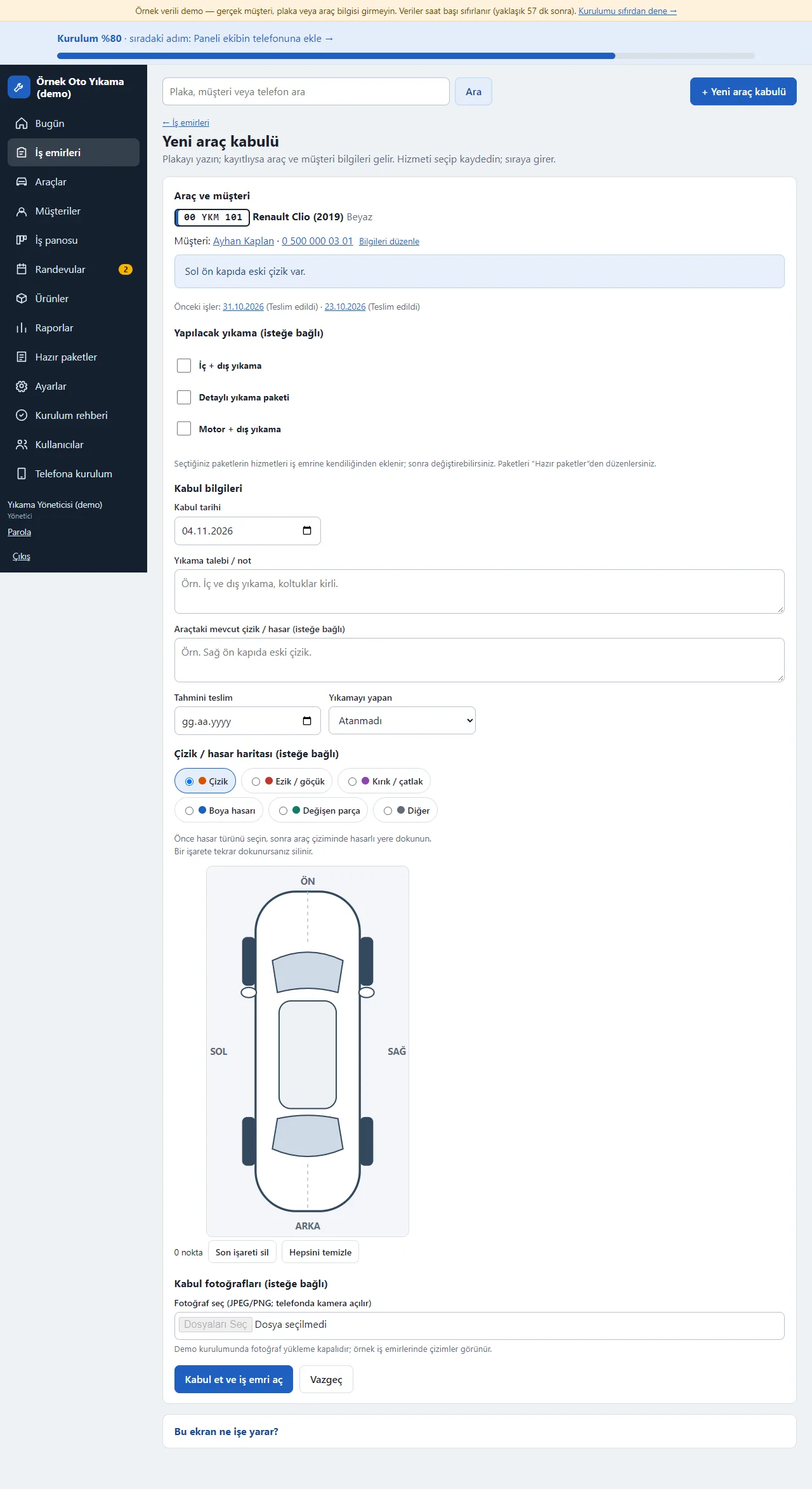
Vehicle intake
Typing the plate brings the known car and customer. In the “Yapılacak yıkama” (wash to do) section ready packages are ticked and their services are added to the job automatically. A note, the estimated delivery, the worker and any existing scratches and damage on a car sketch are optional.
-
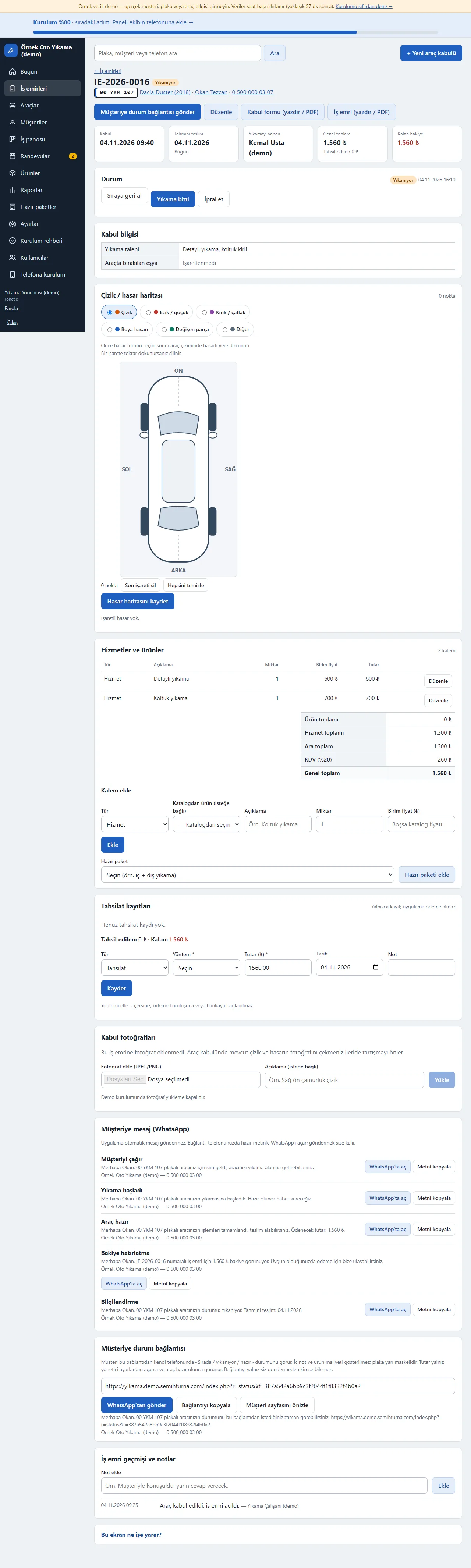
The job
Status buttons move the car through Sırada, Yıkanıyor, Bitti and Teslim edildi. Services and products, payment records (cash, card, transfer), ready WhatsApp messages (call the customer, wash started, car ready, balance reminder), the customer status link and the job history are on one page. A reminder shows at the top when a loyalty reward is due.
-
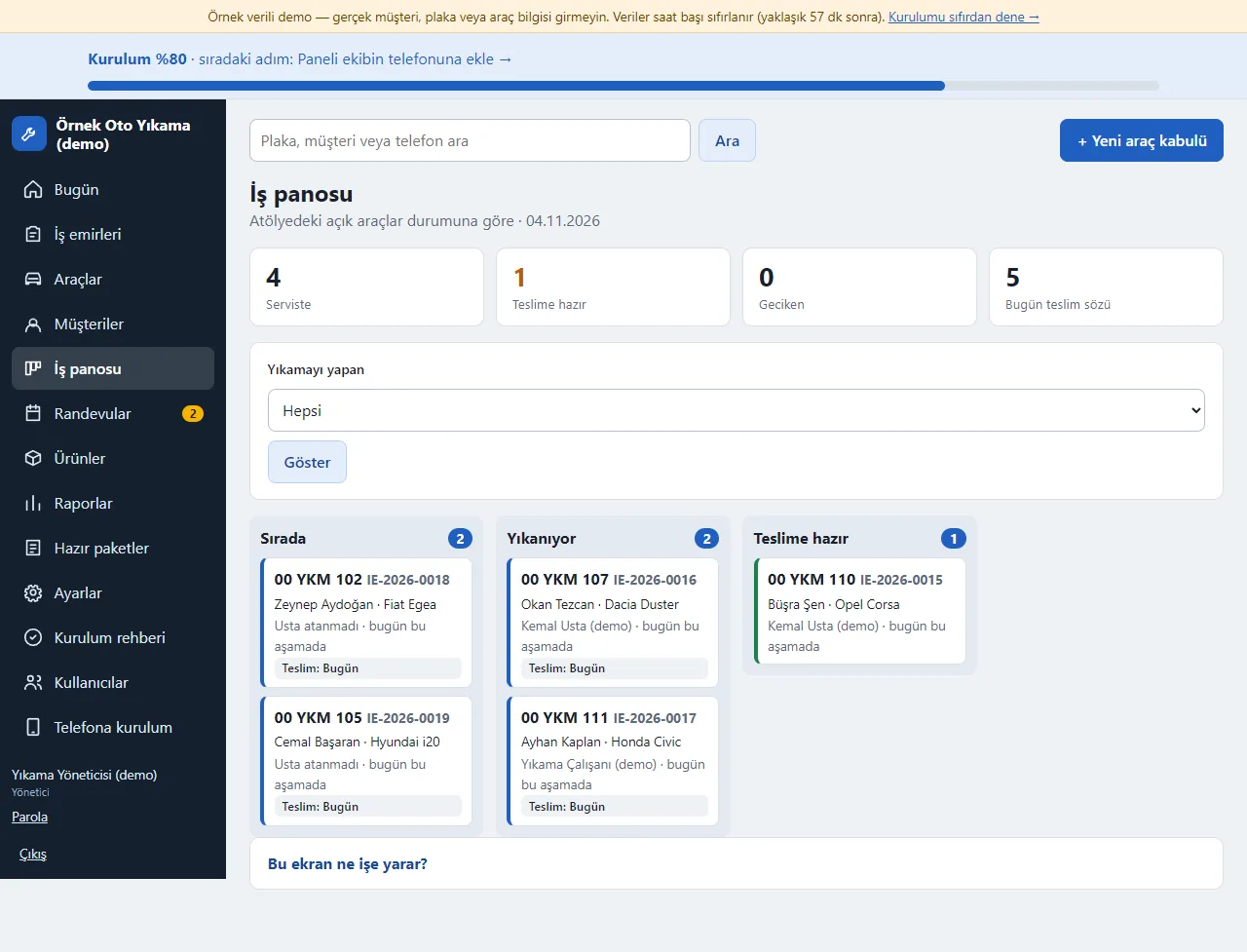
Job board
Queued, washing and ready cars show in three columns; filtered by worker, with late jobs and those promised for today first. Tapping a card opens the job.
-
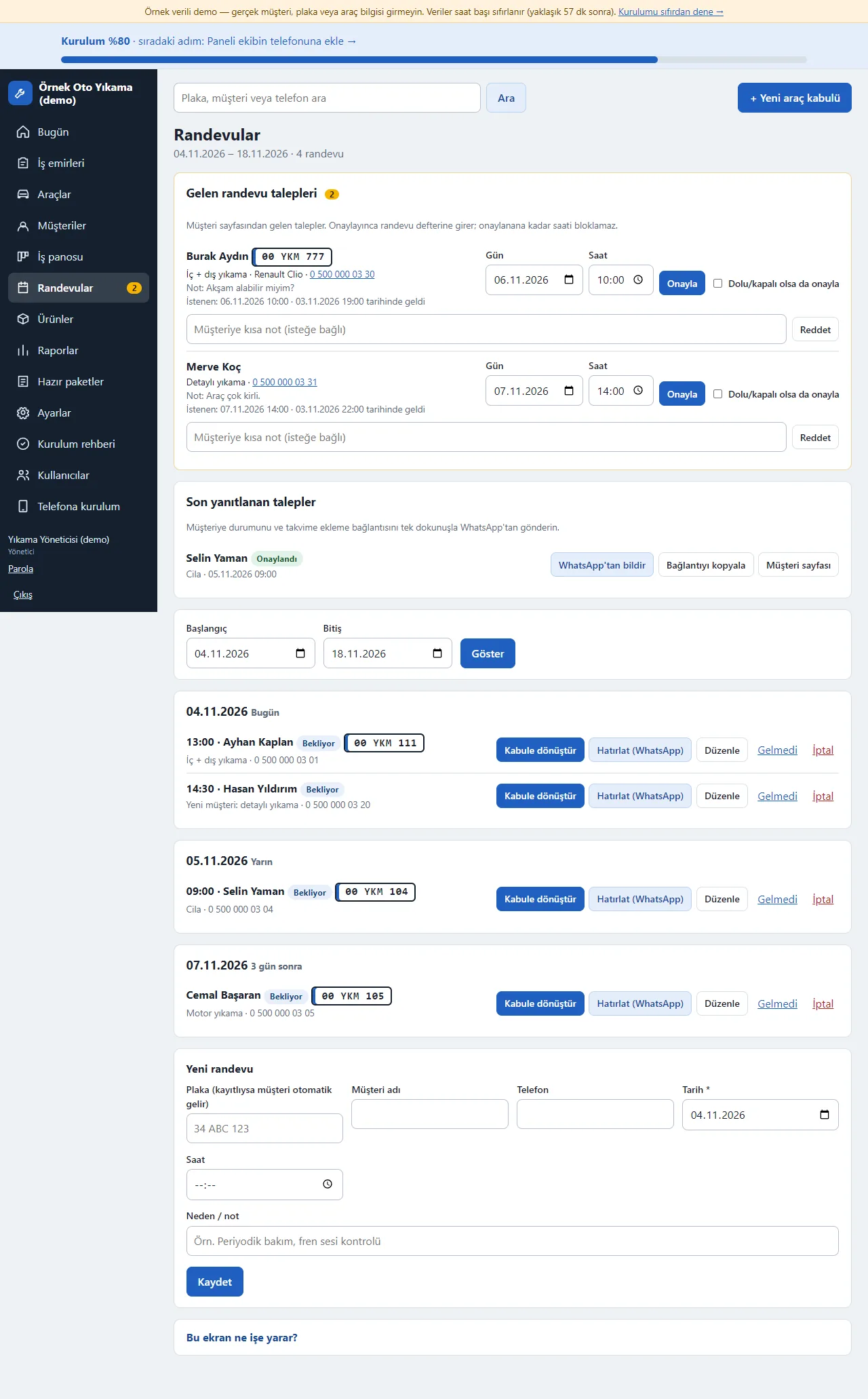
Bookings
The booking book is listed by date; when the car arrives “Kabule dönüştür” (convert to intake) opens a job. Requests the customer sent from the sign-in-free page wait at the top: the manager checks the day and time and approves or rejects. The number of cars that can be washed at once (bays) is set in Settings.
-
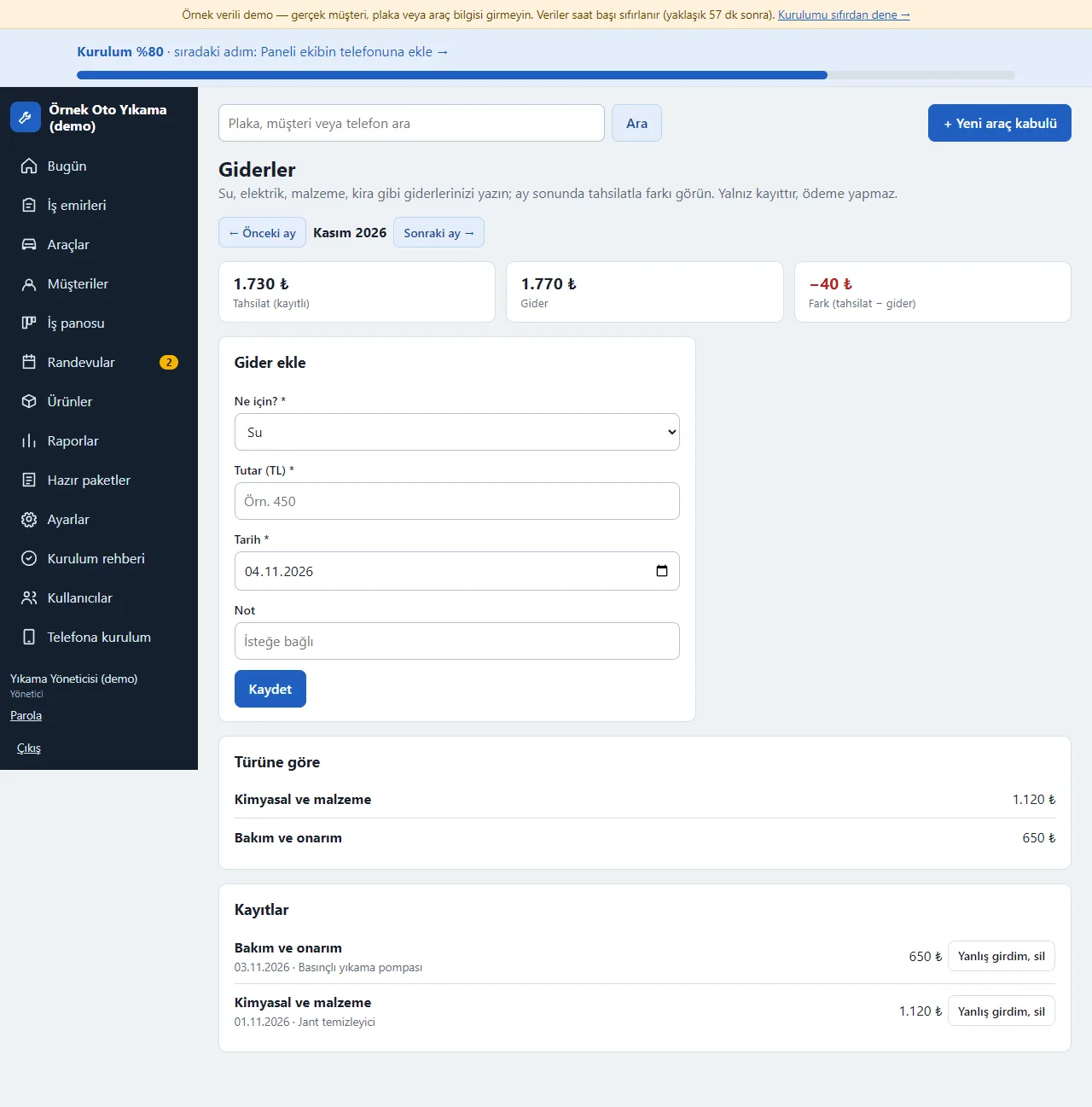
Expenses
Expenses are written by type: water, electricity, chemicals and supplies, staff, rent, repairs and other; for the chosen month the takings, expenses and difference boxes and a breakdown by type show. A wrong entry is removed with “Yanlış girdim, sil” (entered by mistake, delete). Only the manager sees it; it is a record only and takes no payment.
-
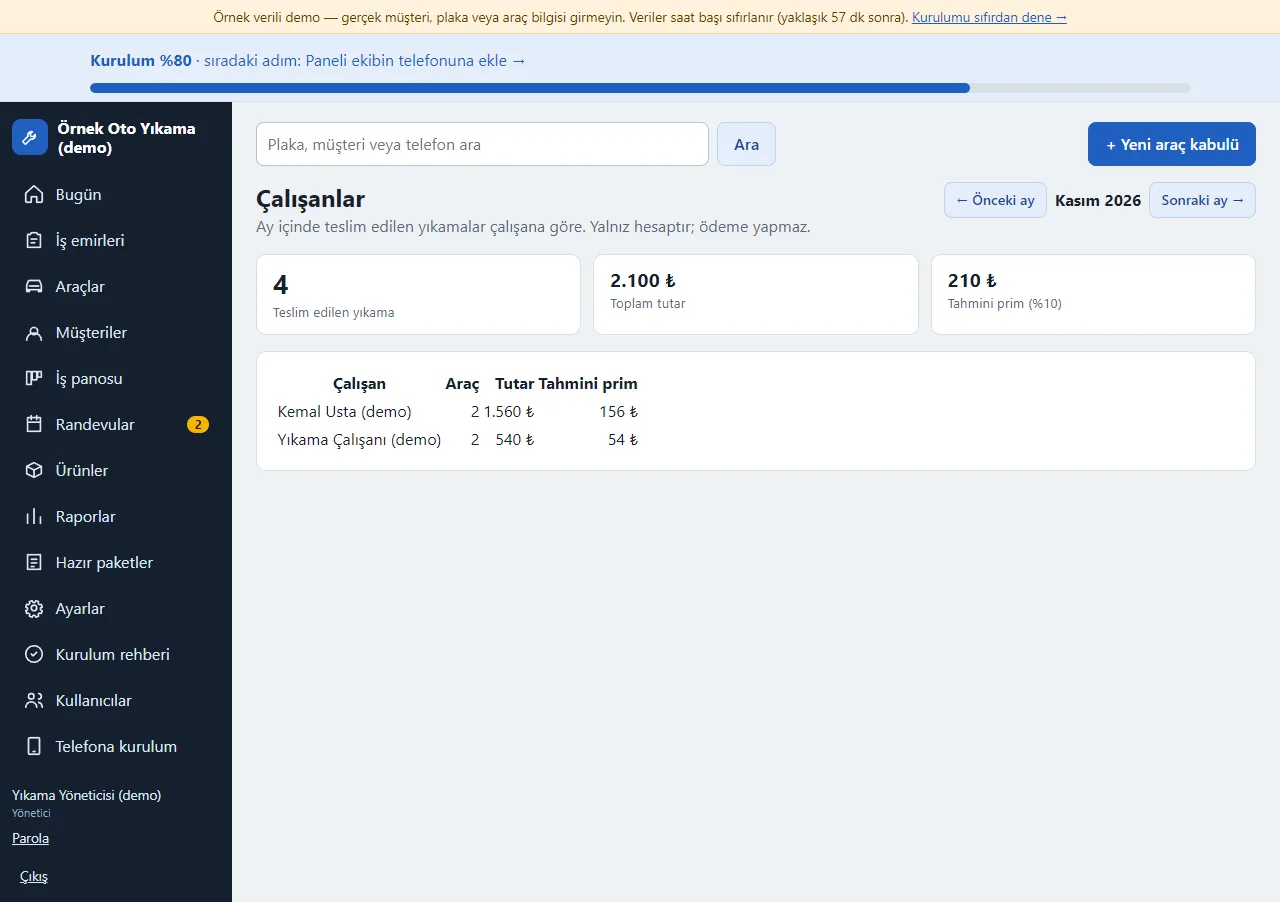
Worker performance
For the chosen month the washes delivered are listed per worker: the number of cars and the amount. If a commission percentage is set in Settings an estimated commission shows too. It is a calculation only and makes no payment. To credit a wash to a worker, “Yıkamayı yapan” (washed by) is chosen on the job.
-
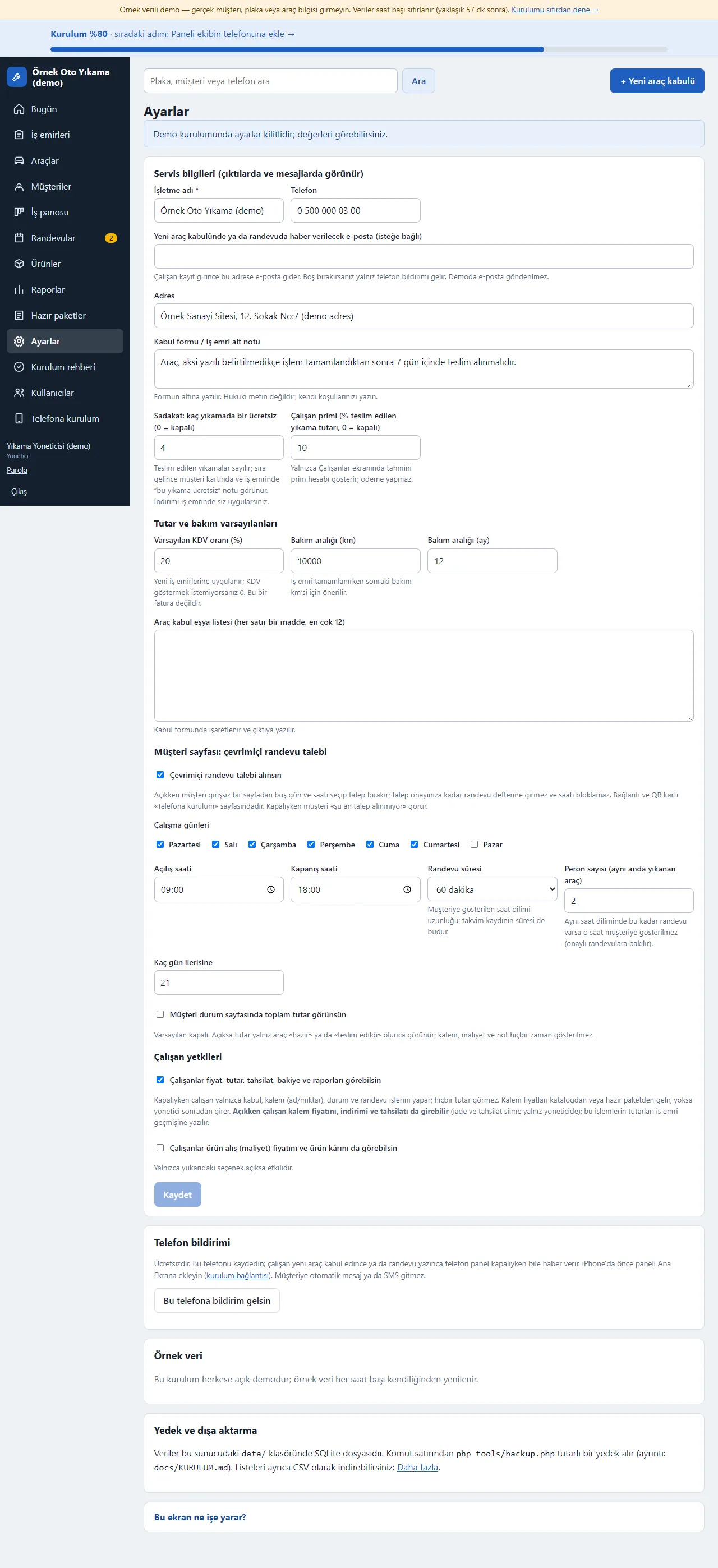
Settings
The business name and phone, VAT, loyalty (“every Nth wash free”), the worker commission, whether a worker sees prices and the customer booking page (working days and hours, booking length, bays) are set here. Adding to the phone and notifications are switched on from this screen too.
-
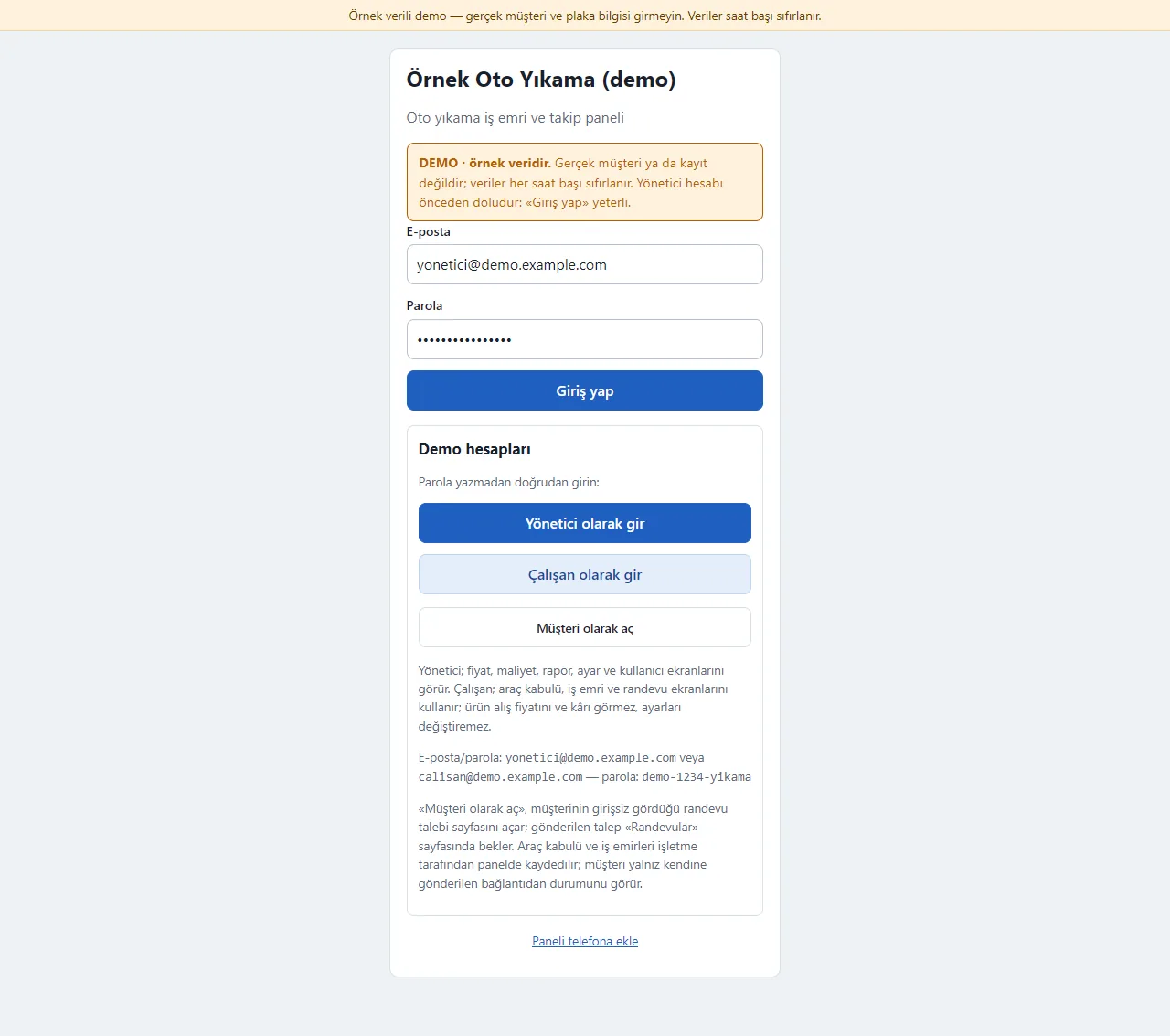
Demo sign-in page
The demo needs no password: one click on “Yönetici olarak gir” (enter as manager) or “Çalışan olarak gir” (enter as worker); “Müşteri olarak aç” (open as customer) opens the booking page the customer sees. A normal installation asks for an e-mail and password.
-
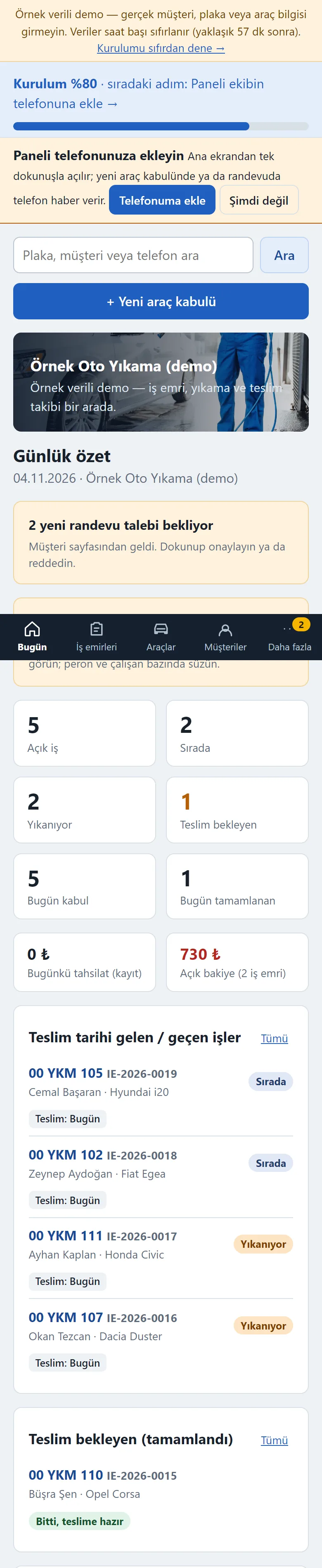
Manager on a phone: Today
On a phone the bottom menu is Bugün, İş emirleri, Araçlar, Müşteriler and Daha fazla. The summary boxes and lists stack on a narrow screen; the “+ Yeni araç kabulü” button is at the top of every screen.
-
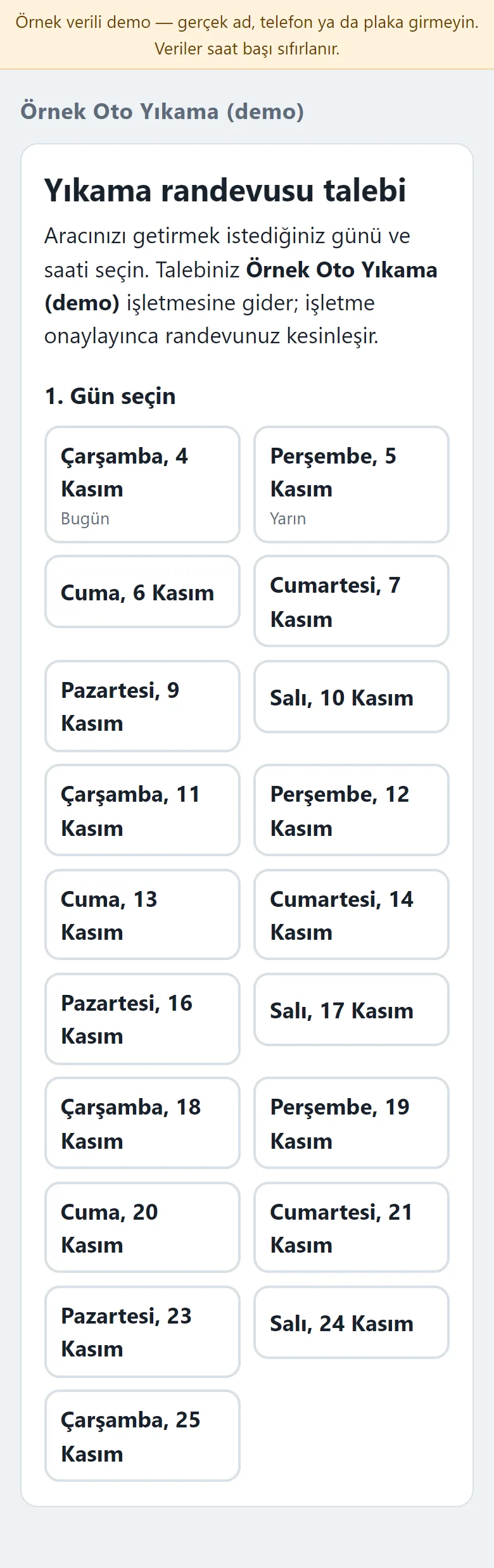
Customer on a phone: booking page
Without opening an account the customer picks a day and time on the sign-in-free page and types a name, phone and plate; the request goes to the business. The booking is not final until the business approves it; once approved the customer sees it on their own status page and can add it to their calendar.
- What do they see at the end?
- The car goes through Sırada, Yıkanıyor and Bitti (queued, washing, done), a ready WhatsApp message goes to the customer when it is ready, and payments and expenses are written in by hand; at month end the cars per worker and the difference between takings and expenses show.
- What is it good for?
- The queue, the cash and the bookings no longer live in a notebook and in memory; who washed how many cars and the month-end difference between takings and expenses are in one place.
Everything that is not included, and all limits
- Not delivered to a client and not used by a real car wash. The business, customers, plates, phone numbers and amounts on the screens are made up.
- There is no automatic SMS or WhatsApp sending; a ready WhatsApp text opens and the business sends it from its own phone. The program sends nobody a message on its own.
- There is no plate reading from a photo, no hand-held terminal or printer integration, no POS or QR payment integration and no e-invoice; payments are entered by hand. There is no membership or subscription package and no multi-branch use.
- The commission and expense screens are a calculation and a record only; they make no payment and do not replace payroll or accounting.
- Adding to the phone and the free phone notification have not been tried on a real phone, in iPhone/Safari or in the WhatsApp in-app browser. Photo upload is switched off in the demo.
- The live demo was run on one hosting account only (PHP, SQLite). In the demo the data is reset every hour; sign-in is without a password through role buttons. The app interface in the screens is in Turkish.
Delivery and sales status
There is no cart, customer account or online payment on this site for now. Reach out by phone, WhatsApp or the form; in a first conversation your need and the software’s fit are reviewed. The form does not create an order, a contract or a payment.
Possible delivery options
Price
There is no package on offer right now, so there is no list price. If a package is defined, the price and payment method are settled then.
Requirements and version history
Installation requirements
- PHP 8.1 or newer (with the pdo_sqlite, mbstring and openssl extensions; curl is recommended for the phone notification) and HTTPS are needed; the data is kept in a SQLite file. The live demo was run on a single hosting account only.
Release notes
- No version has been delivered to a client. The sample-data demo is open to everyone and is shown with the screenshots on this page.
- 0.5.2 (4 November 2026): quick vehicle intake by plate with ready-package selection, the Sırada-Yıkanıyor-Bitti-Teslim flow, a job board, cash and expense records, worker performance and an estimated commission, a loyalty counter, online booking with bay capacity, ready WhatsApp messages, product stock, a scratch and damage map, importing customers and cars from CSV, manager and worker roles and a setup guide.