Carpet washing and dry cleaningDemo with sample data
Carpet Washing and Dry Cleaning Tracking: screen-by-screen guide
The full version of the short description on the product page: every feature, how each screen is used step by step, all limits and the delivery details.
All features
The flows below were run in the app’s version with sample data (0.2.6). The screens were taken on 9 November 2026 from the live demo (version 0.2.1); 0.2.2–0.2.6 are small usability fixes; the business in the demo is “Örnek Halı Yıkama (demo)” (sample), and its customers, addresses, phone numbers and amounts are made up; the price list is a sample.
- Intake slip: the customer (picked from the saved ones or typed new), the pickup type (brought to the shop or collected from the address), pickup and delivery dates, pickup and delivery time slots and a deposit are written in one form, with several items at once
- Item card: carpet, sofa set, corner sofa, single sofa, chair, quilt and blanket, curtain and dry-cleaning piece; for a carpet the width and length in centimetres give the square metres automatically, for sofas and quilts a count or a set is written, and a stain or special-case note can be added
- Every item gets a unique code (HY-year-order number-piece number); a label with a piece counter and a QR code (PARÇA 1/5), an 80 mm and a 58 mm slip and an A4 order form are printed from the browser; slips and labels can also be printed in bulk
- Price list: unit prices per square metre, per piece and per set; the sample prices in the list come with a “sample” notice and you write your own; the amount is worked out from the item automatically
- Stages: Alındı, Yıkamada, Kurutmada, Hazır, Teslim edildi and İptal; orders are moved on one by one or in bulk for a selection, every move is written to the order history; the job board shows four columns
- Cash: the deposit, part payments and credit balance (open balance) are written in by hand, with cash, card and bank transfer kept apart; an end-of-day cash screen, expense records in seven types, a day and period report and a CSV export; the program takes no payment
- Delivery centre: Today, Tomorrow, Late and Completed tabs; every row has a map link, the slip, a ready WhatsApp message and a “Teslim et” (deliver) button
- Courier field screen: a courier sees only the pickups and deliveries assigned to them; Call, Map and “WhatsApp: 10 dk” (a “we will be at your door in 10 minutes” message), pick up, deliver and collect-payment-on-site buttons
- Washer screen: a washer sees only the job list and moves an order to the next stage; customer details, amounts and the cash screen are not shown to them
- Roles and permissions: manager, office, courier and washer; pages, menu items and buttons not allowed are never shown and the server refuses an address typed by hand
- Pickup booking: working days, pickup time slots and a daily capacity are set; a customer picks a day and time on a sign-in-free page, and a request does not enter the booking book or block the time until you approve it
- Multi-day time off and closed time: all day or the same hours every day (example: 1–30 November 13:00–14:00); no pickup request is taken from the customer page on those days; an existing booking is not cancelled silently, upcoming time off is listed and removed with “Yanlış girdim, sil” (entered by mistake, delete)
- Customers who have not come back: customers whose last order is further back than the set number of days (example: over 90 days) are listed and a ready WhatsApp message opens; the business sends the message
- Customer pages (no sign-in): a pickup request page and an order look-up page (by the order code on the slip and the phone, or through the QR code on the slip); the customer opens no account and the look-up page shows the stage
- Ready WhatsApp messages: your items were received, washing started, drying, your order is ready, balance reminder and a general notice; the message opens or the text is copied, the program sends nothing on its own; a status link can be sent to the customer too
- Importing customers from Excel/CSV: column recognition from the header, a preview before saving, duplicate checking and undo for the last import; no message is sent during an import
- A setup guide (with a progress percentage) and a “Bu ekran ne işe yarar?” (what is this screen for) box on every screen; installs on a phone or computer (an add-to-phone box and a sign-in-free setup page); a free phone notification for a new pickup request (Web Push); in the demo “Boş siteyle yeniden başla” and “Örnek veriyi geri yükle”
Screen by screen: how it is used
The interface in these screens is Turkish; only the captions and explanations on this page are in English. The screens were taken on 9 November 2026 from the live demo of version 0.2.1 of the app (with sample data). The business (“Örnek Halı Yıkama (demo)”), customers, addresses, phone numbers and amounts are made up; the price list is a sample.
- Who uses it?
- The owner or office worker of a carpet washing and dry-cleaning business, the washer, the courier who collects and delivers, and the customer who sends a pickup request.
- Where do they start?
- The items come to the shop or are collected from the address; an intake slip is written, the items are added with their sizes and a label is printed for each piece. A customer can send a pickup request from a sign-in-free page.
What do they do on screen? Step by step
-
Today screen
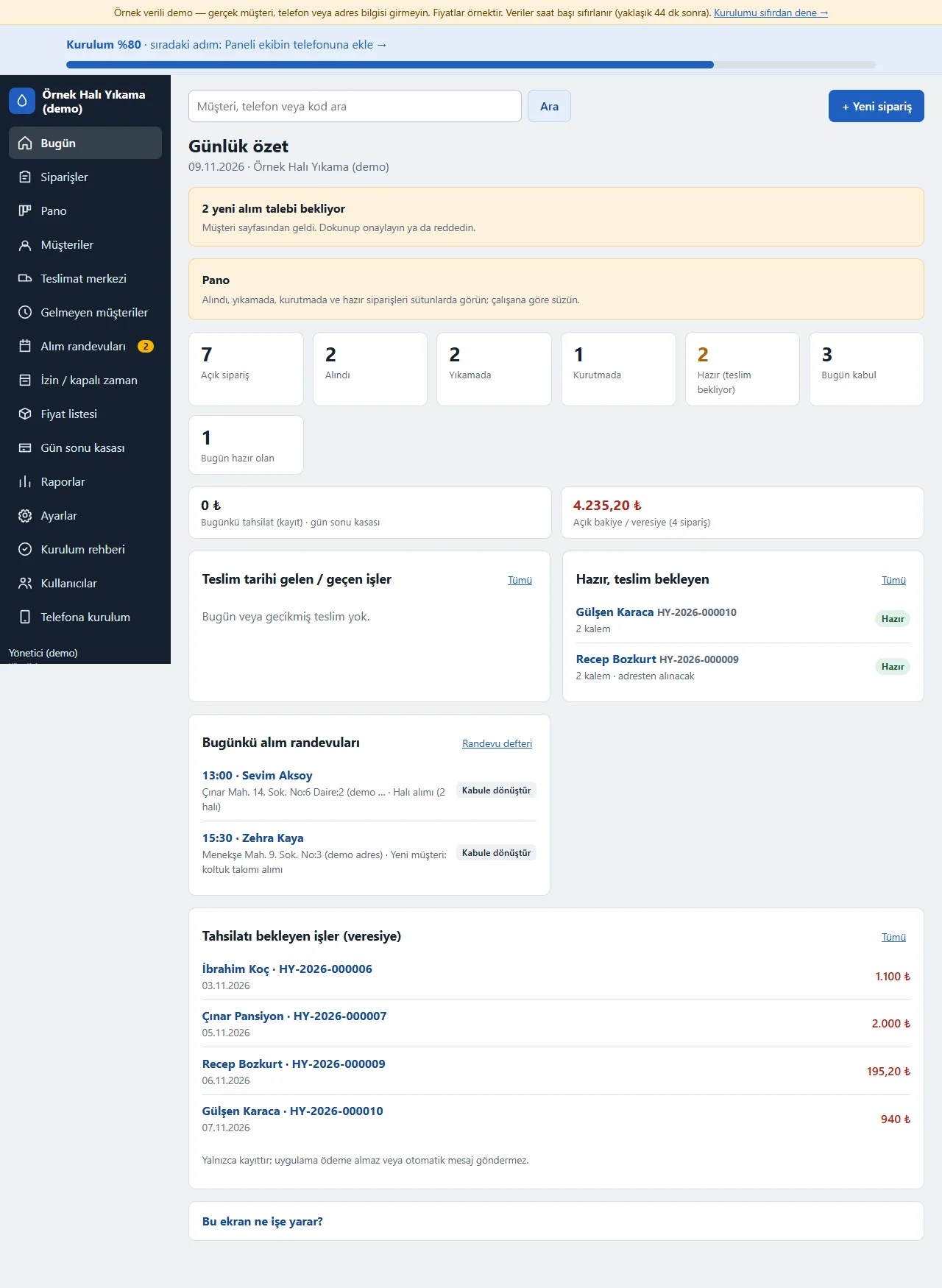
Open orders, Alındı, Yıkamada, Kurutmada, Hazır (waiting for delivery), taken in today and ready today show as tappable boxes; today’s takings, the open balance (credit), orders due and today’s pickup bookings are listed one under another. New pickup requests wait at the top as a notice.
- On screen (Turkish interface)
- “Açık sipariş” — open orders
- “Hazır (teslim bekliyor)” — ready, waiting for delivery
- “Açık bakiye / veresiye” — open balance / credit
- “Alım randevuları” — pickup bookings
-
Taking an order in
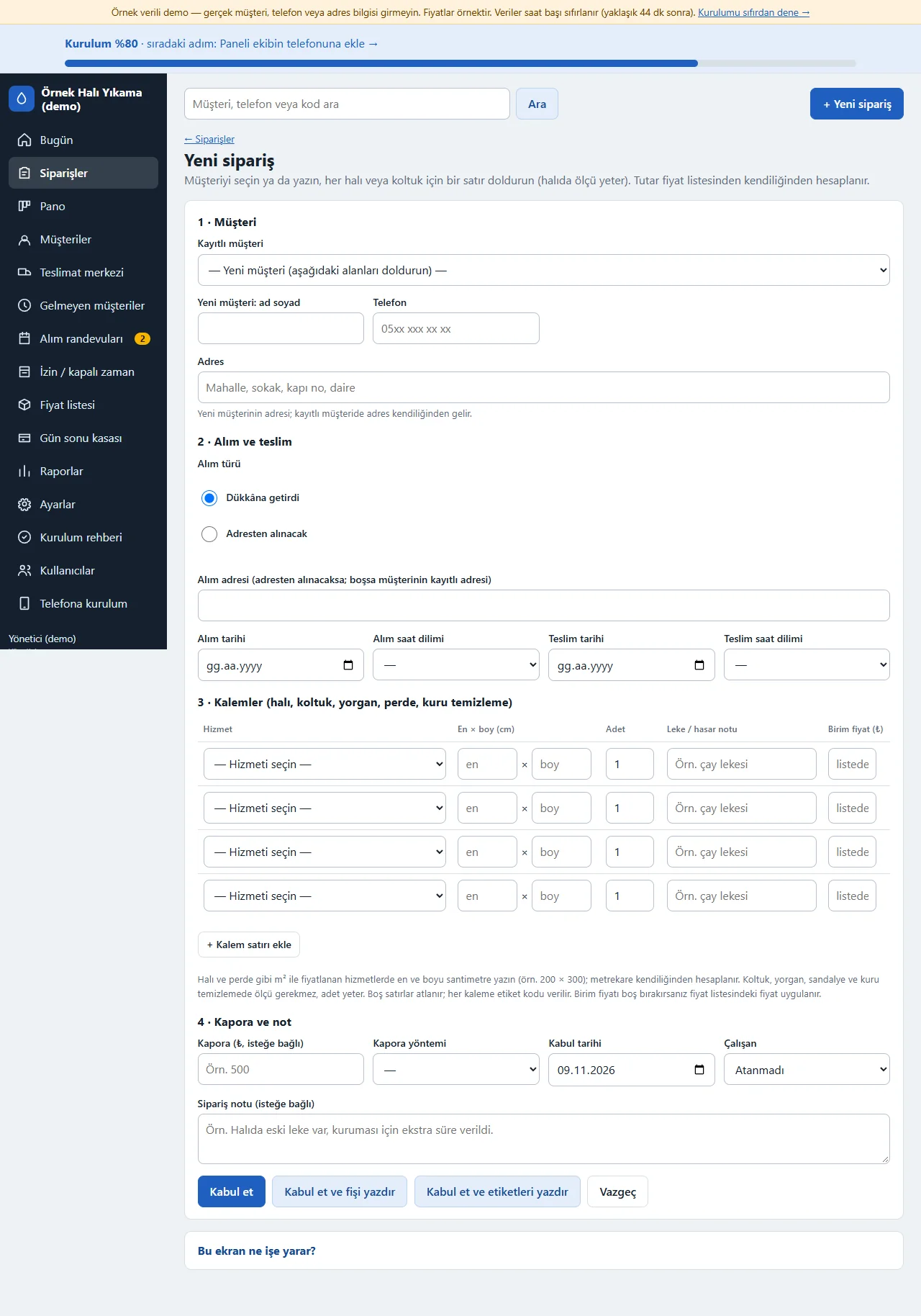
The customer is picked from the saved ones or typed new. The pickup type (brought to the shop, collected from the address), the pickup and delivery dates and the time slots are chosen. On an item row the service is chosen; for a carpet the width and length in centimetres give the square metres automatically, for sofas and quilts a count is enough. The deposit, the worker and a note are optional; “Kabul et ve etiketleri yazdır” opens the labels at once.
- On screen (Turkish interface)
- “Yeni sipariş” — new order
- “Dükkâna getirdi” — brought to the shop
- “Adresten alınacak” — collected from the address
- “Kabul et” — accept the order
-
0.3.0 · 10 November 2026 The order page
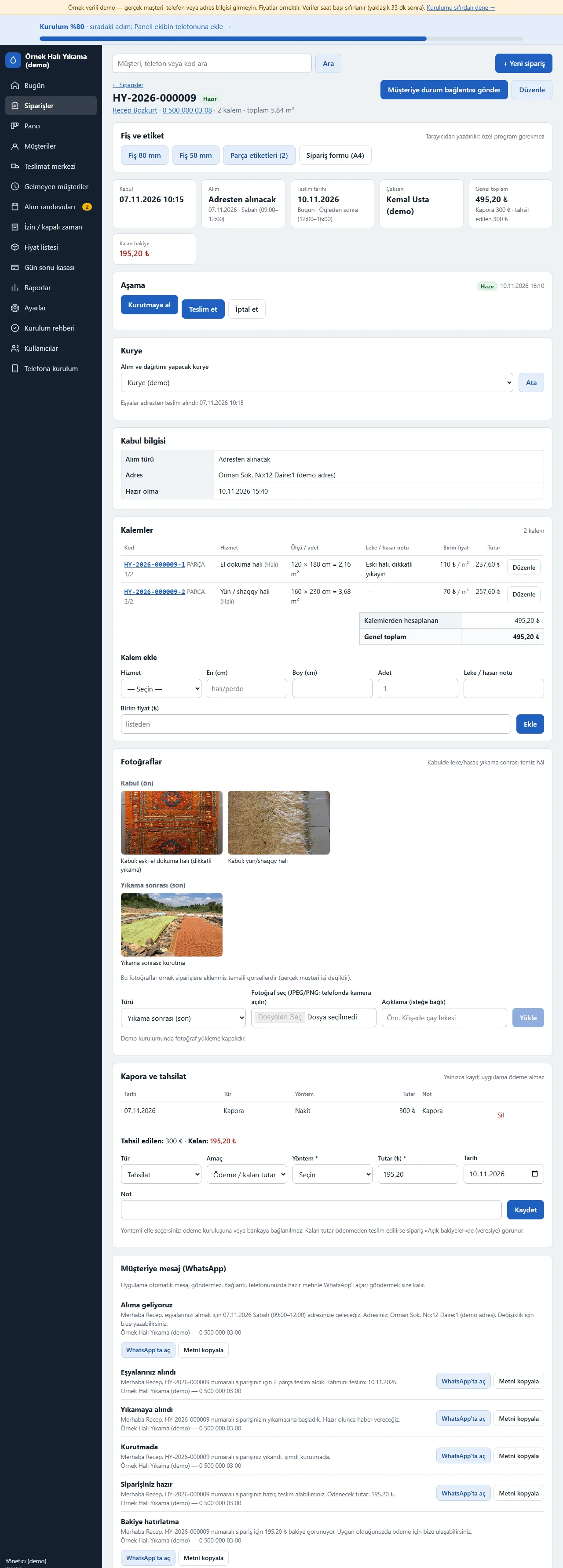
The slip (80 mm, 58 mm, A4 order form) and piece labels, the stage buttons (Kurutmaya al, Teslim et, İptal et), the courier assignment, the items with their codes, the deposit and payment record, ready WhatsApp messages (items received, washing started, drying, your order is ready, balance reminder), the customer status link and the stage history are all on one page.
- On screen (Turkish interface)
- “Kurutmaya al” — move to drying
- “Teslim et” — deliver
- “İptal et” — cancel
- “WhatsApp’ta aç” — open in WhatsApp
-
Piece label
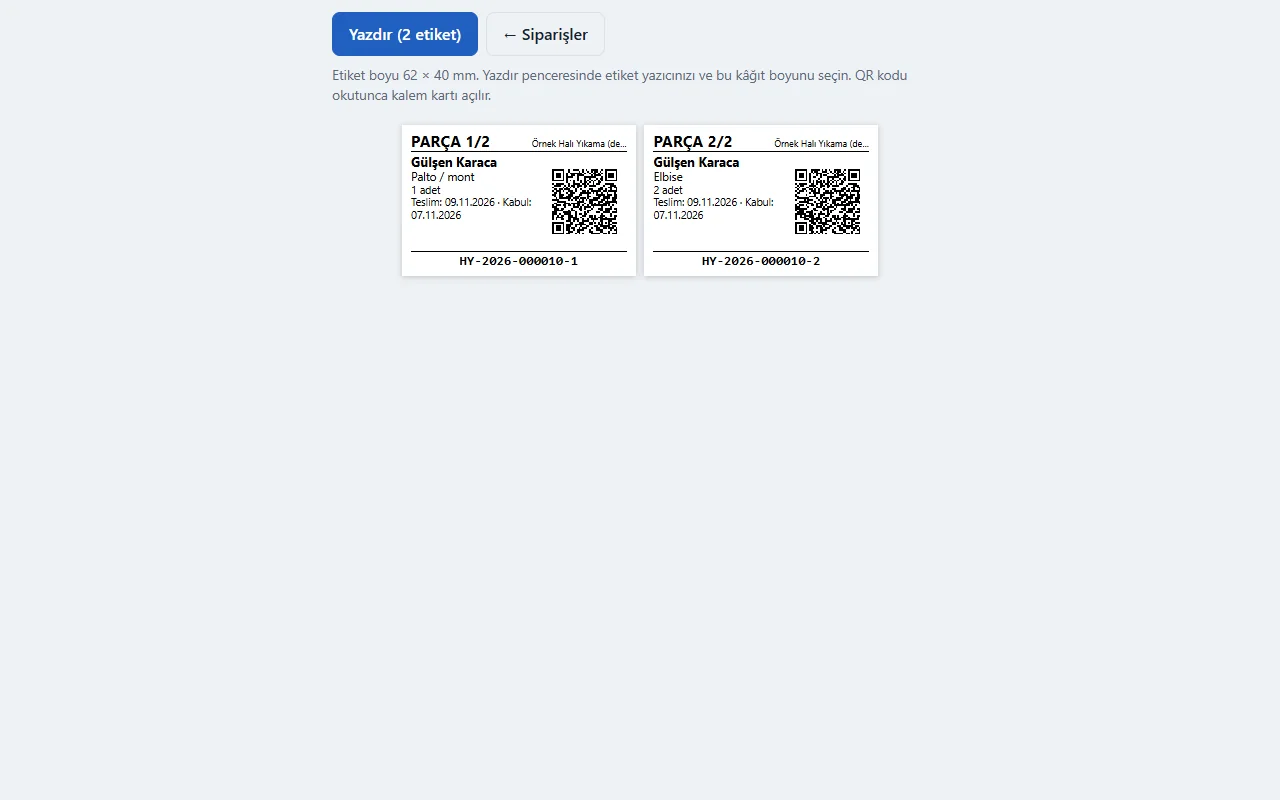
A separate label is printed for every piece: a counter such as PARÇA 1/2, a unique code, the customer name, the service and count, the intake and delivery dates and a QR code. Scanning the QR code opens the item card. The label is meant for 62 × 40 mm and bulk labels can be printed too; it prints from the browser and physical printing on a thermal printer has not been tried.
- On screen (Turkish interface)
- “PARÇA 1/2” — piece 1 of 2
- “Teslim” — delivery
- “Kabul” — intake
- “Yazdır (2 etiket)” — print (2 labels)
-
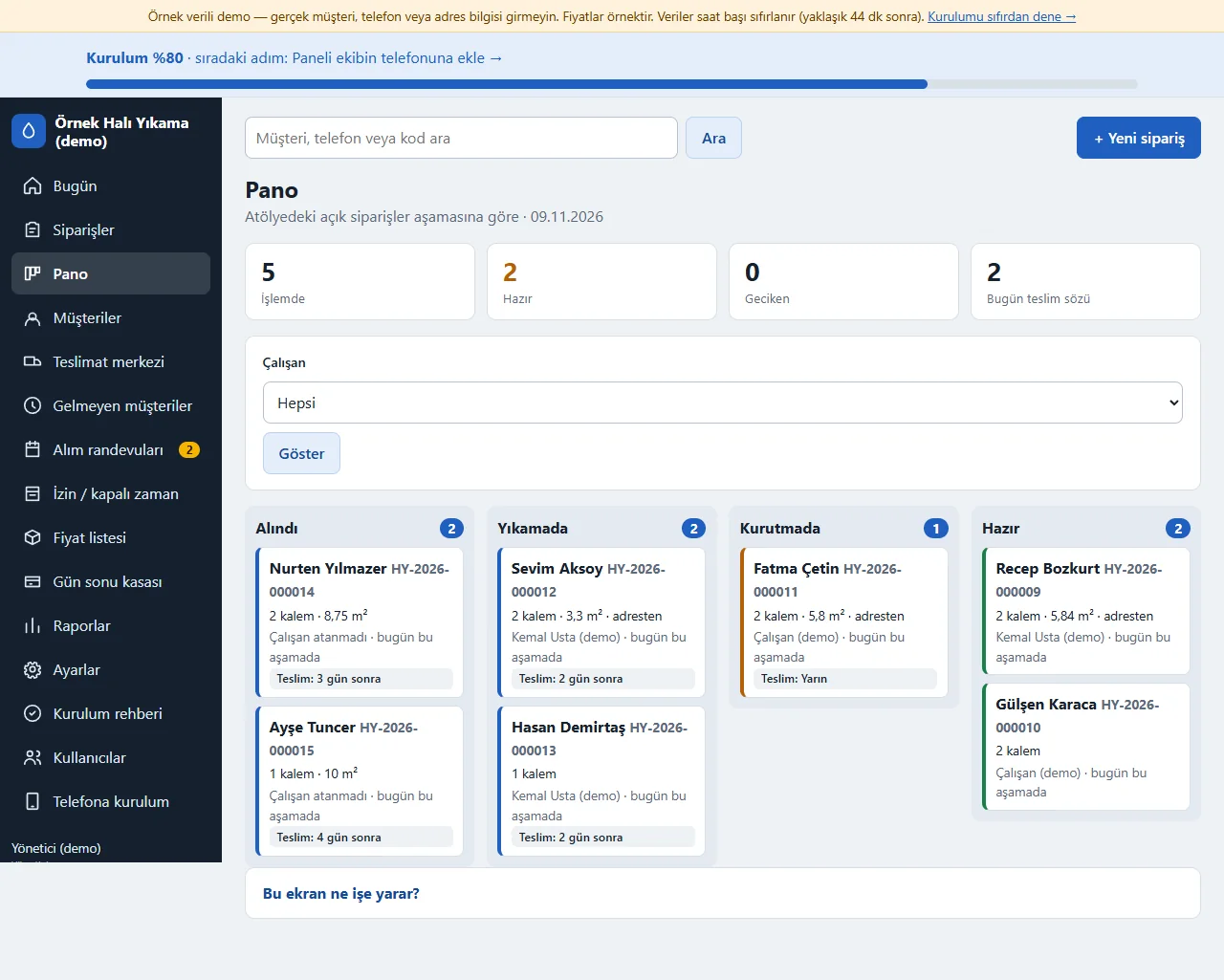
Board
Open orders show as cards in the Alındı, Yıkamada, Kurutmada and Hazır columns by stage; filtered by worker, with late orders and those promised for today first. Tapping a card opens the order.
- On screen (Turkish interface)
- “İşlemde” — in progress
- “Alındı” — received
- “Yıkamada” — washing
- “Kurutmada” — drying
- “Hazır” — ready
-
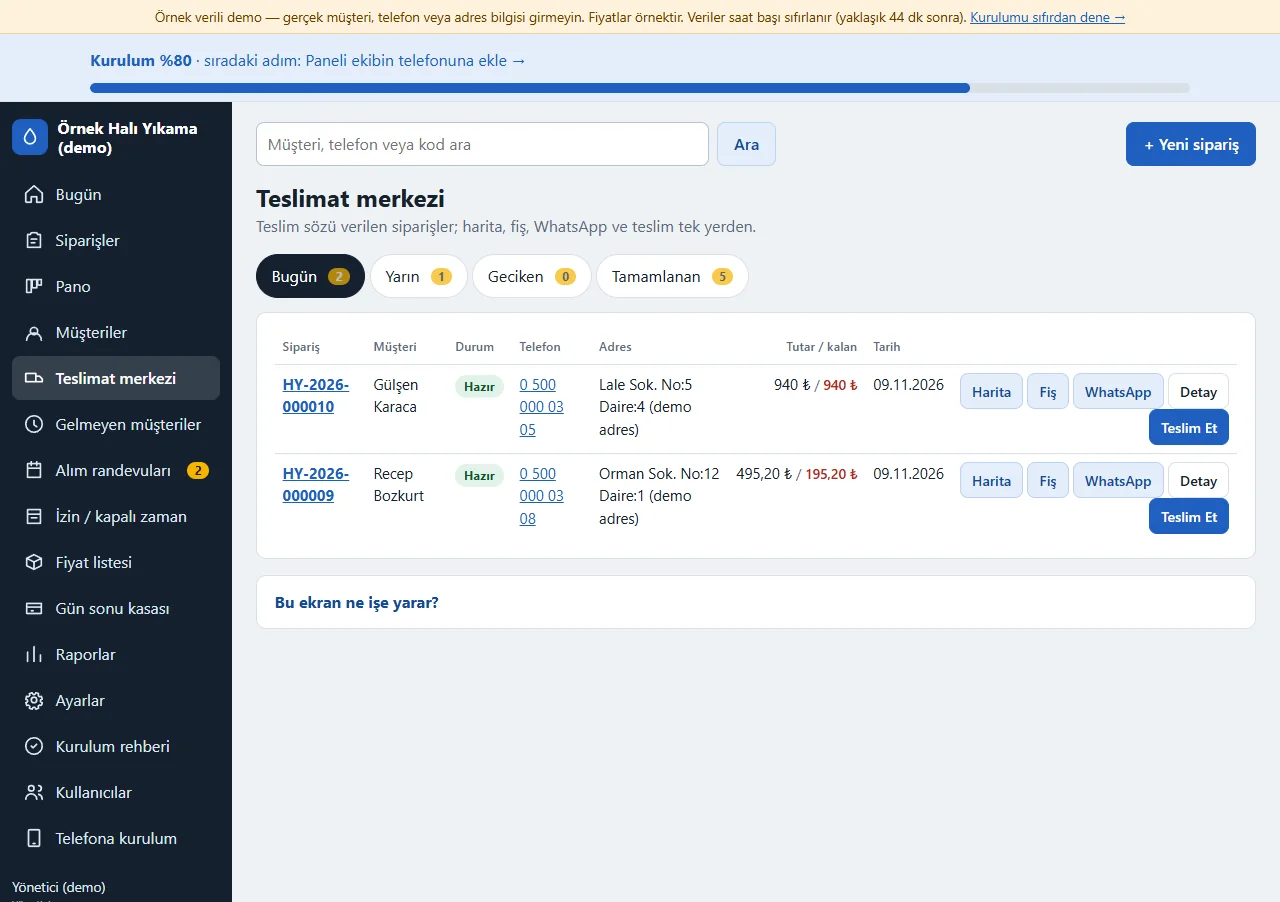
Delivery centre
Orders promised for delivery are listed in the Bugün, Yarın, Geciken and Tamamlanan tabs. Every row has the customer’s phone, the address, the amount left, a map link, the slip, a ready WhatsApp message, the order details and a “Teslim et” button.
- On screen (Turkish interface)
- “Bugün” — today
- “Yarın” — tomorrow
- “Geciken” — late
- “Tamamlanan” — completed
- “Harita” — map
-
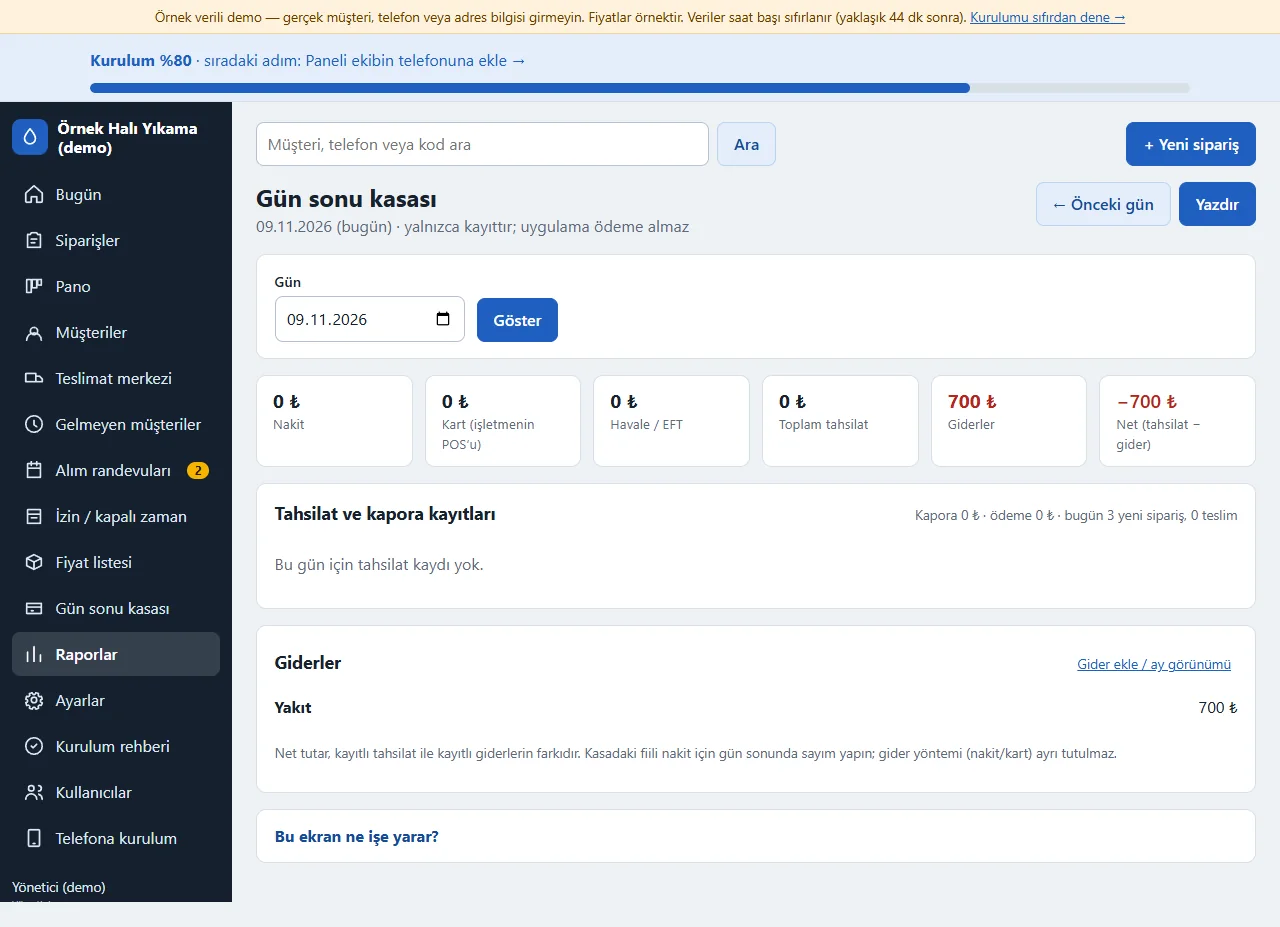
End-of-day cash
For the chosen day the cash, card (the business’s own POS) and bank-transfer takings, the total takings, the expenses and the net amount show; the payment and deposit records and the expenses are listed below. It is a record only and takes no payment.
- On screen (Turkish interface)
- “Gün sonu kasası” — end-of-day cash
- “Nakit” — cash
- “Havale / EFT” — bank transfer
- “Giderler” — expenses
-
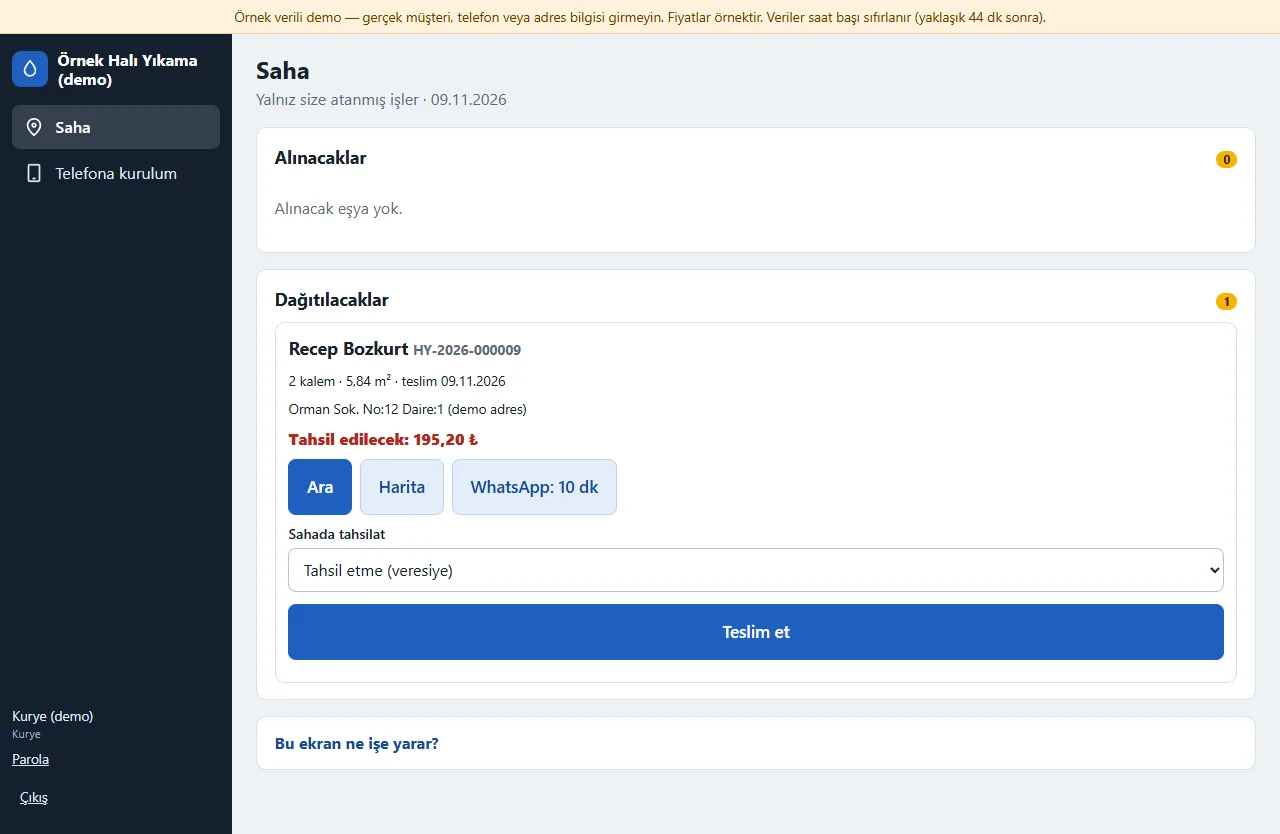
Courier screen
When a courier signs in they see only the jobs assigned to them: pickups and deliveries. Every card has Call, Map and “WhatsApp: 10 dk” buttons, a payment-on-site choice and a “Teslim et” button. The customer list, the cash screen and settings are not shown to a courier.
- On screen (Turkish interface)
- “Alınacaklar” — to pick up
- “Dağıtacaklar” — to deliver
- “Ara” — call
- “Harita” — map
-
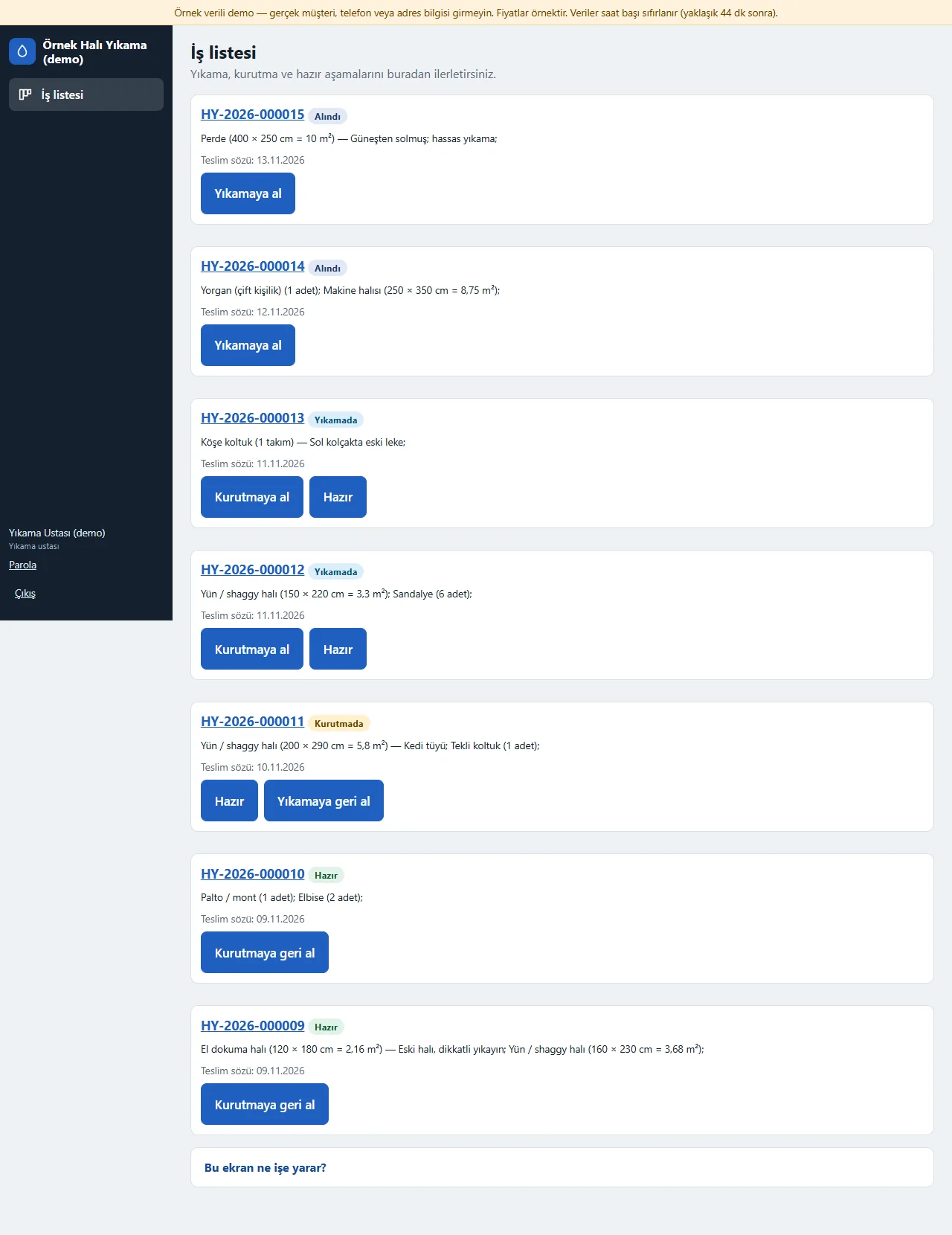
Washer screen
The washer sees only the job list: the items of each order, the promised delivery and the buttons that move it to the next stage (Yıkamaya al, Kurutmaya al, Hazır). The customer’s name and phone, the amounts and the cash screen are not shown to the washer.
- On screen (Turkish interface)
- “İş listesi” — job list
- “Yıkamaya al” — start washing
- “Kurutmaya al” — move to drying
- “Hazır” — ready
-
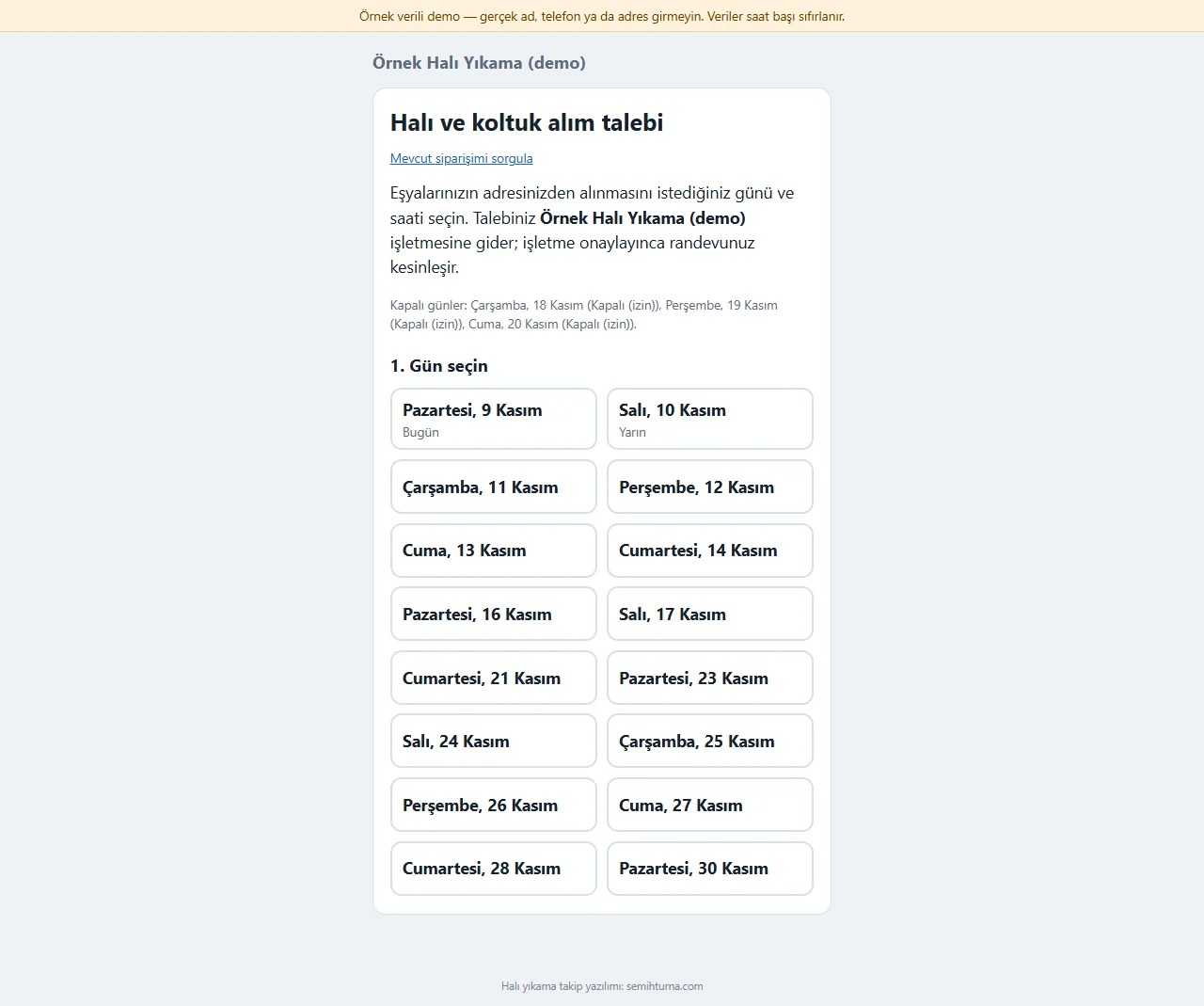
Customer: pickup request
Without opening an account the customer picks a free day and time slot on the sign-in-free page and writes a name, phone and address; the request goes to the business. The booking is not final until the business approves it and it does not block the time. Closed days (time off, holidays) are shown on the page.
- On screen (Turkish interface)
- “Alım talebi” — pickup request
- “1. Gün seç” — 1. Choose a day
- “Kapalı günler” — closed days
-
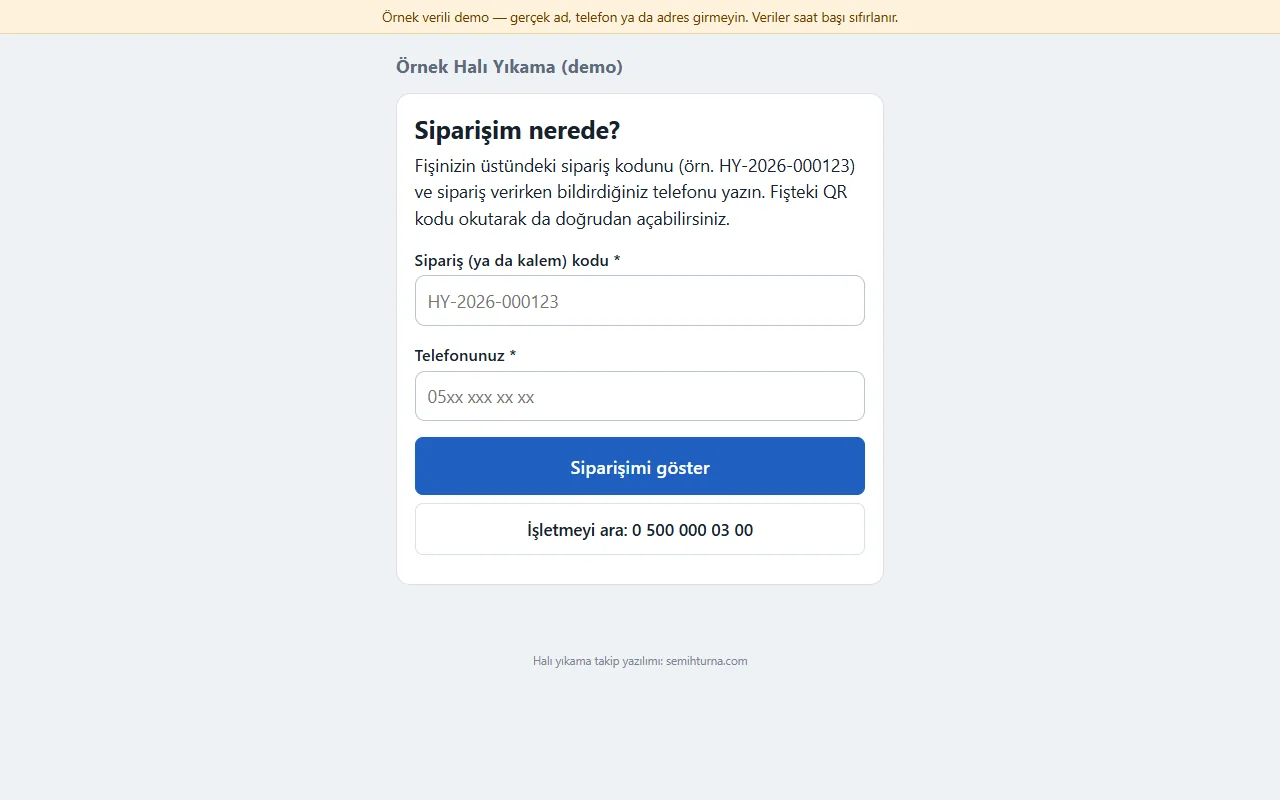
Customer: order look-up
The customer types the order code from the top of the slip and a phone number, or scans the QR code on the slip, and sees at which stage the order is without signing in. The business’s phone is written on the page.
- On screen (Turkish interface)
- “Siparişim nerede?” — where is my order?
- “Siparişimi göster” — show my order
-

Manager on a phone: Today
On a phone the bottom menu is Bugün, Siparişler, Pano, Müşteriler and Daha fazla. The summary boxes and lists stack on a narrow screen; the “+ Yeni sipariş” button is at the top of every screen.
- On screen (Turkish interface)
- “Bugün” — today
- “Siparişler” — orders
- “Daha fazla” — more
- “+ Yeni sipariş” — new order
-
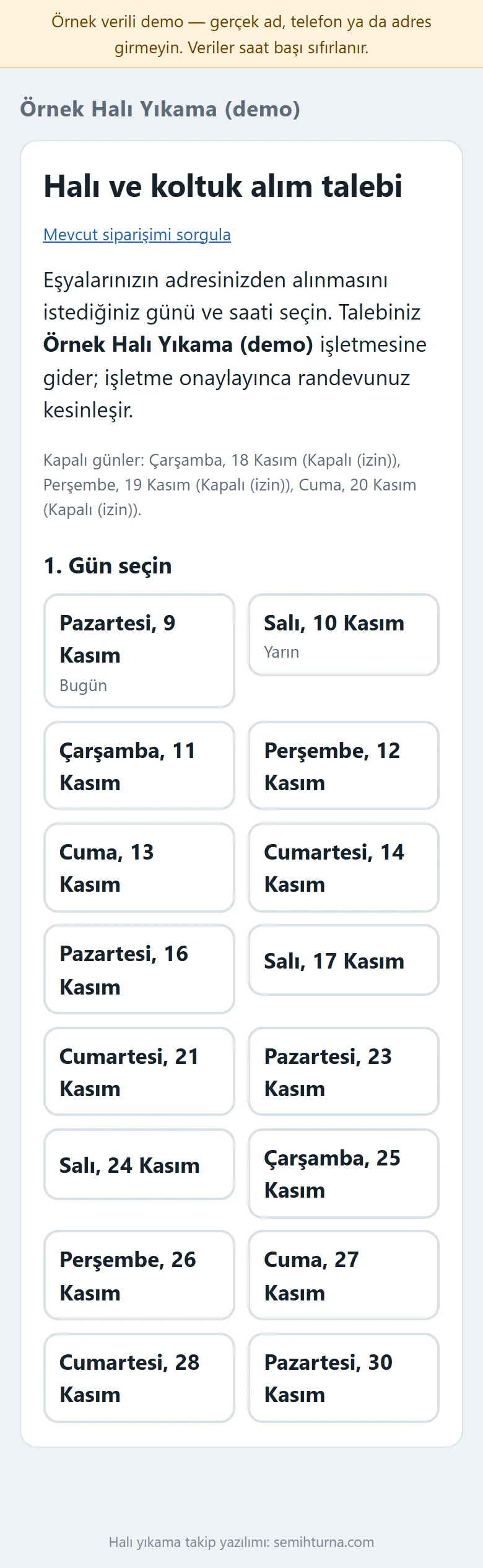
Customer on a phone: pickup request
The customer page is large-print and simple on a phone: days are chosen as two-column buttons, then the time slot and the contact details are written. The customer opens no account; the page can be added to the phone.
- On screen (Turkish interface)
- “Alım talebi” — pickup request
- “1. Gün seç” — 1. Choose a day
- What do they see at the end?
- The order goes through Alındı, Yıkamada, Kurutmada, Hazır and Teslim edildi; a ready WhatsApp message opens for the customer when it is ready, it is delivered from the delivery centre or the courier screen, and payments and credit balances are written in by hand.
- What is it good for?
- Which piece is at which stage, who goes to the door and how much each customer still owes no longer live in a notebook and in memory; they are in one place.
Everything that is not included, and all limits
- Not delivered to a client and not used by a real business. The business, customers, addresses, phone numbers and amounts on the screens are made up; the price list is a sample.
- There is no automatic SMS sending; WhatsApp messages open as a ready text and the business sends them from its own phone. The program sends nobody a message on its own.
- There is no e-invoice or e-archive, caller-number recognition (switchboard), live vehicle location (GPS), card payment over the internet, automatic route optimisation, loyalty points or multi-branch use; payments are entered by hand and the map link only opens the address on a map.
- The cash and expense screens are a record only; they take no payment and do not replace accounting or e-invoicing.
- The order flow was tried on the live demo in Chrome, Firefox and the Safari engine (WebKit, with iPhone and iPad profiles), at desktop and phone width, by typing and clicking; the slip and label print layout was checked on screen at 80, 58 and 62 mm. Physical printing on a thermal printer, adding to the phone and the free phone notification on a real phone and a real iPhone/Safari, and use inside the WhatsApp in-app browser have not been tried.
- The live demo was run on one hosting account only (PHP, SQLite). In the demo the data is reset every hour; sign-in is without a password through role buttons. The app interface in the screens is in Turkish.
Delivery and sales status
How does it work?
You try the demo and tell us about your business, and we send you a quote. We install it and we host it. The yearly price includes installation, hosting, data transfer and support; it is for a single business.
Price
The yearly list price is 2,000 TL. Installation, one year of hosting, data transfer, bug fixes and written usage support are included; it is for a single business. Automatic SMS and WhatsApp sending (a ready message and link come with it, you send it), online card payment, e-invoicing / e-archive, live location (GPS), route optimisation and multiple branches are not included. New feature requests and work beyond the scope are discussed separately.
Possible delivery options
Other delivery options
Requirements and version history
Installation requirements
- PHP 8.1 or newer (with the pdo_sqlite, mbstring and openssl extensions; curl is recommended for the phone notification) and HTTPS are needed; the data is kept in a SQLite file. The live demo was run on a single hosting account only.
Release notes
- No version has been delivered to a client. The sample-data demo is open to everyone and is shown with the screenshots on this page.
- 0.2.2 – 0.2.6 (9 November 2026): the collection amount comes pre-filled with the balance and is selected on touch (Safari included); a collection error returns to the order page and keeps what was typed; a correct warning for an amount that cannot be read; the amount being cut off in the collection records table on a phone is fixed.
- 0.2.1 (8 November 2026): the “Teslim et” button being cut off on a phone in the delivery centre card is fixed.
- 0.2.0 (8 November 2026): a delivery centre, a courier field screen and a washer role, fine-grained permissions, pickup time slots and a daily capacity, multi-day time off, customers who have not come back, a sign-in-free order look-up, installing on a phone and computer.
- 0.1.0 (8 November 2026): item cards with square-metre sizing, a price list, stages with bulk moves, an intake slip, 80 and 58 mm slips and piece labels, cash, credit balance and end of day, expenses and a report.
Decisions not made yet
- Rights to use, modify, transfer and receive the source code: to be set in a written agreement; not decided yet.
- Whose name the hosting and domain are opened in, and where the software is installed, have not been decided yet.
There is no cart, customer account or online payment on this site for now. Reach out by phone, WhatsApp or the form; in a first conversation your need and the software’s fit are reviewed. The form does not create an order, a contract or a payment.