Cleaning companiesDemo with sample data
Cleaning Company Requests and Booking Tracking: screen-by-screen guide
The full version of the short description on the product page: every feature, how each screen is used step by step, all limits and the delivery details.
All features
The flows below were run in the app’s live demo with sample data. The screens were taken from the live demo (versions 1.0.1 and 1.0.2) on 1 November 2026; the phone Customers screen is from 1.0.2. The live demo is on version 1.0.2 today. 1.0.2 only changed the trial-mode box in the setup wizard and the columns of the customer list on a narrow screen; the trial box is not shown in demo mode, so the other screens look the same in 1.0.2. No real data is entered on the screens: the firm (“Parlak Temizlik”), customers, phone numbers, addresses and amounts are made up; no real name, phone number or e-mail should be entered in the demo. The phone notification and adding to the home screen have not been tried on a real phone.
- Customer request page: without an account the customer writes the service, the area, the address and the wanted day; acceptance of the privacy notice (KVKK) is required; there is a bot trap and a rate limit; the program does not work out or suggest a price, the firm sets it
- The customer’s own status page: a stage bar in the customer’s own words (request received, survey and quote, approved, scheduled, on the way, started, finished), the quote items and the contract; the address is a secret one; the page can be added to the phone
- Survey appointment and job calendar: a day and time for the survey, or a direct job date (a box is ticked if the customer agreed verbally); day and week views and a crew filter
- Crew assignment and clash warning: a clashing job for the same crew and a crew member’s day off are flagged; nothing is blocked, you choose “yine de ata” (assign anyway); it stays consistent under simultaneous requests
- Itemised quote: service (m², hours or pieces) x unit price, extra-service buttons, a single-price option, a printable quote and the customer accepting the quote
- Recurring service: weekly, every two weeks or monthly; an end date or a number of visits (up to 60); skip a visit, postpone it or end the series; a contract renewal reminder shows in “Geri dönülecekler” (to call back) and on the Today screen
- Crew field screen: only the jobs assigned to its own crew, the address and open in maps, the entry and key note, a pet and allergy warning, a room-by-room checklist, On the way, Started and Finished, reporting a problem; if “Bitti” is tapped before the checklist is ticked it warns and does not block
- Customer card and import: address, entry and key, pets and allergies, past jobs and turnover; importing the old list from CSV or by pasting, column recognition from the header, phone-format matching, duplicate removal, a preview before saving and undo; no message or request is created
- Payment and expense records: deposit, payment and refund are records only (an amount above the quote is refused; the program takes no payment); materials, supplies and transport expenses, a simple profit summary per job and a monthly report
- Ready WhatsApp messages: survey, quote, approval, reminder, satisfaction and a request for a review, cancellation; each opens on the firm’s phone and you send the message yourself; copy the link
- News of a new request: a notice box and badge in the panel, a free phone notification (Web Push) and an e-mail; no automatic message or SMS goes to the customer. The phone notification has not been tried on a real phone
- Multi-day crew time off: all day or the same hours every day; an assignment in that range warns and an existing job is not cancelled silently; an “upcoming time off and closed hours” list and “Yanlış girdim, sil” (entered by mistake, delete); a crew member sees only its own; there is no leave-entitlement counter
- Contract draft and problem log: a sample contract with recurring-service clauses, the customer’s simple electronic approval and printing; a problem or complaint log opened by the customer, the crew or the owner; the contract text is a sample, check your own wording
- Privacy and export: a customer data dump and anonymisation (refused while a series or an open job exists; locked in the demo); requests, payments, expenses, checklists and problems download as CSV
- Set-up and guidance: a setup guide (steps tick themselves, with a progress percentage), a “Bu ekran ne işe yarar?” (what is this screen for) box on every screen, one-tap WhatsApp, copy and an A4 poster with a QR code for the customer link, a sign-in-free set-up page for the firm’s phone, fix buttons next to error messages; “Boş siteyle yeniden başla” and “Örnek veriyi geri yükle” (restore the sample data) in the demo
- Trial installation mode: if ticked in the setup wizard, the installation starts as a 15-day trial; when the time ends the panel and the customer request page close, no data is deleted, sign-in and CSV export stay open and the whole period can be downloaded. There is no trial in demo mode; this mode has not been tried in a real customer installation
- Roles: company owner, crew and the customer page; a crew member sees only the job assigned to it (someone else’s job does not open), screens, menu items and buttons it may not use are never shown, and the server refuses an address typed by hand
Screen by screen: how it is used
The interface in these screens is Turkish; only the captions and explanations on this page are in English. The screens were taken from the live demo (with sample data, 1 November 2026; versions 1.0.1 and 1.0.2); the phone Customers screen is from 1.0.2. The live demo is on 1.0.2 today (1.0.2 added the trial box, which is not shown in demo mode, to the setup wizard and changed the columns of the customer list on a narrow screen; the other screens look the same in 1.0.2). The firm (“Parlak Temizlik”), customers, phone numbers, addresses and amounts are made up. The field, customer and firm set-up screens are phone views, 390 px wide.
- Who uses it?
- The owner of a cleaning firm, the crew that goes to the job and a customer who wants a cleaning.
- Where do they start?
- The customer writes the need on the request page and sends it, or a request that arrives by phone is recorded in the panel.
What do they do on screen? Step by step
-
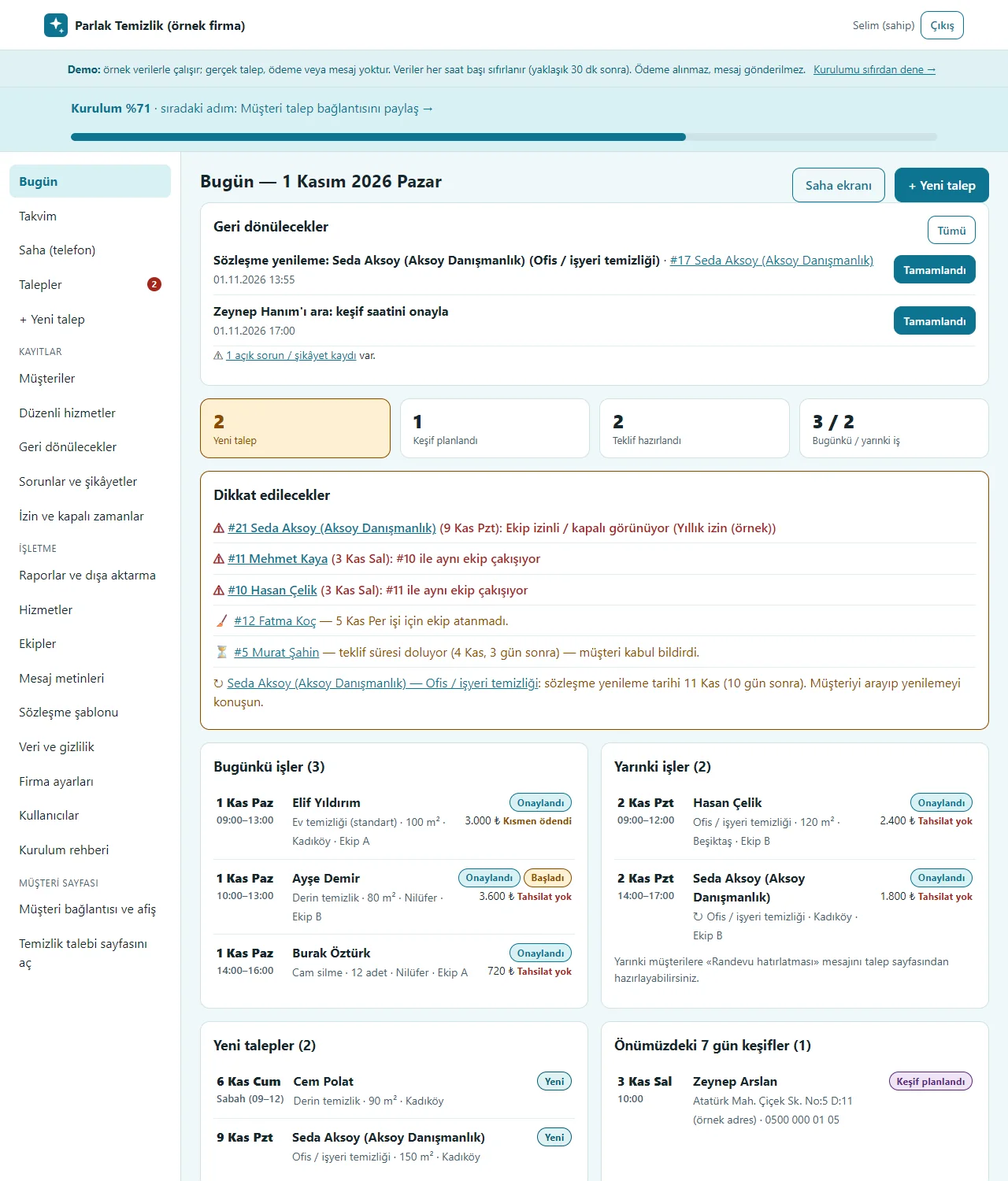
Today screen
Callbacks, things to watch (a clash, a contract to renew, a quote waiting), today’s and tomorrow’s jobs, new requests and open balances on one screen. The setup progress and the next step show at the top.
- On screen (Turkish interface)
- “Bugün” — today
- “Geri dönülecekler” — to call back
- “Dikkat edilecekler” — things to watch
- “Bugünkü işler” — today’s jobs
- “Yarınki işler” — tomorrow’s jobs
- “Yeni talepler” — new requests
- “Açık bakiyeler” — open balances
- “Kurulum” — setup
-
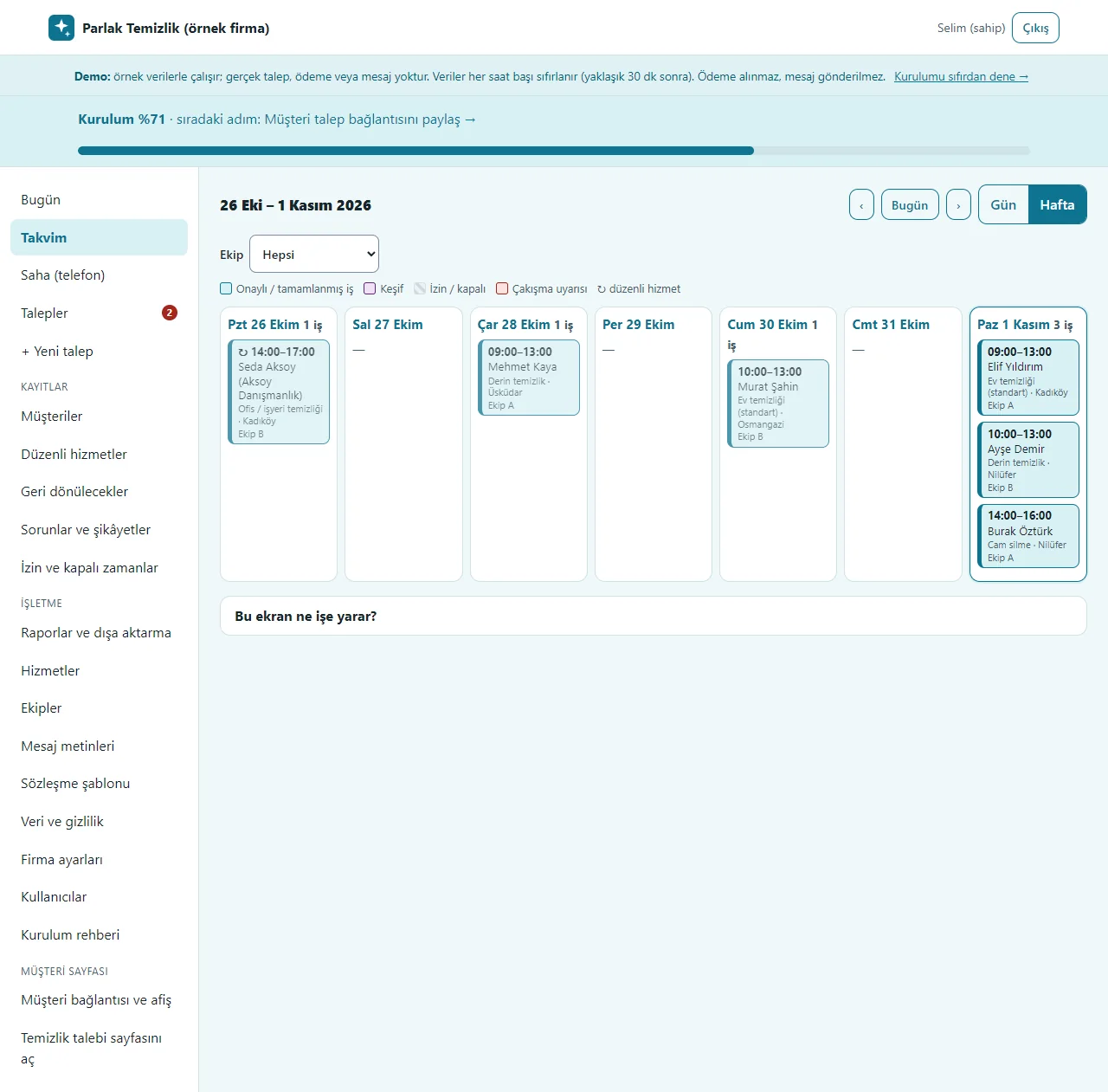
Calendar
Day and week views and a crew filter. Confirmed jobs, surveys, time off and the clash warning have different colours; recurring-service visits are marked separately. A tap on a job opens the request card.
- On screen (Turkish interface)
- “Takvim” — calendar
- “Gün” — day
- “Hafta” — week
- “Ekip” — crew
- “Keşif” — survey
- “İzin / kapalı” — time off / closed
- “Çakışma uyarısı” — clash warning
- “düzenli hizmet” — recurring service
-
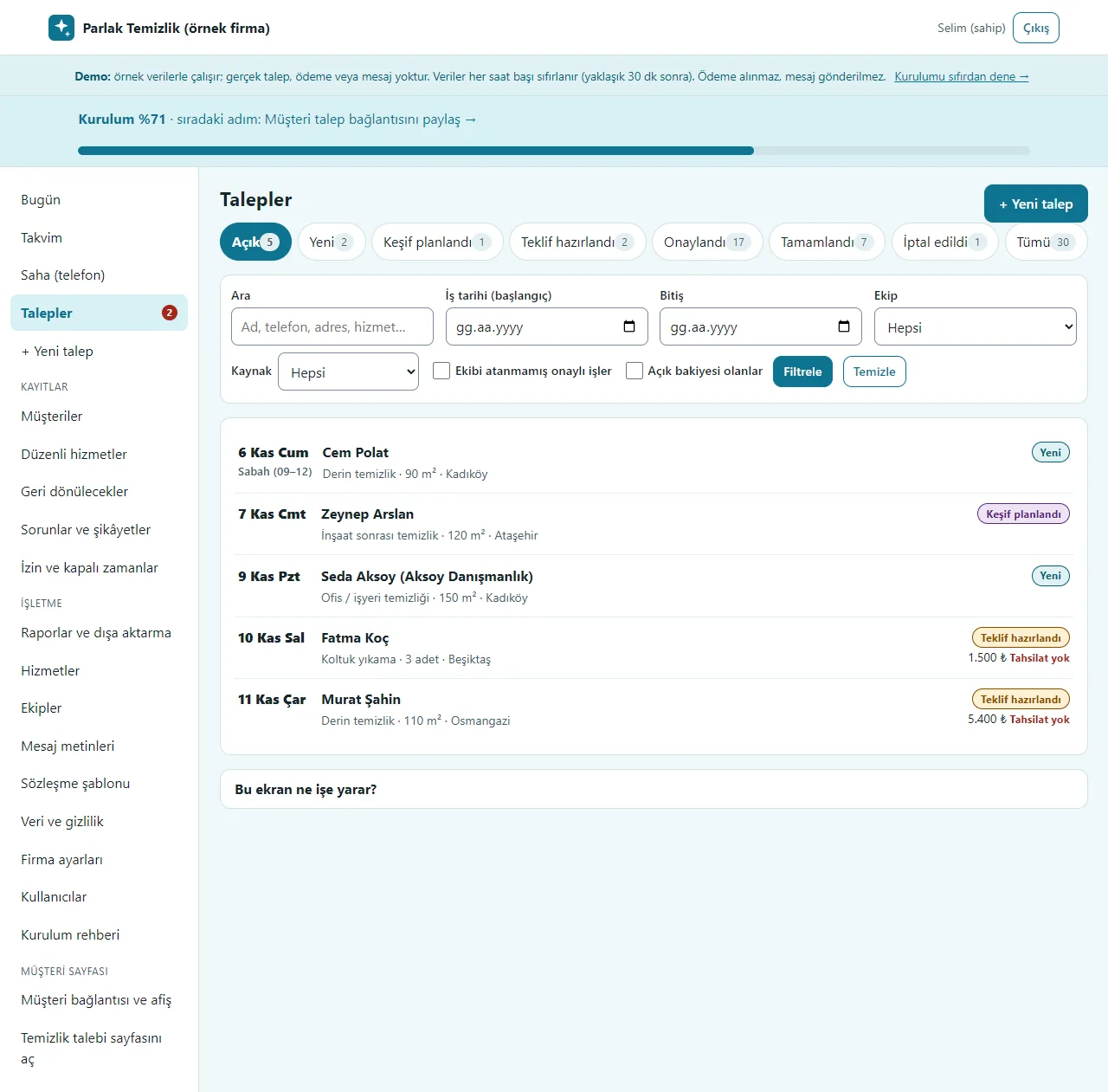
Requests
Incoming requests are filtered by status (new, survey planned, quote ready, approved, completed, cancelled); search by name, phone or address and filter by date and crew. A request that arrives by phone is recorded with “+ Yeni talep”.
- On screen (Turkish interface)
- “Talepler” — requests
- “Yeni” — new
- “Keşif planlandı” — survey planned
- “Teklif hazırlandı” — quote ready
- “Onaylandı” — approved
- “Tamamlandı” — completed
- “İptal edildi” — cancelled
- “+ Yeni talep” — new request
-
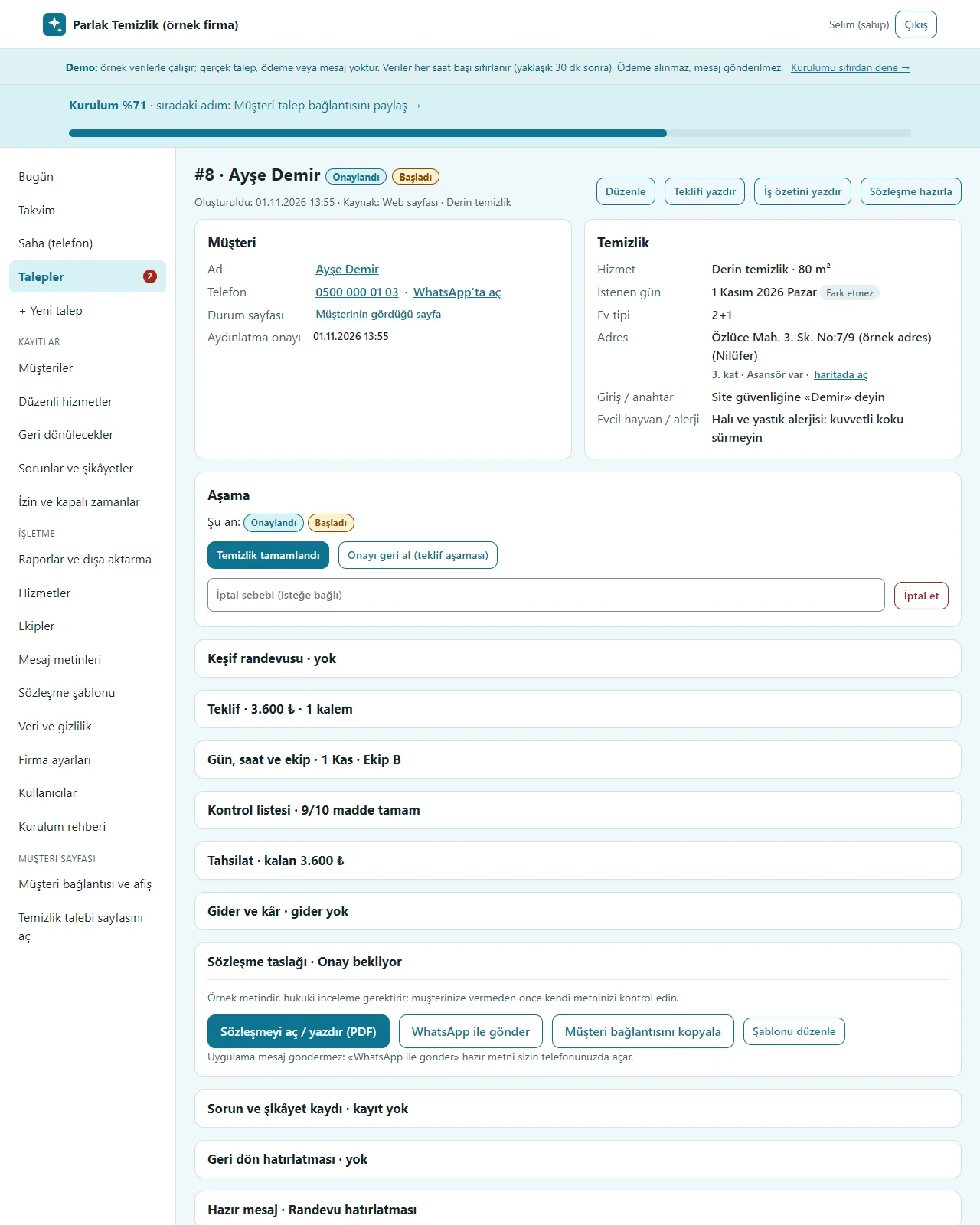
The request card
Customer details, service, address, the entry and key note and the pet warning; stage buttons; survey appointment, itemised quote, day and crew, checklist, payment, expenses and profit, contract draft, ready WhatsApp messages, problem log and a call-back reminder. The program takes no payment and you send the message yourself.
- On screen (Turkish interface)
- “Aşama” — stage
- “Teklif” — quote
- “Kontrol listesi” — checklist
- “Tahsilat” — payment
- “Gider ve kâr” — expenses and profit
- “Sözleşme taslağı” — contract draft
- “WhatsApp ile gönder” — send on WhatsApp
- “Geri dön hatırlatması” — call-back reminder
- “İç not” — internal note
-
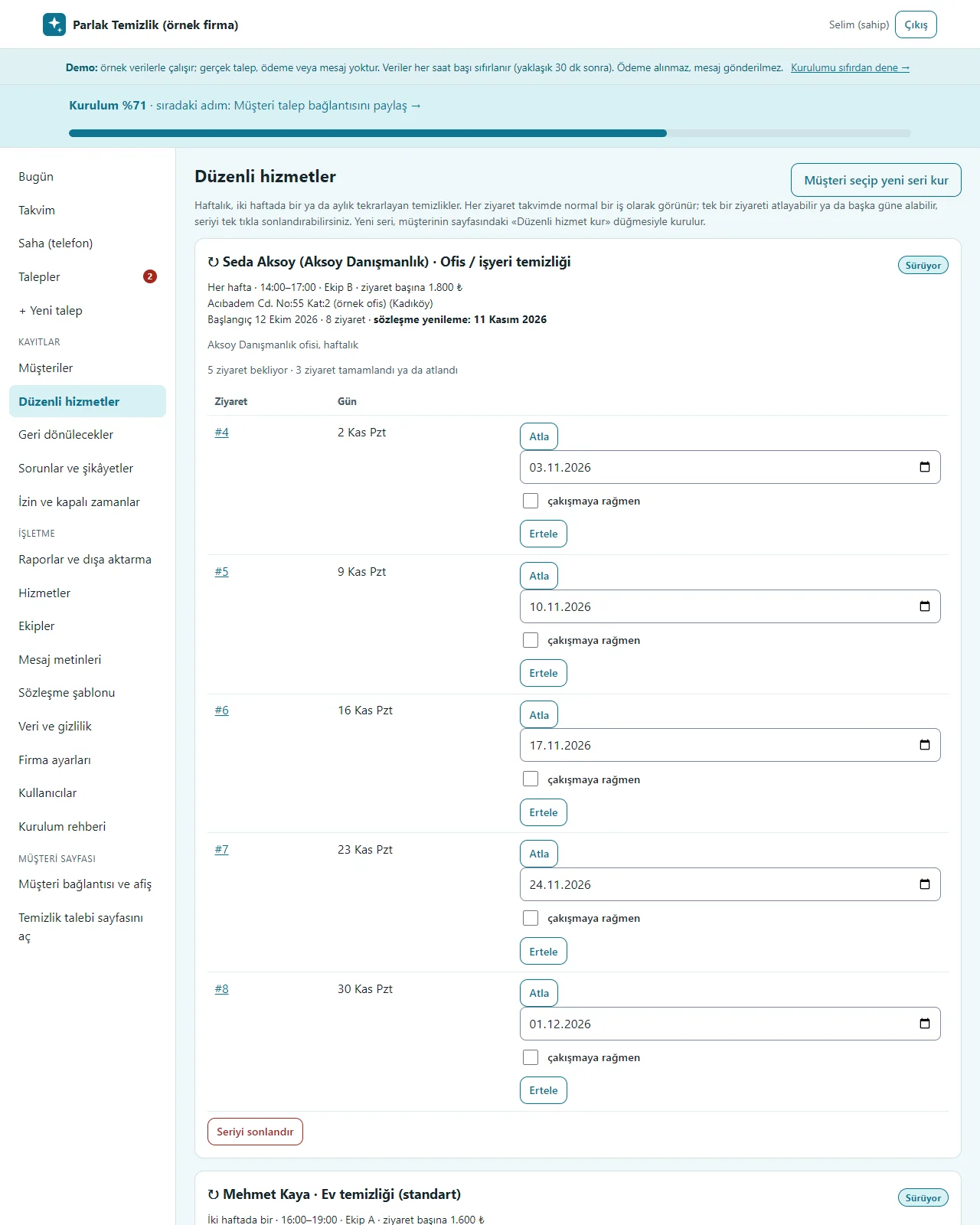
Recurring services
Weekly, fortnightly or monthly series: each visit becomes a normal job on the calendar; a visit is skipped, moved to another day (it warns unless “çakışmaya rağmen” is ticked) or the whole series ends with one tap. The contract renewal date is reminded.
- On screen (Turkish interface)
- “Düzenli hizmetler” — recurring services
- “Sürüyor” — ongoing
- “Her hafta” — every week
- “Atla” — skip
- “Ertele” — postpone
- “çakışmaya rağmen” — despite the clash
- “Seriyi sonlandır” — end the series
-
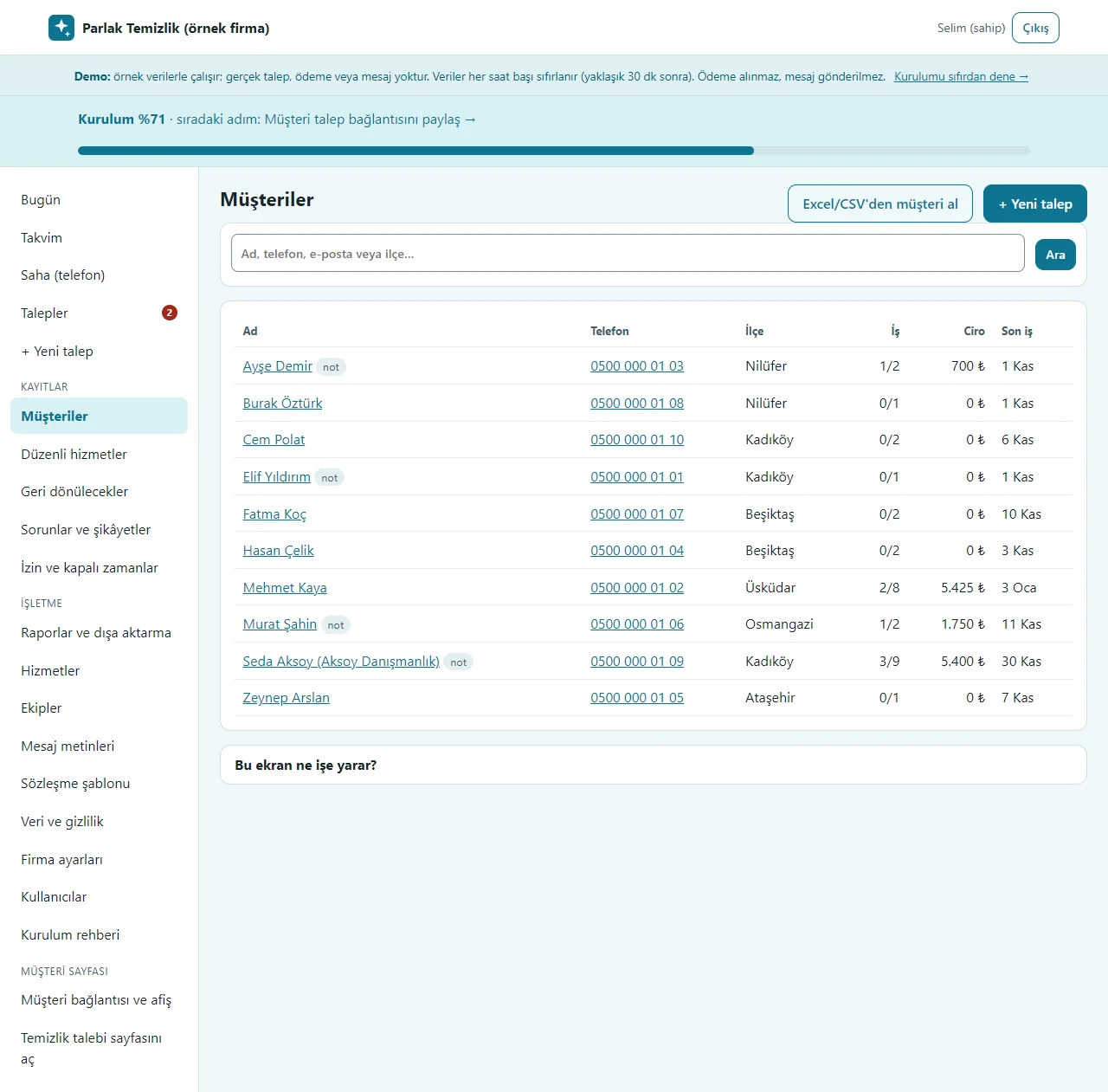
Customers
Name, phone, district, number of jobs, turnover and last job. The customer card holds the address, the entry and key, a pet and allergy note and past jobs; “Excel/CSV’den müşteri al” brings in an old list. On a narrow screen the district and last-job columns, and on a very narrow screen (below 420 px) the jobs column too, are hidden; name, phone and turnover stay.
- On screen (Turkish interface)
- “Müşteriler” — customers
- “Excel/CSV’den müşteri al” — import customers from Excel/CSV
- “Müşteri ara” — search customers
- “Ciro” — turnover
- “Son iş” — last job
-
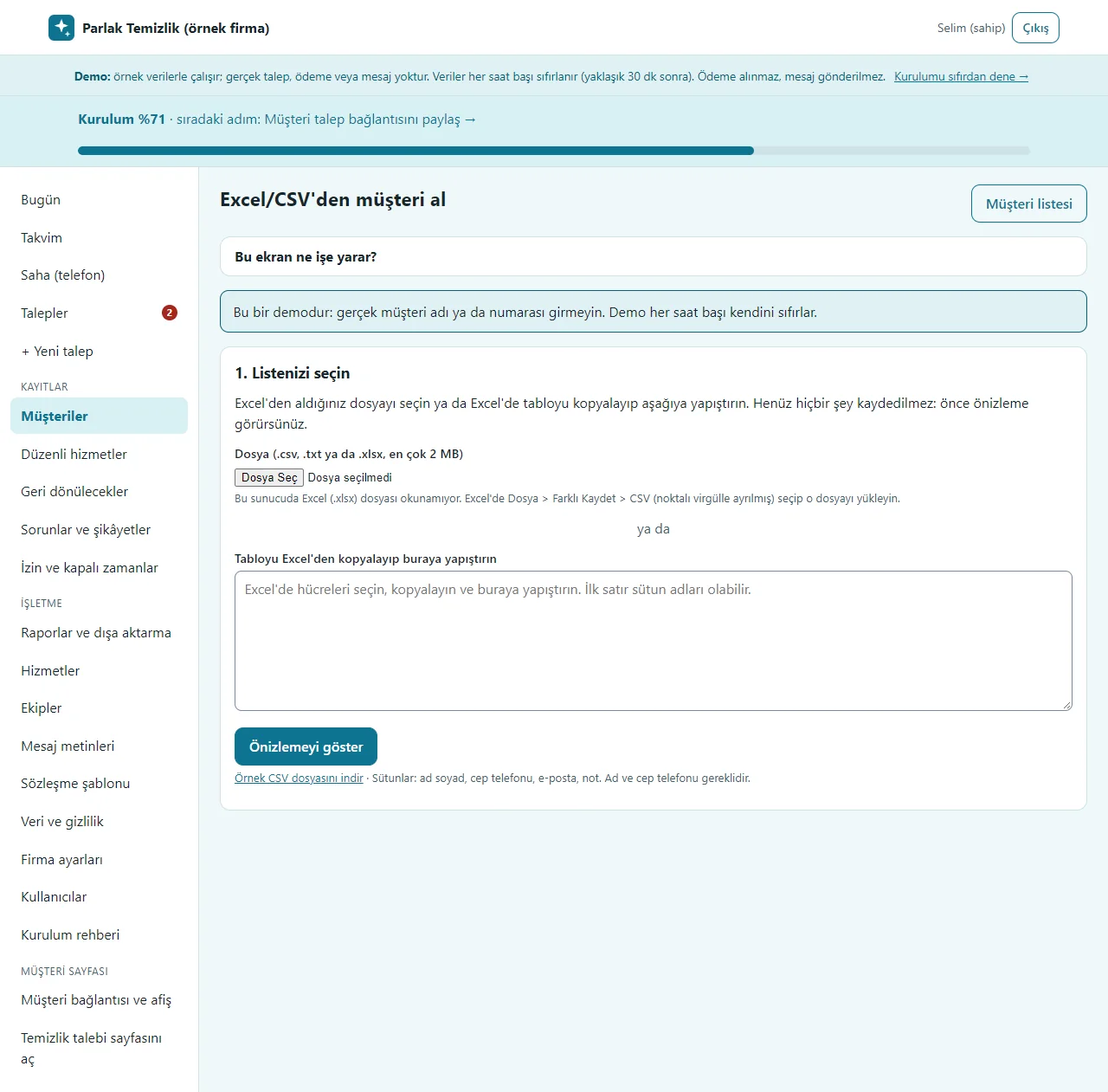
Importing the customer list
A file is picked or the table from Excel is pasted; the columns are recognised from the header. A preview is shown before saving; no request or message is created and the last import can be undone. An Excel file is not read directly: save it as CSV.
- On screen (Turkish interface)
- “Excel/CSV’den müşteri al” — import customers from Excel/CSV
- “Listenizi seçin” — choose your list
- “Önizlemeyi göster” — show the preview
- “Örnek CSV dosyasını indir” — download a sample CSV file
-
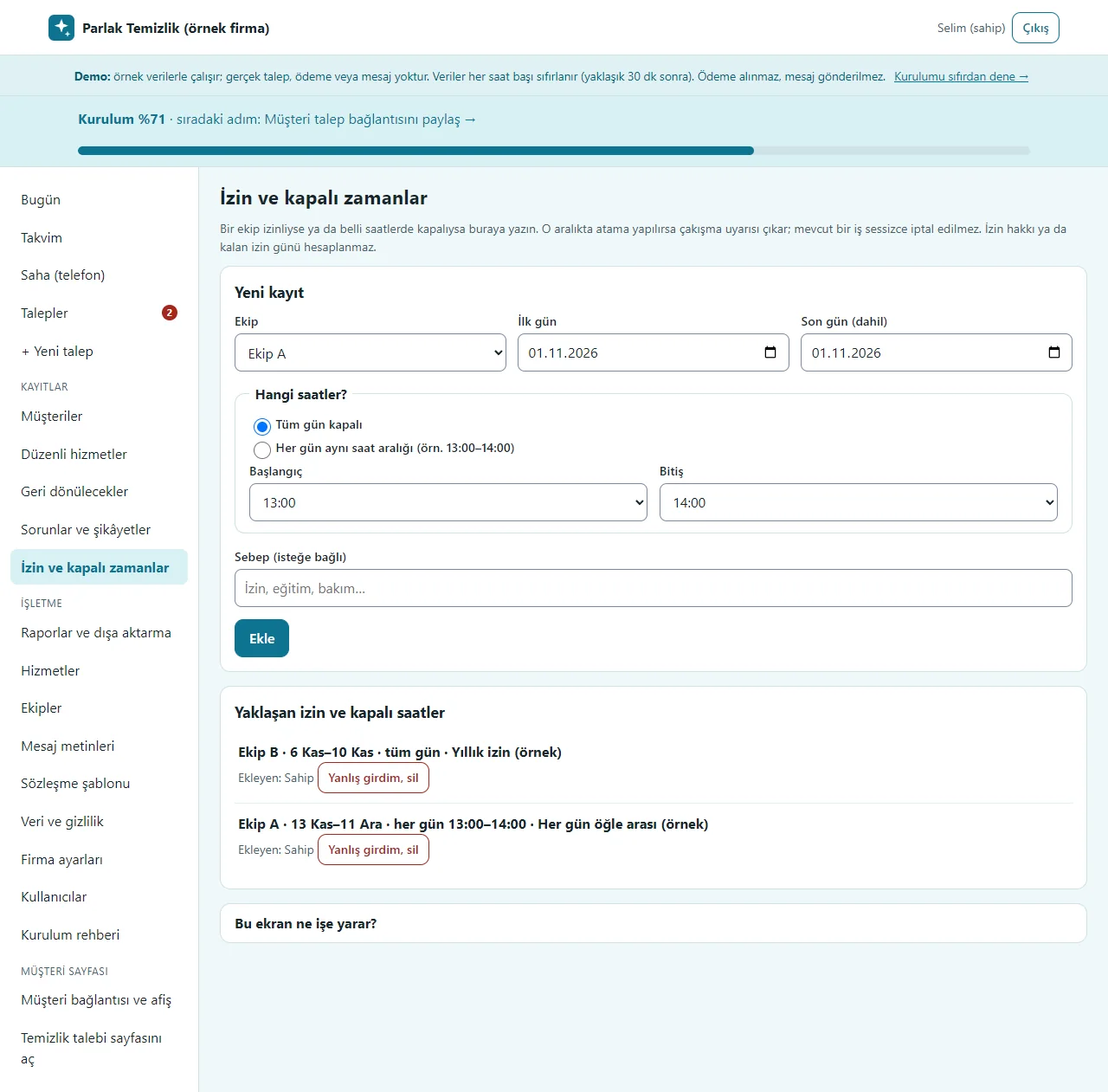
Time off and closed periods
If a crew is off for several days, or closed at certain hours every day, a first and a last day are entered. An assignment in that range warns and an existing job is not cancelled silently; upcoming time off is listed and a wrong entry is removed with “Yanlış girdim, sil”. No leave-day counter is worked out.
- On screen (Turkish interface)
- “İzin ve kapalı zamanlar” — time off and closed periods
- “Yeni kayıt” — new entry
- “Tüm gün kapalı” — closed all day
- “Her gün aynı saat aralığı” — the same hours every day
- “Yaklaşan izin ve kapalı saatler” — upcoming time off and closed hours
- “Yanlış girdim, sil” — entered by mistake, delete
-
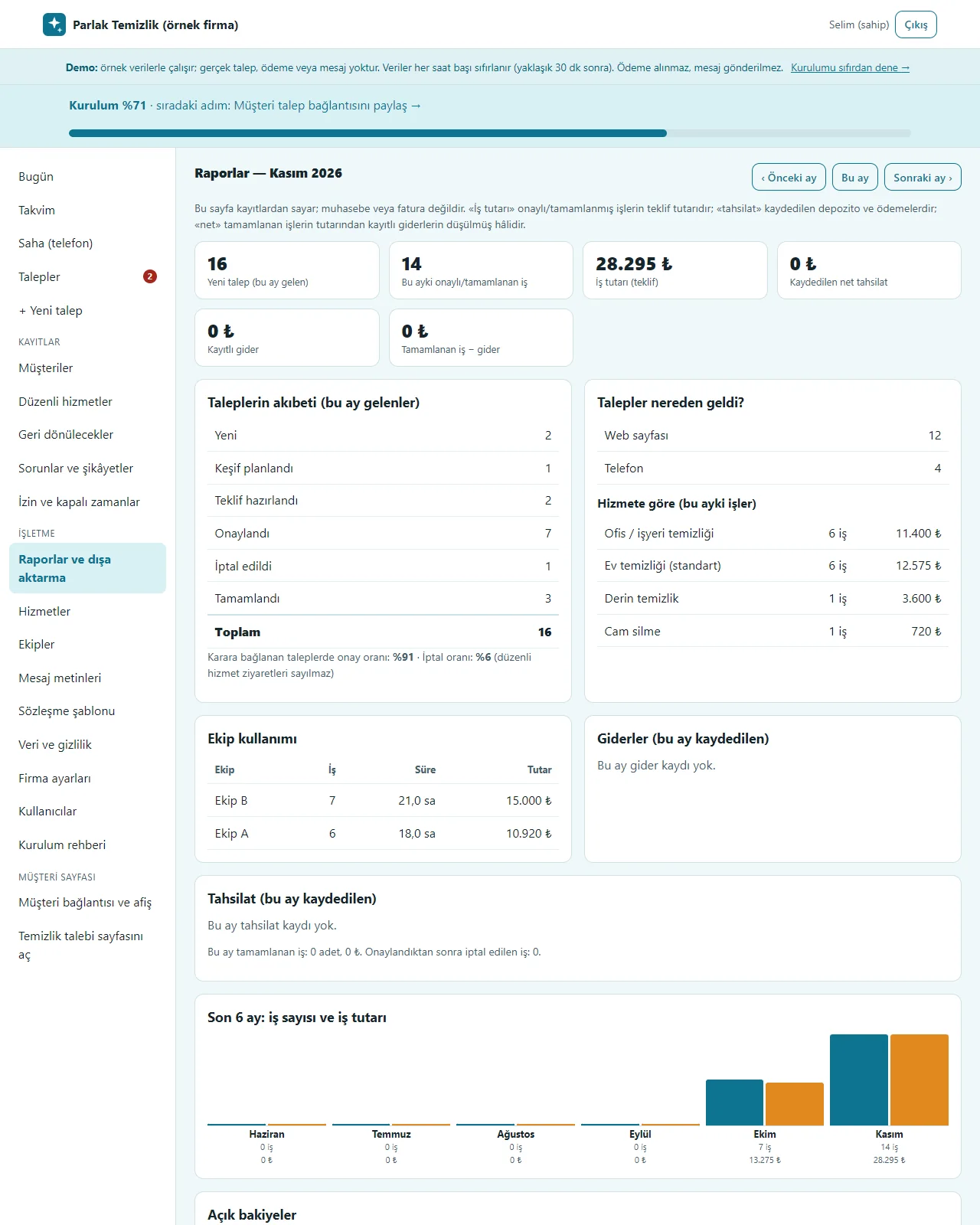
Reports
For the chosen month: requests received, approval and cancellation rates, where requests came from, jobs by service, crew use, recorded expenses and payments, the job value of the last 6 months and open balances. The page counts from the records; it is not accounting or an invoice. The list downloads as CSV.
- On screen (Turkish interface)
- “Raporlar” — reports
- “Talepler nereden geldi?” — where did requests come from?
- “Hizmete göre” — by service
- “Ekip kullanımı” — crew use
- “Giderler” — expenses
- “Tahsilat” — payments
- “Açık bakiyeler” — open balances
- “CSV dışa aktarma” — CSV export
-
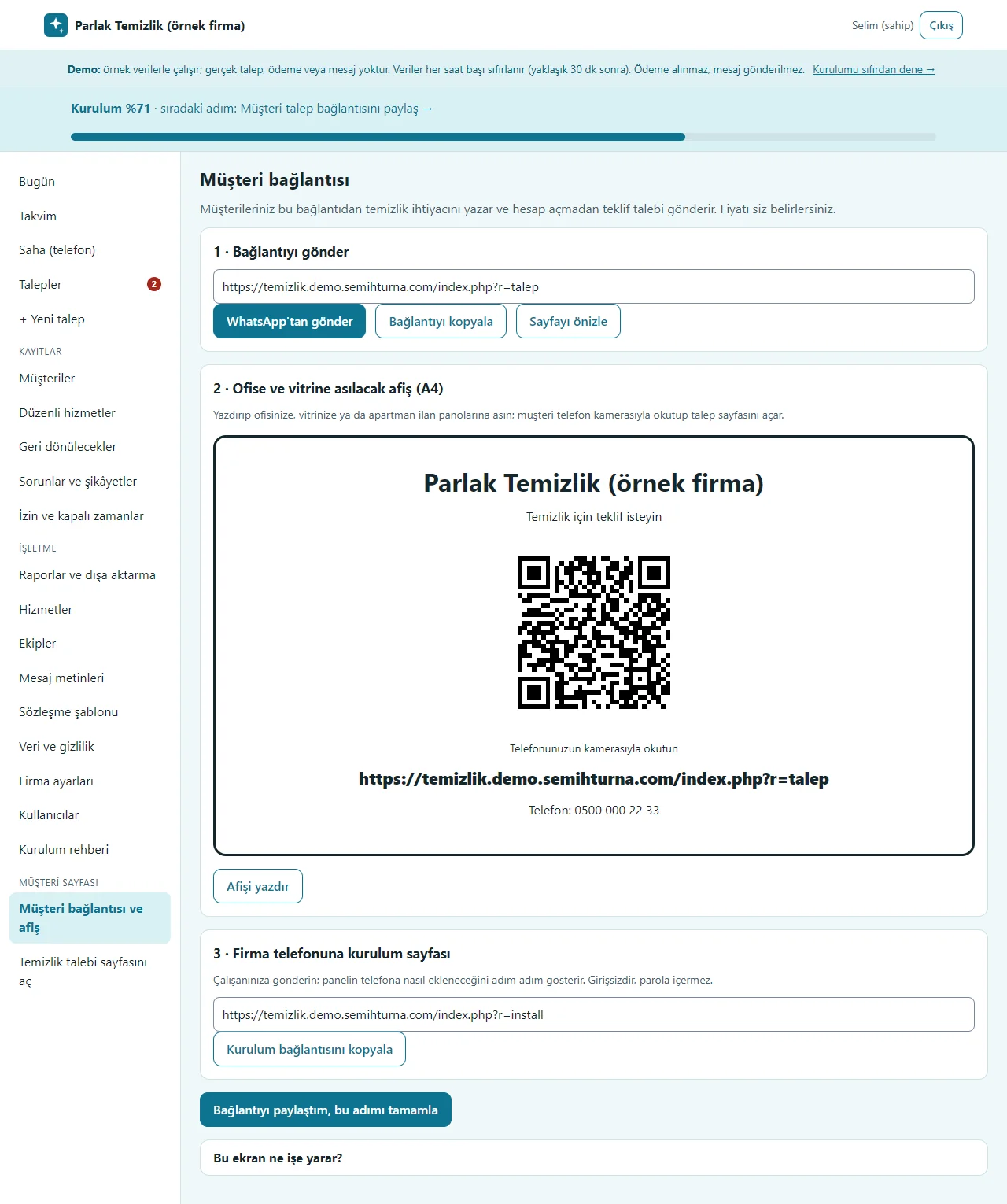
Customer link and a poster with a QR code
The address where a customer writes a request is sent on WhatsApp with one tap or copied. The A4 poster for the office, the shop window or an apartment notice board carries a QR code of that address. The link to the sign-in-free set-up page that puts the panel on a crew member’s phone is here as well.
- On screen (Turkish interface)
- “Müşteri bağlantısı” — customer link
- “WhatsApp’tan gönder” — send on WhatsApp
- “Bağlantıyı kopyala” — copy the link
- “Afişi yazdır” — print the poster
- “Kurulum bağlantısını kopyala” — copy the set-up link
-
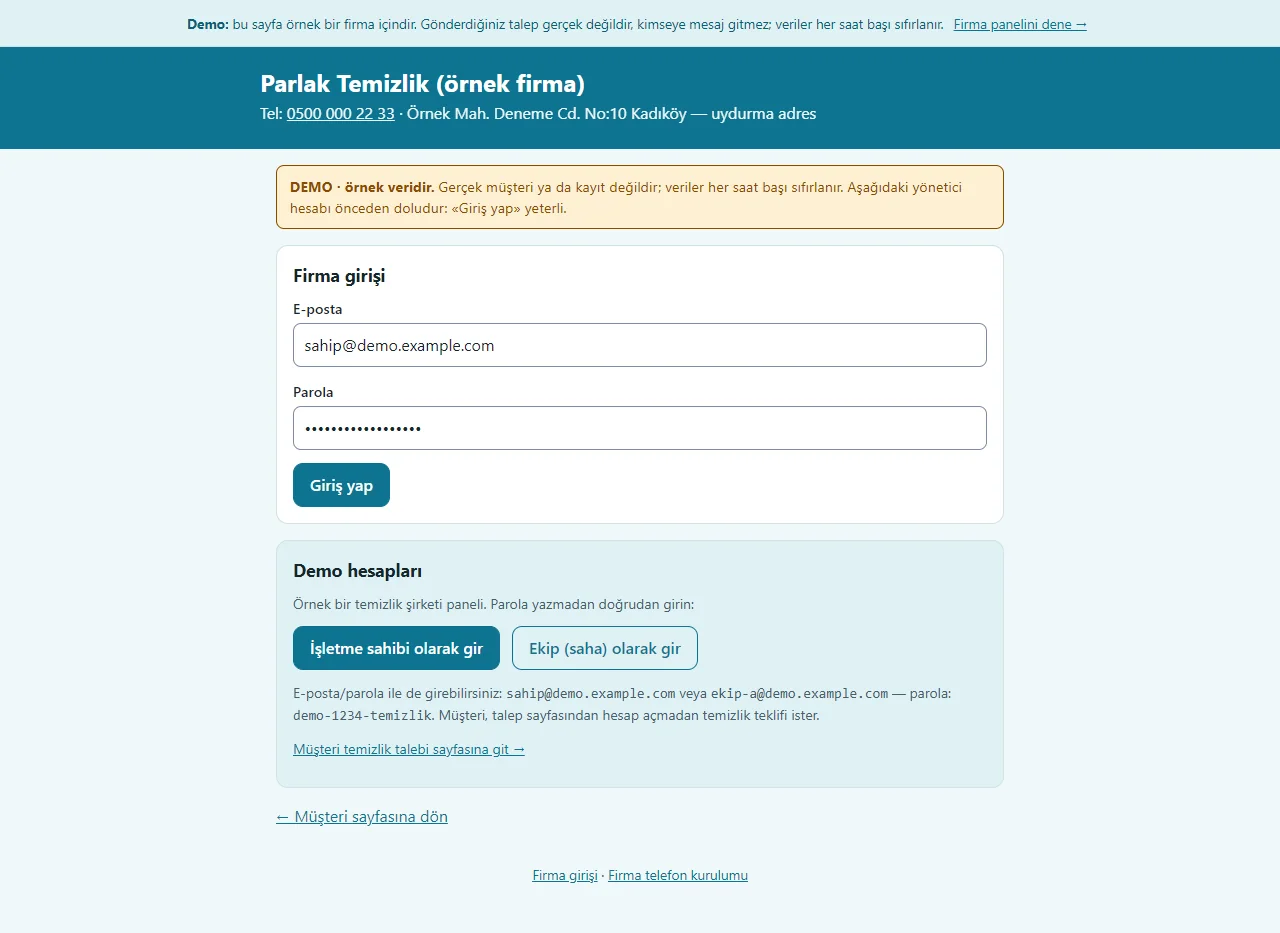
Demo sign-in page
The demo needs no password: one click on “İşletme sahibi olarak gir” (enter as owner) or “Ekip (saha) olarak gir” (enter as field crew), and the customer’s request page opens from here too. A normal installation asks for an e-mail and password.
- On screen (Turkish interface)
- “Demo hesapları” — demo accounts
- “İşletme sahibi olarak gir” — enter as owner
- “Ekip (saha) olarak gir” — enter as field crew
- “Müşteri temizlik talebi sayfasına git” — go to the customer request page
-
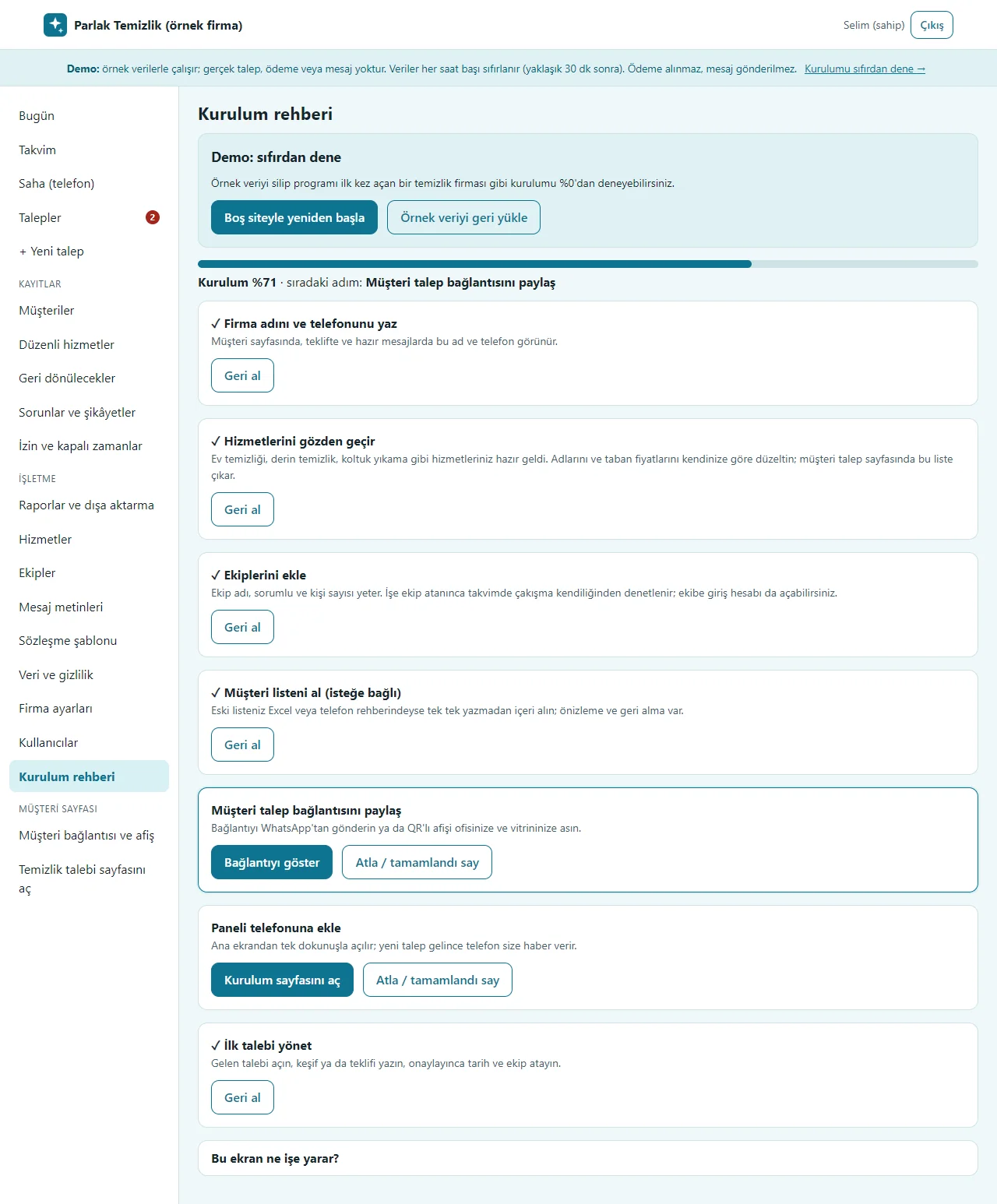
Setup guide
Seven steps show a progress percentage and the next step; steps tick themselves as they are done and any step can be skipped. In the demo, “Boş siteyle yeniden başla” at the top deletes the sample data and opens the guide at 0%, and “Örnek veriyi geri yükle” brings it back.
- On screen (Turkish interface)
- “Kurulum rehberi” — setup guide
- “Boş siteyle yeniden başla” — start with an empty site
- “Örnek veriyi geri yükle” — restore the sample data
- “Atla / tamamlandı say” — skip / count as done
- “Geri al” — undo
-
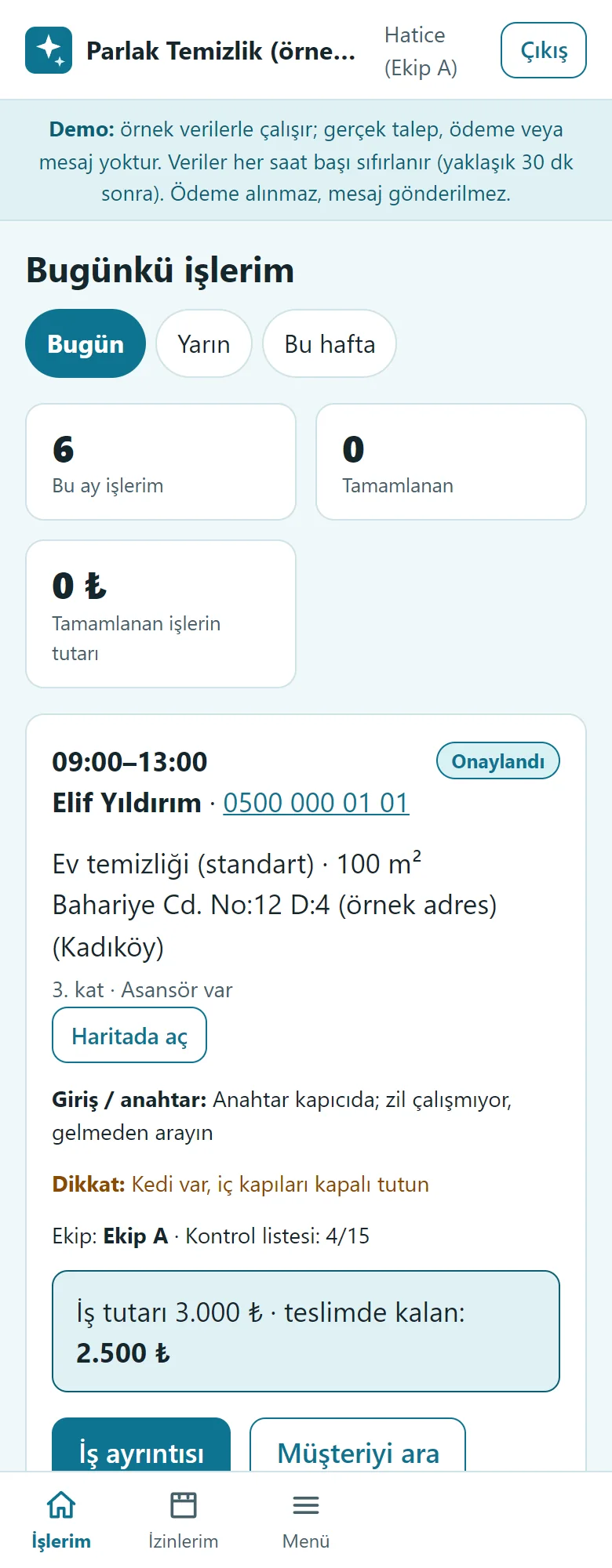
Crew on a phone: today’s jobs
The crew sees only the jobs assigned to it: time, customer, service, address and open in maps, the entry and key note, the pet warning and the job’s amount. There are Today, Tomorrow and This week tabs and the customer is called with one tap. There is no link to the owner’s screens.
- On screen (Turkish interface)
- “Bugünkü işlerim” — today’s jobs
- “Bugün” — today
- “Yarın” — tomorrow
- “Bu hafta” — this week
- “Haritada aç” — open in maps
- “İş ayrıntısı” — job details
- “Müşteriyi ara” — call the customer
-
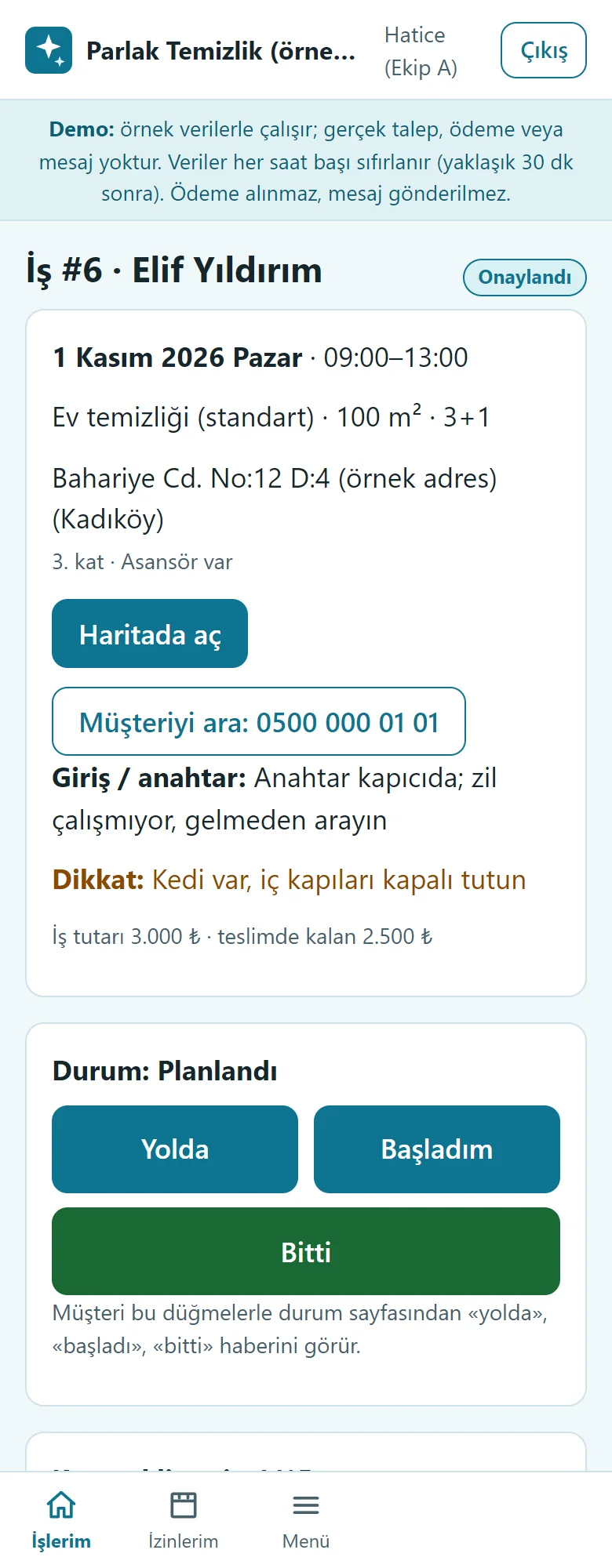
Crew on a phone: job details
When setting off the crew taps “Yolda” (on the way), when it starts “Başladım” (started) and when done “Bitti” (finished); the customer sees this on their own page. The same screen holds the customer’s notes and the job’s amount; another crew’s job does not open.
- On screen (Turkish interface)
- “Yolda” — on the way
- “Başladım” — started
- “Bitti” — finished
- “Giriş / anahtar” — entry / key
- “Haritada aç” — open in maps
-
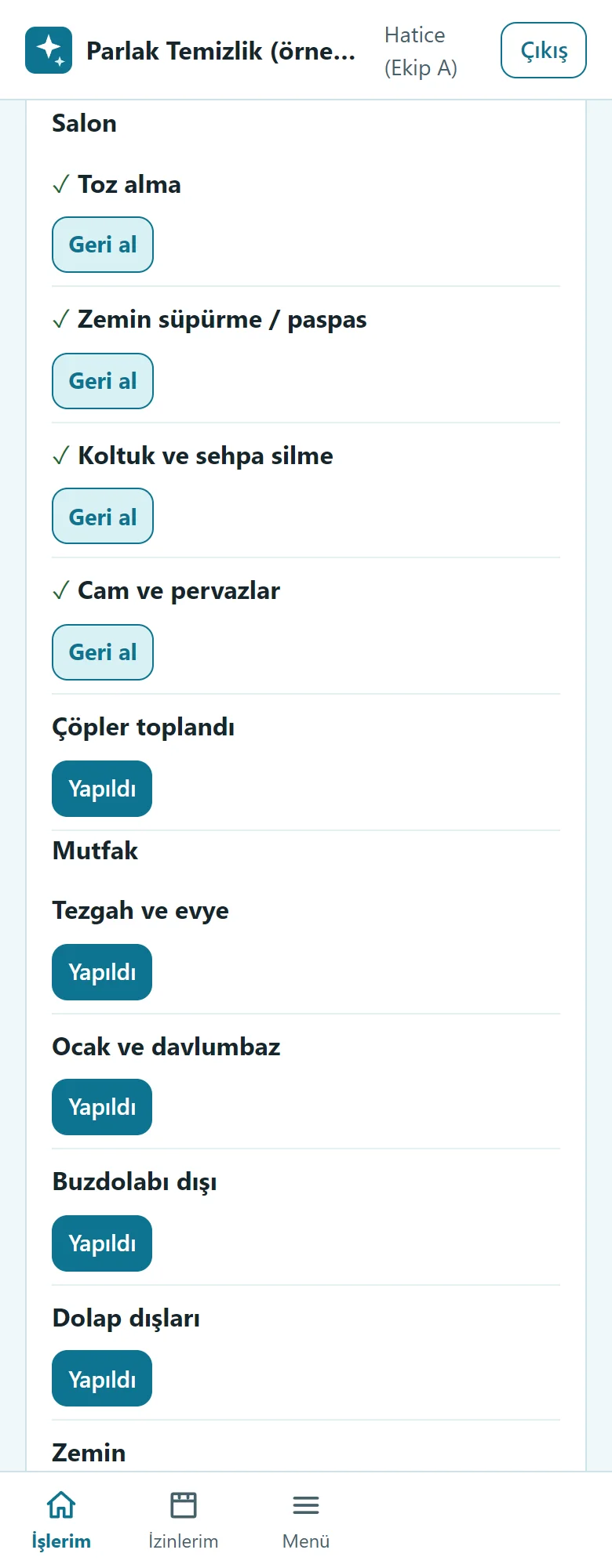
Crew on a phone: the checklist
Ready-made items by room and area (living room, kitchen…) are marked “Yapıldı” (done) with one tap and a wrong mark is removed with “Geri al”. If “Bitti” is tapped before the items are marked the program warns and does not block.
- On screen (Turkish interface)
- “Yapıldı” — done
- “Geri al” — undo
- “Bitti” — finished
-

Customer on a phone: the request form
Without an account the customer writes name, phone, service, area (m²), home type, wanted day and address, and accepts the privacy notice (KVKK). The form works out no price and takes no payment; on a wrong or missing field the error is shown on the same form without wiping what was typed.
- On screen (Turkish interface)
- “Temizlik teklif talebi” — cleaning quote request
- “Ad soyad” — full name
- “Cep telefonu” — mobile phone
- “Hizmet” — service
- “Alan (m²)” — area (m²)
- “Hangi gün? (istenen)” — which day? (wanted)
-

Customer on a phone: their own status page
After sending, the customer lands on their own page: the stage bar (request received, survey and quote, approved, scheduled, on the way, started, finished), the request summary, the quote items and the service contract. The address is hidden, the page can be added to the home screen and no payment is taken on this page.
- On screen (Turkish interface)
- “Temizlik başladı” — cleaning has started
- “Talep özeti” — request summary
- “Teklif” — quote
- “Hizmet sözleşmesi” — service contract
- “Bu sayfanın adresini kopyala” — copy this page’s address
-
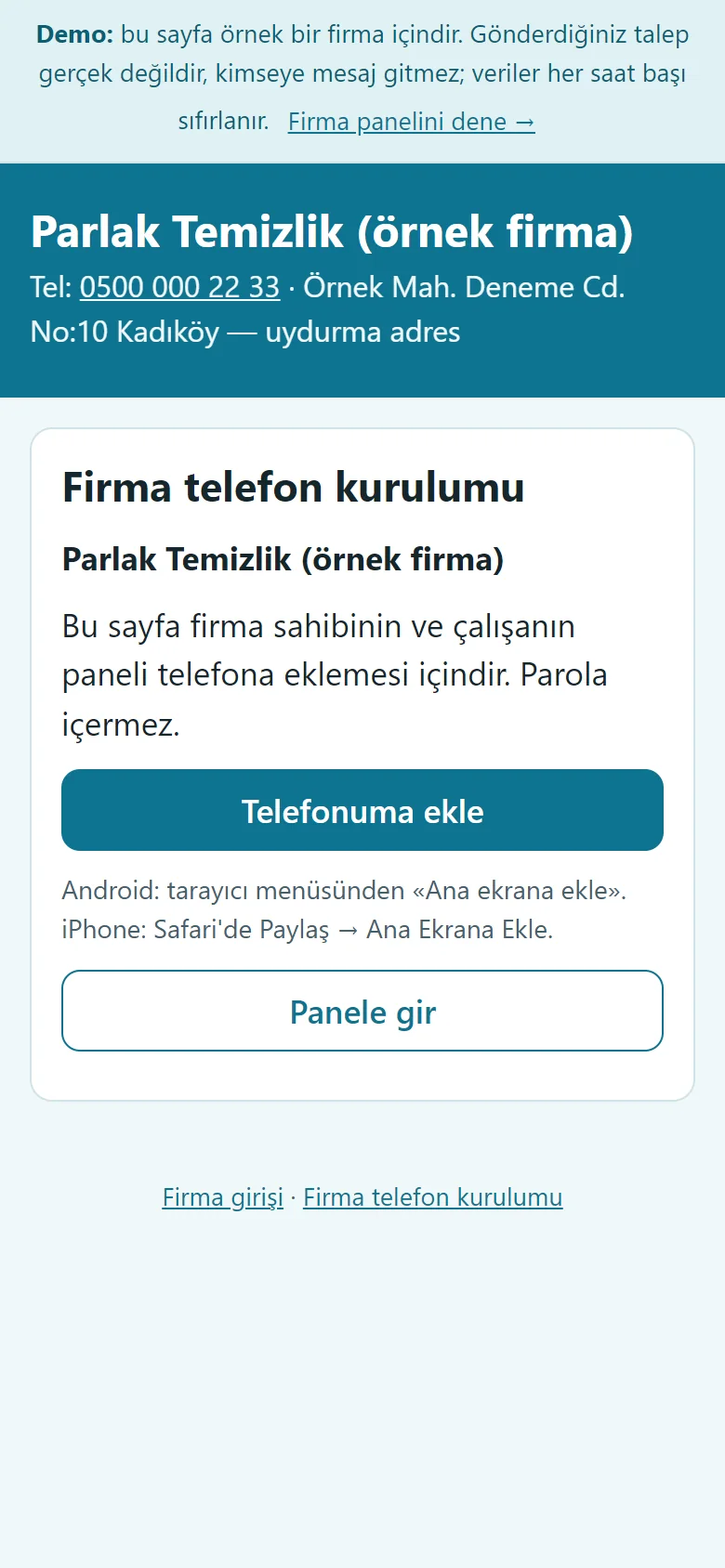
The firm’s set-up page on a phone
A sign-in-free page sent to the owner or a crew member: a large “Telefonuma ekle” button, instructions for Android and iPhone, and “Panele gir”. It holds no password; it has not been tried on a real phone.
- On screen (Turkish interface)
- “Firma telefon kurulumu” — firm phone set-up
- “Telefonuma ekle” — add to my phone
- “Panele gir” — go to the panel
-
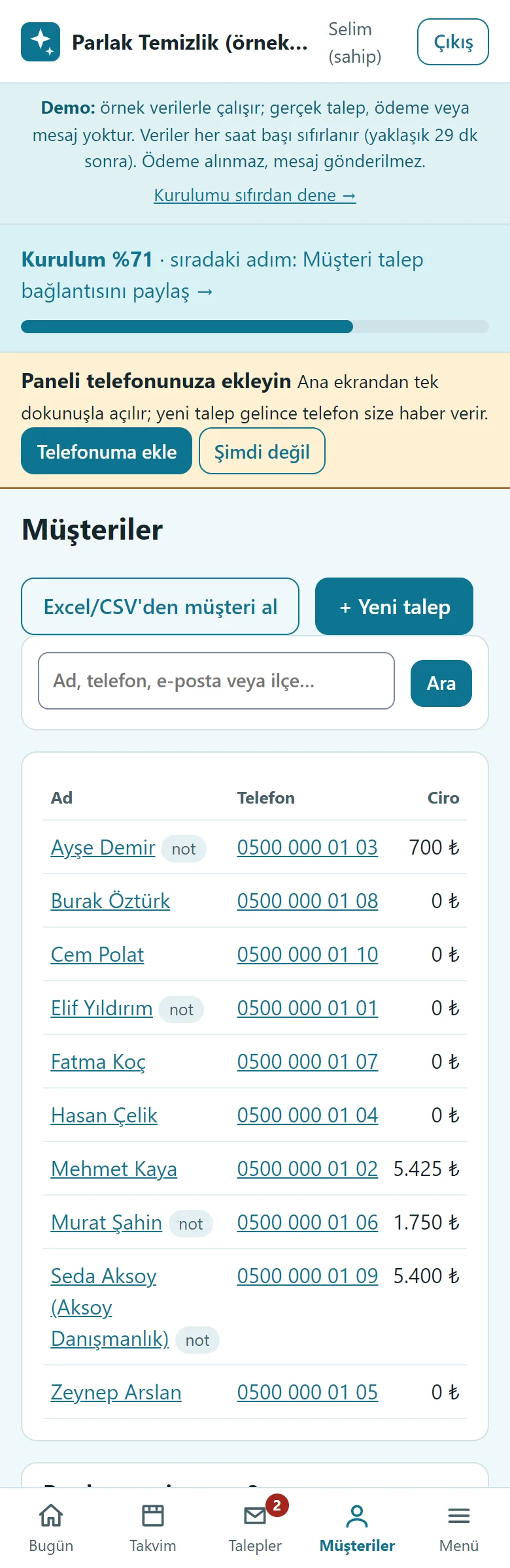
Customer list on a phone
The firm owner sees the customers at a glance on a phone: on a narrow screen the district, last-job and jobs columns are hidden and name, phone and turnover stay; the page does not scroll sideways. Search by name, phone, e-mail or district; a tap on a phone number calls the customer.
- What do they see at the end?
- The request becomes a survey or a quote, a crew is assigned (a clash is warned about), the crew taps On the way, Started and Finished on its phone, and the customer sees the stage on their own page.
- What is it good for?
- Requests, crews and regular customers no longer scatter across a notebook and the phone; who works where and when is on one screen.
Everything that is not included, and all limits
- Not delivered to a client and not used by a real business. The firm, customers, phone numbers, addresses and amounts on the screens are made up.
- There is no GPS, location tracking or route optimisation; the crew opens the address in maps. There is no automatic SMS or WhatsApp sending; a ready WhatsApp text opens and the firm sends it from its own phone; there is no bulk SMS.
- There is no online card payment or payment link; payments are entered by hand. There is no e-invoice, e-archive or accounting integration; the records are not an invoice or accounting.
- There is no price calculator and no AI feature; the firm sets the price itself and the program does not suggest one.
- There is no photo upload or photo report; the problem log is text only. There is no multi-branch use, offline mobile app, payroll or timesheet, or leave-entitlement counter.
- Adding to the phone and the free phone notification have not been tried on a real phone, in iPhone/Safari or in the WhatsApp in-app browser. The customer’s status page is a secret address; anyone who knows the link sees that request.
- An Excel file is not read directly; save it as CSV from Excel or paste the table.
- The file-access protections (.htaccess) are written in the code; they were not tried separately on a different server software. The live demo was run on one hosting account only.
- In the demo the data is reset every hour; sign-in is without a password through role buttons. A normal installation asks for an e-mail and password.
Delivery and sales status
How does it work?
You try the demo and tell us about your business, and we send you a quote. We install it and we host it. The yearly price includes installation, hosting, data transfer and support.
Price
The yearly list price is 3,000 TL (up to 10 crews). Installation, one year of hosting, data transfer, bug fixes and written usage support are included. Automatic SMS and WhatsApp sending and automatic notices to customers, online card payment, an app published in the app stores (there is a web app that installs on the phone), e-invoice / e-archive, GPS and route tracking, photo job reports, AI features and multiple branches are not included. New feature requests and work beyond the scope are priced separately and you are told before it is done.
Possible delivery options
Other delivery options
Requirements and version history
Installation requirements
- PHP 8.1 or newer (with the pdo_sqlite, mbstring and openssl extensions; curl is recommended for the phone notification) and HTTPS are needed; the data is kept in a SQLite file. The live demo was run on a single hosting account only.
Release notes
- No version has been delivered to a client. The sample-data demo is open to everyone and is shown with the screenshots on this page.
- 1.0.2 (1 November 2026): a “15 günlük deneme” (15-day trial) box in the setup wizard (when the time ends the panel and the customer request page close, no data is deleted, the whole period downloads as CSV; not shown in demo mode); in the customer list the district and last-job columns are hidden on a narrow screen and the jobs column too on a very narrow one (below 420 px); name, phone and turnover stay.
- 1.0.0 – 1.0.1 (1 November 2026): the first versions; a service catalogue, a sign-in-free customer request page and the customer’s own status page, a survey and job calendar, a crew clash warning, itemised quotes, recurring service series, a customer card and CSV import, a crew field screen and checklist, payment and expense records, multi-day crew time off, ready WhatsApp messages, a free phone notification (not tried on a real phone), privacy (KVKK) tools, a setup guide and an empty-start in the demo, roles. 1.0.1: gaps found in an AI security review were fixed.
Decisions not made yet
- Rights to use, modify, transfer and receive the source code: to be set in a written agreement; not decided yet.
- Whose name the hosting and domain are opened in, and where the software is installed, have not been decided yet.
There is no cart, customer account or online payment on this site for now. Reach out by phone, WhatsApp or the form; in a first conversation your need and the software’s fit are reviewed. The form does not create an order, a contract or a payment.