Dietitians and nutrition consultantsDemo with sample data
Dietitian Client and Measurement Tracking: screen-by-screen guide
The full version of the short description on the product page: every feature, how each screen is used step by step, all limits and the delivery details.
All features
The flows below were run in the app’s version with sample data (0.2.0). The screens were taken on 12 November 2026 from the live demo of the same version; the clinic is “Dyt. Selin Aksoy Beslenme Danışmanlığı (demo)” (sample), and its clients, phone numbers, measurements, plans, pre-consultation requests and amounts are made up. The application has no AI, no food database and sends no automatic messages.
- Client card: name, phone, date of birth, height, starting and goal weight, a goal note, source and a KVKK consent record; for quick adding a name and phone are enough; a client made passive keeps their history
- Anamnesis (health history): illness, medication, chronic disease, allergy, digestion, eating habits, activity, stress, sleep, diet history and expectations; each question is marked Yok (none), Var (yes) or Belirtilmedi (not stated); only the manager (the dietitian) sees it, the assistant and the client page never do
- Measurements and weight chart: weight, body fat, muscle mass, waist and hip are written, BMI is worked out for information; after two measurements a weight chart appears and the goal weight is shown as a dashed line; a wrong measurement is removed with “Yanlış girdim, sil” (entered by mistake, delete)
- Appointments: a day and a week view, free-slot suggestions, a clash warning for the same time (with an add-anyway option), a type of in clinic, online or by phone, a geldi (attended), gelmedi (no-show) or cancelled mark, a ready WhatsApp reminder
- Meal plan: a title, date range, a daily calorie and protein goal, a description; meal rows by day (time, meal, content, optional calories and protein); a quick six-meal template, copying a plan to another client, printing and a ready WhatsApp message to the client; the calories and protein are values you write yourself
- Session packages and payments: a package such as “8 seans” (8 sessions) with its fee; when a client booked in an appointment is marked geldi a session is taken off; part payments, a payment above the debt is refused, a printable receipt, a list of open balances and a ready WhatsApp debt reminder; the program takes no payment, it only records
- Client page (no sign-in): a private link that cannot be guessed; the client sees their active plan, weight chart, next appointment and sessions left; the link is sent from WhatsApp, copied or renewed; the anamnesis, notes and any other client’s data are not on this page
- Pre-consultation form: a sign-in-free public link (website, Instagram, a QR A4 poster or a ready WhatsApp message); a person writes their name, phone, goal and a suitable time and confirms that their personal data is used only for the pre-consultation; the form asks no health question; a new request sends a notification to the manager’s phone; the list has “Aradım” (called), “Vazgeçti” (gave up) and “Danışan olarak kaydet” (save as a client) and warns if the phone number is the same as a registered client’s
- Importing the client list from Excel/CSV: a file (CSV or .xlsx) or a paste, a sample CSV, columns recognised from their headings, a preview before saving (new, already registered, repeated and faulty rows; “Alma” for an unwanted one), phone-format and duplicate checks, undoing the last import with one click; nobody is sent a message during an import and no payment, appointment or plan is created
- Multi-day leave and closed hours: a start and an end date, “all day” or the same hours every day; no new appointment is given in that range (it can be given on purpose with “Yine de ekle”), it does not appear in free-slot suggestions and the closed dates show on the client page; if a planned appointment exists it warns but cancels none; an upcoming-leave list and “Yanlış girdim, sil”; no remaining-leave-days calculation is made
- Reports (manager only): the chosen month’s appointments (attended, planned, no-show, cancelled), payments, new clients, the conversion from pre-consultation to client and the first-to-last weight difference over the last 30 days; based on recorded data only
- Calculators (manager only): body mass index, basal metabolic rate (Mifflin-St Jeor), daily energy by activity level, an ideal-weight range, the waist-to-hip ratio; height, weight and age come ready from the client card; worked out in the browser and not saved; not a diagnosis or medical advice
- Roles: manager (the dietitian) and assistant; the assistant does appointments, measurement entry, packages and payments, pre-consultations, client-list import and leave, and never sees plans, the anamnesis, reports, calculators or settings (not in the menu, a button or a card), and the server refuses an address typed by hand
- Today screen: today’s appointments with one-tap Geldi and Gelmedi; upcoming appointments, clients due for a measurement, packages about to run out and open balances; a closed “Bu ekran ne işe yarar?” (what is this screen for) box on every screen
- Installs on a phone or computer; a free phone notification to the manager for a new appointment, client or pre-consultation request (no SMS); backup and CSV export
- A setup guide (nine steps) with a “Kurulum %77 · sıradaki adım” (setup 77% · next step) progress bar; in the demo a “Demo hesapları” (demo accounts) box, “Boş siteyle yeniden başla” (start again with an empty site) and “Örnek veriyi geri yükle” (restore the sample data)
Screen by screen: how it is used
The interface in these screens is Turkish; only the captions and explanations on this page are in English. The screens were taken on 12 November 2026 from the live demo of version 0.2.0 of the app. The clinic (“Dyt. Selin Aksoy Beslenme Danışmanlığı (demo)”), clients, phone numbers, measurements, plans, pre-consultation requests and amounts are made up.
- Who uses it?
- A dietitian working alone or with a small team, the assistant who handles appointments and payments, and the client who wants to see their plan.
- Where do they start?
- A client is recorded with a first measurement and a goal weight; an appointment is given, a meal plan is prepared from the quick template and the client is sent the link to a page of their own, without a sign-in. New clients come in through the pre-consultation form or your old list is imported from Excel.
What do they do on screen? Step by step
-
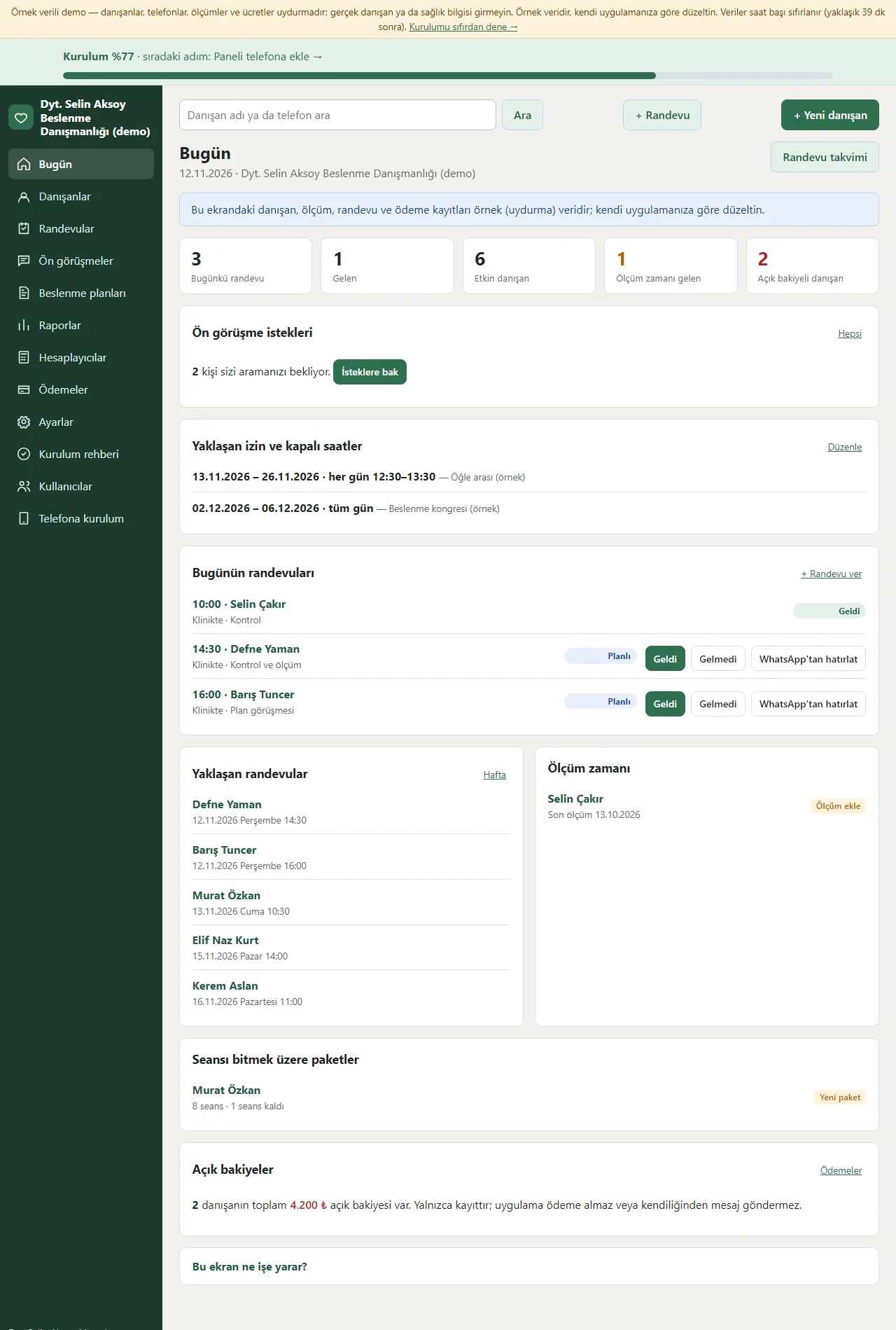
0.2.0 · 12 November 2026 Today screen
Today’s appointments, the numbers of clients attended and active, and the numbers of clients due for a measurement and with an open balance show as tappable boxes; today’s appointments have one-tap Geldi and Gelmedi, and each opens a ready WhatsApp reminder. If a pre-consultation request is waiting, a card at the top reminds you of it; upcoming appointments, upcoming leave and closed days, clients due for a measurement, packages about to run out and open balances are listed one under another. The setup percentage sits at the top.
- On screen (Turkish interface)
- “Ön görüşme” — pre-consultation
- “Geldi” — attended
- “Gelmedi” — did not come
- “Açık bakiye” — open balance
- “Ölçüm zamanı” — measurement due
-
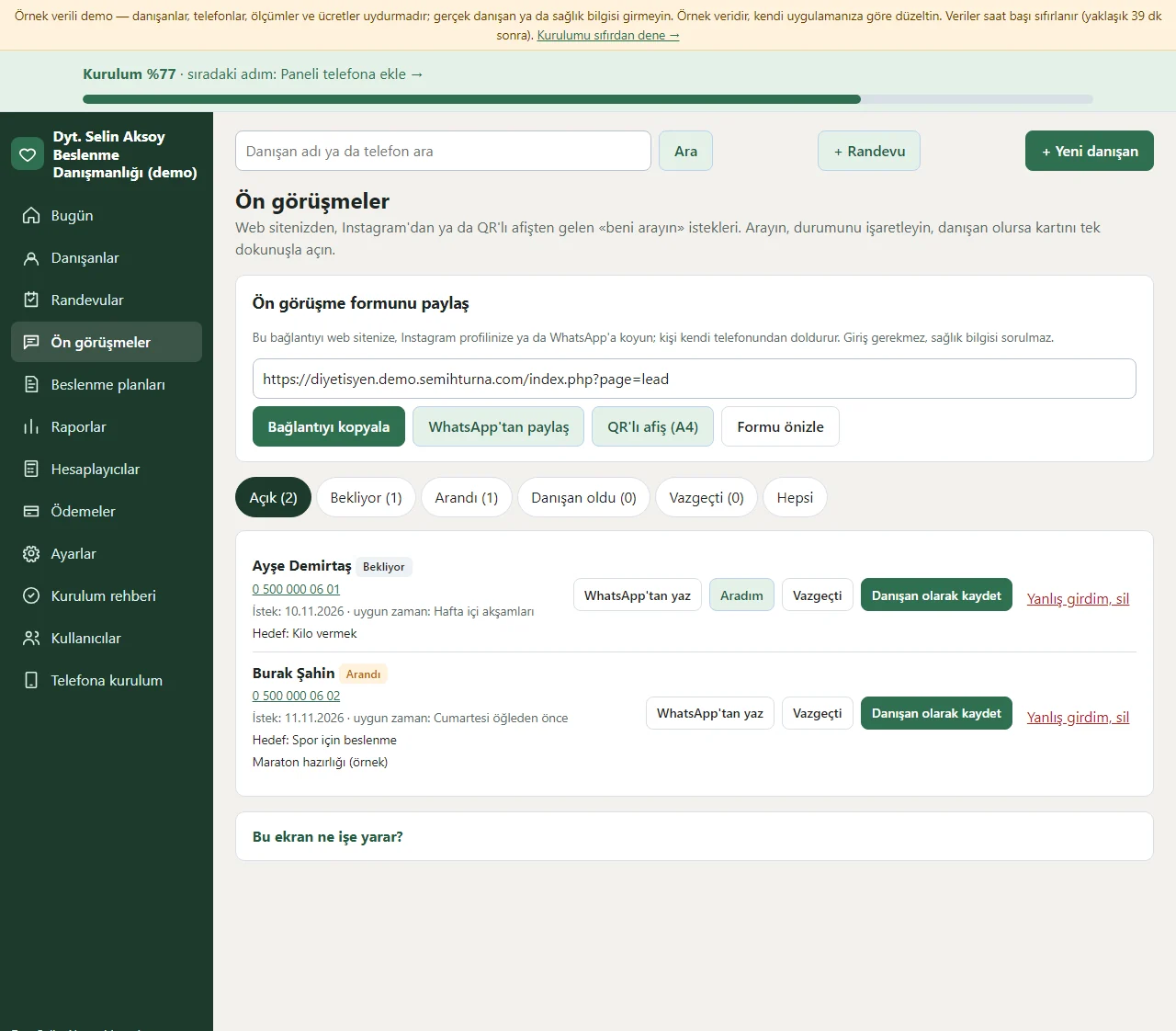
0.2.0 · 12 November 2026 Pre-consultations
At the top sits the link to the pre-consultation form: the “Bağlantıyı kopyala”, “WhatsApp’tan paylaş” and QR “A4 afiş” buttons put it on your website, Instagram or the door; “Formu önizle” opens the form. Below, the requests that arrive are filtered by status (Açık, Bekliyor, Arandı, Danışan oldu, Vazgeçti); each row has the person’s name, phone, goal and a suitable time, and the buttons “WhatsApp’tan yaz”, “Aradım”, “Vazgeçti” and “Danışan olarak kaydet”. If the phone number is the same as a registered client’s the row warns you. When a new request arrives the manager’s phone gets a notification.
- On screen (Turkish interface)
- “Bekliyor” — waiting
- “Arandı” — called
- “Danışan olarak kaydet” — save as a client
- “QR’lı A4 afiş” — QR poster (A4)
-
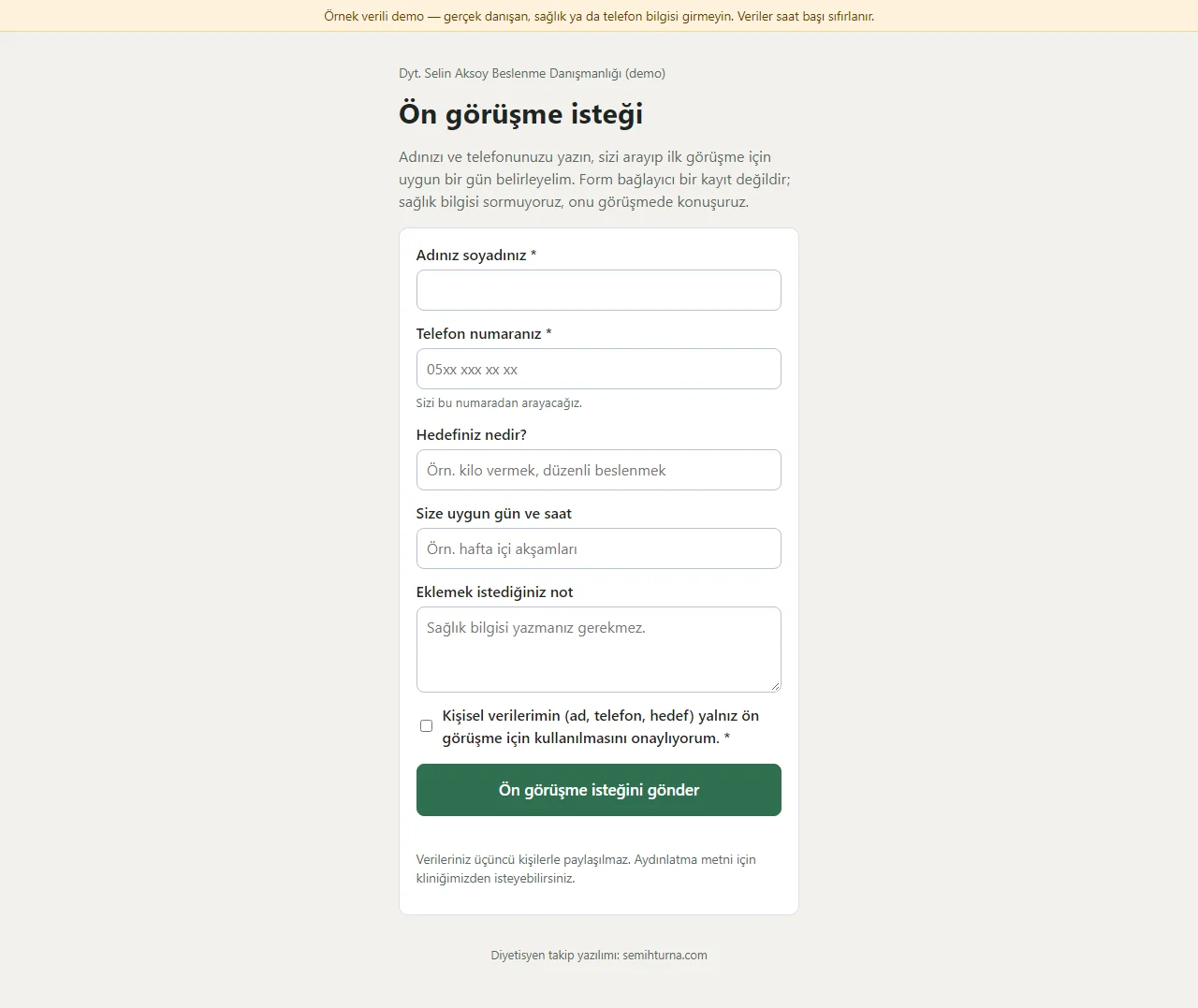
0.2.0 · 12 November 2026 Pre-consultation form
A person opens the link on their own phone without an account and writes their name, phone, goal, a suitable day and time and, if they like, a note; they confirm that their personal data is used only for the pre-consultation. The form has no health question (you talk about that at the visit, in the anamnesis); it has a hidden field for bots and an hourly sending limit. After sending, a thank-you page opens and the request drops into the list above.
- On screen (Turkish interface)
- “Ön görüşme isteği” — pre-consultation request
- “Hedefiniz nedir?” — what is your goal?
- “Size uygun gün ve saat” — a day and time that suit you
-
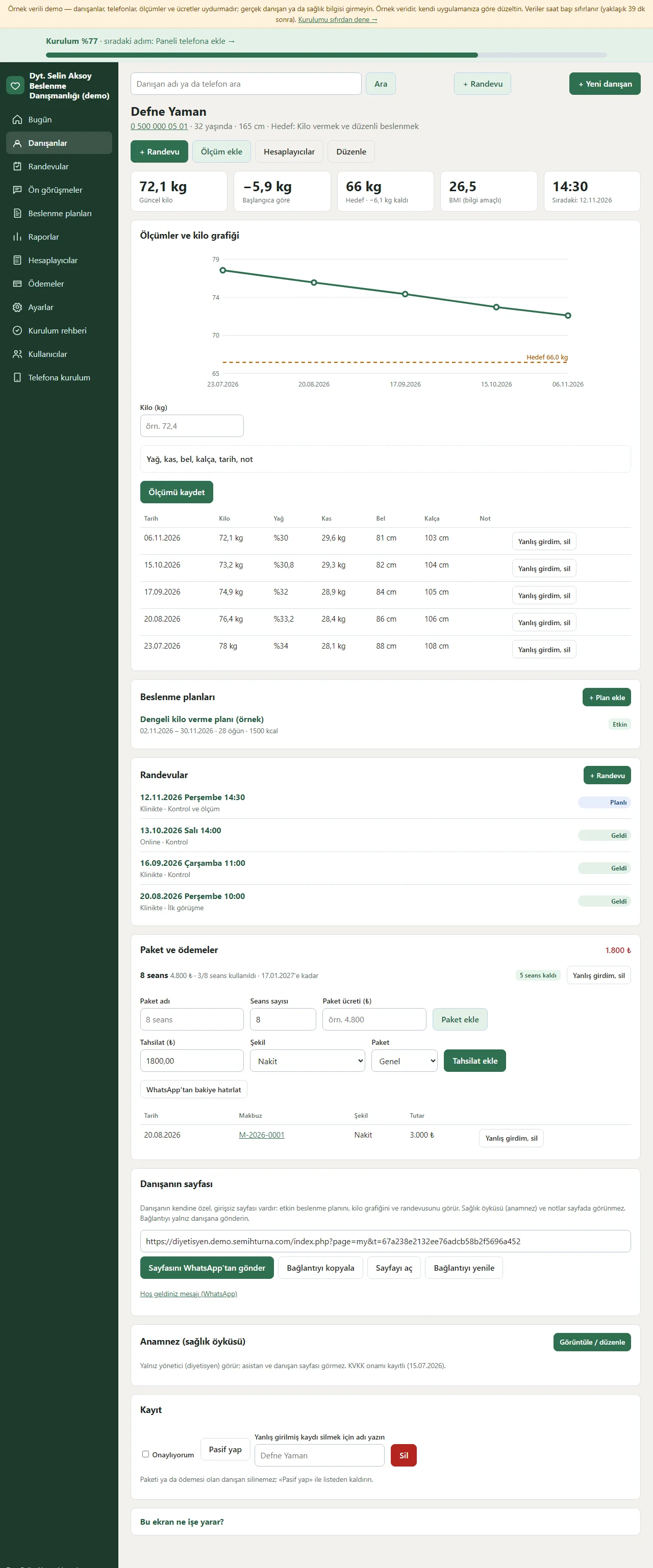
0.2.0 · 12 November 2026 Client card
The client’s current weight, the change since the start, the weight left to the goal, BMI and the next appointment show at the top. Below are a weight chart with a goal line, the measurement history (weight, fat, muscle, waist, hip; “Yanlış girdim, sil” on each row), meal plans, appointments, the package and payments, the link to the client’s sign-in-free page (send from WhatsApp, copy, renew) and the anamnesis section, all on one page. The Hesaplayıcılar button at the top brings the client’s height, weight and age ready.
- On screen (Turkish interface)
- “Ölçüm ekle” — add a measurement
- “Yanlış girdim, sil” — entered by mistake, delete
- “Plan ekle” — add a plan
- “Paket ekle” — add a package
- “Hesaplayıcılar” — calculators
-
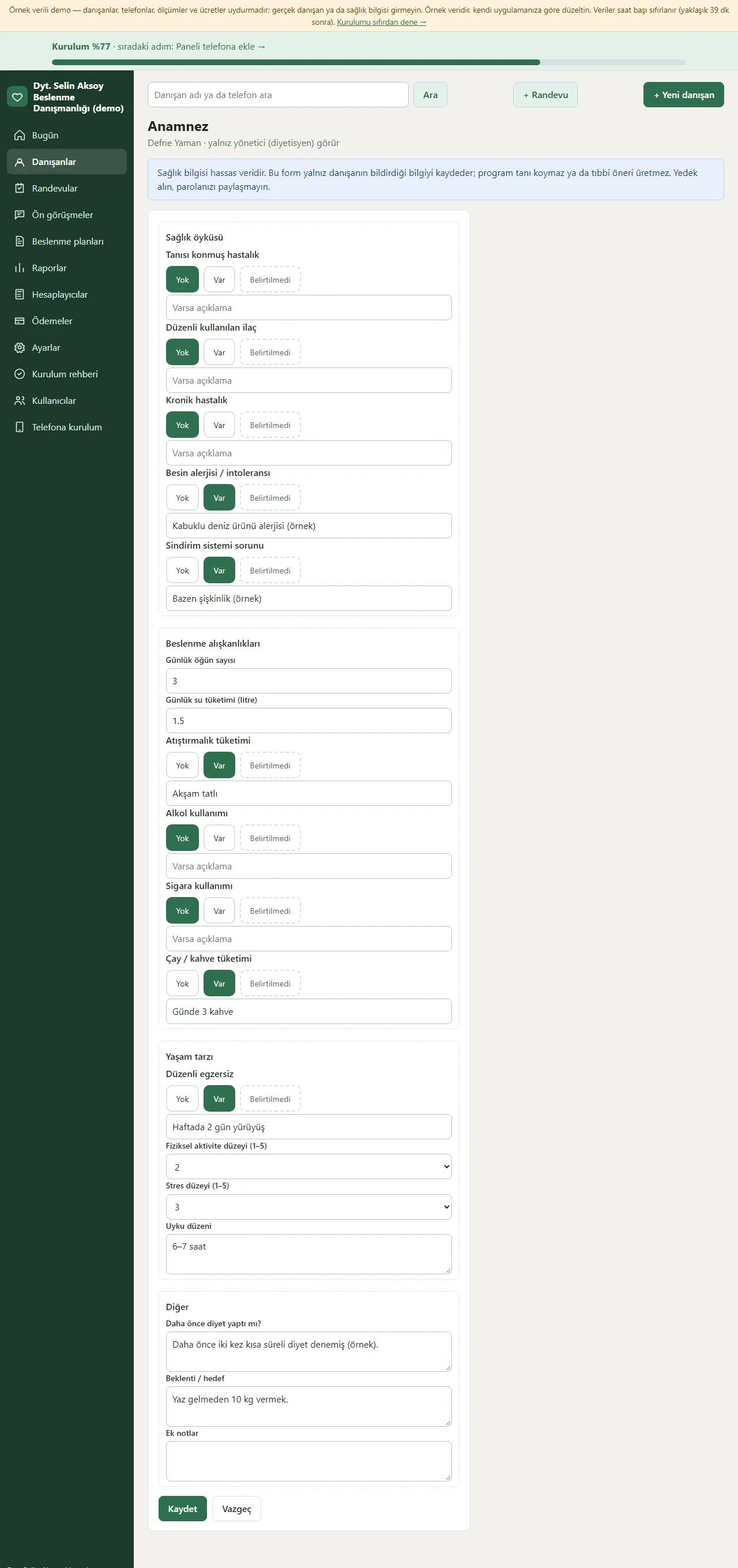
0.2.0 · 12 November 2026 Anamnesis
The health history is a grouped form: illness, medication, chronic disease, allergy and digestive problems are marked Yok, Var or Belirtilmedi; the number of meals, water, alcohol, smoking, tea and coffee, exercise, activity and stress level, sleep, diet history and expectations are written. The top of the page says only the manager sees it and that the program makes no diagnosis; the assistant and the client page never see this form.
- On screen (Turkish interface)
- “Yok” — none
- “Var” — yes
- “Belirtilmedi” — not stated
-
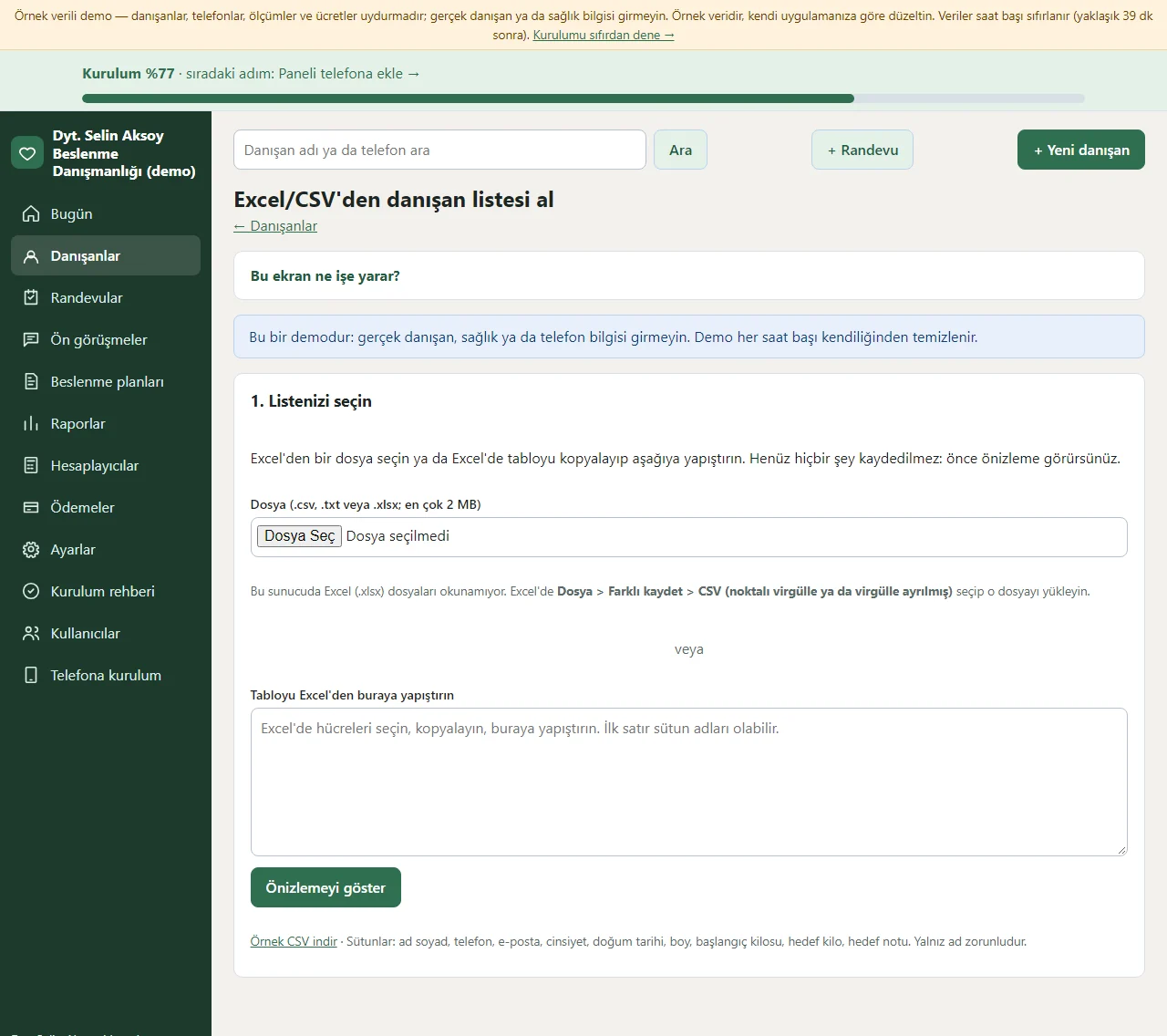
0.2.0 · 12 November 2026 Importing the client list from Excel
A client list you kept before in Excel or another program is not retyped: you choose the file (CSV or .xlsx) or copy the table and paste it into the box; “Örnek CSV indir” gives the template to fill in. The program recognises the columns from their headings and you change them from a list if one is wrong. The preview shows new, already registered, repeated-in-the-file and faulty rows apart and you mark an unwanted row “Alma”; no record is added until you press “Ekle”. Nobody is sent a message during an import; the last import is undone with one click.
- On screen (Turkish interface)
- “Örnek CSV indir” — download a sample CSV
- “Alma” — skip
- “Ekle” — add
- “Son içe aktarmayı geri al” — undo the last import
-
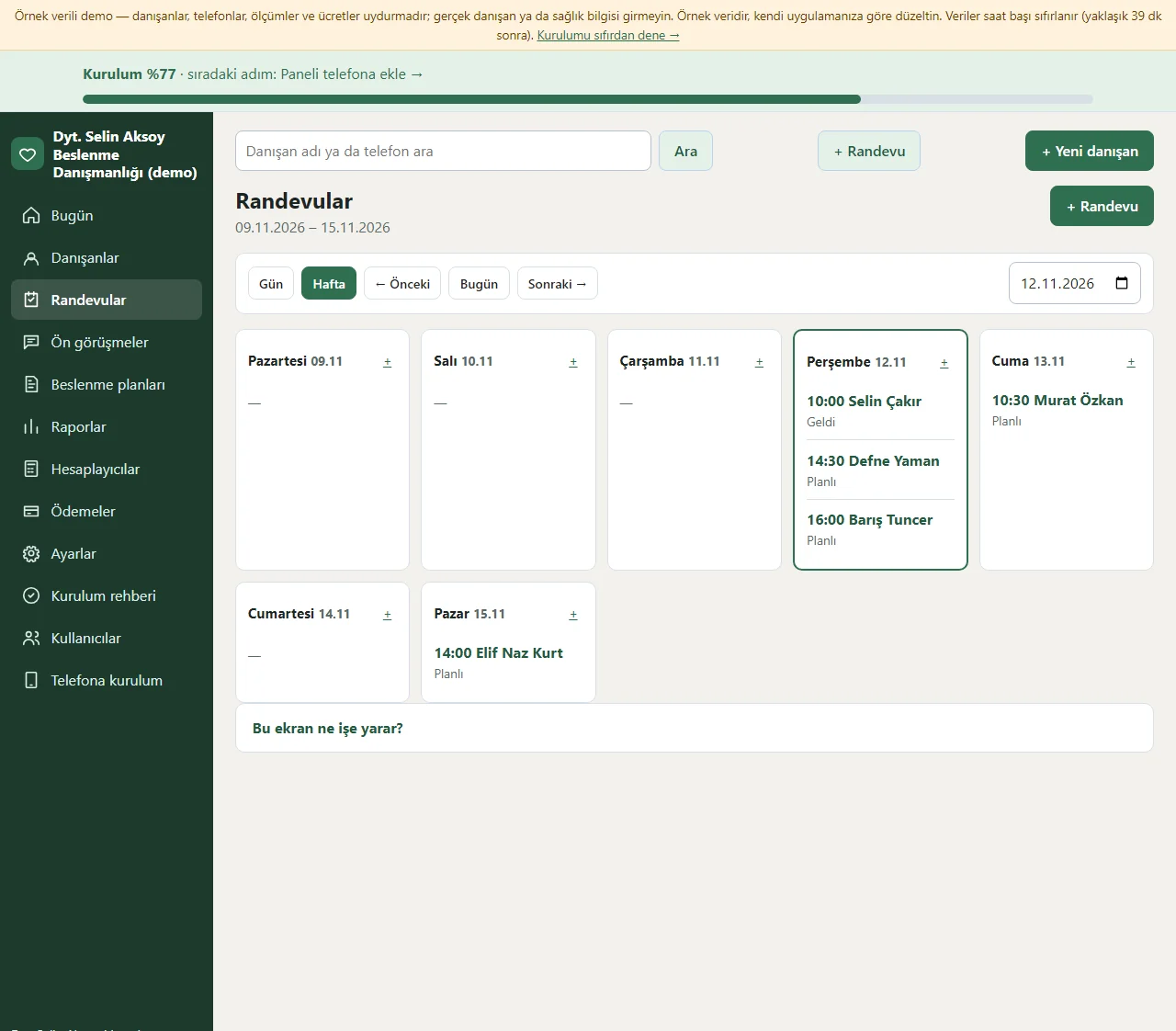
0.2.0 · 12 November 2026 Appointment calendar
In the week view the days are columns and each day’s appointments show in time order with a Planlı, Geldi or Gelmedi status; there are Gün and Hafta buttons, previous and next week and go to date. If the day you open is leave or a closed day (in the day view), a strip at the top of the screen shows it and no new appointment is given that day (it can be given on purpose with “Yine de ekle”). A new appointment shows free-slot suggestions and a second appointment at the same time raises a warning. When Geldi is marked, one session comes off the client’s package.
- On screen (Turkish interface)
- “Gün” — day
- “Hafta” — week
- “Planlı” — scheduled
- “Yine de ekle” — add anyway
-
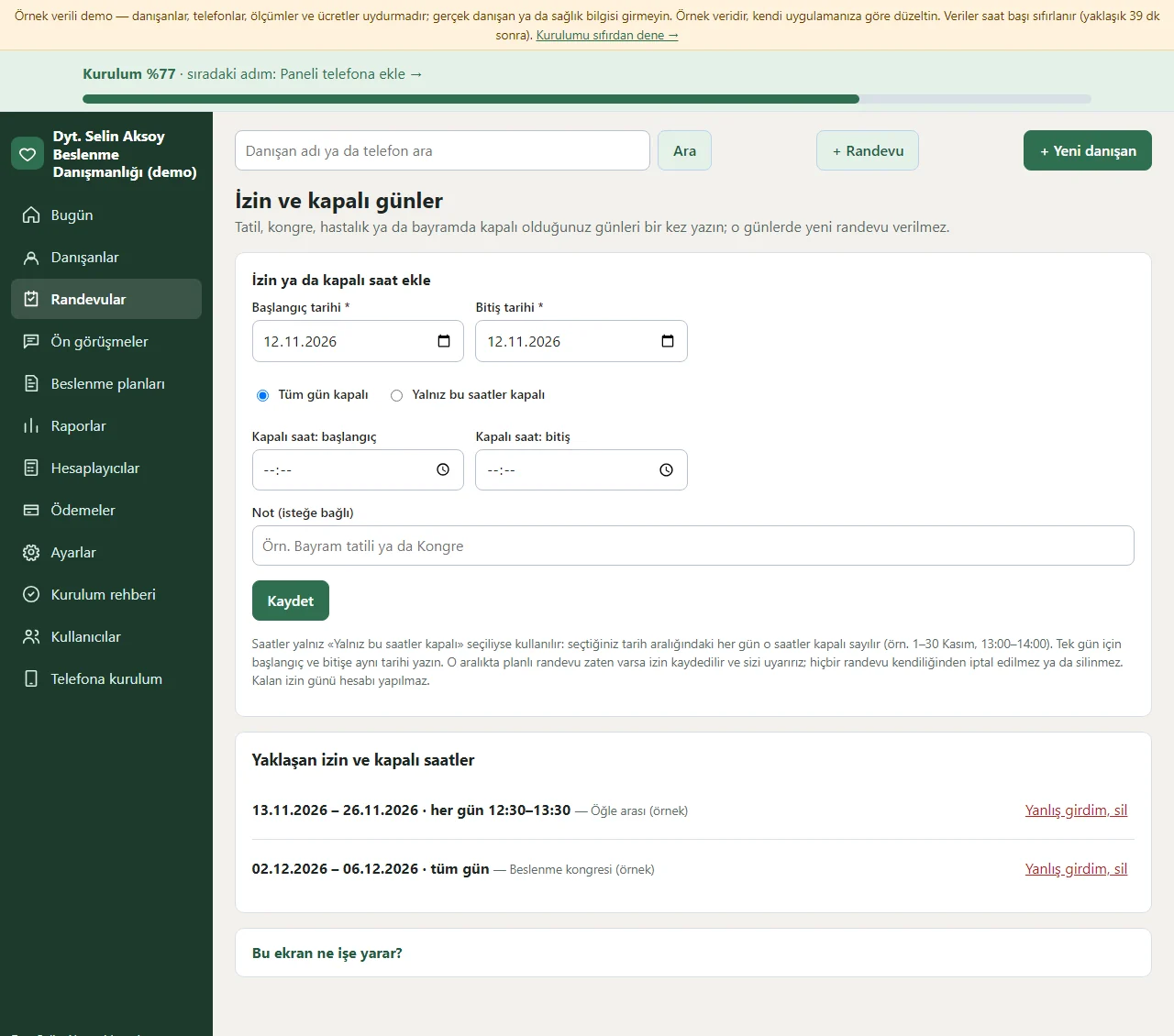
0.2.0 · 12 November 2026 Leave and closed days
The days you are closed for a holiday, a congress, illness or a bayram are written once with a start and an end date; “Tüm gün kapalı” (closed all day) or “Yalnız bu saatler kapalı” (closed only at these hours, for example every day 13:00–14:00 from 1 to 30 November) is chosen. In that range no new appointment is given, it does not appear in free-slot suggestions and the closed dates show on the client’s page (the note does not). If a planned appointment is already in the range the leave is saved and warns you; no appointment is cancelled on its own. Upcoming leave is listed below and a wrong entry is removed with “Yanlış girdim, sil”. No remaining-leave-days calculation is made.
- On screen (Turkish interface)
- “Tüm gün kapalı” — closed all day
- “Yalnız bu saatler kapalı” — closed only at these hours
- “Yaklaşan izin ve kapalı saatler” — upcoming leave and closed hours
-
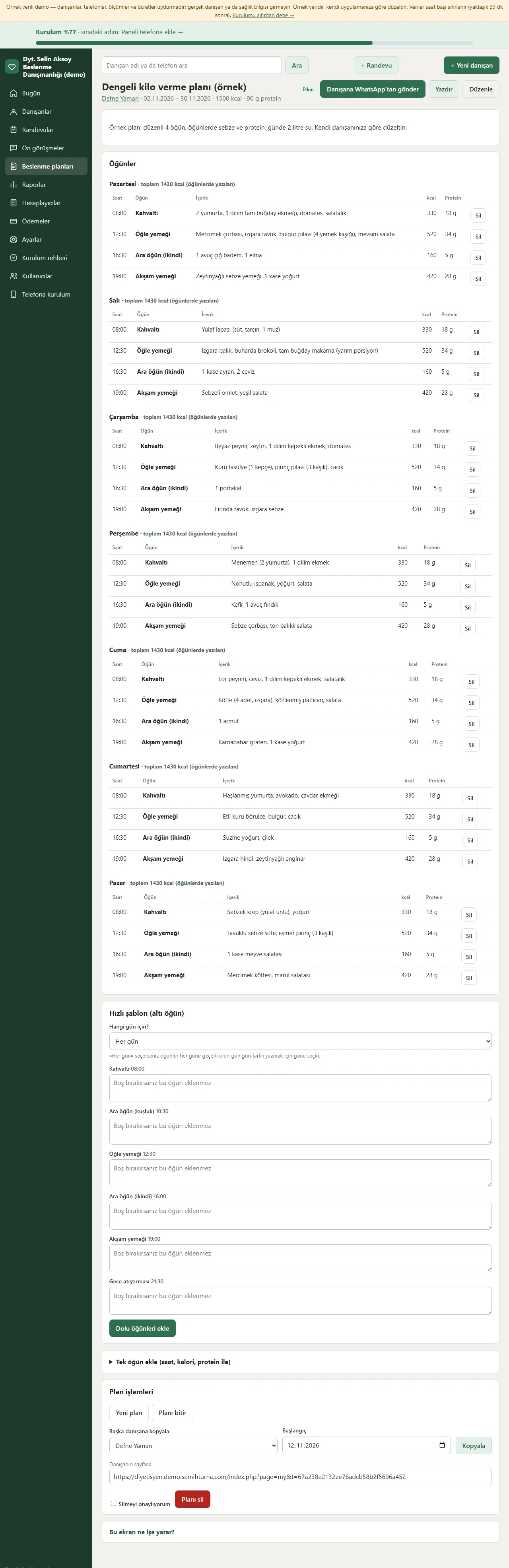
0.2.0 · 12 November 2026 Meal plan
The plan’s title, client, date range, daily calorie and protein goal and description sit at the top; below is a meal table by day (time, meal, content, calories, protein) with each day’s total. The send-to-the-client-on-WhatsApp, print and edit buttons are at the top; the quick six-meal template fills the meals with one tap, and a plan is copied to another client. There is no food database; calories and protein are written by hand.
- On screen (Turkish interface)
- “Danışana WhatsApp’tan gönder” — send to the client on WhatsApp
- “Yazdır” — print
- “Öğün” — meal
- “Kahvaltı” — breakfast
-
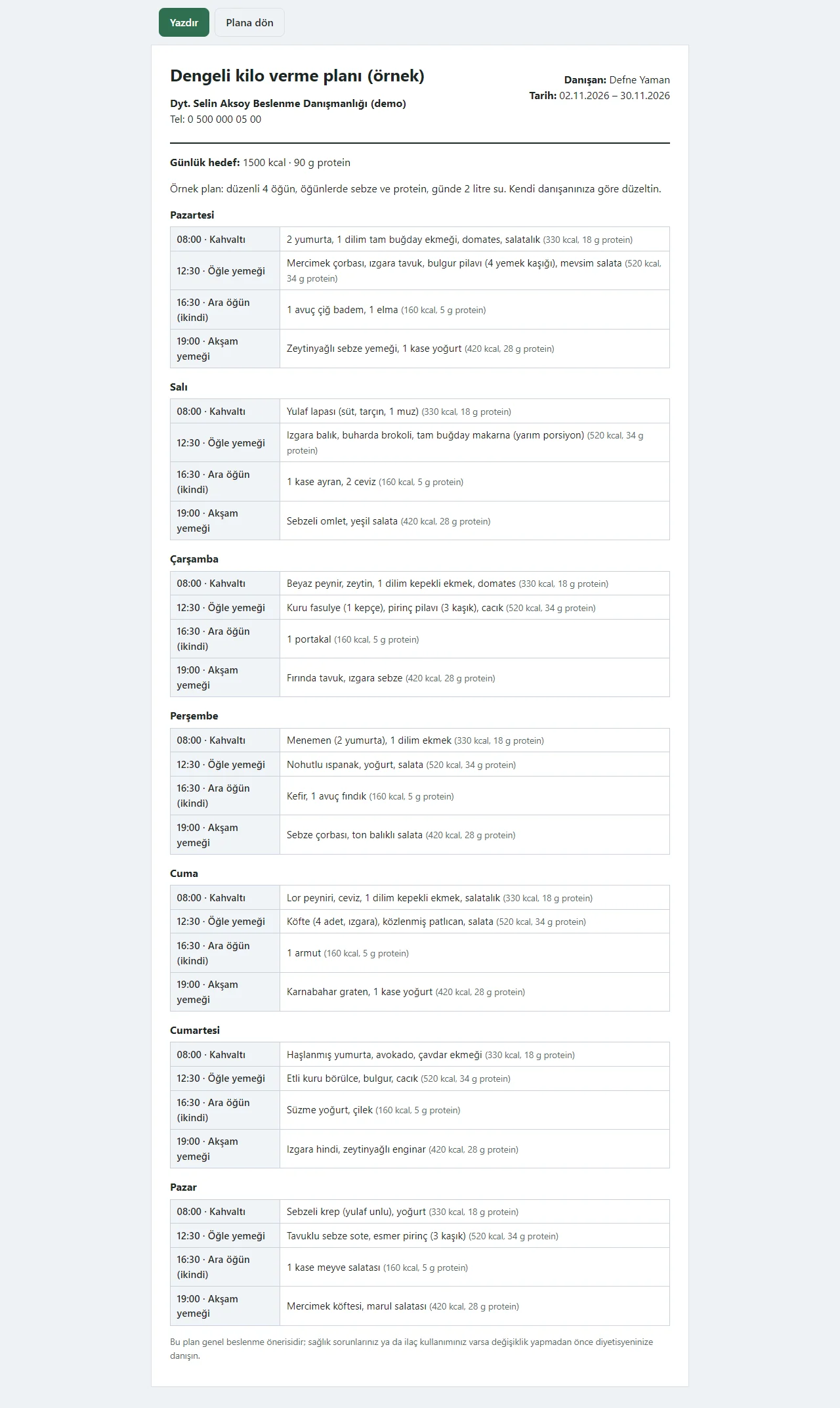
0.2.0 · 12 November 2026 Printing the plan
The print button opens the plan on a plain page: the clinic’s name and phone, the client’s name, the date range, the daily goal and the meal list by day. The page is sent to paper or a PDF through the browser’s print window.
- On screen (Turkish interface)
- “Yazdır” — print
- “Plana dön” — back to the plan
-
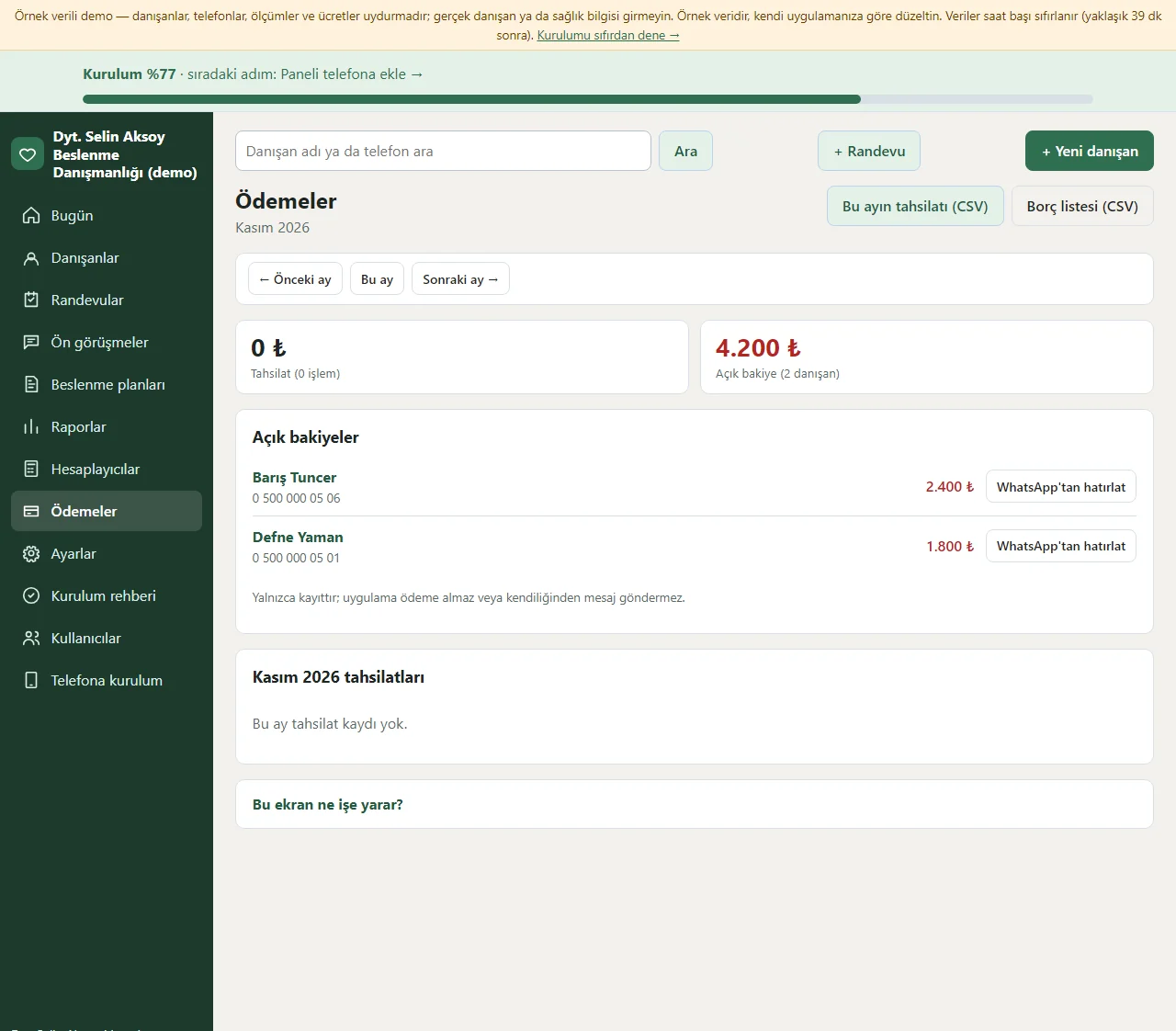
0.2.0 · 12 November 2026 Payments
The month’s payments and the total open balance sit at the top and the clients with an open balance are listed below; each row has a ready WhatsApp reminder. The month’s payments and the debt list download as CSV. A payment is recorded from the package and the client card and a receipt is printed. The program takes no payment, it only records.
- On screen (Turkish interface)
- “Açık bakiye” — open balance
- “Tahsilat” — payment received
- “Borç listesi” — debt list
- “WhatsApp’tan hatırlat” — remind on WhatsApp
-
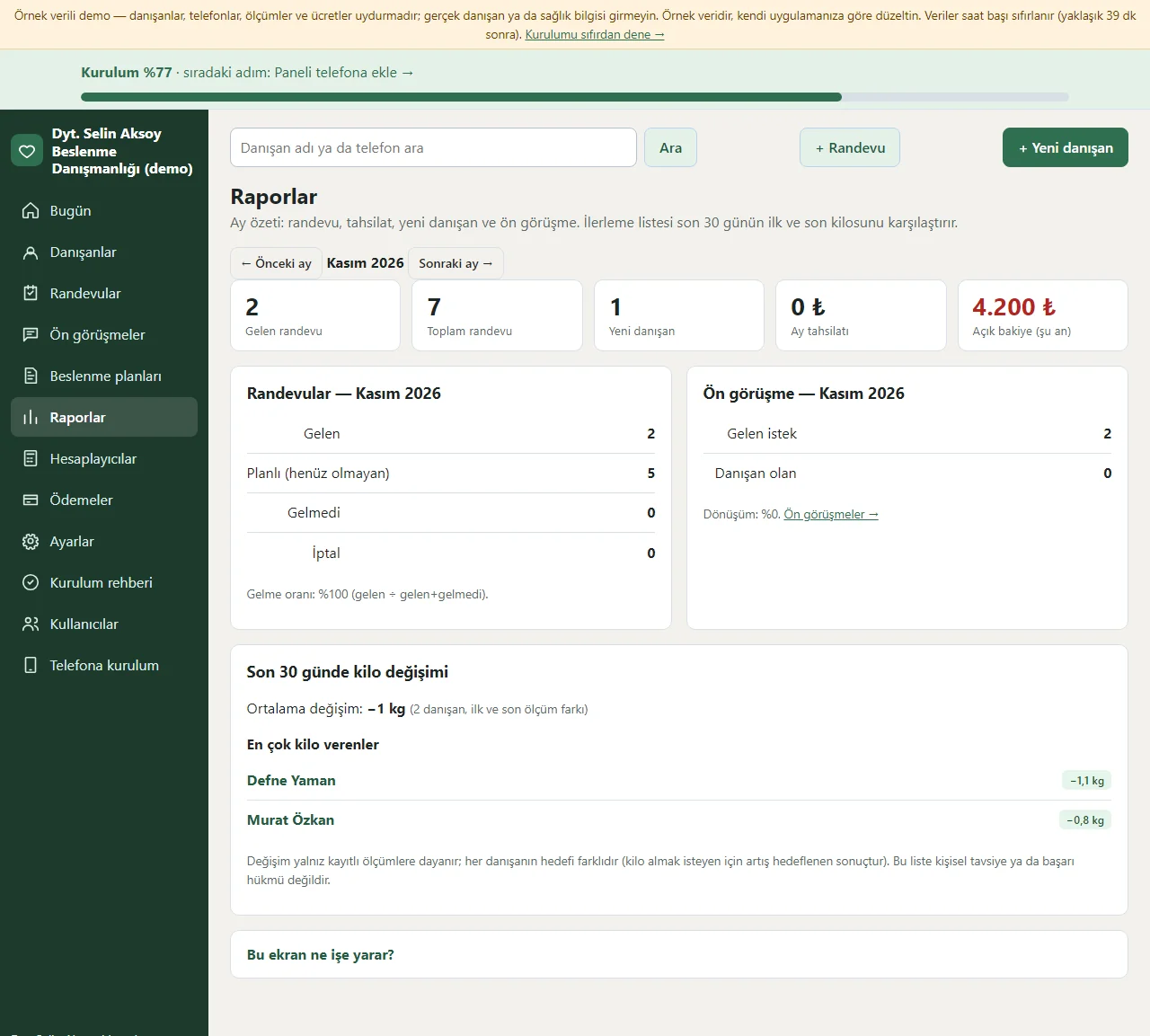
0.2.0 · 12 November 2026 Reports
The month you choose shows the number of appointments (attended, planned, no-show, cancelled), payments, the number of new clients and the conversion from pre-consultation to client at the top; below, for clients with at least two measurements in the last 30 days, the first and last weight with the difference and the average difference are listed. It rests on recorded data only and is neither a personal assessment nor a medical comment. Only the manager sees the reports.
- On screen (Turkish interface)
- “Gelen” — attended
- “Gelmeyen” — no-show
- “Tahsilat” — payments
- “Yeni danışan” — new clients
-
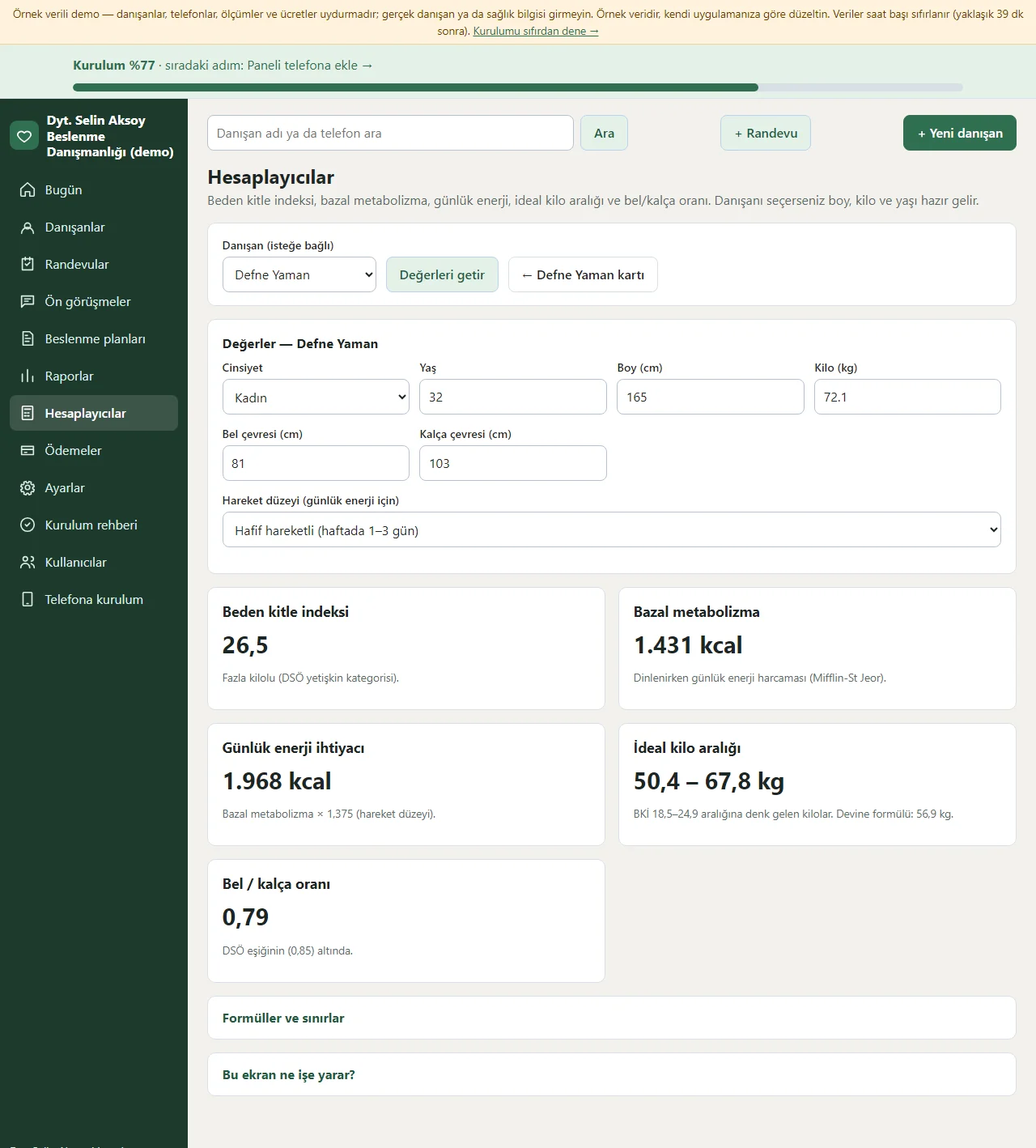
0.2.0 · 12 November 2026 Calculators
Five small calculations are on one page: body mass index (BKİ), basal metabolic rate (Mifflin-St Jeor), daily energy need by activity level, an ideal-weight range and the waist-to-hip ratio. The Hesaplayıcılar button on the client card brings the height, weight and age ready; the formulas are written on the page. The values are worked out in the browser and are not saved; they are a helper, not a diagnosis or medical advice. Only the manager sees the calculators.
- On screen (Turkish interface)
- “BKİ” — body mass index
- “Bazal metabolizma” — basal metabolic rate
- “Günlük enerji” — daily energy
- “İdeal kilo” — ideal weight
- “Bel/kalça” — waist/hip
-
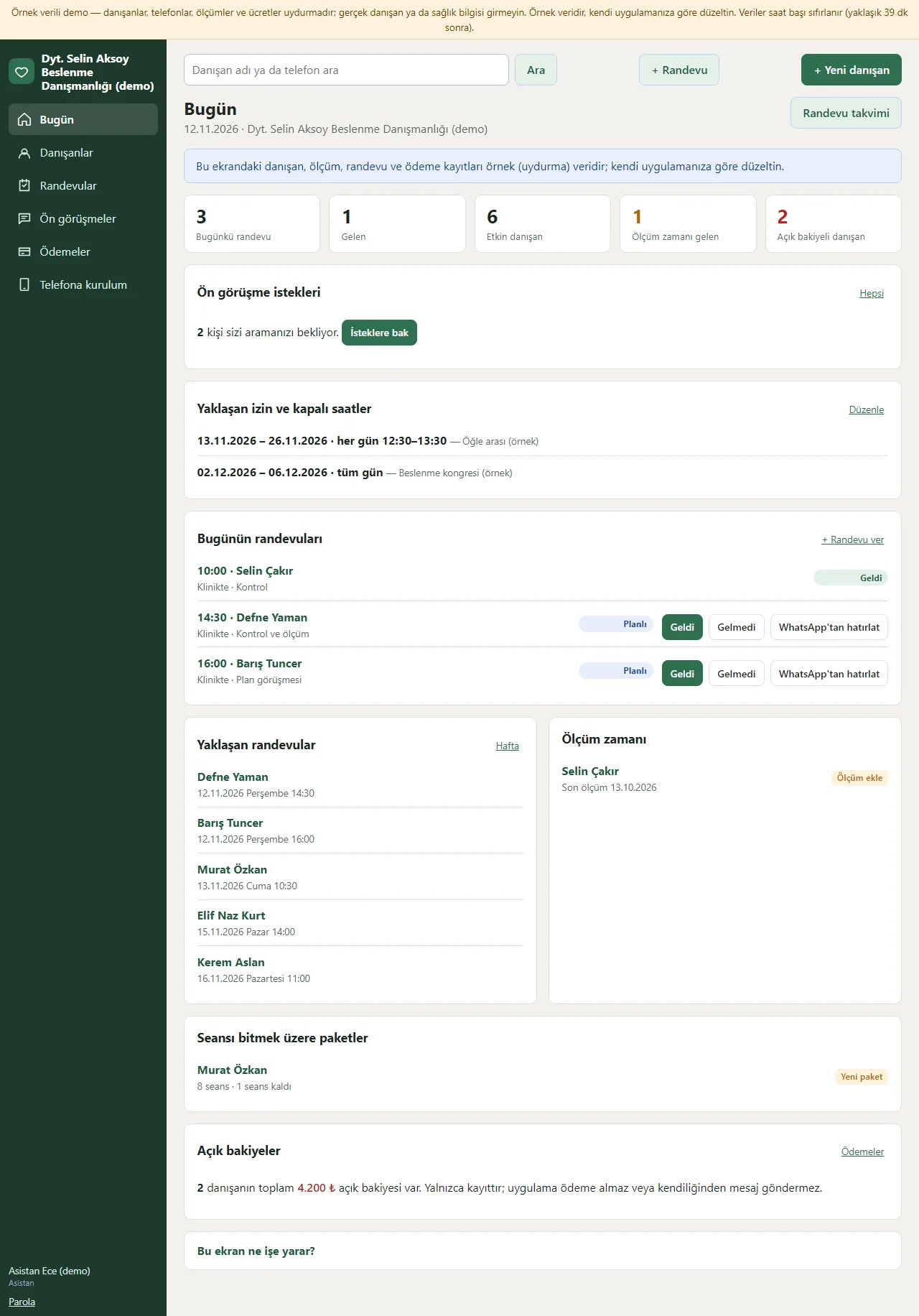
0.2.0 · 12 November 2026 The assistant’s screen
Signed in as the assistant, the menu shows Bugün, Ön görüşmeler, Danışanlar, Randevular, Ödemeler, İzin ve kapalı günler and Telefona kurulum; the meal plans, Raporlar, Hesaplayıcılar, Ayarlar, Kullanıcılar and the setup guide are not there. On the client card the anamnesis and plan sections do not show either; even if the address of those pages is typed by hand the server refuses it.
- On screen (Turkish interface)
- “Ön görüşmeler” — pre-consultations
- “Danışanlar” — clients
- “Randevular” — appointments
- “Ödemeler” — payments
- “İzin ve kapalı günler” — leave and closed days
- “Telefona kurulum” — install on a phone
-
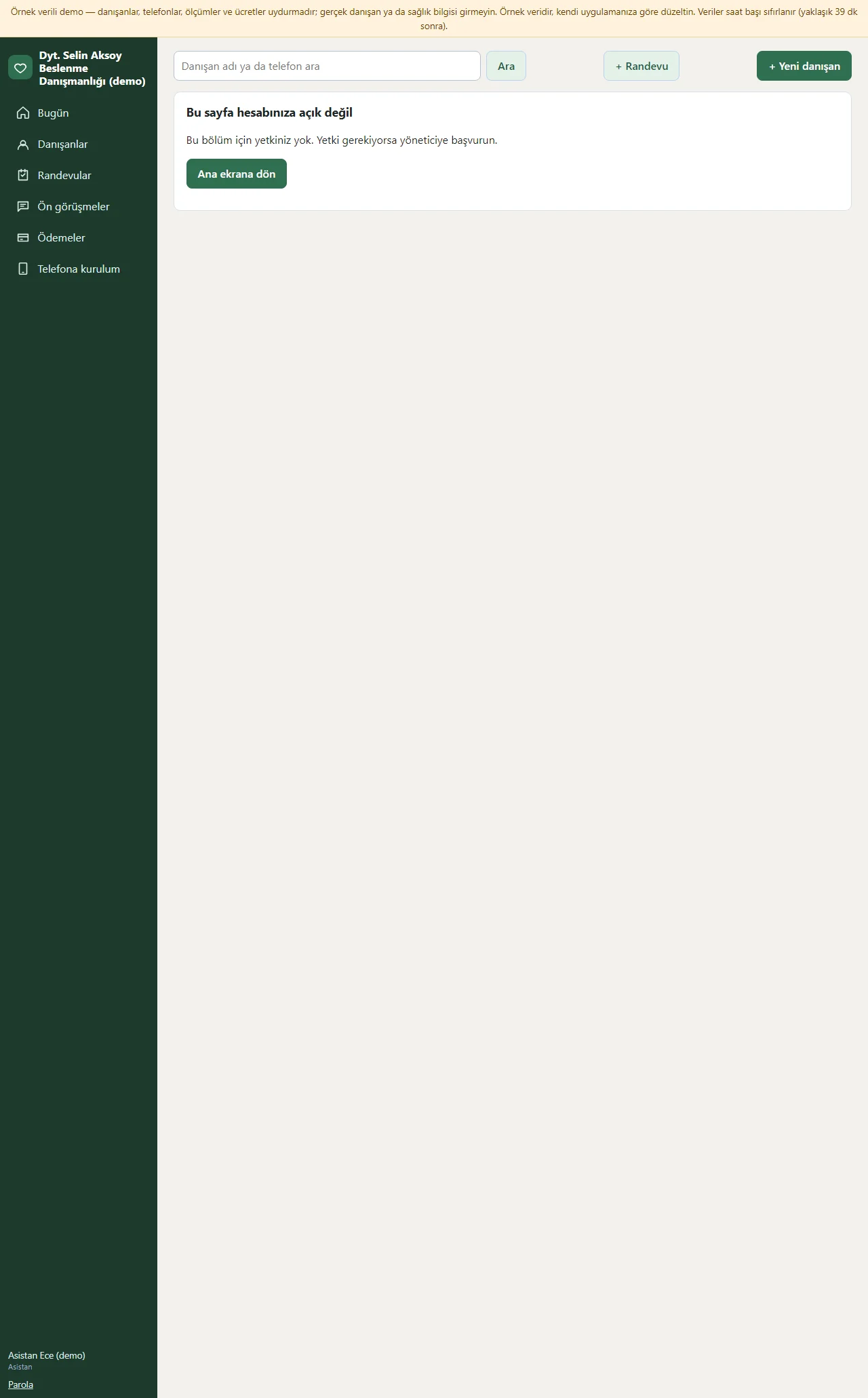
0.2.0 · 12 November 2026 Setup guide
Setup is nine small steps: the clinic’s name and phone, session length and working hours, a first client, a first measurement, a first appointment, a first meal plan, adding the panel to the phone, sending the client the link to their page and sharing the pre-consultation link. Each step is saved on its own, can be undone with “Geri al”, and the progress percentage sits at the top. In the demo the page starts with “Boş siteyle yeniden başla” and “Örnek veriyi geri yükle” buttons.
- On screen (Turkish interface)
- “Kurulum rehberi” — setup guide
- “Geri al” — undo
- “Boş siteyle yeniden başla” — start again with an empty site
-
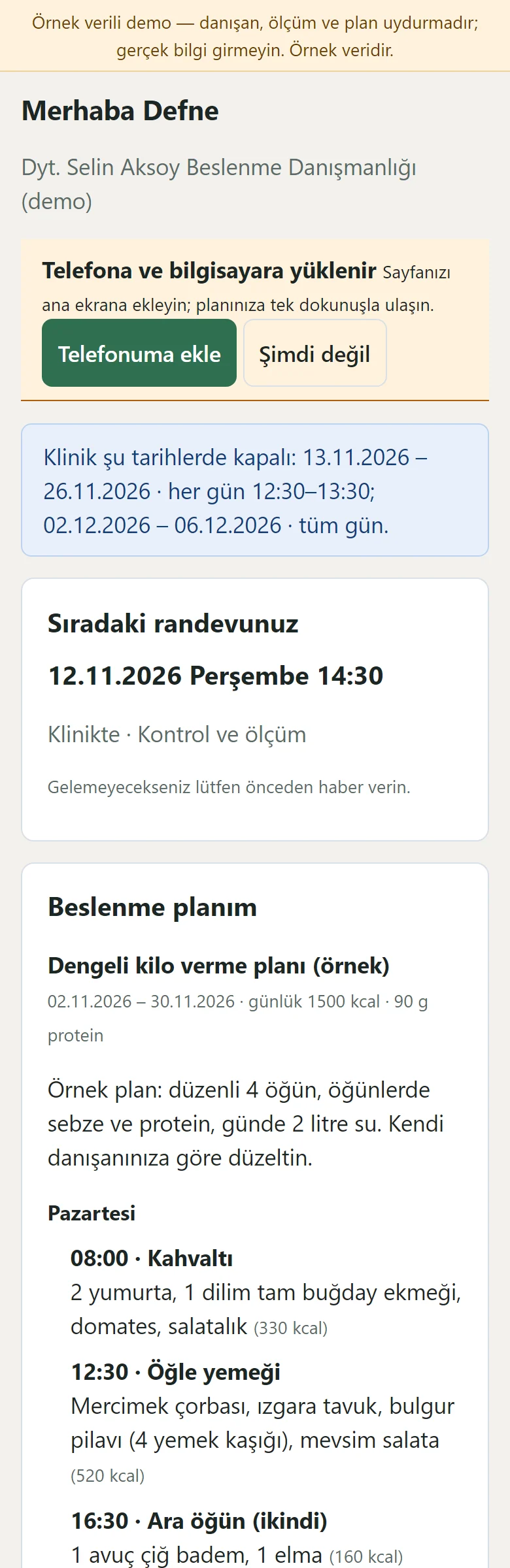
0.2.0 · 12 November 2026 Client page on a phone
A client opens the link without an account: their next appointment, the active meal plan by day, the weight chart of their measurements, the sessions left and the clinic’s address. The page is large-print and simple; the dates the clinic is closed show (the leave note does not), and the anamnesis and notes do not appear on it. The “Telefonuma ekle” (add to my phone) button at the top adds the page to the home screen.
- On screen (Turkish interface)
- “Sıradaki randevunuz” — your next appointment
- “Beslenme planım” — my meal plan
- “Ölçümlerim” — my measurements
- “Telefonuma ekle” — add to my phone
- What do they see at the end?
- The client sees their plan, weight chart and next appointment on their own page; at each visit the dietitian adds a measurement and watches the chart move towards the goal; a session comes off the package and the open balances sit in one list.
- What is it good for?
- Measurements, plans, appointments and payments no longer scatter over paper, Excel and messages; the health history stays on the dietitian’s screen only.
Everything that is not included, and all limits
- Not delivered to a client and not used by a real clinic. The clinic, clients, phone numbers, measurements, plans and amounts on the screens are made up.
- There is no automatic SMS or WhatsApp sending; WhatsApp messages open as a ready text and you send them from your own phone. The program sends clients no message on its own; only a phone notification (Web Push) goes to the manager.
- There is no food database and no automatic calorie or macro calculation; the calories and protein in a plan are written by hand. The program makes no diagnosis and gives no medical advice; the health information is only a record. No claim of legal compliance is made.
- Reading an Excel (.xlsx) file depends on the server’s zip extension; without it the file is saved as CSV or the table is pasted. There is no remaining-leave-days calculation. The reports and calculators are a helper, not a diagnosis or medical advice. Card payment over the internet, video calls, e-invoice, client photos and multi-branch use are not there either; the program takes no payment.
- A real Web Push delivery, iPhone/Safari, Firefox and a real phone have not been tried; it was run on PHP 8.3 and a single hosting account (PHP, SQLite) only.
- In the demo the data is reset every hour; sign-in is without a password through role buttons. The app interface in the screens is in Turkish.
Delivery and sales status
How does it work?
You try the demo and tell us about your practice, and we send you a quote. We install it and we host it. The yearly price includes installation, hosting, data transfer and support; it is for a single practice and there is no extra charge by number of clients.
Price
The yearly list price is 2,500 TL. Installation, one year of hosting, data transfer, bug fixes and written usage support are included; it is for a single practice and there is no extra charge by number of clients. Automatic SMS or WhatsApp sending (including an SMS code for client sign-in), online card payment, video calls, e-invoice / e-archive, client photos and multi-branch use, a food database and automatic calorie calculation, importing files from devices such as TANITA, and a personal website and blog are not included; client messages go the free way (a ready WhatsApp text, a phone notification for the manager).
Possible delivery options
Other delivery options
Requirements and version history
Installation requirements
- PHP 8.1 or newer (with the pdo_sqlite, mbstring and openssl extensions; curl is recommended for the phone notification) and HTTPS are needed; the data is kept in a SQLite file. The live demo was run on a single hosting account and PHP 8.3 only.
Release notes
- No version has been delivered to a client. The sample-data demo is open to everyone and is shown with the screenshots on this page.
- 0.2.0 (12 November 2026): a sign-in-free pre-consultation form and list, importing the client list from Excel/CSV (preview, duplicate check, undo), multi-day leave and closed hours, a monthly report, five calculators (BMI, basal metabolic rate, daily energy, ideal weight, waist/hip), a ninth step in the setup guide and a notification to the manager’s phone for a new pre-consultation request.
- 0.1.0 (12 November 2026): a client card and anamnesis, measurements and a weight chart with a goal line, appointments (day and week, a clash warning), a meal plan (meal rows, a quick template, copying, printing), session packages and payments, a sign-in-free client page, manager and assistant roles, a setup guide and installing on a phone.
There is no cart, customer account or online payment on this site for now. Reach out by phone, WhatsApp or the form; in a first conversation your need and the software’s fit are reviewed. The form does not create an order, a contract or a payment.