Factories and workshopsDemo with sample data
Lean ERP for Small Factories and Workshops: screen-by-screen guide
The full version of the short description on the product page: every feature, how each screen is used step by step, all limits and the delivery details.
All features
The flows below were run in the app’s version with sample data (0.32.0). The screens were taken on 14 and 15 November 2026 from the live demo (at the top of the Today screen the Acil işler (urgent work orders) card from version 0.32.0; under Kasa ve vade the Çek portföyü raporu (cheque portfolio report) from version 0.31.0; under İK the Vardiya şablonları (shift templates) page from version 0.30.0; under Kasa ve vade the Günlük kapanış (daily cash closing) screen with its count form and recent closings from version 0.29.0; under İK the monthly Puantaj (timesheet) with its pre-approval check list, the Puantaj screen of an approved month with the ONAYLI (approved) stamp and the Resmî tatil günleri (public holidays) page from version 0.28.0; the craftsman’s Atölye screen on a phone from version 0.27.0; the Kullanıcılar (users) page, the user edit form and a filtered İşlem kaydı (activity log) from version 0.26.0; under Depo the Stok durumu (stock status), a sales order, the Rezervasyon dökümü (reservation breakdown) on a product page and the available-stock warning on a sale from version 0.25.0; under Ayarlar the Yedek (backup) card, a sales order document and a purchase order form from version 0.24.0; under Depo the Lot ve SKT (lots and expiry) screen, under Ayarlar the Kapsamlar (scopes), a purchase document with the price warning and the approval box, from version 0.23.0; the Today screen, under İK the Giriş-çıkış (clock-in and clock-out) day table and the Kapı ekranı (gate screen) a craftsman opens, from version 0.22.0, with its new sample data that includes weekend shifts; four screens: under Production the Ar-Ge (R&D) board, a sample project, a change request and the recipe versions comparison, from version 0.21.0; the Kart kodları (card codes) from version 0.20.0; five screens: the delivery slip and customer return cards on a sales document, the delivery-slip page, the special prices on a customer page, the supplier performance page and the supplier invoice and supplier return cards on a purchase document, from version 0.19.0; six screens: under Kasa ve vade (cash and credit) the ageing, cheques and notes, cash flow, accounting export, an account statement and the VAT line on a sales document, from version 0.18.0; the “Bakım” (maintenance) board, the machine card, the maintenance work order and the craftsman’s “Arıza bildir” (report a breakdown) screen, from version 0.17.0; “Planlama” and the planning fields on the product card from version 0.16.0; “Kısmi teslim” and “Üretim panosu” from version 0.15.0; the others are 0.14.0 screens these versions did not change); the company is “Örnek Mobilya Atölyesi (demo)” (sample), and its customers, suppliers, products, staff, craftsmen, certificates and amounts are made up. The application has no AI and sends no automatic messages.
- Party and product cards: customer, supplier or both; raw material, semi-finished, finished and consumable cards, buying and selling price, a critical stock level; at setup ready card names arrive for furniture, textiles, metal, plastic or general manufacturing (you write the prices and stock values yourself); importing a list from an Excel/CSV file or by pasting (custom-field columns are recognised from their headings), a preview, the same phone number or product code never added twice, and undoing the last import
- Warehouse: stock is the sum of movements (in, out, count); a one-tap in and out on the warehouse list, a count screen, a movement history, cancelling a movement with “Yanlış girdim” (entered by mistake; the record is not deleted), a critical and sold-out warning, a moving weighted average cost and stock value for each product
- Several warehouses and transfers: a “Ana depo” (main warehouse) exists in every installation; a separate warehouse is opened for raw material, semi-finished goods or outsourcing, stock is kept separately in each warehouse and none can go below zero; a transfer between warehouses is one document, leaves the total stock and cost unchanged and can be undone; with a single warehouse the warehouse choice never shows
- Shelf location, barcode and labels: a barcode and a shelf location in a warehouse are written on a product; the barcode is scanned on in, out, count and transfer (a keyboard-style reader or the phone camera), a barcode that is not found suggests opening a product card; the Code 128 barcode labels of the chosen products are printed on A4 paper
- Lot, serial number, expiry date and per-shelf stock: tracking (lot or serial) and an expiry date are switched on in the product card; stock is worked out from movements per “bucket” (warehouse, lot, expiry date, shelf); on a goods receipt and a stock-in the lot, expiry date and shelf are written; a goods-out draws by itself from the lot that expires first (or the oldest receipt when there is no expiry date), and an expired lot is not used unless it is chosen by hand; if one goods-out is split over several lots, cancelling the movement undoes the whole batch; with serial tracking each piece is its own record; transfers and counts keep the lot and the shelf; the lot number of a finished item that comes out of production is the work-order number; the Lot ve SKT (lots and expiry) screen lists expired and soon-to-expire lots and lot traceability shows a lot’s receipt, issues and what is left; movements without a lot or shelf and a bucket that has gone below zero are added as a “Lotsuz / rafsız stok” (no lot / no shelf stock) line, so the product total equals the stock status; the receipt of a lot that has been used cannot be cancelled; the “Lot/seri, son kullanma ve raf bazlı stok” scope can be switched off in Settings (it is on in the Full package)
- Stock reservation: under Depo > Stok durumu every product has Eldeki (on hand: what is on the shelf), Rezerve (reserved: the quantity on confirmed orders not yet shipped plus what work orders still need from the warehouse; written separately for orders and work orders) and Müsait (available: on hand minus reserved) columns; there is no separate reservation record, everything is worked out at once from orders and work orders; a quote does not count as reserved. A product whose available quantity falls below zero gets a red “Yetersiz” (insufficient) label, the “Yetersiz müsait” box and the Durum filter gather them, and the CSV file gains Rezerve and Müsait columns. The “Rezervasyon dökümü” (reservation breakdown) on a product page shows which order and which work order sets aside how much (the links are links only for a role that may open the page, and no price is shown). When a quote is turned into an order and the available stock is short a warning box appears (product, quantity asked for, on hand, set aside for others, available, shortfall): “Yine de onayla” (confirm anyway) or, for someone with production access, “Onayla ve eksik ürünler için iş emri aç” (confirm and open a work order for the missing items) (a salesperson sees a note to pass it to the production chief); nothing is blocked. The critical-stock decision still goes by what is on hand; a “Rezerve edilince kritik olacaklar” (will become critical once reserved) list gives early notice. “Eksik ürünler için iş emri aç” first sets the shelf stock aside for orders already confirmed when it works out the shortfall. It is on in every package; if the Sales or Production scope is off that part simply shows zero
- Custom fields (owner only): add your own fields to the product card, party, staff member and work order; text, number, a choice list, date or yes/no, optionally required (for example Colour and Size in textiles, Thickness and Material grade in metal). A field shows on the form, the detail page, the product list, in search, in the Excel download and when a list is imported from Excel/CSV; when a field is switched off its values are kept, when it is deleted they are cleared; up to 12 fields can be added to a record type
- Sector package and quick setup: besides the product card names a package brings the sector’s production stations, custom fields and a routing template for finished products (operation order, station, planned minutes); there are furniture, textiles (Kesim cutting, Dikim sewing, Nakış ve baskı embroidery and printing, Ütü pressing, Paketleme packing), metal, plastic and general manufacturing; anything with the same code or name is skipped and what was added is undone in one tap (what you have used is left alone). On first sign-in a one-minute quick setup asks the company name, the sector and the processes you will use (Başlangıç, Atölye, Tam)
- Owner dashboard: the Today screen opens with eight cards: Kritik stok (critical stock), Üretimde (in production, with stopped and late operations), Bugün biten (finished today), Onay bekliyor (awaiting approval: purchase approvals and R&D change requests waiting; the owner only), Termini geçen (past their due date: orders and work orders), Vadesi geçen alacak (overdue receivables, with open receivables and the cash and bank total beneath) , Bugün vardiyada (on shift today, with who is in, on leave and the certificate warnings) and Hızlı işlem (quick actions: new work order, shop-floor screen, stock in, new product card); when a work order is marked urgent and is planned or in production, an “Acil işler” (urgent work orders) card shows at the top of the Today screen (up to 5 rows: work-order number, status, due date or “N gün gecikti” (N days late), item, quantity and the linked sale and customer; late ones first, then by due date; “Tümü” (all) opens the production board filtered to urgent, tapping a row opens the work order; the card has no action button and does not show when nothing is urgent; the owner, chief, craftsman, storekeeper and salesperson see it, purchasing, HR and the accounting clerk do not; the customer name shows only to someone with access to parties); the Kritik stok card adds a “SKT uyarısı” (expiry warning) count when a lot is expired or about to expire; each card shows only to a role that may see it and has that scope switched on (a craftsman, storekeeper or HR person does not see some of them at all) and the detailed numbers sit in an “Tüm sayılar” (all numbers) box; each card opens, when tapped, a filtered list with the same records as its count (Termini geçen: all orders past their due date whose shipment is not finished)
- Scopes: in Settings a module or extra feature you do not use (several warehouses, barcode, lot and expiry, outsourcing, cost and bonus) is switched off; it never shows in the menu, on the Today screen or at its address, and its data is not deleted; there are ready Başlangıç (Starter), Atölye (Workshop) and Tam (Full) packages and a “who sees what” table
- Moving over from an old system (owner only): opening stock (with a warehouse and unit cost, writes no income or expense), opening party balances (not a cash movement), recipes, routings, open sales and purchase orders and open work orders are brought in from the old program or Excel with the remaining quantity; each has a sample CSV, a preview, a one-tap undo and no notification sent to anyone; a migration plan, a validation report, a reconciliation with the old system’s totals and a cut-over-day checklist
- Purchasing: one request from critical stock, a unit price and delivery day quoted by up to three suppliers, a side-by-side comparison (the lowest is marked; a price above 3 times the average cost raises a warning and is not saved unless the “yine de kaydet” (save anyway) box is ticked, and quotes are not saved without a supplier or price), the order, a partial goods receipt and its cancellation; a ready WhatsApp text opens for the supplier
- Sales: a quote to the customer, sending it as a ready WhatsApp text, turning it into an order, a partial shipment (if stock is short no line is processed), undoing a shipment, a warning for an order past its due date, an estimated gross profit on the shipped part; opening a work order from the order for items not in the warehouse
- Production: a product’s recipe (materials for 1 unit, an optional planned scrap %) and routing (operation order, station, planned time); a work order, a purchase request for missing material, a Planlandı / Üretimde / Bitti board (priority Normal or Acil, urgent: urgent work orders stay on top of the shop-floor queue and the board with a red label and only the chief and the owner change it); on the Atölye (shop-floor) screen a craftsman picks their station, picks their name and types a PIN once in the “Ben kimim?” (who am I) card (the phone knows them for 12 hours, the activity log shows their name, “Ben değilim · çıkış” makes the phone forget them and a shared tablet can use “Ortak cihaz: her seferinde PIN”) and starts an operation, stops it with a reason through “Sorun bildir” (report a problem: machine breakdown, waiting for material, quality problem, break, other), resumes it with “Devam et” and finishes it, and reports scrap; the stopped time is taken off the operation’s real time and a work order lists its stops; “Sorun bildir” does not stop a job until a reason is chosen; a craftsman other than the one who started an operation cannot finish it (the chief and the owner can) and who finished it shows on the work order; materials leave the warehouse when the first operation starts and the finished item enters it when the last one finishes; the finished part of a work order that has started can also go into the warehouse before the order ends through “Kısmi teslim” (partial delivery; for example 2 of 4 units) and be shipped, and the rest enters when the last operation finishes; a partial delivery enters at the planned unit cost and the rest at the real cost; for a lot-tracked product the finished item’s lot number is the work-order number (“work-order no-K1” on a partial delivery); Production > Planlama (planning) compares open sales orders, the component needs of work orders whose material has not been drawn and critical stock with the stock on hand and the goods on the way (open requests, orders and work orders), explodes the recipe down to sub-items and lists “what to buy” and “what to make” with a quantity, a date needed and a reason; counting back from the lead time on the product card it says “Planlı” (planned), “Bugün ver” (order today) or “Yetişmez” (cannot make it in time even if ordered today), and rounds to the minimum and multiple-quantity rules; the selected rows become one purchase request or planned work orders in one click, and a warning is given for goods that arrive late, stock gone negative and a finished product without a recipe
- Operation library, quality approval and work-order layout: operations you do often (name, station, planned minutes, instruction, quality approval) are defined once under Üretim > Operasyonlar and added to a routing with one choice (what is added is a copy, so changing the library later does not disturb old routings); an empty routing can take another product’s routing in one tap; the instruction shows on the card on the shop-floor screen; when an operation that asks for quality approval is finished the craftsman picks Geçti (passed), Kaldı (failed) or Yeniden işle (rework) (Yeniden işle puts the operation back in the queue and raises a counter; after Kaldı the operation does not finish, the work order becomes “Kalite kararı bekliyor” (quality decision pending) and the chief or the owner decides: Yeniden işle (rework; which operation to restart from is chosen) or Hurda yaz (scrap it; the faulty quantity does not enter stock, the work continues with the sound quantity, and unit cost and bonus are worked out on the sound quantity only); the records show on the work order’s quality records list); the owner and the chief add an operation to an open work order, skip an operation that has not started (it counts as done, no time is written; the last remaining operation cannot be skipped) and change its order with ↑ ↓
- Work-order sheet and stop and quality report: the sheet opened from a work-order page prints the QR code (to the work-order page), product, quantity, due date, custom fields, an operation table (station, plan, instruction, a box for the craftsman’s signature) and the material list on A4; Üretim > Rapor shows, over 7, 30 or 90 days, the stops by reason and by station (count and minutes), the operation that is stopped now, the quality results and the operations reworked most; the operation library and the work-order layout are for the owner and the chief only, the sheet and the report for everyone who may see production
- Real cost: a work order’s cost is made up of the materials drawn, scrap, labour and machine (the operation’s real time × the station’s hourly cost) and an overhead share; the figures freeze when the work order finishes and the gap between planned and real is shown; the average cost of products and the cost of scrap are listed; only the owner and the chief see it
- Craftsman bonus: for the chosen month the bonus per piece, a scrap deduction and a monthly target bonus are worked out per craftsman from finished work orders and downloaded for Excel; only the owner writes the rules; the bonus is not payroll, your accountant pays it
- Outsourcing (subcontracting): sending a part to a painting, coating or CNC shop; the supplier, the job, quantity, send date and return date; how many days it has been away and a late warning; when it comes back “Geldi” (arrived) and an optional fee (added to the work order’s cost); a work order with a part out cannot be finished; an outsourced quantity cannot exceed the work order’s quantity
- Maintenance: a machine record (code, name, linked station, place) and its status (Çalışıyor: running, Arıza kaydı var: breakdown on record, Bakımı geçti: maintenance overdue, Durdu: stopped); planned maintenance by days such as “oiling every 30 days” and what to do is written for a machine, maintenance that is due or overdue is listed and turned into a maintenance work order in one tap, the work order is started with “Bakıma başla” (start maintenance) first, and when it finishes the plan’s next date moves on; a craftsman reports a breakdown from the Atölye screen on a phone (if the machine has stopped they tick the box: the breakdown counts as urgent, the stopped time is measured, a free phone notification goes to the managers and a “Duran makine” stopped-machine warning shows on the Atölye screen); on a maintenance work order the spare part leaves the warehouse and the labour minutes are written; each machine’s breakdowns, planned maintenance, total stopped time, average repair time (MTTR) and days between breakdowns (MTBF) are reported; only the owner and the chief manage it, the craftsman only reports a breakdown
- Sales and purchasing controls: a customer return per line from a shipped sale (the goods enter stock as a “return”, the customer’s receivable falls, more than was shipped cannot be returned, it can be undone; a shipment that has a return cannot be cancelled until the return is undone); a special price per product on the customer page (it comes in automatically when that product is added to a quote and the price is left empty, a price typed by hand wins); a printable delivery slip for every shipment (lines, quantities, signature areas for handing over and receiving; no prices); on an ordered document the supplier invoice number and amount are written, a “Fatura farkı” (invoice difference) warning appears if the amount differs from the value of goods received by more than 2% (at least 1 TL), and the same invoice number cannot be written twice for one supplier; a supplier return per line for received goods (the goods leave stock, the debt falls, it can be undone); an order above a threshold the owner writes cannot be placed by the buyer, it becomes “Onay bekliyor” (awaiting approval) and the owner approves or rejects it (the threshold starts off, and if the owner places the order the approval is recorded); a supplier performance page (per supplier over the last 90 days, 1 year or 2 years: orders, average days to delivery, on-time share, return rate, number of invoice differences and the value received)
- Cash and credit: separate cash and bank ledgers, receipts, payments, expenses, ageing of receivables and payables (by the party’s credit days), a ready WhatsApp reminder for an overdue customer; an account statement (a date range, opening and running balance, printable, a file for Excel); ageing (not yet due, 1–30, 31–60, 61–90, 91+ days); cheques and promissory notes (received and issued, with a due date; “Tahsil edildi / Ödendi” (collected / paid) writes a bank receipt or payment and lowers the party’s balance, a bounced one does not lower the balance, and it can be undone; when a cheque is written “Hangi belge için?” (for which document?) can be chosen, the document shows “Çek bekliyor” (cheque pending) until the cheque’s due date and is not counted as overdue, the amount is counted once in the cash flow and ageing, and the collection is written to the document); a cheque portfolio report (opened from the Çek/senet screen; filtered by direction, type, status, due-date range, party and bank; it shows cards for pending received and issued, net position, overdue and bounced amounts, a due-date ageing (overdue, 0–7, 8–30, 31–60, 61+ days), a calendar of the next 8 weeks of receipts, payments and net, totals by party and by bank, and a list of lines by due date; there are “Excel için indir” (download for Excel, CSV) and “Yazdır” (print; A4 landscape, with the company name, the date and a summary of the filter in the heading); only roles with cash and finance access (the owner, accounting) see it and the link is not shown to other roles; cheques and notes are for records and reports only, there is no connection to a bank); a cash-flow forecast (open receivables, payables and pending cheques are added to the cash and bank balance by due week, 12 weeks, a week that falls below zero is flagged, expenses of the last 90 days); daily cash closing (at the end of the day the opening balance, the cash receipts and payments and the expected cash balance are shown; the cashier types the cash in the till and an optional “Kupürle say” (count by denomination) takes the number of 200, 100, 50, 20, 10, 5 and 1 ₺ notes and coins, the total filling in by itself; the difference shows live (Tutuyor, Eksik, Fazla) and a reason is required when there is one; “Günü kapat” (close the day) locks the day’s cash entries, bank entries are not locked; only the owner or the support account can reopen it with a reason (“Kapanışı aç”); the Today board warns about a day in the last 7 that was not closed (to accounting and the owner only); there is a print view and a monthly CSV, and closed days carry a “Kapalı gün” label in the cash ledger; the document is an internal cash reconciliation and does not replace an official document or a cash-register Z report); an optional VAT scope (a rate of 0%, 1%, 10% or 20% on a sales or purchase document, a total including VAT, receivables and payables worked out from the VAT-inclusive amount; it starts off in an upgraded installation); an accounting export (sales and purchase documents in a date range with net, VAT and total, a summary of calculated, deductible and net VAT, a file that opens in Excel); a shipped sale is written to receivables and a received purchase to payables by itself
- HR: a staff list, a weekly shift roster (copy the previous week; shift templates: a weekly pattern is set up once (a cycle of 1–4 weeks, including a 2-week alternating day/evening) and written to the employees you pick for 1–12 weeks; before writing, a preview shows the counts of days to write, filled, already the same, on leave and public holidays with a summary per employee, and nothing is written until you confirm; filled days are left alone (or overwritten), public holidays can be left empty, days on leave are never touched, the picked employees can be rotated; the roster has “Bu haftayı şablon yap” (make this week a template), “Hazır şablonları ekle” (add ready templates: weekday day shift, alternating day/evening, a week with a Saturday half day) and “Son uygulamayı geri al” (undo the last apply; it only restores days that have not changed since), and only HR and the owner use it), multi-day leave, expiry tracking for safety and health certificates (expired red, due within 30 days yellow); clock-in and clock-out by card: every employee gets a personal Code 128 barcode card (printed, and the code is renewed if the card is lost); on a tablet or phone at the door the “Kapı ekranı” (gate screen) reads the card with a reader or the camera, and someone without a card picks their name and types a 4-digit PIN (HR assigns the PIN on the employee page and the same PIN cannot be given to two active employees; the first scan is clock-in, the next clock-out; scanning twice in a row is blocked); a day table matches the scans to the shift and shows who is late, left early, absent, on leave or has no clock-out, and the overtime (tolerance and break are set, the break is deducted on days over 6 hours); a forgotten record is added, corrected or cancelled with a reason (marked as manual and visible in the activity log); a monthly timesheet is downloaded for Excel and printed; timesheet approval: after the month ends HR reviews it and taps “Onaya gönder” (send for approval; it cannot be sent before the month ends; a check list first shows records with no clock-out, days with a shift but no record and days longer than 16 hours, and if there are warnings a “Uyarıları gördüm” (I have seen the warnings) tick is needed), the owner or the support account taps “Onayla” (approve) or writes a reason and taps “Düzelt” (correct), and HR cannot approve; once approved each employee’s totals are frozen, an “ONAYLI · approver · date” stamp shows on screen, in print and in Excel, the clock records of that month are locked, the owner can undo the approval with a reason (“Onayı geri al”) and every step is written to the activity log; public-holiday calendar: the fixed public holidays are ready (28 October as a half day), religious holidays are added by hand with a date and a name after checking the Diyanet calendar, the time worked on a holiday shows in a separate “Tatil mesaisi” (holiday overtime) column, a holiday is not counted as absence and the overtime and lateness calculation does not change; no location, photo or fingerprint is taken; remaining leave days, pay and payroll are not calculated
- R&D (Production > Ar-Ge, in the Full package only): a sample and prototype project goes through the gates idea, design, prototype, test, ready for series production and in series production; at each gate a decision “Geçti” (passed), “Yeniden çalışılacak” (to be reworked) or “Bırak” (drop) is written with a reason, and passing has conditions (to leave design a product card and a recipe, to leave prototype a finished prototype work order, to leave testing the last test must be “Geçti”); a prototype work order is opened from the project with the product’s recipe (an ordinary work order), and the target unit cost shows beside the estimate from the recipe and the real cost of the finished work order, and test records are kept. Recipe change request: the change is prepared in a draft, the difference between old and new, the open work orders and the number of products affected show, the owner approves or rejects with a reason, and once approved it is applied (an optional effective date; if the recipe changes in the meantime the request cannot be applied); every applied change keeps the old recipe as R1, R2…, two versions can be compared and a work order carries the recipe version it was opened with; “Nerede kullanılır?” (where used) shows which products contain a material, indirect uses included; editing the recipe directly on the Reçeteler screen does not open a version
- Backup (owner only): the “Yedek indir” (download backup) button on the Settings > Yedek card downloads a copy of the database (a .sqlite file); it holds all the data and the user records (password hashes included), so it is not handed to anyone and is kept somewhere safe; the time of the last backup and who took it show on the card and are written to the activity log; if no backup was ever taken or the last one is more than 7 days old a quiet warning shows on the Today screen for the owner only, and there is a shortcut on the “Daha fazla” (more) page. It does not replace your hosting backup; the steps for restoring from a backup are in the installation guide and there is no restoring from inside the app. It is on in every package
- Users and activity log: the users list shows each person’s name, e-mail, role, last sign-in and status; the owner (and the support account) edits a user’s name, e-mail and role, and when the role changes the open session works with the new access from the next page; the last active owner cannot be turned into another role and nobody can change their own role; the change is written to the activity log. The activity log has a text search, a person and a date-range filter and paging, and the filtered list downloads with “Excel için indir (CSV)”. In the demo install user actions are locked. It is on in every package
- Quote and order document: the “Siparişi yazdır / PDF” (print the order; “Teklifi yazdır / PDF” on a quote) button on a sales document opens an A4 document (its title is Teklif (quote), Satış siparişi (sales order) or a cancelled order; the company, customer, lines, discount, total and note; VAT only if the VAT scope is on); the “Sipariş formunu yazdır / PDF” (print the order form) button on a purchase document opens the form that goes to the supplier (supplier, lines, quantity, the unit price and total once the order is placed, expected delivery, delivery note and approval status; a request not yet ordered prints without prices as a “Satın alma talebi” (purchase request)). The PDF is made through the browser’s “Print > Save as PDF”; no PDF is produced on the server. The owner, chief, salesperson and accounts clerk open the sales document, the owner, buyer and accounts clerk the purchase form; the storekeeper and craftsman do not see the button. The documents are not an official invoice or delivery note
- Roles: owner, chief, craftsman, storekeeper, buyer, salesperson, HR and accounts clerk; for a role without access a page, menu entry, button and link never show (the craftsman and storekeeper see no prices or costs; the storekeeper does not see the invoice number, amount or approval threshold on a purchase document either) and the server refuses an address typed by hand
- Installs on a phone or computer; a free phone notification to the manager when stock reaches the critical level (no SMS); a twelve-step setup guide and progress bar, a closed “Bu ekran ne işe yarar?” (what is this screen for) box on every screen; a 15-day trial install (when it ends sign-in closes, the data is not deleted and the Excel lists can be downloaded); in the demo a “Demo hesapları” (demo accounts) box, “Boş siteyle yeniden başla” (start again with an empty site) and “Örnek veriyi geri yükle” (restore the sample data)
Screen by screen: how it is used
The interface in these screens is Turkish; only the captions and explanations on this page are in English. The screens were taken on 14 and 15 November 2026 from the live demo of the app: at the top of the Bugün (Today) screen the Acil işler (urgent work orders) card from version 0.32.0, under Kasa ve vade the Çek portföyü raporu (cheque portfolio report) from version 0.31.0, under İK the Vardiya şablonları (shift templates) page from version 0.30.0, under Kasa ve vade the Günlük kapanış (daily cash closing) screen with its count form and recent closings from version 0.29.0, under İK the monthly Puantaj (timesheet) with its pre-approval check list, the Puantaj screen of an approved month with the ONAYLI (approved) stamp and the Resmî tatil günleri (public holidays) page from version 0.28.0, the craftsman’s Atölye screen on a phone (before and after identifying, with an Acil work order) from version 0.27.0, the Kullanıcılar (users) page, the user edit form and a filtered İşlem kaydı (activity log) from version 0.26.0, under Depo the Stok durumu (stock status: Eldeki, Rezerve, Müsait), a sales order, the Rezervasyon dökümü (reservation breakdown) on a product page and the available-stock warning on a sales order from version 0.25.0, under Ayarlar the Yedek (backup) card, a sales order document and a purchase order form from version 0.24.0, under Depo the Lot ve SKT (lots and expiry) screen, under Ayarlar the Kapsamlar (scopes), a purchase document with the price warning and the approval box from version 0.23.0, the Bugün (Today) screen and, under İK, the Giriş-çıkış (clock-in and clock-out) day table and the Kapı ekranı (gate screen) a craftsman opens from version 0.22.0 (with new sample data that includes weekend shifts), the Ar-Ge (R&D) board under Production, a sample project, a change request and the recipe versions comparison from version 0.21.0, the Kart kodları (card codes) from version 0.20.0, the delivery slip and customer return cards on a sales document, the delivery-slip page, the special prices on a customer page, the “Tedarikçi performansı” (supplier performance) page and the supplier invoice and supplier return cards on a purchase document from version 0.19.0, “Bakım” (maintenance) board, the machine card, the maintenance work order and the craftsman’s “Arıza bildir” (report a breakdown) screen from version 0.17.0, the ageing, cheques and notes, cash-flow and accounting-export screens under Kasa ve vade, an account statement and the VAT line on a sales document from version 0.18.0, “Planlama” (planning) and the planning fields on the product card from version 0.16.0, “Kısmi teslim” (partial delivery) and “Üretim panosu” (production board) from version 0.15.0 and the others from version 0.14.0 (screens these versions did not change; 0.16.0 added a Planlama tab under Production and three fields on the product card, 0.17.0 a Bakım tab, 0.18.0 the Yaşlandırma, Çek/senet, Nakit akışı and Muhasebe tabs under Kasa ve vade and the account statement, 0.19.0 a return and a delivery slip on the sales document, special prices on the customer page, invoice and return cards on the purchase document and the Tedarikçi performansı page, 0.20.0 the Giriş-çıkış, Kart kodları and Puantaj tabs under İK and the Kapı ekranı, 0.21.0 an Ar-Ge tab under Production and version links on the recipe page, 0.24.0 a Yedek card under Settings and a print button on sales and purchase documents, 0.26.0 a Son giriş column on the users page, an edit page and a search and filter on the activity log, 0.28.0 a Tatil mesaisi column, a monthly approval flow and the Resmî tatil günleri page on the Puantaj tab, 0.29.0 a Günlük kapanış tab under Kasa ve vade). The company (“Örnek Mobilya Atölyesi (demo)”), parties, products, staff, craftsmen, certificates and amounts are made up.
- Who uses it?
- The owner of the workshop or factory, the chief who runs production, the storekeeper, the buyer and the craftsman who starts and finishes a job on a phone.
- Where do they start?
- Product and party cards are set up and the first stock is counted; a request is opened from critical stock, supplier quotes are compared and an order is placed; a quote is given to the customer, turned into an order once accepted, and a work order is opened for missing items.
What do they do on screen? Step by step
-
0.14.0 · 14 November 2026 Today screen
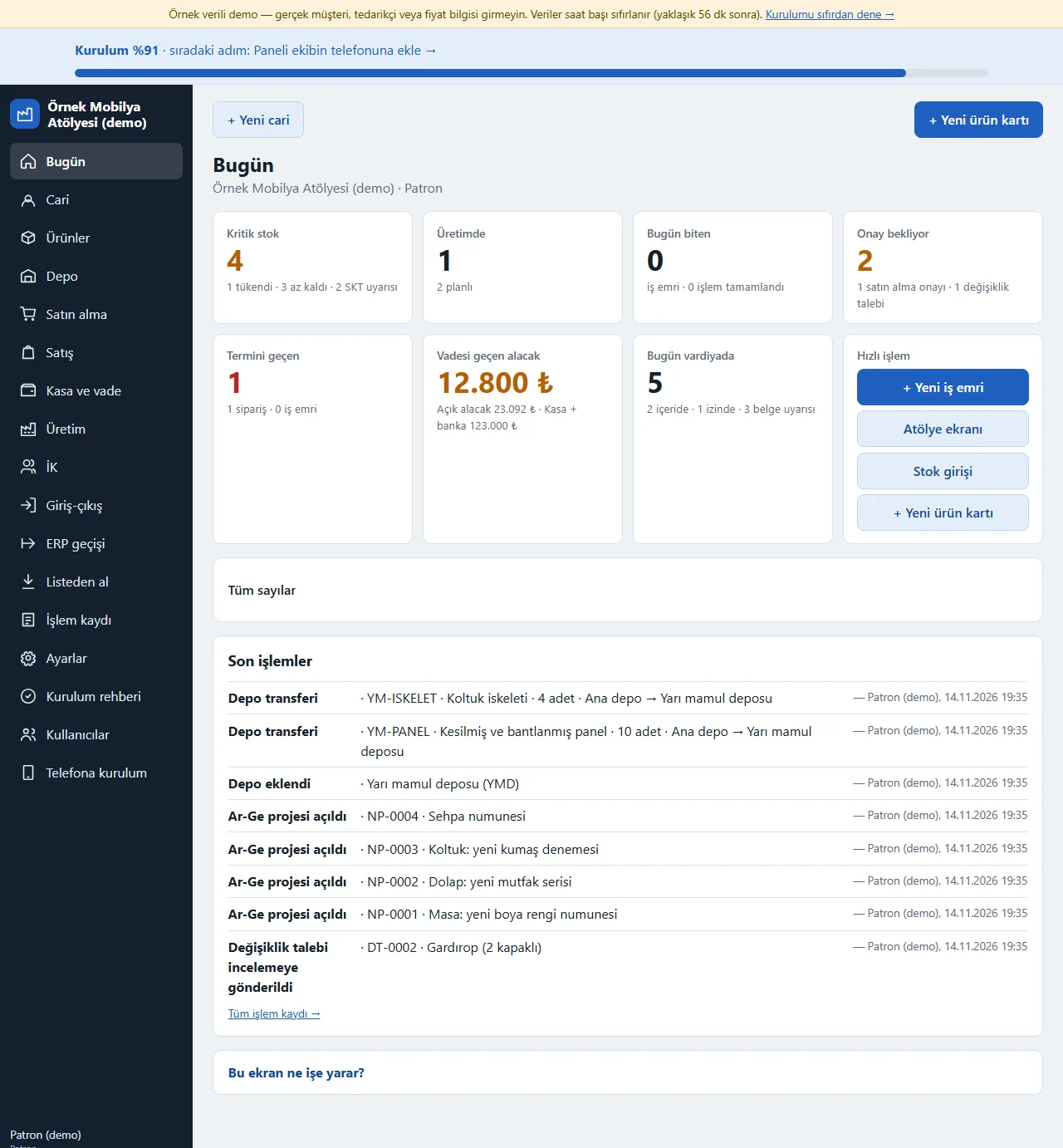
The owner’s first screen opens with eight cards: Kritik stok (critical stock, with the sold-out and low counts and an “SKT uyarısı” expiry-warning count for lots that are expired or about to expire), Üretimde (in production, with stopped and late operations), Bugün biten (finished today), Onay bekliyor (awaiting approval: the number of purchase approvals and R&D change requests waiting; shown to the owner only), Termini geçen (past their due date: orders and work orders), Vadesi geçen alacak (the overdue amount, with open receivables and the cash and bank total beneath) , Bugün vardiyada (on shift today, with who is in, on leave and the certificate warnings) and Hızlı işlem (quick actions: new work order, shop-floor screen, stock in, new product card; only what the role may do). The “Tüm sayılar” (all numbers) box below shows: the numbers of customers and suppliers, the numbers of raw-material, semi-finished, finished and consumable cards, who is on shift and on leave today, certificate warnings; sold-out and critical stock, open requests and quotes, pending and ready-to-ship orders, jobs past their due date, work orders in production and planned; the cash and bank total, open receivables, overdue receivables and open payables show as tappable boxes. Below are the latest actions; the setup percentage and “Yeni cari” and “Yeni ürün kartı” buttons sit at the top.
- On screen (Turkish interface)
- “Bugün” — today
- “Kritik stok” — critical stock
- “SKT uyarısı” — expiry warning
- “Bugün biten” — finished today
- “Hızlı işlem” — quick actions
- “Tüm sayılar” — all numbers
-
Today: Acil işler card
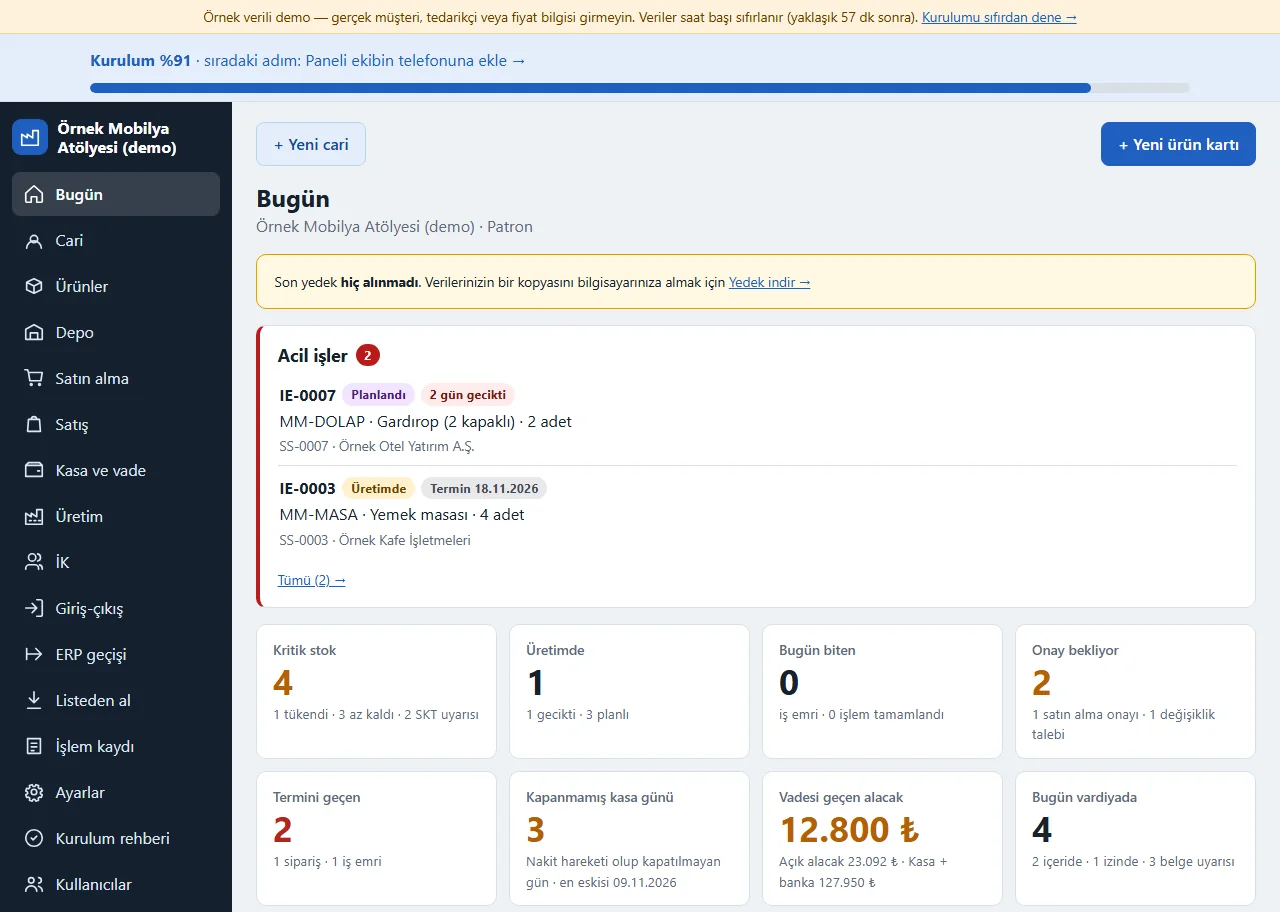
At the top of the Today screen, work orders marked urgent that are planned or in production are gathered in the “Acil işler” (urgent work orders) card. Each row shows the work-order number, its status, its due date (or a number of days such as “2 gün gecikti” (2 days late) when it is late), the item and quantity, and the linked sales order and customer; late ones come first, then by due date. The card shows up to 5 rows; the “Tümü (2) →” (all) link opens the production board filtered to urgent, and tapping a row opens that work order. The card has no action button; when nothing is urgent it does not show at all. The owner, chief, craftsman, storekeeper and salesperson see it; purchasing, HR and accounting roles do not; the customer name shows only to those with access to parties.
- On screen (Turkish interface)
- “Acil işler” — urgent work orders
- “Tümü” — all
- “gün gecikti” — days late
- “Planlandı / Üretimde” — planned / in production
- “Termin” — due date
-
0.14.0 · 14 November 2026 Warehouse: stock status
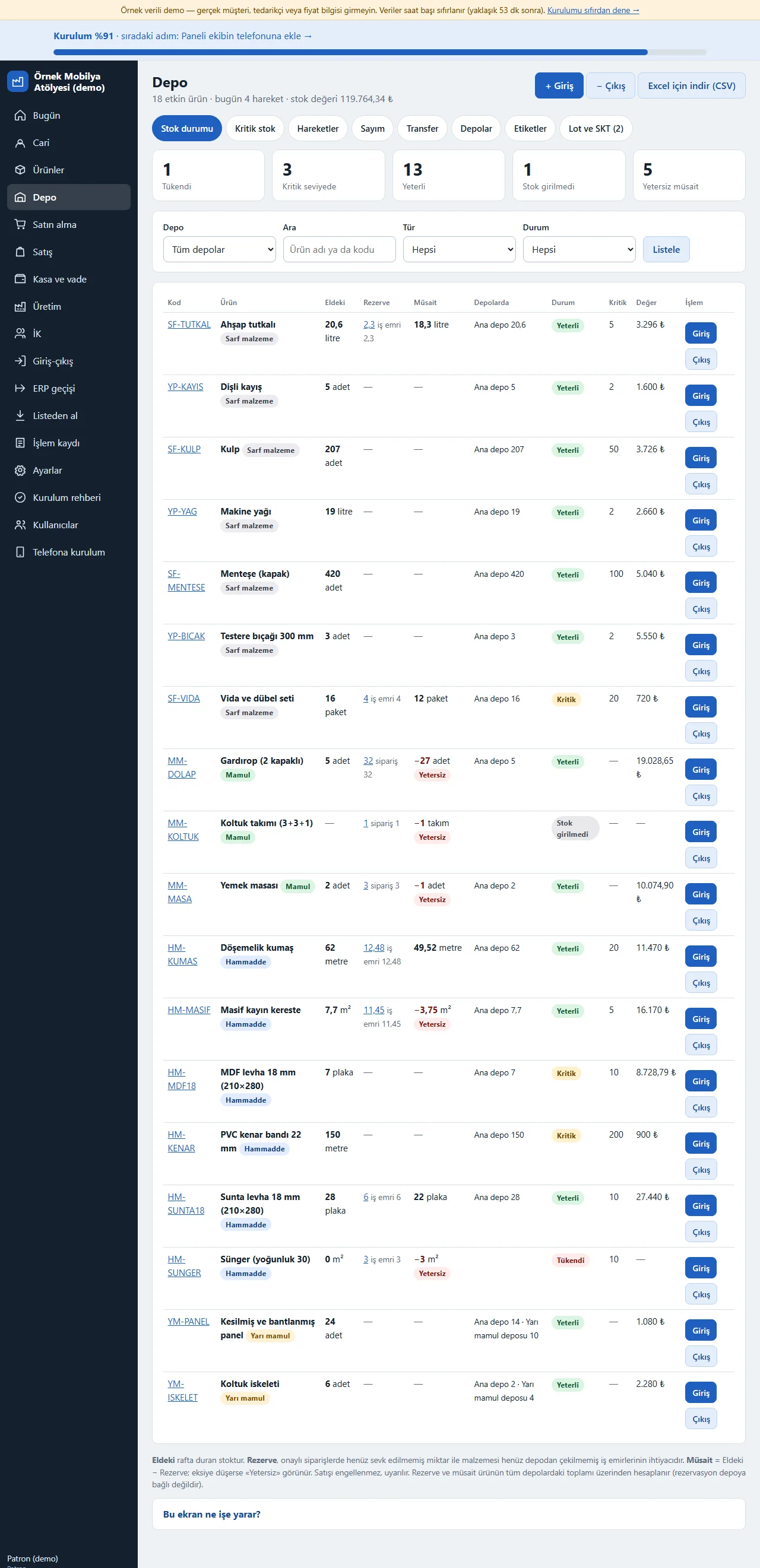
Each product’s stock, critical level, status (Yeterli, Kritik, Tükendi) and value are listed; stock is the sum of movements and is not typed in. “Eldeki” (on hand) is the stock on the shelf; “Rezerve” (reserved) is the quantity on confirmed orders not yet shipped plus what work orders still need from the warehouse (written separately for orders and work orders; tapping it opens the breakdown on the product page); “Müsait” (available) is on hand minus reserved and, if it falls below zero, the row gets a red “Yetersiz” (insufficient) label, and the “Yetersiz müsait” box at the top and the Durum (status) filter gather these products. Reservation does not block a sale, it only warns. Each row has a one-tap Giriş and Çıkış button, and at the top are Giriş, Çıkış and download for Excel; the Kritik stok, Hareketler, Sayım, Transfer, Depolar, Etiketler and Lot ve SKT (lots and expiry) tabs sit beside it. With two warehouses open a “Depolarda” (in warehouses) column shows how much of each product sits in which warehouse, and the “Depo” choice in the filter shows a single warehouse. A wrong movement is cancelled with “Geri al” and the record is not deleted.
- On screen (Turkish interface)
- “Giriş” — in
- “Çıkış” — out
- “Yeterli” — enough
- “Tükendi” — sold out
- “Sayım” — count
- “Depolarda” — in warehouses
- “Rezerve” — reserved
- “Müsait” — available
-
Reservation breakdown on the product page
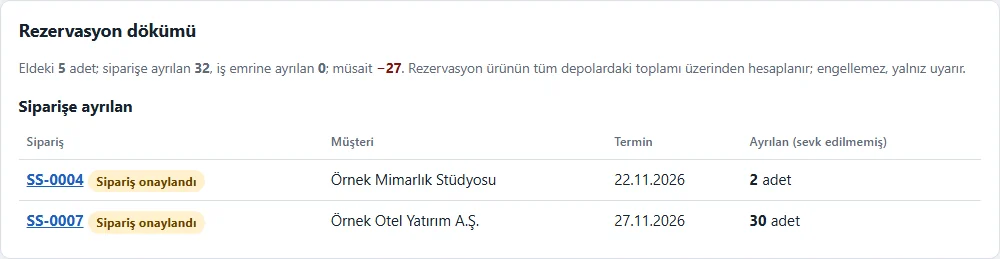
The “Rezervasyon dökümü” (reservation breakdown) card on a product page gives the stock on hand, what is set aside for orders and for work orders and the available quantity; below it lists which sales order (number, customer, due date) and which work order sets aside how much. The order and work-order links are links only for a role that may open that page and plain text for another role; it shows no price or amount. A reservation is not a separate record, it is worked out over the product’s total in all warehouses; a quote that is not confirmed does not count as reserved.
- On screen (Turkish interface)
- “Rezervasyon dökümü” — reservation breakdown
- “Siparişe ayrılan” — set aside for orders
-
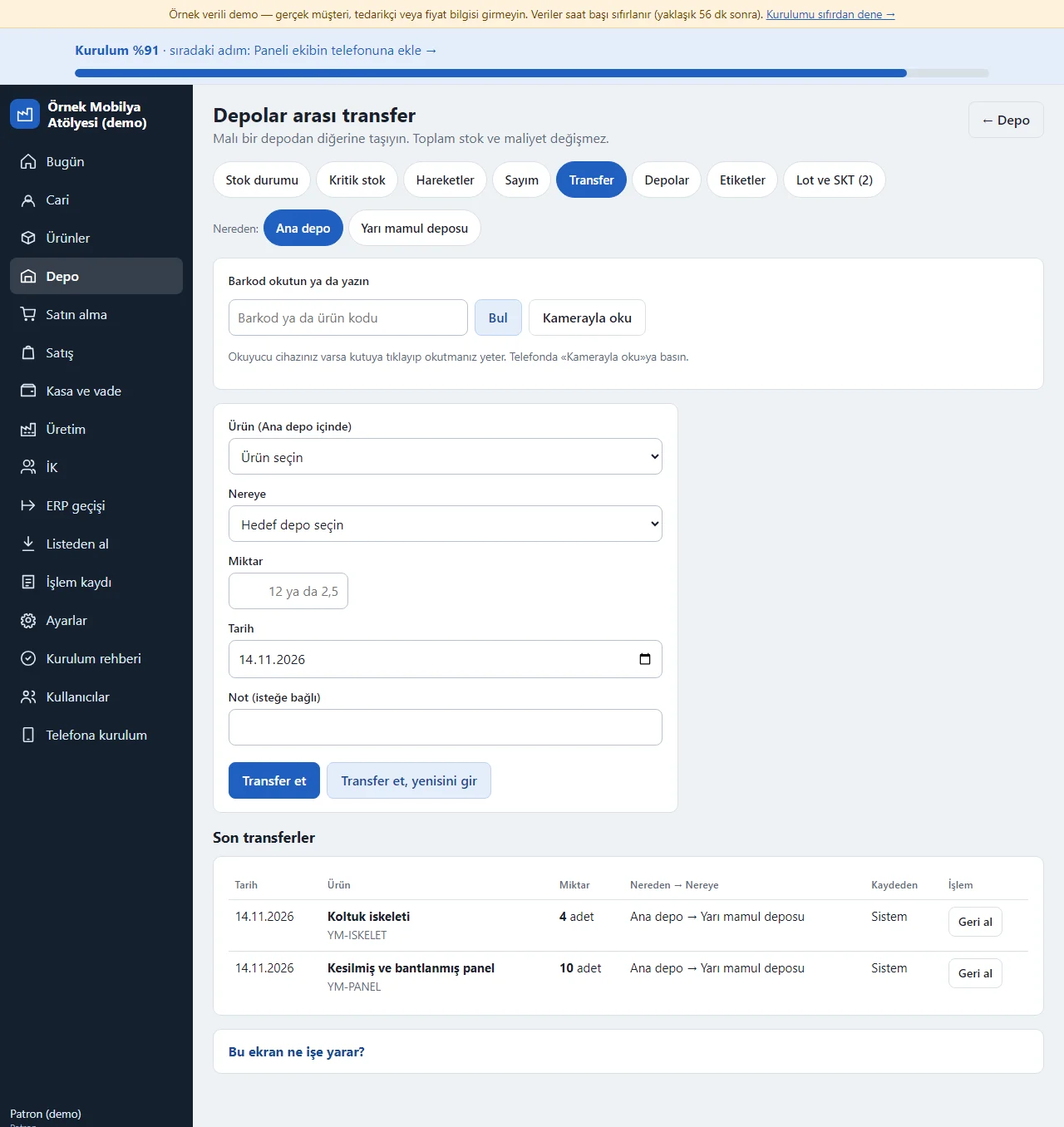
0.14.0 · 14 November 2026 Transfer between warehouses and barcode scanning
You move goods from one warehouse to another: you choose the source warehouse, the product, the target warehouse and the quantity; the total stock and cost do not change, and “Geri al” (undo) cancels the transfer as a whole if it was wrong. In the “Barkod okutun ya da yazın” (scan or type a barcode) box at the top you scan the barcode with a reader device (on a phone “Kamerayla oku”, read with the camera); the product is chosen by itself and, if the barcode is not found, opening a product card is suggested. The same box is on the in, out and count screens. Stock is kept separately in each warehouse and none can go below zero. For a lot-tracked product the lot and expiry date move to the target warehouse with it.
- On screen (Turkish interface)
- “Transfer” — transfer
- “Nereden” — from
- “Nereye” — to
- “Barkod okutun ya da yazın” — scan or type a barcode
- “Kamerayla oku” — read with the camera
-
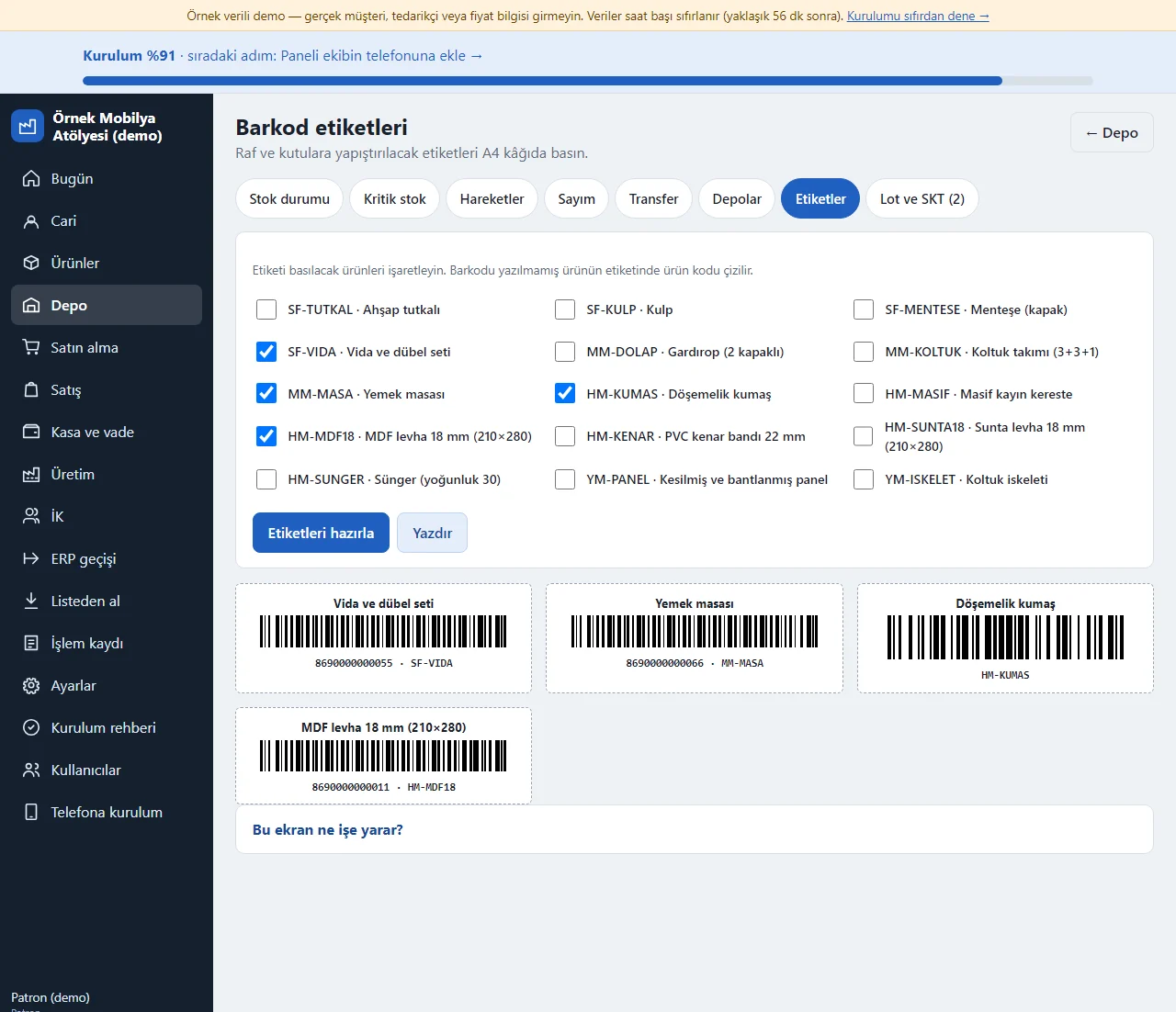
0.14.0 · 14 November 2026 Barcode labels
You tick the products whose labels are to be printed; each label carries the product name, its Code 128 barcode and the barcode number (the product code if no barcode was written). “Yazdır” (print) prints the labels in 3 columns on A4 paper. The shelf location is written on the product card, on the warehouse row.
- On screen (Turkish interface)
- “Etiketleri hazırla” — prepare the labels
- “Yazdır” — print
-
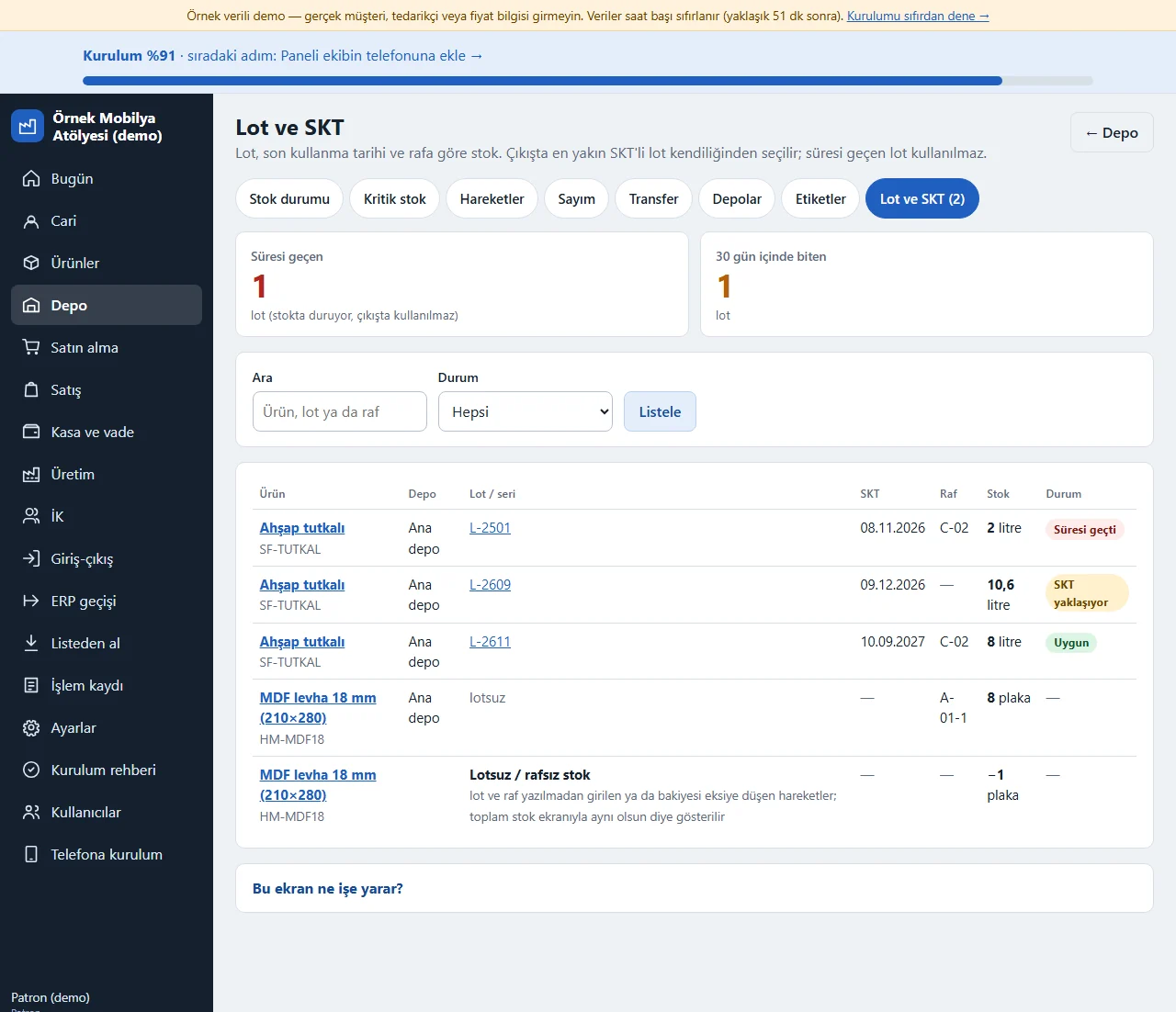
0.14.0 · 14 November 2026 Lots and expiry
Depo > Lot ve SKT: every lot of the products tracked by lot or serial number (warehouse, lot / serial no, expiry date, shelf, stock) is on one list. At the top are “Süresi geçen” (expired; the lot stays in stock and is not used on a goods-out) and “30 gün içinde biten” (expiring within 30 days) boxes, and each lot is marked Süresi geçti (expired), SKT yaklaşıyor (expiry approaching) or Uygun (fine). You search by product name, lot or shelf and filter by status; tapping a lot number opens its traceability page. A product that is not lot-tracked but has a shelf shows as “lotsuz” (no lot); movements entered without a lot or shelf and a bucket that has gone below zero are added under the list as a “Lotsuz / rafsız stok” (no lot / no shelf stock) line (−1 sheet in the example), so that the product’s total equals the Stok durumu screen. When the scope is switched off this tab never shows.
- On screen (Turkish interface)
- “Lot ve SKT” — lots and expiry
- “Süresi geçen” — expired
- “30 gün içinde biten” — expiring within 30 days
- “SKT yaklaşıyor” — expiry approaching
- “Uygun” — fine
-
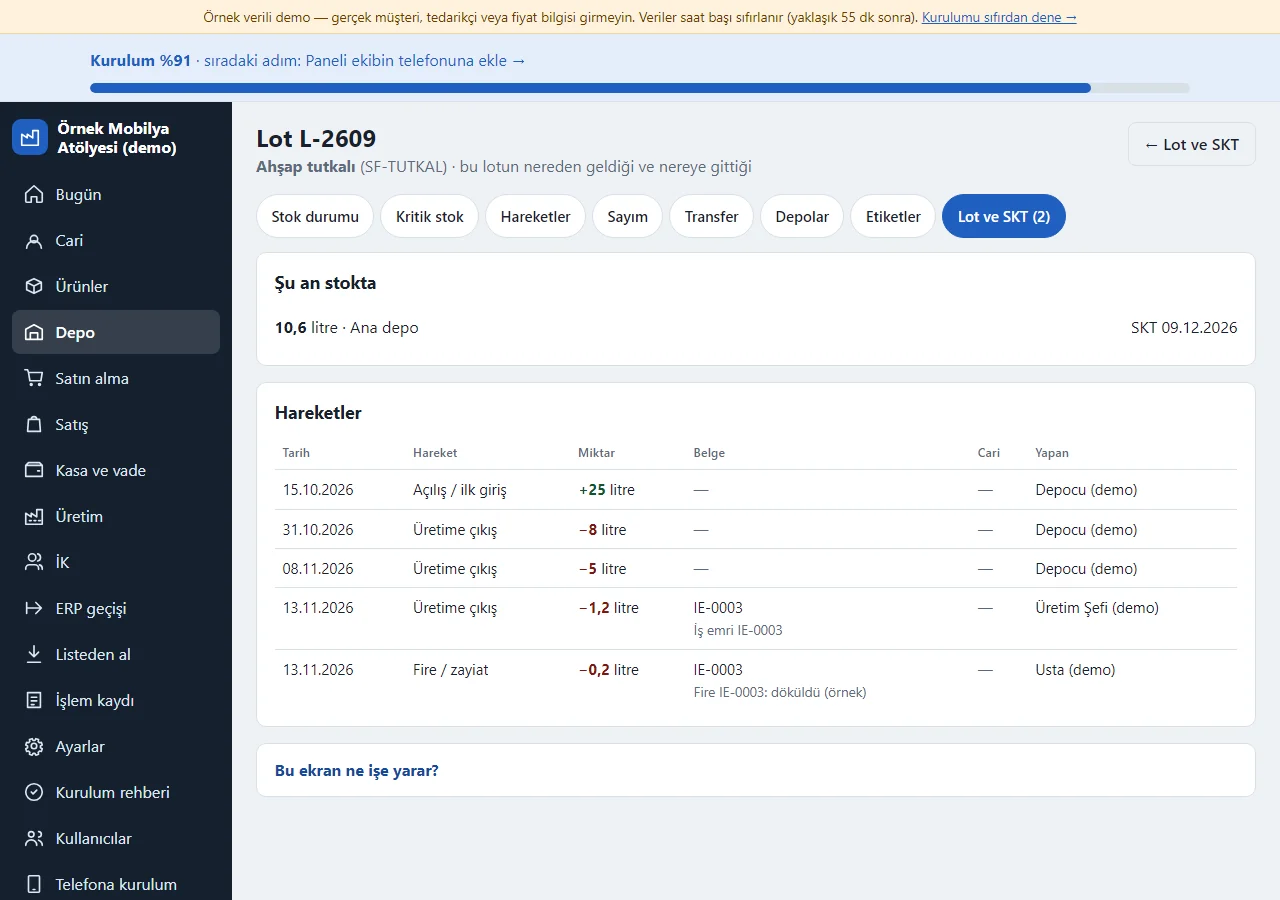
0.14.0 · 14 November 2026 Lot traceability
Tapping a lot number opens a “Lot L-2609” page: where the lot is in stock now, how much and with which expiry date, and below it every movement made with this lot (receipt, issue to production, scrap, transfer, count) with its date, quantity, document (work order or goods receipt), party and who did it. So where the lot came from and where it went is on one page; a work order’s material list also names the lot drawn and links to this page. There is no lot-based cost and no recall report.
- On screen (Turkish interface)
- “Şu an stokta” — in stock now
- “Hareketler” — movements
- “Üretime çıkış” — issue to production
- “Fire / zayiat” — scrap
-
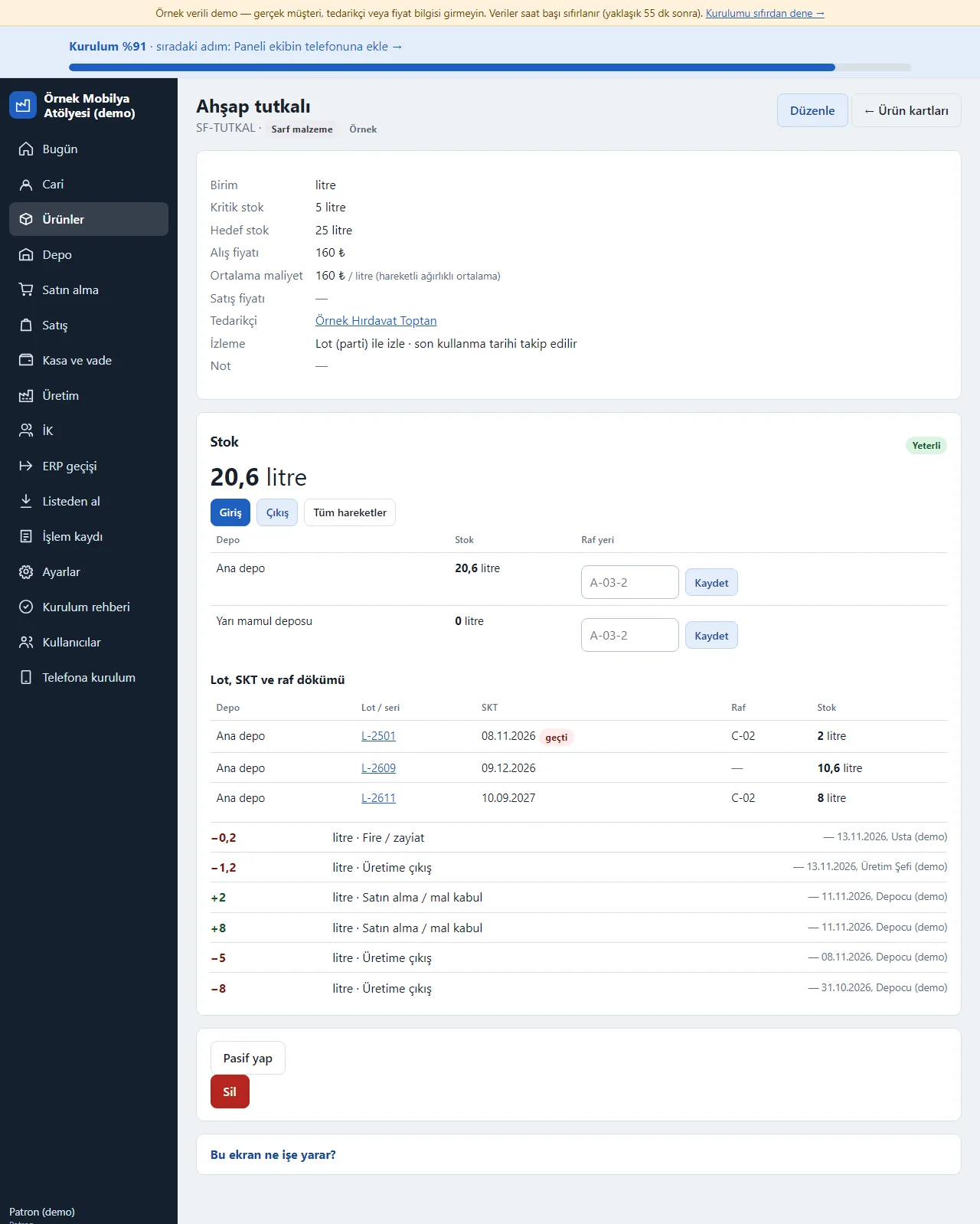
0.14.0 · 14 November 2026 Lot, expiry and shelf breakdown on the product page
In the product card form “Lot / seri izleme” (lot / serial tracking: İzlenmez, Lot (parti) ile izle, Seri numarasıyla izle: not tracked, track by lot, track by serial number) and “Son kullanma tarihi (SKT) takip edilsin” (track the expiry date) are chosen. The page of a tracked product has an “İzleme” (tracking) line; the Stok box shows the total stock, the stock per warehouse and the shelf, and the “Lot, SKT ve raf dökümü” (lot, expiry and shelf breakdown) table below it lists each lot with warehouse, lot / serial no, expiry date (an expired one carries a “geçti” label), shelf and stock; tapping a lot number opens its traceability page. The Giriş, Çıkış and Tüm hareketler buttons are in the same box. The average cost is a moving weighted average per product, not per lot.
- On screen (Turkish interface)
- “İzleme” — tracking
- “Lot, SKT ve raf dökümü” — lot, expiry and shelf breakdown
- “geçti” — expired
- “Raf yeri” — shelf
-
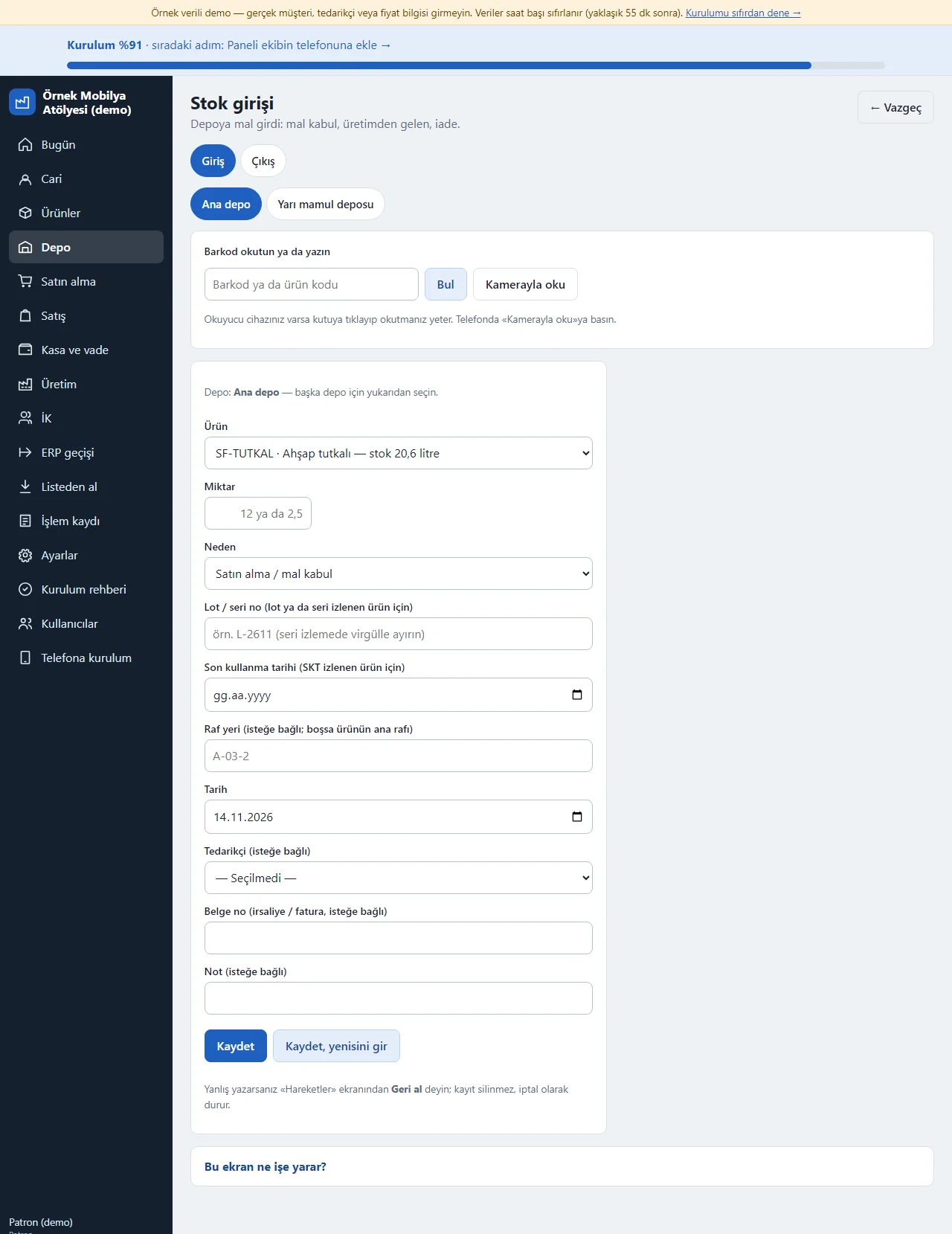
0.14.0 · 14 November 2026 Stock in with lot, expiry date and shelf
On a stock-in for a lot-tracked product the “Lot / seri no”, “Son kullanma tarihi (SKT izlenen ürün için)” and “Raf yeri” (shelf) fields are filled (with serial tracking the numbers are separated by commas; an empty shelf takes the product’s main shelf); a goods receipt has the same fields for each line. On a goods-out no lot needs to be typed: when “Lot / seri no” is empty the program draws by itself from the lot that expires first (the oldest receipt when there is no expiry date), and one goods-out can be split over several lots; an expired lot is issued only when its lot is typed by hand. A wrong movement is cancelled with “Geri al” (undo; a split goods-out is cancelled as a whole), and the receipt of a lot that has been used cannot be cancelled. Transfers and counts keep the lot and the shelf; the lot number of a finished item that comes out of production is the work-order number.
- On screen (Turkish interface)
- “Lot / seri no” — lot / serial no
- “Son kullanma tarihi” — expiry date
- “Raf yeri” — shelf
- “Kaydet, yenisini gir” — save, enter another
-
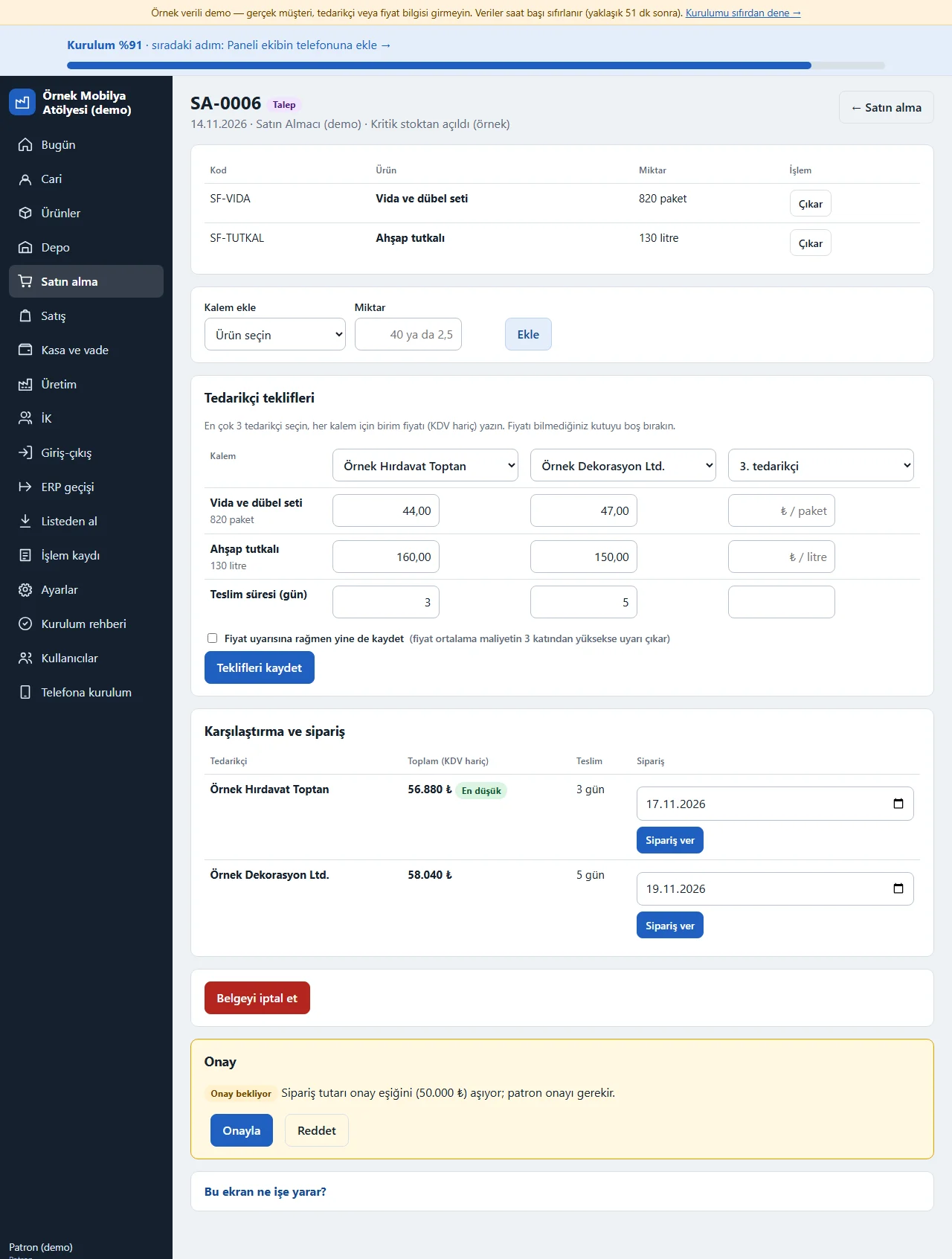
0.14.0 · 14 November 2026 Purchasing: quote comparison
In a request opened from critical stock up to three suppliers are chosen; for each item a unit price and delivery day are written. A price above 3 times the average cost raises a warning and is not saved unless the “Fiyat uyarısına rağmen yine de kaydet” (save despite the price warning) box is ticked; quotes are not saved without a supplier or price. Once the quotes are saved the totals show side by side and the lowest is marked; “Sipariş ver” (place order) is tapped on the right supplier. When the order amount is above the approval threshold the owner wrote (50,000 ₺ in the example) an “Onay” box under the document says “Onay bekliyor” (awaiting approval) and the owner taps Onayla (approve) or Reddet (reject). When the goods arrive Mal kabul records a partial or full receipt and the warehouse entry is written by itself; a ready WhatsApp text opens for the supplier.
- On screen (Turkish interface)
- “Tedarikçi teklifleri” — supplier quotes
- “En düşük” — lowest
- “Sipariş ver” — place order
- “Mal kabul” — goods receipt
-
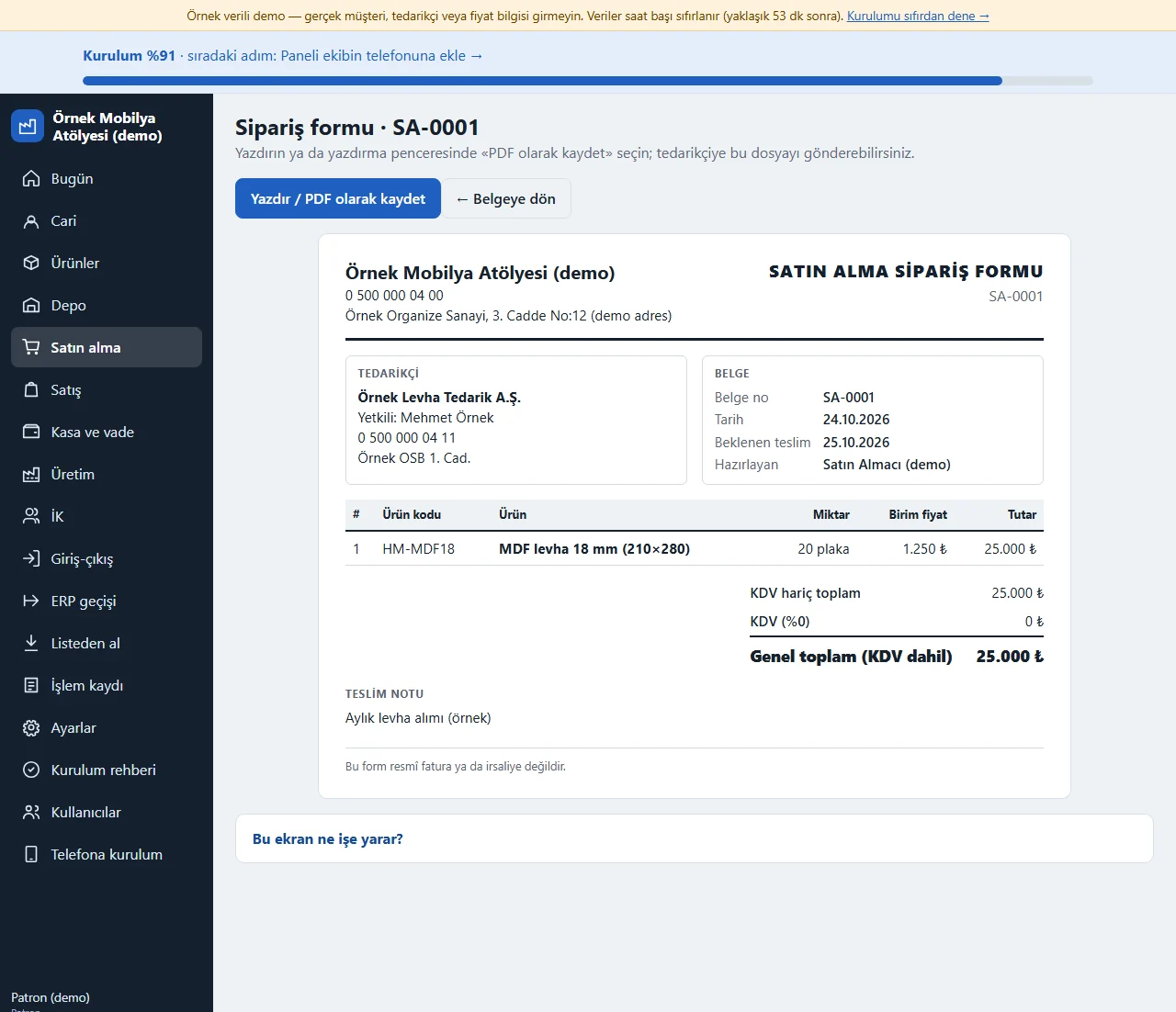
Purchase order form
The “Sipariş formunu yazdır / PDF” (print the order form) button on a purchase document opens the A4 form that goes to the supplier: the company and supplier details, the document number, date, expected delivery, the lines (product code, product, quantity, unit price, amount), the total without VAT, VAT and the total including VAT if the VAT scope is on, the delivery note and the approval status. “Yazdır / PDF olarak kaydet” (print / save as PDF) opens the print window; if “Save as PDF” is picked instead of a printer the form can be sent to the supplier as a file (the server does not produce a PDF). A request not yet ordered prints without prices as a “Satın alma talebi” (purchase request) and a cancelled order prints with a cancelled heading. At the bottom it says “Bu form resmî fatura ya da irsaliye değildir” (this form is not an official invoice or delivery note). The owner, the buyer and the accounts clerk open the form; the storekeeper and the craftsman do not see the button.
- On screen (Turkish interface)
- “Yazdır / PDF olarak kaydet” — print / save as PDF
-
0.14.0 · 14 November 2026 Sales order
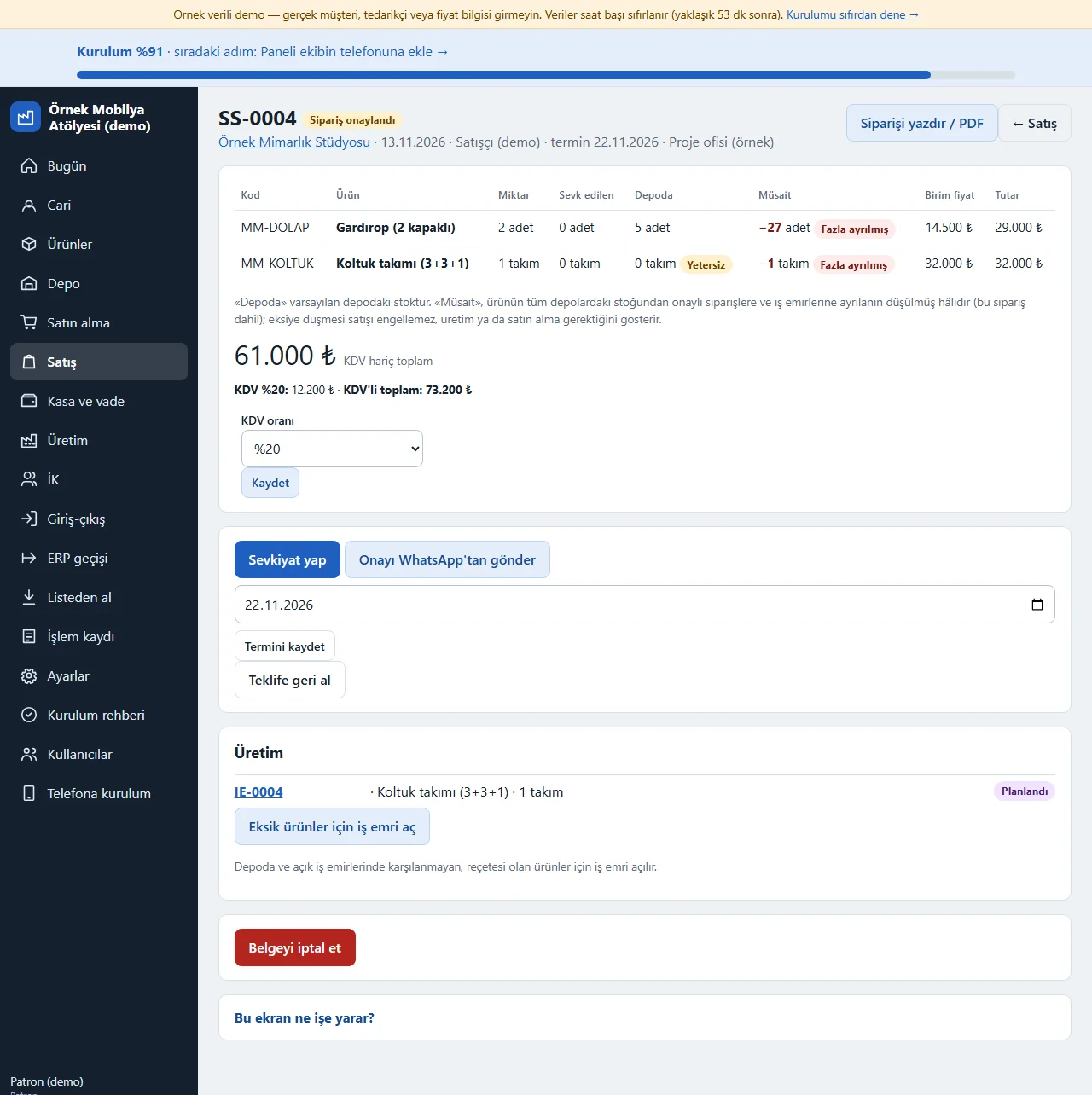
On a confirmed order the lines, the quantity shipped, the quantity in the warehouse and the available quantity show (a line whose available quantity falls below zero gets a “Fazla ayrılmış” (over-reserved) label; on a quote the same place is an “Eldeki / Müsait” (on hand / available) line); a line with too little stock gets a “Yetersiz” (insufficient) label and the “Eksik ürünler için iş emri aç” button opens a work order for these items. Sevkiyat yap can be partial, a due date is written and the confirmation is sent to the customer on WhatsApp; an estimated gross profit is shown for the shipped part.
- On screen (Turkish interface)
- “Sevkiyat yap” — ship
- “Yetersiz” — insufficient
- “Eksik ürünler için iş emri aç” — open a work order for missing items
- “Teklife geri al” — return to a quote
-
Available-stock warning on a sale
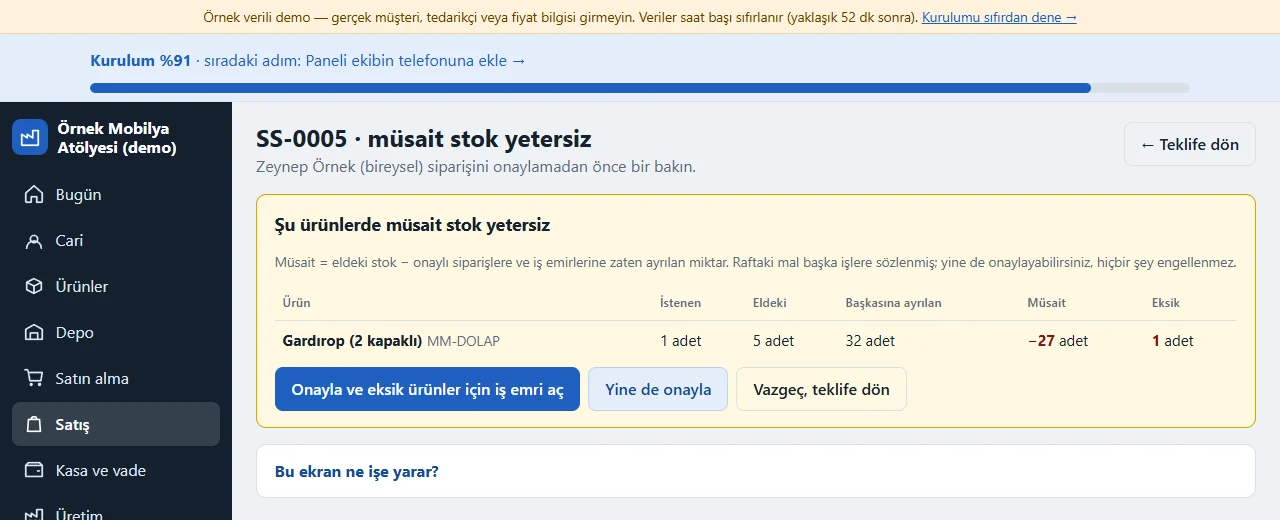
When a quote is turned into an order and the available stock is short, the order is not confirmed straight away: the product, the quantity asked for, the stock on hand, what is set aside for others, the available quantity and the shortfall show in a warning box. Nothing is blocked: “Yine de onayla” (confirm anyway) confirms the order; for someone with production access “Onayla ve eksik ürünler için iş emri aç” (confirm and open a work order for the missing items) confirms the order and opens a work order for them; “Vazgeç, teklife dön” (cancel, back to the quote) leaves the quote as it is. A salesperson without production access sees a note to pass it on to the production chief.
- On screen (Turkish interface)
- “Yine de onayla” — confirm anyway
- “Müsait” — available
-
Quote and order document
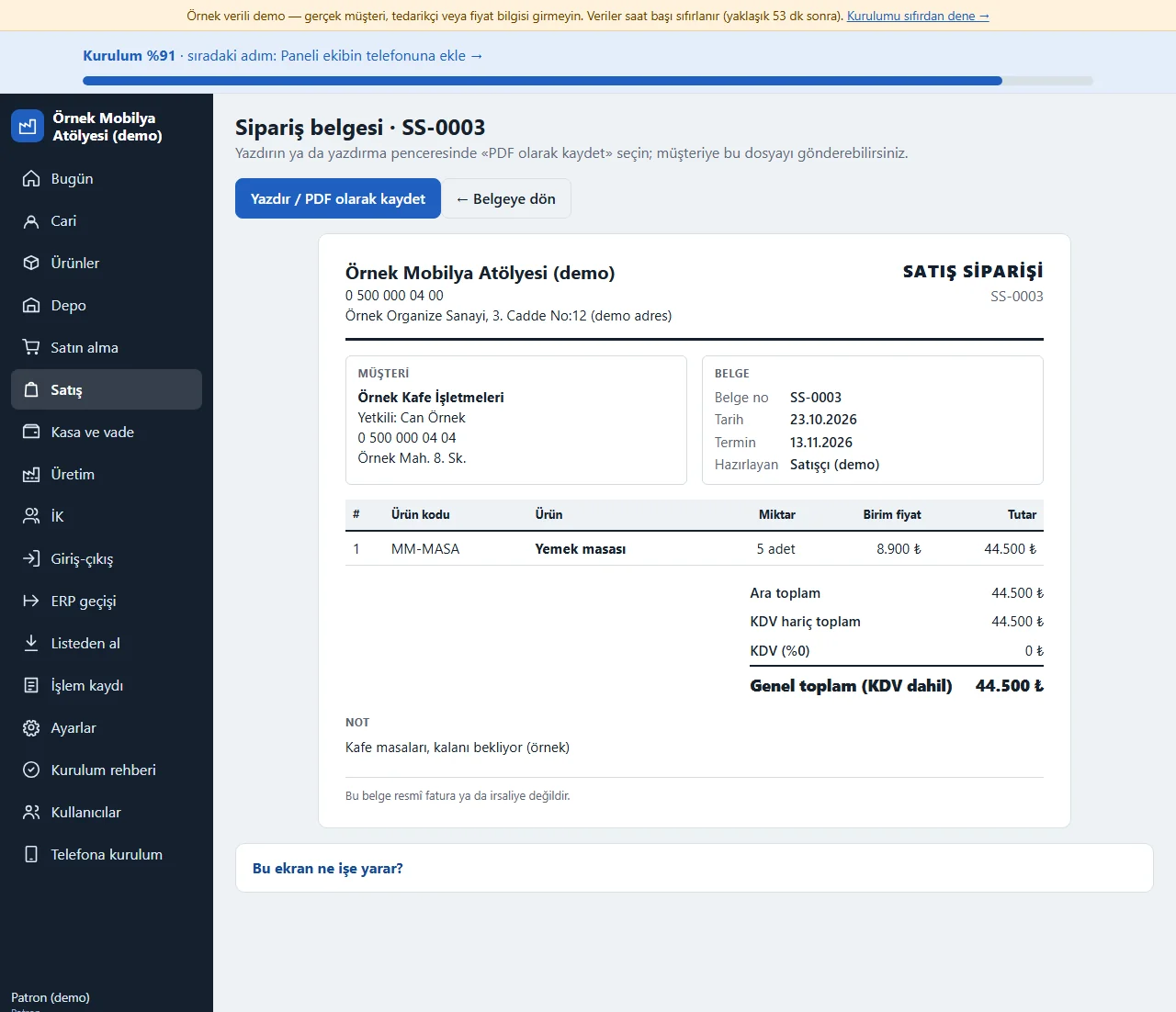
The “Siparişi yazdır / PDF” (print the order; “Teklifi yazdır / PDF” at the quote stage) button on a sales document opens the A4 document that goes to the customer: the company details, the customer and contact person, the document number, date and due date, who prepared it, the lines (product code, product, quantity, unit price, amount), the subtotal, a discount if there is one, VAT and the total including VAT if the VAT scope is on, and a note. The heading is TEKLİF (quote) or SATIŞ SİPARİŞİ (sales order) by the state of the document, and a cancelled document carries a cancelled heading. “Yazdır / PDF olarak kaydet” (print / save as PDF) opens the print window; with “Save as PDF” the customer gets a file. At the bottom it says “Bu belge resmî fatura ya da irsaliye değildir” (this document is not an official invoice or delivery note). The owner, the chief, the salesperson and the accounts clerk open the document; the storekeeper and the craftsman do not see the button.
- On screen (Turkish interface)
- “Yazdır / PDF olarak kaydet” — print / save as PDF
-
0.14.0 · 14 November 2026 Recipe and routing
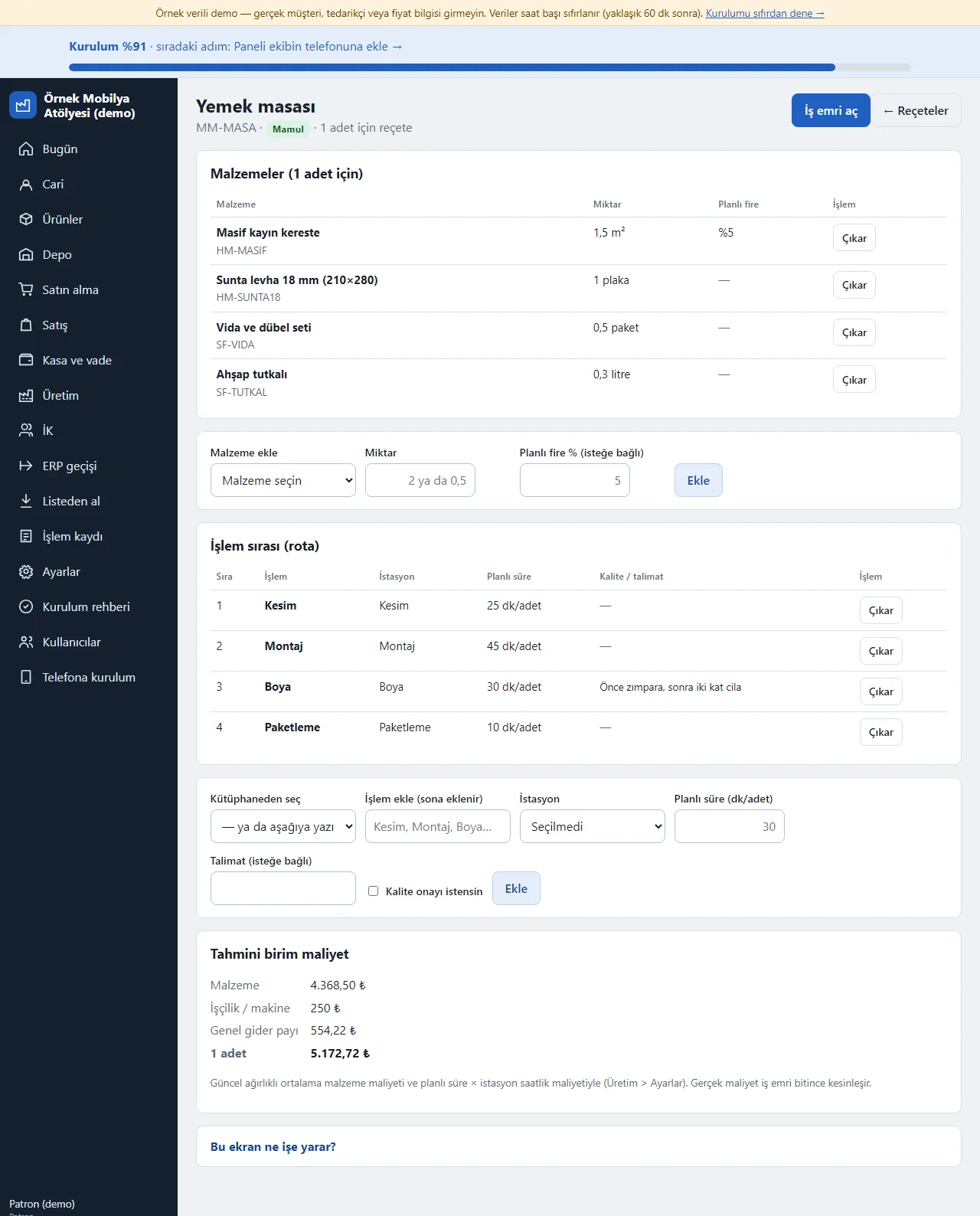
The materials needed for 1 unit of a product (with an optional planned scrap %) and the operation order (operation, station, planned time per unit) are written once. Below, the material, labour and machine, the overhead share and the estimated unit cost of 1 unit are worked out. The “İş emri aç” (open a work order) button opens a work order from this recipe. The routing form has a choice from the operation library, an instruction and a “kalite onayı istensin” (ask for quality approval) option, plus a button that copies another product’s routing into an empty one; the routing table shows a quality-approval and instruction column.
- On screen (Turkish interface)
- “Kütüphaneden seç” — choose from the library
- “Rotayı kopyala” — copy the routing
- “Malzemeler (1 adet için)” — materials (for 1 unit)
- “İşlem sırası (rota)” — operation order (routing)
- “Planlı fire” — planned scrap
- “İş emri aç” — open a work order
-
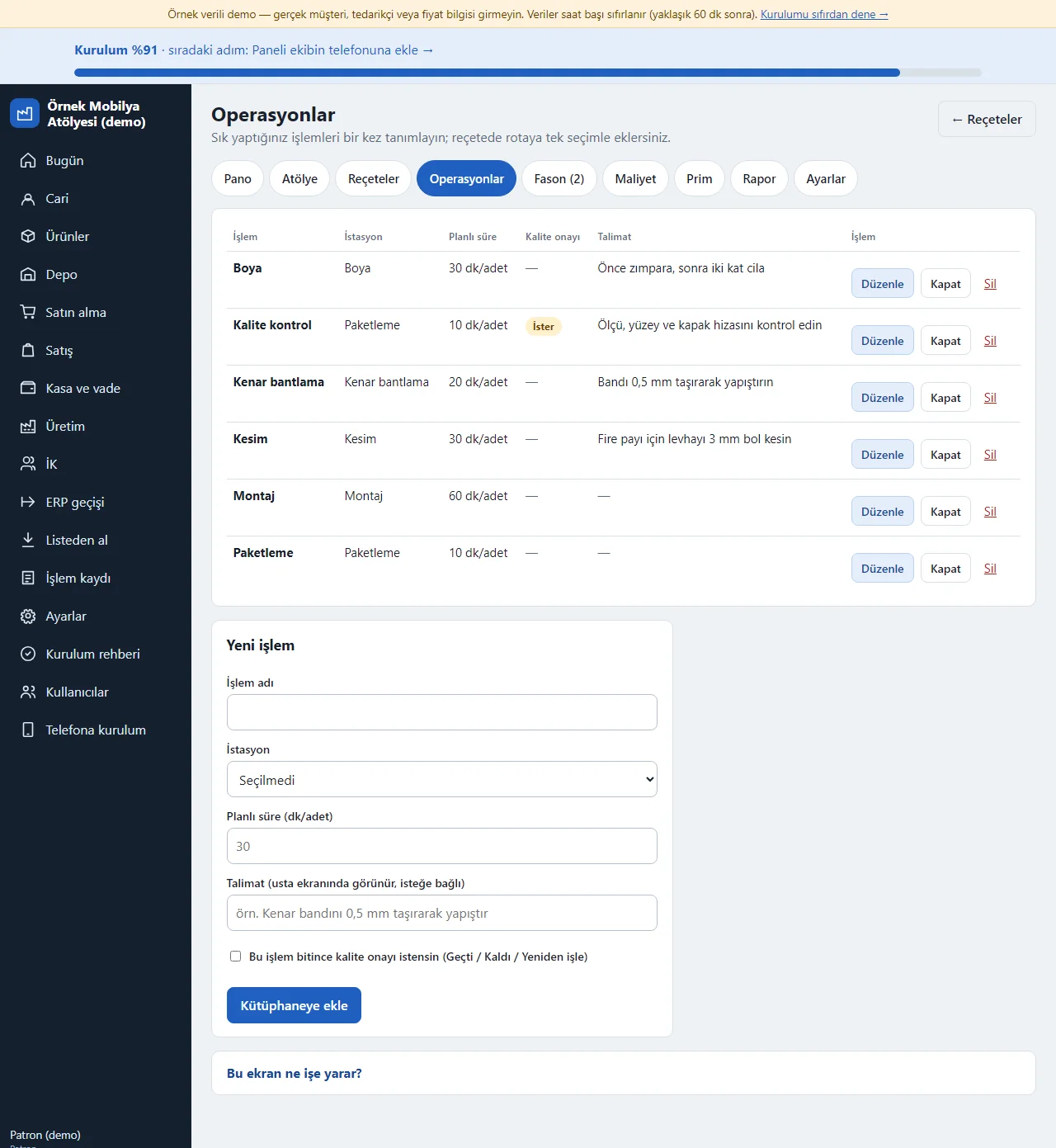
0.14.0 · 14 November 2026 Operation library
Üretim > Operasyonlar (owner, chief): you define the operations you do often once: a name, a station, planned minutes (per unit), an instruction that shows on the shop-floor screen and a “bu işlem bitince kalite onayı istensin” (ask for quality approval when this operation finishes) option (in the demo Kesim, Kenar bantlama, Montaj, Boya, Kalite kontrol and Paketleme are written as examples). In a recipe you add an operation to the routing from the library with one choice; what is added is a copy, so changing or deleting the library later does not disturb old routings. “Kapat” takes an operation off the choice list, “Sil” deletes it from the library.
- On screen (Turkish interface)
- “Operasyonlar” — operations
- “Kalite onayı” — quality approval
- “Talimat” — instruction
- “Kapat” — switch off
- “Sil” — delete
-
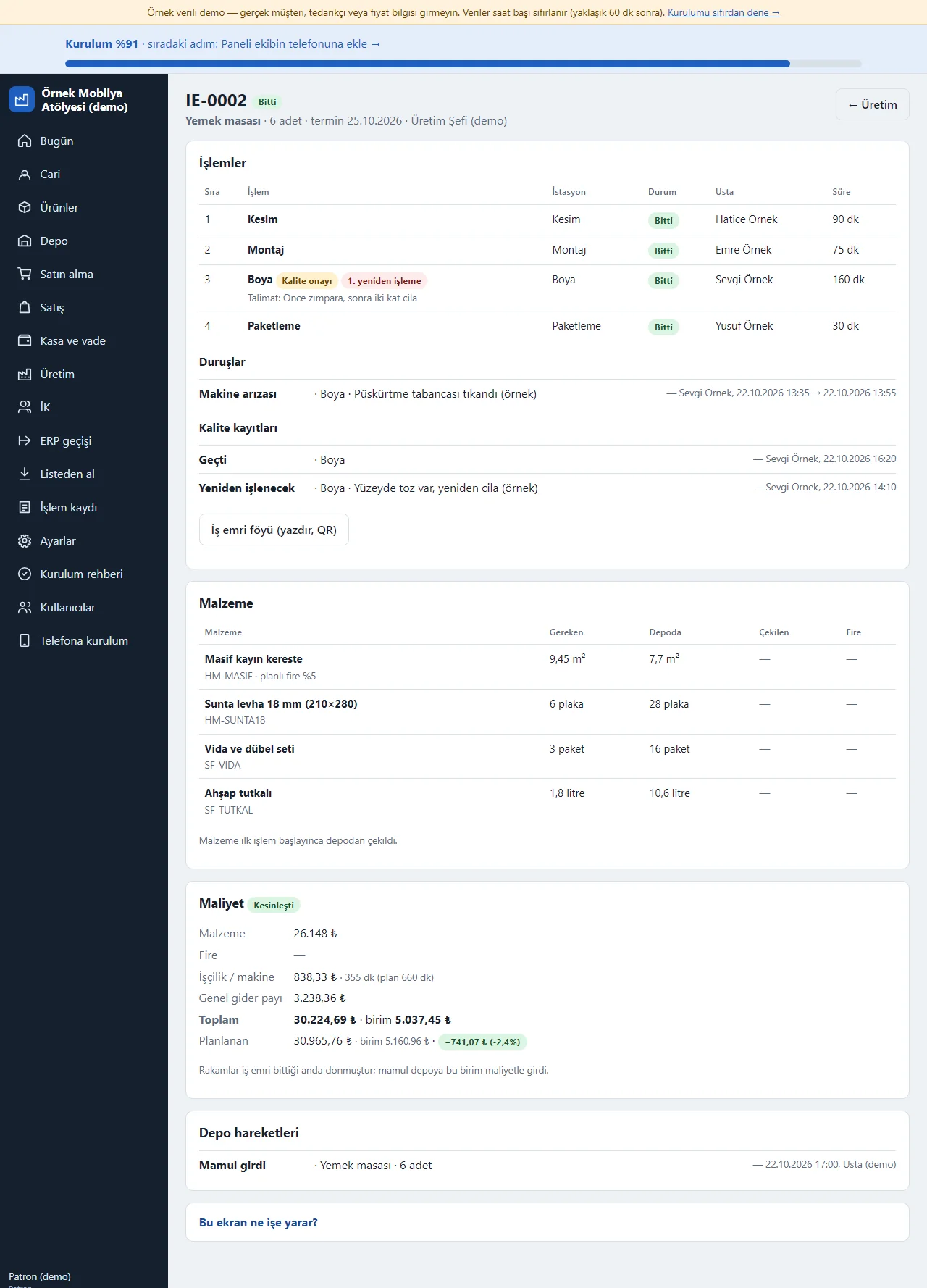
0.14.0 · 14 November 2026 Work order and real cost
On a finished work order the operations, craftsmen and times, material use and warehouse movements show. The cost card adds up the material drawn, scrap, labour and machine (real time × the station’s hourly cost) and an overhead share; when the work order finishes the figures freeze and the difference from the plan is written. The finished item enters the warehouse at this unit cost. For an operation that asks for quality approval a “Kalite kayıtları” (quality records) list gives the result (Geçti, Kaldı, Yeniden işlenecek: passed, failed, to be reworked), the note and who marked it; a reworked operation shows its counter.
- On screen (Turkish interface)
- “İşlemler” — operations
- “Maliyet” — cost
- “Kesinleşti” — finalised
- “Planlanan” — planned
-
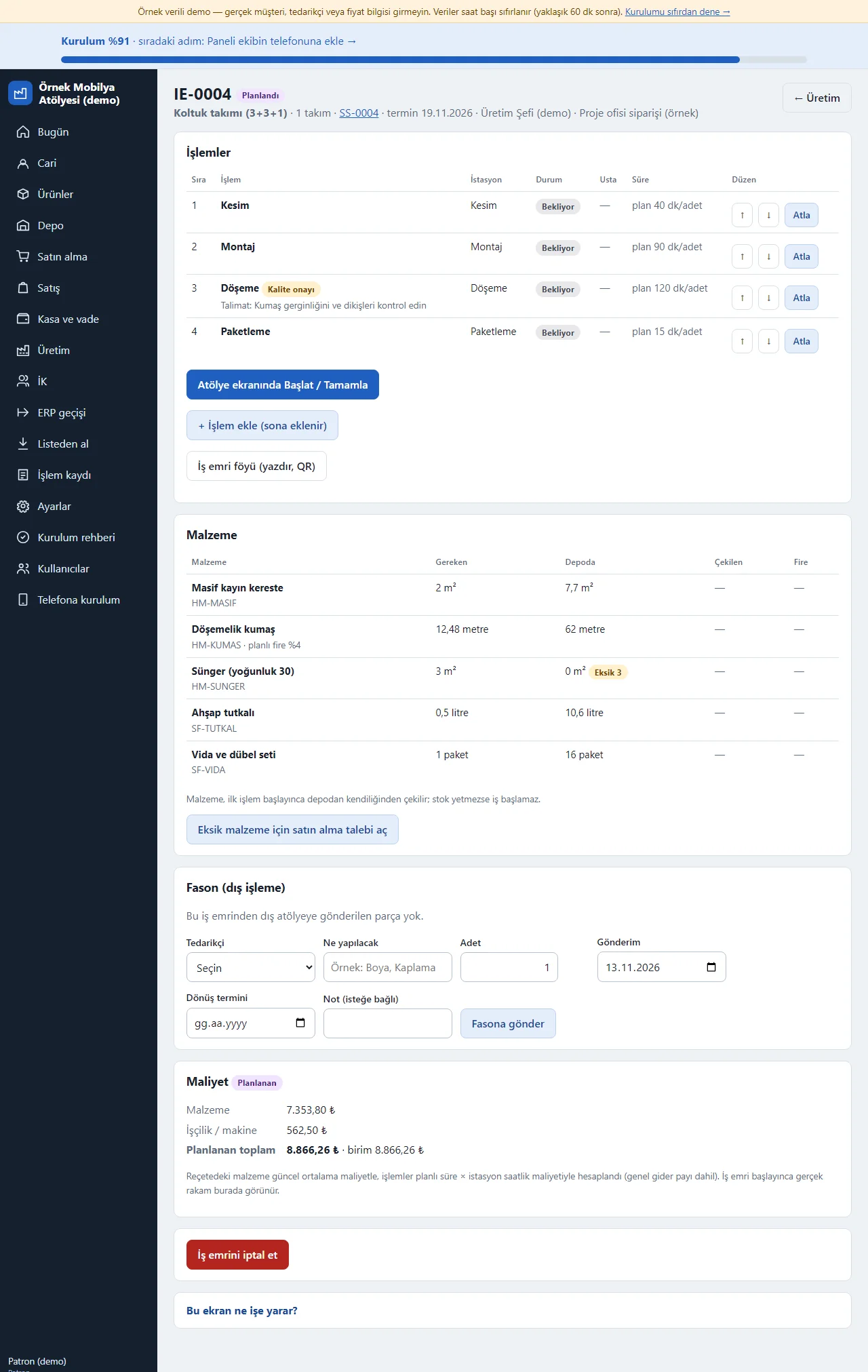
0.14.0 · 14 November 2026 Operation layout on an open work order
On a planned or running work order the owner and the chief arrange the operations: ↑ ↓ beside an operation that has not started change the order, “Atla” (skip) counts an operation that will not be done on this work order as finished (no time or craftsman is written, its note shows; the last remaining operation cannot be skipped), and “+ İşlem ekle” (add an operation) adds an operation at the end of the work order, from the library or by hand. Beside an operation a “Kalite onayı” label and the instruction are written; a reworked operation gets a “1. yeniden işleme” (1st rework) label. A finished work order has none of these buttons.
- On screen (Turkish interface)
- “Atla” — skip
- “İşlem ekle” — add an operation
- “Kalite onayı” — quality approval
- “yeniden işleme” — rework
-
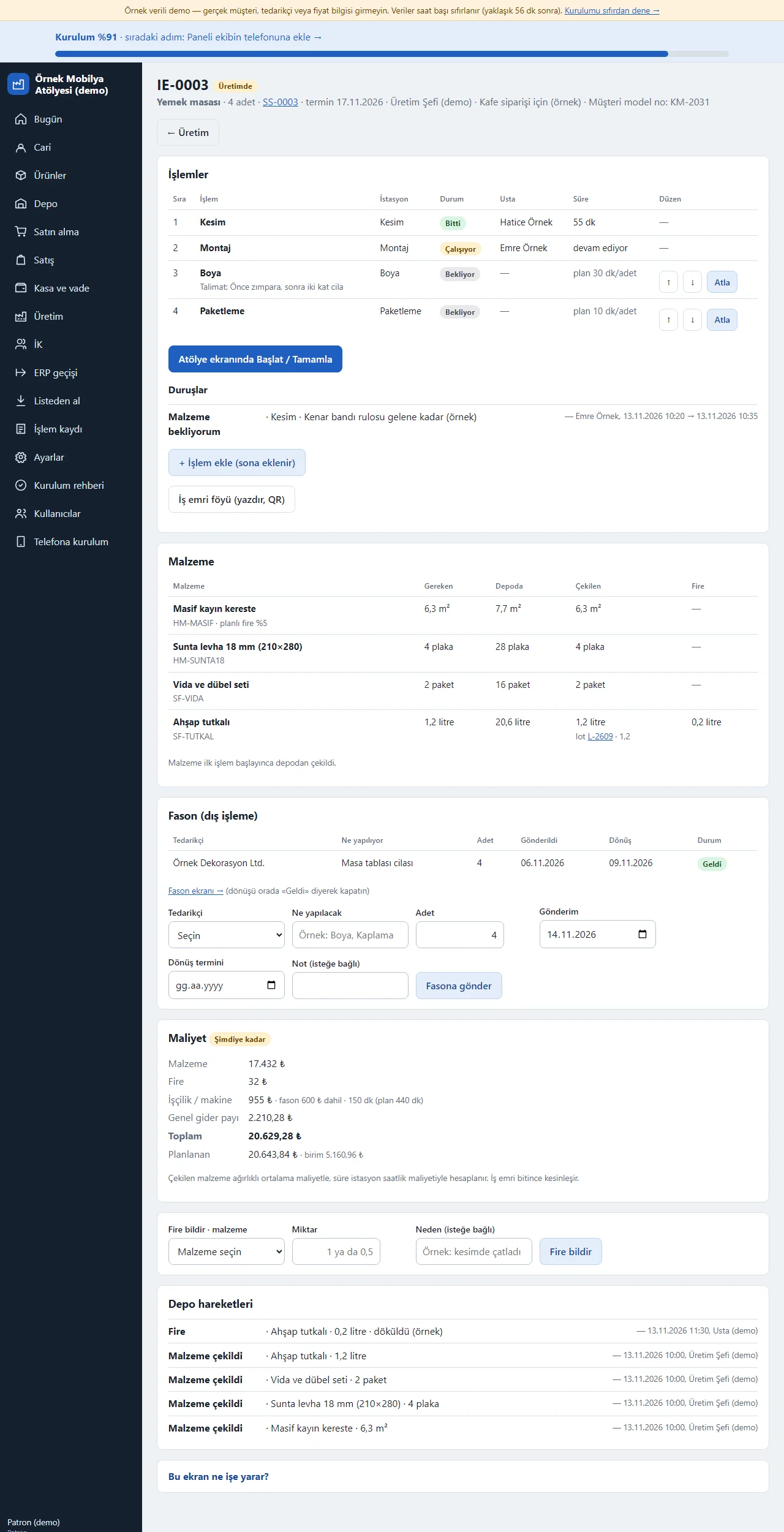
0.14.0 · 14 November 2026 Stops on a work order
When a craftsman presses “Sorun bildir” (report a problem) and picks a reason the operation stops; on the work-order page the operation reads like “Duruyor: Malzeme bekliyorum” (stopped: waiting for material) and a “Duruşlar” (stops) list below gives the reason, a note, who reported it, when it stopped and when it resumed. The stopped time is taken off the operation’s real time, so labour and machine cost and the craftsman bonus do not carry the waiting. A stopped job is also marked on the production board and on the owner’s Today screen. In the material list the lot number a lot-tracked product was drawn from is written too and links to the lot’s traceability page.
- On screen (Turkish interface)
- “Duruşlar” — stops
- “Duruyor” — stopped
- “Malzeme bekliyorum” — waiting for material
- “Devam et” — resume
-
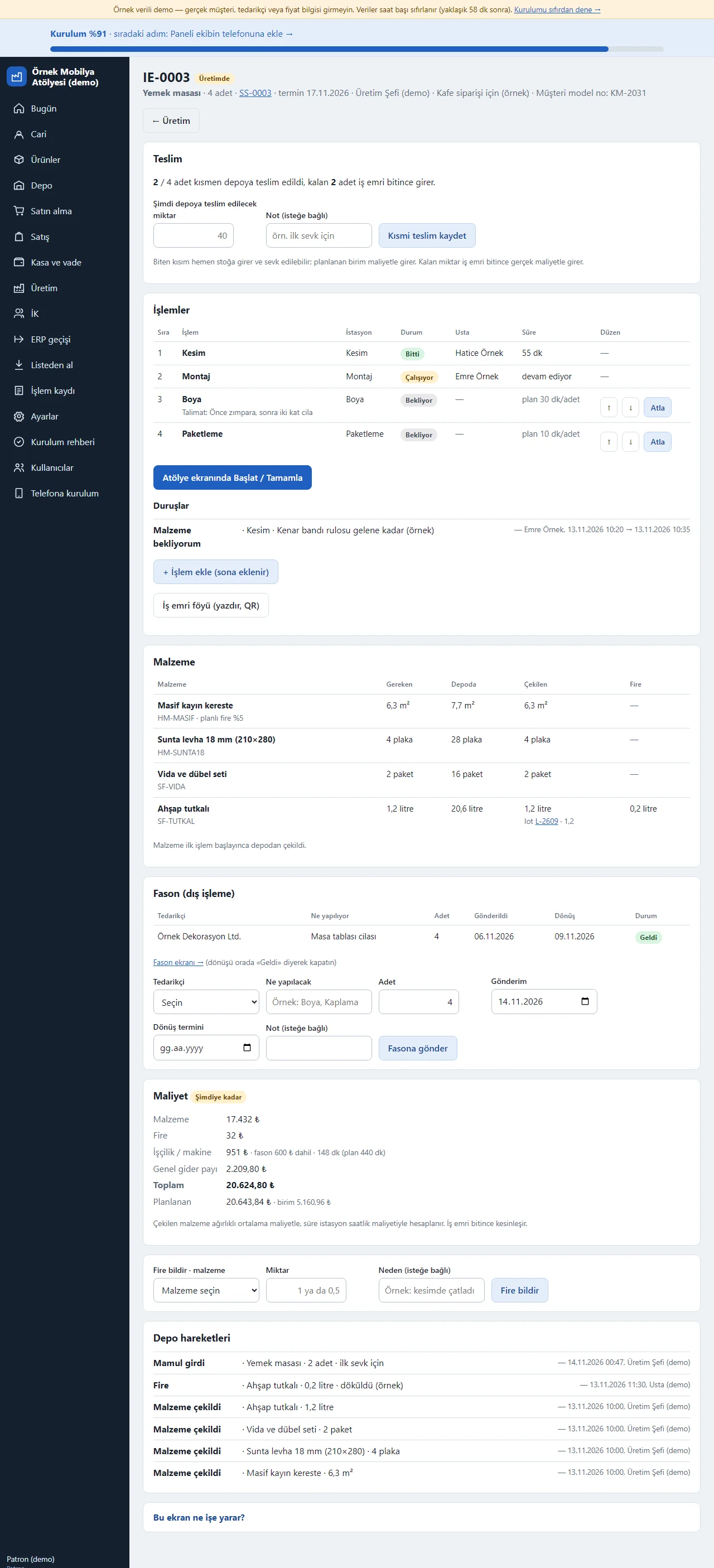
Partial delivery
On the page of a work order that has started (its material drawn) a “Teslim” (delivery) card shows: “2 / 4 units partly delivered to the warehouse, the remaining 2 enter when the work order ends”. The owner or chief writes the finished quantity (for example 2) in “Şimdi depoya teslim edilecek miktar” (quantity to deliver now) and an optional note and presses “Kısmi teslim kaydet” (save partial delivery); the finished item enters stock at once and can be shipped, and it shows in the movements as “work-order no partial delivery 1”. The delivered total must stay below the order quantity; the rest enters by itself when the last operation finishes, with no double entry. The partial entry is made at the planned unit cost and the rest enters at the real cost; for a lot-tracked product the lot is “work-order no-K1”. A partial delivery cannot be undone and a work order is not split in two.
- On screen (Turkish interface)
- “Teslim” — delivery
- “Kısmi teslim kaydet” — save partial delivery
-
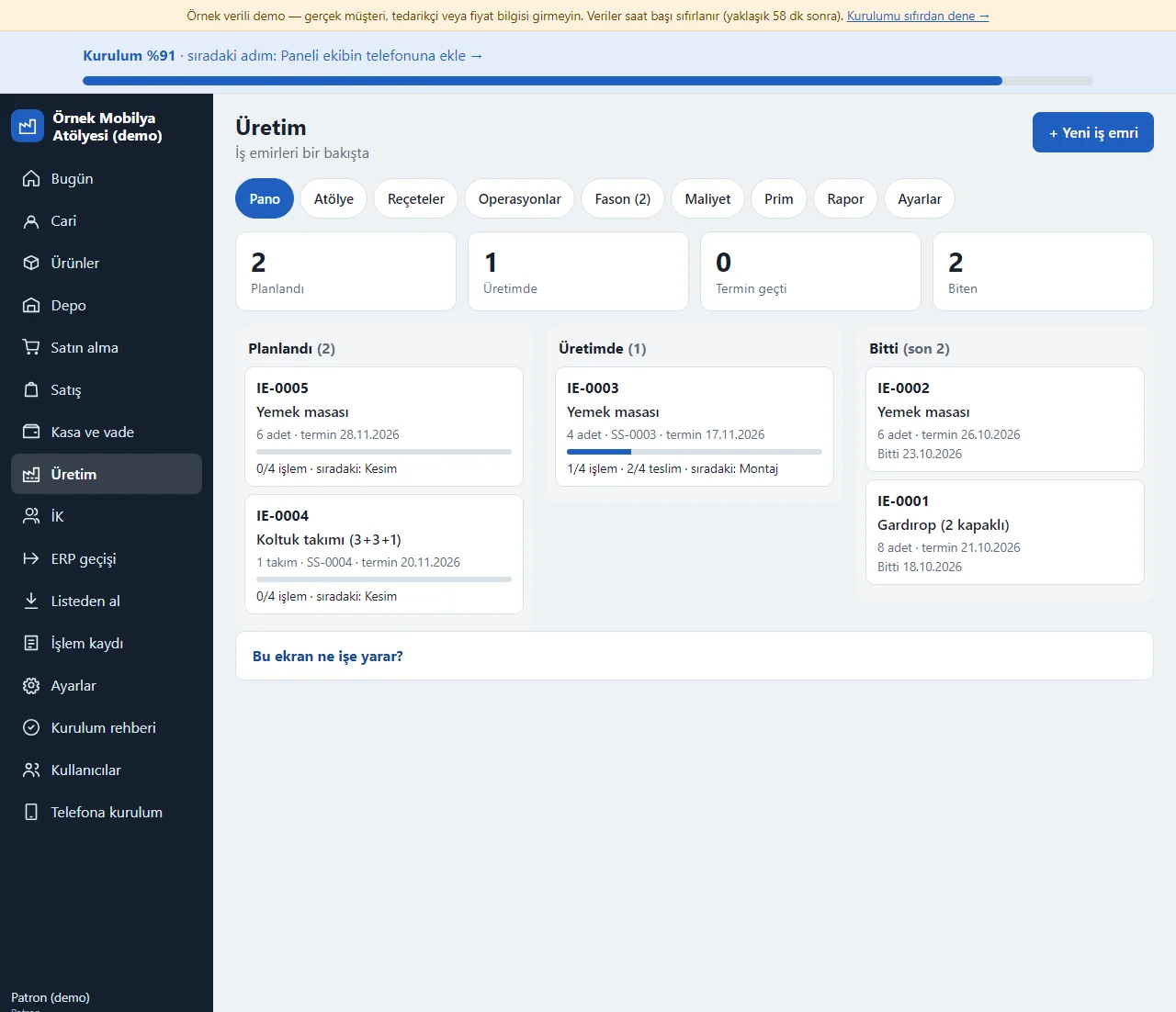
Production board
Production > Pano (board) shows work orders in Planlandı (planned), Üretimde (in production) and Bitti (finished) columns; a card carries the next operation and a progress bar, and a work order that was partly delivered also shows the delivered count, such as “1/4 işlem · 2/4 teslim”. The four boxes above give the planned, in-production, late and finished work-order counts.
- On screen (Turkish interface)
- “Planlandı” — planned
- “Üretimde” — in production
- “Bitti” — finished
- “teslim” — delivered
-
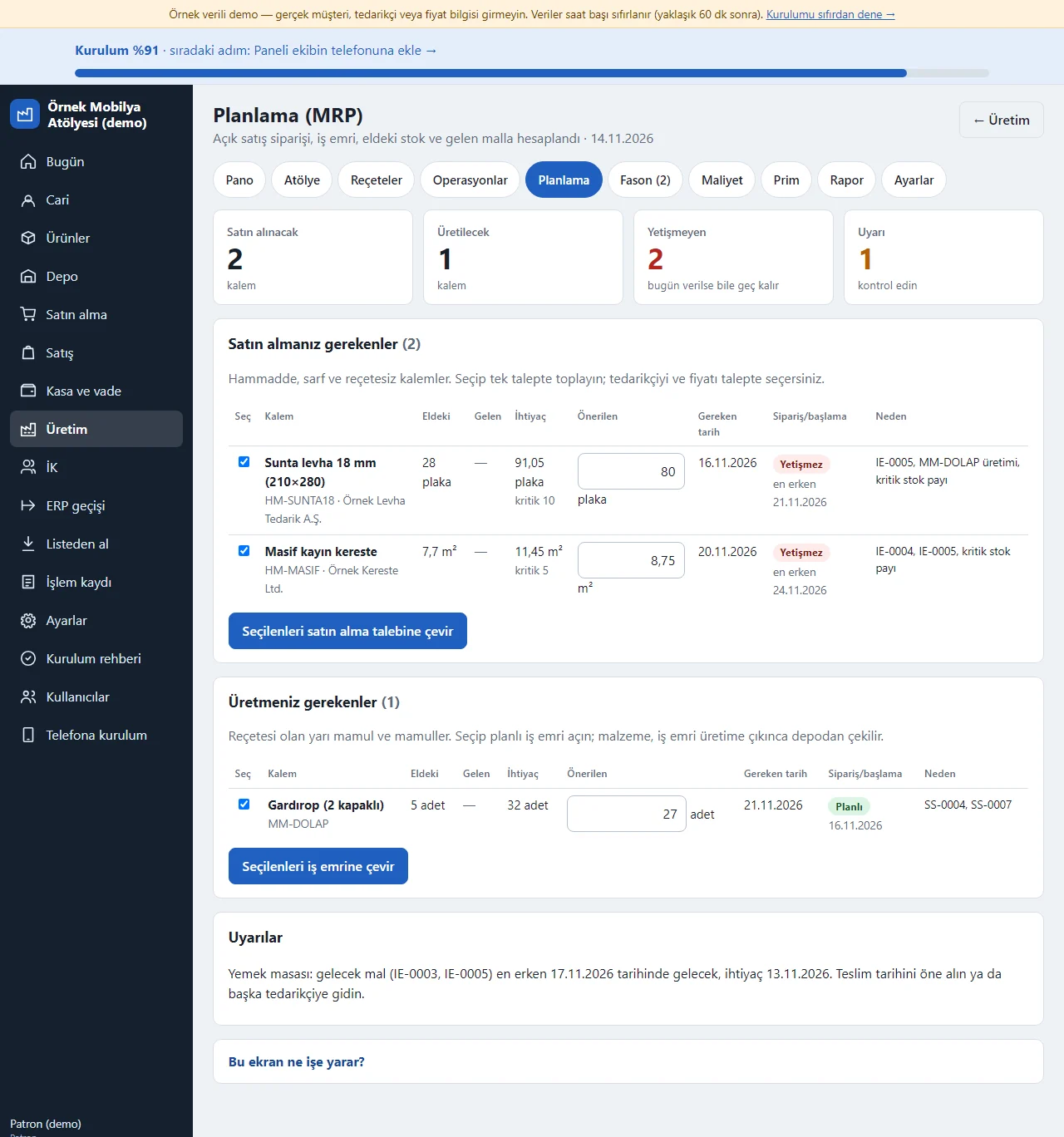
Planning (MRP)
Production > Planlama (planning): four boxes at the top give the number of items to buy and to make, those that cannot make it in time even if ordered today, and the warnings. In the “Satın almanız gerekenler” (what you must buy: raw material, consumables, items without a recipe) and “Üretmeniz gerekenler” (what you must make: semi-finished and finished products with a recipe) tables each item shows what is on hand, what is on the way (open requests, orders and work orders), the need, the suggested quantity, the date needed and the reason (for example SS-0007, critical-stock margin). The status label is counted back from the lead time on the product card: “Planlı” (planned), “Bugün ver” (order today), or “Yetişmez” (cannot make it in time even if ordered today) with the earliest date. You can change the suggested quantity; the selected rows become a purchase request or planned work orders in one click through “Seçilenleri satın alma talebine çevir” (turn the selected into a purchase request) or “Seçilenleri iş emrine çevir” (turn the selected into a work order), and a converted item counts as on the way and leaves the suggestions. Warnings appear at the bottom: goods that arrive after the date needed, stock gone negative, a finished product without a recipe suggested as a purchase. The plan is calculated live each time it is opened; there is no weekly time-bucket plan, no finite capacity and no demand forecast.
- On screen (Turkish interface)
- “Planlı” — planned
- “Bugün ver” — order today
- “Yetişmez” — cannot make it in time
-
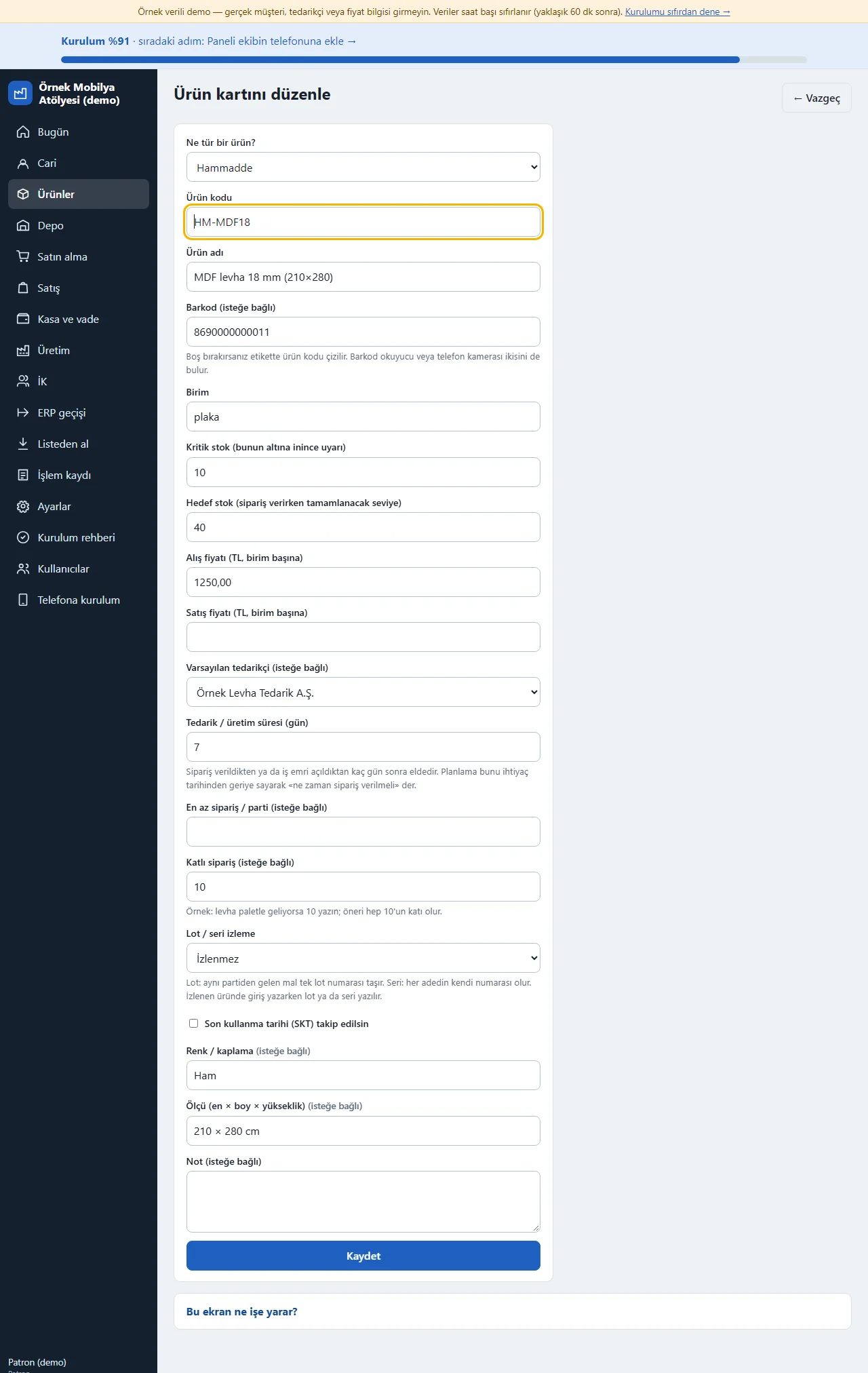
Planning fields on the product card
The product card has the “Tedarik / üretim süresi (gün)” (lead time in days), “En az sipariş / parti” (minimum order or batch) and “Katlı sipariş” (order multiple) fields (while the Planning scope is on). The lead time lets planning work out the “when to order” date by counting back from the date needed; the minimum and the multiple round the suggestion (for example, if boards come on a pallet, an order multiple of 10 makes the suggestion always a multiple of 10). The card’s “Kritik stok” (critical stock) is counted as a safety stock in planning. An empty field counts as 0; these three fields are not in the product CSV import, so they are typed on the card.
-
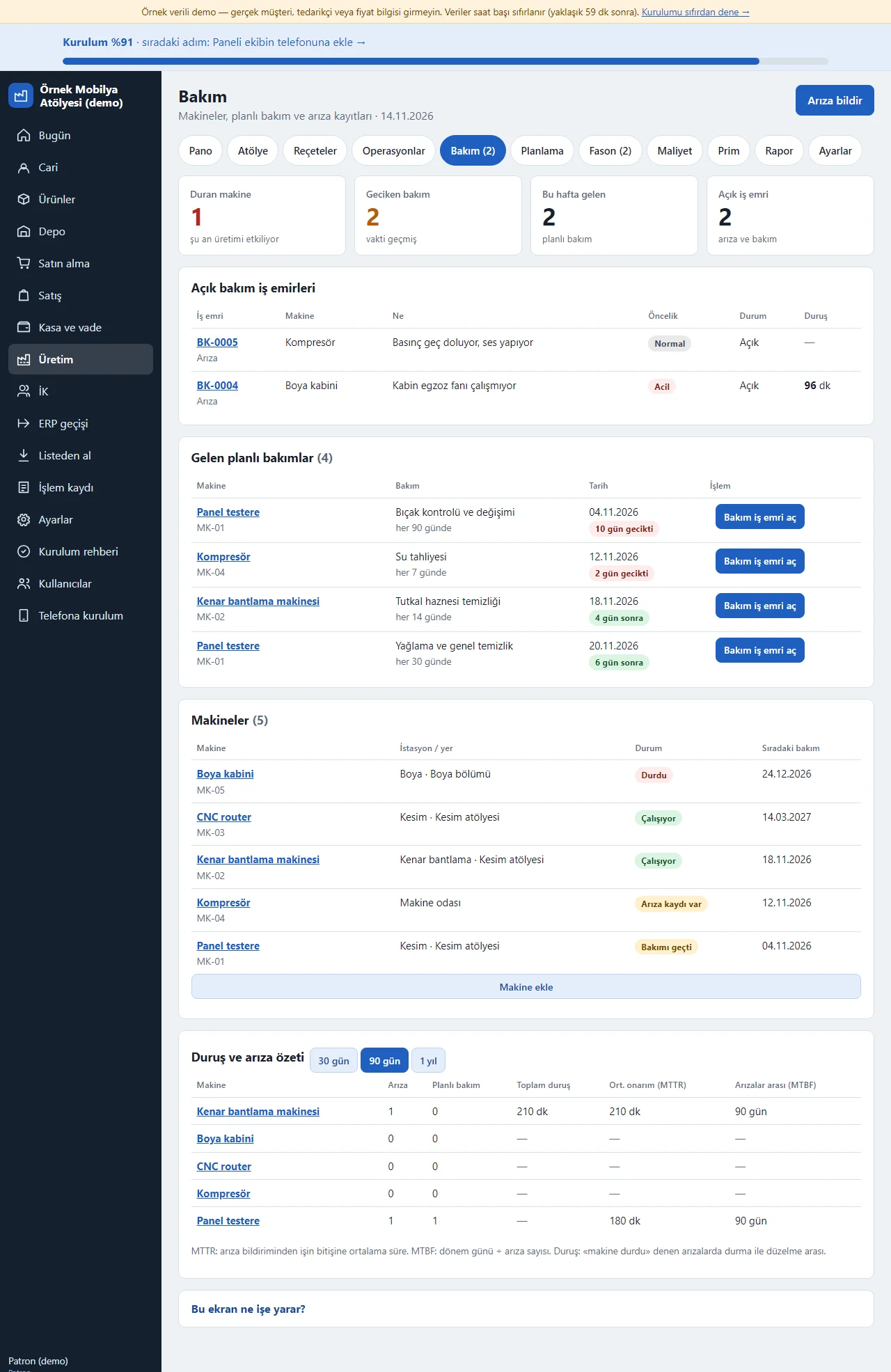
Maintenance board
Production > Bakım (maintenance): four boxes at the top give the number of machines that are stopped, planned maintenance that is overdue, planned maintenance due this week and open maintenance work orders. The “Açık bakım iş emirleri” (open maintenance work orders) table shows the work-order number, the machine, what is wrong, the priority (Normal, Acil: urgent), the status and, if the machine was marked stopped, the stopped minutes. “Gelen planlı bakımlar” (planned maintenance coming up) lists maintenance due in the next 7 days and overdue maintenance with its date (for example “10 gün gecikti”, 10 days late, “6 gün sonra”, in 6 days); “Bakım iş emri aç” (open a maintenance work order) on each row opens a work order in one click. The “Makineler” (machines) table gives each machine’s station, place, status (Çalışıyor: running, Arıza kaydı var: breakdown on record, Bakımı geçti: maintenance overdue, Durdu: stopped) and next maintenance date; “Makine ekle” (add a machine) writes a new machine. At the bottom, for 30 days, 90 days and 1 year, each machine’s number of breakdowns, planned maintenances, total stopped time, average repair time (MTTR) and days between breakdowns (MTBF). Maintenance is by days; there is no running-hours or output counter.
- On screen (Turkish interface)
- “Bakım” — maintenance
- “Duran makine” — machine stopped
- “Geciken bakım” — overdue maintenance
- “Bakım iş emri aç” — open a maintenance work order
- “Çalışıyor” — running
- “Durdu” — stopped
- “Makine ekle” — add a machine
-
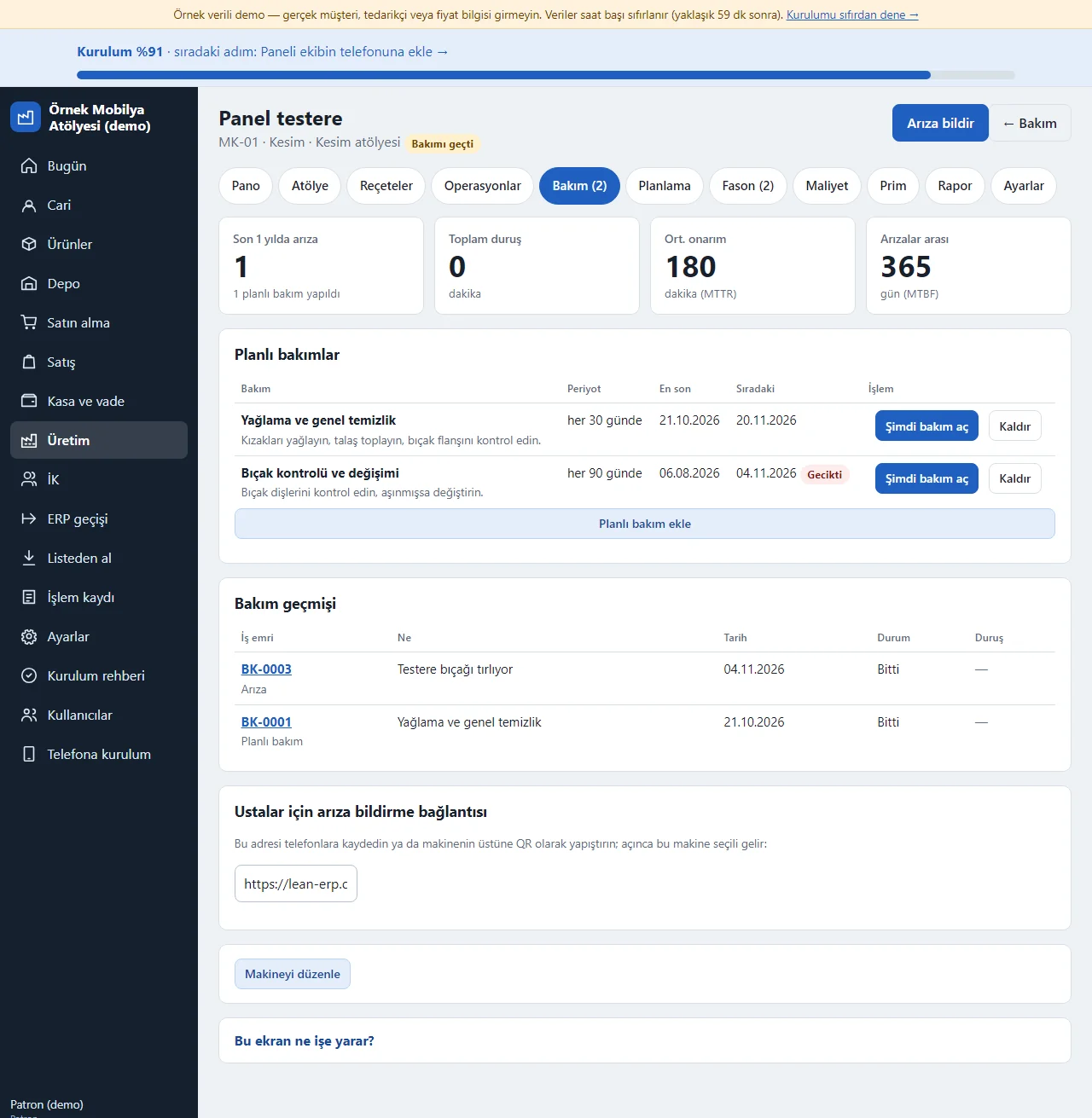
Machine card
Tapping a machine’s name opens its card: at the top its status, the number of breakdowns in the last year, the total stopped time, the average repair time and the days between breakdowns; the “Planlı bakımlar” (planned maintenance) table gives each maintenance’s period (“her 30 günde”, every 30 days), when it was last done, the next date and what is to be done. “Şimdi bakım aç” (open maintenance now) turns the plan into a work order, “Planlı bakım ekle” (add planned maintenance) saves a new one (a name, how many days apart, an optional last-done date and what to do) and “Kaldır” (remove) takes a plan away. Below are the maintenance history, the breakdown-reporting address to send to the craftsmen (it opens with this machine already chosen) and “Makineyi düzenle” (edit the machine); a machine can be tied to a production station. There is no equipment hierarchy (sub-components), no meter-based maintenance and no QR label printing.
- On screen (Turkish interface)
- “Planlı bakımlar” — planned maintenance
- “Şimdi bakım aç” — open maintenance now
- “Planlı bakım ekle” — add planned maintenance
- “Bakım geçmişi” — maintenance history
- “Makineyi düzenle” — edit the machine
-
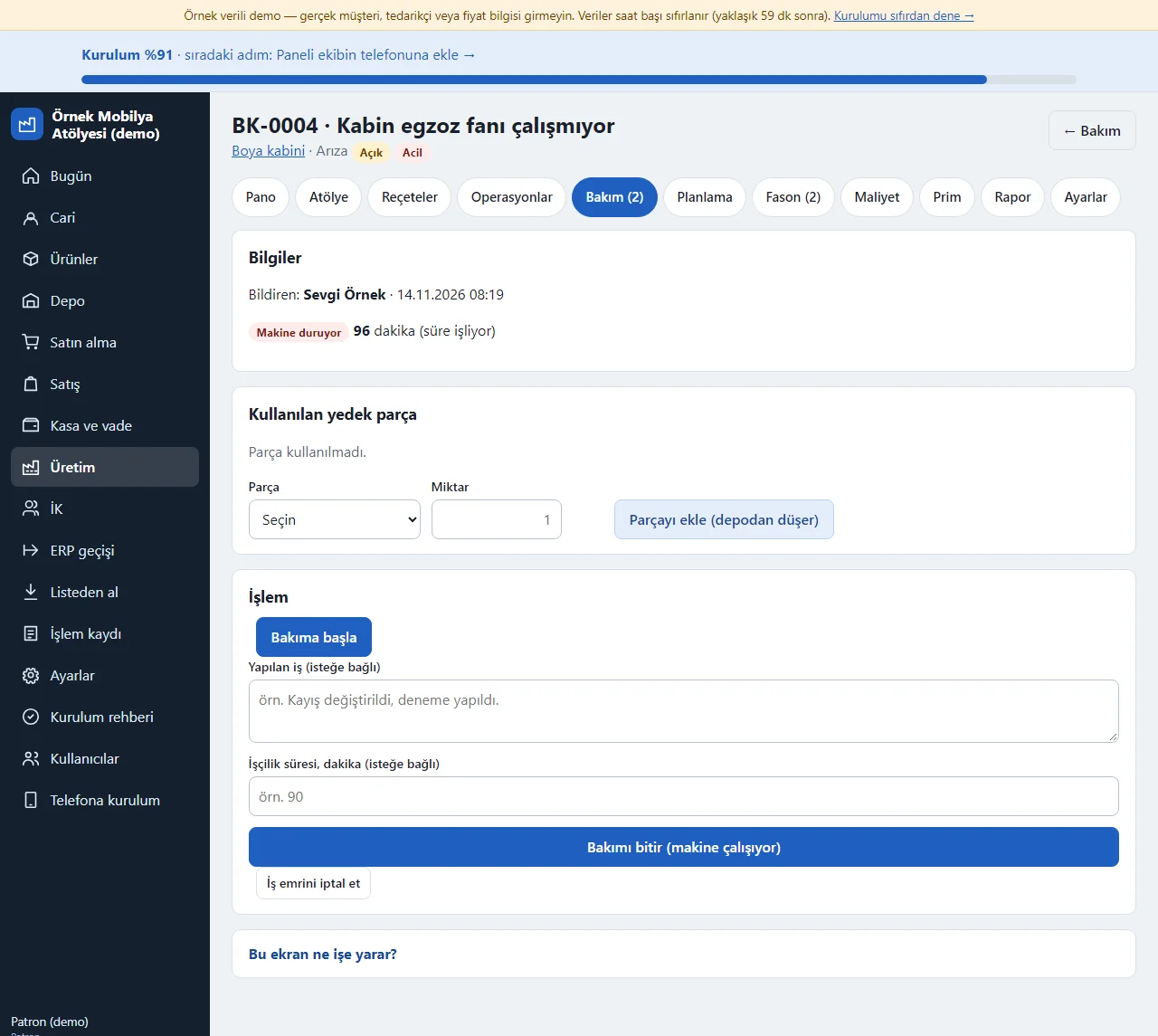
Maintenance work order
A breakdown or planned maintenance becomes a work order (for example BK-0004): who reported it, the date, the status and, if the machine stopped, a “Makine duruyor” (machine is stopped) label with the stopped minutes running. “Bakıma başla” (start maintenance) starts the job; “Parçayı ekle” (add the part) picks a spare part and a quantity from a list and the part leaves the warehouse with the reason “Bakım / onarım” (maintenance / repair); “Bakımı bitir” (finish maintenance) writes what was done and the labour minutes, sets the machine back to running and closes the stopped time. When planned maintenance finishes the plan’s next date is counted again from today. A work order that has used a part cannot be cancelled. The cost of parts and a labour fee are not added to a cost.
- On screen (Turkish interface)
- “Bakıma başla” — start maintenance
- “Parçayı ekle” — add the part
- “Bakımı bitir” — finish maintenance
- “Makine duruyor” — machine is stopped
- “Kullanılan yedek parça” — spare parts used
-
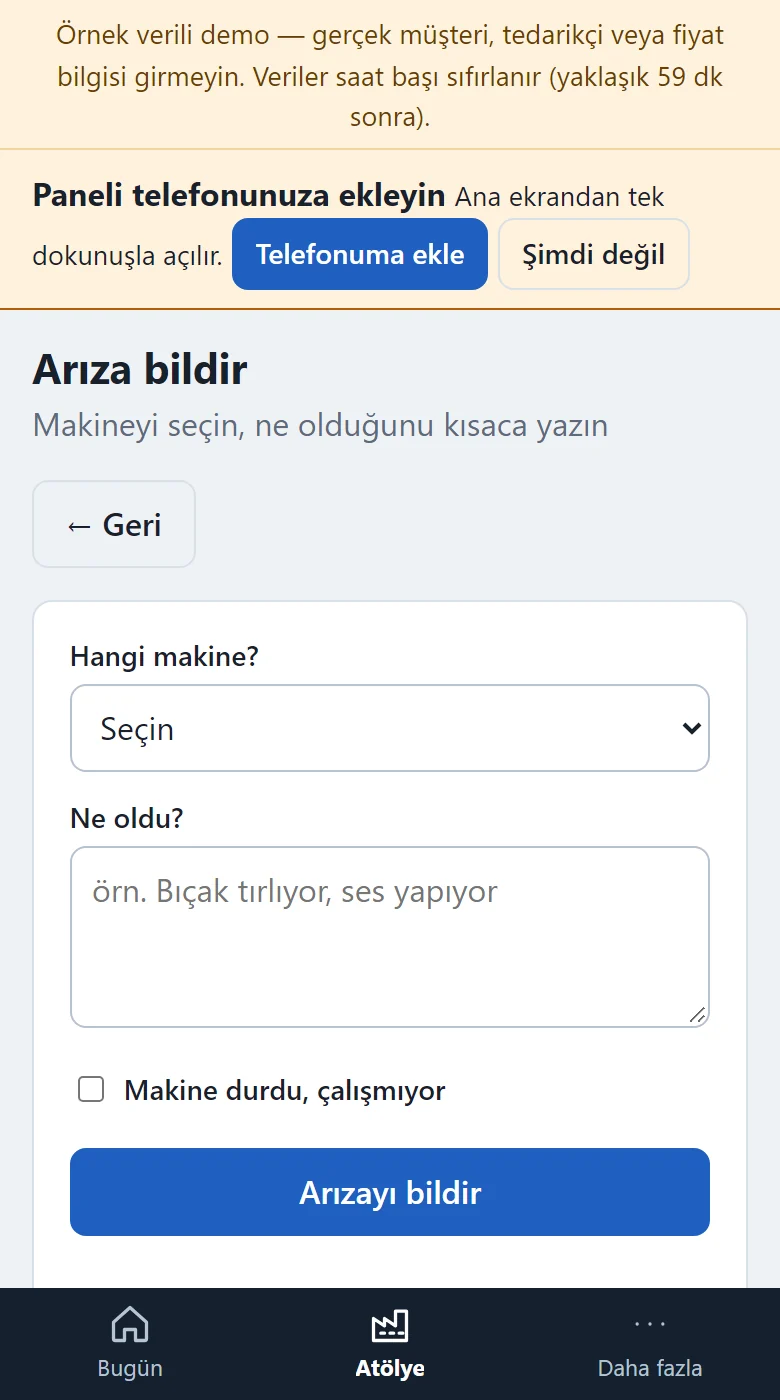
Reporting a breakdown on a phone
A craftsman opens this screen on their phone through the “Makine arızası bildir” (report a machine breakdown) button on the Atölye screen (or through the address on the machine card): they pick the machine, write briefly what is wrong and, if the machine has stopped completely, tick “Makine durdu, çalışmıyor” (the machine has stopped, it is not working). When ticked the breakdown counts as “Acil” (urgent), the stopped time starts to be measured, a free phone notification (Web Push) goes to the managers who have registered a phone for notifications and the stopped machine shows as a “Duran makine” (stopped machine) warning on the Atölye screen. A craftsman cannot see the maintenance board, the machine cards or the maintenance work orders; they only report a breakdown. There is no photo attachment.
- On screen (Turkish interface)
- “Arıza bildir” — report a breakdown
- “Hangi makine?” — which machine?
- “Ne oldu?” — what happened?
- “Makine durdu, çalışmıyor” — the machine has stopped
-
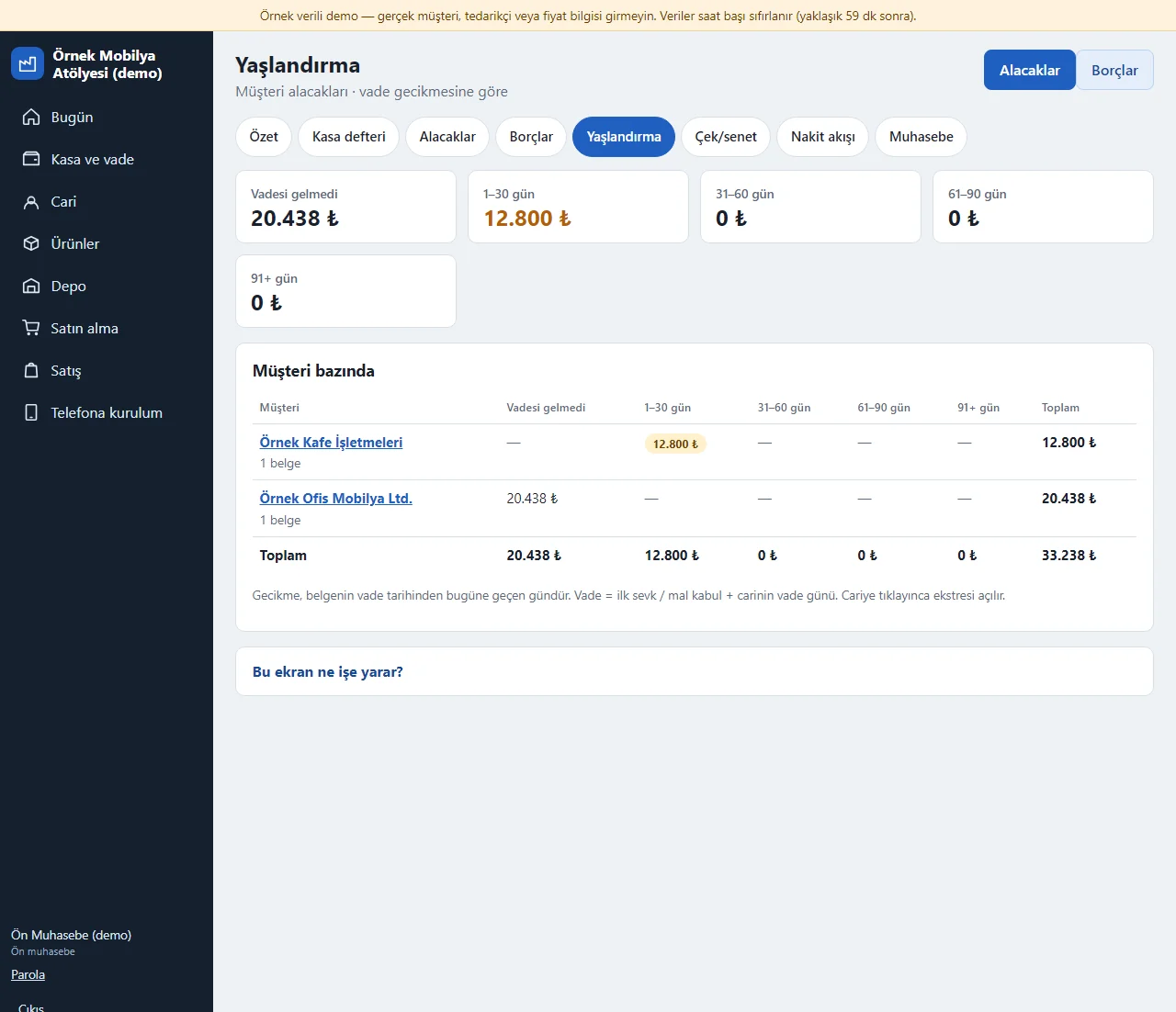
Ageing
Kasa ve vade (cash and credit) > Yaşlandırma (ageing): splits open customer receivables (supplier payables with the “Borçlar” button at the top) by how far past its due date each is: Vadesi gelmedi (not yet due), 1–30, 31–60, 61–90 and 91+ days. At the top each bucket’s total is a box, below is a table by party, and the party that is most overdue comes first. Lateness is the days from the document’s due date to today; the due date is the date of the first shipment or goods receipt plus the party’s credit days. Tapping a party’s name opens its account statement.
- On screen (Turkish interface)
- “Yaşlandırma” — ageing
- “Vadesi gelmedi” — not yet due
- “Müşteri bazında” — by customer
- “Alacaklar / Borçlar” — receivables / payables
-
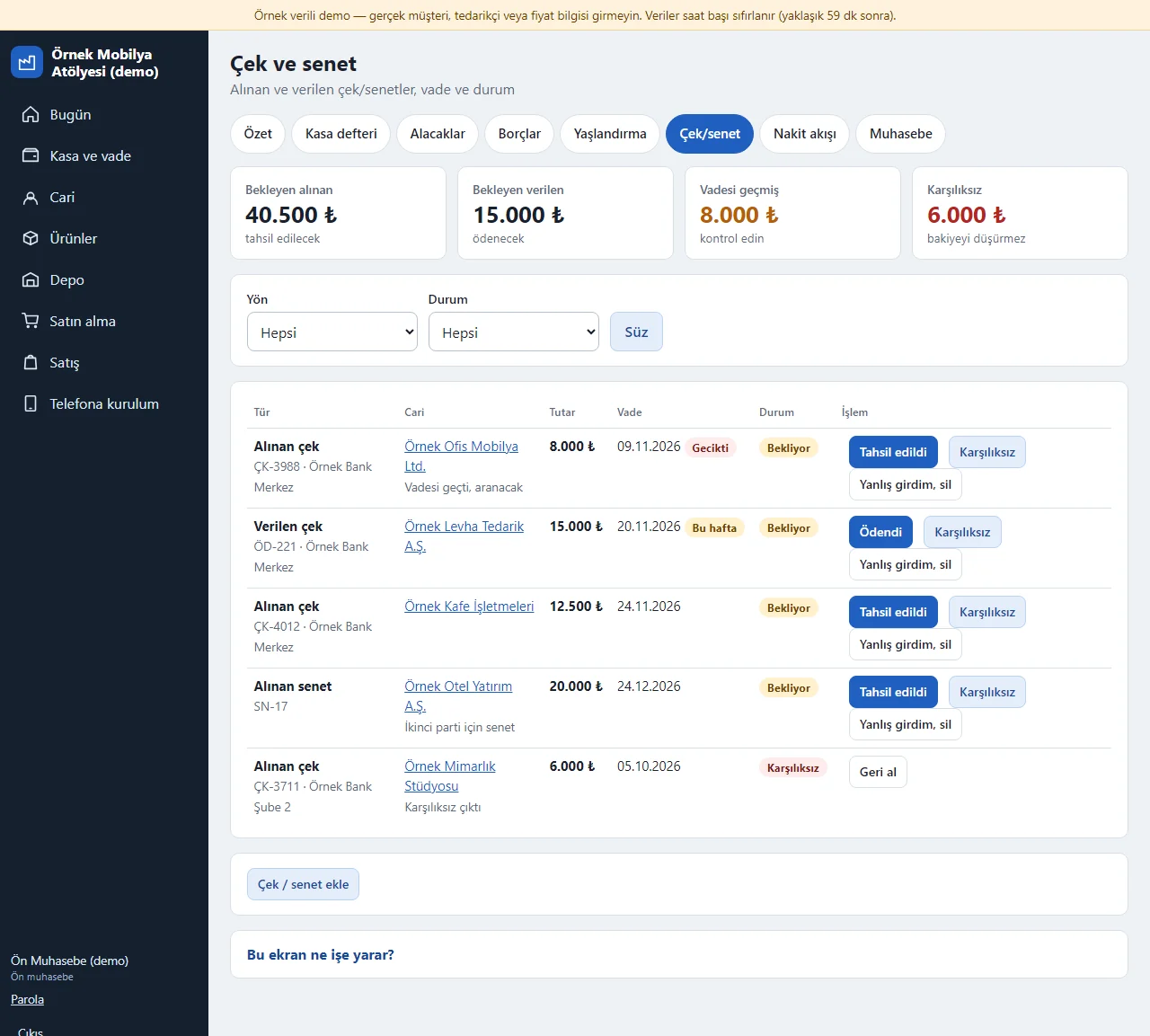
Cheques and promissory notes
Kasa ve vade > Çek/senet (while “Çek ve senet” is on in the scopes): cheques and promissory notes received from customers and issued to suppliers are listed with number, bank, amount, due date and status; an overdue one is marked “Gecikti” (late) and one due this week “Bu hafta” (this week). At the top are boxes for pending received, pending issued, overdue and bounced amounts; a Yön (direction) and Durum (status) filter is available. “Tahsil edildi” (collected; “Ödendi”, paid, for an issued one) writes a bank receipt (payment) to the cash ledger and lowers the party’s receivable (payable); “Karşılıksız” (bounced) marks the record but does not lower the balance; “Geri al” (undo) puts a closed record back to waiting and cancels its cash entry too; “Yanlış girdim, sil” (entered by mistake, delete) deletes a waiting record only. There is no cheque endorsement and no bank connection.
- On screen (Turkish interface)
- “Çek ve senet” — cheques and notes
- “Bekleyen alınan” — pending received
- “Tahsil edildi” — collected
- “Ödendi” — paid
- “Karşılıksız” — bounced
- “Geri al” — undo
- “Yanlış girdim, sil” — entered by mistake, delete
-
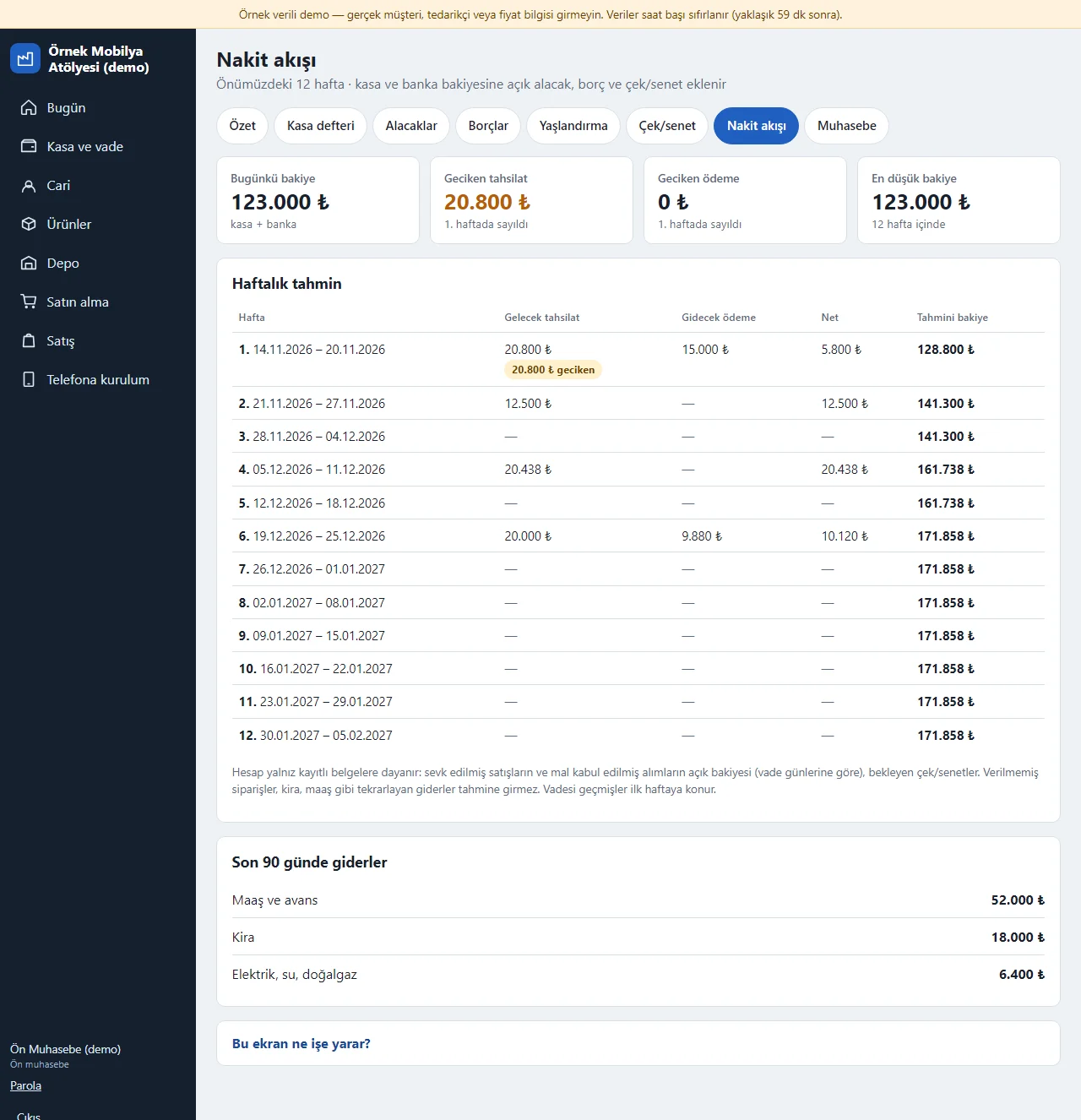
Cash flow
Kasa ve vade > Nakit akışı (cash flow): open customer receivables, open supplier payables and pending cheques and notes are added to and taken from today’s cash and bank balance by their due week, and the forecast balance of the next 12 weeks becomes a table; those past due show separately as “geciken” (overdue) in the first week and a week whose balance falls below zero gets an “Eksi” (negative) label. At the top are boxes for today’s balance, overdue receipts, overdue payments and the lowest balance, and below are the last 90 days’ expenses by category. The forecast rests only on recorded documents and cheques; recurring expenses such as rent and pay, and orders not yet shipped, are not in it.
- On screen (Turkish interface)
- “Nakit akışı” — cash flow
- “Haftalık tahmin” — weekly forecast
- “Geciken tahsilat” — overdue receipts
- “Eksi” — negative
-
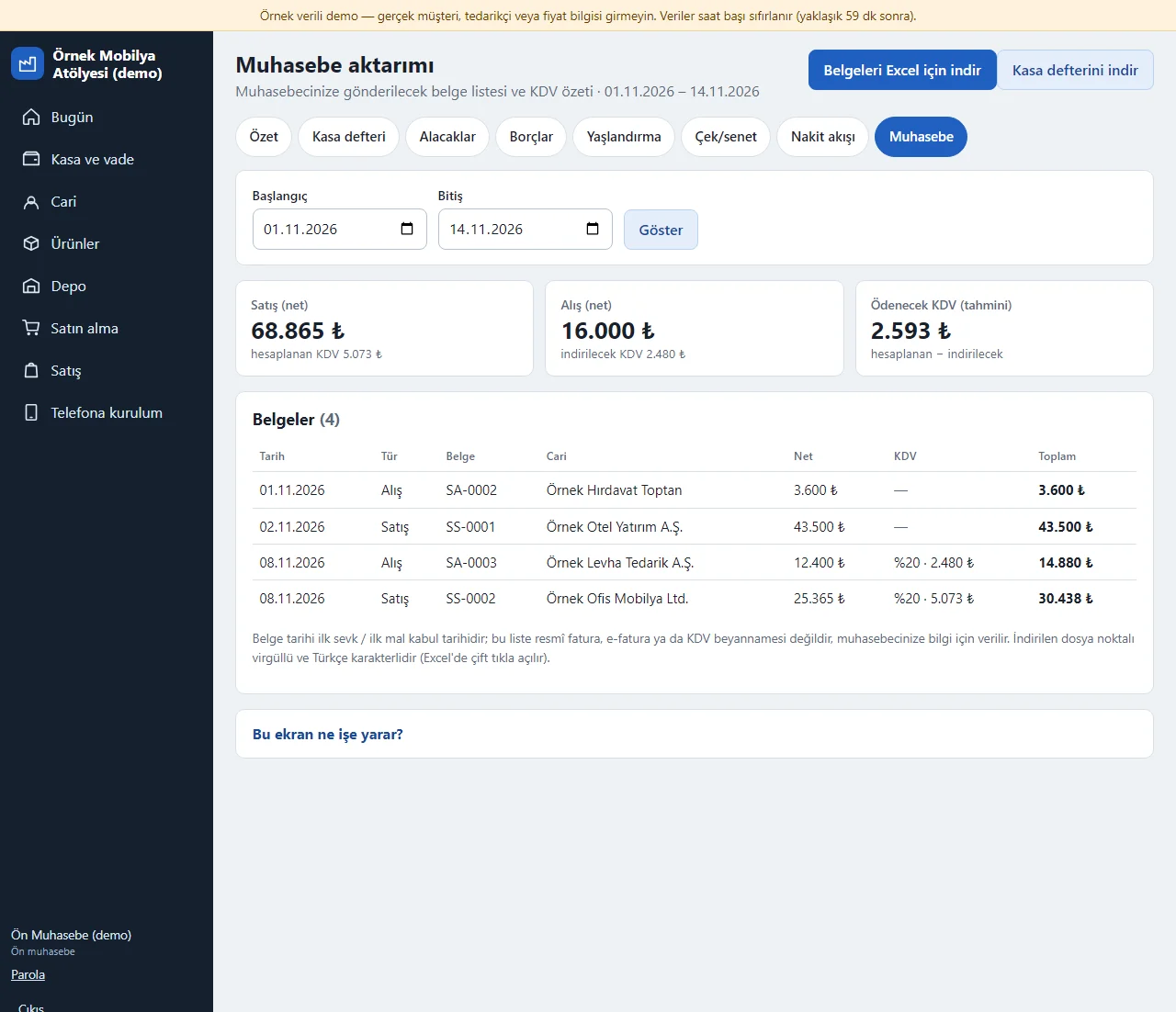
Export for the accountant
Kasa ve vade > Muhasebe (accounting): lists the sales documents shipped and purchases received in a date range you pick with net amount, VAT rate, VAT and total; at the top are sales and purchase net figures, the calculated and deductible VAT and the estimated VAT to pay. “Belgeleri Excel için indir” (download the documents for Excel) gives a semicolon-separated file that opens with a double click in Excel; “Kasa defterini indir” (download the cash ledger) gives the cash entries. A document’s date is the date of its first shipment or first goods receipt; the list is not an official invoice, e-invoice or VAT return and is given to your accountant for information. Parties have no tax-number field.
- On screen (Turkish interface)
- “Muhasebe aktarımı” — accounting export
- “Belgeleri Excel için indir” — download the documents for Excel
- “Kasa defterini indir” — download the cash ledger
- “hesaplanan KDV” — calculated VAT
- “indirilecek KDV” — deductible VAT
-
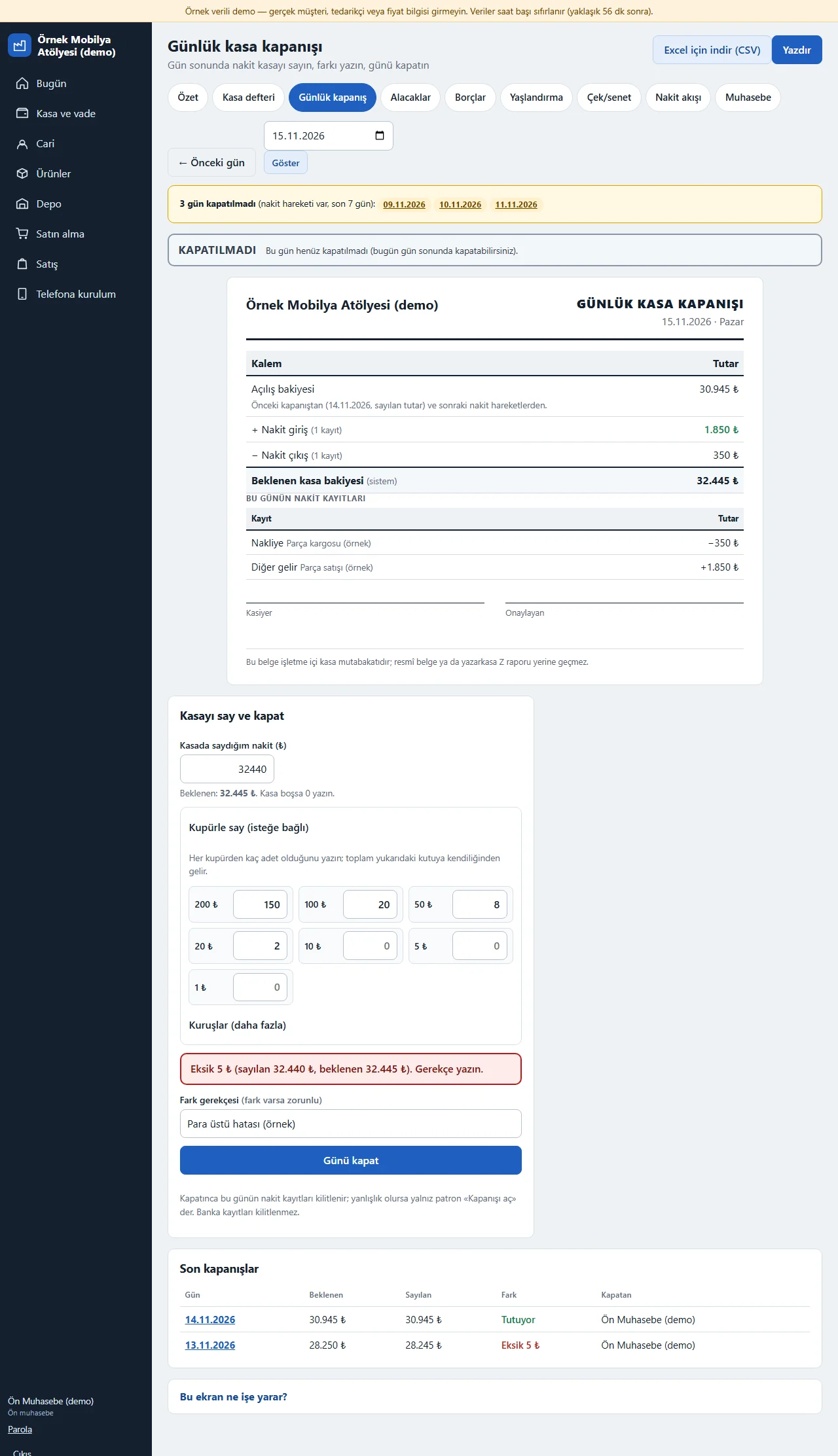
Daily cash closing
Kasa ve vade > Günlük kapanış (daily closing): at the end of the day the screen shows the day’s opening balance (the counted amount of the previous closing), the cash receipts, the cash payments and the expected cash balance. The cashier types the cash in the till into “Kasada saydığım nakit” (cash I counted); if they like, “Kupürle say” (count by denomination) takes the number of 200, 100, 50, 20, 10, 5 and 1 ₺ notes and coins (the small coins fold under “Kuruşlar”) and the total fills in by itself. The difference shows live (Tutuyor: it matches, Eksik: short, or Fazla: over) and a reason is required when there is one (5 ₺ short in the picture). “Günü kapat” (close the day) locks the day’s cash entries (bank entries are not locked) and freezes the totals; if it turns out wrong only the owner or the support account can write a reason and tap “Kapanışı aç” (reopen the closing), and every closing and reopening is written to the activity log. If a cash day within the last 7 days is not closed, the Today screen shows a “Kapanmamış kasa günü” (unclosed cash day) warning (to accounting and the owner only). The page prints (a KAPALI stamp, Kasiyer and Onaylayan signature lines), the month’s list downloads as CSV for Excel and closed days carry a “Kapalı gün” label in the cash ledger. The document is an internal cash reconciliation; it does not replace an official document or a cash-register Z report. There is no multi-till or branch till, no bank reconciliation, no POS slip matching and no banknote picture or scale connection.
- On screen (Turkish interface)
- “Günlük kapanış” — daily closing
- “Kupürle say” — count by denomination
- “Günü kapat” — close the day
- “Kapanışı aç” — reopen the closing
- “Kapalı gün” — closed day
-
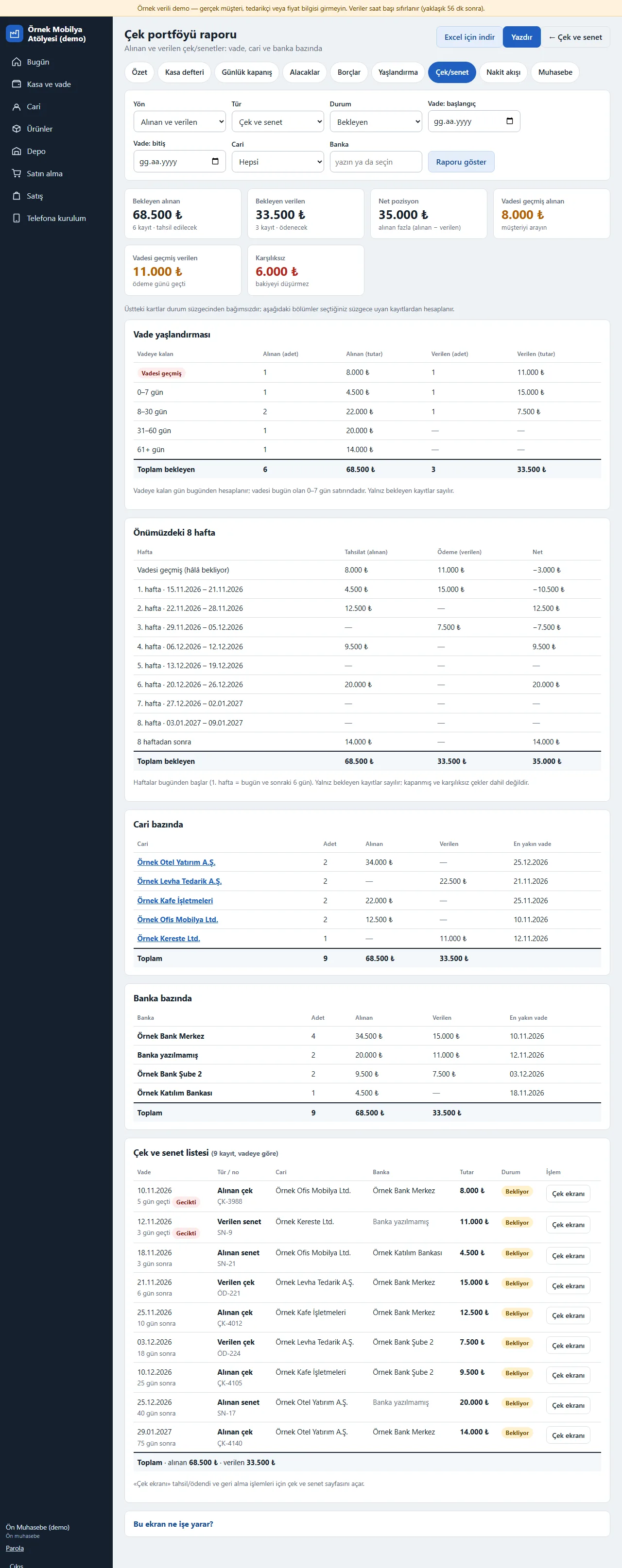
Cheque portfolio report
Kasa ve vade > Çek/senet > “Çek portföyü raporu” (cheque portfolio report) button opens it (only roles with cash and finance access see it; the link is not shown to other roles). The filter picks the direction (received, issued), type (cheque, note), status (pending, closed, bounced, all), due-date range, party and bank. At the top are cards for pending received, pending issued, net position (received − issued), overdue received, overdue issued and bounced amounts (they do not depend on the status filter); below, the due-date ageing (overdue, 0–7, 8–30, 31–60, 61+ days), a calendar of the next 8 weeks of receipts, payments and net, totals by party and by bank and a list of cheques and notes by due date are worked out from the records that match the filter. “Excel için indir” (download for Excel, CSV) gives the table as a file and “Yazdır” (print) prints A4 landscape (the heading has the company name, the report date and a summary of the filter). The report only reads; it changes no record. Cheques and notes are for records and reports only; there is no bank connection, no e-cheque and no automatic collection.
- On screen (Turkish interface)
- “Çek portföyü raporu” — cheque portfolio report
- “Excel için indir” — download for Excel
- “Yazdır” — print
- “Vadesi geçmiş” — overdue
- “Karşılıksız” — bounced
-
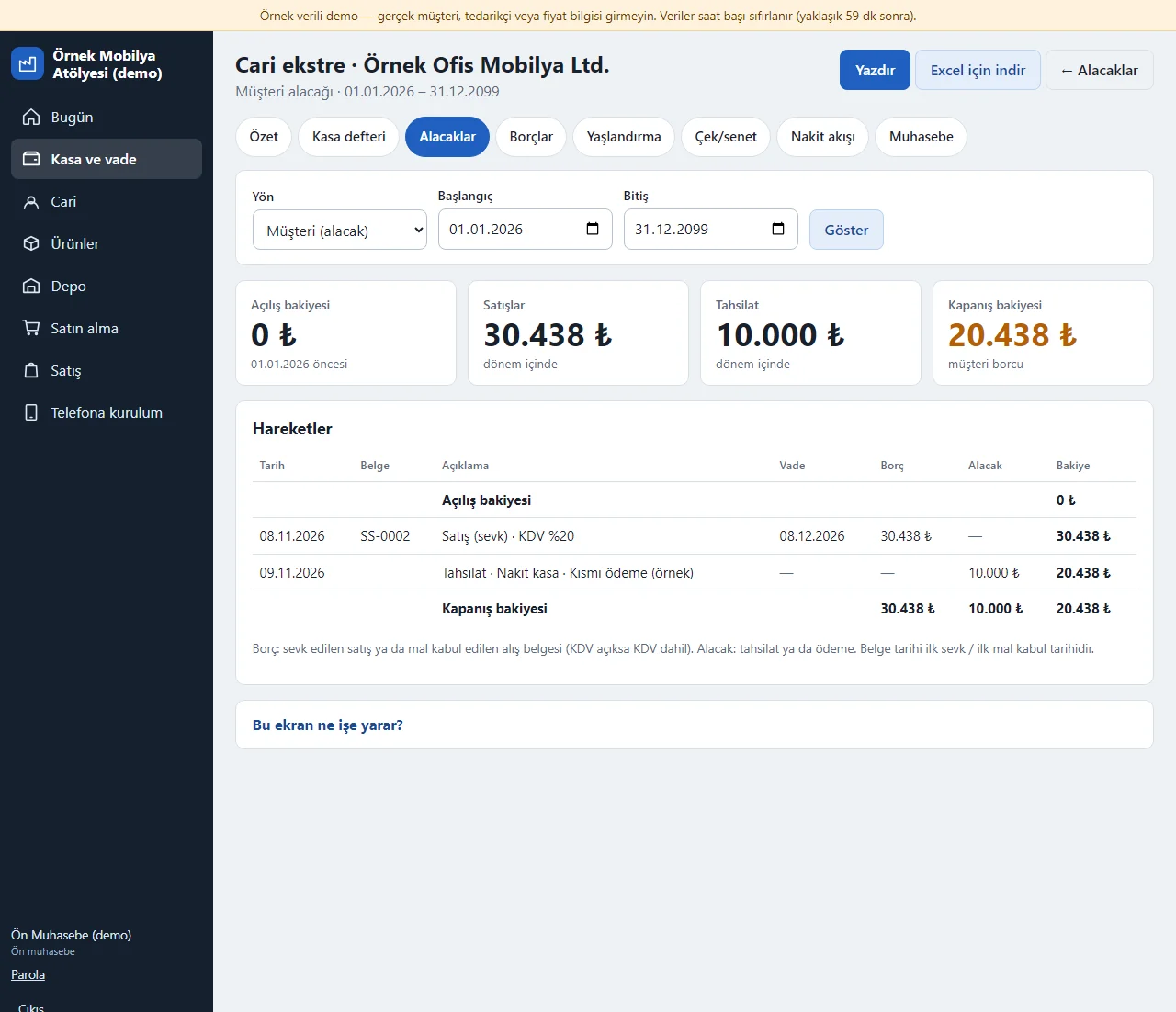
Account statement
The “Ekstre” (statement) link next to a party’s name on the Alacaklar (receivables), Borçlar (payables) or Yaşlandırma (ageing) screen opens its account statement: in a date range you pick, the party’s documents (shipment or goods receipt) and its receipts and payments are written in date order with an opening balance, a running balance and a closing balance; a negative balance means an advance. The customer or supplier side is chosen separately. “Yazdır” (print) prepares the statement for printing without the side menu and buttons and “Excel için indir” (download for Excel) gives the same table as a file.
- On screen (Turkish interface)
- “Cari ekstre” — account statement
- “Açılış bakiyesi” — opening balance
- “Kapanış bakiyesi” — closing balance
- “Yazdır” — print
- “Excel için indir” — download for Excel
-
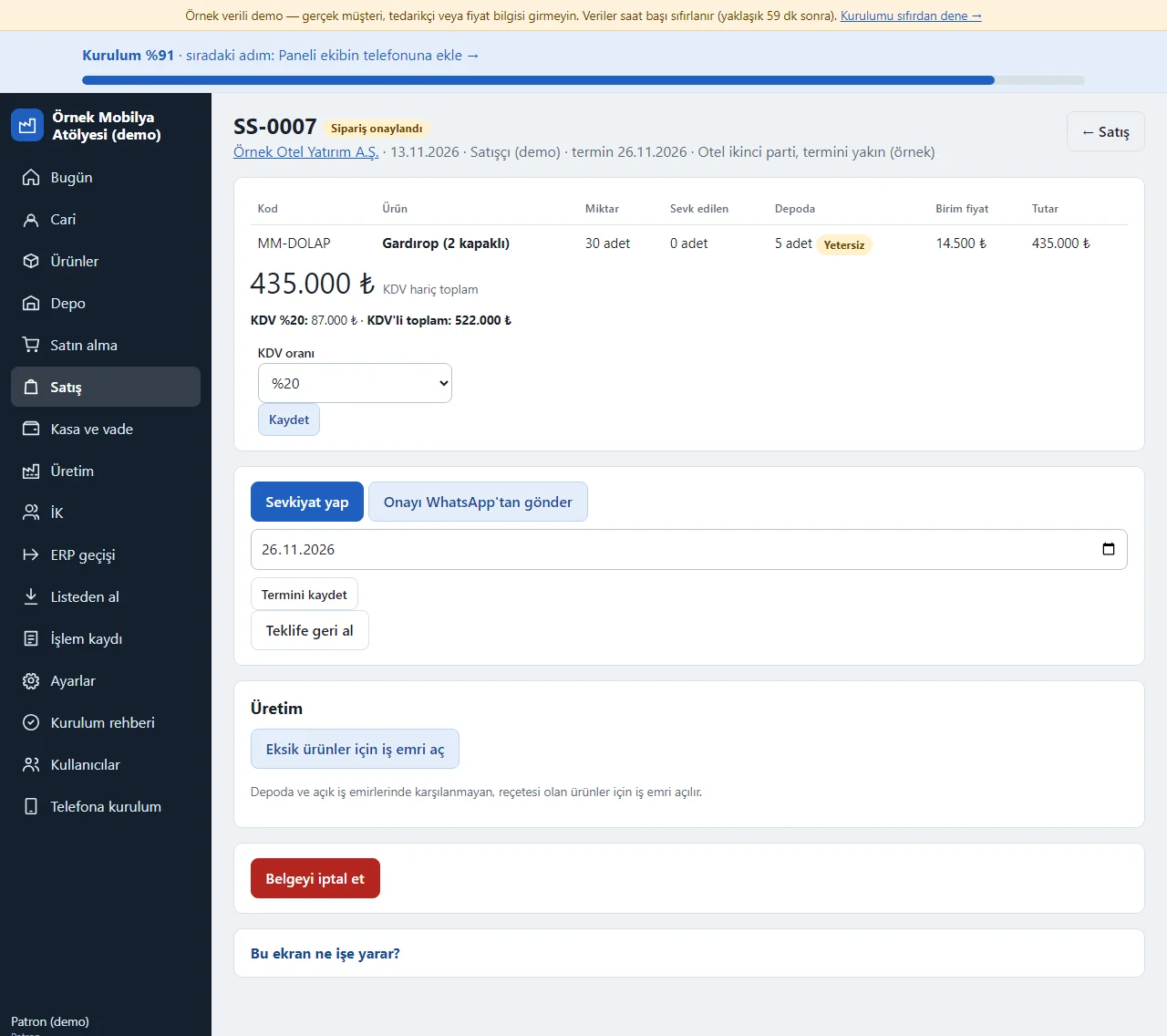
VAT on a sales document
When “KDV” (VAT) is turned on in the scopes (it starts off in an upgraded installation), a line “KDV %20: … · KDV’li toplam: …” (VAT 20%: … · total including VAT: …) and a “KDV oranı” (VAT rate) selector appear under the total of a sales or purchase document; the rate is 0%, 1%, 10% or 20%, can be changed until shipping or goods receipt starts, and a new document opens at 20%. Prices stay without VAT; receivables and payables, the statement and the cash-flow forecast are worked out from the VAT-inclusive amount. With VAT off the amounts are without VAT as before.
- On screen (Turkish interface)
- “KDV oranı” — VAT rate
- “KDV’li toplam” — total including VAT
- “KDV hariç toplam” — total without VAT
-
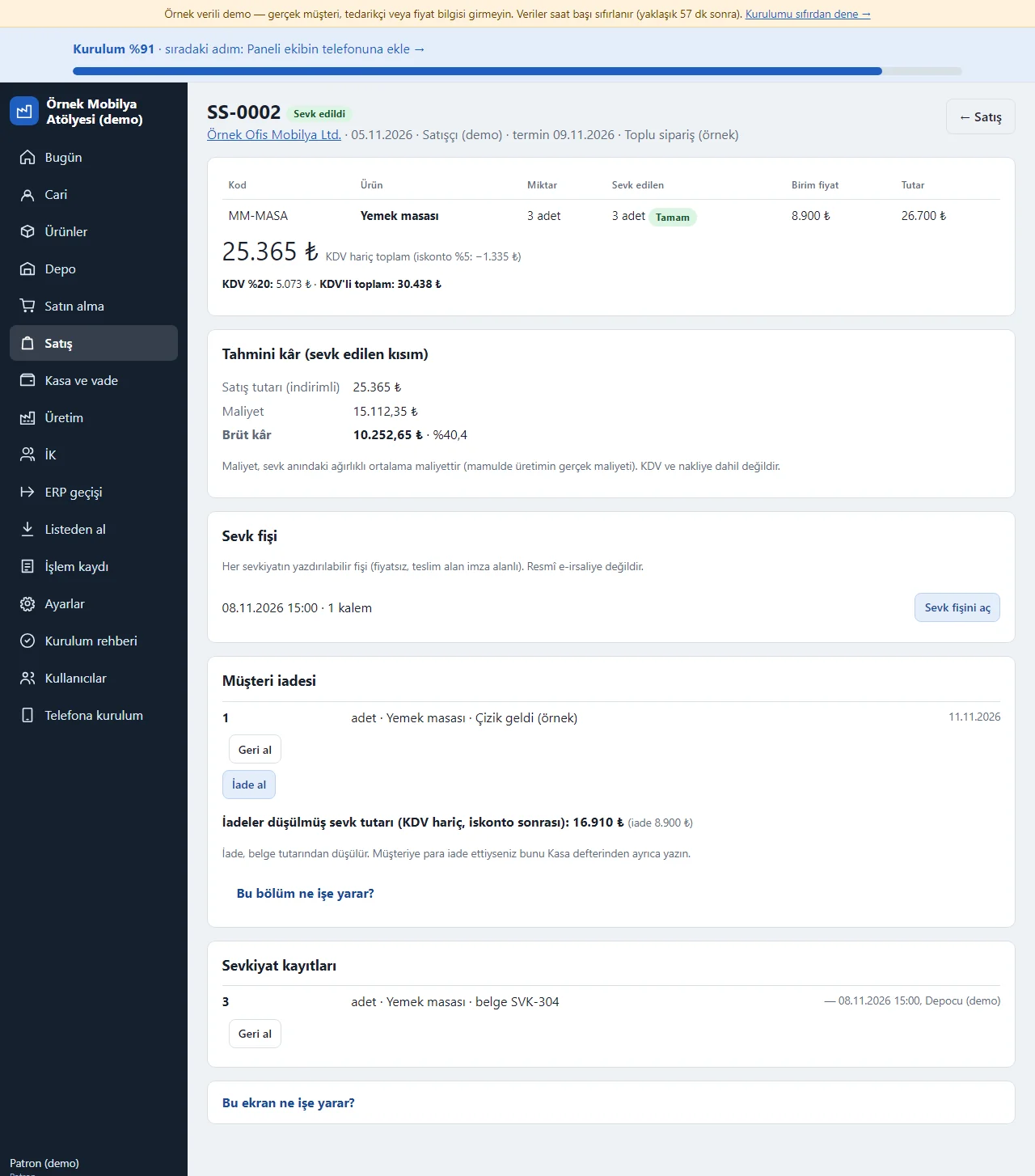
Customer return
The “Müşteri iadesi” (customer return) card on a shipped sales document takes a return per line, not above the quantity shipped, with an optional reason: the goods enter stock as a “return”, the document amount is worked out net of the return and the customer’s receivable falls by that much; a wrong return is cancelled with “Geri al” (undo). A shipment that has a return cannot be cancelled until the return is undone. If you refunded the customer in money you write that separately in the cash book; a refund is not written automatically.
- On screen (Turkish interface)
- “Müşteri iadesi” — customer return
- “İade al” — take a return
- “Geri al” — undo
-
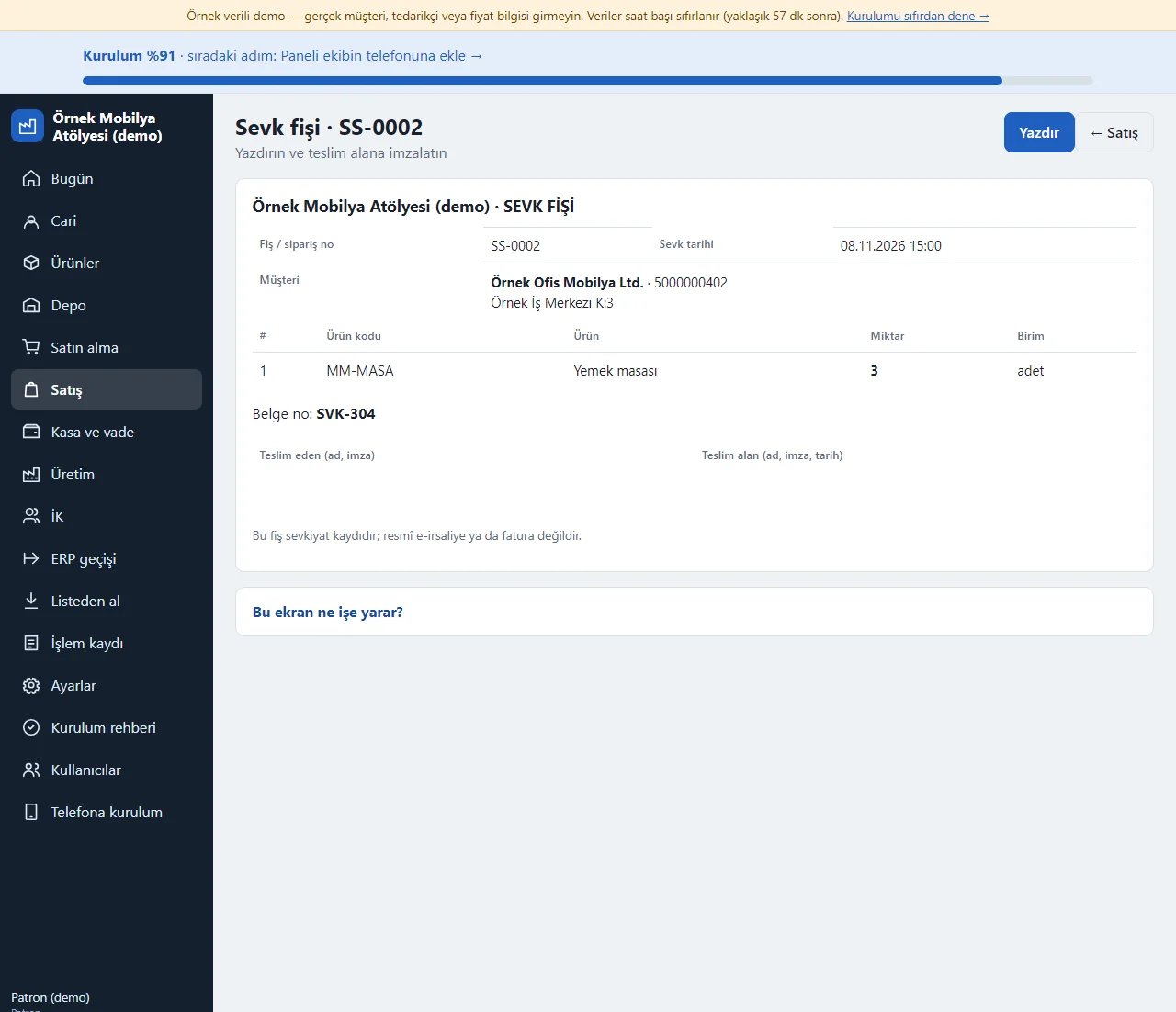
Delivery slip
The “Sevk fişi” (delivery slip) card on a sales document gives a link for each shipment; the page it opens shows the lines, quantities, customer details and signature areas for the person handing over and the person receiving, in a printable form, with no prices. The “Yazdır” (print) button prepares it for printing without the side menu and buttons. It is not a legal e-waybill.
- On screen (Turkish interface)
- “Sevk fişi” — delivery slip
- “Teslim eden” — handed over by
- “Teslim alan” — received by
- “Yazdır” — print
-
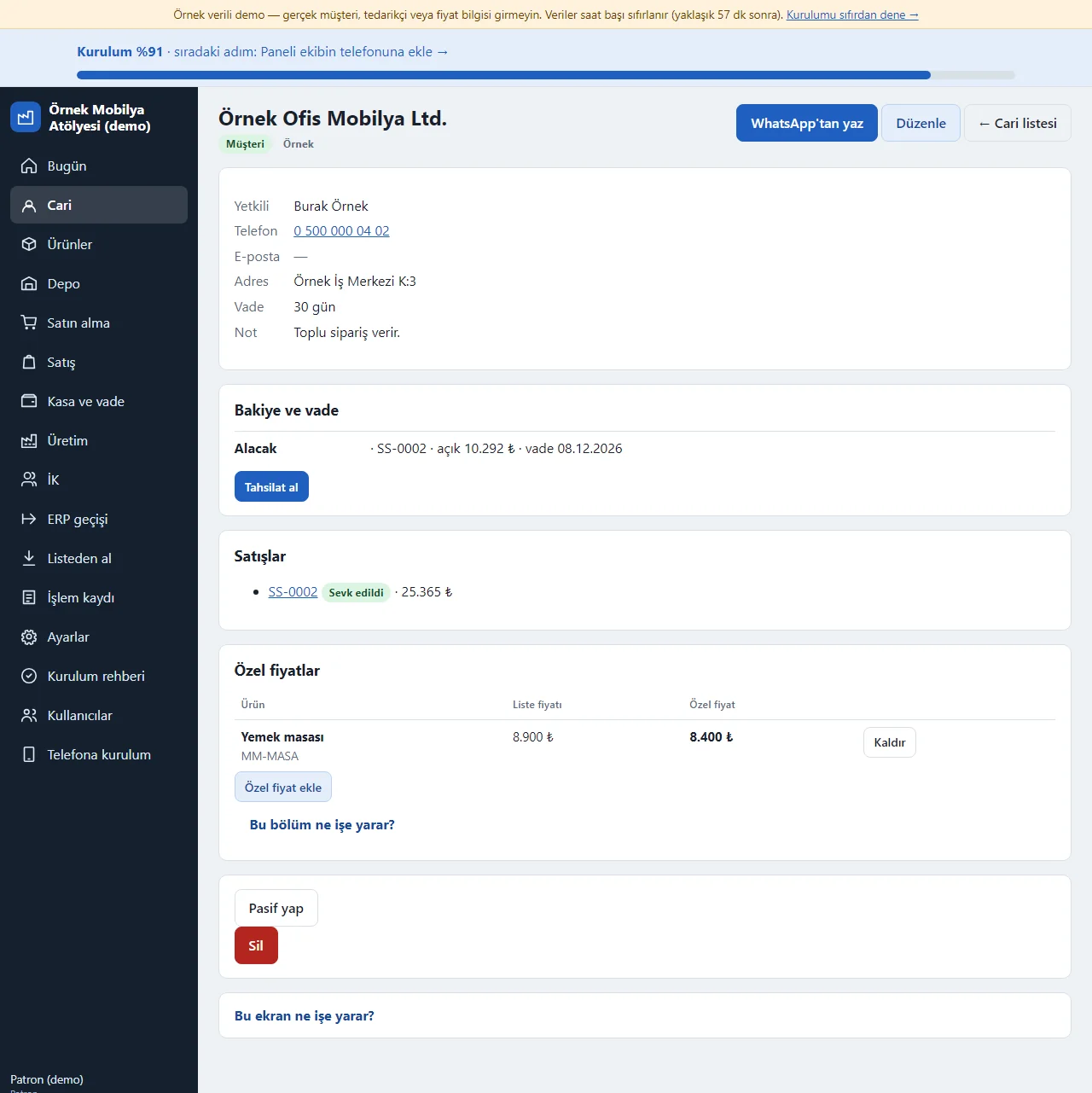
Customer-specific price
On the “Özel fiyatlar” (special prices) card of a customer page a fixed unit price (without VAT) is written for this customer per product, with the list price beside it. When that product is added to this customer’s quote and the price is left empty the special price comes in (the price on the product card if there is none), a price typed by hand wins, and saved documents do not change. Roles that cannot see prices do not see the card. There is no date or quantity tier for a special price.
- On screen (Turkish interface)
- “Özel fiyatlar” — special prices
- “Liste fiyatı” — list price
- “Özel birim fiyat” — special unit price
-
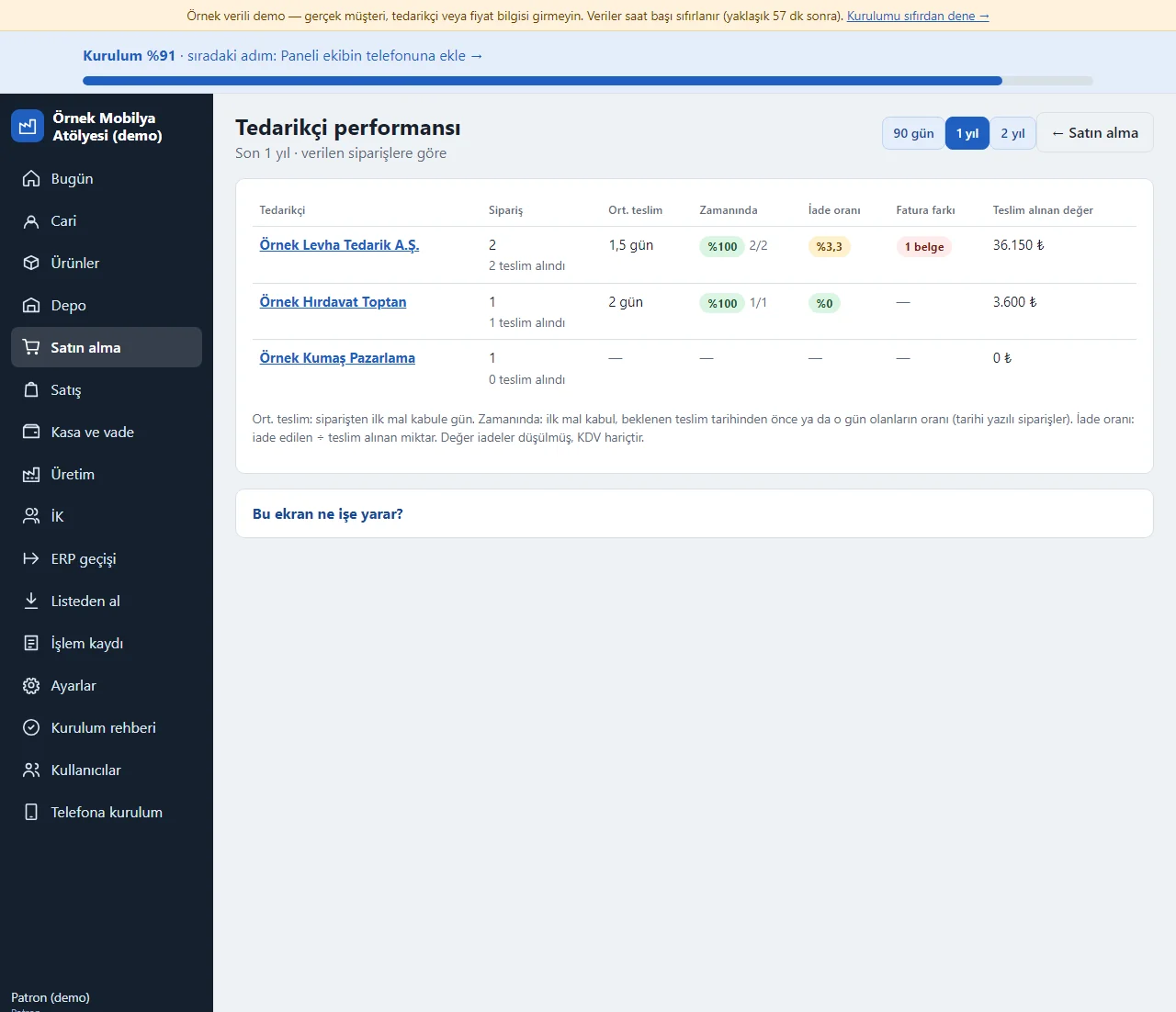
Supplier performance
The “Tedarikçi performansı” (supplier performance) page under Satın alma shows, per supplier over the last 90 days, 1 year or 2 years, the number of orders, the average days from order to first goods receipt, the share of deliveries within the expected date, the return rate (returned ÷ received quantity), the number of documents with an invoice difference and the value received net of returns (without VAT). It rests only on recorded orders, goods receipts and invoice details; there is no scoring rule.
- On screen (Turkish interface)
- “Tedarikçi performansı” — supplier performance
- “Zamanında” — on time
- “İade oranı” — return rate
- “Fatura farkı” — invoice difference
-
Supplier invoice and supplier return
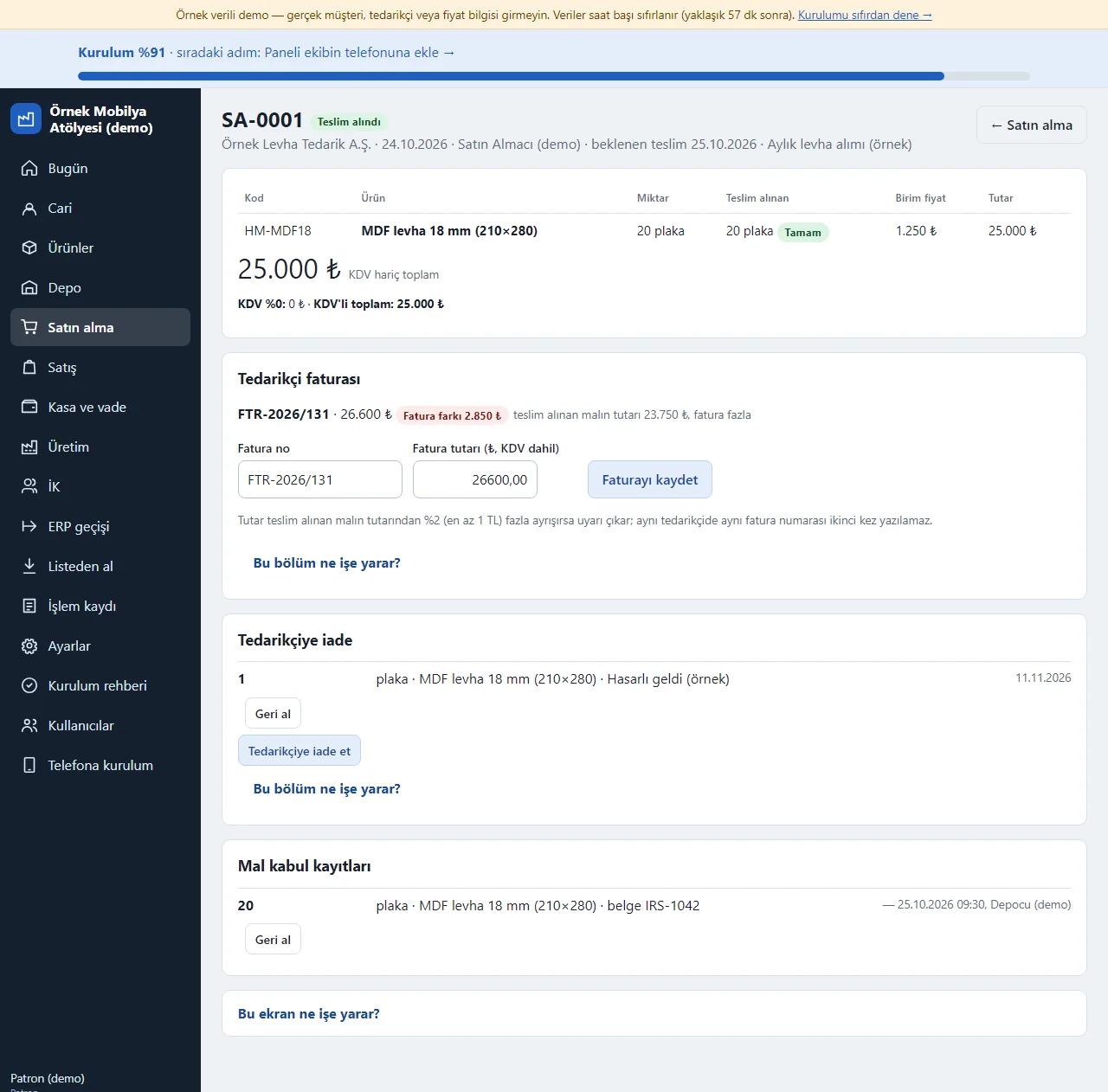
On an ordered purchase document the “Tedarikçi faturası” (supplier invoice) card takes the invoice number and amount; if the amount differs from the value of the goods received by more than 2% (at least 1 TL) a “Fatura farkı” (invoice difference) warning appears, and the same invoice number cannot be written twice for the same supplier. The “Tedarikçiye iade” (supplier return) card sends received goods back per line: the goods leave stock, the debt falls and the return can be undone; more than was received cannot be returned. If the owner writes an approval threshold on the purchasing list (it starts off), an order above that amount cannot be placed by the buyer, the document becomes “Onay bekliyor” (awaiting approval) and the owner approves or rejects it.
- On screen (Turkish interface)
- “Tedarikçi faturası” — supplier invoice
- “Fatura farkı” — invoice difference
- “Tedarikçiye iade” — supplier return
- “Onay bekliyor” — awaiting approval
- “Onay eşiği” — approval threshold
-
Clock-in and clock-out (HR)
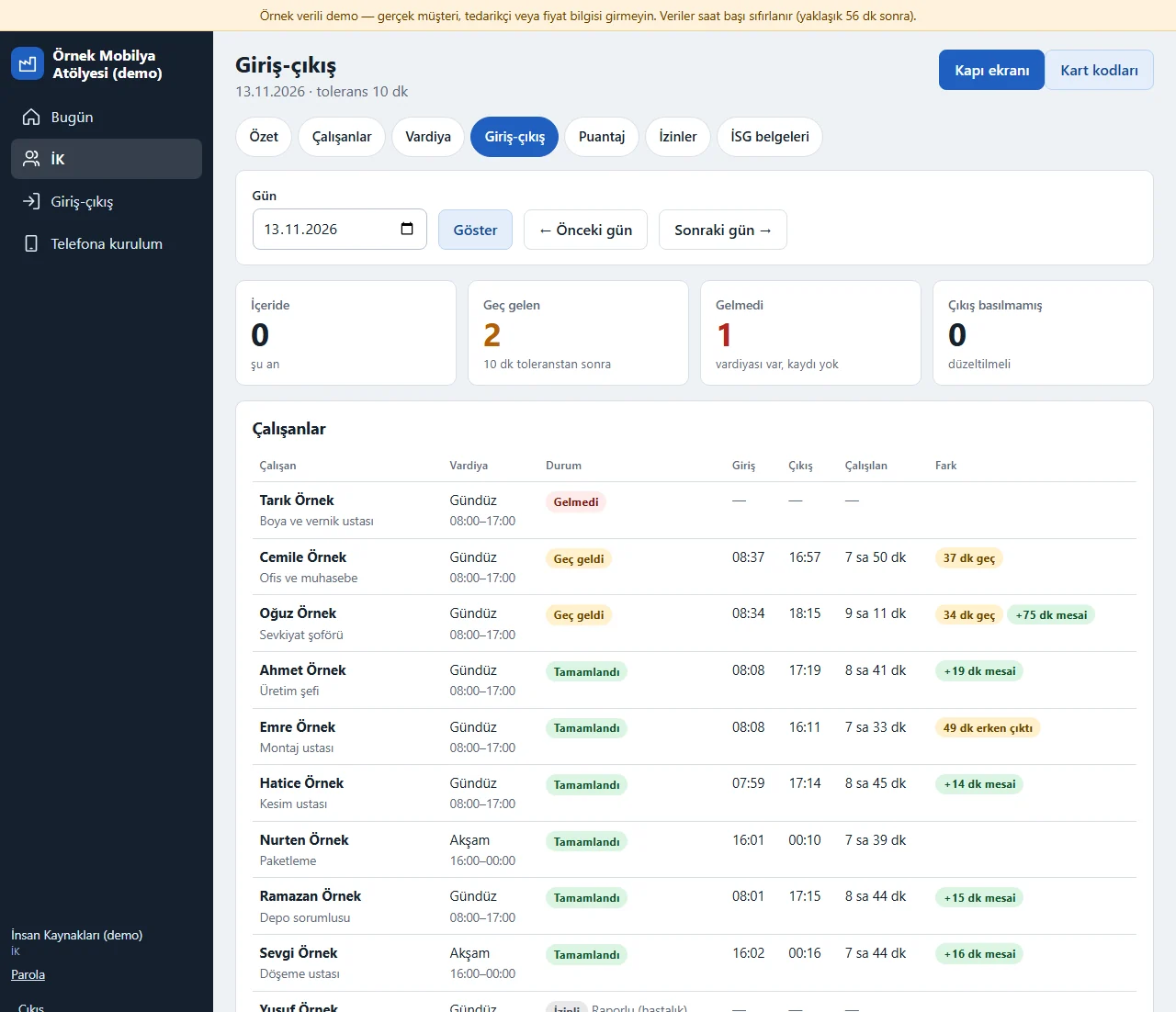
İK > Giriş-çıkış (HR > clock-in and clock-out) shows, for the day you pick, each employee’s shift that day, the clock-in and clock-out times, the time worked and the difference: “İçeride” (inside), “Tamamlandı” (done), “Geç geldi” (late), “Gelmedi” (absent), “İzinli” (on leave), “Vardiya yok” (no shift) or “Çıkış basılmamış” (no clock-out). Arriving after the tolerance (10 minutes by default) is written as lateness, and leaving early and overtime are written in minutes; the clock-out of a night shift can fall on the next day, and a break (30 minutes by default) is deducted on days over 6 hours. A forgotten or wrong record is added, corrected or cancelled with a reason; every correction is marked “elle” (manual) and who made it shows in the activity log. No location, photo or fingerprint is taken.
- On screen (Turkish interface)
- “Giriş-çıkış” — clock-in and clock-out
- “Geç geldi” — late
- “Gelmedi” — absent
- “Çıkış basılmamış” — no clock-out
- “Fazla mesai” — overtime
-
Card codes
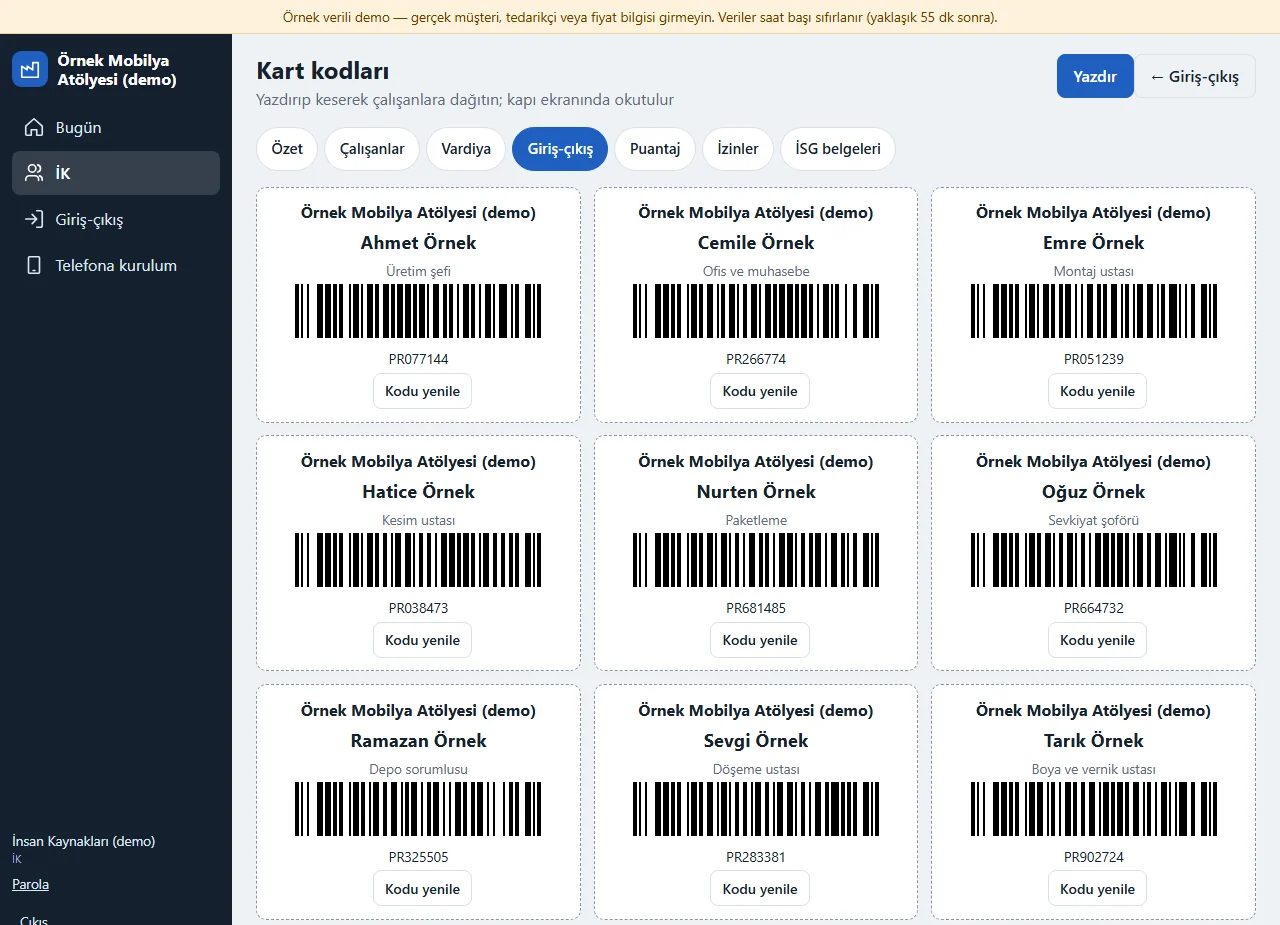
İK > Giriş-çıkış > Kart kodları (card codes) makes a personal Code 128 barcode card for each employee (a six-digit code that starts with PR); “Yazdır” (print) prints the cards on A4 and you cut them out and hand them over. If a card is lost “Kodu yenile” (renew the code) gives a new code and the old one stops working at once. There is no QR code, only a barcode.
- On screen (Turkish interface)
- “Kart kodları” — card codes
- “Kodu yenile” — renew the code
- “Yazdır” — print
-
Monthly timesheet
İK > Puantaj (timesheet) adds up, for the month you pick, each employee’s planned days, days worked and time worked, lateness, early leaving, overtime, holiday overtime, absence, days on leave and days with no clock-out; “Excel için indir” (download for Excel) gives the same table as a file and “Yazdır” (print) prepares it for printing without the tabs. A month that is not yet approved shows a “TASLAK” (draft) label and an “Onay öncesi kontrol” (pre-approval check) list at the top: records with no clock-out, days with a shift but no record and days longer than 16 hours; none of them is corrected by itself, records are corrected with a reason from the Giriş-çıkış screen. The table is not payroll or social-security calculation and is given to your accountant for information; there is no leave balance or rounding rule.
- On screen (Turkish interface)
- “Puantaj” — timesheet
- “Planlı gün” — planned days
- “Çalışılan gün” — days worked
- “Devamsızlık” — absence
- “Tatil mesaisi” — holiday overtime
- “Excel için indir” — download for Excel
-
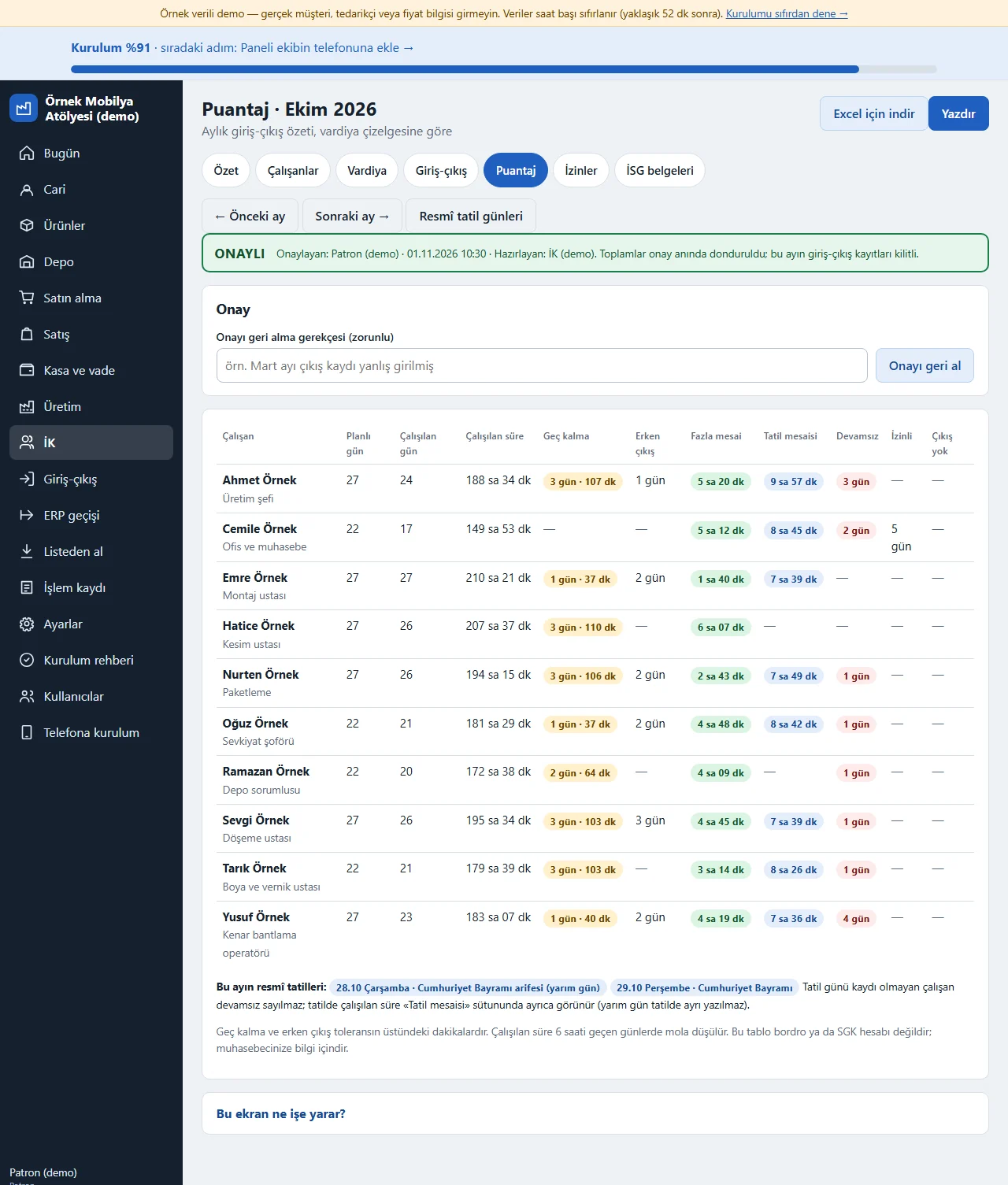
Monthly timesheet approval
When the month ends HR reviews it and taps “Onaya gönder” (send for approval; it cannot be sent before the month ends); if the check list has warnings, a “Uyarıları gördüm” (I have seen the warnings) tick is needed. The owner or the support account taps “Onayla” (approve) or writes a reason and taps “Düzelt” (correct); HR cannot approve. Once approved each employee’s totals are frozen, an “ONAYLI · approver · date” stamp shows on screen, in print and in Excel (October 2026 in the picture) and the clock records of that month are locked. If it turns out wrong, the owner writes a reason and taps “Onayı geri al” (undo the approval); every step is written to the activity log. There is no employee-side approval, no pay or payroll calculation and no social-security notification; the timesheet is for your accountant’s information.
- On screen (Turkish interface)
- “ONAYLI” — approved
- “Onaya gönder” — send for approval
- “Onayı geri al” — undo the approval
-
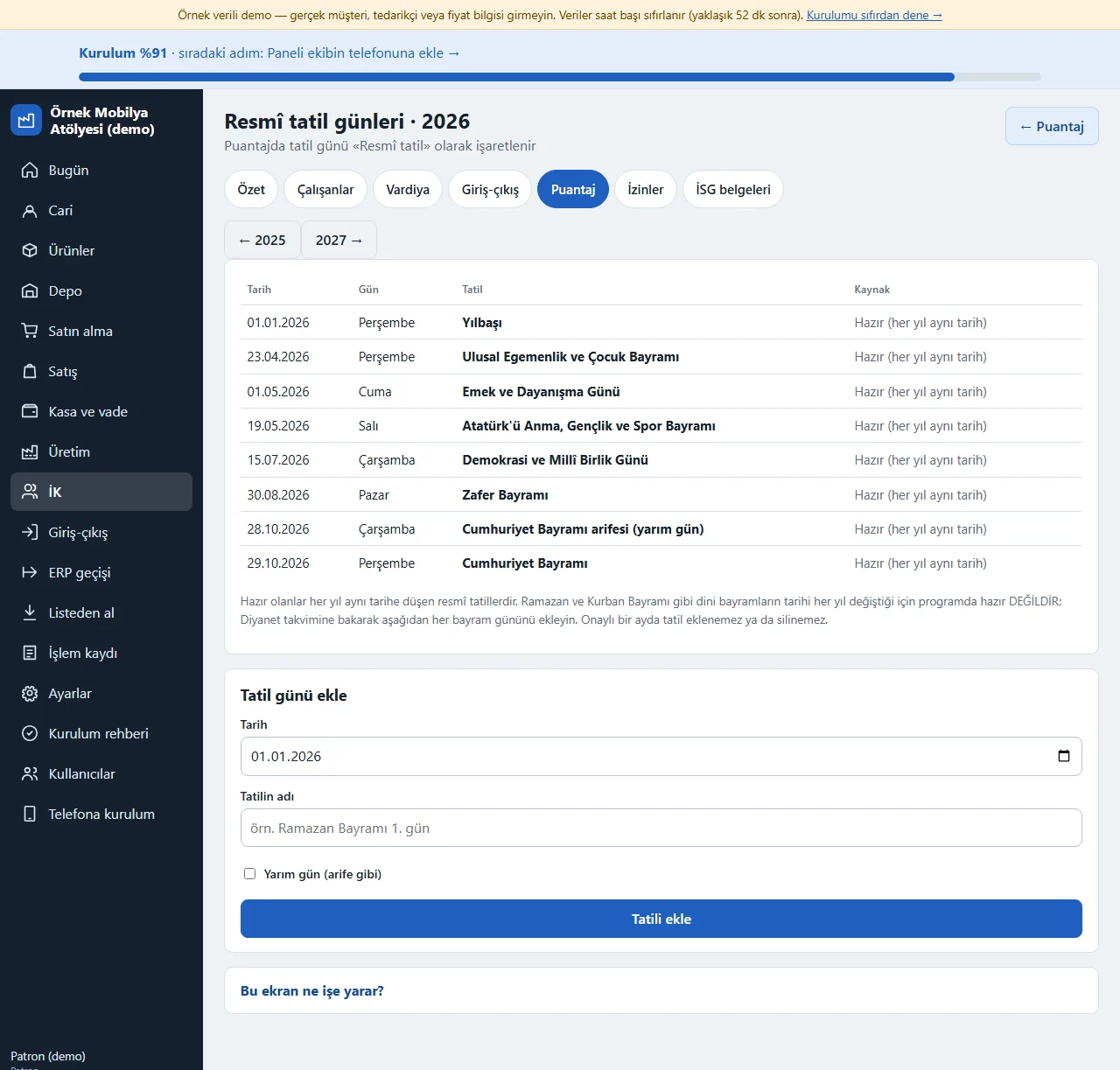
Public holidays
It opens from the “Resmî tatil günleri” (public holidays) link on the Puantaj page: the public holidays that fall on the same date every year are ready (the eve of 28 October is a half day). The dates of religious holidays such as Ramazan and Kurban Bayramı are not ready-made; after checking the Diyanet calendar each holiday is added by hand with a date and a name, with half days such as an eve ticked. An employee with no record on a holiday is not counted as absent; the time worked on a holiday shows in the separate “Tatil mesaisi” (holiday overtime) column of the timesheet, and the overtime and lateness calculation does not change. A holiday cannot be added or deleted in an approved month.
- On screen (Turkish interface)
- “Resmî tatil günleri” — public holidays
- “Tatil mesaisi” — holiday overtime
- “Yarım gün” — half day
-
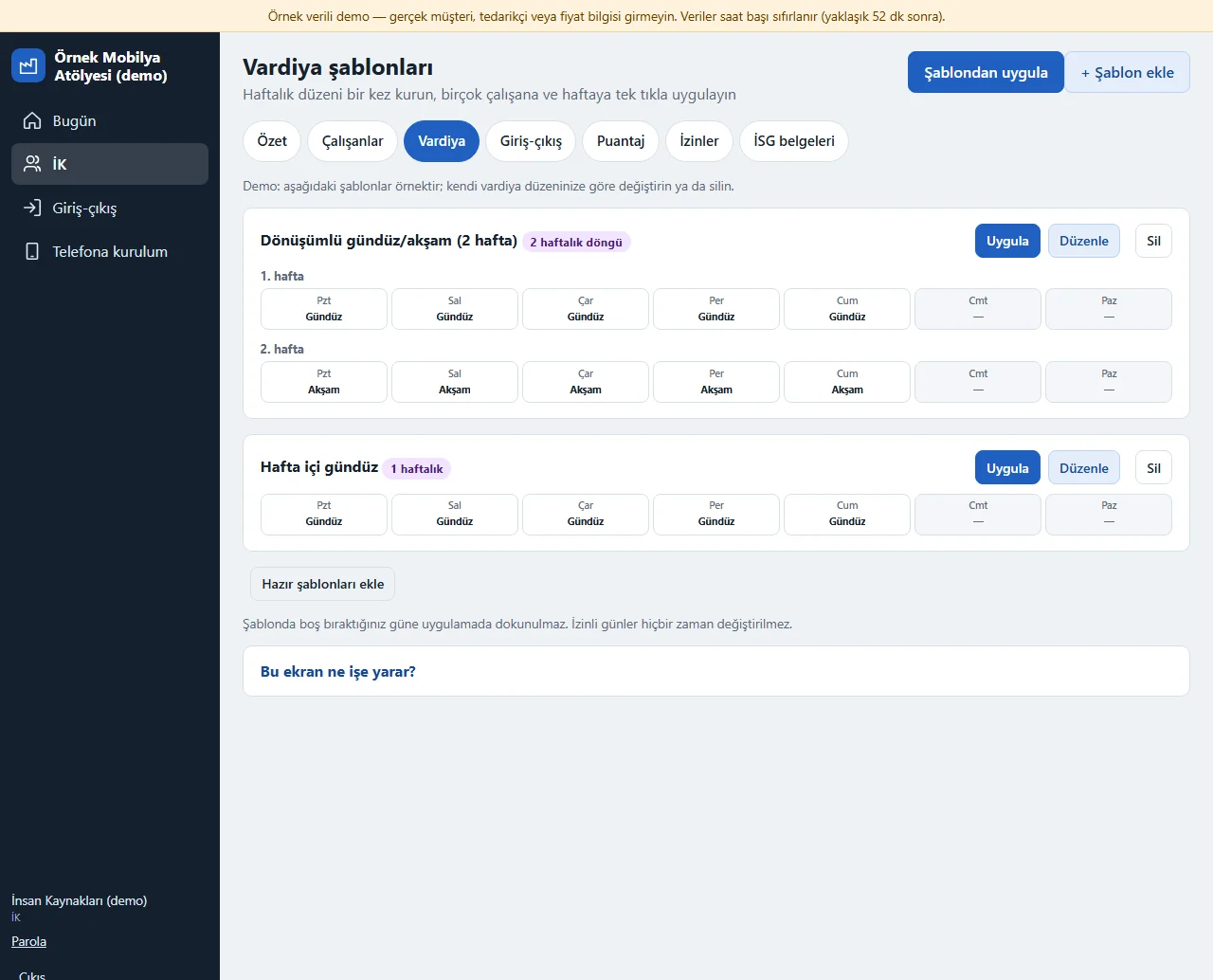
Shift templates
İK > Vardiya > “Şablonlar” (İK > shift roster > templates), or “Şablondan uygula” (apply a template) on the roster: you set up the weekly pattern once; it can be a cycle of 1–4 weeks (the picture shows a 2-week alternating day/evening template and a weekday day-shift template). “Uygula” (apply) writes the template you chose to the employees you chose, from the starting week for 1–12 weeks; before writing a preview shows the counts of days to write, filled, already the same, on leave and public holidays with a summary per employee, and nothing is written until you confirm. You choose “Dolu günlere dokunma” (leave filled days alone, recommended) or “üzerine yaz” (overwrite), public holidays can be left empty and the chosen employees can be rotated; days on leave are never touched. The roster has “Bu haftayı şablon yap” (make this week a template) on an employee row, the template page has “Hazır şablonları ekle” (add ready templates: weekday day shift, alternating day/evening, a week with a Saturday half day) and after an apply there is “Son uygulamayı geri al” (undo the last apply; it only restores days that have not changed since). Only HR and the owner see it. A template is not tied to an employee for good, it is written to the roster when applied; there is no check for overtime, rest time or head count and no shift swap or request flow.
-
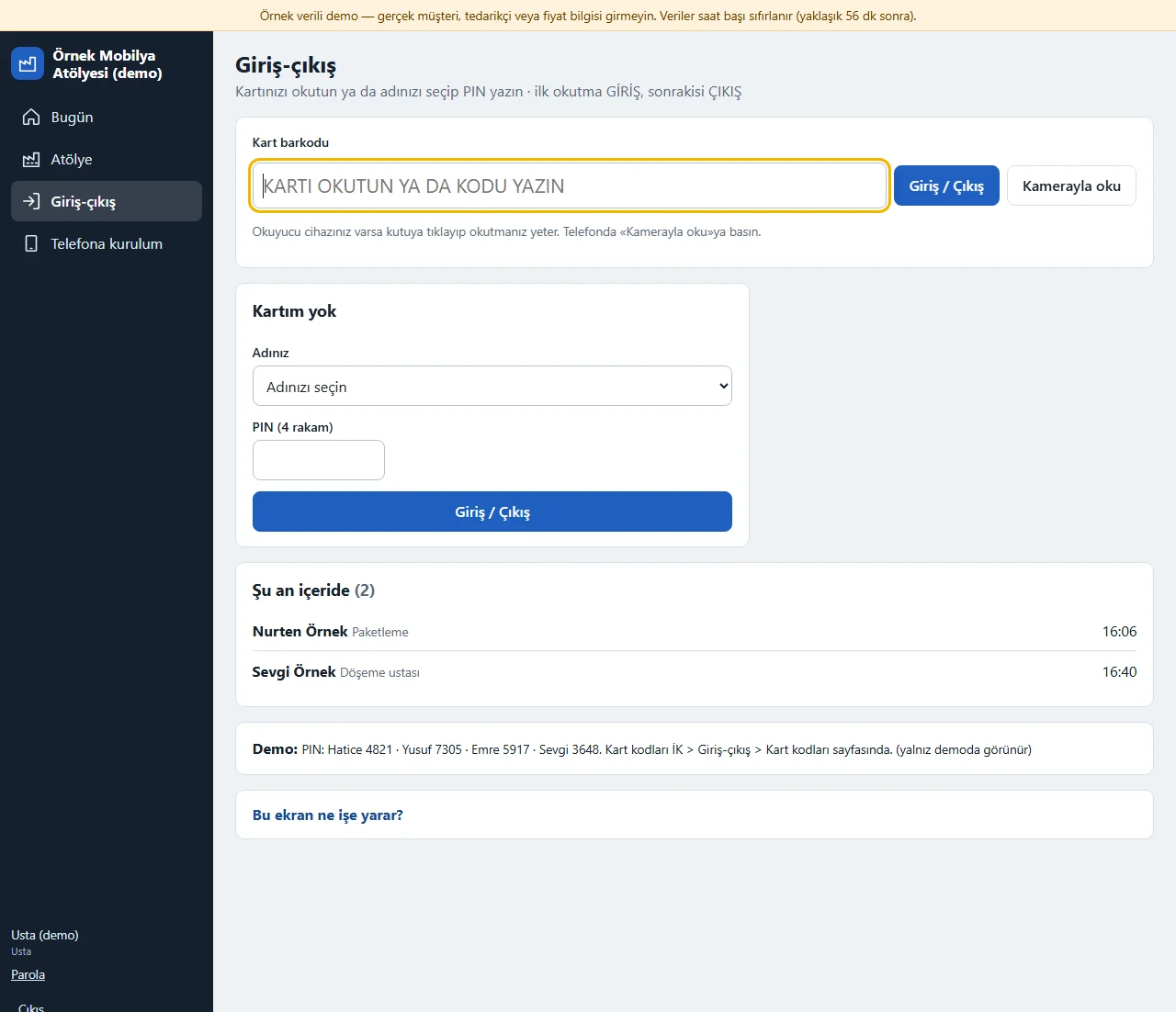
Gate screen
Giriş-çıkış > Kapı ekranı (gate screen) is kept open on a tablet or phone at the door: an employee scans the barcode on the card with a reader device or with “Kamerayla oku” (read with the camera), or, without a card, picks their name and types a 4-digit PIN. The first scan is GİRİŞ (in), the next ÇIKIŞ (out); scanning twice in a row is blocked and a “Şu an içeride” (inside now) list shows. The craftsman and the chief can also open this screen from their own menu. No instant clock-in notification goes to the manager.
- On screen (Turkish interface)
- “Kapı ekranı” — gate screen
- “Kartım yok” — I have no card
- “Şu an içeride” — inside now
- “Kamerayla oku” — read with the camera
-
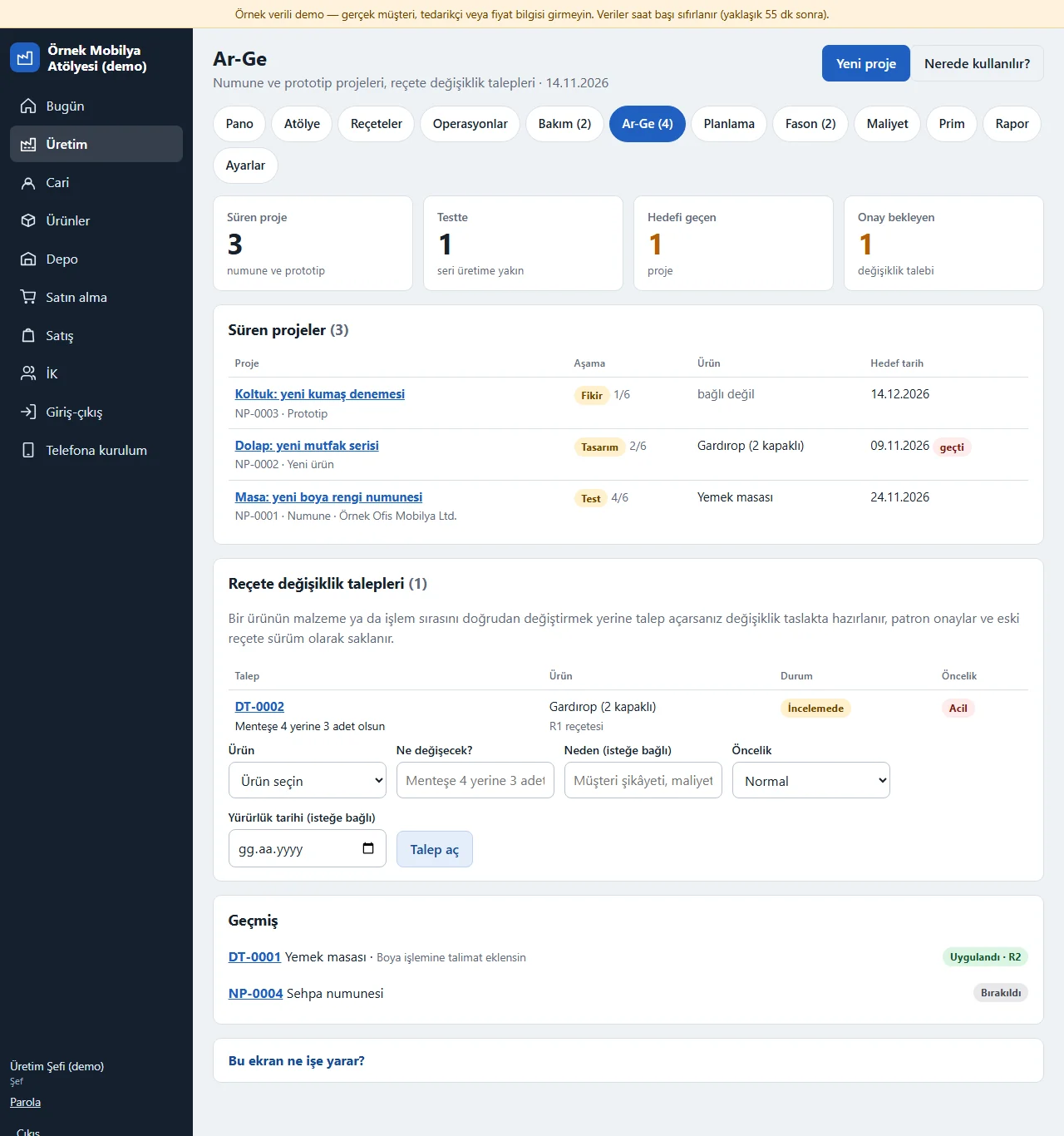
R&D board
Üretim > Ar-Ge (Production > R&D) gathers the running sample and prototype projects (with their stage and target date, a project past its date marked) and the recipe change requests (draft, in review, approved) on one page; the four cards at the top count running projects, projects in testing, those past their target and change requests awaiting approval. From here you open a new project, start a change request for a product and go to the “Nerede kullanılır?” (where used) page. The R&D scope is on only in the Full package and can be switched off under Ayarlar > Kapsamlar; a role without access does not see the tab.
- On screen (Turkish interface)
- “Ar-Ge” — R&D
- “Yeni proje” — new project
- “Talep aç” — open a request
- “Nerede kullanılır?” — where used?
-
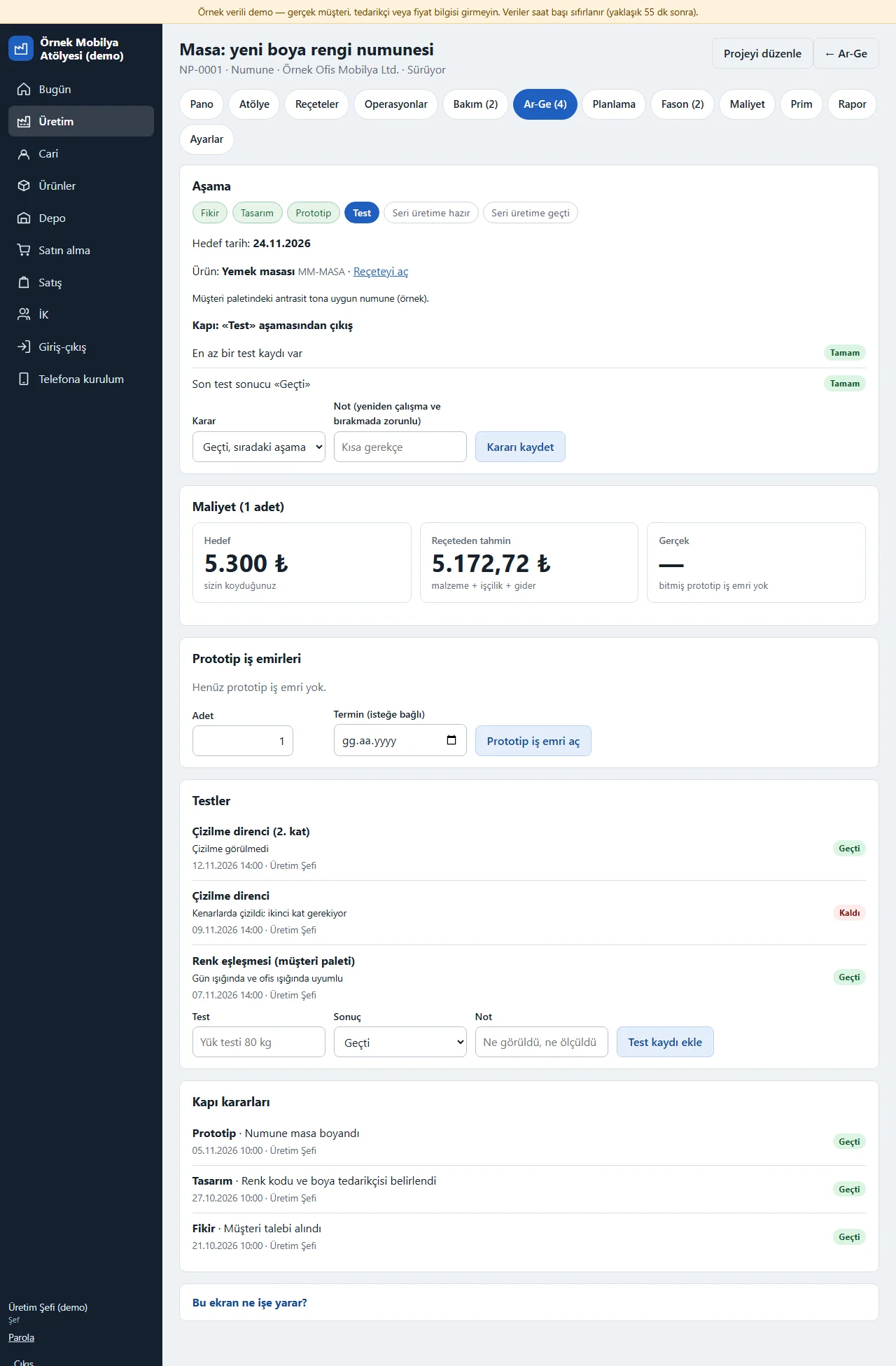
Sample and prototype project
A project goes through the stages idea, design, prototype, test, ready for series production and in series production; each stage ends at a gate and the decision is recorded with its reason as “Geçti” (passed), “Yeniden çalışılacak” (to be reworked) or “Bırak” (drop). Passing has conditions: to leave design the project needs a product card and a recipe, to leave prototype a finished prototype work order, to leave testing the last test must be “Geçti”; a missing condition is listed on the page. “Prototip iş emri aç” (open a prototype work order) opens a work order with the product’s recipe (an ordinary work order, the finished product enters stock); the target unit cost, the estimate from the recipe and the real cost of the finished work order show side by side, and a warning appears if the target is exceeded but it does not close the gate. Test records (passed, failed, note) and gate decisions stay with the project; a dropped project can be reopened. There is no drawing or file upload.
- On screen (Turkish interface)
- “Kapı kararı” — gate decision
- “Prototip iş emri aç” — open a prototype work order
- “Yeniden çalışılacak” — to be reworked
- “Test kaydı ekle” — add a test record
-
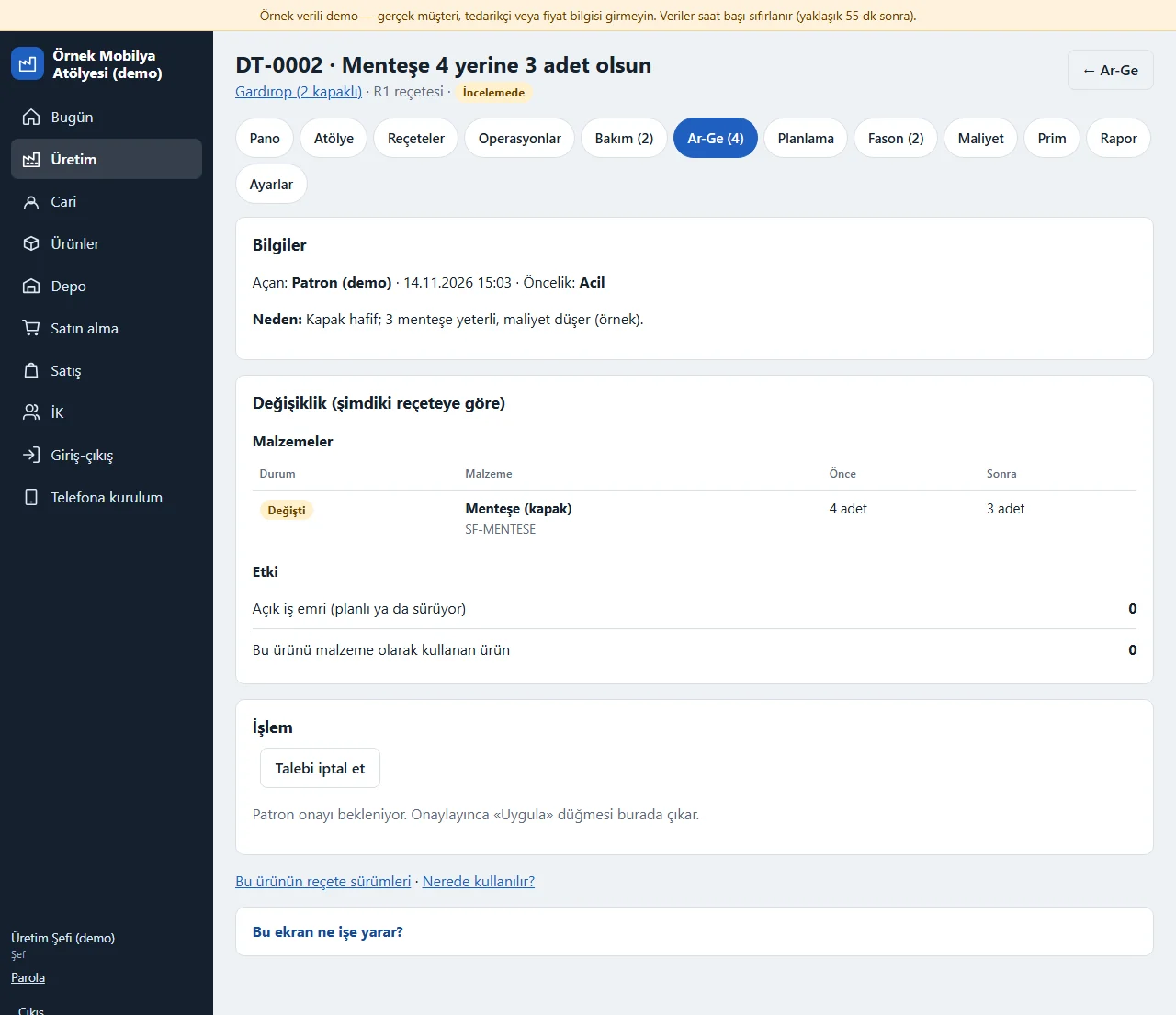
Recipe change request
You change a product’s materials or operation order by opening a request: the change is prepared in a draft (add a material, change quantity and scrap, remove; add, change or remove an operation) and the page shows the difference between old and new, the open work orders affected and the number of products that use it. You press “İncelemeye gönder” (send for review), the owner approves or rejects with a reason, and “Uygula” (apply) then changes the recipe. An optional effective date stops it applying before that day; if the recipe is changed elsewhere after the request was opened the request cannot be applied (cancel it and open a new one); a product has only one open request at a time. Work orders already in production do not change. Editing directly on the Reçeteler screen does not open a version; the versioned, approved way is a change request. There is no multi-step approval; only the owner approves.
- On screen (Turkish interface)
- “Talebi aç” — open the request
- “İncelemeye gönder” — send for review
- “Onayla” — approve
- “Reddet” — reject
- “Uygula” — apply
-
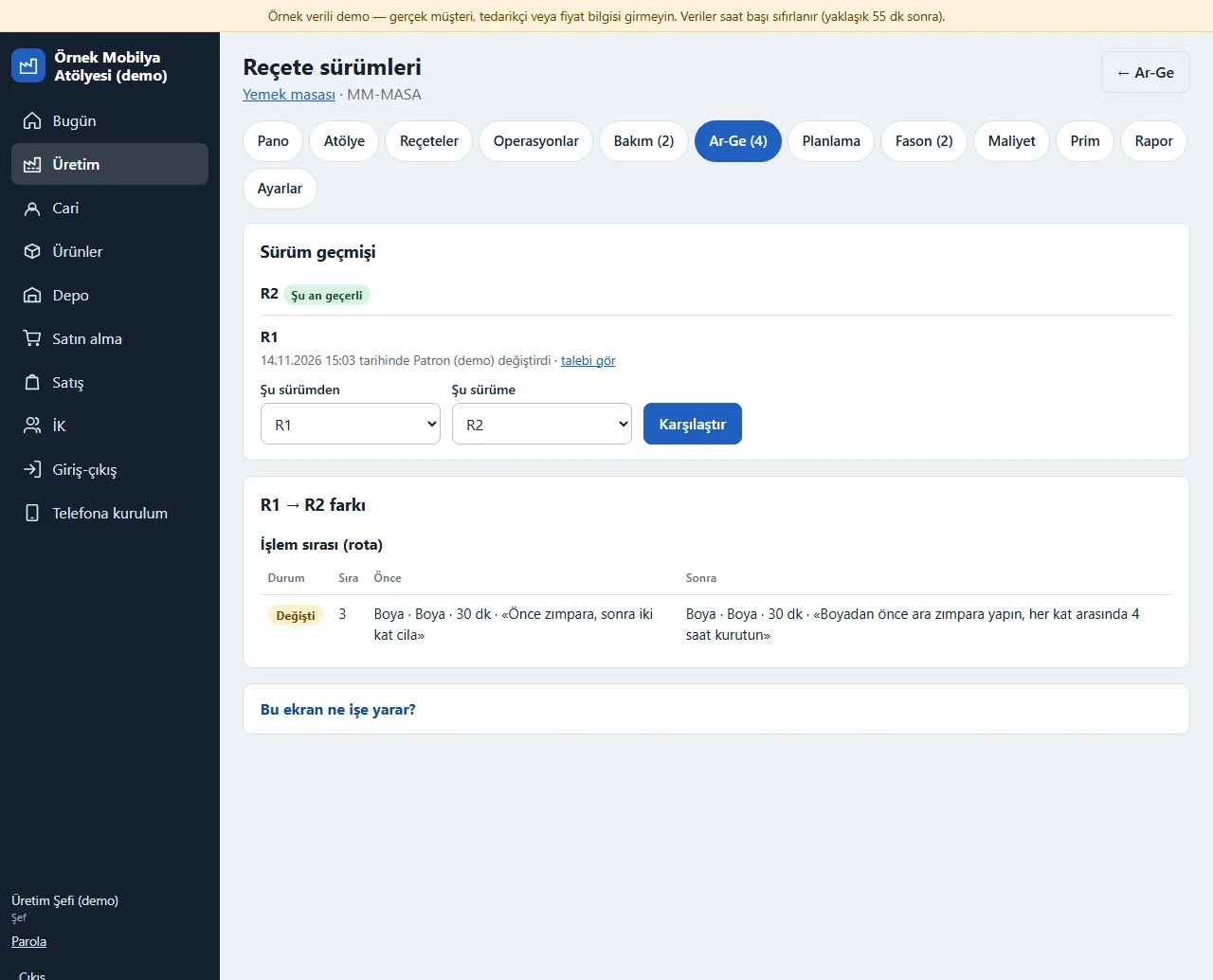
Recipe versions and where used
Every applied change keeps the old recipe as R1, R2…; the recipe page shows the current version and a “sürümler” (versions) link, the versions page compares two chosen versions (added, removed and changed materials and operations), and a work order carries the recipe version it was opened with. “Nerede kullanılır?” (where used) lists, level by level and including indirect uses through a semi-finished product, the products whose recipe contains the material or semi-finished product you pick, so you see how many products a change would affect. There is no parallel version or version merging.
- On screen (Turkish interface)
- “Reçete sürümleri” — recipe versions
- “Şu an geçerli” — currently valid
- “Karşılaştır” — compare
- “Nerede kullanılır?” — where used?
-
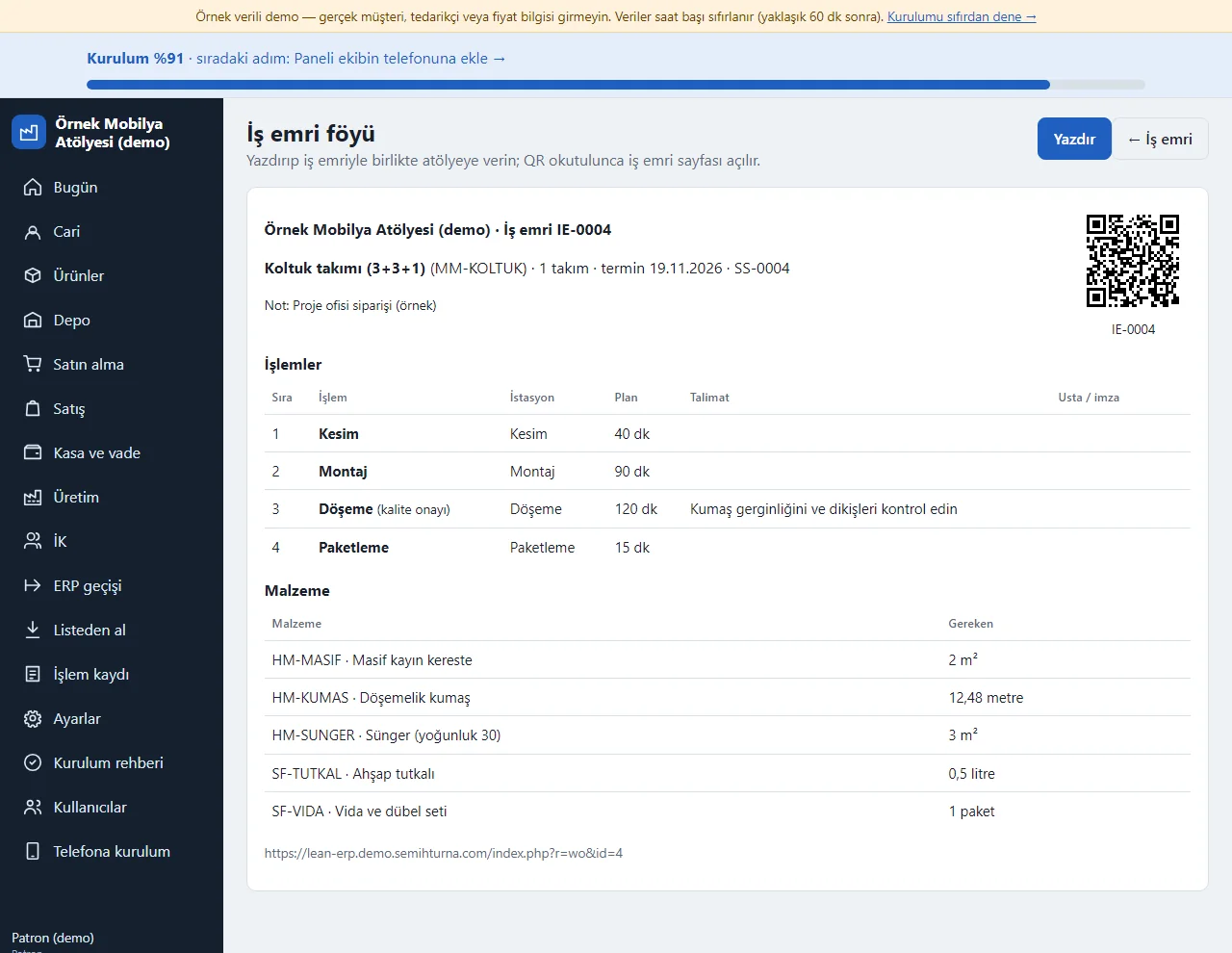
0.14.0 · 14 November 2026 Work-order sheet
The “İş emri föyü” (work-order sheet) link on a work-order page opens a printable A4 page: the company and the work-order number, the product, quantity, due date and custom fields, a QR code leading to the work-order page, an operation table (order, operation, station, planned minutes, instruction and an empty box for the craftsman’s signature) and the list of materials needed. The Yazdır (print) button prints only the sheet; anyone who may see production can open it.
- On screen (Turkish interface)
- “İş emri föyü” — work-order sheet
- “Yazdır” — print
- “Usta / imza” — craftsman / signature
-
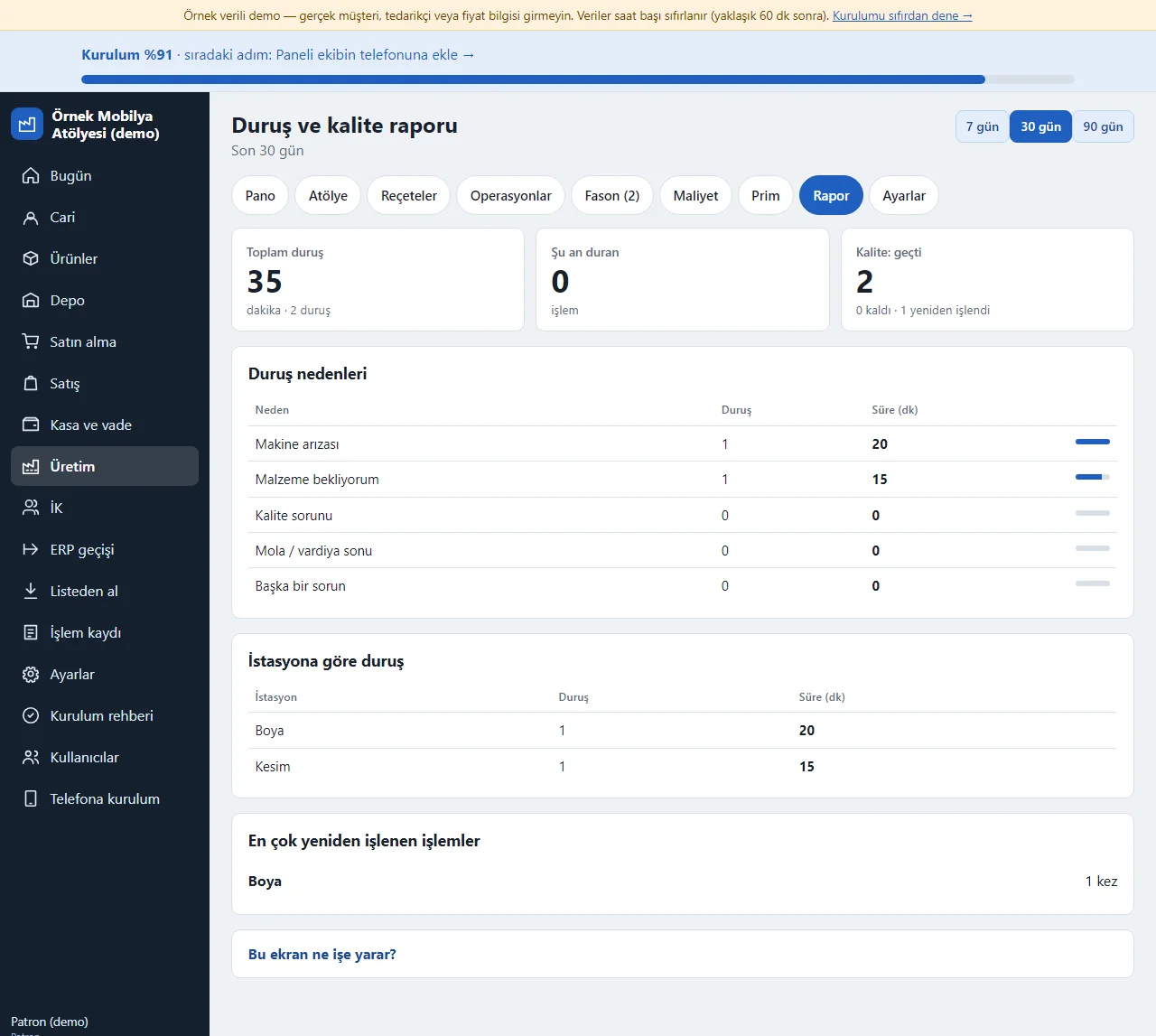
0.14.0 · 14 November 2026 Stop and quality report
Üretim > Rapor adds up what came from the shop floor over the last 7, 30 or 90 days: the total stopped minutes, the number of operations stopped now, how many passed, failed and were reworked in quality control; count and minutes by stop reason (machine breakdown, waiting for material, quality problem, break, other); stops by station; the operations reworked most. The data comes from “Sorun bildir” and the quality choices; no plan or capacity is worked out.
- On screen (Turkish interface)
- “Duruş nedenleri” — stop reasons
- “İstasyona göre duruş” — stops by station
- “En çok yeniden işlenen işlemler” — operations reworked most
- “Kalite: geçti” — quality: passed
-
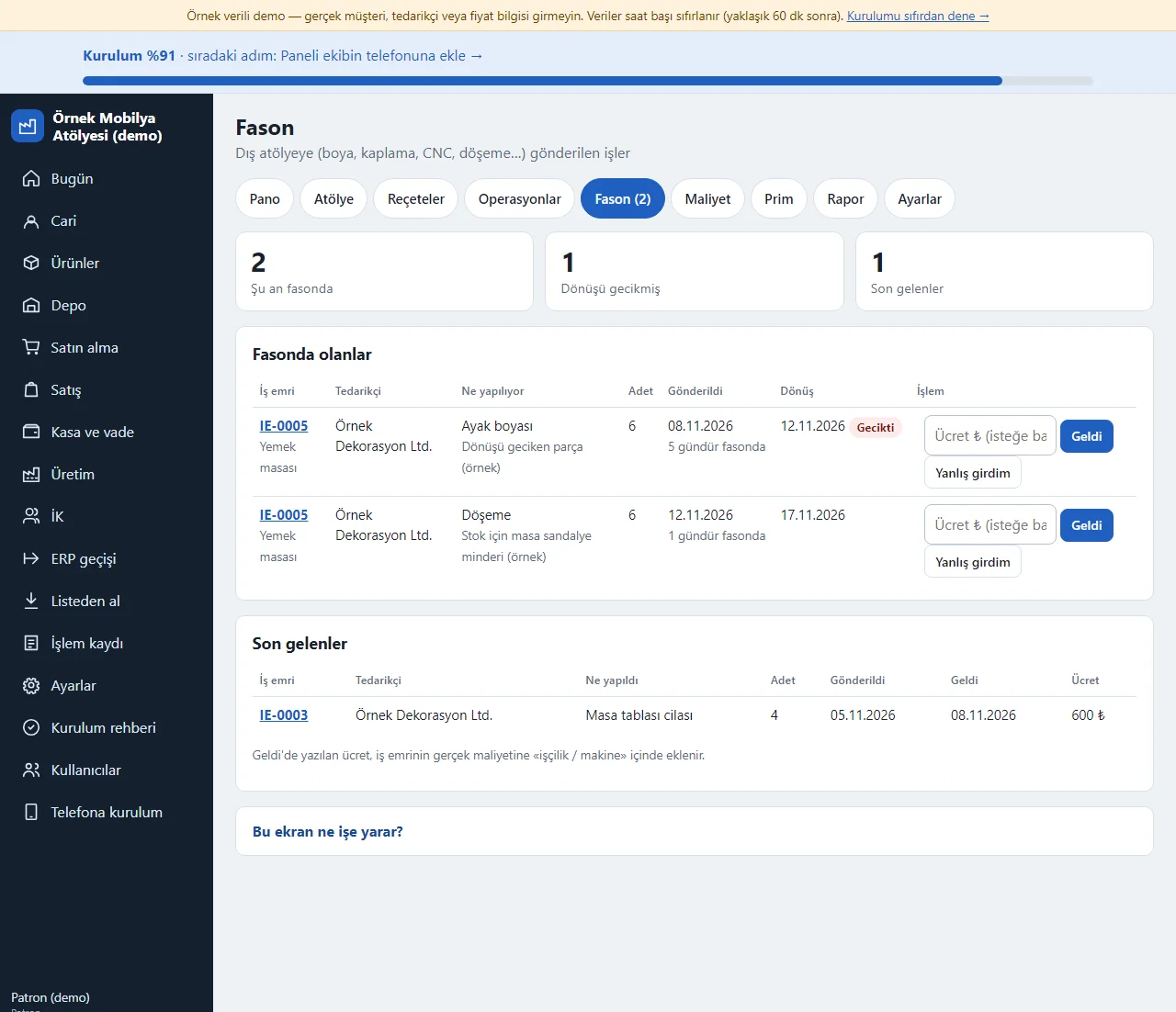
0.14.0 · 14 November 2026 Outsourcing (subcontracting)
Parts sent out for painting, coating, CNC or upholstery are listed with the supplier, the job, quantity, send date and return date; how many days it has been away shows, and one past its return date is marked “Gecikti” (late). When the part comes back “Geldi” is pressed and an optional fee written; the fee is added to the work order’s cost. A work order with a part out cannot be finished.
- On screen (Turkish interface)
- “Fasonda olanlar” — out at the subcontractor
- “Geldi” — arrived
- “Gecikti” — late
- “Yanlış girdim” — entered by mistake
-
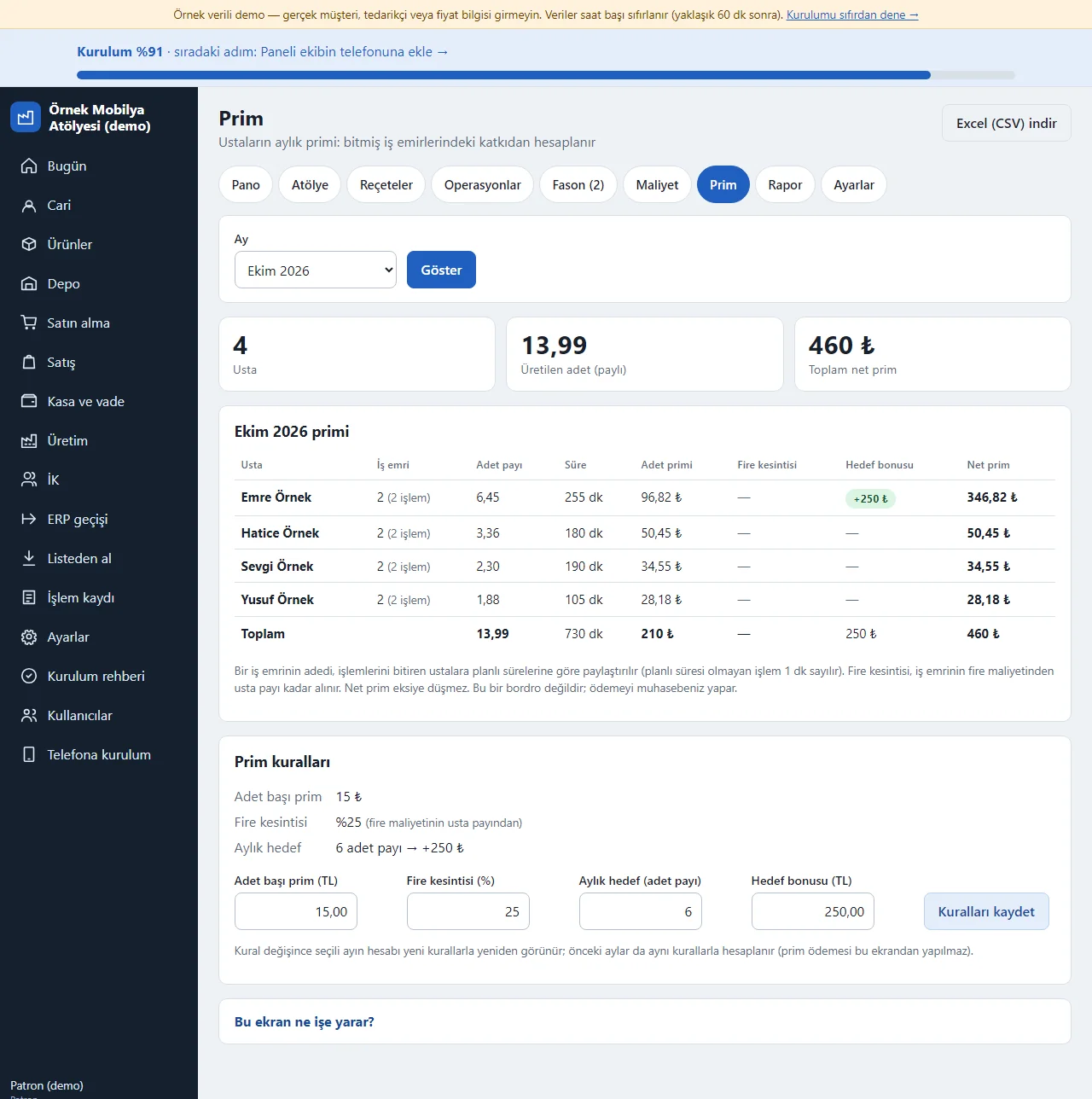
0.14.0 · 14 November 2026 Craftsman bonus
From the chosen month’s finished work orders the bonus per piece, a scrap deduction and a monthly target bonus are worked out per craftsman; a craftsman’s share is split by the operations’ planned time and the net bonus never goes below zero. Only the owner writes the bonus rules (amount per piece, scrap deduction %, monthly target and bonus); the table downloads for Excel. The bonus is not payroll, your accountant pays it.
- On screen (Turkish interface)
- “Prim kuralları” — bonus rules
- “Adet primi” — bonus per piece
- “Fire kesintisi” — scrap deduction
- “Hedef bonusu” — target bonus
-
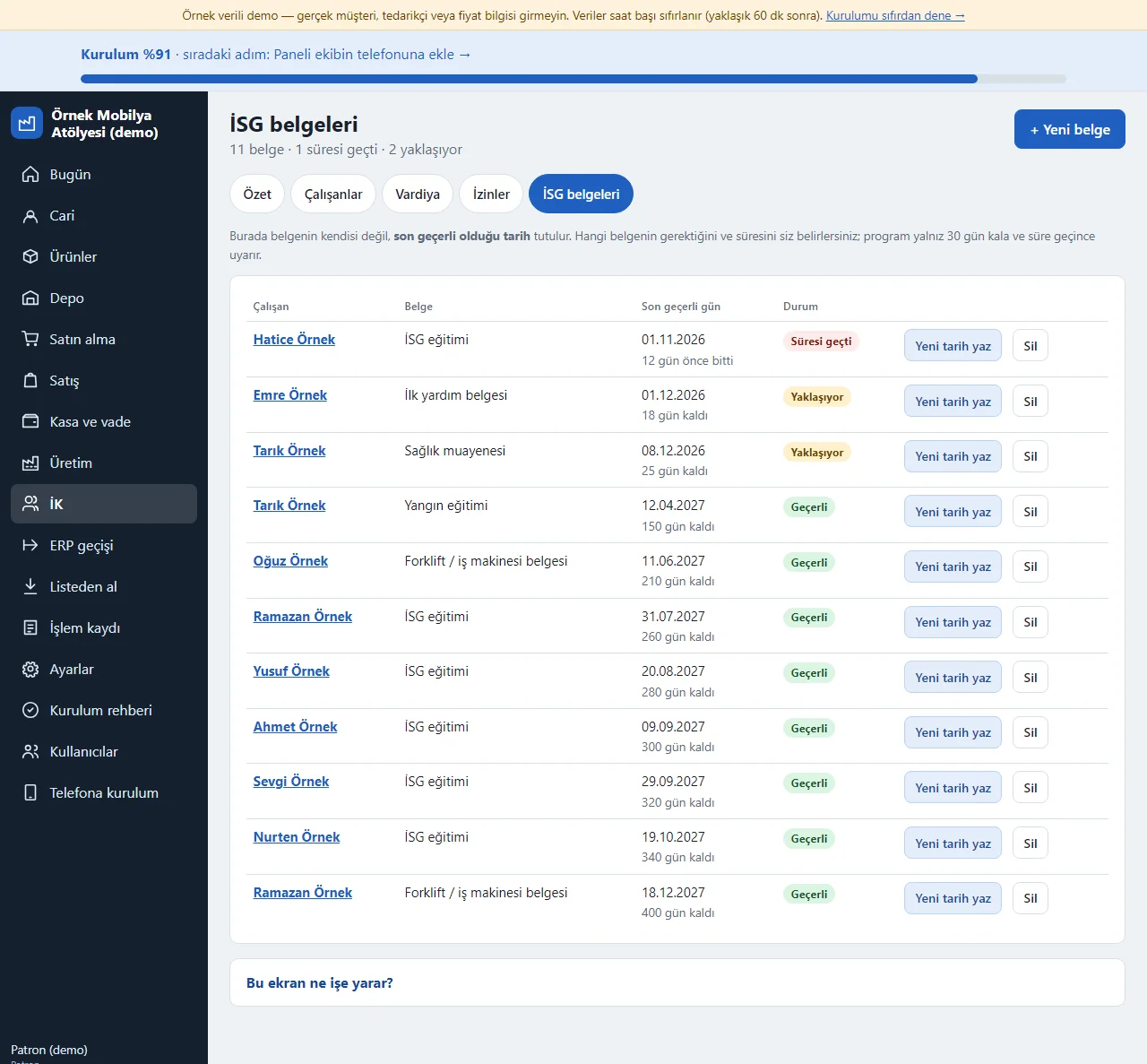
0.14.0 · 14 November 2026 Safety-certificate tracking
For each employee a certificate type and its last valid day are written; an expired one shows red and one expiring within 30 days yellow, and the warning also appears on the Today screen. When a certificate is renewed “Yeni tarih yaz” (write the new date) is pressed. The same section holds the staff list, the weekly shift roster and multi-day leave; no certificate file, pay or remaining leave days are kept.
- On screen (Turkish interface)
- “İSG belgeleri” — safety certificates
- “Süresi geçti” — expired
- “Yaklaşıyor” — approaching
- “Yeni tarih yaz” — write the new date
-
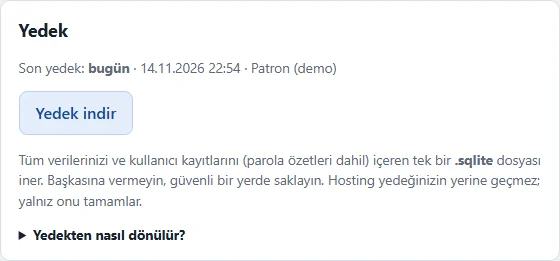
Backup download
The Settings > Yedek (backup) card shows only to the owner. “Yedek indir” (download backup) downloads a consistent copy of the database (lean-erp-yedek-20261114-2254.sqlite). The file holds all the data and the user records (password hashes included); it is not handed to anyone and is kept somewhere safe. The card shows the time of the last backup and who took it, and it is written to the activity log. If no backup was ever taken or the last one is more than 7 days old a quiet warning shows on the owner’s Today screen; there is a shortcut on the “Daha fazla” (more) page. The “Yedekten nasıl dönülür?” (how to restore) box explains the way back: in the hosting file manager take a copy of the database file in the data folder and put the backup you downloaded in its place under the same name (the detailed steps are in the installation guide); there is no restoring from inside the app and it does not replace your hosting backup.
- On screen (Turkish interface)
- “Yedek indir” — download backup
- “Yedekten nasıl dönülür?” — how to restore
-
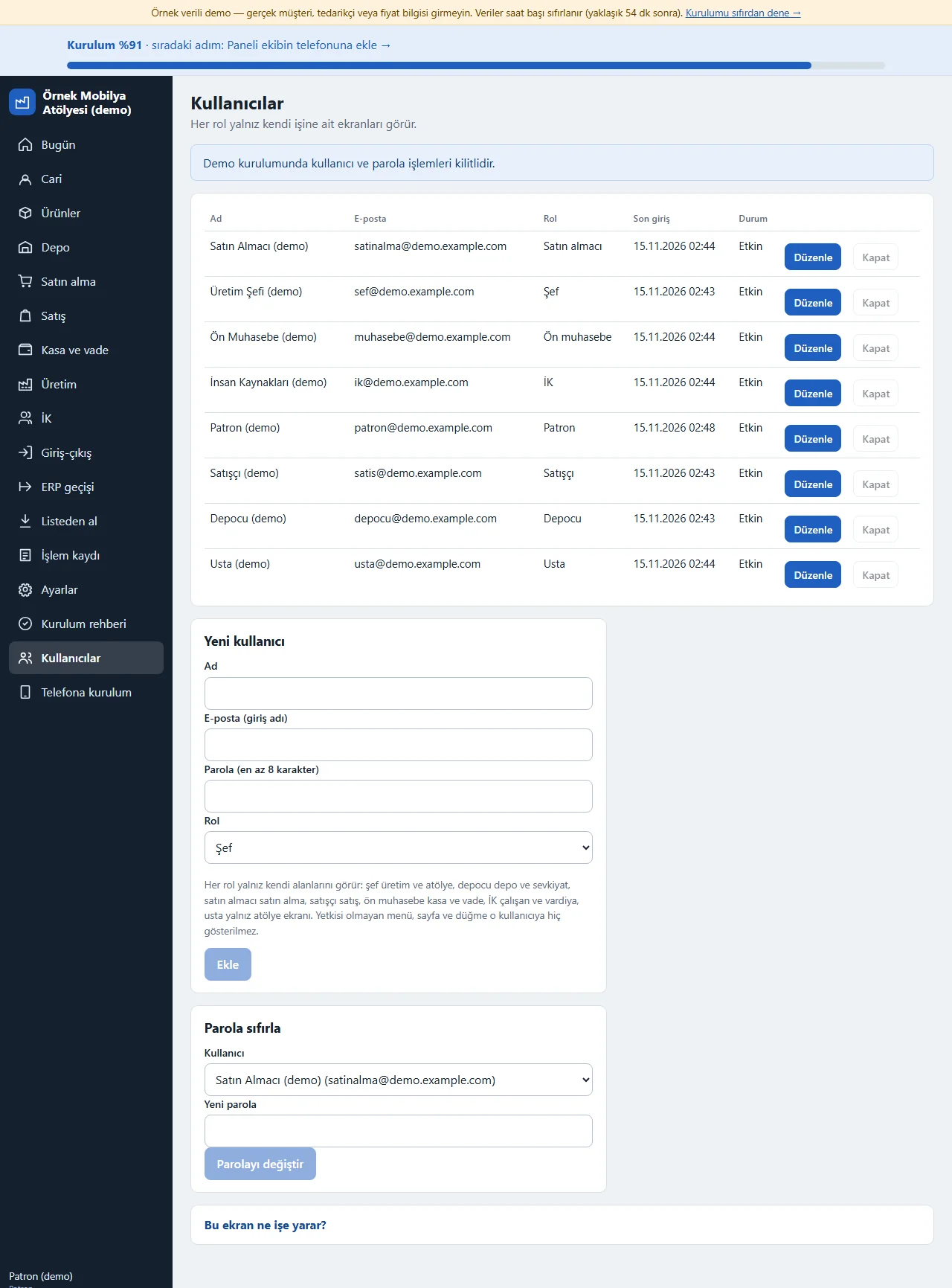
Users and last sign-in
The Kullanıcılar (users) page in the menu lists each person with their name, e-mail (the sign-in name), role, “Son giriş” (last sign-in; empty for someone who has never signed in) and status, so who signed in last and when shows at a glance. Each row has “Düzenle” (edit) and “Kapat” (close); below are the forms to add a user and to reset a password. Each role sees only its own areas; a menu item, page or button a user may not use is never shown. In the demo install user and password actions are locked; the page only shows how it looks.
- On screen (Turkish interface)
- “Son giriş” — last sign-in
- “Düzenle” — edit
- “Kapat” — close
-
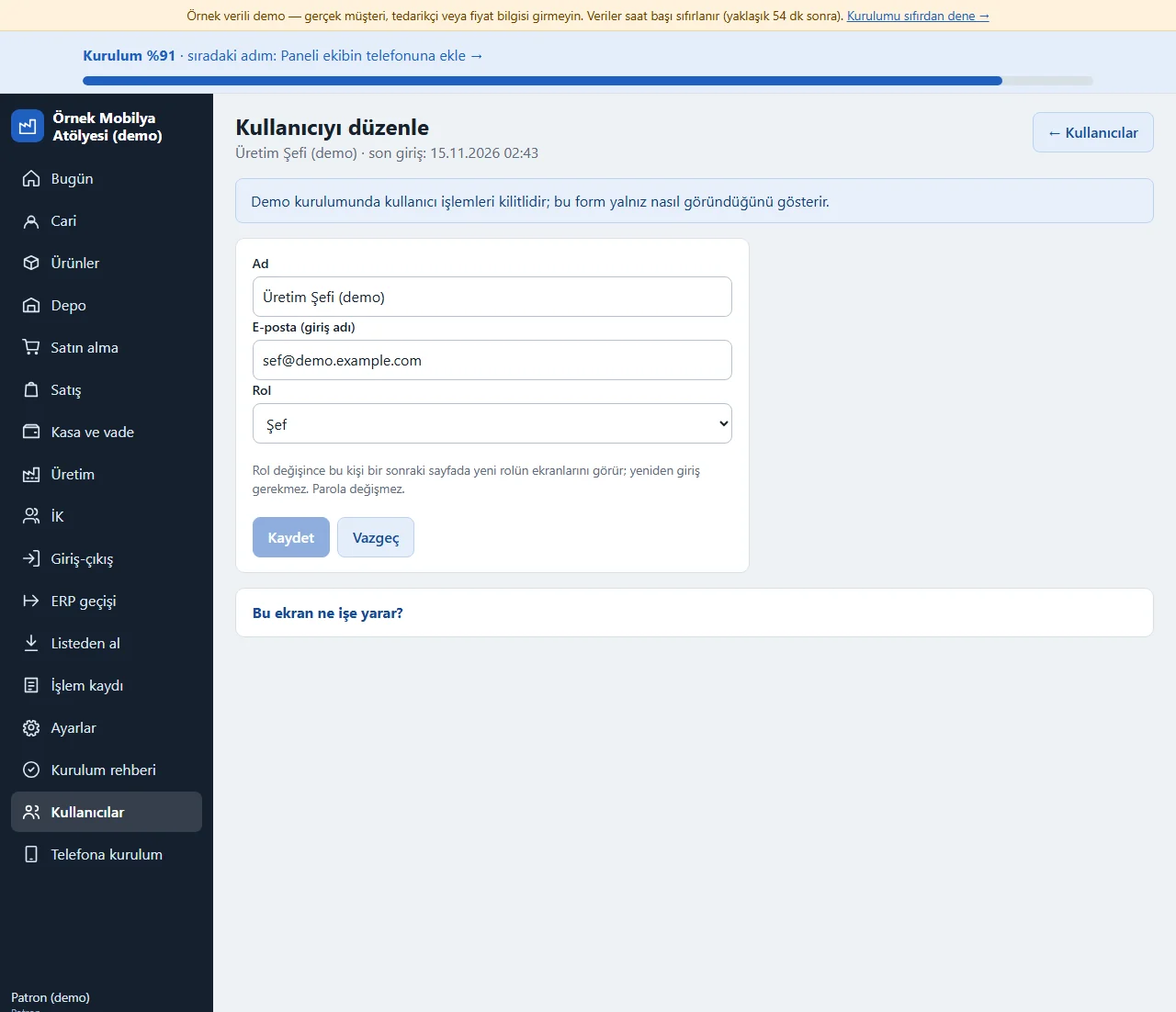
Editing a user
On the page that “Düzenle” opens, the owner (and the support account) changes the person’s name, e-mail and role. When the role changes, the person’s open session works with the new role’s access from the next page; signing in again is not needed and the password does not change. Two rules prevent locking yourself out by mistake: the last active owner cannot be turned into another role and nobody can change their own role. Every change is written to the activity log. In the demo install this form is locked and only shows how it looks.
- On screen (Turkish interface)
- “Kullanıcıyı düzenle” — edit user
- “Rol” — role
-
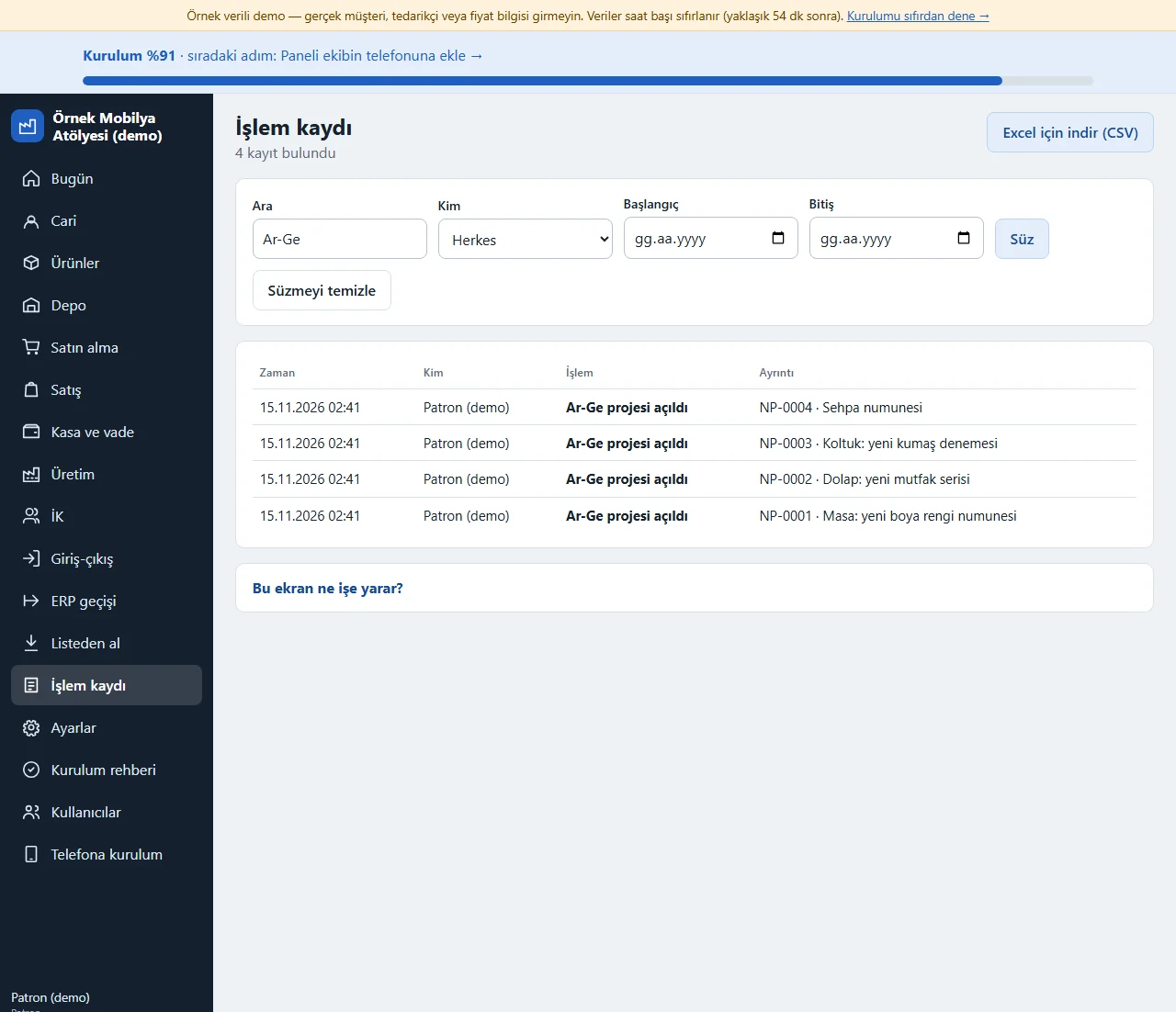
Activity log: search, filter and CSV
On the İşlem kaydı (activity log) page the “Ara” (search) box looks in the action name and the detail (example: Ar-Ge); “Kim” (who) picks one person or Sistem (system), and “Başlangıç” and “Bitiş” give a date range. A count such as “4 kayıt bulundu” (4 records found) shows at the top and “Süzmeyi temizle” (clear the filter) resets the list; when there are many records the list is split into pages. “Excel için indir (CSV)” downloads the list as filtered at that moment. The download is also written to the activity log.
- On screen (Turkish interface)
- “Ara” — search
- “Süz” — filter
- “Süzmeyi temizle” — clear the filter
- “Excel için indir (CSV)” — download for Excel (CSV)
-
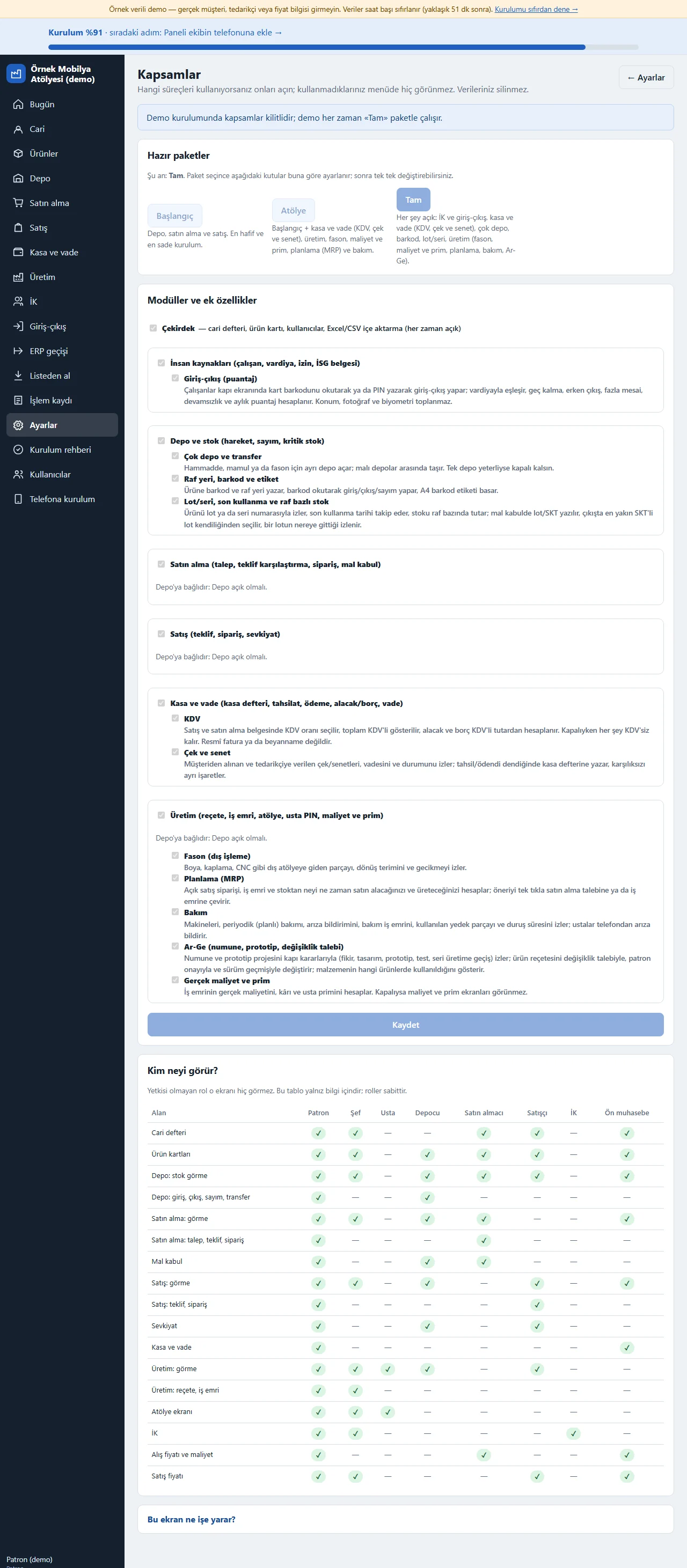
0.14.0 · 14 November 2026 Scopes
Settings > Kapsamlar (scopes): you choose which processes you use. The Depo (warehouse), Satın alma (purchasing), Satış (sales), Kasa ve vade (cash and credit), Üretim (production) and İK (HR) modules and the extra features several warehouses, shelf location and barcode, lot/serial, expiry and per-shelf stock, outsourcing, planning, maintenance, R&D, real cost and bonus, VAT, cheques and notes, and clock-in and clock-out (timesheet) switch on and off with a tap; what is switched off never shows in the menu, a tab, a Today card or at its address, and its data is not deleted. There are ready Başlangıç (Starter), Atölye (Workshop) and Tam (Full) packages (what each one contains is written under it) and, below, a table of what each role sees. The demo always runs with the Full package.
- On screen (Turkish interface)
- “Kapsamlar” — scopes
- “Hazır paketler” — ready packages
- “Kim neyi görür?” — who sees what?
-
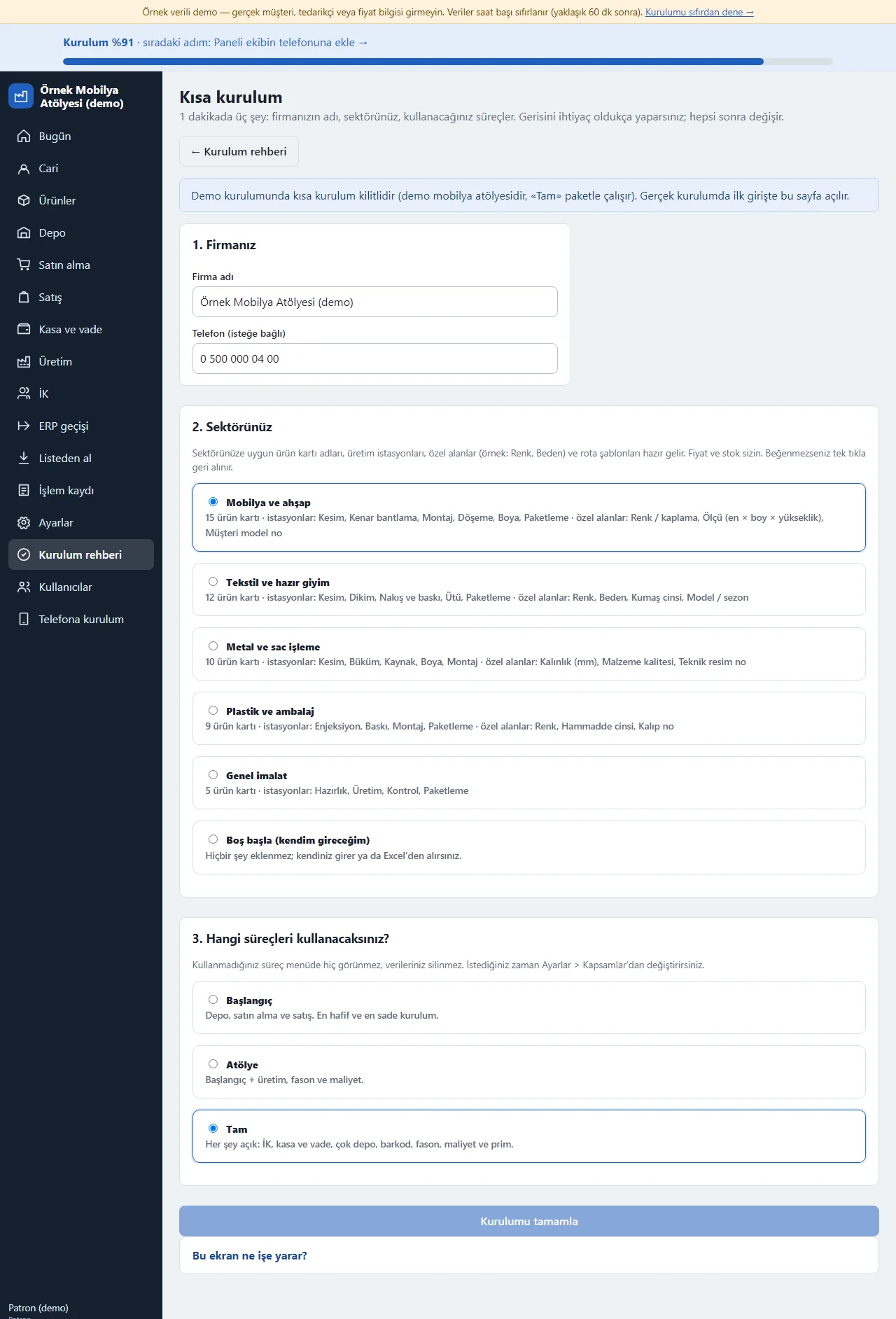
0.14.0 · 14 November 2026 Quick setup
The owner lands on this page on first sign-in and answers three questions in a minute: the company name (and an optional phone), the sector (furniture, textiles, metal, plastic, general manufacturing or “Boş başla”, start empty; how many product cards, which stations and custom fields each sector brings is written out) and which processes will be used (Başlangıç, Atölye or Tam). When “Kurulumu tamamla” (finish setup) is pressed the sector package is applied, an unused process is hidden from the menu and two steps of the setup guide are ticked; all of it can be changed later in Settings. In the demo this page is locked (the demo is a furniture workshop).
- On screen (Turkish interface)
- “Kısa kurulum” — quick setup
- “Sektörünüz” — your sector
- “Hangi süreçleri kullanacaksınız?” — which processes will you use?
- “Kurulumu tamamla” — finish setup
-
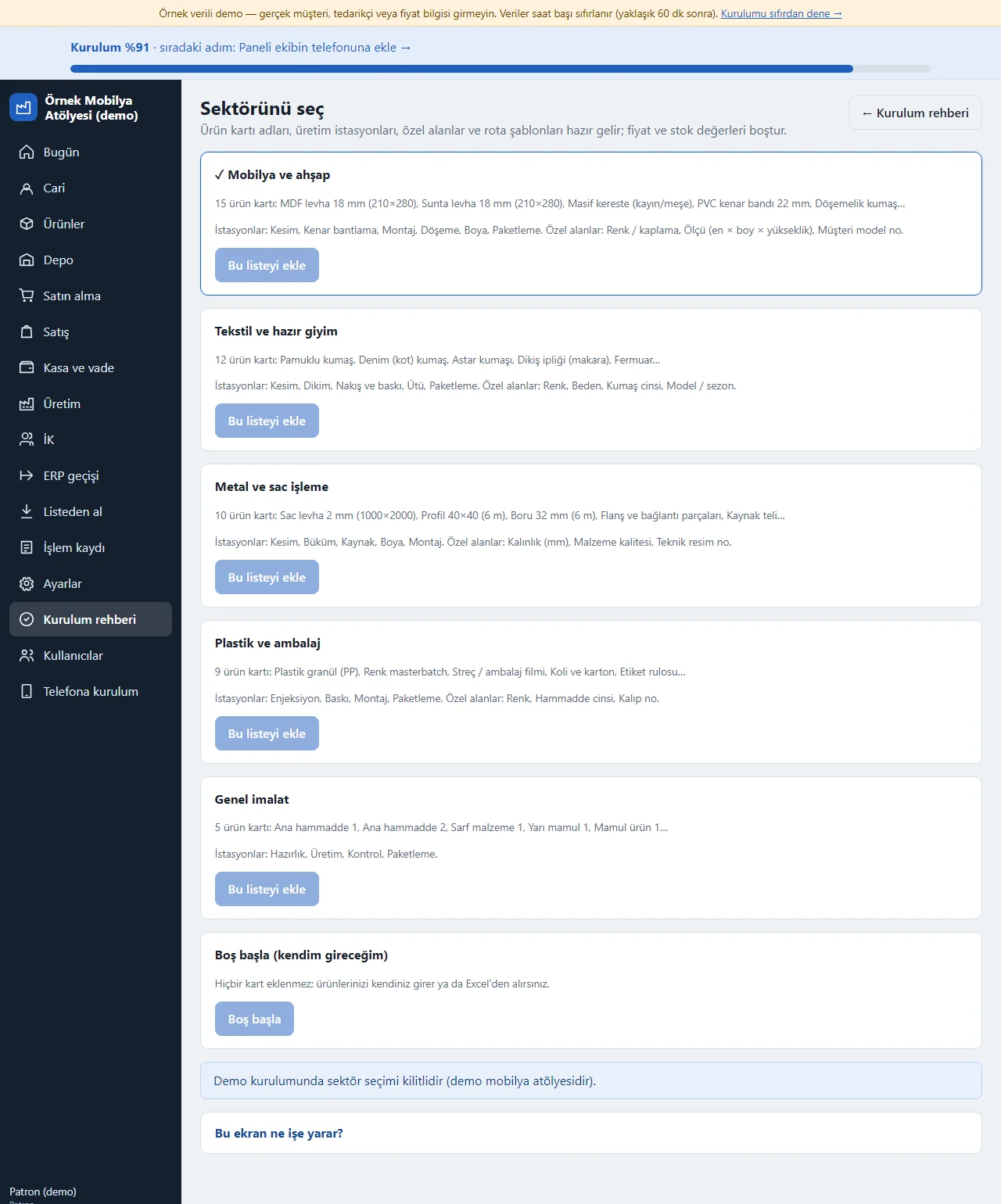
0.14.0 · 14 November 2026 Sector package
The furniture, textiles, metal, plastic and general manufacturing packages bring, besides the product card names, the sector’s production stations, custom fields and a routing template for finished products (for example in textiles the stations Kesim (cutting), Dikim (sewing), Nakış ve baskı (embroidery and printing), Ütü (pressing) and Paketleme (packing); the fields Renk (colour), Beden (size) and Kumaş cinsi (fabric type); routings for a shirt, trousers and a T-shirt). Prices and stock values are empty; anything with the same code or name is skipped. “Son eklenen sektör paketini geri al” (undo the last added package) undoes what was added and leaves alone the records you edited or used. In the demo the sector choice is locked.
- On screen (Turkish interface)
- “Bu listeyi ekle” — add this list
- “Boş başla” — start empty
- “İstasyonlar” — stations
- “Özel alanlar” — custom fields
-
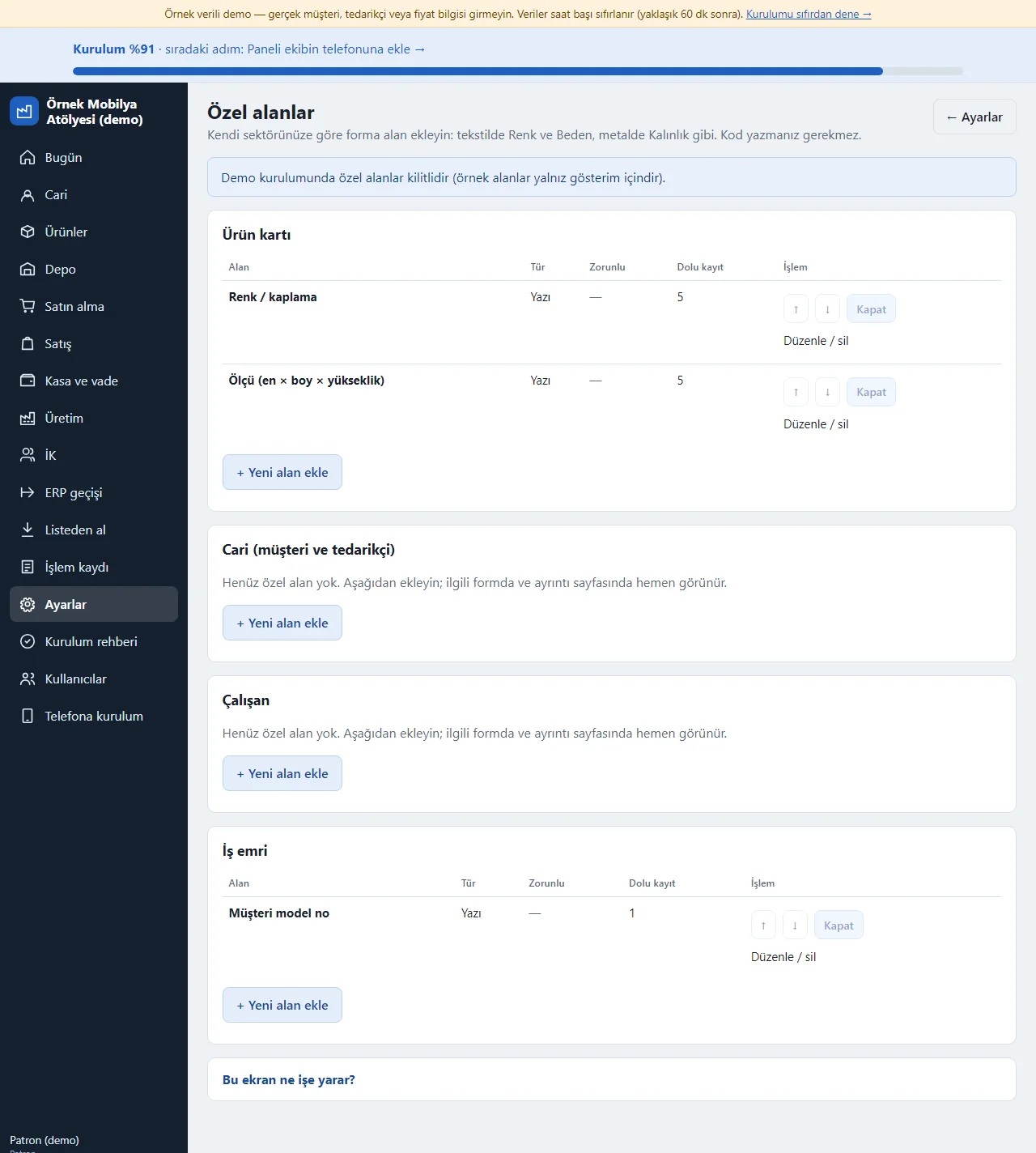
0.14.0 · 14 November 2026 Custom fields
Settings > Özel alanlar (custom fields; owner only): you add your own fields for the product card, party, staff member and work order (in the demo the furniture package’s Renk / kaplama (colour / finish), Ölçü (size) and Müşteri model no (customer model no) fields are written as examples). A field is text, a number, a choice list, a date or yes/no, and can be made required; ↑ ↓ reorder it, “Kapat” (switch off) removes it from forms but keeps the values, “Alanı sil” (delete the field) clears the values as well (how many records hold a value is written beside it). A field shows on its form, the detail page, the product list, in search, in the Excel download and when a list is imported from Excel/CSV. In the demo the buttons are locked.
- On screen (Turkish interface)
- “Özel alanlar” — custom fields
- “Yeni alan ekle” — add a new field
- “Kapat” — switch off
- “Alanı sil” — delete the field
- “Dolu kayıt” — records with a value
-
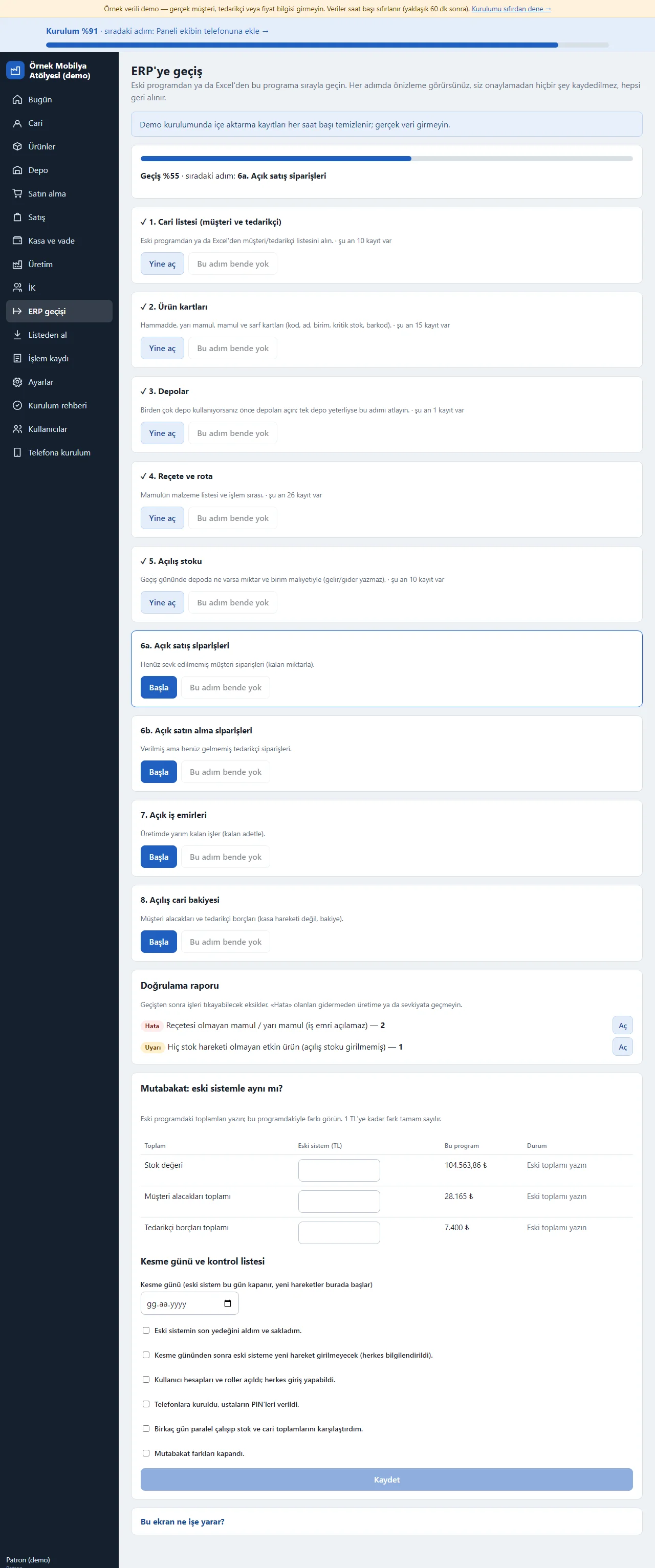
0.14.0 · 14 November 2026 Moving over from an old system
You move over from an old program or Excel step by step: the party list, product cards, warehouses, recipes and routings, opening stock, open orders, opening balances. Each step has its own screen: a file is chosen or a table pasted, columns are recognised from their headings, the preview shows new, already existing and faulty rows, nothing is saved until you confirm, no one is notified and the last import can be undone. Opening stock and opening balances write no income or expense. Below, a validation report finds gaps (such as a finished product without a recipe), a reconciliation compares the old system’s stock value, receivables and payables with this program’s, and a cut-over day and checklist plan the switch.
- On screen (Turkish interface)
- “ERP geçişi” — moving over
- “Doğrulama raporu” — validation report
- “Mutabakat” — reconciliation
- “Kesme günü” — cut-over day
-
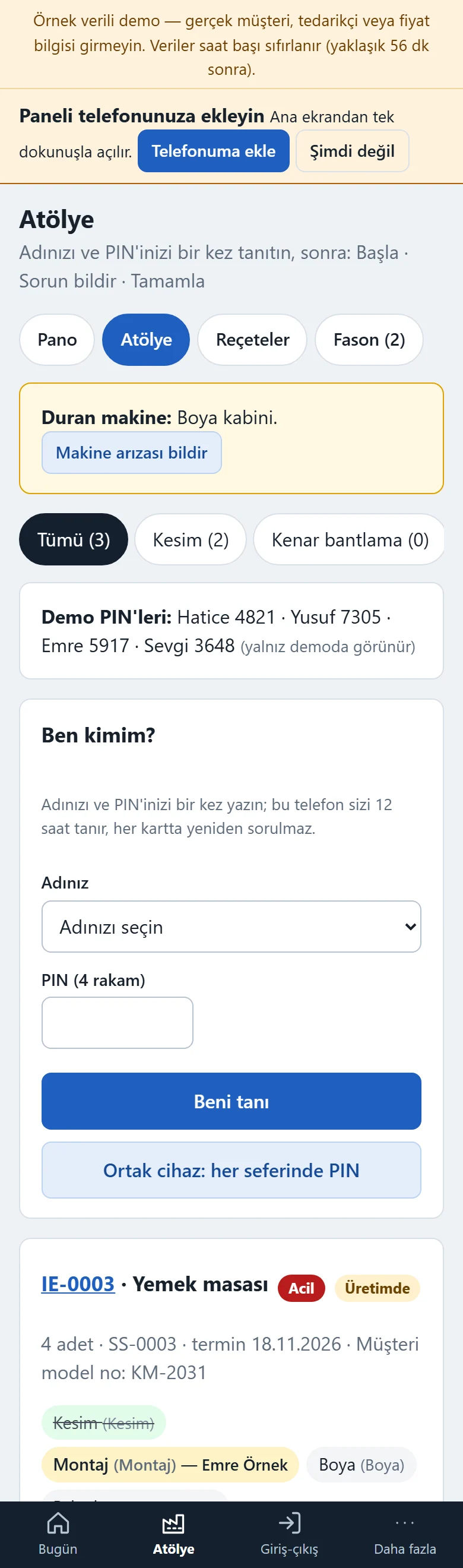
0.14.0 · 14 November 2026 Shop-floor screen on a phone
A craftsman opens the Atölye (workshop) screen on their phone: from the tabs at the top they pick their own station (each tab shows how many jobs are waiting) and see only that station’s jobs. In the “Ben kimim?” (who am I) card at the top they choose their name and type a 4-digit PIN once (details in the next step); there are three large buttons: “Başla” (start), “Sorun bildir” (report a problem; the reason is picked from a list: machine breakdown, waiting for material, quality problem, break, other) and “Tamamla” (finish); the “Sorun varsa nedeni” (reason, if there is a problem) list opens empty as “Neden seç” (pick a reason) and “Sorun bildir” does not stop a job until a reason is picked; a craftsman other than the one who started a job cannot finish it (the chief and the owner can); once a job has stopped “Devam et” (resume) appears. When a machine is stopped a “Duran makine” (stopped machine) warning shows at the top. When the first operation starts the materials leave the warehouse and when the last one finishes the finished item enters it; scrap is reported from here too. If the operation has an instruction it is written on the card; for an operation that asks for quality approval Geçti (passed), Kaldı (failed) or Yeniden işle (rework) is picked before “Tamamla” (rework puts the operation back in the queue; after Kaldı the operation does not finish and becomes “Kalite kararı bekliyor” (quality decision pending), and the chief picks Yeniden işle or Hurda yaz, scrap it). The craftsman’s menu shows no prices or costs.
- On screen (Turkish interface)
- “Atölye” — workshop
- “Başla” — start
- “Sorun bildir” — report a problem
- “Devam et” — resume
- “Tamamla” — finish
-
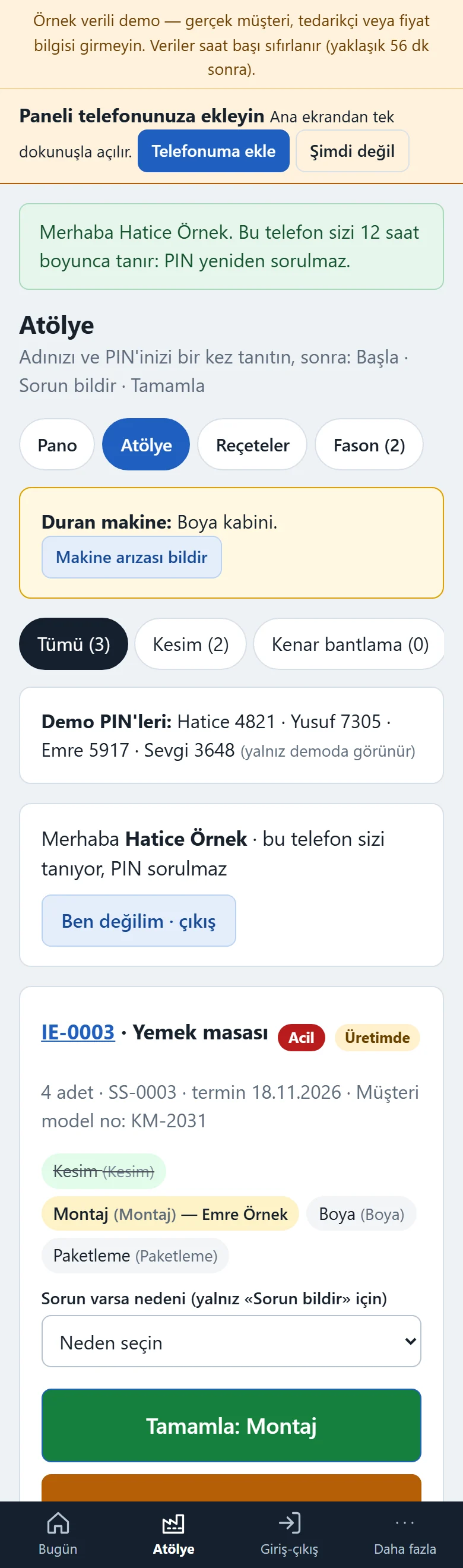
Craftsman phone: identify once, then one tap
The first time a craftsman opens the Atölye screen they see the “Ben kimim?” (who am I) card at the top: they pick their name from the list and type their 4-digit PIN once. The phone then knows them for 12 hours; a “Merhaba Hatice Örnek · bu telefon sizi tanıyor, PIN sorulmaz” (hello, this phone knows you, no PIN asked) line appears and the Başla, Sorun bildir, Devam et and Tamamla cards no longer ask for name and PIN; the craftsman’s name is written to the activity log. “Ben değilim · çıkış” (it is not me, sign out) makes the phone forget the person; on a shared tablet the “Ortak cihaz: her seferinde PIN” (shared device: PIN every time) option makes the phone remember nobody and ask for the PIN on each action. The PIN is not kept in a cookie: the phone is given a random token and the server keeps only its hash; the token stops working when the PIN changes, the employee is made inactive or on sign-out; after 5 wrong PINs there is a 5-minute wait. The same screen shows work-order priority: urgent (Acil) work orders stay on top of the queue and the board with a red “Acil” label; only the chief and the owner change the priority (Normal, Acil). In the demo the sample PINs are written on the screen (they are not on a real install).
- On screen (Turkish interface)
- “Ben kimim?” — who am I?
- “Ben değilim · çıkış” — not me, sign out
- “Ortak cihaz: her seferinde PIN” — shared device: PIN every time
- “Acil” — urgent
- What do they see at the end?
- The craftsman picks a station, types a PIN once (the phone knows them for 12 hours), starts a job on the phone, reports a problem if one comes up, finishes it and reports scrap; when a work order finishes its material, scrap, labour and machine cost freezes and the planned-versus-real gap shows; the month’s craftsman bonus and the return of a part sent out for painting are followed in one program.
- What is it good for?
- Stock, orders, work orders and cost no longer scatter over a notebook, Excel and WhatsApp; you know where each job is and what it cost; only those with access see prices and costs.
Everything that is not included, and all limits
- Not delivered to a client and not used by a real business. The company, parties, products, staff and amounts on the screens are made up.
- There is no e-invoice, e-archive, e-ledger, VAT return or legal accounting; the daily cash closing is an internal cash reconciliation and does not replace an official document or a cash-register Z report; VAT is an optional scope that only shows the rate and the total including VAT on a document, the file given to the accountant is not an official invoice (a document’s date is the date of its first shipment or goods receipt); there is no bank integration, bank reconciliation, POS slip matching, multi-till or branch till, banknote picture or scale connection, e-cheque, automatic collection, cheque endorsement, tax-number field on parties or multi-currency; shifts are not checked for overtime, rest time or head count when written, there is no shift swap or request flow, a template is not tied to an employee for good (it is written to the roster when applied) and overtime pay is not calculated; the program only keeps records and produces management information. There is no personal pay or payroll either; the bonus calculation is not payroll.
- There is no FIFO or lot-based cost (cost is a moving average per product), no lot label or barcode printing, no recall report, no splitting a work order in two (opening a separate work order) and no undoing of a partial delivery (a partial delivery enters at the planned unit cost and the rest at the real cost), no quality-control form with measurement or value fields, no capacity planning (finite capacity) or Gantt chart; the plan is calculated live each time it is opened, with no weekly time-bucket plan, no demand forecast and no plan export (CSV), and importing products from CSV has no lead-time, minimum or multiple-quantity fields; quality approval is a three-way mark; an operation marked “Kaldı” (failed) waits for the chief or owner to choose “Yeniden işle” (rework) or “Hurda yaz” (scrap it), and scrapped quantity does not enter stock and cost is worked out on the sound quantity; there is no planning around stops; maintenance has no meter-based (running-hours) maintenance, no checklist approval steps, no breakdown photo, no QR label printing for a machine, no equipment hierarchy (sub-components), no maintenance cost and no calendar view, and parts and labour are not added to a cost; a customer refund in money is not written to the cash book automatically (you write it there by hand), and there is no date or quantity tier for special prices, no multi-step approval, no return invoice, no e-waybill and no invoice attachment; the delivery slip is not a legal e-waybill.
- Clock-in and clock-out has no QR code (Code 128 barcode only), no personal QR on a phone, no turnstile, fingerprint or face-recognition device, no location (GPS), no leave-balance counter, no rounding rule, no instant notification to the manager, no CSV import of clock records and no approval for work outside the shift; the dates of religious holidays are not ready-made (they are added by hand after checking the Diyanet calendar); timesheet approval is only the management’s approval, with no employee-side approval or objection step, no pay or payroll calculation and no social-security notification; the timesheet is not payroll or social-security calculation and is given to the accountant for information. Reading a card with a real barcode reader and a phone camera was not tried.
- R&D has no drawing, photo or file upload, no sharing with a supplier or customer, no CAD import, no multi-step approval, no parallel recipe versions or version merging, no split between an engineering and a manufacturing recipe, no project budget, engineer workload or Gantt chart; only the owner approves, editing a recipe directly does not open a version and a prototype work order is an ordinary work order (the finished product enters stock). The R&D screens were not tried in a real factory.
- Stock reservation is an on-hand, reserved and available count and only warns: it does not block a sale or the confirmation of an order, opens no work order by itself, does not set stock aside per warehouse, lot or shelf, and nothing is reserved by hand on a work order or an order; a quote that is not confirmed does not count as reserved.
- There is no restoring from a backup from inside the app, no automatic or scheduled backup, no PDF produced on the server (a PDF is made through the browser’s print window with “Save as PDF”), no stamp or signature area and no validity period on a quote or order document, no blind count, no invitation or password-reset link by e-mail, no two-step verification and no list of open devices. A downloaded backup does not replace your hosting backup; restoring from it is done by hand with the steps in the installation guide.
- There is no automatic SMS or WhatsApp sending; WhatsApp messages open as a ready text and you send them from your own phone. Only a phone notification (Web Push) goes to the manager. There is no card payment over the internet or payment-provider link either. There is no real-time notification to a craftsman’s phone, no card or NFC reader and no biometric recognition; a craftsman is identified by a PIN.
- A real Web Push delivery to a phone, barcode scanning with a phone camera, printing labels, the work-order sheet and the quote and order documents on a real printer, reading the sheet’s QR code with a phone camera and a real iPhone have not been tried; the screens were tried in Chrome, the Safari engine (WebKit) and Firefox. The load test was run on the development computer with 150 simultaneous users (in version 0.14.0, with no errors) and nothing more is promised; it was run in the development environment and on a single hosting account (PHP, SQLite) only.
- In the demo the data is reset every hour; sign-in is without a password through role buttons. The app interface in the screens is in Turkish.
Delivery and sales status
How does it work?
You try the demo and tell us about your business, and we send you a quote. We install it and we host it. The yearly price includes installation, hosting, data transfer and support; there is no per-user fee and the price is the same for all your staff. The stock, purchasing, sales, production, cash and credit, and HR modules are all included in the one price.
Price
The yearly list price is 7,500 TL. Installation, one year of hosting, data transfer, bug fixes and written usage support are included; it is for a single business and there is no extra charge by number of users. E-invoice / e-waybill integration, bank connection, SMS and GPS vehicle tracking are not included. New feature requests and work beyond the scope are priced separately and you are told before it is done.
Possible delivery options
Other delivery options
Requirements and version history
Installation requirements
- PHP 8.1 or newer (with the pdo_sqlite, mbstring and openssl extensions; curl is recommended for the phone notification) and HTTPS are needed; the data is kept in a SQLite file. The live demo was run on a single hosting account only.
Release notes
- No version has been delivered to a client. The sample-data demo is open to everyone and is shown with the screenshots on this page.
- 0.32.0 (15 November 2026): “Acil işler” (urgent work orders) card on the Today screen (work orders marked urgent that are planned or in production are gathered at the top of the screen; a row shows the work-order number, status, due date or “N gün gecikti” (N days late), item, quantity and the linked sale and customer; up to 5 rows, late ones first, then by due date; “Tümü” (all) opens the production board filtered to urgent and tapping a row opens the work order; the card has no action button and does not show when nothing is urgent; the owner, chief, craftsman, storekeeper and salesperson see it, purchasing, HR and accounting roles do not, and the customer name shows only to those with access to parties). The database schema did not change. 0.31.0 (15 November 2026): cheque portfolio report (opened from “Çek portföyü raporu” on the Kasa ve vade > Çek/senet screen; filtered by direction, type, status, due-date range, party and bank; it shows cards for pending received and issued, net position, overdue and bounced amounts, a due-date ageing (overdue, 0–7, 8–30, 31–60, 61+ days), a calendar of the next 8 weeks of receipts, payments and net, totals by party and by bank, and a list of lines by due date; there are “Excel için indir” (download for Excel, CSV) and “Yazdır” (print; A4 landscape, with the company name, the date and a summary of the filter in the heading); only roles with cash and finance access see it and the link is not shown to other roles). Cheques and notes are for records and reports only; there is no connection to a bank, no e-cheque and no automatic collection. The database schema did not change. 0.30.0 (15 November 2026): shift templates (a weekly pattern is set up once; a cycle of 1–4 weeks, including a 2-week alternating day/evening; under İK > Vardiya (shift roster) “Şablondan uygula” (apply a template) and “Şablonlar” (templates); it is written to the employees you pick for 1–12 weeks, and before writing a preview shows the counts of days to write, filled, already the same, on leave and public holidays with a summary per employee, and nothing is written until you confirm; you choose “dolu günlere dokunma” (leave filled days alone, recommended) or “üzerine yaz” (overwrite), leaving public holidays empty, never touching days on leave, and rotating the picked employees; the roster has “Bu haftayı şablon yap” (make this week a template) on an employee row, “Hazır şablonları ekle” (add ready templates: weekday day shift, alternating day/evening, a week with a Saturday half day) and “Son uygulamayı geri al” (undo the last apply; it only restores days that have not changed since); only HR and the owner use it). There is no check for overtime, rest time or head count, no shift swap or request flow and no overtime pay calculation; a template is not tied to an employee for good, it is written to the roster when applied. 0.29.0 (15 November 2026): daily cash closing (at the end of the day the opening balance, the cash receipts and payments and the expected cash balance are shown; the cashier types the cash in the till and, if they like, “Kupürle say” (count by denomination) takes the number of 200, 100, 50, 20, 10, 5 and 1 ₺ notes and coins and the total fills in by itself; the difference shows live (Tutuyor: it matches, Eksik: short, Fazla: over) and a reason is required when there is one; “Günü kapat” (close the day) locks the day’s cash entries (bank entries are not locked) and freezes the totals, only the owner or the support account can reopen it with a reason (“Kapanışı aç”), and every closing and reopening is written to the activity log; the Today board shows a “Kapanmamış kasa günü” (unclosed cash day) warning for a day in the last 7 that was not closed, to accounting and the owner only; there is a print view (a KAPALI stamp, Kasiyer and Onaylayan signature lines), a monthly closing CSV and a “Kapalı gün” label in the cash ledger). The document is an internal cash reconciliation; it does not replace an official document or a cash-register Z report; there is no multi-till or branch till, no bank reconciliation, no POS slip matching and no banknote picture or scale connection. 0.28.0 (15 November 2026): monthly timesheet approval (HR reviews the month and taps “Onaya gönder” (send for approval), which cannot be done before the month ends; a pre-approval check list shows records with no clock-out, days with a shift but no record and days longer than 16 hours, and if there are warnings a “Uyarıları gördüm” (I have seen the warnings) tick is needed; the owner or the support account taps “Onayla” (approve) or writes a reason and taps “Düzelt” (correct), and HR cannot approve; once approved each employee’s totals are frozen, an “ONAYLI · approver · date” stamp shows on screen, in print and in Excel, the clock records of an approved month are locked, the owner can undo it with a reason (“Onayı geri al”) and every step is written to the activity log) and a public-holiday calendar (the fixed public holidays are ready, 28 October as a half day; religious holidays are added by hand; the time worked on a holiday shows in a separate “Tatil mesaisi” (holiday overtime) column, a holiday is not counted as absence and the overtime and lateness calculation does not change). The dates of religious holidays are not ready-made; there is no payroll, no pay calculation, no social-security notification and no employee-side approval. 0.27.0 (15 November 2026): craftsman phone (on the shop-floor screen the craftsman picks their name and types a PIN once and the phone knows them for 12 hours; the Başla, Sorun bildir, Devam et and Tamamla cards no longer ask for name and PIN again and the craftsman’s name is written to the activity log; “Ben değilim · çıkış” makes the phone forget the person; a “Ortak cihaz: her seferinde PIN” option for a shared tablet; the PIN is not kept in a cookie and stops working when the PIN changes, the employee is made inactive or on sign-out; 5 wrong PINs lock for 5 minutes) and work-order priority (Normal or Acil, urgent; urgent ones stay on top of the shop-floor queue and the board with a red “Acil” label, and only the chief and the owner change the priority). 0.26.0 (15 November 2026): editing a user (the owner and the support account change a name, e-mail and role; the last active owner cannot be turned into another role and nobody can change their own role; when the role changes the open session works with the new access at once; the change is written to the activity log), a last sign-in column on the users list, and on the activity log a text search, a person and date-range filter, paging and a filtered CSV download, and a simpler Rezerve cell on the stock list. 0.25.0 (15 November 2026): stock reservation (on hand, reserved and available columns on the stock status, a “Yetersiz” label and filter for a product whose available quantity falls below zero, a reservation breakdown on the product page, a warning box when a quote is turned into an order and the available stock is short; nothing is blocked; a “will become critical once reserved” list under critical stock; “Eksik ürünler için iş emri aç” first sets stock aside for confirmed orders when it works out the shortfall). 0.24.0 (14 November 2026): backup download (a “Yedek” card under Settings, owner only; a warning for the owner on the Today screen if no backup was ever taken or the last one is more than 7 days old) and printing or saving as a PDF, through the browser, of a quote, a sales order and a purchase order form (a role without access does not see the button). 0.23.0 (14 November 2026): a bug-fix release (a quality “Kaldı” no longer puts a faulty finished item into stock, the chief chooses rework or scrap; timesheet, statement and ledger printouts print as tables; the lot and expiry screen matches stock; the storekeeper does not see the invoice amount; a cheque can be tied to a document and is counted once in the cash flow; Today cards open the right list; links a role may not use are not shown; a PIN is unique and a craftsman cannot finish someone else’s operation; a price-deviation warning on a quote). 0.22.0 (14 November 2026): new cards on the Today screen (awaiting approval, past their due date, overdue receivables and on shift today; each card shows only to a role that may see it and has that scope switched on), sample data with weekend shifts, a shorter shift name on the shift roster. 0.21.0 (14 November 2026): R&D (sample and prototype projects with gate decisions, a prototype work order, target and real cost, recipe change requests with owner approval, recipe versions with a difference view, where used). 0.20.0 (14 November 2026): HR clock-in and clock-out (a Code 128 barcode card for each employee, clock-in and clock-out by card or PIN on a gate screen, a day table matched to the shift, corrections with a reason, a monthly timesheet). 0.19.0 (14 November 2026): sales and purchasing completed (customer returns, customer-specific prices, a printable delivery slip, supplier invoice checks, supplier returns, amount-threshold approval, supplier performance). 0.18.0 (14 November 2026): cash and credit completed (account statements, ageing, cheques and promissory notes, cash flow, optional VAT, an export file for the accountant). 0.17.0 (14 November 2026): maintenance (machine records, planned maintenance by days, breakdown reporting from a craftsman’s phone, a maintenance work order, spare parts, downtime, MTBF/MTTR). 0.16.0 (14 November 2026): planning (MRP: a suggestion of what to buy and make from open orders, work orders, stock on hand and goods on the way, lead time, minimum and multiple quantity, one-click request and work orders). 0.15.0 (14 November 2026): partial delivery (the finished part of a work order in production enters the warehouse before the order ends). 0.11.0–0.14.0 (13 November 2026): scopes, a migration screen, several warehouses, barcodes and labels, custom fields and sector packages, a quick setup, an operation library, quality approval, a work-order sheet with a QR code, a stop and quality report, lot and serial and expiry-date tracking, per-shelf stock. 0.10.0 (13 November 2026): outsourcing (subcontract) tracking. In the earlier versions (0.1.0–0.9.0, up to 12 November 2026): party and product cards, importing lists from Excel/CSV, warehouse and counting, purchasing (quote comparison, partial goods receipt), sales (quote, order, shipment), production with recipes and a shop-floor screen, real work-order cost and craftsman bonus, cash and credit, shift, leave and safety-certificate tracking, roles, a setup guide, installing on a phone and a 15-day trial install.
There is no cart, customer account or online payment on this site for now. Reach out by phone, WhatsApp or the form; in a first conversation your need and the software’s fit are reviewed. The form does not create an order, a contract or a payment.