Wedding and event venuesDemo with sample data
Wedding Venue Booking and Quote Management: screen-by-screen guide
The full version of the short description on the product page: every feature, how each screen is used step by step, all limits and the delivery details.
All features
The flows below were run in the app’s demo mode with sample data, and the screens were taken from that installation. The business (“Papatya Düğün ve Davet Salonu”, a made-up name), the halls, menu and service prices, people, phone numbers and amounts are made up. The sample-data demo is live (version 1.4.1): the setup guide and add-to-phone came with 1.2.0, remaining balances, all payments, person in charge, bride and groom details, customer source and the VAT rate with 1.3.0, the “WhatsApp’tan hatırlat” button with 1.4.0, and the overdue-payments row list on a phone with 1.4.1; its address is the button below.
- Hall and space set-up: capacity, service hours (which may run past midnight) and weekday and weekend hall fee for indoor halls, gardens, terraces and countryside spaces; closed days for maintenance and holidays
- Monthly and daily calendar: each hall’s day shows as free, optioned, firmly booked or closed, with all halls side by side. A second firm booking with overlapping times in the same hall is refused even when requests arrive at the same moment; non-overlapping times, such as a daytime henna night and an evening wedding, can both be firm on the same day
- Setup guide (owner only): six steps, each saved on its own and skippable; finishing one moves on to the next and a progress bar shows the next step. A closed “Bu ekran ne işe yarar?” (what is this screen for?) box sits under the main screens, and halls are added in a table or by pasting. The demo has “Boş siteyle yeniden başla” (start again with an empty site) and “Örnek veriyi geri yükle” (restore the sample data) buttons (not shown on a real installation)
- Request link and add-to-phone: the link goes out in one tap as a ready WhatsApp message or is copied, and a QR-code A4 poster is printed; the panel and the customer’s status page can be added to the phone’s home screen. A new preliminary request sends a free instant alert (Web Push) and an optional e-mail to the business phone, and a customer who wishes sees a notice on their phone when their request changes status; there is no SMS and the demo sends no notice at all
- Remaining balances and all payments: firm reservations with an amount still owed are filtered by hall, customer and date, and the “Toplam alacak” (total receivable) figure is shown to the owner only. All payments (owner only): payment and refund records in a date range are filtered by method, hall and the staff member who recorded them, the period total shows and the list downloads as CSV. Records only, the app takes no payment
- Person in charge, bride and groom details, customer source: a record optionally takes a person in charge (with a list filter), the bride’s and groom’s names and phones, the contract holder’s address and, only if needed, a national ID number (with a data-protection warning, visible to the owner only); the “how did the customer reach us?” list is edited in the settings and the Reports show requests and confirmations per source
- VAT rate: a default rate (not calculated separately / 1% / 10% / 20%) is chosen in the settings and changed per record and per quote; the quote, the record and the contract form show subtotal, VAT and grand total. If no rate is chosen no amount and no printout changes; no invoice is issued
- Permission view: staff do not see the contract total, today’s payments, “Toplam alacak”, all payments, reports, prices or settings screens; if such an address is typed in by hand the server refuses it
- Customer requests and contact notes: contact details, event type (wedding, engagement, henna night, betrothal, circumcision party and so on), date, number of guests, menu and allergy note, a call-back day and contact notes that record the channel
- A pipeline board: new request, quote sent, optioned and confirmed columns; the history is written as a record moves from one stage to the next
- Quotes and packages: the hall fee, per-person menu and extra services on separate lines; a discount and custom lines; the total is worked out automatically. Start from a ready package and change any line; quotes are versioned and, once accepted, the total is written to the reservation
- Options: a last valid date and an extension; when it runs out the record is not deleted or cancelled, it shows as a warning on the Today screen, the board, the calendar and the menu badge. Several options can wait in a queue for the same date; if one is confirmed the others show a “no longer valid” warning
- Debt reminders: a “WhatsApp’tan hatırlat” (remind on WhatsApp) button on the Remaining balances and Overdue payments rows opens WhatsApp in a new tab with the customer’s number and the venue’s own “Ödeme hatırlatma” (payment reminder) text (customer name, next item, amount, due date, remaining total); the venue sends the message from its own phone, the app does not. The tap is written to the record’s history and the row shows “Son hatırlatma: N gün önce” (last reminder: N days ago); owner and staff use it. Overdue payments show as a row list on a phone (the buttons and the amount are not cut off)
- Deposit, instalments and remaining amount: a payment plan of a deposit and equal instalments, payment and refund records, a list of overdue payments and of those falling due soon; a payment above the total and a refund above what was received are refused. Records only, the app takes no payment
- A printable quote, a reservation summary / contract form (parties, event, price breakdown, payment plan, the venue’s own terms, signature fields) and an event-day sheet; printed or saved as PDF from the browser
- An event-day task list: a ready list or your own items, timed or untimed; done items are ticked
- A customer request page: choose a hall, see free and optioned days on the calendar and send a preliminary request (no payment, the date is not final); the customer follows the request, the event summary once confirmed and the payment plan on a status page and adds a confirmed booking to their calendar with “Google Takvim’e ekle” or an .ics file (the calendar entry holds no customer name, phone or amount)
- Ready message texts (quote, option, confirmation, payment reminder, pre-event, closing): copy them or open them in the venue’s own WhatsApp; the venue sends the message, the app does not
- Reports (owner only): confirmed events, contract total, received and remaining, hall occupancy, event type, request-to-confirmed conversion and a yearly occupancy table; reservations download as CSV. There are owner and staff roles, and the panel works on a phone with a bottom menu
Screen by screen: how it is used
The app’s interface in these screens is Turkish; only the captions and explanations on this page are in English. The screens come from the app’s own demo mode with sample data; the business (“Papatya Düğün ve Davet Salonu”, a made-up name), the halls, menu and service prices, people, phone numbers and amounts are sample data. The screens come from the live demo: the debt-reminder screens (Remaining balances, Overdue payments and Overdue payments on a phone) from version 1.4.1, the others from version 1.3.2; only six detail crops (accepting a quote, overlap prevention, payment plan, deposit record, task list and ready message) are kept from earlier versions and work the same way. The phone views were taken with a browser set to a phone’s size and show the first screen; the bottom menu bar sits at the bottom of the phone screen.
- Who uses it?
- The venue owner or manager who handles requests and quotes; sales staff who use the calendar, the quote and the payment records.
- Where do they start?
- A customer picks a hall and a date on the request page and sends a preliminary request, or a request that came by phone is entered in the panel; sign in as owner or staff and start at the Today screen.
What do they do on screen? Step by step
-
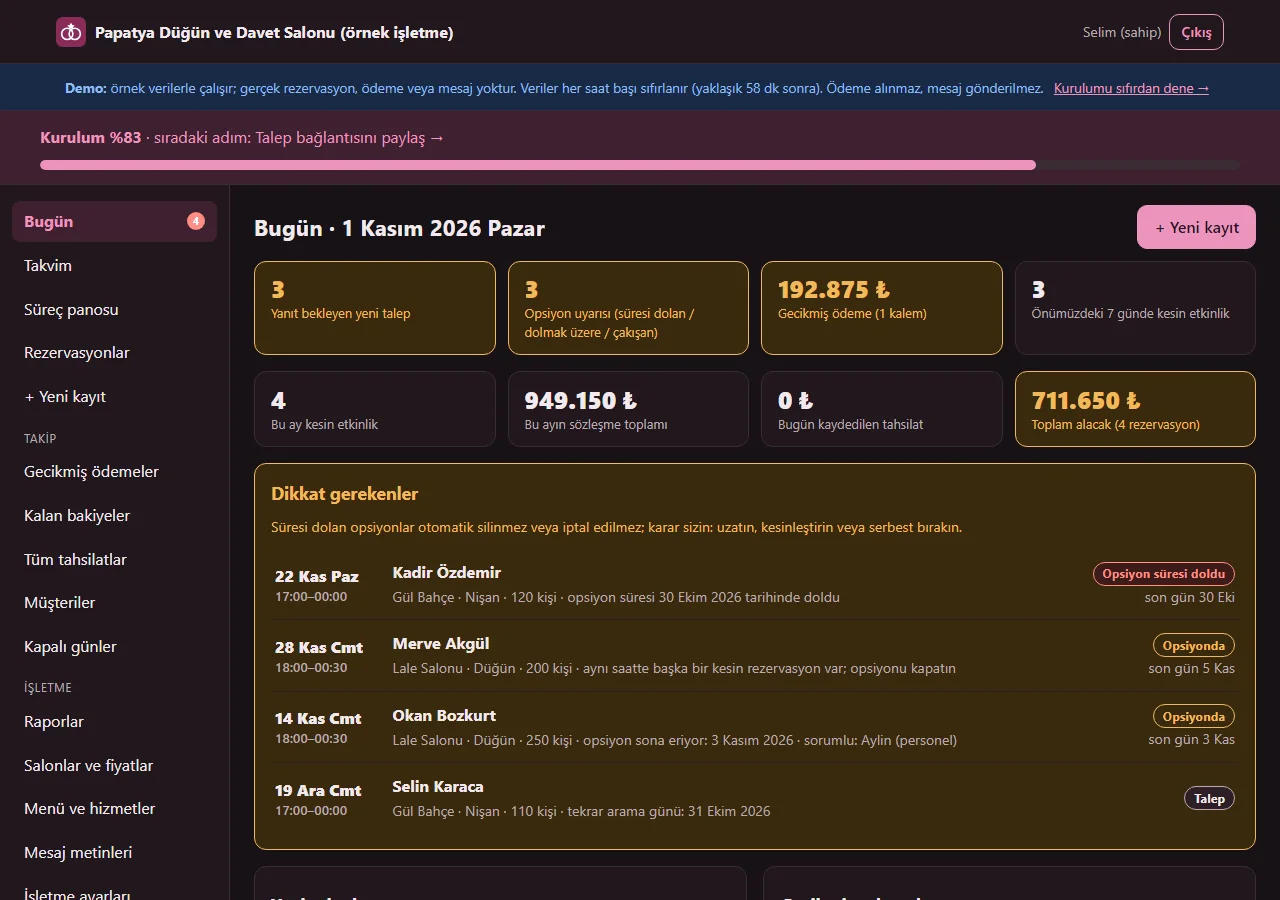
1.3.2 · 1 November 2026 Today screen
Requests waiting for a reply, options that have expired or are about to, overdue payments, upcoming events and payments falling due at a glance; the summary boxes at the top can be tapped and open the matching list. The owner also sees this month’s contract total, the payments recorded today and a “Toplam alacak” (total receivable) box; staff do not have those three boxes. An expired option is not deleted; it shows as a warning.
- On screen (Turkish interface)
- “Dikkat gerekenler” — things that need attention
- “Yeni talepler” — new requests
- “Gecikmiş ödemeler” — overdue payments
- “Opsiyon süresi doldu” — option expired
-
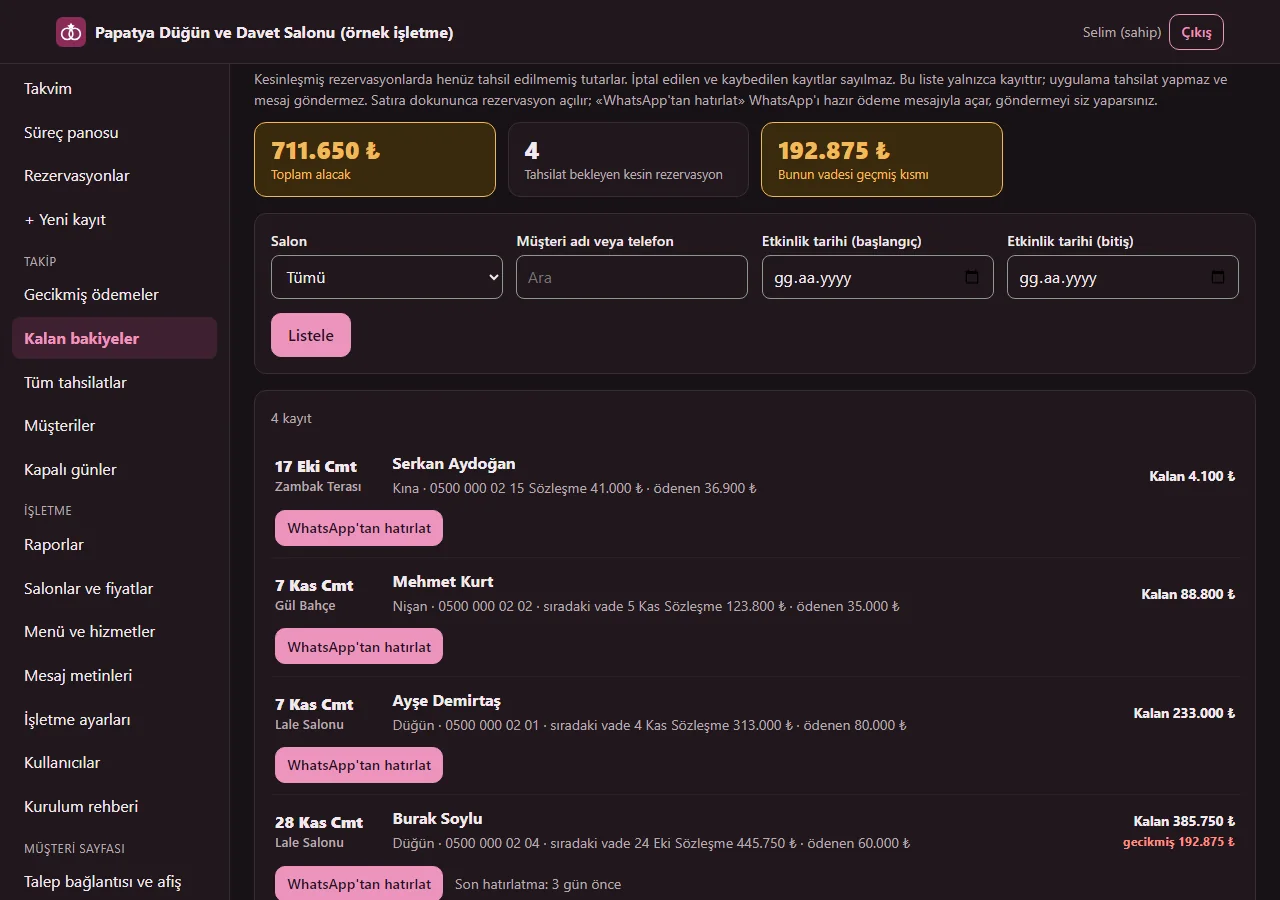
1.4.1 · 1 November 2026 Remaining balances and “WhatsApp’tan hatırlat”
The “Kalan bakiyeler” (remaining balances) page in the menu lists firm reservations with an amount still owed (cancelled and lost records are not counted); it filters by hall, customer name or phone and event date. Each row shows the contract amount, the amount paid, the remainder and, if any, the overdue part; tapping a row opens the reservation. The “WhatsApp’tan hatırlat” button under each row opens WhatsApp in a new tab with the customer’s number and the venue’s own payment-reminder text; the venue sends the message from its own phone, the app does not. The tap is written to the record’s history and the row shows “Son hatırlatma: 3 gün önce” (last reminder: 3 days ago), so the same person is not written to twice. Owner and staff use it. The large “Toplam alacak” (total receivable) figure and the overdue part are shown to the owner only; staff see the list but not the total. Records only; the app collects no payment, sends no message and there is no SMS.
- On screen (Turkish interface)
- “Kalan bakiyeler” — remaining balances
- “Toplam alacak” — total receivable
- “Tahsilat bekleyen kesin rezervasyon” — firm reservations awaiting payment
- “Bunun vadesi geçmiş kısmı” — of which overdue
- “Listele” — list
- “Sözleşme · ödenen · Kalan” — contract · paid · remaining
- “WhatsApp'tan hatırlat” — remind on WhatsApp
- “Son hatırlatma: 3 gün önce” — last reminder: 3 days ago
-
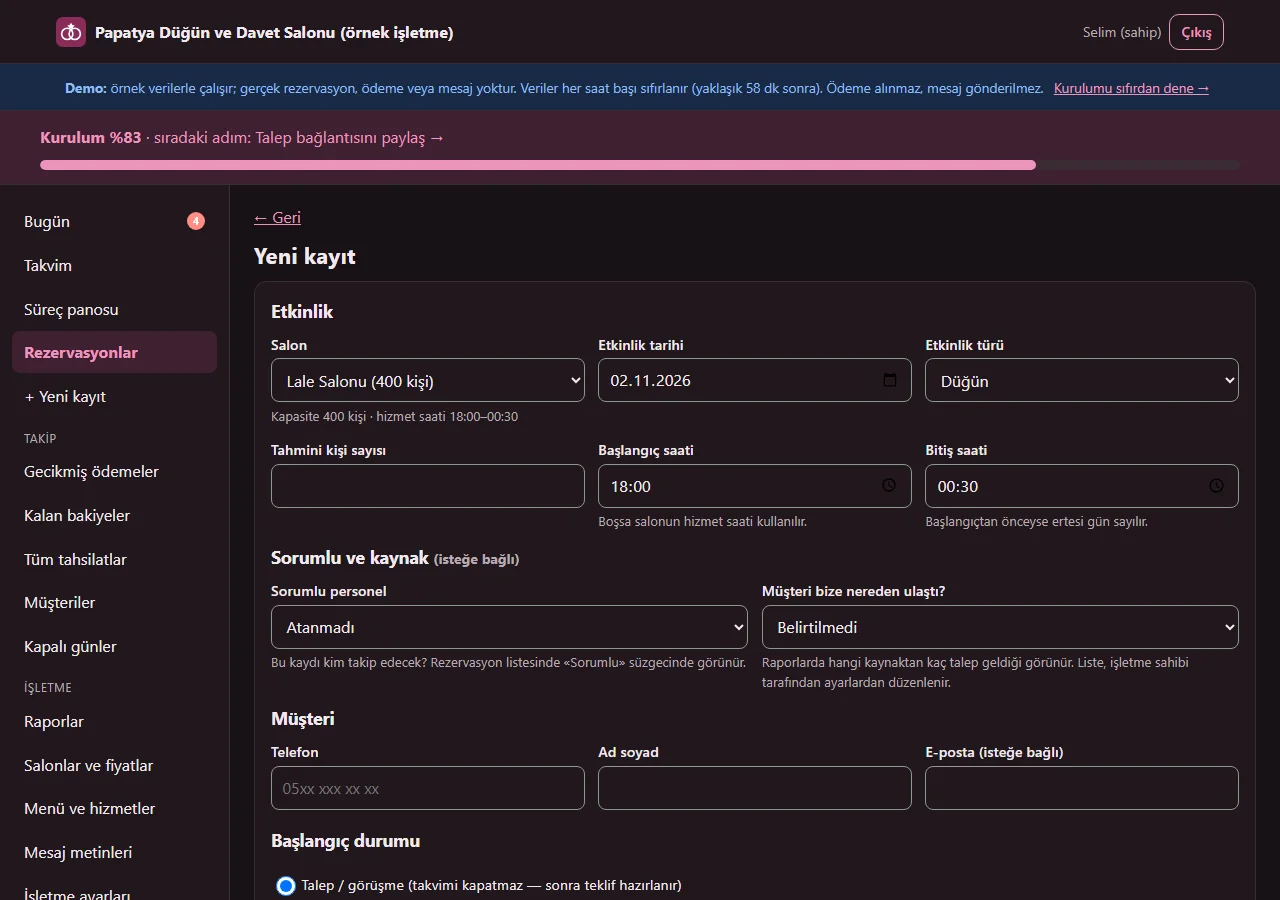
1.3.2 · 1 November 2026 New record: person in charge, source, bride and groom, VAT
The record form takes, all optional, a person in charge (shown in the list and on Today as “sorumlu: …”), how the customer reached us (Instagram, Google, a recommendation and so on; the list is edited in the settings), the bride’s and groom’s names and phones, the contract holder’s address and a VAT rate. For weddings, engagements, henna nights and betrothals the bride and groom section opens by itself; for other types it is closed. Filled fields are printed on the reservation summary / contract form. A national ID number is entered only if needed: there is a data-protection warning, only the owner sees and changes it, and it is not written to lists, the CSV or the record history.
- On screen (Turkish interface)
- “Sorumlu personel” — person in charge
- “Müşteri bize nereden ulaştı?” — how did the customer reach us?
- “Gelin adı soyadı” — bride’s name
- “Damat adı soyadı” — groom’s name
- “Sözleşme sahibinin adresi” — contract holder’s address
- “T.C. kimlik numarası (yalnız gerekirse)” — national ID number (only if needed)
- “KDV oranı” — VAT rate
-
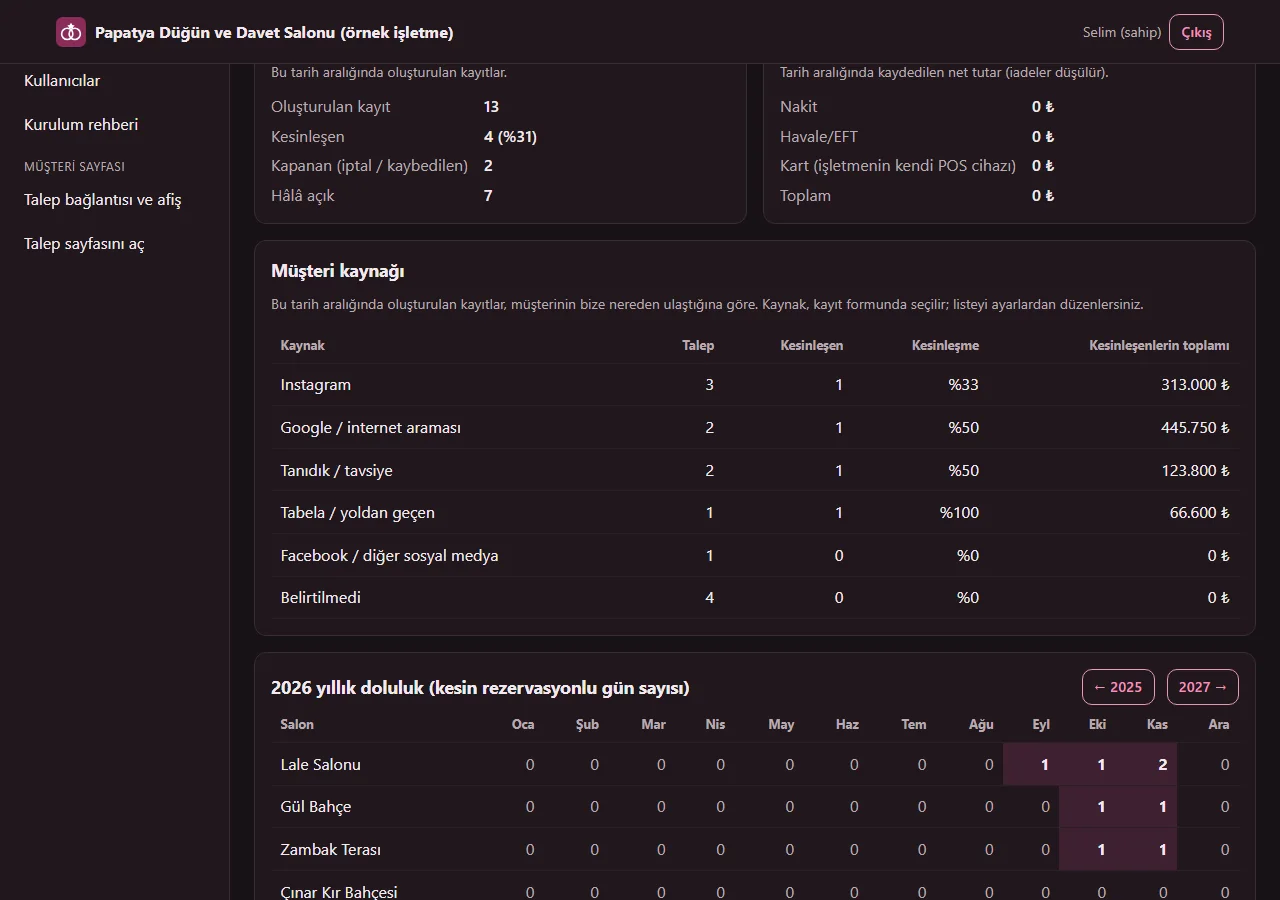
1.3.2 · 1 November 2026 Reports: customer source
On the Reports page, records created in the chosen date range are counted by the source the customer came from: requests, confirmed, confirmation rate and the total of the confirmed ones per source. Records with no source are collected in a “Belirtilmedi” (not stated) row. The owner edits the source list in the business settings (six ready examples come with a new installation); a source removed from the list stays on old records and in the reports.
- On screen (Turkish interface)
- “Müşteri kaynağı” — customer source
- “Kesinleşen” — confirmed
- “Kesinleşme” — confirmation rate
- “Kesinleşenlerin toplamı” — total of the confirmed
- “Belirtilmedi” — not stated
-
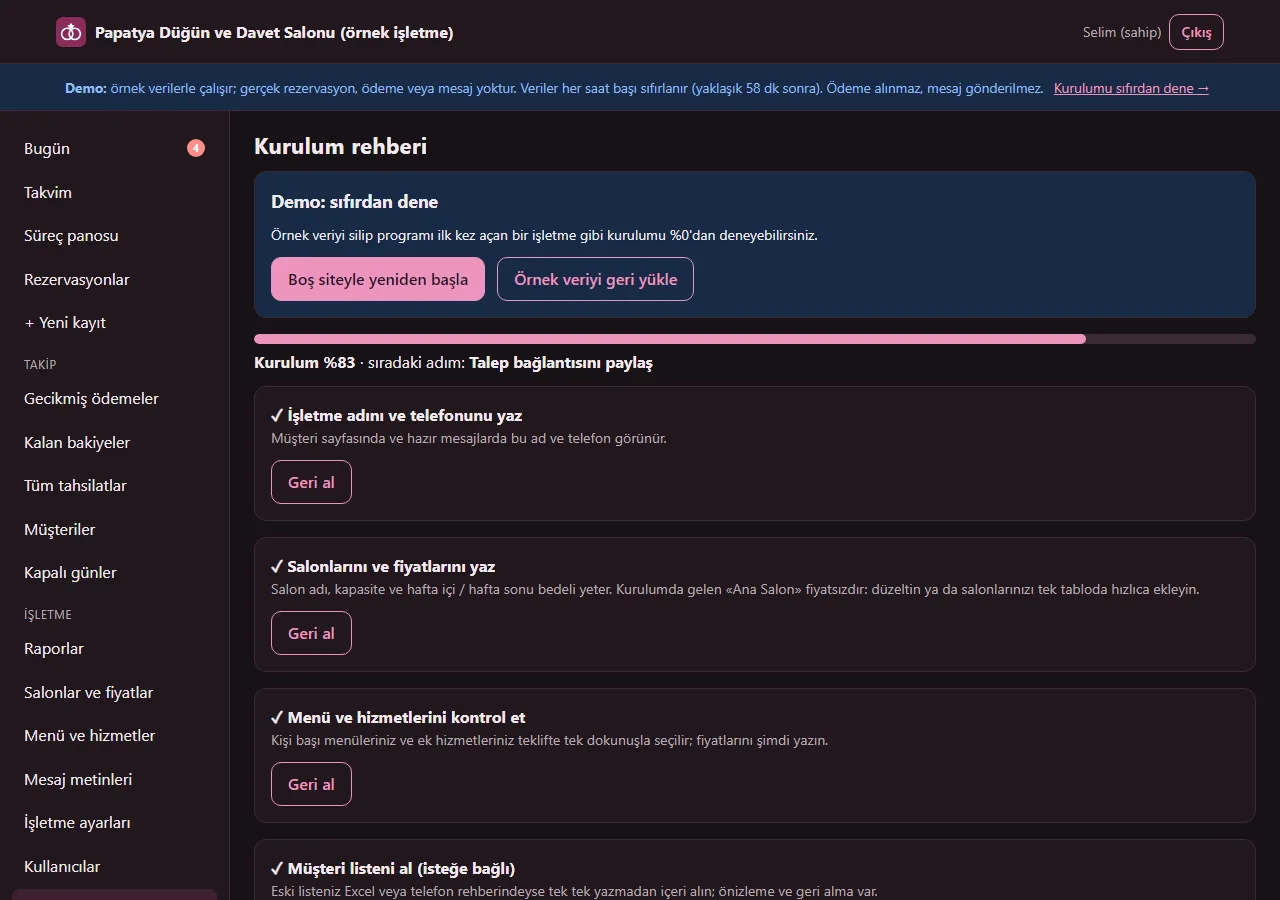
1.3.2 · 1 November 2026 Setup guide
Only the owner sees it. There are six steps: business name and phone, halls and prices, menu and services, the customer list (optional), sharing the request link and the first request. Each step saves on its own, an unwanted one can be skipped, and finishing one moves on to the next; until it is done a “Kurulum %… · sıradaki adım” (setup %… · next step) bar shows at the top of every panel page. A closed “Bu ekran ne işe yarar?” (what is this screen for?) box sits under the main screens. In the demo, “Boş siteyle yeniden başla” (start again with an empty site) at the top of the page deletes the sample data and “Örnek veriyi geri yükle” (restore the sample data) brings it back; on a real installation those buttons do not show and nothing is deleted.
- On screen (Turkish interface)
- “Kurulum rehberi” — setup guide
- “Boş siteyle yeniden başla” — start again with an empty site
- “Örnek veriyi geri yükle” — restore the sample data
- “Atla / tamamlandı say” — skip / count as done
- “Geri al” — undo
- “Bu ekran ne işe yarar?” — what is this screen for?
-
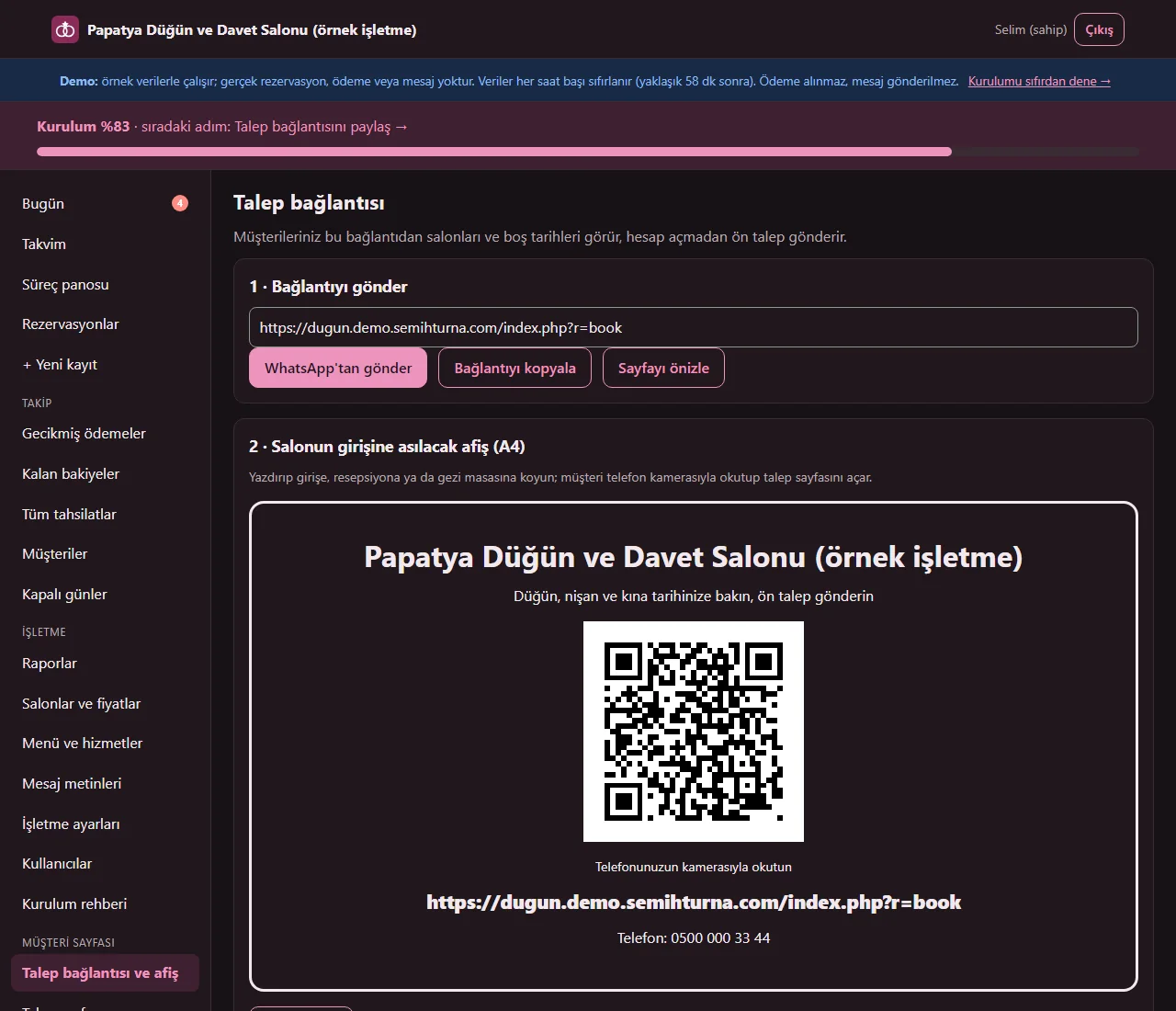
1.3.2 · 1 November 2026 Request link and poster
Staff see the “Talep bağlantısı ve afiş” (request link and poster) page in the menu too. The link is sent as a ready WhatsApp message with one tap or copied, and the page can be previewed. A QR-code A4 poster to hang at the venue entrance is printed from the browser (the QR code is generated without a separate library). A set-up page link for the business phone, with no sign-in or password in it, is here as well; adding to the phone is a single button on Android and a few steps on iPhone. The venue sends the message; the app does not.
- On screen (Turkish interface)
- “Talep bağlantısı” — request link
- “WhatsApp’tan gönder” — send on WhatsApp
- “Bağlantıyı kopyala” — copy the link
- “Sayfayı önizle” — preview the page
- “Afişi yazdır” — print the poster
- “Kurulum bağlantısını kopyala” — copy the set-up link
-
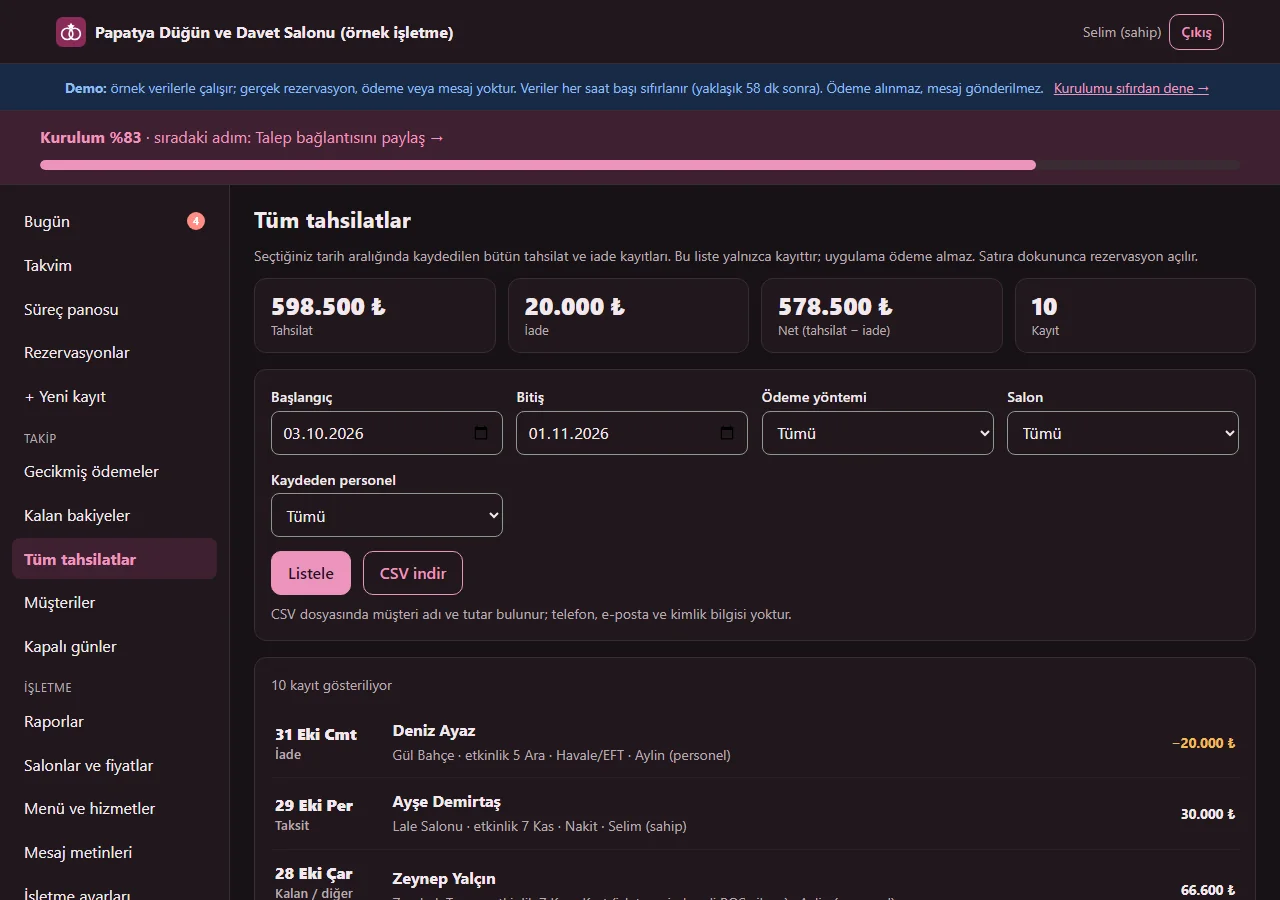
1.3.2 · 1 November 2026 All payments (owner only)
Every payment and refund record in the chosen date range (the default is the last 30 days), filtered by payment method (cash, bank transfer/EFT, card on the venue’s own POS device), hall and the staff member who recorded it. The payments, refunds and net total show at the top, and a row opens its reservation. The CSV from “CSV indir” holds the customer name and amount; there is no phone, e-mail or ID information. Because it is turnover, staff see it neither in the menu nor as a page. Records only; the app takes no payment.
- On screen (Turkish interface)
- “Tüm tahsilatlar” — all payments
- “Tahsilat” — payments
- “İade” — refunds
- “Net (tahsilat − iade)” — net (payments − refunds)
- “Ödeme yöntemi” — payment method
- “CSV indir” — download CSV
-
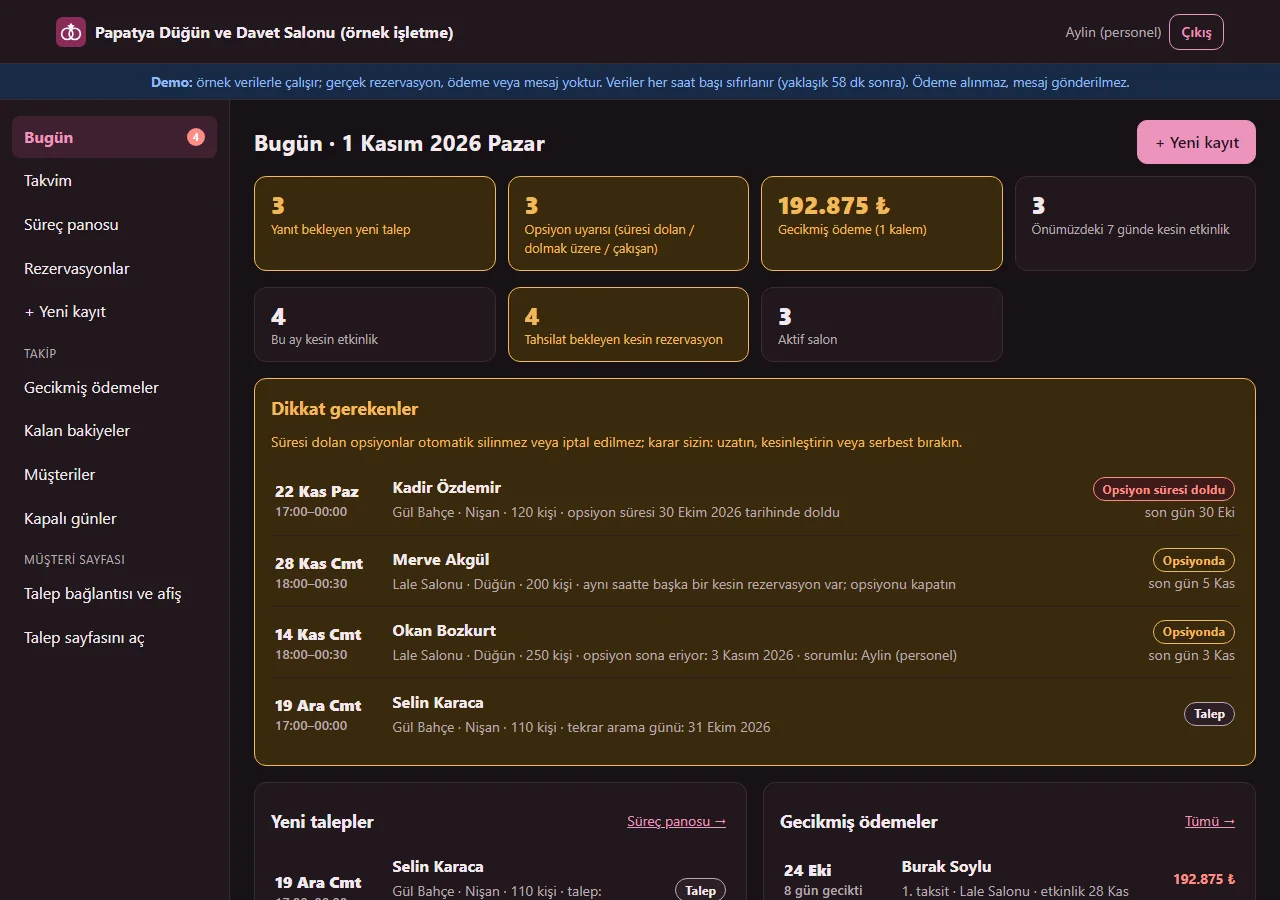
1.3.2 · 1 November 2026 The Today screen staff see
Signed in as staff, the Today screen shows requests waiting for a reply, option warnings, overdue payments and upcoming events; the contract total, today’s payments and the “Toplam alacak” figure are not shown. Hall prices, menus, reports, settings, users and the “Tüm tahsilatlar” screens are never shown to staff, and if such an address is typed in by hand the server refuses it. In the reservation list a staff member can filter only the records assigned to themselves.
- On screen (Turkish interface)
- “Bugün” — today
- “Dikkat gerekenler” — things that need attention
- “Gecikmiş ödeme” — overdue payment
- “Tahsilat bekleyen kesin rezervasyon” — firm reservations awaiting payment
-
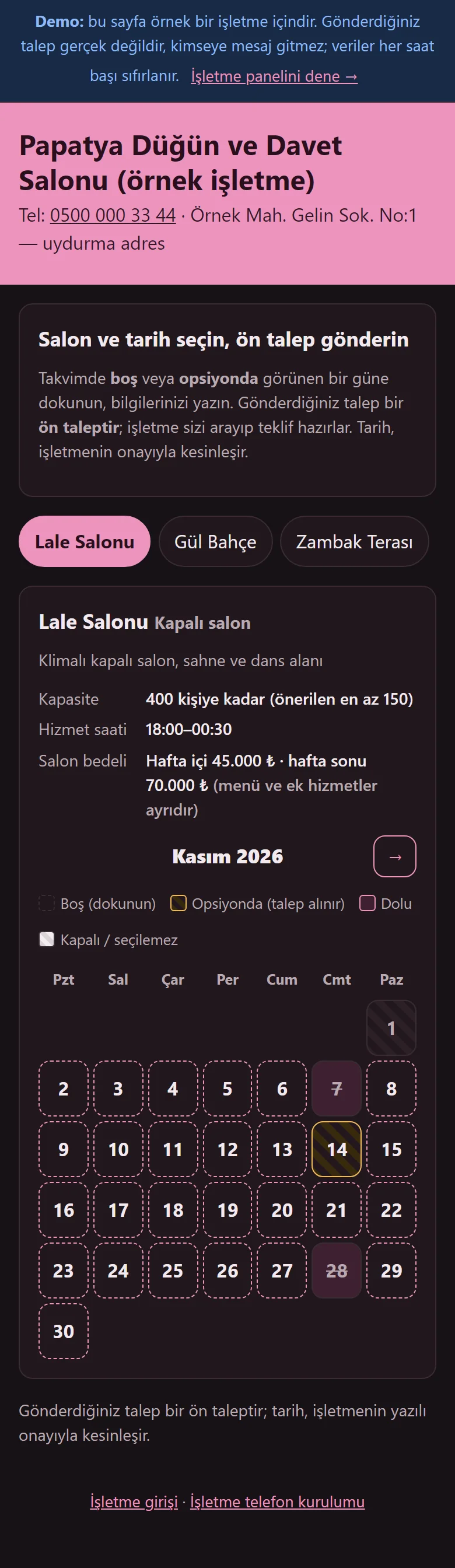
1.3.2 · 1 November 2026 Customer request page
The customer picks a hall and sees free, optioned and taken days on a monthly calendar; taken days are struck through and who booked them is not shown. The hall details and, if enabled, the hall fee are on the page.
- On screen (Turkish interface)
- “Salon ve tarih seçin, ön talep gönderin” — choose a hall and date, send a preliminary request
- “Boş (dokunun)” — free (tap)
- “Opsiyonda (talep alınır)” — optioned (requests accepted)
- “Dolu” — taken
-
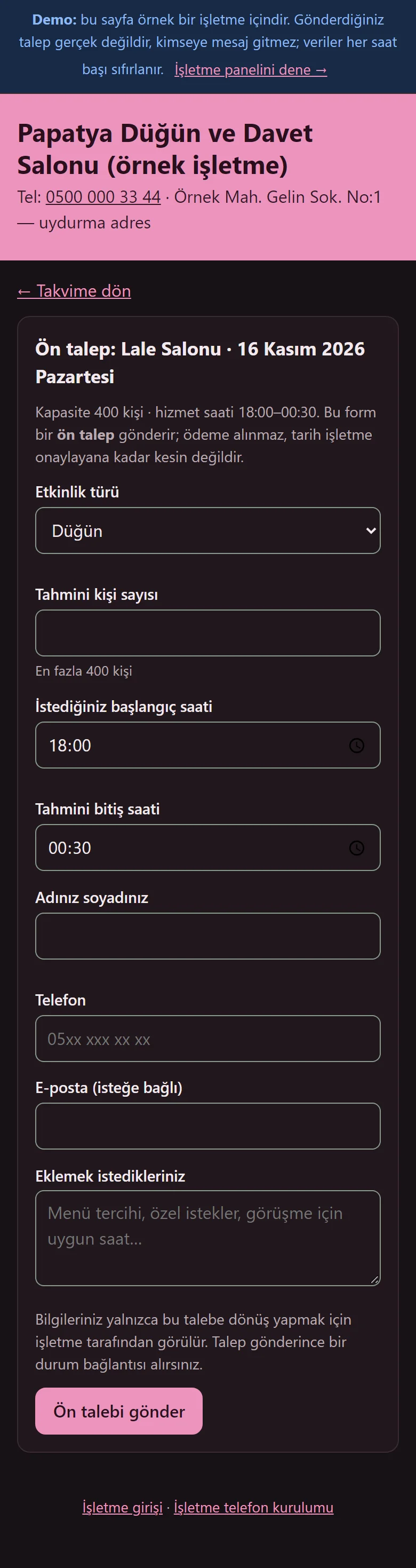
1.3.2 · 1 November 2026 Preliminary request form
The customer enters the event type, estimated guests, time, name and phone. It is a preliminary request: the date is not final until the venue confirms it, and no payment is taken on the page.
- On screen (Turkish interface)
- “Ön talep: Lale Salonu” — preliminary request: Lale Salonu
- “Etkinlik türü” — event type
- “Tahmini kişi sayısı” — estimated guests
- “Ön talebi gönder” — send the preliminary request
-
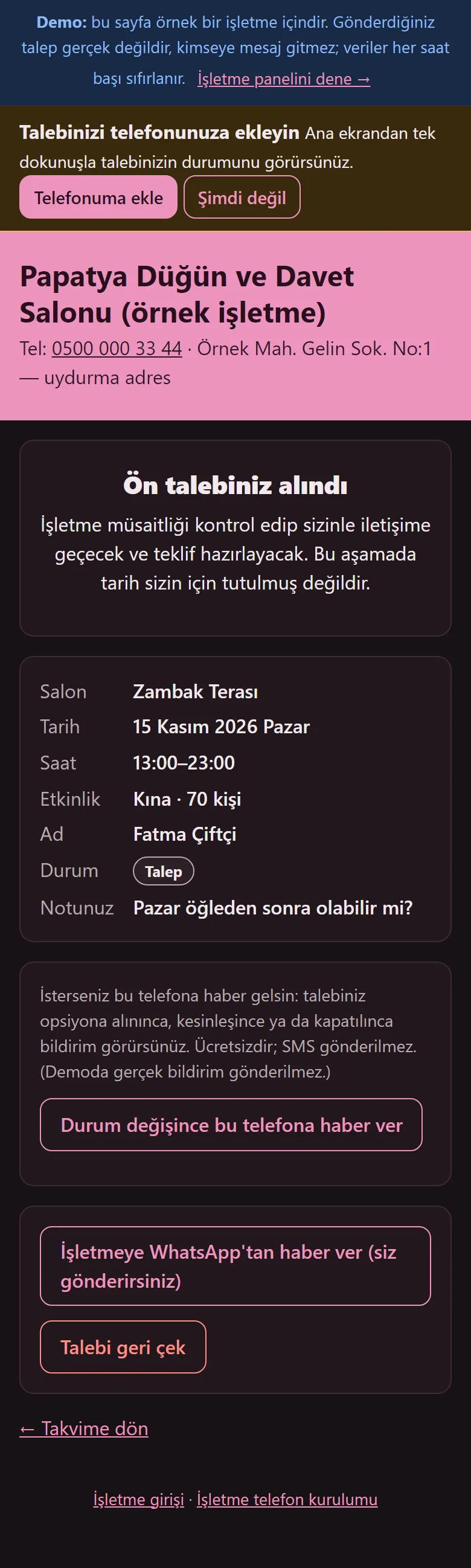
1.3.2 · 1 November 2026 Request sent: status page
The request reaches the venue and the customer follows it on a status link. The date is not held at this stage; once confirmed, the event summary and payment plan show on the same link.
- On screen (Turkish interface)
- “Ön talebiniz alındı” — your preliminary request was received
- “Talebi geri çek” — withdraw the request
- “Durum” — status
-
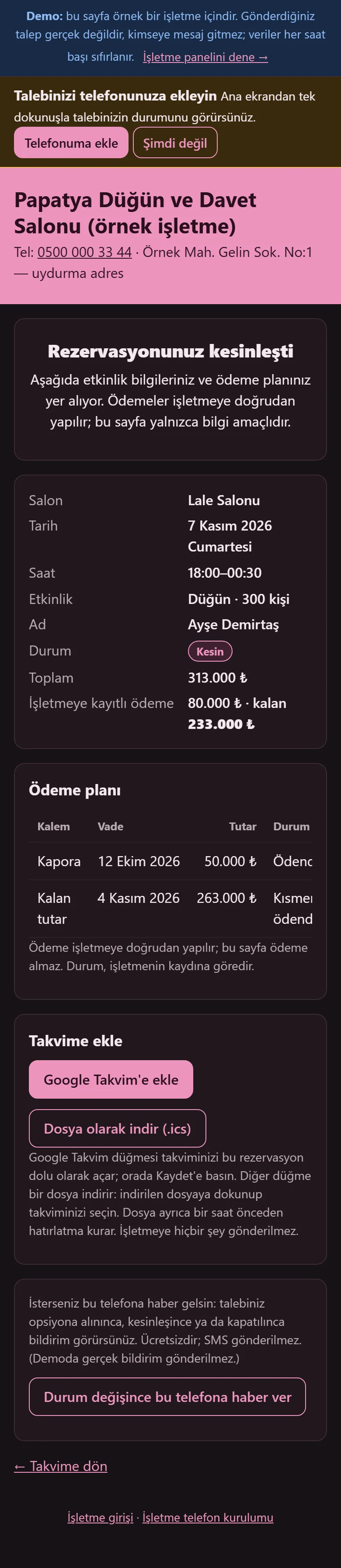
1.3.2 · 1 November 2026 The customer’s own status page: Add to calendar
A customer who sends a request sees the request on a status page of their own and, once confirmed, the event summary and the payment plan; the page says payment is made directly to the venue and the page takes none. If the booking is firm and its date has not passed, “Takvime ekle” (add to calendar) shows: “Google Takvim’e ekle” and an .ics file that reminds an hour ahead; the calendar entry holds the business name, hall, date and time, and no customer name, phone or amount. The page can be added to the phone’s home screen; if the customer wishes, a notice appears on their phone when the request is optioned, confirmed or closed (free; no SMS; the demo sends no real notice).
- On screen (Turkish interface)
- “Rezervasyonunuz kesinleşti” — your reservation is confirmed
- “Ödeme planı” — payment plan
- “Takvime ekle” — add to calendar
- “Google Takvim’e ekle” — add to Google Calendar
- “Dosya olarak indir (.ics)” — download as a file (.ics)
- “Durum değişince bu telefona haber ver” — notify this phone when the status changes
-
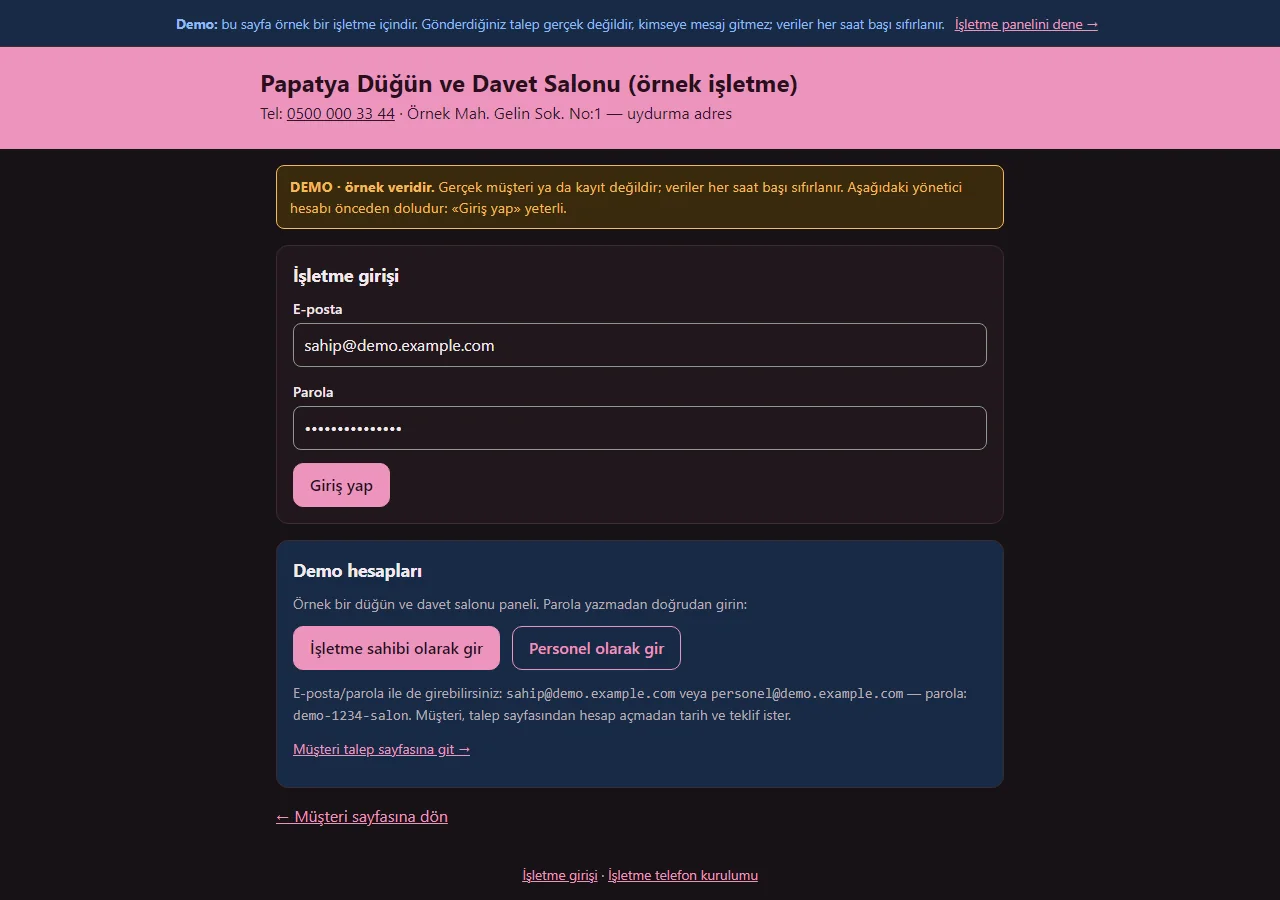
1.3.2 · 1 November 2026 Panel sign-in
On the demo’s sign-in page a “DEMO · örnek veridir” notice sits at the top, the e-mail and password fields come prefilled with the manager account, and a “Demo hesapları” (demo accounts) box holds password-free “… olarak gir” buttons for owner and staff and a link to the customer page. Both show only in the demo; a normal installation has empty fields. Staff do not see hall prices, menus, reports, settings or users.
- On screen (Turkish interface)
- “DEMO · örnek veridir” — DEMO · sample data
- “Demo hesapları” — demo accounts
- “İşletme sahibi olarak gir” — enter as owner
- “Personel olarak gir” — enter as staff
- “Giriş yap” — sign in
-
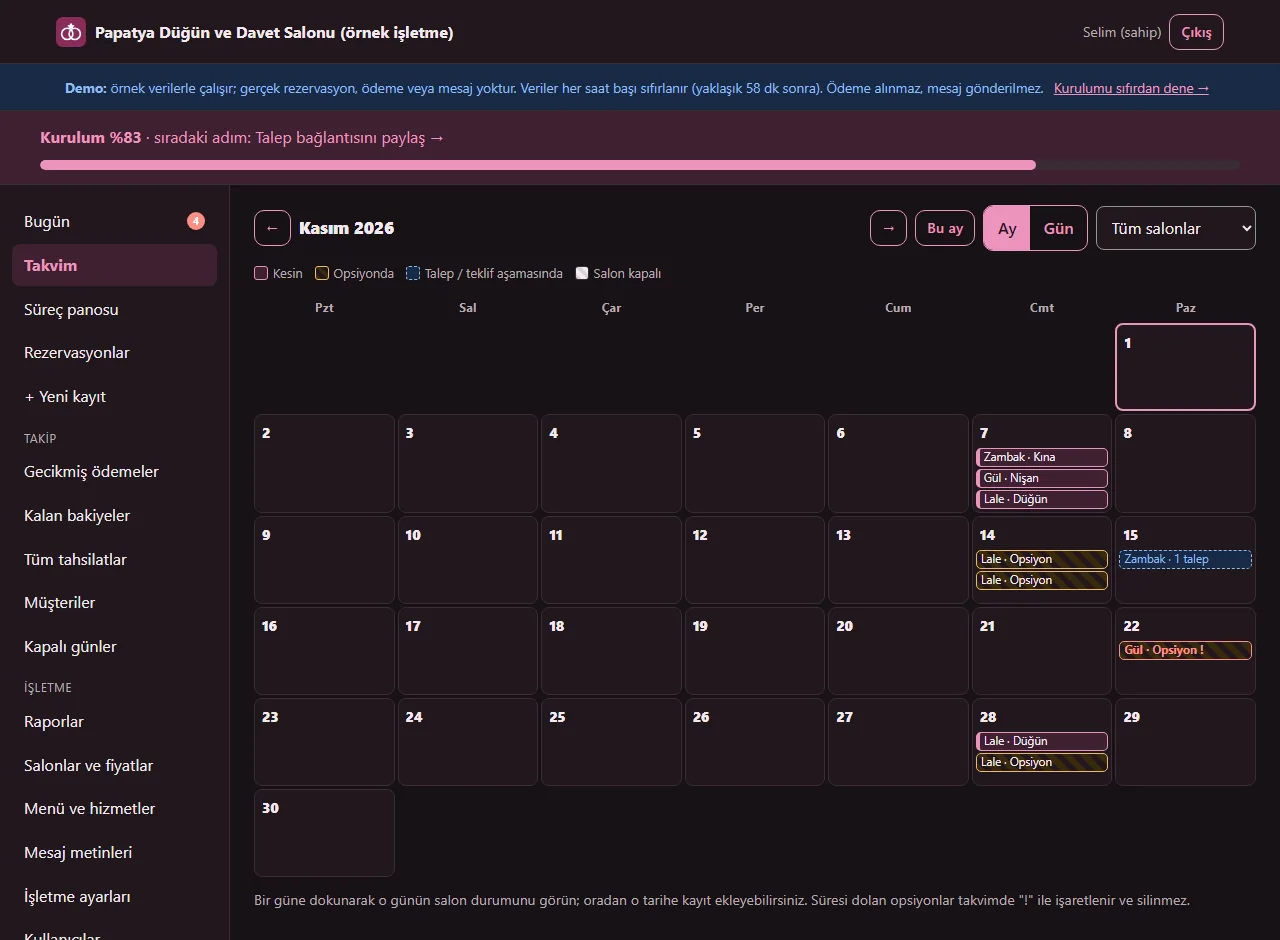
1.3.2 · 1 November 2026 Monthly calendar
All halls side by side: confirmed, optioned, request or quote stage and closed days are shown differently; an expired option is marked with "!". The hall filter narrows it to one hall.
- On screen (Turkish interface)
- “Kesin” — confirmed
- “Opsiyonda” — optioned
- “Talep / teklif aşamasında” — at request / quote stage
- “Salon kapalı” — hall closed
- “Tüm salonlar” — all halls
-
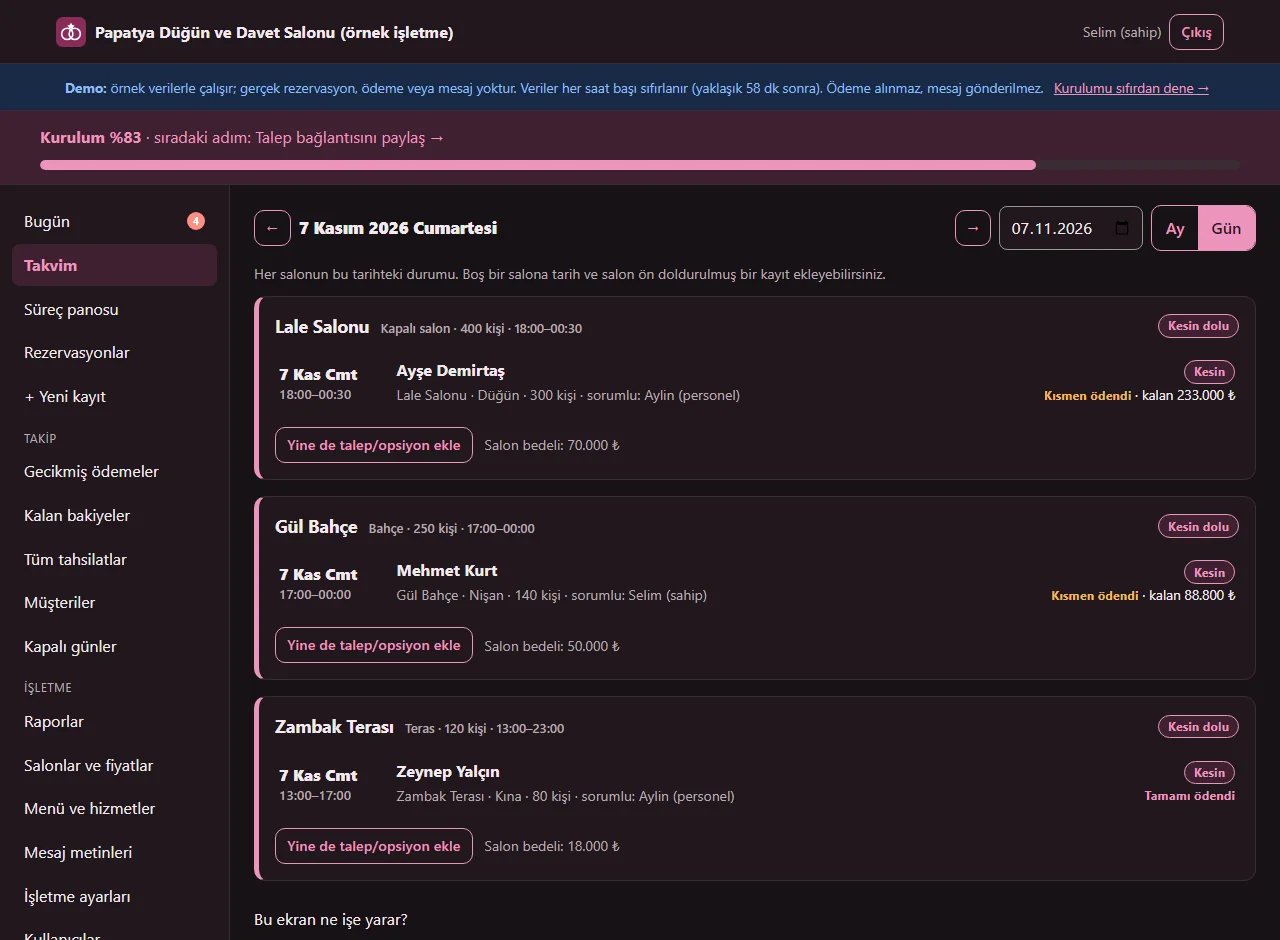
1.3.2 · 1 November 2026 Daily view
The status of each hall on that day (free, optioned, confirmed, closed), its records and the hall fee. A record is added to a free hall with the date and hall pre-filled.
- On screen (Turkish interface)
- “Boş” — free
- “Kesin dolu” — confirmed
- “Bu tarihe kayıt ekle” — add a record to this date
- “Salon bedeli” — hall fee
-
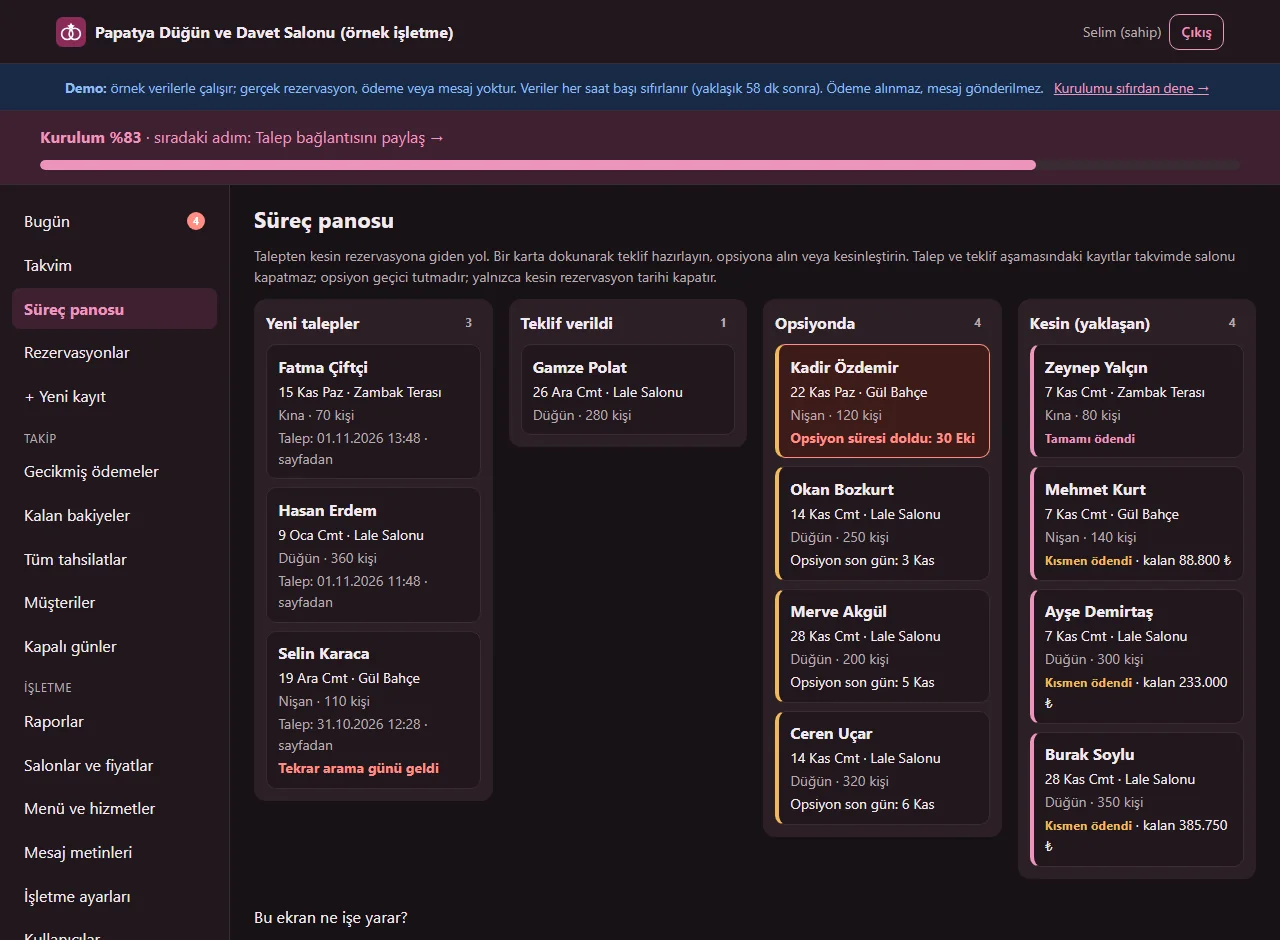
1.3.2 · 1 November 2026 Pipeline board
New request, quote sent, optioned and confirmed columns; each card shows date, hall, event type and guests, and an expired option is red. Request and quote stages do not close the calendar.
- On screen (Turkish interface)
- “Yeni talepler” — new requests
- “Teklif verildi” — quote sent
- “Opsiyonda” — optioned
- “Kesin (yaklaşan)” — confirmed (upcoming)
-
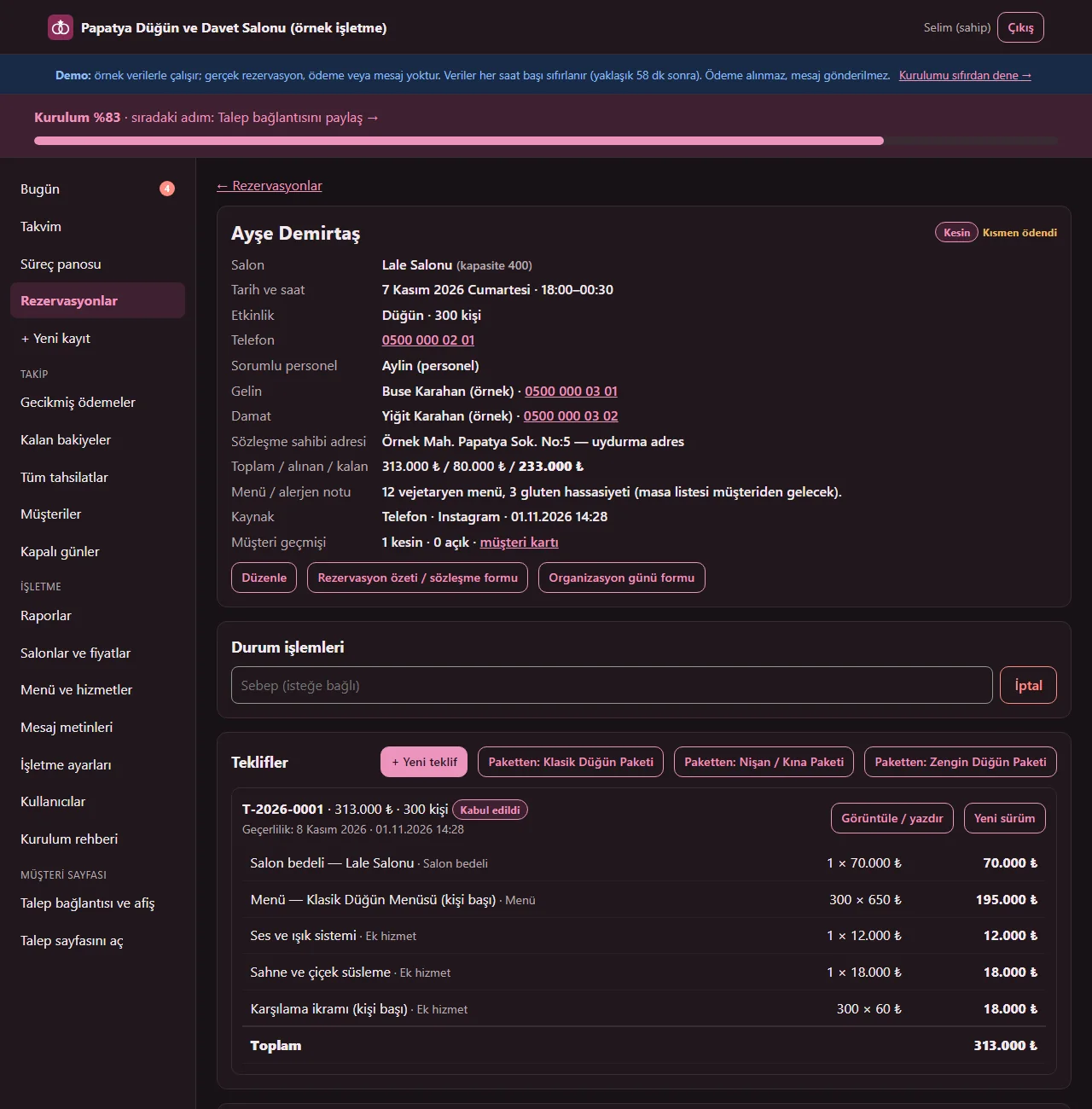
1.3.2 · 1 November 2026 Record page
Customer, hall, date and time, event, total, received and remaining, the menu and allergy note and, if entered, the person in charge together; status actions, quotes, payment plan, tasks, ready message and contact notes on the same page.
- On screen (Turkish interface)
- “Toplam / alınan / kalan” — total / received / remaining
- “Menü / alerjen notu” — menu / allergy note
- “Rezervasyon özeti / sözleşme formu” — reservation summary / contract form
- “Durum işlemleri” — status actions
-
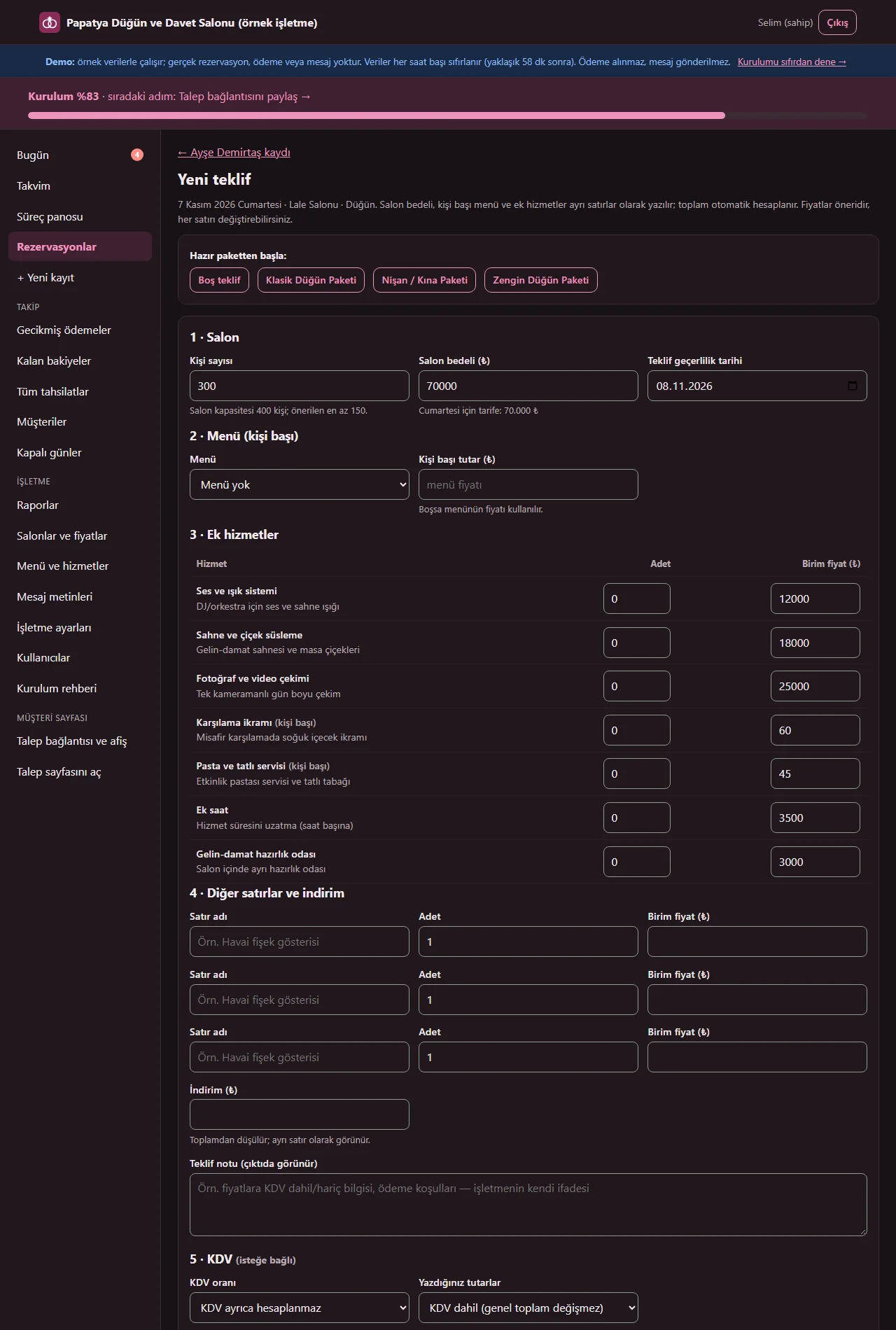
1.3.2 · 1 November 2026 Quote form
The hall fee, per-person menu and extra services in separate sections; a ready package fills the form and each line can be changed, with a discount and custom lines. The estimated total updates on screen at once; the app works it out again when the quote is saved.
- On screen (Turkish interface)
- “Salon” — hall
- “Menü (kişi başı)” — menu (per person)
- “Ek hizmetler” — extra services
- “İndirim (₺)” — discount (TRY)
- “Tahmini toplam” — estimated total
- “Teklifi oluştur” — create the quote
-
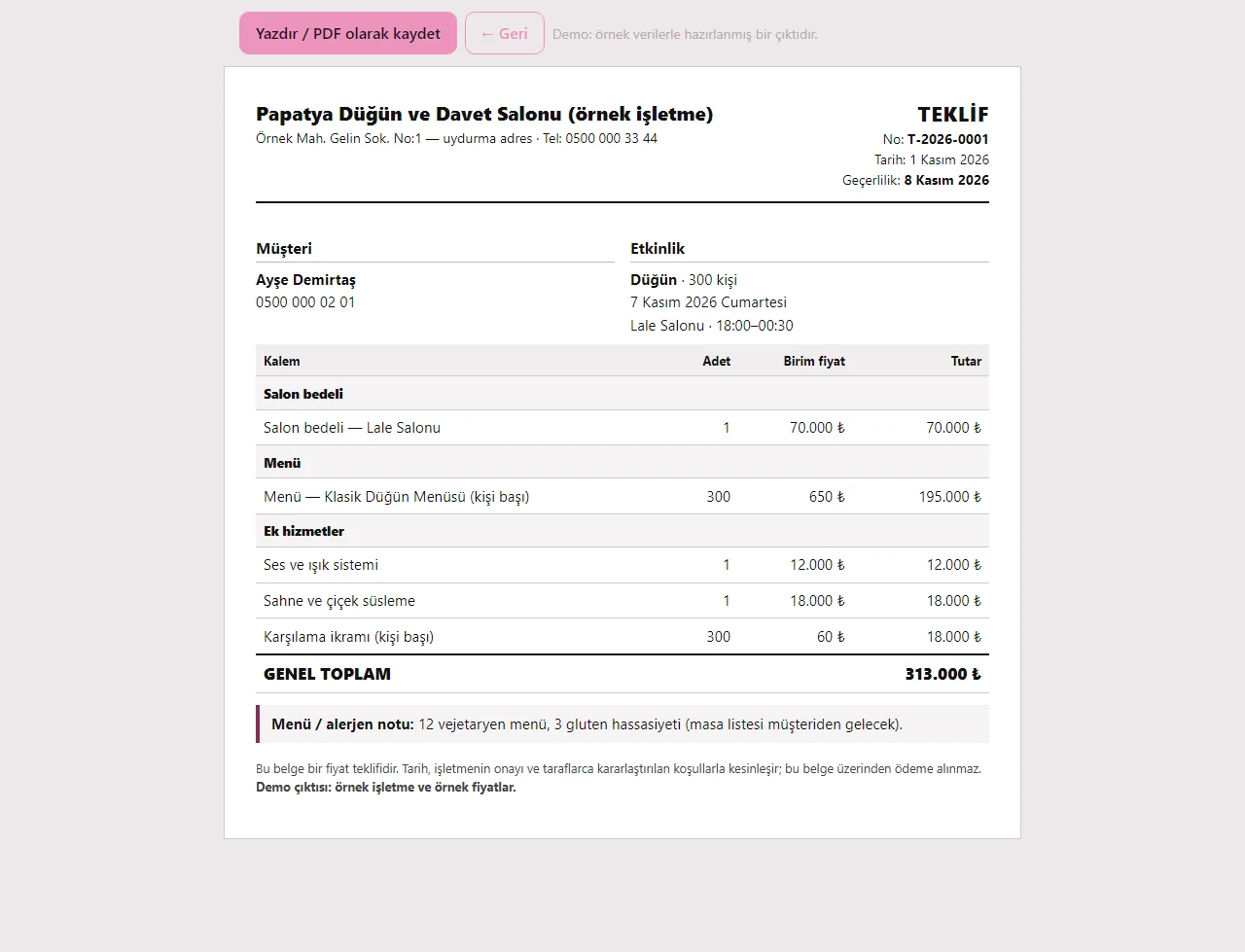
1.3.2 · 1 November 2026 Printable quote
The hall fee, menu, extra services and discount on separate lines, the grand total and a validity date. It is printed or saved as PDF from the browser; the document takes no payment. When a VAT rate is chosen on the record, the subtotal, VAT and grand total show on separate lines.
- On screen (Turkish interface)
- “TEKLİF” — QUOTE
- “Geçerlilik” — valid until
- “GENEL TOPLAM” — GRAND TOTAL
- “Yazdır / PDF olarak kaydet” — print / save as PDF
-
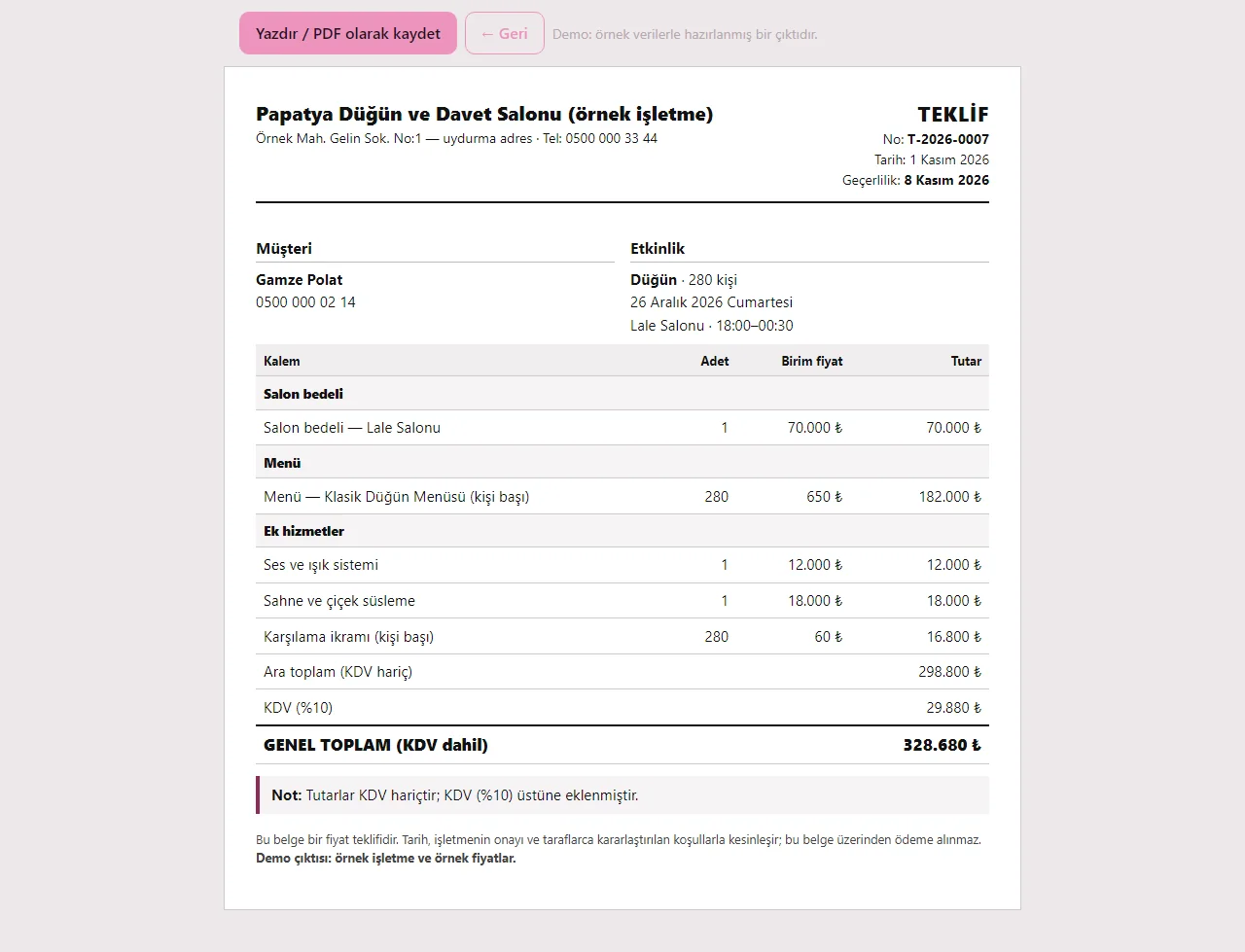
1.3.2 · 1 November 2026 VAT rate on a quote
The default VAT rate is chosen in the business settings (VAT not calculated separately / 1% / 10% / 20%) and changed per record and per quote. The reservation total is taken as including VAT; on a quote you may choose “amounts are without VAT, add VAT on top”, and the printout shows the subtotal, VAT and grand total. If no rate is chosen no amount and no printout changes. The app issues no invoice or e-invoice.
- On screen (Turkish interface)
- “Ara toplam (KDV hariç)” — subtotal (without VAT)
- “KDV (%10)” — VAT (10%)
- “GENEL TOPLAM (KDV dahil)” — GRAND TOTAL (with VAT)
-
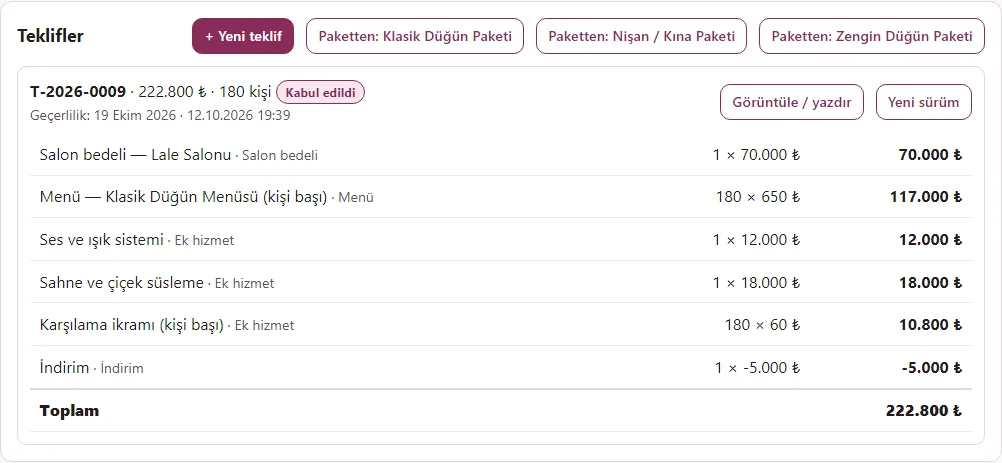
Accepting a quote
A quote is marked "Sent" and "Accepted"; the accepted amount becomes the reservation total. An accepted quote does not change; a new version is created for changes.
- On screen (Turkish interface)
- “Teklifler” — quotes
- “Kabul edildi” — accepted
- “Yeni sürüm” — new version
-
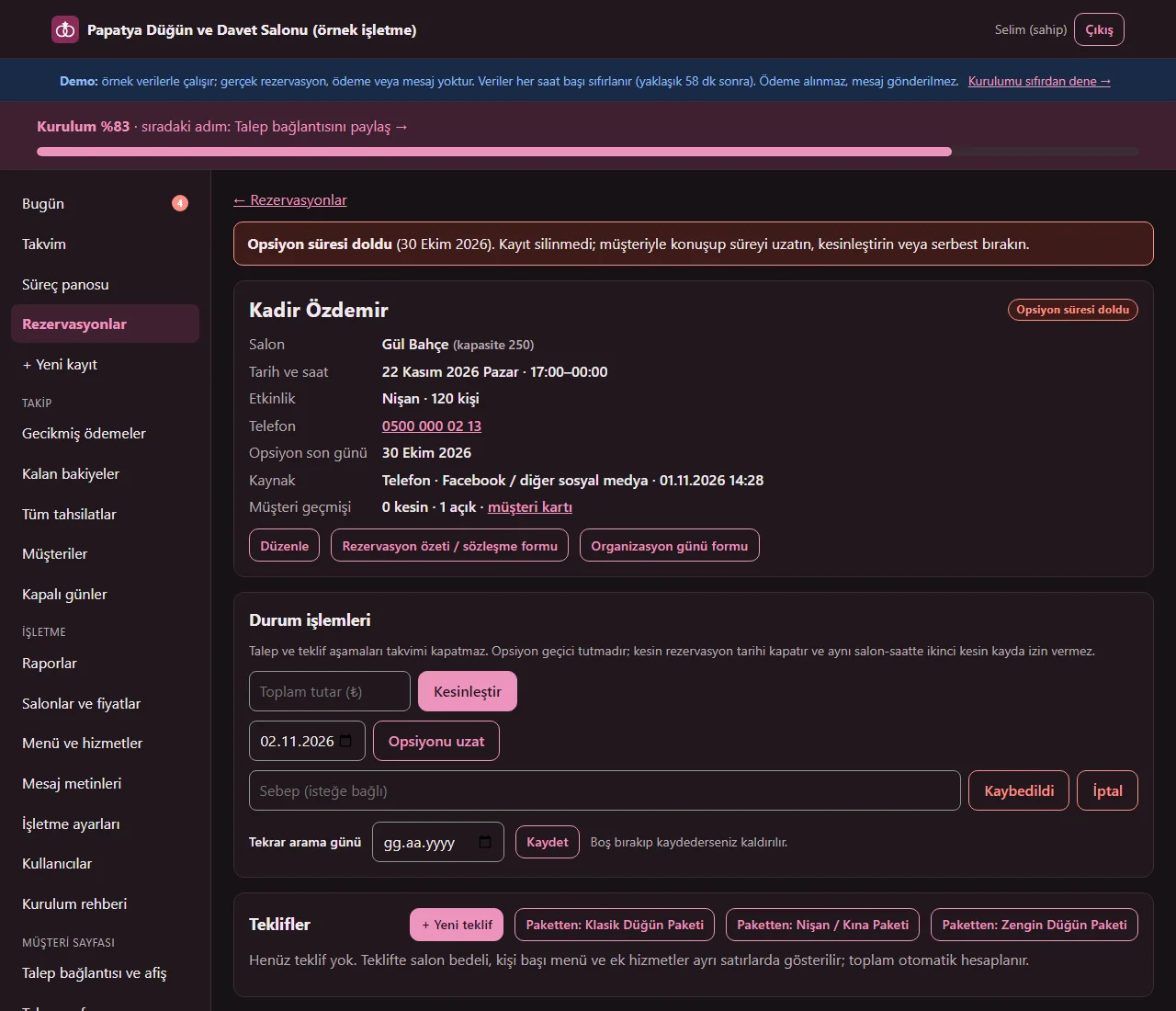
1.3.2 · 1 November 2026 Option-expired warning
When an option’s last day passes, the record is not deleted or cancelled; a warning shows on the record and on the Today screen. You can extend it, confirm it or release it.
- On screen (Turkish interface)
- “Opsiyon süresi doldu” — option expired
- “Opsiyonu uzat” — extend the option
- “Kesinleştir” — confirm
- “Kaybedildi” — lost
-
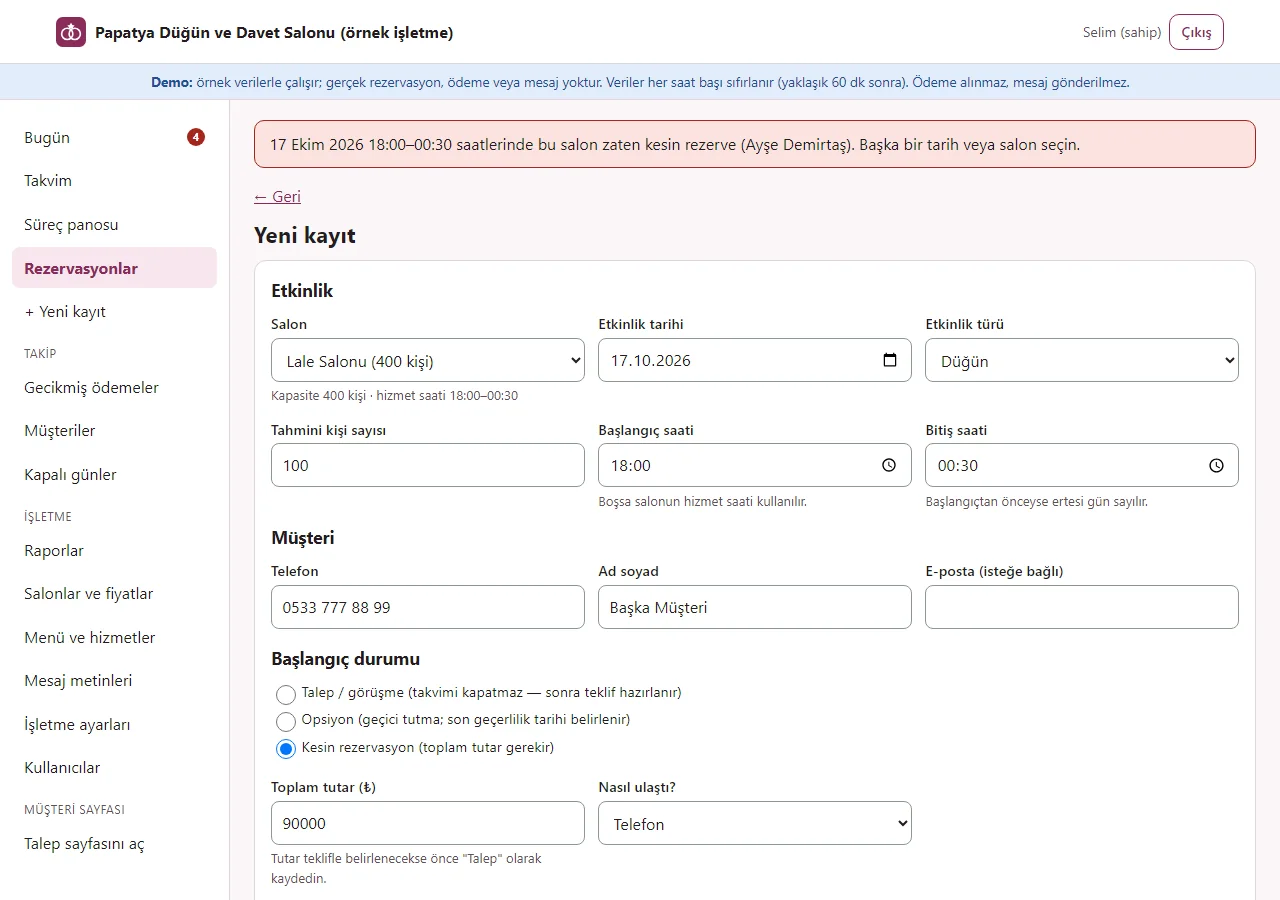
Overlap prevention
A second confirmed booking with overlapping times in the same hall is refused and the panel names the record it clashes with. Of two requests arriving at the same moment, only one is accepted.
- On screen (Turkish interface)
- “bu salon zaten kesin rezerve” — this hall is already firmly booked
- “Yeni kayıt” — new record
- “Kesin rezervasyon (toplam tutar gerekir)” — confirmed booking (total required)
-
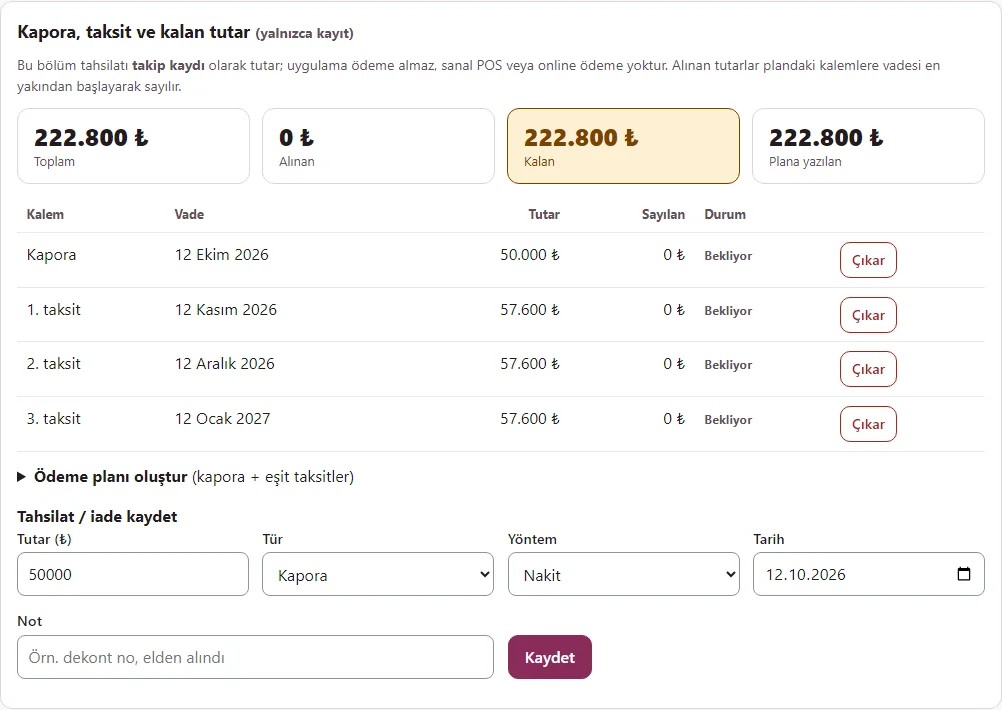
Payment plan
A plan of a deposit and equal instalments is created; due dates cannot pass the event day and the last instalment carries the rounding difference. The plan is a tracking record only; the app takes no payment.
- On screen (Turkish interface)
- “Kapora, taksit ve kalan tutar” — deposit, instalments and remaining amount
- “Ödeme planı oluştur” — create a payment plan
- “Plana yazılan” — written into the plan
-
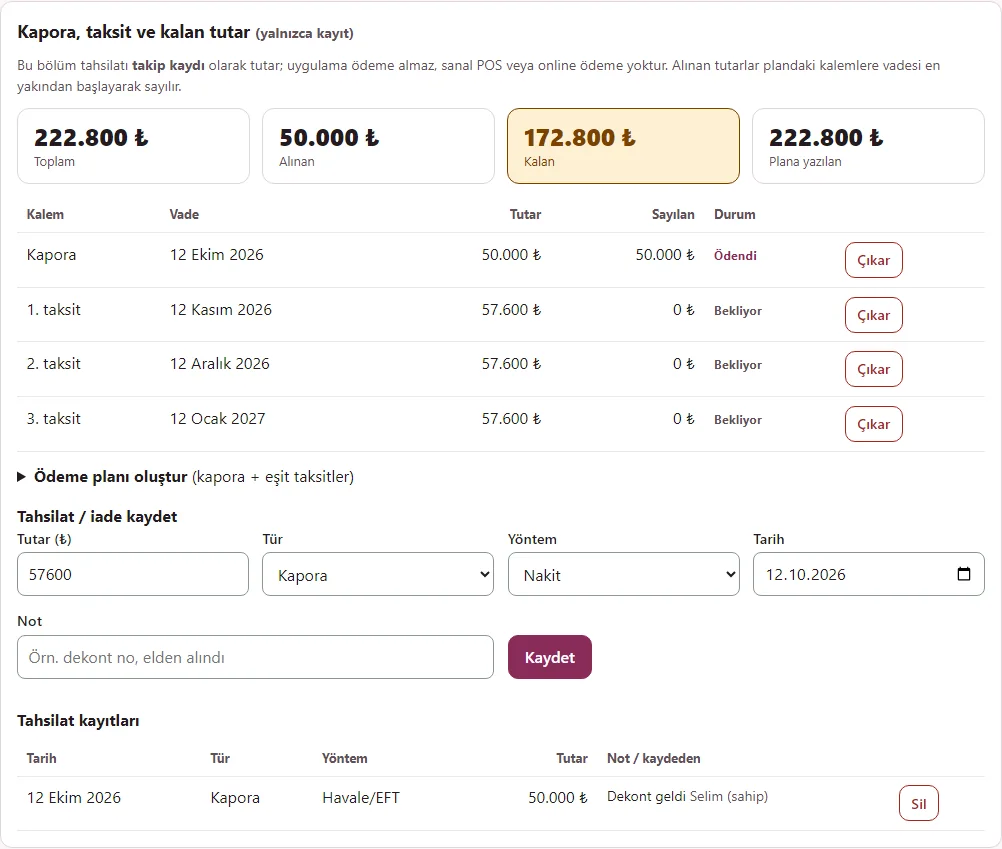
Deposit and payment records
The deposit and instalments received are entered as records; cash, transfer and card are only labels. A payment above the total and a refund above what was received are refused; the amount received counts against plan items from the earliest due date.
- On screen (Turkish interface)
- “Tahsilat / iade kaydet” — record a payment / refund
- “Tahsilat kayıtları” — payment records
- “Ödendi” — paid
- “Bekliyor” — waiting
-
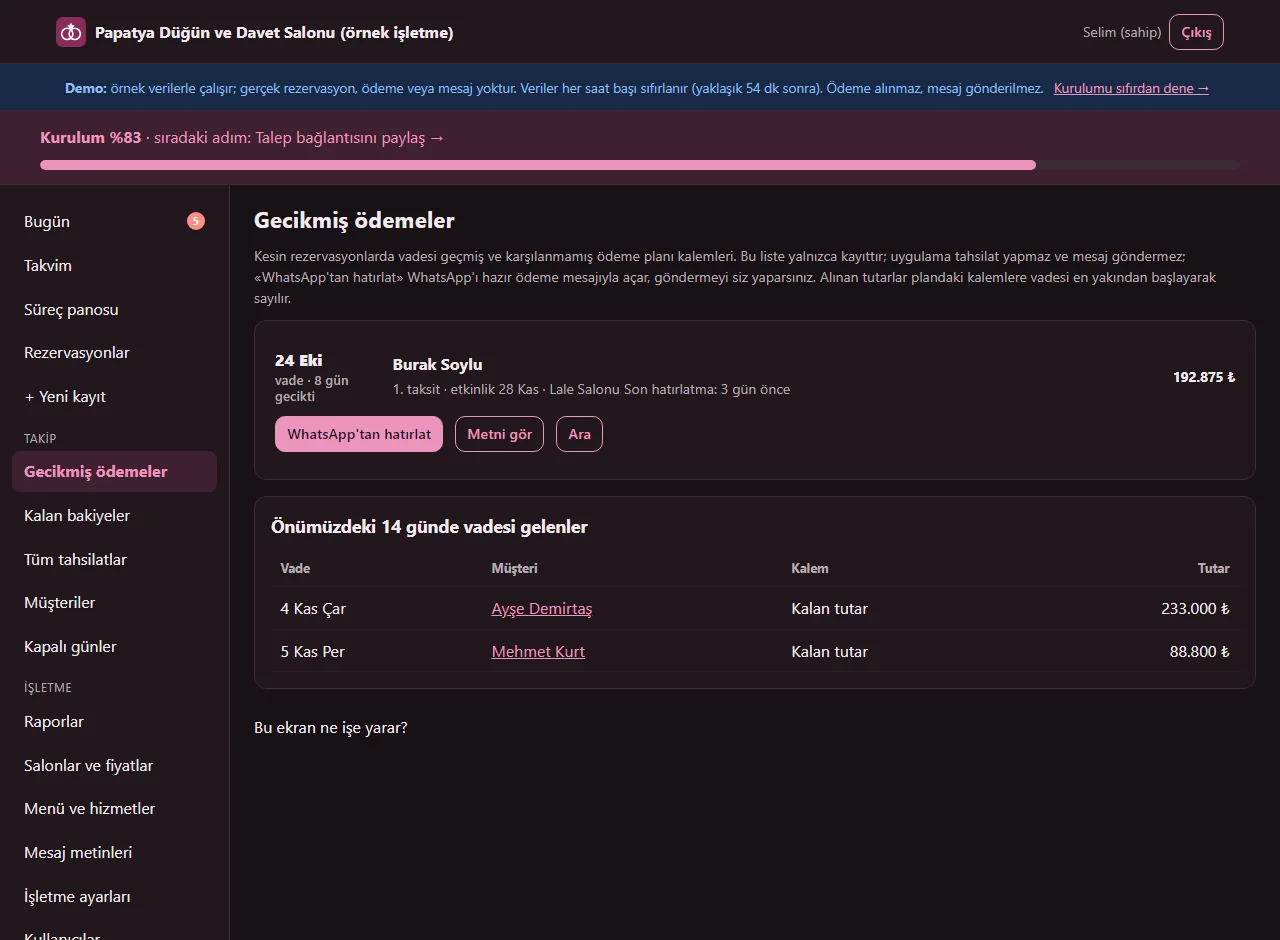
1.4.1 · 1 November 2026 Overdue payments
Plan items past due and not covered are listed with the customer, event, remaining amount and days late. Each row has “WhatsApp’tan hatırlat” (opens WhatsApp with the customer’s number and the ready payment message), “Metni gör” for those who want to read the message first, and “Ara”; once a reminder has been opened the row says “Son hatırlatma: 3 gün önce” (last reminder: 3 days ago). The venue sends the message, the app does not.
- On screen (Turkish interface)
- “Gecikmiş ödemeler” — overdue payments
- “WhatsApp'tan hatırlat” — remind on WhatsApp
- “Metni gör” — see the text
- “Ara” — call
- “Son hatırlatma: 3 gün önce” — last reminder: 3 days ago
- “Önümüzdeki 14 günde vadesi gelenler” — falling due in the next 14 days
-
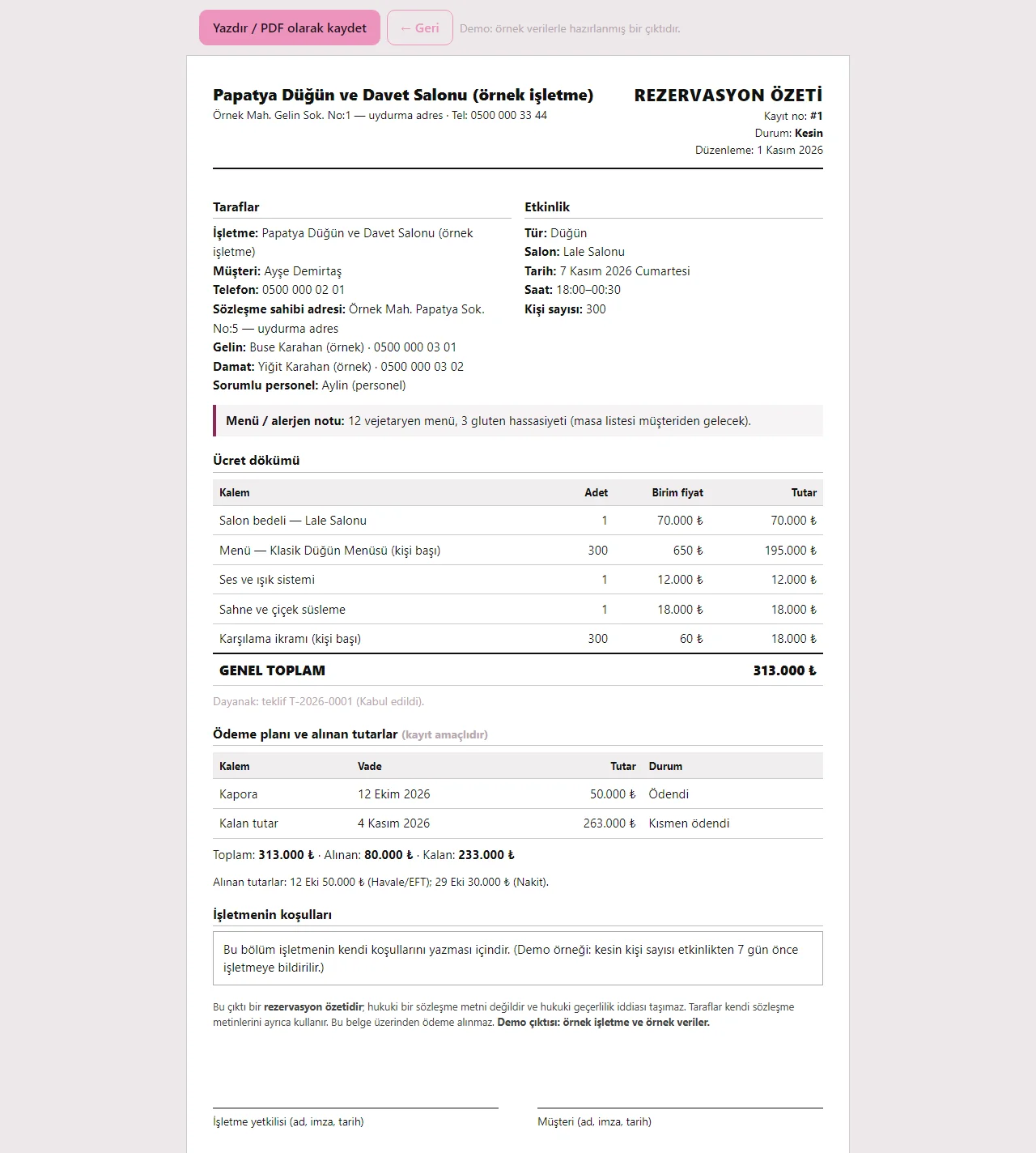
1.3.2 · 1 November 2026 Reservation summary / contract form
Parties, event, price breakdown, payment plan, amounts received, the venue’s own terms and signature fields; if entered, the bride’s and groom’s names and phone numbers and the contract holder’s address are printed too. The national ID number shows only when the owner prints it. It is not a legal contract text; the venue writes cancellation, refund and similar terms itself.
- On screen (Turkish interface)
- “REZERVASYON ÖZETİ” — RESERVATION SUMMARY
- “İşletmenin koşulları” — the venue’s terms
- “İşletme yetkilisi” — venue representative
- “Müşteri” — customer
-
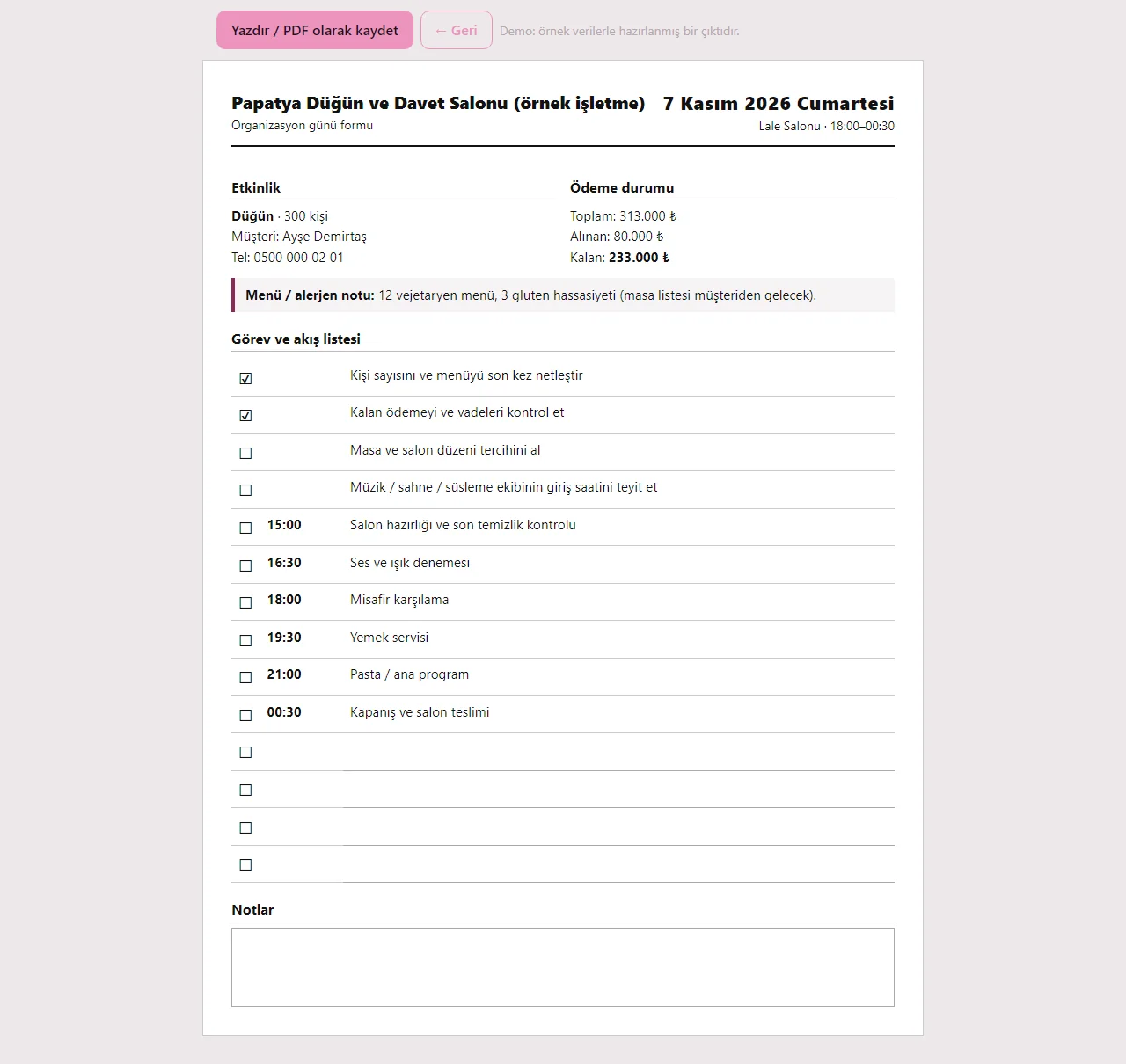
1.3.2 · 1 November 2026 Event-day sheet
Hall, time, customer, remaining payment, menu and allergy note and a timed task and flow list; done items are ticked and blank lines are left for additions. Printed or saved as PDF.
- On screen (Turkish interface)
- “Organizasyon günü formu” — event-day sheet
- “Görev ve akış listesi” — task and flow list
- “Notlar” — notes
-
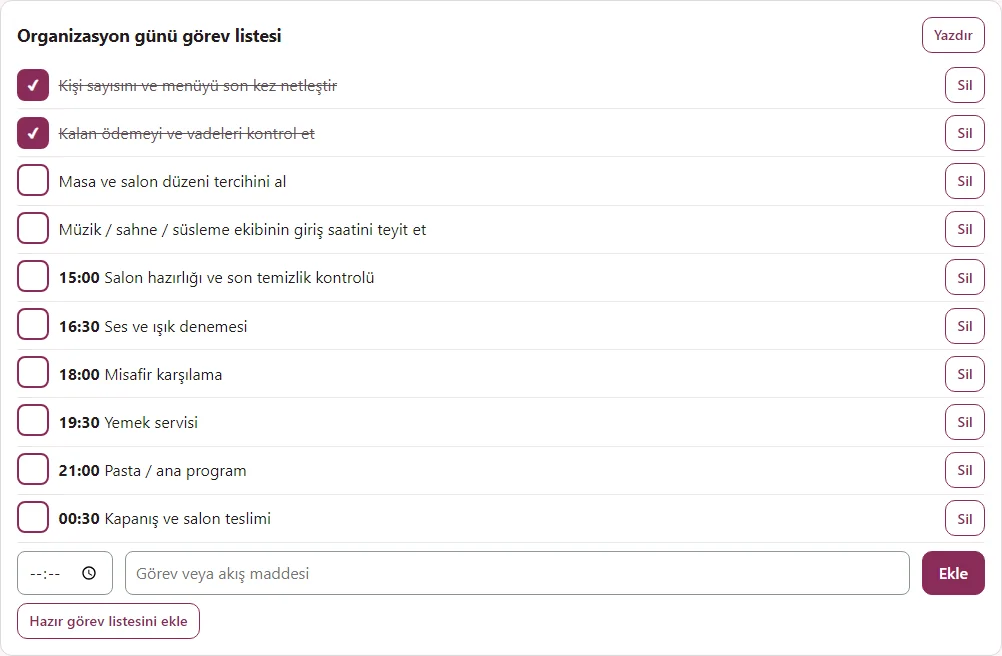
Task list
A ready list or your own items, timed or untimed; done items are ticked. Times in the ready list are worked out from the event’s start time.
- On screen (Turkish interface)
- “Organizasyon günü görev listesi” — event-day task list
- “Misafir karşılama” — guest welcome
- “Yemek servisi” — meal service
- “Hazır görev listesini ekle” — add the ready task list
-
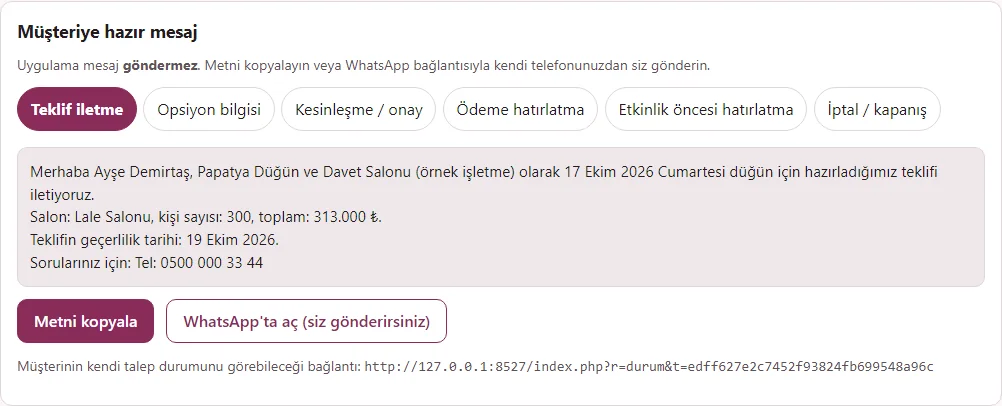
Ready message
Quote, option, confirmation, payment reminder, pre-event and closing texts are filled from the record. "Open in WhatsApp" opens the chat with the text filled in; the venue sends it, the app sends nothing.
- On screen (Turkish interface)
- “Müşteriye hazır mesaj” — ready message for the customer
- “Metni kopyala” — copy the text
- “WhatsApp'ta aç (siz gönderirsiniz)” — open in WhatsApp (you send it)
-
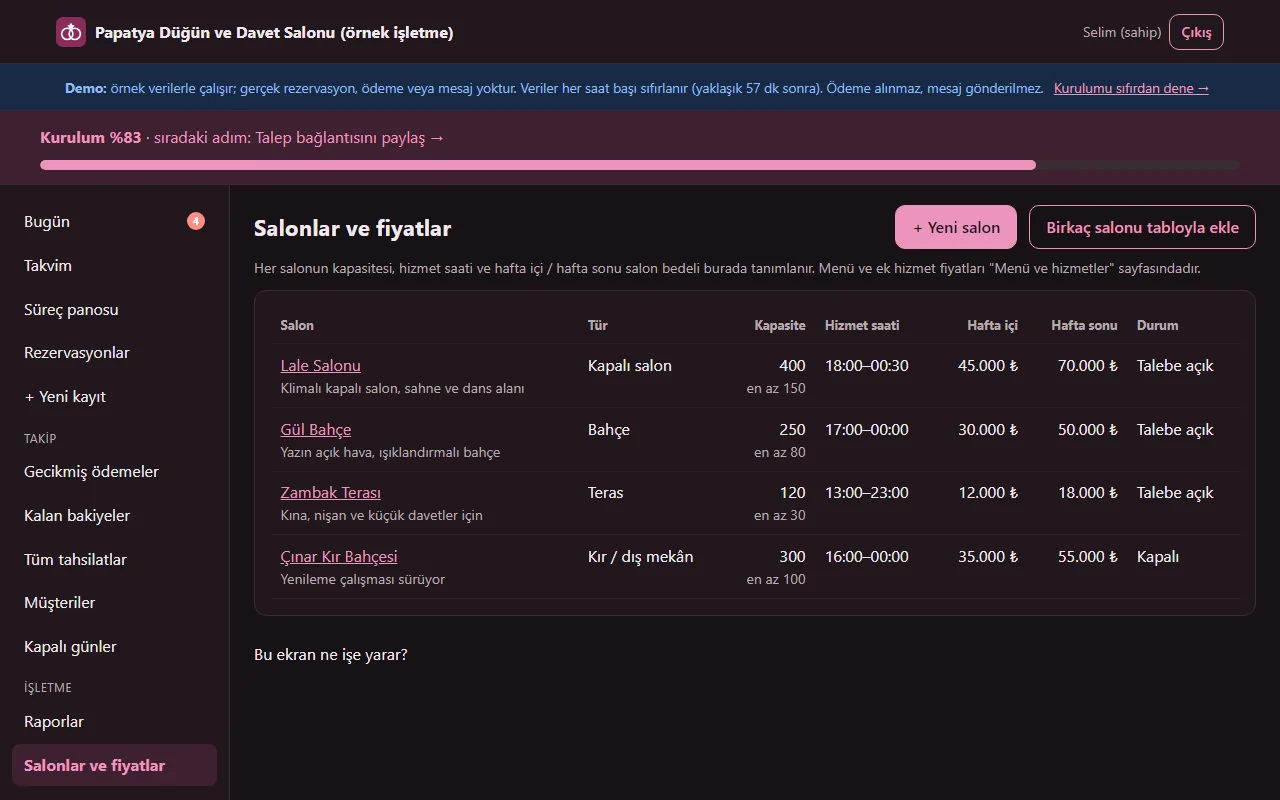
1.3.2 · 1 November 2026 Halls and prices
Type, capacity, service hours and weekday and weekend hall fee. The prices are examples; the venue enters its own. A hall with booking history is not deleted, only closed. To add several halls at once there is “Birkaç salonu tabloyla ekle” (add several halls in a table).
- On screen (Turkish interface)
- “Salonlar ve fiyatlar” — halls and prices
- “Kapasite” — capacity
- “Hizmet saati” — service hours
- “Hafta içi / Hafta sonu” — weekday / weekend
-
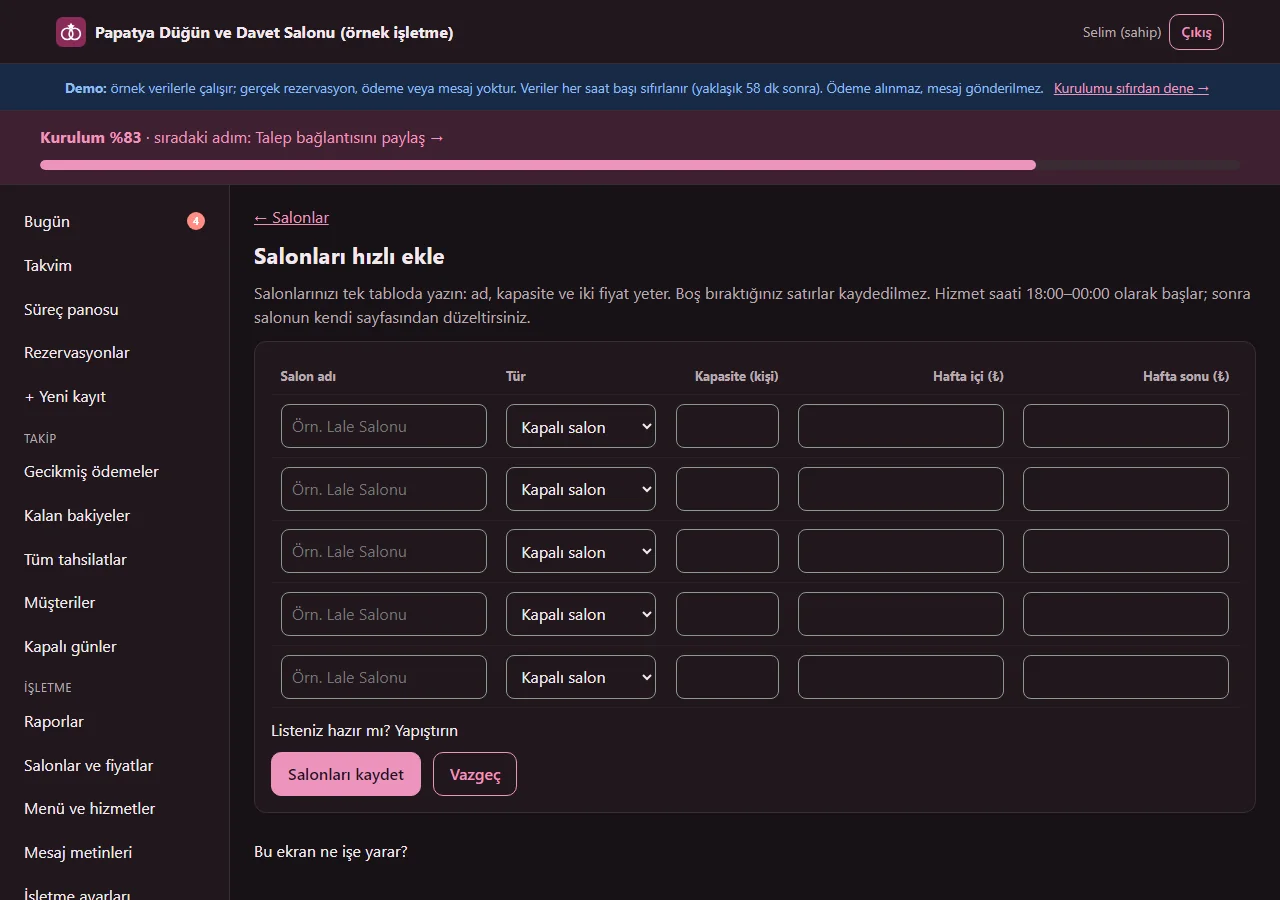
1.3.2 · 1 November 2026 Adding halls in a table
The “Birkaç salonu tabloyla ekle” (add several halls in a table) page on the Halls screen gives five ready rows: a name, a type, a capacity and two prices are enough, and empty rows are not saved. You can instead paste lines in the form “name; capacity; weekday; weekend” (they can be copied from Excel). The service hours start at 18:00–00:00 and are corrected afterwards on the hall’s own page.
- On screen (Turkish interface)
- “Salonları hızlı ekle” — add halls quickly
- “Hafta içi (₺)” — weekday (TRY)
- “Hafta sonu (₺)” — weekend (TRY)
- “Listeniz hazır mı? Yapıştırın” — got a list? Paste it
- “Salonları kaydet” — save the halls
-
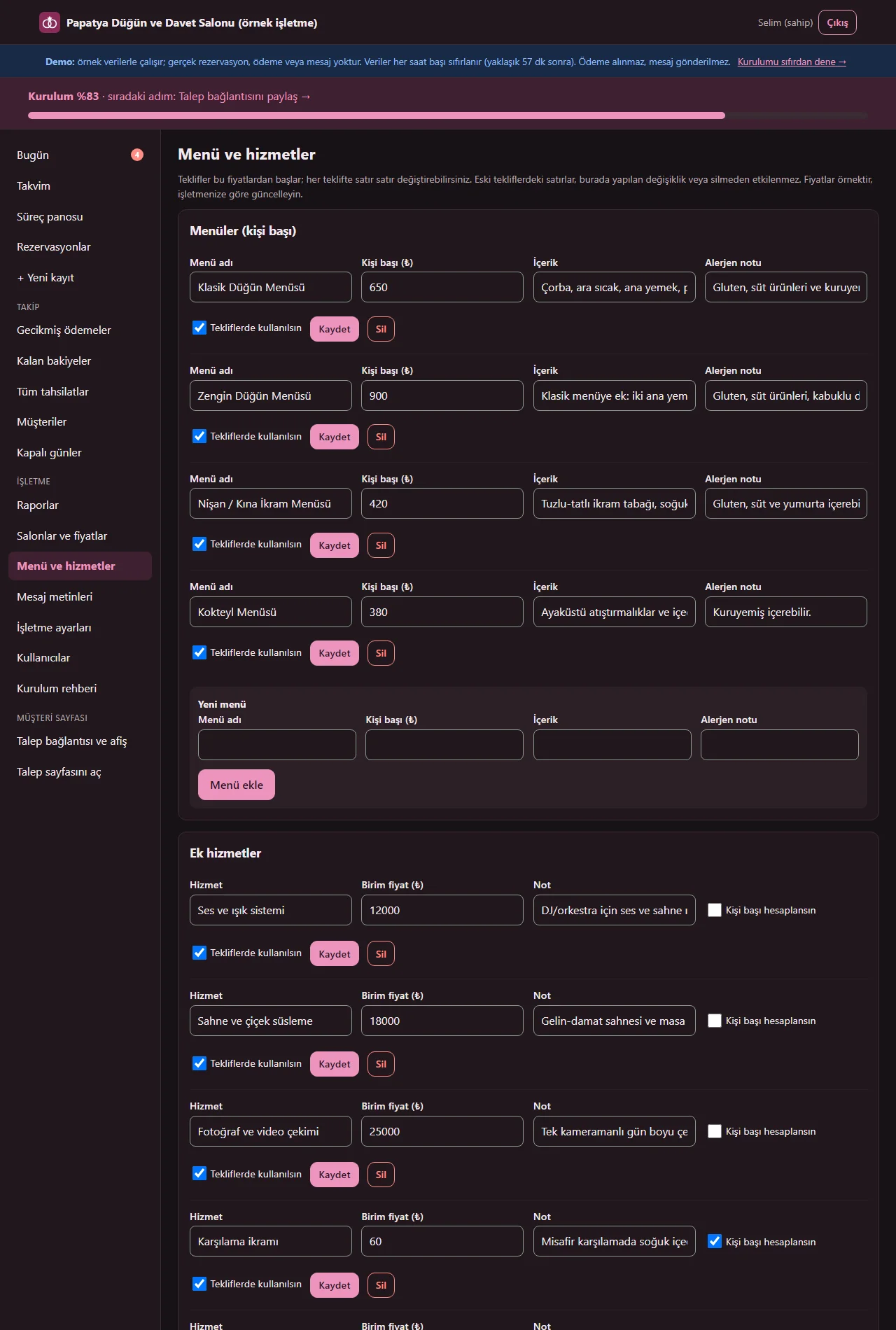
1.3.2 · 1 November 2026 Menus and services
Per-person menus (with allergy notes), extra services (fixed or per person) and ready packages. Quotes start from these prices; lines in old quotes do not change.
- On screen (Turkish interface)
- “Menüler (kişi başı)” — menus (per person)
- “Ek hizmetler” — extra services
- “Hazır paketler” — ready packages
- “Alerjen notu” — allergy note
-
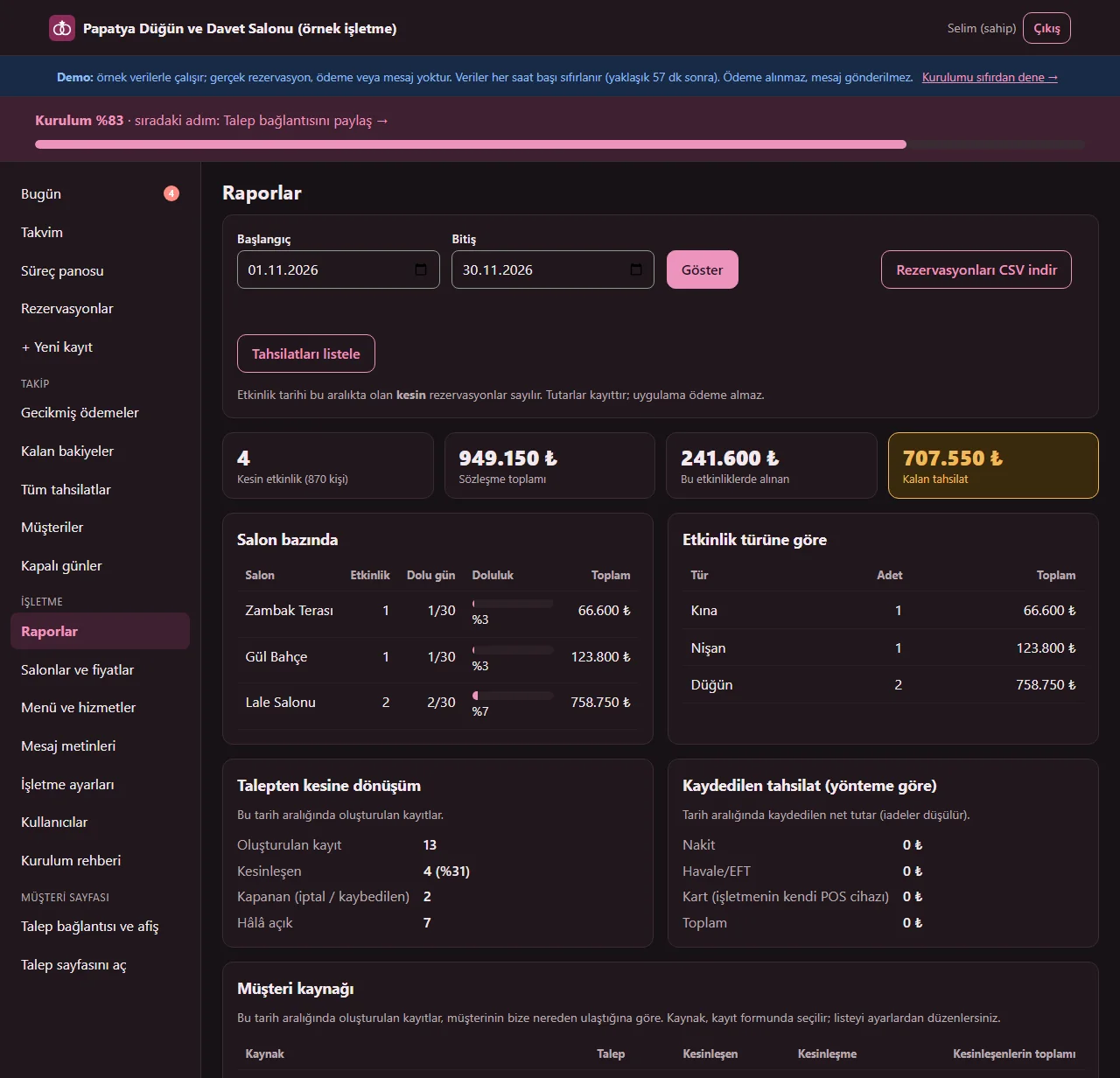
1.3.2 · 1 November 2026 Reports
Only the owner sees them: confirmed events, contract total, received and remaining, hall occupancy, event type, request-to-confirmed conversion, requests by customer source and a yearly occupancy table. Reservations download as CSV.
- On screen (Turkish interface)
- “Raporlar” — reports
- “Salon bazında” — by hall
- “Talepten kesine dönüşüm” — request-to-confirmed conversion
- “yıllık doluluk” — yearly occupancy
- “Rezervasyonları CSV indir” — download reservations as CSV
-
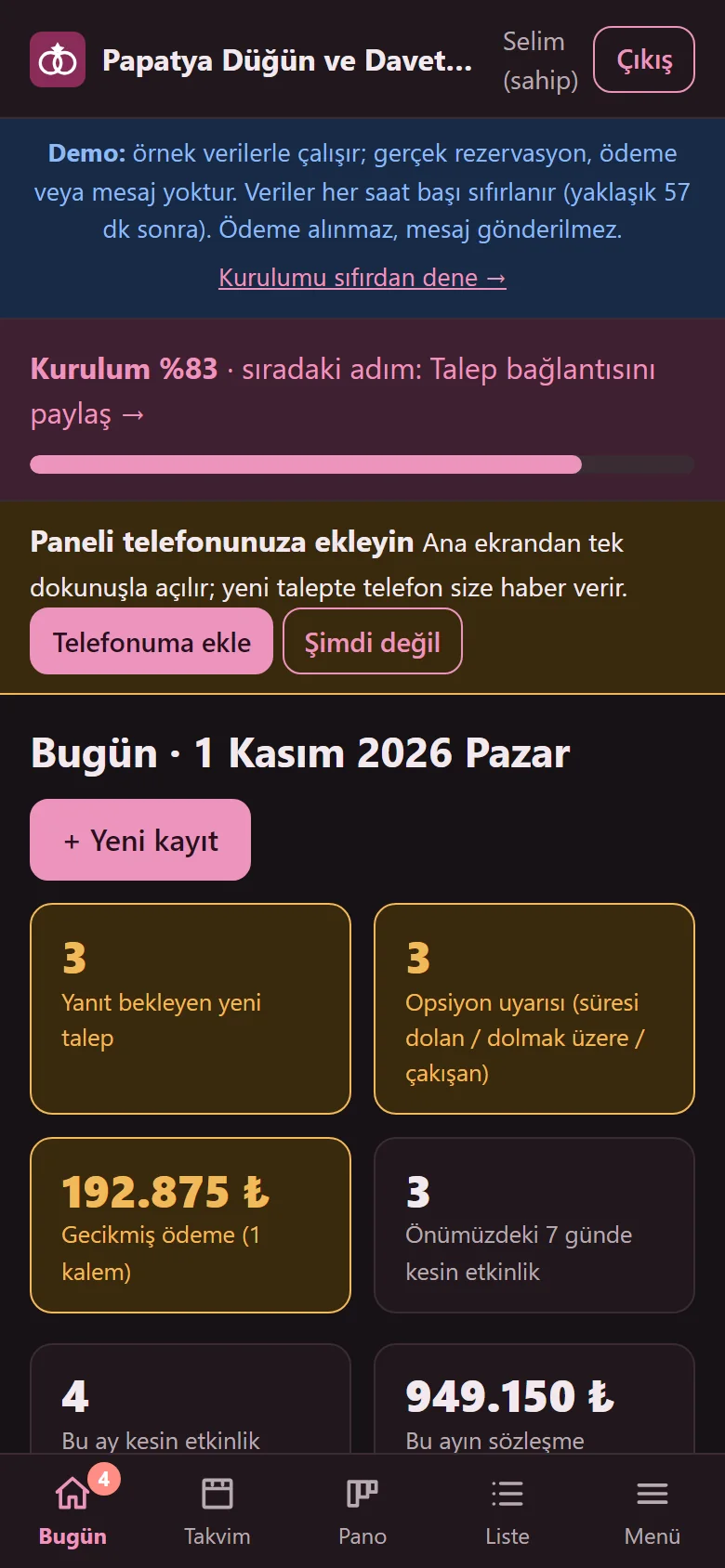
1.3.2 · 1 November 2026 Today on a phone
The panel on a phone: the bottom menu opens Today, Calendar, Board, List and Menu; request and option warnings are visible one-handed.
- On screen (Turkish interface)
- “Bugün” — today
- “Takvim” — calendar
- “Pano” — board
- “Liste” — list
- “Menü” — menu
-
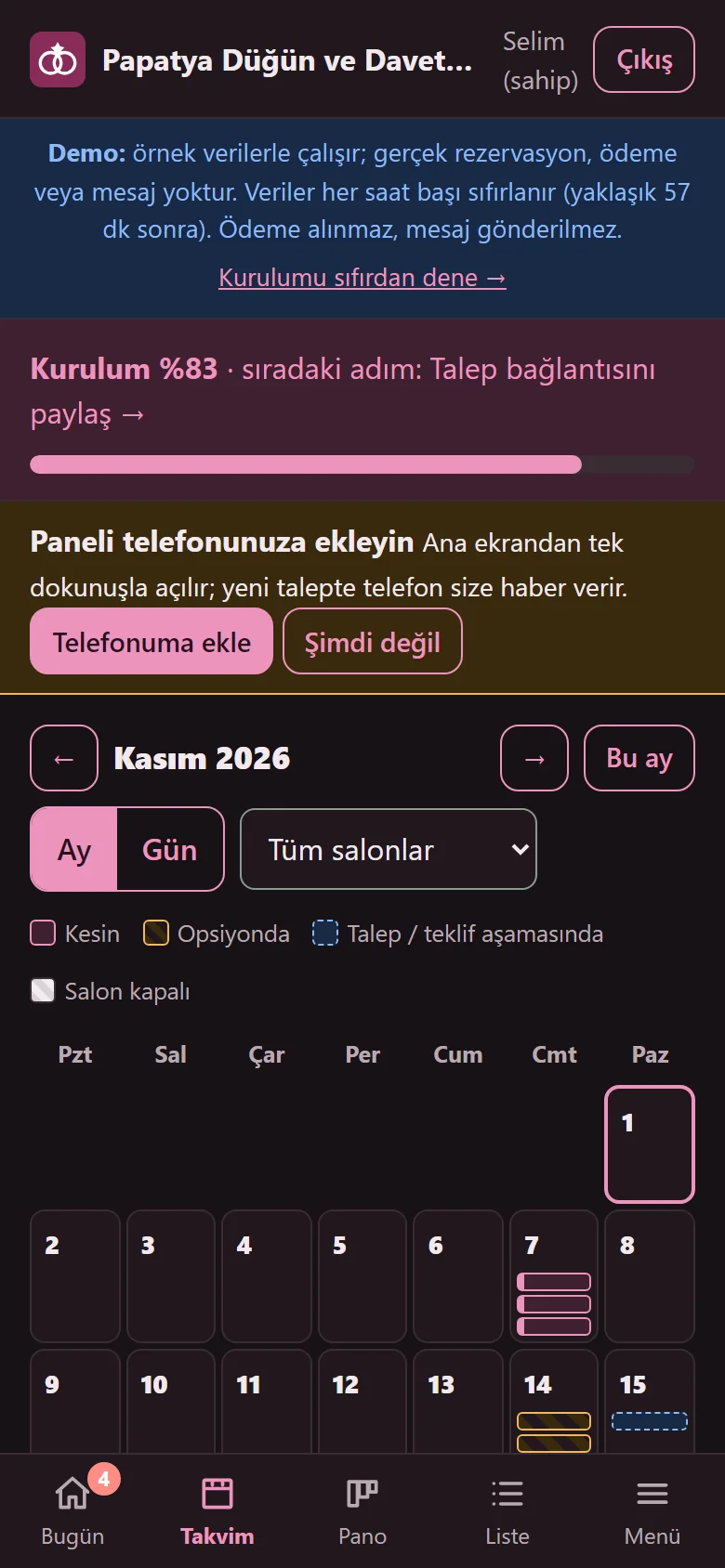
1.3.2 · 1 November 2026 Monthly calendar on a phone
Confirmed, optioned and request records show as coloured marks in the day cells; tapping a day opens that day’s hall status.
- On screen (Turkish interface)
- “Ekim 2026” — October 2026
- “Tüm salonlar” — all halls
- “Kesin” — confirmed
- “Opsiyonda” — optioned
-
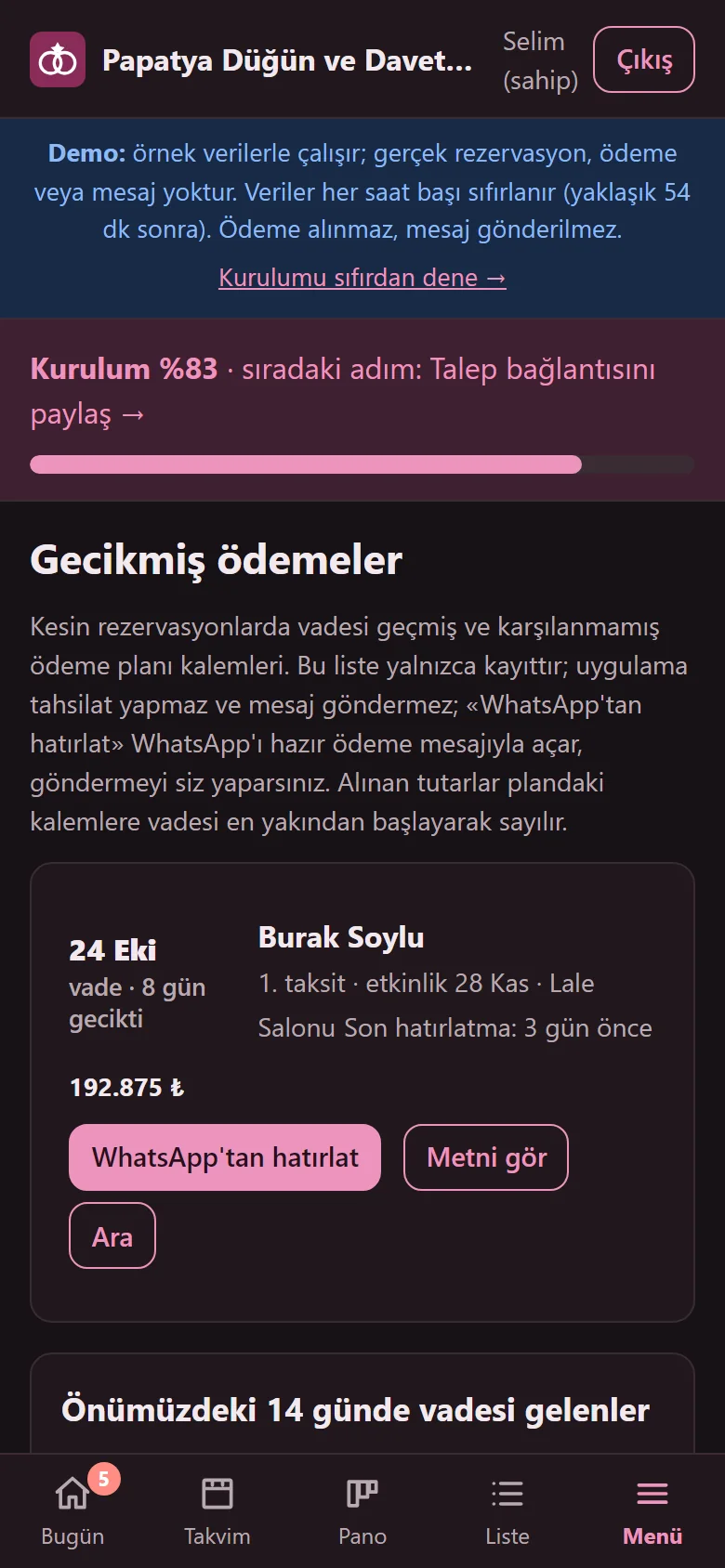
1.4.1 · 1 November 2026 Overdue payments on a phone
On a phone the list is rows, not a table: due date and days late, customer, item, event and amount; under the row the “WhatsApp’tan hatırlat”, “Metni gör” and “Ara” buttons stay in view and are not cut off. Remaining balances use the same row layout.
- On screen (Turkish interface)
- “Gecikmiş ödemeler” — overdue payments
- “WhatsApp'tan hatırlat” — remind on WhatsApp
- “Metni gör” — see the text
- “Ara” — call
- “Son hatırlatma: 3 gün önce” — last reminder: 3 days ago
- What do they see at the end?
- A request moves on to a quote, an option and a firm booking; at every stage the calendar, the total, the payment plan and the task list sit in the same record. An expired option and an overdue payment show as warnings.
- What is it good for?
- Dates, options, quote calculation and deposit and instalment records do not scatter across phone calls, WhatsApp and a ledger; two promises for the same date are prevented; an expired option and a late payment get noticed.
Everything that is not included, and all limits
- Not delivered to a client and not used by a real venue. The business on the screens (“Papatya Düğün ve Davet Salonu”), the halls, menu and service prices, people, phone numbers and amounts are made up; no real customer details should be entered in the demo.
- There is no online payment, virtual POS or bank connection: deposits, instalments and the remaining amount are records only, and the app takes no payment.
- There is no SMS, WhatsApp API or automatic message sending: the message text comes ready and the venue sends it from its own phone. The “WhatsApp’tan hatırlat” button opens WhatsApp with the ready text and the venue does the sending; the app cannot tell whether it was sent and records only the tap. Option and payment warnings only show in the panel; a phone alert goes out only for a new preliminary request (and, if the customer wishes, for a status change of their own request).
- The reservation summary is not a legal contract text and makes no claim of legal compliance; the venue writes its own cancellation, refund and similar terms. The product is not a substitute for legal, financial or tax advice.
- There is no accounting (income and expense, cash book, balance sheet), e-invoice or invoice issuing (VAT is only an amount display), seating or table plan, supplier marketplace, staff shifts, multi-branch view or extensive event planning; the task list is a simple flow and to-do list.
- The customer page takes a preliminary request and does not hold the date. In the online calendar a day shows as taken if there is any firm booking that day; separate firm records for different hours are entered only from the panel.
- Tried locally with PHP 8.3 and SQLite (1,134 automatic checks passed for 1.3.0), and on a DirectAdmin/LiteSpeed demo account with PHP 8.3; the phone alert (Web Push), the add-to-phone button and the QR poster were not tried on a real phone; it has not been tried on any other hosting or PHP version. There is no MariaDB or MySQL support; only SQLite is used.
- In the demo the data is reset every hour; the sign-in page has the manager account prefilled and a “Demo hesapları” (demo accounts) box with “İşletme sahibi olarak gir” (enter as owner) and “Personel olarak gir” (enter as staff) buttons that need no password (the notice and the box show only in the demo). A normal installation asks for an e-mail and password.
- The interface in the screens is Turkish; there is no English interface in the panel. There is no store app; the panel opens in a phone browser.
Delivery and sales status
How does it work?
You try the demo and tell us about your venue, and we send you a quote. We install it and we host it. The yearly price includes installation, hosting, data transfer and support.
Price
The yearly list price is 3,000 TL. Installation, one year of hosting, data transfer, bug fixes and written usage support are included. Automatic SMS and WhatsApp messages (the venue sends the reminder from its own phone), online card payment (the app takes no payment), e-invoicing, accounting (income and expense, stock, staff advances), maps and an app published in the app stores (there is a web app that installs on the phone) are not included. New feature requests and work beyond the scope are priced separately and you are told before it is done.
Possible delivery options
Other delivery options
Requirements and version history
Installation requirements
- It uses plain PHP 8.1 or newer and SQLite; no separate database server is needed, and MariaDB or MySQL are not supported. The product was tried locally and on the demo account with PHP 8.3; it has not been tried on other PHP versions.
Release notes
- No version has been delivered to a client. A live sample-data demo exists.
- 1.0.0 (12 October 2026): first version; hall and space set-up, a monthly and daily calendar, an overlap block for firm bookings, customer requests and contact notes, a pipeline board, quotes and packages, options with an expiry warning, deposit, instalment and remaining-amount records, an overdue payments list, a printable quote, reservation summary and event-day sheet, a task list, a customer request page and status link, ready message texts, reports and CSV, owner and staff roles.
- 1.0.1 (18 October 2026): demo sign-in page: a demo notice, fields prefilled with the manager account and password-free “… olarak gir” (sign in as …) buttons for owner and staff (demo mode only; on a real installation there is no notice, box or prefilled field).
- 1.1.0 (21 October 2026): for the owner, importing a customer and prospect list from Excel/CSV: a preview first, nothing is added without approval, duplicate phone numbers are not added, the last import can be undone in one press; no booking, quote or payment data is imported and no message is sent.
- 1.1.1 (28 October 2026): a one-press role screen from the product page (demo only): opens as the owner or as staff without a password; closed on a real installation. No new permission, data or schema change.
- 1.1.2 (28 October 2026): “Takvime ekle” (add to calendar) on the customer’s status page: an “Add to Google Calendar” link and “Dosya olarak indir (.ics)” (download the file; a reminder one hour before). Shown only once the booking is firm and its date has not passed; not for an option, a request, a quote, a cancelled or a lost record. No customer name, phone number, note or amount is carried and nothing is sent to the business. No new permission, data or schema change.
- 1.2.0 (1 November 2026): a guidance pack: a six-step setup guide with a progress bar, “Bu ekran ne işe yarar?” (what is this screen for?) boxes, “Boş siteyle yeniden başla” (start again with an empty site) and “Örnek veriyi geri yükle” (restore the sample data) in the demo; adding halls in a table; a request-link page (a ready WhatsApp message, copy the link, a QR-code A4 poster); a set-up page for the phone and add-to-phone for the panel and the customer status page; a free phone alert (Web Push) and an optional e-mail for a new preliminary request, and a notice for the customer’s own request if they wish (no SMS; the demo sends no notice at all); tappable summary boxes and empty-screen guidance; the contract total and today’s payments boxes were hidden from staff.
- 1.3.0 (1 November 2026): a remaining-balances screen and a “Toplam alacak” (total receivable) figure for the owner; a person in charge and a list filter; bride and groom details, the contract holder’s address and an optional national ID number (owner only, with a data-protection warning); a free customer-source list and a customer-source report in Reports; a VAT rate (not calculated separately / 1% / 10% / 20%) with subtotal, VAT and grand total on the quote; an all-payments list and CSV for the owner only. The database schema is upgraded from 1 to 2 without touching existing records; no payment is taken and there is no SMS.
- 1.3.1 (1 November 2026): the all-payments list now defaults to the last 30 days (it no longer looks empty at the start of a month).
- 1.3.2 (1 November 2026): the small label at the left of list rows no longer spills into the text beside it in a narrow column (appearance only).
- 1.4.0 (1 November 2026): debt reminder in one tap: a “WhatsApp’tan hatırlat” (remind on WhatsApp) button on the Remaining balances and Overdue payments rows opens WhatsApp with the customer’s number and the venue’s own “Ödeme hatırlatma” (payment reminder) text in a new tab; the venue sends the message from its own phone, the app does not (no SMS or automatic message). The tap is written to the record’s history and the row shows “Son hatırlatma: N gün önce” (last reminder: N days ago); owner and staff use it. The database schema did not change.
- 1.4.1 (1 November 2026): Overdue payments is now a row list on a phone (the buttons and the amount are not cut off; the “falling due in the next 14 days” table is unchanged).
Decisions not made yet
- Rights to use, modify, transfer and receive the source code: to be set in a written agreement; not decided yet.
- Whose name the hosting and domain are opened in, and where the software is installed, have not been decided yet.
There is no cart, customer account or online payment on this site for now. Reach out by phone, WhatsApp or the form; in a first conversation your need and the software’s fit are reviewed. The form does not create an order, a contract or a payment.