Workflow guide
Tracking daily barbershop cash and barber commission
Put short jobs on tickets with their barber, tie the queue’s payments to tickets, keep the till apart and check each barber’s monthly commission.
This guide is based on the record flow of the sample-data demo shown on this site. It is not a ready-made product or a customer deployment; a similar project needs its own agreed scope.
Put every job on a ticket with its barber
A barbershop closes many short tickets through the day. In the sample application a service (a beard shave, say) and a product (beard oil, say) go on one ticket, and each line shows its barber: whoever did the job or sold the product. A sold product leaves the stock. A line with no barber sends the month’s commission to the wrong person, or to nobody.
Tie the queue’s payments to tickets
A walk-in is taken in from the waiting list; when the job is done, “Tamamla ve ödeme al” (finish and take payment) brings the service to the ticket ready. If the customer bought a product it is added, then the payment is taken. That way someone who came by queue is tied to a barber and a ticket just like an appointment. If the customer’s number matches a saved customer, the ticket goes to that customer’s card only when the business confirms it is the same person.
Separate the daily till by method and expense
The daily till shows cash, card, transfer, expenses and net apart, and lists customers who owe. At day-end compare the cash count with the cash line only; do not count card and transfer as physical money. When a ticket is closed, the payment field also suggests the customer’s earlier balance. That is deliberate and worth explaining in the shop. The receipt only informs; it is neither a tax document nor an e-invoice.
Keep barber commission with its rule and its source
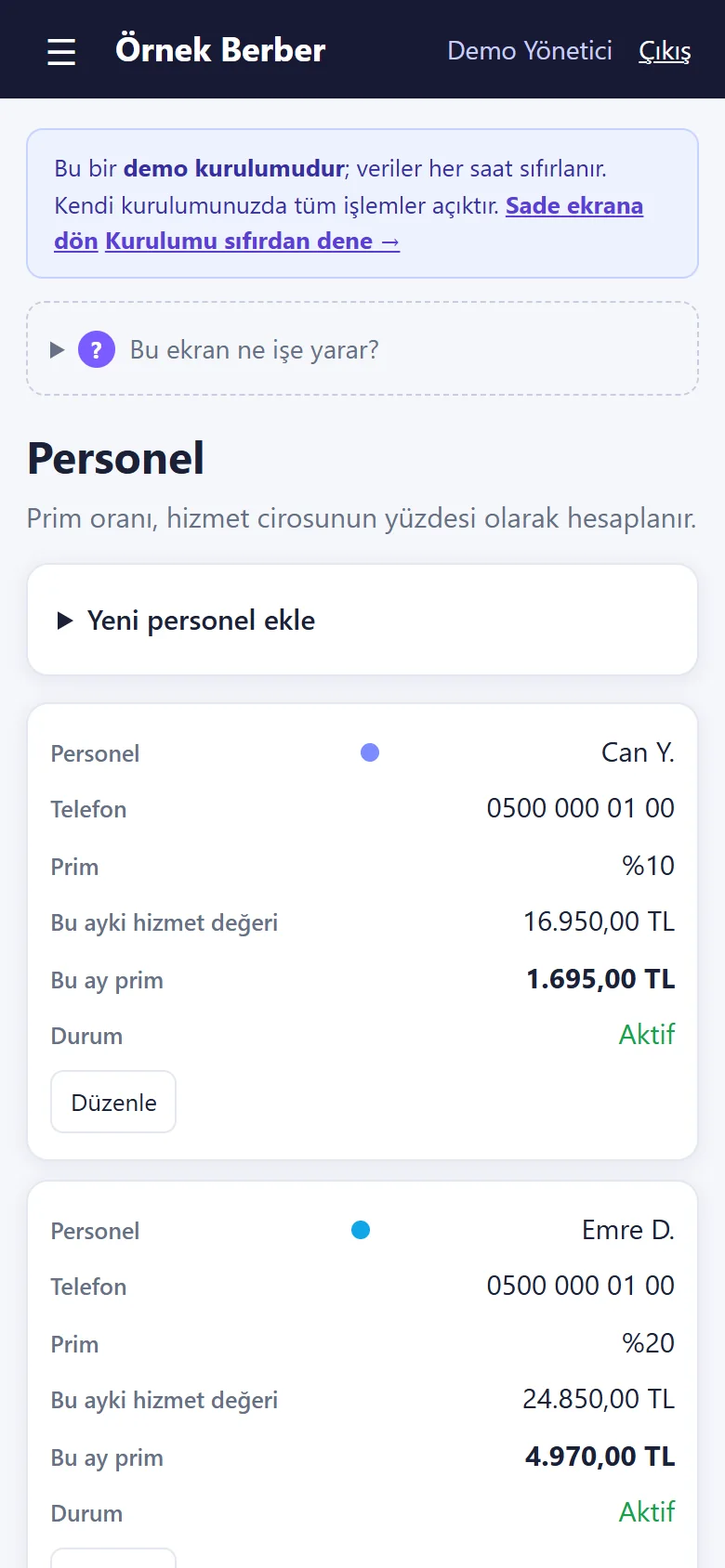
Each barber has a commission percentage of their own, and commission is calculated only from service revenue; product sales such as beard oil do not earn it. The staff screen shows each barber’s rate, this month’s revenue and this month’s commission. If master, journeyman or apprentice should earn different rates, enter a separate percentage for each person; the app has no seat or chair-based revenue. If a commission model with product sales or discounts is wanted, list it as a separate requirement. With the plain screen on (the default of a new installation) commission, campaigns, stock, packages and card payment are hidden; to see commission, clear the “Sade ekran” (plain screen) box in Settings; no record is deleted.
Review the day and the month separately
At day-end, review open tickets, payment methods and expenses; “daily net” is not the shop’s profit for the period. At month-end compare each barber’s service revenue with the commission screen; the reports page shows collections, expenses and net for the chosen period with each barber’s performance. The screens were tried on a local installation with sample data; going live, backup and support need a separately agreed scope.
Quick checklist
- Does each line show the right barber?
- Was the queue’s payment tied to a ticket?
- Was the cash count compared with the cash line only?
- Are each barber’s commission rate and rule explicit?
Related guide
Preventing double bookings and queue clashes in a barbershop
A record flow for keeping barber-specific bookings, phone bookings and the walk-in queue apart without mixing them up.
Read the guide →