Workflow guide
Tracking daily salon cash and staff commission
Separate ticket lines, staff, package sales, payment methods and expenses to review the day’s receipts and each person’s monthly service commission.
This guide is based on the record flow of the sample-data demo shown on this site. It is not a ready-made product or a customer deployment; a similar project needs its own agreed scope.
Build the ticket from service and product lines
A client’s total payment does not say which staff member did which service. In the sample application services and products go on one ticket and each line shows its staff member: whoever did the service or sold the product. A sold product leaves the stock.
Record the payment method and the client’s balance together
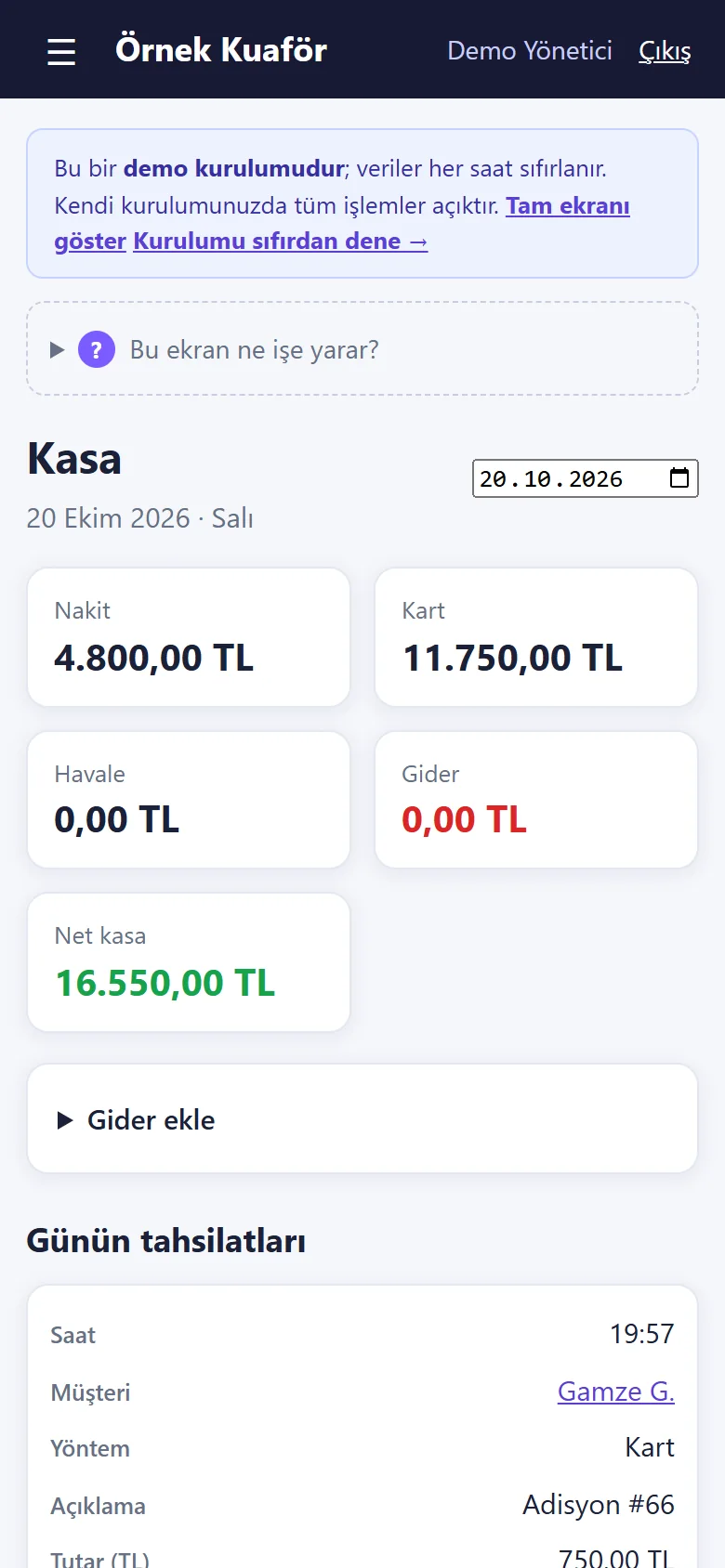
Keep cash, card and transfer receipts apart; the daily till shows these methods and expenses separately. When a ticket is closed, the payment field also suggests the client’s earlier balance. That is deliberate and worth explaining at the till. The receipt is an information slip, not a tax document or an e-invoice.
Track package and session sales separately
A salon may sell a treatment package. In the sample application a package is sold from the client card; each visit uses up a session, and a package with no sessions left becomes “used” by itself. Do not treat the package’s sale amount and the work done in each session as the same thing; write down which of them commission is calculated from.
Set an explicit commission rule per staff member
Each staff member has a commission percentage of their own; commission is calculated only from service revenue, and product sales do not earn it. The staff screen shows each member’s rate, this month’s revenue and this month’s commission. If a model that includes product sales or discounts is wanted, list it as a separate requirement. For work two people did together, check the staff assignment on each line so the amount is not credited to the wrong person. With the plain screen on (the default of a new installation) commission, campaigns, stock and panel users are hidden, while packages and card / transfer payment stay available. To see commission, switch the plain screen off in Settings.
Review the day and the month separately
At day-end, review open tickets, payment methods and expenses; “daily net” does not mean the business’s profit for the period. At month-end compare each staff member’s service revenue with the commission screen; the reports page shows collections, expenses and net for the chosen period. These screens were tried locally with sample data; real deployment, backup and support are agreed separately.
Follow one day from start to finish
The easiest way to understand the till is to follow a single client’s path. The client arrives with or without an appointment; the service is done; the staff member writes the service on the ticket and adds any product the client bought; when payment is taken the ticket becomes “closed” and a receipt can be printed; at day-end the same amount is gathered in the daily till on a line for its payment method. If any link of this chain is missing, the till does not add up: when a service is done but not on a ticket, the money exists but the record does not; when a ticket is left open, the record exists but the money does not show. That is why the list of open tickets is the first thing to look at at day-end.
Meeting a client who owes at the till
On a client card in the sample data you see the balance, the total paid, the number of appointments and no-shows. A client paying a ticket by card may also want to settle an earlier balance; in the sample screen a 2,000 TRY ticket and an earlier 2,500 TRY balance are collected together as 4,500 TRY by card and both close at once. This is a behaviour shown with sample data, not a price or a target. What you do at the till is tell the client plainly that part of the amount is the earlier balance, and see the list of clients who owe get shorter the next day.
Keep expenses apart from the daily net
The daily till shows cash, card, transfer, expenses and net separately. Net is that day’s receipts minus the expenses entered that day; it is not the business’s profit for the period. When rent, bills or materials fall on different days, a single day’s net can mislead. Use the daily net for motivation and the month-end report for decisions. When you enter an expense do not leave the description empty; at month-end “what was this paid for” is the question that takes the most time.
A product sale touches the till and the stock together
A product sold on the ticket leaves the stock, each product has a minimum level and the stock page warns about low items. For the till this means: the product sale goes into the receipts but does not raise the staff member’s service commission, because commission is calculated only from service revenue. If a staff member asks why their commission did not move for a product they sold, the answer lies in that rule of the application and in the commission rule you wrote; so talk through with the staff, at the start, whether a product sale should affect commission, and put it in writing.
Common mistakes
Skipping the staff member on a line sends the month’s commission to the wrong person, or to nobody. Counting both a package’s sale amount and the work done in each session as revenue shows the same income twice. Counting card and transfer as physical money in the cash count makes the till look short or over. A closed ticket can be reopened to correct it, but if who did it and why are not noted, an unexplained difference appears later. The receipt is an information slip; it does not replace a tax document or an e-invoice.
Reading the month-end report
The reports page shows receipts, expenses, net, the number of appointments and the no-show rate for the chosen period; it also shows daily revenue, performance and commission per staff member, and the count and revenue of each service. At month-end look at these in order: do the receipts match the sum of the daily tills, does each staff member’s service revenue agree with the commission screen, are the services that bring the most and the least work what you expected. If you can say yes to all three, your record keeping works; each question you answer no to shows which day of the previous month to go back and look at.
The limits of this guide
The guide explains ways to organise till and commission records. It gives no advice on tax, accounting or employment rights; ask the relevant expert for those. Multiple branches, SMS reminders, online payment and a cash-register link are not in the sample application. The business, the people and the amounts on the screens are sample data.
Three questions people ask when starting
Does the receipt replace a tax document? No; the receipt is an information slip. How does a walk-in client reach the till? They are taken in from the waiting list and, when the job is done, “Tamamla ve ödeme al” (finish and take payment) brings the service to the ticket ready; so they go through the same till flow as a client with an appointment. If I change a commission rate later, are earlier months affected? Try it once on your own trial data and note the result; this guide promises nothing about it, because comparing earlier months’ commission with the month-end reports is always in your hands.
Quick checklist
- Does each service line show the right staff member?
- Are cash, card and transfer separated correctly?
- Are package sessions tracked apart from the sale amount?
- Are each person’s commission rate and rule explicit?
Related guide
How to prevent overlapping salon appointments
A record flow for checking staff assignment, phone bookings, approval status and the hours around long services such as colouring, all in one calendar.
Read the guide →